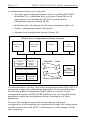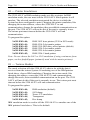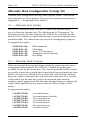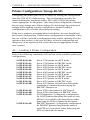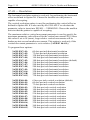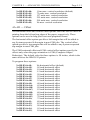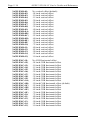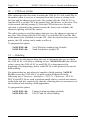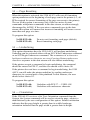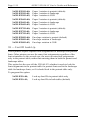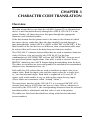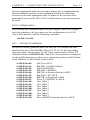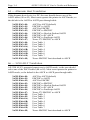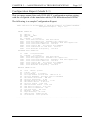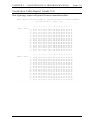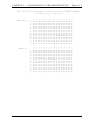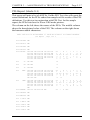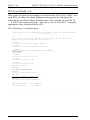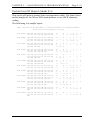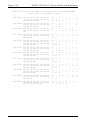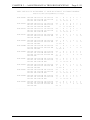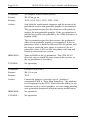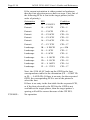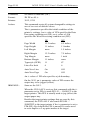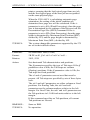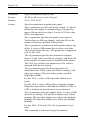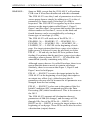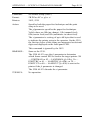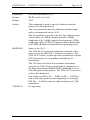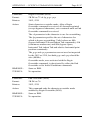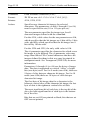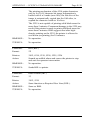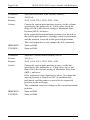
1
5250 ALLY TM Intelligent Protocol Converter 5250 ALLY MODE TM Users Guide and Reference AGILE 875 Alfred Nobel Drive Hercules, CA 94547-1899 TEL (510) 724-1600 TEL (800) 538-1634 FAX (510) 724-9624 Customer Support: FAX (510) 724-2222 E-MAIL [email protected] Page ii AGILE 5250 ALLY Users Guide and Reference Copyright Information ©1995 AGILE All rights reserved. Copyright protection claimed includes all forms and matters of copyrightable material and information now allowed by statutory or judicial law or hereinafter granted. AGILE is a registered trademark of AGILE. 5250 ALLY and all other AGILE products mentioned in this publication are trademarks of AGILE. IBM and all IBM products mentioned in this publication are registered trademarks of International Business Machines, Inc. Xerox and all Xerox products mentioned in this publication are trademarks of Xerox Corporation. Hewlett-Packard and all Hewlett-Packard products mentioned in this publication are trademarks of the Hewlett-Packard Company. All other trademarks appearing in this document are owned by their respective companies. Release Notes This version of the AGILE 5250 ALLY Users Guide and Reference was printed in October 1995. It describes 5250 ALLY software revision 1.00 and later. Printed in the United States of America. Fill in for future reference: AGILE 5250 ALLY Purchase Date: _______________________ AGILE 5250 ALLY Serial Number: _______________________ PREFACE Page iii About AGILE In 1978 IBM and the word compatible were rarely found together, but IBMs mainframe customers wanted a less expensive, more flexible printing solution than IBM offered them. They wanted value, performance and features that only ASCII printers could provide. They wanted freedom of choice. This market need prompted Robert Torrey, then Director of Engineering for AGILE, to develop a bridge between popular ASCII printers and the IBM 3270 coax protocol that was a barrier to using ASCII printers in an IBM environment. Robert Torrey is now president of AGILE, and his coax protocol converter was so successful that more than 40 companies tried to copy it. The industry has undergone enormous changes, and so has AGILE. As the age of the mainframe fades, AGILEs 6287 ULTRA coax printer interface is still known industry wide as the finest available. The recognized leader in IBM and PCM mainframe and midrange connectivity, AGILE continually seeks new ways to offer its customers options that broaden their choices and provide solutions to their printing problems. Over 50,000 AGILE interfaces have been installed worldwide. By working closely with industry leaders including Xerox, Lexmark, Hewlett-Packard and Novell, AGILE makes certain that its products will continue to provide full compatibility, remain attractively priced and stay on the leading edge of market developments. AGILEs staff of experienced hardware, software and technical support engineers ensure that we will remain in the forefront of technology without sacrificing reliability. The custom solution is one of our strengths, and we have a variety of platforms from which to fulfill the special needs of our customers. If we cannot provide the connectivity you require, we will gladly refer you to one of our strategic business partners who can. If you read what AGILEs customers have to say, you will see words like the performance was flawless and the best support we have seen. You see, customer satisfaction is the only true measure of our success. We understand that to keep pace with the rapidly changing environment, we must do more than simply provide products. That is why we remain uncompromising about some very important things: Quality, Performance, Value and Service. Page iv AGILE 5250 ALLY Users Guide and Reference Also From AGILE 5250 OPTIMA An intelligent protocol converter that enables serial and parallel ASCII and EBCDIC printers to be attached to a System/3X or AS/400 midrange computer. Up to three twinax addresses are supported. Its alternate host feature allows the midrange host and PC to share the same printer without an A/B switch. 6287 ULTRA A full-featured protocol converter that enables a serial or parallel ASCII or EBCDIC printer or plotter to be attached to a 3270-type controller. Its alternate host feature allows the mainframe host and a PC to share the printer without an A/B switch. 6287 ALLY PLUS A high-speed protocol converter that enables serial and parallel ASCII and EBCDIC printers and plotters to be attached to a 3270-type controller. Its alternate host feature allows the mainframe host and a PC to share the same printer without an A/B switch. 6287 ALLY A high-speed protocol converter that enables serial and parallel ASCII and EBCDIC printers and plotters to be attached to a 3270-type controller. 3270 KLONE A PC expansion card that enables an IBM PC/AT/XT, PS/2 or compatible computer to emulate a mainframe terminal. Its features include powerful file transfer utilities for sharing PC and mainframe data, plus mainframe printer emulation, allowing mainframe data to be printed on a PC printer. Printer Monitor A small device that enables the user to capture print data streams for troubleshooting analysis. Attaches to a parallel port of a PC used to capture data that otherwise would have been sent to the printer. PREFACE Page v AGILE Product Warranty Standard Warranty AGILE warrants to the original purchaser that this product will be free from defects in materials and workmanship and in good working order per the functional specifications current at the time of shipment for a period of two (2) years from the date of shipment to the purchaser. AGILE units that fail within the first thirty (30) days from the date of delivery will be treated as an Express Exchange Service (see Optional Warranties and Services) at no extra charge. Should this product fail to be in good working order at any time during the two-year period, AGILE will, at its absolute discretion, repair or replace this product. AGILE shall have no obligation whatsoever if the product has been damaged due to accident or disaster, or if it has been misused, carelessly handled, defaced, modified or altered, including unauthorized repairs made or attempted, or if the user has failed to provide and maintain a proper environment for the product. AGILE reserves the right to determine what constitutes warranty repair. Outof-warranty products will be repaired using AGILEs flat repair rate. All outof-warranty repaired units have a 90-day Standard Warranty. Units returned for repair and found not defective will, at AGILEs discretion, incur a handling and testing charge. AGILE is not responsible for delays caused by shipping or non-availability of replacement components or other similar causes, events or conditions beyond its reasonable control. Claims must be reported to AGILEs Technical Support Department at (510) 724-1600, (800) 538-1634, or by FAX at (510) 724-2222. AGILE will assist the customer in verifying the source of the problem. At AGILEs discretion, a Return Materials Authorization (RMA) number will be issued to the customer. The customer will then carefully package and ship the unit to AGILE (preferably in the original shipping container) with the RMA number on the outside of the box. Shipping costs incurred in sending the unit to AGILE are borne by the customer. Shipping costs incurred in returning the unit to the customer via UPS Ground (or equivalent service with a secondary shipper) are borne by AGILE. Repair parts and replacement products will be furnished on an exchange basis and will be either reconditioned or new. All replaced parts and products become the property of AGILE. This warranty is the only warranty provided by AGILE. If this product is not in good working order as warranted above, the customers sole remedy shall be repair or replacement as provided above. This warranty states the purchasers exclusive remedy for any breach of AGILEs warranty and for any claim, whether in contract or tort, for loss, injury or damages caused by the sale or use of any product and is in lieu of all other warranties, expressed or implied. In no event shall AGILE be responsible for any loss of business, savings or profits, Page vi AGILE 5250 ALLY Users Guide and Reference downtime or delay, labor repair or material costs, injury to person or property, or any similar or dissimilar consequential or inconsequential loss or damage resulting from this product, its use, or arising out of any breach of warranty, even if AGILE or an authorized AGILE dealer has been advised of the possibility of such damage, or for any claim by any other party. Some states do not allow the exclusion or limitation of incidental or consequential damages, so the above limitations or exclusions may not apply. All expressed and implied warranties for this product, including the warranties of merchantability and fitness for a particular purpose, are limited in duration to a period of two (2) years from the date of purchase by the original purchaser, and no warranties, whether expressed or implied, will apply after this period. Some states do not allow limitations on how long an implied warranty lasts, so the above limitations may not apply. This warranty gives the user specific legal rights, and the user may also have other rights which may vary from state to state. Optional Warranties and Services Extended Warranty lengthens the Standard Warranty and is available in 12month increments for a maximum of three (3) years. This extension can effectively lengthen the Standard Warranty to five (5) years. Any Extended Warranty must be purchased prior to the expiration date of the Standard Warranty. Express Exchange Service provides a next-business-day delivery of a replacement unit. The customer must contact AGILE, and AGILEs Customer Support Department must determine by 2:00 p.m. PST that a replacement unit is required. Express Exchange Service is available in 12-month increments for a maximum total of five (5) years and must be concurrent with Standard or Extended Warranties. Medallion Support Program extends the AGILE two-year Standard Warranty by one year to three years, plus it includes three years of Express Exchange Service, all at a savings of one-third off the standard price. Software Upgrades AGILE periodically makes improvements to the operating software for its products. These software upgrades are available from AGILE for no charge during the warranty period. All software upgrades are facilitated by downloading revised code to the 5250 ALLY flash EEPROM memory. Code revisions can be obtained via the AGILE BBS (refer to Chapter 5 Maintenance and Troubleshooting). PREFACE Page vii FCC Statement This equipment generates, uses and can radiate radio frequency energy. If it is not installed and used in strict accordance with AGILEs instructions, it may cause interference to radio and television reception. This equipment has been tested and complies with the limits for a Class A computing device in accordance with the specifications in Subpart J of Part 15 of FCC Rules, which are designed to provide reasonable protection against such interference when operated in a commercial environment. Operation of this equipment in a residential area is likely to cause interference. However, there is no guarantee that interference will not occur in a particular installation. If this equipment does cause interference to radio and television reception, which can be determined by turning the equipment off, the user is encouraged to try to correct the interference by one or more of the following measures: Reorient the receiving antenna. Relocate the 5250 ALLY with respect to the receiver. Move the 5250 ALLY away from the receiver. Plug the 5250 ALLY into a different outlet so that the 5250 ALLY and receiver are on different branch circuits. If necessary, the user should consult an experienced radio/television technician for additional suggestions. The booklet, How to Identify and Resolve Radio-TV Interference Problems, prepared by the Federal Communications Commission, may also be helpful. This booklet is available from the US Government Printing Office, Washington, DC 20402, Stock No. 004-000-00345-4. WARNING: This equipment has been certified to comply with the limits for a Class A computing device, pursuant to Subpart J of Part 15 of FCC rules. Only peripherals (computer input/output devices, printers, plotters, etc.) certified to comply with the Class A (commercial) or Class B (residential) limits may be attached to the 5250 ALLY. Operation with noncertified peripherals is likely to result in interference to radio and TV reception. Note: This equipment uses shielded cables to meet compliance limits for a Class A computing device. Shielded cables must be used to ensure this equipment continues to meet these limits. The shield must be terminated to the metallic connector at both ends to guarantee adequate suppression of undesirable emissions. All cables are double shielded (Mylar foil and tinned copper braid.) Page viii AGILE 5250 ALLY Users Guide and Reference About the AGILE 5250 ALLY The AGILE 5250 ALLY is a powerful, easy-to-use, intelligent protocol converter/printer interface controller that enables an industry-standard, parallel, ASCII or EBCDIC printer to be attached to an IBM AS/400 or a System 34, 36 or 38. The alternate host port allows the attached printer to be shared with a PC, PC LAN, file server, print sharing device, protocol converter or another parallel-attached alternate host input device. The 5250 ALLY is designed to be fast and to have maximum flexibility. One twinax address (also referred to as a session or logical unit) is supported. It is configurable to emulate an IBM 3812 (SCS mode), 4214, 5219, 5224, 5225 or 5256 printer. The 5250 ALLY automatically validates the port address, thus avoiding address conflicts. 5219 support includes IBM Office/400 and DisplayWrite 36 support, including multi-column justification, GFIDs with multiple fonts per page, superscripting, subscripting, bolding, overstriking, backspacing, underlining, pitch control, sheetfeeder control, page orientation and page format. Connectivity is provided by a twinax port, one parallel input port and one Centronics parallel output port. The parallel input port is used for input from an alternate host. The parallel output port is dedicated to output. The twinax address and the alternate host input can be configured to print to the attached printer, with appropriate character translation provided by the 5250 ALLY. It translates IBM twinax output to parallel output, and it translates high-level formatting information to a format appropriate for the attached printer (i.e., it converts IBM printer control codes to control codes used by other printers). The operating software and configuration data are stored in flash EEPROM memory, facilitating new code upgrades and support for custom applications. The unit can be configured with the twinax data stream or from the alternate host. Many configuration settings also can be changed from the 5250 ALLY front panel. Users with Xerox 275s can replace those units without changing their host software. The 5250 ALLY also provides extensive special support for Xerox printers in both XDPM (XES/UDK/2700) and XPPM modes, including the ability to provide AS/400 or System/3X connectivity to a Xerox 4235 in XDPM or XPPM modes. The 5250 ALLY allows Xerox 4235 users to download fonts and forms in XPPM and XDPM modes through the printers parallel port. PREFACE Page ix Programmable function strings, computer output reduction (COR) and user-editable font correspondence tables are also standard features. The unit is user-configurable for full SCS formatting support on virtually any printer. Throughput is rated at 35 logical pages per minute at 100% print density in IBM emulation, or 55 logical pages per minute at 100% print density in 275 emulation. 100% print density is defined as 132 columns by 66 lines, for a total of 8712 characters per page. Diagnostics include a power-on self test of ROM and RAM, automatic twinax address validation and conflict avoidance, an internal twinax loopback test, and an EBCDIC hexadecimal printout of data sent to the 5250 ALLY by the midrange host. Reports generated by the 5250 ALLY include a printer test, a configuration report, a translation table report, a PFS report, a PFS test, font correspondence table reports, a loop test and a twinax error log. The 5250 ALLY is backed by a full two-year warranty. Optional warranties and services are also available. About This Manual This manual covers the installation and use of the AGILE 5250 ALLY intelligent protocol converter. AGILE makes no warranties, expressed or implied, as to its completeness or accuracy. The information in this manual is current as of the date of its publication, but it is subject to change by AGILE at any time without notice. This manual is not intended to be used for manufacturing or engineering specifications, and it is assumed that the user understands the interrelationship between any affected systems, machines, programs and media. AGILE periodically updates this manual for clarity, to correct inaccuracies and typographical errors, or to document added or changed product features. AGILE will be pleased to improve the manual by implementing suggestions from our customers. Please put suggestions in writing and mail to AGILE at the address below: AGILE Attn: Marketing 875 Alfred Nobel Drive Hercules, CA 94547-1899 Page x AGILE 5250 ALLY Users Guide and Reference 5250 ALLY Features and Specifications Host Systems Supported IBM AS/400 IBM System 34/36/38 IBM Specifications SCS/DCA FFT data stream support Twinax cable attachment (AWM 2498) to AS/400 or System/3X computer system Input/Output Ports IBM Twinax Port 2 DB-25 Parallel Ports (1 input, 1 output) Host Interface Intelligent T connector with automatic termination/cablethrough One twinax address (session/logical unit) with automatic address validation and conflict avoidance Printer Output Interfacing Centronics DB-25 parallel output port Alternate Host Input Interfacing DB-25 parallel input port for PC, PC LAN, etc. Printer Sharing Printer sharing between twinax host and alternate host Printer Emulations IBM 3812 (SCS mode), 4214, 5219, 5224, 5225 and 5256 printers Printers Supported All parallel-attached ASCII or EBCDIC output devices Throughput 35 logical pages-per-minute at 100% print density (132 columns by 66 lines, for a total of 8712 characters per page) in IBM emulation 55 logical pages-per-minute in 275 emulation Diagnostics Power-on self test EBCDIC hexadecimal dump Configuration parameter printout Upgradeability Operating software and configuration data stored in flash EEPROM memory, user-programmable via PC software PREFACE Page xi Programmability Twinax host data stream Alternate host data stream 5250 ALLY front panel User Programmable Function Strings (PFSs) 512 PFSs dynamically allocated up to 20K bytes total Transparency IBM 35h ASCII 03h (in IBM emulation mode) Xerox Metacode 35h (in IBM emulation mode) i-data pseudo transparency (in IBM emulation mode) Xerox 36h (in Xerox 275 emulation mode) MPI pseudo transparency (in Xerox 275 emulation mode) Translation Translation tables can be selected and edited on line by the user Character Sets ASCII or EBCDIC character sets Custom Application Support Office/400: multi-column justification, GFIDs with multiple fonts per page, superscripting, subscripting, bolding, overstriking, underlining, pitch control, page orientation, formatting DisplayWrite/36: multi-column justification, GFIDs with multiple fonts per page, superscripting, subscripting, bolding, overstriking, underlining, pitch control, page orientation, formatting XES Metacode Special application customization available Power 5 VDC at 1 amp (110 VAC), or 5 VDC at 1.5 amp (220 VAC) Size 8.6" x 5.85" x 1.3" Weight 1.75 lbs. Certifications FCC, UL, CSA, VDE Product Support Toll-free technical support from 7:00 a.m. to 4:30 p.m. Pacific Two-year product warranty Table of Contents Preface Copyright Information ................................................................................ ii Release Notes .............................................................................................. ii About AGILE ............................................................................................. iii Also From AGILE ...................................................................................... iv 5250 OPTIMA .................................................................................... iv 6287 ULTRA ...................................................................................... iv 6287 ALLY PLUS .............................................................................. iv 6287 ALLY ......................................................................................... iv 3270 KLONE ...................................................................................... iv Printer Monitor.................................................................................... iv AGILE Product Warranty ............................................................................v Standard Warranty ................................................................................v Optional Warranties and Services ...................................................... vi Extended Warranty ..................................................................... vi Express Exchange Service .......................................................... vi Medallion Support Program ....................................................... vi Software Upgrades .............................................................................. vi FCC Statement .......................................................................................... vii About the AGILE 5250 ALLY ................................................................ viii About This Manual .................................................................................... ix 5250 ALLY Features and Specifications .....................................................x Chapter 1 Getting Started Overview / Objectives .............................................................................. 1-1 Physical Interface .............................................................................. 1-1 Data Stream Interface ....................................................................... 1-1 Before Beginning ..................................................................................... 1-2 Selecting a Location ................................................................................. 1-3 Page xvi AGILE 5250 ALLY Users Guide and Reference Space Requirements .......................................................................... 1-3 Electrical Requirements .................................................................... 1-3 Operating Environment .................................................................... 1-3 Unpacking ................................................................................................ 1-4 Package Contents .............................................................................. 1-4 Important Safety Instructions/Precautions............................................... 1-5 5250 ALLY Rear Panel............................................................................ 1-5 AGILE 5250 ALLY Cable Chart ..................................................... 1-5 Parallel Port Pin-Outs ....................................................................... 1-6 Twinax Adapter Port Unterminated Pin-Outs .................................. 1-6 Connecting to the Host System ................................................................ 1-7 Connecting the Printer ............................................................................. 1-8 Connecting the Alternate Host ................................................................. 1-9 Connecting the 5250 ALLY to Power ................................................... 1-10 5250 ALLY Front Panel ........................................................................ 1-10 Modes ..................................................................................................... 1-11 0 Normal Operating Mode ......................................................... 1-11 1 Twinax Addressing ................................................................. 1-11 2 Printer Emulations .................................................................. 1-11 3 Twinax Modes ........................................................................ 1-11 4 Twinax Timeout ...................................................................... 1-12 5 Printer Configurations ............................................................ 1-12 6 Alternate Host Modes ............................................................. 1-12 7 Alternate Host Timeout .......................................................... 1-12 8 Translate Table Selection ....................................................... 1-13 9 Tests and Reports .................................................................... 1-13 A Form Feed .............................................................................. 1-13 B Save Configuration................................................................. 1-13 C Power-On Reset ...................................................................... 1-14 D Reset to Factory Defaults ....................................................... 1-14 E External Loop Test ................................................................. 1-14 Starting Up ............................................................................................. 1-14 Basic Port Configuration ........................................................................ 1-14 Configuring the Twinax Port ................................................................. 1-14 1 Twinax Addressing ................................................................. 1-14 2 Printer Emulations .................................................................. 1-15 TABLE OF CONTENTS Page xvii 3 Twinax Modes ........................................................................ 1-16 4 Twinax Timeout ...................................................................... 1-17 Configuring the Parallel Out Printer Port .............................................. 1-17 5 Printer Configurations Available ............................................ 1-18 Configuring the Parallel In Alternate Host Port .................................... 1-19 6 Alternate Host Modes ............................................................. 1-19 7 Alternate Host Timeout .......................................................... 1-20 8 Selecting a Translate Table ............................................................ 1-21 Data Type ........................................................................................ 1-21 Translation Tables ........................................................................... 1-21 Summary ................................................................................................ 1-22 Chapter 2 Advanced Configuration Overview .................................................................................................. 2-1 Configuration Structure ........................................................................... 2-1 Changing Configuration Option Parameters ........................................... 2-3 Multiple Configuration Changes ...................................................... 2-3 Configuration Defaults ..................................................................... 2-4 Power-On Reset ................................................................................ 2-4 Save Configuration ........................................................................... 2-4 Configuration Groups .............................................................................. 2-5 Twinax Configuration (Group 00) ........................................................... 2-5 01 Twinax Addressing ................................................................. 2-5 02 Printer Emulations .................................................................. 2-6 03 Twinax Modes ........................................................................ 2-6 05 Twinax Timeout ...................................................................... 2-7 Alternate Host Configuration (Group 30) ............................................... 2-8 31 Alternate Host Modes ............................................................. 2-8 33 Alternate Host Timeout .......................................................... 2-8 Printer Configuration (Group 40-50) ....................................................... 2-9 40 Loading a Printer Configuration............................................. 2-9 42 Printer Timing ....................................................................... 2-10 43 Printer Error Timeout ........................................................... 2-10 44 Carriage Return at Form Feed .............................................. 2-11 Page xviii AGILE 5250 ALLY Users Guide and Reference 46 Vertical Movement ............................................................... 2-11 47-49 Resolution ........................................................................ 2-12 4A-4D Offset.............................................................................. 2-13 4E Percentage Vertical Reduction in COR ............................... 2-15 4F CPI/Font Order ..................................................................... 2-16 51 Bolding .................................................................................. 2-16 52 Page Resetting ....................................................................... 2-17 53 Underlining ........................................................................... 2-17 54 Orientation ............................................................................ 2-17 55-58 Paper Sources (Drawers) ................................................. 2-20 Width ....................................................................................... 2-20 Height ...................................................................................... 2-21 Rotation ................................................................................... 2-21 59 Font ID Look-Up .................................................................. 2-22 Chapter 3 Character Code Translation Overview .................................................................................................. 3-1 Selecting a Translation Table (Group 60) ............................................... 3-2 Save Configuration ........................................................................... 3-3 60 Twinax Translation ................................................................. 3-3 63 Alternate Host Translation ...................................................... 3-4 66 5250 ALLY Translation ......................................................... 3-4 67 Xerox EBCDIC Font Download Translation ......................... 3-5 Reading Translation Tables ..................................................................... 3-5 Editing a Translation Table ...................................................................... 3-6 Resetting Translation Tables to Defaults ......................................... 3-6 Power-On Reset ................................................................................ 3-7 Save Configuration ........................................................................... 3-7 Downloading an Entire Translation Table ....................................... 3-7 Downloading a Single Translation Table Value .............................. 3-8 Downloading a Partial Translation Table ......................................... 3-8 Changing Multiple Translation Table Values .................................. 3-8 Alternate Hosts and Character Translation....................................... 3-9 Translation Tables .................................................................................. 3-10 00 ASCII to ASCII..................................................................... 3-10 01 EBCDIC to ASCII ................................................................ 3-11 02 ASCII to EBCDIC ................................................................ 3-12 03 EBCDIC to EBCDIC ............................................................ 3-13 04 EBCDIC to HP LaserJet ....................................................... 3-14 TABLE OF CONTENTS Page xix 05 EBCDIC to PC ...................................................................... 3-15 06 EBCDIC to PostScript .......................................................... 3-16 07 Xerox 275 Protocol Converter EBCDIC to ASCII .............. 3-17 08 User Table 1 .......................................................................... 3-18 09 User Table 2 .......................................................................... 3-19 0A User Table 3 ......................................................................... 3-20 0B User Table 4 ......................................................................... 3-21 0C User Table 5 ......................................................................... 3-22 0D User Table 6 ......................................................................... 3-23 0E User Table 7 ......................................................................... 3-24 0F Xerox EBCDIC Font Download to ASCII ........................... 3-25 Chapter 4 Programmable Function Strings Overview .................................................................................................. 4-1 Editing PFSs ............................................................................................. 4-2 Power-On Reset ................................................................................ 4-3 Save Configuration ........................................................................... 4-3 Parameters Within PFSs ................................................................... 4-4 GFIDs ....................................................................................................... 4-5 User Font Configuration ................................................................... 4-5 PFS Descriptions ...................................................................................... 4-7 00 INITIBM ................................................................................. 4-8 01 INITTWN................................................................................ 4-8 04 INITALT ................................................................................. 4-8 05 INIT275................................................................................... 4-8 06 INITALY ................................................................................ 4-9 07 FF ............................................................................................ 4-9 08 CR ........................................................................................... 4-9 09 LF ............................................................................................ 4-9 0A PORT .................................................................................... 4-10 0B LAND ................................................................................... 4-10 0D VERMOVE .......................................................................... 4-10 0E LINEDEN ............................................................................. 4-11 0F PAGELEN ............................................................................ 4-11 10 P 5CPI ................................................................................... 4-11 11 P 8CPI ................................................................................... 4-12 12 P 10CPI ................................................................................. 4-12 13 P PSCPI ................................................................................. 4-13 14 P 12CPI ................................................................................. 4-13 15 P 15CPI ................................................................................. 4-13 Page xx AGILE 5250 ALLY Users Guide and Reference 16 P 16CPI ................................................................................. 4-14 17 P 17CPI ................................................................................. 4-14 18 L 5CPI ................................................................................... 4-15 19 L 8CPI ................................................................................... 4-15 1A L 10CPI ................................................................................ 4-15 1B L PSCPI ................................................................................ 4-16 1C L 12CPI ................................................................................ 4-16 1D L 15CPI ................................................................................ 4-17 1E L 16CPI................................................................................. 4-17 1F L 17CPI ................................................................................. 4-17 20 COR 10 ................................................................................. 4-18 21 COR 12 ................................................................................. 4-18 22 COR 15 ................................................................................. 4-19 23 BOLD ON ............................................................................. 4-19 24 BOLDOFF............................................................................. 4-19 25 BSBOLD1 and 26 BSBOLD2 ......................................... 4-20 27 UNDL ON ............................................................................. 4-20 28 UNDLOFF ............................................................................ 4-20 2B SUBS ON ............................................................................. 4-21 2C SUBSOFF ............................................................................. 4-21 2D SUPS ON.............................................................................. 4-21 2E SUPSOFF ............................................................................. 4-21 2F LOWQUAL .......................................................................... 4-21 30 MEDQUAL ........................................................................... 4-22 31 HIQUAL ............................................................................... 4-22 32 SIMPLEX.............................................................................. 4-22 33 DUPLEX ............................................................................... 4-22 34 TUMBLE .............................................................................. 4-23 35 PPAPER 1 ............................................................................. 4-23 36 PPAPER 2 ............................................................................. 4-23 37 PPAPER 3 ............................................................................. 4-23 38 P ENVEL .............................................................................. 4-23 39 PORTCUT............................................................................. 4-24 3A PORTTRC ............................................................................ 4-24 3B PORTMAN........................................................................... 4-24 3C LPAPER 1 ............................................................................ 4-24 3D LPAPER 2 ............................................................................ 4-24 3E LPAPER 3 ............................................................................ 4-25 3F L ENVEL .............................................................................. 4-25 40 LANDCUT ............................................................................ 4-25 41 LANDTRC ............................................................................ 4-25 42 LANDMAN .......................................................................... 4-25 43 JOG OUT .............................................................................. 4-26 TABLE OF CONTENTS Page xxi 44 DEST1 ................................................................................... 4-26 45 DEST2 ................................................................................... 4-26 46 DEST3 ................................................................................... 4-26 4B JOBSTRT ............................................................................. 4-26 4C JOBEND ............................................................................... 4-27 4D TIMEOUT ............................................................................ 4-27 Chapter 5 Maintenance and Troubleshooting Diagnostics ............................................................................................... 5-1 External Loop Test (Mode E) ........................................................... 5-1 Twinax Addressing ........................................................................... 5-2 Error Codes ....................................................................................... 5-2 Decimal Point on ...................................................................... 5-2 Decimal Point Off ..................................................................... 5-2 Decimal Point Slow Flash......................................................... 5-2 Decimal Point Fast Flash .......................................................... 5-2 Digital Display Slow Flash ....................................................... 5-2 Digital Display Fast Flash......................................................... 5-2 Twinax Error Log ............................................................................. 5-3 SCS Dump and Hex Dump Samples ....................................................... 5-3 SCSGEN File .................................................................................... 5-3 Hex Dump Mode............................................................................... 5-3 SCS Dump Mode .............................................................................. 5-4 IBM Emulation ................................................................................. 5-4 Printing Reports (Mode 9) ....................................................................... 5-5 Printer Test (Mode 9-0) .................................................................... 5-6 Configuration Report (Mode 9-1) .................................................... 5-7 Translation Table Report (Mode 9-2)............................................... 5-9 PFS Report (Mode 9-3)................................................................... 5-17 PFS Test (Mode 9-4) ....................................................................... 5-20 Portrait Font ID Report (Mode 9-5) ............................................... 5-21 Landscape Font ID Report (Mode 9-6) .......................................... 5-27 Loop Test (Mode 9-7) ..................................................................... 5-32 Twinax Error Log (Mode 9-8) ........................................................ 5-32 Troubleshooting ..................................................................................... 5-33 Step 1: Power .................................................................................. 5-33 Step 2: Connections ........................................................................ 5-33 Step 3: Configuration ...................................................................... 5-34 Step 4: Printer Test.......................................................................... 5-34 Page xxii AGILE 5250 ALLY Users Guide and Reference Step 5: Configuration Test .............................................................. 5-34 Step 6: Twinax Host Test................................................................ 5-34 Step 7: Alternate Host Test ............................................................. 5-34 Other Issues ..................................................................................... 5-34 Orientation .............................................................................. 5-34 Xerox 4235 Printer Duplexing ............................................... 5-35 Contacting AGILE Technical Support .................................................. 5-35 The AGILE Bulletin Board System ................................................ 5-36 Mode F Code Load ........................................................................... 5-37 Other Files Contained in the Self-Extracting Archive ................... 5-39 Appendix A Interfacing Xerox Printers Introduction ............................................................................................. A-1 System-Based Formatting ................................................................ A-1 XES Mode ........................................................................................ A-2 Formatting Conflict Overview ......................................................... A-2 Coexistence ...................................................................................... A-3 Delimiting XES Jobs ........................................................................ A-3 Well-Formed XES Jobs ................................................................... A-4 Auto PFS Suppression ..................................................................... A-4 Auto Form Feed Suppression .......................................................... A-5 Passing FFs in Auto FF Suppression Mode .................................... A-5 Logical Not (¬) Commands ............................................................. A-7 Special Formatting Problems .................................................................. A-8 Font Downloading ........................................................................... A-8 UDK Character Conflict .................................................................. A-8 Line Endings ........................................................................................... A-9 Support for all Types of SCS Line Endings .................................... A-9 Auto UDK Termination ........................................................................ A-10 Line Feed vs. Relative Movements ............................................... A-10 Antiquities ...................................................................................... A-11 Font Correspondences ........................................................................... A-12 Downloading Font Correspondences ............................................ A-12 Font Correspondence Limits.......................................................... A-14 Xerox Options ....................................................................................... A-14 0600 UDK Character Translation ............................................. A-14 TABLE OF CONTENTS Page xxiii 0601 PFS Suppression .............................................................. A-15 0602 Form Feed Suppression ................................................... A-16 0603 Change Form Feed to New Line ..................................... A-17 0604 Logical Not Commands ................................................... A-17 0605 Job Restart to Form Feed Translation ............................. A-18 0606 Metacode Transparency ................................................... A-18 46 Line Feed Configuration ...................................................... A-19 Interfacing Xerox 4235 Printers in XPPM Mode ................................. A-19 Appendix B SCS / DCA Command Summary Overview ..................................................................................................B-1 Null (NUL) ........................................................................................B-2 ASCII Transparency (ATRN) ...........................................................B-2 Horizontal Tab (HT) .........................................................................B-2 Required New Line (RNL) ...............................................................B-3 Superscript (SPS) ..............................................................................B-4 Repeat (RPT) .....................................................................................B-4 Form Feed (FF) .................................................................................B-5 Carriage Return (CR) ........................................................................B-5 New Line (NL) ..................................................................................B-6 Unit Back Space (UBS) ....................................................................B-6 Back Space (BS) ...............................................................................B-7 Interchange Record Separator (IRS) ................................................B-7 Word Underscore (WUS) .................................................................B-8 Line Feed (LF) ..................................................................................B-9 Switch (SW) ......................................................................................B-9 Set Horizontal Format (SHF) ..........................................................B-10 Set Vertical Format (SVF) ..............................................................B-10 Set Line Density (SLD) ..................................................................B-11 Set Graphic Error Action (SGEA) ..................................................B-12 Execute PMP (PMP) .......................................................................B-12 Set Coded Graphic character set through Local ID (SCGL) .........B-13 Set GCGID Through GCID (SCG) .................................................B-14 Set FID Through GFID (SFG) ........................................................B-15 Begin Emphasis (BES) ...................................................................B-17 End Emphasis (EES) .......................................................................B-17 Release Left Margin (RLM) ...........................................................B-18 Set Indent Level (SIL) ....................................................................B-18 Set Line Spacing (SLS) ...................................................................B-19 Set Initial Conditions (SIC) ............................................................B-20 Set Horizontal Tabs (STAB)...........................................................B-21 Page xxiv AGILE 5250 ALLY Users Guide and Reference Justify Text Field (JTF) ..................................................................B-22 Set Justify Mode (SJM) ..................................................................B-23 Set Horizontal Margins (SHM) ......................................................B-24 Set Presentation Page Size (SPPS) .................................................B-25 Set Single Line Distance (SSLD) ...................................................B-26 Set Character Density (SCD) ..........................................................B-27 Set Presentation Color (SPC) ..........................................................B-28 Page Presentation Media (PPM) .....................................................B-30 Set Vertical Margins (SVM) ...........................................................B-32 Set Printer Setup (SPSU) ................................................................B-33 Set Exception Action (SEA) ...........................................................B-34 Set Text Orientation (STO).............................................................B-35 Begin Underscore (BUS) ................................................................B-36 End Underscore (EUS) ...................................................................B-36 Begin Overstrike (BOS) ..................................................................B-37 End Overstrike (EOS) .....................................................................B-37 Load Alternate Characters (LAC) ..................................................B-38 Bell (BEL) .......................................................................................B-39 Index Return (IRT) .........................................................................B-39 Absolute Horizontal Print Position (AHPP) ...................................B-40 Absolute Vertical Print Position (AVPP) .......................................B-40 Relative Horizontal Print Position (RHPP) ....................................B-41 Relative Vertical Print Position (RVPP).........................................B-41 Transparent (TRN) ..........................................................................B-42 Numeric Backspace (NBS) .............................................................B-42 Subscript (SBS) ...............................................................................B-43 Indent Tab (IT) ................................................................................B-43 Required Form Feed (RFF).............................................................B-44 Substitute (SUB) .............................................................................B-44 Space (SP) .......................................................................................B-44 Required Space (RSP).....................................................................B-44 Numeric Space (NSP) .....................................................................B-45 Appendix C Pseudo Transparency Introduction ..............................................................................................C-1 i-Data Pseudo Transparency .............................................................C-1 MPI Pseudo Transparency ................................................................C-2 Glossary CHAPTER 1 GETTING STARTED Overview / Objectives This chapter provides information on installing the AGILE 5250 ALLY. Sections of this chapter provide instructions regarding: Choosing a location for the 5250 ALLY Physical interfacing to the host System, printer and alternate host Configuring the 5250 ALLY for communication with the host System, printer and alternate host All physical interfacing should be performed before the 5250 ALLY is turned on. This chapter provides instructions for interfacing the 5250 ALLY ports before providing instructions on configuring those interfaces. Please follow this order when installing the 5250 ALLY. This chapter provides step-by-step instructions to assist the user in performing the basic port configuration required to get the 5250 ALLY communicating with the host System, printer and alternate host. All of the configuration operations described in this chapter can be performed from the 5250 ALLY front panel. Other configuration operations must be performed by downloading commands in the data stream from either the twinax host or the alternate host. These commands are described in subsequent chapters. Physical Interface IBM midrange hosts are attached to IBM midrange printers via a twinaxial interface. Industry-standard printers are typically attached to computers via a Centronics parallel interface. The 5250 ALLY provides the physical connection that converts a twinaxial interface to a Centronics parallel interface. Data Stream Interface The data stream in a print job from an IBM midrange host consists of hexadecimal values, some of which are SCS/DCA control codes, and some of which represent printable characters for an IBM midrange printer. The IBM midrange host uses over fifty SCS/DCA commands to control how an IBM midrange printer formats a given print job. Page 1-2 AGILE 5250 ALLY Users Guide and Reference The commands can control all formatting aspects, including orientation and paper size, the amount of justification and special print features like bolding and underlining. Industry-standard printers are not capable of understanding or interpreting either the commands or the hexadecimal values representing printable characters. The 5250 ALLY interprets the various SCS/DCA control codes it receives and sends to the printer the command it needs to accomplish the formatting specified by the SCS/DCA control code. It does this by sending a specific programmable function string (PFS) to the printer upon receipt of a specific SCS/DCA hexadecimal command. The conversion of printable characters is accomplished by the 5250 ALLY with translation tables. Upon receipt of a hexadecimal value representing a printable character, the 5250 ALLY looks up the value in the active translation table, and it sends to the attached industry-standard printer the corresponding value that will produce the same printed character. The key to allowing this interpretation and character translation is the proper configuration of the 5250 ALLY. Most important to the configuration process is the loading of the output port configuration (printer driver) appropriate for the attached industry-standard printer. By loading this driver, programmable function strings will automatically be defined for the users specific printer for accurate conversion of the SCS/ DCA formatting commands received by the 5250 ALLY. The output port configuration will also define the appropriate translation table to use for the printer. The user may modify or delete any PFSs that produce undesirable print results, and translation tables may also be edited by the user to access printable characters not converted by the translation tables to the users desired characters. Before Beginning The following are needed before installing the 5250 ALLY: A suitable location A parallel printer (or other output device) A twinax host interface cable connected to the users host System or remote twinax controller Additionally, the user or someone in the users organization should be knowledgeable about the host System and printer. CHAPTER 1 GETTING STARTED Page 1-3 Selecting a Location The compact size, quiet operation and attractive styling of the 5250 ALLY allow it to be placed in almost any location with a flat, stable surface. For ease of operation and servicing, it is recommended that it be installed near the printer. If the printer has a large enough flat surface, the 5250 ALLY may be placed there for convenience. Space Requirements The dimensions of the 5250 ALLY are as follows: 5250 ALLY TM MODE Electrical Requirements The 5250 ALLY requires 5 VDC at 1 amp provided by the 110 VAC adapter, or 5 VDC at 1.5 amps provided by an optional 220 VAC adapter. Users with any questions regarding the electrical service at their site should contact a qualified, licensed electrician. Operating Environment The 5250 ALLY operates best in an environment with a temperature between 50° and 90° Fahrenheit (10°-32° Celsius) and a relative humidity between 15% and 65%. It should be located in a well-ventilated area away from direct sunlight and sources of heat, cold or humidity. Page 1-4 AGILE 5250 ALLY Users Guide and Reference Unpacking After removing the 5250 ALLY from the shipping container, inspect the unit for any damage in shipment. Immediately report any damage to the freight carrier. Save the packing container. MODE 6287 ALLY PLUS TM 5250 ALLY User’s Manual AC Power Adapter TM MODE 5250 ALLY Parallel Printer Cable Package Contents After unpacking the 5250 ALLY, please check that all of the following items have been included. If any of these items are missing, please contact AGILE immediately. Unless ordered otherwise, the 5250 ALLY shipping container includes: This users manual The AGILE 5250 ALLY protocol converter An AC power adapter Parallel printer cable Twinax auto-terminating T type connector Alternate host parallel input cable (optional) CHAPTER 1 GETTING STARTED Page 1-5 Important Safety Instructions/Precautions Follow these important safety precautions: Read these instructions carefully before turning on the 5250 ALLY and before plugging the unit into a power outlet. Disconnect the power plug by pulling the plug, not the cord. Never use the unit if it has been damaged or exposed to excessive moisture. Never open the cover of the 5250 ALLY. 5250 ALLY Rear Panel The rear panel of the 5250 ALLY provides an on/off switch, an AC power adapter outlet (DC IN), a DB-15 port for connecting a twinax adapter (TWINAX HOST), a Centronics DB-25 parallel output port (PARALLEL OUT PRINTER) and a DB-25 parallel input port (PARALLEL IN ALTERNATE HOST). The PARALLEL OUT PRINTER port is a PC-compatible DB-25 Centronics port that is dedicated to output to a printer or another parallel-attached output device. The PARALLEL IN ALTERNATE HOST port is a PC-compatible DB-25 port dedicated to input from a PC, DEC VAX, HP 3000, PC LAN, file server, print sharing device, protocol converter or another parallel-attached alternate host input device. The TWINAX HOST port is used to attach an intelligent twinax T adapter for attachment to a twinax host. The adapter will automatically terminate or cable-through. AGILE 5250 ALLY Cable Chart The following chart lists and describes the printer and alternate host cables available for connection to the 5250 ALLY. Custom cables are also available from AGILE. Page 1-6 AGILE 5250 ALLY Users Guide and Reference AGILE P/N Description 830650-1 830680-1 Parallel Output (DB-25 S/Centronics 36) Parallel Alternate Host (DB-25 P/DB-25 P) Parallel Port Pin-Outs The pin-outs for the parallel ports are as follows: 13 12 11 10 9 8 7 6 5 4 3 2 1 25 24 23 22 21 20 19 18 17 16 15 14 1. Strobe 2. Data 1 3. Data 2 4. Data 3 5. Data 4 6. Data 5 7. Data 6 8. Data 7 9. Data 8 10. Printer Acknowledge 11. Busy 12. Paper Error 13. Select Twinax Adapter Port Unterminated Pin-Outs The twinax adapter port pin-outs are as follows: 1 2 3 4 5 6 7 8 Shield (Ground) 9 10 11 12 13 14 15 7. Phase A 8. Phase B The twinax port pin-outs are as follows: Shield (Ground) A B Key 14. 15. 16. 17. 18. 19. 20. 21. 22. 23. 24. 25. Auto Feed Fault Init Select In Ground Ground Ground Ground Ground Ground Ground Ground CHAPTER 1 GETTING STARTED Page 1-7 Connecting to the Host System The 5250 ALLY can be connected via its twinax T adapter to any IBM 5250 protocol device (AS/400, System/3X or remote controller) that has an address configured as an IBM 3812 (SCS Mode), 4214, 5219, 5224, 5225 or 5256 printer. To connect the 5250 ALLY to the host System or remote controller twinax line: 1. Attach the twinax T cable adapter to the DB-15 connector located on the right side of the rear panel of the 5250 ALLY. This connector is labeled TWINAX HOST. 2. Tighten the thumbscrews until the connection is firm, but do not overtighten. 3. Screw the twinax cable from the local System/3X, AS/400 CPU or remote controller into one side of the twinax cable adapter T. Both sides of the T are identical, so either side may be used. Page 1-8 AGILE 5250 ALLY Users Guide and Reference 4. To cable through, simply connect to the other side of the twinax adapter. Otherwise, the adapter will automatically terminate the twinax line. Connecting the Printer Use the PARALLEL OUT PRINTER port to connect the 5250 ALLY to the printer. A parallel output cable is included with the 5250 ALLY. The cable supplied by AGILE may be used, or if a standard Centronics parallel cable is already connected to the printer, it may be used instead. The PARALLEL OUT PRINTER port on the 5250 ALLY is IBM PC, XT, AT, and PS/2 compatible. Any cable used to connect one of these computers to the printer may be used to connect the 5250 ALLY to the printer. 1. Insert the Centronics 36-pin device end of the AGILE printer cable into the parallel connector on the rear of the printer. 2. If the printers Centronics connector includes latches, secure them. CHAPTER 1 GETTING STARTED Page 1-9 3. Insert the Centronics DB-25 parallel end of the AGILE printer cable into the PARALLEL OUT PRINTER port of the 5250 ALLY. This port is located to the left of the rear panel. 4. Tighten the thumbscrews until the connection is firm, but do not overtighten. Connecting the Alternate Host The 5250 ALLY supports an optional alternate host. The alternate host may share the attached printer with the host System. Data received is sent to the output port on a first-come-first-served basis. No operator intervention is required to switch to the alternate host port the 5250 ALLY does this automatically. The cable required to connect the PARALLEL IN ALTERNATE HOST port to an alternate host device is available from AGILE as an option. The alternate host can be a PC, PC LAN, file server, print sharing device, another protocol converter or other parallel-attached input device. To connect the PARALLEL IN ALTERNATE HOST port to an alternate host device: 1. Insert one end of the AGILE parallel alternate host cable into the parallel connector on the rear of the alternate host device. Both ends of the cable are the same, so either end may be used. 2. Tighten the thumbscrews until the connection is firm, but do not overtighten. Page 1-10 AGILE 5250 ALLY Users Guide and Reference 3. Insert the other end of the AGILE alternate host cable into the PARALLEL IN ALTERNATE HOST port of the 5250 ALLY. 4. Tighten the thumbscrews until the connection is firm, but do not overtighten. Connecting the 5250 ALLY to Power Now that the 5250 ALLY has been connected to the printer and alternate host device, it may be connected to the power outlet. 1. Connect the female end of the power cord to the DC IN power receptacle of the 5250 ALLY. 2. Plug the male end of the power cord into an AC power outlet. Remember: Never unplug either end of the power cord by pulling on the cord. Always pull by the plug. 5250 ALLY Front Panel The front panel of the 5250 ALLY provides a MODE button and a sevensegment LED used as a mode indicator. To select a mode, press the MODE button until the LED indicates the appropriate number. The mode operation will begin two seconds later. Note: This section describes only how each mode is selected. It does not fully explain the purpose of each mode, nor does it fully describe each mode selection. For a complete description of each mode, please refer to Basic Port Configuration later in this chapter and to Chapter 2 Advanced Configuration. CHAPTER 1 GETTING STARTED LED: Page 1-11 The Light-Emitting Diode is used to display information regarding the current status of the 5250 ALLY. (Refer to Chapter 5 Maintenance & Troubleshooting for a complete description of the meaning of the various flashing states of the decimal point and digital display.) MODE: The MODE button is used to select among various operating states of the 5250 ALLY. Modes 0 Normal Operating Mode Host data or alternate host data may be accepted at any time during Normal Operating Mode. Mode changes may be made during printing, but they will not take effect until the 5250 ALLY times out. 1 Twinax Addressing This mode is used to select the twinax address used by the 5250 ALLY. After selecting Mode 1, the LED will display an underscore (_). The user must then press the MODE button until the LED displays the desired address (0-6). After two seconds, the twinax address value will change, and the unit will return to Normal Operating Mode. 2 Printer Emulations This mode is used to select the printer emulation used by the 5250 ALLY. After selecting Mode 2, the LED will display an underscore (_). The user must then press the MODE button until the LED displays the desired emulation number (0=3812, 1=4214, 2=5219, 3=5224, 4=5225, 5=5256). After two seconds, the printer emulation value will change, and the unit will return to Normal Operating Mode. 3 Twinax Modes This mode is used to select the twinax mode used by the 5250 ALLY. After selecting Mode 3, the LED will display an underscore (_). The user must then press the MODE button until the LED displays the desired mode number (0=IBM emulation, 1=SCS Dump, 2=Xerox 275 emulation, 4=Transparent, 5=Hex Dump). After two seconds, the twinax mode value will change, and the unit will return to Normal Operating Mode. Page 1-12 AGILE 5250 ALLY Users Guide and Reference 4 Twinax Timeout This mode is used to select the twinax timeout period. After selecting Mode 4, the LED will display an underscore (_). The user must then press the MODE button until the LED displays the number of the desired timeout period (0=1 second, 1=5 seconds, 2=10 seconds, 3=15 seconds, 4=30 seconds, 5=45 seconds, 6=1 minute). After two seconds, the twinax timeout value will change, and the unit will return to Normal Operating Mode. 5 Printer Configurations This mode is used to select a predefined configuration (stored in the 5250 ALLYs flash memory) for the PARALLEL OUT PRINTER port. The complete list of supported printer configurations can be found later in this chapter (all printer configurations are represented by a two-digit hexadecimal value). After selecting Mode 5, the LED will display an equals sign (=). The user must then press the MODE button until the LED displays the first digit of the desired printer configuration number. After two seconds, the LED will display an underscore (_), and the user must enter the second digit of the printer configuration. After two seconds, the configuration will be loaded, and the unit will return to Normal Operating Mode. 6 Alternate Host Modes This mode is used to select the alternate host mode used by the 5250 ALLY. After selecting Mode 6, the LED will display an underscore (_). The user must then press the MODE button until the LED displays the desired mode number (0=IBM emulation, 1=SCS Dump, 2=Xerox 275 emulation, 4=Transparent, 5=Hex Dump). After two seconds, the alternate host mode value will change, and the unit will return to Normal Operating Mode. 7 Alternate Host Timeout This mode is used to select the alternate host timeout period. After selecting Mode 7, the LED will display an underscore (_). The user must then press the MODE button until the LED displays the number of the desired timeout period (0=1 second, 1=5 seconds, 2=10 seconds, 3=15 seconds, 4= 30 seconds, 5=45 seconds, 6=1 minute). After two seconds, the alternate host timeout value will change, and the unit will return to Normal Operating Mode. CHAPTER 1 GETTING STARTED Page 1-13 8 Translation Table Selection This mode is used to select the translation table to be used with each type of data handled by the 5250 ALLY. After selecting Mode 8, the LED will display an underscore (_). The user must then press the MODE button until the LED displays the number for the data type to be translated (0=twinax data, 3=alt host data, 6=5250 ALLY data, and 7=Xerox font downloads). After the data type has been selected, the LED will display an equals sign (=). The user must then press the MODE button until the numeral or letter of the appropriate translation table for the data type is displayed (0=ASCII to ASCII, 1=EBCDIC to ASCII, 2=ASCII to EBCDIC, 3=EBCDIC to EBCDIC, 4=EBCDIC to HP, 5=EBCDIC to PC, 6=EBCDIC to PostScript, 7=Xerox 275 emulation to ASCII, 8=User 1, 9=User 2, A=User 3, B=User 4, C=User 5, D=User 6, E=User 7 and F=Xerox font downloads to ASCII.) After two seconds, the translation table selection for the selected data type will change, and the unit will return to Normal Operating Mode. This process must be repeated for each data type that the user would like routed through a different translation table. 9 Tests and Reports This mode is used to print various tests and reports. Descriptions and samples of each of the reports can be found in Chapter 5 Maintenance & Troubleshooting. After selecting Mode 9, the LED will display an underscore (_). The user must then press the MODE button until the LED displays the number of the desired test or report (0=Printer Test, 1=Configuration Report, 2=Translation Table Report, 3=PFS Report, 4=PFS Test, 5=Portrait Font ID Report, 6=Landscape Font ID Report, 7=Loop Test, 8=Twinax Error Log). After two seconds, the test or report will begin printing. A Form Feed The 5250 ALLY will return to Normal Operating Mode after a Form Feed is sent to the printer. B Save Configuration All changes made to the configuration of the 5250 ALLY (whether made from the front panel or via the data stream) will be saved to the 5250 ALLYs flash memory, and the unit will return to Normal Operating Mode. Page 1-14 AGILE 5250 ALLY Users Guide and Reference C Power-On Reset The 5250 ALLY will Reset and return to Normal Operating Mode. Configuration changes will not be saved to flash memory. D Reset to Factory Defaults All configuration options will be reset to factory defaults, and the 5250 ALLY will return to Normal Operating Mode. E External Loop Test IMPORTANT: Please refer to Chapter 5 Maintenance & Troubleshooting before performing this test. F Code Load IMPORTANT: Please refer to Chapter 5 Maintenance & Troubleshooting for information on upgrading the 5250 ALLYs operational software. This mode cannot be selected from the front panel. Starting Up Follow these instructions each time the 5250 ALLY is powered up: 1. Make certain the printer is powered on and ready to receive and to print data. Power on the alternate host, if any. 2. Turn on the 5250 ALLY with the rear panel power switch. The user may now configure the 5250 ALLY. Basic Port Configuration The 5250 ALLY is configurable to its specific printer/host environment. While many options are set to factory defaults that may match the users needs, the first time the 5250 ALLY is used, the user will need to configure its ports so it may properly use the devices attached to them. This section is intended to walk the user step-by-step through the port configuration process. Configuring the Twinax Port The 5250 ALLY supports one twinax address. It can be configured for different types of IBM printer emulations, character translation, mode of operation, etc. To use a twinax port, the user must set its address, select the appropriate emulation and mode, and choose the timeout period. CHAPTER 1 GETTING STARTED Page 1-15 1 Twinax Addressing The user must choose an address that does not conflict with an existing device on the twinax line. The default factory configuration for the twinax address is 1. If using this address, no address selection is needed. To change the address, press the MODE button until the LED reads 1. After two seconds, the LED will display an underscore (_). Then press the MODE button until the LED displays the number of the appropriate address (0-6). After two seconds, the address will be changed and the unit will return to Normal Operating Mode. Changing a twinax address causes the 5250 ALLY to stop communication on the current address unless the address is in use. The current twinax address must timeout before the 5250 ALLY will end communication on the address. When the address change takes place, the 5250 ALLY will end communication on the address, reconfigure the twinax port for the new address, then reestablish communication on the new address. 2 Printer Emulations In emulation mode, the 5250 ALLY imitates a printer, and the user must tell the 5250 ALLY which of the following possible printers it will emulate. The selected emulation must match the device to which the System has been configured to print. The device emulations are: 0. IBM 3812 laser printer ( SCS mode 5219 emulation) 1. IBM 4214-2 dot matrix printer 2. IBM 5219-D02 daisy wheel printer (default) 3. IBM 5224-2 dot matrix printer 4. IBM 5225-4 dot matrix printer 5. IBM 5256-1 band printer To select an emulation, press the MODE button on the 5250 ALLY front panel until the LED reads 2. After two seconds, the LED will display an underscore (_). Then press the MODE button until the LED displays the number of the appropriate emulation (0-5). After two seconds, the emulation will be changed and the unit will return to Normal Operating Mode. Page 1-16 AGILE 5250 ALLY Users Guide and Reference Changing a twinax ports emulation, like changing its address, causes the 5250 ALLY to end communication on that address, change the emulation, then reestablish communication on that address. The 5250 ALLY will not do this if the address is currently in use; the twinax address must timeout before the 5250 ALLY will end communication on the address. Note: Do not choose the 3812 or 5219 emulation if using continuous form paper, such as fanfold paper (primarily used with dot matrix printers). 3 Twinax Modes The mode selection tells the 5250 ALLY what to do with the data it receives from the System. If the 5250 ALLY will emulate one of the IBM printers listed above, the user should select IBM printer emulation. The five mode options are described below. 0. IBM printer emulation. This mode is the default, and it activates the emulations above. 1. SCS dump. An EBCDIC hexadecimal data dump, this mode simply prints a formatted hexadecimal report of the incoming EBCDIC data, including a human-readable interpretation of the SCS and DCA commands of the incoming data stream from the twinax host. 2. Xerox 275 twinax protocol converter emulation. If the user selects this, the user ordinarily should also select either 5225 or 5256 from the emulation menu described above. Selecting this mode will also usually require the user to set the twinax translation table option to Table 07 (Xerox 275 protocol converter EBCDIC to ASCII). If the users printer is set for the EBCDIC character set, the user must set the twinax table option to Table 03 (EBCDIC to EBCDIC). 4. Transparent. This is used only for diagnostic purposes. 5. Hex Dump. Hex dump mode will cause the 5250 ALLY to print all data it receives as 16 hexadecimal bytes per line on the left column of a page, accompanied in the right column by the 16 ASCII characters they represent. SCS/DCA commands are represented by a backslash (\) character. Refer to Chapter 5 Maintenance & Troubleshooting for a printout of a sample Hex dump. To select a mode, press the MODE button on the 5250 ALLY front panel until the LED reads 3. After two seconds, the LED will display an underscore (_). Then press the MODE button until the LED displays the number of the appropriate mode (0-5). After two seconds, the mode will be changed and the unit will return to Normal Operating Mode. CHAPTER 1 GETTING STARTED Page 1-17 Changing a twinax ports mode, like changing its address, causes the 5250 ALLY to end communication on that address, change the mode, then reestablish communication on the address, unless the address is currently in use. The twinax address must timeout before the 5250 ALLY will end communication on the address. 4 Twinax Timeout When the twinax port has stopped using the output port for a userconfigurable period, the 5250 ALLY considers the output port available for use by the alternate host port. The timeout period should be as short as possible to prevent too much time from being wasted between print jobs from the different sources, but not so short that a job from one source could interrupt a job from the other source. The following timeout values are available from the 5250 ALLY front panel. For most twinax hosts, the default value of 5 seconds is fine. 0. 1 second 1. 5 seconds (default) 2. 10 seconds 3. 15 seconds 4. 30 seconds 5. 45 seconds 6. 1 minute To change the timeout period, press the MODE button on the 5250 ALLY front panel until the LED reads 4. After two seconds, the LED will display an underscore (_). Then press the MODE button until the LED displays the number of the appropriate timeout period (0-6). After two seconds, the timeout period will be changed and the unit will return to Normal Operating Mode. Configuring the Parallel Out Printer Port The next step is to configure the PARALLEL OUT PRINTER port. It has a configuration that specifies the translation table, format information and PFS codes appropriate for the printer attached to the port. Page 1-18 AGILE 5250 ALLY Users Guide and Reference If the printer attached to the 5250 ALLY is among the supported printer configurations in the 5250 ALLY flash memory (see below), configuring the output port can be as simple as loading the appropriate configuration. Loading a printer configuration sets the appropriate timing and loads the appropriate format, translation and PFS/GFID information. Once the configuration is loaded, the timing, printer error timeout period, format information, translation tables, PFSs and GFIDs may be modified by the user. Do not modify any output port settings before loading a printer configuration, because loading a configuration will overwrite all output port settings. If the users printer configuration is not among those in the 5250 ALLY flash memory, the user should load the configuration named Generic. If this configuration does not work properly with the users printer, either a configuration will have to be built from scratch, or Generic or another configuration file will have to be modified by the user. 5 Printer Configurations Available The following output port configurations are available in the 5250 ALLY firmware EPROM: 00. Xerox 3700 printer in ASCII mode 01. Xerox 3700 printer in EBCDIC mode 02. Xerox 4030 printer in ASCII mode 03. Xerox 4030 printer in EBCDIC mode 04. Xerox 4045 printer in ASCII mode 05. Xerox 4045 printer in EBCDIC mode 06. Xerox 4197 printer in ASCII mode 07. Xerox 4197 printer in EBCDIC mode 08. Xerox 4235 printer in ASCII mode 09. Xerox 4235 printer in EBCDIC mode 0B. Xerox 4235 printer in Production Print mode (emulating a centralized printer) using the EBCDIC character set 0C. Xerox 4700 color printer in ASCII mode 0D. Xerox 4700 color printer in EBCDIC mode 0E. ASCII Diagnostic. A diagnostic-only printer configuration, for ASCII printers, that prints the name of each PFS as it is invoked by the data stream, rather than using the PFS to format the document CHAPTER 1 GETTING STARTED Page 1-19 0F. EBCDIC diagnostic. A diagnostic-only printer configuration, for EBCDIC printers, that prints the name of each PFS as it is invoked by the data stream, rather than using the PFS to format the document 10. Epson FX printer 11. Generic. A printer configuration that is used as the basis for creating a configuration when the configuration for the users printer is not included in the 5250 ALLY EEPROM (default) 12. Hewlett-Packard LaserJet II printer 13. Hewlett-Packard LaserJet IIISi printer 14. Hewlett-Packard LaserJet 4 printer 15. IBM QuietWriter III printer 16. Epson LQ 1000 series printer 17. Epson LQ 2500 printer To choose a printer configuration, press the MODE button on the 5250 ALLY front panel until the LED reads 5. After two seconds, the LED will display an equals sign (=). The user must then press the MODE button until the LED displays the first digit of the desired printer configuration number. After two seconds, the LED will display an underscore (_), and the user must enter the second digit of the printer configuration. After two seconds, the configuration will be loaded, and the unit will return to Normal Operating Mode. If building a parallel output port configuration from scratch , translation tables must be chosen, the format and timing information must be specified, and GFIDs and programmable function strings (PFSs) must be edited. Detailed information on all of these features can be found in later chapters. Configuring the Parallel In Alternate Host Port The next step in the basic port configuration procedure is to configure the PARALLEL IN ALTERNATE HOST port. This consists of selecting the mode and the timeout period. This step is optional. If the user does not require a parallel-attached alternate host device, this section may be ignored. Page 1-20 AGILE 5250 ALLY Users Guide and Reference 6 Alternate Host Modes The mode selection tells the 5250 ALLY what to do with the data it receives from the alternate host. This should be set to Transparent (the default) except for diagnostic purposes. 0. IBM printer emulation. 1. SCS dump. 2. Xerox 275 twinax protocol converter emulation. 4. Transparent (default). 5. Hex dump. To select a mode, press the MODE button on the 5250 ALLY front panel until the LED reads 6. After two seconds, the LED will display an underscore (_). Then press the MODE button until the LED displays the number of the appropriate mode (0-5). After two seconds, the mode will be changed and the unit will return to Normal Operating Mode. 7 Alternate Host Timeout When the alternate host port has stopped using the printer port for a userconfigurable period, the 5250 ALLY considers the printer port available for the twinax port. The timeout period should be as short as possible to prevent too much time from being wasted between print jobs from the different sources, but not so short that a job from one source could interrupt a job from the other source. The following timeout values are available from the 5250 ALLY front panel. The timeout period may need to be increased when running complex graphic applications that take time during printing to compute the image. Some applications may require timeout values as large as one minute. 0. 1 second 1. 5 seconds (default) 2. 10 seconds 3. 15 seconds 4. 30 seconds 5. 45 seconds 6. 1 minute CHAPTER 1 GETTING STARTED Page 1-21 To change the timeout period, press the MODE button on the 5250 ALLY front panel until the LED reads 7. After two seconds, the LED will display an underscore (_). Then press the MODE button until the LED displays the number of the appropriate timeout period (0-6). After two seconds, the timeout period will be changed and the unit will return to Normal Operating Mode. 8 Selecting a Translation Table If the user would like to use translation tables other than the default selections that were loaded with the output port configuration, the final step is to select a translation table for each type of data handled by the 5250 ALLY. Making a change to the translation table selection is usually required only if the users printer is not included among the supported output port configurations, or if the user has selected Xerox 275 emulation mode rather than IBM emulation mode. Detailed information on translation tables can be found in Chapter 3 Translation Tables. AGILE recommends reading Chapter 3 before making any changes to default translation tables. The description provided here is included only because of the convenience of making this selection from the 5250 ALLY front panel. Data Type The 5250 ALLY handles four different data types, listed below with their access numbers: 0. Twinax host data 3. Alternate host data 6. 5250 ALLY data 7. Xerox font downloads Translation Tables The 5250 ALLY has sixteen translation tables from which the user may choose. They are listed here along with their access number or letter: 0. ASCII to ASCII (default for 5250 ALLY & alternate host) 1. EBCDIC to ASCII (default for twinax translation) Page 1-22 AGILE 5250 ALLY Users Guide and Reference 2. ASCII to EBCDIC 3. EBCDIC to EBCDIC 4. EBCDIC to HP LaserJet (Roman 8 extended ASCII) 5. EBCDIC to PC (standard PC extended ASCII character set) 6. EBCDIC to PostScript (IsoLatin1 extended ASCII character set) 7. Xerox 275 protocol converter EBCDIC to ASCII 8. User Table 1 9. User Table 2 A.User Table 3 B.User Table 4 C.User Table 5 D.User Table 6 E.User Table 7 F.Xerox EBCDIC Font Download to ASCII (default for fonts) To change the translation table selection, press the MODE button on the 5250 ALLY front panel until the LED reads 8. After two seconds, the LED will display an underscore (_). Then press the MODE button until the LED displays the number of the data type to be translated (0, 3, 6, 7). After the data type has been selected, the LED will display an equals sign (=). The user must then press the MODE button until the number of the appropriate translation table for the data type is displayed (0-F.) After two seconds, the translation table selection for the selected data type will change, and the unit will return to Normal Operating Mode. This process must be repeated for each data type that the user would like routed through a different translation table. Note: The translation table selection is loaded as part of the output port configuration. Loading an output port configuration will overwrite this selection. As such, changes to this selection must be made after loading the output port configuration. CHAPTER 1 GETTING STARTED Page 1-23 Summary The 5250 ALLY should now be up and running and ready for printing with the users configuration requirements set and permanently stored in the flash memory. Unless the System (twinax address, alternate host or printer) changes, this configuration procedure will not have to be performed again. For many applications, this will be all that is necessary to install and use the 5250 ALLY. However, AGILE suggests reading subsequent chapters to gain a full understanding of the 5250 ALLYs capabilities and how it may be further configured to maximize its usefulness and efficiency. In addition, if using the 5250 ALLY to interface the host System to a Xerox printer, read Appendix A Interfacing Xerox Printers. CHAPTER 2 ADVANCED CONFIGURATION Overview Configuring the 5250 ALLY changes the way in which it handles the data stream from the twinax host or alternate host before the data is sent to the printer. The configuration option parameters allow the user to change the twinax address and printer emulation, the mode and timeout periods of the host and alternate host, the translation tables used by the host and alternate host, and a variety of printer specifications. The selection of special Xerox printer options, and the editing of translation tables and programmable function strings (PFSs) is also permitted, although these topics are covered in later chapters. Some of these configuration changes can also be made from the 5250 ALLY front panel using the MODE button, but this chapter covers configuration using the data stream from the twinax host and alternate host. This is a very powerful feature. It allows System administrators and end users to change the parameters of the 5250 ALLY without leaving their workstations. Once the configuration changes are saved to the flash memory, whether the changes are made from the front panel or within the data stream, they will determine the configuration of the 5250 ALLY, even after the unit is powered down, until it is configured otherwise and the changes are saved to flash. Before changing any of the configuration settings, the user should print a Configuration Report to display the current settings, using Mode 9-1 from the front panel of the 5250 ALLY as described in Chapter 1 Getting Started. A sample report can be found in Chapter 5 Maintenance & Troubleshooting. Configuration Structure It may be helpful to the user to understand the way in which a configuration is created, loaded, saved and stored in the 5250 ALLY. The illustration that follows may help to clarify this procedure. The user should also refer to the AGILE 5250 ALLY Configuration Reference Card at the back of this users manual when performing the configuration and when reading this section. Page 2-2 AGILE 5250 ALLY Users Guide and Reference A configuration consists of several parts: An output port configuration/printer driver, including PFS/GFID definitions (P%), translation table selections (Group 60) for all input options, font information (PP & PL) and all printer configuration options (Groups 40-50) Definitions for each character in all sixteen translation tables (#) Twinax configuration options (Group 00) Alternate host configuration options (Group 30) Output Port Configurations (Printer Drivers) Xerox 3700 ASCII Printer Configuration Options Xerox 3700 EBCDIC Printer PFSs & GFIDs Generic Mode B — Save Flash EEPROM Memory Translate Table Definitions Twinax Configuration Options Alt Host Configuration Options H-P LaserJet 4 Power-Up Restore Master Configuration As illustrated above, the key step in the configuration of the 5250 ALLY is loading the output port configuration appropriate for the attached printer. Because the printer configuration defines and/or overwrites several configuration options and PFS/GFID definitions, the user should load the appropriate output port configuration before changing any of these parameters. The user also should be aware that after loading an output port configuration, or after making any configuration change, the configuration must be saved to the 5250 ALLYs flash memory, or the changes will be only temporary. CHAPTER 2 ADVANCED CONFIGURATION Page 2-3 Changing Configuration Option Parameters The command for changing all parameters in the 5250 ALLY begins with the text !AGILE!, the configuration trigger. (The trigger is not case sensitive; it may be entered either in upper or lower case letters.) The trigger is followed eventually by a semicolon (;), the configuration terminator. Configuration changes take the following form: !AGILE!OO=CC; Where !AGILE! is the trigger; OO represents the Option number (2 or 4 hexadecimal digits); CC represents the 2-digit Choice number; an equals sign (=) separates the option number from the choice number; and a semicolon (;) is the terminator. The hexadecimal values to be substituted for OO and CC are listed on the enclosed AGILE 5250 ALLY Configuration Reference Card. The number for each option or choice is indicated in parentheses within the box that holds the name of the option or choice. For instance, the option number for changing the twinax address is 01. To change the twinax address to 3, enter: !AGILE!01=03; Commands are entered in a document to be printed. After typing the command, press the Print Screen key on the alternate host or twinax host keyboard. The 5250 ALLY will interpret the command and change the units configuration. The configuration changes will be temporary unless they are saved to the 5250 ALLYs flash memory. The command will not be sent to the printer. This allows the user to change the configuration of the 5250 ALLY transparently within a document. Multiple Configuration Changes Multiple configuration changes can be made in a single document. Each configuration change must be separated by a comma. Nulls, Spaces, Tabs, Carriage Returns, Line Feeds, Form Feeds and New Lines are allowed. The following command will change the twinax address to 1, set the unit to emulate an IBM 5256 printer, set the mode to IBM emulation, and change the twinax timeout period to one minute: !AGILE!01=01,02=05,03=01,05=06; Page 2-4 AGILE 5250 ALLY Users Guide and Reference Configuration Defaults The 5250 ALLY is shipped from the factory with a given set of parameters called defaults. The default configuration will allow most operators to use the 5250 ALLY after making few, if any, configuration changes. These factory defaults, including the default programmable function strings and translation tables, can be restored at any time by sending the trigger followed directly by the terminator, as shown: !AGILE!; To reset an individual configuration parameter to its default setting, enter the trigger, the option number and the terminator. The following example sets the twinax host Xerox PFS suppression value to its default setting (note that this is one of the four-digit options): !AGILE!0601; Note: Xerox special options are described in Appendix A Interfacing Xerox Printers. Power-On Reset If the user has made configuration changes and would like the unit to return to its previous configuration, the user can cancel any unsaved changes and return the unit to its former power-on state with the following command: !AGILE!=POR; Save Configuration After making any configuration changes, unless the changes are to be temporary, the user must save the configuration to the 5250 ALLY flash memory with the following command: !AGILE!=SAVE; CHAPTER 2 ADVANCED CONFIGURATION Page 2-5 Configuration Groups The 5250 ALLY configuration options are organized into four groups: Twinax (Group 00), Alternate Host (Group 30), Printer (Group 40-50) and Translation (Group 60). Group numbers and option numbers that are not included are reserved for configuration compatibility with other AGILE products with feature sets that are different than the 5250 ALLY. Twinax Configuration (Group 00) This configuration group allows the user to change the twinax address, printer emulation, twinax mode, twinax timeout value and special options for Xerox printers. Note: Xerox special options are described in Appendix A Interfacing Xerox Printers. 01 Twinax Addressing This option allows the user to change the twinax address, also referred to as a session or logical unit. The user must choose an address that does not conflict with an existing device on the twinax line. If the user chooses a conflicting address, the 5250 ALLY will send a message to the printer that reads, The twinax address selected (n) is in use by another twinax device, where n represents the address selected by the user. If this message is printed, the user must choose another address. Changing a twinax address causes the 5250 ALLY to stop communication on the twinax port. The 5250 ALLY will not do this if the port is currently in use. The port must timeout before the 5250 ALLY will end communication. When the address change takes place, the 5250 ALLY will end communication on the address, configure the port for the new address, and then reestablish communication. To program this option: !AGILE!01=00; !AGILE!01=01; !AGILE!01=02; !AGILE!01=03; !AGILE!01=04; !AGILE!01=05; !AGILE!01=06; Sets the address to 0 Sets the address to 1 (default) Sets the address to 2 Sets the address to 3 Sets the address to 4 Sets the address to 5 Sets the address to 6 Page 2-6 AGILE 5250 ALLY Users Guide and Reference 02 Printer Emulations The 5250 ALLY in IBM emulation mode acts like a printer. In IBM emulation mode, the user must tell the 5250 ALLY which printer it will emulate. The selected emulation must match the device to which the System has been configured to print. Changing the printer emulation, like changing the twinax address, causes the 5250 ALLY to end communication, change the emulation, then reestablish communication on the port. The 5250 ALLY will not do this if the port is currently in use. The twinax port must timeout before the 5250 ALLY will end communication. To program this option: !AGILE!02=00; !AGILE!02=01; !AGILE!02=02; !AGILE!02=03; !AGILE!02=04; !AGILE!02=05; IBM 3812 laser printer (5219 in SCS mode) IBM 4214-2 dot matrix printer IBM 5219-D02 daisy wheel printer (default) IBM 5224-2 dot matrix printer IBM 5225-4 dot matrix printer IBM 5256-1 band printer Note: Do not choose the 3812 or 5219 emulation if using continuous form paper, such as fanfold paper (primarily used with dot matrix printers). 03 Twinax Modes The mode selection tells the 5250 ALLY what to do with the data it receives from the twinax System. If emulating one of the IBM printers listed above, choose IBM emulation. Changing the twinax mode, like changing the address, causes the 5250 ALLY to end communication, change the mode, then reestablish communication on the port. The 5250 ALLY will not do this if the port is currently in use. The twinax port must timeout before the 5250 ALLY will end communication. To program this option: !AGILE!03=00; !AGILE!03=01; !AGILE!03=02; !AGILE!03=04; !AGILE!03=05; IBM emulation (default) SCS dump Xerox 275 emulation Transparent Hex dump IBM emulation mode is used to tell the 5250 ALLY to emulate one of the IBM printers listed above. This is the default. CHAPTER 2 ADVANCED CONFIGURATION Page 2-7 SCS dump mode is used to tell the 5250 ALLY to print a formatted hexadecimal report, including an interpretation of the SCS and DCA commands, of the incoming EBCDIC data from the twinax host. Refer to Chapter 5 Maintenance & Troubleshooting for a printout of a sample SCS dump. Xerox 275 emulation mode is an emulation of a Xerox 275 twinax protocol converter. If this mode is selected, the user ordinarily should also select either IBM 5225 or IBM 5256 under 02 Printer Emulation (!AGILE! 02=04; or !AGILE!02=05;). Also, under Translation (Group 60), the user will usually want to set the twinax translation table to Xerox 275 EBCDIC to ASCII (!AGILE!60=07;). If the users printer is set for the EBCDIC character set, the user must set the twinax translation table to EBCDIC to EBCDIC (!AGILE!60=03;). Transparent mode is used only for diagnostic purposes when the user has been advised to do so by AGILE. Hex dump mode will cause the 5250 ALLY to print all data it receives as 16 hexadecimal bytes per line on the left column of a page, accompanied in the right column by the 16 ASCII characters they represent. SCS/DCA commands are represented by a backslash (\) character. Refer to Chapter 5 Maintenance & Troubleshooting for a sample Hex dump printout. 05 Twinax Timeout When the twinax port has stopped using the printer port for a userconfigurable timeout period, the 5250 ALLY makes the printer port available for use by the alternate host port. The timeout period should be as short as possible to prevent too much time being wasted between print jobs from the two sources, but it should not be so short that a job from the twinax port could be interrupted by a job from the alternate host port. Five seconds is the default timeout period for the twinax port. To program this option: !AGILE!05=00; !AGILE!05=01; !AGILE!05=02; !AGILE!05=03; !AGILE!05=04; !AGILE!05=05; !AGILE!05=06; 1 second timeout 5 second timeout (default) 10 second timeout 15 second timeout 30 second timeout 45 second timeout 1 minute timeout Page 2-8 AGILE 5250 ALLY Users Guide and Reference Alternate Host Configuration (Group 30) Alternate host configuration has only three options: Mode, Timeout and special options for Xerox printers. Xerox special options are described in Appendix A Interfacing Xerox Printers. 31 Alternate Host Modes The mode selection tells the 5250 ALLY what to do with the data it receives from the alternate host. The default mode is Transparent. In Transparent mode, the data output by the 5250 ALLY is identical to the data received, with the exception that the data is routed through the active translation table. The other modes are used only for diagnostic purposes. To program this option: !AGILE!31=00; !AGILE!31=01; !AGILE!31=02; !AGILE!31=04; !AGILE!31=05; IBM emulation SCS dump Xerox 275 emulation Transparent mode (default) Hex dump 33 Alternate Host Timeout When the alternate host port has stopped using the printer port for a userconfigurable timeout period, the 5250 ALLY makes the printer port available for use by the twinax port. The timeout period should be as short as possible to prevent too much time being wasted between print jobs from the two sources, but it should not be so short that a job from the alternate host port could be interrupted by a job from the twinax port. Five seconds is the default, but the time may need to be increased when running complex graphic applications that take time during printing to compute the image. Some applications may require timeout values as large as one minute. To program this option: !AGILE!33=00; !AGILE!33=01; !AGILE!33=02; !AGILE!33=03; !AGILE!33=04; !AGILE!33=05; !AGILE!33=06; 1 second timeout 5 second timeout (default) 10 second timeout 15 second timeout 30 second timeout 45 second timeout 1 minute timeout CHAPTER 2 ADVANCED CONFIGURATION Page 2-9 Printer Configuration (Group 40-50) Configuring the printer port can be as simple as loading the configuration from the 5250 ALLY flash memory. This configuration specifies the format information, translation tables, PFS codes, GFIDs and timing values appropriate for the printer. Once the printer configuration is loaded, the user may change any of these settings. Do not change any printer port settings before loading a printer configuration, because loading a configuration will overwrite all printer port settings. If the users printer is not among those listed below, the user should load the Generic configuration. If the Generic configuration is unsuitable, either the user will have to build a configuration from scratch, defining all of the options in this section, or the user will have to load a configuration and change any of the options in this section that are not appropriate for the users printer. 40 Loading a Printer Configuration Each of the following commands will load one of the available printer port configurations: !AGILE!40=00; !AGILE!40=01; !AGILE!40=02; !AGILE!40=03; !AGILE!40=04; !AGILE!40=05; !AGILE!40=06; !AGILE!40=07; !AGILE!40=08; !AGILE!40=09; !AGILE!40=0B; !AGILE!40=0C; !AGILE!40=0D; !AGILE!40=0E; !AGILE!40=0F; Xerox 3700 printer in ASCII mode Xerox 3700 printer in EBCDIC mode Xerox 4030 printer in ASCII mode Xerox 4030 printer in EBCDIC mode Xerox 4045 printer in ASCII mode Xerox 4045 printer in EBCDIC mode Xerox 4197 printer in ASCII mode Xerox 4197 printer in EBCDIC mode Xerox 4235 printer in ASCII mode Xerox 4235 printer in EBCDIC mode Xerox 4235 printer in Production Print mode (emulating a centralized printer) using the EBCDIC character set Xerox 4700 color printer in ASCII mode Xerox 4700 color printer in EBCDIC mode ASCII diagnostic. A diagnostic configuration for ASCII printers that prints the name of each PFS as it is invoked by the data stream, rather than using the PFSs to format the document EBCDIC diagnostic. A diagnostic configuration for EBCDIC printers that prints the name of each PFS as it is invoked, rather than using the PFSs to format the document Page 2-10 AGILE 5250 ALLY Users Guide and Reference !AGILE!40=10; !AGILE!40=11; !AGILE!40=12; !AGILE!40=13; !AGILE!40=14; !AGILE!40=15; !AGILE!40=16; !AGILE!40=17; Epson FX printer Generic printer. A printer configuration that is used as the basis for creating a configuration when the configuration for the users printer is not included in the 5250 ALLY EEPROM (default) Hewlett-Packard LaserJet II printer Hewlett-Packard LaserJet IIISi printer Hewlett-Packard LaserJet 4 printer IBM QuietWriter III printer Epson LQ 1000 series printer Epson LQ 2500 printer The remaining items in this section describe the components of a printer configuration. These items are used to build or modify a printer configuration if those available above are not satisfactory. 42 Printer Timing The timing option is used to specify the relative speed at which the printer can receive data. In general, laser printers should be set to fast, and dot matrix printers should be set to slow. The printer configurations available in flash memory specify the appropriate timing level for each printer. To program this option: !AGILE!42=00; !AGILE!42=01; !AGILE!42=02; !AGILE!42=03; !AGILE!42=04; Very slow Slow Average Fast (default) Very fast 43 Printer Error Timeout Some printers do not send error information (e.g., out of paper, paper jam) to the System. This is true of most Xerox printers. The 5250 ALLY, however, recognizes when the printer is no longer accepting data, and it is capable of alerting the System. This feature determines the length of time that the 5250 ALLY will wait after the printer is no longer accepting data before alerting the System operator. Five seconds is suitable for most laser printers. The setting should be increased if the System alerts the operator when no error has actually occurred. To program this option: CHAPTER 2 ADVANCED CONFIGURATION !AGILE!43=00; !AGILE!43=01; !AGILE!43=02; !AGILE!43=03; !AGILE!43=04; !AGILE!43=05; !AGILE!43=06; Page 2-11 1 second 5 seconds (default) 10 seconds 15 seconds 30 seconds 45 seconds 1 minute 44 Carriage Return at Form Feed Some printers automatically perform a Carriage Return (CR) when they receive a Form Feed (FF) command, while other printers do not perform this function. This option provides users with two choices. If the user chooses to add a Carriage Return, the 5250 ALLY will send a Carriage Return every time it sends a Form Feed to the printer. This is the appropriate choice if the printer does not perform a Carriage Return. If the user chooses not to add a Carriage Return, a Carriage Return will not be sent with a Form Feed. This choice assumes that the printer will perform this function. To program this option: !AGILE!44=00; !AGILE!44=01; Do not add a CR Add a CR at every FF (default) 46 Vertical Movement Some printers recognize a command to move the cursor to an absolute position on the page, and others recognize a command to move a relative distance from the current cursor position. Some printers recognize either type. Determine the type of parameter the printer recognizes for vertical movement, and set the parameter appropriately. If the printer recognizes both types of parameters, choose Absolute. This choice must be coordinated with the definition given to the PFS that controls vertical movement (PFS 0D VERMOVE). If the user would like the 5250 ALLY to send PFS 09 LF to control vertical movement, select Line Feed vertical movement. To program this option: !AGILE!46=00; !AGILE!46=01; !AGILE!46=02; Absolute vertical movement Relative vertical movement (default) Line Feed vertical movement Page 2-12 AGILE 5250 ALLY Users Guide and Reference 47-49 Resolution The horizontal resolution option is used only for performing the horizontal offset as defined in Option 4A. Choose the smallest size the printer is capable of accepting. The vertical resolution option is used for performing the vertical offset as defined in Option 4B. It is also used by the 5250 ALLY to calculate the parameter value to insert into PFS 0D VERMOVE. Choose the smallest unit size that the printer is capable of accepting. The maximum relative vertical movement parameter is used to specify the maximum parameter value allowed for the vertical movement PFS. Unless this value is set to 05 (none), large relative vertical movements will be broken up into several smaller movements. This option is used only if the vertical movement parameter is set to relative (!AGILE! 46=01;). To program these options: !AGILE!47=01; !AGILE!47=02; !AGILE!47=03; !AGILE!47=04; !AGILE!47=05; !AGILE!47=06; !AGILE!47=07; !AGILE!47=08; !AGILE!47=09; !AGILE!47=0A; !AGILE!47=0B; !AGILE!47=0C; 60 dots per inch horizontal resolution 72 dots per inch horizontal resolution 120 dots per inch horizontal resolution 144 dots per inch horizontal resolution 180 dots per inch horizontal resolution (default) 216 dots per inch horizontal resolution 240 dots per inch horizontal resolution 288 dots per inch horizontal resolution 300 dots per inch horizontal resolution 320 dots per inch horizontal resolution 360 dots per inch horizontal resolution 720 dots per inch horizontal resolution !AGILE!48=00; !AGILE!48=01; !AGILE!48=02; !AGILE!48=03; !AGILE!48=04; !AGILE!48=05; !AGILE!48=06; !AGILE!48=07; !AGILE!48=08; !AGILE!48=09; !AGILE!48=0A; !AGILE!48=0B; !AGILE!48=0C; 6 lines per inch vertical resolution (default) 60 dots per inch vertical resolution 72 dots per inch vertical resolution 120 dots per inch vertical resolution 144 dots per inch vertical resolution 180 dots per inch vertical resolution 216 dots per inch vertical resolution 240 dots per inch vertical resolution 288 dots per inch vertical resolution 300 dots per inch vertical resolution 320 dots per inch vertical resolution 360 dots per inch vertical resolution 720 dots per inch vertical resolution CHAPTER 2 ADVANCED CONFIGURATION !AGILE!49=00; !AGILE!49=01; !AGILE!49=02; !AGILE!49=03; !AGILE!49=04; !AGILE!49=05; Page 2-13 1 line max. vertical resolution (default) 72 units max. vertical resolution 127 units max. vertical resolution 255 units max. vertical resolution 299 units max. vertical resolution No max. vertical resolution 4A-4D Offset The horizontal offset and vertical offset options allow the user to offset all printing from the left and top edges of the paper, respectively. These options can be used to help place text onto preprinted forms. The horizontal offset option specifies a left margin that will be added to any System-requested left margin in non-COR jobs. The vertical offset option specifies a top margin that will be added to any System-requested top margin in non-COR jobs. The COR horizontal offset and COR vertical offset options specify the offsets only when the page orientation is COR (Computer Output Reduction). The default value for these options is .50 inches, which is the same offset as the IBM 3812 printer. To program these options: !AGILE!4A=01; !AGILE!4A=02; !AGILE!4A=03; !AGILE!4A=04; !AGILE!4A=05; !AGILE!4A=06; !AGILE!4A=07; !AGILE!4A=08; !AGILE!4A=09; !AGILE!4A=0A; !AGILE!4A=0B; !AGILE!4A=0C; !AGILE!4A=0D; !AGILE!4A=0E; !AGILE!4A=0F; !AGILE!4A=10; !AGILE!4A=11; !AGILE!4A=12; !AGILE!4A=13; !AGILE!4A=14; !AGILE!4A=15; No horizontal offset (default) .05 inch horizontal offset .10 inch horizontal offset .15 inch horizontal offset .20 inch horizontal offset .25 inch horizontal offset .30 inch horizontal offset .35 inch horizontal offset .40 inch horizontal offset .45 inch horizontal offset .50 inch horizontal offset .55 inch horizontal offset .60 inch horizontal offset .65 inch horizontal offset .70 inch horizontal offset .75 inch horizontal offset .80 inch horizontal offset .85 inch horizontal offset .90 inch horizontal offset .95 inch horizontal offset 1.0 inch horizontal offset Page 2-14 AGILE 5250 ALLY Users Guide and Reference !AGILE!4B=01; !AGILE!4B=02; !AGILE!4B=03; !AGILE!4B=04; !AGILE!4B=05; !AGILE!4B=06; !AGILE!4B=07; !AGILE!4B=08; !AGILE!4B=09; !AGILE!4B=0A; !AGILE!4B=0B; !AGILE!4B=0C; !AGILE!4B=0D; !AGILE!4B=0E; !AGILE!4B=0F; !AGILE!4B=10; !AGILE!4B=11; !AGILE!4B=12; !AGILE!4B=13; !AGILE!4B=14; !AGILE!4B=15; No vertical offset (default) .05 inch vertical offset .10 inch vertical offset .15 inch vertical offset .20 inch vertical offset .25 inch vertical offset .30 inch vertical offset .35 inch vertical offset .40 inch vertical offset .45 inch vertical offset .50 inch vertical offset .55 inch vertical offset .60 inch vertical offset .65 inch vertical offset .70 inch vertical offset .75 inch vertical offset .80 inch vertical offset .85 inch vertical offset .90 inch vertical offset .95 inch vertical offset 1.0 inch vertical offset !AGILE!4C=01; !AGILE!4C=02; !AGILE!4C=03; !AGILE!4C=04; !AGILE!4C=05; !AGILE!4C=06; !AGILE!4C=07; !AGILE!4C=08; !AGILE!4C=09; !AGILE!4C=0A; !AGILE!4C=0B; !AGILE!4C=0C; !AGILE!4C=0D; !AGILE!4C=0E; !AGILE!4C=0F; !AGILE!4C=10; !AGILE!4C=11; !AGILE!4C=12; !AGILE!4C=13; !AGILE!4C=14; !AGILE!4C=15; No COR horizontal offset .05 inch COR horizontal offset .10 inch COR horizontal offset .15 inch COR horizontal offset .20 inch COR horizontal offset .25 inch COR horizontal offset .30 inch COR horizontal offset .35 inch COR horizontal offset .40 inch COR horizontal offset .45 inch COR horizontal offset .50 inch COR horizontal offset (default) .55 inch COR horizontal offset .60 inch COR horizontal offset .65 inch COR horizontal offset .70 inch COR horizontal offset .75 inch COR horizontal offset .80 inch COR horizontal offset .85 inch COR horizontal offset .90 inch COR horizontal offset .95 inch COR horizontal offset 1.0 inch COR horizontal offset CHAPTER 2 ADVANCED CONFIGURATION !AGILE!4D=01; !AGILE!4D=02; !AGILE!4D=03; !AGILE!4D=04; !AGILE!4D=05; !AGILE!4D=06; !AGILE!4D=07; !AGILE!4D=08; !AGILE!4D=09; !AGILE!4D=0A; !AGILE!4D=0B; !AGILE!4D=0C; !AGILE!4D=0D; !AGILE!4D=0E; !AGILE!4D=0F; !AGILE!4D=10; !AGILE!4D=11; !AGILE!4D=12; !AGILE!4D=13; !AGILE!4D=14; !AGILE!4D=15; Page 2-15 No COR vertical offset .05 inch COR vertical offset .10 inch COR vertical offset .15 inch COR vertical offset .20 inch COR vertical offset .25 inch COR vertical offset .30 inch COR vertical offset .35 inch COR vertical offset .40 inch COR vertical offset .45 inch COR vertical offset .50 inch COR vertical offset (default) .55 inch COR vertical offset .60 inch COR vertical offset .65 inch COR vertical offset .70 inch COR vertical offset .75 inch COR vertical offset .80 inch COR vertical offset .85 inch COR vertical offset .90 inch COR vertical offset .95 inch COR vertical offset 1.0 inch COR vertical offset 4E Percentage of Vertical Reduction in COR This option allows the user to decide the percentage of vertical reduction performed by the 5250 ALLY when printing in COR format. The default percentage of vertical reduction is 70%, which is the IBM standard. Some printers, such as the Hewlett-Packard LaserJet series, require a reduction of 65% for all data to fit on the page. For larger margins, the user may select a 60% vertical reduction. To program this option: !AGILE!4E=00; !AGILE!4E=01; !AGILE!4E=02; 70% vertical reduction in COR (default) 65% vertical reduction in COR 60% vertical reduction in COR Page 2-16 AGILE 5250 ALLY Users Guide and Reference 4F CPI/Font Order This option specifies the order in which the 5250 ALLY will send PFSs to the printer when it receives a command from the System to change both the font and the characters per inch. One setting tells the 5250 ALLY to send the PFS to set the CPI at the printer first, and then to set the font. This is the normal (default) setting. If, after the CPI has been set, the font selection is ignored by the printer because the font is not available, the character spacing will still be correct. The other setting is used for printers that can vary the character spacing of any font. This setting tells the 5250 ALLY to send the PFS to set the font at the printer first, and then to set the CPI. After the font has been set at the printer, the CPI setting can be made to affect it. To program this option: !AGILE!4F=00; !AGILE!4F=01; Set CPI before sending font (default) Send font before setting CPI 51 Bolding The choices for this option allow the user to determine the way in which the 5250 ALLY will achieve bolding of text. !AGILE!51=00; (the default value) causes the 5250 ALLY to send PFS 23 to the printer at the beginning of bold printing, and to send PFS 24 to the printer at the end of bold printing. For printers that are not otherwise capable of bold printing, !AGILE! 51=01; causes the 5250 ALLY to print each bold character in the following way: Character - Backspace - PFS 25 - Character - PFS 26. PFS 25 and PFS 26 are used to perform small relative vertical movements to the right and left, respectively, thereby offsetting the two occurrences of the character and creating a bold appearance. To program this option: !AGILE!51=00; !AGILE!51=01; Printer performs bolding (default) PFS 25 and 26 offset bolding CHAPTER 2 ADVANCED CONFIGURATION Page 2-17 52 Page Resetting When this option is activated, the 5250 ALLY will reset all formatting option parameters at the beginning of each page sent to the printer (i.e., all PFSs required for correct formatting of the page are resent to the printer). The use of this option is necessary only if the user mixes System commands with printer commands in the data stream, an action strongly discouraged by AGILE. If the user mixes command types in the data stream, this option will ensure that incorrect formatting will occur over no more than one page at a time. To program this option: !AGILE!52=00; !AGILE!52=01; Do not reset formatting each page (default) Reset formatting each page 53 Underlining This option determines how the 5250 ALLY will perform underlining. Underling can be activated either with an SCS Word Underscore command or an SCS Begin Underscore command. The occurrence of a characterbackspace-underscore character or a text-Carriage Return-underscore character sequence in the data stream will also initiate underlining. If the printer accepts a command to begin underlining, the command should be entered in PFS 27, and the user should select choice 00. If the printer does not have a command to begin underlining, the 5250 ALLY can still make the printer underline by sending underscore characters in a second pass of the printhead. In this instance, the user should select choice 01. To program this option: !AGILE!53=00; !AGILE!53=01; Underline with PFS 27 UNDL ON Underline with underscore character 54 Orientation If the 5250 ALLY receives a Set Text Orientation command from the System, the System command will be used to orient the page, subject to modification by the user configuration of this option. Portrait orientation indicates that the page height is greater than its width; landscape orientation indicates that the page width is greater than its height. Page 2-18 AGILE 5250 ALLY Users Guide and Reference When determining the appropriate orientation, the System tells the 5250 ALLY which drawer to use, and the 5250 ALLY assumes that the PFS for that drawer has been set correctly. These choices are used to determine page orientation: Automatic: If there is no System Set Text Orientation command for page orientation (or if the System specifies the default orientation), and if the user chooses !AGILE!54=00;, the 5250 ALLY will orient the page automatically using the following procedure: The 5250 ALLY will deduce the appropriate page size based upon the information the System provides about the number of lines, the lines per inch, the number of characters per line and font CPI. It will then check the height and width settings on the selected drawer in options 5500 and 5501, 5600 and 5601, 5700 and 5701, or 5800 and 5801 (Paper 1, Paper 2, Paper 3 or Envelope, respectively) to check if the size is valid. Finally, it checks the page size to see which dimension is larger and orients the page accordingly. (It checks to see if it is possible to fit all of the data on the page, determines which orientation is best, and then executes the orientation command.) If the data will not fit on the page using this method, the 5250 ALLY uses the settings for the drawer. (See Drawer below.) Drawer: If there is no System command for page orientation (or if the System specifies the default orientation), and if the user chooses !AGILE!54=01;, the page orientation will be determined by the rotation setting (portrait, landscape or COR) that has been indicated for the drawer selection in options 5502, 5602, 5702, and 5802 (Paper 1, Paper 2, Paper 3 or Envelope, respectively). Portrait: The 5250 ALLY will force a portrait orientation regardless of any System request. Landscape: The 5250 ALLY will force a landscape orientation regardless of any System request. COR: The 5250 ALLY will use Computer Output Reduction regardless of any System request. To program this option: !AGILE!54=00; !AGILE!54=01; !AGILE!54=02; !AGILE!54=03; !AGILE!54=04; Use automatic page orientation Use drawer rotation setting for orientation Force portrait orientation (default) Force landscape orientation Force Computer Output Reduction The 5250 ALLY orientation selection algorithm is illustrated on the following page: CHAPTER 2 ADVANCED CONFIGURATION Page 2-19 Calculate Page Orientation The 02 (portrait), 03 (landscape) and 04 (COR) options allow overriding of all system orientation requests. Is the Setting of Option 54 = 02, 03 or 04? Yes Use Orientation Specified Regardless of System Requests. No The 5250 ALLY supports only portrait, landscape and COR (Computer Output Reduction) orientations; it does not support “reverse” portrait or landscape orientations. Rotations of 0 or 180 degrees are both portrait. Rotations of 90 or 270 degrees are both landscape. Has System Specifically Requested Landscape, Portrait or COR? Yes Use SystemRequested Orientation. No (Or System Requests Default) What Is The Setting Of Option 54? 01 (Drawer) Use Setting of Paper Drawers as Orientation. (Force Portrait by default.) 00 (Auto) System page size is calculated as: Columns (MPP) x CPI = width in inches, Lines (MPL) x LPI = length in inches. Physical paper width and height are determined by the settings of the individual paper drawer. Will System-Requested Page Size Fit On Paper In Current Drawer? No Use Setting of Paper Drawers as Orientation. (Force Portrait by default.) Yes When automatically orienting, pages that are taller than wide are printed in portrait orientation, and pages that are wider than tall are printed in landscape orientation. Is System-Requested Height > System-Requested Width? Yes Use Portrait Orientation. No Use Landscape Orientation. Page 2-20 AGILE 5250 ALLY Users Guide and Reference 55-58 Paper Sources (Drawers) For each possible source drawer that the printer can use, the user must specify its width, height and rotation. Each of the four drawers can be used to define any possible envelope or paper size and rotation, regardless of the name of the drawer. The names of the four source drawers are Paper 1, Paper 2, Paper 3 and Envelope. When the 5250 ALLY receives a command from the System to use one of these source drawers, it sends the related PFS to tell the printer the correct source drawer. Each drawer has settings for width, height and rotation. These settings are used by the orientation selection algorithm in determining the best orientation for the drawer. Width Regardless of the orientation of the page, find the smallest dimension of the paper in the drawer. For example, if the paper in the drawer is 8 1/2 X 11 inches, select 8.5 inches. If the size of the page is not one of the sizes listed here, choose the next smallest size. If the paper is smaller than all of the choices, choose the smallest available size. To program these options: !AGILE!5500=00; !AGILE!5500=01; !AGILE!5500=02; !AGILE!5500=03; Paper 1 width is 8.5 inches (default) Paper 1 width is 11 inches Paper 1 width is 14 inches Paper 1 width is 17 inches !AGILE!5600=00; !AGILE!5600=01; !AGILE!5600=02; !AGILE!5600=03; Paper 2 width is 8.5 inches (default) Paper 2 width is 11 inches Paper 2 width is 14 inches Paper 2 width is 17 inches !AGILE!5700=00; !AGILE!5700=01; !AGILE!5700=02; !AGILE!5700=03; Paper 3 width is 8.5 inches (default) Paper 3 width is 11 inches Paper 3 width is 14 inches Paper 3 width is 17 inches !AGILE!5800=00; !AGILE!5800=01; !AGILE!5800=02; !AGILE!5800=03; Envelope width is 8.5 inches (default) Envelope width is 11 inches Envelope width is 14 inches Envelope width is 17 inches CHAPTER 2 ADVANCED CONFIGURATION Page 2-21 Height Find the largest dimension of the paper in the drawer. For example, if the paper in the drawer is 8 1/2 X 11 inches, select 11 inches. If the size of the page is not one of the sizes listed here, choose the next smallest size. If the paper is smaller than all of the choices, choose the smallest available size. To program these options: !AGILE!5501=00; !AGILE!5501=01; !AGILE!5501=02; !AGILE!5501=03; Paper 1 length is 8.5 inches Paper 1 length is 11 inches (default) Paper 1 length is 14 inches Paper 1 length is 17 inches !AGILE!5601=00; !AGILE!5601=01; !AGILE!5601=02; !AGILE!5601=03; Paper 2 length is 8.5 inches Paper 2 length is 11 inches (default) Paper 2 length is 14 inches Paper 2 length is 17 inches !AGILE!5701=00; !AGILE!5701=01; !AGILE!5701=02; !AGILE!5701=03; Paper 3 length is 8.5 inches Paper 3 length is 11 inches (default) Paper 3 length is 14 inches Paper 3 length is 17 inches !AGILE!5801=00; !AGILE!5801=01; !AGILE!5801=02; !AGILE!5801=03; Envelope length is 8.5 inches Envelope length is 11 inches (default) Envelope length is 14 inches Envelope length is 17 inches Rotation Portrait indicates that the paper height is greater than the paper width. Landscape indicates that the paper width is greater than the paper height. COR, or computer output reduction, is the default setting for each drawer. If the 5250 ALLY is driving the printer in COR mode, the printer will be put into landscape mode using PFS 0B. The line spacing will be reduced to 70% (depending upon the setting of Option 4E) of the System-requested line spacing, allowing an 11-inch page depth to fit into 8.5 inches. If using COR mode, the definitions of PFSs 20, 21 and 22 should perform the following functions, respectively: PFS 20 should select a landscape font greater than or (preferably) equal to 13 pitch; PFS 21 should select a landscape font greater than or equal to 15 pitch; and PFS 22 should select a landscape font greater than or equal to 20 pitch. To program these options: Page 2-22 AGILE 5250 ALLY Users Guide and Reference !AGILE!5502=00; !AGILE!5502=01; !AGILE!5502=02; Paper 1 rotation is portrait (default) Paper 1 rotation is landscape Paper 1 rotation is COR !AGILE!5602=00; !AGILE!5602=01; !AGILE!5602=02; Paper 2 rotation is portrait (default) Paper 2 rotation is landscape Paper 2 rotation is COR !AGILE!5702=00; !AGILE!5702=01; !AGILE!5702=02; Paper 3 rotation is portrait (default) Paper 3 rotation is landscape Paper 3 rotation is COR !AGILE!5802=00; !AGILE!5802=01; !AGILE!5802=02; Envelope rotation is portrait (default) Envelope rotation is landscape Envelope rotation is COR 59 Font ID Look-Up Xerox printers require separate font assignments for landscape and portrait fonts. Other printers can use the same font assignments regardless of the font orientation. In the second case, the user can enter font assignments only in the portrait table, rather than entering them in both the portrait and landscape tables. This option lets the user tell the 5250 ALLY whether it needs to look for font assignments in the portrait table for portrait fonts and in the landscape table for landscape fonts, or if it should look in the portrait table only. To program this option: !AGILE!59=00; !AGILE!59=01; Look up font IDs in portrait table only Look up font IDs in both tables (default) CHAPTER 3 CHARACTER CODE TRANSLATION Overview The data stream that is sent from the AS/400, System/3X or alternate host device is not forwarded directly through the AGILE 5250 ALLY to the printer. Rather, all characters must first pass through the appropriate character code translation table. If the data format that the printer uses is the same as the format in which the source device sends data, then the data should be routed through a pass-through table (either ASCII to ASCII or EBCDIC to EBCDIC). If the data formats of the two devices are different, then a translation table must be selected that will convert the data from one format to another. The 5250 ALLY contains sixteen tables that are used to translate character codes. Of these, four are used by the 5250 ALLY for the four combinations of ASCII/EBCDIC to/from ASCII/EBCDIC. Four are used for specialized printer applications. One table is used to convert Xerox EBCDIC characters into ASCII format during downloading from the host. The other seven tables are user configurable for translation to nonstandard character sets, international use, etc. Each table has 256 values that are used to translate an input value to an output value. Both the input value and the output value are a single byte, i.e., two hexadecimal digits. Each table is organized as 16 rows of 16 values each, which makes it easy to look up the output for any input. (These tables are sometimes called lookup tables.) The most basic function of the 5250 ALLY is to convert EBCDIC SCS (twinax host) data to ASCII data one byte at a time. When a character is received by the 5250 ALLY, the corresponding character from the selected translation table is substituted, and that value is sent to the printer. The tables are listed and described here along with their hexadecimal access numbers: Page 3-2 AGILE 5250 ALLY Users Guide and Reference 00. ASCII to ASCII (default for 5250 ALLY & alternate host) 01. EBCDIC to ASCII (default for twinax translation) 02. ASCII to EBCDIC 03. EBCDIC to EBCDIC 04. EBCDIC to HP LaserJet (Roman 8 extended ASCII) 05. EBCDIC to PC (standard PC extended ASCII character set) 06. EBCDIC to PostScript (IsoLatin1 extended ASCII character set) 07. Xerox 275 protocol converter EBCDIC to ASCII 08. User Table 1 09. User Table 2 0A. User Table 3 0B. User Table 4 0C. User Table 5 0D. User Table 6 0E. User Table 7 0F. Xerox EBCDIC Font Download to ASCII (default for fonts) The appropriate character code translation tables for the input and output devices are selected when a supported printer configuration is loaded. If the printer/output device is not among the supported printer configurations, the user must select the appropriate translation table for each input device. These tables may be modified by the user, if necessary. Tables 08-0E are reserved for definition by the user. Selecting a Translation Table (Group 60) When configuring the 5250 ALLY, for each input device the appropriate translation table must be selected. The default selections of the translation tables might meet the users needs, but the user may need to find the appropriate tables from among the other fifteen tables included in flash memory. The 5250 ALLY allows any of the sixteen tables to be selected by the user for any input device, but only some are ordinarily appropriate. Notice that the tables are mostly made up of some combination of EBCDIC or ASCII. To determine which is the appropriate table for an input device, the user must determine the format of the data stream and the format used by the printer. If the source device is twinax, the input will be in EBCDIC SCS. If the source device is a PC, the input will probably be ASCII. The printer might use either EBCDIC or standard 7-bit ASCII, or one of the 8-bit extended ASCII character sets used by the HP LaserJet and other printers. If unsure what format the device uses, please consult the manual that came with it. CHAPTER 3 CHARACTER CODE TRANSLATION Page 3-3 Once the appropriate table for each input/output device combination has been determined, send one of the commands listed in the following sections to select the appropriate table. In order for the selection to be permanently saved in the 5250 ALLYs flash memory, the selection must be saved Save Configuration After making any translation table selection changes, unless the changes are to be temporary, the user must save the configuration to the 5250 ALLY flash memory with the following command: !AGILE!=SAVE; 60 Twinax Translation Because all twinax-generated data is in EBCDIC SCS format, the user should select one of the EBCDIC tables (01, 03, 04, 05, 06), depending upon the printer. Choose table 07 only if the twinax mode is Xerox 275 emulation mode (!AGILE!03=02;), and if the Xerox printer is configured for the ASCII character set. Most users operate the printer in ASCII mode, so the EBCDIC to ASCII table is the default. !AGILE!60=00; !AGILE!60=01; !AGILE!60=02; !AGILE!60=03; !AGILE!60=04; !AGILE!60=05; !AGILE!60=06; !AGILE!60=07; !AGILE!60=08; !AGILE!60=09; !AGILE!60=0A; !AGILE!60=0B; !AGILE!60=0C; !AGILE!60=0D; !AGILE!60=0E; !AGILE!60=0F; ASCII to ASCII EBCDIC to ASCII (default) ASCII to EBCDIC EBCDIC to EBCDIC EBCDIC to Hewlett-Packard ASCII EBCDIC to PC ASCII EBCDIC to PostScript ASCII Xerox 275 EBCDIC to ASCII User Table 1 User Table 2 User Table 3 User Table 4 User Table 5 User Table 6 User Table 7 Xerox EBCDIC font download to ASCII Page 3-4 AGILE 5250 ALLY Users Guide and Reference 63 Alternate Host Translation If the alternate host device is a PC, the user should choose one of the ASCII tables (00 or 02). Most users operate the printer in ASCII mode, so the default is the ASCII to ASCII pass-through table. !AGILE!63=00; !AGILE!63=01; !AGILE!63=02; !AGILE!63=03; !AGILE!63=04; !AGILE!63=05; !AGILE!63=06; !AGILE!63=07; !AGILE!63=08; !AGILE!63=09; !AGILE!63=0A; !AGILE!63=0B; !AGILE!63=0C; !AGILE!63=0D; !AGILE!63=0E; !AGILE!63=0F; ASCII to ASCII (default) EBCDIC to ASCII ASCII to EBCDIC EBCDIC to EBCDIC EBCDIC to Hewlett-Packard ASCII EBCDIC to PC ASCII EBCDIC to PostScript ASCII Xerox 275 EBCDIC to ASCII User Table 1 User Table 2 User Table 3 User Table 4 User Table 5 User Table 6 User Table 7 Xerox EBCDIC font download to ASCII 66 5250 ALLY Translation All 5250 ALLY-generated reports are in ASCII mode, so the user should select one of the ASCII tables (00 or 02). Most users operate the printer in ASCII mode, so the default is the ASCII to ASCII pass-through table. !AGILE!66=00; !AGILE!66=01; !AGILE!66=02; !AGILE!66=03; !AGILE!66=04; !AGILE!66=05; !AGILE!66=06; !AGILE!66=07; !AGILE!66=08; !AGILE!66=09; !AGILE!66=0A; !AGILE!66=0B; !AGILE!66=0C; !AGILE!66=0D; !AGILE!66=0E; !AGILE!66=0F; ASCII to ASCII (default) EBCDIC to ASCII ASCII to EBCDIC EBCDIC to EBCDIC EBCDIC to Hewlett-Packard ASCII EBCDIC to PC ASCII EBCDIC to PostScript ASCII Xerox 275 EBCDIC to ASCII User Table 1 User Table 2 User Table 3 User Table 4 User Table 5 User Table 6 User Table 7 Xerox EBCDIC font download to ASCII CHAPTER 3 CHARACTER CODE TRANSLATION Page 3-5 67 Xerox EBCDIC Font Download Translation The table selected here is automatically invoked when the 5250 ALLY encounters a Xerox font download in the data stream. The user should select table 0F if operating a Xerox printer in ASCII mode. The EBCDIC pass-through table (03) should be selected if the user is operating a Xerox printer in EBCDIC mode. !AGILE!67=00; !AGILE!67=01; !AGILE!67=02; !AGILE!67=03; !AGILE!67=04; !AGILE!67=05; !AGILE!67=06; !AGILE!67=07; !AGILE!67=08; !AGILE!67=09; !AGILE!67=0A; !AGILE!67=0B; !AGILE!67=0C; !AGILE!67=0D; !AGILE!67=0E; !AGILE!67=0F; ASCII to ASCII EBCDIC to ASCII ASCII to EBCDIC EBCDIC to EBCDIC EBCDIC to Hewlett-Packard ASCII EBCDIC to PC ASCII EBCDIC to PostScript ASCII Xerox 275 EBCDIC to ASCII User Table 1 User Table 2 User Table 3 User Table 4 User Table 5 User Table 6 User Table 7 Xerox font download to ASCII (default) Reading Translation Tables The left column of each table is a series of numerals and letters representing the most significant digit of the hexadecimal input character received by the 5250 ALLY. The top row of each table is a series of numerals and letters representing the least significant digit of the hexadecimal input character received by the 5250 ALLY. The intersection in the table of the most significant and least significant digits of the input character is the location of the output value that the 5250 ALLY sends to the printer upon receiving a given input character in the data stream. To understand the way in which the translation tables work, look at Translation Table 01 (EBCDIC to ASCII) on page 3-10. Find the output value for the hexadecimal input character 'C1.' (This is an uppercase A in EBCDIC.) Look down the left column and find the entry C_. Look across the table until reaching the intersection of the column headed by _1. Page 3-6 AGILE 5250 ALLY Users Guide and Reference The table shows that the output value for the input value of 'C1' is '41.' (This is an uppercase A in ASCII.) When this table is selected, an uppercase EBCDIC A received by the 5250 ALLY is translated into an uppercase ASCII A and sent to the printer. Editing a Translation Table The appropriate translation table for the input/output device combinations may not exist. If this is the case, the user will have to edit an existing table. Find the table that most closely matches the requirements from among User Table 1 to User Table 7. Before changing any translation table, the user should print a translation table report using Mode 9-2 as described on page 1-13. This report will send the printer a report of each of the translation tables. A sample translation table report can be found in Chapter 5 Maintenance & Troubleshooting. Translation tables can be modified by the user by downloading new values from the host or alternate host. This procedure should be attempted only by advanced users with a clear understanding of the way in which the translation tables function. The translation table downloading procedure is similar to the way in which configuration options are modified. It requires a trigger (!AGILE!); a number/pound sign (#) to indicate that the data is a change to a translation table; a two-digit table number; an at sign (@) to indicate the starting position of the change in the table; the position number in the table; an equals sign (=) to indicate the start of the replacement values; the values themselves; and then a semicolon (;) as a terminator. (A comma will also act as a terminator.) All Spaces, Nulls and carriage control characters will be ignored during translation table downloading. This allows the user to separate entries for easier reading, and it prevents the data from becoming corrupted by host forms control. Resetting Translation Tables to Defaults To set all translation tables to their factory default values, enter: !AGILE!#; To set an individual table to its factory default values, enter: !AGILE!#nn; CHAPTER 3 CHARACTER CODE TRANSLATION Page 3-7 where nn represents the number of the table to set to default values. Power-On Reset If the user has made translation table changes and would like the unit to return to its previous configuration, the user can cancel any unsaved changes and return the unit to its former power-on state with the following command: !AGILE!=POR; Save Configuration After making any translation table changes, unless the changes are to be temporary, the user must save the configuration to the 5250 ALLY flash memory with the following command: !AGILE!=SAVE; Downloading an Entire Translation Table Downloading an entire translation table uses the following format. The example changes User Table 2 (Table 05) to a pass-through table: !AGILE!#05@00= 00 01 02 03 04 10 11 12 13 14 20 21 22 23 24 30 31 32 33 34 40 41 42 43 44 50 51 52 53 54 60 61 62 63 64 70 71 72 73 74 80 81 82 83 84 90 91 92 93 94 A0 A1 A2 A3 A4 B0 B1 B2 B3 B4 C0 C1 C2 C3 C4 D0 D1 D2 D3 D4 E0 E1 E2 E3 E4 F0 F1 F2 F3 F4 ; 05 15 25 35 45 55 65 75 85 95 A5 B5 C5 D5 E5 F5 06 16 26 36 46 56 66 76 86 96 A6 B6 C6 D6 E6 F6 07 17 27 37 47 57 67 77 87 97 A7 B7 C7 D7 E7 F7 08 18 28 38 48 58 68 78 88 98 A8 B8 C8 D8 E8 F8 09 19 29 39 49 59 69 79 89 99 A9 B9 C9 D9 E9 F9 0A 1A 2A 3A 4A 5A 6A 7A 8A 9A AA BA CA DA EA FA 0B 1B 2B 3B 4B 5B 6B 7B 8B 9B AB BB CB DB EB FB 0C 1C 2C 3C 4C 5C 6C 7C 8C 9C AC BC CC DC EC FC 0D 1D 2D 3D 4D 5D 6D 7D 8D 9D AD BD CD DD ED FD 0E 1E 2E 3E 4E 5E 6E 7E 8E 9E AE BE CE DE EE FE 0F 1F 2F 3F 4F 5F 6F 7F 8F 9F AF BF CF DF EF FF Page 3-8 AGILE 5250 ALLY Users Guide and Reference Downloading a Single Translation Table Value Downloading a change to a single translation table position value uses the following format. The example shown here changes the output value for an EBCDIC Form Feed character to an ASCII Space in Table 01 (EBCDIC to ASCII): !AGILE!#01@0C=20; !AGILE! is the trigger; a number sign (#) indicates a change to a translation table; 01 represents the EBCDIC to ASCII translation table; the at sign (@) is the position identifier; 0C is the position to be changed; 20 is the value moved into position 0C; an equals sign (=) separates the position from the value; and a semicolon (;) is the terminator. A comma (,) will also terminate this action. Downloading a Partial Translation Table Downloading of a partial translation table uses the following format. The example illustrates changing the value of all lowercase letters in Table 00 (ASCII to ASCII) to uppercase letters: !AGILE!#00@61= 41 42 43 44 45 46 47 48 49 4A 4B 4C 4D 4E 4F 50 51 52 53 54 55 56 57 58 59 5A; The offset position number indicates the location in the table where the changes to the translation table will begin (location 61 was used in the example above). Any values in the character string after the offset position value will replace subsequent values in consecutive order in the table. Downloading will end when a semicolon (;) is received. A comma (,) will also terminate this action. Changing Multiple Translation Table Values Multiple translation table changes are possible by separating assignments with a comma. For example: !AGILE!#01@05=20,#01@02=20,#02@0D=20,#02@0C=20; CHAPTER 3 CHARACTER CODE TRANSLATION Page 3-9 Alternate Hosts and Character Translation When using an alternate host, the only function that the 5250 ALLY performs is to send the data through a translation table (and to send PFS 04 INITALT to the printer upon receipt of data from the alternate host). Although the translation tables can translate both printable (40h - FFh in EBCDIC) and unprintable characters (00h - 3Fh), the user will usually need to translate only printable characters. Page 3-10 AGILE 5250 ALLY Users Guide and Reference Translation Tables 00 ASCII to ASCII This is a pass-though table. It is the default translation table for 5250 ALLY-generated data (tests and reports) and for alternate host data. LS MS 0 1 2 3 4 5 6 7 8 9 10 11 12 13 14 0 1 2 3 4 5 6 7 8 9 A B C D E 15 F 00 0 00 NUL 01 SOH 02 STX 03 ETX 04 EOT 05 ENQ 06 ACK 07 BEL 08 BS 09 HT 0A LF 0B VT 0C FF 0D CR 0E SO OF SI 16 1 10 DLE 11 DC1 12 DC2 13 DC3 14 DC4 15 NAK 16 SYN 17 ETB 18 CAN 19 EM 1A SUB 1B ESC 1C FS 1D GS 1E RS 1F US 32 2 20 SP 21 ! 22 " 23 # 24 $ 25 % 26 & 27 ' 28 ( 29 ) 2A * 2B + 2C , 2D - 2E . 2F / 48 3 30 0 31 1 32 2 33 3 34 4 35 5 36 6 37 7 38 8 39 9 3A : 3B ; 3C < 3D = 3E > 3F ? 64 4 40 @ 41 A 42 B 43 C 44 D 45 E 46 F 47 G 48 H 49 I 4A J 4B K 4C L 4D M 4E N 4F O 80 5 50 P 51 Q 52 R 53 S 54 T 55 U 56 V 57 W 58 X 59 Y 5A Z 5B [ 5C \ 5D ] 5E ^ 5F _ 96 6 60 ` 61 a 62 b 63 c 64 d 65 e 66 f 67 g 68 h 69 i 6A j 6B k 6C l 6D m 6E n 6F o 112 7 70 p 71 q 72 r 73 s 74 t 75 u 76 v 77 w 78 x 79 y 7A z 7B { 7C | 7D } 7E ~ 7F DEL 128 8 80 81 82 83 84 85 86 87 88 89 8A 8B 8C 8D 8E 8F 144 9 90 91 92 93 94 95 96 97 98 99 9A 9B 9C 9D 9E 9F 160 A A0 A1 A2 A3 A4 A5 A6 A7 A8 A9 AA AB AC AD AE AF 176 B B0 B1 B2 B3 B4 B5 B6 B7 B8 B9 BA BB BC BD BE BF 192 C C0 C1 C2 C3 C4 C5 C6 C7 C8 C9 CA CB CC CD CE CF 208 D D0 D1 D2 D3 D4 D5 D6 D7 D8 D9 DA DB DC DD DE DF 224 E E0 E1 E2 E3 E4 E5 E6 E7 E8 E9 EA EB EC ED EE EF 240 F F0 F1 F2 F3 F4 F5 F6 F7 F8 F9 FA FB FC FD FE FF CHAPTER 3 CHARACTER CODE TRANSLATION Page 3-11 01 EBCDIC to ASCII This table is the default translation table for twinax data. LS MS 0 1 2 3 4 5 6 7 8 9 10 11 12 13 14 0 1 2 3 4 5 6 7 8 9 A B C D E 15 F 00 0 00 00 00 00 00 00 00 00 00 00 00 00 0C FF 0D CR 00 00 16 1 00 00 00 00 00 00 00 00 00 00 00 00 00 00 00 00 32 2 00 00 00 00 00 0A LF 00 1B ESC 00 00 00 00 00 00 00 00 48 3 00 00 00 00 00 00 00 00 00 00 00 00 00 00 00 00 64 4 20 SP 20 SP 61 a 61 a 61 a 61 a 61 a 61 a 63 c 6E n 5B [ 2E . 3C < 28 ( 2B + 21 ! 80 5 26 & 65 e 65 e 65 e 65 e 69 i 69 i 69 i 69 i 42 B 5D ] 24 $ 2A * 29 ) 3B ; 5E ^ 96 6 2D - 2F / 41 A 41 A 41 A 41 A 41 A 41 A 43 C 4E N 7C | 2C , 25 % 5F _ 3E > 3F ? 112 7 6F o 45 E 45 E 45 E 45 E 49 I 49 I 49 I 49 I 60 ` 3A : 23 # 40 @ 27 ' 3D = 22 " 128 8 4F O 61 a 62 b 63 c 64 d 65 e 66 f 67 g 68 h 69 i 3C < 3E > 64 d 79 y 70 p 2B + 144 9 6F o 6A j 6B k 6C l 6D m 6E n 6F o 70 p 71 q 72 r 61 a 6F o 61 a 2C , 41 A 6F o 160 A 75 u 7E ~ 73 s 74 t 75 u 76 v 77 w 78 x 79 y 7A z 21 ! 3F ? 44 D 59 Y 50 P 52 R 176 B 63 c 4C L 59 Y 50 P 66 f 53 S 50 P 61 / 61 / 61 / 5E ^ 7C | 2D - 22 " 27 ' 5F _ 192 C 7B { 41 A 42 B 43 C 44 D 45 E 46 F 47 G 48 H 49 I 2D - 6F o 6F o 6F o 6F o 6F o 208 D 7D } 4A J 4B K 4C L 4D M 4E N 4F O 50 P 51 Q 52 R 31 1 75 u 75 u 75 u 75 u 79 y 224 E 5C \ 20 SP 53 S 54 T 55 U 56 V 57 W 58 X 59 Y 5A Z 32 2 4F O 4F O 4F O 4F O 4F O 240 F 30 0 31 1 32 2 33 3 34 4 35 5 36 6 37 7 38 8 39 9 33 3 55 U 55 U 55 U 55 U 00 Page 3-12 AGILE 5250 ALLY Users Guide and Reference 02 ASCII to EBCDIC This table can be used for alternate host data if using a Xerox printer running in EBCDIC mode. LS MS 0 1 2 3 4 5 6 7 8 9 10 11 12 13 14 0 1 2 3 4 5 6 7 8 9 A B C D E 15 F 00 0 00 00 00 00 00 00 00 2F BEL 00 00 25 LF 00 0C FF 0D CR 00 00 16 1 00 00 00 00 00 00 00 00 00 00 00 27 ESC 00 00 00 00 32 2 40 SP 4F ! 7F " 7B # 5B $ 6C % 50 & 7D ' 4D ( 5D ) 5C * 4E + 6B , 60 - 4B . 61 / 48 3 F0 0 F1 1 F2 2 F3 3 F4 4 F5 5 F6 6 F7 7 F8 8 F9 9 7A : 5E ; 4C < 7E = 6E > 6F ? 64 4 7C @ C1 A C2 B C3 C C4 D C5 E C6 F C7 G C8 H C9 I D1 J D2 K D3 L D4 M D5 N D6 O 80 5 D7 P D8 Q D9 R E2 S E3 T E4 U E5 V E6 W E7 X E8 Y E9 Z 4A ¢ E0 \ 5A ! 5F ¬ 6D _ 96 6 7D ' 81 a 82 b 83 c 84 d 85 e 86 f 87 g 88 h 89 i 91 j 92 k 93 l 94 m 95 n 96 o 112 7 97 p 98 q 99 r A2 s A3 t A4 u A5 v A6 w A7 x A8 y A9 z C0 { BB ] D0 } A1 ~ 00 128 8 00 00 00 00 00 00 00 00 00 00 00 00 00 00 00 00 144 9 00 00 00 00 00 00 00 00 00 00 00 00 00 00 00 00 160 A 00 00 00 00 00 00 00 00 00 00 00 00 00 00 00 00 176 B 00 00 00 00 00 00 00 00 00 00 00 00 00 00 00 00 192 C 00 00 00 00 00 00 00 00 00 00 00 00 00 00 00 00 208 D 00 00 00 00 00 00 00 00 00 00 00 00 00 00 00 00 224 E 00 00 00 00 00 00 00 00 00 00 00 00 00 00 00 00 240 F 00 00 00 00 00 00 00 00 00 00 00 00 00 00 00 00 CHAPTER 3 CHARACTER CODE TRANSLATION Page 3-13 03 EBCDIC to EBCDIC This table can be used to translate twinax data if using a Xerox printer running in EBCDIC mode. LS MS 0 1 2 3 4 5 6 7 8 9 10 11 12 13 14 0 1 2 3 4 5 6 7 8 9 A B C D E 15 F 00 0 00 NUL 01 SOH 02 STX 03 ATN 04 SEL 05 HT 06 RNL 07 DEL 08 GE 09 SPS 0A RPT 0B VT 0C FF 0D CR 0E SD 0F SI 16 1 10 DLE 11 DC1 12 DC2 13 DC3 14 RES 15 NL 16 BS 17 POC 18 CAN 19 EM 1A UBS 1B CU1 1C IFS 1D IGS 1E IRS 1F IUS 32 2 20 DS 21 SOS 22 FS 23 WUS 24 BYP 25 LF 26 ETB 27 ESC 28 SA 29 2A SW 2B FMT 2C MFA 2D ENQ 2E 2F ACK BEL 48 3 30 31 32 SYN 33 IRT 34 PP 35 TRN 36 NBS 37 EOT 38 SBS 39 IT 3A RFF 3B CU3 3C DC4 3D NAK 3E 3F SUB 64 4 40 SP 41 RSP 42 â 43 ä 44 à 45 á 46 ã 47 å 48 ç 49 ñ 4A [ 4B . 4C < 4D ( 4E + 4F ! 80 5 50 & 51 é 52 ê 53 ë 54 è 55 í 56 î 57 ï 58 ì 59 ß 5A ] 5B $ 5C * 5D ) 5E ; 5F ^ 96 6 60 - 61 / 62  63 Ä 64 À 65 Á 66 à 67 Å 68 Ç 69 Ñ 6A ¦ 6B , 6C % 6D _ 6E > 6F ? 112 7 70 ø 71 É 72 Ê 73 Ë 74 È 75 Í 76 Î 77 Ï 78 Ì 79 ` 7A : 7B # 7C @ 7D ' 7E = 7F " 128 8 80 Ø 81 a 82 b 83 c 84 d 85 e 86 f 87 g 88 h 89 i 8A « 8B » 8C ð 8D ý 8E þ 8F ± 144 9 90 ° 91 j 92 k 93 l 94 m 95 n 96 o 97 p 98 q 99 r 9A ª 9B º 9C æ 9D ¸ 9E Æ 9F ¤ 160 A A0 µ A1 ~ A2 s A3 t A4 u A5 v A6 w A7 x A8 y A9 z AA ¡ AB ¿ AC Ð AD Ý AE Þ AF ® 176 B B0 ¢ B1 £ B2 ¥ B3 Pts B4 ƒ B5 § B6 ¶ B7 ¼ B8 ½ B9 ¾ BA ¬ BB | BC ¯ BD ¨ BE ´ BF 192 C C0 { C1 A C2 B C3 C C4 D C5 E C6 F C7 G C8 H C9 I CA SHY CB ô CC ö CD ò CE ó CF õ 208 D D0 } D1 J D2 K D3 L D4 M D5 N D6 O D7 P D8 Q D9 R DA ¹ DB û DC ü DD ù DE ú DF ÿ 224 E E0 \ E1 NSP E2 S E3 T E4 U E5 V E6 W E7 X E8 Y E9 Z EA ² EB Ô EC Ö ED Ò EE Ó EF Õ 240 F F0 0 F1 1 F2 2 F3 3 F4 4 F5 5 F6 6 F7 7 F8 8 F9 9 FA ³ FB Û FC Ü FD Ù FE Ú FF EO Page 3-14 AGILE 5250 ALLY Users Guide and Reference 04 EBCDIC to HP LaserJet This table translates twinax data for printers that use Roman 8 extended ASCII. LS MS 0 1 2 3 4 5 6 7 8 9 10 11 12 13 14 0 1 2 3 4 5 6 7 8 9 A B C D E 15 F 00 0 00 00 00 00 00 00 00 00 00 00 00 00 0C FF 0D CR 00 00 16 1 00 00 00 00 00 00 00 00 00 00 00 00 00 00 00 00 32 2 00 00 00 00 00 0A LF 00 1B ESC 00 00 00 00 00 00 00 00 48 3 00 00 00 00 00 00 00 00 00 00 00 00 00 00 00 00 64 4 20 SP 20 SP C0 â CC ä C8 à C4 á E2 ã D4 å B5 ç B7 ñ 5B [ 2E . 3C < 28 ( 2B + 21 ! 80 5 26 & C5 é C1 ê CD ë C9 è D5 í D1 î DD ï D9 ì DE ß 5D ] 24 $ 2A * 29 ) 3B ; 5E ^ 96 6 2D - 2F / A2  D8 Ä A1 À E0 Á E1 à D0 Å B4 Ç B6 Ñ 7C | 2C , 25 % 5F _ 3E > 3F ? 112 7 D6 ø DC É A4 Ê A5 Ë A3 È E5 Í A6 Î A7 Ï E6 Ì A9 ` 3A : 23 # 41 @ 27 ' 3D = 22 " 128 8 D2 Ø 61 a 62 b 63 c 64 d 65 e 66 f 67 g 68 h 69 i FB « FD » E4 ð B2 ý F1 þ FE ± 144 9 B3 ° 6A j 6B k 6C l 6D m 6E n 6F o 70 p 71 q 72 r F9 ª FA º D7 æ 2C , D3 Æ BA ¤ 160 A F3 µ AC ~ 73 s 74 t 75 u 76 v 77 w 78 x 79 y 7A z B8 ¡ B9 ¿ E3 Ð B1 Ý F0 Þ 52 R 176 B BF ¢ BB £ BC ¥ 50 P BE ƒ BD § F4 ¶ F7 ¼ F8 ½ F5 ¾ 5E ^ 7C | B0 - AB ¨ A8 ´ 5F _ 192 C 7B { 41 A 42 B 43 C 44 D 45 E 46 F 47 G 48 H 49 I 2D - C2 ô CE ö CA ò C6 ó EA õ 208 D 7D } 4A J 4B K 4C L 4D M 4E N 4F O 50 P 51 Q 52 R 31 1 C3 û CF ü CB ù C7 ú EF ÿ 224 E 5C \ 20 SP 53 S 54 T 55 U 56 V 57 W 58 X 59 Y 5A Z 32 2 DF Ô DA Ö E8 Ò E7 Ó E9 Õ 240 F 30 0 31 1 32 2 33 3 34 4 35 5 36 6 37 7 38 8 39 9 33 3 AE Û DB Ü AD Ù ED Ú FF CHAPTER 3 CHARACTER CODE TRANSLATION Page 3-15 05 EBCDIC to PC This table translates twinax data for printers that use the standard PC extended ASCII character set. LS MS 0 1 2 3 4 5 6 7 8 9 10 11 12 13 14 0 1 2 3 4 5 6 7 8 9 A B C D E 15 F 00 0 00 00 00 00 00 00 00 00 00 00 00 00 0C FF 0D CR 00 00 16 1 00 00 00 00 00 00 00 00 00 00 00 00 00 00 00 00 32 2 00 00 00 00 00 0A LF 00 1B ESC 00 00 00 00 00 00 00 00 48 3 00 00 00 00 00 00 00 00 00 00 00 00 00 00 00 00 64 4 20 SP 20 SP 83 â 84 ä 85 à A0 á 61 a 86 å 87 ç A4 ñ 5B [ 2E . 3C < 28 ( 2B + 21 ! 80 5 26 & 82 é 88 ê 89 ë 8A è A1 í 8C î 8B ï 8D ì E1 ß 5D ] 5B $ 2A * 29 ) 3B ; 5E ^ 96 6 2D - 2F / 41 A 8E Ä 41 A 41 A 41 A 8F Å 80 Ç A5 Ñ 7C | 2C , 25 % 5F _ 3E > 3F ? 112 7 ED ø 90 É 45 E 45 E 45 E 49 I 49 I 49 I 49 I 61 ` 3A : 23 # 41 @ 27 ' 3D = 22 " 128 8 4F O 61 a 62 b 63 c 64 d 65 e 66 f 67 g 68 h 69 i AE « AF » 64 d 79 y 70 p F1 ± 144 9 F8 ° 6A j 6B k 6C l 6D m 6E n 6F o 70 p 71 q 72 r A6 ª A7 º 91 æ 2C , 92 Æ 6F o 160 A E6 µ 7E ~ 73 s 74 t 75 u 76 v 77 w 78 x 79 y 7A z AD ¡ A8 ¿ 44 D 59 Y 50 P 52 R 176 B 9B ¢ 9C £ 9D ¥ 9E Pts 9F ƒ 53 S 50 P AC ¼ AB ½ 61 / AA ¬ 7C | 2D - 22 " 27 ' 5F _ 192 C 7B { 41 A 42 B 43 C 44 D 45 E 46 F 47 G 48 H 49 I 2D - 93 ô 94 ö 95 ò A2 ó 6F o 208 D 7D } 4A J 4B K 4C L 4D M 4E N 4F O 50 P 51 Q 52 R 31 1 96 û 81 ü 97 ù A3 ú 98 ÿ 224 E 5C \ 20 SP 53 S 54 T 55 U 56 V 57 W 58 X 59 Y 5A Z FD ² 4F O 99 Ö 4F O 4F O 4F O 240 F 30 0 31 1 32 2 33 3 34 4 35 5 36 6 37 7 38 8 39 9 33 3 55 U 94 Ü 55 U 55 U 00 Page 3-16 AGILE 5250 ALLY Users Guide and Reference 06 EBCDIC to PostScript This table translates twinax data for printers that use the IsoLatin1 extended ASCII character set. LS MS 0 1 2 3 4 5 6 7 8 9 10 11 12 13 14 0 1 2 3 4 5 6 7 8 9 A B C D E 15 F 00 0 00 00 00 00 00 00 00 00 00 00 00 00 0C FF 0D CR 00 00 16 1 00 00 00 00 00 00 00 00 00 00 00 00 00 00 00 00 32 2 00 00 00 00 00 0A LF 00 1B ESC 00 00 00 00 00 00 00 00 48 3 00 00 00 00 00 00 00 00 00 00 00 00 00 00 00 00 64 4 20 SP 20 SP E2 â E4 ä E0 à E1 á E3 ã E5 å E7 ç F1 ñ 5B [ 2E . 3C < 28 ( 2B + 21 ! 80 5 26 & E9 é EA ê EB ë E8 è ED í EE î EF ï EC ì DF ß 5D ] 24 $ 2A * 29 ) 3B ; 5E ^ 96 6 2D - 2F / C2  C4 Ä C0 À C1 Á C3 à C5 Å C7 Ç D1 Ñ A6 ¦ 2C , 25 % 5F _ 3E > 3F ? 112 7 F8 ø C9 É CA Ê CB Ë C8 È CD Í CE Î CF Ï CC Ì 91 ‘ 3A : 23 # 40 @ 27 ' 3D = 22 " 128 8 D8 Ø 61 a 62 b 63 c 64 d 65 e 66 f 67 g 68 h 69 i AB « BB » F0 ð FD ý FE þ B1 ± 144 9 B0 ° 6A j 6B k 6C l 6D m 6E n 6F o 70 p 71 q 72 r AA ª BA º E6 æ B8 ¸ C6 Æ A4 ¤ 160 A B5 µ 7E ~ 73 s 74 t 75 u 76 v 77 w 78 x 79 y 7A z A1 ¡ BF ¿ D0 Ð DD Ý DE Þ AE ® 176 B A2 ¢ A3 £ A5 ¥ 50 P 66 f A7 § B6 ¶ BC ¼ BD ½ BE ¾ AC ¬ 7C | AF ¯ A8 ¨ B4 ´ 5F _ 192 C 7B { 41 A 42 B 43 C 44 D 45 E 46 F 47 G 48 H 49 I 2D - F4 ô F6 ö F2 ò F3 ó F5 õ 208 D 7D } 4A J 4B K 4C L 4D M 4E N 4F O 50 P 51 Q 52 R B9 ¹ FB û FC ü F9 ù FA ú FF ÿ 224 E 5C \ 20 SP 53 S 54 T 55 U 56 V 57 W 58 X 59 Y 5A Z B2 ² D4 Ô D6 Ö D2 Ò D3 Ó D5 Õ 240 F 30 0 31 1 32 2 33 3 34 4 35 5 36 6 37 7 38 8 39 9 B3 ³ DB Û DC Ü D9 Ù DA Ú 00 CHAPTER 3 CHARACTER CODE TRANSLATION Page 3-17 07 Xerox 275 Protocol Converter EBCDIC to ASCII This table is used to translate twinax data if the 5250 ALLY has been configured to emulate a Xerox 275 protocol converter (Mode 3-2, or !AGILE!03=02;), and if the printer is configured for the ASCII character set. The user should also set the printer emulation to 5225 or 5256 (Mode 2-4 or 2-5, or !AGILE!02=04; or !AGILE!02=05;). LS 0 1 2 3 4 5 6 7 8 9 10 11 12 13 14 0 1 2 3 4 5 6 7 8 9 A B C D E 15 F 00 0 00 00 00 00 00 00 00 00 00 00 00 00 0C FF 0D CR 00 00 16 1 00 00 00 00 00 00 08 BS 00 00 00 00 00 00 00 00 00 32 2 00 00 00 00 00 0A LF 00 1B ESC 00 00 00 00 00 00 00 07 BEL 48 3 00 00 00 00 00 00 00 00 00 00 00 00 00 00 00 00 64 4 20 SP A3 £ A4 $ A5 ¥ A6 # A7 § A8 ¤ F8 l AA " AB « A2 ¢ 2E . 3C < 28 ( 2B + 7C | 80 5 26 & BA " BB » C0 C1 ` BD ½ BC ¼ C4 ~ C5 ¯ C6 ( MS 21 ! 24 ¤ 2A * 29 ) 3B ; 98 ¬ 96 6 2D - 2F / C7 C8 ¨ C9 ¨ D0 - D1 ¹ D2 ® D3 © D4 ™ 99 ¦ 2C , 25 % 5F _ 3E > 3F ? 112 7 D5 m 9A 9B 9C 9D E0 Ω E2 Ð E3 ª E4 H 60 ` 3A : 23 # 40 @ 27 ' 3D = 22 " 128 8 B5 µ 61 a 62 b 63 c 64 d 65 e 66 f 67 g 68 h 69 i A1 ¡ E6 IJ E7 Li E8 L E9 Ø F0 κ 144 9 F1 æ 6A j 6B k 6C l 6D m 6E n 6F o 70 p 71 q 72 r F2 d F3 ð F4 h F5 i F6 ij F7 li 160 A A0 7E ~ 73 s 74 t 75 u 76 v 77 w 78 x 79 y 7A z AD ↑ C2 ´ AC ← 5B [ AE → AF ↓ 176 B B0 ° B1 ± B2 ² B3 ³ B4 × 5E ( B6 ¶ B7 · B8 ÷ B9 ' F9 ø C3 ^ A9 ' 5D ] BE ¾ BF ¿ 192 C 7B { 41 A 42 B 43 C 44 D 45 E 46 F 47 G 48 H 49 I CA · CB ¸ CC _ CD " CE CF / 208 D 7D } 4A J 4B K 4C L 4D M 4E N 4F O 50 P 51 Q 52 R 9E 9F DC ¿ DD ¡ DE ¬ DF /8 224 E 5C \ E1 Æ 53 S 54 T 55 U 56 V 57 W 58 X 59 Y 5A Z EA Œ EB º EC Þ ED T EE η EF in 240 F 30 0 31 1 32 2 33 3 34 4 35 5 36 6 37 7 38 8 39 9 FA œ FB ß FC þ FD t FE η FF w Page 3-18 AGILE 5250 ALLY Users Guide and Reference 08 User Table 1 The user may edit and use this table for any purpose. LS MS 0 1 2 3 4 5 6 7 8 9 10 11 12 13 14 0 1 2 3 4 5 6 7 8 9 A B C D E 15 F 00 0 00 01 02 03 04 05 06 07 08 09 0A 0B 0C 0D 0E OF 16 1 10 11 12 13 14 15 16 17 18 19 1A 1B 1C 1D 1E 1F 32 2 20 21 22 23 24 25 26 27 28 29 2A 2B 2C 2D 2E 2F 48 3 30 31 32 33 34 35 36 37 38 39 3A 3B 3C 3D 3E 3F 64 4 40 41 42 43 44 45 46 47 48 49 4A 4B 4C 4D 4E 4F 80 5 50 51 52 53 54 55 56 57 58 59 5A 5B 5C 5D 5E 5F 96 6 60 61 62 63 64 65 66 67 68 69 6A 6B 6C 6D 6E 6F 112 7 70 71 72 73 74 75 76 77 78 79 7A 7B 7C 7D 7E 7F 128 8 80 81 82 83 84 85 86 87 88 89 8A 8B 8C 8D 8E 8F 144 9 90 91 92 93 94 95 96 97 98 99 9A 9B 9C 9D 9E 9F 160 A A0 A1 A2 A3 A4 A5 A6 A7 A8 A9 AA AB AC AD AE AF 176 B B0 B1 B2 B3 B4 B5 B6 B7 B8 B9 BA BB BC BD BE BF 192 C C0 C1 C2 C3 C4 C5 C6 C7 C8 C9 CA CB CC CD CE CF 208 D D0 D1 D2 D3 D4 D5 D6 D7 D8 D9 DA DB DC DD DE DF 224 E E0 E1 E2 E3 E4 E5 E6 E7 E8 E9 EA EB EC ED EE EF 240 F F0 F1 F2 F3 F4 F5 F6 F7 F8 F9 FA FB FC FD FE FF CHAPTER 3 CHARACTER CODE TRANSLATION Page 3-19 09 User Table 2 The user may edit and use this table for any purpose. LS MS 0 1 2 3 4 5 6 7 8 9 10 11 12 13 14 0 1 2 3 4 5 6 7 8 9 A B C D E 15 F 00 0 00 00 00 00 00 00 00 2F 00 00 25 00 0C 0D 00 00 16 1 00 00 00 00 00 00 00 00 00 00 00 27 00 00 00 00 32 2 40 4F 7F 7B 5B 6C 50 7D 4D 5D 5C 4E 6B 60 4B 61 48 3 F0 F1 F2 F3 F4 F5 F6 F7 F8 F9 7A 5E 4C 7E 6E 6F 64 4 7C C1 C2 C3 C4 C5 C6 C7 C8 C9 D1 D2 D3 D4 D5 D6 80 5 D7 D8 D9 E2 E3 E4 E5 E6 E7 E8 E9 4A E0 5A 5F 6D 96 6 7D 81 82 83 84 85 86 87 88 89 91 92 93 94 95 96 112 7 97 98 99 A2 A3 A4 A5 A6 A7 A8 A9 C0 BB D0 A1 00 128 8 00 00 00 00 00 00 00 00 00 00 00 00 00 00 00 00 144 9 00 00 00 00 00 00 00 00 00 00 00 00 00 00 00 00 160 A 00 00 00 00 00 00 00 00 00 00 00 00 00 00 00 00 176 B 00 00 00 00 00 00 00 00 00 00 00 00 00 00 00 00 192 C 00 00 00 00 00 00 00 00 00 00 00 00 00 00 00 00 208 D 00 00 00 00 00 00 00 00 00 00 00 00 00 00 00 00 224 E 00 00 00 00 00 00 00 00 00 00 00 00 00 00 00 00 240 F 00 00 00 00 00 00 00 00 00 00 00 00 00 00 00 00 Page 3-20 AGILE 5250 ALLY Users Guide and Reference 0A User Table 3 The user may edit and use this table for any purpose. LS MS 0 1 2 3 4 5 6 7 8 9 10 11 12 13 14 0 1 2 3 4 5 6 7 8 9 A B C D E 15 F 00 0 00 01 02 03 04 05 06 07 08 09 0A 0B 0C 0D 0E OF 16 1 10 11 12 13 14 15 16 17 18 19 1A 1B 1C 1D 1E 1F 32 2 20 21 22 23 24 25 26 27 28 29 2A 2B 2C 2D 2E 2F 48 3 30 31 32 33 34 35 36 37 38 39 3A 3B 3C 3D 3E 3F 64 4 40 41 42 43 44 45 46 47 48 49 4A 4B 4C 4D 4E 4F 80 5 50 51 52 53 54 55 56 57 58 59 5A 5B 5C 5D 5E 5F 96 6 60 61 62 63 64 65 66 67 68 69 6A 6B 6C 6D 6E 6F 112 7 70 71 72 73 74 75 76 77 78 79 7A 7B 7C 7D 7E 7F 128 8 80 81 82 83 84 85 86 87 88 89 8A 8B 8C 8D 8E 8F 144 9 90 91 92 93 94 95 96 97 98 99 9A 9B 9C 9D 9E 9F 160 A A0 A1 A2 A3 A4 A5 A6 A7 A8 A9 AA AB AC AD AE AF 176 B B0 B1 B2 B3 B4 B5 B6 B7 B8 B9 BA BB BC BD BE BF 192 C C0 C1 C2 C3 C4 C5 C6 C7 C8 C9 CA CB CC CD CE CF 208 D D0 D1 D2 D3 D4 D5 D6 D7 D8 D9 DA DB DC DD DE DF 224 E E0 E1 E2 E3 E4 E5 E6 E7 E8 E9 EA EB EC ED EE EF 240 F F0 F1 F2 F3 F4 F5 F6 F7 F8 F9 FA FB FC FD FE FF CHAPTER 3 CHARACTER CODE TRANSLATION Page 3-21 0B User Table 4 The user may edit and use this table for any purpose. LS MS 0 1 2 3 4 5 6 7 8 9 10 11 12 13 14 0 1 2 3 4 5 6 7 8 9 A B C D E 15 F 00 0 00 01 02 03 04 05 06 07 08 09 0A 0B 0C 0D 0E OF 16 1 10 11 12 13 14 15 16 17 18 19 1A 1B 1C 1D 1E 1F 32 2 20 21 22 23 24 25 26 27 28 29 2A 2B 2C 2D 2E 2F 48 3 30 31 32 33 34 35 36 37 38 39 3A 3B 3C 3D 3E 3F 64 4 40 41 42 43 44 45 46 47 48 49 4A 4B 4C 4D 4E 4F 80 5 50 51 52 53 54 55 56 57 58 59 5A 5B 5C 5D 5E 5F 96 6 60 61 62 63 64 65 66 67 68 69 6A 6B 6C 6D 6E 6F 112 7 70 71 72 73 74 75 76 77 78 79 7A 7B 7C 7D 7E 7F 128 8 80 81 82 83 84 85 86 87 88 89 8A 8B 8C 8D 8E 8F 144 9 90 91 92 93 94 95 96 97 98 99 9A 9B 9C 9D 9E 9F 160 A A0 A1 A2 A3 A4 A5 A6 A7 A8 A9 AA AB AC AD AE AF 176 B B0 B1 B2 B3 B4 B5 B6 B7 B8 B9 BA BB BC BD BE BF 192 C C0 C1 C2 C3 C4 C5 C6 C7 C8 C9 CA CB CC CD CE CF 208 D D0 D1 D2 D3 D4 D5 D6 D7 D8 D9 DA DB DC DD DE DF 224 E E0 E1 E2 E3 E4 E5 E6 E7 E8 E9 EA EB EC ED EE EF 240 F F0 F1 F2 F3 F4 F5 F6 F7 F8 F9 FA FB FC FD FE FF Page 3-22 AGILE 5250 ALLY Users Guide and Reference 0C User Table 5 The user may edit and use this table for any purpose. LS MS 0 1 2 3 4 5 6 7 8 9 10 11 12 13 14 0 1 2 3 4 5 6 7 8 9 A B C D E 15 F 00 0 00 00 00 00 00 00 00 2F 00 00 25 00 0C 0D 00 00 16 1 00 00 00 00 00 00 00 00 00 00 00 27 00 00 00 00 32 2 40 4F 7F 7B 5B 6C 50 7D 4D 5D 5C 4E 6B 60 4B 61 48 3 F0 F1 F2 F3 F4 F5 F6 F7 F8 F9 7A 5E 4C 7E 6E 6F 64 4 7C C1 C2 C3 C4 C5 C6 C7 C8 C9 D1 D2 D3 D4 D5 D6 80 5 D7 D8 D9 E2 E3 E4 E5 E6 E7 E8 E9 4A E0 5A 5F 6D 96 6 7D 81 82 83 84 85 86 87 88 89 91 92 93 94 95 96 112 7 97 98 99 A2 A3 A4 A5 A6 A7 A8 A9 C0 BB D0 A1 00 128 8 00 00 00 00 00 00 00 00 00 00 00 00 00 00 00 00 144 9 00 00 00 00 00 00 00 00 00 00 00 00 00 00 00 00 160 A 00 00 00 00 00 00 00 00 00 00 00 00 00 00 00 00 176 B 00 00 00 00 00 00 00 00 00 00 00 00 00 00 00 00 192 C 00 00 00 00 00 00 00 00 00 00 00 00 00 00 00 00 208 D 00 00 00 00 00 00 00 00 00 00 00 00 00 00 00 00 224 E 00 00 00 00 00 00 00 00 00 00 00 00 00 00 00 00 240 F 00 00 00 00 00 00 00 00 00 00 00 00 00 00 00 00 CHAPTER 3 CHARACTER CODE TRANSLATION Page 3-23 0D User Table 6 The user may edit and use this table for any purpose. LS MS 0 1 2 3 4 5 6 7 8 9 10 11 12 13 14 0 1 2 3 4 5 6 7 8 9 A B C D E 15 F 00 0 00 01 02 03 04 05 06 07 08 09 0A 0B 0C 0D 0E OF 16 1 10 11 12 13 14 15 16 17 18 19 1A 1B 1C 1D 1E 1F 32 2 20 21 22 23 24 25 26 27 28 29 2A 2B 2C 2D 2E 2F 48 3 30 31 32 33 34 35 36 37 38 39 3A 3B 3C 3D 3E 3F 64 4 40 41 42 43 44 45 46 47 48 49 4A 4B 4C 4D 4E 4F 80 5 50 51 52 53 54 55 56 57 58 59 5A 5B 5C 5D 5E 5F 96 6 60 61 62 63 64 65 66 67 68 69 6A 6B 6C 6D 6E 6F 112 7 70 71 72 73 74 75 76 77 78 79 7A 7B 7C 7D 7E 7F 128 8 80 81 82 83 84 85 86 87 88 89 8A 8B 8C 8D 8E 8F 144 9 90 91 92 93 94 95 96 97 98 99 9A 9B 9C 9D 9E 9F 160 A A0 A1 A2 A3 A4 A5 A6 A7 A8 A9 AA AB AC AD AE AF 176 B B0 B1 B2 B3 B4 B5 B6 B7 B8 B9 BA BB BC BD BE BF 192 C C0 C1 C2 C3 C4 C5 C6 C7 C8 C9 CA CB CC CD CE CF 208 D D0 D1 D2 D3 D4 D5 D6 D7 D8 D9 DA DB DC DD DE DF 224 E E0 E1 E2 E3 E4 E5 E6 E7 E8 E9 EA EB EC ED EE EF 240 F F0 F1 F2 F3 F4 F5 F6 F7 F8 F9 FA FB FC FD FE FF Page 3-24 AGILE 5250 ALLY Users Guide and Reference 0E User Table 7 The user may edit and use this table for any purpose. LS MS 0 1 2 3 4 5 6 7 8 9 10 11 12 13 14 0 1 2 3 4 5 6 7 8 9 A B C D E 15 F 00 0 00 01 02 03 04 05 06 07 08 09 0A 0B 0C 0D 0E OF 16 1 10 11 12 13 14 15 16 17 18 19 1A 1B 1C 1D 1E 1F 32 2 20 21 22 23 24 25 26 27 28 29 2A 2B 2C 2D 2E 2F 48 3 30 31 32 33 34 35 36 37 38 39 3A 3B 3C 3D 3E 3F 64 4 40 41 42 43 44 45 46 47 48 49 4A 4B 4C 4D 4E 4F 80 5 50 51 52 53 54 55 56 57 58 59 5A 5B 5C 5D 5E 5F 96 6 60 61 62 63 64 65 66 67 68 69 6A 6B 6C 6D 6E 6F 112 7 70 71 72 73 74 75 76 77 78 79 7A 7B 7C 7D 7E 7F 128 8 80 81 82 83 84 85 86 87 88 89 8A 8B 8C 8D 8E 8F 144 9 90 91 92 93 94 95 96 97 98 99 9A 9B 9C 9D 9E 9F 160 A A0 A1 A2 A3 A4 A5 A6 A7 A8 A9 AA AB AC AD AE AF 176 B B0 B1 B2 B3 B4 B5 B6 B7 B8 B9 BA BB BC BD BE BF 192 C C0 C1 C2 C3 C4 C5 C6 C7 C8 C9 CA CB CC CD CE CF 208 D D0 D1 D2 D3 D4 D5 D6 D7 D8 D9 DA DB DC DD DE DF 224 E E0 E1 E2 E3 E4 E5 E6 E7 E8 E9 EA EB EC ED EE EF 240 F F0 F1 F2 F3 F4 F5 F6 F7 F8 F9 FA FB FC FD FE FF CHAPTER 3 CHARACTER CODE TRANSLATION Page 3-25 0F Xerox EBCDIC Font Download to ASCII This is a table used to translate Xerox EBCDIC fonts for use on an ASCII printer. LS MS 0 1 2 3 4 5 6 7 8 9 10 11 12 13 14 0 1 2 3 4 5 6 7 8 9 A B C D E 15 F 00 0 00 00 00 00 00 00 00 00 00 00 00 00 00 00 00 00 16 1 00 00 00 00 00 00 00 00 00 00 00 00 00 00 00 00 32 2 00 00 00 00 00 00 00 00 00 00 00 00 00 00 00 00 48 3 00 00 00 00 00 00 00 00 00 00 00 00 00 00 00 00 64 4 00 00 00 00 00 00 00 00 00 00 00 30 0 00 39 9 7D } 00 80 5 31 1 00 00 00 00 00 00 00 00 00 00 00 00 32 2 00 00 96 6 00 33 3 00 00 00 00 00 00 00 00 00 34 4 35 5 36 6 00 37 7 112 7 00 00 00 00 00 00 00 00 00 00 38 8 00 00 00 7E ~ 00 128 8 00 61 a 62 b 63 c 64 d 65 e 66 f 67 g 68 h 69 i 00 00 00 00 00 00 144 9 00 6A j 6B k 6C l 6D m 6E n 6F o 70 p 71 q 72 r 00 00 00 00 00 00 160 A 00 00 73 s 74 t 75 u 76 v 77 w 78 x 79 y 7A z 00 00 00 00 00 00 176 B 00 00 00 00 00 00 00 00 00 00 00 00 00 00 00 00 192 C 00 41 A 42 B 43 C 44 D 45 E 46 F 47 G 48 H 49 I 00 00 00 00 00 00 208 D 00 4A J 4B K 4C L 4D M 4E N 4F O 50 P 51 Q 52 R 00 00 00 00 00 00 224 E 00 00 53 S 54 T 55 U 56 V 57 W 58 X 59 Y 5A Z 00 00 00 00 00 00 240 F 3F ? 40 @ 5B [ 5C \ 5D ] 5F _ 60 ` 7B { 7C | 00 00 00 00 00 00 00 CHAPTER 4 PROGRAMMABLE FUNCTION STRINGS Overview The 5250 ALLY has a total PFS storage of 20K bytes. Programmable Function Strings (PFSs) are used by the AGILE 5250 ALLY to control all functions that vary from printer to printer. Whenever some special formatting or control function is required, the 5250 ALLY looks up the appropriate PFS and sends it to the printer. For example, if the System requests emphasized printing, the 5250 ALLY looks up and sends PFS 23 BOLD ON. The 5250 ALLY will load the appropriate PFSs for the printer when the configuration for the printer is loaded. If the printer is among the listed printer configurations, the user will probably not have to make any modifications to the PFSs. If the output device is not listed among the supported printer configurations, the user either will have to define a set of PFSs or modify an existing set as part of the output port configuration. By changing or defining PFSs, almost any printer can be driven by the 5250 ALLY. If the user would like to use the PFSs in a way not anticipated by AGILE, the user can modify them with commands in the twinax or alternate host data stream. For example, if the printer can double underline, and if the user would like to configure the 5250 ALLY to double underline instead of single underline, enter the appropriate control string into PFS 27 UNDL ON. The user also will have to enter into PFS 28 UNDLOFF the appropriate control string that turns off double underlining. PFSs can also be used to send printable characters to the printer. Printable characters must be entered between quote marks (") to distinguish them from hexadecimal codes. PFSs in the 5250 ALLY are entered as a string of hexadecimal or printable ASCII characters. Most printer reference manuals have examples of control strings in hexadecimal, and this makes it easy to enter them directly into the 5250 ALLY as PFSs. Page 4-2 AGILE 5250 ALLY Users Guide and Reference Editing PFSs To edit an existing PFS, load a supported printer configuration, either from the front panel as described in Chapter 1 Getting Started, or with the twinax or alternate host data stream, as described in Chapter 2 Advanced Configuration. If a printer configuration has already been loaded as part of the users configuration process, this step is unnecessary. A configuration report will indicate which printer configuration, if any, has been loaded. Before changing any PFS, print a PFS Report using Mode 9-3 as described in Chapter 1 Getting Started. This report will send the printer the name of each PFS along with its definition in both hexadecimal and ASCII (EBCDIC if the translation table is set to EBCDIC output) formats. After changing PFSs, print a PFS Test using Mode 9-4 as described on page in Chapter 1 Getting Started. This report will use the PFS definitions to format printed output to verify that the PFSs have been defined correctly. Refer to the printer users manual for information on the control code for the printer function to be entered as the PFS definition. Some printer manuals list their control codes in hexadecimal and others list their codes in ASCII. The 5250 ALLY enables the user to use either method to define the PFSs. Editing PFSs is similar to making other configuration changes with the alternate host or twinax host data stream. Enter the trigger (!AGILE!); then enter an uppercase P and a percent sign (%) to indicate that the configuration will change a PFS definition; enter the number of the PFS to be edited; enter an equals sign (=); enter the PFS definition; finally, enter a semicolon (;) as the terminator. (A comma will also act as a terminator.) All Spaces, Nulls and carriage control characters will be ignored during PFS definition downloading. This allows the user to separate entries for easier reading, and it prevents the data from becoming corrupted by host forms control. For example, to enter PFS 23 BOLD ON for a Xerox (XES/UDK) printer running in ASCII mode, use the following command: !AGILE!P%23=1B 62; 1Bh is the ASCII Escape character, and 62h is the ASCII lowercase b. Thus, this command will define PFS 23 BOLD ON as Esc b. CHAPTER 4 PROGRAMMABLE FUNCTION STRINGS Page 4-3 The 5250 ALLY will also allow the user to enter the PFS definitions using normal, printable characters, rather than as hexadecimal. The characters must be entered between quote marks (") to distinguish them from hexadecimal commands. For instance, PFS 23 BOLD ON could also have been entered as follows: !AGILE!P%23=1B "b"; Since the Escape character is not printable, it must be entered as a hexadecimal value. The following example defines PFS 04 INITALT, which initializes the printer for input from the alternate host. It sends a Mode Change Keyword command for a Xerox (XES/UDK) printer running in ASCII mode, and sets the printer to run in XES mode: !AGILE!P%04="=MCK= EMULATE/2700/END" 0D 0A; 0Dh and 0Ah are the hexadecimal equivalents of a Carriage Return and Line Feed , respectively, the required line ending for this command. Note that a Space, Tab or line ending is required between =MCK= and EMULATE. Remember that some PFSs must be coordinated with the format information selected with Option 46 Vertical Movement, Options 48 and 49 (Vertical Resolution), Option 51 Bolding and Options 55, 56, 57 and 58 (Paper Sources). For instance, if Option 51 has been set to 01 (!AGILE!51=01;), the user must define PFSs 25 and 26. Similarly, the format information for Options 55-58 (Paper 1, Paper 2, Paper 3 and Envelope) should be coordinated with PFSs 35-38 and 3C-3F. Power-On Reset If the user has made PFS changes and would like the unit to return to its previous configuration, the user can cancel any unsaved changes and return the unit to its former power-on state with the following command: !AGILE!=POR; Save Configuration After making any PFS changes, unless the changes are to be temporary, the user must save the configuration to the 5250 ALLY flash memory with the following command: !AGILE!=SAVE; Page 4-4 AGILE 5250 ALLY Users Guide and Reference Parameters Within PFSs To perform their functions, a few PFSs require a parameter that specifies a variable value. The 5250 ALLY allows only one such parameter per PFS. Parameters can take one of five formats (see below), but usually the format will be in decimal (base 10). Both the decimal format and the hexadecimal format parameters are sent through a 5250 ALLY character code translation table. As such, make certain that the 5250 ALLY character code translation table is either an ASCII to ASCII pass-through table (!AGILE!66=00;) or an ASCII to EBCDIC table (!AGILE! 66=02;), depending upon the printer, that has not been edited (all 5250 ALLYgenerated data is ASCII). To determine which parameter format the printer uses, refer to the printer users manual in the section that defines the printers control codes. Since parameters are crucial for controlling the printers cursor, the user will probably find the format of the required parameters in the section that discusses horizontal or vertical movement. The format of the parameter may not be mentioned specifically in the manual, so the user may have to make a deduction based upon the information the manual provides. A brief description of the available parameter formats follows: Decimal Prints out the parameter value in decimal (base 10). To use this format, the user must have the character code translation table for the 5250 ALLY set correctly. Byte One byte. It cannot send a value greater than 255. HiLoWord A two-byte word in which the high-order byte precedes the low-order byte. LoHiWord A two-byte word in which the low-order byte precedes the high-order byte. Hex Prints the parameter value in hexadecimal (base 16). To use this format, the user must have the character code translation table for the 5250 ALLY set correctly. The user indicates the location of the parameter and the parameter type within the PFS definition. Each parameter indicator begins with an underscore character (_). It is followed by a letter that indicates the parameter type: CHAPTER 4 PROGRAMMABLE FUNCTION STRINGS _h _d _b _H _L Page 4-5 hexadecimal decimal byte HiLoWord LoHiWord The following example defines PFS 0D VERMOVE for a Xerox (XES/ UDK) printer. !AGILE!0D=1B 72 64 _d 20; This command translates as Esc r d [insert decimal parameter] (Space). GFIDs IBM systems refer to fonts using numbers from 00001 to 65534. These numbers are called GFIDs, or global font identifiers. (Sometimes they are referred to as font identifiers, FIDs or typestyle numbers.) The System selects a particular font by sending a GFID request to the printer. The 5250 ALLY takes the GFID request and translates it into an Escape sequence that the printer will use to select a font (unless the job is a COR orientation as determined by the 5250 ALLY orientation algorithm illustrated in Chapter 2 Advanced Configuration). The Escape sequence that a particular GFID evokes is determined by two tables used by the 5250 ALLY. The Portrait Font Correspondence Table contains the Escape sequences for portrait-oriented fonts, and the Landscape Font Correspondence Table is used for landscape-oriented fonts. If the printer is listed among the supported configurations, the font correspondence tables will be loaded with the rest of the configuration. The fonts evoked by the Escape sequences in the correspondence tables for the printer will approximate those evoked by the IBM GFIDs as closely as possible using the fonts readily available for the printer. User Font Configuration To edit an existing GFID, load a supported printer configuration, either from the front panel as described in Chapter 1 Getting Started, or with the twinax or alternate host data stream, as described in Chapter 2 Advanced Configuration. If a printer configuration has already been loaded as part of the users configuration process, this step is unnecessary. Page 4-6 AGILE 5250 ALLY Users Guide and Reference Before changing any GFID, print a Portrait FID Report and/or Landscape FID Report using Mode 9-5 or 9-6, respectively, as described in Chapter 1 Getting Started. These reports will send the printer the number of each GFID along with its definition in both hexadecimal and ASCII (or EBCDIC) formats. After changing GFIDs, print the reports again to verify that they are correct. Changes to GFIDs are made in much the same way they are made to PFSs, except that parameters are not permitted in GFID edit mode. Instead of P%, use PP for portrait fonts and PL for landscape fonts. The following example defines portrait GFID 00013 for a Xerox (XES/ UDK) printer running in ASCII mode as Titan10iso-P: !AGILE!PP00013=1B 2B 39 4F 43 52 42 31 30 2D 50 0D 0A 1B 39; This reads Esc + 9 Titan10iso-P (Carriage Return) (Line Feed) Esc 9. There are several situations in which the user may have to edit the font correspondence tables. 1. The printer may not have one or more of the fonts that will be evoked by the font correspondence tables. If the System requests a GFID for a font that the printer does not have, the user will either have to eliminate the System request, change the number of the GFID requested by the System, or the user will have to change the table entry for that GFID. Do one of the following: Delete the GFID. No Escape sequence will be sent to the printer, and it will continue printing in the current font. Replace the Escape sequence with one that will request a font that is available to the printer. 2. The user may have a font available to the printer that is not being evoked by the font correspondence tables. Do one of the following: Replace an Escape sequence for a font that the printer does not have with the Escape sequence for a font it does have. Add a new entry into the font correspondence table that matches the number of the GFID requested by the System. 3. The System may request a GFID that is not in the table. Do one of the following: Do nothing. The current font will remain active. Add a new entry into the font correspondence table. CHAPTER 4 PROGRAMMABLE FUNCTION STRINGS Page 4-7 4. The printer may not be listed in the supported configurations. The user may want to build a table from scratch. 5. The user may want to evoke a PFS or printer command using a System font request. Since the Escape sequence can be composed of any characters, it is not restricted to font selection Escape sequences. As such, GFIDs can be used as an extension to the PFS capacity of the 5250 ALLY. Each table can hold up to 128 entries up to a maximum of 20K (20480) bytes. If the user attempts to download a font correspondence entry to the 5250 ALLY when either the maximum number of entries has been reached or the total storage is full, the new entry will be ignored. In these circumstances it is necessary to delete existing (and preferably unused) entries to make room for the new entries. PFS Descriptions The following is a complete list of PFSs currently offered with the 5250 ALLY, along with the number used to edit each PFS. Each description describes the action of the PFS and indicates when each PFS will be sent to the printer by the 5250 ALLY. The descriptions also indicate the type of command that should be entered by the user in the PFS definition, and where appropriate, indicates related configuration options that may have to be coordinated with the PFS definitions. Note that PFSs are used by the 5250 ALLY only in IBM emulation mode (!AGILE!03=00;), except for the initialization PFSs (00-06). Further, they are not used if any type of PFS suppression is active (except for the initialization PFSs and PFS 07 FF, 08 CR, 09 LF, 23 BOLD ON, 24 BOLDOFF, 25 BSBOLD1, 26 BSBOLD2, 27 UNDL ON and 28 UNDLOFF, depending upon the configuration of Options 0601 and 3401). Please refer to Appendix A Interfacing Xerox Printers for information about PFS suppression and other special Xerox commands. The only PFS definitions that are not empty in the Generic printer configuration are 07 FF, 08 CR, 09 LF and 0D VERMOVE. If the user is aware of how each of the PFSs is used and what conditions will trigger them, the user may define them for any purpose. Please refer to Appendix B SCS/DCA Command Summary for detailed information on the commands that will trigger each PFS. Page 4-8 AGILE 5250 ALLY Users Guide and Reference 00 INITIBM This PFS is empty by default in all printer configurations. Use this to initialize the printer to a known state for communication with twinax printer emulation-generated data. For instance, the user can clear the margins, set movement units, turn off bolding, underlining, scripting, emphasis, etc. This PFS is sent to the printer after PFS 01 INITTWN is sent, if using IBM emulation mode (!AGILE!03=00;). 01 INITTWN This PFS is empty by default in all printer configurations. Use this to initialize the printer to a known state for communication with input on the twinax address. For instance, the user can clear the margins, set movement units, turn off bolding, underlining, scripting, emphasis, etc. This PFS is sent to the printer when the 5250 ALLY first receives data from the twinax host, regardless of the setting of Option 03 Mode. 04 INITALT This PFS is empty by default in all printer configurations. Use this to initialize the printer to a known state for communication with input from the alternate host (the only PFS used with the alternate host). For instance, the user can clear the margins, set movement units, turn off bolding, underlining, scripting, emphasis, etc. This PFS is sent to the printer when the 5250 ALLY first receives data from the alternate host. 05 INIT275 This PFS is empty by default in all printer configurations. Use this to initialize the printer to a known state for communication with the twinax host when the 5250 ALLY is in Xerox 275 twinax protocol converter emulation mode. For instance, the user can clear the margins, set movement units, turn off bolding, underlining, scripting, emphasis, etc. This PFS is sent to the printer after PFS 01 INITTWN is sent, if the 5250 ALLY is in Xerox 275 twinax protocol converter emulation mode (!AGILE!03=02;). CHAPTER 4 PROGRAMMABLE FUNCTION STRINGS Page 4-9 06 INITALY This PFS is defined in all printer configurations except Generic. Use this to set the printer to a known font, orientation and margins for 5250 ALLYgenerated output. This PFS is sent to the printer before the 5250 ALLY prints any of the reports that are printed using Mode 9 Tests and Reports. 07 FF Form Feed. This PFS is defined in all printer configurations. This should eject the old page and start a new page. If the user would like something else to occur at the start of a new page, the user should put it here. (It is possible for this PFS to be sent to the printer in response to an SCS Required New Line, Form Feed, New Line, Interchange Record Separator, Line Feed, Set Horizontal Format, Set Vertical Format, Set Initial Conditions, Set Presentation Page Size, Page Presentation Media, Index Return, Absolute Vertical Print Position or Required Form Feed command.) 08 CR Carriage Return. This PFS is defined in all printer configurations. This should move the print position horizontally to the left edge of the page. It should not cause any vertical movement. (It is possible for this PFS to be sent to the printer in response to an SCS Required New Line, Form Feed, Carriage Return, New Line, Interchange Record Separator, Set Horizontal Format, Index Return, Absolute Horizontal Print Position or Required Form Feed command.) It may also be sent to the printer by the 5250 ALLY with every Form Feed if Option 44 Carriage Return at Form Feed is active (!AGILE!44=01;), or when underlining or overstriking requires a second pass of the printhead. 09 LF Line Feed. This PFS is defined in all printer configurations. It should cause one vertical Line Feed. It should not result in any horizontal movement. (It is possible for this PFS to be sent to the printer in response to an SCS Required New Line, New Line, Interchange Record Separator, Set Horizontal Format, Set Vertical Format, Line Feed or Index Return command.) Page 4-10 AGILE 5250 ALLY Users Guide and Reference This is not normally used with laser printers, and it is only used when some type of PFS Suppression is active or when Option 46 Vertical Movement has been set to Line Feed (!AGILE!46=02;). Normally, the 5250 ALLY sends PFS 0D VERMOVE to control all vertical movement. 0A PORT Print page in portrait orientation. This PFS is sent to the printer at the beginning of all portrait pages, determined by the 5250 ALLYs page orientation algorithm (diagrammed on page 2-17). This should cause the printer to enter a portrait page orientation and to select a default font for that orientation. If page orientation for the printer is selected by font, the user needs only to select the appropriate font. 0B LAND Print page in landscape orientation. This PFS is sent to the printer at the beginning of all landscape pages, determined by the 5250 ALLYs page orientation algorithm (diagrammed on page 2-17). This should cause the printer to enter a landscape page orientation and to select a default font for that orientation. If page orientation for the printer is selected by font, the user needs only to select the appropriate font. 0D VERMOVE Move the printhead vertically. This is sent to the printer whenever the 5250 ALLY needs to position something vertically on the page, e.g., the beginning of a line of text or the top margin of a page. The SCS commands that may affect this PFS include: Required New Line, New Line, Interchange Record Separator, Line Feed, Set Initial Conditions (top margin parameter), Set Vertical Margins (top margin parameter), Index Return, Absolute Vertical Print Position and Relative Vertical Print Position. The 5250 ALLY uses the ls parameter in the SCS Set Line Spacing command to calculate the vertical movement commands to send to the target printer. This PFS is dependent upon two format options (46 Vertical Movement and 48 Vertical Resolution). If Vertical Movement is set to Absolute (!AGILE!46=00;), the parameter specifies the vertical position to which to be moved. If Vertical Movement is set to Relative (!AGILE!46=01;), it provides the distance down to move. The unit of measure must be supplied in Option 48 Vertical Resolution. CHAPTER 4 PROGRAMMABLE FUNCTION STRINGS Page 4-11 0E LINEDEN This is used to set the line density at the printer. This PFS is sent to the printer whenever the System changes the line density setting in response to an SCS Set Line Density or Set Single Line Distance command. Although the 5250 ALLY normally performs vertical movement at the printer using PFS 0D VERMOVE, there are two reasons that the printer may need to know the actual line density. 1. The user can cause the 5250 ALLY to use Line Feeds (PFS 09 LF) instead of PFS 0D VERMOVE by setting Option 46 Vertical Movement to Line Feed (!AGILE!46=02;). If the 5250 ALLY is using Line Feeds to perform vertical movement, the printer needs to know the line density so that the line spacing created by the Line Feeds will be correct. 2. If the printer supports continuous feed paper (i.e., fanfold) then the printer needs to know the length of the paper so that it can move the correct distance when it receives a Form Feed. Most printers set forms length as a number of lines per page after the line density has been set. (See PFS 0F PAGELEN below.) The new line density is sent as the parameter of this PFS and is converted to the unit of measurement specified by Option 48 Vertical Resolution. 0F PAGELEN This is used to set the length of the form, and it is sent to the printer in response to an SCS Set Vertical Format or Set Initial Conditions command. This is usually needed only for printers that use continuous forms, such as fanfold paper. Because the length of the form is set in lines per page, the line density must be set correctly at the printer in order for the forms length to be set properly. For this reason, PFS 0E LINEDEN must be set correctly in order for this PFS to work. 10 P 5CPI Print 5 characters per inch in portrait orientation. This PFS is sent to the printer when the 5250 ALLYs page orientation algorithm has selected a portrait orientation, and when the System has requested a font with a pitch of 5 CPI or less (using either an SCS Set Character Density command or an SCS Set FID through GFID command). Page 4-12 AGILE 5250 ALLY Users Guide and Reference If the printer is capable of printing any font at any pitch (CPI), then this PFS should set the pitch for the current font. If a specific font is needed to achieve 5 CPI, then this PFS should be defined to select that font. If Option 4F CPI/Font Order is set to 00 (!AGILE!4F=00;), then this PFS will be sent before the GFID for the font is sent. If Option 4F CPI/ Font Order is set to 01 (!AGILE!4F=01;), then this PFS will be sent after the GFID for the font is sent. 11 P 8CPI Print 8 characters per inch in portrait orientation. This PFS is sent to the printer when the 5250 ALLYs page orientation algorithm has selected a portrait orientation, and when the System has requested a font with a pitch of greater than 5 but less than or equal to 8 CPI (using either an SCS Set Character Density command or an SCS Set FID through GFID command). If the printer is capable of printing any font at any pitch (CPI), then this PFS should set the pitch for the current font. If a specific font is needed to achieve 8 CPI, then this PFS should be defined to select that font. If Option 4F CPI/Font Order is set to 00 (!AGILE!4F=00;), then this PFS will be sent before the GFID for the font is sent. If Option 4F CPI/ Font Order is set to 01 (!AGILE!4F=01;), then this PFS will be sent after the GFID for the font is sent. 12 P 10CPI Print 10 characters per inch in portrait orientation. This PFS is sent to the printer when the 5250 ALLYs page orientation algorithm has selected a portrait orientation, and when the System has requested a font with a pitch of greater than 8 but less than or equal to 10 CPI (using either an SCS Set Character Density command or an SCS Set FID through GFID command). If the printer is capable of printing any font at any pitch (CPI), then this PFS should set the pitch for the current font. If a specific font is needed to achieve 10 CPI, then this PFS should be defined to select that font. If Option 4F CPI/Font Order is set to 00 (!AGILE!4F=00;), then this PFS will be sent before the GFID for the font is sent. If Option 4F CPI/ Font Order is set to 01 (!AGILE!4F=01;), then this PFS will be sent after the GFID for the font is sent. CHAPTER 4 PROGRAMMABLE FUNCTION STRINGS Page 4-13 13 P PSCPI Print with proportional spacing in portrait orientation. This PFS is sent to the printer when the 5250 ALLYs page orientation algorithm has selected a portrait orientation, and when the System has requested proportional spacing (using either an SCS Set Character Density command or an SCS Set FID through GFID command). If the printer is capable of printing any font with proportional spacing, then this PFS should set proportional spacing for the current font. If a specific font is needed to achieve proportional spacing, then this PFS should be defined to select that font. If Option 4F CPI/Font Order is set to 00 (!AGILE!4F=00;), then this PFS will be sent before the GFID for the font is sent. If Option 4F CPI/ Font Order is set to 01 (!AGILE!4F=01;), then this PFS will be sent after the GFID for the font is sent. 14 P 12CPI Print 12 characters per inch in portrait orientation. This PFS is sent to the printer when the 5250 ALLYs page orientation algorithm has selected a portrait orientation, and when the System has requested a font with a pitch of greater than 10 but less than or equal to 12 CPI (using either an SCS Set Character Density command or an SCS Set FID through GFID command). If the printer is capable of printing any font at any pitch (CPI), then this PFS should set the pitch for the current font. If a specific font is needed to achieve 12 CPI, then this PFS should be defined to select that font. If Option 4F CPI/Font Order is set to 00 (!AGILE!4F=00;), then this PFS will be sent before the GFID for the font is sent. If Option 4F CPI/ Font Order is set to 01 (!AGILE!4F=01;), then this PFS will be sent after the GFID for the font is sent. 15 P 15CPI Print 15 characters per inch in portrait orientation. This PFS is sent to the printer when the 5250 ALLYs page orientation algorithm has selected a portrait orientation, and when the System has requested a font with a pitch of greater than 12 but less than or equal to 15 CPI (using either an SCS Set Character Density command or an SCS Set FID through GFID command). Page 4-14 AGILE 5250 ALLY Users Guide and Reference If the printer is capable of printing any font at any pitch (CPI), then this PFS should set the pitch for the current font. If a specific font is needed to achieve 15 CPI, then this PFS should be defined to select that font. If Option 4F CPI/Font Order is set to 00 (!AGILE!4F=00;), then this PFS will be sent before the GFID for the font is sent. If Option 4F CPI/ Font Order is set to 01 (!AGILE!4F=01;), then this PFS will be sent after the GFID for the font is sent. 16 P 16CPI Print 16 characters per inch in portrait orientation. This PFS is sent to the printer when the 5250 ALLYs page orientation algorithm has selected a portrait orientation, and when the System has requested a font with a pitch of greater than 15 but less than or equal to 16 CPI (using either an SCS Set Character Density command or an SCS Set FID through GFID command). If the printer is capable of printing any font at any pitch (CPI), then this PFS should set the pitch for the current font. If a specific font is needed to achieve 16 CPI, then this PFS should be defined to select that font. If Option 4F CPI/Font Order is set to 00 (!AGILE!4F=00;), then this PFS will be sent before the GFID for the font is sent. If Option 4F CPI/ Font Order is set to 01 (!AGILE!4F=01;), then this PFS will be sent after the GFID for the font is sent. 17 P 17CPI Print 17 characters per inch in portrait orientation. This PFS is sent to the printer when the 5250 ALLYs page orientation algorithm has selected a portrait orientation, and when the System has requested a font with a pitch of greater than 16 CPI (using either an SCS Set Character Density command or an SCS Set FID through GFID command). If the printer is capable of printing any font at any pitch (CPI), then this PFS should set the pitch for the current font. If a specific font is needed to achieve 17 CPI, then this PFS should be defined to select that font. If Option 4F CPI/Font Order is set to 00 (!AGILE!4F=00;), then this PFS will be sent before the GFID for the font is sent. If Option 4F CPI/ Font Order is set to 01 (!AGILE!4F=01;), then this PFS will be sent after the GFID for the font is sent. CHAPTER 4 PROGRAMMABLE FUNCTION STRINGS Page 4-15 18 L 5CPI Print 5 characters per inch in landscape orientation. This PFS is sent to the printer when the 5250 ALLYs page orientation algorithm has selected a landscape orientation, and when the System has requested a font with a pitch of 5 CPI or less (using either an SCS Set Character Density command or an SCS Set FID through GFID command). If the printer is capable of printing any font at any pitch (CPI), then this PFS should set the pitch for the current font. If a specific font is needed to achieve 5 CPI, then this PFS should be defined to select that font. If Option 4F CPI/Font Order is set to 00 (!AGILE!4F=00;), then this PFS will be sent before the GFID for the font is sent. If Option 4F CPI/ Font Order is set to 01 (!AGILE!4F=01;), then this PFS will be sent after the GFID for the font is sent. 19 L 8CPI Print 8 characters per inch in landscape orientation. This PFS is sent to the printer when the 5250 ALLYs page orientation algorithm has selected a landscape orientation, and when the System has requested a font with a pitch of greater than 5 but less than or equal to 8 CPI (using either an SCS Set Character Density command or an SCS Set FID through GFID command). If the printer is capable of printing any font at any pitch (CPI), then this PFS should set the pitch for the current font. If a specific font is needed to achieve 8 CPI, then this PFS should be defined to select that font. If Option 4F CPI/Font Order is set to 00 (!AGILE!4F=00;), then this PFS will be sent before the GFID for the font is sent. If Option 4F CPI/ Font Order is set to 01 (!AGILE!4F=01;), then this PFS will be sent after the GFID for the font is sent. 1A L 10CPI Print 10 characters per inch in landscape orientation. This PFS is sent to the printer when the 5250 ALLYs page orientation algorithm has selected a landscape orientation, and when the System has requested a font with a pitch of greater than 8 but less than or equal to 10 CPI (using either an SCS Set Character Density command or an SCS Set FID through GFID command). Page 4-16 AGILE 5250 ALLY Users Guide and Reference If the printer is capable of printing any font at any pitch (CPI), then this PFS should set the pitch for the current font. If a specific font is needed to achieve 10 CPI, then this PFS should be defined to select that font. If Option 4F CPI/Font Order is set to 00 (!AGILE!4F=00;), then this PFS will be sent before the GFID for the font is sent. If Option 4F CPI/ Font Order is set to 01 (!AGILE!4F=01;), then this PFS will be sent after the GFID for the font is sent. 1B L PSCPI Print with proportional spacing in landscape orientation. This PFS is sent to the printer when the 5250 ALLYs page orientation algorithm has selected a landscape orientation, and when the System has requested proportional spacing (using either an SCS Set Character Density command or an SCS Set FID through GFID command). If the printer is capable of printing any font with proportional spacing, then this PFS should set proportional spacing for the current font. If a specific font is needed to achieve proportional spacing, then this PFS should be defined to select that font. If Option 4F CPI/Font Order is set to 00 (!AGILE!4F=00;), then this PFS will be sent before the GFID for the font is sent. If Option 4F CPI/ Font Order is set to 01 (!AGILE!4F=01;), then this PFS will be sent after the GFID for the font is sent. 1C L 12CPI Print 12 characters per inch in landscape orientation. This PFS is sent to the printer when the 5250 ALLYs page orientation algorithm has selected a landscape orientation, and when the System has requested a font with a pitch of greater than 10 but less than or equal to 12 CPI (using either an SCS Set Character Density command or an SCS Set FID through GFID command). If the printer is capable of printing any font at any pitch (CPI), then this PFS should set the pitch for the current font. If a specific font is needed to achieve 12 CPI, then this PFS should be defined to select that font. If Option 4F CPI/Font Order is set to 00 (!AGILE!4F=00;), then this PFS will be sent before the GFID for the font is sent. If Option 4F CPI/ Font Order is set to 01 (!AGILE!4F=01;), then this PFS will be sent after the GFID for the font is sent. CHAPTER 4 PROGRAMMABLE FUNCTION STRINGS Page 4-17 1D L 15CPI Print 15 characters per inch in landscape orientation. This PFS is sent to the printer when the 5250 ALLYs page orientation algorithm has selected a landscape orientation, and when the System has requested a font with a pitch of greater than 12 but less than or equal to 15 CPI (using either an SCS Set Character Density command or an SCS Set FID through GFID command). If the printer is capable of printing any font at any pitch (CPI), then this PFS should set the pitch for the current font. If a specific font is needed to achieve 15 CPI, then this PFS should be defined to select that font. If Option 4F CPI/Font Order is set to 00 (!AGILE!4F=00;), then this PFS will be sent before the GFID for the font is sent. If Option 4F CPI/ Font Order is set to 01 (!AGILE!4F=01;), then this PFS will be sent after the GFID for the font is sent. 1E L 16CPI Print 16 characters per inch in landscape orientation. This PFS is sent to the printer when the 5250 ALLYs page orientation algorithm has selected a landscape orientation, and when the System has requested a font with a pitch of greater than 15 but less than or equal to 16 CPI (using either an SCS Set Character Density command or an SCS Set FID through GFID command). If the printer is capable of printing any font at any pitch (CPI), then this PFS should set the pitch for the current font. If a specific font is needed to achieve 16 CPI, then this PFS should be defined to select that font. If Option 4F CPI/Font Order is set to 00 (!AGILE!4F=00;), then this PFS will be sent before the GFID for the font is sent. If Option 4F CPI/ Font Order is set to 01 (!AGILE!4F=01;), then this PFS will be sent after the GFID for the font is sent. 1F L 17CPI Print 17 characters per inch in landscape orientation. This PFS is sent to the printer when the 5250 ALLYs page orientation algorithm has selected a landscape orientation, and when the System has requested a font with a pitch of greater than 16 CPI (using either an SCS Set Character Density command or an SCS Set FID through GFID command). Page 4-18 AGILE 5250 ALLY Users Guide and Reference If the printer is capable of printing any font at any pitch (CPI), then this PFS should set the pitch for the current font. If a specific font is needed to achieve 17 CPI, then this PFS should be defined to select that font. If Option 4F CPI/Font Order is set to 00 (!AGILE!4F=00;), then this PFS will be sent before the GFID for the font is sent. If Option 4F CPI/ Font Order is set to 01 (!AGILE!4F=01;), then this PFS will be sent after the GFID for the font is sent. 20 COR 10 Select a landscape font greater than or equal to 13 pitch (preferably equal to). This PFS is sent to the printer when the 5250 ALLYs page orientation algorithm has selected computer output reduction, and when the System has specified a font with a pitch less than or equal to 10 CPI (using either an SCS Set Character Density command or an SCS Set FID through GFID command). If the printer is capable of printing any font at any pitch (CPI), then this PFS should set the pitch for the current font to greater than or equal to 13 CPI, in order to horizontally compress the print enough for 13.2 inches of print at the systems CPI value to fit on 10 inches of paper at the printers CPI value. If a specific font is needed to achieve 13 CPI, then this PFS should be defined to select that font. Example: 10 CPI (systems CPI value) x 13.2 inches (systems expected page width) = 132 columns. 132 columns ÷ 10 inches (actual paper width) = 13 CPI. 21 COR 12 Select a landscape font greater than or equal to 15 pitch. This PFS is sent to the printer when the 5250 ALLYs page orientation algorithm has selected computer output reduction, and when the System has specified a font with a pitch less than or equal to 12 CPI (using either an SCS Set Character Density command or an SCS Set FID through GFID command). If the printer is capable of printing any font at any pitch (CPI), then this PFS should set the pitch for the current font to greater than or equal to 15 CPI, in order to horizontally compress the print enough for 13.2 inches of print at the systems CPI value to fit on 10 inches of paper at the printers CPI value. If a specific font is needed to achieve 15 CPI, then this PFS should be defined to select that font. CHAPTER 4 PROGRAMMABLE FUNCTION STRINGS Page 4-19 Example: 12 CPI (systems CPI value) x 13.2 inches (systems expected page width) = 158 columns. 158 columns ÷ 10 inches (actual paper width) = 15 CPI. 22 COR 15 Select a landscape font greater than or equal to 20 pitch. This PFS is sent to the printer when the 5250 ALLYs page orientation algorithm has selected computer output reduction, and when the System has specified a font with a pitch less than or equal to 15 CPI (using either an SCS Set Character Density command or an SCS Set FID through GFID command). If the printer is capable of printing any font at any pitch (CPI), then this PFS should set the pitch for the current font to greater than or equal to 20 CPI, in order to horizontally compress the print enough for 13.2 inches of print at the systems CPI value to fit on 10 inches of paper at the printers CPI value. If a specific font is needed to achieve 20 CPI, then this PFS should be defined to select that font. Example: 15 CPI (systems CPI value) x 13.2 inches (systems expected page width) = 198 columns. 198 columns ÷ 10 inches (actual paper width) = 20 CPI. 23 BOLD ON If Option 51 Bolding is set to 00 (!AGILE!51=00;), then this PFS will be sent at the beginning of bold text to turn on bold mode. This PFS is used only for printers that ordinarily support bolding. It is sent to the printer in response to an SCS Begin Emphasis command, or when a character-Backspace-same character sequence or a text-Carriage Returnsame text sequence is detected in the data stream. 24 BOLDOFF If Option 51 Bolding is set to 00 (!AGILE!51=00;), then this PFS will be sent at the end of bold text to turn off bold mode. This PFS is used only for printers that ordinarily support bolding. It is sent to the printer in response to an SCS End Emphasis command, or when a characterBackspace-same character sequence or a text-Carriage Return-same text sequence has terminated. Page 4-20 AGILE 5250 ALLY Users Guide and Reference 25 BSBOLD1 and 26 BSBOLD2 Backspace bold. These PFSs are sent to the printer in response to an SCS Begin Emphasis command, or when a character-Backspace-same character sequence or a text-Carriage Return-same text sequence is detected in the data stream. PFS 25 and PFS 26 are used only for printers that are otherwise incapable of bold printing. If Option 51 Bolding is set to 01 (!AGILE!51=01;), the 5250 ALLY will perform the following sequence of operation for each character that is to be printed bold. 1. The character to be printed bold is sent to the printer to be struck the first time. 2. PFS 25 BSBOLD1 is sent to the printer. It should backspace one character, then perform a small offset to the right. The small offset is so that the first and second striking of the character are not directly on top of each other which would not perform bolding on laser printers. 3. The character is sent a second time. 4. PFS 26 BSBOLD2 is sent to the printer. It should perform a small offset to the left of the same distance that PFS 25 BSBOLD1 offset to the right. This will place the print position at the printer at the same place it was before step 2. 27 UNDL ON If Option 53 Underline has been set to 00 (!AGILE!53=00;), this PFS will be sent to the printer to turn on underline mode. This can be the result of a direct System request for underlined text as a response either to an SCS Word Underscore command or an SCS Begin Underscore command, or if the System sends Underscore characters in a second pass through the line (with a character-Backspace-Underscore sequence or a text-Carriage Return-Underscore sequence). 28 UNDLOFF If Option 53 Underline has been set to 00 (!AGILE!53=00;), this PFS will be sent to the printer to turn off underline mode. This is sent to the printer in response to an SCS End Underscore command, at the end of the word to be underlined in response to an SCS Word Underscore command, or after Underscore characters sent by the System in a second pass through the line (with a character-Backspace-Underscore sequence or a textCarriage Return-Underscore sequence) have terminated. CHAPTER 4 PROGRAMMABLE FUNCTION STRINGS Page 4-21 2B SUBS ON Turn on subscript mode. This can be the result only of a direct System request for subscripting using the SCS Subscript command. If the user defines this PFS with the printers Subscript On command, only one level of subscripting will be supported. If the user defines this PFS with the printers relative downward movement command, multiple levels of subscripting will be supported. 2C SUBSOFF If subscripting is active, this PFS will turn off subscript mode and return printing to the baseline, triggered by the System with an SCS Superscript command. This PFS must be defined as the opposite of the SUBS ON PFS (i.e., either as the printers Subscript Off command, or as the printers relative upward movement command). 2D SUPS ON Turn on superscript mode. This can be the result only of a direct System request for superscripting using the SCS Superscript command. If the user defines this PFS with the printers Superscript On command, only one level of superscripting will be supported. If the user defines this PFS with the printers relative upward movement command, multiple levels of superscripting will be supported. 2E SUPSOFF If superscripting is active, this PFS will turn off superscript mode and return printing to the baseline, triggered by the System with an SCS Subscript command. This PFS must be defined as the opposite of the SUPS ON PFS (i.e., either as the printers Superscript Off command, or as the printers relative downward movement command). 2F LOWQUAL This PFS is sent to the printer when the System has selected a low quality or draft print mode using the SCS Page Presentation Media command with the pq parameter set to 03h. This is normally applicable only for dot matrix printers. The user can use this PFS to control any mode of operation of the printer. Start that mode of operation by selecting draft print mode at the System. Page 4-22 AGILE 5250 ALLY Users Guide and Reference 30 MEDQUAL This PFS is sent to the printer when the System has selected a medium quality print mode using the SCS Page Presentation Media command with the pq parameter set to 01h. This is normally applicable only for dot matrix printers. The user can use this PFS to control any mode of operation of the printer. Start that mode of operation by selecting the appropriate print mode at the System. 31 HIQUAL This PFS is sent to the printer when the System has selected a high quality or near letter quality print mode using the SCS Page Presentation Media command with the pq parameter set to 02h. This is normally applicable only for dot matrix printers. The user can use this PFS to control any mode of operation of the printer. Start that mode of operation by selecting the appropriate print mode at the System. 32 SIMPLEX Print in simplex (single-sided) mode (selected by sending the SCS Page Presentation Media command with the dx parameter set to 01h). If the System is printing in duplex mode, it will insert an additional Form Feed into the data stream if necessary at the end of print jobs. Note: This command will not be sent by the OS/400 operating system, due to IBM restrictions, but some application software may support it. 33 DUPLEX Print in duplex (double-sided) mode for documents that are to be bound on the side of the page (selected by sending the SCS Page Presentation Media command with the dx parameter set to 02h). If the System is printing in duplex mode, it will insert an additional Form Feed into the data stream if necessary at the end of print jobs. Note: This command will not be sent by the OS/400 operating system, due to IBM restrictions, but some application software may support it. CHAPTER 4 PROGRAMMABLE FUNCTION STRINGS Page 4-23 34 TUMBLE Print in duplex (double-sided) mode for documents that are to be bound at the top of the page (selected by sending the SCS Page Presentation Media command with the dx parameter set to 03h). If the System is printing in duplex mode, it will insert an additional Form Feed into the data stream if necessary at the end of print jobs. Note: This command will not be sent by the OS/400 operating system, due to IBM restrictions, but some application software may support it. 35 PPAPER 1 Use paper from source/drawer 1. This PFS is sent to the printer at the beginning of each portrait page when the System has sent an SCS Page Presentation Media command with the sd parameter set to 01h. It uses format information from Option 55 Paper 1. 36 PPAPER 2 Use paper from source/drawer 2. This PFS is sent to the printer at the beginning of each portrait page when the System has sent an SCS Page Presentation Media command with the sd parameter set to 02h. It uses format information from Option 56 Paper 2. 37 PPAPER 3 Use paper from source/drawer 3. This PFS is sent to the printer at the beginning of each portrait page when the System has sent an SCS Page Presentation Media command with the sd parameter set to 03h. It uses format information from Option 57 Paper 3. 38 P ENVEL Use paper from source/drawer 4. This PFS is sent to the printer at the beginning of each portrait page when the System has sent an SCS Page Presentation Media command with the sd parameter set to 04h. It uses format information from Option 58 Envelope. Page 4-24 AGILE 5250 ALLY Users Guide and Reference 39 PORTCUT Use cut feed paper (sheet feed). PORTCUT and LANDCUT are the only settings allowed by the System if the printer is configured as an IBM 3812 laser printer (!AGILE!02=00;). If the System specifies cut feed paper with the SCS Set Printer Setup command, and if the printer is in portrait mode, then this PFS will be sent to the printer. Afterward, one of the drawerselect PFSs above will be sent to select the paper source drawer. 3A PORTTRC Use tractor feed paper. If the System specifies tractor feed with the SCS Set Printer Setup command, and if the printer is in portrait mode, then this PFS will be sent to the printer. If the printer has more than four paper drawers, this PFS can be used to allow access to a fifth paper drawer. However, automatic orientation selection works only for PFSs 35-38 and 3C-3F. It does not work for PORTTRC. 3B PORTMAN Use manual feed paper (sheet feed). If the System specifies manual feed with the SCS Set Printer Setup command, and if the printer is in portrait mode, then this PFS will be sent to the printer. If the printer has more than four paper drawers, this PFS can be used to allow access to a fifth or sixth paper drawer. However, automatic orientation selection works only for PFSs 35-38 and 3C-3F. It does not work for PORTMAN. 3C LPAPER 1 Use paper from source/drawer 1. This PFS is sent to the printer at the beginning of each landscape page when the System has sent an SCS Page Presentation Media command with the sd parameter set to 01h. It uses format information from Option 55 Paper 1. 3D LPAPER 2 Use paper from source/drawer 2. This PFS is sent to the printer at the beginning of each landscape page when the System has sent an SCS Page Presentation Media command with the sd parameter set to 02h. It uses format information from Option 56 Paper 2. CHAPTER 4 PROGRAMMABLE FUNCTION STRINGS Page 4-25 3E LPAPER 3 Use paper from source/drawer 3. This PFS is sent to the printer at the beginning of each landscape page when the System has sent an SCS Page Presentation Media command with the sd parameter set to 03h. It uses format information from Option 57 Paper 3. 3F L ENVEL Use paper from source/drawer 4. This PFS is sent to the printer at the beginning of each landscape page when the System has sent an SCS Page Presentation Media command with the sd parameter set to 04h. It uses format information from Option 58 Envelope. 40 LANDCUT Use cut feed paper (sheet feed). PORTCUT and LANDCUT are the only settings allowed by the System if the printer is configured as an IBM 3812 laser printer (!AGILE!02=00;). If the System specifies cut feed paper with the SCS Set Printer Setup command, and if the printer is in landscape mode, then this PFS will be sent to the printer. Afterward, one of the drawer-select PFSs above will be sent to select the paper source drawer. 41 LANDTRC Use tractor feed paper. If the System specifies tractor feed with the SCS Set Printer Setup command, and if the printer is in landscape mode, then this PFS will be sent to the printer. If the printer has more than four paper drawers, this PFS can be used to allow access to a fifth paper drawer. However, automatic orientation selection works only for PFSs 35-38 and 3C-3F. It does not work for LANDTRC. 42 LANDMAN Use manual feed paper (sheet feed). If the System specifies manual feed with the SCS Set Printer Setup command, and if the printer is in landscape mode, this PFS will be sent to the printer. If the printer has more than four paper drawers, this PFS can be used to access a fifth or sixth drawer. However, automatic orientation selection works only for PFSs 35-38 and 3C-3F. It does not work for LANDMAN. Page 4-26 AGILE 5250 ALLY Users Guide and Reference 43 JOG OUT Move paper output tray to the other position (when the printer can output paper to two positions). This is sometimes referred to as output offsetting. This PFS is sent to the printer at the beginning of each page that requires an offset when the System has sent an SCS Set Initial Conditions command with the ic parameter set to FFh (DP), when the System has sent an SCS Page Presentation Media command with the do parameter set to a value other than 00h, or when the System has sent an SCS Page Presentation Media command with the dd parameter changed from its last setting. 44 DEST1 Select paper output drawer 1. This PFS is sent to the printer at the beginning of each page when the System has selected paper output tray number 1 with the SCS Page Presentation Media command. 45 DEST2 Select paper output drawer 2. This PFS is sent to the printer at the beginning of each page when the System has selected paper output tray number 2 with the SCS Page Presentation Media command. 46 DEST3 Select paper output drawer 3. This PFS is sent to the printer at the beginning of each page when the System has selected paper output tray number 3 with the SCS Page Presentation Media command. 4B JOBSTRT Prepare the printer to receive a new print job. This PFS is sent to the printer when the System declares that a new print job is about to start (upon receipt of an SCS Set Initial Conditions command). Some of the potential uses for this PFS are: 1)Declare a new print job at the printer to allow job offsetting, spooling and/or duplexing to occur properly. 2)Set default formatting settings at the printer. 3)Perform a Form Feed to cause a blank page between jobs. CHAPTER 4 PROGRAMMABLE FUNCTION STRINGS Page 4-27 4C JOBEND This PFS is not normally used. It is triggered at the end of a print job from the System. The user may define this in any appropriate way. 4D TIMEOUT This PFS is sent to the printer before switching hosts after the configuration-defined timeout period. This is not the result of a System request. It is intended primarily so users can define a cleanup procedure to be executed before switching hosts (e.g., send a Form Feed to the printer). CHAPTER 5 MAINTENANCE & TROUBLESHOOTING Diagnostics When the AGILE 5250 ALLY either powers up or is Reset (Mode A from the front panel, or !AGILE!=POR; via the data stream), it performs a set of diagnostics on the internal hardware. These diagnostics include a ROM checksum test to ensure that the ROM has not been corrupted, a RAM test, and an internal loop test. (The internal loop tests the 5250 ALLY twinax communication controller chip, and it is permissible to be connected to the network during this operation.) External Loop Test (Mode E) An external loop test is also available. This diagnostic will test the transmit and receive circuits of the 5250 ALLY. This test is available as part of continuous testing that can be initiated with Mode E from the front panel of the 5250 ALLY. NOTE: to perform this test, the twinax T must be attached to the 5250 ALLY twinax port, and both cables must be disconnected from the T connector so that it only serves as a terminator for the test. Failure to disconnect can cause permanent damage to the equipment. The full set of diagnostics performed is listed below: 1. 2. 3-6. 7-9. A-C. ROM checksum RAM Internal Loop (Data, Address, End-of-Message) DMA Loop (Data, Address, End-of-Message) Optional External Loop (Data, Address, End-of-Message) During testing, the 5250 ALLY LED will display each of these numerals or letters as it performs each test. If an error is detected, the numeral or letter of the test in which an error occurred will remain flashing on the LED. If this occurs, contact AGILE technical support as indicated later in this chapter. To end continuous testing of the 5250 ALLY, the unit must be powered down. Page 5-2 AGILE 5250 ALLY Users Guide and Reference Twinax Addressing After power-on hardware diagnostics and during twinax initialization, the twinax port is monitored to check the 5250 ALLY twinax configuration against the actual port configuration. Before the 5250 ALLY will begin communication on the twinax address, it monitors the line to ensure that the selected address is not being used by another device on the twinax network. If the address is already used, the 5250 ALLY will not use the address, but will flag the configuration error to the user. After twinax initialization, during normal operation, the configured twinax address is continually monitored by the 5250 ALLY. Error Codes Decimal Point On If the 5250 ALLY front panel LED decimal point light is On, the system is polling the unit on the configured address. Decimal Point Off If the decimal point is Off, the system is not polling that address. If the System is not polling that address, either the unit is not connected properly, or the System is not configured to have a device on that address. Check the connections, and if the error persists, configure the System to accept a device on that address. Decimal Point Slow Flash If the decimal point is flashing On and Off in half-second intervals, the unit is in slow poll mode. Decimal Point Fast Flash If the decimal point is flashing On and Off in quarter-second intervals, the units twinax address is in collision with another device on the twinax line. The address must be changed to one that is not being used by another device. Digital Display Slow Flash If the digit on the 5250 ALLY front panel LED is flashing at half-second intervals, the 5250 ALLY is holding data for the printer. During small print jobs, the flashing may not be apparent to the user, but it will be noticeable during large jobs that the printer cannot process immediately. Digital Display Fast Flash If the digit on the 5250 ALLY front panel LED is flashing at quartersecond intervals, there is a problem at the printer; probably, the printer is either off line or out of paper. CHAPTER 5 MAINTENANCE & TROUBLESHOOTING Page 5-3 Twinax Error Log The 5250 ALLY makes a log of any twinax hardware errors it encounters on the physical twinax line. Most errors encountered are parity errors caused by faulty cabling or termination. This feature is useful for diagnosing the cause of twinax errors. The twinax error log can be printed using Mode 9-8. SCS Dump and Hex Dump Samples In order to illustrate the difference between the SCS Dump and the Hex Dump modes, the following SCSGEN file was sent to the 5250 ALLY three different times, once with the unit in Hex Dump mode, once in SCS Dump mode, and finally in IBM emulation mode: SCSGEN File /**************************************************************************** Example test program ****************************************************************************/ program ovrstk = 0x70; // Set EBCDIC overstrike character (-) avpp 30; // goto line 30 ahpp 30; // column 30 text Sample test program; avpp 32; ahpp 30; bus 1; // underscore all text This line is underscored; eus; avpp 34; ahpp 30; bes; // start emphasis text This line is emphasized; ees; avpp 36; ahpp 30; bos ovrstk, 1; // overstrike all text This line is struck out; ff // kick out that page end Hex Dump Mode 000000: 000010: 000020: 000030: 000040: 000050: 000060: 000070: 000080: 34 A3 D4 A2 0E 40 A9 08 85 C4 40 04 40 34 93 85 72 40 1E 97 0A A4 C4 89 84 70 89 34 99 01 95 22 95 2B 01 A2 C0 96 01 84 34 85 D1 00 40 1E 87 E3 85 C0 40 03 00 A2 E2 99 88 99 1E 89 8E 00 A3 81 81 89 A2 2B A2 00 00 99 94 94 A2 83 D1 40 34 E3 A4 97 34 40 96 03 85 C4 88 83 93 C4 93 99 8A 94 24 89 92 85 20 89 85 00 97 34 A2 40 40 34 95 84 E3 88 C0 40 96 A3 C0 85 2B 88 81 1E 93 A4 85 1E 40 D4 89 A2 2B 89 A3 A2 2B 89 02 A2 89 D4 95 0C * D { Sample tes* *t program D { * *M. This line i* *s underscored M * * D { J - This* * line is emphasi* *zed J - D { M* *.-This lin* *e is struck out.* Page 5-4 AGILE 5250 ALLY Users Guide and Reference SCS Dump Mode ----------------------------------------------------------------------------5250 ALLY V1.00 Sep 1 1995, 11:49:36 COPYRIGHT (C) BY AGILE. SCS / DCA Formatted Report, Page - 1. ----------------------------------------------------------------------------00000000: 00000003: 00000006: 00000014: 00000022: 00000025: 00000028: 00000031: 00000037: 00000045: 00000053: 00000061: 00000065: 00000068: 00000071: 00000076: 00000084: 00000092: 00000099: 00000104: 00000107: 00000110: 34 C4 1E Absolute Vertical( To Line 30 ) 34 C0 1E Absolute Horizontal( To Column 30 ) E2 81 94 97 93 85 40 A3 Text( S a m p l e t ) 85 A2 A3 40 97 99 96 87 Text( e s t p r o g ) 99 81 94 Text( r a m ) 34 C4 20 Absolute Vertical( To Line 32 ) 34 C0 1E Absolute Horizontal( To Column 30 ) 2B D4 04 0A 01 01 Begin Underscore( INVALID ) E3 88 89 A2 40 93 89 95 Text( T h i s l i n ) 85 40 89 A2 40 A4 95 84 Text( e i s u n d ) 85 99 A2 83 96 99 85 84 Text( e r s c o r e d ) 2B D4 02 0E End Underscore 34 C4 22 Absolute Vertical( To Line 34 ) 34 C0 1E Absolute Horizontal(To Column 30 ) 2B D1 03 8A 00 Begin Emphasized E3 88 89 A2 40 93 89 95 Text( T h i s l i n ) 85 40 89 A2 40 85 94 97 Text( e i s e m p ) 88 81 A2 89 A9 85 84 Text( h a s i z e d ) 2B D1 03 8E 00 End Emphasized 34 C4 24 Absolute Vertical( To Line 36 ) 34 C0 1E Absolute Horizontal( To Column 30 ) 2B D4 08 72 70 01 00 00 Begin Overstrike( Character = \ 00 00 00000120: E3 88 89 A2 40 93 89 95 Text( T h i s l i n ) 00000128: 85 40 89 A2 40 A2 A3 99 Text( e i s s t r ) 00000136: A4 83 92 40 96 A4 A3 Text( u c k o u t ) 00000143: 0C Form Feed END ----------------------------------------------------------------------------- IBM Emulation Sample test program This line is underscored This line is emphasized This line is struck out ----------------------- CHAPTER 5 MAINTENANCE & TROUBLESHOOTING Page 5-5 Printing Reports (Mode 9) The 5250 ALLY will print nine tests and reports that allow the user to verify that the unit is functioning properly, and that the configuration settings are correct. If experiencing problems with the unit, it is helpful to start solving them by first printing and checking these reports: 0. Printer Test 1. Configuration Report 2. Translation Table Report 3. PFS Report 4. PFS Test 5. Portrait Font ID Report 6. Landscape Font ID Report 7. Loop Test 8. Twinax Error Log To begin printing reports, make certain that the printer is properly connected to the 5250 ALLY and that both the printer and the 5250 ALLY are turned on. Select Mode 9 from the front panel of the 5250 ALLY by pressing the MODE button until the LED displays an 9. After two seconds, the LED will display an underscore (_). The user must then press the MODE button until the LED displays the number of the report to be printed, as indicated above. Page 5-6 AGILE 5250 ALLY Users Guide and Reference Printer Test (Mode 9-0) The Printer Test is a repeating set of characters that demonstrates that the printer is operating correctly and that the interface is properly connected. The following is a sample report: ----------------------------------------------------------------------------AGILE 5250 ALLY V1.00 COPYRIGHT (C) 09/01/95 BY AGILE. ALL RIGHTS RESERVED. Printer Test Page ----------------------------------------------------------------------------!#$%&()*+,-./0123456789:;<=>?@ABCDEFGHIJKLMNOPQRSTUVWXYZ[\]^_abcdefghijkl !#$%&()*+,-./0123456789:;<=>?@ABCDEFGHIJKLMNOPQRSTUVWXYZ[\]^_abcdefghijklm #$%&()*+,-./0123456789:;<=>?@ABCDEFGHIJKLMNOPQRSTUVWXYZ[\]^_`abcdefghijklmn #$%&()*+,-./0123456789:;<=>?@ABCDEFGHIJKLMNOPQRSTUVWXYZ[\]^_abcdefghijklmno $%&()*+,-./0123456789:;<=>?@ABCDEFGHIJKLMNOPQRSTUVWXYZ[\]^_abcdefghijklmnop %&()*+,-./0123456789:;<=>?@ABCDEFGHIJKLMNOPQRSTUVWXYZ[\]^_abcdefghijklmnopq &()*+,-./0123456789:;<=>?@ABCDEFGHIJKLMNOPQRSTUVWXYZ[\]^_abcdefghijklmnopqr ()*+,-./0123456789:;<=>?@ABCDEFGHIJKLMNOPQRSTUVWXYZ[\]^_`abcdefghijklmnopqrs ()*+,-./0123456789:;<=>?@ABCDEFGHIJKLMNOPQRSTUVWXYZ[\]^_abcdefghijklmnopqrst )*+,-./0123456789:;<=>?@ABCDEFGHIJKLMNOPQRSTUVWXYZ[\]^_abcdefghijklmnopqrstu *+,-./0123456789:;<=>?@ABCDEFGHIJKLMNOPQRSTUVWXYZ[\]^_abcdefghijklmnopqrstuv +,-./0123456789:;<=>?@ABCDEFGHIJKLMNOPQRSTUVWXYZ[\]^_abcdefghijklmnopqrstuvw ,-./0123456789:;<=>?@ABCDEFGHIJKLMNOPQRSTUVWXYZ[\]^_abcdefghijklmnopqrstuvwx -./0123456789:;<=>?@ABCDEFGHIJKLMNOPQRSTUVWXYZ[\]^_abcdefghijklmnopqrstuvwxy ./0123456789:;<=>?@ABCDEFGHIJKLMNOPQRSTUVWXYZ[\]^_abcdefghijklmnopqrstuvwxyz /0123456789:;<=>?@ABCDEFGHIJKLMNOPQRSTUVWXYZ[\]^_abcdefghijklmnopqrstuvwxyz{ 0123456789:;<=>?@ABCDEFGHIJKLMNOPQRSTUVWXYZ[\]^_abcdefghijklmnopqrstuvwxyz{| 123456789:;<=>?@ABCDEFGHIJKLMNOPQRSTUVWXYZ[\]^_abcdefghijklmnopqrstuvwxyz{|} 23456789:;<=>?@ABCDEFGHIJKLMNOPQRSTUVWXYZ[\]^_abcdefghijklmnopqrstuvwxyz{|}~ 3456789:;<=>?@ABCDEFGHIJKLMNOPQRSTUVWXYZ[\]^_abcdefghijklmnopqrstuvwxyz{|}~ 456789:;<=>?@ABCDEFGHIJKLMNOPQRSTUVWXYZ[\]^_abcdefghijklmnopqrstuvwxyz{|}~ 56789:;<=>?@ABCDEFGHIJKLMNOPQRSTUVWXYZ[\]^_abcdefghijklmnopqrstuvwxyz{|}~ ! 6789:;<=>?@ABCDEFGHIJKLMNOPQRSTUVWXYZ[\]^_abcdefghijklmnopqrstuvwxyz{|}~ ! 789:;<=>?@ABCDEFGHIJKLMNOPQRSTUVWXYZ[\]^_abcdefghijklmnopqrstuvwxyz{|}~ !# 89:;<=>?@ABCDEFGHIJKLMNOPQRSTUVWXYZ[\]^_abcdefghijklmnopqrstuvwxyz{|}~ !#$ 9:;<=>?@ABCDEFGHIJKLMNOPQRSTUVWXYZ[\]^_abcdefghijklmnopqrstuvwxyz{|}~ !#$% :;<=>?@ABCDEFGHIJKLMNOPQRSTUVWXYZ[\]^_abcdefghijklmnopqrstuvwxyz{|}~ !#$%& ;<=>?@ABCDEFGHIJKLMNOPQRSTUVWXYZ[\]^_abcdefghijklmnopqrstuvwxyz{|}~ !#$%& <=>?@ABCDEFGHIJKLMNOPQRSTUVWXYZ[\]^_abcdefghijklmnopqrstuvwxyz{|}~ !#$%&( =>?@ABCDEFGHIJKLMNOPQRSTUVWXYZ[\]^_abcdefghijklmnopqrstuvwxyz{|}~ !#$%&() >?@ABCDEFGHIJKLMNOPQRSTUVWXYZ[\]^_abcdefghijklmnopqrstuvwxyz{|}~ !#$%&()* ?@ABCDEFGHIJKLMNOPQRSTUVWXYZ[\]^_abcdefghijklmnopqrstuvwxyz{|}~ !#$%&()*+ @ABCDEFGHIJKLMNOPQRSTUVWXYZ[\]^_abcdefghijklmnopqrstuvwxyz{|}~ !#$%&()*+, ABCDEFGHIJKLMNOPQRSTUVWXYZ[\]^_abcdefghijklmnopqrstuvwxyz{|}~ !#$%&()*+,BCDEFGHIJKLMNOPQRSTUVWXYZ[\]^_abcdefghijklmnopqrstuvwxyz{|}~ !#$%&()*+,-. CDEFGHIJKLMNOPQRSTUVWXYZ[\]^_abcdefghijklmnopqrstuvwxyz{|}~ !#$%&()*+,-./ DEFGHIJKLMNOPQRSTUVWXYZ[\]^_abcdefghijklmnopqrstuvwxyz{|}~ !#$%&()*+,-./0 EFGHIJKLMNOPQRSTUVWXYZ[\]^_abcdefghijklmnopqrstuvwxyz{|}~ !#$%&()*+,-./01 FGHIJKLMNOPQRSTUVWXYZ[\]^_abcdefghijklmnopqrstuvwxyz{|}~ !#$%&()*+,-./012 GHIJKLMNOPQRSTUVWXYZ[\]^_abcdefghijklmnopqrstuvwxyz{|}~ !#$%&()*+,-./0123 HIJKLMNOPQRSTUVWXYZ[\]^_abcdefghijklmnopqrstuvwxyz{|}~ !#$%&()*+,-./01234 IJKLMNOPQRSTUVWXYZ[\]^_abcdefghijklmnopqrstuvwxyz{|}~ !#$%&()*+,-./012345 JKLMNOPQRSTUVWXYZ[\]^_abcdefghijklmnopqrstuvwxyz{|}~ !#$%&()*+,-./0123456 KLMNOPQRSTUVWXYZ[\]^_abcdefghijklmnopqrstuvwxyz{|}~ !#$%&()*+,-./01234567 LMNOPQRSTUVWXYZ[\]^_abcdefghijklmnopqrstuvwxyz{|}~ !#$%&()*+,-./012345678 MNOPQRSTUVWXYZ[\]^_abcdefghijklmnopqrstuvwxyz{|}~ !#$%&()*+,-./0123456789 NOPQRSTUVWXYZ[\]^_abcdefghijklmnopqrstuvwxyz{|}~ !#$%&()*+,-./0123456789: OPQRSTUVWXYZ[\]^_abcdefghijklmnopqrstuvwxyz{|}~ !#$%&()*+,-./0123456789:; PQRSTUVWXYZ[\]^_abcdefghijklmnopqrstuvwxyz{|}~ !#$%&()*+,-./0123456789:;< QRSTUVWXYZ[\]^_abcdefghijklmnopqrstuvwxyz{|}~ !#$%&()*+,-./0123456789:;<= RSTUVWXYZ[\]^_abcdefghijklmnopqrstuvwxyz{|}~ !#$%&()*+,-./0123456789:;<=> STUVWXYZ[\]^_abcdefghijklmnopqrstuvwxyz{|}~ !#$%&()*+,-./0123456789:;<=>? TUVWXYZ[\]^_abcdefghijklmnopqrstuvwxyz{|}~ !#$%&()*+,-./0123456789:;<=>?@ ----------------------------------------------------------------------------- CHAPTER 5 MAINTENANCE & TROUBLESHOOTING Page 5-7 Configuration Report (Mode 9-1) This two-page report lists each 5250 ALLY configuration option setting, with the exception of the translation tables, PFS definitions and GFIDs. The following is a sample Configuration Report: ----------------------------------------------------------------------------AGILE 5250 ALLY V1.00 COPYRIGHT (C) 09/01/95 BY AGILE. ALL RIGHTS RESERVED. Configuration Report - Page 1 of 2 ----------------------------------------------------------------------------TWINAX (GROUP 00) 01 02 03 05 0600 0601 0602 0603 0604 0605 0606 Address - 1 Emulate - 5219 Mode - IBM Timeout - 5 second(s) - Xerox UDK Translation - UDK translation - Xerox PFS Suppression - Automatic PFS suppression - Xerox Form Feed Suppression - Automatic form feed suppression - Xerox Form Feed to New Line - Inactive - Xerox Logical Not - Use logical not commands - Xerox Job Restart to Form Feed - Inactive - Xerox Metacode Transparency - Inactive ALTERNATE HOST (GROUP 30) 31 33 3400 3401 3402 3403 3404 3405 3406 Mode - Transparent mode Timeout - 5 second(s) - Xerox UDK Translation - UDK translation - Xerox PFS Suppression - Automatic PFS suppression - Xerox Form Feed Suppression - Automatic form feed suppression - Xerox Form Feed to New Line - Inactive - Xerox Logical Not - Use logical not commands - Xerox Job Restart to Form Feed - Inactive - Xerox Metacode Transparency - Inactive PRINTER (GROUP 40-50) 40 42 43 44 46 47 48 49 4A 4B 4C 4D 4E 4F 51 52 53 54 - Load - Generic printer Timing - Fast Error Timeout - 5 second(s) Carriage Return at Form Feed - Add CR at FF Vertical Movement - Relative vertical movement Horizontal Resolution - 180 DPI Vertical Resolution - 6 LPI Maximum Vertical Resolution - 1 line Horizontal Offset - 0.00 inch Vertical Offset - 0.00 inch COR Horizontal Offset - 0.50 inch COR Vertical Offset - 0.50 inch COR Vertical Reduction - 70% CPI/Font Order - CPI-Font Bolding - Printer Page Resetting - No reset Underlining - Underline PFS Orientation - Force portrait ----------------------------------------------------------------------------- Page 5-8 AGILE 5250 ALLY Users Guide and Reference ----------------------------------------------------------------------------AGILE 5250 ALLY V1.00 COPYRIGHT (C) 09/01/95 BY AGILE. ALL RIGHTS RESERVED. Configuration Report - Page 2 of 2 ----------------------------------------------------------------------------5500 5501 5502 5600 5601 5602 5700 5701 5702 5800 5801 5802 59 - - Paper 1 Width - 8.50 inch - Paper 1 Length - 11.00 inch - Paper 1 Rotation - Portrait - Paper 2 Width - 8.50 inch - Paper 2 Length - 11.00 inch - Paper 2 Rotation - Portrait - Paper 3 Width - 8.50 inch - Paper 3 Length - 11.00 inch - Paper 3 Rotation - Portrait - Envelope Width - 8.50 inch - Envelope Length - 11.00 inch - Envelope Rotation - Portrait Font ID Table Look-Up - Portrait and Landscape TRANSLATION (GROUP 60) 60 63 66 67 - Twinax Translation - EBCDIC to ASCII Alternate Host Translation - ASCII to ASCII 5250 ALLY Translation - ASCII to ASCII Xerox Font Translation - Xerox EBCDIC Font download to ASCII ----------------------------------------------------------------------------- CHAPTER 5 MAINTENANCE & TROUBLESHOOTING Page 5-9 Translation Table Report (Mode 9-2) This eight-page report will print all sixteen translation tables. ----------------------------------------------------------------------------AGILE 5250 ALLY V1.00 COPYRIGHT (C) 09/01/95 BY AGILE. ALL RIGHTS RESERVED. Translation Tables - Page 1 of 8 ----------------------------------------------------------------------------- ASCII->ASCII> EBCDIC->ASCII> 0_: 1_: 2_: 3_: 4_: 5_: 6_: 7_: 8_: 9_: A_: B_: C_: D_: E_: F_: _0 _1 _2 _3 _4 _5 _6 _7 _8 _9 _A _B _C _D _E _F ----------------------------------------------00 01 02 03 04 05 06 07 08 09 0A 0B 0C 0D 0E 0F 10 11 12 13 14 15 16 17 18 19 1A 1B 1C 1D 1E 1F 20 21 22 23 24 25 26 27 28 29 2A 2B 2C 2D 2E 2F 30 31 32 33 34 35 36 37 38 39 3A 3B 3C 3D 3E 3F 40 41 42 43 44 45 46 47 48 49 4A 4B 4C 4D 4E 4F 50 51 52 53 54 55 56 57 58 59 5A 5B 5C 5D 5E 5F 60 61 62 63 64 65 66 67 68 69 6A 6B 6C 6D 6E 6F 70 71 72 73 74 75 76 77 78 79 7A 7B 7C 7D 7E 7F 80 81 82 83 84 85 86 87 88 89 8A 8B 8C 8D 8E 8F 90 91 92 93 94 95 96 97 98 99 9A 9B 9C 9D 9E 9F A0 A1 A2 A3 A4 A5 A6 A7 A8 A9 AA AB AC AD AE AF B0 B1 B2 B3 B4 B5 B6 B7 B8 B9 BA BB BC BD BE BF C0 C1 C2 C3 C4 C5 C6 C7 C8 C9 CA CB CC CD CE CF D0 D1 D2 D3 D4 D5 D6 D7 D8 D9 DA DB DC DD DE DF E0 E1 E2 E3 E4 E5 E6 E7 E8 E9 EA EB EC ED EE EF F0 F1 F2 F3 F4 F5 F6 F7 F8 F9 FA FB FC FD FE FF 0_: 1_: 2_: 3_: 4_: 5_: 6_: 7_: 8_: 9_: A_: B_: C_: D_: E_: F_: _0 _1 _2 _3 _4 _5 _6 _7 _8 _9 _A _B _C _D _E _F ----------------------------------------------00 00 00 00 00 00 00 00 00 00 00 00 0C 0D 00 00 00 00 00 00 00 00 00 00 00 00 00 00 00 00 00 00 00 00 00 00 00 0A 00 1B 00 00 00 00 00 00 00 00 00 00 00 00 00 00 00 00 00 00 00 00 00 00 00 00 20 20 61 61 61 61 61 61 63 6E 5B 2E 3C 28 2B 21 26 65 65 65 65 69 69 69 69 42 5D 24 2A 29 3B 5E 2D 2F 41 41 41 41 41 41 43 4E 7C 2C 25 5F 3E 3F 6F 45 45 45 45 49 49 49 49 60 3A 23 40 27 3D 22 4F 61 62 63 64 65 66 67 68 69 3C 3E 64 79 70 2B 6F 6A 6B 6C 6D 6E 6F 70 71 72 61 6F 61 2C 41 6F 75 7E 73 74 75 76 77 78 79 7A 21 3F 44 59 50 52 63 4C 59 50 66 53 50 61 61 61 5E 7C 2D 22 27 5F 7B 41 42 43 44 45 46 47 48 49 2D 6F 6F 6F 6F 6F 7D 4A 4B 4C 4D 4E 4F 50 51 52 31 75 75 75 75 79 5C 20 53 54 55 56 57 58 59 5A 32 4F 4F 4F 4F 4F 30 31 32 33 34 35 36 37 38 39 33 55 55 55 55 00 ----------------------------------------------------------------------------- Page 5-10 AGILE 5250 ALLY Users Guide and Reference ----------------------------------------------------------------------------AGILE 5250 ALLY V1.00 COPYRIGHT (C) 09/01/95 BY AGILE. ALL RIGHTS RESERVED. Translation Tables - Page 2 of 8 ----------------------------------------------------------------------------- ASCII->EBCDIC-> EBCDIC->EBCDIC-> 0_: 1_: 2_: 3_: 4_: 5_: 6_: 7_: 8_: 9_: A_: B_: C_: D_: E_: F_: _0 _1 _2 _3 _4 _5 _6 _7 _8 _9 _A _B _C _D _E _F ----------------------------------------------00 00 00 00 00 00 00 2F 00 00 25 00 0C 0D 00 00 00 00 00 00 00 00 00 00 00 00 00 27 00 00 00 00 40 4F 7F 7B 5B 6C 50 7D 4D 5D 5C 4E 6B 60 4B 61 F0 F1 F2 F3 F4 F5 F6 F7 F8 F9 7A 5E 4C 7E 6E 6F 7C C1 C2 C3 C4 C5 C6 C7 C8 C9 D1 D2 D3 D4 D5 D6 D7 D8 D9 E2 E3 E4 E5 E6 E7 E8 E9 4A E0 5A 5F 6D 7D 81 82 83 84 85 86 87 88 89 91 92 93 94 95 96 97 98 99 A2 A3 A4 A5 A6 A7 A8 A9 C0 BB D0 A1 00 00 00 00 00 00 00 00 00 00 00 00 00 00 00 00 00 00 00 00 00 00 00 00 00 00 00 00 00 00 00 00 00 00 00 00 00 00 00 00 00 00 00 00 00 00 00 00 00 00 00 00 00 00 00 00 00 00 00 00 00 00 00 00 00 00 00 00 00 00 00 00 00 00 00 00 00 00 00 00 00 00 00 00 00 00 00 00 00 00 00 00 00 00 00 00 00 00 00 00 00 00 00 00 00 00 00 00 00 00 00 00 00 00 00 00 00 00 00 00 00 00 00 00 00 00 00 00 00 0_: 1_: 2_: 3_: 4_: 5_: 6_: 7_: 8_: 9_: A_: B_: C_: D_: E_: F_: _0 _1 _2 _3 _4 _5 _6 _7 _8 _9 _A _B _C _D _E _F ----------------------------------------------00 01 02 03 04 05 06 07 08 09 0A 0B 0C 0D 0E 0F 10 11 12 13 14 15 16 17 18 19 1A 1B 1C 1D 1E 1F 20 21 22 23 24 25 26 27 28 29 2A 2B 2C 2D 2E 2F 30 31 32 33 34 35 36 37 38 39 3A 3B 3C 3D 3E 3F 40 41 42 43 44 45 46 47 48 49 4A 4B 4C 4D 4E 4F 50 51 52 53 54 55 56 57 58 59 5A 5B 5C 5D 5E 5F 60 61 62 63 64 65 66 67 68 69 6A 6B 6C 6D 6E 6F 70 71 72 73 74 75 76 77 78 79 7A 7B 7C 7D 7E 7F 80 81 82 83 84 85 86 87 88 89 8A 8B 8C 8D 8E 8F 90 91 92 93 94 95 96 97 98 99 9A 9B 9C 9D 9E 9F A0 A1 A2 A3 A4 A5 A6 A7 A8 A9 AA AB AC AD AE AF B0 B1 B2 B3 B4 B5 B6 B7 B8 B9 BA BB BC BD BE BF C0 C1 C2 C3 C4 C5 C6 C7 C8 C9 CA CB CC CD CE CF D0 D1 D2 D3 D4 D5 D6 D7 D8 D9 DA DB DC DD DE DF E0 E1 E2 E3 E4 E5 E6 E7 E8 E9 EA EB EC ED EE EF F0 F1 F2 F3 F4 F5 F6 F7 F8 F9 FA FB FC FD FE FF ----------------------------------------------------------------------------- CHAPTER 5 MAINTENANCE & TROUBLESHOOTING Page 5-11 ----------------------------------------------------------------------------AGILE 5250 ALLY V1.00 COPYRIGHT (C) 09/01/95 BY AGILE. ALL RIGHTS RESERVED. Translation Tables - Page 3 of 8 ----------------------------------------------------------------------------- EBCDIC->HP LJ--> EBCDIC->PC--> 0_: 1_: 2_: 3_: 4_: 5_: 6_: 7_: 8_: 9_: A_: B_: C_: D_: E_: F_: _0 _1 _2 _3 _4 _5 _6 _7 _8 _9 _A _B _C _D _E _F ----------------------------------------------00 00 00 00 00 00 00 00 00 00 00 00 0C 0D 00 00 00 00 00 00 00 00 00 00 00 00 00 00 00 00 00 00 00 00 00 00 00 0A 00 1B 00 00 00 00 00 00 00 00 00 00 00 00 00 00 00 00 00 00 00 00 00 00 00 00 20 20 C0 CC C8 C4 E2 D4 B5 B7 5B 2E 3C 28 2B 21 26 C5 C1 CD C9 D5 D1 DD D9 DE 5D 24 2A 29 3B 5E 2D 2F A2 D8 A1 E0 E1 D0 B4 B6 7C 2C 25 5F 3E 3F D6 DC A4 A5 A3 E5 A6 A7 E6 A9 3A 23 41 27 3D 22 D2 61 62 63 64 65 66 67 68 69 FB FD E4 B2 F1 FE B3 6A 6B 6C 6D 6E 6F 70 71 72 F9 FA D7 2C D3 BA F3 AC 73 74 75 76 77 78 79 7A B8 B9 E3 B1 F0 52 BF BB BC 50 BE BD F4 F7 F8 F5 5E 7C B0 AB A8 5F 7B 41 42 43 44 45 46 47 48 49 2D C2 CE CA C6 EA 7D 4A 4B 4C 4D 4E 4F 50 51 52 31 C3 CF CB C7 EF 5C 20 53 54 55 56 57 58 59 5A 32 DF DA E8 E7 E9 30 31 32 33 34 35 36 37 38 39 33 AE DB AD ED FF 0_: 1_: 2_: 3_: 4_: 5_: 6_: 7_: 8_: 9_: A_: B_: C_: D_: E_: F_: _0 _1 _2 _3 _4 _5 _6 _7 _8 _9 _A _B _C _D _E _F ----------------------------------------------00 00 00 00 00 00 00 00 00 00 00 00 0C 0D 00 00 00 00 00 00 00 00 00 00 00 00 00 00 00 00 00 00 00 00 00 00 00 0A 00 1B 00 00 00 00 00 00 00 00 00 00 00 00 00 00 00 00 00 00 00 00 00 00 00 00 20 20 83 84 85 A0 61 86 87 A4 5B 2E 3C 28 2B 21 26 82 88 89 8A A1 8C 8B 8D E1 5D 5B 2A 29 3B 5E 2D 2F 41 8E 41 41 41 8F 80 A5 7C 2C 25 5F 3E 3F ED 90 45 45 45 49 49 49 49 61 3A 23 41 27 3D 22 4F 61 62 63 64 65 66 67 68 69 AE AF 64 79 70 F1 F8 6A 6B 6C 6D 6E 6F 70 71 72 A6 A7 91 2C 92 6F E6 7E 73 74 75 76 77 78 79 7A AD A8 44 59 50 52 9B 9C 9D 9E 9F 53 50 AC AB 61 AA 7C 2D 22 27 5F 7B 41 42 43 44 45 46 47 48 49 2D 93 94 95 A2 6F 7D 4A 4B 4C 4D 4E 4F 50 51 52 31 96 81 97 A3 98 5C 20 53 54 55 56 57 58 59 5A FD 4F 99 4F 4F 4F 30 31 32 33 34 35 36 37 38 39 33 55 94 55 55 00 ----------------------------------------------------------------------------- Page 5-12 AGILE 5250 ALLY Users Guide and Reference ----------------------------------------------------------------------------AGILE 5250 ALLY V1.00 COPYRIGHT (C) 09/01/95 BY AGILE. ALL RIGHTS RESERVED. Translation Tables - Page 4 of 8 ----------------------------------------------------------------------------- EBCDIC -> PS --> 275 E->A --> 0_: 1_: 2_: 3_: 4_: 5_: 6_: 7_: 8_: 9_: A_: B_: C_: D_: E_: F_: _0 _1 _2 _3 _4 _5 _6 _7 _8 _9 _A _B _C _D _E _F ----------------------------------------------00 00 00 00 00 00 00 00 00 00 00 00 0C 0D 00 00 00 00 00 00 00 00 00 00 00 00 00 00 00 00 00 00 00 00 00 00 00 0A 00 1B 00 00 00 00 00 00 00 00 00 00 00 00 00 00 00 00 00 00 00 00 00 00 00 00 20 20 E2 E4 E0 E1 E3 E5 E7 F1 5B 2E 3C 28 2B 21 26 E9 EA EB E8 ED EE EF EC DF 5D 24 2A 29 3B 5E 2D 2F C2 C4 C0 C1 C3 C5 C7 D1 A6 2C 25 5F 3E 3F F8 C9 CA CB C8 CD CE CF CC 91 3A 23 40 27 3D 22 D8 61 62 63 64 65 66 67 68 69 AB BB F0 FD FE B1 B0 6A 6B 6C 6D 6E 6F 70 71 72 AA BA E6 B8 C6 A4 B5 7E 73 74 75 76 77 78 79 7A A1 BF D0 DD DE AE A2 A3 A5 50 66 A7 B6 BC BD BE AC 7C AF A8 B4 5F0 7B 41 42 43 44 45 46 47 48 49 2D F4 F6 F2 F3 F5 7D 4A 4B 4C 4D 4E 4F 50 51 52 B9 FB FC F9 FA FF 5C 20 53 54 55 56 57 58 59 5A B2 D4 D6 D2 D3 D5 30 31 32 33 34 35 36 37 38 39 B3 DB DC D9 DA 00 0_: 1_: 2_: 3_: 4_: 5_: 6_: 7_: 8_: 9_: A_: B_: C_: D_: E_: F_: _0 _1 _2 _3 _4 _5 _6 _7 _8 _9 _A _B _C _D _E _F ----------------------------------------------00 00 00 00 00 00 00 00 00 00 00 00 0C 0D 00 00 00 00 00 00 00 00 08 00 00 00 00 00 00 00 00 00 00 00 00 00 00 0A 00 1B 00 00 00 00 00 00 00 07 00 00 00 00 00 00 00 00 00 00 00 00 00 00 00 00 20 A3 A4 A5 A6 A7 A8 F8 AA AB A2 2E 3C 28 2B 7C 26 BA BB C0 C1 BD BC C4 C5 C6 21 24 2A 29 3B 98 2D 2F C7 C8 C9 D0 D1 D2 D3 D4 99 2C 25 5F 3E 3F D5 9A 9B 9C 9D E0 E2 E3 E4 60 3A 23 40 27 3D 22 B5 61 62 63 64 65 66 67 68 69 A1 E6 E7 E8 E9 F0 F1 6A 6B 6C 6D 6E 6F 70 71 72 F2 F3 F4 F5 F6 F7 A0 7E 73 74 75 76 77 78 79 7A AD C2 AC 5B AE AF B0 B1 B2 B3 B4 5E B6 B7 B8 B9 F9 C3 A9 5D BE BF 7B 41 42 43 44 45 46 47 48 49 CA CB CC CD CE CF 7D 4A 4B 4C 4D 4E 4F 50 51 52 9E 9F DC DD DE DF 5C E1 53 54 55 56 57 58 59 5A EA EB EC ED EE EF 30 31 32 33 34 35 36 37 38 39 FA FB FC FD FE FF ----------------------------------------------------------------------------- CHAPTER 5 MAINTENANCE & TROUBLESHOOTING Page 5-13 ----------------------------------------------------------------------------AGILE 5250 ALLY V1.00 COPYRIGHT (C) 09/01/95 BY AGILE. ALL RIGHTS RESERVED. Translation Tables - Page 5 of 8 ----------------------------------------------------------------------------- User Table 1-> User Table 2-> 0_: 1_: 2_: 3_: 4_: 5_: 6_: 7_: 8_: 9_: A_: B_: C_: D_: E_: F_: _0 _1 _2 _3 _4 _5 _6 _7 _8 _9 _A _B _C _D _E _F ----------------------------------------------00 01 02 03 04 05 06 07 08 09 0A 0B 0C 0D 0E 0F 10 11 12 13 14 15 16 17 18 19 1A 1B 1C 1D 1E 1F 20 21 22 23 24 25 26 27 28 29 2A 2B 2C 2D 2E 2F 30 31 32 33 34 35 36 37 38 39 3A 3B 3C 3D 3E 3F 40 41 42 43 44 45 46 47 48 49 4A 4B 4C 4D 4E 4F 50 51 52 53 54 55 56 57 58 59 5A 5B 5C 5D 5E 5F 60 61 62 63 64 65 66 67 68 69 6A 6B 6C 6D 6E 6F 70 71 72 73 74 75 76 77 78 79 7A 7B 7C 7D 7E 7F 80 81 82 83 84 85 86 87 88 89 8A 8B 8C 8D 8E 8F 90 91 92 93 94 95 96 97 98 99 9A 9B 9C 9D 9E 9F A0 A1 A2 A3 A4 A5 A6 A7 A8 A9 AA AB AC AD AE AF B0 B1 B2 B3 B4 B5 B6 B7 B8 B9 BA BB BC BD BE BF C0 C1 C2 C3 C4 C5 C6 C7 C8 C9 CA CB CC CD CE CF D0 D1 D2 D3 D4 D5 D6 D7 D8 D9 DA DB DC DD DE DF E0 E1 E2 E3 E4 E5 E6 E7 E8 E9 EA EB EC ED EE EF F0 F1 F2 F3 F4 F5 F6 F7 F8 F9 FA FB FC FD FE FF 0_: 1_: 2_: 3_: 4_: 5_: 6_: 7_: 8_: 9_: A_: B_: C_: D_: E_: F_: _0 _1 _2 _3 _4 _5 _6 _7 _8 _9 _A _B _C _D _E _F ----------------------------------------------00 00 00 00 00 00 00 2F 00 00 25 00 0C 0D 00 00 00 00 00 00 00 00 00 00 00 00 00 27 00 00 00 00 40 4F 7F 7B 5B 6C 50 7D 4D 5D 5C 4E 6B 60 4B 61 F0 F1 F2 F3 F4 F5 F6 F7 F8 F9 7A 5E 4C 7E 6E 6F 7C C1 C2 C3 C4 C5 C6 C7 C8 C9 D1 D2 D3 D4 D5 D6 D7 D8 D9 E2 E3 E4 E5 E6 E7 E8 E9 4A E0 5A 5F 6D 7D 81 82 83 84 85 86 87 88 89 91 92 93 94 95 96 97 98 99 A2 A3 A4 A5 A6 A7 A8 A9 C0 BB D0 A1 00 00 00 00 00 00 00 00 00 00 00 00 00 00 00 00 00 00 00 00 00 00 00 00 00 00 00 00 00 00 00 00 00 00 00 00 00 00 00 00 00 00 00 00 00 00 00 00 00 00 00 00 00 00 00 00 00 00 00 00 00 00 00 00 00 00 00 00 00 00 00 00 00 00 00 00 00 00 00 00 00 00 00 00 00 00 00 00 00 00 00 00 00 00 00 00 00 00 00 00 00 00 00 00 00 00 00 00 00 00 00 00 00 00 00 00 00 00 00 00 00 00 00 00 00 00 00 00 00 ----------------------------------------------------------------------------- Page 5-14 AGILE 5250 ALLY Users Guide and Reference ----------------------------------------------------------------------------AGILE 5250 ALLY V1.00 COPYRIGHT (C) 09/01/95 BY AGILE. ALL RIGHTS RESERVED. Translation Tables - Page 6 of 8 ----------------------------------------------------------------------------- User Table 3-> User Table 4-> 0_: 1_: 2_: 3_: 4_: 5_: 6_: 7_: 8_: 9_: A_: B_: C_: D_: E_: F_: _0 _1 _2 _3 _4 _5 _6 _7 _8 _9 _A _B _C _D _E _F ----------------------------------------------00 01 02 03 04 05 06 07 08 09 0A 0B 0C 0D 0E 0F 10 11 12 13 14 15 16 17 18 19 1A 1B 1C 1D 1E 1F 20 21 22 23 24 25 26 27 28 29 2A 2B 2C 2D 2E 2F 30 31 32 33 34 35 36 37 38 39 3A 3B 3C 3D 3E 3F 40 41 42 43 44 45 46 47 48 49 4A 4B 4C 4D 4E 4F 50 51 52 53 54 55 56 57 58 59 5A 5B 5C 5D 5E 5F 60 61 62 63 64 65 66 67 68 69 6A 6B 6C 6D 6E 6F 70 71 72 73 74 75 76 77 78 79 7A 7B 7C 7D 7E 7F 80 81 82 83 84 85 86 87 88 89 8A 8B 8C 8D 8E 8F 90 91 92 93 94 95 96 97 98 99 9A 9B 9C 9D 9E 9F A0 A1 A2 A3 A4 A5 A6 A7 A8 A9 AA AB AC AD AE AF B0 B1 B2 B3 B4 B5 B6 B7 B8 B9 BA BB BC BD BE BF C0 C1 C2 C3 C4 C5 C6 C7 C8 C9 CA CB CC CD CE CF D0 D1 D2 D3 D4 D5 D6 D7 D8 D9 DA DB DC DD DE DF E0 E1 E2 E3 E4 E5 E6 E7 E8 E9 EA EB EC ED EE EF F0 F1 F2 F3 F4 F5 F6 F7 F8 F9 FA FB FC FD FE FF 0_: 1_: 2_: 3_: 4_: 5_: 6_: 7_: 8_: 9_: A_: B_: C_: D_: E_: F_: _0 _1 _2 _3 _4 _5 _6 _7 _8 _9 _A _B _C _D _E _F ----------------------------------------------00 01 02 03 04 05 06 07 08 09 0A 0B 0C 0D 0E 0F 10 11 12 13 14 15 16 17 18 19 1A 1B 1C 1D 1E 1F 20 21 22 23 24 25 26 27 28 29 2A 2B 2C 2D 2E 2F 30 31 32 33 34 35 36 37 38 39 3A 3B 3C 3D 3E 3F 40 41 42 43 44 45 46 47 48 49 4A 4B 4C 4D 4E 4F 50 51 52 53 54 55 56 57 58 59 5A 5B 5C 5D 5E 5F 60 61 62 63 64 65 66 67 68 69 6A 6B 6C 6D 6E 6F 70 71 72 73 74 75 76 77 78 79 7A 7B 7C 7D 7E 7F 80 81 82 83 84 85 86 87 88 89 8A 8B 8C 8D 8E 8F 90 91 92 93 94 95 96 97 98 99 9A 9B 9C 9D 9E 9F A0 A1 A2 A3 A4 A5 A6 A7 A8 A9 AA AB AC AD AE AF B0 B1 B2 B3 B4 B5 B6 B7 B8 B9 BA BB BC BD BE BF C0 C1 C2 C3 C4 C5 C6 C7 C8 C9 CA CB CC CD CE CF D0 D1 D2 D3 D4 D5 D6 D7 D8 D9 DA DB DC DD DE DF E0 E1 E2 E3 E4 E5 E6 E7 E8 E9 EA EB EC ED EE EF F0 F1 F2 F3 F4 F5 F6 F7 F8 F9 FA FB FC FD FE FF ----------------------------------------------------------------------------- CHAPTER 5 MAINTENANCE & TROUBLESHOOTING Page 5-15 ----------------------------------------------------------------------------AGILE 5250 ALLY V1.00 COPYRIGHT (C) 09/01/95 BY AGILE. ALL RIGHTS RESERVED. Translation Tables - Page 7 of 8 ----------------------------------------------------------------------------- User Table 5-> User Table 6-> 0_: 1_: 2_: 3_: 4_: 5_: 6_: 7_: 8_: 9_: A_: B_: C_: D_: E_: F_: _0 _1 _2 _3 _4 _5 _6 _7 _8 _9 _A _B _C _D _E _F ----------------------------------------------00 00 00 00 00 00 00 2F 00 00 25 00 0C 0D 00 00 00 00 00 00 00 00 00 00 00 00 00 27 00 00 00 00 40 4F 7F 7B 5B 6C 50 7D 4D 5D 5C 4E 6B 60 4B 61 F0 F1 F2 F3 F4 F5 F6 F7 F8 F9 7A 5E 4C 7E 6E 6F 7C C1 C2 C3 C4 C5 C6 C7 C8 C9 D1 D2 D3 D4 D5 D6 D7 D8 D9 E2 E3 E4 E5 E6 E7 E8 E9 4A E0 5A 5F 6D 7D 81 82 83 84 85 86 87 88 89 91 92 93 94 95 96 97 98 99 A2 A3 A4 A5 A6 A7 A8 A9 C0 BB D0 A1 00 00 00 00 00 00 00 00 00 00 00 00 00 00 00 00 00 00 00 00 00 00 00 00 00 00 00 00 00 00 00 00 00 00 00 00 00 00 00 00 00 00 00 00 00 00 00 00 00 00 00 00 00 00 00 00 00 00 00 00 00 00 00 00 00 00 00 00 00 00 00 00 00 00 00 00 00 00 00 00 00 00 00 00 00 00 00 00 00 00 00 00 00 00 00 00 00 00 00 00 00 00 00 00 00 00 00 00 00 00 00 00 00 00 00 00 00 00 00 00 00 00 00 00 00 00 00 00 00 0_: 1_: 2_: 3_: 4_: 5_: 6_: 7_: 8_: 9_: A_: B_: C_: D_: E_: F_: _0 _1 _2 _3 _4 _5 _6 _7 _8 _9 _A _B _C _D _E _F ----------------------------------------------00 01 02 03 04 05 06 07 08 09 0A 0B 0C 0D 0E 0F 10 11 12 13 14 15 16 17 18 19 1A 1B 1C 1D 1E 1F 20 21 22 23 24 25 26 27 28 29 2A 2B 2C 2D 2E 2F 30 31 32 33 34 35 36 37 38 39 3A 3B 3C 3D 3E 3F 40 41 42 43 44 45 46 47 48 49 4A 4B 4C 4D 4E 4F 50 51 52 53 54 55 56 57 58 59 5A 5B 5C 5D 5E 5F 60 61 62 63 64 65 66 67 68 69 6A 6B 6C 6D 6E 6F 70 71 72 73 74 75 76 77 78 79 7A 7B 7C 7D 7E 7F 80 81 82 83 84 85 86 87 88 89 8A 8B 8C 8D 8E 8F 90 91 92 93 94 95 96 97 98 99 9A 9B 9C 9D 9E 9F A0 A1 A2 A3 A4 A5 A6 A7 A8 A9 AA AB AC AD AE AF B0 B1 B2 B3 B4 B5 B6 B7 B8 B9 BA BB BC BD BE BF C0 C1 C2 C3 C4 C5 C6 C7 C8 C9 CA CB CC CD CE CF D0 D1 D2 D3 D4 D5 D6 D7 D8 D9 DA DB DC DD DE DF E0 E1 E2 E3 E4 E5 E6 E7 E8 E9 EA EB EC ED EE EF F0 F1 F2 F3 F4 F5 F6 F7 F8 F9 FA FB FC FD FE FF ----------------------------------------------------------------------------- Page 5-16 AGILE 5250 ALLY Users Guide and Reference ----------------------------------------------------------------------------AGILE 5250 ALLY V1.00 COPYRIGHT (C) 09/01/95 BY AGILE. ALL RIGHTS RESERVED. Translation Tables - Page 8 of 8 ----------------------------------------------------------------------------- User Table 7-> XFNTE>A-> 0_: 1_: 2_: 3_: 4_: 5_: 6_: 7_: 8_: 9_: A_: B_: C_: D_: E_: F_: _0 _1 _2 _3 _4 _5 _6 _7 _8 _9 _A _B _C _D _E _F ----------------------------------------------00 01 02 03 04 05 06 07 08 09 0A 0B 0C 0D 0E 0F 10 11 12 13 14 15 16 17 18 19 1A 1B 1C 1D 1E 1F 20 21 22 23 24 25 26 27 28 29 2A 2B 2C 2D 2E 2F 30 31 32 33 34 35 36 37 38 39 3A 3B 3C 3D 3E 3F 40 41 42 43 44 45 46 47 48 49 4A 4B 4C 4D 4E 4F 50 51 52 53 54 55 56 57 58 59 5A 5B 5C 5D 5E 5F 60 61 62 63 64 65 66 67 68 69 6A 6B 6C 6D 6E 6F 70 71 72 73 74 75 76 77 78 79 7A 7B 7C 7D 7E 7F 80 81 82 83 84 85 86 87 88 89 8A 8B 8C 8D 8E 8F 90 91 92 93 94 95 96 97 98 99 9A 9B 9C 9D 9E 9F A0 A1 A2 A3 A4 A5 A6 A7 A8 A9 AA AB AC AD AE AF B0 B1 B2 B3 B4 B5 B6 B7 B8 B9 BA BB BC BD BE BF C0 C1 C2 C3 C4 C5 C6 C7 C8 C9 CA CB CC CD CE CF D0 D1 D2 D3 D4 D5 D6 D7 D8 D9 DA DB DC DD DE DF E0 E1 E2 E3 E4 E5 E6 E7 E8 E9 EA EB EC ED EE EF F0 F1 F2 F3 F4 F5 F6 F7 F8 F9 FA FB FC FD FE FF 0_: 1_: 2_: 3_: 4_: 5_: 6_: 7_: 8_: 9_: A_: B_: C_: D_: E_: F_: _0 _1 _2 _3 _4 _5 _6 _7 _8 _9 _A _B _C _D _E _F ----------------------------------------------00 00 00 00 00 00 00 00 00 00 00 00 00 00 00 00 00 00 00 00 00 00 00 00 00 00 00 00 00 00 00 00 00 00 00 00 00 00 00 00 00 00 00 00 00 00 00 00 00 00 00 00 00 00 00 00 00 00 00 00 00 00 00 00 00 00 00 00 00 00 00 00 00 00 00 30 00 39 7D 00 31 00 00 00 00 00 00 00 00 00 00 00 00 32 00 00 00 33 00 00 00 00 00 00 00 00 00 34 35 36 00 37 00 00 00 00 00 00 00 00 00 00 38 00 00 00 7E 00 00 61 62 63 64 65 66 67 68 69 00 00 00 00 00 00 00 6A 6B 6C 6D 6E 6F 70 71 72 00 00 00 00 00 00 00 00 73 74 75 76 77 78 79 7A 00 00 00 00 00 00 00 00 00 00 00 00 00 00 00 00 00 00 00 00 00 00 00 41 42 43 44 45 46 47 48 49 00 00 00 00 00 00 00 4A 4B 4C 4D 4E 4F 50 51 52 00 00 00 00 00 00 00 00 53 54 55 56 57 58 59 5A 00 00 00 00 00 00 3F 40 5B 5C 5D 5F 60 7B 7C 00 00 00 00 00 00 00 ----------------------------------------------------------------------------- CHAPTER 5 MAINTENANCE & TROUBLESHOOTING Page 5-17 PFS Report (Mode 9-3) This report will print a list of all PFSs. Unlike PFS Test, this will report the actual definitions for the PFSs rather than samples of the results of the PFS definitions. Use this test in conjunction with PFS Test. In this sample report, the PFSs listed are for Xerox XES mode printers. The column on the left shows the names of the PFSs. The middle column shows the hexadecimal value of the PFS. The column on the right shows the human-readable characters. ----------------------------------------------------------------------------AGILE 5250 ALLY V1.00 COPYRIGHT (C) 09/01/95 BY AGILE. ALL RIGHTS RESERVED. PFS Report - Page 1 of 3 ----------------------------------------------------------------------------PFS INITIBM> END PFS INITALT> END PFS INITTWN> END PFS INIT275> END PFS INITALY> $1B $31 $0A $33 $37 $37 $2B $30 $1B $33 $35 $35 $39 $69 $39 $30 $2C $0D $54 $73 $1B $30 $37 $0A $69 $6F $7A $2C $35 END $74 $2D $66 $37 $2C $61 $50 $1B $35 $32 $6E $0D $6D $2C $34 esc + 1 0 lf esc 3 3 7 5 7 5 PFS FF> $0C END ff PFS CR> $0D END cr PFS LF> $0A END 9 T i s 9 esc 0 0 , 7 cr lf i o z , 5 t f 7 , a P esc 5 2 n cr m , 4 t f 0 3 a P esc , 0 n cr m 0 0 lf PFS PORT> $1B $31 $0A $33 $2C $0D $2B $30 $1B $33 $31 $0A $39 $69 $39 $30 $35 END $54 $73 $1B $30 $2C $69 $6F $7A $2C $33 $74 $2D $66 $30 $33 $61 $50 $1B $2C $30 $6E $0D $6D $30 $30 esc + 1 0 lf esc 3 3 , 1 cr lf 9 i 9 0 5 T s esc 0 , i o z , 3 PFS LAND> $1B $69 $39 $30 $35 END $2B $73 $1B $30 $2C $39 $6F $7A $2C $33 $58 $2D $66 $30 $33 $43 $4C $1B $2C $30 $50 $0D $6D $30 $30 $31 $0A $33 $2C $0D $34 $1B $33 $31 $0A esc + i s 9 esc 0 0 5 , 9 o z , 3 X f 0 3 C L esc , 0 esc d DEC PFS VERMOVE> $1B $72 $64 DEC $20 END r P cr m 0 0 1 4 lf esc 3 3 , 1 cr lf PFS LINEDEN> END PFS PAGELEN> END PFS P 5CPI> END PFS P 8CPI> END PFS P 10CPI> END PFS P PSCPI> END PFS P 12CPI> END ----------------------------------------------------------------------------- Page 5-18 AGILE 5250 ALLY Users Guide and Reference ----------------------------------------------------------------------------AGILE 5250 ALLY V1.00 COPYRIGHT (C) 09/01/95 BY AGILE. ALL RIGHTS RESERVED. PFS Report - Page 2 of 3 ----------------------------------------------------------------------------PFS P 15CPI> END PFS P 16CPI> END PFS P 17CPI> END PFS L 5CPI> END PFS L 8CPI> END PFS L 10CPI> END PFS L PSCPI> END PFS L 12CPI> END PFS L 15CPI> END PFS L 16CPI> END PFS L 17CPI> END PFS COR 10> END PFS COR 12> END PFS COR 15> END PFS BOLD ON> $1B $62 END esc b PFS BOLDOFF> $1B $70 END esc p PFS UNDL ON> $1B $75 END esc u PFS UNDLOFF> $1B $77 END esc w PFS SUBS ON> $1B $6C END esc l PFS SUBSOFF> $1B $73 END esc s PFS SUPS ON> $1B $68 END esc h PFS SUPSOFF> $1B $73 END esc s PFS BSBOLD1> END PFS BSBOLD2> END PFS LOWQUAL> END PFS MEDQUAL> END ----------------------------------------------------------------------------- CHAPTER 5 MAINTENANCE & TROUBLESHOOTING Page 5-19 ----------------------------------------------------------------------------AGILE 5250 ALLY V1.00 COPYRIGHT (C) 09/01/95 BY AGILE. ALL RIGHTS RESERVED. PFS Report - Page 3 of 3 ----------------------------------------------------------------------------PFS HIQUAL> END PFS SIMPLEX> END PFS DUPLEX> END PFS TUMBLE> END PFS PPAPER1> $1B $63 $31 END esc c 1 PFS PPAPER2> $1B $63 $32 END esc c 2 PFS PPAPER3> $1B $63 $33 END esc c 3 PFS P ENVEL> $1B $63 $31 END esc c 1 PFS PORTCUT> END PFS PORTTRC> END PFS PORTMAN> END PFS LPAPER1> END PFS LPAPER2> END PFS LPAPER3> END PFS L ENVEL> END PFS LANDCUT> END PFS LANDTRC> END PFS LANDMAN> END PFS JOG OUT> END PFS DEST1> END PFS DEST2> END PFS DEST3> END PFS JOBSTRT> END PFS JOBEND> END PFS TIMEOUT> END ----------------------------------------------------------------------------- Page 5-20 AGILE 5250 ALLY Users Guide and Reference PFS Test (Mode 9-4) This report will print a test sample of several of the 5250 ALLY PFSs. For each PFS, see that it has been implemented properly by looking at the effect on the text that follows the PFS name. For example, to test PFS 12 P 10CPI, the report will print This line of text is in 10 CPI, using the appropriate font as defined in the PFS. The following is a sample report: ----------------------------------------------------------------------------AGILE 5250 ALLY V1.00 COPYRIGHT (C) 09/01/95 BY AGILE. ALL RIGHTS RESERVED. PFS Test Page ----------------------------------------------------------------------------This is a test of the PFSs for the printer. Each of the following print enhancements are made with the indicated PFS. P 5CPI> 5 Characters Per Inch. P 10CPI> This text should be 10 Characters Per Inch. P PSCPI> This text should be proportionally spaced. WWWWWWWWWW iiiiiiiiii P 12CPI> This should be 12 Characters Per Inch. P 15CPI> This should be 15 Characters Per Inch. P 16CPI> This should be 16 Characters Per Inch. Now Back to 10 CPI. BOLD ON> This text should be bold. BOLDOFF> This text should not be bold. UNDL ON> This text should be underlined. UNDLOFF> This text should not be underlined. SUBS ON> Baseline. SUPS ON> Baseline. Subscripted. SUBSOFF> Superscripted. SUPSOFF> ----------------------------------------------------------------------------- CHAPTER 5 MAINTENANCE & TROUBLESHOOTING Page 5-21 Portrait Font ID Report (Mode 9-5) This report will print a portrait font correspondence table. The fonts listed in this sample are for Xerox XES mode printers set to ASCII character coding. The following is a sample report: ----------------------------------------------------------------------------AGILE 5250 ALLY V1.00 COPYRIGHT (C) 09/01/95 BY AGILE. ALL RIGHTS RESERVED. Portrait Font Correspondence Listings ----------------------------------------------------------------------------GFID 00003> $1B $2B $39 $4F $43 $52 $42 $31 $30 $2D $50 $0D $0A $1B $39 END esc 0 + - 9 P O cr C R lf esc B 9 1 GFID 00005> $1B $2B $39 $53 $70 $6F $6B $65 $73 $6D $61 $6E $31 $30 $69 $73 $6F $2D $50 $0D $0A $1B $39 END esc s o + m - 9 a P S n cr p o 1 0 lf esc k i 9 e s GFID 00011> $1B $2B $39 $54 $69 $74 $61 $6E $31 $30 $69 $73 $6F $2D $50 $0D $0A $1B $39 END esc + 1 0 lf esc 9 i 9 T s i o t - a P n cr GFID 00012> $1B $2B $39 $56 $69 $6E $74 $61 $67 $65 $31 $30 $69 $73 $6F $2D $50 $0D $0A $1B $39 END esc g P 9 V 1 0 lf esc i i 9 n s t o a - GFID 00013> $1B $2B $39 $54 $69 $74 $61 $6E $31 $30 $69 $73 $6F $2D $50 $0D $0A $1B $39 END esc + 1 0 lf esc 9 i 9 T s i o t - a P n cr GFID 00018> $1B $2B $39 $54 $69 $74 $61 $6E $31 $30 $49 $69 $73 $6F $2D $50 $0D $0A $1B $39 END esc 1 cr + 9 0 I lf esc T i 9 i s t o a - n P GFID 00019> $1B $2B $39 $4F $43 $52 $41 $31 $30 $2D $50 $0D $0A $1B $39 END esc 0 + - 9 P O cr C R lf esc A 9 1 GFID 00020> $1B $2B $39 $56 $69 $6E $74 $61 $67 $65 $31 $30 $69 $73 $6F $2D $50 $0D $0A $1B $39 END esc g P + e cr 9 V 1 0 lf esc i i 9 n s t o a - GFID 00021> $1B $2B $39 $56 $69 $6E $74 $61 $67 $65 $31 $30 $42 $69 $73 $6F $2D $50 $0D $0A $1B $39 END esc g - + e P 9 1 cr n i 9 t s a o GFID 00022> $1B $2B $39 $54 $69 $74 $61 $6E $31 $30 $42 $49 $69 $73 $6F $2D $50 $0D $0A $1B $39 END esc 1 P + 0 cr 9 T B I lf esc i i 9 t s a o n - GFID 00025> $1B $2B $39 $43 $68 $61 $72 $74 $31 $30 $2D $50 $0D $0A $1B $39 END esc 1 + 0 9 - C P h cr a r lf esc t 9 GFID 00027> $1B $2B $39 $46 $6F $72 $6D $73 $31 $30 $2D $50 $0D $0A $1B $39 END esc 1 + 0 9 - F P o cr r m lf esc s 9 + e cr V i 0 B lf esc ----------------------------------------------------------------------------- Page 5-22 AGILE 5250 ALLY Users Guide and Reference ----------------------------------------------------------------------------AGILE 5250 ALLY V1.00 COPYRIGHT (C) 09/01/95 BY AGILE. ALL RIGHTS RESERVED. Portrait Font Correspondence Listings ----------------------------------------------------------------------------GFID 00030> $1B $2B $39 $54 $69 $74 $61 $6E $31 $30 $69 $73 $6F $2D $50 $0D $0A $1B $39 END esc + 1 0 lf esc 9 i 9 T s i o GFID 00038> $1B $2B $39 $53 $70 $6F $6B $65 $73 $6D $61 $6E $31 $30 $69 $73 $6F $2D $50 $0D $0A $1B $39 END esc s o 9 a P S n cr GFID 00039> $1B $72 $30 $0A $2B $47 $42 $1B $39 $6F $69 $39 esc + r G 0 B lf esc 9 o i 9 GFID 00040> $1B $72 $30 $1B $2B $47 $69 $39 $39 $4C $65 $74 $74 $65 $6F $74 $68 $69 $63 $31 $73 $6F $2D $50 $0D $0A END esc r 0 esc + G i 9 9 o s GFID 00041> $1B $2B $39 $56 $69 $6E $74 $61 $67 $65 $31 $30 $69 $73 $6F $2D $50 $0D $0A $1B $39 END esc g P + e cr GFID 00042> $1B $2B $39 $54 $69 $74 $61 $6E $31 $30 $69 $73 $6F $2D $50 $0D $0A $1B $39 END esc + 1 0 lf esc GFID 00043> $1B $2B $39 $54 $69 $74 $61 $6E $31 $30 $49 $69 $73 $6F $2D $50 $0D $0A $1B $39 END esc 1 cr GFID 00046> $1B $2B $39 $54 $69 $74 $61 $6E $31 $30 $42 $69 $73 $6F $2D $50 $0D $0A $1B $39 END esc 1 cr GFID 00060> $1B $2B $39 $55 $50 $43 $41 $6D $65 $64 $69 $75 $6D $2D $50 $0D $0A $1B $39 END esc + e d lf esc GFID 00061> $1B $2B $39 $55 $50 $43 $45 $6D $65 $64 $69 $75 $6D $2D $50 $0D $0A $1B $39 END GFID 00062> $1B $2B $39 $49 $6E $74 $65 $72 $6C $65 $61 $76 $65 $64 $32 $6F $66 $35 $2D $50 $0D $0A $1B $39 END $4C $65 $74 $74 $65 $74 $68 $69 $63 $31 $73 $6F $2D $50 $0D END a P n cr p o 1 0 lf esc k i 9 e s L t s e h o t i - t c P e 1 cr L t o e h - t i P t c cr e 1 lf 9 V 1 0 lf esc i i 9 n s t o a - 9 i 9 T s i o t - a P n cr + 9 0 I lf esc T i 9 i s t o a - n P + 9 0 B lf esc T i 9 i s t o a - n P 9 i 9 U u P m C - A P m cr esc + e d lf esc 9 i 9 U u P m C - E P m cr esc l f 9 a - I v P n e cr t e d 2 lf esc + m - + e 5 t - r o 9 ----------------------------------------------------------------------------- CHAPTER 5 MAINTENANCE & TROUBLESHOOTING Page 5-23 ----------------------------------------------------------------------------AGILE 5250 ALLY V1.00 COPYRIGHT (C) 09/01/95 BY AGILE. ALL RIGHTS RESERVED. Portrait Font Correspondence Listings ----------------------------------------------------------------------------GFID 00063> $1B $2B $39 $43 $6F $64 $65 $33 $6F $66 $39 $2D $50 $0D $0A $1B $39 END esc o 9 + f 9 9 C - o P d cr e 3 lf esc GFID 00066> $1B $72 $32 $1B $2B $47 $69 $39 $39 $4C $65 $74 $74 $65 $6F $74 $68 $69 $63 $31 $73 $6F $2D $50 $0D $0A END esc r 2 esc + G i 9 9 o s L t o e h - t i P t c cr e 1 lf GFID 00068> $1B $72 $32 $1B $2B $47 $69 $39 $39 $4C $65 $74 $74 $65 $6F $74 $68 $69 $63 $31 $73 $6F $2D $50 $0D $0A END esc r 2 esc + G i 9 9 o s L t o e h - t i P t c cr e 1 lf GFID 00069> $1B $72 $32 $0A $2B $47 $42 $1B $39 $6F $69 $39 esc + r G 2 B lf esc 9 o i 9 L t s e h o t i - t c P e 1 cr GFID 00070> $1B $2B $39 $56 $69 $6E $74 $61 $67 $65 $31 $32 $69 $73 $6F $2D $50 $0D $0A $1B $39 END esc g P + e cr 9 V 1 2 lf esc i i 9 n s t o a - GFID 00071> $1B $2B $39 $56 $69 $6E $74 $61 $67 $65 $31 $32 $69 $73 $6F $2D $50 $0D $0A $1B $39 END esc g P + e cr 9 V 1 2 lf esc i i 9 n s t o a - GFID 00072> $1B $2B $39 $56 $69 $6E $74 $61 $67 $65 $31 $32 $42 $69 $73 $6F $2D $50 $0D $0A $1B $39 END esc g - + e P 9 1 cr V i 2 B lf esc n i 9 t s a o GFID 00080> $1B $2B $39 $54 $69 $74 $61 $6E $31 $32 $69 $73 $6F $2D $50 $0D $0A $1B $39 END esc + 1 2 lf esc 9 i 9 T s i o t - a P n cr GFID 00085> $1B $2B $39 $54 $69 $74 $61 $6E $31 $32 $69 $73 $6F $2D $50 $0D $0A $1B $39 END esc + 1 2 lf esc 9 i 9 T s i o t - a P n cr GFID 00086> $1B $2B $39 $45 $6C $69 $74 $65 $31 $32 $69 $73 $6F $2D $50 $0D $0A $1B $39 END esc + 1 2 lf esc 9 i 9 E s l o i - t P e cr GFID 00087> $1B $72 $32 $1B esc r 2 esc 9 o s L t o e h - t i P t c cr e 1 lf $2B $47 $69 $39 $4C $65 $74 $74 $65 $74 $68 $69 $63 $31 $73 $6F $2D $50 $0D END $39 $4C $65 $74 $74 $65 $6F $74 $68 $69 $63 $31 $73 $6F $2D $50 $0D $0A END + G i 9 ----------------------------------------------------------------------------- Page 5-24 AGILE 5250 ALLY Users Guide and Reference ----------------------------------------------------------------------------AGILE 5250 ALLY V1.00 COPYRIGHT (C) 09/01/95 BY AGILE. ALL RIGHTS RESERVED. Portrait Font Correspondence Listings ----------------------------------------------------------------------------GFID 00091> $1B $2B $39 $54 $69 $74 $61 $6E $31 $32 $49 $69 $73 $6F $2D $50 $0D $0A $1B $39 END esc 1 cr + 9 2 I lf esc T i 9 i s t o a - n P GFID 00095> $1B $2B $39 $54 $69 $74 $61 $6E $31 $32 $42 $69 $73 $6F $2D $50 $0D $0A $1B $39 END esc 1 cr + 9 2 B lf esc T i 9 i s t o a - n P GFID 00100> $1B $2B $39 $46 $6F $72 $6D $73 $31 $32 $2D $50 $0D $0A $1B $39 END esc 1 + 2 9 - F P o cr r m lf esc s 9 GFID 00108> $1B $2B $39 $46 $6F $72 $6D $73 $31 $32 $2E $35 $2D $50 $0D $0A $1B $39 END esc 1 esc + 2 9 9 . F 5 o - r P m cr s lf GFID 00110> $1B $72 $32 $0A esc + r G 2 B lf esc 9 o i 9 L t s e h o t i - t c P e 1 cr E i 9 l s i o t - e P $2B $47 $42 $1B $39 $6F $69 $39 $4C $65 $74 $74 $65 $74 $68 $69 $63 $31 $73 $6F $2D $50 $0D END GFID 00111> $1B $2B $39 $45 $6C $69 $74 $65 $31 $32 $42 $69 $73 $6F $2D $50 $0D $0A $1B $39 END esc 1 cr + 9 2 B lf esc GFID 00112> $1B $2B $39 $45 $6C $69 $74 $65 $31 $32 $69 $73 $6F $2D $50 $0D $0A $1B $39 END esc + 1 2 lf esc 9 i 9 E s l o i - t P e cr GFID 00115> $1B $2B $39 $54 $69 $74 $61 $6E $31 $32 $69 $73 $6F $2D $50 $0D $0A $1B $39 END esc + 1 2 lf esc 9 i 9 T s i o t - a P n cr GFID 00155> $1B $2B $39 $42 $6F $6C $64 $49 $50 $53 $69 $73 $6F $2D $50 $0D $0A $1B $39 END esc + P S lf esc 9 i 9 B s o o l - d P I cr GFID 00158> $1B $2B $39 $54 $72 $65 $6E $64 $50 $53 $69 $73 $6F $2D $50 $0D $0A $1B $39 END esc + P S lf esc 9 i 9 T s r o e - n P d cr GFID 00159> $1B $2B $39 $42 $6F $6C $64 $50 $53 $69 $73 $6F $2D $50 $0D $0A $1B $39 END esc S esc + i 9 9 s B o o - l P d cr P lf GFID 00160> $1B $2B $39 $53 $71 $75 $61 $72 $65 $33 $50 $53 $69 $73 $6F $2D $50 $0D $0A $1B $39 END esc e P + 3 cr 9 S P S lf esc q i 9 u s a o r - ----------------------------------------------------------------------------- CHAPTER 5 MAINTENANCE & TROUBLESHOOTING Page 5-25 ----------------------------------------------------------------------------AGILE 5250 ALLY V1.00 COPYRIGHT (C) 09/01/95 BY AGILE. ALL RIGHTS RESERVED. Portrait Font Correspondence Listings ----------------------------------------------------------------------------GFID 00162> $1B $2B $39 $53 $71 $75 $61 $72 $65 $33 $50 $53 $69 $73 $6F $2D $50 $0D $0A $1B $39 END esc e P + 3 cr 9 S P S lf esc GFID 00163> $1B $2B $39 $53 $71 $75 $61 $72 $65 $33 $50 $53 $42 $69 $73 $6F $2D $50 $0D $0A $1B $39 END esc e - + 3 P 9 P cr GFID 00173> $1B $2B $39 $53 $71 $75 $61 $72 $65 $33 $50 $53 $69 $73 $6F $2D $50 $0D $0A $1B $39 END esc e P + 3 cr 9 S P S lf esc GFID 00175> $1B $2B $39 $54 $72 $65 $6E $64 $50 $53 $69 $73 $6F $2D $50 $0D $0A $1B $39 END esc + P S lf esc 9 i 9 GFID 00193> $1B $2B $39 $54 $69 $74 $61 $6E $31 $32 $69 $73 $6F $2D $50 $0D $0A $1B $39 END esc + 1 2 lf esc GFID 00198> $1B $2B $39 $54 $69 $74 $61 $6E $31 $30 $69 $73 $6F $2D $50 $0D $0A $1B $39 END GFID 00204> $1B $72 $32 $1B u s a o r - u i 9 a s r o q i 9 u s a o r - T s r o e - n P d cr 9 i 9 T s i o t - a P n cr esc + 1 0 lf esc 9 i 9 T s i o t - a P n cr $39 $4C $65 $74 $74 $65 $6F $74 $68 $69 $63 $31 $73 $6F $2D $50 $0D $0A END esc r 2 esc + G i 9 9 o s L t o e h - t i P t c cr e 1 lf GFID 00221> $1B $2B $39 $56 $69 $6E $74 $61 $67 $65 $31 $35 $69 $73 $6F $2D $50 $0D $0A $1B $39 END esc g P + e cr 9 V 1 5 lf esc i i 9 n s t o a - GFID 00223> $1B $2B $39 $54 $69 $74 $61 $6E $31 $35 $69 $73 $6F $2D $50 $0D $0A $1B $39 END esc + 1 5 lf esc 9 i 9 i o t - a P n cr GFID 00225> $1B $2B $39 $56 $69 $6E $74 $61 $67 $65 $31 $35 $69 $73 $6F $2D $50 $0D $0A $1B $39 END esc g P + e cr 9 V 1 5 lf esc i i 9 n s t o a - GFID 00229> $1B $2B $39 $56 $69 $6E $74 $61 $67 $65 $31 $35 $69 $73 $6F $2D $50 $0D $0A $1B $39 END esc g P + e cr 9 V 1 5 lf esc i i 9 n s t o a - GFID 00230> $1B $72 $35 $1B esc r 5 esc + G i 9 9 o s e h - t i P t c cr e 1 lf $2B $47 $69 $39 $2B $47 $69 $39 $39 $4C $65 $74 $74 $65 $6F $74 $68 $69 $63 $31 $73 $6F $2D $50 $0D $0A END q i 9 S q S B lf esc T s L t o ----------------------------------------------------------------------------- Page 5-26 AGILE 5250 ALLY Users Guide and Reference ----------------------------------------------------------------------------AGILE 5250 ALLY V1.00 COPYRIGHT (C) 09/01/95 BY AGILE. ALL RIGHTS RESERVED. Portrait Font Correspondence Listings ----------------------------------------------------------------------------GFID 00231> $1B $72 $35 $0A $2B $47 $42 $1B $39 $6F $69 $39 $4C $65 $74 $74 $65 $74 $68 $69 $63 $31 $73 $6F $2D $50 $0D END esc + r G 5 B lf esc 9 o i 9 L t s e h o t i - t c P e 1 cr GFID 00234> $1B $2B $39 $46 $6F $72 $6D $73 $31 $34 $2D $50 $0D $0A $1B $39 END esc 1 + 4 9 - F P o cr r m lf esc s 9 GFID 00235> $1B $2B $39 $46 $6F $72 $6D $73 $31 $35 $2D $50 $0D $0A $1B $39 END esc 1 + 5 9 - F P o cr r m lf esc s 9 GFID 00252> $1B $2B $39 $58 $43 $50 $31 $34 $69 $73 $6F $2D $50 $0D $0A $1B $39 END esc i 9 + s 9 o X - C P P cr 1 4 lf esc GFID 00253> $1B $2B $39 $58 $43 $50 $31 $34 $69 $73 $6F $2D $50 $0D $0A $1B $39 END esc i 9 + s 9 o X - C P P cr 1 4 lf esc GFID 00254> $1B $2B $39 $58 $43 $50 $31 $34 $69 $73 $6F $2D $50 $0D $0A $1B $39 END esc i 9 + s 9 o X - C P P cr 1 4 lf esc GFID 00281> $1B $2B $39 $58 $43 $50 $31 $34 $69 $73 $6F $2D $50 $0D $0A $1B $39 END esc i 9 + s 9 o X - C P P cr 1 4 lf esc GFID 00290> $1B $2B $39 $58 $43 $50 $31 $34 $69 $73 $6F $2D $50 $0D $0A $1B $39 END esc i 9 + s 9 o X - C P P cr 1 4 lf esc ----------------------------------------------------------------------------- CHAPTER 5 MAINTENANCE & TROUBLESHOOTING Page 5-27 Landscape Font ID Report (Mode 9-6) This report will print a landscape font correspondence table. The fonts listed in this sample are for Xerox XES mode printers set to ASCII character coding. The following is a sample report: ----------------------------------------------------------------------------AGILE 5250 ALLY V1.00 COPYRIGHT (C) 09/01/95 BY AGILE. ALL RIGHTS RESERVED. Landscape Font Correspondence Listings ----------------------------------------------------------------------------GFID 00003> $1B $2B $39 $4F $43 $52 $42 $31 $30 $2D $4C $0D $0A $1B $39 END esc 0 + - 9 L O cr C R lf esc B 9 1 GFID 00005> $1B $2B $39 $53 $70 $6F $6B $65 $73 $6D $61 $6E $31 $30 $69 $73 $6F $2D $4C $0D $0A $1B $39 END esc s o + m - 9 a L S n cr p o 1 0 lf esc k i 9 e s GFID 00011> $1B $2B $39 $54 $69 $74 $61 $6E $31 $30 $69 $73 $6F $2D $4C $0D $0A $1B $39 END esc + 1 0 lf esc 9 i 9 T s i o t - a L n cr GFID 00012> $1B $2B $39 $56 $69 $6E $74 $61 $67 $65 $31 $30 $69 $73 $6F $2D $4C $0D $0A $1B $39 END esc g L 9 V 1 0 lf esc i i 9 n s t o a - GFID 00013> $1B $2B $39 $54 $69 $74 $61 $6E $31 $30 $69 $73 $6F $2D $4C $0D $0A $1B $39 END esc + 1 0 lf esc 9 i 9 T s i o t - a L n cr GFID 00018> $1B $2B $39 $54 $69 $74 $61 $6E $31 $30 $49 $69 $73 $6F $2D $4C $0D $0A $1B $39 END esc 1 cr + 9 0 I lf esc T i 9 i s t o a - n L GFID 00019> $1B $2B $39 $4F $43 $52 $41 $31 $30 $2D $4C $0D $0A $1B $39 END esc 0 + - 9 L O cr C R lf esc A 9 1 GFID 00020> $1B $2B $39 $56 $69 $6E $74 $61 $67 $65 $31 $30 $69 $73 $6F $2D $4C $0D $0A $1B $39 END esc g L + e cr 9 V 1 0 lf esc i i 9 n s t o a - GFID 00021> $1B $2B $39 $56 $69 $6E $74 $61 $67 $65 $31 $30 $42 $69 $73 $6F $2D $4C $0D $0A $1B $39 END esc g - + e L 9 1 cr n i 9 t s a o GFID 00022> $1B $2B $39 $54 $69 $74 $61 $6E $31 $30 $42 $49 $69 $73 $6F $2D $4C $0D $0A $1B $39 END esc 1 L + 0 cr 9 T B I lf esc i i 9 t s a o n - GFID 00025> $1B $2B $39 $43 $68 $61 $72 $74 $31 $30 $2D $4C $0D $0A $1B $39 END esc 1 + 0 9 - C L h cr a r lf esc t 9 GFID 00027> $1B $2B $39 $46 $6F $72 $6D $73 $31 $30 $2D $4C $0D $0A $1B $39 END esc 1 + 0 9 - F L o cr r m lf esc s 9 + e cr V i 0 B lf esc ----------------------------------------------------------------------------- Page 5-28 AGILE 5250 ALLY Users Guide and Reference ----------------------------------------------------------------------------AGILE 5250 ALLY V1.00 COPYRIGHT (C) 09/01/95 BY AGILE. ALL RIGHTS RESERVED. Landscape Font Correspondence Listings ----------------------------------------------------------------------------GFID 00030> $1B $2B $39 $54 $69 $74 $61 $6E $31 $30 $69 $73 $6F $2D $4C $0D $0A $1B $39 END esc + 1 0 lf esc 9 i 9 T s i o GFID 00038> $1B $2B $39 $53 $70 $6F $6B $65 $73 $6D $61 $6E $31 $30 $69 $73 $6F $2D $4C $0D $0A $1B $39 END esc s o 9 a L S n cr GFID 00039> $1B $72 $30 $0A $2B $47 $42 $1B $39 $6F $69 $39 esc + r G 0 B lf esc 9 o i 9 GFID 00040> $1B $72 $30 $1B $2B $47 $69 $39 $39 $4C $65 $74 $74 $65 $6F $74 $68 $69 $63 $31 $73 $6F $2D $4C $0D $0A END esc r 0 esc + G i 9 9 o s GFID 00041> $1B $2B $39 $56 $69 $6E $74 $61 $67 $65 $31 $30 $69 $73 $6F $2D $4C $0D $0A $1B $39 END esc g L + e cr GFID 00042> $1B $2B $39 $54 $69 $74 $61 $6E $31 $30 $69 $73 $6F $2D $4C $0D $0A $1B $39 END esc + 1 0 lf esc GFID 00043> $1B $2B $39 $54 $69 $74 $61 $6E $31 $30 $49 $69 $73 $6F $2D $4C $0D $0A $1B $39 END esc 1 cr GFID 00046> $1B $2B $39 $54 $69 $74 $61 $6E $31 $30 $42 $69 $73 $6F $2D $4C $0D $0A $1B $39 END esc 1 cr GFID 00060> $1B $2B $39 $55 $50 $43 $41 $6D $65 $64 $69 $75 $6D $2D $4C $0D $0A $1B $39 END esc + e d lf esc GFID 00061> $1B $2B $39 $55 $50 $43 $45 $6D $65 $64 $69 $75 $6D $2D $4C $0D $0A $1B $39 END GFID 00062> $1B $2B $39 $49 $6E $74 $65 $72 $6C $65 $61 $76 $65 $64 $32 $6F $66 $35 $2D $4C $0D $0A $1B $39 END $4C $65 $74 $74 $65 $74 $68 $69 $63 $31 $73 $6F $2D $4C $0D END a L n cr p o 1 0 lf esc k i 9 e s L t s e h o t i - t c L e 1 cr L t o e h - t i L t c cr e 1 lf 9 V 1 0 lf esc i i 9 n s t o a - 9 i 9 T s i o t - a L n cr + 9 0 I lf esc T i 9 i s t o a - n L + 9 0 B lf esc T i 9 i s t o a - n L 9 i 9 U u P m C - A L m cr esc + e d lf esc 9 i 9 U u P m C - E L m cr esc l f 9 a - I v L n e cr t e d 2 lf esc + m - + e 5 t - r o 9 ----------------------------------------------------------------------------- CHAPTER 5 MAINTENANCE & TROUBLESHOOTING Page 5-29 ----------------------------------------------------------------------------AGILE 5250 ALLY V1.00 COPYRIGHT (C) 09/01/95 BY AGILE. ALL RIGHTS RESERVED. Landscape Font Correspondence Listings ----------------------------------------------------------------------------GFID 00063> $1B $2B $39 $43 $6F $64 $65 $33 $6F $66 $39 $2D $4C $0D $0A $1B $39 END esc o 9 + f 9 9 C - o L d cr e 3 lf esc GFID 00066> $1B $72 $32 $1B $2B $47 $69 $39 $39 $4C $65 $74 $74 $65 $6F $74 $68 $69 $63 $31 $73 $6F $2D $4C $0D $0A END esc r 2 esc + G i 9 9 o s L t o e h - t i L t c cr e 1 lf GFID 00068> $1B $72 $32 $1B $2B $47 $69 $39 $39 $4C $65 $74 $74 $65 $6F $74 $68 $69 $63 $31 $73 $6F $2D $4C $0D $0A END esc r 2 esc + G i 9 9 o s L t o e h - t i L t c cr e 1 lf GFID 00069> $1B $72 $32 $0A $2B $47 $42 $1B $39 $6F $69 $39 esc + r G 2 B lf esc 9 o i 9 L t s e h o t i - t c L e 1 cr GFID 00070> $1B $2B $39 $56 $69 $6E $74 $61 $67 $65 $31 $32 $69 $73 $6F $2D $4C $0D $0A $1B $39 END esc g L + e cr 9 V 1 2 lf esc i i 9 n s t o a - GFID 00071> $1B $2B $39 $56 $69 $6E $74 $61 $67 $65 $31 $32 $69 $73 $6F $2D $4C $0D $0A $1B $39 END esc g L + e cr 9 V 1 2 lf esc i i 9 n s t o a - GFID 00072> $1B $2B $39 $56 $69 $6E $74 $61 $67 $65 $31 $32 $42 $69 $73 $6F $2D $4C $0D $0A $1B $39 END esc g - + e L 9 1 cr V i 2 B lf esc n i 9 t s a o GFID 00080> $1B $2B $39 $54 $69 $74 $61 $6E $31 $32 $69 $73 $6F $2D $4C $0D $0A $1B $39 END esc + 1 2 lf esc 9 i 9 T s i o t - a L n cr GFID 00085> $1B $2B $39 $54 $69 $74 $61 $6E $31 $32 $69 $73 $6F $2D $4C $0D $0A $1B $39 END esc + 1 2 lf esc 9 i 9 T s i o t - a L n cr GFID 00086> $1B $2B $39 $45 $6C $69 $74 $65 $31 $32 $69 $73 $6F $2D $4C $0D $0A $1B $39 END esc + 1 2 lf esc 9 i 9 E s l o i - t L e cr GFID 00087> $1B $72 $32 $1B esc r 2 esc 9 o s L t o e h - t i L t c cr e 1 lf $2B $47 $69 $39 $4C $65 $74 $74 $65 $74 $68 $69 $63 $31 $73 $6F $2D $4C $0D END $39 $4C $65 $74 $74 $65 $6F $74 $68 $69 $63 $31 $73 $6F $2D $4C $0D $0A END + G i 9 ----------------------------------------------------------------------------- Page 5-30 AGILE 5250 ALLY Users Guide and Reference ----------------------------------------------------------------------------AGILE 5250 ALLY V1.00 COPYRIGHT (C) 09/01/95 BY AGILE. ALL RIGHTS RESERVED. Landscape Font Correspondence Listings ----------------------------------------------------------------------------GFID 00091> $1B $2B $39 $54 $69 $74 $61 $6E $31 $32 $49 $69 $73 $6F $2D $4C $0D $0A $1B $39 END esc 1 cr + 9 2 I lf esc T i 9 i s t o a - n L GFID 00095> $1B $2B $39 $54 $69 $74 $61 $6E $31 $32 $42 $69 $73 $6F $2D $4C $0D $0A $1B $39 END esc 1 cr + 9 2 B lf esc T i 9 i s t o a - n L GFID 00100> $1B $2B $39 $46 $6F $72 $6D $73 $31 $32 $2D $4C $0D $0A $1B $39 END esc 1 + 2 9 - F L o cr r m lf esc s 9 GFID 00108> $1B $2B $39 $46 $6F $72 $6D $73 $31 $32 $2E $35 $2D $4C $0D $0A $1B $39 END esc 1 esc + 2 9 9 . F 5 o - r L m cr s lf GFID 00110> $1B $72 $32 $0A esc + r G 2 B lf esc 9 o i 9 L t s e h o t i - t c L e 1 cr E i 9 l s i o t - e L $2B $47 $42 $1B $39 $6F $69 $39 $4C $65 $74 $74 $65 $74 $68 $69 $63 $31 $73 $6F $2D $4C $0D END GFID 00111> $1B $2B $39 $45 $6C $69 $74 $65 $31 $32 $42 $69 $73 $6F $2D $4C $0D $0A $1B $39 END esc 1 cr + 9 2 B lf esc GFID 00112> $1B $2B $39 $45 $6C $69 $74 $65 $31 $32 $69 $73 $6F $2D $4C $0D $0A $1B $39 END esc + 1 2 lf esc 9 i 9 E s l o i - t L e cr GFID 00115> $1B $2B $39 $54 $69 $74 $61 $6E $31 $32 $69 $73 $6F $2D $4C $0D $0A $1B $39 END esc + 1 2 lf esc 9 i 9 T s i o t - a L n cr GFID 00155> $1B $2B $39 $42 $6F $6C $64 $49 $50 $53 $69 $73 $6F $2D $4C $0D $0A $1B $39 END esc + P S lf esc 9 i 9 B s o o l - d L I cr GFID 00158> $1B $2B $39 $54 $72 $65 $6E $64 $50 $53 $69 $73 $6F $2D $4C $0D $0A $1B $39 END esc + P S lf esc 9 i 9 T s r o e - n L d cr GFID 00159> $1B $2B $39 $42 $6F $6C $64 $50 $53 $69 $73 $6F $2D $4C $0D $0A $1B $39 END esc S esc + i 9 9 s B o o - l L d cr P lf GFID 00160> $1B $2B $39 $53 $71 $75 $61 $72 $65 $33 $50 $53 $69 $73 $6F $2D $4C $0D $0A $1B $39 END esc e L + 3 cr 9 S P S lf esc q i 9 u s a o r - ----------------------------------------------------------------------------- CHAPTER 5 MAINTENANCE & TROUBLESHOOTING Page 5-31 ----------------------------------------------------------------------------AGILE 5250 ALLY V1.00 COPYRIGHT (C) 09/01/95 BY AGILE. ALL RIGHTS RESERVED. Landscape Font Correspondence Listings ----------------------------------------------------------------------------GFID 00162> $1B $2B $39 $53 $71 $75 $61 $72 $65 $33 $50 $53 $69 $73 $6F $2D $4C $0D $0A $1B $39 END esc e L + 3 cr 9 S P S lf esc GFID 00163> $1B $2B $39 $53 $71 $75 $61 $72 $65 $33 $50 $53 $42 $69 $73 $6F $2D $4C $0D $0A $1B $39 END esc e - + 3 L 9 P cr GFID 00173> $1B $2B $39 $53 $71 $75 $61 $72 $65 $33 $50 $53 $69 $73 $6F $2D $4C $0D $0A $1B $39 END esc e L + 3 cr 9 S P S lf esc GFID 00175> $1B $2B $39 $54 $72 $65 $6E $64 $50 $53 $69 $73 $6F $2D $4C $0D $0A $1B $39 END esc + P S lf esc 9 i 9 GFID 00193> $1B $2B $39 $54 $69 $74 $61 $6E $31 $32 $69 $73 $6F $2D $4C $0D $0A $1B $39 END esc + 1 2 lf esc GFID 00198> $1B $2B $39 $54 $69 $74 $61 $6E $31 $30 $69 $73 $6F $2D $4C $0D $0A $1B $39 END GFID 00204> $1B $72 $32 $1B u s a o r - u i 9 a s r o q i 9 u s a o r - T s r o e - n L d cr 9 i 9 T s i o t - a L n cr esc + 1 0 lf esc 9 i 9 T s i o t - a L n cr $39 $4C $65 $74 $74 $65 $6F $74 $68 $69 $63 $31 $73 $6F $2D $4C $0D $0A END esc r 2 esc + G i 9 9 o s L t o e h - t i L t c cr e 1 lf GFID 00221> $1B $2B $39 $56 $69 $6E $74 $61 $67 $65 $31 $35 $69 $73 $6F $2D $4C $0D $0A $1B $39 END esc g L + e cr 9 V 1 5 lf esc i i 9 n s t o a - GFID 00223> $1B $2B $39 $54 $69 $74 $61 $6E $31 $35 $69 $73 $6F $2D $4C $0D $0A $1B $39 END esc + 1 5 lf esc 9 i 9 i o t - a L n cr GFID 00225> $1B $2B $39 $56 $69 $6E $74 $61 $67 $65 $31 $35 $69 $73 $6F $2D $4C $0D $0A $1B $39 END esc g L + e cr 9 V 1 5 lf esc i i 9 n s t o a - GFID 00229> $1B $2B $39 $56 $69 $6E $74 $61 $67 $65 $31 $35 $69 $73 $6F $2D $4C $0D $0A $1B $39 END esc g L + e cr 9 V 1 5 lf esc i i 9 n s t o a - GFID 00230> $1B $72 $35 $1B esc r 5 esc + G i 9 9 o s e h - t i L t c cr e 1 lf $2B $47 $69 $39 $2B $47 $69 $39 $39 $4C $65 $74 $74 $65 $6F $74 $68 $69 $63 $31 $73 $6F $2D $4C $0D $0A END q i 9 S q S B lf esc T s L t o ----------------------------------------------------------------------------- Page 5-32 AGILE 5250 ALLY Users Guide and Reference ----------------------------------------------------------------------------AGILE 5250 ALLY V1.00 COPYRIGHT (C) 09/01/95 BY AGILE. ALL RIGHTS RESERVED. Landscape Font Correspondence Listings ----------------------------------------------------------------------------GFID 00231> $1B $72 $35 $0A $2B $47 $42 $1B $39 $6F $69 $39 $4C $65 $74 $74 $65 $74 $68 $69 $63 $31 $73 $6F $2D $4C $0D END esc + r G 5 B lf esc 9 o i 9 L t s e h o t i - t c L e 1 cr GFID 00234> $1B $2B $39 $46 $6F $72 $6D $73 $31 $34 $2D $4C $0D $0A $1B $39 END esc 1 + 4 9 - F L o cr r m lf esc s 9 GFID 00235> $1B $2B $39 $46 $6F $72 $6D $73 $31 $35 $2D $4C $0D $0A $1B $39 END esc 1 + 5 9 - F L o cr r m lf esc s 9 GFID 00252> $1B $2B $39 $58 $43 $50 $31 $34 $69 $73 $6F $2D $4C $0D $0A $1B $39 END esc i 9 + s 9 o X - C L P cr 1 4 lf esc GFID 00253> $1B $2B $39 $58 $43 $50 $31 $34 $69 $73 $6F $2D $4C $0D $0A $1B $39 END esc i 9 + s 9 o X - C L P cr 1 4 lf esc GFID 00254> $1B $2B $39 $58 $43 $50 $31 $34 $69 $73 $6F $2D $4C $0D $0A $1B $39 END esc i 9 + s 9 o X - C L P cr 1 4 lf esc GFID 00281> $1B $2B $39 $58 $43 $50 $31 $34 $69 $73 $6F $2D $4C $0D $0A $1B $39 END esc i 9 + s 9 o X - C L P cr 1 4 lf esc GFID 00290> $1B $2B $39 $58 $43 $50 $31 $34 $69 $73 $6F $2D $4C $0D $0A $1B $39 END esc i 9 + s 9 o X - C L P cr 1 4 lf esc ----------------------------------------------------------------------------- Loop Test (Mode 9-7) This report is a diagnostic test that is not normally used. ABCDEFGHIJKLMNOPQRSTUVWXYZ0123456789{}~abcdefghijklmnopqrstuvwxyz!@#$^&*()[+]? Twinax Error Log (Mode 9-8) Using this mode will print and reset to zero the twinax error log, which is a count of the number of errors on the twinax line since the last power-up, reset or twinax error log report. Most errors encountered are parity errors caused by faulty cabling or termination. This feature is useful for diagnosing the cause of twinax errors. 00000 CHAPTER 5 MAINTENANCE & TROUBLESHOOTING Page 5-33 Troubleshooting This guide is intended as a quick reference for identifying and correcting the most likely causes of problems encountered when installing or troubleshooting the AGILE 5250 ALLY. Step 1: Power ❏ 5250 ALLY Check that the 5250 ALLY is connected to a power source and that the power switch and front panel LED are on. Refer to Chapter 1 Getting Started: Selecting a Location, Connecting the 5250 ALLY to Power and Starting Up. ❏ Printer Confirm that the printer is connected to a power source, powered on and on line. Ensure that the printer is functioning properly by having it perform a self test. Refer to the printer users manual for instructions. Step 2: Connections ❏ 5250 ALLY to Twinax Host Check that the twinax T cable adapter is firmly connected to the 5250 ALLY and that the twinax cable is securely fastened to one side of the T. Refer to the system documentation and to Chapter 1 Getting Started: Connecting to the Host System. ❏ 5250 ALLY to Printer Check that the cable between the 5250 ALLY and the printer is an AGILEapproved cable and that the cable is securely fastened to the PARALLEL OUT PRINTER port on the 5250 ALLY. Refer to the printer users manual and to Chapter 1 Getting Started: Connecting the Printer. ❏ 5250 ALLY to Alternate Host (if using an alternate host) Confirm that the alternate host is connected to the 5250 ALLY with an AGILE-approved cable and that the cable is securely fastened to the PARALLEL IN ALTERNATE HOST port on the 5250 ALLY. Refer to the alternate host documentation and to Chapter 1 Getting Started: Connecting the Alternate Host. Page 5-34 AGILE 5250 ALLY Users Guide and Reference Step 3: Configuration Perform the basic configuration steps outlined in Chapter 1 Getting Started: Basic Port Configuration. Pay particular attention to Configuring the Parallel Out Printer Port. Step 4: Printer Test Verify that the printer is operating correctly and that the interface is properly connected by sending a Printer Test to the printer. If the report does not print, recheck the connections and ensure that the printer is functioning properly, or reconfigure the printer ports as described in Chapter 2 Advanced Configuration: Printer Configuration (Group 4050). Step 5: Configuration Test Confirm correct configuration by sending a Configuration Report to the printer. Consult the printouts of the report for sources of potential problems. Step 6: Twinax Host Test Confirm that the 5250 ALLY does not indicate any address errors. If an error is indicated, correct it by reconfiguring the twinax ports as described in Chapter 2 Advanced Configuration: Twinax Configuration (Group 00). Step 7: Alternate Host Test Test the alternate host connection by sending a Print Screen job (or device equivalent) from the alternate host to the printer. Refer to the alternate host documentation. If the test fails to print, recheck the connections, or reconfigure the alternate host port as described in Chapter 2 Advanced Configuration: Alternate Host Configuration (Group 30). Other Issues ❏ Orientation Refer to Chapter 2 Advanced Configuration for information on the orientation algorithm of the 5250 ALLY. If the page size indicated by the host is bigger than the paper size indicated by the 5250 ALLY in Options 5500, 5600, 5700, 5800, 5501, 5601, 5701 and 5801, by default the 5250 CHAPTER 5 MAINTENANCE & TROUBLESHOOTING Page 5-35 ALLY will invoke COR and automatically rotate the job to a landscape orientation. To prevent COR output, refer to Chapter 2 Advanced Configuration: Printer Configuration (Group 40-50), and change the settings of Options 5502, 5602, 5702 and 5802. ❏ Xerox 4235 Printer Duplexing When duplex printing on the 4235 printer, program PFS 4C JOB END with the DUPLEX SIDE SELECT (szyi1d) command. This will ensure that new jobs start printing on the front side of the page. Contacting AGILE Technical Support If the problem persists after each of the potential problems listed above has been checked and corrected, call the AGILE technical support hotline. Please have the following information available before calling: A printout of the Configuration Report, if able to print one. 5250 ALLY serial number (found on the back panel): S/N Firmware version number (found on Configuration Report): Host type: Model: Host port: Address: Host OS: Version: Release: Modification: Printer make: Model: Printer configuration used: Printer cable #: Alternate host make: Model #: Alternate host cable #: AGILE technical support is available between the hours of 7:00 a.m. and 4:30 p.m. Pacific time. For Express Exchange Service customers who would like next-business-day replacement of a unit, AGILE technical support must be contacted early enough so that the need for a replacement unit can be determined before 2:00 p.m. Pacific time. Call (800) 538-1634, FAX (510) 724-2222 or e-mail [email protected]. Page 5-36 AGILE 5250 ALLY Users Guide and Reference The AGILE Bulletin Board System To upload files or download a new configuration, call the AGILE BBS: 1. Load the communications software. 2. Set up the modem: Baud rate: Fastest setting available (AGILE supports speeds of up to 28.8 with both V.FC and V.34 modems) Data bits: 8 Stop bits: 1 Parity: None 3. Dial 15107248073. If using a line with Call Waiting, dial *70,15107248073 to disable Call Waiting. 4. As prompted by the bulletin board, enter the following: First name Last name Y to confirm name Password Re-enter password C to continue Company name Voice phone number 5. Now answer a few questions about your system: Hot keys (Y/N) allow options to be selected without pressing Enter Color menus A = auto-detect Default editor mode F = full screen (if the user has ANSI terminal emulation); L = line edit (if the user does not have ANSI terminal emulation) Protocol for file transfers the preferred file transfer protocol is ZMODEM (Z), but the user may also use any of the other protocols displayed on the screen. 6. The bulletin board will then ask if you want to display the Bulletin menu (Y/N), inform you that you have no personal mail, and after you press Enter, will display the Main menu. 7. To download new code for the 5250 ALLY, perform the following steps: CHAPTER 5 MAINTENANCE & TROUBLESHOOTING Page 5-37 Press F to display the File menu Press L to List files Press 1 to go to File area 1 (AGILE software download area) Press M to Mark the file Type the number of the file to be downloaded Press D to Download the file Press D to confirm the download Perform the local download procedure according to your communications software instructions 8. After downloading the file, press Enter, then exit the bulletin board with the following steps: Press S to Stop downloading and exit the Download menu Press Q to Quit to the Main menu Press G to Goodbye and Logoff Press Y to confirm the Logoff Mode F Code Load AGILE periodically makes improvements to the operating software for its products, either to provide more functionality or to correct problems with earlier versions. These software upgrades are available from AGILE at no charge during the warranty period. All software upgrades are facilitated by downloading revised code to the 5250 ALLY flash EEPROM memory. Code revisions can be obtained via the AGILE BBS (see above), or by contacting AGILE Technical Support for the shipment of a diskette with the new code. If downloaded from the AGILE BBS, the new code will be contained in a self-extracting archive named 52alMMDD.exe, with MMDD representing month-day, e.g., the code released on September 1st would be called 52al0901.exe. To extract the files contained in the self-extracting archive, simply type the name of the file at the PCs prompt, e.g., 52al0901. The name of the code file will have the extension .agl, for instance, ally5250.agl. The archive contains other files besides the new code. Also included are boot.agl, codeload.exe, gocode.exe, param.exe and readme.txt. These files will be discussed later in this chapter. To load the new code to the 5250 ALLYs flash memory, the unit must be placed in Mode F. To do so, power off the 5250 ALLY. Then, while pressing and holding down the Mode button on the units front panel, power up the 5250 ALLY. The LED will display an F. Page 5-38 AGILE 5250 ALLY Users Guide and Reference Next, insert the diskette with the new code into a PC connected to the 5250 ALLY alternate host port. At the users PC prompt, type codeload ally5250. The new code will be loaded to the 5250 ALLYs flash memory. During the process, the user will see something similar to the following on the PC screen: XTRA Coad load utility 1.0 Copyright (C) 1995 Agile Inc. Load address: c000 Loading file: ally5250.agl to the XTRA via LPT1 at I/O address 0x0378 Writing the flash... 1800 1840 1880 18C0 1900 1940 1980 19C0 1A00 1A40 1A80 1AC0 1B00 1B40 1B80 1BC0 1C00 1C40 1C80 1CC0 1D00 1D40 1D80 1DC0 1E00 1E40 - 0000000000000000000000000000000000000000000000000000000000000000 0000000000000000000000000000000000000000000000000000000000000000 0000000000000000000000000000000000000000000000000000000000000000 0000000000000000000000000000000000000000000000000000000000000000 0000000000000000000000000000000000000000000000000000000000000000 0000000000000000000000000000000000000000000000000000000000000000 0000000000000000000000000000000000000000000000000000000000000000 0000000000000000000000000000000000000000000000000000000000000000 0000000000000000000000000000000000000000000000000000000000000000 0000000000000000000000000000000000000000000000000000000000000000 0000000000000000000000000000000000000000000000000000000000000000 0000000000000000000000000000000000000000000000000000000000000000 0000000000000000000000000000000000000000000000000000000000000000 0000000000000000000000000000000000000000000000000000000000000000 0000000000000000000000000000000000000000000000000000000000000000 0000000000000000000000000000000000000000000000000000000000000000 0000000000000000000000000000000000000000000000000000000000000000 0000000000000000000000000000000000000000000000000000000000000000 0000000000000000000000000000000000000000000000000000000000000000 0000000000000000000000000000000000000000000000000000000000000000 0000000000000000000000000000000000000000000000000000000000000000 0000000000000000000000000000000000000000000000000000000000000000 0000000000000000000000000000000000000000000000000000000000000000 0000000000000000000000000000000000000000000000000000000000000000 0000000000000000000000000000000000000000000000000000000000000000 000000000000000 Verifying the flash... 1800 1840 1880 18C0 1900 1940 1980 19C0 1A00 1A40 1A80 1AC0 1B00 1B40 1B80 1BC0 1C00 1C40 1C80 1CC0 1D00 1D40 1D80 1DC0 1E00 1E40 - 0000000000000000000000000000000000000000000000000000000000000000 0000000000000000000000000000000000000000000000000000000000000000 0000000000000000000000000000000000000000000000000000000000000000 0000000000000000000000000000000000000000000000000000000000000000 0000000000000000000000000000000000000000000000000000000000000000 0000000000000000000000000000000000000000000000000000000000000000 0000000000000000000000000000000000000000000000000000000000000000 0000000000000000000000000000000000000000000000000000000000000000 0000000000000000000000000000000000000000000000000000000000000000 0000000000000000000000000000000000000000000000000000000000000000 0000000000000000000000000000000000000000000000000000000000000000 0000000000000000000000000000000000000000000000000000000000000000 0000000000000000000000000000000000000000000000000000000000000000 0000000000000000000000000000000000000000000000000000000000000000 0000000000000000000000000000000000000000000000000000000000000000 0000000000000000000000000000000000000000000000000000000000000000 0000000000000000000000000000000000000000000000000000000000000000 0000000000000000000000000000000000000000000000000000000000000000 0000000000000000000000000000000000000000000000000000000000000000 0000000000000000000000000000000000000000000000000000000000000000 0000000000000000000000000000000000000000000000000000000000000000 0000000000000000000000000000000000000000000000000000000000000000 0000000000000000000000000000000000000000000000000000000000000000 0000000000000000000000000000000000000000000000000000000000000000 0000000000000000000000000000000000000000000000000000000000000000 000000000000000 CHAPTER 5 MAINTENANCE & TROUBLESHOOTING Page 5-39 If an X appears on the screen instead of a 0, an error has occurred in the code load process. Contact AGILE Technical Support for instructions if an error appears. Other Files Contained in the Self-Extracting Archive Readme.txt is an explanation of how to use the files contained in the archive. The user may read this file with any program that can read test files. Param.exe will print to the screen information about the 5250 ALLY to which the PC has been connected via the alternate host port. This information is useful only to AGILE Technical Support, and the user will ordinarily use this utility only when requested to do so by AGILE. A sample printout follows: 5250 ALLY parameter print utility 1.0 Copyright (C) 1995 Agile Inc. Unit parameters: Sector Size: First sector: Last sector: Boot sector: Boot version: 80 1000 1fff ffc0 101 Gocode.exe will restart the 5250 ALLY from the alternate host PC after new code has been loaded, and without the user having to reset the unit from its front panel. Boot.agl is boot code for the 5250 ALLY. Warning: Do not attempt to load this file to the 5250 ALLY except after having been advised to do so, and after being told how to do so, by AGILE Technical Support. Loading boot.agl improperly can cause permanent damage to the 5250 ALLY. APPENDIX A INTERFACING XEROX PRINTERS Introduction The AGILE 5250 ALLY provides extensive special support for Xerox printers in XDPM and XPPM modes. XDPM mode is also referred to as XES mode or UDK mode. XES mode is the native Xerox print mode for Xerox 2700, 3700, 4030, 4045 and 4213 printers. The XDPM mode option on the 4235 also provides the XES command set. XPPM mode is available on Xerox centralized printers such as the 4050, 4090, 4850, etc. XPPM mode is also available on the 4235. This appendix describes the use of XDPM/XES mode commands to control the formatting of Xerox printers attached through the 5250 ALLY to an IBM AS/400 or System 34, 36 and 38. It also describes how to use the 5250 ALLY to interface twinax systems to the 4235 in XPPM mode. The first part of this appendix describes the issues involved in using a Xerox printers native command set to control formatting. The last part of this appendix is a reference of the 5250 ALLYs options that are used to resolve these issues. System-Based Formatting Normally the 5250 ALLY controls the formatting of documents received from the IBM host via the SCS (SNA Character String) commands embedded in the document by the host System. The subset of the SCS command set that the System uses is dependent upon the IBM printer that the 5250 ALLY has been configured to emulate. 5256, 5224/5225, 4214, 5219 and 3812 emulations provide successively more control over document formatting. The 5250 ALLY achieves its emulation of IBM printers by translating the SCS codes into sequences of PFSs (Programmable Function Strings). When the user loads a printer driver for a Xerox printer, these PFSs are defined with XES commands that the Xerox printer understands. This allows documents sent from the host System to be formatted as they would be on an IBM printer. Page A-2 AGILE 5250 ALLY Users Guide and Reference XES Mode The XES command set used by older Xerox printers allows more functionality than the SCS command set used by IBM printers. For example, the XES command set allows overlay forms, APA (All-PointsAddressable) graphics, special fonts for barcodes or logos, and downloading of fonts and forms from the host System. All XES commands consist of printable text. Each command is initiated with a special character called the UDK (User-Defined Key). The Xerox printer allows the UDK to be assigned to most printable characters by sending the command =UDK=%, where % is the character to be used as the UDK. The UDK should be assigned only to a character that will not be printed for the duration of the UDK assignment. Additionally, the UDK should be assigned only to punctuation characters, not to alphanumeric characters. After the UDK has been assigned, most XES commands can be sent to the printer as textual data streams. Some XES commands require a line ending. When a line ending sequence is used to terminate an XES command, it is not acted upon in the usual way, but instead is treated as part of the command. The line ending terminator requirement of some XES commands can pose some special problems. XES commands themselves also can cause some formatting conflicts. Formatting Conflict Overview When XES commands are sent to the printer, the host System does not understand the function of these commands. The host System also may be sending SCS commands to control the documents formatting. The coexistence of these separate and potentially conflicting sources of formatting information can cause the documents formatting to be incorrect. This is known as a formatting conflict. This type of formatting conflict can be exacerbated, because depending upon the host System and its operating software, the user may have little or no control over the SCS codes the System uses to control the printer. Another type of conflict can occur because several XES commands require a line ending as part of the command. Most IBM host systems automatically count the number of lines per page and insert an FF (Form Feed) character when the end of a page is reached. Because each XES command that requires a line ending consumes one line in the systems count, it may be difficult or impossible to fit the required XES commands within the number of lines the System considers to be a page. APPENDIX A INTERFACING XEROX PRINTERS Page A-3 The 5250 ALLY provides several methods that allow SCS and XES documents to coexist in the same environment. Coexistence In order to eliminate the formatting conflicts that can arise when using XES commands to control document formatting, the 5250 ALLY provides two special modes of operation, one called PFS (Programmable Function String) suppression mode, and the other called FF (Form Feed) suppression mode. These two modes of operation can act independently or in unison. When the 5250 ALLY receives SCS commands from the host System, it sends PFSs to the printer to simulate the behavior of the IBM printer it is emulating. PFSs contain the XES commands used to control the printer. When the 5250 ALLY is in one of its PFS suppression modes, it continues to receive and interpret SCS commands from the host System; however, it does not send the required PFSs to the printer. For the duration of PFS suppression mode, the System effectively loses the ability to control document formatting, allowing full control of the formatting via XES commands. When PFS suppression is active, the only PFSs sent to the printer are the INIT, CR, LF and FF PFSs. When the 5250 ALLY is in one of its FF suppression modes, Form Feed characters received from the host System are ignored. This allows the user to fit a large number of XES commands on one physical page at the printer, even though the System thinks it is printing multiple pages. Delimiting XES Jobs The 5250 ALLY provides two different methods of initiating and terminating PFS and FF suppression based upon printable trigger sequences. Auto PFS/FF suppression uses the natural format of an XES mode job to automatically turn on PFS and/or FF suppression at the beginning of an XES command data stream, and turn the suppression off at the end of the XES command data stream. For XES jobs that do not conform to conventions, and for compatibility with existing applications and documents, the 5250 ALLY also supports Logical Not (¬) commands that can be used to independently initiate and terminate PFS and FF suppression modes. Page A-4 AGILE 5250 ALLY Users Guide and Reference Well-Formed XES Jobs The XES command set provides several commands that are used to declare the beginning of a print job. Each of these commands declares the beginning of a different type of job. The XES command set also includes a command to end the print job. This users manual uses the term well-formed to refer to an XES print job that uses XES commands to delimit the beginning and end of a print job. Auto PFS suppression Auto PFS suppression uses the format of a well-formed XES job to automatically begin and end PFS suppression. In the XES command set, there are four different commands that can be used to begin a job. These commands indicate to the printer that a new print job has begun. These commands are listed below: s+Pd Print Job s+Qd Print Job (mixed orientation) s+Md Merge Page Load s+Nd Form Load where d indicates a line ending. When Auto PFS suppression is active, the 5250 ALLY automatically begins PFS suppression mode when it sees one of these XES commands in the data stream. Auto PFS suppression is ended when the 5250 ALLY sees the XES job end command in the data stream: s+Xd Reset These job begin and end commands are part of the XES command set. Although these are the commands normally used to begin and end XES mode print jobs, Xerox printers are forgiving if they are not in the data stream. In order for Auto PFS suppression to work, the XES job must be started and ended with these commands. APPENDIX A INTERFACING XEROX PRINTERS Page A-5 Auto Form Feed Suppression Auto FF suppression is initiated in the same way as Auto PFS suppression, although there is a separate configuration option to select whether or not this occurs. Because Auto FF suppression is particularly useful for form download jobs, it is possible to configure FF suppression to be initiated by s+Md or s+Nd (both of which initiate a form-based job) but not s+Pd or s+Qd. This is in addition to the standard Auto FF suppression mode that is initiated by any of the four commands. Passing FFs in Auto FF suppression mode Because Auto FF suppression mode is active for the duration of the XES job, a method is necessary to pass Form Feeds to the printer. The method the 5250 ALLY uses is designed to take advantage of the behavior of XES printers. If an XES mode printer receives a job begin command while a job is currently active, it prints the current page and begins a new page as an effect of starting the new job. Many existing applications take advantage of this behavior and use job start commands as Form Feed commands. This use of the job start command works well on most Xerox printers, but it fails when used on 4235 printers. Each page is considered by the 4235 printer to be a separate job. 4235 printers treat a job as a logical unit in the way they spool and print data. Some possible effects of printing each page as a separate job are: the job queue quickly becomes cluttered; each page may be offset in the output tray; and the printer throughput may be noticeably reduced. When the 5250 ALLY is in Auto FF suppression mode, it enforces the rule that the current job must be ended before starting a new job. For the duration of the current print job, the XES command used to begin the job may be used as a Form Feed command. The 5250 ALLY will automatically translate this command into a Form Feed to avoid the problems caused by having only a single page per job. In this example, the column on the left shows the data stream for a print job, and the column on the right shows the 5250 ALLYs output: Page A-6 AGILE 5250 ALLY Users Guide and Reference Input to 5250 ALLY: Output from 5250 ALLY: s+Pd s+Pd ...(commands and text)... ...(commands and text)... <FF> (inserted by System) (Form Feed is removed) ...(commands and text)... ...(commands and text)... s+Pd <FF> ...(commands and text)... ...(commands and text)... <FF> (inserted by System) (Form Feed is removed) ...(commands and text)... ...(commands and text)... s+Xd s+Xd <FF> <FF> In the example above, the first and second Form Feeds were not sent to the printer, because Auto FF suppression was initiated by the s+Pd job beginning. The second s+Pd was translated into a Form Feed. This means the second page is actually part of the same job as the first page. The s+Xd ended auto FF suppression mode and the job. The last Form Feed was passed because auto FF suppression had ended. Input to 5250 ALLY: Output from 5250 ALLY: s+Pd s+Pd ...(commands and text)... ...(commands and text)... <FF> (inserted by System) (Form Feed is removed) ...(commands and text)... ...(commands and text)... s+Xd s+Xd s+Pd s+Pd ...(commands and text)... ...(commands and text)... <FF> (inserted by System) (Form Feed is removed) ...(commands and text)... ...(commands and text)... s+Xd s+Xd <FF> <FF> This example shows that the job start command is translated to a Form Feed only when there is already an active job. APPENDIX A INTERFACING XEROX PRINTERS Page A-7 Input to 5250 ALLY: Output from 5250 ALLY: s+Pd s+Pd ...(commands and text)... ...(commands and text)... <FF> (inserted by System) (Form Feed is removed) ...( commands and text)... ...(commands and text)... s+Md s+Md ...(commands and text)... ...(commands and text)... <FF> (inserted by System) (Form Feed is removed) ...(commands and text)... ...(commands and text)... s+Xd s+Xd <FF> <FF> This example shows that a job start command is only translated to a Form Feed if it is the same type of job as the currently active job. Logical Not (¬) Commands In order to maintain compatibility with existing data streams and applications, the 5250 ALLY supports the use of Logical Not (¬) commands to initiate PFS and FF suppression modes. The PFS/FF suppression modes that these commands initiate are not the same as Auto PFS and Auto FF suppression modes. For example, if a Logical Not command is used to initiate FF suppression mode, then the FF pass-through feature described above is not available. Also, if PFS/FF suppression mode is initiated with a Logical Not command, it cannot be terminated automatically with the Auto PFS/FF suppression terminator s+Xd; it must be terminated with the appropriate Logical Not command. The Logical Not commands: ¬¬<<< Initiates PFS Suppression ¬¬>>> Terminates PFS Suppression ¬¬{{{ Initiates Form Feed Suppression ¬¬}}} Terminates Form Feed Suppression If ¬¬{{{ is used to initiate FF suppression mode, then the following is the only way to send a Form Feed to the printer: Page A-8 AGILE 5250 ALLY Users Guide and Reference use ¬¬}}} to terminate FF suppression mode send the FF use ¬¬{{{ to reinitiate the FF suppression mode. For this reason, AGILE recommends the use of these commands only for existing applications and documents. New applications and documents should use the Auto PFS/FF suppression modes. Special Formatting Problems This section discusses some additional issues regarding data stream conflicts. Font Downloading XES mode printers require a special translation table to be used when downloading sixelized data to the printer. When downloading an EBCDICencoded font from the host System through the 5250 ALLY, no special setup or handling are required. The 5250 ALLY automatically changes to the correct translation table for the duration of the sixelized data, and returns to the current translation table after the sixelized data. The 5250 ALLY automatically strips all SCS control and formatting commands for the duration of the font download regardless of whether or not PFS and/or FF suppression are active. UDK Character Conflict The UDK character is a shared resource. Each data stream sent to the printer is responsible for defining the UDK character at the beginning of the data stream, and using a s+Xd command to undefine the character at the end of the data stream. Failure to follow these rules can cause a UDK character conflict. An example of this type of conflict is illustrated by the following sequence of events: 1. A job from one source defines the UDK character. 2. A job from another source redefines the UDK character. 3. A second job from the first source expects the same UDK character defined in step 1 to be active. Data stream number 3 is not following the rules, but this is not an uncommon problem. Here is an example of another common problem: APPENDIX A INTERFACING XEROX PRINTERS Page A-9 1. A job from one source defines and uses a UDK character, but does not end its job with a s+Xd to undefine the UDK character. 2. A second job from the System that does not define or use a UDK character tries to use the previously defined UDK character as a printable character. In this case, the failure that will occur in step 2 is actually caused by the first job not following the rules. To reduce these kinds of problems, the 5250 ALLY provides Auto UDK character translation. Auto UDK character translation works, because regardless of the state of the UDK character definition, the XES mode printer continues to accept the s character as a UDK character equivalent. When Auto UDK translation is enabled, the 5250 ALLY translates all occurrences of the UDK character to the s character for the duration of the =UDK= character assignment. The =UDK= assignment is never actually passed to the printer when this mode is enabled. Line Endings The 5250 ALLYs handling of the XES command set is not limited to simple character translation. The 5250 ALLY provides several special features to assist in the proper generation of the line endings required by some XES commands. One common problem in generating proper line endings to some XES commands is that it is often difficult or impossible to control the SCS commands generated by the IBM host System. Support for all types of SCS line endings The 5250 ALLY automatically translates any possible line ending condition in the SCS command set into a proper <CR><LF> line ending. This translation includes all single byte and multiple byte SCS commands. This feature is particularly important for environments in which the System will be generating the data stream. For example, it is possible to include XES commands to control the formatting of screen prints or wordprocessed documents (DisplayWrite/36, Text Management, Office Vision/ 400, etc.) without concern for the methods used by the System or application software to terminate lines. Page A-10 AGILE 5250 ALLY Users Guide and Reference Auto UDK termination The 5250 ALLY also allows multiple XES commands to occur on one line of text from the host System, even if those commands normally require line endings. The 5250 ALLY understands the XES command set, and it will insert the line endings for any commands that require them. An example: Input to 5250 ALLY: sx20,200,5sx40,400,5d Output from 5250 ALLY: sx20,200,5d sx40,400,5d In the example above, when the 5250 ALLY encountered the second UDK character, it automatically terminated the previous UDK command. This termination was provided only because the previous command (sx line draw) requires a line ending termination. If the previous command does not require a line ending termination, none will be inserted. This feature does not require any special mode to be entered; it is part of the natural behavior of the 5250 ALLY. There is no limit to the number of commands that can be placed on a single line, except that the line length limit (MPP Maximum Print Position) must not be exceeded. This feature can be useful in reducing the number of lines of text required to encode a data stream, and it can be used to eliminate the requirement for FF suppression for some less complex documents. Line Feed vs. Relative Movements When the 5250 ALLY is emulating an IBM printer, it normally uses relative vertical movements to simulate the line spacing requested by the System. This behavior has several advantages over set-line-density-thenline-feed type vertical movement methods: 1. Line density is under direct System control regardless of the font selection. This is the same behavior as the IBM printers that the 5250 ALLY emulates. 2. Use of this method allows the reduction of line spacing to 70% of the System requested value during COR (Computer Output Reduction) jobs. This is the same as IBM printers. 3. The System controls line density using either 1/72-inch units or APPENDIX A INTERFACING XEROX PRINTERS Page A-11 1/1440-inch units. The Xerox printer allows line density to be set only in 1/300-inch units. For some System-supported line densities, the closest line density in 1/300-inch would be in error. This error would accumulate as text moves down the page. The 5250 ALLY normally maintains vertical positioning information in the systems 1/1440-inch resolution. Each line of text is placed within one-half pixel of its correct position. There is no error accumulation. This feature does not cause interference with the proper termination of XES commands. Antiquities The 5250 ALLY supports the following additional Logical Not (¬) commands for compatibility with existing documents and applications. Their use is not recommended. ¬¬%%%x Set Default Font Correspondence Table 1. Because the 5250 ALLY has one large font correspondence table, instead of several small tables, this command has little use. It is treated as a no-operation by the 5250 ALLY; however, it is removed from the data stream. ¬¬&&&x Set Default Font Correspondence Table 2. Nooperation; removed from data stream. ¬¬###x Set Current Font Correspondence Table. No-operation; removed from data stream. Font Correspondences The 5250 ALLY maintains a separate pair of font correspondence tables for its output port. One of the tables is used for portrait orientation, and the other is used for landscape orientation. When the host System requests a GFID (Global Font ID, also referred to as a typestyle number), the 5250 ALLY looks up the GFID in one of the two tables. If an entry for the GFID is found in the table, the associated PFS is sent to the printer to cause the printer to change to the correct font. Normally the 5250 ALLY uses XES font selection commands in the following format: s+9 fontnameds9 This allows the printers font index numbers 0 - 8 to be used without any conflicts caused by the 5250 ALLYs use of font index numbers. Page A-12 AGILE 5250 ALLY Users Guide and Reference Downloading Font Correspondences The 5250 ALLY supports the use of the Logical Not command used to download font correspondences from the host System. The general format for this command is: ¬¬(((x on=fontname ))) where: x is any digit. It is ignored. o is either P for Portrait or L for Landscape. This character specifies in which of the two font correspondence tables the entry should be placed. If the last character of the font name (see below) is either P or L, then the o parameter is optional. n is the IBM GFID (typestyle number) to be used by the host System to refer to the font. This value must be in the range of 1 - 65534. Leading zeros in the GFID number are acceptable, but not required. fontname is the name of the font to be used. This name must be spelled exactly as it is referred to by the printer. Case is also important, i.e., Titan10iso-P and titan10iso-P are different font names. Make certain that the case is correct in the font name. When the 5250 ALLY receives this command, it creates an entry in the font correspondence table and turns the fontname into an escape sequence that will select the font at the printer. An example: ¬¬(((0 P11=Titan10iso-P ))) The example above will add an entry to the portrait font correspondence table that maps GFID (typestyle) number 11 to the font Titan10iso-P. The P or L at the beginning of the entry is optional if the last character of the font name is either P or L. For example: ¬¬(((0 11=Titan10iso-P ))) APPENDIX A INTERFACING XEROX PRINTERS Page A-13 This example performs the same function as the previous example. Multiple entries can be separated either by line endings or by commas. For example: ¬¬(((0 11=Titan10iso-P,11=Titan10iso-L 87=LetterGothic12iso-P,87=LetterGothic12iso-L ))) This example creates four new entries in the font correspondence tables two for the landscape table, and two for the portrait table. If the GFID number of an entry already exists in the table, the new entry replaces the old entry. For example: ¬¬(((0 87=PrestigeElite12iso-P ))) If this entry were sent to the 5250 ALLY after the previous example, the old font entry of LetterGothic12iso-P would be replaced by the new entry of PrestigeElite12iso-P. Font entries can be deleted by not specifying a font for the GFID. In this case, the orientation character at the beginning is required, because there is no font name from which the 5250 ALLY can derive the orientation. An example: ¬¬(((0 P87,P11,L87,L11 ))) This example deletes the four entries from the font correspondence table for GFIDs 11 and 87 in both portrait and landscape orientations. Font Correspondence Limits Each of the 5250 ALLYs two font correspondence tables (portrait and landscape) can hold up to 128 entries. Additionally, there is a total limit of 20K (20480) bytes. This storage is used to hold the PFSs and the GFID tables for the port. If the user attempts to download a font correspondence entry to the 5250 ALLY when either the maximum number of entries has been reached or the total storage is full, the new entry will be ignored. In these circumstances it is necessary to delete existing (and preferably unused) entries to make room for the new entries. Page A-14 AGILE 5250 ALLY Users Guide and Reference Xerox Options The previous sections described the options available on the 5250 ALLY that are used to assist the user in interfacing the host System to Xerox printers. This section lists the specific options available and describes the special modes invoked by these options. For more information about how these modes can be used to help solve any specific problems, please refer to the previous sections of this appendix. Note: The Xerox options are used only when the twinax address or input port is configured for IBM EMUL. As such, the numbers associated with each option described below use the twinax code (06nn) instead of the alternate host code (34nn). Xerox options are used for the alternate host port only for diagnostic purposes. 0600 UDK Character Translation This option is useful only for twinax addresses receiving XDPM /XES data streams. The 5250 ALLYs UDK character translation option controls whether the 5250 ALLY will perform UDK character to Escape character translation, or whether it should let the printer do the translation. Do not translate UDKs: This setting causes the 5250 ALLY to pass any =UDK= character assignments to the printer and not to perform the UDK character translation itself. Translate UDKs: This setting causes the 5250 ALLY to perform the UDK character translation itself instead of letting the printer do it. This is particularly useful in resolving UDK character conflicts that can be caused by the 5250 ALLYs dynamic data routing. In this mode, the 5250 ALLY will not pass the =UDK= character assignment to the printer, but will store the UDK character and translate it to s. To program this option: !AGILE!0600=00; !AGILE!0600=01; Do not translate UDKs Translate UDKs (default) 0601 PFS Suppression This option is useful for both XDPM and XPPM data streams. The PFS suppression option allows the user to control how the 5250 ALLY suppresses PFSs for the data it receives on the twinax address. Do not suppress PFSs: This option tells the 5250 ALLY not to suppress PFSs for the data stream received on the twinax address. This option gives the host System full control over document formatting. APPENDIX A INTERFACING XEROX PRINTERS Page A-15 Auto PFS suppression: This option causes the 5250 ALLY automatically to suppress all PFSs except the INIT, CR, LF and FF PFSs at the beginning of an XDPM print job. The XDPM job is delimited by one of the job start commands: s+Pd, s+Qd, s+Md, or s+Nd. This setting is useful only for XDPM data streams. Suppress PFSs: This option causes the 5250 ALLY to suppress all PFSs for the data streams received on the twinax address. This allows the data stream to format the page without conflicts from System formatting requests. This option is useful for XPPM data streams. If the twinax address is receiving XPPM data to be sent to a printer in XPPM mode, this option should be set. Suppress PFSs except bold and underline: This option is identical to Suppress, except that the BOLD ON, BOLDOFF, BSBOLD1, BSBOLD2, UNDL ON and UNDLOFF PFSs are not suppressed. Auto PFS suppression except bold and underline: This option is identical to Auto PFS suppression, except that the BOLD ON, BOLDOFF, BSBOLD1, BSBOLD2, UNDL ON and UNDLOFF PFSs are also not suppressed. To program this option: !AGILE!0601=00; !AGILE!0601=01; !AGILE!0601=02; !AGILE!0601=03; !AGILE!0601=04; Do not suppress PFSs Auto PFS suppression (default) Suppress PFSs Suppress PFSs except bold and underline Auto PFS suppression except bold and underline 0602 Form Feed Suppression The Form Feed suppression option can be useful for either XDPM or XPPM mode data streams, although it is probably most useful for XDPM mode. This option specifies how the 5250 ALLY will suppress Form Feeds. When Form Feed suppression is active, the 5250 ALLY will not send the FF PFS to the printer. Do not suppress Form Feeds: This option tell the 5250 ALLY not to suppress the FF PFS. This means that Form Feeds received for this twinax address will be sent to the printer normally. Auto Form Feed suppression: This option tells the 5250 ALLY to suppress the FF PFS automatically after receiving an XDPM job start command. These commands are: s+Pd, s+Qd, s+Md and s+Nd. Form feed suppression will continue until the XDPM job end command is received: s+Xd. This setting is useful only for XDPM data streams. Page A-16 AGILE 5250 ALLY Users Guide and Reference Suppress Form Feeds in form-based jobs: This option is similar to the Auto Form Feed suppression option, except that the 5250 ALLY starts suppression only for form-based jobs. Form-based jobs are started with s+Md and s+Nd. The Form Feed suppression mode is terminated with the job reset command: s+Xd. This setting is useful only for XDPM data streams. Suppress Form Feeds: This option causes the 5250 ALLY to suppress all Form Feeds for data received from the twinax address. If the user sets this option, the only way to get a Form Feed to the printer is to change a character translation table to translate a printable EBCDIC character into the Form Feed character. This setting is useful in both XDPM and XPPM mode, but it is rarely used. To program this option: !AGILE!0602=00; !AGILE!0602=01; !AGILE!0602=02; !AGILE!0602=03; Do not suppress FFs Auto FF suppression (default) Suppress FFs in form-based jobs Suppress FFs For more information on Form Feed suppression, see the previous sections of this appendix, Auto PFS Suppression and Auto Form Feed Suppression. 0603 Change Form Feed to New Line If Form Feed suppression is occurring, activating this feature will change all Form Feed requests into New Lines (CR/LF). To program this option: !AGILE!0603=00; !AGILE!0603=01; Do not change FF to NL (default) Change FF to NL 0604 Logical Not Commands This option is useful for both XDPM and XPPM data streams; however it is rarely used for XPPM. This option controls how the 5250 ALLY uses Logical Not commands (¬). Ignore Logical Not commands: This option specifies that Logical Not commands in the data stream are to be ignored, i.e., treated as printable text. This mode is very useful in debugging data streams that use Logical Not commands. APPENDIX A INTERFACING XEROX PRINTERS Page A-17 Remove Logical Not commands: This option specifies that Logical Not commands are to be removed from the data stream, i.e., neither printed nor acted upon. This mode is useful for debugging data streams, but it is primarily intended to assist the user in migrating existing documents that use Logical Not commands to the 5250 ALLYs more powerful Auto PFS and FF suppression modes. Use Logical Not commands: This option specifies that the 5250 ALLY should use the Logical Not commands to perform their correct actions. To program this option: !AGILE!0604=00; !AGILE!0604=01; !AGILE!0604=02; Ignore Logical Not commands Remove Logical Not commands Use Logical Not commands (default) For more information on Logical Not commands, see the previous sections of this appendix, Logical Not Commands, Antiquities and Downloading Font Correspondences. 0605 Job Restart to Form Feed Translation This option is useful only for XDPM data streams. The 5250 ALLY is capable of converting XDPM/XES print job restarts into Form Feeds. This is helpful for jobs that use a job restart to cause a Form Feed to occur when Form Feed suppression is active. Job restart to FF translation is inactive: This option specifies that the 5250 ALLY should not translate job restarts into Form Feeds. Job restart to FF translation is active: This option specifies that the 5250 ALLY should translate job restarts into Form Feeds. To program this option: !AGILE!0605=00; !AGILE!0605=01; Job restart to FF translation is inactive (default) Job restart to FF translation is active For more information about job restart to Form Feed translation, see the previous section, Passing FFs in Auto FF Suppression Mode. 0606 Metacode Transparency This option is useful only for XPPM data streams. Page A-18 AGILE 5250 ALLY Users Guide and Reference The 5250 ALLY has two different modes of transparency for use in passing Metacode from the host System to the printer. The 5250 ALLYs normal handling of transparent data is to remove the data from the transparent packet and to send the data to the printer. XPPM printers, however, require that they receive the data in a transparent packet. The 5250 ALLY has a special option that specifies whether the transparent packet header should be passed along to the printer. Metacode transparency is inactive: This option specifies that the 5250 ALLY should not send transparent packets intact to the printer, but that it should send only the data in the packet. For example when the 5250 ALLY receives: Hex 35 countbyte ...data..., only the ...data... will be sent to the printer. The Hex 35 and countbyte will be stripped. Metacode transparency is active: This option specifies that the 5250 ALLY should keep transparent data packets intact when sending them to the printer. When the 5250 ALLY receives a packet of the form: Hex 35 countbyte ...data..., the printer will receive Hex 35 countbyte ...data.... To program this option: !AGILE!0606=00; !AGILE!0606=01; Metacode transparency is inactive (default) Metacode transparency is active 46 Line Feed Configuration This setting is useful only for XDPM data streams. It has no use for XPPM data streams. The 5250 ALLY, when driving Xerox XDPM mode printers, usually performs a relative vertical movement command at the end of each line of text in order to place the next line of text at the correct vertical position. This vertical positioning is based upon the System-requested line density setting. Some XDPM documents are formatted with the assumption that the line density is based upon the height of the current active font. The 5250 ALLY has a setting that allows the user to specify whether the line density should be based upon the fonts height, or the Systemspecified line density. Line Feed movement is Absolute: This setting should not be used for Xerox printers. Line Feed movement is Relative: This option specifies that the 5250 ALLY should use relative vertical movements to simulate Systemspecified line density. APPENDIX A INTERFACING XEROX PRINTERS Page A-19 Line Feed movement is Line Feed: This option specifies that the 5250 ALLY should use Line Feeds to move from line to line. This causes the line density to be based upon the current fonts height. Regardless of the setting of this option, the 5250 ALLY always uses Line Feeds when any type of PFS suppression is active. To program this option: !AGILE!46=00; !AGILE!46=01; !AGILE!46=02; Line Feed movement is Absolute Line Feed movement is Relative (default) Line Feed movement is Line Feed Interfacing Xerox 4235 Printers in XPPM Mode Interfacing the 4235 printer in XPPM mode creates its own set of problems. The primary problem is that the 5250 ALLY does not provide SCS/DCA (host System command) to XPPM translation. This is not normally a problem, because the main reason for using XPPM mode is to print preexisting applications and documents that use XPPM commands and strategies (DJDE, JDE, JDL and sometimes Metacode) to provide formatting. In order to print XPPM documents, the user needs to tell the 5250 ALLY not to send XDPM codes that it normally uses to control formatting. Only one configuration option needs to be set in this situation. !AGILE!0601=02; Suppress PFSs It specifies that the 5250 ALLY should not send PFSs to the printer for data received on the twinax address. APPENDIX B SCS/DCA COMMAND SUMMARY Overview The AGILE 5250 ALLY, like the IBM printers it emulates, accepts SCS (SNA Control String) and DCA - FFT (Document Content Architecture Final Form Text) commands. These commands control formatting of the text and other printer functions. The 5250 ALLYs IBM printer emulation uses the printer configuration and the PFS definitions to simulate the appropriate behavior on the output device (usually a printer). The 5250 ALLY supports most of the commands that are available on any of the IBM printers it emulates. These commands are not limited to the emulations of the IBM printers that normally use those commands, but are available in all of the IBM printer emulations. For example, the 5250 ALLY supports the DCA command, Justify Text Field, not only when it is emulating a 5219 or 3812 (IBM printers that support that command), but also when it is emulating a 5225 (an IBM printer that does not support that command). This means that the 5250 ALLY implements the full command set listed here regardless of the IBM printer emulation for which it is configured. This section lists the SCS and DCA commands that the 5250 ALLY implements and also gives some information about the methods it uses in emulating the IBM printer. Note: All variables are entered as hexadecimal (base 16) values. The parameter nn represents a count byte equal to the number of bytes following the count byte plus the count byte itself, except where otherwise specified. Page B-2 AGILE 5250 ALLY Users Guide and Reference Command: Null (NUL) Format: 00 Printers: 3812, 4214, 5219, 5224, 5225, 5256 Action: No operation is performed. No character is printed. IBMEMUL: No operation. 275EMUL: NUL is sent to printer. Command: ASCII Transparency (ATRN) Format: 03 nn [ASCII data] Printers: IBM printer emulation on 3197 display station Action: The following nn bytes of data are sent directly to the printer. The nn parameter counts the number of following bytes. The count nn does not include the count byte itself. IBMEMUL: Same as IBM. 275EMUL: No operation. Command: Horizontal Tab (HT) Format: 05 Printers: 3812, 5219 Action: Moves the current print position to the right one Tab stop. If there are no Tab stops to the right, a Space is performed. IBMEMUL: Same as IBM. 275EMUL: Sends HT to printer. APPENDIX B SCS/DCA COMMAND SUMMARY Page B-3 Command: Required New Line (RNL) Format: 06 Printers: 3812, 5219 Action: Resets the indent level to the left margin, performs a Carriage Return (CR) and a Line Feed (LF). If the current print position is on the last line of the logical page, an automatic Form Feed (FF) is performed, and printing continues on the first line of the next page. Most IBM host system print spoolers use the Form Feed character to delimit and count pages. For this reason, only Form Feed should be used to move to the next page. Required New Line should not be used to move to a new page. IBMEMUL: Same as IBM. 275EMUL: No operation. Page B-4 AGILE 5250 ALLY Users Guide and Reference Command: Superscript (SPS) Format: 09 Printers: 3812, 5219 Action: Causes the current print position to move up one-half line distance. On the 5219, only one level of superscript is supported. On the 3812, multiple levels of superscript are supported. IBMEMUL: Same as the 3812. PFS 2D SUPS ON is sent to the printer once for each superscript level. A superscript command received after a subscript command (to restore the normal baseline position) causes PFS 2E SUPSOFF to be sent to the printer once per level. The use of Subscript On/Off and Superscript On/Off printer commands in PFSs 2D SUPS ON, PFS 2E SUPSOFF, PFS 2B SUBS ON and PFS 2C SUBSOFF, respectively, will allow only one level of sub/ superscripting, because the target printer is performing the sub/superscript, and it will support only a single level. The use of relative upward/downward movement commands for PFSs 2D SUPS ON, PFS 2E SUPSOFF, PFS 2B SUBS ON and PFS 2C SUBSOFF, respectively, will allow multiple sub/ superscript levels to be supported. 275EMUL: No operation. Command: Repeat (RPT) Format: 0A Printers: 3812, 5219 Action: No operation is performed; no character is printed. IBMEMUL: No operation. 275EMUL: No operation. APPENDIX B SCS/DCA COMMAND SUMMARY Page B-5 Command: Form Feed (FF) Format: 0C Printers: 3812, 4214, 5219, 5224, 5225, 5256 Action: Moves the current print position to the top line of the next logical page. The print position is restored to the current indent level, or to the left margin if there is no indent. Most IBM host system print spoolers use the Form Feed character to delimit and count pages. For this reason, only Form Feed should be used to move to a new page. Vertical movement commands other than Form Feed should not be used to move to a new page. IBMEMUL: PFS 7 FF is sent to the printer. Normally this PFS sends a Form Feed character to the printer. Support for source paper drawer selection on some target printers requires that PFS 7 FF be empty. See Page Presentation Media (PPM) for more information. 275EMUL: FF is sent to printer. Command: Carriage Return (CR) Format: 0D Printers: 3812, 4214, 5219, 5224, 5225, 5256 Action: Returns the current print position to the first position on the current line. On the 3812 and 5219, the current print position is returned to the current indent level as set by Indent Tab (IT) and/or Set Indent Level (SIL). If there is no indent level set, the current print position is returned to the left margin. IBMEMUL: Same as the 3812 and 5219. 275EMUL: CR is sent to printer. Page B-6 AGILE 5250 ALLY Users Guide and Reference Command: New Line (NL) Format: 15 Printers: 3812, 4214, 5219, 5224, 5225, 5256 Action: Performs a Carriage Return (CR) and a Line Feed (LF). If the current print position is on the last line of the logical page, it performs an automatic Form Feed (FF), and printing continues on the first line of the next page. Most IBM host system print spoolers use the Form Feed character to delimit and count pages. For this reason, only Form Feed should be used to move to a new page. New Line should not be used to move to a new page. IBMEMUL: Same as IBM. 275EMUL: CR and LF are sent to printer. Command: Unit Back Space (UBS) Format: 1A Printers: 3812, 5219 Action: When in proportional spacing mode (PSM), this command causes the current print position to move 1/60inch to the left. If not in proportional spacing mode, no operation is performed. IBMEMUL: No operation. 275EMUL: No operation. APPENDIX B SCS/DCA COMMAND SUMMARY Page B-7 Command: Back Space (BS) Format: 16 Printers: 3812, 5219 Action: Causes the current print position to be moved one character to the left. On the 3812, Back Space can cause the current print position to move to the left of the logical left margin. On the 5219, Back Space will not move to the left of the logical left margin unless a Release Left Margin (RLM) command has been received on the current print line. IBMEMUL: Same as the 5219. 275EMUL: No operation. Command: Interchange Record Separator (IRS) Format: 1E Printers: 3812, 4214, 5219, 5224, 5225, 5256 Action: Performs a Carriage Return (CR) and a Line Feed (LF). If the current print position is on the last line of the logical page, it performs an automatic Form Feed (FF), and printing continues on the first line of the next page. Most IBM host system print spoolers use the Form Feed character to delimit and count pages. For this reason, only Form Feed should be used to move to a new page. Interchange Record Separator should not be used to move to a new page. IBMEMUL: Same as IBM. 275EMUL: No operation. Page B-8 AGILE 5250 ALLY Users Guide and Reference Command: Word Underscore (WUS) Format: 23 Printers: 3812, 5219 Action: Causes the preceding word to be underscored. The beginning of the word is delimited by any of the following commands: Underscore Word Underscore Space Numeric Space Back Space Unit Back Space Horizontal Tab Indent Tab Justify Text Field New Line Required New Line Line Feed Carriage Return Form Feed Required Form Feed Print Position Interchange Record Separator IBMEMUL: Same as IBM. If Option 53 Underlining is set to 00 (!AGILE! 53=00;), PFS 27 UNDL ON is sent to the printer before the word to be underscored. PFS 28 UNDLOFF is sent to the printer after the word to end the underscoring. Normally these PFSs turn underlining on and off at the target printer. If Option 53 Underlining is set to 01 (!AGILE! 53=01;), underlining is achieved by sending underscore characters in a second pass through the line. 275EMUL: No operation. APPENDIX B SCS/DCA COMMAND SUMMARY Page B-9 Command: Line Feed (LF) Format: 25 Printers: 3812, 4214, 5219, 5224, 5225, 5256 Action: Moves the print position down one line. The character position is not changed. If the current print position is the last line of the logical page, it performs an automatic Form Feed (FF), and printing continues at the current position on the first line of the next page. Most IBM host system print spoolers use the Form Feed character to delimit and count pages. For this reason, only Form Feed should be used to move to a new page. Line Feed should not be used to move to a new page. IBMEMUL: Same as IBM. 275EMUL: LF is sent to printer. Command: Switch (SW) Format: 2A Printers: 3812, 5219 Action: No operation is performed. No character is printed. IBMEMUL: No operation. 275EMUL: No operation. Page B-10 AGILE 5250 ALLY Users Guide and Reference Command: Set Horizontal Format (SHF) Format: 2B C1 nn hh Printers: 3812, 4214, 5219, 5224, 5225, 5256 Action: Sets the horizontal Maximum Print Position (MPP) to the value of the hh parameter. If the hh parameter is 00h, or if the hh parameter is omitted, the default value for MPP is calculated as 13.2 inches x the current CPI setting. For the 3812, setting the hh parameter to 01h also sets MPP to the default value. For the 3812 and 5219, activates auto new line function. For all others, auto new line is always active. If the current print position is = MPP+1 when auto new line is active, a new line sequence is automatically generated. IBMEMUL: Same as IBM. 275EMUL: The hh parameter is used as Maximum Print Position (MPP). Auto line ending is always active. Command: Set Vertical Format (SVF) Format: 2B C2 nn vv Printers: 3812, 4214, 5219, 5224, 5225, 5256 Action: Sets the vertical Maximum Print Line (MPL) to the value of the vv parameter. Occurrence of the command sets the current print line to the top of the form (line one). If the vv parameter is 00h, or if the vv parameter is omitted, MPL is set to the default value of 66. On the 3812 and 5219, this command activates the auto new page function. On all others, auto new page is always active. IBMEMUL: Same as IBM. 275EMUL: No operation. APPENDIX B SCS/DCA COMMAND SUMMARY Page B-11 Command: Set Line Density (SLD) Format: 2B C6 nn ld Printers: 3812, 4214, 5219, 5224, 5225 Action: Sets the height of one line of print to be the value of the ld parameter divided by 72 inches. For the 4214, if the value of the ld parameter is greater than 48h, a default value of 0Ch (6 lines per inch) will be used. For the 5219, ld parameter values other than 12h (4 lines per inch), 0Eh (5.33 lines per inch), 0Ch (6 lines per inch), 09h (8 lines per inch), 08h (9 lines per inch) and 06h (12 lines per inch) will result in no operation; line density remains unchanged. For the 3812, 5224 and 5225, all values of the ld parameter are allowed. For the 3812, Computer Output Reduction (COR) mode causes the ld parameter to be reduced automatically to 70% of its set value (the default value for Option 4E Percentage Vertical Reduction in COR). This reduces a form height of 11 inches to 7.7 inches. IBMEMUL: Same as the 3812. Because many target printers are not capable of changing line density (line density is a function of the font selected), the 5250 ALLY does not send line feeds to most printers. Instead, it performs vertical downward movements (with PFS 0D VERMOVE) to simulate IBM line spacing and to provide full support for this command. If the Initial Condition Set specified by Set Initial Conditions (SIC) is Data Processing (DP), the line density set either by this command or by the Set Single Line Distance (SSLD) command is used in page length calculations when determining orientation automatically. 275EMUL: No effect, except that if the vv parameter is less than 0Ch (6 lines per inch), subsequent lines are double spaced. Page B-12 AGILE 5250 ALLY Users Guide and Reference Command: Set Graphic Error Action (SGEA) Format: 2B C8 nn gg uu Printers: 3812, 4214, 5219, 5224, 5225, 5256 Action: Sets both the replacement character and the action to be performed when a non-printable graphic is encountered. The gg parameter specifies the character with which to replace the non-printable graphic. If the gg parameter is omitted or invalid (non-printable), the value defaults to a hyphen (60h). The uu parameter specifies the action to be performed when a non-printable graphic is encountered. If the uu parameter value is between 00h and 02h, the printer will not stop or return an error status to system. If the uu parameter value is 03h or 04h, the printer will stop and return an error status to system. IBMEMUL: Same as IBM for the gg parameter. The 5250 ALLY does not stop or return an error status to the system, so the uu parameter is discarded. 275EMUL: No operation. Command: Execute PMP (PMP) Format: 2B CA nn pm Printers: 3812 Action: Causes the printer to execute a set of primitive commands. PMP is Page Map Primitives, the machinelevel language for the 3812. It provides the ability to use functions such as vector graphics, reverse image printing, user-generated characters and print macro modification. IBMEMUL: No operation. 275EMUL: No operation. APPENDIX B SCS/DCA COMMAND SUMMARY Page B-13 Command: Set Coded Graphic character set though Local ID (SCGL) Format: 2B D1 nn 81 id Printers: 3812, 4214, 5219, 5224, 5225 Action: Selects the character set used for subsequent printing. The id parameter value is one of the following, listed with the name of the corresponding character set: 00 Multinational 01 United States 02 Austria/Germany 03 Belgium 04 Brazil 05 Canadian French 06 Denmark/Norway 07 Finland/Sweden 08 France 09 Italy 0A Japan English 0B Japan Katakana 0C Portuguese 0D Spain 0E Spanish Speaking 0F United Kingdom 65 New Spanish Word Processing FF Default Value For the 4214, 5224 and 5225, this command clears all character bit images loaded with the Load Alternate Characters (LAC) command. IBMEMUL: No operation. 275EMUL: No operation. Page B-14 AGILE 5250 ALLY Users Guide and Reference Command: Set GCGID through GCID (SCG) Format: 2B D1 nn 01 gcgc cpcp Printers: 3812, 5219 Action: Sets the character set used to map subsequent text. The gcgc parameter specifies the Graphic Character set Global ID (GCGID). The cpcp parameter specifies the Code Page Global ID (CPGID). The 3812 discards the gcgc parameter. IBMEMUL: No operation. 275EMUL: No operation. APPENDIX B SCS/DCA COMMAND SUMMARY Page B-15 Command: Set FID through GFID (SFG) Format: 2B D1 nn 05 gfid fntw ps Printers: 3812, 5219 Action: Selects the font and spacing used for subsequent text. The gfid parameter specifies the Global Font ID (GFID) or typestyle number to be used. The fntw parameter divided by 1440 specifies the character width in inches (Characters Per Inch equals 1440 divided by the fntw parameter). For the 5219, the fntw parameter is restricted to 0060h (15 CPI), 0078h (12 CPI) or 0090h (10 CPI). All other values default to 0060h (10 CPI). The ps parameter specifies whether monospacing (01h) or proportional spacing (02h) is to be used. A value of 00h means no change. For the 3812, both the fntw and the ps parameters are discarded. The 3812 always uses the spacing for which the font requested was designed. IBMEMUL: Same as IBM. When the 5250 ALLY receives this command, it selects a font at the target printer in the following manner: If Computer Output Reduction (COR) is active, and if the CPI value selected by the fntw parameter is different than the current setting, one of these PFSs is sent to the target printer: PFS: Condition: PFS 20 COR 10 CPI = 10 PFS 21 COR 12 CPI = 12 PFS 22 COR 15 CPI > 12 For COR mode, these PFSs should select fonts 13, 15 and 20 CPI, respectively, to provide horizontal reduction. If the orientation is COR, this is the only action performed. Page B-16 AGILE 5250 ALLY Users Guide and Reference If the current orientation is either portrait or landscape, then the font selection process has two steps. First, one of the following PFSs is sent to the target printer (in this order of priority): Orientation PFS Condition Portrait 13 P PSCPI ps = 02h Portrait 10 P 5CPI CPI = 5 Portrait 11 P 8CPI CPI = 8 Portrait 12 P 10CPI CPI = 10 Portrait 15 P 15CPI CPI = 15 Portrait 16 P 16CPI CPI = 16 Portrait 17 P 17CPI CPI = 17 Landscape 1B L PSCPI ps = 02h Landscape 18 L 5CPI CPI = 5 Landscape 19 L 8CPI CPI = 8 Landscape 1A L 10CPI CPI = 10 Landscape 1D L 15CPI CPI = 15 Landscape 1E L 16CPI CPI = 16 Landscape 1F L 17CPI CPI = 17 Next, the 5250 ALLY looks up the GFID in the font correspondence table for the orientation (PP PORT ID or PL LAND ID). If there is an entry for the requested GFID, the corresponding PFS is sent to the printer to select the font. If there is no entry in the font table for the requested CPI, or if the font selected by the PFS for the GFID is not available at the target printer, then the target printers spacing will still be correct because of the CPI PFS. 275EMUL: No operation. APPENDIX B SCS/DCA COMMAND SUMMARY Page B-17 Command: Begin Emphasis (BES) Format: 2B D1 nn 8A ca Printers: 3812 Action: Activates the continuous emphasis function. It emphasizes characters by overlaying them with the same pel pattern displaced by two pels horizontally. The ca parameter is ignored. IBMEMUL: Same as IBM. If Option 51 Bolding is set to 00 (!AGILE!51=00;), PFS 23 BOLD ON is sent to the printer before the text to be bolded. PFS 24 BOLDOFF is sent to the printer after the text to end the bolding. Normally these PFSs turn bolding on and off at the target printer. If Option 51 Bolding is set to 01 (!AGILE!51=01;), bolding is achieved by printing each bold character in the following way: Character - Backspace - PFS 25 Character - PFS 26. PFS 25 and PFS 26 are used to perform small relative vertical movements to the right and left, respectively, thereby offsetting the two occurences of the character and creating a bold appearance. 275EMUL: No operation. Command: End Emphasis (EES) Format: 2B D1 nn 8E xx Printers: 3812 Action: Deactivates the continuous emphasis function. The xx parameter is ignored. IBMEMUL: Same as IBM. Ends bolding mode previously started by Begin Emphasis command. 275EMUL: No operation. Page B-18 AGILE 5250 ALLY Users Guide and Reference Command: Release Left Margin (RLM) Format: 2B D2 nn 0B Printers: 3812, 5219 Action: Release Left Margin (RLM) is used to indicate to the printer that Back Spaces (BS) and Unit Back Spaces (UBS) are allowed to go to the left of the logical left margin. The left margin becomes unreleased upon the next occurrence of a Carriage Return (CR), New Line (NL), Required New Line (RNL), Interchange record Separator (IRS), Form Feed (FF) or Required Form Feed (RFF) command. For the 3812, the left margin is always released. This command is used by the 3812 only in determining the last line of a justified paragraph (see Set Justify Mode). IBMEMUL: Same as the 5219. 275EMUL: No operation. Command: Set Indent Level (SIL) Format: 2B D2 nn 07 il Printers: 3812, 5219 Action: Specifies the number of Tab stops to indent on subsequent Carriage Returns (CR). The il parameter specifies how many Tab stops to indent. A value of 00h turns off indenting. IBMEMUL: Same as IBM. 275EMUL: No operation. APPENDIX B SCS/DCA COMMAND SUMMARY Page B-19 Command: Set Line Spacing (SLS) Format: 2B D2 nn 09 ls Printers: 3812, 5219 Action: Specifies the line spacing to be used for subsequent text. The ls parameter specifies the number of half-lines to Space. The distance of a full line is determined by the value most recently set either by the Set Line Density (SLD) command or by the Set Single Line Distance (SSLD) command. IBMEMUL: Same as IBM. The 5250 ALLY uses the ls parameter in calculating vertical movement commands (PFS 0D VERMOVE) to send to the target printer. See Set Line Density (SLD) and Set Single Line Distance (SSLD) for more information. 275EMUL: No operation. Page B-20 AGILE 5250 ALLY Users Guide and Reference Command: Set Initial Conditions (SIC) Format: 2B D2 nn 45 ic Printers: 3812, 5219 Action: This command resets all system-changeable settings to one of two sets of default values. The ic parameter specifies the initial condition of the printers settings. An ic value of FFh specifies the Data Processing condition set (DP); an ic value of 01h specifies the Word Processing condition set (WP). DP WP Page Width 13.2 inches 8.5 inches Page Height 11 inches 11 inches Left Margin none 1.5 inches Right Margin 13.2 inches 7.5 inches Top Margin none 1 inch Bottom Margin 11 inches none Typestyle (GFID) 11 87 Lines Per Inch 6 6 Auto New Line On Off Auto New Page On Off An ic value of FFh also specifies a job boundary. On the 3812, an ic parameter value of FFh causes the output tray to be jogged (offset). IBMEMUL: Same as the 3812. When the 5250 ALLY receives this command with the ic parameter set to FFh, it sends PFS 43 JOGOUT to the target printer. This PFS is usually used to jog (offset) the output paper tray. Besides the target printer settings that are reset by this command, the 5250 ALLY also sends PFS 4B JOBSTRT to the target printer if the ic parameter is set to FFh (DP). By default this PFS is unused. It can be used to reset duplex or 2-up print modes at the target APPENDIX B SCS/DCA COMMAND SUMMARY Page B-21 printer, ensuring that the last logical page from one job and the first logical page of the next job are not printed on the same physical page. When the 5250 ALLY is calculating automatic page orientation, the setting of the initial condition set determines how page size will be calculated. If the ic parameter is set to 01h (Word Processing), then the page size is determined by the settings of the last received Set Presentation Page Size (SPPS) command. If the ic parameter is set to FFh (Data Processing), then the page width is determined by Maximum Print Position (MPP) divided by CPI, and the page height is determined by Maximum Print Line (MPL) divided by LPI. 275EMUL: The system-changeable parameters supported by the 275 are set to their default values. Command: Set Horizontal Tabs (STAB) Format: 2B D2 nn 01 ff a1 tab1 a2 tab2 a3 tab3 Printers: 3812, 5219 Action: Sets horizontal Tab characteristics and positions. The ff parameter specifies the type of Tab stops. If the ff parameter value is 00h, the Tab stops are column (floating) positions. If the ff parameter value is 01h, the Tab stops are fixed positions. The a1 and a2 parameters are not used but must be present. All Tab stops are specified by sets of three bytes each. The tab1 and tab2 parameters are either column or fixed positions. For floating Tabs, the tab1 and tab2 parameters are the column numbers relative to the left margin. For fixed Tabs, the tab1 and tab2 parameters are the Tab positions in 1/1440-inch units relative to the left margin. If this command specifies no Tab positions, all current Tab positions are cleared. IBMEMUL: Same as IBM. 275EMUL: No operation. Page B-22 AGILE 5250 ALLY Users Guide and Reference Command: Justify Text Field (JTF) Format: 2B D2 nn 03 rere pr Printers: 3812, 5219 Action: Specifies that a field of text is to be justified. Text to be justified follows the command. Justification ends at the next Justify Text Field (JTF), Carriage Return (CR), New Line (NL), Required New Line (RNL), Interchange Record Separator (IRS), Form Feed (FF) or Required Form Feed (RFF) command. The left edge of the fields placement is the current print position. The rere parameter specifies the right edge the fields placement in 1/1440-inch units relative to the left margin. The pr parameter specifies the percentage of white Space at the end of the field that is to be redistributed within the field. Allowed values of pr for 3812 and 5219 printers are 00h (no change from last value), 32h (50%) and 64h (100%). If the text to be justified does not fit within the field, no justification takes place. JFT cannot occur while Set Justify Mode is active. IBMEMUL: Same as IBM. The 5250 ALLY allows any percentage rule: 00h (no change), and 01h (1%) to 64h (100%). The 5250 ALLY turns off justify mode (as set by Set Justify Mode) upon receiving this command. The 5250 ALLY performs all calculations necessary to perform the justification on the target printer. 275EMUL: No operation. APPENDIX B SCS/DCA COMMAND SUMMARY Page B-23 Command: Set Justify Mode (SJM) Format: 2B D2 nn 0D st pr Printers: 3812, 5219 Action: Set Justify Mode is used to activate and deactivate justification. The st parameter specifies whether justify mode is to be activated or deactivated. An st value of 00h means no change. An st value of 01h means activate justify mode. An st value of 02h means deactivate justify mode. The pr parameter specifies the percentage of white Space at the end of the field to be redistributed within the field. A pr value of 00h means no change. Allowed values of pr are 00h, 32h (50%) and 64h (100%). When justification is active, Justify Text Field (JTF) is not allowed. When justification is active, subsequent text is justified between the left and right margins. Lines ended with any of the following combinations of commands are considered to be the last line of a paragraph and are not justified: NL (or IRS) & NL (or IRS); RNL (or IRT); NL (or IRS) & LF; NL (or IRS) & HT; NL (or IRS) & Indent Tab; NL (or IRS) & Space; NL (or IRS) & Numeric Space; NL (or IRS) & Required Space; NL (or IRS) & BS; NL (or IRS) & UBS; NL (or IRS) & CR; NL (or IRS) & RLM; NL (or IRS) & NBS; Required Form Feed. Lines of text that extend past the right margin are not justified. IBMEMUL: Same as IBM. The 5250 ALLY allows any percentage rule: 00h (no change), and 01h (1%) to 64h (100%). The 5250 ALLY turns off justify mode (as set by Set Justify Mode) upon receiving this command. The 5250 ALLY performs all calculations necessary to perform the justification on the target printer. 275EMUL: No operation. Page B-24 AGILE 5250 ALLY Users Guide and Reference Command: Set Horizontal Margins (SHM) Printers: 3812, 5219 Format: 2B D2 nn 11 lmlm rmrm Action: Specifies the left and right margins for subsequent printing. The lmlm parameter specifies the left margin position in 1/1440-inch units. The rmrm parameter specifies the right margin position in 1/1440-inch units. Both the lmlm and rmrm parameters are relative to the physical left edge of the page. Valid values for both lmlm and rmrm parameters are 0000h through 7FFFh. A value of 0000h means no change to last setting. The rmrm parameter is used in justifying text only when Set Justify Mode (SJM) has turned justification on. IBMEMUL: Same as IBM. The rmrm parameter is used only in justification calculations. 275EMUL: No operation. APPENDIX B SCS/DCA COMMAND SUMMARY Page B-25 Command: Set Presentation Page Size (SPPS) Format: 2B D2 nn 40 wdwd htht Printers: 3812, 5219 Action: Specifies the physical size of the page. This deactivates the auto new line function. The auto new page function is deactivated if the htht parameter is not omitted. The wdwd parameter specifies the physical width of the page. The htht parameter specifies the physical height of the page. Valid values for both the wdwd and htht parameters are 0000h through 7FFFh. A value of 0000h indicates no change to the last setting. For the 5219, the wdwd parameter is limited to the range of 0000h through 4A00h. This command is restricted to page boundaries. If the initial condition set specified by Set Initial Conditions (SIC) is Word Processing (WP), then the physical size of the page is used in automatic page orientation calculations. IBMEMUL: Same as 3812. 275EMUL: No operation. Page B-26 AGILE 5250 ALLY Users Guide and Reference Command: Set Single Line Distance (SSLD) Format: 2B D2 nn 15 ldld Printers: 3812, 4214, 5219 Action: Specifies in 1/1440-inch units the distance between subsequent print lines. This command overrides the last Set Single Line Distance or Set Line Density (SLD) command. Set Single Line Distance has the same effect as Set Line Density, with the exception that the units are different. The ldld parameter specifies the height of a print line in 1/1440-inch units. For the 5219, the following ldld parameter values are supported: 001Eh (48 LPI), 003Ch (24 LPI), 0078h (12 LPI), 0096h (9.6 LPI), 00B4h (8 PLI), 00F0h (6 LPI), 010Eh (5.33 LPI), 168h (4 LPI) and 023Ah (1 line per centimeter). For the 4214, all values are valid and are translated to equivalent 1/72-inch units. For the 3812, values between 0001h and 7FFFh are valid. IBMEMUL: Same as the 3812. All values of the ldld parameter are supported. The 5250 ALLY maintains all vertical movement distances in 1/1440-inch units; however, actual commands to the target printer are translated to the equivalent units specified by Option 48 Vertical Resolution. This means that the accumulated error across multiple lines of text is never more than one-half of the target printers vertical resolution. 275EMUL: No operation. APPENDIX B SCS/DCA COMMAND SUMMARY Page B-27 Command: Set Character Density (SCD) Format: 2B D2 nn 29 00 cp Printers: 3812, 4214, 5219, 5224, 5225 Action: Specifies the character density in characters per inch (CPI) for subsequent text. The cp parameter specifies CPI. For the 4214, values of 00h (no change), 05h (5CPI), 0Ah (10CPI), 0Ch (12 CPI) and 10h (16.7 CPI) are valid. For the 3812 and 5219, values of 00h (no change), 0Ah (10 CPI), 0Bh (proportional spacing), 0Ch (12 CPI) and 0Fh (15 CPI) are valid. For the 3812 and 5219, the value 0Bh (proportional spacing) is effectively the same as setting the ps parameter value of the Set FID through GFID (FSG) command to 02h. For the 5224 and 5225, values of 00h (no change), 0Ah (10 CPI), 0Ch (12 CPI) and 0Fh (15 CPI) are valid. This command recalculates the horizontal Maximum Print Position (MPP). If the newly calculated MPP is less than the current MPP, it overrides the old MPP setting. IBMEMUL: Same as IBM. The 5250 ALLY supports all CPI values for all IBM printer emulations. The 5250 ALLY, in addition to all of the above values of the cp parameter, supports values of 08h (8.6 CPI) and 11h (17.1 CPI). If the current orientation is portrait, one of the following PFSs will be sent to the target printer to invoke the appropriate CPI value: 10 P 5CPI (CPI≤5), 11 P 8CPI (CPI≤8>5), 12 P 10CPI (CPI≤10>8), 13 P PSCPI (proportional spacing), 14 P 12CPI (CPI≤12>10), 15 P 15CPI (CPI≤15>12), 16 P 16CPI (CPI≤16>15) or 17 P 17CPI (CPI>16). Page B-28 AGILE 5250 ALLY Users Guide and Reference If the current orientation is landscape, one of the following PFSs will be sent to the target printer to invoke the appropriate CPI value: 18 L 5CPI (CPI≤5), 19 L 8CPI (CPI≤8>5), 1A L 10CPI (CPI≤10>8), 1B L PSCPI (proportional spacing), 1C L 12CPI (CPI≤12>10), 1D L 15CPI (CPI≤15>12), 1E L 16CPI (CPI≤16>15) or 1F L 17CPI (CPI>16). If the current orientation is Computer Output Reduction (COR), one of the following PFSs will be sent to the target printer to invoke the appropriate CPI value: 20 COR 10 (CPI≤10), 21 COR 12 (CPI≤12>10) or 22 COR 15 (CPI>12). Although the 5250 ALLY automatically reduces all line spacing during COR printing to 70% (the default reduction value), the COR 10, COR 12 and COR 15 PFSs should select CPI values ≥ 13, 15 and 20 CPI, respectively, to provide horizontal character spacing reduction. 275EMUL: No operation. Command: Set Presentation Color (SPC) Format: 2B D2 nn 2D cccc Printers: IBM printer emulation on 3197 display Action: Specifies the color used for subsequent text. The cccc parameter may be either a one- or two-byte number. For one-byte numbers the following values are valid: Hex value: Color: F0 Brown F1 Blue F2 Red F3 Pink F4 Green F5 Turquoise F6 Yellow F7 Neutral F8 Orange F9 Color of Medium APPENDIX B SCS/DCA COMMAND SUMMARY Page B-29 For two-byte numbers the following values are valid: Hex value: Color: 0000 Black (or other ribbon color) 0001 Blue 0002 Red 0003 Pink/Magenta 0004 Green 0005 Turquoise/Cyan 0006 Yellow 0007 White 0008 Black 0009 Dark Blue 000A Orange 000B Purple 000C Dark Green 000D Dark Turquoise 000E Mustard 000F Grey 0010 Brown FF00 Default FF01 Blue FF02 Red FF03 Pink FF04 Green FF05 Turquoise/Cyan FF06 Yellow FF07 Black FF08 Color of Medium FFFF Default When the current print color is Color of Medium, no text is printed until a new color is selected. IBMEMUL: No operation. 275EMUL: No operation. Page B-30 AGILE 5250 ALLY Users Guide and Reference Command: Page Presentation Media (PPM) Format: 2B D2 nn 48 xxxx fc sd do dd pq dx Printers: 3812, 4214, 5219 Action: Specifies parameters regarding the paper. The fc parameter specifies the forms control. A value of 00h means no change to current setting; 01h specifies paper; 02h specifies envelopes. For the 3812, the value 02h is not supported. The sd parameter specifies the paper source drawer. Valid values are 00h (no change), and from 01h to the number of drawers installed in the printer. The do parameter specifies the destination (output) tray offset. A value of 00h means do not offset; any other value means offset the tray. This parameter is supported only by the 3812. The dd parameter specifies the destination (output) drawer. Valid values are 00h (no change), and from 01h to the number of output drawers installed in the printer. The 3812 jogs (offsets) the output tray if the value is changed from the last setting. The pq parameter specifies the print quality for subsequent text. Valid values are 00h (no change), 01h (data processing), 02h (near-letter quality) and 03h (high-speed draft). For the 5219, a value of 01h specifies ribbon-saver mode. For the 3812, a value of 01h allows Computer Output Reduction, and values of 02h and 03h disallow COR. If COR is disallowed, portrait mode is used instead. The dx parameter specifies duplex mode. A value of 00h specifies no change; 01h specifies simplex (one-sided) printing; 02h specifies duplex (two-sided, side-binding) printing; 03h specifies tumble (two-sided, top binding) printing. For the 3812, 4214 and 5219, the dx parameter is not used. This command is restricted to page boundaries. APPENDIX B SCS/DCA COMMAND SUMMARY IBMEMUL: Page B-31 Same as IBM, except that the 5250 ALLY will perform COR even if it has been disallowed with this command. The 5250 ALLY uses the fc and sd parameters to select a source paper drawer simply by adding two (2) to the sd parameter if a forms-type of envelope (fc=02h) is requested. The 5250 ALLY recognizes up to four source drawers on the target printer called Paper 1, Paper 2, Paper 3 and Envelope. On systems that restrict the source drawer number to less than 3, access to the third and fourth drawers can be accomplished by selecting a forms-type of envelope (fc=02h). The 5250 ALLY will send one of the PFSs 35 PPAPER1, 36 PPAPER2, 37 PPAPER3, 38 P ENVEL, 3C LPAPER1, 3D LPAPER2, 3E LPAPER3, 3F L ENVEL at the beginning of each page. For target printers that force a page eject when a paper source is selected, it may be necessary to delete PFS 07 FF and rely on these PFSs to perform form feeding. For printers that do not force a page eject when selecting a source drawer, PFS 07 FF should be left unmodified (usually containing only 0Ch). Although source drawer 4 is called Envelope, there is no reason that this drawer needs to contain envelopes. Similarly, there is no reason that Paper 1, Paper 2 and Paper 3 need to hold paper. PFS 43 JOGOUT is sent to the target printer by the 5250 ALLY at the beginning of each page that requires an output tray offset (jog), either because the do parameter was non-zero or because the dd parameter was changed from the last setting. PFS 43 JOGOUT is also sent to the printer if the Set Initial Conditions (SIC) command specifies the Data Processing (DP) initial condition set. This is the same as the 3812. The 5250 ALLY supports dd (destination drawer) parameters of 00h (no change), and the range of 01h through 03h. One of the PFSs 44 DEST1, 45 DEST2 or 46 DEST3 is sent to the target printer at the beginning of each page. These PFSs can be used to select a destination (output) drawer. Page B-32 AGILE 5250 ALLY Users Guide and Reference The qq parameter controls the print quality at the target printer by sending one of the PFSs 2F LOWQUAL (qq=03h), 30 MEDQUAL (qq=01h) or 31 HIQUAL (qq=02h). These PFSs are sent to the printer only if the print quality setting is changed. Many target printers (specifically dot matrix) place limitations on print quality, proportional spacing, font and/or print enhancement combinations. The 5250 ALLY supports the dx (duplex) parameter by sending PFS 32 SIMPLEX, 33 DUPLEX or 34 TUMBLE to the target printer whenever the parameter is changed. 275EMUL: No operation. Command: Set Vertical Margins (SVM) Format: 2B D2 nn 49 tmtm bmbm Printers: 3812, 5219 Action: Specifies top and bottom margins for subsequent pages. The tmtm parameter specifies the top margin in 1/1440inch units. Valid values are 0000h through 7FFFh. A value of 0000h causes no change to the last setting. The bmbm parameter specifies the bottom margin in 1/1440-inch units. This parameter is not used by 3812 or 5219 printers. IBMEMUL: Same as IBM. When in Computer Output Reduction (COR) mode, a default half-inch margin is added to the top margin requested by the system. 275EMUL: No operation. APPENDIX B SCS/DCA COMMAND SUMMARY Page B-33 Command: Set Printer Setup (SPSU) Format: 2B D2 nn 4C xx pf xx si Printers: 3812, 5219 Action: Specifies both the paper feed technique and the print setup to be used. The pf parameter specifies the paper feed technique. Valid values are 00h (no change), 01h (manual feed), 02h (tractor feed) and 03h (automatic cut sheet feed). The si parameter is a string of up to 60 bytes that is used to indicate the printer setup to the operator. On the 5219, the first two bytes of this string are interpreted as decimal digits and displayed on the front panel LED. This command is ignored by the 3812. IBMEMUL: Same as the 5219. The 5250 ALLY uses the fc parameter to determine which forms control PFS to send to the target printer: 3B PORTMAN or 42 LANDMAN (fc=01h); 3A PORTTRC or 41 LANDTRC (fc=02h); or 39 PORTCUT or 40 LANDCUT (fc=03h) is sent to the printer if the fc parameter is changed. The 5250 ALLY discards the si parameter. 275EMUL: No operation. Page B-34 AGILE 5250 ALLY Users Guide and Reference Command: Set Exception Action (SEA) Format: 2B D2 nn 85 e1 a1 e2 a2... Printers: 3812, 5219 Action: Set Exception Action is used to specify the action to be taken for each of the exception condition levels. The parameters en and an must be specified in pairs. From zero to 4 pairs can be supplied. The en parameter specifies an exception condition level. The an parameter specifies the action to take when that exception condition level is encountered. IBMEMUL: No operation. The 5250 ALLY performs automatic error recovery for all error conditions. 275EMUL: No operation. APPENDIX B SCS/DCA COMMAND SUMMARY Page B-35 Command: Set Text Orientation (STO) Format: 2B D3 nn F6 caca lala Printers: 3812 Action: This command is used to specify character and line rotation for subsequent text. The caca parameter specifies character rotation angle and is not supported on the 3812. The lala parameter specifies the text line rotation angle. Valid values are: 0000h (normal portrait), 2D00h (landscape left), 5A00h (upside-down portrait), 8700h (landscape right), FFFEh (Computer Output Reduction) and FFFFh (default orientation based upon page size). IBMEMUL: Same as the 3812. The 5250 ALLY performs orientation selection in the same way as the IBM 3812, with two exceptions. The 5250 ALLY allows system-specified orientation with the STO command to be overridden with Option 54 Orientation. The 3812 does not allow the automatic orientation selection of COR if the pq (print quality) parameter in the Page Presentation Media (PPM) command is set to 01h (data processing quality). The 5250 ALLY does not enforce this limitation. One of the two PFSs, 0A PORT or 0B LAND, is sent to the target printer at the beginning of each page. PFS 0B LAND is sent for either landscape or COR orientation. 275EMUL: No operation. Page B-36 AGILE 5250 ALLY Users Guide and Reference Command: Begin Underscore (BUS) Format: 2B D4 nn 0A 01 bp Printers: 3812, 5219 Action: The Begin Underscore command specifies that all subsequent text is to be underscored until the next End Underscore command is received. The bp parameter specifies the set of characters for which to bypass underscoring. Valid values are 00h (bypass horizontal Tab and indent Tab commands), 01h (continuous underscore) and 80h (bypass Space, horizontal Tab, indent Tab and relative horizontal print position commands). Underscoring is disabled either by an End Underscore command or by a Set Initial Conditions command. IBMEMUL: Same as IBM. If Option 53 Underlining is set to 00 (!AGILE! 53=00;), PFS 27 UNDL ON is sent to the printer before the text to be underscored. PFS 28 UNDLOFF is sent to the printer after the text to end the underscoring. Normally these PFSs turn underlining on and off at the target printer. If Option 53 Underlining is set to 01 (!AGILE! 53=01;), underlining is achieved by sending underscore characters in a second pass through the line. 275EMUL: No operation. Command: End Underscore (EUS) Format: 2B D4 nn 0E Printers: 3812, 5219 Action: Ends underscoring mode previously started by Begin Underscore command. IBMEMUL: Same as IBM. 275EMUL: No operation. APPENDIX B SCS/DCA COMMAND SUMMARY Page B-37 Command: Begin Overstrike (BOS) Format: 2B D4 nn 72 ch bp gcgc cpcp Printers: 3812, 5219 Action: Starts character overstrike mode. After a Begin Overstrike command is received, all characters printed (except bypassed characters), are overstruck until an End Overstrike command is received. The ch parameter is the character to use for overstriking. The bp parameter specifies the set of characters for which to bypass overstriking. Valid values are 00h (bypass horizontal Tab and indent Tab commands), 01h (continuous underscore) and 80h (bypass Space, horizontal Tab, indent Tab and relative horizontal print position commands). The gcgc and cpcp parameters are not used or inspected by the 3812 or 5219, but both gcgc and cpcp should be zero (0000h). Overstrike mode, once activated with the Begin Overstrike command, is deactivated by either the End Overstrike or Set Initial Conditions commands. IBMEMUL: Same as IBM. 275EMUL: No operation. Command: End Overstrike (EOS) Format: 2B D4 nn 76 Printers: 3812, 5219 Action: This command ends the character overstrike mode enabled by Begin Overstrike (BOS). IBMEMUL: Same as IBM. 275EMUL: No operation. Page B-38 AGILE 5250 ALLY Users Guide and Reference Command: Load Alternate Characters (LAC) Format: 2B FE nn mm ch i1 i2 i3 i4 i5 i6 i7 i8 i9 [i10]... Printers: 4214, 5224, 5225 Action: Specifies new character bit images for selected characters. The parameters ch and i1 through i9 (or i10) must be specified in sets (10 or 11 bytes per set). The mm parameter specifies the image type for all character images defined with the command. For the 4214, valid values for the mm parameter are 01h, which specifies that the bit images are 8 bits tall by 9 bits wide, and 02h, which specifies that the bit images are 8 bits tall by 10 bits wide. For the 5224 and 5225, the only valid value is 01h. The ch parameter specifies the character for which a new bit image is to be defined. The ch parameter value may range from 00h to FFh. Control characters that have bit images defined for them in this way may be printed in transparent mode. See Transparent (TRN 35h) for more information. Parameters i1 through i9 (or i10) are the bytes of image data. The data is organized as vertical slices of eight bits (one byte) each. For 8 x 9 mode (mm=01h), there are 9 bytes of slice data per character bit image. For 8 x 10 mode (mm=02h) there are 10 bytes of slice data per character bit image. The first byte of bit image data for a character is the leftmost vertical slice of the character bit image; the last byte of data is the rightmost vertical slice of data. The most significant bit of each byte is the top bit of the slice; the least significant bit of each byte is the bottom bit of the slice. Bits that are set ON are printed as black; bits that are set OFF are not printed. APPENDIX B SCS/DCA COMMAND SUMMARY Page B-39 The printing mechanism of the 4214 prints characters only as 8 x 10. If character bit image information is loaded with 8 x 9 mode (mm=01h), the 9th slice of the image is automatically copied into the 10th slice, to expand the character width to 10 slices. The 5225 is not capable of printing solid black areas for more than 5 minutes. Permanent damage to the 5225 may result if the printer is made to print solid black areas for more than 5 minutes. IBM suggests that after highdensity printing on the 5225, the printer is allowed to cool down (no printing) for 10 minutes. IBMEMUL: No operation. 275EMUL: No operation. Command: Bell (BEL) Format: 2F Printers: 3812, 4214, 5219, 5224, 5225, 5226 Action: Sounds an audible alarm and causes the printer to stop and wait for operator intervention. IBMEMUL: No operation. 275EMUL: Sends BEL to printer. Command: Index Return (IRT) Format: 33 Printer: 3812, 5219 Action: Same function as Required New Line (RNL). IBMEMUL: Same as IBM. 275EMUL: No operation. Page B-40 AGILE 5250 ALLY Users Guide and Reference Command: Absolute Horizontal Print Position (AHPP) Format: 34 C0 ah Printers: 3812, 4214, 5219, 5224, 5225, 5226 Action: Causes the current print position to move to the column specified by the parameter ah. Valid values are in the range of 01h to the current setting of Maximum Print Position (MPP), inclusive. If the requested horizontal print position is to the left of the current print position, a carriage return is performed, and the position is moved to the specified placement. The vertical position is not changed by this command. IBMEMUL: Same as IBM. 275EMUL: Same as IBM. Command: Absolute Vertical Print Position (AVPP) Format: 34 C4 av Printers: 3812, 4214, 5219, 5224, 5225, 5226 Action: Causes the current print position to move to the line specified by the parameter av. Valid values for av are from 01h to the current setting of Maximum Print Line (MPL), inclusive. If the requested vertical position is above (less than) the current position, a Form Feed (FF) is automatically performed, and the printer is moved to the requested position on the next page. This command causes no change to the current horizontal position. IBMEMUL: Same as IBM. 275EMUL: Same as IBM. APPENDIX B SCS/DCA COMMAND SUMMARY Page B-41 Command: Relative Horizontal Print Position (RHPP) Format: 34 C8 rh Printers: 3812, 4214, 5219, 5224, 5225, 5226 Action: Causes the current print position to be moved horizontally rh character positions to the right. Any value that does not cause the print position to exceed the Maximum Print Position (MPP) is valid. If the rh parameter value is 00h, this command performs no operation. This command causes no change to the vertical position. IBMEMUL: Same as IBM. 275EMUL: Same as IBM. Command: Relative Vertical Print Position (RVPP) Format: 34 4C rv Printers: 3812, 4214, 5219, 5224, 5225, 5226 Action: Causes the current print position to move down the number of lines specified by the rv parameter. Any value that does not cause the current print position to exceed the Maximum Print Line (MPL) is valid. If the rv parameter value is 00h, this command performs no operation. This command causes no change to the horizontal position. IBMEMUL: Same as IBM. 275EMUL: Same as IBM. Page B-42 AGILE 5250 ALLY Users Guide and Reference Command: Transparent (TRN) Format: 35 nn [data] Printers: 4214, 5224, 5225 Action: Causes the printer to enter a transparent printer mode, where the subsequent nn characters are not checked for control codes. This command allows printing of the bit images previously associated with control characters by the Load Alternate Characters (LAC) command. The count parameter, nn, unlike the count parameter for format commands, does not include the count byte itself. The count parameter is the count of following bytes not to be checked for SCS/DCA control codes. IBMEMUL: The 5250 ALLY allows data to be sent directly to the printer (or other output device) with this command. After receiving the Transparent command, it sends the following nn bytes directly out the output port. Unlike the ASCII Transparent (ATRN) mode, Transparent data is translated before it is sent to the target printer. 275EMUL: Same as IBMEMUL. Command: Numeric Backspace (NBS) Format: 36 Printers: 5219 Action: This command is the same as Back Space (BS). IBMEMUL: Same as IBM. 275EMUL: No operation. APPENDIX B SCS/DCA COMMAND SUMMARY Page B-43 Command: Subscript (SBS) Format: 38 Printer: 3812, 5219 Action: Causes the current print position to move down one-half line distance. On the 5219, only one level of superscript is supported. On the 3812, multiple levels of superscript are supported. IBMEMUL: Same as the 3812. PFS 2B SUBS ON is sent to the printer once for each subscript level. A subscript command received after a superscript command (to restore the normal baseline position) causes PFS 2C SUBSOFF to be sent to the printer once per level. The use of Subscript On/Off and Superscript On/Off printer commands in PFSs 2B SUBS ON, 2C SUBSOFF, 2D SUPS ON and 2E SUPSOFF, respectively, will allow only one level of sub/ superscripting, because the target printer is performing the sub/superscript, and it will support only a single level. The use of relative downward/upward movement commands for PFSs 2B SUBS ON, 2C SUBSOFF, 2D SUPS ON and 2E SUPSOFF, respectively, will allow multiple sub/superscript levels to be supported. 275EMUL: No operation. Command: Indent Tab (IT) Format: 39 Printers: 3812, 5219 Action: Moves the print position to the right one Tab stop and sets the effective left margin to this position. If no Tab stop is encountered, it will move the print position one Space to the right. IBMEMUL: Same as IBM. 275EMUL: No operation. Page B-44 AGILE 5250 ALLY Users Guide and Reference Command: Required Form Feed (RFF) Format: 3A Printers: 3812, 5219 Action: Performs the same function as the Form Feed (FF) control and restores the print position to the left margin. On the 3812, RFF causes the current page to print. IBMEMUL: Same as IBM. 275EMUL: No operation. Command: Substitute (SUB) Format: 3F Printers: 3812, 5219 Action: Prints the hyphen (-) graphic. IBMEMUL: Same as IBM. 275EMUL: No operation. Command: Space (SP) Format: 40 Printers: 3812, 5219 Action: Prints the standard Space graphic. It is a word delimiter, and it can increase in width during formatting. IBMEMUL: Same as IBM. 275EMUL: Same as IBM. Command: Required Space (RSP) Format: 41 Printers: 3812, 5219 Action: Prints the standard Space graphic. It is processed like Space (SP), but it is not recognized as a word delimiter, and it is not increased in width during formatting. IBMEMUL: Same as IBM. 275EMUL: No operation. APPENDIX B SCS/DCA COMMAND SUMMARY Page B-45 Command: Numeric Space (NSP) Format: E1 Printers: 3812, 5219 Action: Prints the standard Space graphic. It is processed like Space (SP), but it is not recognized as a word delimiter, and it is not increased in width during formatting. IBMEMUL: Same as IBM. 275EMUL: No operation. APPENDIX C PSEUDO TRANSPARENCY Introduction Most ASCII and EBCDIC printers have features that are not available on IBM midrange printers. If the users application software is aware that the destination of the data may be a non-IBM printer attached to a protocol converter, the application can send printer commands that will activate the printers advanced features. Printer commands must be sent to the printer without being modified by the System or the protocol converter. For this to occur, the commands must be sent in a transparent packet. (Refer to the printer users manual for a list of available printer commands.) A transparent packet consists of a trigger followed by the data or command that will be sent to the printer. The trigger alerts the protocol converter that the data that follows it should be sent directly to the printer without translation. The 5250 ALLY will recognize the triggers for IBM transparency (35h), ASCII transparency (03h) in IBM emulation mode, Xerox Metacode transparency (35h) in IBM emulation mode, and Xerox transparency (36h) in Xerox 275 twinax protocol converter emulation mode. The 5250 ALLY will also support two forms of pseudo transparency. i-data Pseudo Transparency This form of pseudo transparency is valid only for twinax data streams when the 5250 ALLY is in IBM emulation mode (!AGILE!03=00;). The trigger used by i-data applications for pseudo transparency is designated by the user within the application. The application sets the trigger at the protocol converter by sending two ampersand characters (&&), two question marks (??) and the designated transparency trigger. For instance, to define the trigger as a percent sign (%), the application would send the following command string: &&??% Page C-2 AGILE 5250 ALLY Users Guide and Reference The transparent packet itself consists of two trigger characters, the data to be sent to the printer without translation, and one trigger character that is used to terminate the transparent packet. For example, to send an ASCII escape (1Bh) to the printer, the application would send the following packet: %%1B% Transparent data may also be sent as text when the text is placed between apostrophes ('), as shown below: %%1B'0Titan10iso-P'0D0A% The 5250 ALLY will convert all printable text characters between apostrophes into the appropriate hexadecimal values using the active character code translation table. All hexadecimal values may be separated with spaces, commas or carriage control commands. The 5250 ALLY will remove these characters before sending the transparent command to the printer. MPI Pseudo Transparency This form of pseudo transparency is valid only for twinax data streams when the 5250 ALLY is in Xerox 275 twinax protocol converter emulation mode (!AGILE!03=02;). The trigger and terminator for MPI pseudo transparency is not determined by the user. Both the trigger and the terminator consist of an ampersand (&) followed by a percent sign (%). When the 5250 ALLY encounters these two characters together, it begins pseudo transparency operations until the next consecutive occurence of the characters. For instance, to send a PCL printer reset command (Esc E) to the printer, the command sent to the 5250 ALLY would look like this: &%1B45&% 1Bh is the ASCII escape character, and 45h is the uppercase E. All values in this form of transparency must be in hexadecimal format, and they must not be separated by any printable characters or carriage control commands. GLOSSARY A A/B switch A switch that allows input devices to share a printer. AC adapter Converts alternating current to direct current. AFP Advanced Function Printing. AFPDS Advanced Function Printing Data Stream. Alternate host Input device other than the twinax host that can use the printer attached to the 5250 ALLY, such as a PC, network server, print sharing device or even another protocol converter. ASCII American Standard Code for Information Interchange. A 7-bit standard character code used for interchanging data between communications equipment. B Backspace Moves the print position one column to the left. Battery-backed RAM A non-volatile temporary means of storage. The 5250 ALLY uses it to store configuration parameters. Binary A base 2 numbering system. Bit A binary digit. The smallest unit of binary information. Either a 0 or a 1. BM Bottom margin. Bold A typestyle in which the strokes of the characters are thicker than normal. Bottom margin The last line on which the 5250 ALLY will allow a character to be printed. Break An interruption of a transmission. BS Backspace. Page G-2 AGILE 5250 ALLY Users Guide and Reference Buffer A block of internal memory that stores information until it is ready to be used. Byte A unit of information consisting of eight binary bits. Character codes are often represented in bytes. C Carriage Return A control character that (unless set to be interpreted as a line end) causes the printer to begin printing at the left margin of the current line. Centronics The printer manufacturer that produced the parallel interface that is now the industry standard. Also used to refer to the interface itself. CNT Count. The number of bytes in a command string. Column The vertical members of one line of an array. Computer Output Reduction A feature that reduces and reorients SYSOUT output intended for 13.2"x11" paper so that it will fit on letter-size paper (8.5"x11"). Configuration To assemble a collection of hardware and software into a system and to adjust each of the parts so they all work together. Control code A byte of information representing a print instruction (e.g., a tab). Control Unit The portion of the CPU that directs the step-by-step operation of the entire computing system. COR Computer Output Reduction. Count byte A byte that indicates the number of bytes to follow in an escape sequence. CPI Characters per inch. Pitch. CR Carriage return. CR/LF Carriage return/line feed. CRT Cathode ray tube. A video display terminal. GLOSSARY Page G-3 D Data stream Information transmitted between the host system and the 5250 ALLY. DB-25 A plug with 25 male or female pins. Decimal A base 10 numbering system. Default Formatting configurations that are present and are used automatically when no other information is available. Delimit To mark the beginning and end of a character string. Diagnostic A routine designed to verify the operation of a system and to find a malfunction in a device. DisplayWrite/400 An IBM word processing application that supports bolding, underlining and overstriking. DPA Display printer adapter. DSC Data stream compatible. A pre-SNA protocol. E EBCDIC Extended Binary Coded Decimal Interchange Code. An eight bit character code. Emulation A hardware or software product imitating the function of another hardware or software product. EPROM Erasable programmable read-only memory. The storage medium for the 5250 ALLY firmware. Esc Escape control character. A non-graphic (unimaged) code that signals the transmission of control information to the 5250 ALLY. Extended ASCII Some printer manufacturers have implemented their own version of 8 bit transmission. Extended ASCII allows 128 additional characters to be displayed by the printer. Page G-4 AGILE 5250 ALLY Users Guide and Reference F FCC Federal Communications Commission. FF Form feed. Firmware The pre-programmed EPROMs installed in the 5250 ALLY (the internal software). Form feed A control code that instructs the printer to process the current page and print it; a page end. The physical transport of paper to the beginning of a new page. G GDDM Graphical Data Display Manager. An IBM graphics software product. GML Graphic Machine Language. Graphic Windows A feature of Xerox printers. H Hardware Any physical device in a computer network. Hewlett-Packard A California company that produces a wide range of computer equipment and peripherals. Hexadecimal A base 16 numbering system. Numbers are represented using digits 0-9 and letters A-F. Horizontal tab Moves the presentation position horizontally to the next tab stop to the right. Host The system that transmits information to the 5250 ALLY. IBM twinax host. HP Hewlett-Packard. HPGL Hewlett-Packard Graphics Language. A language used to transfer graphic information to an HP or HP-compatible plotter. HT Horizontal tab. GLOSSARY Page G-5 I IBM The worlds largest manufacturer of computing equipment. IBM 35 Hex transparency A standard form of transparency used in SCS data streams. IFS Interchange file separator. IGS Interchange group separator. Initialization To preset to proper starting values. Input The introduction of data from an input device to the computers main memory. Input device A unit used to enter data. Interchange separator A command used to delimit information strings in SCS data streams (IFS, IGS, IRS, IUS). Interface The method by which different types of devices are linked to each other for communication (e.g., parallel, twinax). Invalid character In hexadecimal, any character other than numerals 0-9 and letters A-F. IR Intervention required. IRS Interchange record separator. IUS Interchange unit separator. L Least significant digit The digit representing the least value (e.g., in 1024, the 4 is the least significant). Left margin The number of the first column at which a character can be printed on a page. LF Line feed. Line density Vertical spacing, or the number of lines per inch that can be printed on a page. Line Feed A control code that advances the print position down by one line. Page G-6 AGILE 5250 ALLY Users Guide and Reference LM Left margin. Logical buffer RAM used to display a displayable or printable image. Logical Unit Number A number assigned to a physical device for identification purposes. M Margin The number of spaces between the edges of a page and the beginning of text. Maximum presentation line The number of the last physical line on the page. Maximum presentation position The number of the rightmost character position on the physical page. Metacode A Xerox printer command code. Mode A method of controlling the 5250 ALLY using a pushbutton on the front panel. The mode number is indicated by a seven-segment LED. Most significant digit The digit representing the greatest value (e.g., in 1024, the 1 is the most significant). MPL Maximum presentation line. MPP Maximum presentation position. N New Line A printer operation consisting of a carriage return (CR) and a line feed (LF). NL New line. Normal operating mode The 5250 ALLY mode in which host data may be accepted. O Option An 5250 ALLY configuration parameter for which the user can make a choice. GLOSSARY Page G-7 Output Data transferred from a computers internal storage to an output device. Output device A unit that takes data output from a computer and presents it in the form desired by the user. Overstrike A DisplayWrite/400 function in which two characters may be printed in the same presentation position. P Page control The method by which page boundaries (margins) are determined. Page control may be done either by the host application or by the 5250 ALLY. Parallel interface 8 bits of a byte are transmitted simultaneously through 8 parallel wires. PFS Programmable function string. Plotter An output unit that graphs data by automatically controlled pens. POR Power on reset. Power on reset The method by which a peripheral device announces to the host that it is ready. Presentation line The number of the line that is the current presentation position. Presentation position The line and column number of the current position on the page. Presentation surface Represents a single page of printed output. Print screen A PC keyboard command that will print the text currently displayed on the screen. Printer An output device that produces hard copy output. Programmable function string An instruction string used by the 5250 ALLY to activate printer features. Page G-8 AGILE 5250 ALLY Users Guide and Reference Protocol A set of rules governing the format of data and the control of information interchange between two communicating devices. Protocol converter A device that takes input in one data communications format and outputs the data in another communications format. PSF Print Services Facility. R RAM Random access memory. Used for temporary storage of information. Rasterizer A device that converts an image sequentially line by line, instead of by vector. Reset To return components to a specified static state. Right margin The last column at which data can be printed on a page. RM Right margin. ROM Read-only memory. S SCS SNA character string. EBCDIC control codes that are used to format data. Sense codes An SNA code that describes an exception condition. Set horizontal format The SCS command that describes left and right margins and horizontal tab stops. Set vertical format The SCS command that describes top and bottom margins and vertical tab stops. SHF Set horizontal format. SLD Set line density. SNA System network architecture. An IBM communication standard. GLOSSARY Page G-9 Space A print position where no character is printed. SVF Set vertical format. T Tab A carriage control that specifies output columns and rows. Terminator A character or sequence of characters that indicates the end of a data string that is variable in length. Timer A configuration option that determines how long an idle host or alternate host controls an output port. TM Top margin. Top margin The topmost position on a page where a character can be printed. Translate tables Look-up tables used by the 5250 ALLY to translate data input into the desired data output. U UDK User-defined key. Feature used in Xerox laser printers to define a substitute escape character. V VCS Vertical channel select. Vertical channel select An SCS command that the 5250 ALLY outputs as one or more CR/LF sequences. Vertical Tab Moves the presentation position down to the next vertical tab stop. VT Vertical tab. X XDPM Xerox Decentralized Print Mode. XPPM Xerox Production Print Mode Page G-10 AGILE 5250 ALLY Users Guide and Reference Xerox A large manufacturer of computers, printers, peripherals and other electronic equipment. XES Xerox Escape Sequence. The native print mode for Xerox 2700, 3700, 4030, 4045 and 4213 printers. Also available on 4235 printers in XDPM.