1
5.1-Channel Production Guidelines
3.
4.
5.
6.
3.4.4
Production Environment
remaining approximately two seconds at each output before moving on to the
next. If you do not hear pink noise in any of the five main channels as the noise
cycles through that channel, check your system connections and settings.
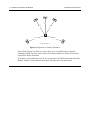
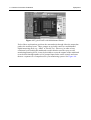
Ensure that you are sitting in your normal, proper reference listening or mixing
position. Set the SPL meter to “C” weighting and “slow” response.
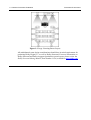
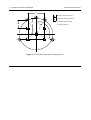
Facing the front speakers, hold the SPL meter at chest level, with the microphone
facing up at an angle of approximately 45 degrees to the center speaker. Keep the
meter at arm’s length to prevent measuring audio that may reflect from your body.
You should be able to take SPL readings as you look down at the meter.
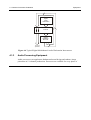
Keep the SPL meter in this position. Make sure that the meter is aimed at the
center speaker as you take readings for the left and right speakers.
When taking the SPL readings for the left surround or right surround speakers,
keep the meter at the same angle and position as you did for the front speakers.
Turn your body 90 degrees from the center speaker towards the wall closest to the
surround speaker you are measuring. This will minimize “shadowing” or
obscuring the meter with your body.
Bass Redirection
Prior to calibration, decide whether the monitoring system requires bass redirection of
low frequencies. Many decoders are capable of redirecting low-frequency information
below a selected frequency (typically 80, 100, or 120 Hz) to the channels capable of
reproducing them. This is similar to the normal/wide mode for the Center channel in a
consumer decoder with Dolby Surround Pro Logic.
3-18