1
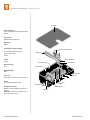
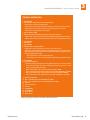
settings / limit switch adjustment
-/4/2
-/4/2
,)-)4
3,/$7.
,)-)4
3,/$7.
#/--/.
#/--/.
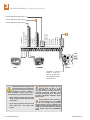
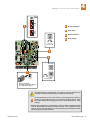
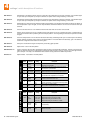
BROWN (1)
BLUE (2)
ORANGE (3)
RED (4)
YELLOW (5)
GREEN (6)
GRN/WHT (YEL)
02)-!29
+%9
37)4#(
4
1
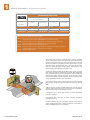
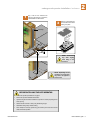
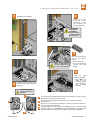
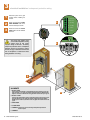
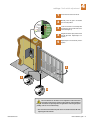
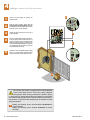
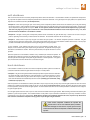
Unlock the motor and set to manual.
2
Manually move the gate to the desired
open or closed position.
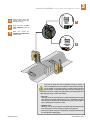
3
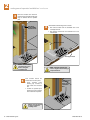
Loosen the limit bolt nut and slowly slide
the assembly until the LIMIT LED on the
circuit board lights up.
4
Re-tighten the limits in place, lock the motor
and test gate travel. Repeat steps 1-4 if
required.
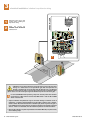
5
Repeat steps for the Secondary motor if
required.
2
3
3
The limit switches on the motor can be adjusted to control the travel
of the gate and to precisely set the full open and full closed position of
the gate. This feature is especially useful in applications where the gate opens
partially, such as on a curved driveway.
6400-065-E-05-07
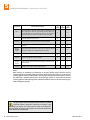
The motor must be installed and power to the circuit board must be ON when
adjusting the limit switches.
6400 installation guide
21