1
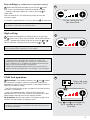
Low setting
[e.g. holiday home in period of vacancy]
Select the Background mode by pressing the + button
until 10 bars are illuminated. Continue to hold for a further
7 seconds, then adjust down to 1st bar by pressing – to
show blue.
6
6
After 20 seconds this will automatically revert to show the
‘Comfort’ mode.
❅ Min
In ‘Comfort’ mode reduce to 1st bar by pressing – to show blue.
On low setting the first
bar shows blue
TIP The blue frost protection bar may be illuminated because
the heater is connected to an external control.
High setting
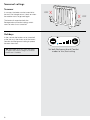
7 Increase the ‘Background’ setting to 8th bar by pressing
Max
7
the + button until 10 bars are illuminated. Continue to hold for a
further 7 seconds then adjust to 8th bar by pressing – or +
Set the ‘Comfort’ setting to 5th bar by pressing – or +
❅ Min
TIP After setting the controls: Operate the radiator for 24 hours
before making further adjustments to the settings.
Max
TIP It may require a few days fine-tuning to achieve an optimum
comfort level. On subsequent days increase or decrease the
temperature by one red light until a satisfactory comfort level has
been established. Once established the radiator will automatically
adjust to suit seasonal changes in temperature.
During mild weather Background heat may not operate or be required, however the Comfort heat - low wattage - may still operate.
Child lock operation
8
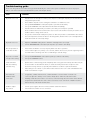
8 To activate: simultaneously depress the + and – buttons
for a period of 3 seconds. After this period the childlock is in
operation and the LED will illuminate for a short period and then
revert to the setback setting.
- The LED beside the key or lock symbol will illuminate while the
child lock is in operation.
- Once in the locked position, if either of the controls are
operated the LED will resume maximum illumination for a short
period before reverting back to the setback position.
To deactivate: depress the buttons simultaneously again for 3
seconds and the buttons will become active.
TIP If the child lock is illuminated green this shows that the
radiator is connected to an external control. See these instructions
for further information.
Glows red when
child lock ‘ON’
❅ Min
Max
❅
Min
Press – and + simultaneously
for 3 seconds to set the
child lock
5