1
Table of Contents
Table of Contents
Chapter 1
Getting Started ................................................................................................... 4
Introduction ................................................................................................................ 4
Specifications ............................................................................................................. 5
Software ................................................................................................................. 5
Installation ................................................................................................................. 8
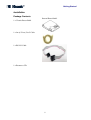
Package Contents ................................................................................................... 8
System Requirements ............................................................................................ 9
Installation Procedure ............................................................................................ 9
Chapter 2
Installing the Visonic PowerLink2 ..................................................................... 10
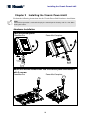
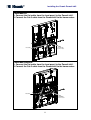
Hardware Installation ............................................................................................... 10
Software Installation ................................................................................................ 12
Control Panel Configuration ................................................................................ 12
Router Configuration ........................................................................................... 13
Step 1: Determining the IP Addresses of Home Router and Visonic PowerLink2
............................................................................................................................. 13
Step 2: Logging In to the Router ......................................................................... 14
Step 3: Port Forwarding Configuration ............................................................... 14
Step 4: Wi-Fi (Wireless Network) Configuration ............................................... 15
Step 5: Wi-Fi Encryption Configuration ............................................................. 15
Visonic PowerLink2 Configuration ......................................................................... 15
Step 1: Logging-in to the Visonic PowerLink2 ................................................... 15
Step 2: Connection Setup..................................................................................... 15
Chapter 3
Logging Into The Visonic PowerLink2 .............................................................. 17
Chapter 4
Visonic PowerLink2 Window ............................................................................ 19
Quick View .............................................................................................................. 20
Home Devices Pane ............................................................................................. 20
Cameras Pane....................................................................................................... 21
Security System Pane .......................................................................................... 22
Chapter 5
Managing Alerts and Alarms ............................................................................ 23
System Alerts ........................................................................................................... 23
System Alarms ......................................................................................................... 24
Viewing Cameras during an Alarm ..................................................................... 25
Closing the Alarm Mode Screen.......................................................................... 26
Chapter 6
Managing Home Devices ................................................................................. 28
1