1
*1¿
97.3.29 10:25 AM ˘ ` 2
This is a 15.0Ócolor LCD monitor to display signals from PC or Video
equipment.
This manual has been prepared to assist you in becoming familiar with your
new display monitor.
Features
¥15 .0Ó viewable XGA (1024 X 768) resolution LCD module
¥262,144 Color Display
¥Brightness (250cd/m2)
¥Viewing angle (U/D: 55°/60°, R/L : 70°/70°)
¥DPMS (Display Power Management Signaling)
¥OSD (On screen Display) controls, Multi Language OSD Menu
¥Implement the DDC 1/2B features.
DDC 1/2B uses a formerly unconnected signal pins in the 15 -pin VGA
connector.
The system will perform ÒPlug&PlayÓ feature if both monitor and host
systems support DDC 1/2B protocol.
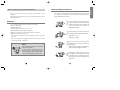
Note
Some computer systems are not compatible
with the DDC standard.
If your monitor is displaying a wrong
resolution, please check your computer
system including a DDC compatible video
card and contact HANSOL Service Center.
2
General Safety precautions
This Monitor has been engineered and manufactured to assure your safety, and
you can prevent your safety from serious electrical shock and other hazards by
keeping in the following attentions.
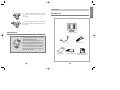
1
Do not place heavy, wet or magnetic on the
monitor or the power cord. Never cover the
ventilation openings with any material and
never touch them with metallic of
inflammable materials.
2
Avoid operating the monitor in the place
extremely heated, humid or affected by dust.
Temperature : 0 ~ 40°C
Humidity : 30 ~ 80RH
3
Be sure to turn the monitor off before
plugging the power cord into the socket of
power source.
Make sure that the power cord and the other
cords are securely and rightly connected.
4
Overloaded AC outlets and extension cords
are dangerous. So are frayed power cords and
broken plugs. They may result in a shock or
fire hazard. Call your service technician for
replacement.
3
English
How to get the most enjoyment with monitor