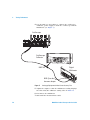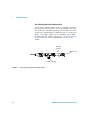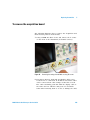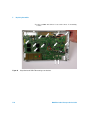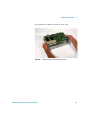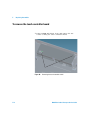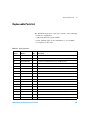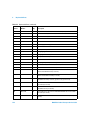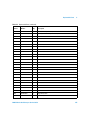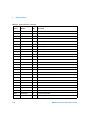
1
Agilent InfiniiVision 4000 X-Series Oscilloscopes Service Guide s1 Notices © Agilent Technologies, Inc. 2008-2012 Warranty No part of this manual may be reproduced in any form or by any means (including electronic storage and retrieval or translation into a foreign language) without prior agreement and written consent from Agilent Technologies, Inc. as governed by United States and international copyright laws. The material contained in this document is provided “as is,” and is subject to being changed, without notice, in future editions. Further, to the maximum extent permitted by applicable law, Agilent disclaims all warranties, either express or implied, with regard to this manual and any information contained herein, including but not limited to the implied warranties of merchantability and fitness for a particular purpose. Agilent shall not be liable for errors or for incidental or consequential damages in connection with the furnishing, use, or performance of this document or of any information contained herein. Should Agilent and the user have a separate written agreement with warranty terms covering the material in this document that conflict with these terms, the warranty terms in the separate agreement shall control. Manual Part Number 54709-97013, November 2012 Print History: 54709-97013, November 2012 54709-97011, October 2012 Available in electronic format only Agilent Technologies, Inc. 1900 Garden of the Gods Road Colorado Springs, CO 80907 USA A newer version of this manual may be available at www.agilent.com/find/ 4000X-Series-manual Safety Notices CAUTION A CAUTION notice denotes a hazard. It calls attention to an operating procedure, practice, or the like that, if not correctly performed or adhered to, could result in damage to the product or loss of important data. Do not proceed beyond a CAUTION notice until the indicated conditions are fully understood and met. Technology Licenses The hardware and/or software described in this document are furnished under a license and may be used or copied only in accordance with the terms of such license. Restricted Rights Legend Microsoft ® is a U.S. registered trademark of Microsoft Corporation. defined in FAR 52.227-19(c)(1-2) (June 1987). U.S. Government users will receive no greater than Limited Rights as defined in FAR 52.227-14 (June 1987) or DFAR 252.227-7015 (b)(2) (November 1995), as applicable in any technical data. If software is for use in the performance of a U.S. Government prime contract or subcontract, Software is delivered and licensed as “Commercial computer software” as defined in DFAR 252.227-7014 (June 1995), or as a “commercial item” as defined in FAR 2.101(a) or as “Restricted computer software” as defined in FAR 52.227-19 (June 1987) or any equivalent agency regulation or contract clause. Use, duplication or disclosure of Software is subject to Agilent Technologies’ standard commercial license terms, and non-DOD Departments and Agencies of the U.S. Government will receive no greater than Restricted Rights as WA R N I N G A WARNING notice denotes a hazard. It calls attention to an operating procedure, practice, or the like that, if not correctly performed or adhered to, could result in personal injury or death. Do not proceed beyond a WARNING notice until the indicated conditions are fully understood and met. 4000 X-Series Oscilloscopes Service Guide In This Service Guide This book provides the service information for the Agilent 4000 X- Series oscilloscopes. This manual is divided into these chapters: 1 Characteristics and Specifications This chapter contains a partial list of characteristics and specifications for the Agilent InfiniiVision 4000 X- Series oscilloscopes. 2 Testing Performance This chapter explains how to verify correct oscilloscope operation and perform tests to ensure that the oscilloscope meets the performance specifications. 3 Calibrating and Adjusting This chapter explains how to adjust the oscilloscope for optimum operating performance. 4 Troubleshooting This chapter begins with suggestions for solving general problems that you may encounter with the oscilloscope. Procedures for troubleshooting the oscilloscope follow the problem solving suggestions. 5 Replacing Assemblies This chapter describes how to remove assemblies from the 4000 X- Series oscilloscope. 6 Replaceable Parts This chapter describes how to order replaceable assemblies and parts for the Agilent 4000 X- Series oscilloscopes. It includes diagrams and parts lists for hardware that you can order. 4000 X-Series Oscilloscopes Service Guide 3 7 Safety Notices At the front of the book you will find safety notice descriptions and document warranties. Digital Channels Because all of the oscilloscopes in the Agilent 4000 X-Series have analog channels, the analog channel topics in this book apply to all instruments. Whenever a topic discusses the digital channels, that information applies only to Mixed-Signal Oscilloscope (MSO) models or DSO models that have been upgraded to an MSO. Abbreviated instructions for pressing a series of keys Instructions for pressing a series of keys are written in an abbreviated manner. Instructions for pressing Key1, then pressing Softkey2, then pressing Softkey3 are abbreviated as follows: Press [Key1] & Softkey2 & Softkey3. The keys may be front panel keys, or softkeys, which are located directly below the oscilloscope display. 4 4000 X-Series Oscilloscopes Service Guide Contents In This Service Guide 1 Figures 9 Tables 11 3 Characteristics and Specifications Power Requirements 13 14 Measurement Category 15 Measurement Category 15 Measurement Category Definitions 15 Transient Withstand Capability 16 Environmental Conditions Specifications Contact us 2 18 19 Testing Performance Overview 17 21 22 List of Test Equipment Conventions 24 23 To construct the test connector (for use with MSO models only) 25 To test digital channels (MSO models only) 27 To verify digital channel threshold accuracy (MSO models only) 28 When to Test 28 4000 X-Series Oscilloscopes Service Guide 5 Contents What to Test 28 Verifying Test Results 28 To verify DC vertical gain accuracy To verify dual cursor accuracy To verify bandwidth (-3 dB) 33 39 45 To verify time base accuracy 51 To verify trigger sensitivity 53 Test Internal Trigger Sensitivity 54 Test External Trigger Sensitivity (all models) 57 Agilent 4000 X-Series Oscilloscopes Performance Test Record 3 Calibrating and Adjusting 61 65 User Calibration 67 To perform User Cal 67 User Cal Status 70 4 Troubleshooting 71 Solving General Problems with the Oscilloscope If there is no display 72 If there is no trace display 73 If the trace display is unusual or unexpected If you cannot see a channel 74 72 73 Verifying Basic Operation 75 To power-on the oscilloscope 75 To perform hardware self test 76 To perform front panel self test 76 To verify default setup 77 To perform an Auto Scale on the Probe Comp signal To compensate passive probes 80 Troubleshooting Internal Assemblies 6 78 82 4000 X-Series Oscilloscopes Service Guide Contents Equipment Required for Troubleshooting Internal Assemblies 82 To prepare for internal assembly troubleshooting 83 Flowchart for Internal Assembly Power Troubleshooting 86 System Board Drawings 87 To check the system board power supply test points 89 To check the line filter board AC output 91 To check the power switch 92 To check the power supply DC output 94 To check the display supplies 95 To check the keyboard supplies 96 To check the fan 97 5 Replacing Assemblies To remove the handle 99 102 To remove the adjustable legs To remove the cabinet 103 104 To remove the rear deck assembly To replace the battery 105 108 To remove the acquisition board 109 To remove the touch controller board To remove the front panel knobs 115 To remove the front bezel assembly To remove the display assembly 4000 X-Series Oscilloscopes Service Guide 122 125 To remove the power supply shield To remove the line filter board 116 120 To remove the keyboard and keypad To remove the fan assembly 112 126 129 7 Contents To remove the power supply 132 133 6 Replaceable Parts 135 Ordering Replaceable Parts 136 Listed Parts 136 Unlisted Parts 136 Direct Mail Order System 136 Exchange Assemblies 137 Exploded Views 138 Replaceable Parts List 7 Safety Notices Warnings 147 147 To clean the instrument Safety Symbols Index 8 141 148 149 151 4000 X-Series Oscilloscopes Service Guide Figures Figure 1. Constructing the 8-by-2 Connector 26 Figure 2. Setting Up Equipment for Digital Channel Threshold Accuracy Test 30 Figure 3. Setting up Equipment for DC Vertical Gain Accuracy Test 36 Figure 4. Using a Blocking Capacitor to Reduce Noise 38 Figure 5. Setting up Equipment for Dual Cursor Accuracy Test 42 Figure 6. Using a Blocking Capacitor to Reduce Noise 44 Figure 7. Setting Up Equipment for Bandwidth (-3 dB) Verification Test 47 Figure 8. Setting Up Equipment for Internal Trigger Sensitivity Test 55 Figure 9. Setting Up Equipment for 4-Channel External Trigger Sensitivity Test 58 Figure 10. User Calibration cable for 2-channel oscilloscope 68 Figure 11. User Calibration cable for 4-channel oscilloscope 69 Figure 12. Default setup screen 78 Figure 13. Example pulses 80 Figure 14. Setup for troubleshooting internal assemblies 84 Figure 15. System Board Test Points/Connectors - Top Side, Left 87 Figure 16. System Board Test Points/Connectors - Top Side, Right 88 Figure 17. Verify line filter board AC output 91 Figure 18. Verify power switch operation 93 Figure 19. Location of the Fan Connector 98 Figure 20. Removing the handle 102 Figure 21. Removing adjustable legs 103 Figure 22. Removing the cabinet 104 Figure 23. Removing the BNC securing nuts and washers 105 4000 X-Series Oscilloscopes Service Guide 9 Figures Figure 24. Figure 25. Figure 26. Figure 27. Figure 28. Figure 29. Figure 30. Figure 31. Figure 32. Figure 33. Figure 34. Figure 35. Figure 36. Figure 37. Figure 38. Figure 39. Figure 40. Figure 41. Figure 42. Figure 43. Figure 44. Figure 45. Figure 46. Figure 47. Figure 48. Figure 49. Figure 50. Figure 51. Figure 52. Figure 53. Figure 54. 10 Removing the rear deck assembly 106 Separating front and rear deck assemblies 107 Battery location 108 Removing the analog channel BNC securing T6 screws 109 Acquisition board TORX T10 mounting screw locations 110 Lifting acquisition board off the front deck 111 Removing the touch controller shield 112 Lifting the touch controller shield off 113 Removing the touch controller board 114 Removing the front panel knobs 115 Removing the keyboard cable shield 116 Disconnecting the keyboard cable 117 Removing the display cable from the guide 118 Removing the bezel 119 Removing the display assembly 120 Disconnecting the backlight power cable 121 Disconnecting the softkey board cable 122 Removing the keyboard 123 Keyboard and keypad removed 123 Unclip the softkey board from the bezel 124 Softkey board and keypad removed 124 Removing fan assembly 125 Removing the power supply shield 126 Power supply shield removed 127 Removing the air duct 128 Disconnecting the ground wire 129 Removing the line filter board 130 Removing power switch extender 131 Removing the power supply 132 Exploded View 1 of 2 139 Exploded View 2 of 2 140 4000 X-Series Oscilloscopes Service Guide Tables Table 1. Table 2. Table 3. Table 4. List of test equipment 23 Conventions 24 Materials required to construct the test connectors 25 Equipment Required to Test Digital Channel Threshold Accuracy 29 Table 5. Threshold Accuracy Voltage Test Settings 31 Table 6. DC Vertical Gain Accuracy Test Limits 33 Table 7. Equipment Required to Verify DC Vertical Gain Accuracy 34 Table 8. Settings Used to Verify DC Vertical Gain Accuracy 35 Table 9. Equipment Required to Verify Dual Cursor Accuracy 40 Table 10. Settings Used to Verify Dual Cursor Accuracy 41 Table 11. Bandwidth (-3 dB) Test Limits 45 Table 12. Equipment Required to Verify Bandwidth (-3 dB) 46 Table 13. Equipment Required to Verify Time Base Accuracy 51 Table 14. Internal Trigger SensitivityTest Limits 53 Table 15. External Trigger Sensitivity Test Limits, All Models 53 Table 16. Equipment Required to Verify Trigger Sensitivity 54 Table 17. External Trigger Sensitivity Test Settings 57 Table 18. Equipment Required to Troubleshoot the Oscilloscope 82 Table 19. Replaceable Parts 141 4000 X-Series Oscilloscopes Service Guide 11 Tables 12 4000 X-Series Oscilloscopes Service Guide Agilent InfiniiVision 4000 X-Series Oscilloscope Service Guide 1 Characteristics and Specifications Power Requirements 14 Measurement Category 15 Environmental Conditions 17 Specifications 18 Contact us 19 This chapter contains a partial list of characteristics and specifications for the Agilent InfiniiVision 4000 X- Series oscilloscopes. For a full list of Agilent InfiniiVision 4000 X- Series oscilloscopes characteristics and specifications see the data sheets. The data sheets are available at www.agilent.com/find/4000X- Series. s1 13 1 Characteristics and Specifications Power Requirements Line voltage, frequency, and power: • ~Line 100- 120 Vac, 50/60/400 Hz • 100- 240 Vac, 50/60 Hz • 120 W max 14 4000 X-Series Oscilloscopes Service Guide Characteristics and Specifications 1 Measurement Category Measurement Category The InfiniiVision 4000 X- Series oscilloscope is intended to be used for measurements in Measurement Category I. WA R N I N G Use this instrument only for measurements within its specified measurement category. Measurement Category Definitions Measurement category I is for measurements performed on circuits not directly connected to MAINS. Examples are measurements on circuits not derived from MAINS, and specially protected (internal) MAINS derived circuits. In the latter case, transient stresses are variable; for that reason, the transient withstand capability of the equipment is made known to the user. Measurement category II is for measurements performed on circuits directly connected to the low voltage installation. Examples are measurements on household appliances, portable tools and similar equipment. Measurement category III is for measurements performed in the building installation. Examples are measurements on distribution boards, circuit- breakers, wiring, including cables, bus- bars, junction boxes, switches, socket- outlets in the fixed installation, and equipment for industrial use and some other equipment, for example, stationary motors with permanent connection to the fixed installation. Measurement category IV is for measurements performed at the source of the low- voltage installation. Examples are electricity meters and measurements on primary overcurrent protection devices and ripple control units. 4000 X-Series Oscilloscopes Service Guide 15 1 Characteristics and Specifications Transient Withstand Capability CAUTION Maximum input voltage for analog inputs CAT I 300 Vrms, 400 Vpk; transient overvoltage 1.6 kVpk 50 Ω input: 5 Vrms Input protection is enabled in 50 Ω mode and the 50 Ω load will disconnect if greater than 5 Vrms is detected. However the inputs could still be damaged, depending on the time constant of the signal. The 50 Ω input protection only functions when the oscilloscope is powered on. With 10073C 10:1 probe: CAT I 500 Vpk, CAT II 400 Vpk With N2871A, N2872A, N2873A 10:1 probe: CAT I 400 Vpk, transient overvoltage 1.25 kVpk, CAT II 300 Vpk CAUTION Maximum input voltage for logic channels: ±40 V peak CAT I; transient overvoltage 800 Vpk 16 4000 X-Series Oscilloscopes Service Guide Characteristics and Specifications 1 Environmental Conditions Environment Indoor use only. Ambient temperature Operating 0 °C to +55 °C; non-operating –30 °C to +70 °C Humidity Operating: 50% to 95% RH at 40 °C for 5 days. Non-operating: 90% RH at 65 °C for 24 hr. Altitude Maximum operating altitude: 3,000 m (9,842 ft) Overvoltage Category This product is intended to be powered by MAINS that comply to Overvoltage Category II, which is typical of cord-and-plug connected equipment. Pollution Degree The InfiniiVision 4000 X-Series oscilloscopes may be operated in environments of Pollution Degree 2 (or Pollution Degree 1). Pollution Degree Definitions Pollution Degree 1: No pollution or only dry, non-conductive pollution occurs. The pollution has no influence. Example: A clean room or climate controlled office environment. Pollution Degree 2. Normally only dry non-conductive pollution occurs. Occasionally a temporary conductivity caused by condensation may occur. Example: General indoor environment. Pollution Degree 3: Conductive pollution occurs, or dry, non-conductive pollution occurs which becomes conductive due to condensation which is expected. Example: Sheltered outdoor environment. 4000 X-Series Oscilloscopes Service Guide 17 1 Characteristics and Specifications Specifications Please see the InfiniiVision 4000 X- Series Oscilloscopes Data Sheet for complete, up- to- date specifications and characteristics. To download a copy of the data sheet please visit: www.agilent.com/find/4000X- Series. Or go to the Agilent home page at www.agilent.com and search for 4000 X-Series oscilloscopes data sheet. To order a data sheet by phone, please contact your local Agilent office. A contact list is provided on the next page. The most up- to- date list is available at: www.agilent.com/find/contactus 18 4000 X-Series Oscilloscopes Service Guide Characteristics and Specifications 1 Contact us Americas Canada (877) 894-4414 Latin America 305 269 7500 United States (800) 829-4444 Asia Pacific Australia 1 800 629 485 China 800 810 0189 Hong Kong 800 938 693 India 1 800 112 929 Japan 81 426 56 7832 Korea 080 769 0800 Malaysia 1 800 888 848 Singapore 1 800 375 8100 Taiwan 0800 047 866 Thailand 1 800 226 008 Europe Austria 0820 87 44 11 Belgium 32 (0) 2 404 93 40 Denmark 45 70 13 15 15 Finland 358 (0) 10 855 2100 France 0825 010 700 Germany 01805 24 6333* *0.14€/minute Ireland 1890 924 204 Italy 39 02 92 60 8484 Netherlands 31 (0) 20 547 2111 Spain 34 (91) 631 3300 Sweden 0200-88 22 55 Switzerland (French) 44 (21) 8113811 (Opt 2) Switzerland (German) 0800 80 53 53 (Opt 1) United Kingdom 44 (0) 7004 666666 Other European countries: www.agilent.com/find/contactus 4000 X-Series Oscilloscopes Service Guide 19 1 20 Characteristics and Specifications 4000 X-Series Oscilloscopes Service Guide Agilent InfiniiVision 4000 X-Series Oscilloscope Service Guide 2 Testing Performance Overview 22 List of Test Equipment 23 To construct the test connector (for use with MSO models only) 25 To test digital channels (MSO models only) 27 To verify digital channel threshold accuracy (MSO models only) 28 To verify DC vertical gain accuracy 33 To verify dual cursor accuracy 39 To verify bandwidth (-3 dB) 45 To verify time base accuracy 51 To verify trigger sensitivity 53 Agilent 4000 X-Series Oscilloscopes Performance Test Record 61 This chapter explains how to verify correct oscilloscope operation and perform tests to ensure that the oscilloscope meets the performance specifications. s1 21 2 Testing Performance Overview To completely test and troubleshoot MSO models, create and use the test connector accessory as described in this chapter. • The test connector is only required for oscilloscopes that have the MSO option licensed (enabled). • The connector is used in the digital channel threshold accuracy test. • The test connector keeps electrical distortion to a minimum and makes it easy for you to connect the oscilloscope probes to function generators and measurement equipment. Let the Equipment Warm Up Before Testing For accurate test results, let the test equipment and the oscilloscope warm up 30 minutes before testing. Verifying Test Results During the tests, record the readings in the Performance Test Record on page 61. To verify whether a test passes, verify that the reading is within the limits in the Performance Test Record. If a performance test fails If a performance test fails, first perform the User Cal procedure. Press the following keys to access User Cal: [Utility]→Service→Start User Cal. 22 4000 X-Series Oscilloscopes Service Guide Testing Performance 2 List of Test Equipment Below is a list of test equipment and accessories required to perform the performance test verification procedures. Table 1 List of test equipment Equipment Critical Specifications Recommended Model/ Part Number Test connector, 8-by-2* See page 25 for instructions on building test connector. n/a Digital Multimeter 0.1 mV resolution, 0.005% accuracy Agilent 34401A Power Splitter Outputs differ by 0.15 dB Agilent 11667B Oscilloscope Calibrator DC offset voltage of -5.5 V to 35.5 V, 0.1 V resolution 25 MHz—500 MHz sine wave, 5 ppm Fluke 5820A Signal Generator 100 kHz to 1.5 GHz sine waves Agilent N5181A with 3 GHz option Power Meter 1.5 GHz ±3% accuracy Agilent N1914A Power Sensor 1.5 GHz ±3% accuracy Agilent E9304A or N8482A BNC banana cable BNC (m) to dual banana Pomona 2BC-BNC-36 or Agilent 11001-66001 BNC cable (qty 3) BNC - BNC, 48” length Agilent 10503A† Cable Type N (m) 609.6 mm (24 in.) Agilent 11500B Probe cable* No substitute Agilent N6450-60001 (16-channel) or Agilent N6459-60001 (8-channel)† Adapter BNC(f) to banana(m) Agilent 1251-2277† Adapter BNC Tee (m) (f) (f) Agilent 1250-0781† or Pomona 3285 * Required only for testing digital channels of oscilloscopes that have the MSO option. Most parts and equipment are available at www.agilent.com. See respective manufacturer’s websites for their equipment. † These parts available at www.parts.agilent.com at the time this manual was published. 4000 X-Series Oscilloscopes Service Guide 23 2 Testing Performance Table 1 List of test equipment (continued) Recommended Model/ Part Number Equipment Critical Specifications Adapter Type N (m) to BNC (m) Agilent 1250-0082 or Pomona 3288 with Pomona 3533 Blocking capacitor and shorting cap Note: if a BNC blocking capacitor is not available use an SMA blocking capacitor. Agilent 11742A + Pomona 4288 + Pomona 5088 Adapter (qty 3) N(m) to BNC(f) Agilent 1250-0780 50 Ohm Feedthrough Termination 50Ω BNC (f) to BNC (m) Agilent 0960-0301 * Required only for testing digital channels of oscilloscopes that have the MSO option. Most parts and equipment are available at www.agilent.com. See respective manufacturer’s websites for their equipment. † These parts available at www.parts.agilent.com at the time this manual was published. Conventions The following conventions will be used when referring to oscilloscope models throughout this chapter. Table 2 24 Conventions Models Referred to as: MSO-X /DSO-X 4022A, MSO-X /DSO-X 4024A 200 MHz Models MSO-X /DSO-X 4032A, MSO-X /DSO-X 4034A 350 MHz Models MSO-X /DSO-X 4052A, MSO-X /DSO-X 4054A 500 MHz Models MSO-X /DSO-X 4104A 1 GHz Models MSO-X /DSO-X 4154A 1.5 GHz Models 4000 X-Series Oscilloscopes Service Guide Testing Performance 2 To construct the test connector (for use with MSO models only) Agilent 4000 X- Series oscilloscopes that have digital channels enabled require the test connector described below. Follow the steps to build the test connector. Table 3 Materials required to construct the test connectors Description Recommended Part Qty BNC (f) Connector Agilent 1250-1032 or Pomona 4578 1 Berg Strip, 8-by-2 3M .100” x .100” Pin Strip Header or similar 1 strip, cut to length (8x2) Jumper wire 1 Obtain a BNC connector and an 8- by- 2 section of Berg strip. A longer strip can be cut to length using wire cutters. 2 On one side of the Berg strip, solder a jumper wire to all of the pins (shown in Figure 1 on page 26). 3 On the other side of the Berg strip, solder another jumper wire to all of the pins. 4 Solder the center of the BNC connector to a center pin on one of the rows on the Berg strip. 5 Solder the ground tab of the BNC connector to a center pin on the other row on the Berg strip. 4000 X-Series Oscilloscopes Service Guide 25 2 Testing Performance Jumper (2) Ground Lead (from scope’s MSO cable) Signal Lead (from scope’s MSO cable) 8 x 2 Berg Strip BNC Panel Mount Connector Figure 1 26 Constructing the 8-by-2 Connector 4000 X-Series Oscilloscopes Service Guide Testing Performance 2 To test digital channels (MSO models only) The acquisition system testing provides confidence that the acquisition system is functioning correctly. It does not, however, check a particular specification. 1 Disconnect all probes from the circuit under test and from any other input source. 2 Using probe leads and grabbers, connect digital channels D0, D1, D2, and D3 to the Probe Comp signal on the center of the front panel. 3 Press the [AutoScale] key. If four square waves appear, the acquisition system is functioning correctly. If the square waves do not appear, go to the “Troubleshooting” chapter. Then return here to finish testing the digital channels. 4 Disconnect the digital channels from the calibration point. 5 Use steps 2 and 3 to test the following sets of digital channels. After you test one set of digital channels, remove them before connecting the next set. • D4, D5, D6, D7 • D8, D9, D10, D11 • D12, D13, D14, D15 4000 X-Series Oscilloscopes Service Guide 27 2 Testing Performance To verify digital channel threshold accuracy (MSO models only) This test verifies the digital channel threshold accuracy specification of the Agilent 4000 X- Series oscilloscopes. Threshold accuracy test limits: ±(100 mV + 3% of threshold setting) When to Test You should perform this test every two years or after 4000 hours of operation, whichever comes first. What to Test Use these instructions to test the threshold settings of digital channels D7- D0. Then, use the same instructions to test digital channels D15- D8. Verifying Test Results After each threshold test, record the voltage reading in the Performance Test Record on page 61. To verify whether a test passes, verify that the voltage reading is within the limits in the Performance Test Record. 28 4000 X-Series Oscilloscopes Service Guide Testing Performance Table 4 2 Equipment Required to Test Digital Channel Threshold Accuracy Equipment Critical Specifications Recommended Model/Part Digital Multimeter 0.1 mV resolution, 0.005% accuracy Agilent 34401A Oscilloscope Calibrator DC offset voltage 6.3 V Fluke 5820A BNC-Banana Cable Agilent 11001-66001 or Pomona 2BC-BNC-36 BNC Tee Agilent 1250-0781 or Pomona 3285 50 Ω BNC Cable Agilent 10503A BNC Test Connector, 8-by-2 User-built (See page 25) Probe Cable Agilent N6450-60001 (16-channel) or Agilent N6459-60001 (8-channel) 1 Turn on the test equipment and the oscilloscope. Let them warm up for 30 minutes before starting the test. 2 Set up the oscilloscope calibrator. a Set the oscilloscope calibrator to provide a DC offset voltage at the Channel 1 output. b Use the multimeter to monitor the oscilloscope calibrator DC output voltage. 3 Use the 8- by- 2 test connector and the BNC cable assembly to connect digital channels D0- D7 to one side of the BNC Tee. Then connect the D0- D7 ground lead to the ground side of the 8- by- 2 connector. See Figure 2. 4000 X-Series Oscilloscopes Service Guide 29 2 Testing Performance 4000 X-Series Oscilloscope Oscilloscope Calibrator Digital Multimeter Probe Cables BNC Tee BNC-Bananna Cable Test Connector Figure 2 Channels 0-7 Channels 8 - 15 Setting Up Equipment for Digital Channel Threshold Accuracy Test 4 Use a BNC- banana cable to connect the multimeter to the other side of the BNC Tee. 5 Connect the BNC Tee to the Channel 1 output of the calibrator as shown in Figure 2. 6 On the oscilloscope, press the [Digital] key, then press the Thresholds softkey, then press the D7 - D0 softkey repeatedly until the check mark is next to User. 30 4000 X-Series Oscilloscopes Service Guide Testing Performance 2 7 Press the User softkey to the right of the D7 - D0 softkey, then turn the Entry knob ( ) on the front panel of the oscilloscope to set the threshold test settings as shown in Table 5. Table 5 Threshold Accuracy Voltage Test Settings Threshold voltage setting (in oscilloscope User softkey) DC offset voltage setting (on oscilloscope calibrator) +5.00 V +5.250 V ±1 mV dc Lower limit = +4.750 V Upper limit = +5.250 V –5.00 V –4.750 V ±1 mV dc Lower limit = –5.250 V Upper limit = –4.750 V 0.00 V +100m V ±1 mV dc Upper limit = +100 mV Lower limit = –100 mV Limits 8 Do the following steps for each of the threshold voltage levels shown in Table 5. a Set the threshold voltage shown in the User softkey using the Entry knob on the oscilloscope. b Enter the corresponding DC offset voltage on the oscilloscope calibrator front panel. Then use the multimeter to verify the voltage. Digital channel activity indicators are displayed on the status line at the top of the oscilloscope display. The activity indicators for D7- D0 should show all of the channels at digital high levels. c Use the knob on the oscilloscope calibrator to decrease the offset voltage, in increments of 10 mV, until the activity indicators for digital channels D7- D0 are all at digital low levels. Record the oscilloscope calibrator voltage in the Performance Test Record (see page 61). d Use the knob on the oscilloscope calibrator to increase the offset voltage, in increments of 10 mV, until the activity indicators for digital channels D7- D0 are all at 4000 X-Series Oscilloscopes Service Guide 31 2 Testing Performance digital high levels. Record the oscilloscope calibrator voltage in the Performance Test Record (see page 61). Before proceeding to the next step, make sure that you have recorded the oscilloscope calibrator voltage levels for each of the threshold settings shown in Table 5. 9 When testing 4000 X- Series MSOs, use the 8- by- 2 test connector to connect digital channels D15- D8 to the output of the oscilloscope calibrator. Then connect the D15- D8 ground lead to the ground side of the 8- by- 2 connector. 10 Repeat this procedure (steps 6 through 8) for digital channels D15- D8 to verify threshold accuracy and record the threshold levels in the Performance Test Record (see page 61). Be sure to set the thresholds with the User softkey for the appropriate set of channels. 32 4000 X-Series Oscilloscopes Service Guide Testing Performance 2 To verify DC vertical gain accuracy This test verifies the accuracy of the analog channel DC vertical gain for each channel. In this test, you will measure the dc voltage output of an oscilloscope calibrator using the oscilloscope’s Average - Full Screen voltage measurement and compare the results with the multimeter reading. Table 6 DC Vertical Gain Accuracy Test Limits Models Test Limits Notes 4000 X-Series ±2.0% of full scale • Full scale is defined as 32 mV on the 2 mV/div range and the 1 mV/div range. • Full scale on all other ranges is defined as 8 divisions times the V/div setting. 4000 X-Series Oscilloscopes Service Guide 33 2 Testing Performance Table 7 Equipment Required to Verify DC Vertical Gain Accuracy Recommended Model/Part Equipment Critical Specifications Oscilloscope Calibrator 14 mV to 35 Vdc, 0.1 V resolution Fluke 5820A Digital multimeter Better than 0.01% accuracy Agilent 34401A Cable BNC, Qty 2 Agilent 10503A Shorting cap BNC Agilent 1250-0774 Adapter BNC (f) to banana (m) Agilent 1251-2277 Adapter BNC tee (m) (f) (f) Agilent 1250-0781 or Pomona 3285 Blocking capacitor Agilent 11742A + Pomona 4288 + Pomona 5088 1 Press [Save/Recall] > Default/Erase > Factory Default to recall the factory default setup. 2 Set up the oscilloscope. a Adjust the horizontal scale to 10.00 ms/div. b Set the Volts/Div setting to the value in the first line in Table 8 (depending on the oscilloscope model). c Adjust the channel’s vertical position knob to place the baseline (reference level) at 0.5 major division from the bottom of the display. 34 4000 X-Series Oscilloscopes Service Guide Testing Performance Table 8 2 Settings Used to Verify DC Vertical Gain Accuracy Volts/Div Setting Oscilloscope Calibrator Setting Test Limits 5 V/Div 35 V 34.2 V to 35.8 V 2 V/Div 14 V 13.68 V to 14.32 V 1 V/Div 7V 6.84 V to 7.16 V 500 mV/Div 3.5 V 3.42 V to 3.58 V 200 mV/Div 1.4 V 1.368 V to 1.432 V 100 mV/Div 700 mV 684 mV to 716 mV 50 mV/Div 350 mV 342 mV to 358 mV 20 mV/Div 140 mV 136.8 mV to 143.2 mV 10 mV/Div 70 mV 68.4 mV to 71.6 mV 5 mV/Div1 35 mV 34.2 mV to 35.8 mV 2 mV/Div1, 2 14 mV 13.36 mV to 14.64 mV 1 mV/Div1, 2 7 mV 6.36 mV to 7.64 mV 1 A blocking capacitor is required at this range to reduce noise. See “Use a Blocking Capacitor to Reduce Noise” on page 38. 2 Full scale is defined as 32 mV on the 2 mV/div range and the 1 mV/div range. Full scale on all other ranges is defined as 8 divisions times the V/div setting. d Press the [Acquire] key. e Then press the Acq Mode softkey and select Averaging. f Then press the #Avgs softkey and set it to 64. Wait a few seconds for the measurement to settle. 3 Add a measurement for the average voltage: a Press the [Meas] key. b Press Source; then, turn the Entry knob (labeled on the front panel) to select the channel you are testing. 4000 X-Series Oscilloscopes Service Guide 35 2 Testing Performance c Press Type:; then, turn the Entry knob to select Average - Full Screen, and press Add Measurement. 4 Read the “current” average voltage value as V1. 5 Use the BNC tee and cables to connect the oscilloscope calibrator /power supply to both the oscilloscope and the multimeter (see Figure 3). Oscilloscope Oscilloscope Calibrator BNC Tee Digital Multimeter BNC (f) to dual bananna adapter Figure 3 36 Setting up Equipment for DC Vertical Gain Accuracy Test 4000 X-Series Oscilloscopes Service Guide Testing Performance 2 6 Adjust the output so that the multimeter reading displays the first Volts/div calibrator setting value in Table 8 (depending on the oscilloscope model). 7 Disconnect the multimeter. 8 Wait until the measurement settles. 9 Read the “current” average voltage value again as V2. 10 Calculate the difference V2 - V1. The difference in average voltage readings should be within the test limits of Table 8 (depending on the oscilloscope model). If a result is not within the test limits, go to the “Troubleshooting” chapter. Then return here. 11 Disconnect the oscilloscope calibrator from the oscilloscope. 12 Repeat this procedure to check the DC vertical gain accuracy with the remaining Volts/div setting values in Table 8 (depending on the oscilloscope model). 13 Finally, repeat this procedure for the remaining channels to be tested. 4000 X-Series Oscilloscopes Service Guide 37 2 Testing Performance Use a Blocking Capacitor to Reduce Noise On the more sensitive ranges, such as 1 mV/div, 2 mV/div, and 5 mV/div, noise may be a factor. To eliminate the noise, add a BNC Tee, blocking capacitor, and shorting cap at the oscilloscope channel input to shunt the noise to ground. See Figure 4. If a BNC capacitor is not available, use an SMA blocking capacitor, adapter, and cap. See “Blocking capacitor and shorting cap” in the equipment list on page 24 for details. Blocking Capacitor BNC shorting cap To oscilloscope input Figure 4 38 Using a Blocking Capacitor to Reduce Noise 4000 X-Series Oscilloscopes Service Guide Testing Performance 2 To verify dual cursor accuracy This test verifies the dual cursor accuracy for each analog channel. This test is similar to the test for verifying the DC vertical gain, except you will measure the dc voltage output of an oscilloscope calibrator using dual cursors on the oscilloscope and compare the results with the multimeter reading. Dual cursor accuracy test limits: ±[DC vertical gain accuracy + 0.42% full scale] For the DC vertical gain accuracy test limits, see Table 6 on page 33. 4000 X-Series Oscilloscopes Service Guide 39 2 Testing Performance Table 9 Equipment Required to Verify Dual Cursor Accuracy Recommended Model/Part Equipment Critical Specifications Oscilloscope Calibrator 14 mV to 35 Vdc, 0.1 V resolution Fluke 5820A Digital multimeter Better than 0.01% accuracy Agilent 34401A Cable BNC, Qty 2 Agilent 10503A Shorting cap BNC Agilent 1250-0774 Adapter BNC (f) to banana (m) Agilent 1251-2277 Adapter BNC tee (m) (f) (f) Agilent 1250-0781 or Pomona 3285 Blocking capacitor Agilent 11742A + Pomona 4288 + Pomona 5088 1 Press [Save/Recall] > Default/Erase > Factory Default to recall the factory default setup. 2 Set up the oscilloscope. a Set the Volts/Div setting to the value in the first line in Table 10 (depending on the oscilloscope model). b Adjust the channel 1 position knob to place the baseline at 0.5 major division from the bottom of the display. 40 4000 X-Series Oscilloscopes Service Guide Testing Performance Table 10 2 Settings Used to Verify Dual Cursor Accuracy Volts/Div Setting Oscilloscope Calibrator Setting Test Limits 5 V/Div 35 V 34.032 V to 35.968 V 2 V/Div 14 V 13.6128 V to 14.3872 V 1 V/Div 7V 6.8064 V to 7.1936 V 500 mV/Div 3.5 V 3.4032 V to 3.5968 V 200 mV/Div 1.4 V 1.36128 V to 1.43872 V 100 mV/Div 700 mV 680.64 mV to 719.36 mV 50 mV/Div 350 mV 340.32 mV to 359.68 mV 20 mV/Div 140 mV 136.128 mV to 143.87 mV 10 mV/Div 70 mV 68.064 mV to 71.94 mV 5 mV/Div1 35 mV 34.032 mV to 35.97 mV 2 mV/Div1, 2 14 mV 13.226 mV to 14.77 mV 1 mV/Div1, 2 7 mV 6.226 mV to 7.77 mV 1 A blocking capacitor is required at this range to reduce noise. See “Use a Blocking Capacitor to Reduce Noise” on page 44. 2 Full scale is defined as 32 mV on the 2 mV/div range and the 1 mV/div range. Full scale on all other ranges is defined as 8 divisions times the V/div setting. c Press the [Acquire] key. d Then press the Acq Mode softkey and select Averaging. e Then press the #Avgs softkey and set it to 64. Wait a few seconds for the measurement to settle. 3 Press the [Cursors] key, set the Mode softkey to Normal, then press the X Y softkey and select Y. Press the Y1 softkey, then use the Entry knob (labeled on the front panel) to set the Y1 cursor on the baseline of the signal. 4000 X-Series Oscilloscopes Service Guide 41 2 Testing Performance 4 Use the BNC tee and cables to connect the oscilloscope calibrator /power supply to both the oscilloscope and the multimeter (see Figure 5). Oscilloscope Oscilloscope Calibrator BNC Tee Digital Multimeter BNC (f) to dual bananna adapter Figure 5 Setting up Equipment for Dual Cursor Accuracy Test 5 Adjust the output so that the multimeter reading displays the first Volts/div calibrator setting value in Table 10. 6 Disconnect the multimeter. 7 Wait until the measurement settles. 42 4000 X-Series Oscilloscopes Service Guide Testing Performance 2 8 Press the Y2 softkey, then position the Y2 cursor to the center of the voltage trace using the Entry knob. The ΔY value on the lower line of the display should be within the test limits of Table 10. If a result is not within the test limits, go to the “Troubleshooting” chapter. Then return here. 9 Disconnect the oscilloscope calibrator from the oscilloscope. 10 Repeat this procedure to check the dual cursor accuracy with the remaining Volts/div setting values in Table 10. 11 Finally, repeat this procedure for the remaining channels to be tested. 4000 X-Series Oscilloscopes Service Guide 43 2 Testing Performance Use a Blocking Capacitor to Reduce Noise On the more sensitive ranges, such as 1 mV/div, 2 mV/div, and 5 mV/div, noise may be a factor. To eliminate the noise, add a BNC Tee, blocking capacitor, and shorting cap at the oscilloscope channel input to shunt the noise to ground. See Figure 6. If a BNC capacitor is not available, use an SMA blocking capacitor, adapter, and cap. See “Blocking capacitor and shorting cap” in the equipment list on page 24 for details. Blocking Capacitor BNC shorting cap To oscilloscope input Figure 6 44 Using a Blocking Capacitor to Reduce Noise 4000 X-Series Oscilloscopes Service Guide Testing Performance 2 To verify bandwidth (-3 dB) This test checks the bandwidth (- 3 dB) of the oscilloscope. In this test you will use a signal generator and a power meter. Table 11 Bandwidth (-3 dB) Test Limits Models Test Limits 1.5 GHz Models All channels (-3 dB), dc to 1.5 GHz 1 GHz Models All channels (-3 dB), dc to 1 GHz 500 MHz Models All channels (-3 dB), dc to 500 MHz 350 MHz Models All channels (-3 dB), dc to 350 MHz 200 MHz Models All channels (-3 dB), dc to 200 MHz 4000 X-Series Oscilloscopes Service Guide 45 2 Testing Performance Table 12 Equipment Required to Verify Bandwidth (-3 dB) Equipment Critical Specifications Recommended Model/Part Signal Generator 100 kHz - 1.5 GHz at 200 mVrms Agilent N5181A with 3 GHz option Power Meter 1 MHz - 1.5 GHz ±3% accuracy Agilent N1914A Power Sensor 1 MHz - 1.5 GHz ±3% accuracy Agilent E9304A or N8482A Power Splitter outputs differ by < 0.15 dB Agilent 11667A Cable Type N (m) 24 inch Agilent 11500B Adapter Type N (m) to BNC (m) Agilent 1250-0082 or Pomona 3288 with Pomona 3533 1 Connect the equipment (see Figure 7). a Use the N cable to connect the signal generator to the input of the power splitter input. b Connect the power sensor to one output of the power splitter. c Use an N- to- BNC adapter to connect the other splitter output to the channel 1 input. 46 4000 X-Series Oscilloscopes Service Guide Testing Performance 2 Oscilloscope Signal Generator N to BNC Adapter Power Splitter Power Sensor N Cable Power Meter Figure 7 Setting Up Equipment for Bandwidth (-3 dB) Verification Test 2 Set up the power meter. Set the power meter to display measurements in units of watts. 3 Set up the oscilloscope. a Press the [Default Setup] key. b Set channel 1 Coupling to DC. c Set channel 1 Imped to 50 Ohm. 4000 X-Series Oscilloscopes Service Guide 47 2 Testing Performance d Set the time base to 500 ns/div. e Set the Volts/Div for channel 1 to 200 mV/div. f Press the [Acquire] key, then press the Averaging softkey. g Turn the Entry knob to set # Avgs to 8 averages. 4 Set the signal generator for 1 MHz and six divisions of amplitude. The signal on the oscilloscope screen should be about five cycles at six divisions amplitude. 5 Set up the Amplitude measurement a Press the [Meas] key. b Press the Clear Meas softkey and then the Clear All softkey. c Press the Type: softkey and use the Entry knob to select AC RMS - Full Screen (Std Deviation) within the select menu. d Press the Add Measurement softkey. 6 Note the oscilloscope AC RMS - FS(1) reading at the bottom of the screen. (This is the RMS value with any dc offset removed.) 7 Set the power meter Cal Factor % to the 1 MHz value on the calibration chart on the power sensor. 8 Note the reading on the power meter and covert to Vrms using the expression: Vin 1MHz = Pmeas 1MHz × 50Ω For example, if the power meter reading is 892 uW, then Vin1MHz = (892*10- 6 * 50Ω)1/2 = 211.2 mVrms. 48 4000 X-Series Oscilloscopes Service Guide Testing Performance 2 9 Change the signal generator output frequency according to the maximum frequency for the oscilloscope using the following: • 1.5 GHz Models: 1.5 GHz • 1 GHz Models: 1 GHz • 500 MHz Models: 500 MHz • 350 MHz Models: 350 MHz • 200 MHz Models: 200 MHz 10 Referencing the frequency from step 9, set the power meter Cal Factor % to the frequency value on the calibration chart on the power sensor. 11 Set the oscilloscope sweep speed according to the following: • 1.5 GHz Models: 500 ps/div • 1 GHz Models: 500 ps/div • 500 MHz Models: 1 ns/div • 350 MHz Models: 2 ns/div • 200 MHz Models: 2 ns/div 12 Note the oscilloscope AC RMS - FS(1) reading at the bottom of the screen. 13 Note the reading on the power meter and covert to Vrms using the expression: Vin maxfreq = Pmeas maxfreq × 50Ω 14 Calculate the response using the expression: Vout max freq / Vin max freq response(dB) = 20 log10 Vout 1 M Hz / Vin 1 MHz Example If: Pmeas1_MHz = 892 uW AC RMS - FS(n) 1MHz = 210.4 mV Pmeas max_freq = 687 uW AC RMS - FS(n) max freq = 161.6 mV 4000 X-Series Oscilloscopes Service Guide 49 2 Testing Performance Then after converting the values from the power meter to Vrms: response(dB) = 20 log10 161.6 mV / 185.3 mV = -1.16 dB 210.4 mV/ 211.2 mV 15 The result from step 14 should be within - 3.0 dB. Record the result in the Performance Test Record (see page 61). 16 Move the power splitter from the channel 1 to the channel 2 input. 17 Turn off the current channel and turn on the next channel using the channel keys. 18 Repeat steps 3 through 17 for the remaining channels, setting the parameters of the channel being tested where appropriate. 50 4000 X-Series Oscilloscopes Service Guide Testing Performance 2 To verify time base accuracy This test verifies the accuracy of the time base. In this test you will measure the absolute error of the time base oscillator and compare the results to the specification. Table 13 Equipment Required to Verify Time Base Accuracy Recommended Model/Part Equipment Critical Specifications Signal Generator 100 kHz - 1.5 GHz, 0.01 Hz frequency resolution, jitter: < 2ps Agilent N5181A with 3 GHz option Cable BNC, 3 feet Agilent 10503A 1 Set up the signal generator. a Set the output to 10 MHz, approximately 1 Vpp sine wave. 2 Connect the output of the signal generator to oscilloscope channel 1 using the BNC cable. 3 Set up the oscilloscope: a Press [AutoScale]. b Set the oscilloscope Channel 1 vertical sensitivity to 200 mv/div. c Set the oscilloscope horizontal sweep speed control to 5 ns/div. d Adjust the intensity to get a sharp, clear trace. e Adjust the oscilloscope’s trigger level so that the rising edge of the waveform at the center of the screen is located where the center horizontal and vertical grid lines cross (center screen). f Ensure the horizontal position control is set to 0.0 seconds. 4000 X-Series Oscilloscopes Service Guide 51 2 Testing Performance 4 Make the measurement. a Set oscilloscope horizontal sweep speed control to 1 ms/div. b Set horizontal position control to +1 ms (rotate control CCW). c Set the oscilloscope horizontal sweep speed control to 5 ns/div. d Record the number of nanoseconds from where the rising edge crosses the center horizontal grid line to the center vertical grid line. The number of nanoseconds is equivalent to the time base error in ppm. Time base accuracy limit: ±10 ppm e Record the result and compare it to the limits in the Performance Test Record (see page 61). 52 4000 X-Series Oscilloscopes Service Guide Testing Performance 2 To verify trigger sensitivity This test verifies the trigger sensitivity. In this test, you will apply a sine wave to the oscilloscope at the upper bandwidth limit. You will then decrease the amplitude of the signal to the specified levels, and check to see if the oscilloscope is still triggered. Table 14 Internal Trigger SensitivityTest Limits BW Models V/div Frequency 200 MHz, 350 MHz, 500 MHz, and 1 GHz < 10 mV/div All greater of 1 div or 5 mVpp >= 10 mV/div All 0.6 div 1.5 GHz < 10 mV/div DC to 1 GHz greater of 1 div or 5 mVpp 1 GHz to 1.5 GHz greater of 1.5 div or 5 mVpp DC to 1 GHz 0.6 div 1 GHz to 1.5 GHz 1.0 div >= 10 mV/div Table 15 Sensitivity External Trigger Sensitivity Test Limits, All Models Input Range Frequency Sensitivity 1.6 V DC to 100 MHz 40 mVpp 100 MHz to 200 MHz 70 mVpp DC to 100 MHz 200 mVpp 100 MHz to 200 MHz 350 mVpp 8V 4000 X-Series Oscilloscopes Service Guide 53 2 Testing Performance Table 16 Equipment Required to Verify Trigger Sensitivity Equipment Critical Specifications Recommended Model/Part Signal Generator 100 kHz to 1.5 GHz sine waves Agilent N5181A with 3 GHz option Power splitter Outputs differ < 0.15 dB Agilent 11667A Power Meter 1.5 GHz ±3% accuracy Agilent N1914A Power Sensor 1.5 GHz ±3% accuracy Agilent E9304A or N8482A Cable BNC, Qty 3 Agilent 10503A Adapter N (m) to BNC (f), Qty 3 Agilent 1250-0780 Feedthrough 50Ω BNC (f) to BNC (m) Agilent 0960-0301 Test Internal Trigger Sensitivity 1 On the oscilloscope, press the [Default Setup] key. 2 Press the [Mode/Coupling] key; then, press the Mode softkey to select Normal. 3 Connect the equipment (see Figure 8). a Connect the signal generator output to the oscilloscope channel 1 input. 54 4000 X-Series Oscilloscopes Service Guide Testing Performance 2 Oscilloscope Signal Generator N to BNC Adapter N Cable Figure 8 Setting Up Equipment for Internal Trigger Sensitivity Test b Set channel 1 Imped to 50 Ohm. 4 To verify the trigger sensitivity at the oscilloscope’s maximum bandwidth, set the output frequency of the signal generator to the maximum bandwidth of the oscilloscope: • 1.5 GHz models: 1.5 GHz and 1 GHz. • 1 GHz models: 1 GHz. • 500 MHz models: 500 MHz. • 350 MHz models: 350 MHz. • 200 MHz models: 200 MHz. 5 Perform these steps to test at the 5 mV/div setting: a Set the signal generator amplitude to about 10 mVpp. b Press the [AutoScale] key. c Set the time base to 10 ns/div. d Set channel 1 to 5 mV/div. 4000 X-Series Oscilloscopes Service Guide 55 2 Testing Performance e Decrease the amplitude from the signal generator until 1 vertical division of the signal (about 5 mVpp) is displayed. The trigger is stable when the displayed waveform is stable. If the trigger is not stable, try adjusting the trigger level. If adjusting the trigger level makes the trigger stable, the test still passes. If adjusting the trigger does not help, see the “Troubleshooting” chapter. Then return here. f Record the result as Pass or Fail in the Performance Test Record (see page 61). g Repeat this step for the remaining oscilloscope channels. 6 Perform these steps to test at the 10 mV/div setting: a Set the signal generator amplitude to about 20 mVpp. b Press the [AutoScale] key. c Set the time base to 10 ns/div. d Set channel 1 to 10 mV/div. e Decrease the amplitude from the signal generator until 0.6 vertical divisions of the signal (about 6 mVpp) is displayed. The trigger is stable when the displayed waveform is stable. If the trigger is not stable, try adjusting the trigger level. If adjusting the trigger level makes the trigger stable, the test still passes. If adjusting the trigger does not help, see the “Troubleshooting” chapter. Then return here. f Record the result as Pass or Fail in the Performance Test Record (see page 61). g Repeat this step for the remaining oscilloscope channels. 56 4000 X-Series Oscilloscopes Service Guide Testing Performance 2 Test External Trigger Sensitivity (all models) This test applies to all models. Verify the external trigger sensitivity at these settings: Table 17 External Trigger Sensitivity Test Settings Input Range 100 MHz 200 Mhz 1.6 V 40 mVpp 70 mVpp 8V 200 mVpp 350 mVpp 1 Connect the equipment (see Figure 9). a Use the N cable to connect the signal generator to the power splitter input. b Connect one output of the power splitter to the Aux Trig input through a 50Ω feedthrough termination. c Connect the power sensor to the other output of the power splitter. 4000 X-Series Oscilloscopes Service Guide 57 2 Testing Performance Oscilloscope Signal Generator 50 Ohm Feedthrough N to BNC Adapter Power Splitter Power Sensor N Cable Power Meter Figure 9 58 Setting Up Equipment for 4-Channel External Trigger Sensitivity Test 4000 X-Series Oscilloscopes Service Guide Testing Performance 2 2 Set up the oscilloscope. a Press the [Default Setup] key. b Press the [Mode/Coupling] key; then, press the Mode softkey to select Normal. 3 Change the signal generator output frequency to 100 MHz or 200 MHz. 4 Set the power meter Cal Factor % to the appropriate value (100 MHz or 200 MHz) on the calibration chart on the power sensor. If necessary, do a linear interpolation if a 100 MHz or 200 MHz factor is not included in the power meter’s calibration chart. 5 Adjust the signal generator output for reading on the power meter of: Signal Generator Frequency Calculation Power Meter Reading 100 MHz 40 mVpp = 14.14 mV rms, Power = Vin2/50Ω = 14.14 mV2/50Ω 4 μW 200 MHz 70 mVpp = 24.75 mV rms, Power = Vin2/50Ω = 24.75 mV2/50Ω 12.25 μW 100 MHz 200 mVpp = 70.71 mV rms, Power = Vin2/50Ω = 70.71 mV2/50Ω 100 μW 200 MHz 350 mVpp = 123.74 mV rms, Power = Vin2/50Ω = 123.74 mV2/50Ω 306 μW 6 Press the [Trigger] key, then press the Source softkey to set the trigger source to External. 7 Check for stable triggering and adjust the trigger level if necessary. Triggering is indicated by the Trig’d indicator at the top of the display. When Trig’d? is displayed, the oscilloscope is not triggered. When Trig’d is displayed (no question mark), the oscilloscope is triggered. 4000 X-Series Oscilloscopes Service Guide 59 2 Testing Performance 8 Record the results as Pass or Fail in the Performance Test Record (see page 61). If the test fails, see the “Troubleshooting” chapter. Then return here. 60 4000 X-Series Oscilloscopes Service Guide Testing Performance 2 Agilent 4000 X-Series Oscilloscopes Performance Test Record Serial No. ______________________________________ Test Interval ____________________________________ Recommended Next Testing ________________________ Test by _____________________________ Work Order No. ______________________ Temperature ____________ Threshold Accuracy Test (100 mV + 3% of threshold setting) Limits 4.750 V 5.250 V -5.250 V -4.750 V -100 mV 100 mV Ch D7-D0 ________ ________ ________ ________ ________ ________ Ch D15-D8 ________ ________ ________ ________ ________ ________ Test Limits 34.2 V to 35.8 V 13.68 V to 14.32 V 6.84 V to 7.16 V 3.42 V to 3.58 V 1.368 V to 1.432 V 684 mV to 716 mV 342 mV to 358 mV 136.8 mV to 143.2 mV 68.4 mV to 71.6 mV 34.2 mV to 35.8 mV 13.36 mV to 14.64 mV 6.36 mV to 7.64 mV Channel 1 ________ ________ ________ ________ ________ ________ ________ ________ ________ ________ ________ ________ Channel 2 ________ ________ ________ ________ ________ ________ ________ ________ ________ ________ ________ ________ Specification 5 V - 250 mV 5 V + 250 mV -5 V - 250 mV -5 V + 250 mV 0 V - 100 mV 0 V + 100 mV DC Vertical Gain Accuracy Range Power Supply Setting 5 V/Div 35 V 2 V/Div 14 V 1 V/Div 7V 500 mV/Div 3.5 V 200 mV/Div 1.4 V 100 mV/Div 700 mV 50 mV/Div 350 mV 20 mV/Div 140 mV 10 mV/Div 70 mV 5 mV/Div 35 mV 2 mV/Div 14 mV 1 mV/Div 7 mV Channel 3* ________ ________ ________ ________ ________ ________ ________ ________ ________ ________ ________ ________ Channel 4* ________ ________ ________ ________ ________ ________ ________ ________ ________ ________ ________ ________ Continued on next page. 4000 X-Series Oscilloscopes Service Guide 61 2 Testing Performance Dual Cursor Accuracy Range Power Supply Setting 5 V/Div 35 V 2 V/Div 14 V 1 V/Div 7V 500 mV/Div 3.5 V 200 mV/Div 1.4 V 100 mV/Div 700 mV 50 mV/Div 350 mV 20 mV/Div 140 mV 10 mV/Div 70 mV 5 mV/Div 35 mV 2 mV/Div 14 mV 1 mV/Div 7 mV Bandwidth (-3 dB) Model 415x 410x 405x 403x 402x Test Limits 34.0 V to 36.0 V 13.6 V to 14.4 V 6.8 V to 7.2 V 3.4 V to 3.6 V 1.36 V to 1.44 V 680 mV to 720 mV 340 mV to 360 mV 136 mV to 144 mV 68 mV to 72 mV 34 mV to 36 mV 13.2 mV to 14.8 mV 6.2 mV to 7.8 mV Channel 1 ________ ________ ________ ________ ________ ________ ________ ________ ________ ________ ________ ________ Channel 2 ________ ________ ________ ________ ________ ________ ________ ________ ________ ________ ________ ________ Channel 3* ________ ________ ________ ________ ________ ________ ________ ________ ________ ________ ________ ________ Channel 4* ________ ________ ________ ________ ________ ________ ________ ________ ________ ________ ________ ________ Test Limits -3 dB at 1.5 GHz -3 dB at 1 GHz -3 dB at 500 MHz -3 dB at 350 MHz -3 dB at 200 MHz Channel 1 ________ ________ ________ ________ ________ Channel 2 ________ ________ ________ ________ ________ Channel 3* ________ ________ ________ ________ ________ Channel 4* ________ ________ ________ ________ ________ Time Base Accuracy Limits Measured Pass/Fail time base error (ppm) Time Base Accuracy Limit: ±10 ppm ________ ________ Internal Trigger Sensitivity Generator Setting 1.5 GHz models: 1.5 GHz 1 GHz 1 GHz models: 500 MHz models: 350 MHz models: 200 MHz models: 62 1 GHz 500 MHz 350 MHz 200 MHz Test Limits < 10 mV/div: greater of 1.5 div or 5 mVpp >= 10 mV/div: 1 div Channel 1 Channel 2 Channel 3* Channel 4* ________ ________ ________ _______ < 10 mV/div: greater of 1 div or 5 mVpp >= 10 mV/div: 0.6 div ________ ________ ________ _______ < 10 mV/div: greater of 1 div or 5 mVpp >= 10 mV/div: 0.6 div ________ ________ ________ _______ ________ ________ ________ _______ ________ ________ ________ _______ ________ ________ ________ _______ 4000 X-Series Oscilloscopes Service Guide Testing Performance External Trigger Sensitivity Input Range: 8 V Generator Setting 200 MHz 100 MHz Input Range: 1.6 V Generator Setting 200 MHz 100 MHz Test Limits 350 mV 200 mV Ext Trig In ________ ________ Test Limits 70 mV 40 mV Ext Trig In ________ ________ 2 * Where applicable 4000 X-Series Oscilloscopes Service Guide 63 2 64 Testing Performance 4000 X-Series Oscilloscopes Service Guide Agilent InfiniiVision 4000 X-Series Oscilloscope Service Guide 3 Calibrating and Adjusting This chapter explains how to adjust the oscilloscope for optimum operating performance. You should perform self- calibration according to the following recommendations: • Every two years or after 4000 hours of operation • If the ambient temperature is >10 °C from the calibration temperature • If you want to maximize the measurement accuracy The amount of use, environmental conditions, and experience with other instruments help determine if you need shorter adjustment intervals. Let the Equipment Warm Up Before Adjusting Before you start the adjustments, let the oscilloscope and test equipment warm up for at least 30 minutes. Read All Cautions and Warnings Read the following cautions and warning before making adjustments or performing self- calibration. WA R N I N G HAZARDOUS VOLTAGES! Read the safety notice at the front of this book before proceeding. Maintenance is performed with power supplied to the oscilloscope and with the protective covers removed. Only trained service personnel who are aware of the hazards involved should perform the maintenance. Whenever possible, perform the procedures with the power cord removed from the oscilloscope. s1 65 3 Calibrating and Adjusting CAUTION CAUTION CAUTION 66 REMOVE POWER TO AVOID DAMAGE! Do not disconnect any cables or remove any assemblies with power applied to the oscilloscope. Otherwise, damage to the oscilloscope can occur. USE EXTERNAL FAN TO REDUCE TEMPERATURE! When you must operate the oscilloscope with its cover and main shield removed, use an external fan to provide continuous air flow over the samplers (the ICs with heat sinks on them). Air flow over the samplers is reduced when the cover and main shield is removed, which leads to higher than normal operating temperatures. Have the fan blow air across the system board where the heat sinks are located. If the cover is removed but the main shield remains installed and the bottom holes are not blocked, the instrument will cool properly. AVOID DAMAGE TO ELECTRONIC COMPONENTS! Electrostatic discharge (ESD) can damage electronic components. When you use any of the procedures in this chapter, use proper ESD precautions. As a minimum, place the oscilloscope on a properly grounded ESD mat and wear a properly grounded ESD strap. 4000 X-Series Oscilloscopes Service Guide Calibrating and Adjusting 3 User Calibration Perform user- calibration: • Every two years or after 4000 hours of operation. • If the ambient temperature is >10° C from the calibration temperature. • If you want to maximize the measurement accuracy. The amount of use, environmental conditions, and experience with other instruments help determine if you need shorter User Cal intervals. User Cal performs an internal self- alignment routine to optimize the signal path in the oscilloscope. The routine uses internally generated signals to optimize circuits that affect channel sensitivity, offset, and trigger parameters. Disconnect all inputs and allow the oscilloscope to warm up before performing this procedure. Performing User Cal will invalidate your Certificate of Calibration. If NIST (National Institute of Standards and Technology) traceability is required perform the procedures in Chapter 2 in this book using traceable sources. To perform User Cal 1 Disconnect all inputs from the front and rear panels, including the digital channels cable on an MSO, and allow the oscilloscope to warm up before performing this procedure. 2 Press the rear- panel CAL button to disable calibration protection.. 3 Connect short (12 inch maximum) equal length cables to each analog channel’s BNC connector on the front of the oscilloscope. You will need two equal- length cables for a 4000 X-Series Oscilloscopes Service Guide 67 3 Calibrating and Adjusting 2- channel oscilloscope or four equal- length cables for a 4- channel oscilloscope. Use 50Ω RG58AU or equivalent BNC cables when performing User Cal. a For a 2- channel oscilloscope, connect a BNC tee to the equal length cables. Then connect a BNC(f)- to- BNC(f) (also called a barrel connector) to the tee as shown below. Longer cable to TRIG OUT To Channel 1 To Channel 2 Figure 10 User Calibration cable for 2-channel oscilloscope b For a 4- channel oscilloscope, connect BNC tees to the equal- length cables as shown below. Then connect a 68 4000 X-Series Oscilloscopes Service Guide Calibrating and Adjusting 3 BNC(f)- to- BNC(f) (barrel connector) to the tee as shown below. To Channel 1 To Channel 2 To Channel 3 To Channel 4 Figure 11 Longer cable to TRIG OUT User Calibration cable for 4-channel oscilloscope 4 Connect a BNC cable (40 inches maximum) from the TRIG OUT connector on the rear panel to the BNC barrel connector. 5 Press the [Utility] key; then, press the Service softkey. 6 Begin the Self Cal by pressing the Start User Cal softkey. 4000 X-Series Oscilloscopes Service Guide 69 3 Calibrating and Adjusting User Cal Status Pressing the User Cal Status softkey displays the following summary results of the previous User Cal, and the status of probe calibrations for probes that can be calibrated. Note that AutoProbes do not need to be calibrated, but InfiniiMax probes can be calibrated. Results: User Cal date: Change in temperature since last User Cal: Failure: Comments: Probe Cal Status: 70 4000 X-Series Oscilloscopes Service Guide Agilent InfiniiVision 4000 X-Series Oscilloscope Service Guide 4 Troubleshooting Solving General Problems with the Oscilloscope 72 Verifying Basic Operation 75 Troubleshooting Internal Assemblies 82 Read All Cautions and Warnings Before you begin any troubleshooting, read all Warning and Cautions in the “Troubleshooting” section. This chapter begins with “Solving General Problems with the Oscilloscope”. It tells you what to do in these cases: • If there is no display. • If there is no trace display. • If the trace display is unusual or unexpected. • If you cannot see a channel. Next, this chapter describes procedures for “Verifying Basic Operation” of the oscilloscope: • To power- on the oscilloscope. • To perform hardware self test. • To perform front panel self test. • To verify default setup. • To perform an Auto Scale on the Probe Comp signal. • To compensate passive probes. s1 71 4 Troubleshooting Finally, this chapter describes procedures for “Troubleshooting Internal Assemblies” when performing assembly- level repair: • To prepare for internal assembly troubleshooting. • To check the system board power supply test points. • To check the line filter board AC output. • To check the power switch. • To check the power supply DC output. • To check the display supplies. • To check the keyboard supplies. • To check the fan. Solving General Problems with the Oscilloscope This section describes how to solve general problems that you may encounter while using the Agilent 4000 X- Series oscilloscopes. After troubleshooting the oscilloscope, if you need to replace parts, refer to Chapter 6, “Replaceable Parts,” starting on page 135. If there is no display ✔ Check that the power cord is firmly seated in the oscilloscope power receptacle. ✔ Check that the power source is live. ✔ Check that the front- panel power switch is on. ✔ If there is still no display, go to the troubleshooting procedures in this chapter. 72 4000 X-Series Oscilloscopes Service Guide Troubleshooting 4 If there is no trace display ✔ Check that the Intensity (on the front panel) is adjusted correctly. ✔ Recall the default setup by pressing [Default Setup]. This will ensure that the trigger mode is Auto. ✔ Check that the probe clips are securely connected to points in the circuit under test, and that the ground is connected. ✔ Check that the circuit under test is powered on. ✔ Press the [AutoScale] key. ✔ Obtain service from Agilent Technologies, if necessary. If the trace display is unusual or unexpected ✔ Check that the Horizontal time/division setting is correct for the expected frequency range of the input signals. ✔ The sampling speed of the oscilloscope depends on the time/division setting. It may be that when time/division is set to slower speeds, the oscilloscope is sampling too slowly to capture all of the transitions on the waveform. Use peak detect mode. ✔ Check that all oscilloscope probes are connected to the correct signals in the circuit under test. ✔ Ensure that the probe’s ground lead is securely connected to a ground point in the circuit under test. For high- speed measurements, each probe’s individual ground lead should also be connected to a ground point closest to the signal point in the circuit under test. ✔ Check that the trigger setup is correct. ✔ A correct trigger setup is the most important factor in helping you capture the data you desire. See the User’s Guide for information about triggering. 4000 X-Series Oscilloscopes Service Guide 73 4 Troubleshooting ✔ Check that persistence in the Display menu is turned off, then press the Clear Display softkey. ✔ Press the [Auto Scale] key. If you cannot see a channel ✔ Recall the default setup by pressing [Default Setup]. This will ensure that the trigger mode is Auto. ✔ Check that the oscilloscope probe’s BNC connector is securely attached to the oscilloscope’s input connector. ✔ Check that the probe clips are securely connected to points in the circuit under test. ✔ Check that the circuit under test is powered on. You may have pressed the [Auto Scale] key before an input signal was available. Performing the checks listed here ensures that the signals from the circuit under test will be seen by the oscilloscope. Perform the remaining checks in this topic to make sure the oscilloscope channels are on, and to obtain an automatic setup. ✔ Check that the desired oscilloscope channels are turned on. a Press the analog channel key until it is illuminated. b On models with the MSO option, press the digital channels [Digital] key until it is illuminated. ✔ Press the [Auto Scale] key to automatically set up all channels. 74 4000 X-Series Oscilloscopes Service Guide Troubleshooting 4 Verifying Basic Operation To power-on the oscilloscope 1 Connect the power cord to the rear of the oscilloscope, then to a suitable ac voltage source. The oscilloscope power supply automatically adjusts for input line voltages in the range of 100 to 240 VAC. Ensure that you have the correct line cord (see page 135). The power cord provided is matched to the country of origin. WA R N I N G AVOID INJURY. Always operate the oscilloscope with an approved three conductor power cable. Do not negate the protective action of the three conductor power cable. • Press the power switch. • When the oscilloscope is turned on, the front panel LEDs will briefly light up in groups from bottom to top. • Next the Agilent logo appears on the display. • Next a message will appear with tips on getting started using the oscilloscope. At this time you can press any key to remove the message and view the display. Or you can wait and the message will automatically disappear. • It will take a total of about 20- 30 seconds for the oscilloscope to go through its basic self test and power- up routine. 2 Proceed to “To perform hardware self test” on page 76. 4000 X-Series Oscilloscopes Service Guide 75 4 Troubleshooting To perform hardware self test Pressing [Utility] > Service > Hardware Self Test performs a series of internal procedures to verify that the oscilloscope is operating properly. It is recommended you run Hardware Self Test: • After experiencing abnormal operation. • For additional information to better describe an oscilloscope failure. • To verify proper operation after the oscilloscope has been repaired. Successfully passing Hardware Self Test does not guarantee 100% of the oscilloscope's functionality. Hardware Self Test is designed to provide an 80% confidence level that the oscilloscope is operating properly. To perform front panel self test Pressing [Utility] > Service > Front Panel Self Test lets you test the front panel keys and knobs as well as the oscilloscope display. Follow the on- screen instructions. Failures in the front panel self test indicate problems with the keyboard, keypad, or display. 76 4000 X-Series Oscilloscopes Service Guide Troubleshooting 4 To verify default setup The oscilloscope is designed to turn on with the setup from the last turn on or previous setup. To recall the default setup: 1 Press the [Default Setup] key. This returns the oscilloscope to its default settings and places the oscilloscope in a known operating condition. The major default settings are: • Horizontal: • main mode. • 100 us/div scale. • 0 s delay. • center time reference. • Vertical: • Channel 1 on. • 5 V/div scale. • dc coupling. • 0 V position. • probe factor to 1.0 if an AutoProbe probe is not connected to the channel. • Trigger: • Edge trigger. • Auto sweep mode. • 0 V level. • channel 1 source. • dc coupling. • rising edge slope. • 40 ns holdoff time. • Display: • 20% grid intensity. • persistence off. 4000 X-Series Oscilloscopes Service Guide 77 4 Troubleshooting • Other: • Acquire mode normal. • Run/Stop to Run. • cursor measurements off. Figure 12 Default setup screen 2 If your screen looks substantially different, replace the system board. To perform an Auto Scale on the Probe Comp signal 1 Press the [Default Setup] key. The oscilloscope is now configured to its default settings. 2 Connect an oscilloscope probe from channel 1 to the Probe Comp signal terminal on the front panel. 3 Connect the probe’s ground lead to the ground terminal that is next to the Demo 2 (Probe Comp) terminal. 78 4000 X-Series Oscilloscopes Service Guide Troubleshooting 4 4 Press [AutoScale]. 5 You should see a waveform on the oscilloscope’s display similar to this: If you see the waveform, but the square wave is not shaped correctly as shown above, perform the procedure “To compensate passive probes” on page 80. If you do not see the waveform, ensure your power source is adequate, the oscilloscope is properly powered- on, and the probe is connected securely to the front- panel analog channel input BNC and to the Demo 2 (Probe Comp) terminal. 6 If you still do not see the waveform, use the troubleshooting flowchart in this chapter to isolate the problem. 4000 X-Series Oscilloscopes Service Guide 79 4 Troubleshooting To compensate passive probes You should compensate your passive probes to match their characteristics to the oscilloscope’s channels. A poorly compensated probe can introduce measurement errors. 1 Perform the procedure “To perform an Auto Scale on the Probe Comp signal” on page 78 2 Press the channel key to which the probe is connected ([1], [2], etc.). 3 In the Channel Menu, press Probe. 4 In the Channel Probe Menu, press Probe Check; then, follow the instructions on- screen. If necessary, use a nonmetallic tool (supplied with the probe) to adjust the trimmer capacitor on the probe for the flattest pulse possible. On the N2862/63/90 probes, the trimmer capacitor is the yellow adjustment on the probe tip. On other probes, the trimmer capacitor is located on the probe BNC connector. Perfectly compensated Over compensated Under compensated comp.cdr Figure 13 Example pulses 5 Connect probes to all other oscilloscope channels (channel 2 of a 2- channel oscilloscope, or channels 2, 3, and 4 of a 4- channel oscilloscope). 80 4000 X-Series Oscilloscopes Service Guide Troubleshooting 4 6 Repeat the procedure for each channel. The process of compensating the probes serves as a basic test to verify that the oscilloscope is functional. 4000 X-Series Oscilloscopes Service Guide 81 4 Troubleshooting Troubleshooting Internal Assemblies The service policy for all bandwidth model oscilloscopes is assembly level replacement. You can use the procedures described in this section to help identify assemblies that need replacement. Generally, you want to make sure cables to the assembly are good and properly seated. Then, you check that the assembly is supplied with the proper power. If cables are good and the power is good, but the assembly still does not function properly, it must be replaced. If you need parts or assistance from Agilent Technologies to repair your instrument, go to www.agilent.com and locate the service facility for your area. Equipment Required for Troubleshooting Internal Assemblies The equipment listed in this table is required to troubleshoot the oscilloscope. Table 18 82 Equipment Required to Troubleshoot the Oscilloscope Equipment Critical Specifications Recommended Model/Part Digital multimeter Accuracy ±0.05,% 1 mV resolution Agilent 34401A Oscilloscope Capable of measuring ≥ 500 MHz signal. 1 MΩ input impedance. Agilent DSO6102A, MSO6102A, DSO7104A/B, or MSO7104A/B 4000 X-Series Oscilloscopes Service Guide Troubleshooting 4 To prepare for internal assembly troubleshooting WA R N I N G WA R N I N G CAUTION CAUTION HAZARDOUS VOLTAGES EXIST — REMOVE POWER FIRST ! The procedures described in this section are performed with power supplied to the oscilloscope and with the protective covers removed. Only trained service personnel who are aware of the hazards involved should perform the procedures. Whenever possible, perform the procedures with the power cord removed from the oscilloscope. Read the safety notice at the back of this book before proceeding. HAZARDOUS VOLTAGES EXIST — HIGH VOLTAGE IS PRESENT ON POWER SUPPLY HEAT SINKS ! The power supply heat sinks of the 4000 X-Series oscilloscopes are at a high potential. This presents an electric shock hazard. Protect yourself from electric shock by keeping this area covered or by not coming in contact with the heat sinks when the power cord is attached to the oscilloscope! REMOVE POWER TO AVOID DAMAGE ! Do not disconnect any cables or remove any assemblies while power is applied to the oscilloscope, or damage to the oscilloscope can occur. AVOID ESD DAMAGE TO COMPONENTS ! ELECTROSTATIC DISCHARGE (ESD) can damage electronic components. Use proper ESD precautions when doing any of the procedures in this chapter. As a minimum, place the oscilloscope on a properly grounded ESD mat and wear a properly grounded ESD strap. 1 Disconnect any external cables from the front panel. 2 Disconnect the power cord. 3 Remove the cabinet following the instructions on page 104. 4 Remove the power supply shield and air duct following the instructions on page 126. 5 Separate the front and rear decks following the instructions on page 105. but leave all cables except the 4000 X-Series Oscilloscopes Service Guide 83 4 Troubleshooting fan power cable connected as shown in the following figure. Figure 14 CAUTION Setup for troubleshooting internal assemblies MAKE SURE EARTH GROUND IS MAINTAINED FOR THE FRONT DECK ! For example, connect a cable with alligator clips between the rear deck chassis and the front deck chassis, or connect a BNC cable from one of the BNCs on the system board to a known grounded BNC on your workbench. Other advice: • Place the front deck in a cover or rest it on a cloth to prevent scuffing the front panel knobs. • Because of the short length of the interboard supply cable, elevate the rear deck to prevent strain on the cable. 6 Make sure the keyboard cable, display cable, display backlight power cable, and all other cables except the fan power cable are properly connected. 84 4000 X-Series Oscilloscopes Service Guide Troubleshooting CAUTION 4 USE AN EXTERNAL FAN TO AVOID OVERHEATING COMPONENTS ! When you remove the oscilloscope cover and main shield, use an external fan to provide continuous air flow over the heat sinks. Air flow over the heat sinks is reduced when the cover and main shield are removed, which leads to higher than normal operating temperatures. Have the fan blow air across the system board where the heat sinks are located. Otherwise, damage to the components can occur. If the cabinet of a 4000 X-Series oscilloscope is removed but the main power supply shield remains installed and the bottom holes are not blocked, the instrument will cool properly. 4000 X-Series Oscilloscopes Service Guide 85 4 Troubleshooting Flowchart for Internal Assembly Power Troubleshooting The following flowchart is a simplified overview of troubleshooting power to the oscilloscope’s internal assemblies. Start 13V Supply Voltage Okay? Replace System Board No Display/ Keybd Supplies Okay? No No Yes Yes System Board Voltages Okay? Power Switch Okay? Yes Replace Keyboard or Display Power Supply AC Input Okay? No Replace Line Filter Board No Replace Line Filter Board Yes Yes Fan Voltage Okay? Replace Power Supply No Replace Fan or Line Filter Board Yes End 86 4000 X-Series Oscilloscopes Service Guide Troubleshooting 4 System Board Drawings Use these drawings to locate test points on the oscilloscope system board. Figure 15 System Board Test Points/Connectors - Top Side, Left 4000 X-Series Oscilloscopes Service Guide 87 4 Troubleshooting Figure 16 88 System Board Test Points/Connectors - Top Side, Right 4000 X-Series Oscilloscopes Service Guide Troubleshooting 4 To check the system board power supply test points This procedure checks the power supply test points on the system board (see See Figure 16 on page 88). Values outside the expected range help identify bad assemblies. 1 Follow the instructions in “To prepare for internal assembly troubleshooting” on page 83. 2 Connect the negative lead of the multimeter to a ground point on the oscilloscope. 3 Connect the power cord, and turn on the oscilloscope. 4 First check the bulk power supply voltage: Test Point (near J3700) Expected Value VP13V (+13V) +13 V ±3% Assemblies Supplied If Good If Bad All Indicates power supply is good. Go to “To check the line filter board AC output” on page 91. 4000 X-Series Oscilloscopes Service Guide 89 4 Troubleshooting 5 Next, check the supplies coming from the system board: Test Point (near J3700) Expected Value Assemblies Supplied VP5V (+5V) +5 V ±3% Keyboard, Indicates supply coming from System Board system board is good. Replace the system board. VP12V (+12V) +12 V ±3% System Board Replace the system board. VP1V8 (+1.8V) +1.8 V ±3% System Board Replace the system board. VP1V4 (+1.4V) +1.4 V ±3% System Board Replace the system board. VP1V (+1V) +1 V ±3% System Board Replace the system board. VP1V2 (+1.2V) +1.2 V ±3% System Board Replace the system board. VP2V5 (+2.5V) +2.5 V ±3% System Board Replace the system board. VP3V3 (+3.3V) +3.3 V ±3% LCD, System Board Go to “To check the display supplies” on page 95. VM12V -11.5 V to -12.5 V System Board Replace the system board. VM14V -13.5 V to -14.5 V System Board Replace the system board. VM8V -7.814 V to -8.333 V System Board Replace the system board. VM5V2 -5.023 V to -5.329 V System Board Replace the system board. VP13VF +13 V ±3% System Board Replace the system board. VP25V (BL SUPPLY) +24.84 V to +25.2 V Display Backlight Power Go to “To check the display supplies” on page 95. VP13V_PRB (+13V_PRB) +13 V ±3% AutoProbe Interface Go to “To check the keyboard supplies” on page 96. 90 If Good If Bad 4000 X-Series Oscilloscopes Service Guide Troubleshooting 4 To check the line filter board AC output When the 13 V bulk power is not being properly supplied, this procedure tests the AC input to the power supply to determine whether there is a problem with the line filter board. 1 Follow the instructions in “To prepare for internal assembly troubleshooting” on page 83. 2 Connect the power cord, and turn on the oscilloscope. 3 Verify that AC power is present at J1 on the power supply using a DVM and probes as shown in the following picture (remember this is an AC voltage measurement!). Verify AC potential between these two points Figure 17 Verify line filter board AC output • If you have AC power equal to what is being applied to J101 (power cord socket) on the line filter assembly, the AC mains portion of the line filter assembly is probably okay. 4000 X-Series Oscilloscopes Service Guide 91 4 Troubleshooting • If there is no AC power at J1 of the power supply, there is something wrong with the AC mains section of the line filter assembly, and you need to replace the line filter assembly. • If there is AC power at J1 of the power supply, but the instrument still will not power ON when the power switch (S101) is in the ON position, go to “To check the power switch” on page 92. To check the power switch This procedure verifies the operation of the power switch (S101) on the line filter board assembly. 1 Follow the instructions in “To prepare for internal assembly troubleshooting” on page 83. 2 With the power cord disconnected, verify the operation of the power switch (S101) using a DMM in the resistance measurement mode and a set of probes. a Remove the “remote on/off” cable from connector J107 on the line filter board. b Place the DMM probes on pins 1 and 2 of J107. 92 4000 X-Series Oscilloscopes Service Guide Troubleshooting Figure 18 4 Verify power switch operation • With S101 in the OFF position (switch contacts closed) you should measure less than 1 ohm of resistance. • With S101 in the ON position (switch contacts open) you should measure infinite resistance. If you do not measure these two values, there is something wrong with the power switch (S101 on the line filter assembly), and you need to replace the line filter assembly. If the power switch is good, and the AC input to the power supply is good, but the 13 V bulk power is not being properly supplied, it is likely that the power supply is bad. To rule out a bad DC supply cable, see “To check the power supply DC output” on page 94. 4000 X-Series Oscilloscopes Service Guide 93 4 Troubleshooting To check the power supply DC output This procedure checks the power supply DC output after verifying the AC input is good and checking the power switch operation. 1 Follow the instructions in “To prepare for internal assembly troubleshooting” on page 83. 2 Connect the negative lead of the multimeter to a ground point on the oscilloscope. 3 With the power cord disconnected: a Disconnect the DC supply cable that is plugged into J3700 of the system board. 4 Connect the power cord, and turn on the oscilloscope. 5 Verify there is +13V between pins 1 (- ) and 6 (+) of J3 on the power supply. If +13V is not present between pins 1 and 6 of J3 on the power supply, replace the power supply. If +13V is present between pins 1 and 6 of J3 on the power supply, either the cable is wired incorrectly or the power switch S101 is defective or has a solder short to ground between one or some of its pins. a Turn off the oscilloscope, and disconnect the power cord. b Replace the DC supply cable. c Connect the power cord, and turn on the oscilloscope. d Check again to see if the output of the power supply turns ON and OFF as you actuate the power switch S101. If replacing the cable does not fix the problem, there is something wrong with the power switch S101, and you must replace the line filter assembly. 94 4000 X-Series Oscilloscopes Service Guide Troubleshooting 4 To check the display supplies This procedure checks the display supply voltages on the system board test points when the display backlight power cable and the display cable are disconnected. If one or both of these voltages are bad when the cables are connected but good when the cables are disconnected, it indicates problems with the display assembly. 1 Follow the instructions in “To prepare for internal assembly troubleshooting” on page 83. 2 Connect the negative lead of the multimeter to a ground point on the oscilloscope. 3 With the power cord disconnected: a Disconnect the display backlight power cable from the system board connector J3303. b Disconnect the display cable from the system board connector J2000. 4 Connect the power cord, and turn on the oscilloscope. 5 Check the display supplies: Test Point (near J3303) Expected Value Assemblies Supplied If Good If Bad VP25V (BL SUPPLY) +24.84 V to +25.2 V Display Backlight Power Replace the display assembly. Replace the system board. 4000 X-Series Oscilloscopes Service Guide 95 4 Troubleshooting Test Point (near J2000) Expected Value Assemblies Supplied If Good If Bad VP3V3 (+3.3V) +3.3 V ±3% LCD, System Board If good when the display cable is disconnected from the system board, but bad when the display cable is connected, this indicates a problem with either the display cable or the display assembly, 1 Turn off the oscilloscope, and disconnect the power cord. 2 Replace the display cable. 3 Connect the power cord, and turn on the oscilloscope. If the problem is not fixed, replace the display assembly. Replace the system board. To check the keyboard supplies This procedure checks the keyboard supply voltages on the system board test points when the keyboard cable is disconnected. If one or both of these voltages are bad when the keyboard cable is connected but good when the cable is disconnected, it indicates problems with the keyboard assembly. 1 Follow the instructions in “To prepare for internal assembly troubleshooting” on page 83. 2 Connect the negative lead of the multimeter to a ground point on the oscilloscope. 3 With the power cord disconnected: a Disconnect the keyboard cable from the system board connector J3403. 4 Connect the power cord, and turn on the oscilloscope. 96 4000 X-Series Oscilloscopes Service Guide Troubleshooting 4 5 Check the keyboard supplies: Test Point (near J4303) Expected Value Assemblies Supplied If Good VP5V (+5V) +5 V ±3% VP13V_PRB (+13V_PRB) +13 V ±3% VM15V_PRB (-15V_PRB) -13.2 V ±4% VP7V5_PRB (+7.5_PRB) +6.28 V ±4% VM7V5_PRB (-7.5_PRB) -6.25 V ±4% Keyboard, If good when the keyboard cable is System Board disconnected from the system board, but bad when the keyboard AutoProbe cable is connected, this indicates a Interface problem with either the keyboard cable or the keyboard, AutoProbe 1 Turn off the oscilloscope, and Interface disconnect the power cord. AutoProbe 2 Replace the keyboard cable. Interface 3 Connect the power cord, and turn on the oscilloscope. AutoProbe a If the problem is not fixed, Interface replace the keyboard. If Bad Replace the system board. Replace the system board. To check the fan The fan speed is controlled by a circuit on the system board. If the fan is running, perform the hardware self- tests. Go to “To perform hardware self test” on page 76. If the fan is not running, it may be defective. Follow these steps: 1 Follow the instructions in “To prepare for internal assembly troubleshooting” on page 83. 2 Disconnect the fan cable from the system board. 3 Connect the power cord, and turn on the oscilloscope. 4 Measure the fan voltage at the J4300 connector on the system board. See the following figure for the location of the fan connector. 4000 X-Series Oscilloscopes Service Guide 97 4 Troubleshooting 5 If the fan voltage is approximately +9 Vdc at room temperature, replace the fan. If the fan voltage is not approximately +9 Vdc, replace the system board. The proper voltage range depending on temperature is between +7.9 Vdc to +12.8 Vdc. Figure 19 98 Location of the Fan Connector 4000 X-Series Oscilloscopes Service Guide Agilent InfiniiVision 4000 X-Series Oscilloscope Service Guide 5 Replacing Assemblies The service policy for 200 MHz and lower bandwidth oscilloscopes is unit replacement, so the instructions in this chapter are primarily for the 350 MHz, 500 MHz, and 1 GHz bandwidth oscilloscopes. This chapter describes how to remove assemblies from an oscilloscope. To install a replacement assembly after you have removed an old one, follow the instructions in reverse order. The parts shown in the following figures are representative and may look different from what you have in your oscilloscope. Instructions for removable assemblies include: To remove the handle 102 To remove the adjustable legs 103 To remove the cabinet 104 To remove the rear deck assembly 105 To replace the battery 108 To remove the acquisition board 109 To remove the touch controller board 112 To remove the front panel knobs 115 To remove the front bezel assembly 116 To remove the display assembly 120 To remove the keyboard and keypad 122 To remove the fan assembly 125 To remove the power supply shield 126 s1 99 5 Replacing Assemblies To remove the line filter board 129 To remove the power supply 132 Tools Used for Disassembly Use these tools to remove and replace the oscilloscope assemblies: • T6, T10, and T20 TORX drivers. • 5/8- inch socket driver or adjustable wrench (for BNC nuts). • Flat head screw driver. See how the Oscilloscope Parts Fit Together An exploded view of the oscilloscope is included in the “Replaceable Parts” chapter. It shows the individual part numbers used in the assemblies, and shows you how the parts fit together. Read All Warnings and Cautions Read the following warnings and cautions before removing and replacing any assemblies in the oscilloscope. WA R N I N G WA R N I N G 100 HAZARDOUS VOLTAGES! Read the safety summary at the back of this book before proceeding. Maintenance is performed with power supplied to the oscilloscope and with the protective covers removed. Only trained service personnel who are aware of the hazards involved should perform the maintenance. Whenever possible, perform the procedures with the power cord removed from the oscilloscope. AVOID ELECTRICAL SHOCK! Hazardous voltages exist on the LCD assembly and power supply. To avoid electrical shock: 1 Disconnect the power cord from the oscilloscope. 2 Wait at least three minutes for the capacitors in the oscilloscope to discharge before you begin disassembly. Read the Safety Summary at the back of this manual before you begin. 4000 X-Series Oscilloscopes Service Guide Replacing Assemblies CAUTION CAUTION 5 REMOVE POWER TO AVOID DAMAGE! Remove power before you begin to remove and replace assemblies. Do not remove or replace assemblies while the oscilloscope is turned on, or damage to the components can occur. AVOID DAMAGE TO ELECTRONIC COMPONENTS! ELECTROSTATIC DISCHARGE (ESD) can damage electronic components. When doing any of the procedures in this chapter, use proper ESD precautions. As a minimum, you should place the instrument on a properly grounded ESD mat and wear a properly grounded ESD strap. 4000 X-Series Oscilloscopes Service Guide 101 5 Replacing Assemblies To remove the handle The strap handle must be removed prior to removing the cabinet. The removal of the Strap handle may also be necessary when mounting oscilloscope in a rack. 1 Using T20 TORX driver, remove the screws holding strap handle caps in place. 2 Lift the strap handle off the cabinet. Figure 20 102 Removing the handle 4000 X-Series Oscilloscopes Service Guide Replacing Assemblies 5 To remove the adjustable legs Adjustable legs must be removed prior to removing the cabinet. 1 Using a T20 TORX, remove shoulder screw and washer. 2 Pull adjustable leg assembly from cabinet. Assembly contains latching mechanism and spring. Figure 21 4000 X-Series Oscilloscopes Service Guide Removing adjustable legs 103 5 Replacing Assemblies To remove the cabinet Removing the cabinet allows access to the rear deck, fan assembly, power supply cover, power supply assembly, and power switch assembly. 1 Using T20 TORX, remove the three screws securing cabinet to rear deck assembly. 2 Carefully slide cabinet back away from rear deck assembly. Figure 22 104 Removing the cabinet 4000 X-Series Oscilloscopes Service Guide Replacing Assemblies 5 To remove the rear deck assembly Removing the rear deck allows access to the front deck, acquisition board, and inverter board. 1 Remove the BNC securing nuts and washers. Figure 23 4000 X-Series Oscilloscopes Service Guide Removing the BNC securing nuts and washers 105 5 Replacing Assemblies 2 Using a T20 TORX, locate and remove all screws securing rear deck to front deck. Figure 24 Removing the rear deck assembly 3 Carefully separate rear deck from front deck. Take care not damage extender switch. WA R N I N G 106 Sheet metal parts may have sharp edges. Handle with care to avoid injury. 4000 X-Series Oscilloscopes Service Guide Replacing Assemblies 5 4 Disconnect power harness and fan cable from acquisition board. Note cable locations for re- assembly Figure 25 Separating front and rear deck assemblies 4000 X-Series Oscilloscopes Service Guide 107 5 Replacing Assemblies To replace the battery If the battery needs to be replaced, use a CR2032/1HG or CR2032/HGN 3V manganese dioxide lithium battery. Figure 26 108 Battery location 4000 X-Series Oscilloscopes Service Guide Replacing Assemblies 5 To remove the acquisition board The following illustrates how to remove the Acquisition and Dual inverter printed circuit boards. 1 Using a TORK T6 driver locate and remove the 4 screws on the front of the instrument (4 Channel version). Figure 27 Removing the analog channel BNC securing T6 screws 2 Disconnect Inverter, keyboard and display cables. Note locations for re- connection. It should be noted that cables can be removed from cable clamps at this time as well. The cable restraining pads that affix the display cable to the front deck are adhesive and great care should be taken when removing them so as not to damage the cable. 4000 X-Series Oscilloscopes Service Guide 109 5 Replacing Assemblies 3 Using a TORX T10 driver locate and remove 15 mounting screws. Figure 28 110 Acquisition board TORX T10 mounting screw locations 4000 X-Series Oscilloscopes Service Guide Replacing Assemblies 5 4 Carefully lift acquisition board off front deck. Figure 29 4000 X-Series Oscilloscopes Service Guide Lifting acquisition board off the front deck 111 5 Replacing Assemblies To remove the touch controller board 1 Using a TORX T10 driver locate and remove the two screws securing the touch controller shield. Figure 30 112 Removing the touch controller shield 4000 X-Series Oscilloscopes Service Guide Replacing Assemblies Figure 31 4000 X-Series Oscilloscopes Service Guide 5 Lifting the touch controller shield off 113 5 Replacing Assemblies 2 Remove the three screws securing the touch controller board to the front deck. Figure 32 Removing the touch controller board 3 Disconnect all cables, lift board off front deck. 114 4000 X-Series Oscilloscopes Service Guide Replacing Assemblies 5 To remove the front panel knobs The front panel knobs must be removed prior to localized front panel overlay installation or front panel disassembly. 1 Gently pull on the front panel knobs to remove them. Figure 33 4000 X-Series Oscilloscopes Service Guide Removing the front panel knobs 115 5 Replacing Assemblies To remove the front bezel assembly 1 Remove cable shield from front deck. Carefully squeeze the shield so that it clears the sheet metal tabs holding it place then slide it free of the front deck: WA R N I N G Thin sheet metal parts may have sharp edges. Handle with care to avoid injury. Figure 34 116 Removing the keyboard cable shield 4000 X-Series Oscilloscopes Service Guide Replacing Assemblies 5 2 Disconnect the end of the keyboard cable that extends thru front deck. Figure 35 4000 X-Series Oscilloscopes Service Guide Disconnecting the keyboard cable 117 5 Replacing Assemblies 3 Remove the display cable from the cable guide. Figure 36 118 Removing the display cable from the guide 4000 X-Series Oscilloscopes Service Guide Replacing Assemblies 5 4 Remove the bezel from the front deck. The bezel is secured to front deck by molded- in retaining clips located around the perimeter of the bezel. Gently pry these outward (either by hand or using a flat head screwdriver). Working your way around the bezel releasing the clips gently lift the bezel away from the front deck. Figure 37 4000 X-Series Oscilloscopes Service Guide Removing the bezel 119 5 Replacing Assemblies To remove the display assembly 1 Using a TORX T10 remove the two screws that secure the display assembly to the front deck. Figure 38 120 Removing the display assembly 4000 X-Series Oscilloscopes Service Guide Replacing Assemblies 5 2 Disconnect the backlight power cable. Figure 39 Disconnecting the backlight power cable Take care while threading display cables thru front deck sheet metal openings. 4000 X-Series Oscilloscopes Service Guide 121 5 Replacing Assemblies To remove the keyboard and keypad 1 Remove the softkey board cable from the keyboard board. Slide the connector clamp toward the softkey board; then, slide the ribbon cable out. Figure 40 122 Disconnecting the softkey board cable 4000 X-Series Oscilloscopes Service Guide Replacing Assemblies 5 2 To separate the keyboard board from the bezel, carefully pull back locking tabs that secure it. Figure 41 Removing the keyboard Figure 42 Keyboard and keypad removed 4000 X-Series Oscilloscopes Service Guide 123 5 Replacing Assemblies 3 To separate the softkey board from the bezel, carefully pull back locking tabs that secure it. 124 Figure 43 Unclip the softkey board from the bezel Figure 44 Softkey board and keypad removed 4000 X-Series Oscilloscopes Service Guide Replacing Assemblies 5 To remove the fan assembly 1 Ensure that fan power cable has been disconnected from acquisition board. 2 Carefully slide fan assembly (fan and fan mount) to the right, then lift away from rear deck. Note, fan mount is soft and can be damaged by sharp sheet metal edges. Take care that the fan power cable is not damaged when pulling across sheet metal edges. Figure 45 4000 X-Series Oscilloscopes Service Guide Removing fan assembly 125 5 Replacing Assemblies To remove the power supply shield 1 To remove power supply shield, locate and remove using a TORX T20 the four screws securing the power supply shield to the rear deck. Figure 46 126 Removing the power supply shield 4000 X-Series Oscilloscopes Service Guide Replacing Assemblies WA R N I N G 5 Thin sheet metal parts may have sharp edges. Handle with care to avoid injury. 2 Once screws have been removed, carefully remove the power supply cover by lifting the cover up and off retaining tabs on rear deck. Figure 47 4000 X-Series Oscilloscopes Service Guide Power supply shield removed 127 5 Replacing Assemblies 3 Carefully remove the air duct by lifting it up and off the rear deck. Figure 48 128 Removing the air duct 4000 X-Series Oscilloscopes Service Guide Replacing Assemblies 5 To remove the line filter board 1 Disconnect the ground wire from its chassis terminal. Figure 49 Disconnecting the ground wire 2 Disconnect all cables from the line filter board to the power supply and remove the cables from the cable guide. 4000 X-Series Oscilloscopes Service Guide 129 5 Replacing Assemblies 3 Locate and remove using a TORX T20 driver the single screw securing the assembly to the rear deck. Figure 50 Removing the line filter board 4 Slide assembly to right and lift out of rear deck. 5 Take care that you do not damage the switch extender during removal. 130 4000 X-Series Oscilloscopes Service Guide Replacing Assemblies 5 6 To remove the switch extender, gently pry open the extender using a flat head screwdriver. CAUTION Twisting the latch too much could cause it to break! Figure 51 4000 X-Series Oscilloscopes Service Guide Removing power switch extender 131 5 Replacing Assemblies To remove the power supply 1 Disconnect all cables from power supply board. 2 Locate and remove using a TORX T10 driver the four screws securing the power supply assembly to the rear deck. Figure 52 132 Removing the power supply 4000 X-Series Oscilloscopes Service Guide Replacing Assemblies 4000 X-Series Oscilloscopes Service Guide 5 133 5 134 Replacing Assemblies 4000 X-Series Oscilloscopes Service Guide Agilent InfiniiVision 4000 X-Series Oscilloscope Service Guide 6 Replaceable Parts This chapter describes how to order replaceable assemblies and parts for the Agilent 4000 X- Series oscilloscopes. Diagrams and parts lists are included for assemblies and hardware that you can order. Before working on the oscilloscope, read the safety summary at the back of this book. s1 135 6 Replaceable Parts Ordering Replaceable Parts Listed Parts To order a part in the parts list, quote the Agilent Technologies part number, indicate the quantity desired, and address the order to the nearest Agilent Technologies Sales Office. To find your nearest sales office go to www.agilent.com. Unlisted Parts To order a part not listed in the parts list, include the instrument part number, instrument serial number, a description of the part (including its function), and the number of parts required. Address the order to the nearest Agilent Technologies Sales Office. Direct Mail Order System Within the USA, Agilent Technologies can supply parts through a direct mail order system. There are several advantages to this system: • Direct ordering and shipping from the Agilent Technologies parts center in California, USA. • No maximum or minimum on any mail order. (There is a minimum amount for parts ordered through a local Agilent Technologies Sales Office when the orders require billing and invoicing.) • Prepaid transportation. (There is a small handling charge for each order.) • No invoices. 136 4000 X-Series Oscilloscopes Service Guide Replaceable Parts 6 In order for Agilent Technologies to provide these advantages, please send a check or money order with each order. Mail order forms and specific ordering information are available through your local Agilent Technologies Sales Office. Addresses and telephone numbers are located in a separate document shipped with the manuals. Exchange Assemblies Some parts used in this instrument have been set up for an exchange program. This program allows the customer to exchange a faulty assembly with one that has been repaired, calibrated, and performance- verified by the factory. The cost is significantly less than that of a new part. The exchange parts have a part number in the form XXXXX- 695XX. After receiving the repaired exchange part from Agilent Technologies, a United States customer has 30 days to return the faulty assembly. For orders not originating in the United States, contact the local Agilent Technologies service organization. If the faulty assembly is not returned within 30 days, the customer will be charged an additional amount. The additional amount will be the difference in price between a new assembly and that of an exchange assembly. 4000 X-Series Oscilloscopes Service Guide 137 6 Replaceable Parts Exploded Views The following exploded views provide a graphical representation of the oscilloscope at the time this manual was released. Not all parts are shown. Your parts may be slightly different than those shown. These views provide reference designator numbers that map to those used in the parts list table in this chapter. 138 4000 X-Series Oscilloscopes Service Guide Replaceable Parts 6 MP10 MP1 MP7 MP3 MP4 MP6 MP9 MP2 A7 MP8 A3 MP12 Figure 53 Exploded View 1 of 2 4000 X-Series Oscilloscopes Service Guide 139 6 Replaceable Parts MP12 W1 MP15 H11 A4 MP14 A2 A5 MP28 A6 MP27 MP13 MP29 MP25 A10 A9 A8 MP30 Figure 54 140 MP32 Exploded View 2 of 2 4000 X-Series Oscilloscopes Service Guide Replaceable Parts 6 Replaceable Parts List The information given for each part consists of the following: • Reference designation. • Agilent Technologies part number. • Total quantity (Qty) in the instrument or on assembly. • Description of the part. Table 19 Replaceable Parts Ref Des Agilent Part Number Qty Description A2 54702-66601 1 Acquisition board 4000 X-Series 2-Ch - 200 MHz A2 54702-69501 1 Acquisition board 4000 X-Series 2-Ch - 200 MHz (exchange) A2 54702-69501-DEF 1 Acquisition board 4000 X-Series 2-Ch - 200 MHz (return) A2 54703-66601 1 Acquisition board 4000 X-Series 4-Ch - 200 MHz A2 54703-69501 1 Acquisition board 4000 X-Series 4-Ch - 200 MHz (exchange) A2 54703-69501-DEF 1 Acquisition board 4000 X-Series 4-Ch - 200 MHz (return) A2 54704-66601 1 Acquisition board 4000 X-Series 2-Ch - 350, 500 MHz A2 54704-69501 1 Acquisition board 4000 X-Series 2-Ch - 350, 500 MHz (exchange) A2 54704-69501-DEF 1 Acquisition board 4000 X-Series 2-Ch - 350, 500 MHz (return) A2 54705-66601 1 Acquisition board 4000 X-Series 4-Ch - 350, 500 MHz A2 54705-69501 1 Acquisition board 4000 X-Series 4-Ch - 350, 500 MHz (exchange) A2 54705-69501-DEF 1 Acquisition board 4000 X-Series 4-Ch - 350, 500 MHz (return) A2 54707-66601 1 Acquisition board 4000 X-Series 4-Ch - 1 GHz A2 54707-69501 1 Acquisition board 4000 X-Series 4-Ch - 1 GHz (exchange) A2 54707-69501-DEF 1 Acquisition board 4000 X-Series 4-Ch - 1 GHz (return) A2 54709-66601 1 Acquisition board 4000 X-Series 4-Ch - 1.5 GHz A2 54709-69501 1 Acquisition board 4000 X-Series 4-Ch - 1.5 GHz (exchange) 4000 X-Series Oscilloscopes Service Guide 141 6 Replaceable Parts Table 19 Replaceable Parts (continued) Ref Des Agilent Part Number Qty Description A2 54709-69501-DEF 1 Acquisition board 4000 X-Series 4-Ch - 1.5 GHz (return) A3 54709-66421 1 PCA - 2 Channel Keyboard 4000 X-Series A3 54709-66422 1 PCA - 4 Channel Keyboard 4000 X-Series A4 54709-66425 1 Touch Panel Controller board A5 0950-5419 1 Power Supply Switching AC/DC 150W A6 54709-66424 1 PCA - Line Filter Board A7 54709-44701 1 Display assembly. A8 54695-68708 1 Tilting Leg Right Assembly A9 54695-68709 1 Tilting Leg Left Assembly A10 54695-68711 1 Strap Handle Assembly H2 54684-42202 2 Hole plug front panel (2 Channel only, not shown) H5 2950-0054 2 Nut, 1/2-28 THD (secures BNCs, not shown) H11 2190-0068 2 Washer-LK Intl T 1/2 In. .505 IN-ID (for BNCs, not shown) H3 0515-0372 29 Screw-Machine w/Crest-Cup-Con-Wshr Pan-HD TORX-T10 M3X0.5 8mm-LG SST-300 Passivate (not shown) H4 0515-0380 3 Screw-Machine W/Crest-Cup-Con-Washer Pan-HD Torx-T20 M4X0.7 10mm-LG SST-300 Passivated (not shown) H5 0515-0658 2, 4 Screw-Machine w/Crest-Cup-Con-Wshr Pan-HD TORX-T6 M2X0.4 6mm-LG SST-300 Passivated (not shown, qty=2 for 2 Ch, qty=4 for 4 Ch) H6 0515-0710 2 Screw-Machine 90-DEG-FLT-HD Torx-T20 M5X0.8 18mm-LG SST-300 Passivated (not shown) H7 0515-2049 2 Screw-Machine w/Patch-LK 90-DEG-FLT-HD TORX-T20 M5X0.8 16mm-LG SST-300 Passivate (not shown) H8 0515-2143 18 Screw-Machine w/Patch-LK Pan-HD TORX-T20 M4X0.7 6mm-LG SST-300 Passivate (not shown) H9 3050-2320 2 Washer-Flat Non-metalic 10.5mm ID 20mm-OD 2mm-tHK Polyamide (not shown) 142 4000 X-Series Oscilloscopes Service Guide Replaceable Parts Table 19 6 Replaceable Parts (continued) Ref Des Agilent Part Number Qty Description H10 54695-26302 2 Screw-Shoulder (not shown) H11 54709-24701 2 Spacer (at bottom of acquisition board) MP1 54702-94301 1 ID Label DSO-X 4022A MP1 54702-94302 1 ID Label MSO-X 4022A MP1 54703-94301 1 ID Label DSO-X 4024A MP1 54703-94302 1 ID Label MSO-X 4024A MP1 54704-94301 1 ID Label DSO-X 4032A MP1 54704-94302 1 ID Label MSO-X 4032A MP1 54705-94301 1 ID Label DSO-X 4034A MP1 54705-94302 1 ID Label MSO-X 4034A MP1 54704-94303 1 ID Label DSO-X 4052A MP1 54704-94304 1 ID Label MSO-X 4052A MP1 54705-94303 1 ID Label DSO-X 4054A MP1 54705-94304 1 ID Label MSO-X 4054A MP1 54707-94301 1 ID Label DSO-X 4104A MP1 54707-94302 1 ID Label MSO-X 4104A MP1 54709-94301 1 ID Label DSO-X 4154A MP1 54709-94302 1 ID Label MSO-X 4154A MP2 54707-94304 1 BNC Label 2 Channel MP2 54709-94304 1 BNC Label 4 Channel MP3 75019-47401 5 Large Rotary Knob MP4 75019-47402 10 Small Rotary Knob 4000 X-Series Oscilloscopes Service Guide 143 6 Replaceable Parts Table 19 Replaceable Parts (continued) Ref Des Agilent Part Number Qty Description MP6 54707-94303 1 Front Keyboard Label 2 Channel MP6 54709-94303 1 Front Keyboard Label 4 Channel MP7 54709-60201 1 Panel Bezel Assembly MP8 54709-41901 1 Keyboard Keypad MP9 54709-41903 1 Softkey Keypad MP10 54709-44101 1 Front Cover MP12 54709-00101 1 Front Deck MP13 54709-00102 1 Rear Deck MP14 54709-00602 1 Touch Screen Controller Shield MP15 54709-00603 1 Keyboard Cable Shield MP16 5067-4810 1 RFI Clip On Gasket (not shown) MP17 54709-94327 1 Rear Label (not shown) MP25 75019-44701 1 Fan Mount MP26 3160-4365 1 Fan (not shown) MP27 54709-47301 1 Air Duct MP28 75019-43901 1 Extender, Power Switch MP29 54695-00103 1 Power Supply Cover 144 4000 X-Series Oscilloscopes Service Guide Replaceable Parts Table 19 6 Replaceable Parts (continued) Ref Des Agilent Part Number Qty Description MP30 54709-64401 1 Cabinet Assembly MP31 5042-6805 2 Cap - Strap Handle MP32 54695-44701 2 Foot Pad MP33 54709-94310 * Overlay - Traditional Chinese, 4 channel (not shown) MP33 54709-94309 * Overlay - Traditional Chinese, 2 channel (not shown) MP33 54709-94322 * Overlay - Japanese, 4 channel (not shown) MP33 54709-94321 * Overlay - Japanese, 2 channel (not shown) MP33 54709-94326 * Overlay - Russian, 4 channel (not shown) MP33 54709-94325 * Overlay - Russian, 2 channel (not shown) MP33 54709-94316 * Overlay - French, 4 channel (not shown) MP33 54709-94315 * Overlay - French, 2 channel (not shown) MP33 54709-94320 * Overlay - Spanish, 4 channel (not shown) MP33 54709-94319 * Overlay - Spanish, 2 channel (not shown) MP33 54709-94314 * Overlay - German, 4 channel (not shown) MP33 54709-94313 * Overlay - German, 2 channel (not shown) MP33 54709-94324 * Overlay - Portuguese, 4 channel (not shown) MP33 54709-94323 * Overlay - Portuguese, 2 channel (not shown) MP33 54709-94308 * Overlay - Simplified Chinese, 4 channel (not shown) MP33 54709-94306 * Overlay - Simplified Chinese, 2 channel (not shown) MP33 54709-94312 * Overlay - Korean, 4 channel (not shown) MP33 54709-94311 * Overlay - Korean, 2 channel (not shown) MP33 54709-94318 * Overlay - Italian, 4 channel (not shown) MP33 54709-94317 * Overlay - Italian, 2 channel (not shown) 4000 X-Series Oscilloscopes Service Guide 145 6 Replaceable Parts Table 19 Replaceable Parts (continued) Agilent Part Number Qty Description 54695-61605 1 Cable - Ground (not shown) 54709-61601 1 Keyboard Cable 54709-61603 1 Cable - DC (not shown) 54709-61605 1 Cable - AC (not shown) 54709-61606 1 Cable - Display (not shown) 54709-61607 1 Cable - Backlight and Touch Screen Controller (not shown) 54709-61608 1 Cable - Line Trigger (not shown) 54709-61609 1 Cable - Remote (not shown) 54709-61610 1 Soft Keyboard Cable (not shown) Not shown Power cord 0-1 Part number varies by country. Contact your local Agilent sales office for replacement. Not shown N2894A * Passive Probe 10:1, 700 MHz Not shown N2763-60001 * Rack Mount Kit for 4000 X-Series Oscilloscope Ref Des W1 *Optional item. 146 4000 X-Series Oscilloscopes Service Guide Agilent InfiniiVision 4000 X-Series Oscilloscope Service Guide 7 Safety Notices This apparatus has been designed and tested in accordance with IEC Publication 1010, Safety Requirements for Measuring Apparatus, and has been supplied in a safe condition. This is a Safety Class I instrument (provided with terminal for protective earthing). Before applying power, verify that the correct safety precautions are taken (see the following warnings). In addition, note the external markings on the instrument that are described under “Safety Symbols.” Warnings Before turning on the instrument, you must connect the protective earth terminal of the instrument to the protective conductor of the (mains) power cord. The mains plug shall only be inserted in a socket outlet provided with a protective earth contact. You must not negate the protective action by using an extension cord (power cable) without a protective conductor (grounding). Grounding one conductor of a two- conductor outlet is not sufficient protection. Only fuses with the required rated current, voltage, and specified type (normal blow, time delay, etc.) should be used. Do not use repaired fuses or short- circuited fuseholders. To do so could cause a shock or fire hazard. s1 147 Safety Notices If you energize this instrument by an auto transformer (for voltage reduction or mains isolation), the common terminal must be connected to the earth terminal of the power source. Whenever it is likely that the ground protection is impaired, you must make the instrument inoperative and secure it against any unintended operation. Service instructions are for trained service personnel. To avoid dangerous electric shock, do not perform any service unless qualified to do so. Do not attempt internal service or adjustment unless another person, capable of rendering first aid and resuscitation, is present. Do not install substitute parts or perform any unauthorized modification to the instrument. Capacitors inside the instrument may retain a charge even if the instrument is disconnected from its source of supply. Do not operate the instrument in the presence of flammable gasses or fumes. Operation of any electrical instrument in such an environment constitutes a definite safety hazard. Do not use the instrument in a manner not specified by the manufacturer. To clean the instrument If the instrument requires cleaning: (1) Remove power from the instrument. (2) Clean the external surfaces of the instrument with a soft cloth dampened with a mixture of mild detergent and water. (3) Make sure that the instrument is completely dry before reconnecting it to a power source. 148 4000 X-Series Oscilloscopes Service Guide Safety Notices Safety Symbols ! Instruction manual symbol: the product is marked with this symbol when it is necessary for you to refer to the instruction manual in order to protect against damage to the product. Hazardous voltage symbol. Earth terminal symbol: Used to indicate a circuit common connected to grounded chassis. 4000 X-Series Oscilloscopes Service Guide 149 Safety Notices 150 4000 X-Series Oscilloscopes Service Guide Index A E N accuracy, DC vertical gain, 33 accuracy, dual cursor, 39 Agilent contact information, 19 assemblies exchange, 137 replacing, 99 equipment, test, 23 exchange assemblies, 137 exploded view front panel, 139 instrument, 140 NIST, 67 B fan assembly removal, 125 front panel exploded view, 139 removal, 105 front panel self test, 76 bandwidth verification, 45 F C cabinet, removing, 102, 115 calibration, 67 cautions, 83, 86, 89, 100, 101, 132 certificate of calibration, 67 channels problem solving, 74 cleaning the instrument, 148 compensating your probe, 80 connecting for threshold test, 30 contact Agilent, 19 H handle, removing, 103 hardware self test, 76 I internal self-tests, 76 K keyboard, removal, 109 D L DC vertical gain accuracy, 33 digital channel testing, 27 verification, 28 digital channels, 4 display assembly removal, 116 problem solving, 72 dual cursor accuracy, 39 LED, startup sequence, 75 lid, removal, 104 line filter board removal, 129 M O ordering parts, 136 overvoltage category, 17 P parts list, 141 ordering, 136 passive probe, 146 perform user cal, 67 performance test record, 61 pollution degree, 17 pollution degree, definitions, 17 power cord list, 146 supply removal, 132 supply shield, removal, 126 test points, 87, 88 power requirements, 14 probe N2894A, 146 probes compensating, 80 problem solving, 71 R record tests, 61 making test connector, 25 measurement category, 15 definitions, 15 4000 X-Series Oscilloscopes Service Guide 151 Index remove, 129 cabinet, 102, 115 display assembly, 116 fan assembly, 125 front panel, 105 handle, 103 keyboard, 109 power supply, 132 power supply shield, 126 storage lid, 104 replaceable parts list, 141 replacing assemblies, 99 run self-tests, 76 S safety notice, 65, 83 self test, front panel, 76 self test, hardware, 76 self-alignment, user cal, 67 self-tests, 76 specifications, 18 startup sequence, 75 status, User Cal, 70 status, user cal, 67 storage lid, removal, 104 troubleshooting, 71 equipment required, 82 fan, 97 flowchart, 86 power supply, 89 U user calibration, 67 V verify bandwidth, 45 digital channel, 28 trigger, 53 W warnings, 100, 127 warranted specifications, 18 T test connector, constructing, 25 digital channels, 27 equipment, 23 points, power, 87, 88 record, 61 threshold accuracy, digital channel, 28 test diagram, 30 trace display problem solving, 73 transient withstand capability, 16 trigger sensitivity, 53 sensitivity, external, 57 sensitivity, internal, 54 152 4000 X-Series Oscilloscopes Service Guide