1
P604A
6/27/07
9:02 PM
Page 20
Mounting and placement
Appendices
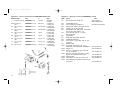
The enemies of radio signals are metal objects, concrete, and water. Mount
FREEXWIREs away from metal objects when possible. Of course, you may be
mounting FREEXWIRE on light stands and brackets, and they generally have a
slight affect on range.
At longer distances it is possible to find dead spots. Moving the FREEXWIRE
Remote unit a few inches in any direction can cure the problem.
Do not use gaffers or duct tape which have metal threads imbedded, on any
FREEXWIRE. Do not mount metallic labels on the units.
When wearing FREEXWIREs, mount them outside your clothing and away from your
body. And, of course, watch out for metal objects on or near you.
Transmitter FW9T units may be mounted close together. FW9T units will trigger
FW8R units at a distance greater than 3 ft (1m) up to the maximum range.
These are the maximum ranges which may be possible under optimum conditions
(vertical antennas, no metal nearby, no nearby radio stations or interference, about
5’ above open field):
Transmitter
FW9T
FW9T
Receiver
FW8R
FW7Q
HI Range*
1000’ (300m)
600’ (175m)
NORM Range (TTL)
500’ (150m)
300’ (90m)
FW10, as a transmitter or receiver, operates at approximately 1/2 of the distances above.
Notes:
* HI range is not recommended for pre-flash systems (digital TTL). HI range can
be used for flash sync, wireless shutter release, or for non pre-flash TTL control
(mostly film cameras). HI range for FW7Q is set via the QF5d panel.
Interference
Do lot locate FREEXWIRE receivers directly on studio flash power packs or other
equipment that generate radio frequency interference, such as most heavy machinery, motors, and of course other transmitters. Arenas, factories, and offices have
other sources of radio “noise” which can include TV camera uplinks, walkie-talkies,
radio and TV broadcast antennas, and cell phone repeaters.
If you cannot remove FREEXWIRE receivers from the area of interference:
Close or partly close the receiver (only!) antennas which will decrease interference. Set FW8R RANGE switch to NORM. Be aware that these measures
will necessarily decrease range as well as cut interference.
20
Accessories may be changed or added periodically. Please consult you dealer
or the Quantum Web page (www.qtm.com) for the latest models available.
Appendix A – Sync-in connections from camera to Transmitter FW9T
Model
434
435
470
FW11
FW12
FW20
FW21
FW22
Description
Sync-in cord- 18” (.5m)
Sync-in cord- 4’ (1.2m)
Hasselblad sync cord
Uni-Mod
Hot Shoe Mount
Sync-in cord- 18”(.5m)
Hot Shoe sync- 18” (.5m)
Hot Shoe sync- 18” (.5m)
From
Camera PC nipple
Camera PC nipple
Hasselblad “C” lens
Camera hot shoe
Camera hot shoe
Camera PC nipple
Camera hot shoe
Camera hot shoe
To
FREEXWIRE Sync-In
FREEXWIRE Sync-In
FREEXWIRE Sync-In
FW9T Accy conn
FW9T Accy conn
FW9T Accy conn
FW9T Accy conn
FW9T Sync-In
Notes
Included with FW9T
Coiled cord
The following require an FW11 Uni-Mod connected to your Transmitter FW9T
unit. These Sync-in connections provide no TTL functions. See Appendix D
for D series adapters which provide additional TTL functions explained in
Sections 7 and 8.
536
537
539
Sync-in cord, 18” (.5m)
Sync-in cord, 5’ (1.5m)
Sync-in cord, 12” (.3m)
Camera PC nipple
Uni-Mod two prong
Hasselblad “C” lens Uni-Mod two prong
Camera PC nipple
Uni-Mod two prong
Coiled cord
Coiled cord
Straight cord
[Note: #536 and 537 serve as Sync-out cords as wel l- see Appendix B]
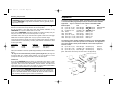
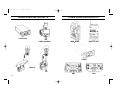
D SERIES QTTL ADAPTERS
FW21
FW20
UNI-MODULE
434
435
470
QF53
536
537
539
21