1
P604A
6/27/07
9:02 PM
Page 16
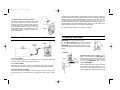
9.2 Receiver FW8R or FW7Q:
Mount and connect one or more of these receivers as in Section 7.2. Connect as
many remote Qflashes as required. Set the remote Qflashes to TTL mode. The
remote TTL Qflashes will expose to the setting of the local “Auto” Qflash.
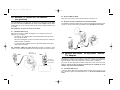
9.3 Additional features with Qflash 4 and 5 series & QTTL Adapters:
Many other Wireless Auto features are available when a Qflash 4 or 5 series is connected to the camera with a D or Dw series Adapter.
The available features include: Wireless ratio control between Qflashes; Wireless
auto-fill; Flash f/# tracking the camera’s f/# setting as it changes; Sensor limit with
any of the preceding modes. Full details of these features are found in the operating manuals for Qflash 4 or 5 and D series QTTL adapters. Operating manuals can
be found at qtm.com if needed.
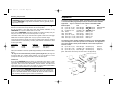
FREEXWIRE ™ FW10(w) [set as a receiver (RX)] Relay unit set it to Relay mode L,
select Special Option for “TTL ON”, set the channel number the same as the
FREEXWIRE ™ TX unit, connect a sync-in cord from the cameras’ sync, or mount
it on the cameras’ hot shoe using a FW11 or FW12 shoe adapter. Connect a
shutter release cord (motor drive cord) from the FW10 to the cameras’ shutter
release connection.
FREEXWIRE ™ (FW8R or FW7Q) Receiver, set to NORM range, connect a sync-out
cord from the unit to the off-camera flash (not needed when using an FW7Q and
Qflash 4d/5d), set the channel Code one higher. For example if FREEXWIRE ™ TX
and FREEXWIRE ™ RX Relay are Code 5, set FREEXWIRE ™ RX to Code 6. If the
first Code TX unit is 7, the next higher Code is 0. Set a Zone “+” (on) which is also
selected on the TX unit.
• The confirmation signal is not possible for this setup.
• Wireless QTTL is not possible for Remote Camera and Remote off-camera
Flash operation.
10.0 Remote Camera and Remote Off-Camera
Flash Operation
• Multiple FREEXWIRE ™ Receivers can be used. Only the FW10(w) can be a
RX Relay unit. See FW10(w) section 8.3.
• Advance Setup with “local” flash and remote TTL or Auto control.
See FW10(w) section 8.4.
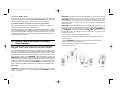
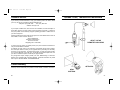
Remote Camera and Remote off-camera Flash operation using Quantum
FREEXWIRE ™ FW8R (or FW7Q with Qflash T4d, T5d), FW9T and FW10(w).
The new FW7Q, FW8R and FW9T are fully compatible with the FW10(w). These
units can be used together to setup remote camera and remote off-camera flash
operation. This setup releases a shutter wirelessly and the camera triggers a remote
flash timed to the shutter release. Careful settings are required for this setup to work.
When the TEST button of the FREEXWIRE ™ FW9T Transmitter is pressed, the
FREEXWIRE ™ FW10(w) [set as a receiver (RX)] Relay unit will activate the camera
shutter function. The camera will delay the flash sync until wake up, auto focusing,
metering, etc. is achieved (this may take up to a second or so), then the shutter opens
and the cameras’ flash sync activates the FREEXWIRE ™ FW10 RX Relay unit which
sends a signal to the (FW8R or FW7Q) Receiver and synchronizes (fires) the flash.
Basic setup:
FREEXWIRE ™ FW9T Tansmitter, set the TTL switch “OFF”, set it to any channel
Code 0 – 7, set the Zones “+” (on) that correspond to the FREEXWIRE ™ Receivers
that you want to fire.
16
17