1
Pre-Installation
™
This device is to be used for building interior
installations only.
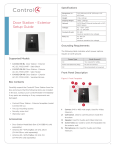
Door Station - Interior
Setup Guide
1
Find the best location for the Door Station. See
“Mounting Tips” below.
2
Install the Door Station Back Box. See the Door
Station Back Box Installation Guide for details.
3
Determine which network and power options
to use (see “Network Options” and “Power
Options”).
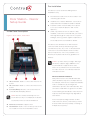
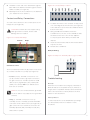
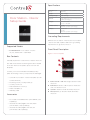
Inside Panel Description
4
(WiFi only). Before the Door Station is fully
installed, Control4 recommends that you test the
Figure 2. Door Station, Inside Panel
WiFi signal strength in Composer Pro’s System
Manager; a strong, robust signal is required. See
3
1
the Composer Pro User Guide for details.
This device uses an Ethernet or WiFi network
connection and can be powered using Power
over Ethernet (PoE), AC, or DC. A wired network
connection is recommended for the best video
intercom experience. If it is not possible to use
Ethernet, then please follow these guidelines for
wireless.
NOTES: (1) Video intercom usage. Although
this device supports b/g/n, 802.11 b is not
recommended or supported for video
intercom. (2) Wireless-N is recommended
for video intercom. See “Wireless Network
Limitations” below.
Wireless Network Limitations
5
1
2
4
AC connection. Used to connect the wires for AC
power.
2
DC connection. Used to connect the wires for DC
power.
3
Contacts/Relays. Used to connect the wires for
Control4 and third-party devices.
NOTE: Use the contacts and relays for nonsecure devices only. For example, don’t attach
secured door wires to this terminal block.
4
Ethernet connection. Supports PoE.
5
Reset Button. Used to reset or factory restore the
Door Station. Press the vertical bar to reset.
2
Many WiFi Access Points handle Multicasts
(WiFi simultaneously sent to multiple devices,
for example, when the Door Station broadcasts
video to all stations) by slowing down
transmission speed to the 1 Mb basic rate. This
can cause overall WiFi congestion in the WiFi
network during the broadcast. Video intercom
response times and images may degrade at
each device.
If a home requires a large number of WiFi
video intercom devices, ensure that you have
a robust WiFi network (possibly consisting of
multiple access points).