1
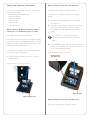
To install the Door Station with Ethernet and DC
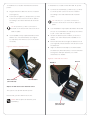
To install the Door Station with WiFi and AC power:
power:
1
1
2
Connect the neutral (N) (-) and hot (L) (+) wires
Plug the Ethernet cable into the Door Station
to the AC power source for the Door Station
(see Figure 5).
according to the national and local electrical
Connect the negative (-) and positive (+) wires
codes.
to the DC power source for the Door Station
according to the national and local electrical
TIP: The hot or ‘L’ (+) wire’s connector is
codes.
closest to the bottom of the Door Station’s
plate.
TIP: The positive (+) wire’s connector is
located on the bottom left side of the Door
2
Your installation may require alternative wires and
the use of a terminal block. Strip the power wires
Station’s plate.
to 1/4” on the end if necessary.
3
Your installation may require alternative wires
3
Attach the antenna (3m or 26cm) to the Door
and the use of a terminal block (see Figure
Station. See “WiFi Antenna Kit Installation” for
5). Strip the power wires to 1/4” on the end if
details.
4
necessary.
Run the antenna wire through the back box hole
(see Figure 6). Ensure that the wire doesn’t touch
the back box.
Figure 5. Ethernet with DC Power
5
Align the antenna vertically to the wall outside
the back box (26cm antenna) or run the antenna
through the wall (3m antenna). See “WiFi
Antennnas” for details.
Figure 6. WiFi with AC Power
Back Box
DC Connections
(Hot and Load)
Antenna
Ethernet Cable
Option 4: WiFi Connection with AC Power
This option sets up WiFi and AC power.
Ensure that you have WiFi in the home.
NOTE: WiFi requires an antenna (sold
separately).
AC Connections
(Hot and Load)
5