1
GCA70–281
11
Troubleshooting Your Telephone
Troubleshooting
Your Telephone
Should your Impact telephone fail to operate properly, or if you do not
understand why it is operating in a certain manner, review the following
list of symptoms and causes for help.
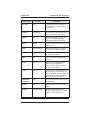
SYMPTOM
INTERCOM light is
flashing.
MESSAGE light (models
8312S, 8324S)
or
HOLD light (models 8012S,
8024S) is flashing.
MUTE light is on.
SPEAKER light on steady.
Error Tone
(three steady tones)
You can not receive a voice
announce call.
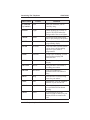
POSSIBLE CAUSE
Your messaging is set. Dial
INTERCOM, then # 0 2 and hang up.
Another telephone has activated your
message waiting light.
Press MESSAGE (or INTERCOM and
then HOLD) to retrieve message. This
action will call the party who activated
light. Once you have received message,
party who activated light (while still
talking to you) must press INTERCOM
to turn off the light. (See Appendix A.)
MUTE is activated.
To cancel, press MUTE.
Background music feature activated even
though you may not have background
mustic provided. Dial INTERCOM then
#1 and hang up to cancel.
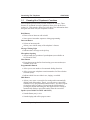
May occur when incorrect buttons are
pressed during autodial or speed dial
programming. For example, if a button
has a line assigned to it, it is not available
as a programmable button and an error
tone sounds if it is pressed during
programming.
Voice announce block has been activated.
To cancel (if desired), dial INTERCOM
then # 2.
NOTE: Press and hold the dialpad 1 Button while connecting the line
cord to perform a self test.
LCD Speakerphone Station User's Guide 11 – 1