1
Chapter 3:
Menu System
This chapter shows you how to access and navigate the onboard Menu
system and the options available for each menu with examples.
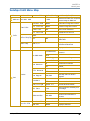
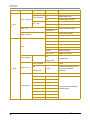
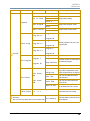
Menu System Overview
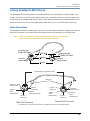
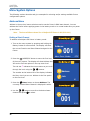
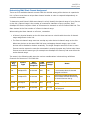
The front panel on SolaSpot LED fixtures has a full color LCD screen and navigation buttons to
display and operate the onboard menu system. You can use the Menu system to perform the
following functions at the fixture level:
• Assign a DMX start channel
• Access and set fixture options
• View fixture status
• Create preset programs
Menu display
Menu system buttons
Address
001
SolaSpot LEDTM User Manual
01-01
17