1
Installing the Software
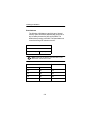
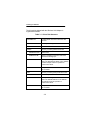
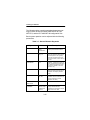
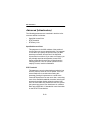
Additional system performance adjustments can be made
with the following parameters.
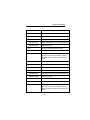
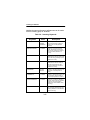
Table 3.10 - Infrastructure Keywords
Keywords
Value
Description
BEACONLOSTTIME
0 – 0xFFFF
Optional – determines the interval of
consecutively missed beacons
which will cause a re-scan (default is
500 Kµsec).
REFRESHINTERVAL
0 – 0xFFFF
Optional – determines the amount of
time in seconds between refresh
packets to the Access Point. Use
0xFFFF to disable (default is 10,000
Kµsec [10 sec]).
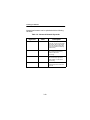
SPECIFIEDAPTO
0 – 0xFFFF
Optional – time in Kµsec to attempt
to associate to a specified Access
Point before searching for any available Access Points (with matching
SSID) (default is 10,000 Kµsec [10
sec]).
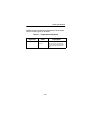
AUTHTIMEOUT
0 – 0xFFFF
Optional – time to attempt to authenticate to an Access Point (default is
2,000 Kµsec [2 sec]).
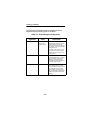
AUTHTYPE
OFF, OPEN,
HAREDKEY,
ENCRYPTONLY
Optional – determines the level of
security of the wireless network
(default is OPEN).
ASSOCIATIONTO
0 – 0xFFFF
Optional – indicates the maximum
amount of time the client will wait for
a response to an association
request from the Access Point
(default is 2,000 Kµsec [2 sec]).
3-23