1
4.Printer Settings
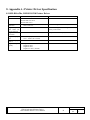
For the paper size, the graphics printing resolution and the print quality paper sizes that can be specified in each driver, see
Appendix A.
5.Printer Fonts
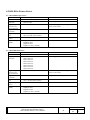
For the printer fonts that can be specified by each driver, see Appendix A. Also, for the point sizes that can be specified for
each printer font, see Appendix B.
6.Special Functions
Using this driver, the inherent functions of the DM-D customer display can be executed.
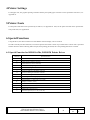
In order to actually use these functions, an exclusive printer font called “control” is provided. If the “control” font is specified
and the characters in the following table are input, then printing performed, the corresponding function is executed.
6.1.Special Function for DM-D10x/20x, DM-D120 Printer Driver
Character
Special Function
a
Clear screen (CLR)
b
Clear 1st line (CAN for 1st Line)
c
Clear 2nd line (CAN for 2nd Line)
d
Screen is always lighting
e
Screen is blinking at 10x50msec intervals
f
Screen is blinking at 20x50msec intervals.
G
Screen is blinking at 40x50msec intervals
h
Screen is blinking at 60x50msec intervals.
I
Put out light with saving displayed contents.
J
Set and display a counter time. (US T h m)
k
Display a counter. (US U)
l
Enable reversed character (US r n)
m
Disable reversed character (US r n)
n
Define macro process (US :)
o
Do macro process (US ^ n m, n=5 m=60)
TITLE
Revision
EPSON Advanced Printer Driver
DM-D Printer Driver User’s Manual
No
NEXT
B
11
SHEET
10