1
Nexys3 Reference Manual
Configuration
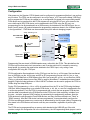
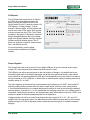
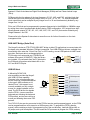
After power-on, the Spartan-6 FPGA board must be configured (or programmed) before it can perform
any functions. The FPGA can be configured in one of four ways: a PC can use the Adept "USB Prog"
port to program the FPGA any time power is on; a configuration file stored in the non-volatile parallel
PCM device can be transferred to the FPGA at power-on using the BPI-UP port; a file stored in the
non-volatile serial (SPI) PCM device can be transferred to the FPGA using the SPI port; or a
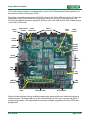
programming file can be transferred from a USB memory stick attached to the USB HID port. An onboard "mode" jumper (J8) selects between the programming modes as shown in the J8 Mode legend
in the figure below. JTAG Mode can be accessed at any time without changing jumpers.
Adept “USB Prog” Port
USB
Controller
Micro-AB USB
Connector
JTAG
Port
6-pin JTAG
Header (J7)
Micron SPI Quad
mode PCM (P5Q)
BPI
Port
Micron Parallel
PCM (P8P)
1x6 JTAG
Header
M0 M1
J8
M0
M1
Spartan6
Host Port
Type A USB
Connector
SPI
Port
2
PIC24
Serial
Prog. Port
Done
BPI UP
SPI
SLV Serial
Programming
Mode
Prog
Programming files are stored in SRAM-based memory cells within the FPGA. This data defines the
FPGA’s logic functions and circuit connections, and it remains valid until it is erased by removing
board power, by pressing the reset button attached to the PROG input, or by writing a new
configuration file using the JTAG port.
FPGA configuration files transferred via the JTAG port use the .bin or .svf file types, files transferred
from a USB stick use the .bit file type, and BPI or SPI programming files can use .bit, .bin, or .mcs
types. The ISE/WebPack or EDK software from Xilinx can create bit, svf, bin, or mcs files from VHDL,
Verilog, or schematic-based source files (EDK is used for MicroBlaze™ embedded processor-based
designs). Digilent's Adept software or Xilinx's iMPACT software can be used to program the FPGA or
ROMs using the Adept USB port.
During JTAG programming, a .bit or .svf file is transferred from the PC to the FPGA using the Adept
USB port. When programming a non-volatile PCM device, a .bit, .bin, or .mcs file is transferred to the
in a two-step process. First, the FPGA is programmed with a circuit that can program PCM devices,
and then data is transferred to the PCM device via the FPGA circuit (this complexity is hidden from
the user – a simple “program ROM” interface is presented by the programming software. Note the
PCM devices are next-generation Flash ROM devices, and they are often referred to as "Flash" or
"ROM" memory). After the PCM device has been programmed, it can automatically configure the
FPGA at a subsequent power-on or reset event as determined by the J8 jumper setting. Programming
files stored in the PCM devices will remain until they are overwritten, regardless of power-cycle
events.
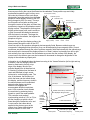
The FPGA can be programmed from a memory stick attached to the USB-HID port if the stick
contains a single .bit configuration file in the root directory, the J8 Programming Mode jumper is set to
Doc: 502-182
page 2 of 22