1
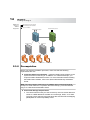
Quest NetVault Backup Plug-in for VMware User’s Guide INSTALLING 2.1.0 Available Editions Deploying Plug-in for VMware Prerequisites Installing Plug-in for VMware Removing Plug-in for VMware 13 Chapter 2: THE PLUG-IN Available Editions The Plug-in for VMware is available in two editions. 2.2.0 ESX Server Edition – The ESX Server Edition provides protection to virtual machines hosted by one or more ESX Servers. This edition can be deployed on any Windows-based or Linux-based NVBU Client. The number of ESX Servers that you can add to a client running the ESX Server Edition of the plug-in will depend on the capacity specified in the purchased license. Enterprise Edition – The Enterprise Edition provides protection to virtual machines controlled by one or more ESX or vCenter Servers. This edition can be deployed on any Windows-based or Linux-based NVBU Client. You can add any number of ESX or vCenter Servers to a client running the Enterprise Edition of the plug-in. Deploying Plug-in for VMware The Plug-in for VMware can be deployed on any Windows-based or Linux-based NVBU Client that has access to the virtual disk storage. This type of deployment enables centralized backup administration and off loads backup I/O from the ESX Server. The ESX Server is only required to generate the snapshot checkpoint which is recorded in the disk. This results in a minimal performance impact on the ESX Server. With a vCenter Server, the plug-in takes advantage of the vMotion technology to track migration and automatically back up a virtual machine from its current host.