1
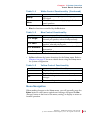
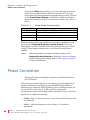
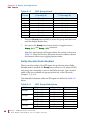
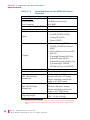
C h a p t e r 2 System Overview Front Panel Controls Table 2–1 White Control Functionality (Continued) Button Group Mute Functionality Selects the channel groups and subgroups for an SDI signal Mutes the audio currently playing in the front panel speakers • Blue for functions controlled by the Fn button. Table 2–2 Blue Control Functionality Button Fn + Single Fn + Pairs Fn + Downmix Fn + Setup Functionality Selects single channel monitoring mode: one channel per speaker, selected independently Selects pair monitoring mode: one channel per speaker, selected pair by pair Selects downmix mode: one of several available downmixes Displays the Setup menu • Yellow indicates the button functions for the Setup menu. Refer to Chapter 6 on page 55 for more details about using the Setup menu for system configuration. Table 2–3 Yellow Control Functionality Button Esc Enter Functionality Displays the previous menu item Displays the next menu item Returns to the previous menu and cancels changes Returns to the previous menu and saves changes Menu Navigation When making changes to the Setup menu, you will generally press the Enter button to select menu options and settings, and press the Esc (Escape) button to back out of the menu, setting, or display to return to normal operation. 8 2 1 0 1 6 : A M P x- E 8 S e r i e s U s e r G u i d e © 2 0 1 1 Woh l er Te c h n o l o g i es , I n c . A ll r i g h t s r e se r ve d . 13