1
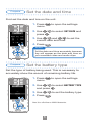
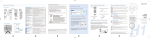
Set the date and time
Prepare
First set the date and time on the unit.
1. Press
to open the settings
menu.
2. Use
to select SET DATE and
/
press
.
3. Use
/
and
/
to set the
current date and time.
1,4
4. Press
.
MEMO
2,3
Set the date and time accurately because
they will appear as the date and time on
your recorded video and audio clips.
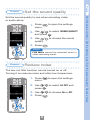
Set the battery type
Prepare
Set the type of battery being used. This is necessary to
accurately show the amount of remaining battery life.
1. Press
to open the settings
menu.
2. Use
/
to select BATTERY TYPE
and press
.
3. Use
1,4
/
4. Press
to set the battery type.
.
Note: Use alkaline or NiMH batteries.
2,3
1