1
Starting EPSON TWAIN Pro or EPSON TWAIN Pro
Network
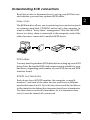
To scan when the scanner is directly connected to your computer,
you must start EPSON TWAIN Pro. When scanning over a
network, you must first start up the scanner server PC containing
EPSON Scan Server, then start TWAIN Pro Network on the
computer from which you want to scan.
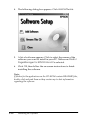
You can start EPSON TWAIN Pro and EPSON TWAIN Pro
Network from a TWAIN-compliant application on your
computer. Or, if the scanner is connected directly to your
computer, you can start EPSON TWAIN Pro by pressing your
scanner’s a Start button. This section explains how to do both.
Note:
❏ You cannot start EPSON TWAIN Pro Network by pressing the
scanner’s a Start button.
❏ Even if your application supports TWAIN, some features of EPSON
TWAIN Pro may not be available depending on the application.
❏ When your scanner is connected directly to your computer, you can
also set up the Start Button feature to start the scanner software,
scan, and send the scanned document to a preselected application or
output device with one press of the a Start button. For instructions
on setting up your system to do this, see “Setting Up the Start
Button” in the online Reference Guide.
4-8
Using Your Scanner