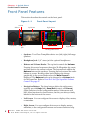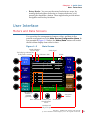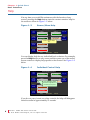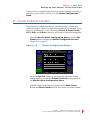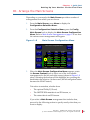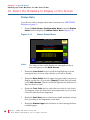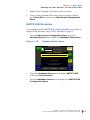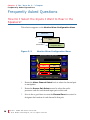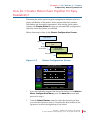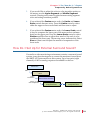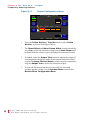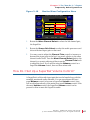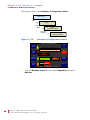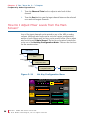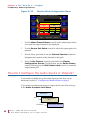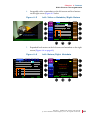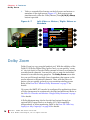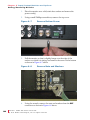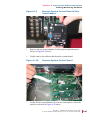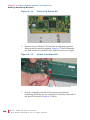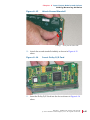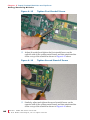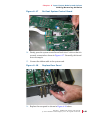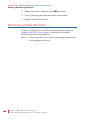
1
AMP2-16V Series • AMP2-16V-3G • AMP2-E16V-3G Modular Audio/Video Management and Monitoring Platform User Guide (Software Release: V5.00) Part Number 821116, Revision B © 2011 Wohler Technologies, Inc. All rights reserved. This publication is protected by federal copyright law. No part of this publication may be copied or distributed, stored in a retrieval system, or translated into any human or computer language in any form or by any means electronic, mechanical, manual, magnetic, or otherwise, or disclosed to third parties without the express written permission of Wohler Technologies. Reproduction Licensed users and authorized distributors of Wohler Technologies, Inc. products may copy this document for use with Wohler Technologies., Inc. products provided that the copyright notice above is included in all reproductions. Customer Support Wohler Technologies, Inc. 31055 Huntwood Avenue Hayward, CA 94544 www.wohler.com Phone: 510-870-0810 FAX: 510-870-0811 US Toll Free: 1-888-596-4537 (1-888-5-WOHLER) Web: www.wohler.com Sales: [email protected] Support: [email protected] Disclaimers Even though Wohler Technologies, Inc. has tested its equipment and software, and reviewed the documentation, Wohler Technologies, Inc makes no warranty or representation, either express or implied, with respect to software, documentation, their quality, performance, merchantability, or fitness for a particular purpose. In no event will Wohler Technologies, Inc. be liable for direct, indirect, special, incidental, or consequential damages resulting from any defect in the hardware, software, or its documentation, even if advised of the possibility of such damages. Some states do not allow the exclusion or limitation for incidental or consequential damages, so the above exclusion or limitation may not apply to you. Printing This document is intended to be printed on a duplex printer, such that the copy appears on both sides of each page. This ensures that all new chapters start on a right-facing page. This document looks best when printed on a color printer since some images may be indistinct when printed on a black and white printer. PDF All text strings appearing in this shade of blue are hyperlinks. Other Technologies and Products Dolby is a registered trademark of Dolby Laboratories, Inc. Microsoft Windows, and Internet Explorer are registered trademarks of Microsoft Corporation. Last Update July 26, 2011 ii 821116: A M P 2 - 1 6 V S er ie s U s e r G u i d e © 2 0 1 1 Wo h l e r Tec h n o l o g i e s , I n c. A l l r i g h t s r e s er ve d . Table of Contents Chapter 1. Quick Start. . . . . . . . . . . . . . . . . . . . . . . . . . . . . 1 Introduction ...................................................................1 Overview..................................................................1 Topics ......................................................................1 Front Panel Features ........................................................2 User Interface.................................................................3 Meters and Data Screens ............................................3 Help ........................................................................4 Setting Up Your Monitor for the First Time ..........................5 I. Configure the Monitor Mixer ....................................5 II. Create Channel Clusters ........................................7 III. Arrange the Main Screens .....................................9 IV. Select the Metadata to Display on the Screen ......... 10 Status Data ...................................................... 10 SMPTE 2020 Metadata........................................ 11 Dolby Metadata ................................................ 13 V. Save Your Setup in a Preset .................................. 15 Getting Support ............................................................ 16 Chapter 2. Installation . . . . . . . . . . . . . . . . . . . . . . . . . . . 17 Introduction ................................................................. 17 Overview................................................................ 17 Topics .................................................................... 17 Safety ......................................................................... 18 Important Safety Instructions ................................... 18 Safety Symbols ....................................................... 19 821116: AMP2-16V Series User Guide © 2 0 1 1 Woh l er Te c h n o l o g i es , I n c . A ll r i g h t s r e se r ve d . iii Installation Recommendations.........................................19 Mounting ................................................................19 Heat Dissipation ......................................................19 Sympathetic Vibration ..............................................20 Mechanical Bracing ..................................................20 Connections and Cable Recommendations ...................20 Electrical Interference ..............................................20 Power ....................................................................21 FCC Compliance ............................................................21 Rear Panel Connectors ...................................................21 Standard Connectors................................................21 Optional I/O Modules and Rear Panel Connectors .........23 Basic Connections..........................................................23 Chapter 3. The “How Do I...” Chapter . . . . . . . . . . . . . . . 25 Introduction..................................................................25 Overview ................................................................25 Topics ....................................................................25 Notation .......................................................................26 Frequently Asked Questions ............................................28 How Do I Select the Inputs I Want to Hear in the Speakers?...............................................................28 How Do I Cluster Meters Pairs Together for Easy Readability? ............................................................29 How Do I Customize the Meter Scales? .......................30 How Do I Set Up for External Surround Sound?............31 How Do I Configure a Stereo Downmix for My External Surround Sound? ...................................33 How Do I Synchronize Internal Speaker Audio with an External Video Source?..................................34 How Do I Synchronize External Surround Sound Audio with Video? ..........................................35 How Do I Monitor Dolby Bitstreams? ..........................37 iv 821116: A M P 2 - 1 6 V S er ie s U s e r G u i d e © 2 0 1 1 Wo h l e r Tec h n o l o g i e s , I n c. A l l r i g h t s r e s er ve d . How Do I Decode and Monitor a Single Dolby Bitstream? ..................................................... 38 How do I Display Dolby CRC Error Counts?.................. 40 How do I Display Dolby E Line Number (Guard Band)? ........................................................ 42 How Do I Use Presets to Change Inputs? .................... 44 How Do I Quickly Recall Presets from the Main Screen? .......................................................... 45 How Do I Set Up a SuperPair to Monitor Intercom or Other Sources? ...................................... 46 How Do I Set Up a SuperPair Volume Control? ............. 47 How Do I Mix Any Input(s) to Any Output(s)?.............. 49 How Do I Adjust Mixer Levels from the Main Screen? .......................................................... 50 How do I Show Mixer Output Levels on the Level Meters?.......................................................... 51 How Do I Configure the Audio Inputs or Outputs? ........ 52 How Do I Set the Clock Source? ................................ 53 How Do I Terminate/Unterminate AES Inputs?............. 55 How Do I Lock Entry to the Menus?............................ 56 How Do I Find Software Version Information? .............. 57 Chapter 4. Features. . . . . . . . . . . . . . . . . . . . . . . . . . . . . . 59 Introduction ................................................................. 59 Overview................................................................ 59 Topics .................................................................... 59 Simultaneous Multi-Format Monitoring ............................. 60 Monitoring Cluster Selection ........................................... 60 Instant Stereo Downmix................................................. 61 Loudness Monitoring ...................................................... 61 High Quality Audio System ............................................. 61 Internal Router and Mixer............................................... 62 Audio Processor Cards ................................................... 64 821116: AMP2-16V Series User Guide © 2 0 1 1 Woh l er Te c h n o l o g i es , I n c . A ll r i g h t s r e se r ve d . v Genlock Input ...............................................................64 Audio Monitoring Delay ..................................................65 SDI Input Audio Monitoring Delay ....................................65 Toslink (SPDIF) Optical Input ..........................................65 Expanded Metering and Data Screens...............................66 Wide Selection of Video Formats......................................66 Main Screen Arrangements .............................................67 Dolby Zoom ..................................................................70 SuperPair Input .............................................................71 Standard and Custom Meter Scales ..................................71 Phase Monitoring ...........................................................71 Dolby E Line Position Display...........................................72 Dolby CRC Error Counter Display .....................................72 Status/Metadata Hot Keys ..............................................72 32 Complete System Presets...........................................73 Automated Preset Changes .............................................73 Bright, Clear Displays.....................................................73 Menu Lock ....................................................................74 Chapter 5. Menu List. . . . . . . . . . . . . . . . . . . . . . . . . . . . . 75 Introduction..................................................................75 Overview ................................................................75 Topics ....................................................................75 Menu Navigation Overview..............................................76 3G SDI I/O Configuration Menu .......................................78 5.1 Downmix Parameters Screen .....................................79 AES Input Configuration Menu.........................................80 AES/Analog Output Configuration Menu ...........................81 Follow Monitor Mode Controls ....................................82 Free Mix Mode Controls ............................................83 vi 821116: A M P 2 - 1 6 V S er ie s U s e r G u i d e © 2 0 1 1 Wo h l e r Tec h n o l o g i e s , I n c. A l l r i g h t s r e s er ve d . Arbitrary Phase Measurement Menu ................................. 84 Audio Processor Card Menu ............................................ 86 Automation Menu .......................................................... 87 Controls ................................................................. 89 Adding an Auto Mode Hot Key ................................... 90 Cluster Configuration Screen........................................... 90 Configuration Selection Menu .......................................... 92 Dolby Decoder Configuration Menu .................................. 93 Dolby Zoom Screen ...................................................... 99 Ethernet Setup Screen ................................................. 101 Hardware Configuration Menu ....................................... 102 Hot Key Configuration Menu 1 Through 8........................ 105 Hot Key Configuration Menu 9 Through 16 ...................... 106 Label Menu .............................................................. 107 Loudness Measurement Menu ....................................... 109 Main Screen ............................................................... 110 Main Screen Configuration Menu ................................... 111 Metadata Select Menu.................................................. 112 Meter Configuration Menu............................................. 114 Monitor Mixer Configuration Menu.................................. 116 Option Configuration Menu ........................................... 119 Preset Management Menu ............................................ 120 Select Menu Lock Combination ...................................... 122 SMTPE 2020 Configuration Menu ................................... 124 Status Select Menu...................................................... 125 Unit Information Menu ................................................. 126 821116: AMP2-16V Series User Guide © 2 0 1 1 Woh l er Te c h n o l o g i es , I n c . A ll r i g h t s r e se r ve d . vii Chapter 6. Input/Output Modules and Options . . . . . . . 129 Introduction................................................................ 129 Overview .............................................................. 129 Topics .................................................................. 129 Distinctions Among Models ........................................... 130 Optional I/O Modules ............................................. 130 Standard Models.................................................... 131 Menu Modifications for Input I/O Modules ................. 131 3G/HD/SD-SDI Card .................................................... 132 3G/HD/SD-SDI Rear Panel Adaptor .......................... 132 Menu Modifications ................................................ 132 Inputs ............................................................ 132 Outputs .......................................................... 133 Connector Pin Outs ................................................ 133 AES Input Card ........................................................... 134 AES Input Rear Panel Adaptor ................................. 134 Menu Modifications ................................................ 135 AES Output Card ......................................................... 135 Rear Panel Adaptor ................................................ 135 Menu Modifications ................................................ 136 Analog I/O Card .......................................................... 136 Rear Panel Adaptor ................................................ 136 Menu Modifications ................................................ 137 Connector Pin Outs ................................................ 137 Analog I/O and SPDIF TOSLINK Card ............................. 140 Rear Panel Adaptor ................................................ 140 Menu Modifications ................................................ 140 Connector Pin-Outs ................................................ 141 Dolby D/E Card ........................................................... 141 viii 821116: A M P 2 - 1 6 V S er ie s U s e r G u i d e © 2 0 1 1 Wo h l e r Tec h n o l o g i e s , I n c. A l l r i g h t s r e s er ve d . Adding a Redundant Power Supply................................. 141 Precautions........................................................... 141 Requirements ....................................................... 142 Adding the Power Supply ........................................ 142 Adding/Removing Modules............................................ 142 Precautions........................................................... 143 Requirements ....................................................... 143 Adding a Dolby D/E Card ........................................ 143 Removing a Dolby D/E Card .................................... 150 Adding an I/O Module ............................................ 151 Adding a 3G Option Card .................................. 151 Adding a Non-3G Card I/O Module ..................... 152 Removing an I/O Module ........................................ 153 Option Kits ................................................................. 154 Chapter 7. Specifications . . . . . . . . . . . . . . . . . . . . . . . . 157 Introduction ............................................................... 157 Overview.............................................................. 157 Topics .................................................................. 157 Compliance ................................................................ 158 Standards .................................................................. 158 Specifications ............................................................. 158 Chapter 8. Troubleshooting. . . . . . . . . . . . . . . . . . . . . . . 161 Introduction ............................................................... 161 Overview.............................................................. 161 Topics .................................................................. 161 Normal Messages ........................................................ 162 No IP Address ....................................................... 162 Inconsistent Module List ......................................... 163 Restart................................................................. 163 821116: AMP2-16V Series User Guide © 2 0 1 1 Woh l er Te c h n o l o g i es , I n c . A ll r i g h t s r e se r ve d . ix Error Messages ........................................................... 164 Front Panel Error ................................................... 164 Minor Issue........................................................... 164 Serial Port Access .................................................. 165 x 821116: A M P 2 - 1 6 V S er ie s U s e r G u i d e © 2 0 1 1 Wo h l e r Tec h n o l o g i e s , I n c. A l l r i g h t s r e s er ve d . CHAPTER 1 Quick Start Introduction Overview This chapter describes how to use the front panel controls and the user interface menu system. For a more in-depth description of each menu, refer to Chapter 5: Menu List on page 75. Topics Topics Introduction Page 1 Front Panel Features 2 User Interface 3 Setting Up Your Monitor for the First Time 5 Getting Support 16 8 2 1 1 1 6 : A M P 2 - 1 6 V S e r i e s Us e r G u i d e © 2 0 1 1 Wo h l e r Tec h n o l o g i e s, I n c. A l l r i g h t s r e s er ved . 1 Chapter 1 Quick Start Front Panel Features Front Panel Features This section describes the controls on the front panel. Figure 1–1 Volume Balance Left Speaker Front Panel Layout Right Screen Left Screen Headphone Jack Navigation Buttons Right Speaker Hot Keys/Menu Knobs • Speakers: Two Class D amplifiers drive two (left/right) full range speakers. • Headphone Jack: 1/4” stereo jack for optional headphones. • Balance and Volume Knobs: The top knob controls the Volume. Pressing this control sequences through a 20 dB speaker dip, mute, and then back to the current volume. The bottom knob adjusts the Balance between the speakers. Pressing the knob returns the audio balance to center. Rotating either knob displays the change graphically in the screen header when the Main Screen is displayed. The Balance knob can be changed to a Volume knob for the SuperPair. Refer to How Do I Set Up a SuperPair Volume Control? on page 47. • Navigation Buttons: The three buttons below the right screen typically provide Help (left), Save/Exit (center), and Cancel (right) functions for the configuration menus. Some menus will have other functions for these buttons, but they are always clearly labeled at the bottom of the screen. • Left Screen: You can configure this screen to display video, meters, or metadata. • Right Screen: You can configure this screen to display meters, metadata, or the configuration menus and context-sensitive help. 2 821116: A M P 2 - 1 6 V S er ie s U s e r G u i d e © 2 0 1 1 Wo h l e r Tec h n o l o g i e s , I n c. A l l r i g h t s r e s er ve d . C h a p t e r 1 Quick Start U s e r I n t e rf a c e • Rotary Knobs: You can use the rotary knobs in two ways: by turning the knob either clockwise or counter-clockwise, or by pressing the knob like a button. These eight knobs provide menu navigation and hot key functions. User Interface Meters and Data Screens You can select the arrangement of meters, video, and data in five possible configurations on the Main Screen Configuration Menu. In our example in Figure 1–2 below, the Video/Data button will switch the left screen display from video to data. Figure 1–2 Main Screen Speaker Indicators: Left and Right The Dolby logo indicates the Dolby Card is installed. Dolby 5.1 Down Mix AES 1 Dolby Zoom Pair 6 Dolby Signal Speaker Indicators: Both Volume +0 0 D -10 o l b -20 y 5 -30 . 1 D o w n A E S A E S 1 2 M i x A n l g A n l g 1 2 0 -10 -20 -30 -40 -40 -50 -50 -60 -60 -60 F F Video/Data -28 LKFS Menu Swap The measured loudness is displayed graphically. Phase Indicators Anlg 1 Anlg 2 Status Meta Recall MyMix Navigation Buttons Loudness of the selected channel cluster. Level Meters Hot Keys and Hot Key Descriptions 821116: AMP2-16V Series User Guide © 2 0 1 1 Woh l er Te c h n o l o g i es , I n c . A ll r i g h t s r e se r ve d . 3 Chapter 1 Quick Start U s e r I n t e r f a ce Help If at any time you would like assistance with the function of any control, pressing the Help button starts the context-sensitive help for the screen as shown in Figure 1–3 below. Figure 1–3 Screen/Menu Help Copy From Save Current Config Rename Preset Clear Preset Preset Management Menu Preset 1: User Preset 1 Preset 4: User Preset 4 Preset 1: Current Config User Preset 1 User Preset 1 Press a control to display help. Copy To Recall On Powerup Preset 1: User Preset 1 Preset 4: User Preset 4 Help Save / Exit Cancel You can display help for any individual knob or button. For example, press the Help button on any screen and then press one of the menu/ screen controls to display help specific to that control. See Figure 1–4 below. Figure 1–4 Individual Control Help Copy From Save Current Config Rename Preset Clear Preset Preset Management Menu Preset 1: User Preset 1 Preset 4: User Preset 4 Preset 1: Current Config User Preset 1 User Preset 1 Turn to select which Preset the current configuration is to be saved into, then press. Preset 1: User Preset 1 Copy To Recall On Powerup Preset 4: User Preset 4 Help Save / Exit Cancel If you do not press/rotate any other controls, the help will disappear from the screen in approximately 15 seconds. 4 821116: A M P 2 - 1 6 V S er ie s U s e r G u i d e © 2 0 1 1 Wo h l e r Tec h n o l o g i e s , I n c. A l l r i g h t s r e s er ve d . C h a p t e r 1 Quick Start S e t t in g U p Y o u r M o n it o r f o r t h e F i rs t T i m e Setting Up Your Monitor for the First Time To set up your monitor quickly and efficiently, we recommend that you set up your initial configuration in the order listed below. 1. Configure the Monitor Mixer: Select the inputs to be monitored. 2. Create channel clusters: Cluster the monitored channel meters to make them most readable. 3. Arrange the Main Screen: Configure the Main Screen arrangement. 4. Select the metadata to display on the screen (if you want to display metadata). 5. Save your setup into a preset. Press the Menu button on the Main Screen to display the Configuration Selection Menu. I. Configure the Monitor Mixer While the Monitor Mixer Configuration Menu (Figure 1–5) provides a number of feature adjustments, only a few are needed for you to get started. (The other feature adjustments are explained later in this manual in Chapter 5: Menu List on page 75.) Figure 1–5 Monitor Mixer Configuration Menu Monitor Mixer Configuration Menu Set Clusters Delay to Speakers = 170 mS Mixer Channel Select Channel Func Dolby 5.1 Slot 2 SDI-3G In Pair 4 Slot 2 SDI-3G In Pair 5 Chan 1 Chan 2 Chan 3 Chan 4 L Front R Front Center LFE +0 +0 +0 +0 Channel Trim Help Save / Exit Cancel Audio Delay Source Pair Select Speaker Mute: Off Phase LED On/Off 821116: AMP2-16V Series User Guide © 2 0 1 1 Woh l er Te c h n o l o g i es , I n c . A ll r i g h t s r e se r ve d . 5 Chapter 1 Quick Start S e t ti n g U p Y o u r M o n i t o r f o r t h e F ir st T i me Table 1–1 Channel Number 1. To get to the Configure Monitor Mixer Menu, press the Menu button to enter the Configuration Selection Menu and then press the Configure Monitor Mixer knob. 2. Before setting up the monitor mixer, it is wise to plan where you want each channel you need to monitor to appear on the metering screen. Table 1–1 may help. Channel List Cluster Name (Ex: 5.1 Dolby) Channel Source (Ex: Slot 2: 3G-SDI In/Pair 4) 1 2 3 4 5 6 7 8 9 10 11 12 13 14 15 16 6 821116: Channel Function (Circle One) LF LF LF LF LF LF LF LF LF LF LF LF LF LF LF LF RF RF RF RF RF RF RF RF RF RF RF RF RF RF RF RF C C C C C C C C C C C C C C C C LFE LFE LFE LFE LFE LFE LFE LFE LFE LFE LFE LFE LFE LFE LFE LFE LS LS LS LS LS LS LS LS LS LS LS LS LS LS LS LS RS RS RS RS RS RS RS RS RS RS RS RS RS RS RS RS LRearS LRearS LRearS LRearS LRearS LRearS LRearS LRearS LRearS LRearS LRearS LRearS LRearS LRearS LRearS LRearS RRearS RRearS RRearS RRearS RRearS RRearS RRearS RRearS RRearS RRearS RRearS RRearS RRearS RRearS RRearS RRearS 3. To select the inputs that will source each of the displayed and monitored pairs, rotate the Mixer Channel Select knob to the channel pair and then use the Source Pair Select to pick a channel pair from the available inputs. 4. Then use the Channel Function to assign a function such as Left Front, Center, Left Surround, or whatever function you want this channel to have. This assignment affects how this signal is treated in other parts of the AMP2-16V, and is essential for correct monitoring operation, especially in terms of the speaker mix and the loudness measurement and external surround positioning. A M P 2 - 1 6 V S er ie s U s e r G u i d e © 2 0 1 1 Wo h l e r Tec h n o l o g i e s , I n c. A l l r i g h t s r e s er ve d . C h a p t e r 1 Quick Start S e t t in g U p Y o u r M o n it o r f o r t h e F i rs t T i m e After you have completed this process for all the channels you want to monitor, you are ready to move on to the Cluster Configuration Menu. II. Create Channel Clusters In the Cluster Configuration Screen, you will group, or cluster the channels together which you consider to be related. For example, if you have set up a discrete 5.1 set of channels (L Front, R Front, Center, LFE, L Surr, and R Surr), then you will want to cluster them together. 1. From the Monitor Mixer Configuration Menu, press the Set Cluster knob to display the Cluster Configuration Screen (Figure 1–6 on page 7). Figure 1–6 Cluster Configuration Screen Cluster Configuration Screen Cluster Start 1 2 0 -10 -20 Edit Cluster Label Cluster Configuration Screen P a i r P a i r P a i r P a i r P a i r P a i r P a i r P a i r 1 2 3 4 5 6 7 8 Cluster End 0 -10 -20 -30 -30 -40 -40 -50 -50 -60 -60 Select Cluster Default 2 Auto Set Help Save / Exit Cancel 2. Press the Auto Set control to automatically adjust the cluster arrangements to match the Channel Function settings made in the Monitor Mixer Configuration Menu. 3. Add the cluster name that is to appear on the Main Screen. Rotate the Select Cluster knob to the cluster you want to name. 821116: AMP2-16V Series User Guide © 2 0 1 1 Woh l er Te c h n o l o g i es , I n c . A ll r i g h t s r e se r ve d . 7 Chapter 1 Quick Start S e t ti n g U p Y o u r M o n i t o r f o r t h e F ir st T i me 4. Press the Edit Cluster Label to display the Label Menu (Figure 1–7). Figure 1–7 Label Menu Label Menu Cursor Control Label Text Select Existing Label Shift Select Horiz Mine Stm1 Three Music2 Annc. Jack7 Msc. Dolby 5.1 Backspace a b c dd e f g h i j k l m n o p q r s t u v w x y z 0 1 2 3 4 5 6 7 8 9 <SPACE> & ( ) . / \ < > - [ ] Help Save / Exit Revert Select Vert Cancel If you see a label in the Select Existing Label list that is close to the label you want, rotate the Select Existing Label knob until that label is highlighted. Then press the knob to replace the label in the Label field with the selected label. 5. If needed, press the Backspace knob until the unwanted text of the current label disappears, or rotate the Cursor Control knob to move the cursor to the location where you want to add text. 6. Use the Shift button to toggle between upper and lower case letters. 7. Turn the Select Horizontal knob (or the Select Vertical knob) to select the letter to type. Press the knob to type it. 8. When you have finished typing the name, press Save/Exit to return to the Cluster Configuration Screen. 9. Repeat Steps 8 through 11 until you have named all the clusters and pairs. 10. When you are finished, press Save/Exit repeatedly until you reach the Main Screen. 8 821116: A M P 2 - 1 6 V S er ie s U s e r G u i d e © 2 0 1 1 Wo h l e r Tec h n o l o g i e s , I n c. A l l r i g h t s r e s er ve d . C h a p t e r 1 Quick Start S e t t in g U p Y o u r M o n it o r f o r t h e F i rs t T i m e III. Arrange the Main Screens Depending on your needs, the Main Screen provides a number of arrangements from which you can choose. 1. From the Main Screen, press Menu to display the Configuration Selection Menu. 2. From the Configuration Selection Menu, press the Config Main Screen knob to display the Main Screen Configuration Menu. Refer to Main Screen Arrangements on page 67 to see how the various screen arrangements will appear. Figure 1–8 Main Screen Configuration Menu Configure Meters Main Screen Configuration Menu Configure Hot Keys 1-8 Configure Hot Keys 9 - 16 Screen Content Left Screen Right Screen Left Nav Button Video Meters Help Data Meters Help Video/Mtrs Data Left Swap Video/Data Meters Left Swap Meters Data Help Video/Mtrs Mtrs/Data Both Swap Help 3. Save / Exit Configure Arbitrary Phase Configure Loudness Status Select Metadata Select Cancel When the Main Screen Configuration Menu appears, rotate the Screen Content knob to select one of the six available arrangements for the left and right screens (shown in Figure 1–8 above). Rotating the knob moves the highlight box; pressing the knob makes the selection. (In these cases, the left navigation button becomes the SWAP button.) Data refers to metadata, whether from: • The optional Dolby D/E card, • The SMPTE 2020 metadata in an SDI stream, or • The status data in an SDI stream. If you select a Main Screen arrangement that includes data, proceed to the following section to specify exactly what data you want to display. 821116: AMP2-16V Series User Guide © 2 0 1 1 Woh l er Te c h n o l o g i es , I n c . A ll r i g h t s r e se r ve d . 9 Chapter 1 Quick Start S e t ti n g U p Y o u r M o n i t o r f o r t h e F ir st T i me IV. Select the Metadata to Display on the Screen Status Data If you do not wish to display status data, continue on to SMPTE 2020 Metadata on page 11. 1. From the Main Screen Configuration Menu, press the Status Select knob to display the Status Select Menu (Figure 1–9). Figure 1–9 Status Select Menu Status Select Menu Status Page 3 Preset Name (HD) 1920x1080/29.97i Line Select S2020 SDIDs Present: 1 S2020 Line Number: 14 SDID Embedding Method: B [Empty] Dolby Line Position Pair 1: 24 Dolby Line Position Pair 2: N/P Dolby Line Position Pair 3: N/P Dolby Line Position Pair 4: N/P Dolby Line Position Pair 5: N/P Dolby Line Position Pair 6: N/P Help Note: 10 821116: Save / Exit Text Color Font Size Data Select Cancel The Lines of data on this display are arranged exactly as they will appear on the Main Screen. 2. Rotate the Line Select knob to scroll the highlight up or down among the lines of text to select the line you want to modify. 3. Rotate the Data Select knob to select the type of data you want to display on this line. (If you select [Empty] a blank line will result on the Main Screen. This can be used to separate the data lines so they are easier to read.) 4. Rotate the Text Color knob to select the text color of your choice. Use brighter colors for data that is more important to you, or dim colors for data that is less important. 5. Rotate the Font Size knob to select from a small, medium, or large font, according to the importance of the data. 6. Rotate the Status Page knob clockwise to select among the three available pages. A M P 2 - 1 6 V S er ie s U s e r G u i d e © 2 0 1 1 Wo h l e r Tec h n o l o g i e s , I n c. A l l r i g h t s r e s er ve d . C h a p t e r 1 Quick Start S e t t in g U p Y o u r M o n it o r f o r t h e F i rs t T i m e 7. Repeat Steps 2 through 6 for Pages 2 and 3 as needed. 8. Once you have defined all the status data you want to display, press Save/Exit to return to the Main Screen Configuration Menu. SMPTE 2020 Metadata You can display either SMPTE 2020 or Dolby metadata. If you prefer to display Dolby metadata, skip to Dolby Metadata on page 13. 1. From the Main Screen Configuration Menu, press the Metadata Select knob to display the Metadata Select Menu. Figure 1–10 Metadata Source Metadata Select Menu Metadata Select Menu SMPTE 2020 Press to Configure Program Description Dialogue Level Center/Surround Mix Lev Stereo Downmix LtRt Cntr/Srnd Downmix Level LFE Lowpass Filter Original Bitstream [Empty] Dolby Digital Sample Rate Metadata Page 3 Text Color Font Size RF Compression Profile Line Select Metadata Select Help Save / Exit Cancel 2. Rotate the Metadata Source knob to display SMPTE 2020, rather than Dolby Decoder. 3. Press the Metadata Source knob to display the SMPTE 2020 Configuration Menu. 821116: AMP2-16V Series User Guide © 2 0 1 1 Woh l er Te c h n o l o g i es , I n c . A ll r i g h t s r e se r ve d . 11 Chapter 1 Quick Start S e t ti n g U p Y o u r M o n i t o r f o r t h e F ir st T i me Figure 1–11 SMPTE 2020 Configuration Menu SMPTE 2020 Source Slot 1 (3G SDI I/O) SMPTE 2020 Configuraton Menu Program ID 1 Program Description 1spg1--------------------- SMPTE SDID Coding Mode 1/0 (C) Bitstream Mode Complete Main Dialogue Level - 27 dBFS Frame Rate 29.97 fps 1 (No Assoc.) Dolby E Program Program 1 Mdata Scroll Help Save / Exit Cancel 4. Rotate the SMTPE 2020 Source to select the input card from which the metadata is to be extracted. The possible choices include any of the 3G/HD/SD SDI cards. 5. Rotate the SMPTE SDID to select the desired SMPTE SDID. The data list in the center of the screen indicates whether the chosen SDID contains metadata. The choices range from 1 through 9. 6. Rotate the Dolby E Program knob to select the desired Dolby E program. 7. Press Save/Exit to return to the Metadata Select Menu (Figure 1–12 below). Note: Any text line can contain any metadata element. Figure 1–12 Metadata Source Metadata Select Menu Metadata Select Menu SMPTE 2020 Press to Configure Program Description Dialogue Level Center/Surround Mix Lev Stereo Downmix LtRt Cntr/Srnd Downmix Level LFE Lowpass Filter Original Bitstream [Empty] Dolby Digital Sample Rate Metadata Page 3 Text Color Font Size RF Compression Profile Line Select Metadata Select Help 12 821116: Save / Exit A M P 2 - 1 6 V S er ie s U s e r G u i d e © 2 0 1 1 Wo h l e r Tec h n o l o g i e s , I n c. A l l r i g h t s r e s er ve d . Cancel C h a p t e r 1 Quick Start S e t t in g U p Y o u r M o n it o r f o r t h e F i rs t T i m e 8. Rotate the Line Select knob to scroll the highlight up or down among the lines of text to select the one you want to modify. 9. Rotate the Metadata Select knob to select the type of data you want to display on this line. (If you select [Empty] a blank line will result on the Main Screen. This can be used to separate the data lines so they are easier to read.) 10. Rotate the Text Color knob to select the text color of your choice. Use brighter colors for data that is more important to you, or dim colors for data that is less important. 11. Rotate the Font Size knob to select from a small, medium, or large font, according to the data line’s importance. 12. Rotate the Status Page knob clockwise to select among the three available pages. 13. Repeat Steps 2 through 12 for Pages 2 and 3 if needed. 14. Once you have defined all the status data you want to display, press Save/Exit to return to the Main Screen Configuration Menu. Dolby Metadata Note: Only units equipped with an optional Dolby Cat. 552 card will show this option. 1. On the Metadata Select Menu, rotate the Metadata Source knob to display Dolby Decoder, rather than SMPTE 2020. 2. Press the knob when Dolby Decoder displays to display the Dolby Decoder Configuration Menu. 821116: AMP2-16V Series User Guide © 2 0 1 1 Woh l er Te c h n o l o g i es , I n c . A ll r i g h t s r e se r ve d . 13 Chapter 1 Quick Start S e t ti n g U p Y o u r M o n i t o r f o r t h e F ir st T i me Figure 1–13 Dolby Configuration and Metadata Display Menu Dolby Decoder Configuraton Menu Decoder Source Decode Coding Mode 1/0 (C) Bitstream Mode Complete Main Slot 1 (AES In) Pair 1 Pro-16 Mode Channel Aux Pair Dialogue Level - 27 dBFS Frame Rate 29.97 fps LFE Channel Disabled Surround Mode Not Srnd Encoded Channel 1 Dolby E Program Program 1 CRC Error Reporting On All formats LtRt Downmix DRC Mode Line Mode Mdata Scroll Help Save / Exit Cancel 3. Rotate the Decoder Source knob to select the source for the Dolby D/E Card. The choices include all available AES input pairs, all available SDI de-embedded pairs, and Dolby Zoom Select. 4. Rotate the Pro-16 Mode Channel knob to select the stream to decode when two are present in the decoder source pair. 5. Rotate the Dolby E Program knob to select the Dolby E program. If the selected program is not available, the metadata from Program 1 will display. 6. Press the CRC Error Reporting knob to toggle Main Screen CRC error reporting and counting on or off. 7. Rotate the Decode knob selects the Dolby stream to decode. The available options include: All Formats, Dolby D Only, or Dolby E Only. 8. Rotate the Aux Pair knob to select how the Auxiliary Dolby Pair will be treated. The available options include: Mute, Mono, LoRo Downmix, or LtRt Downmix. 9. Rotate the DRC Mode knob to select the DRC Mode. The available options are None, Dialnorm Only, Line Mode, or RF Mode. 10. Repeat Step 8 onward in the previous section. 11. Rotate the Metadata Scroll knob to scroll through the list of available Dolby metadata items. The metadata items in the list are 14 821116: A M P 2 - 1 6 V S er ie s U s e r G u i d e © 2 0 1 1 Wo h l e r Tec h n o l o g i e s , I n c. A l l r i g h t s r e s er ve d . C h a p t e r 1 Quick Start S e t t in g U p Y o u r M o n it o r f o r t h e F i rs t T i m e actively refreshed by the software, and will change to reflect changes in the selected input stream. 12. When you have completed making your selections on the Dolby Decoder Configuration Menu, press Save/Exit to return to the Metadata Select Menu. Figure 1–14 Metadata Source Metadata Select Menu Metadata Select Menu SMPTE 2020 Press to Configure Program Description Dialogue Level Center/Surround Mix Lev Stereo Downmix LtRt Cntr/Srnd Downmix Level LFE Lowpass Filter Original Bitstream [Empty] Dolby Digital Sample Rate Metadata Page 3 Text Color Font Size RF Compression Profile Line Select Metadata Select Help Note: Save / Exit Cancel Any text line can contain any metadata element. 13. Rotate the Line Select knob to scroll the highlight up or down among the lines of text to select the line you want to modify. 14. Select the Text Color, Font Size, and the Metadata Select as you did previously. 15. Repeat Steps 3 through 13 for Pages 2 and 3 as needed. 16. Press the Save/Exit button twice to return to the Configuration Selection Menu. V. Save Your Setup in a Preset Now that you have a basic configuration for your system, we’ll save it as a preset so you can reconfigure this way quickly and easily. Note that if you make any change(s) in the menu settings and return to the Main Screen without saving them into a preset, a yellow warning flag will appear on the Main Screen reminding you to do so. 821116: AMP2-16V Series User Guide © 2 0 1 1 Woh l er Te c h n o l o g i es , I n c . A ll r i g h t s r e se r ve d . 15 Chapter 1 Quick Start Getting Support Figure 1–15 Copy From Preset Management Menu Preset Management Menu Preset 1: User Preset 1 Preset 4: User Preset 4 Save Current Config Preset 1: User Preset 1 Current Config Current Settings Rename Preset Preset 1: User Preset 1 Clear Preset Copy To Recall On Powerup Preset 4: User Preset 4 Help Save / Exit Cancel 1. From the Main Screen, press Menu to display the Configuration Selection Menu. 2. From the Configuration Selection Menu, press the Manage Presets knob to display the Preset Management Menu. 3. Rotate the Save Current Config control to the number of the preset you would like to save the configuration into and then press the knob. 4. You will be presented with the opportunity to name the preset. Typically a short name describing the use of the configuration is appropriate. For example, if the preset will select a number of AES channels for monitoring, name the preset, AES. Getting Support Should you need to contact Wohler’s customer support line (see page ii for our contact information), you will save time on the phone by writing down the software and hardware versions installed in your monitor. Refer to How Do I Find Software Version Information? on page 57 for instructions. 16 821116: A M P 2 - 1 6 V S er ie s U s e r G u i d e © 2 0 1 1 Wo h l e r Tec h n o l o g i e s , I n c. A l l r i g h t s r e s er ve d . CHAPTER 2 Installation Introduction Overview This chapter describes how to install the AMP2-16V Series monitor into a standard 19” rack and how to connect the necessary wiring. Topics Topics Introduction Page 17 Safety 18 Installation Recommendations 19 FCC Compliance 21 Rear Panel Connectors 21 Basic Connections 23 8 2 1 1 1 6 : A M P 2 - 1 6 V S e r i e s Us e r G u i d e © 2 0 1 1 Wo h l e r Tec h n o l o g i e s, I n c. A l l r i g h t s r e s er ved . 17 C h a p t e r 2 I n st a l la t i o n Safety Safety Important Safety Instructions WARNING: IMPORTANT: 18 821116: Do not use this equipment near water, rain or moisture. 1. Read, keep, and follow all of these instructions; heed all warnings. Use only a dry cloth to clean the equipment. 2. Do not block any ventilation openings. Install only in accordance with the instructions in the section entitled, Installation Recommendations on page 19. 3. Do not install near any heat source such as a radiator, heat register, amplifier, or stove. 4. Do not attempt to plug the unit into a two-blade outlet (with only two prongs of equal width). By design, these monitors will only plug into a three-prong outlet for your safety. If the plug does not fit into your outlet, contact an electrician to replace the obsolete outlet. 5. Protect the power cord from being walked on or pinched, particularly at plug’s source on the equipment and at the socket. 6. Use only the attachments/accessories specified by the manufacturer. 7. Unplug the equipment during lightning storms or when unused for long periods of time. 8. Use of a cart is neither recommended nor approved by Wohler. 9. Refer all servicing to qualified service personnel. Servicing will be required under all of the following conditions: • The equipment has been damaged in any way, such as when the power-supply cord or plug is damaged. • Objects have fallen onto the equipment; or the equipment has been exposed to rain or moisture, or liquid has been spilled onto the equipment. • The equipment does not operate normally. • The equipment has been dropped. A M P 2 - 1 6 V S er ie s U s e r G u i d e © 2 0 1 1 Wo h l e r Tec h n o l o g i e s , I n c. A l l r i g h t s r e s er ve d . C h a p t e r 2 Installation I n s ta l la t i o n R e c o m me n d a t io n s Safety Symbols WARNING: The symbol to the left warns of electric shock hazard inside the unit. Disconnect the power cord before removing access panels when installing upgrades. Only qualified service personnel are to operate the equipment with covers removed, and are to exercise caution to avoid personal injury. Installation Recommendations Mounting The unit is designed to install into a standard 19" rack mounted at ear level for best high frequency response and visual observation of the monitor screen. Please adhere to the following clearances: Clearance 24” 3” 2” 1.75” 0” Surface Front Rear Sides Top and Bottom (if either radiates heat) Top and Bottom (if no heat) Heat Dissipation The ambient temperature inside the mounting enclosure should not exceed 40° Celsius (104° Fahrenheit). Adjacent devices can be rack mounted (or stacked) in proximity to the unit if this temperature is not exceeded. Otherwise, allow a 1RU (1.75”/44.45mm) space above and below the unit for air circulation. Important: To reduce noise, the monitor does not have any fans. As a result, the heat generated by the class D power amplifiers, power supplies, and other components is vented by slots in the side of the unit. Therefore, as a safety precaution, you must allow proper ventilation on both sides of the unit. 821116: AMP2-16V Series User Guide © 2 0 1 1 Woh l er Te c h n o l o g i es , I n c . A ll r i g h t s r e se r ve d . 19 C h a p t e r 2 I n st a l la t i o n I n s t a ll a t io n R e c o m m e n d a t i o n s Sympathetic Vibration Sympathetic vibration from other equipment (cables, etc.,) in the rack may be serious enough to interfere with the unit’s sound quality. The use of thin card stock and/or felt or foam weather-stripping type materials between adjacent vibrating surfaces, or tying up loose cables, etc., may be required to stop vibrations external to the unit. Mechanical Bracing Even though the 2U models are fairly heavy, the chassis is securely attached to the front panel. In addition, the chassis has mounting tabs through which you attach it to the rack rail. This feature will reduce or eliminate rear bracing requirements in many mobile/portable applications. The weight of internal components is distributed fairly evenly around the unit. Connections and Cable Recommendations We recommend that you limit the length of the cables that you use for feeding HD-SDI signals sources to the HD-SDI inputs of the AMPx-E8 Series units and that you use a Belden 1694A cable (or equivalent). The HD-SDI inputs (In 1 and In 2) can be up to 150 meters (492 feet) in length when used with HD signals and 75 meters (246 feet) in length when using 3G signals. Note: The connections of all DB-25 connectors are compatible with Tascam DB-25 to XLR cable assemblies. Consult the factory for availability. All rear panel connectors are female. Electrical Interference Be careful to apply proper input termination settings and avoid mismatched cable types and other similar causes of undesired reflections in digital signal systems. If severe enough, such reflections can result in corruption of the digital data stream. As with any audio equipment, maximum immunity from electrical interference requires the use of shielded cable. The internal circuitry ground is connected to the chassis. 20 821116: A M P 2 - 1 6 V S er ie s U s e r G u i d e © 2 0 1 1 Wo h l e r Tec h n o l o g i e s , I n c. A l l r i g h t s r e s er ve d . C h a p t e r 2 Installation F C C C o m p li a n c e Power The unit comes with one 100 - 240 VAC +/- 10%, 150W, 50/60Hz power supply module. A second identical module is an optional accessory for use when redundancy is necessary. These modules plug in to the back panel and are secured with thumbscrews. The power to each supply connects an A/C mains power source through the IEC connector provided on the back panel of each power supply. When the mains plug or appliance coupler is used as the disconnect device, the disconnect device should remain operable. FCC Compliance This equipment has been tested and found to comply with the limits for a Class A digital device, pursuant to part 15 of the FCC Rules. These limits are designed to provide reasonable protection against harmful interference when the equipment is operated in a commercial environment. This equipment generates, uses, and can radiate radio frequency energy and, if not installed and used in accordance with the instruction manual, may cause harmful interference to radio communications. Operation of this equipment in a residential area is likely to cause harmful interference in which case the user will be required to correct the interference at his own expense. Rear Panel Connectors Standard Connectors The AMP2-16V Series monitor back panel contains all of the connectors except for the headphone jack as shown in Figure 2–1 on page 22. Note that, as you are facing the rear panel, the audio module slots are numbered from right to left. 821116: AMP2-16V Series User Guide © 2 0 1 1 Woh l er Te c h n o l o g i es , I n c . A ll r i g h t s r e se r ve d . 21 C h a p t e r 2 I n st a l la t i o n R e a r P a n e l C o n n e ct o r s • Power: The AMP2-16V Series monitors use a standard IEC power cord for the 100 to 240 VAC power connection. A redundant power supply is optional. (Refer to Option Kits on page 154 for a complete list). • Ethernet: The Ethernet port is used for system software upgrades. • Serial: This DB-9F connector is used for system software upgrades. • Genlock Ref Input and Pass-Through (Ref): These BNC connectors are designed to be used in a daisy-chained series arrangement from unit to unit. A 75 BNC terminator (not supplied) must be installed in the open Ref connector of the last unit in the chain. These inputs accept composite video sync sources. Figure 2–1 Slot 5 Power Connector 22 821116: Typical Back Panel Layout Slot 4 Blank Cover Plates for Unused Slots Slot 3 Slot 2 Slot 1 Re-embedded Output Ethernet Port Serial Port AES Outputs 3G/HD/SD-SDI Inputs A M P 2 - 1 6 V S er ie s U s e r G u i d e © 2 0 1 1 Wo h l e r Tec h n o l o g i e s , I n c. A l l r i g h t s r e s er ve d . Genlock Ref Input and Pass Through Unused: For Possible Future Use Blank Cover Plate for Optional Redundant Power Supply C h a p t e r 2 Installation B a si c C o n n e c t io n s Optional I/O Modules and Rear Panel Connectors The AMP2-16V Series monitors can include any combination of the optional I/O modules listed in Table 2–1 below. Table 2–1 Available Add-On I/O Modules I/O Module Name I/O Module Description Two 3G/HD/SD-SDI inputs 8 de-embedded AES pairs outputs (Includes automatic frame rate detection) AES Input Card 16 channel (eight unbalanced AES pairs) AES Output Card 16 channel (eight unbalanced AES pairs) 8 balanced channels in and 8 balanced channels Analog I/O Card out 8 balanced channels in, 8 balanced channels out, Analog I/O SPDIF TOSLINK Card and 1 optical SPDIF (TOSLINK) input Provides Dolby bitstream decoding for an AES Dolby Card D/E Carda pair or de-embedded SDI of your choice 3G/HD/SD-SDI-V Card a The Dolby D/E Card is a daughter card and does not occupy one of the vacant slots and does not require its own external connectors. Refer to Chapter 6: Input/Output Modules and Options on page 129 for more details. Basic Connections Usually, the AMP2-16V is sold with a single 3G/HD/SD-SDI-V card in Slot 1. The instructions below assume this configuration. 1. Install the AMP2-16V into a standard 19” rack as close to eye-level as possible. 2. Connect power from the unit to A/C mains. If you have purchased a redundant power supply, verify you are connecting the second power supply to A/C mains power on a different circuit from the first. 3. Connect an SDI video source to the SDI input connector. 821116: AMP2-16V Series User Guide © 2 0 1 1 Woh l er Te c h n o l o g i es , I n c . A ll r i g h t s r e se r ve d . 23 CHAPTER 3 The “How Do I...” Chapter Introduction Overview This chapter answers many questions that naturally come up as the AMP2-16V Series monitor is first put into service. Topics Topics Notation Page 26 How Do I Select the Inputs I Want to Hear in the Speakers? 28 How Do I Cluster Meters Pairs Together for Easy Readability? 29 How Do I Customize the Meter Scales? 30 How Do I Set Up for External Surround Sound? 31 How Do I Configure a Stereo Downmix for My External Surround Sound? 33 How Do I Synchronize Internal Speaker Audio with an External Video Source? 34 How Do I Synchronize External Surround Sound Audio with Video? 35 How Do I Monitor Dolby Bitstreams? 37 How Do I Decode and Monitor a Single Dolby Bitstream? 38 How do I Display Dolby CRC Error Counts? 40 How do I Display Dolby E Line Number (Guard Band)? 42 8 2 1 1 1 6 : A M P 2 - 1 6 V S e r i e s Us e r G u i d e © 2 0 1 1 Wo h l e r Tec h n o l o g i e s, I n c. A l l r i g h t s r e s er ved . 25 C h a p t e r 3 T h e “ H o w D o I . . .” C h a p t e r N o ta t io n Topics How Do I Use Presets to Change Inputs? Page 44 How Do I Quickly Recall Presets from the Main Screen? 45 How Do I Set Up a SuperPair to Monitor Intercom or Other Sources? 46 How Do I Set Up a SuperPair Volume Control? 47 How Do I Mix Any Input(s) to Any Output(s)? 49 How Do I Adjust Mixer Levels from the Main Screen? 50 How do I Show Mixer Output Levels on the Level Meters? 51 How Do I Configure the Audio Inputs or Outputs? 52 How Do I Set the Clock Source? 53 How Do I Terminate/Unterminate AES Inputs? 55 How Do I Lock Entry to the Menus? 56 How Do I Find Software Version Information? 57 Notation In this chapter, we use a shorthand method to show you how to progress from the Main Screen to the menus. See Figure 3–1 below. 26 821116: A M P 2 - 1 6 V S er ie s U s e r G u i d e © 2 0 1 1 Wo h l e r Tec h n o l o g i e s , I n c. A l l r i g h t s r e s er ve d . C h a p t e r 3 The “How Do I...” Chapter N o t at i o n Figure 3–1 Screen Notation + 0 Dolby 5.1 Anlg 1 Anlg 2 Down Mix Main Screen Status AES 1 -60 Dolby Zoom Pair 6 -28 LKFS Video/Data Menu Swap Meta Recall MyMix Menu Recall Preset Configuration Selection Menu 1 Push knob to recall User Preset 1 Video / SDI Source Configuration Selection Menu Slot 1 Input 1 Input 2 SDI Input Select Configure Monitor Mixer Configure Main Screen Manage Presets Audio Processors Configure Options Save / Exit Help Cancel Configure Monitor Mixer Set Clusters Monitor Mixer Configuration Menu Delay to Speakers = 170 mS Mixer Channel Select Monitor Mixer Configuration Menu Dolby 5.1 Slot 2 SDI-3G In Pair 4 Chan 1 Channel Func + 0 L Front Slot 1 AES In Pair 1 Chan 2 + 0 R Front Chan 3 + 0 Center Chan 4 + 0 LFE Channel Trim Help Save / Exit Cancel Audio Delay Source Pair Select Speaker Mute: Off Phase LED On/Off Or simply Main Screen Menu Configure Monitor Mixer Configuration Selection Menu Monitor Mixer Configuration Menu 821116: AMP2-16V Series User Guide © 2 0 1 1 Woh l er Te c h n o l o g i es , I n c . A ll r i g h t s r e se r ve d . 27 C h a p t e r 3 T h e “ H o w D o I . . .” C h a p t e r Frequently Asked Questions Frequently Asked Questions How Do I Select the Inputs I Want to Hear in the Speakers? This selection appears on the Monitor Mixer Configuration Menu. Main Screen Menu Configuration Selection Menu Configure Monitor Mixer Figure 3–2 Monitor Mixer Configuration Menu Monitor Mixer Configuration Menu Monitor Mixer Configuration Menu Set Clusters Delay to Speakers = 170 mS Mixer Channel Select Channel Func Dolby 5.1 Slot 2 SDI-3G In Pair 4 Slot 2 SDI-3G In Pair 5 Chan 1 Chan 2 Chan 3 L Front R Front Center +0 +0 +0 Chan 4 LFE +0 Channel Trim Help 28 821116: Save / Exit Cancel Audio Delay Source Pair Select Speaker Mute: Off Phase LED On/Off 1. Rotate the Mixer Channel Select knob to select the channel pair to manipulate. 2. Rotate the Source Pair Select control to select the audio processor card slot and desired input pair on that card. 3. Now is also a good time to rotate the Channel Function control to designate the function of each channel in that pair. A M P 2 - 1 6 V S er ie s U s e r G u i d e © 2 0 1 1 Wo h l e r Tec h n o l o g i e s , I n c. A l l r i g h t s r e s er ve d . C h a p t e r 3 The “How Do I...” Chapter F r e q u e n t l y A s k e d Q u e st i o n s How Do I Cluster Meters Pairs Together for Easy Readability? Clustering the meter pairs in logical arrangements enhances the at-aglance readability of the meters. It also assures that the Loudness calculations are accurately represented. After setting up the meter clusters, the Cluster Select hot keys are automatically configured so that they select the clusters you defined. Meter clustering is done in the Cluster Configuration Screen: Main Screen Menu Configuration Selection Menu Configure Monitor Mixer Monitor Mixer Configuration Menu Set Clusters Figure 3–3 Cluster Configuration Screen Cluster Configuration Screen Cluster Start 1 2 0 -10 -20 Edit Cluster Label Cluster Configuration Screen Cluster Configuration Screen P a i r P a i r P a i r P a i r P a i r P a i r P a i r P a i r 1 2 3 4 5 6 7 8 Cluster End 0 -10 -20 -30 -30 -40 -40 -50 -50 -60 -60 Select Cluster Default 2 Auto Set Help 1. Save / Exit Cancel If you have already assigned the channel functions in the Monitor Mixer Configuration Menu, press the Auto Set control and proceed to step 4. 2. Turn the Select Cluster control to select the channel pair that you want the cluster to start on. Note that the blue bracket at the top moves to select the beginning of the cluster. 821116: AMP2-16V Series User Guide © 2 0 1 1 Woh l er Te c h n o l o g i es , I n c . A ll r i g h t s r e se r ve d . 29 C h a p t e r 3 T h e “ H o w D o I . . .” C h a p t e r Frequently Asked Questions 3. Turn the Cluster End control so that the blue bracket encompasses the channel pairs you want in the cluster. Press the Cluster End control to set the cluster. 4. Press the Edit Cluster Label control to proceed to a screen that lets you name the cluster. This name will appear on the main screens. How Do I Customize the Meter Scales? The AMP2-16V contains a number of commonly-used meter scales. It also provides the ability to define custom scales or custom bar graph colors. The meter scale is set in the Meter Configuration Menu: Main Screen Menu Configuration Selection Menu Configure Main Screen Main Screen Configuration Menu Configure Meters Figure 3–4 Meter Configuration Menu Meter Configuration Menu Meter Configuration Menu Scale Reference AES 0 Ballistics Float IEC1 Bar VU 0 dBr = -10 0 dBFS -20 15 Upper Segments -20 dBr Limits Lower Scale Top 0 dBr Bottom -72 dBr Division -30 dBr Size 50% FS Help 30 821116: -30 -40 12 -50 -30 dBr Middle Segments -60 Save / Exit 4 Lower Segments Cancel 1. Turn the Scale control to select your choice of meter scale. 2. Adjust the Reference and Ballistics controls, if you like. A M P 2 - 1 6 V S er ie s U s e r G u i d e © 2 0 1 1 Wo h l e r Tec h n o l o g i e s , I n c. A l l r i g h t s r e s er ve d . C h a p t e r 3 The “How Do I...” Chapter F r e q u e n t l y A s k e d Q u e st i o n s 3. If you would like to adjust the color-to-color transition points on the meters, use the Upper Segment and Middle Segment controls. Pressing each control toggles between setting segment color and setting transition position. 4. If you selected the Custom meter scale, the Limits and Lower Scale controls become active. Press the Limits control to select either the upper or lower scale limit and then turn to adjust. 5. If you selected the Custom meter scale, the Lower Scale control is used to compress the lower part of the meter scale to enhance detail on the upper part. Press the Lower Scale control to select Division and then turn to adjust how much of the scale is to be considered the lower part. The moving arrow indicates this. Select Size and then turn to adjust the amount of compression of the lower scale. How Do I Set Up for External Surround Sound? If a studio or other monitoring environment contains a surround sound system, it may be advantageous to connect the monitored sound from the AMP2-16V Series monitor to this system. Up to four pairs (eight channels) of AES or analog outputs are available for this use. Main Screen Menu Configuration Selection Menu Audio Processors Audio Processor Card Menu Analog -or- AES Card Configuration Analog Output Configuration Menu or AES Output Configuration Menu 821116: AMP2-16V Series User Guide © 2 0 1 1 Woh l er Te c h n o l o g i es , I n c . A ll r i g h t s r e se r ve d . 31 C h a p t e r 3 T h e “ H o w D o I . . .” C h a p t e r Frequently Asked Questions Figure 3–5 Output Configuration Menu Analog Output Slot 3 Configuration Menu Follow Monitor Free Mix Yes Yes Mixer Channel Select Output 1 Outpput 2 Output 3 Output Trim L. Front +0 R. Front +0 LFE +0 Yes Help 32 821116: Save / Exit Main Volume Affect Output 4 Center +0 Select Affect Cancel Mute With Phones 6. Press the Follow Monitor / Free Mix knob to select Follow Monitor, as shown in the figure below. 7. The Select Affect and Main Volume Affect controls should be set to Yes, so that the channels selected on the Main Screen will be heard and the volume control will adjust the surround sound. 8. If needed, rotate the Output Trim control to adjust the output of each channel to match the needs of the external surround sound system. The Mixer Channel Select control is used in conjunction with the Output Trim to select the channel to adjust. 9. To turn off the internal speakers so that only the surround speakers produce audio, use the Speaker Mute control in the Monitor Mixer Configuration Menu. A M P 2 - 1 6 V S er ie s U s e r G u i d e © 2 0 1 1 Wo h l e r Tec h n o l o g i e s , I n c. A l l r i g h t s r e s er ve d . C h a p t e r 3 The “How Do I...” Chapter F r e q u e n t l y A s k e d Q u e st i o n s How Do I Configure a Stereo Downmix for My External Surround Sound? First, make sure you have set up your external surround sound system. (See the previous page.) Stereo Downmix is a hot key function, so it is set up in one of the Hot Key Configuration Menus. Main Screen Menu Configuration Selection Menu Configure Main Screen Main Screen Configuration Menu Configure Hot Keys Figure 3–6 Hot Key 1-8 Configuration Menu Hot Key 9-16 Configuration Menu or Hot Key Configuration Menu Trim Key 1 Hot Key 9 - 16 Configuration Menu AES Out (4) Trim 1 3 5 7 9 11 13 15 Recall Preset 29 AES Mic Channe... Rec 1 Key 5 2 4 6 8 10 12 14 16 Data Pre Key 2 Status/Metadata/Preset 24 SDI Feed from Den... Auto Mode Automation On-Off Dolby Zoom Selectable 1 2 3 4 5 6 7 8 Dolby Zoom Key 7 Stat Mdata Status/Metadata Press for Stat/Meta Downmix LtRt LoRo Dnmix Key 8 Help Off Save / Exit Off Cancel 1. Turn the knob associated with the hot key you want the downmix to be on, so that the long bar (not the control label) is highlighted. Press the knob until the green Downmix function displays. 2. Turn the knob to either LtRt or LoRo and press to select the downmix. 3. Now, on the Main Screen, the system will display a downmix hot key that you can press to change the external surround sound mix from 5.1, to stereo, and press again to change to mono. 821116: AMP2-16V Series User Guide © 2 0 1 1 Woh l er Te c h n o l o g i es , I n c . A ll r i g h t s r e se r ve d . 33 C h a p t e r 3 T h e “ H o w D o I . . .” C h a p t e r Frequently Asked Questions How Do I Synchronize Internal Speaker Audio with an External Video Source? Audio from all input sources can be delayed before it gets to the internal speakers by up to 170 ms. This is adjustable in 1 ms increments. Audio Delay is enabled and adjusted in the Monitor Mixer Configuration Menu. Before proceeding to this menu, adjust the Main Screen controls so that you are viewing the video and hearing the associated audio. Then proceed to the Monitor Mixer Configuration Menu: Main Screen Menu Configuration Selection Menu Configure Monitor Mixer Figure 3–7 Monitor Mixer Configuration Menu Monitor Mixer Configuration Menu Monitor Mixer Configuration Menu Set Clusters Delay to Speakers = 170 mS Mixer Channel Select Channel Func Dolby 5.1 Slot 2 SDI-3G In Pair 4 Slot 1 AES In Pair 1 Chan 1 Chan 2 Chan 3 Chan 4 L Front R Front Center LFE +0 +0 +0 +0 Channel Trim Help 34 821116: Save / Exit Cancel Audio Delay Source Pair Select Speaker Mute: Off Phase LED On/Off 1. Press the Audio Delay control to turn on the delay feature. 2. Turn the Audio Delay control while listening to the audio and watching the video. Adjust so that they appear to be synchronized. 3. The Audio Delay control will then show you how much delay it needed to add. 4. If you need to set a specific delay, you can of course do that by simply adjusting the Audio Delay control to that amount. A M P 2 - 1 6 V S er ie s U s e r G u i d e © 2 0 1 1 Wo h l e r Tec h n o l o g i e s , I n c. A l l r i g h t s r e s er ve d . C h a p t e r 3 The “How Do I...” Chapter F r e q u e n t l y A s k e d Q u e st i o n s 5. Pressing the Audio Delay again will turn off the delay. How Do I Synchronize External Surround Sound Audio with Video? Audio from the 3G/HD/SD-SDI inputs can be delayed so that all of its destinations, including outputs will receive the delay. The SDI input channels can be delayed up to 160 ms, adjustable in 1 ms increments. Note that if you are using both the SDI input delay and the monitor mixer delay, the effect to the internal speakers is additive for a total of up to 330 ms. Note: The Audio Delay you set also applies to the AES outputs on the 3G/HD/SD-SDI I/O card, but does not apply to the reclocked output SDI input Audio Delay is enabled and adjusted in the 3G SDI I/O Card Configuration Menu. Before proceeding to this menu, adjust the Main Screen controls so that you are viewing the video and hearing the associated audio on your surround sound system. Then proceed to the 3G SDI Input Configuration Menu: Main Screen Menu Configuration Selection Menu Audio Processors Audio Processor Card Menu 3G SDI I/O Card Configuration 3G SDI I/O Configuration Menu 821116: AMP2-16V Series User Guide © 2 0 1 1 Woh l er Te c h n o l o g i es , I n c . A ll r i g h t s r e se r ve d . 35 C h a p t e r 3 T h e “ H o w D o I . . .” C h a p t e r Frequently Asked Questions Figure 3–8 3G SDI I/O Configuration Menu 3G SDI Input Slot 1 Configuration Menu 80 mS Help 36 821116: Save / Exit Audio Delay Cancel 1. Press the Audio Delay control to turn on the delay feature. 2. Turn the Audio Delay control while listening to the audio and watching the video. Adjust so that they appear to be synchronized. 3. The Audio Delay control will then show you how much delay it needed to add. 4. If you need to set a specific delay, you may of course do that by simply adjusting the Audio Delay control to that amount. 5. Pressing the Audio Delay again will turn off the delay. A M P 2 - 1 6 V S er ie s U s e r G u i d e © 2 0 1 1 Wo h l e r Tec h n o l o g i e s , I n c. A l l r i g h t s r e s er ve d . C h a p t e r 3 The “How Do I...” Chapter F r e q u e n t l y A s k e d Q u e st i o n s How Do I Monitor Dolby Bitstreams? Only one bitstream may be decoded at any given time, but that bitstream may produce up to 10 channels of audio. All 10 resultant channels can be monitored at the same time if desired. You may change the Cluster Select hot keys associated with those bitstreams into Dolby Zoom hot keys. Then you will be able to press these Dolby Zoom hot keys to listen to the encoded audio and view the Dolby metadata from that bitstream. Note: The AMP2-16V must contain the optional Dolby decoder card in order to decode Dolby bitstreams. To set up a Dolby Zoom hot key, use the Configure Hot Key menu: Main Screen Menu Configuration Selection Menu Configure Main Screen Main Screen Configuration Menu Configure Hot Keys Figure 3–9 Hot Key 1-8 Configuration Menu Hot Key 9-16 Configuration Menu or Hot Key Configuration Menu Trim Key 1 Hot Key 9 - 16 Configuration Menu AES Out (4) Trim 1 3 5 7 9 11 13 15 Recall Preset 29 AES Mic Channe... Rec 1 Key 5 2 4 6 8 10 12 14 16 Data Pre Key 2 Status/Metadata/Preset 24 SDI Feed from Den... Auto Mode Automation On-Off Dolby Zoom Selectable 1 2 3 4 5 6 7 8 Dolby Zoom Key 7 Stat Mdata Status/Metadata Press for Stat/Meta Downmix LtRt LoRo Dnmix Key 8 Help 1. Off Save / Exit Off Cancel Turn the control associated with the hot key you want Dolby Zoom to be on so that the long bar (not the control label) is highlighted. Press the control until the turquoise Dolby Zoom function is found. 821116: AMP2-16V Series User Guide © 2 0 1 1 Woh l er Te c h n o l o g i es , I n c . A ll r i g h t s r e se r ve d . 37 C h a p t e r 3 T h e “ H o w D o I . . .” C h a p t e r Frequently Asked Questions 2. Turn the control to the number of the Dolby bitstream pair you want it to affect and press it. 3. You may instead choose Selectable. Then, on the Main Screen, you can rotate the Dolby Zoom hot key to pick the bitstream you want to analyze and then press it. How Do I Decode and Monitor a Single Dolby Bitstream? A single Dolby bitstream from the SDI or AES inputs may be monitored continuously. The bitstream itself doesn't have to be displayed on the Main Screen meters. You may also monitor the Dolby metadata continuously. Note: The AMP2-16V must contain the optional Dolby decoder card in order to decode a Dolby bitstream. Setting up continuous Dolby bitstream monitoring is a two-step process, first setting up the Decoder card and then setting up the monitoring channels. The first step involves configuring the Dolby decoder card: Main Screen Menu Audio Processors Configuration Selection Menu Audio Processor Card Menu Dolby 38 821116: A M P 2 - 1 6 V S er ie s U s e r G u i d e © 2 0 1 1 Wo h l e r Tec h n o l o g i e s , I n c. A l l r i g h t s r e s er ve d . Dolby Decoder Configuration Menu C h a p t e r 3 The “How Do I...” Chapter F r e q u e n t l y A s k e d Q u e st i o n s Figure 3–10 Dolby Decoder Configuration Menu Dolby Decoder Configuraton Menu Decoder Source Decode Coding Mode 1/0 (C) Bitstream Mode Complete Main Slot 1 (AES In) Pair 1 Pro-16 Mode Channel Aux Pair Dialogue Level - 27 dBFS Frame Rate 29.97 fps LFE Channel Disabled Surround Mode Not Srnd Encoded Channel 1 Dolby E Program Program 1 CRC Error Reporting On All formats LtRt Downmix DRC Mode Line Mode Mdata Scroll Help Save / Exit Cancel 1. Turn the Decoder Source control to the AES or SDI channel pair that contains the Dolby bitstream to be decoded. 2. You should see the metadata from that Dolby bitstream. Adjust the other controls if necessary so that you see the data you need. 3. Follow the instructions on the next page to select which meter channels you would like to view the decoded channels on. Now that you have connected a Dolby bitstream source to the Dolby decoder, you need to connect the outputs of the Dolby decoder to the metering channels you will be monitoring the audio on. This step involves configuring the monitor mixer: Main Screen Menu Configure Monitor Mixer Configuration Selection Menu Monitor Mixer Configuration Menu 821116: AMP2-16V Series User Guide © 2 0 1 1 Woh l er Te c h n o l o g i es , I n c . A ll r i g h t s r e se r ve d . 39 C h a p t e r 3 T h e “ H o w D o I . . .” C h a p t e r Frequently Asked Questions Figure 3–11 Monitor Mixer Configuration Menu Monitor Mixer Configuration Menu Set Clusters Mixer Channel Select Channel Func Delay to Speakers = 170 mS Dolby 5.1 Dolby Decoder Pair 1 Dolby Decoder Pair 2 Chan 1 Chan 2 Chan 3 Chan 4 L Front R Front Center LFE +0 +0 +0 +0 Channel Trim Help Save / Exit Cancel Audio Delay Source Pair Select Speaker Mute: Off Phase LED On/Off 4. Use the Mixer Channel Select control to select the channel pair that you want the first decoded Dolby pair to reside on. 5. Use the Source Pair Select control to select the decoded Dolby pair, as shown below. Repeat steps 4 and 5 for each decoded pair. 6. Use the Channel Function control to designate the function of the channels in that pair. 7. Press the Set Clusters control to cluster the decoded Dolby pairs and then name the cluster. How do I Display Dolby CRC Error Counts? By default Dolby CRC error counts are flagged at the top of the righthand meter screen: 40 821116: A M P 2 - 1 6 V S er ie s U s e r G u i d e © 2 0 1 1 Wo h l e r Tec h n o l o g i e s , I n c. A l l r i g h t s r e s er ve d . C h a p t e r 3 The “How Do I...” Chapter F r e q u e n t l y A s k e d Q u e st i o n s Figure 3–12 Main Screen Displaying Level Meters and Number of CRC Errors Dolby 5.1 Down Mix AES 1 Dolby Zoom Pair 6 +0 Dolby CRCs: 27 0 D -10 o l b -20 y D o w n A E S A E S 1 2 M i x 5 -30 . 1 A n l g A n l g 1 2 0 -10 -20 -30 -40 -40 -50 -50 -60 -60 -60 Φ Φ Video/Data -28 LKFS Reset CRCs Anlg 1 Swap Anlg 2 Status Meta Recall MyMix The flag is red for a few seconds when a count is added and then it turns yellow. 1. To reset the count, press the Reset CRCs button at the bottom of the screen. 2. This feature can be disabled if needed in the Dolby Decoder Configuration Menu: Main Screen Menu Configuration Selection Menu Audio Processors Audio Processor Card Menu Dolby 3. Dolby Decoder Configuration Menu Press the CRC Error Reporting control to select On or Off. 821116: AMP2-16V Series User Guide © 2 0 1 1 Woh l er Te c h n o l o g i es , I n c . A ll r i g h t s r e se r ve d . 41 C h a p t e r 3 T h e “ H o w D o I . . .” C h a p t e r Frequently Asked Questions Figure 3–13 Dolby Decoder Configuration Menu Dolby Decoder Configuraton Menu Decoder Source Decode Coding Mode 1/0 (C) Bitstream Mode Complete Main Slot 1 (AES In) Pair 1 Pro-16 Mode Channel Aux Pair Dialogue Level - 27 dBFS Frame Rate 29.97 fps LFE Channel Disabled Surround Mode Not Srnd Encoded Channel 1 Dolby E Program Program 1 CRC Error Reporting On All formats LtRt Downmix DRC Mode Line Mode Mdata Scroll Help Save / Exit Cancel How do I Display Dolby E Line Number (Guard Band)? As part of the Status Data screen, the AMP2-16V will display the line position of each Dolby E bitstream contained in a 3G/HD/SD-SDI signal, for guard band checking. This may be shown for any or all Dolby E bitstreams simultaneously on the same screen. As with other Status Data, Dolby E the line position can be shown in a color and size that is appropriate to its importance to you. To show this data, first set up a Status/Metadata hot key: Main Screen Menu Configuration Selection Menu Configure Main Screen Main Screen Configuration Menu Configure Hot Keys 1. 42 821116: Hot Key 1-8 Configuration Menu or Hot Key 9-16 Configuration Menu Turn the control associated with the hot key that you want to use for the Status/Metadata control. Press the control until the twotone brown Status/Metadata function is found. A M P 2 - 1 6 V S er ie s U s e r G u i d e © 2 0 1 1 Wo h l e r Tec h n o l o g i e s , I n c. A l l r i g h t s r e s er ve d . C h a p t e r 3 The “How Do I...” Chapter F r e q u e n t l y A s k e d Q u e st i o n s Figure 3–14 Trim Key 1 Hot Key 9 - 16 Configuration Menu Hot Key 9 - 16 Configuration Menu AES Out (4) Trim 1 3 5 7 9 11 13 15 Recall Preset 29 AES Mic Channe... Rec 1 Key 5 2 4 6 8 10 12 14 16 Data Pre Key 2 Status/Metadata/Preset 24 SDI Feed from Den... Auto Mode Automation On-Off Dolby Zoom Selectable 1 2 3 4 5 6 7 8 Dolby Zoom Key 7 Stat Mdata Status/Metadata Press for Stat/Meta Downmix LtRt LoRo Dnmix Key 8 Help Off Save / Exit Off Cancel 2. Make sure you have a Main Data Screen showing. Refer to Main Screen Arrangements on page 67 for Main Screen examples. 3. Now on the main Data Screen, the you can press the Status/ Metadata control to display the Status Screen, which contains the Dolby line position data: Figure 3–15 Data Screen +0 Dolby 5.1 Down Mix AES 1 AES 2 Preset Name 1920x1080/29.97i S2020 Line Number: 14 SDID Embedding Method: B Dolby Headers Present: 8 Dolby Line Position Pair 1: 24 Dolby Line Position Pair 2: N/P Dolby Line Position Pair 3: N/P Dolby Line Position Pair 4: N/P Dolby Line Position Pair 5: N/P Dolby Line Position Pair 6: N/P Dolby Line Position Pair 7: N/P Dolby Line Position Pair 8: N/P Help 4. SDI Input Status -28 LKFS Menu Swap AES ANLG Status Meta If desired, you can change the arrangement of data on this screen, or change the size, spacing, or text colors to best display the data you need to see. Refer to IV. Select the Metadata to Display on the Screen on page 10. 821116: AMP2-16V Series User Guide © 2 0 1 1 Woh l er Te c h n o l o g i es , I n c . A ll r i g h t s r e se r ve d . 43 C h a p t e r 3 T h e “ H o w D o I . . .” C h a p t e r Frequently Asked Questions How Do I Use Presets to Change Inputs? The AMP2-16V can be outfitted with far more inputs than can be monitored on a 16-channel screen. While it is possible to delve into the various menus to reconfigure which channels are monitored each time a change is needed, this would be a time-consuming task. Fortunately the AMP2-16 has the ability to store 32 entire system configurations as presets, including the inputs that are being monitored. These presets can be instantly recalled from the Main Screen as needed. For example, suppose you need to monitor an SDI stream sometimes, but other times you need to monitor just some of those SDI channels along with some AES or analog inputs. You could set up one configuration to monitor purely the SDI stream channels, and another to monitor the mix of channels you need. If there were other inputs you sometimes need to monitor, you could set up system configurations for each scenario, up to a total of 32 configurations. Since a preset is a complete system configuration, first set up all of the parameters to be part of the preset. Then use the Preset Management Menu: Main Screen Menu Configuration Selection Menu Manage Presets Figure 3–16 Copy From Preset Management Menu Preset Management Menu Preset 1: User Preset 1 Preset 4: User Preset 4 Save Current Config Preset 1: User Preset 1 Current Config Current Settings Rename Preset Preset 1: User Preset 1 Clear Preset Preset 4: User Preset 4 Help 44 821116: Preset Management Menu Save / Exit A M P 2 - 1 6 V S er ie s U s e r G u i d e © 2 0 1 1 Wo h l e r Tec h n o l o g i e s , I n c. A l l r i g h t s r e s er ve d . Cancel Copy To Recall On Powerup C h a p t e r 3 The “How Do I...” Chapter F r e q u e n t l y A s k e d Q u e st i o n s 1. Turn the Save Current Config control to select the number (1 to 32) of the preset you would like to save the current configuration into. Then press the control. 2. The preset naming screen will automatically appear to allow you to name the preset. Enter a name that is descriptive and that you will recognize later. If you have named this preset before and want to keep the same name, simply press Save/Exit. 3. Whenever you make menu changes and then exit to the Main Screen without saving into a preset, a yellow warning flag will appear in the header of the main screen to remind you to save the changes you make. How Do I Quickly Recall Presets from the Main Screen? While presets can always be recalled from the Recall Preset control on the Configuration Selection Menu, pressing Recall Preset hot keys on the Main Screen is an even more direct and quick way to do it. This is set up in one of the Hot Key Configuration Menus. Main Screen Menu Configuration Selection Menu Configure Main Screen Main Screen Configuration Menu Configure Hot Keys Hot Key 1-8 Configuration Menu or Hot Key 9-16 Configuration Menu 821116: AMP2-16V Series User Guide © 2 0 1 1 Woh l er Te c h n o l o g i es , I n c . A ll r i g h t s r e se r ve d . 45 C h a p t e r 3 T h e “ H o w D o I . . .” C h a p t e r Frequently Asked Questions Figure 3–17 Trim Key 1 Hot Key Configuration Menu Hot Key 9 - 16 Configuration Menu AES Out (4) Trim 1 3 5 7 9 11 13 15 Recall Preset 29 AES Mic Channe... Rec 1 Key 5 2 4 6 8 10 12 14 16 Data Pre Key 2 Status/Metadata/Preset 24 SDI Feed from Den... Auto Mode Automation On-Off Dolby Zoom Selectable 1 2 3 4 5 6 7 8 Dolby Zoom Key 7 Stat Mdata Status/Metadata Press for Stat/Meta Downmix LtRt LoRo Dnmix Key 8 Help Off Save / Exit Off Cancel 1. Turn the control associated with the hot key you want to be used to quickly recall a preset that the long bar (not the control label) is highlighted. Press the control until the Recall Preset or the Status/Metadata/Preset function displays. 2. Turn the control to the number of the preset you wish the control to recall. You can also set it to Selectable. 3. Now, on the Main Screen, that same control will recall a preset. How Do I Set Up a SuperPair to Monitor Intercom or Other Sources? A SuperPair is a 9th audio input pair that you can monitor along with the normally monitored audio channels. It can be any input pair. This special pair can be heard in the speakers or outputs, but is not metered on the Main Screen. It is useful if you need to hear production intercom audio (or any other audio) along with the monitored audio. If you need a front panel volume control to adjust the SuperPair, please refer to How Do I Set Up a SuperPair Volume Control? on page 47. This setup is done in the Monitor Mixer Configuration Menu: Main Screen Menu Configuration Selection Menu Configure Monitor Mixer 46 821116: A M P 2 - 1 6 V S er ie s U s e r G u i d e © 2 0 1 1 Wo h l e r Tec h n o l o g i e s , I n c. A l l r i g h t s r e s er ve d . Monitor Mixer Configuration Menu C h a p t e r 3 The “How Do I...” Chapter F r e q u e n t l y A s k e d Q u e st i o n s Figure 3–18 Monitor Mixer Configuration Menu Monitor Mixer Configuration Menu Set Clusters Delay Off Mixer Channel Select Channel Func Pair 8 SuperPair Slot 2 SDI-3G In Pair 4 Slot 4 Toslink Input Chan 15 Chan 16 Super 1 Super 2 L Front R Front L Front R Front +0 +0 +0 +0 Channel Trim Help Save / Exit Cancel Audio Delay Source Pair Select Speaker Mute: Off Phase LED On/Off 1. Rotate the Mixer Channel Select to select the 9th channel pair, the SuperPair. 2. Rotate the Source Pair Select to select the audio processor card slot and desired input pair on that card. 3. You may want to adjust the Channel Trim control to increase or decrease the input gain to the level you need, relative to the other channel audio levels. Turn the Mixer Channel Select knob to the channel you want to adjust and then turn the Channel Trim knob to adjust the level. If you will be using the Balance control as a SuperPair Volume control, then set these trims to 0. How Do I Set Up a SuperPair Volume Control? A SuperPair is a 9th audio input pair that can be heard along with the normally monitored audio channels. You can reconfigure the front panel Balance control to become a SuperPair Volume control, that will work independently of the main front panel Volume control. Like the main Volume control, the SuperPair Volume control can be pressed to dim or mute the SuperPair audio. 821116: AMP2-16V Series User Guide © 2 0 1 1 Woh l er Te c h n o l o g i es , I n c . A ll r i g h t s r e se r ve d . 47 C h a p t e r 3 T h e “ H o w D o I . . .” C h a p t e r Frequently Asked Questions This setup is done in the Hardware Configuration Menu: Main Screen Menu Configuration Selection Menu Configure Options Option Configuration Menu Configure Hardware Figure 3–19 Hardware Configuration Menu Hardware Configuration Menu Hardware Configuration Menu Clock Source Unit Info Selected Slot 4 (AES In) Pair 1 Current: Internal Sync Factory Default Screen Saver Analog I/O Ref Level 8 hours -20dBFS = +4 dBu Left Screen Bright 16 48 821116: Balance Control Right 32 Help 1. Balance SuperPair Menu Lock Save / Exit Cancel Turn the Balance Control knob to select SuperPair instead of Balance. A M P 2 - 1 6 V S er ie s U s e r G u i d e © 2 0 1 1 Wo h l e r Tec h n o l o g i e s , I n c. A l l r i g h t s r e s er ve d . C h a p t e r 3 The “How Do I...” Chapter F r e q u e n t l y A s k e d Q u e st i o n s How Do I Mix Any Input(s) to Any Output(s)? Any of the input channels can be mixed to any of the AES or analog outputs. The mixer controls for each AES or analog output are in the Analog or AES Output Card Configuration Menu: Main Screen Menu Configuration Selection Menu Audio Processors Audio Processor Card Menu Analog -or- AES Card Configuration Figure 3–20 Follow Monitor Free Mix Mixer Channel Select Channel Trim Analog Output Configuration Menu AES Output Configuration Menu or AES Output Configuration Menu AES Output Slot 4 Configuration Menu Slot 3 (AES In) Pair 1 Chan. 1 +0 Chan. 2 +0 1 3 5 7 9 11 13 15 2 4 6 8 10 12 14 16 Help 1 3 5 7 9 11 13 15 Slot 5 (SDI In) Pair 3 Chan. 3 +0 2 4 6 8 10 12 14 16 1 3 5 7 9 11 13 15 Save / Exit Chan. 4 +0 2 4 6 8 10 12 14 16 Mix Input Select 1 3 5 7 9 11 13 15 Pan 2 4 6 8 10 12 14 16 Output Assign Cancel 1. Press the Follow Monitor / Free Mix control to select Free Mix, as shown in Figure 3–20 above. 2. Any input channel can be mixed to one or more output channels. Turn the Mixer Channel Select knob to select an output strip. 3. Turn the Mix Input Select knob to select the slot and pair containing the channel to be mixed. 4. Turn the Output Assign knob to select an output channel that will receive the input source. Press the knob to route the input signal to the output. One input can be routed to as many outputs as desired. 821116: AMP2-16V Series User Guide © 2 0 1 1 Woh l er Te c h n o l o g i es , I n c . A ll r i g h t s r e se r ve d . 49 C h a p t e r 3 T h e “ H o w D o I . . .” C h a p t e r Frequently Asked Questions 5. Turn the Channel Trim knob to adjust to mix level of that channel. 6. Turn the Pan knob to pan the input channel between the selected even and odd output channels. How Do I Adjust Mixer Levels from the Main Screen? Any of the input channels can be mixed to any of the AES or analog outputs. Although mix levels can be set in the output configuration menus of each output card, hot keys can be used to allow you to adjust mix levels from the Main Screen. The hot keys for mixer controls are set in one of the Hot Key Configuration Menu. This can also be done for the monitor mixer: Main Screen Menu Configuration Selection Menu Configure Main Screen Main Screen Configuration Menu Configure Hot Keys Hot Key 1-8 Configuration Menu Figure 3–21 Trim Key 1 Hot Key 9-16 Configuration Menu or Hot Key Configuration Menu Hot Key 9 - 16 Configuration Menu AES Out (4) Trim 1 3 5 7 9 11 13 15 Recall Preset 29 AES Mic Channe... Rec 1 Key 5 2 4 6 8 10 12 14 16 Data Pre Key 2 Status/Metadata/Preset 24 SDI Feed from Den... Auto Mode Automation On-Off Dolby Zoom Selectable 1 2 3 4 5 6 7 8 Dolby Zoom Key 7 Stat Mdata Status/Metadata Press for Stat/Meta Downmix LtRt LoRo Dnmix Key 8 Help 50 821116: Off Save / Exit A M P 2 - 1 6 V S er ie s U s e r G u i d e © 2 0 1 1 Wo h l e r Tec h n o l o g i e s , I n c. A l l r i g h t s r e s er ve d . Cancel Off C h a p t e r 3 The “How Do I...” Chapter F r e q u e n t l y A s k e d Q u e st i o n s 1. Turn the control associated with the hot key you want the downmix to be on so that the long bar (not the control label) is highlighted. Press the control until the purple AES or Analog Output Trim function displays. If there are multiple output cards, note that the card slot number is shown in parenthesis. 2. Turn the control to each of the 16 channels shown and press to either include that channel in this control's adjustment or not. Although you can set the control to adjust multiple channels, you cannot set two different controls to adjust the same channel. If a channel is already controlled by another hot key, its selection is shown in gray. How do I Show Mixer Output Levels on the Level Meters? If you have not done so already, you first need to set up a free mix in the output card. Please refer toHow Do I Mix Any Input(s) to Any Output(s)? on page 49 and set up the needed output mix. To show mixer output levels, certain configurations must be avoided so that potential internal feedback loops will not exist within the digital mixer. Output levels cannot be displayed if: 1. The monitor mix output pair appears as one of the inputs to the output mixer, or 2. The output mixer is in Follow Monitor mode. 3. Analog I/O Cards with the TOSLINK option will not allow the analog outputs to be routed back to the monitor mixer to be metered. The internal pathways used for this feature are also used by the TOSLINK Card. Output free mix channel pairs will appear as sources in the Monitor Mixer Configuration Menu: Main Screen Menu Configure Monitor Mixer Configuration Selection Menu Monitor Mixer Configuration Menu 821116: AMP2-16V Series User Guide © 2 0 1 1 Woh l er Te c h n o l o g i es , I n c . A ll r i g h t s r e se r ve d . 51 C h a p t e r 3 T h e “ H o w D o I . . .” C h a p t e r Frequently Asked Questions Figure 3–22 Monitor Mixer Configuration Menu Monitor Mixer Configuration Menu Set Clusters Audio Delay Delay to Speakers = 170 mS Mixer Channel Select Source Pair Select Dolby 5.1 Slot 2 SDI-3G In Pair 4 Channel Func Slot 1 AES In Pair 1 Chan 1 Chan 2 Chan 3 Chan 4 L Front R Front Center LFE +0 +0 +0 +0 Speaker Mute: Off Channel Trim Help Save / Exit Cancel Phase LED On/Off 1. Use the Mixer Channel Select to scroll to the channel pair where you want the output signals to be displayed. 2. Use the Source Pair Select control to select the output pair to be metered. 3. Now is also a good time to use the Channel Function control to designate the function of the channels in that pair. 4. Press the Set Clusters control to proceed to the Cluster Configuration Screen. On that screen, use the Select Cluster control, following by the Edit Cluster Label control to name the output meter pair. How Do I Configure the Audio Inputs or Outputs? If you need to initially set up the audio inputs so that they can be monitored, refer to I. Configure the Monitor Mixer on page 5. If you need to configure an input or output card in one of the slots, go to the Audio Processor Card Menu: Main Screen Menu Configuration Selection Menu Audio Processors 52 821116: A M P 2 - 1 6 V S er ie s U s e r G u i d e © 2 0 1 1 Wo h l e r Tec h n o l o g i e s , I n c. A l l r i g h t s r e s er ve d . Audio Processor Card Menu C h a p t e r 3 The “How Do I...” Chapter F r e q u e n t l y A s k e d Q u e st i o n s Figure 3–23 Audio Processor Card Menu Audio Processor Card Menu Slot 1 Slot 2 Slot 5 3G SDI I/O Card Configuration No Card Installed Analog I/O Card Configuration Slot 3 AES Output Card Configuration Slot 4 AES Input Card Configuration Help Dolby Card Configuration Exit Dolby Exit 1. Press the control associated with the slot that contains the card you want to adjust (Figure 3–23 above). You may also configure the optional Dolby decoder card. 2. Depending upon the type of card, there will be more or fewer options that can be adjusted. How Do I Set the Clock Source? All inputs to the AMP2-16V must be synchronized to the same clock. By default, the system will automatically select a logical clock source, such as the 3G/HD/SD-SDI card in the lowest numbered slot. However, you can also set the clock source to any AES input pair or to the Reference Genlock Input. This setup is done in the Hardware Configuration Menu: Main Screen Menu Configuration Selection Menu Configure Options Option Configuration Menu Configure Hardware Hardware Configuration Menu 821116: AMP2-16V Series User Guide © 2 0 1 1 Woh l er Te c h n o l o g i es , I n c . A ll r i g h t s r e se r ve d . 53 C h a p t e r 3 T h e “ H o w D o I . . .” C h a p t e r Frequently Asked Questions Figure 3–24 Hardware Configuration Menu Hardware Configuration Menu Clock Source Unit Info Selected Slot 4 (AES In) Pair 1 Current: Internal Sync Factory Default Screen Saver Analog I/O Ref Level 8 hours -20dBFS = +4 dBu Left Screen Bright 16 Balance Control Right 32 Help 1. Balance SuperPair Menu Lock Save / Exit Cancel Turn the Clock Source knob to select the preferred clock and press it. This control will always display the current sync source in the lower rectangle. If the selected source and the current source are different, this means the current source does not have a signal applied. Note: Channels not locked to the current sync source will mute automatically, or may periodically mute and unmute if the sampling frequencies are closely related but are drifting in and out of sync. You should choose a source of sync that is stable, always present, and not connected to an external switcher. A source of composite black burst video connected to the genlock input is the best choice. In the unlikely event that only analog sources are connected to the AMP2-16V, the Clock Source should be set to Internal. 54 821116: A M P 2 - 1 6 V S er ie s U s e r G u i d e © 2 0 1 1 Wo h l e r Tec h n o l o g i e s , I n c. A l l r i g h t s r e s er ve d . C h a p t e r 3 The “How Do I...” Chapter F r e q u e n t l y A s k e d Q u e st i o n s How Do I Terminate/Unterminate AES Inputs? AES signals should have one and only one termination. This termination should physically be at the last destination of an AES coax cable. If the AMP2-16V is the last connection in a series of AES connection, then its terminations should be turned on. By default, the AES inputs of the AMP2-16V are all terminated. A symptom of too many terminations (or no termination) is that no signal appears to be present on the AES input. The termination setup is done in the AES Input Configuration Menu: Main Screen Menu Configuration Selection Menu Audio Processors Audio Processor Card Menu AES Input Card Configuration Figure 3–25 AES Input Configuration Menu AES Input Configuration Menu AES Input Slot 4 Configuration Menu AES 75-Ohm Term 1 2 3 4 5 6 7 8 Terminate All Input Terminated Input Not Terminated Help 1. Save / Exit Cancel To terminate or unterminate all of the AES input pairs on the card in this slot, press Terminate All. This is an alternate-action button. 821116: AMP2-16V Series User Guide © 2 0 1 1 Woh l er Te c h n o l o g i es , I n c . A ll r i g h t s r e se r ve d . 55 C h a p t e r 3 T h e “ H o w D o I . . .” C h a p t e r Frequently Asked Questions 2. To terminate or unterminate one AES input pair, turn the AES 75-Ohm Term control to select the desired AES input pair and then press it. This, too, is an alternate-action button. How Do I Lock Entry to the Menus? In some installations, it may be advantageous to lock access to the menu system. The AMP2-16V is equipped with the ability to set a simple menu access lock. Navigate to the Select Menu Lock Screen Combination screen: Main Screen Menu Configuration Selection Menu Configure Options Option Configuration Menu Configure Hardware Hardware Configuration Menu Menu Lock Figure 3–26 Select Menu Lock Combination Select Menu Lock Combination Select Menu Lock Combination Key 5 Key 1 Select Menu Lock combination by pressing the encoders to indicate the desired combination. Key 2 To unlock the first menu, hold the center navigation button and press the combination. Key 3 Key 6 Key 7 Current Status: Lock Enabled Key 4 Key 8 Help 1. 56 821116: Save / Exit Cancel Instructions are located on the screen. Simply press the knobs to form an unlocking combination. In Figure 3–26 above, the combination is 1-3-7. Make sure you remember the combination you set! A M P 2 - 1 6 V S er ie s U s e r G u i d e © 2 0 1 1 Wo h l e r Tec h n o l o g i e s , I n c. A l l r i g h t s r e s er ve d . C h a p t e r 3 The “How Do I...” Chapter F r e q u e n t l y A s k e d Q u e st i o n s 2. To remove the lock, press the knobs so that none of them are yellow. 3. In the Main Screen, the Menu button will be labeled Menu Locked after you set a lock combination. 4. To gain entry to the menus, hold the Menu Locked button while pressing the lock combination on the eight knobs, one at a time, in any order. Then release the Menu Locked button and you will gain access to the menu system. 5. When you leave the menu system and return to the Main Screen, the menu system is automatically locked again. How Do I Find Software Version Information? Occasionally, when speaking with a customer service representative, it is necessary to locate the software versions of the software in the AMP2-16V. This is simply a screen that can be called up. This screen also reports which audio processors are installed in the product. The software versions are displayed on the Unit Information Screen: Main Screen Menu Configuration Selection Menu Configure Options Option Configuration Menu Configure Hardware Hardware Configuration Menu Unit Info Unit Information Menu 821116: AMP2-16V Series User Guide © 2 0 1 1 Woh l er Te c h n o l o g i es , I n c . A ll r i g h t s r e se r ve d . 57 C h a p t e r 3 T h e “ H o w D o I . . .” C h a p t e r Frequently Asked Questions Figure 3–27 Unit Information Screen Unit Information Menu Unit S/W Info. Application: AMP2-16-V Application Version: 4.16 NvRam Table Version: 00.64 Graphics Software Version: 02.53 Motherboard CPLD Version: 03.04 Motherboard FPGA Version: 02.26 Motherboard DSP Version: 02.02 Dolby Version: 2.1.2.6 Ethernet Serial Info. Front Panel Code: 848093 V. 1.3.0 PS PS PS PS PS 1: 2: 3: 4: 5: Processor Slot Contents 3G IO Embed Board V03.02 Empty Empty Empty Empty S/W Update Exit 58 821116: 1. The upper part of the screen contains the version numbers of the system software. 2. The lower part of the screen lists the installed audio processor card slots, as well as the software versions they contain. A M P 2 - 1 6 V S er ie s U s e r G u i d e © 2 0 1 1 Wo h l e r Tec h n o l o g i e s , I n c. A l l r i g h t s r e s er ve d . CHAPTER 4 Features Introduction Overview This chapter describes the major features of the AMP2-16V Series monitors. Topics Topics Introduction Page 59 Simultaneous Multi-Format Monitoring 60 Monitoring Cluster Selection 60 Instant Stereo Downmix 61 Loudness Monitoring 61 High Quality Audio System 61 Internal Router and Mixer 62 Audio Processor Cards 64 Genlock Input 64 Audio Monitoring Delay 65 SDI Input Audio Monitoring Delay 65 Toslink (SPDIF) Optical Input 65 Expanded Metering and Data Screens 66 Wide Selection of Video Formats 66 Main Screen Arrangements 67 Dolby Zoom 70 8 2 1 1 1 6 : A M P 2 - 1 6 V S e r i e s Us e r G u i d e © 2 0 1 1 Wo h l e r Tec h n o l o g i e s, I n c. A l l r i g h t s r e s er ved . 59 Chapter 4 Features S i m u l t a n e o u s M u l t i -F o r m a t M o n it o r in g Topics SuperPair Input Page 71 Standard and Custom Meter Scales 71 Phase Monitoring 71 Dolby E Line Position Display 72 Dolby CRC Error Counter Display 72 Status/Metadata Hot Keys 72 32 Complete System Presets 73 Bright, Clear Displays 73 Menu Lock 74 Simultaneous Multi-Format Monitoring The AMP2-16V can monitor 16 channels of 3G/HD/SD-SDI, AES, analog, or optical inputs in any combination on the same level meter screen. It does not need to switch between different input port types to display them simultaneously on the meters, or to monitor them audibly. Using the 32 presets, you can monitor many different arrangements of channels at the press of a button. Monitoring Cluster Selection Generally speaking, you probably won’t want to listen to more than one audio program cluster at a time. So the Cluster Select hot keys allow quick selection of the audio program you want to hear. The system will automatically set up the Cluster Select hot keys when you arrange the level meters into clusters. Refer to How Do I Cluster Meters Pairs Together for Easy Readability? on page 29 for details. Simply press the Cluster Select hot key corresponding to the meter cluster you want to monitor. The selected cluster is indicated on the meter screen by means of a highlighted cluster label and highlighted channel indicators. The loudness for the selected cluster is also calculated and displayed both numerically and graphically depending on the settings in the Loudness Configuration Menu. 60 821116: A M P 2 - 1 6 V S er ie s U s e r G u i d e © 2 0 1 1 Wo h l e r Tec h n o l o g i e s , I n c. A l l r i g h t s r e s er ve d . C h a p t e r 4 Features Instant Stereo Downmix When the chosen Select Cluster hot key is rotated right or left, individual channels or channel pairs within the cluster are then soloed or muted. This can be very useful for troubleshooting audio problems on channels. When an optional AES or analog output card is used to connect the AMP2-16V audio to an external surround sound system, selecting a cluster automatically routes the appropriate channels to the correct speakers according to their function as set in the Monitor Mixer Configuration Menu. Instant Stereo Downmix The Downmix hot key allows quick comparisons of 5.1 channel monitoring, a stereo downmix, or even a mono downmix of channels on an external surround sound system. Either LtRt or LoRo downmixes are available. Downmix parameters can be set to either fixed levels or derived from metadata. Refer to How Do I Configure a Stereo Downmix for My External Surround Sound? on page 33 for details. Loudness Monitoring Loudness can be measured on any cluster. When a Cluster Select hot key is pressed to listen to a certain audio program, Loudness is measured and displayed automatically for that program. High Quality Audio System The totally digital system architecture along with high-fidelity Class D amplifiers provides loud, clear, low-noise, wide range audio monitoring. A standard ¼" headphone jack is also provided. 821116: AMP2-16V Series User Guide © 2 0 1 1 Woh l er Te c h n o l o g i es , I n c . A ll r i g h t s r e se r ve d . 61 Chapter 4 Features Internal Router and Mixer Internal Router and Mixer The wide variety of input and output possibilities offered by the AMP2-16V is a product of the flexible internal digital audio routing system depicted in the diagram in Figure 4–1 on page 63. As a factory default, the AMP2-16V will be configured to produce audio in the self-contained speakers from the card in the monitor's lowest numbered occupied slot (typically Slot 1). However, you can configure the monitor to produce audio in the front speakers from any available input sources. Refer to I. Configure the Monitor Mixer on page 5 for details. Note that you can set up multiple audio paths. For example, while monitoring de-embedded SDI audio channels through the speakers, you may independently decode Dolby channels from an AES stream, convert them to analog, and output them. Setups like this can be stored as presets and called up at will. Any monitored inputs can be routed to any AES or analog output pairs. These powerful features will allow de-embedded, Dolby decoded, or other digital or analog audio to be used by other products. The audio that is output doesn't necessarily need to be monitored by the meters or speakers. Input channels can be metered, rearranged, monitored, and output in any order, or even mixed, panned, and trimmed. The resulting mixed output channels may also be metered. Refer to the How do I Show Mixer Output Levels on the Level Meters? on page 51 for details. Because an optional redundant internal power supply is available, power integrity is assured and the output of the internal mixer can be used for live events and broadcast chain use. Refer to the How Do I Mix Any Input(s) to Any Output(s)? on page 49 and How Do I Adjust Mixer Levels from the Main Screen? on page 50 for more information. 62 821116: A M P 2 - 1 6 V S er ie s U s e r G u i d e © 2 0 1 1 Wo h l e r Tec h n o l o g i e s , I n c. A l l r i g h t s r e s er ve d . Ch ap te r 4 Features I n t e rn a l R o u t e r a n d M ix e r Figure 4–1 SDI Input SDI Reclk Output Audio Routing Diagram SDI Input Module (up to 3) Up to 3 X 8 De-embedded AES Pairs from SDI De-embedded AES Outputs AES Inputs AES Input Module (up to 5) Up to 5 Pairs from SPDIF SPDIF TOSLINK Input Analog Inputs Analog Outputs Analog I/O & TOSLINK Module (up to 5) Up to 5 X 4 Pairs Balanced Analog from up to 5 menus AES Outputs Up to 5 X 8 Pairs from AES 5 Pairs Decoded Dolby Up to 5 X 4 Pairs Digitized from Analog Dolby Configuration and Metadata Display 1 Decoder Src 2 Pro 16 Mode 3 Dolby E Pgm 4 Scroll Up to 5 X 4 Analog Output Mix Pairs 5 6 7 8 Up to 4 X 8 AES Output Mix Pairs AES Output Module (up to 4) 1 Pair from Monitor Mix Analog Output Menu Free Mix 1 Follow/Free Mix Input Sel 2 Mixer Ch Sel Pan 3 Channel Trim Output Assgn 4 1 2 3 4 AES Output Menu Free Mix 5 6 7 8 1 Follow/Free Mix Input Sel 2 Mixer Ch Sel Pan 3 Channel Trim Output Assgn 4 Monitor Mixer Config Menu 5 6 7 8 Cluster Cfg Mixer Ch Sel Channel Trim Spkr Assign Stereo Pair Audio Delay Source Pair Speaker Mute Phase LED 5 6 7 8 Metering, Video, Monitor Amplifiers, & Speakers Up to 4 X 8 Pairs AES from up to 4 menus 8 2 1 1 1 6 : A M P 2 - 1 6 V S er ie s U s e r G u i d e © 2 0 1 1 Woh l e r Te c h n o l o g i es , I n c . A l l r i g h t s r e se r ve d . 63 Chapter 4 Features Audio Processor Cards Audio Processor Cards While the AMP2-16V comes standard with a dual input 3G/HD/SDSDI card, it can be outfitted with up to five optional cards of various types so that it can be customized for your particular installation. • Dual Input 3G/HD/SD-SDI Card: This card has two selectable 3G/ HD/SD-SDI inputs, one reclocked 3G/HD/SD-SDI output of the selected input, and eight de-embedded AES outputs on two HD-15 connectors from the selected input. The de-embedded AES output signals can be delayed up to 160 ms in 1 ms increments. Up to three of these cards can be installed in an AMP2-16V. The video from the selected input can be displayed on the left screen of the front panel. • AES Input Card: This card provides BNC inputs for eight AES channel pairs. These inputs can be metered, monitored, or output to optional output cards, according to preset and menu settings. • AES Output Card: This card provides BNC outputs for eight AES channel pairs. These outputs can be derived from other inputs, decoded Dolby channels, or the flexible internal audio mixer, according to preset and menu settings. • Analog I/O and SPDIF (TOSLINK) Card: This card provides four channel pairs of balanced analog inputs and four channel pairs of balanced analog outputs on two DB-25 connectors. It also provides an optical input for another channel pair. The outputs can be derived from other inputs, decoded Dolby channels, or the flexible internal audio mixer, according to preset and menu settings. Refer to Chapter 6: Input/Output Modules and Options on page 129 for a complete description and pin-out of each of the preceding cards. Genlock Input To ensure the best performance, the AMP2-16V includes a Genlock input to keep all of the inputs synchronized. Note that if the Genlock input is not used, by default the AMP2-16V will automatically locate a clock source from the input cards starting with the lowest-numbered card slot. 64 821116: A M P 2 - 1 6 V S er ie s U s e r G u i d e © 2 0 1 1 Wo h l e r Tec h n o l o g i e s , I n c. A l l r i g h t s r e s er ve d . C h a p t e r 4 Features A u d i o M o n it o r in g D e l a y This unit requires all inputs that are being mixed or monitored to be synchronous (i.e., have the same sample rate based on a common clock). Inputs that are not synchronous with the selected clock source will be automatically muted. Refer to the How Do I Set the Clock Source? on page 53 for details. Audio Monitoring Delay Add monitored audio delay to the internal speakers in 1 ms increments up to 170 ms to provide lip sync. The effect of the delay can be audibly monitored continuously as it is changed. Refer to How Do I Synchronize Internal Speaker Audio with an External Video Source? on page 34 for details. SDI Input Audio Monitoring Delay Add audio delay to the SDI input signals in 1 ms increments up to 160 ms to provide lip sync. You can then output these delayed signals as needed through the de-embedded AES output ports or the optional AES and analog output ports. The effect of the delay can be audibly monitored continuously as it is changed. Refer to How Do I Synchronize External Surround Sound Audio with Video? on page 35 for details. When using this delay in conjunction with the audio monitoring delay, you can create a total delay of up to 330 ms before routing the audio to the internal speakers. When multiple SDI input cards are installed in an AMP2-16V, the SDI input delay of each card is separately adjustable. Toslink (SPDIF) Optical Input One or more optical channel pair inputs are now available as part of optional Analog I/O Cards. This would typically be used for auxiliary monitoring purposes. This optical input is equipped with a sample rate converter so that its clocking may be independent from the clocking of all of the other inputs.Refer to the How Do I Select the Inputs I Want to Hear in the Speakers? on page 28 for details. 821116: AMP2-16V Series User Guide © 2 0 1 1 Woh l er Te c h n o l o g i es , I n c . A ll r i g h t s r e se r ve d . 65 Chapter 4 Features Expanded Metering and Data Screens Expanded Metering and Data Screens The AMP2-16V includes two display screens with wide viewing angles. This makes it easy to view video, metadata, and meters from a greater range of positions. The content of each screen is fully configurable. (See Main Screen Arrangements on page 67 for details.) Formatting the data to be presented is easy, using a menu that dynamically shows exactly what will appear on the Main Screen as you set it up. Refer to IV. Select the Metadata to Display on the Screen on page 10 for details. Wide Selection of Video Formats Video formats are automatically selected. The following formats are supported: Table 4–1 Supported Video Formats Standard Format SD 720p HD 1035i 1080i 1080sf 66 821116: A M P 2 - 1 6 V S er ie s U s e r G u i d e © 2 0 1 1 Wo h l e r Tec h n o l o g i e s , I n c. A l l r i g h t s r e s er ve d . Rate 29.97 25 23.98 24 25 29.97 30 50 59.94 60 29.97 30 25 29.97 30 23.98 24 25 29.97 30 C h a p t e r 4 Features Main Screen Arrangements Table 4–1 Supported Video Formats (Continued) Standard Format HD (Continued) 1080p 3G 1080p Rate 23.98 24 25 29.97 30 50 59.94 60 Main Screen Arrangements You can select from six Main Screen arrangements, including ones that allow you to quickly toggle between video and metering or video and data screens. The screen arrangement is chosen in the Main Screen Configuration Menu. Refer to the III. Arrange the Main Screens on page 9 for more details. The six Main Screen arrangements are: 1. Video on the left screen and level meters on the right screen (Figure 4–2 below). Figure 4–2 Left: Video/Right: Meters Trim 0 dB +0 SOLO SDI-1 M/trak Dolby 5.1 AES Pair 2 ANLG Pair 3 Help -28 LKFS Menu Swap Status Meta 821116: AMP2-16V Series User Guide © 2 0 1 1 Woh l er Te c h n o l o g i es , I n c . A ll r i g h t s r e se r ve d . 67 Chapter 4 Features Main Screen Arrangements 2. Metadata on the left screen and level meters on the right screen (Figure 4–3 below). Figure 4–3 Audio Delay 160 mS Left: Metadata/Right: Meters Meter Scale: AES SMPTE 2020 Metadata Page 1 Program Description Dialogue Level Center/Surround Mix Lev Stereo Downmix LtRt Cntr/Srnd Downmix Level LFE Lowpass Filter Original Bitstream Dolby Digital Sample Rate Trim 0 dB +0 SOLO Dolby 5.1 AES Pair 2 ANLG RF Compression Profile Pair 3 -28 LKFS Help 3. -20 -30 -40 Trim 0 dB Dolby 5.1 Pair 2 -50 -60 -60 821116: Swap Left: Video or Meters/Right: Metadata 0 -10 68 Menu Status Meta Swappable video or expanded level meters on the left screen and metadata on the right screen (Figure 4–4 below). Figure 4–4 F SDI-1 M/trak +0 SOLO SMPTE 2020 Metadata Page 1 Program Description Dialogue Level Center/Surround Mix Lev Stereo Downmix LtRt Cntr/Srnd Downmix Level LFE Lowpass Filter Original Bitstream Dolby Digital Sample Rate RF Compression Profile Pair 3 F A M P 2 - 1 6 V S er ie s U s e r G u i d e © 2 0 1 1 Wo h l e r Tec h n o l o g i e s , I n c. A l l r i g h t s r e s er ve d . Left Swap -28 LKFS Menu Swap SDI-1 M/trak AES ANLG Status Meta C h a p t e r 4 Features Main Screen Arrangements 4. Swappable video or metadata on the left screen and level meters on the right screen (Figure 4–5 below Figure 4–5 Left: Video or Metadata/Right: Meters Trim 0 dB x Lev mix ownmix Level wpass Filter ginal Bitstream +0 SOLO SDI-1 M/trak Dolby 5.1 AES Pair 2 ANLG by Digital Sample Rate RF Compression Profile Pair 3 -28 LKFS Left Swap 5. Down Mix Swap Expanded level meters on the left screen and metadata on the right screen (Figure 4–6 on page 69). Figure 4–6 Dolby 5.1 Menu Status Meta AES 1 AES 2 Anlg 1 Left: Meters/Right: Metadata Anlg 2 0 -10 0 -10 -20 -20 -30 -30 -40 -40 -50 -50 -60 -60 -60 F F Trim 0 dB Dolby 5.1 Pair 2 +0 SOLO SMPTE 2020 Metadata Page 1 Program Description Dialogue Level Center/Surround Mix Lev Stereo Downmix LtRt Cntr/Srnd Downmix Level LFE Lowpass Filter Original Bitstream Dolby Digital Sample Rate RF Compression Profile Pair 3 Help -28 LKFS Menu Swap SDI-1 M/trak AES ANLG Status Meta 821116: AMP2-16V Series User Guide © 2 0 1 1 Woh l er Te c h n o l o g i es , I n c . A ll r i g h t s r e se r ve d . 69 Chapter 4 Features Dolby Zoom 6. Video or expanded level meters on the left screen and meters or metadata on the right screen (Figure 4–7). Both screens swap simultaneously when the Video/Meters/Data (V/M/D) Swap button is pressed. Figure 4–7 Left: Video or Meters / Right: Meters or Metadata 0 -10 -20 -30 -40 Trim 0 dB Dolby 5.1 F Lev ix nmix Level ass Filter al Bitstream Pair 2 Digital Sample Rate SDI-1 M/trak AES ANLG RF Compression Profile -50 -60 -60 +0 SOLO Pair 3 F V/M/D Swap -28 LKFS Menu Swap Status Meta Dolby Zoom Dolby Zoom is a very powerful analysis tool. With the addition of the Dolby D/E/Dolby Digital Plus Option Card, you can quickly “zoom in” on your choice of encoded Dolby streams to listen to and meter the contained audio channels. You may also solo or mute the individual channels for troubleshooting purposes. The Dolby Zoom screen also lets you scroll through multiple lines of metadata, that appear on the screen adjacent to the metered channels. Then, with the press of a button, you can quickly go back to your normal monitoring screen. Refer to the How Do I Monitor Dolby Bitstreams? on page 37 for details. Of course, the AMP2-16V can also be configured for applications where a Dolby stream must be continuously decoded and monitored. Refer to the How Do I Decode and Monitor a Single Dolby Bitstream? on page 38 for details. A Dolby bitstream may also be decoded and output through an optional AES Output Card or an Analog I/O Card completely independently of other monitoring. Refer to the How Do I Mix Any Input(s) to Any Output(s)? on page 49 for details. 70 821116: A M P 2 - 1 6 V S er ie s U s e r G u i d e © 2 0 1 1 Wo h l e r Tec h n o l o g i e s , I n c. A l l r i g h t s r e s er ve d . C h a p t e r 4 Features S u p e r P a ir I n p u t SuperPair Input Any input pair can be configured as a ninth SuperPair input, allowing audio-only monitoring of any input pair, in addition to the other monitored channels. This might be audio from a production intercom, audio from a computer, or audio from a satellite receiver or cable box. Refer to the How Do I Set Up a SuperPair to Monitor Intercom or Other Sources? on page 46 for details. Standard and Custom Meter Scales The AMP2-16V Series monitors are capable of displaying 16 high resolution, 175-segment bar graph level meters with a variety of selectable scales and phase indicators simultaneously with a loudness indication. The available options include AES, VU, Ext VU, BBC, EBU, Nordic, DIN, and Custom. A variety of adjustments are available, depending upon the meter scale you select. The widest variety is available on the Custom scale. This scale allows you to adjust the ballistics, the reference level, segment division points and colors, upper and lower limits, and the amount of scale compression on the lower part of the scale. Refer to the How Do I Customize the Meter Scales? on page 30 for details. You can set the signals to be monitored by the level meters and internal speakers in the Monitor Mixer Configuration Menu,. These signals can be de-embedded SDI audio, AES audio, decoded Dolby, a mix of any inputs or outputs, or a combination depending on the optional I/O modules installed in the unit. Phase Monitoring Not only can the phase relationship of any pairs be monitored, but the phase between any arbitrary non-adjacent channels or pairs can also be monitored. Phase monitoring between adjacent pairs is controlled in the Monitor Mixer Configuration Menu. Arbitrary phase monitoring between any channels is set up in the Arbitrary Phase Measurement Menu. 821116: AMP2-16V Series User Guide © 2 0 1 1 Woh l er Te c h n o l o g i es , I n c . A ll r i g h t s r e se r ve d . 71 Chapter 4 Features D o lb y E L i n e P o s i t io n D i s p l a y Dolby E Line Position Display As part of the Status Data Screen, the AMP2-16V will display the line position of each Dolby E bitstream contained in a 3G/HD/SD-SDI signal, relative to the guard band. This may be shown for any or all Dolby E bitstreams simultaneously on the same screen. As with other status data, Dolby E the line position can be shown in a color and size that is appropriate to its importance to you. The Guard Band in an SDI signal is an interval in which video edits and switching can occur without disrupting the signal. The Line Position is the number of video lines from the end of the guard band to the start of the Dolby E data burst. Dolby CRC Error Counter Display The AMP2-16V can flag and count Dolby errors as they occur. This important information is shown on the Main Screen of the AMP216V. Error counts may be allowed to accumulate or may be reset as desired. A CRC Error (Cyclic Redundancy Check Error) is a momentary flaw in the Dolby bitstream. There can be a variety of reasons that this could occur, including errors in transmission or a momentary interruption of the bitstream. The occasional CRC error may be nothing to worry about, but multiple errors are an indication of a signal problem, and this display will allow you to make that judgment. Status/Metadata Hot Keys Two kinds of hot keys control the display of status data or metadata. Pressing the Status/Metadata hot key toggles between Status data or Metadata. Rotating it sequences through the three possible pages of each data type. Pressing the Status/Metadata/Preset hot key recalls a preset. Rotating it sequences through a total of up to six pages of status data 72 821116: A M P 2 - 1 6 V S er ie s U s e r G u i d e © 2 0 1 1 Wo h l e r Tec h n o l o g i e s , I n c. A l l r i g h t s r e s er ve d . C h a p t e r 4 Features 32 Complete System Presets and metadata. This combination hot key makes efficient use of the available space on the Main Screen. 32 Complete System Presets Thirty-two presets allows you to tailor the AMP2-16V to the everincreasing number, variety, and challenging monitoring needs of the broadcast industry. Refer to the How Do I Use Presets to Change Inputs? on page 44 and How Do I Quickly Recall Presets from the Main Screen? on page 45 for details. Automated Preset Changes Operational changes can be made according to a variety of conditions found on the input signals. For example a preset change can be triggered depending upon whether a 3G, an HD, or an SD signal is encountered, or whether a Dolby bitstream is found on a certain SDI or AES input channel pair. Bright, Clear Displays The 4.3" screens are large enough for clear viewing, whether for video, metering, or data. You can adjust the brightness of each screen individually for the ambient lighting, and a screen saver can automatically activate after your choice of a wide range of times has elapsed. 821116: AMP2-16V Series User Guide © 2 0 1 1 Woh l er Te c h n o l o g i es , I n c . A ll r i g h t s r e se r ve d . 73 Chapter 4 Features Menu Lock Menu Lock You can lock the menu system with a combination code to prevent unauthorized or accidental setup changes. Refer to the How Do I Lock Entry to the Menus? on page 56 for details. 74 821116: A M P 2 - 1 6 V S er ie s U s e r G u i d e © 2 0 1 1 Wo h l e r Tec h n o l o g i e s , I n c. A l l r i g h t s r e s er ve d . CHAPTER 5 Menu List Introduction Overview This chapter provides an in-depth description of all the menus and all their respective options and functions. Note: The menus are listed alphabetically for easy reference. Topics Topics Introduction Page 75 Menu Navigation Overview 76 3G SDI I/O Configuration Menu 78 5.1 Downmix Parameters Screen 79 AES Input Configuration Menu 80 AES/Analog Output Configuration Menu 81 Arbitrary Phase Measurement Menu 84 Audio Processor Card Menu 86 Automation Menu 87 Cluster Configuration Screen 90 Cluster Label Menu 107 Configuration Selection Menu 92 Dolby Decoder Configuration Menu 93 Dolby Zoom Screen 99 Ethernet Setup Screen 101 8 2 1 1 1 6 : A M P 2 - 1 6 V S e r i e s Us e r G u i d e © 2 0 1 1 Wo h l e r Tec h n o l o g i e s, I n c. A l l r i g h t s r e s er ved . 75 C h a p t e r 5 M e n u L i st Menu Navigation Overview Topics (Continued) Hardware Configuration Menu Page 102 Hot Key Configuration Menu 1 Through 8 105 Hot Key Configuration Menu 9 Through 16 106 Hot Key Label Menu 107 Label Menu 107 Loudness Measurement Menu 109 Main Screen 110 Main Screen Configuration Menu 111 Metadata Select Menu 112 Meter Configuration Menu 114 Monitor Mixer Configuration Menu 116 Option Configuration Menu 119 Preset Label Menu 107 Preset Management Menu 120 Select Menu Lock Combination 122 SMTPE 2020 Configuration Menu 124 Status Select Menu 125 Unit Information Menu 126 Menu Navigation Overview The menu tree (shown in Figure 5–1 on page 77) describes how to navigate from one screen to another on the AMP2-16V Series monitor so you can configure and customize the operation of the monitor to meet your needs exactly. 76 821116: A M P 2 - 1 6 V S er ie s U s e r G u i d e © 2 0 1 1 Wo h l e r Tec h n o l o g i e s , I n c. A l l r i g h t s r e s er ve d . C h a p t e r 5 Menu List M e n u N a v ig a t i o n O v e r v ie w Figure 5–1 Menu Tree Dolby Zoom 1 2 3 4 Solo 1 Solo 2 Solo 3 Solo 4 Help Main Screen Mute 5 5 6 Dolby E Pgm 7 Scroll 8 Exit Exit 1 2 3 4 Audio Monitoring Main Screen Hot Key 1 Hot Key 5 Hot Key 2 Hot Key 6 Hot Key 3 Hot Key 7 Hot Key 4 Hot Key 8 H/Swap Menu Hotkeys 5 6 7 8 1 2 3 4 Hot Key 9 Hot Key 13 Hot Key 10 Hot Key 14 Hot Key 11 Hot Key 15 Hot Key 12 Hot Key 16 H/Swap Menu Hotkeys 5 6 7 8 Data Monitoring System Configuration Input/Output Display Configuration Selection Menu Monitor Mixer Configuration Menu 1 Set Cluster Audio Delay 2 Mixer Ch Sel Source Pair 3 Ch Function Speaker Mute 4 Channel Trim Phase Ind 5 6 7 8 Meter Configuration Menu 1 Scale 2 Ballistics 3 Limits 4 Lower Scale Cursor Backspace Revert Select Vert 5 6 7 8 Mng Presets 5 Video/SDI Source SDI Input Sel 6 3 Cfg Monitor Mixer Audio Processors 7 Config Options 8 Reference Upper Seg Middle Seg Lower Seg Main Screen Configuration Menu 5 6 7 8 1 Meter Cfg Arbitrary Ph 2 Hot Key 1-8 Meas. Loud 3 Hot Key 9-16 Status Sel 4 Scrn Content Metadata Sel Hot Key 1-8 Configuration Menu Cluster Label Menu 1 2 Sel Existing 3 Shift 4 Select Horiz Recall Preset 2 4 Config Main Screen Cluster Configuration Menu 1 Cluster Start Cluster End 5 2 Select Cluster 6 3 Edit Label Default 2-4-8 7 4 8 1 1 2 3 4 Hot Key 1 Hot Key 2 Hot Key 3 Hot Key 4 Hot Key 5 Hot Key 6 Hot Key 7 Hot Key 8 1 Metadata Src Metadata Pg 2 Text Color 3 Font Size 4 Line Select Metadata Sel Cursor Backspace Revert Select Vert 5 6 7 8 Hot Key 9 Hot Key 10 Hot Key 11 Hot Key 12 Hot Key 13 Hot Key 14 Hot Key 15 Hot Key 16 5 6 7 8 1 Source 2 SMPTE SDID 3 Dolby E Pgm 4 Mdata Scroll 5 6 7 8 1 2 3 4 Line Select Status Page Text Color Font Size Data Select Hotkey Label Cursor Backspace Revert Select Vert 5 6 7 8 1 Meas. On/Off 2 3 4 Loud Window ITU / EBU Def Cluster Solo Mode Downmix Config HW 5 6 7 8 1 Center Mix 2 Surround Mix 3 Overall Offset 4 1 Clock Src Unit Info 2 Screen Saver Factory Def 3 Analog Ref Bal / Super Pr 4 Brightness Menu Lock 5 6 7 8 1 2 3 4 Key 1 Key 2 Key 3 Key 4 Key 5 Key 6 Key 7 Key 8 5 6 7 8 1 2 3 4 1 Sel Condition Sel Response 2 3 Select Row 4 Auto On/Off 5 6 7 8 1 Ref. Channel Test Channel 2 3 Select Pair 4 1 2 3 4 5 6 7 8 Audio Delay 5 6 7 8 Unit Name Select Set DHCP Adjust 1 2 Sel Existing 3 Shift 4 Select Horiz Cursor Backspace Revert Select Vert Dolby 1 2 3 4 Term One Term All 1 Follow Mon Select Affect 2 Mixer Ch Sel Volume Affect 3 Output Trim 4 Mute w/ HP 5 6 7 8 5 6 7 8 5 6 7 8 5 6 7 8 1 2 Sel Existing 3 Shift 4 Select Horiz Cursor Backspace Revert Select Vert 5 6 7 8 AES Output Configuration Menu 1 Follow Mon Select Affect 2 Mixer Ch Sel Volume Affect 3 Output Trim 4 Mute w/ HP 5 6 7 8 AES Output Configuration Menu 1 Free Mix Mix Input Sel 2 Mixer Ch Sel Pan 3 Channel Trim Output Assgn 4 5 6 7 8 Analog Output Configuration Menu 5 6 7 8 1 Free Mix Mix Input Sel 2 Mixer Ch Sel Pan 3 Channel Trim Output Assgn 4 5 6 7 8 Dolby Decoder Configuration Menu Unit Name Menu 5 6 7 8 Slot 5 Analog Output Configuration Menu 1 S/W Info Ethernet Ser. 5 2 Ethernet Set 6 3 7 4 (Enable FTP) S/W Update 8 1 2 3 4 Slot 1 Slot 2 Slot 3 Slot 4 AES Input Configuration Menu Ethernet Setup Screen Arbitrary Phase Measurement Menu 5 6 7 8 5 6 7 8 Unit Information Menu Automation Menu 5 6 7 8 Param Src Copy To PU Recall Preset Label Menu Audio Processor Card Menu 3G SDI I/O Configuration Menu Select Menu Lock Combination Loudness Measurement Menu 1 2 Sel Existing 3 Shift 4 Select Horiz 1 2 Select Cluster 3 Mon Mix Trim 4 Automation 5.1 Downmix Parameters Hardware Configuration Menu Status Select Menu Hot Key 9-16 Configuration Menu 1 2 3 4 5 6 7 8 SMPTE 2020 Configuration Menu Hotkey Label 1 2 Sel Existing 3 Shift 4 Select Horiz Option Configuration Menu Metadata Select Menu 5 6 7 8 Preset Management Menu 1 Copy From 2 Save Current 3 Rename Preset 4 Clear Preset 5 6 7 8 1 Decoder Src 2 Pro 16 Mode 3 Dolby E Pgm 4 CRC Error Decode Aux Pair DRC Mode Mdata Scroll 5 6 7 8 8 2 1 1 1 6 : A M P 2 - 1 6 V S er ie s U s e r G u i d e © 2 0 1 1 Woh l e r Te c h n o l o g i es , I n c . A l l r i g h t s r e se r ve d . 77 C h a p t e r 5 M e n u L i st 3G SDI I/O Configuration Menu 3G SDI I/O Configuration Menu This menu allows you to configure the audio from the 3G SDI I/O Card. Main Screen Menu Configuration Selection Menu Audio Processors Audio Processor Card Menu 3G SDI I/O Card Configuration Figure 5–2 3G SDI I/O Configuration Menu 3G SDI I/O Configuration Menu 3G SDI Input Slot 1 Configuration Menu 80 mS Help Save / Exit Audio Delay Cancel • Input 16 Ch Delay: Pressing this knob turns the SDI input delay on or Off. Rotating this knob selects the amount do delay. The SDI audio delay may be set to either Off or from 3 ms to 160 ms in 1 ms increments. The system will save the delay value even when the system is turned off and display the delay value on the bottom line of the knob label. Note: 78 821116: The Audio Delay you set also applies to the AES outputs on the 3G/HD/SD-SDI I/O card, but does not apply to the reclocked output. A M P 2 - 1 6 V S er ie s U s e r G u i d e © 2 0 1 1 Wo h l e r Tec h n o l o g i e s , I n c. A l l r i g h t s r e s er ve d . C h a p te r 5 Menu List 5 .1 D o w n m i x Pa r a m e te rs S c re e n 5.1 Downmix Parameters Screen This menu allows you to set the audio attenuation levels that will be applied to the channels by pressing the Downmix hot key. These parameters apply to the downmix that appears externally through the Analog or AES outputs, as well as to the internal speaker mix. The selected mix will be LoRo, unless a Downmix hot key enables LtRt and is activated. Main Screen Menu Configuration Selection Menu Configure Options Option Configuration Menu 5.1 Downmix Parameters Figure 5–3 5.1 Downmix Parameters 5.1 Downmix Parameters Screen 5.1 Downmix Parameters Center Mix Level -3 dB Surround Mix Level -3 dB 0 dB Overall Offset Level Help Fixed Settings Metadata Values Adjust settings according to the Metadata Source selection in the Metadata Select Menu. Save / Exit Parameter Source Cancel • Center Mix Level: Rotating this knob selects between four possible level reductions for the center channel in the downmix: 0 dB, -3 dB, -4.5 dB, or -6 dB. • Surround Mix Level: Rotating this knob selects between three possible level reductions for the surround channels in the downmix: -3 dB, -6 dB, or Mute. 821116: AMP2-16V Series User Guide © 2 0 1 1 Woh l er Te c h n o l o g i es , I n c . A ll r i g h t s r e se r ve d . 79 C h a p t e r 5 M e n u L i st A E S In p u t C o n f i g u r a t i o n M e n u • Overall Offset Level: Rotating this knob selects between four possible level reductions for the center channel in the downmix: 0 dB, -3 dB, -4.5 dB, or -6 dB. • Parameter Source: This control enables or disables the application of received center and surround level data, either SMPTE 2020 or Dolby, as set in the Metadata Select Menu. If metadata is received from the selected SMPTE 2020 or Dolby decoder source, it will be substituted for the fixed settings that are also set in this menu. If no metadata is available, then the fixed settings are used. Rotating this control selects either Fixed Settings or Metadata Values. AES Input Configuration Menu This menu allows you to set the termination on the input connectors. Main Screen Configuration Selection Menu Audio Processors Audio Processor Card Menu AES Input Card Configuration Figure 5–4 AES Input Configuration Menu AES Input Configuration Menu AES Input Slot 4 Configuration Menu AES 75-ohm Term 1 2 3 4 5 6 7 Input Terminated Input Not Terminated Help 80 821116: Save / Exit A M P 2 - 1 6 V S er ie s U s e r G u i d e © 2 0 1 1 Wo h l e r Tec h n o l o g i e s , I n c. A l l r i g h t s r e s er ve d . Cancel 8 Terminate All C h a p te r 5 Menu List AES/Analog Output Configuration Menu • AES 75-Ohm Term: Rotate the knob to highlight each individual channel and then press the knob to toggle termination. • Terminate All: Press the knob to toggle the termination of all the channels simultaneously on or off. AES/Analog Output Configuration Menu Note: The AES and Analog Output Configuration Menus and controls are almost identical so we are only showing the Analog Output Configuration Menu. These menus allow you to: • Adjust the level of each channel, and • Mix or direct sources to outputs. Main Screen Menu Configuration Selection Menu Audio Processors Audio Processor Card Menu AES Output Card Configuration AES Output Configuration Menu The menu can take one of two forms depending on the channel pair you want to send to the output port: • The same channel selection that is audible on the speakers (Follow Monitor mode), or • Any other selection (Free Mix mode). Follow Monitor/Free Mix: Pressing this knob toggles between the menu display shown in Figure 5–5 below, and the display shown in Figure 5–6 on page 83. 821116: AMP2-16V Series User Guide © 2 0 1 1 Woh l er Te c h n o l o g i es , I n c . A ll r i g h t s r e se r ve d . 81 C h a p t e r 5 M e n u L i st A ES / An a lo g O u tp u t C o n f ig u ra t io n M e n u Follow Monitor Mode Controls In Follow Monitor mode (Figure 5–5 below) you can direct the channels selected in the Monitor Mixer Configuration Menu (Figure 5–6 on page 83) to be output through the AES Output Card. Figure 5–5 AES Output Configuration Menu Follow Monitor Follow Monitor Free Mix AES Output Slot 4 Configuration Menu Yes Yes Mixer Channel Select Output Trim Output 1 Output 2 Output 3 L. Front R. Front Center +0 +0 +0 Save / Exit Main Volume Affect Output 4 LFE +0 Yes Help Select Affect Cancel Mute With Phones • Mixer Channel Select: Rotating this knob moves a highlight between the source channels. Other controls then affect the selected channel. • Channel Trim: Rotating this knob changes the gain on the selected channel. This control has a range of -60 dB to +12 dB (inclusive) in 1 dB increments. You can mute the channel by turning the knob counterclockwise beyond -60 dB. Pressing and holding this knob returns the setting to 0 dB. • Select Affect: Pressing or rotating this knob selects Yes or No, and determines whether all the outputs are affected by the Cluster Select hot keys on the Main Screen. • Main Volume Affect: Pressing or rotating this knob selects Yes or No, and determines whether all the outputs are controlled by the front panel Volume control. • Mute with Phones: Pressing or rotating this knob selects Yes or No, and determines whether all the outputs are muted by the presence of a plug in the front panel headphone jack. 82 821116: A M P 2 - 1 6 V S er ie s U s e r G u i d e © 2 0 1 1 Wo h l e r Tec h n o l o g i e s , I n c. A l l r i g h t s r e s er ve d . C h a p te r 5 Menu List AES/Analog Output Configuration Menu Free Mix Mode Controls In Free Mix mode you can mix and output any combination of channel pairs into any combination of output channels, or you can turn the output pair Off altogether. Adding a Dolby D/E Card adds the five decoded Dolby output pairs, so you can select one of many inputs (up to four other processor cards at eight channel pairs each, plus five Dolby output pairs). You will see the choices displayed as Slot x (<card name>) Channel y or Dolby Decoder Pair z. Figure 5–6 Follow Monitor Free Mix Mixer Channel Select Channel Trim AES Output Configuration Menu Free Mix AES Output Slot 4 Configuration Menu Slot 3 (AES In) Pair 1 Chan. 1 +0 Chan. 2 +0 1 3 5 7 9 11 13 15 2 4 6 8 10 12 14 16 Help 1 3 5 7 9 11 13 15 Slot 5 (SDI In) Pair 3 Chan. 3 2 4 6 8 10 12 14 16 1 3 5 7 9 11 13 15 Save / Exit Chan. 4 +0 +0 2 4 6 8 10 12 14 16 Mix Input Select 1 3 5 7 9 11 13 15 Pan 2 4 6 8 10 12 14 16 Output Assign Cancel • Mixer Channel Select: Rotating this knob moves a highlight between the mixer strips. Other controls then affect the mixer strip. Other controls then affect the selected channel and pair. • Channel Trim: Rotating this knob changes the gain on the selected channel. This control has a range of -60 dB to +12 dB (inclusive) in 1 dB increments. You can mute the channel by turning the knob counter-clockwise beyond -60 dB. Pressing and holding this knob returns the setting to 0 dB. • Mix Input Select: Rotating this knob selects between any input card sources, the monitor mix pair, and any Dolby decoder sources (if the Dolby D/E Card is installed). Setting the channel pair to Off disables the other adjustments for that channel pair. • Pan: Rotating this knob changes the relative gain on the selected channel to the selected odd and even numbered output channels, allowing you to pan the selected input between the odd and even numbered output channels. Pressing and holding this knob for a 821116: AMP2-16V Series User Guide © 2 0 1 1 Woh l er Te c h n o l o g i es , I n c . A ll r i g h t s r e se r ve d . 83 C h a p t e r 5 M e n u L i st A r b i t r a r y P h a s e M e a s u re m e n t M e n u second returns the setting to the center, providing equal signal levels to all selected output channels. • Output Assign: Rotating this knob moves a highlight between possible output channel numbers and between channels and pairs. Pressing the knob adds or removes the highlighted channel from each channel's output mix. Arbitrary Phase Measurement Menu In addition to the normal pair-wise phase indication between adjacent pairs, the left or right meter screens can also indicate the phase relationship between any two channels being displayed. You can configure up to eight arbitrary phase comparisons in the Arbitrary Phase Measurement Menu. The system selects colors and symbols automatically. Note: By default, no arbitrary phase comparisons are set up in an AMP2-16V Series monitor. Main Screen Configuration Selection Menu Configure Main Screen Main Screen Configuration Menu Configure Arbitrary Phase 84 821116: A M P 2 - 1 6 V S er ie s U s e r G u i d e © 2 0 1 1 Wo h l e r Tec h n o l o g i e s , I n c. A l l r i g h t s r e s er ve d . Arbitrary Phase Measurement Menu C h a p te r 5 Menu List A r b it r a r y P h a s e M e a s u r e m e n t M e n u Figure 5–7 Phase Reference Channel Select Phase Pair Arbitrary Phase Measurement Menu Arbitrary Phase Measurement Menu Reference Channel Indication Color Test Channel None None None None None None None None None None None None None None None None Help Save / Exit Phase Test Channel Cancel • Phase Compare A: Rotating this knob steps through the channels (and also displays their functions as assigned on the Monitor Mixer Configuration Menu.) The channel(s) selected by Phase Compare A are the Reference Channels in each phase comparison. Use this control in conjunction with Phase Compare B to set up each phase measurement relationship. • Select Phase Pair: Rotating this knob moves the highlight from channel pair to channel pair;. Pressing this control to light the indicator enables a phase comparison between the two channels on this line. • Phase Compare B: Rotating this knob steps through the audible channels (except for the one you have already selected in Phase Compare A). The channel(s) selected by Phase Compare B are the Test Channels to be compared to the Reference Channels. Use this control in conjunction with Phase Compare A to set up each phase measurement relationship. Note: The colors for each arbitrary phase indication are automatically and sequentially selected. Note: The same channel may not be both a Reference Channel and a Test Channel. Note: Any given Reference Channel may be used in more than one comparison. The triangular arbitrary phase indications on the Main Screen function as follows: 821116: AMP2-16V Series User Guide © 2 0 1 1 Woh l er Te c h n o l o g i es , I n c . A ll r i g h t s r e se r ve d . 85 C h a p t e r 5 M e n u L i st Audio Processor Card Menu • If a Test Channel is out of phase with its Reference Channel, then the Test Channel will be shown with a filled triangle, while the Reference Channel will be shown with an empty triangle. Audio Processor Card Menu The Audio Processor Card Menu allows you to select each optional module independently to configure inputs, mixing, and outputs. Main Screen Menu Configuration Selection Menu Audio Processors Figure 5–8 Audio Processor Card Menu Audio Processor Card Menu Audio Processor Card Menu Slot 1 Slot 2 Slot 5 3G SDI I/O Card Configuration No Card Installed Analog I/O Card Configuration Slot 3 AES Output Card Configuration Slot 4 AES Input Card Configuration Help Dolby Card Configuration Exit Dolby Exit Slots 1 through 5: Each occupied slot displays the name of the card in that slot. Press the knob of the corresponding card to display the Configuration Menu for the card in that slot. If a slot is empty, the label will be gray and disabled, no card name will appear, and the knob will have no function. Rotating the knob does nothing; select the card by pressing the knob. Refer to the AES/Analog Output Configuration Menu on page 81 for configuration option examples. • 3G SDI I/O: Pressing a knob with this description displays the 3G SDI Output Configuration Menu. You can delay the input signals in this menu. 86 821116: A M P 2 - 1 6 V S er ie s U s e r G u i d e © 2 0 1 1 Wo h l e r Tec h n o l o g i e s , I n c. A l l r i g h t s r e s er ve d . C h a p te r 5 Menu List Automation Menu • Analog Input/Output: Pressing a knob with this description displays the Analog Output Configuration Menu. In this menu signals can be mixed to output through the analog outputs. • Analog I/O and TOSLINK Input: Pressing a knob with this description displays the Analog Output Configuration Menu. In this menu signals can be mixed to output through the analog outputs. • AES Output: Pressing a knob with this description displays the AES Output Configuration Menu. In this menu, signals can be mixed for output through the AES outputs. • AES Input: Pressing a knob with this description displays the AES Input Configuration Menu. In this menu, you can set or remove AES terminations. • Dolby: Pressing this knob displays the Dolby Decoder Configuration Menu as shown on page 93 where you can configure the Dolby D/E Card (if installed) and display live Dolby metadata. In this screen, the source of the Dolby metadata can be set, along with other parameters. If the AMP2-16V is not equipped with the Dolby D/E card, then this label will not display. Automation Menu This menu allows you to set the system so that it automatically performs certain functions based on conditions you set. Main Screen Menu Configuration Selection Menu Configure Options Automation Menu Option Configuration Menu Automation Menu 821116: AMP2-16V Series User Guide © 2 0 1 1 Woh l er Te c h n o l o g i es , I n c . A ll r i g h t s r e se r ve d . 87 C h a p t e r 5 M e n u L i st Automation Menu Figure 5–9 Automation Menu Automation Menu Select Condition Select Row Auto Mode On Select Response Condition Slot 1 3G SDI I/O = HD Slot 1 3G SDI I/O = SD Slot 1 3G SDI I/O (Pr 1) = Dolby -------- Help Save / Exit Response P3 HD Preset P2 SD Preset P4 5.1 Chan -------- Cancel This menu shows Ten Condition/Response lines that you can individually enable or disable. Each line automatically enables when either a Condition or a Response is selected. Lines that do not have both a Condition and a Response are automatically deleted when you exit the menu. The priority of each Condition/Response is determined by its position in the list: The higher the position, the higher the priority. In operation, if more than one condition is met, the one higher in the list will rule. The Response events are edge triggered, that is, they will only take effect when a change occurs. You can therefore override any automated change at any time. And your changes stay in effect until the current condition is removed and then met again, or until another condition is met. As long as a high priority condition is met, lower priority conditions are ignored. Responses can only take effect when the Main Screen is displayed. If a condition is met when control is in the Dolby Zoom screen, the Response will be delayed until the Main Screen is once again displayed. This will prevent a preset change from interrupting your analysis in the Dolby Zoom screen. Likewise, if a condition is met when control is in any of the menu screens, the Response will be delayed until all menus are exited to avoid any unexpected changes. 88 821116: A M P 2 - 1 6 V S er ie s U s e r G u i d e © 2 0 1 1 Wo h l e r Tec h n o l o g i e s , I n c. A l l r i g h t s r e s er ve d . C h a p te r 5 Menu List Automation Menu Controls • Select Condition: Rotating this control selects from the set of possible conditions: A. Slot n SDI-3G In = (SD, HD, 3G) B. Slot n SDI-3G In = Unlock C. Slot n SDI-3G In Pair m = Dolby D. Slot n SDI-3G In Pair m = No Dolby E. Slot p AES In Pair m = Lock F. Slot p AES In Pair m = Unlock G. Slot p AES In Pair m = Dolby H. Slot p AES In Pair m = No Dolby I. Default where: 1) n is between 1 and 3, limited by the number of SDI cards installed, 2) p is between 1 and 5, limited by the number of AES Input cards installed, and 3) m is between 1 and 8. • Select Row: Rotating this control selects the row that the conditions/responses will be set on. When pressed, the currently selected row is toggled between enabled and disabled. • Auto Mode On/Off: Pressing this control turns the action of the Conditions and Responses on and off. While this is turned off, the individual on/off settings of each line are stored. • Select Response: Rotating this control displays one of 32 presets. 821116: AMP2-16V Series User Guide © 2 0 1 1 Woh l er Te c h n o l o g i es , I n c . A ll r i g h t s r e se r ve d . 89 C h a p t e r 5 M e n u L i st Cluster Configuration Screen Adding an Auto Mode Hot Key By setting up an Auto Mode hot key, you can quickly and easily turn the Automation Menu on or off. Refer to one of the Hot Key Configuration Menu sections of this chapter to do this. When one of the knobs is assigned as an Auto Mode hot key, the background color of the knob label will be gold if Auto Mode is on and gray if Auto Mode is off. Since it works in parallel with the Auto Mode on/off control in the Automation Menu, each one will be affected by toggling the other one. It determines whether the Condition/Response settings in the Automation Menu (if any) will be active or not. Note: This hot key has no settings: simply setting it as an Automation Menu (on/off) hot key is enough. Moreover, it is normally not necessary to set up more than one Automation Menu hot key. Cluster Configuration Screen The Cluster Configuration Screen allows you to define and select clusters for display on the Main Screen. Main Screen Menu Configuration Selection Menu Configure Monitor Mixer Monitor Mixer Configuration Menu Set Clusters 90 821116: A M P 2 - 1 6 V S er ie s U s e r G u i d e © 2 0 1 1 Wo h l e r Tec h n o l o g i e s , I n c. A l l r i g h t s r e s er ve d . Cluster Menu C h a p te r 5 Menu List C lu st e r C o n f ig u ra t io n S c re e n Figure 5–10 Cluster Configuration Screen Cluster Configuration Screen Cluster Start 1 2 0 -10 -20 Edit Cluster Label Cluster Configuration Screen P a i r P a i r P a i r P a i r P a i r P a i r P a i r P a i r 1 2 3 4 5 6 7 8 Cluster End 0 -10 -20 -30 -30 -40 -40 -50 -50 -60 -60 Select Cluster Default 2 Auto Set Help Note: Save / Exit Cancel When you turn off channels in the Monitor Mixer Configuration Menu, they will appear gray on the Cluster Configuration Screen. Moreover, they will not appear at all on the Main Screen and the remaining meters will automatically redistribute themselves to display evenly on the screen. • Cluster Start: Rotating this knob moves the left side of the bracket so you can select the starting channel of a cluster. You can create up to eight clusters. Pressing this knob sets the new cluster. • Edit Cluster Label: Pressing this knob proceeds to the Label Menu so you can enter or change the cluster label, shown vertically in Figure 5–10 as Pair 1. If a partial cluster or multiple clusters are bracketed, then this knob is disabled. • Auto Set: Pressing this control automatically sets the clusters according to the Channel Functions of each pair. The Channel Function settings are made in the Monitor Mixer Configuration Menu. After using the Auto Set control, clusters can still be revised using the Cluster Start and Cluster End controls. After the Auto Set control has been used, the clusters should be named appropriately using the Edit Cluster Label control. • Cluster End: Rotating this knob moves the right side of the bracket to select the ending channel of a cluster. Pressing this knob sets the new cluster. Channels from other existing clusters are automatically removed and added to the one being set. You can create up to eight clusters. • Select Cluster: Rotating this knob moves the bracket from cluster to cluster so you can adjust each one. 821116: AMP2-16V Series User Guide © 2 0 1 1 Woh l er Te c h n o l o g i es , I n c . A ll r i g h t s r e se r ve d . 91 C h a p t e r 5 M e n u L i st Configuration Selection Menu • Default 2-4-8: Rotating this knob configures the meters into clusters of two, four, or eight. Pressing this knob reformats the screen to form two clusters of eight channels each, four clusters of four channels each, or eight clusters of two channels each. Configuration Selection Menu The Configuration Selection Menu allows you to modify meters, audio, and Dolby configurations and it allows you to select and modify SDI input selections, and audio outputs. Main Screen Menu Figure 5–11 Recall Preset Configuration Selection Menu Configuration Selection Menu Configuration Selection Menu 1 Push knob to recall User Preset 1 Video / SDI Source Slot 1 Input 1 Input 2 Manage Presets SDI Input Select Configure Monitor Mixer Audio Processors Configure Main Screen Configure Options Help Save / Exit Cancel • Recall a Preset: Rotating this knob steps through each of the 32 user-defined presets. Pressing the knob recalls the displayed preset. • Video/SDI Source: This control only appears when one or more 3G SDI I/O cards are installed. The number of slots displayed depends in the number of cards installed. Rotating this knob selects the video source to be displayed on the left-hand screen. • Configure Monitor Mixer: Pressing this knob displays the Monitor Mixer Configuration Menu where you can define the 92 821116: A M P 2 - 1 6 V S er ie s U s e r G u i d e © 2 0 1 1 Wo h l e r Tec h n o l o g i e s , I n c. A l l r i g h t s r e s er ve d . C h a p te r 5 Menu List Dolby Decoder Configuration Menu channel pairs that you will monitor and that will appear on the meters. You will also define the function of each channel. See I. Configure the Monitor Mixer on page 5 or Monitor Mixer Configuration Menu on page 116 for details. • Configure Main Screen: Pressing this knob displays the Main Screen Configuration Menu as well as other features related to the Main Screen. (See III. Arrange the Main Screens on page 9 or Main Screen Configuration Menu on page 111 for details.) • Manage Presets: Pressing this knob displays the Preset Management Menu where you can save, name, and manage presets. (See V. Save Your Setup in a Preset on page 15 for details.) • SDI Input Select: This knob appears when one or more 3G cards are installed. Rotating this knob moves the red selection box from input to input on each installed card. Pressing this knob selects the input source (from 1 to 2 or from 2 to 1) for that card. • Audio Processors: Pressing this knob displays the Audio Processor Card Menu and identifies the card in each slot. It also allows you to set up parameters for each installed audio processor card. Dolby Decoder Configuration Menu I m p o rt a n t : The Dolby Configuration and Metadata screen is only available when the Dolby D/E Card is installed. Figure 5–12 Dolby Decoder Configuration Menu Dolby Decoder Configuraton Menu Decoder Source Decode Coding Mode 1/0 (C) Bitstream Mode Complete Main Slot 1 (AES In) Pair 1 Pro-16 Mode Channel Aux Pair Dialogue Level - 27 dBFS Frame Rate 29.97 fps LFE Channel Disabled Surround Mode Not Srnd Encoded Channel 1 Dolby E Program Program 1 CRC Error Reporting On All formats LtRt Downmix DRC Mode Line Mode Mdata Scroll Help Save / Exit Cancel 821116: AMP2-16V Series User Guide © 2 0 1 1 Woh l er Te c h n o l o g i es , I n c . A ll r i g h t s r e se r ve d . 93 C h a p t e r 5 M e n u L i st D o lb y D e co d e r C o n f i g u r a ti o n M e n u This menu allows you to configure the Dolby D/E Card, and see the metadata associated with the currently-selected bitstream (if any). For more information, refer to IV. Select the Metadata to Display on the Screen on page 10 or to How Do I Monitor Dolby Bitstreams? on page 37. The purpose of this menu is to set up a number of parameters related to decoding Dolby bitstreams in the AMP2-E16V. These parameters include: • Selecting the source of the Dolby bitstream • Commands are provided to control the action of the Dolby decoder card. • CRC error reporting can be enabled or disabled. • Metadata can be reviewed. For convenience, you can access the Dolby Decoder Configuration menu as one of the Audio Processor cards, Main Screen Menu Configuration Selection Menu Audio Processors Audio Processor Card Menu Dolby Card Configuration 94 821116: A M P 2 - 1 6 V S er ie s U s e r G u i d e © 2 0 1 1 Wo h l e r Tec h n o l o g i e s , I n c. A l l r i g h t s r e s er ve d . Dolby Decoder Configuration Menu C h a p te r 5 Menu List Dolby Decoder Configuration Menu Or, while selecting metadata to appear on the main screens. Main Screen Menu Configuration Selection Menu Configure Main Screen Main Screen Configuration Menu Metadata Select Metadata Select Menu Metadata Source Dolby Decoder Configuration Menu • Decoder Source: Rotating this knob selects the Dolby bitstream source to be decoded • Any AES pair, • Any de-embedded AES pair from an SDI input, • Any TOSLINK/SPDIF input When you select any one of these sources, the Dolby D/E Card is locked to that source and cannot be used on other sources. However, you can select the Dolby Zoom Select source instead. This frees the Dolby decoder card to be used by any Dolby Zoom hot key. The system will dynamically assign it to any source that must be decoded, depending on which Dolby Zoom hot key you press. • Pro-16 Mode Channel: In the early days of Dolby, Pro-16 Mode allowed you to encode two different programs simultaneously, one Dolby D bitstream on the AES left channel, and one on the right channel. This mode has largely fallen out of use; but the AMP2-16V is still capable of monitoring it, should the need arise. The Pro-16 Mode channel control simply selects one of the two AES channels to decode. More recently, however, the incoming stream will be Dolby Digital 32-bit where both channels are used for one stream and the Pro-16 Mode channel parameter is ignored. • Dolby E Program: A Dolby E bitstream can contain up to eight separate audio programs with metadata. This control selects the program to monitor, both audio and metadata. It also selects the 821116: AMP2-16V Series User Guide © 2 0 1 1 Woh l er Te c h n o l o g i es , I n c . A ll r i g h t s r e se r ve d . 95 C h a p t e r 5 M e n u L i st D o lb y D e co d e r C o n f i g u r a ti o n M e n u program that appears on the AUX (pair 5) output of the Dolby decoder. Rotating this control shows you which programs are contained in the bitstream. If you select a program that does not exist, it defaults to Program 1. Usually, however, the stream contains only one or two programs, so the setting should be either Program 1 or Program 2. • CRC Error Reporting: A CRC (Cyclic Redundancy Check) error is a momentary flaw in the Dolby bitstream. This can occur for a variety of reasons, including transmission errors or a brief interruption of the bitstream. If this happens, the Dolby decoder will mute the audio for a very short period (perhaps 32 ms) and then will continue normally. The occasional CRC error may be nothing to worry about, but multiple errors indicate of a signal problem. CRC errors are flagged and counted on the Main Screen of the AMP2-16V. Each time a CRC error is detected, a red flag appears at the top of the screen as shown in Figure 5–13 below. Figure 5–13 CRC Error Count CRC Error Count Dolby 5.1 Down Mix AES 1 Reset CRCs Dolby Zoom Pair 6 +0 Dolby CRCs: 27 0 D -10 o l b -20 y 5 -30 . 1 D o w n A E S A E S 1 2 M i x A n l g A n l g 1 2 0 -10 -20 -30 -40 -40 -50 -50 -60 -60 -60 F F Video/Data -28 LKFS Reset CRCs Swap Anlg 1 Anlg 2 Status Meta Recall MyMix After a few seconds, the red bar turns yellow and will remain until you reset it. Note that when a CRC error first appears, the Menu button becomes the Reset CRCs button. • Decode: Either rotating or pressing this knob selects the Dolby stream to decode. The available options include: All Formats, Dolby D Only, or Dolby E Only. This is especially useful for signals that often switch between PCM and E or D. There will be a 1frame burst of noise for every switch between PCM and D or E, 96 821116: A M P 2 - 1 6 V S er ie s U s e r G u i d e © 2 0 1 1 Wo h l e r Tec h n o l o g i e s , I n c. A l l r i g h t s r e s er ve d . C h a p te r 5 Menu List Dolby Decoder Configuration Menu unless this menu item is set to either Dolby D Only or Dolby E Only. For some applications, only one form of Dolby should be decoded and all others should be muted. If the same type of Dolby bitstream is always expected, then select that type. However, if any of the other formats can be expected to appear at various times and must be decoded, then select All Formats. • Aux Pair: Either rotating or pressing this knob determines how the auxiliary Dolby pair will be treated. The available options include: Mute, Mono, LoRo Downmix, or LtRt Downmix. The fifth (AUX) channel pair of the Dolby decoder can be tasked with outputting one of several downmixes: • LoRo Downmix: This a downmix of the selected surround program that forms a stereo signal in which the surround channels are combined. The resulting signal can be used to play a representation of the surround sound signal in stereo headphones or stereo speakers. You can also downmix this signal again to mono. • LtRt Downmix: This is a downmix of the selected surround program that sums the surround channels and adds them with a +90° phase shift to the left channel and a -90° phase shift to the right channel. A Dolby Surround Pro Logic decoder can then be used on this signal to reconstruct the surround channel. However, while the result of this downmix can be used, it will not produce a mono mix of the surround program because the phase-shifted channels will cancel. • Mono Downmix: The selected surround program is downmixed to mono. • Mute: The AUX output is muted. The AUX output of the Dolby D/E card is available for monitoring in the Monitor Mixer Configuration Menu, along with the other four output channels. • DRC Mode: Either rotating or pressing this knob selects the DRC (Dynamic Range Compression) Mode. The available options include: Bypass, RF, Line, or Dialnorm. • None: This selection removes the compression for the main decoded channel outputs, but provides a line compression profile for the AUX output. This provides the least amount of compression, which allows audible monitoring in as close a 821116: AMP2-16V Series User Guide © 2 0 1 1 Woh l er Te c h n o l o g i es , I n c . A ll r i g h t s r e se r ve d . 97 C h a p t e r 5 M e n u L i st D o lb y D e co d e r C o n f i g u r a ti o n M e n u representation to the actual program as possible. The characteristics of line compression are: · Boost compression scaling for low-level signals is performed. · Cut compression scaling for high-level signals is performed. The term line is derived from the use of this profile with line outputs of set-top decoders and other A/V equipment. • Dialnorm Only: This selection sets the Dolby decoder to operate in exactly the same way as in the None setting, except that on Dolby E bitstreams, the Dialnorm is adjusted to reproduce at the level indicated by the Dialnorm metadata value. • Line Mode: This selection sets the Dolby decoder to operate in the same way as the Dialnorm Only setting above, except that the Line profile is applied to the main outputs as well as to the AUX output. • RF Mode: This selection sets the Dolby decoder to operate with an RF compression profile. This mode provides the most aggressive amount of compression resulting in the least dynamic range in the output signal. The term RF is derived from the use of this profile as a suitable one for use with the RF output of set top decoders, which have a limited audio dynamic range. • Metadata Scroll: Rotating this knob scrolls the list of available Dolby metadata up or down, actively updating the metadata list. The arrows at the right of the list indicate whether you can scroll to view more data above or below. The metadata from the selected Dolby program is shown in the window at the center of the screen. This metadata is updated live. the Metadata Scroll control allows you to simply scroll up and down the list. 98 821116: A M P 2 - 1 6 V S er ie s U s e r G u i d e © 2 0 1 1 Wo h l e r Tec h n o l o g i e s , I n c. A l l r i g h t s r e s er ve d . C h a p te r 5 Menu List Dolby Zoom Screen Dolby Zoom Screen I m p o rt a n t : The Dolby Zoom Screen is only available when the Dolby D/E Card is installed. The Dolby Zoom feature allows you to view the Dolby metadata and the level meters simultaneously while also monitoring the Dolby audio pairs in the front panel speakers. Main Screen Dolby Zoom Pair x Dolby Zoom To display the Dolby Zoom screen from the Main Screen, press a Dolby Zoom hot key. For detailed instructions for creating a Dolby Zoom hot key, refer to How Do I Monitor Dolby Bitstreams? on page 37. Figure 5–14 Solo Chans 1-2 Solo Chans 3-4 Solo Chans 5-6 Pair 4 Dolby Zoom Screen L 0 / -10 R -20 F r -30 o n -40 t -50 -60 C e n t e r / L F E L / R S u r r o u n d L R S t e r e o D o w n M i x Bitstream Format DD 32-bit Coding Mode 0 3/2 (L, C, R, Ls, Rs) Mute Chans 9-10 Bitstream Mode Complete Main Dialog Level - 27 dBFS Data Rate 384 kbps Dolby E Pgm 1 DD Sample Rate kHz F Dolby Zoom – Slot 1 (3G SDI I/O) Pair 1 Help Note: +0 SOLO Exit Scroll Exit The solo and mute keys on the Dolby Zoom screen are automatically configured to allow you to easily isolate and listen to the audio of any channel or channels. With the twist of a knob, these hot keys can be converted from solos to mutes. They are automatically labelled according to the Dolby metadata, as are the meter pairs. 821116: AMP2-16V Series User Guide © 2 0 1 1 Woh l er Te c h n o l o g i es , I n c . A ll r i g h t s r e se r ve d . 99 C h a p t e r 5 M e n u L i st Dolby Zoom Screen • Solo/Mute Pair 1 through 4: To Solo/Mute any of the Dolby pairs or the downmix: A. Rotate the knob to the right (clockwise) to select soloing (blue) or to the left (counterclockwise) to select muting (red). B. Press the knob to activate the solo or mute. C. Rotate the knob one “click” at a time to select one or the other of the channels in the pair to solo or mute. The speaker symbol above the level meter will turn into the Dolby symbol. D. Press the knob again to remove the solo/mute. • Solo/Mute Pair 5: The “fifth pair” is a stereo downmix of the other 4 pairs. The type of downmix for this pair is selected in the Dolby Decoder Configuration Menu. • Dolby Program: Rotate this knob to select the program you want. If the knob label is gray, then only one program is available. • Scroll: Rotate the knob to the left to scroll the list down or to the right to scroll the list up. 100 821116: A M P 2 - 1 6 V S er ie s U s e r G u i d e © 2 0 1 1 Wo h l e r Tec h n o l o g i e s , I n c. A l l r i g h t s r e s er ve d . C h a p te r 5 Menu List Ethernet Setup Screen Ethernet Setup Screen The menu allows you to configure your AMP2-16V monitor for a local area network (LAN). Main Screen Menu Configuration Selection Menu Configure Options Option Configuration Menu Configure Hardware Hardware Configuration Menu Unit Info Unit Information Menu Ethernet Setup Ethernet Setup Screen Figure 5–15 Ethernet Setup Screen Ethernet Setup Screen Unit Name Unit Name: Wohler’s AMP2-16V Select IP Address: 255 . 255 . 255 . 255 Adjust IP Mask: 255 . 255 . 255 . 255 Gateway: 255 . 255 . 255 . 255 Set for DHCP DNS: 255 . 255 . 255 . 255 The IP Address cannot be 255.255.255.255 Help Save / Exit Cancel • Unit Name: Pressing this knob displays the Label Menu where you can assign a unique and descriptive name to your monitor. This field will accept up to 17 characters. • Select: Pressing this knob highlights the current octet. Rotating this knob moves the highlight from one octet to another. 821116: AMP2-16V Series User Guide © 2 0 1 1 Woh l er Te c h n o l o g i es , I n c . A ll r i g h t s r e se r ve d . 101 C h a p t e r 5 M e n u L i st Hardware Configuration Menu • Set for DHCP: Pressing this knob resets all the fields (IP Address, IP Mask, Gateway, and DNS) to all 0s and sets the monitor so it will accept a DHCP-assigned IP address from your LAN. Note: The text area at the bottom of the screen will help you set a proper IP Address and IP Mask. At this time, the Gateway and DNS settings are not used. Also, the center navigation button will change its text from Cancel to Save/Exit depending on whether the IP Address and IP Mask settings are usable. • Adjust: Pressing this knob advances the highlight to the octet to the right. Rotating this knob increases or decreases the octet number from 0 to 255. Hardware Configuration Menu The menu allows you to select a clock source and set reference levels. It also provides a link to the Unit Information Menu. Note: Except for the Clock Source, these settings are not stored or recalled as part of a preset. The Clock Source is saved as part of each preset. Main Screen Menu Configuration Selection Menu Configure Options Option Configuration Menu Configure Hardware 102 821116: A M P 2 - 1 6 V S er ie s U s e r G u i d e © 2 0 1 1 Wo h l e r Tec h n o l o g i e s , I n c. A l l r i g h t s r e s er ve d . Hardware Configuration Menu C h a p te r 5 Menu List Hardware Configuration Menu Figure 5–16 Hardware Configuration Menu Hardware Configuration Menu Clock Source Unit Info Selected Slot 4 (AES In) Pair 1 Current: Internal Sync Factory Default Screen Saver Analog I/O Ref Level 8 hours Left Screen Bright Balance -20dBFS = +4 dBu 16 Balance Control SuperPair Right 32 Help Menu Lock Save / Exit Cancel • Clock Source: Rotating this knob selects the input source for audio clocking. You can use the Ref input on the rear panel to provide a Genlock sync signal to which all sources are locked. To use this connector, set this control to Ref Genlocked. If there is only one input card and no Ref input, this is automatically set to that card. If the currently-selected source is unlocked, the system will automatically choose another locked source. When this happens, the current source and the selected source fields will be different. Clock problems are displayed in red on the Main Screen as shown in Figure 5–17 below. Note: You must set the Clock Source for each chosen preset. All other settings on this page affect all presets. Figure 5–17 Genlock Lost Indicator Dolby 5.1 Genlock Lost Indicator on Main Screen +0 GENLOCK LOST 0 D -10 o D o A E A E A n A n 0 Anlg 1 -10 • Screen Saver: Rotate this knob to select the interval of time the system will wait from the time the user last touched any of the front panel controls, to the time that the system will display the screen saver across both screens. Values can be Off (no screen saver display) or from 5 Mins to 24 Hrs. Setting a time will prolong the life of the front panel screens. • Analog I/O Reference Level: Rotating this knob allows you to select from any of the following eight analog I/O reference levels: 821116: AMP2-16V Series User Guide © 2 0 1 1 Woh l er Te c h n o l o g i es , I n c . A ll r i g h t s r e se r ve d . 103 C h a p t e r 5 M e n u L i st Hardware Configuration Menu • -22 dBFS = +4 dBu • -20 dBFS = +4 dBu • -18 dBFS = +4 dBu • -16 dBFS = +4 dBu • -20 dBFS = +8 dBu • -20 dBFS = 0 dBu • -18 dBFS = 0 dBu • -9 dBFS = +6 dBu • Screen Bright: Press this knob to toggle the screen whose brightness you want to change. Rotate the knob clockwise to increase the brightness, or rotate it to counterclockwise to decrease the brightness. The brightness is measured from 1 to 29. • Unit Info: Pressing this knob displays the Unit Information Menu where you can display the version of the various software components in the system and/or update those software components. Refer to Unit Information Menu on page 126 for details. • Factory Default: Press this knob to clear all of the presets. Use this function with care because it will undo every setup ever configured, including factory presets that were installed to tailor system operation to the option cards purchased. A warning screen will show when pressed and a second press is required to proceed. • Balance Control: When rotated or pressed, this control switches the function of the balance control knob between being a Balance control and adjusting the level of the SuperPair into the monitor mix. When this control is set to adjust the SuperPair trim, the leftright balance of the monitor mix is automatically centered. • Menu Lock: Pressing the Menu Lock knob displays the Select Menu Lock Combination screen. See Select Menu Lock Combination on page 122 for details. 104 821116: A M P 2 - 1 6 V S er ie s U s e r G u i d e © 2 0 1 1 Wo h l e r Tec h n o l o g i e s , I n c. A l l r i g h t s r e s er ve d . C h a p te r 5 Menu List Hot Key Configuration Menu 1 Through 8 Hot Key Configuration Menu 1 Through 8 This menu allows you to configure the eight hot key knobs on the Main Screen. Main Screen Configuration Selection Menu Configure Main Screen Main Screen Configuration Menu Configure Hot Keys Figure 5–18 Hot Key 1-8 Configuration Menu Main Screen Hot Key Configuration Menu Clust 1 Hot Key 1 - 8 Configuration Menu 1 Select Cluster Channels 1-2 Pair 1 5 Select Cluster Channels 9-10 Pair 5 2 Select Cluster Channels 3-4 Pair 2 6 Select Cluster Channels 11-12 Pair 6 Clust 3 3 Select Cluster Channels 5-6 Pair 3 7 Select Cluster Channels 13-14 Pair 7 Clust 4 4 Select Cluster Channels 7-8 Pair 4 8 Select Cluster Channels 15-16 Pair 8 Clust 2 Help Save / Exit Pair 5 Pair 6 Pair 7 Pair 8 Cancel Rotary Knobs: Rotating any knob moves the highlight from the knob label itself to the function field and then steps through each of the channel numbers. Note: The Select Cluster hot keys (1 through 8) are automatically set for you when you exit the Cluster Configuration Menu. Note: The Select Cluster hot keys (1 through 8) are automatically set for you when you exit the Cluster Configuration Menu. 821116: AMP2-16V Series User Guide © 2 0 1 1 Woh l er Te c h n o l o g i es , I n c . A ll r i g h t s r e se r ve d . 105 C h a p t e r 5 M e n u L i st Hot Key Configuration Menu 9 Through 16 • Pressing the knob while the highlight is over the knob label displays the Label Menu so you can rename the hot key. Refer to the Label Menu on page 107 for details. Note: The label may not be changed on the Status/ Metadata or Off hot keys. The label on the Select Cluster can be changed in the Cluster Configuration Menu, but not here. • Pressing the knob while the description (Select Cluster, Recall Preset, Trim, Downmix, Dolby Zoom, Status/Metadata, Status/Metadata/Preset, or Off) is highlighted steps through these four options. As each option is displayed, the color scheme changes as shown in Figure 5–19 on page 107. Note: Multiple trim hot keys cannot adjust the same channels on the same menu, so channels that are not selectable are disabled and grayed out. • Pressing the knob while a channel or channel pair is highlighted selects or deselects it from applying to this hot key. Note that in some cases you can select multiple channels. • Pressing the knob while a preset is highlighted, selects it and deselects any other preset that was already selected. If you choose Selectable, you will be able to rotate the knob to display the available presets on the Main Screen. Hot Key Configuration Menu 9 Through 16 This menu allows you to configure hot keys 9 through 16 on the Main Screen. The selections on this menu are identical to those on the Hot 106 821116: A M P 2 - 1 6 V S er ie s U s e r G u i d e © 2 0 1 1 Wo h l e r Tec h n o l o g i e s , I n c. A l l r i g h t s r e s er ve d . C h a p te r 5 Menu List Label Menu Key Configuration Menu 1 Through 8 on page 105. Main Screen Configuration Selection Menu Configure Main Screen Main Screen Configuration Menu Configure Hot Keys Figure 5–19 Trim Key 1 Hot Key 1-8 Configuration Menu Hot Key 9-16 Configuration Menu or Main Screen Hot Key Configuration Menu Hot Key 9 - 16 Configuration Menu AES Out (4) Trim 1 3 5 7 9 11 13 15 Recall Preset 29 AES Mic Channe... Rec 1 Key 5 2 4 6 8 10 12 14 16 Data Pre Key 2 Status/Metadata/Preset 24 SDI Feed from Den... Auto Mode Automation On-Off Dolby Zoom Selectable 1 2 3 4 5 6 7 8 Dolby Zoom Key 7 Stat Mdata Status/Metadata Press for Stat/Meta Downmix LtRt LoRo Dnmix Key 8 Help Off Save / Exit Off Cancel Label Menu This menu allows you to modify the knob labels for clusters, presets, and hot keys. 821116: AMP2-16V Series User Guide © 2 0 1 1 Woh l er Te c h n o l o g i es , I n c . A ll r i g h t s r e se r ve d . 107 C h a p t e r 5 M e n u L i st Label Menu Figure 5–20 Label Menu Label Menu Cursor Control Label Text Select Existing Label Shift Select Horiz Mine Stm1 Three Music2 Annc. Jack7 Msc. Dolby 5.1 Backspace a b c dd e f g h i j k l m n o p q r s t u v w x y z 0 1 2 3 4 5 6 7 8 9 <SPACE> & ( ) . / \ < > - [ ] Help Save / Exit Revert Select Vert Cancel • Select Existing Label: This knob allows you to use an existing label to create a new one so you can avoid starting from scratch. Rotating the knob left and right moves the cursor left and right among the labels. Pressing the knob replaces the label in the Label field with the selected label. • Shift: Pressing this knob toggles between upper- and lower-case letters. Rotating it left selects upper case; rotating it right selects lower case. The letters inside the dark area of the screen change accordingly. • Select Horiz: Rotating the knob moves the cursor inside the character field horizontally. Pressing this knob selects the letter or symbol in the character field, and places it in the next character location in the Label field. • Cursor Control: Rotating this knob positions the cursor within the text so that new characters can be entered from that position. Pressing this knob deletes the character immediately to the left of the cursor in the Label field. • Backspace: Pressing this knob deletes the character immediately to the left of the cursor in the Label field. • Revert: Pressing this knob recalls the previous label, and allows you to continue editing. • Select Vert: Rotating this knob moves the cursor within the character field vertically. 108 821116: A M P 2 - 1 6 V S er ie s U s e r G u i d e © 2 0 1 1 Wo h l e r Tec h n o l o g i e s , I n c. A l l r i g h t s r e s er ve d . C h a p te r 5 Menu List Loudness Measurement Menu Pressing this knob selects the letter or symbol in the character field, and places it in the next location in the Label field. Loudness Measurement Menu The Loudness Configuration Menu sets some loudness parameters and controls what loudness indications are displayed on the Main Screen. Main Screen Menu Configuration Selection Menu Configure Main Screen Main Screen Configuration Menu Configure Loudness Figure 5–21 Measure On/Off Louddness Measurement Menu Loudness Measurement Menu Loudness Measurement Menu Cluster Name 1 Pair 1 2 Pair 2 3 5.1 Channels 4 Pair 6 5 Pair 7 6 Pair 8 ITU EBU 7 8 Loudness Window 3 Seconds Help Save / Exit Off Default Cluster Cancel • Measure On/Off: Rotating this knob moves the highlight from one cluster to the next. Pressing this knob toggles whether loudness will be calculated on this cluster when it is chosen by a Select Cluster hot key. • Loudness Window: Rotating this knob increases or decreases the time interval over which loudness is measured. 821116: AMP2-16V Series User Guide © 2 0 1 1 Woh l er Te c h n o l o g i es , I n c . A ll r i g h t s r e se r ve d . 109 C h a p t e r 5 M e n u L i st M a i n S cr e e n • ITU/EBU: This control selects whether the Main Screen presents the loudness measurement in ITU (LKFS) units or EBU (LUFS) units. • Default Cluster: The default cluster is the cluster for which loudness is measured if no other enabled clusters are selected. Rotating this knob sequences through each of the clusters. Pressing this knob selects the default cluster. When set to Off, no cluster is the default. When set to off, no loudness measurement will be displayed if the selected cluster's measurement is not enabled, or if no cluster is selected. Main Screen In the following screen, the Dolby symbol will appear on the left side of the meter window if the Dolby D/E card is installed. The loudness symbol, level, and graph will only appear whenever a meter cluster is selected, or as otherwise set up in the Loudness Measurement Menu. For a description of how to select the arrangement of video, meters and/or data, refer to III. Arrange the Main Screens on page 9. Figure 5–22 Dolby 5.1 Down Mix AES 1 Dolby Zoom Pair 6 Main Screen +0 0 D -10 o l b -20 y 5 -30 . 1 D o w n A E S A E S 1 2 M i x A n l g A n l g 1 2 0 -10 -20 -30 -40 -40 -50 -50 -60 -60 -60 F F Video/Data -28 LKFS Menu Swap Anlg 1 Anlg 2 Status Meta Recall MyMix On the Hot Key Configuration Menu, you can assign the hot keys to have a variety of functions. 110 821116: A M P 2 - 1 6 V S er ie s U s e r G u i d e © 2 0 1 1 Wo h l e r Tec h n o l o g i e s , I n c. A l l r i g h t s r e s er ve d . C h a p te r 5 Menu List M a i n S cr e e n C o n f i g u r a t i o n M e n u Main Screen Configuration Menu This menu provides links to other menus where you can configure the meters, clusters, other options, hot keys, and loudness settings. Main Screen Menu Configuration Selection Menu Configure Main Screen Figure 5–23 Configure Meters Main Screen Configuration Menu Main Screen Configuration Menu Configure Hot Keys 1-8 Configure Hot Keys 9 - 16 Screen Content Main Screen Configuration Menu Left Screen Right Screen Left Nav Button Video Meters Help Data Meters Help Video/Mtrs Data Left Swap Video/Data Meters Left Swap Meters Data Help Video/Mtrs Mtrs/Data Both Swap Help Save / Exit Configure Arbitrary Phase Configure Loudness Status Select Metadata Select Cancel • Configure Meters: Pressing this knob displays the Meter Configuration Menu. See Meter Configuration Menu on page 114 for details. • Configure Hot Keys 1 - 8: Pressing this knob displays the Main Screen Hot Key Button Configuration Menu that will allow you to set up the function of the first eight Main Screen hot keys. See Hot Key Configuration Menu 1 Through 8 on page 105 for details. • Configure Hot Keys 9 - 16: Pressing this knob displays the Main Screen Hot Key Button Configuration Menu that will allow you to set up the function of the second eight Main Screen hot keys. Hot Key Configuration Menu 9 Through 16 on page 106 for details. 821116: AMP2-16V Series User Guide © 2 0 1 1 Woh l er Te c h n o l o g i es , I n c . A ll r i g h t s r e se r ve d . 111 C h a p t e r 5 M e n u L i st Me ta da t a Se le ct M e n u • Screen Content: Rotating this knob scrolls through the available video and metadata display options for the left screen and the functionality of the left navigation button. Pressing this knob selects the highlighted option. The yellow indicator identifies the current option. • Configure Arbitrary Phase: Pressing this knob displays the Arbitrary Phase Measurement Menu. See Arbitrary Phase Measurement Menu on page 84 for details. • Configure Loudness: Pressing this knob displays the Loudness Measurement Menu. See Loudness Measurement Menu on page 109 for details. • Status Select: Pressing this knob displays the SMTPE 2020 Configuration Menu. See SMTPE 2020 Configuration Menu on page 124 for details. • Metadata Select: Pressing the knob displays the Metadata Select Menu. See Metadata Select Menu on the next page for details. Metadata Select Menu From this menu, you can select up to three pages of exactly what metadata you want to display including the order of data items, the font color, and font size. Main Screen Menu Configuration Selection Menu Configure Main Screen Main Screen Configuration Menu Metadata Select 112 821116: A M P 2 - 1 6 V S er ie s U s e r G u i d e © 2 0 1 1 Wo h l e r Tec h n o l o g i e s , I n c. A l l r i g h t s r e s er ve d . Metadata Select Menu C h a p te r 5 Menu List M e t ad a ta S e l e ct M e n u Figure 5–24 Metadata Source Metadata Select Menu Metadata Select Menu SMPTE 2020 Press to Configure Program Description Dialogue Level Center/Surround Mix Lev Stereo Downmix LtRt Cntr/Srnd Downmix Level LFE Lowpass Filter Original Bitstream [Empty] Dolby Digital Sample Rate Metadata Page 3 Text Color Font Size RF Compression Profile Line Select Metadata Select Help Save / Exit Cancel • Metadata Source: Rotating this knob displays the source from which the metadata is derived. Then when you press the Metadata Select knob, it will display the SMPTE 2020 Configuration Menu or the Dolby Decoder Configuration Menu respectively. • Line Select: Rotating this knob scrolls the highlight up or down among the lines of text to select the line you want to modify. • Metadata Page: Rotating this knob selects among the three available pages. • Text Color: Rotating this knob selects the text color of your choice. Use brighter colors for data that is more important to you, or dim colors for data that is less important. • Font Size: Rotating this knob selects from a small, medium, or large font. • Metadata Select: Rotating this knob selects the type of data you want to display on this line. (If you select [Empty] a blank line will result on the Main Screen. This can be used to separate the data lines so they are easier to read.) The height of the blank line is controlled by the Font Size control. 821116: AMP2-16V Series User Guide © 2 0 1 1 Woh l er Te c h n o l o g i es , I n c . A ll r i g h t s r e se r ve d . 113 Meter Configuration Menu This menu allows you to configure the appearance of the Main Screen meter characteristics, including: scale, ballistics, limits, reference levels, and upper, middle, and lower segment set points, and colors. Main Screen Menu Configuration Selection Menu Configure Main Screen Main Screen Configuration Menu Configure Meters Figure 5–25 Meter Configuration Menu Meter Configuration Menu Meter Configuration Menu Scale Reference AES 0 Ballistics Float IEC1 Bar VU 0 dBr = -10 0 dBFS -20 15 Upper Segments -20 dBr Limits Lower Scale -30 Top 0 dBr Bottom -72 dBr Division -30 dBr Size 50% FS Help -40 12 -50 -30 dBr Middle Segments -60 4 Save / Exit Lower Segments Cancel • Scale: Rotating this knob steps through the scales for the level meters. Seven selections are available as shown in Table 5–1 below. Six settings are predefined; a seventh setting is user defined. Table 5–1 Meter Limits and References Default Reference Default Color Bounds Lower Upper Bottom Limit Top Limit AES -72 dBFS 0.0 dBFS 0 dBFS = 0 dBFS -30 dBFS -20 dBFS VU Extd VU -45 dBr -56 dBr +3.5 dBr +16.0 dBr -20 dBFS = 0 dBr -20 dBFS = 0 dBr -3 dBr -10 dBr 0 dBr 0 dBr Scale Default Ballistics Float IEC Type I — — Bar VU VU VU C h a p te r 5 Menu List Meter Configuration Menu Table 5–1 Scale BBC (EBU) Nordic DIN Custom Meter Limits and References (Continued) Default Reference Default Color Bounds Lower Upper Bottom Limit Top Limit -13.25 dBr +13.0 dBr -18 dBFS = 0 dBr 0 dBr -44 dBr -53 dBr -72 dBr (min) (2) +12.5 dBr +5.5 dBr +20.0 dBr (max) (2) -18 dBFS = 0 dBr -15 dBFS = 0 dBr 0 dBFS = 0 dBr Default Ballistics Float Bar 8 dBr — IEC Type II -10 dBr -5 dBr 0 dBr 0 dBr IEC Type I IEC Type I -30 dBr -20 dBr — — IEC Type I VU • Ballistics: Rotating this knob adjusts the float. Pressing and then rotating adjusts the bar. Ballistic timings are valid only at 48 kHz. Table 5–2 Ballistics VU IEC Type I IEC Type II None Meter Timings Rise Fall Level Change Time Not Specified 5 ms to reach -2 dB of -20 dB 1.7 sec. settled reading 10 ms to reach -2 dB of -24 dB 2.8 sec. settled reading Bar or Floating Segment Not Displayed • Limits: Rotating this knob sets the upper limit of the display. Pressing and then rotating sets the lower limit. Top and bottom limits are adjustable in 1 dB increments. This function is available on the custom meter scale only. • Lower Scale: (This function is available on the custom meter scale only.) This knob controls the size of the lower part of the scale in relation to the overall scale. You can reduce the size of the lower part of the scale to allow more accuracy in viewing the upper part. Rotating this button sets the division point between the upper and lower parts of the scale in 1 dBr increments and it moves the arrow in the meter display up or down. As you adjust the division, the percent of full scale (%FS) in the Size section of this function, is continuously recalculated. Likewise, if the Limits control is adjusted, the %FS is also recalculated. Pressing the knob and then rotating it adjusts the %FS. This value cannot be adjusted to a number in excess of the calculated %FS. Rotating the knob counter-clockwise reduces the %FS in 1% increments. It may not be adjusted to less than 5%. 821116: AMP2-16V Series User Guide © 2 0 1 1 Woh l er Te c h n o l o g i es , I n c . A ll r i g h t s r e se r ve d . 115 C h a p t e r 5 M e n u L i st M o n it o r M ix e r C o n f ig u ra t io n M e n u • Reference: Rotating this knob adjusts the display reference level. This function is available on all scales except the AES scale. • Upper Segment Color: Rotating this knob cycles the upper color of the displayed sample level meter color through a wide variety of colors. Pressing this knob allows you to adjust the division between the upper and middle segments. Color boundaries are adjustable in 1 dB increments, and have the same range as the bottom and top limits of the meter. • Middle Segment Color: Rotating this knob cycles the middle color of the displayed sample level meter color through a wide variety of colors. Pressing this knob allows adjusting the division between the middle and lower segments. Color boundaries are adjustable in 1 dB increments, and have the same range as the bottom and top limits of the meter. • Lower Display Color: Rotating this knob cycles the lower color of the displayed sample level meter color through a wide variety of colors. Monitor Mixer Configuration Menu This menu allows you control the audio monitoring of each channel and to control the phase displays for each channel pair. It also links to the Cluster Configuration Screen, where you can configure the clustering of the channels on the Main Screen. Main Screen Menu Configuration Selection Menu Configure Monitor Mixer 116 821116: A M P 2 - 1 6 V S er ie s U s e r G u i d e © 2 0 1 1 Wo h l e r Tec h n o l o g i e s , I n c. A l l r i g h t s r e s er ve d . Monitor Mixer Configuration Menu C h a p te r 5 Menu List Monitor Mixer Configuration Menu Figure 5–26 Monitor Mixer Configuration Menu Monitor Mixer Configuration Menu Set Clusters Delay to Speakers = 170 mS Mixer Channel Select Channel Func Dolby 5.1 Slot 2 SDI-3G In Pair 4 Slot 2 SDI-3G In Pair 5 Chan 1 Chan 2 Chan 3 L Front R Front Center +0 +0 +0 Chan 4 LFE +0 Channel Trim Help Save / Exit Cancel Audio Delay Source Pair Select Speaker Mute: Off Phase LED On/Off With the combination of the Volume control, channel clustering, and speaker setting, you has a very powerful, intuitive tool to arrange the metering and monitoring options on the Main Screen so users can tell at a glance what is happening with the monitored sources. • Set Cluster: Pressing this knob continues on to the Cluster Configuration Screen, where you can configure and label the meter clusters, and how they will display on the Main Screen. • Mixer Channel Select: Rotating this knob moves the red selection boxes from side to side, selecting the monitor mixer channel and pair to configure. • Channel Func: Rotating this knob selects either L Front, R Front, Center, LFE, R Surr., M Surr., L Rear., L Rear, or R Rear. It is important to accurately set this for each channel because many other system functions depend upon it. • Channel Trim: Rotating this knob changes the gain. This knob has a range of -60 dB to +12 dB (inclusive) in 1 dB steps. Pressing and holding this knob for over 1 second returns the setting to 0 dB. You can mute the channel by turning this knob counterclockwise beyond -60 dB. • Audio Delay: Rotating this knob allows you to add an audio delay of up to 170 ms in 1 ms increments to the speaker audio. As you turn the knob, the audio delay varies dynamically so that, while watching the associated video, you can visually and audibly 821116: AMP2-16V Series User Guide © 2 0 1 1 Woh l er Te c h n o l o g i es , I n c . A ll r i g h t s r e se r ve d . 117 C h a p t e r 5 M e n u L i st M o n it o r M ix e r C o n f ig u ra t io n M e n u determine the correct delay. Pressing the knob toggles between no delay (Off) and the current delay setting. Note: While adjusting the delay, the monitor may produce a small clicking noise. • Source Pair Select: Rotating this knob steps you through all the possible source pairs for this particular monitoring pair, or Off. Pressing this knob has no effect. You can choose any one of the eight channel pairs of any active input or output card, or Off. In Dolby-capable units, the five Dolby output pairs will be added. This will select between one of many inputs (five processor cards at 16 channel pairs each plus five Dolby output pairs). The choices are presented to you as Slot x (<card name>) Pair y or Dolby Decoder Pair z. Setting the channel to Off disables the other knobs for that channel pair. Turning a channel Off removes its meter, its associated text, and its phase LED from the Main screen. The remaining meters will automatically scale and rearrange themselves to fill the void. • Speaker Mute On/Off: Rotating or pressing this knob turns the knob label on or off. When the Speaker Mute is On, no sound will emit from the speakers, although the metering will work normally. This mute is designed to be engaged when an external surround sound system is in use instead of the internal speakers. • Phase LED On/Off: Rotating or pressing this knob turns the selected pair-wise phase indicator on or off. The effect is to either enable or disable a phase indicator on the Main Screen. The phase indicators in this menu can be enabled for adjacent channels that are part of the same cluster only. A phase indicator can not be enabled for any channel that is off. The box is disabled for any phase indicator that cannot be enabled. Refer to Arbitrary Phase Measurement Menu on page 84 to set up phase comparisons between non-adjacent channels. 118 821116: A M P 2 - 1 6 V S er ie s U s e r G u i d e © 2 0 1 1 Wo h l e r Tec h n o l o g i e s , I n c. A l l r i g h t s r e s er ve d . C h a p te r 5 Menu List Option Configuration Menu Option Configuration Menu This menu allows you to determine exactly how you want the audio to come through the internal speakers and whether you want to enable the Main Screen solos/mutes for this source. It also provides a link to the Hardware Configuration Menu. Main Screen Menu Configuration Selection Menu Configure Options Figure 5–27 Option Configuration Menu Option Configuration Menu Option Configuration Menu Select Cluster Monitor Mixer Trims One at a Time Multiple In Place Left-Cntr-Right Enabled Disabled Solo Mode 5.1 Downmix Paramters Configure Hardware Help Save / Exit Cancel • Select Cluster: Rotating or pressing this control determines whether you can select a single cluster, or multiple clusters to be heard at once. • Monitor Mixer Trims: Rotating or pressing this control determines whether the eight pairs of Channel Trim controls on the Monitor Mixer Configuration Menu will be enabled for adjustment. This setting does not affect the SuperPair, which will always have its trim controls enabled. • Solo Mode: Rotating or pressing this knob determines whether the individual channels soloed by the Select Cluster controls are heard in their native position or in place on the left and right speakers. When the monitor mix is fed to an Analog or AES output 821116: AMP2-16V Series User Guide © 2 0 1 1 Woh l er Te c h n o l o g i es , I n c . A ll r i g h t s r e se r ve d . 119 C h a p t e r 5 M e n u L i st Preset Management Menu card (for use with surround speakers), each soloed channel is then heard either in its native (Left, Right, Center, LFE, Left Surround, or Right Surround) position or in the front (Left, Right, and Center) speakers. • 5.1 Downmix Parameters: Pressing this button displays the 5.1 Downmix Parameters Screen. See 5.1 Downmix Parameters Screen on page 79 for details. • Configure Hardware: Pressing this knob displays the Hardware Configuration Menu. Refer to Hardware Configuration Menu on page 102 for more details. Preset Management Menu This menu allows you to name, save, copy, and clear presets. Presets should be saved after changes are made to them. This menu will also let you set how the system is configured after power is lost and then restored. Main Screen Configuration Selection Menu Manage Presets 120 821116: Preset Management Menu A M P 2 - 1 6 V S er ie s U s e r G u i d e © 2 0 1 1 Wo h l e r Tec h n o l o g i e s , I n c. A l l r i g h t s r e s er ve d . C h a p te r 5 Menu List Preset Management Menu Figure 5–28 Preset Management Menu Copy From Preset Management Menu Preset 1: User Preset 1 Preset 4: User Preset 4 Save Current Config Preset 1: User Preset 1 Current Config Current Settings Rename Preset Preset 1: User Preset 1 Clear Preset Copy To Recall On Powerup Preset 4: User Preset 4 Help Save / Exit Cancel • Copy From: Rotating this knob steps through source presets for the copy. Press the knob to copy the preset shown. This knob is to be used in conjunction with the Copy To knob. Pressing either one will copy the indicated preset. • Save Current Config: Press the knob to display the Preset Label Menu and save the current settings into the selected preset. • Rename Preset: Rotating this knob allows you to select from any of the presets. Pressing this knob displays the Label Menu where you can enter a new name for the preset. • Clear Preset: Rotating this knob selects a preset to be cleared, and pressing the knob clears it. A warning appears to verify that this action was intentional. Pressing the knob a second time will clear the preset completely. • Copy To: Rotating this knob selects the destination preset for the copy. Pressing the knob completes the copy. This knob is to be used in conjunction with the Copy From Knob. Pressing either one will copy the indicated preset. • Recall on Power Up: Rotating this knob allows you to select from any of the presets, or the last known state of the unit. Thus, after a power failure, or after the unit is unplugged and then subsequently powered up, the unit can either start up in its last known state, or in the selected preset. Note: None of the preset modifications are saved until the Save/Exit button is pressed. All changes are cancelled if the Cancel button is pressed 821116: AMP2-16V Series User Guide © 2 0 1 1 Woh l er Te c h n o l o g i es , I n c . A ll r i g h t s r e se r ve d . 121 C h a p t e r 5 M e n u L i st S e l e c t M e n u L o ck C o m b in a ti o n Select Menu Lock Combination The menu lock feature allows you to lock the front panel controls so that a casual operator cannot access the configuration menus. The Select Menu Lock Combination Screen allows you to create a combination that will allow entry into the menu system. Thereafter, you will need to use this combination every time you want to access the Configuration Selection Menu. Main Screen Menu Configuration Selection Menu Configure Options Option Configuration Menu Configure Hardware Hardware Configuration Menu Menu Lock Figure 5–29 Select Menu Lock Combination Select Menu Lock Combination Screen Enabled Select Menu Lock Combination Key 5 Key 1 Select Menu Lock combination by pressing the encoders to indicate the desired combination. Key 2 To unlock the first menu, hold the center navigation button and press the combination. Key 3 Key 6 Key 7 Current Status: Lock Enabled Key 4 Key 8 Help Save / Exit Cancel Keys 1 - 8 – Lock Configuration: Pressing each control toggles between a bright yellow or a dark blue condition on that control label. The bright yellow labels indicate that the control is part of the lock combination. 122 821116: A M P 2 - 1 6 V S er ie s U s e r G u i d e © 2 0 1 1 Wo h l e r Tec h n o l o g i e s , I n c. A l l r i g h t s r e s er ve d . C h a p te r 5 Menu List Sele ct Men u Lo ck C o m b in at i o n If all labels are dark blue, no combination is set as shown in Figure 5–30 on page 123. Figure 5–30 Select Menu Lock Combination Screen Disabled Select Menu Lock Combination Key 5 Key 1 Select Menu Lock combination by pressing the encoders to indicate the desired combination. Key 2 To unlock the first menu, hold the center navigation button and press the combination. Key 3 Key 6 Key 7 Current Status: Lock Disabled Key 4 Key 8 Help Save / Exit Cancel To unlock the menu screen, hold the Menu button down (from the Main Screen). Then press only the combination buttons (in any order) and no others. Release the Menu button and the Configuration Selection Menu will appear. If you forget the combination, you can unlock the menus using the following steps: 1. Unplug the power cord(s) and wait 10 seconds. 2. While pressing and holding the center Menu button, connect the power cord(s). 3. Continue holding the center Menu button until a screen tells you to release it. 4. Press the Continue control. At this point, the menu unlock combination has been forgotten, effectively unlocking the menu entry. All other system configurations and settings will remain unchanged 821116: AMP2-16V Series User Guide © 2 0 1 1 Woh l er Te c h n o l o g i es , I n c . A ll r i g h t s r e se r ve d . 123 C h a p t e r 5 M e n u L i st S M T PE 2 0 2 0 C o n f i g u r a t i o n M e n u SMTPE 2020 Configuration Menu This menu allows you to select the data that you want to appear on either of the screens depending on how you have arranged the video, data, and meters to display on the Main Screen. (See IV. Select the Metadata to Display on the Screen on page 10 for more information.) Main Screen Menu Configuration Selection Menu Configure Main Screen Main Screen Configuration Menu Metadata Select Metadata Select Menu Metadata Source Figure 5–31 SMPTE 2020 Configuration Menu or Dolby Decoder Configuration Menu SMPTE 2020 Configuration Menu SMPTE 2020 Source Slot 1 (3G SDI I/O) SMPTE SDID SMPTE 2020 Configuraton Menu Program ID 1 Program Description 1spg1--------------------Coding Mode 1/0 (C) Bitstream Mode Complete Main Dialogue Level - 27 dBFS Frame Rate 29.97 fps 1 (No Assoc.) Dolby E Program Program 1 Mdata Scroll Help Save / Exit Cancel • SMTPE 2020 Source: Rotating this control selects the input source of the SMPTE 2020 metadata. The possible choices include any of the 3G/HD/SD SDI cards. Pressing the control has no effect. • SMPTE SDID: Rotating this control selects the desired SMPTE SDID. The metadata list to the right of the selection indicates whether the chosen SDID contains metadata. This control is grayed out if a SMPTE source is not selected. The nine choices include Pair 1 through Pair 8 and No Assoc. 124 821116: A M P 2 - 1 6 V S er ie s U s e r G u i d e © 2 0 1 1 Wo h l e r Tec h n o l o g i e s , I n c. A l l r i g h t s r e s er ve d . C h a p te r 5 Menu List Status Select Menu • Dolby E Program: E program. Rotating this control selects the desired Dolby • Mdata Scroll: When rotated, this control scrolls up or down an actively updating metadata list. Status Select Menu This menu allows you to select the content and display font size and color of the status information you want to display on the screens. Main Screen Menu Configuration Selection Menu Configure Main Screen Main Screen Configuration Menu Status Select Status Select Menu Figure 5–32 Status Select Menu Status Select Menu Status Page 3 Preset Name (HD) 1920x1080/29.97i Line Select S2020 SDIDs Present: 1 S2020 Line Number: 14 SDID Embedding Method: B [Empty] Dolby Line Position Pair 1: 24 Dolby Line Position Pair 2: N/P Dolby Line Position Pair 3: N/P Dolby Line Position Pair 4: N/P Dolby Line Position Pair 5: N/P Dolby Line Position Pair 6: N/P Help Save / Exit Text Color Font Size Data Select Cancel • Line Select: Rotating this knob moves the highlight from line to line. • Status Page 3: Rotating this knob selects among the three available pages. 821116: AMP2-16V Series User Guide © 2 0 1 1 Woh l er Te c h n o l o g i es , I n c . A ll r i g h t s r e se r ve d . 125 C h a p t e r 5 M e n u L i st U n i t I n f o r m a t io n M e n u • Text Color: Rotating this knob selects the text color of your choice. Use brighter colors for data lines that need to stand out more and dimmer colors for necessary but little used data. • Font Size: Rotating this knob changes the font size, small, medium, or large, for the highlighted line. • Data Select: Rotating this knob selects the type of data you want to display on this line. (If you select Empty, a blank line will result on the Main Screen. This can be used to separate the data lines so they are easier to read.) The height of the blank line is controlled by the Font Size control. Unit Information Menu This menu allows you to display the current software version of various internal components, upgrade the software of those components, and establish Ethernet and/or serial connectivity from the unit to a PC. Pressing the S/W Update knob enables and displays the ENABLE FTP knob. When you first display the Unit Information Menu, the Unit S/W Info. information will automatically display. Main Screen Configuration Selection Menu Configure Options Option Configuration Menu Configure Hardware Hardware Configuration Menu Unit Info Unit Information Menu 126 821116: A M P 2 - 1 6 V S er ie s U s e r G u i d e © 2 0 1 1 Wo h l e r Tec h n o l o g i e s , I n c. A l l r i g h t s r e s er ve d . C h a p te r 5 Menu List U n i t I n f o r ma t i o n M e n u Figure 5–33 Unit Information Menu - (Application) Unit Information Menu Unit S/W Info. Application: AMP2-16-V Application Version: 4.16 NvRam Table Version: 00.64 Graphics Software Version: 02.53 Motherboard CPLD Version: 03.04 Motherboard FPGA Version: 02.26 Motherboard DSP Version: 02.02 Dolby Version: 2.1.2.6 Ethernet Serial Info. Front Panel Code: 848093 V. 1.3.0 PS PS PS PS PS 1: 2: 3: 4: 5: Processor Slot Contents 3G IO Embed Board V03.02 Empty Empty Empty Empty S/W Update Exit • Unit Name: Pressing this knob proceeds to the Label Menu where you can name this particular AMP2-16V so that this name can be seen remotely when updating software via the Ethernet. • Unit S/W Info.: Pressing this knob displays the version of each software component in the unit and the I/O modules that this unit contains. • Ethernet Serial Info: Pressing this knob changes this menu to show the Ethernet and serial port information as shown in Figure 5–34 below. Figure 5–34 Unit S/W Info. Unit Information Menu - (Ethernet) Unit Information Menu Ethernet Port Configuration Unit Name: Edit Studio Mon 3 IP Address: 0.0.0.0 Network Mask: 0.0.0.0 Gateway: 0.0.0.0 DNS: 0.0.0.0 MAC Address: 00:03:f4:02:97:55 Ethernet Serial Info. Ethernet Setup Serial (RS-232) Port Configuration Baud Rate: Parity: Data Bits: Stop Bits: Handshaking: 115200 None 8 1 None S/W Update Exit • S/W Update: Do not use this knob unless instructed to do so by Wohler technical support. 821116: AMP2-16V Series User Guide © 2 0 1 1 Woh l er Te c h n o l o g i es , I n c . A ll r i g h t s r e se r ve d . 127 CHAPTER 6 Input/Output Modules and Options Introduction Overview This chapter discusses the various modules and their impact on the menu system, as well as other available options for the AMP2-16V Series monitors. Topics Topics Introduction Page 129 Distinctions Among Models 130 3G/HD/SD-SDI Card 132 AES Input Card 134 AES Output Card 135 Analog I/O Card 136 Analog I/O and SPDIF TOSLINK Card 140 Dolby D/E Card 141 Adding a Redundant Power Supply 141 Adding/Removing Modules 142 Option Kits 154 8 2 1 1 1 6 : A M P 2 - 1 6 V S e r i e s Us e r G u i d e © 2 0 1 1 Wo h l e r Tec h n o l o g i e s, I n c. A l l r i g h t s r e s er ved . 129 C h a p t e r 6 I n p u t / O u t p u t M o d u l e s a n d O p ti o n s Distinctions Among Models Distinctions Among Models Optional I/O Modules You can further customize the AMP2-16V by inserting additional I/O modules (a total of five) to the back plane. Figure 6–1 Optional I/O Modules Note that you can add any of the I/O modules (listed in Table 6–1) or multiples of I/O modules, in any order. Table 6–1 Available Add-On I/O Modules I/O Module Name 3G/HD/SD-SDI-V Card AES Input Card AES Output Card Analog I/O Card Analog I/O and SPDIF TOSLINK Card Dolby Card D/E Carda a 130 821116: Functionality Provided 2 3G/HD/SD-SDI audio/video inputs 8 de-embedded AES pairs outputs (Includes automatic frame rate detection) 16 channel (eight AES pairs) 16 channel (eight AES pairs) consisting of a mix of any channels 8 channel 8 channel and 1 optical pair Provides Dolby decoding for an AES pair or de-embedded SDI of your choice The Dolby D/E Card is a daughter card and does not occupy one of the vacant slots since it does not require its own external connectors. A M P 2 - 1 6 V S er ie s U s e r G u i d e © 2 0 1 1 Wo h l e r Tec h n o l o g i e s , I n c. A l l r i g h t s r e s er ve d . C h a p t e r 6 Input/Output Modules and Options D i s t in ct i o n s A m o n g M o d e l s Standard Models The model names rely on the following naming schema. Table 6–2 AMP2-16V Model Naming Schema Letter E 3G Description Includes Dolby D, E, and Dolby Digital Plus decoding capability Includes dual 3G/HD/SD-SDI inputs and reclocked output While a huge number of functional combinations are possible, the following typical combinations form Wohler’s standard offering. Table 6–3 Model Relationship Between Model Name and Included I/O Modules 3G/HD/ SD-SDI Card AMP2-16V-3G AMP2-E16V-3G AES Input Card AES Output Card Analog I/O Card Dolby D/ E Card Menu Modifications for Input I/O Modules The menus automatically adjust themselves to accommodate any I/O modules that are added to the system. This means that the channels of any new input cards and the mixed outputs of any output cards automatically appear as sources in the available monitoring or output menus. The output cards automatically cause output menus to appear so that you can assign sources to them. I m p o rt a n t : If a card is removed, the unit will return to the factory default settings when it is turned on again. Do NOT add or remove processor cards with system power applied. 821116: AMP2-16V Series User Guide © 2 0 1 1 Woh l er Te c h n o l o g i es , I n c . A ll r i g h t s r e se r ve d . 131 C h a p t e r 6 I n p u t / O u t p u t M o d u l e s a n d O p ti o n s 3 G / H D / S D- S D I C a r d 3G/HD/SD-SDI Card 3G/HD/SD-SDI Rear Panel Adaptor After adding the 3G/HD/SD-SDI Card and its corresponding rear panel adaptor to the AMP2-16V, the rear panel adaptor provides the connectors shown in Figure 6–2. Figure 6–2 3G/HD/SD-SDI Card Rear Panel Adaptor and Rear Card Cover Plate Menu Modifications Inputs The 3G/HD/SD-SDI Card rear panel adaptor has two selectable BNC inputs from the Configuration Selection Menu. The de-embedded audio channels from the selected BNC will appear on the Monitor Mixer Configuration Menu. 132 821116: A M P 2 - 1 6 V S er ie s U s e r G u i d e © 2 0 1 1 Wo h l e r Tec h n o l o g i e s , I n c. A l l r i g h t s r e s er ve d . C h a p t e r 6 Input/Output Modules and Options 3 G / H D / S D -S D I C a r d Outputs The eight AES output pairs on this card are de-embedded and reclocked from the 3G/HD/SD-SDI signal. No other signals can be routed to these particular outputs. Pairs 1 through 4 are output through the top DB-9 connector and Pairs 5 through 8 are output through the bottom DB-9 connector. The de-embedded pairs that you select in the Monitor Mixer Menu are the same ones that display on the level meters and are audible through the internal speakers. Note: The AES outputs are delayed by the Audio Delay setting in the 3G SDI I/O Configuration Menu. The delay setting in the Monitor Mixer Configuration Menu has no effect on any of these outputs. Connector Pin Outs The pin out of the unbalanced AES output connectors on the 3G/HD/ SD-SDI rear panel adaptor is listed in Table 6–4 below. Note: The unbalanced AES output pin-out is the same as a commercially-available VGA to BNC cable. Table 6–4 Pin Unbalanced AES Output Connector Pin Out AES Outputs AES Outputs 1 thru 4 Function 5 thru 8 Function 1 AES Pair 1 AES Pair 5 2 AES Pair 2 AES Pair 6 3 AES Pair 3 AES Pair 7 Use Unbalanced AES Outputs 821116: AMP2-16V Series User Guide © 2 0 1 1 Woh l er Te c h n o l o g i es , I n c . A ll r i g h t s r e se r ve d . 133 C h a p t e r 6 I n p u t / O u t p u t M o d u l e s a n d O p ti o n s A E S I n p u t C ar d Table 6–4 Pin Unbalanced AES Output Connector Pin Out (Continued) AES Outputs AES Outputs 1 thru 4 Function 5 thru 8 Function 4 Ground Ground 5 Ground Ground 6 Ground Ground 7 Ground Ground 8 Ground Ground 9 Ground Ground 10 Ground Ground 11 Ground Ground 12 Ground Ground AES Pair 4 AES Pair 8 14 Ground Ground 15 Ground Ground 13 Use Chassis Ground Return Unbalanced AES Outputs Chassis Ground Return AES Input Card AES Input Rear Panel Adaptor After adding the AES Input Card and its corresponding rear panel adaptor to the AMP2-16V Series monitor, the rear panel adaptor provides the input connectors shown in Figure 6–3. 134 821116: A M P 2 - 1 6 V S er ie s U s e r G u i d e © 2 0 1 1 Wo h l e r Tec h n o l o g i e s , I n c. A l l r i g h t s r e s er ve d . C h a p t e r 6 Input/Output Modules and Options AES Output Card Figure 6–3 AES Input Card Rear Panel Adaptor and Rear Card Cover Plate Menu Modifications All of the AES input pairs on the AES Input Card rear panel adaptor are selectable on the Monitor Mixer Configuration Menu and are also sources on the AES or Analog Output Cards or on the optional Dolby D/E Card. Terminations can be turned on or off on the AES Input Configuration Menu. AES Output Card Rear Panel Adaptor After adding the AES Output Card and its corresponding rear panel adaptor to the AMP2-16V, the rear panel adaptor provides the connectors shown in Figure 6–5. 821116: AMP2-16V Series User Guide © 2 0 1 1 Woh l er Te c h n o l o g i es , I n c . A ll r i g h t s r e se r ve d . 135 C h a p t e r 6 I n p u t / O u t p u t M o d u l e s a n d O p ti o n s A n a l o g I /O C a rd Figure 6–4 AES Output Card Rear Panel Adaptor and Rear Card Cover Plate Menu Modifications Pressing the AES Out knob from the Audio Processors Configuation Menu will display the AES Output Configuration Menu from which you can select and/or configure each of the AES output pairs. Analog I/O Card Rear Panel Adaptor After adding the Analog I/O Card and its corresponding rear panel adaptor to the AMP2-16V, the rear panel adaptor provides the connectors shown in Figure 6–4. 136 821116: A M P 2 - 1 6 V S er ie s U s e r G u i d e © 2 0 1 1 Wo h l e r Tec h n o l o g i e s , I n c. A l l r i g h t s r e s er ve d . C h a p t e r 6 Input/Output Modules and Options A n a l o g I /O C a rd Figure 6–5 Analog I/O Card Rear Panel Adaptor and Rear Card Cover Plate Menu Modifications You can select the analog input from the Monitor Mixer Configuration Menu and also from the AES and Analog Output Menus. The Audio Processor Configuration Menu will now display an Analog I/O knob. Pressing this knob will display the Analog Output Configuration Menu from which you can select and configure the outputs. Note: You can modify the analog reference levels in the Hardware Configuration Menu. Connector Pin Outs The pin out of the balanced analog input connector is listed in Table 6–5 below. Note: The balanced analog input connector pin out is the same as the commercially-available Tascam DA-88 adapter cables. 821116: AMP2-16V Series User Guide © 2 0 1 1 Woh l er Te c h n o l o g i es , I n c . A ll r i g h t s r e se r ve d . 137 C h a p t e r 6 I n p u t / O u t p u t M o d u l e s a n d O p ti o n s A n a l o g I /O C a rd Table 6–5 Pin 138 821116: Balanced Analog Input Connector Pin Out Function Use 1 Channel 8 (+) Non-inverted Balanced Analog Input 2 Ground Channel 8 Shield 3 Channel 7 (-) Inverted Balanced Analog Input 4 Channel 6 (+) Non-inverted Balanced Analog Input 5 Ground Channel 6 Shield 6 Channel 5 (-) Inverted Balanced Analog Input 7 Channel 4 (+) Non-inverted Balanced Analog Input 8 Ground Channel 4 Shield 9 Channel 3 (-) Inverted Balanced Analog Input 10 Channel 2 (+) Non-inverted Balanced Analog Input 11 Ground Channel 2 Shield 12 Channel 1 (-) Inverted Balanced Analog Input 13 (NC) Not Used 14 Channel 8 (-) Inverted Balanced Analog Input 15 Channel 7 (+) Non-inverted Balanced Analog Input 16 Ground Channel 7 Shield 17 Channel 6 (-) Inverted Balanced Analog Input 18 Channel 5 (+) Non-inverted Balanced Analog Input 19 Ground Channel 5 Shield 20 Channel 4 (-) Inverted Balanced Analog Input 21 Channel 3 (+) Non-inverted Balanced Analog Input 22 Ground Channel 3 Shield 23 Channel 2 (-) Inverted Balanced Analog Input 24 Channel 1 (+) Non-inverted Balanced Analog Input 25 Ground Channel 1 Shield A M P 2 - 1 6 V S er ie s U s e r G u i d e © 2 0 1 1 Wo h l e r Tec h n o l o g i e s , I n c. A l l r i g h t s r e s er ve d . C h a p t e r 6 Input/Output Modules and Options A n a l o g I /O C a rd The pin out of the balanced analog output connector is listed in Table 6–6 below. Table 6–6 Pin Balanced Analog Output Connector Pin Out Function Use 1 Channel 8 (+) Non-inverted Balanced Analog Output 2 Ground Channel 8 Shield 3 Channel 7 (-) Inverted Balanced Analog Output 4 Channel 6 (+) Non-inverted Balanced Analog Output 5 Ground Channel 6 Shield 6 Channel 5 (-) Inverted Balanced Analog Output 7 Channel 4 (+) Non-inverted Balanced Analog Output 8 Ground Channel 4 Shield 9 Channel 3 (-) Inverted Balanced Analog Output 10 Channel 2 (+) Non-inverted Balanced Analog Output 11 Ground Channel 2 Shield 12 Channel 1 (-) Inverted Balanced Analog Output 13 (NC) Not Used 14 Channel 8 (-) Inverted Balanced Analog Output 15 Channel 7 (+) Non-inverted Balanced Analog Output 16 Ground Channel 7 Shield 17 Channel 6 (-) Inverted Balanced Analog Output 18 Channel 5 (+) Non-inverted Balanced Analog Output 19 Ground Channel 5 Shield 20 Channel 4 (-) Inverted Balanced Analog Output 21 Channel 3 (+) Non-inverted Balanced Analog Output 22 Ground Channel 3 Shield 23 Channel 2 (-) Inverted Balanced Analog Output 24 Channel 1 (+) Non-inverted Balanced Analog Output 25 Ground Channel 1 Shield 821116: AMP2-16V Series User Guide © 2 0 1 1 Woh l er Te c h n o l o g i es , I n c . A ll r i g h t s r e se r ve d . 139 C h a p t e r 6 I n p u t / O u t p u t M o d u l e s a n d O p ti o n s A n a l o g I / O a n d S P D I F T O S LI N K C a r d Analog I/O and SPDIF TOSLINK Card Rear Panel Adaptor After adding the Analog I/O Card and its corresponding rear panel adaptor to the AMP2-16V, the rear panel adaptor provides the connectors shown in Figure 6–4. Figure 6–6 Analog I/O and SPDIF TOSLINK Rear Panel Adaptor and Cover Plate Menu Modifications You can select the analog input or the Toslink Input from the Monitor Mixer Configuration Menu and also from the AES and Analog Output Menus. The Audio Processor Configuration Menu will now display an Analog I/O knob. Pressing this knob will display the Analog Output Configuration Menu from which you can select and configure the outputs. Note: 140 821116: You can modify the analog reference levels in the Hardware Configuration Menu. A M P 2 - 1 6 V S er ie s U s e r G u i d e © 2 0 1 1 Wo h l e r Tec h n o l o g i e s , I n c. A l l r i g h t s r e s er ve d . C h a p t e r 6 Input/Output Modules and Options Dolby D/E Card Note: Analog I/O cards with TOSLINK options will not allow the analog outputs to be routed back to the monitor mixer. The internal pathways used for this feature are also used by the TOSLINK card. Connector Pin-Outs Since the pin-outs fo the Analog I/O and SPDIF TOSLINK Card are identical to those of the Analog I/O Card, refer to Connector Pin-Outs on page 141. Dolby D/E Card Note: The Dolby D/E Card does not have a rear panel adaptor. Installing a Dolby D/E Card activates the Dolby Configuration and Metadata Display Menu and allows hot keys to be assigned to the Dolby Zoom function Adding a Redundant Power Supply The AMP2-16V Series monitors come with a single 150W power supply that is sufficient to drive a fully-loaded monitor. However, an additional power supply (also 150W) is available as an option to provide for system redundancy. Power supply modules are to be installed into their specialized slots on the far left and far right of the back panel. When adding an optional redundant power supply, remove the blank cover to gain access to the power supply slot. Precautions Before unpacking your new power supply, make sure you have a staticfree surface on which to work. 821116: AMP2-16V Series User Guide © 2 0 1 1 Woh l er Te c h n o l o g i es , I n c . A ll r i g h t s r e se r ve d . 141 C h a p t e r 6 I n p u t / O u t p u t M o d u l e s a n d O p ti o n s A d d in g / R e m o v i n g M o d u l e s Requirements • A small Phillips screwdriver • The redundant power supply option kit (See Option Kits on page 154 for more information.) Adding the Power Supply To install an additional power supply, follow the instructions below. Note: I m p o rt a n t : I m p o rt a n t : It may prove helpful to place the monitor with the rear panel facing you for this procedure. 1. Remove the power cord. 2. Using a small Phillips screwdriver, the blank cover plate on the rear panel on the far right-hand side. Keep the blank cover plate for future use. We recommend taping it to the side of the monitor; but do not cover the air vent. 3. Slide the power supply into the slot from the rear panel, making sure that the power supply’s connector seats securely into the connector inside the monitor. 4. Screw in the two captive thumbscrews that hold the power supply in place. 5. Attach the power cords to the power supply connectors and plug them into an outlets protected by different breakers. It is crucial that the secondary power supply be plugged into an outlet on a different circuit breaker than the original power supply to ensure system redundancy. Adding/Removing Modules Wohler’s standard models typically do not populate all five slots, allowing for the addition of other modules. This section describes the procedures for adding new cards and removing existing cards. 142 821116: A M P 2 - 1 6 V S er ie s U s e r G u i d e © 2 0 1 1 Wo h l e r Tec h n o l o g i e s , I n c. A l l r i g h t s r e s er ve d . C h a p t e r 6 Input/Output Modules and Options Adding/Removing Modules I m p o rt a n t : After adding or removing a card from the monitor, the software will automatically recognize the new card configuration, and automatically implement all appropriate changes to the menu system. No software upgrades or further modifications are necessary. However, it may take two minutes for the unit to boot the first time after a card swap. A message will briefly be displayed, and the user will have to press Initialize to proceed. Precautions Before unpacking your new module, make sure you have a static-free surface on which to work. CAUTION! Static discharge can cause serious damage to sensitive semiconductor devices. Avoid handling the circuit boards in high static environments such as carpeted areas, and when synthetic or wool fiber clothing is worn. Touch the frame to dissipate static charge before removing boards from a frame, and always exercise proper grounding precautions when handling circuit boards. Do NOT add or remove processor cards with system power applied. Requirements • A small Phillips screwdriver • A wrench, preferably an adjustable one • If you are adding hardware, the components of the option kit you want to add • If you are removing hardware, a static-free bag or container Adding a Dolby D/E Card To add a Dolby D/E Card, follow the instructions below. Note: It may prove helpful to place the monitor with the rear panel facing you for this procedure. 821116: AMP2-16V Series User Guide © 2 0 1 1 Woh l er Te c h n o l o g i es , I n c . A ll r i g h t s r e se r ve d . 143 C h a p t e r 6 I n p u t / O u t p u t M o d u l e s a n d O p ti o n s A d d in g / R e m o v i n g M o d u l e s 1. Place the monitor on a solid, static-free surface and remove the power cord(s). 2. Using a small Phillips screwdriver, remove the top cover. Figure 6–7 3. Pull the monitor so that it slightly hangs over the edge of the surface on which it is sitting, and remove the screw on the bottom as shown in Figure 6–7 above. Figure 6–8 4. 144 821116: Remove Bottom Screw Remove Nuts and Washers Using the wrench, remove the nuts and washers from the REF connectors as shown in Figure 6–8 above. A M P 2 - 1 6 V S er ie s U s e r G u i d e © 2 0 1 1 Wo h l e r Tec h n o l o g i e s , I n c. A l l r i g h t s r e s er ve d . C h a p t e r 6 Input/Output Modules and Options Adding/Removing Modules Figure 6–9 Remove System Control Board's Rear Panel Adaptor 5. Remove the rear panel adaptor for the system control board as shown in Figure 6–9 above. 6. Gently remove the ribbon cable from the system board. Figure 6–10 7. Remove System Control Board Gently tilt the system board out of its slot and remove it from the monitor as shown in Figure 6–10 above. 821116: AMP2-16V Series User Guide © 2 0 1 1 Woh l er Te c h n o l o g i es , I n c . A ll r i g h t s r e se r ve d . 145 C h a p t e r 6 I n p u t / O u t p u t M o d u l e s a n d O p ti o n s A d d in g / R e m o v i n g M o d u l e s Figure 6–11 8. Dolby D/E Option Kit Remove the new Dolby D/E Card from its shipping container being careful to remain grounded. Figure 6–11 above illustrates the card and the two standoffs (left) and the four screws (right). Figure 6–12 Attach First Standoff Standoff 9. 146 821116: Screw from the Other Side Attach a standoff to the side of the system control board containing the Dolby slot, by screwing it in from the other side of the board as shown in Figure 6–12 above. A M P 2 - 1 6 V S er ie s U s e r G u i d e © 2 0 1 1 Wo h l e r Tec h n o l o g i e s , I n c. A l l r i g h t s r e s er ve d . C h a p t e r 6 Input/Output Modules and Options Adding/Removing Modules Figure 6–13 Attach Second Standoff Standoff Screw from the Other Side 10. Attach the second standoff similarly as shown in Figure 6–13 above. Figure 6–14 Insert Dolby D/E Card 11. Insert the Dolby D/E Card into the slot as shown in Figure 6–14 above. 821116: AMP2-16V Series User Guide © 2 0 1 1 Woh l er Te c h n o l o g i es , I n c . A ll r i g h t s r e se r ve d . 147 C h a p t e r 6 I n p u t / O u t p u t M o d u l e s a n d O p ti o n s A d d in g / R e m o v i n g M o d u l e s Figure 6–15 Tighten First Standoff Screw 12. Adjust (if needed) and tighten the first standoff screw on the opposite side of the system control board, and then attach another screw on top of the standoff as shown in Figure 6–15 above. Figure 6–16 Tighten Second Standoff Screw 13. Similarly, adjust and tighten the second standoff screw on the opposite side of the system control board, and then attach another screw on top of the standoff as shown in Figure 6–16 above. 148 821116: A M P 2 - 1 6 V S er ie s U s e r G u i d e © 2 0 1 1 Wo h l e r Tec h n o l o g i e s , I n c. A l l r i g h t s r e s er ve d . C h a p t e r 6 Input/Output Modules and Options Adding/Removing Modules Figure 6–17 Re-Seat System Control Board 14. Firmly press the system control board back into it’s slot so that it is securely connected as shown in Figure 6–17. Generally, this board does not snap in. 15. Connect the ribbon cable to the system card. Figure 6–18 Replace Rear Panel 16. Replace the rear panel as shown in Figure 6–18 above. 821116: AMP2-16V Series User Guide © 2 0 1 1 Woh l er Te c h n o l o g i es , I n c . A ll r i g h t s r e se r ve d . 149 C h a p t e r 6 I n p u t / O u t p u t M o d u l e s a n d O p ti o n s A d d in g / R e m o v i n g M o d u l e s 17. Replace the washers and nuts on the REF connectors. 18. Screw in the rear panel from the bottom of the monitor. 19. Replace the lid and the screws. Removing a Dolby D/E Card To remove a Dolby D/E Card, follow the instructions in reverse for Adding a Dolby D/E Card on page 143 and leave the standoffs attached to the system control board. Note: 150 821116: All presets will be set to a factory default appropriate for the new arrangement of cards. A M P 2 - 1 6 V S er ie s U s e r G u i d e © 2 0 1 1 Wo h l e r Tec h n o l o g i e s , I n c. A l l r i g h t s r e s er ve d . C h a p t e r 6 Input/Output Modules and Options Adding/Removing Modules Adding an I/O Module Decision Point: If you would like to add a 3G Card, then continue on to Adding a 3G Option Card immediately below. Otherwise, if you would like to add a different type of I/O module, continue on to Adding a Non-3G Card I/O Module on page 152. Adding a 3G Option Card To add a new 3G card, follow the instructions below. Note: I m p o rt a n t : It may prove helpful to place the monitor with the rear panel facing you for this procedure. 1. Place the monitor on a solid, static-free surface and remove the power cord(s). 2. Using a small Phillips screwdriver, remove the top cover. 3. Remove the blank cover plate from the rear panel for the new I/O module’s slot. Remember to save the four screws for the new rear panel cover plate. Keep the blank cover plate for future use. We recommend taping it to the side of the monitor; but do not cover the air vent. 4. Remove the 3G Option Card from its shipping container being careful to remain grounded. 5. When you receive your 3G Option Card, it will arrive partially assembled. Verify that the external nuts and washers on the gold BNC connectors are loose. 6. Insert the 3G Option card into the rear panel opening being careful not to snag the ribbon cables. Keep them folded against the circuit board to keep them out of the way. 7. Insert the card into the slot and press firmly until it plugs in securely. 821116: AMP2-16V Series User Guide © 2 0 1 1 Woh l er Te c h n o l o g i es , I n c . A ll r i g h t s r e se r ve d . 151 C h a p t e r 6 I n p u t / O u t p u t M o d u l e s a n d O p ti o n s A d d in g / R e m o v i n g M o d u l e s 8. Insert the rear panel cover screws and tighten. 9. Replace the lid and the screws. 10. Tighten the external nuts on the gold BNC connectors. W A R NI N G! Do not attempt to operate the monitor without all rear panel cover plates in place. Doing so will compromise the unit’s shielding. Adding a Non-3G Card I/O Module To add a new I/O module, follow the instructions below. Note: I m p o rt a n t : W A R NI N G! 152 821116: It may prove helpful to place the monitor with the rear panel facing you for this procedure. 1. Place the monitor on a solid, static-free surface and remove the power cord(s). 2. Using a small Phillips screwdriver, remove the top cover. 3. Remove the blank cover plate from the rear panel for the new I/O module’s slot. Keep the blank cover plate for future use. We recommend taping it to the side of the monitor; but do not cover the air vent. 4. Remove the new I/O module from its shipping container being careful to remain grounded. 5. Insert the new I/O module in the empty slot until the I/O module snaps in securely. 6. Attach the rear panel connectors to the card and screw it to the rear panel frame. 7. Replace the lid and the screws. Do not attempt to operate the monitor without all rear panel cover plates in place. Doing so will compromise the unit’s shielding. A M P 2 - 1 6 V S er ie s U s e r G u i d e © 2 0 1 1 Wo h l e r Tec h n o l o g i e s , I n c. A l l r i g h t s r e s er ve d . C h a p t e r 6 Input/Output Modules and Options Adding/Removing Modules Removing an I/O Module CAUTION! Static discharge can cause serious damage to sensitive semiconductor devices. Avoid handling the circuit boards in high static environments such as carpeted areas, and when synthetic or wool fiber clothing is worn. Touch the frame to dissipate static charge before removing boards from a frame, and always exercise proper grounding precautions when handling circuit boards. To remove a new 3G card, follow the instructions below. Note: W A R NI N G! It may prove helpful to place the monitor with the rear panel facing you for this procedure. 1. Place the monitor on a solid, static-free surface and remove the power cord(s). 2. Using a suitable socket wrench, adjustable wrench, or needle-nose plyers, loosen the nuts on the gold BNC connectors and remove them. 3. Using a small Phillips screwdriver, remove the top cover. 4. Unseat the card from the slot and remove the card (still connected to the rear panel) through the rear panel opening. 5. Cover the rear panel opening with a blank rear panel cover. 6. Insert the rear panel cover screws and tighten. Do not attempt to operate the monitor without all rear panel cover plates in place. Doing so will compromise the unit’s shielding. 7. Replace the lid and the screws. Note: All presets will be set to a factory default appropriate for the new arrangement of cards. 821116: AMP2-16V Series User Guide © 2 0 1 1 Woh l er Te c h n o l o g i es , I n c . A ll r i g h t s r e se r ve d . 153 C h a p t e r 6 I n p u t / O u t p u t M o d u l e s a n d O p ti o n s O p t io n K it s Option Kits Table 6–7 below lists the option kits with their respective hardware components for your convenience. Please contact your Wohler sales representative for further information. Table 6–7 Part Numbers for Optional Hardware/Kits Part Number 829024 3G/HD/SD-SDI Audio/Video I/O Card Option Kit Note: The 3G/HD/SD-SDI I/O Module does not have a separate rear panel adaptor. The I/O module and the rear panel connectors are all on one piece of hardware. (includes 256756, 919313 and 750645) 256756 3G SDI Rear Cover Plate 919313 3G SDI I/O Module 750645 2 Cables (15-Pin VGA Female to IDC 16 Pos Female 6” LG) 829001 AES Input Option Kit (includes 256455-01, 919256, and 919282) 256455-01 821116: AES Input Rear Cover Plate 919256 AES Input Rear Panel Adaptor 919282 AES Input I/O Module 829002 AES Output Option Kit (includes 256455-02, 919256, 919283) 256455-02 154 Description AES Output Rear Cover Plate 919256 AES Output Rear Panel Adaptor 919283 AES Output I/O Module 829010 Analog I/O Option Kit (includes 256885, 919277, and 919285) 256885 Analog I/O Rear Cover 919277 Analog I/O Rear Panel Adaptor 919285 Analog I/O Module A M P 2 - 1 6 V S er ie s U s e r G u i d e © 2 0 1 1 Wo h l e r Tec h n o l o g i e s , I n c. A l l r i g h t s r e s er ve d . C h a p t e r 6 Input/Output Modules and Options O p t io n K i t s Table 6–7 Part Numbers for Optional Hardware/Kits Part Number Description 829021 Analog I/O and SPDIF TOSLINK Card Option Kit (includes 256767, 919316, 919285, and 919301) 256767 Analog I/O Rear Cover for TOSLINK Child Card 919316 Analog I/O Rear Panel Adaptor for TOSLINK Child Card 919285 Analog I/O Module with TOSLINK Child Card Connector 919301 TOSLINK Child Card 829014 Dolby D/E Option Kit Note: The Dolby D/E Card is a daughter card to the system control board (P/N 919323), so it does not have a rear panel adaptor or a rear panel cover plate. [includes 919210, 281422 (x4), and 285050 (x2)] 919210 Dolby D/E Decoder Module 281422 4 Screws (4-40 x 3/16") 829013 Redundant Power Supply Option Kit (includes 760033 and 600001) 760033 Power Supply (24V) 600001 Power Cord 829015 Harness DB25 to Female XLR Option Kit (includes 751017) 751017 Cable (DB25 to Female XLR) 829016 Harness DB25 to Male XLR Option Kit (includes 751018) 751018 Cable (DB25 to Male XLR) Other Optional Hardware 256262 Blank Rear Cover Plate (does not include additional screws) 821116: AMP2-16V Series User Guide © 2 0 1 1 Woh l er Te c h n o l o g i es , I n c . A ll r i g h t s r e se r ve d . 155 CHAPTER 7 Specifications Introduction Overview This chapter lists the specifications for the AMP2-16V Series monitors. Topics Topics Introduction Page 157 Compliance 158 Standards 158 Specifications 158 8 2 1 1 1 6 : A M P 2 - 1 6 V S e r i e s Us e r G u i d e © 2 0 1 1 Wo h l e r Tec h n o l o g i e s, I n c. A l l r i g h t s r e s er ved . 157 C h a p t e r 7 S p e c i f ic a ti o n s Compliance Compliance All components comply with UL, CE, and RoHs specifications. Standards Loudness measurements comply with ITU-1770/1771 standards. Specifications The AMP2-16-3G series monitors meet the following specifications. Table 7–1 Specifications Specification Power requirements Power consumption Dimensions (H x W x D) Weight Space Required Supplied Accessories Optional Accessories OLED Resolution Level Meter Resolution 158 821116: Values/Domains 100 V to 240 V AC ± 10%, 50/60Hz 250 Watts max 3.5” x 19” x 14.5” (89 mm x 483 mm x 368 mm) about 18 lbs.; depends on configuration 2 RU (rack unit) AC Power Cord (North America) See card list in Table 6–1 on page 130. 480 x 272 175 segments A M P 2 - 1 6 V S er ie s U s e r G u i d e © 2 0 1 1 Wo h l e r Tec h n o l o g i e s , I n c. A l l r i g h t s r e s er ve d . C h a p t e r 7 Specifications S p e ci f i c a t i o n s Table 7–1 Specifications (Continued) Specification Values/Domains Selectable: • AES, • VU, • Ext. VU, Level Meter Scales • BBC, • EBU, • Nordic, • DIN, and • Custom. Selectable: • Meter range • Meter thresholds, Level Meter Characteristics • Reference, • Segment Colors, and • Ballistics Peak Acoustic Output Power Output Frequency Response AES/EBU Input Termination SDI Input Termination AES/EBU Input Sampling Rate Analog Input Impedance Hum and Noise Electrical Distortion Acoustic Distortion Magnetic Shielding • Phase Indicators (pair-wise or arbitrary) 104 dB SPL (@ 2 feet) 15W (30W peak) per channel 60 Hz - 16 kHz (±5 dB) (-10 dB @ 50 Hz, 20 kHz) 75 Ohms unbalanced, switchable 75 Ohms unbalanced 48kHz 40K Ohms Better than -75dB below full output <0.15% at any level below limit threshold 8% or less at worst case frequencies above 300 Hz; typically <2% <0.8 gauss any adjacent surface 821116: AMP2-16V Series User Guide © 2 0 1 1 Woh l er Te c h n o l o g i es , I n c . A ll r i g h t s r e se r ve d . 159 CHAPTER 8 Troubleshooting Introduction Overview This chapter lists the potential error and warning messages in the event the AMP2-16V Series monitor may experience an unexpected condition. If on the outside chance you cannot recover from an error message, contact Wohler’s customer support. Wohler’s contact information is on the copyright page of this document. Topics Topics Introduction Page 161 Normal Messages 162 Error Messages 164 8 2 1 1 1 6 : A M P 2 - 1 6 V S e r i e s Us e r G u i d e © 2 0 1 1 Wo h l e r Tec h n o l o g i e s, I n c. A l l r i g h t s r e s er ved . 161 Chapter 8 Troubleshooting Normal Messages Normal Messages Occasionally, if you may make changes to your system, you may receive an unexpected message the next time you power up the AMP2-16V Series monitor. Receiving any of the following messages is part of the normal operation of the unit. No IP Address If you are attempting to connect your AMP2-16V Series monitor to your network and you see this message displayed on the Unit Information Menu, refer to Ethernet Setup Screen on page 101 for more information. Figure 8–1 Unit S/W Info. Unit Information Menu Unit Information Menu Ethernet Port Configuration Unit Name: Edit Studio Mon 3 IP Address: 0.0.0.0 Network Mask: 0.0.0.0 Gateway: 0.0.0.0 DNS: 0.0.0.0 MAC Address: 00:03:f4:02:97:55 Ethernet Serial Info. Ethernet Setup Serial (RS-232) Port Configuration Baud Rate: Parity: Data Bits: Stop Bits: Handshaking: Exit 162 821116: A M P 2 - 1 6 V S er ie s U s e r G u i d e © 2 0 1 1 Wo h l e r Tec h n o l o g i e s , I n c. A l l r i g h t s r e s er ve d . 115200 None 8 1 None S/W Update C h a p t e r 8 Troubleshooting Normal Messages Inconsistent Module List If you recently removed any of the I/O cards from the AMP2-16V Series monitor, you will see the following message. Figure 8–2 Message: Removed Module? Did you add or remove an optional module? The system module list has changed. This is normal if you recently added or removed a module. Press Initialize to set all presets to defaults and to update the module list, or press Serial Port to enable serial port and Ethernet access. Slot: Expected PS1: 8AES Input Board PS2: 3G SDI Input Board PS3: 3G SDI I/O Board PS4: 8 AES Output Board PS5: 8 In/8 Out analog Board Dolby: Installed Detected 8 AES Input Board 3G SDI Input Board 3G SDI I/O Board 8 AES Output Board 8 In/8 Out Analog board Not Installed Serial Port Initialize If you have not recently removed an I/O module, remove the top cover to verify that all the cards are seated properly, then restart the unit. Restart When powering up the AMP2-16V Series monitor, you may see the following message. Figure 8–3 Message: Restart Restart System restart in process… Please wait. 821116: AMP2-16V Series User Guide © 2 0 1 1 Woh l er Te c h n o l o g i es , I n c . A ll r i g h t s r e se r ve d . 163 Chapter 8 Troubleshooting E r r o r M e s sa g e s Error Messages Front Panel Error If the AMP2-16V Series monitor cannot communicate with its internal input controls, restarting the unit can often correct this condition. Figure 8–4 Message: Front Panel Error Front Panel Error The system is unable to communicate with the front panel controls. Turn the power off and then back on again. Call Wohler Technical Support if this problem persists. Minor Issue In the event of the following error, please print the report and have it available before contacting Wohler’s customer support. Figure 8–5 Message: Minor Issue Minor Issue The system encountered a minor issue during power up. Press Reboot to clear this issue. If this issue recurs after several restarts, connect a PC to the serial port and run a terminal emulation program. Then restart once more. Contact Wohler Technical Support if this problem persists. Reboot 164 821116: A M P 2 - 1 6 V S er ie s U s e r G u i d e © 2 0 1 1 Wo h l e r Tec h n o l o g i e s , I n c. A l l r i g h t s r e s er ve d . Continue C h a p t e r 8 Troubleshooting E r r o r M e s sa g e s Serial Port Access In the event of the following error, please print the report and have it available before contacting Wohler’s customer support. Figure 8–6 Message: Serial Port Access Serial Port Access The system has encountered an operation error. Cycle the power on the monitor and connect your laptop/PC to the serial port to view a report. 821116: AMP2-16V Series User Guide © 2 0 1 1 Woh l er Te c h n o l o g i es , I n c . A ll r i g h t s r e se r ve d . 165