1
SETTING UP CALL DIVERT
You can set your phone up to divert to another number if it is busy, switched off or if it
rings out. Most people divert calls to voicemail so the caller can leave a voice message
for them. Contact the service provider that provided your SIM card to find out the your
voice mail phone number. Note there may be fees for using voicemail – obtain this
information from the provider of your SIM card.
1.
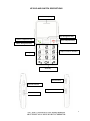
Repeatedly press the Red Telephone key to return to the main screen.
2.
Press the ‘UP’ Navigation key seven times until it says “Call Centre” and then press
the Green Telephone key to select it.
3.
Press the ‘DOWN’ Navigation key once until “Call settings” is highlighted and then
press the Green Telephone key to select it.
4.
Press the ‘DOWN’ Navigation key twice until “Call Divert” is highlighted and then
press the Green Telephone key to select it. A list of divert options will be displayed.
5.
Press the ‘DOWN’ Navigation key until the preferred divert option is highlighted and
then press the Green Telephone key to select it.
6.
Press the press the Green Telephone key when “Activate” is highlighted.
Two options will then be presented:
a)
b)
'To new number' and
'To voice mail'.
Highlight the preferred option using the "DOWN Navigation key.
7.
Enter the phone number to divert calls to. If the diversion is 'To voice mail', you’ll
need to get this number from your network provider
8.
Press the Green Telephone key to confirm the diversion.
9.
Press the Red Telephone key any time you wish to cancel the operation.
10. Repeatedly press the Red Telephone key to return to the main screen.
22