1
Field of View
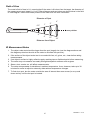
The meter’s field of view is 8:1, meaning that if the meter is 8 inches from the target, the diameter of
the measurement spot (target) is 1 inch. Other distances and spot sizes are shown below in the field
of view diagram. Refer to the chart printed on the meter also for more information.
Diameter of Spot
0.5”
2”
1”
4”
Laser pointer
4”
8”
16”
32”
Distance from Object
IR Measurement Notes
1. The object under test should be larger than the spot (target) size (use the diagram above and
the diagram printed on the side of the meter to calculate the spot size).
2. If the surface of the object under test is covered with frost, oil, grime, etc., clean before taking
measurements.
3. If an object's surface is highly reflective apply masking tape or flat black paint before measuring.
4. The meter may not measure accurately through transparent surfaces such as glass.
5. Steam, dust, smoke, etc. will affect measurements.
6. The meter compensates for deviations in ambient temperature. It can, however, take up to 30
minutes for meter to adjust to extremely wide ambient temperature changes.
7. To find a hot spot, aim the meter outside the area of interest then scan across (in an up and
down motion) until the hot spot is located.
10
42582-EN v6.1 07/13