1
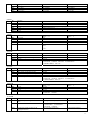
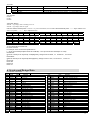
Bit4
Bit3
Bit2
Bit1
Bit0
Fjp_av_stereo
Fjp_fm
Fjp_video2
Fjp_dvd
Fjp_S-video
AV mono
no FM
no VIDEO2
no DVD
no S-video
AV stereo
use FM
use VIDEO2
use DVD
use S-video
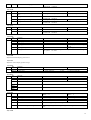
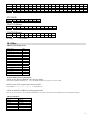
Bit
Function
Bit7
Bit6
Bit5-4
Bit3
Bit2
Bit1-0
No use
ALS SW for ta1343
ALS start point
No use
Input attenuation
No use
Status “ 0”
Status “ 1”
This bit must be zero
off
on
00:220[mv] 01:380[mv] 10:525[mv] 11:770[mv]
This bit must be zero
0dB
-5dB
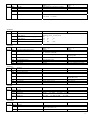
Bit
Function
Bit7
Bit6
Bit5-4
Bit3
Bit2-0
Bass boost
No use
Woofer LPF
No use
Surround effect level
6)EFF1
EFF1
7)EFF2
EFF2
Status “ 0”
Status “ 1”
off
on
This bit must be zero
on
00:100[hz] 01:125[hz] 10:170[hz] 11:210[hz]
000:off
001:1
…..
111:7
8)CCOR
CCOR
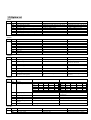
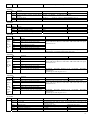
Bit
Function
Bit7
Bit6
Bit5-4
Bit3-0
No use
Italic enable specification register
No use
Set menu character’s color
Status “ 0”
Status “ 1”
No use
normal
italic
No use
0:BLACK 1:BLUE
2:GREEN 3:CYAN 4:RED 5: MAGENDA
6:YELLOW 7:WHITE 8:BLACK 9: DARK BLUE
10:DARK GREEN and so on
9)TCOR
TCOR
Bit
Function
Bit7
Bit6
Bit5
Bit4
Bit3-0
No use
Italic enable specification register
Underline enable specification register
No use
Set menu top character’s color
Status “ 0”
Status “ 1”
No use
normal
italic
normal
underline
No use
0:BLACK 1:BLUE
2:GREEN 3:CYAN 4:RED 5: MAGENDA
6:YELLOW 7:WHITE 8:BLACK 9: DARK BLUE
10:DARK GREEN and so on
10)SCOR
SCOR
Bit
Function
Bit7
Bit6
Bit5-4
Bit3-0
No use
Italic enable specification register
No use
Set menu selected character’s color
Status “ 0”
No use
0:normal
1: italic
No use
0:BLACK 1:BLUE
2:GREEN
6:YELLOW 7:WHITE
Status “ 1”
3:CYAN 4:RED
5: MAGENDA
11)ACOR
ACOR
Bit
Function
Bit7
Transparency enable register for the menu
area
Color select for the menu area
Bit6-4
Bit3
Transparency enable register for the
highlight menu area
Status “ 0”
not assign half transparency
Status “ 1”
assign half transparency
0:BLACK 1:BLUE
2:GREEN
3:CYAN 4:RED 5: MAGENDA
6:YELLOW 7:WHITE
not assign half transparency
assign half transparency
11