1
Table Of Contents
Important Notices ................................................................................................................... 6
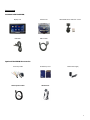
Components............................................................................................................................. 7
Installation............................................................................................................................... 8
SAFETY FIRST! ......................................................................................................................................... 8
OBD II Connector.................................................................................................................................... 8
Cable Routing ......................................................................................................................................... 8
Attaching Windshield Mount ................................................................................................................. 8
Windshield Mounting............................................................................................................................. 9
Connections............................................................................................................................................ 9
SD Memory Card .................................................................................................................................. 10
Basic Operation ..................................................................................................................... 11
Menu Navigation.................................................................................................................................. 11
New Vehicle Setup/Find Signals........................................................................................................... 11
Main Menu and Setup Menu ............................................................................................................... 12
Gauge Setup & Navigation .................................................................................................... 13
Navigating Gauges................................................................................................................................ 13
Assign a Signal to a Gauge.................................................................................................................... 13
Set Gauge Min/Max Values-Optional .................................................................................................. 14
Set Gauge Low Warning / High Warning-Optional .............................................................................. 14
Warning Sounds-Optional .................................................................................................................... 15
Setting Signal/Graph Colors-Optional .................................................................................................. 16
Global Data Logger ............................................................................................................................... 16
Device Manager/Third Party Accessories* ........................................................................... 17
Licensed DashDAQ Drivers ................................................................................................................... 18
Using Device Manager.......................................................................................................................... 18
3