1
/
User Guide
1
M. Scott
NAME
3/07/12
PAY PERIOD ENDING
SIGNATURE
1
M. Scott
NAME
DATE AND TIME
PAYABLE
TIME
3/07/12
PAY PERIOD ENDING
SIGNATURE
TOTAL HOURS OFFICE
R.T.
O.T.
USE
TOTAL HOURS OFFICE
R.T.
O.T.
USE
RATE
AMOUNT
DATE AND TIME
PAYABLE
TIME
EARNINGS
DEDUCTIONS
RATE
BALANCE
AMOUNT
EARNINGS
DEDUCTIONS
BALANCE
CONTACT US:
For more information, visit pyramidtimesystems.com or
call our technical support team at 888.474.7264 ext 1
during regular business hours: 8:00am-5:00pm EST,
Monday-Friday.
Copyright © 2012 Pyramid Time Systems, LLC. All rights reserved.
I2226
IMPORTANT: Duplicate card numbers must NOT
be used within the same pay period
pyramidtimesystems.com
Form 44100-10 Rev. K
© 2001 PYRAMID TIME SYSTEMS, LLC
IMPORTANT: Duplicate card numbers must NOT
be used within the same pay period
pyramidtimesystems.com
Copyright Information
© 2012 Pyramid Time Systems, LLC. All rights reserved.
Reproduction, adaptation or translation without prior written permission is prohibited,
except as allowed under the copyright laws.
The information contained herein is subject to change without notice.
The only warranties for Pyramid Time Systems products are set forth in the express
warranty statements accompanying such products. Nothing herein should be construed
as constituting an additional warranty. Pyramid Time Systems shall not be liable for
technical or editorial errors or omissions contained herein.
AUTO TOTALING TIME CLOCK INSTRUCTIONS
Model 5000+/5000+HD
GETTING
TABLE
OF STARTED
CONTENTS
GETTING STARTED & INSTALLATION
2
PROGRAMMING
PROGRAMMING
2-3
SET UP PAY
4-6
TIME CARDS
7
PRINT FORMAT
7
BUZZER & BELLS
8-9
OPERATION
10
REPLACING RIBBON CARTRIDGE
11
TROUBLESHOOTING
12
MASTER RESET
12
CLEANING & CARE
13
FAQs
14
ACCESSORIES
14
SPECIFICATIONS
15
WARRANTY & CUSTOMER SUPPORT
pyramidtimesystem.com
16-17
1
AUTO TOTALING TIME CLOCK INSTRUCTIONS
Model 5000+/5000+HD
DESKTOP SETUP
Remove time clock from carton & place on a flat, level surface.
Plug unit into AC wall outlet.
WALL MOUNTING
Select a location convenient to employees
clocking IN & OUT. Be sure power outlet is
within 6 feet of mounting location.
Use masking tape to hold included mounting
template on wall, making certain template is
positioned so bottom of time clock is
approximately 45 inches from floor.
Model 5000+
Drill holes using template as a guide.
Remove template from wall & install #10 screws,
leaving approximately 3/16 inch of screws
exposed. For sheetrock walls, use plastic
anchors.
Hang time clock on wall, aligning keyholes on the
rear with screw heads. Press downward on time
clock until it lowers onto screws. If mounting
5000+HD Time Clock, unlock & remove top/front
cover, & tighten wall screws to fasten.
Model 5000+HD
Plug unit into AC wall outlet.
PROGRAMMING
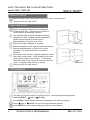
Use key to unlock & remove top/front cover. Locate programming buttons
labeled SELECT,
(UP) & (DOWN).
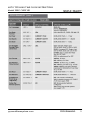
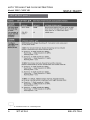
Press SELECT until desired feature is displayed (see chart on page 2).
TECHNICAL
SUPPORT
Press (UP)
or (DOWN) to scroll through feature options.
Press SELECT to save option setting & move to next feature.
2
INSTALLATION & PROGRAMMING
888.479.7264
AUTO TOTALING TIME CLOCK INSTRUCTIONS
Model 5000+/5000+HD
PROGRAMMING
GETTING STARTED
(cont.)
pyramidtimesystem.com
PROGRAMMING
3
AUTO TOTALING TIME CLOCK INSTRUCTIONS
Model 5000+/5000+HD
SET UP PAY
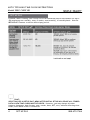
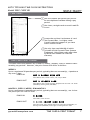
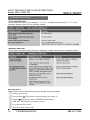
Pyramid’s Auto Totaling Time Clocks record & summarize payroll information for up to
100 employees on a weekly, every 2 weeks, semi-monthly, or monthly basis. Use the
SETUP PAY? Feature to select desired pay period.
1
IMPORTANT:
SELECTING YES IN SETUP PAY? MENU AFTER INITIAL SETUP WILL ERASE ALL STORED
DATA & NEW TIME CARDS MUST BE ISSUED. However, you may change all other
features (language, date format, year, month, date, DST, etc.) without effecting time
totals, even while a user is clocked IN.
4
SET UP PAY
888.479.7264
AUTO TOTALING TIME CLOCK INSTRUCTIONS
Model 5000+/5000+HD
SET UP PAY (cont.)
1
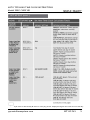
Reset Day & Time is desired day & time for new pay period. Employee begins new time card on this day.
pyramidtimesystem.com
SET UP PAY
5
AUTO TOTALING TIME CLOCK INSTRUCTIONS
Model 5000+/5000+HD
SET UP PAY (cont.)
1
Before it is assumed there is a missed punch.
6
SET UP PAY
888.479.7264
AUTO TOTALING TIME CLOCK INSTRUCTIONS
Model 5000+/5000+HD
TIME CARDS
Use one number per person per period.
Do not duplicate numbers during a pay
period.
Use clean, straight cards to avoid read/ID
errors.
Locate the revision # at bottom of card.
Use Pyramid Rev. I or higher cards.
Contact technical support if you have
lower revision cards.
Use only time card #44100-10 which
includes official Pyramid Time Systems
Trademark. Using time cards other than
Pyramid item #44100-10 voids the
warranty.
Time Card #44410-10
TIME CARD PRINT FORMAT
The same time card (#44100-10) is used for weekly, monthly, every 2 weeks & semimonthly pay periods. However, the print format will differ as follows:
WEEKLY:
Up to a maximum 28 punches per period, typically (but not necessarily), 4 punches a
day over 7 days.
PUNCH IN
MAY 9 8:00AM *IN* WED
Prints Month, Date, Punch In Time, “IN”, Day of Week
PUNCH OUT
MAY 9 12:00PM 4:00
Prints Month, Date, Punch Out Time, Elapsed Time since last “IN” Punch
(HRS:MINS), Running Total (HRS:MINS)
MONTHLY, EVERY 2 WEEKS, SEMI-MONTHLY:
Up to a maximum 64 punches per period, typically (but not necessarily), one in/one
out punch per line over 32 lines.
PUNCH IN
9 8:00A
Prints Date, Punch In Time
PUNCH OUT
9 8:00a 12:00p 4:00 4:00
Prints Punch Out Time, Elapsed Time since last IN Punch (HRS:MIN), &
Running Total (HRS:MINS) to the right of existing Punch In Time
pyramidtimesystem.com
TIME CARD & PRINT FORMAT
7
AUTO TOTALING TIME CLOCK INSTRUCTIONS
Model 5000+/5000+HD
SET EVENT USING BUZZER/BELLS
The time clock has an internal buzzer & bell ringer interface option to alert workers (or
students) of start times, breaks, lunch and dismissal times. The internal buzzer will also
sound when the time clock sends a BCD signal to ring a bell.
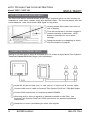
Locate volume dial inside front cover to
left of display.
Turn dial clockwise to increase volume &
counterclockwise to decrease. NOTE:
Buzzer is intended for use in quiet
settings.
Sound the buzzer by scheduling an event
(See Event Menu on page 8).
CONNECTING EXTERNAL BELLS
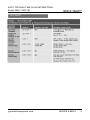
Add up to 15 bells and/or horns & schedule up to 50 events using Pyramid Time System’s
TimeTrax™ Model 5300 Bell Ringer (sold separately).
Locate RJ-45 jack at back
(5000+)
or side
(5000+HD)
of time clock & connect cable.
Connect other end of cable to Pyramid Time System TimeTrax™ 5300 Bell Ringer.
Connect 5300 transformer to receptacle labeled POWER.
Wire bells and/or horns in parallel to labeled terminals on the 5300. See
Pyramid Time Systems TimeTrax™ 5300 Instructions for detailed installation
instructions
Sound bell or horn by scheduling an event (see page 8)
8
BUZZER & BELLS
888.479.7264
AUTO TOTALING TIME CLOCK INSTRUCTIONS
Model 5000+/5000+HD
SET EVENT
pyramidtimesystem.com
BUZZER & BELLS
9
AUTO TOTALING TIME CLOCK INSTRUCTIONS
Model 5000+/5000+HD
USING TIME CLOCK
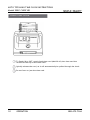
To Punch IN or OUT, gently feed time card (#44100-10) into time card slot
located at the top of the time clock.
Quickly release the card, as it will automatically be pulled through the clock.
Do not force or jam the time card.
10
OPERATION
888.479.7264
AUTO TOTALING TIME CLOCK INSTRUCTIONS
Model 5000+/5000+HD
REPLACING RIBBON CARTRIDGE
For optimum performance, the ribbon cartridge should be replaced every 6 months.
A
B
D
C
A – Ribbon
B – Tab
C – Retaining Pins
D – Manual Advance Knob
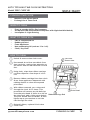
To remove old ribbon, lift ribbon cartridge straight up using the tab (B) located
on top of cartridge.
Remove new ribbon cartridge from packaging & turn the manual ribbon advance
knob (D) clockwise to straighten ribbon.
Holding tab, install ribbon cartridge into print carriage, making certain retaining
pins (C) are aligned to rear of carriage clips & ribbon (A) is between print head &
metal print mask (see diagram).
Gently push down cartridge until it snaps into carriage while turning the manual
ribbon advance knob clockwise.
Turn manual ribbon advance knob clockwise a few rotations to ensure ribbon is
positioned correctly in front of print head.
Replace the cover & lock unit.
Feed a time card through unit to test print quality.
If time clock prints incomplete characters, the ribbon is not fully installed over
print head. If time clock prints lines that become increasingly light, the cartridge is
not fully snapped into the holder. Reinstall ribbon cartridge, following steps 1-7
until a complete & consistent time card prints.
For assistance, please contact customer support at 888.479.7264 ext 1.
pyramidtimesystem.com
REPLACING RIBBON CARTRIDGE
11
AUTO TOTALING TIME CLOCK INSTRUCTIONS
Model 5000+/5000+HD
TROUBLESHOOTING
TRY AGAIN MESSAGE
In the event the time clock displays “TRY AGAIN”, re-feed the time card. If “TRY AGAIN”
persists, please check list for possible causes:
IMPAIRED PRINTING
In the event the time clock printing is impaired, please check list for possible causes:
MASTER RESET
Erases time clock’s memory & restores default factory settings:
Unplug time clock.
Press & hold
Release
(UP) button while plugging unit back in.
(UP) button when PTR5000 VER displays.
TIME NOT SET flashes on display screen.
Re-program time clock.
Distribute new time cards.
12
TROUBLESHOOTING
888.479.7264
AUTO TOTALING TIME CLOCK INSTRUCTIONS
Model 5000+/5000+HD
CLEANING TIME CLOCK
o
o
Maintain Peak Performance
Prolong Life of Time Clock
WHEN TO CLEAN
o
o
o
Every 6 months (Office Environment)
As required (HD Environment-workplace with high dust/dirt/debris)
Incomplete or Light Printing
WHAT TO CLEAN WITH
o
o
o
o
o
Can of Compressed Air
Rubbing Alcohol
Foam Applicator
Non-penetrating Oil (such as 3-in-1 oil)
Clean, Dry Cloth
HOW TO CLEAN
Unlock & remove time clock cover.
Use canned air to blow out debris from
time card slot, paying close attention to
the sensor area on left hand side of card
slot.
Card Slot
Sensor Area
Using cloth, wipe down ribbon carriage
rod then disperse a few drops of oil on
rod.
Remove ribbon cartridge from time clock
& use foam applicator dampened with
rubbing alcohol to clean the exposed
print head.
With ribbon removed, run a time card
through the clock 10-15 times. This
procedure will remove any ink build up
from the print head. If there is no ink on
Ribbon Carriage Rod
the time card, add a little more alcohol.
The print should start to darken, & then
lighten up as you continue to run the
card through the clock.
Print Head
Reinstall ribbon, replace & lock time
clock cover.
pyramidtimesystems.com
CLEANING & CARE
13
AUTO TOTALING TIME CLOCK INSTRUCTIONS
Model 5000+/5000+HD
FAQs
Q:
A:
When do I need new Time Cards?
First day of each new pay period, after making any changes in the SETUP
PAY feature, or after Master Reset.
Q:
A:
Do I have to use consecutive numbered time cards during a pay period?
No. Issuing cards in sequential order avoids duplicating numbers during a pay
period.
Q:
A:
Does the time clock calculate overtime?
The time clock provides a running total of all hours worked. Overtime
policies vary from company to company and must be calculated manually.
Q:
A:
Does the time clock have an automatic lunch deduction feature?
The time clock provides a running total of hours between punches &
therefore any payroll deductions must be calculated manually at end of pay
period.
Q:
A:
What does ATAAP mean?
ATAAP is the acronym used by the U.S. government that describes how time
is accounted for using hundredths of hour (i.e. one and a quarter hours
equals 1.25 hours).
ACCESSORIES
14
FAQ’s & ACCESSORIES
888.479.7264
AUTO TOTALING TIME CLOCK INSTRUCTIONS
Model 5000+/5000+HD
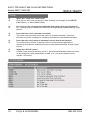
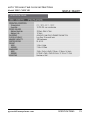
SPECIFICATIONS
pyramidtimesystems.com
SPECIFICATIONS
15
AUTO TOTALING TIME CLOCK INSTRUCTIONS
Model 5000+/5000+HD
LIMITED HARDWARE WARRANTY
o
o
o
o
o
o
o
Pyramid Time System warrants its equipment to original user against defective
material or workmanship for a period of 1-year from date of purchase. Proof of
purchase & purchase date are required for warranty service on this product.
Please remember to register your product at
pyramidtimesystems.com/ProductRegistration/.
Pyramid Time Systems’ responsibility under this warranty is limited to
replacement of defective part(s). Replacement is the sole discretion of
Pyramid Time Systems.
For Return Shipments to Pyramid Time Systems, product must be shipped in its
original carton or equivalent. The return freight method and cost for
warranteed product is the sole responsibility of the customer. Pyramid Time
Systems will not assume any responsibility for loss or damage incurred in
shipping.
Pyramid Time Systems reserves the right to determine whether parts failed
because of defective material, workmanship or other causes.
Failure caused by accident, alteration, misuse or improper packaging of
returned unit is not covered by this warranty.
Any repair done by the customer without the consent from Pyramid Time
Systems will automatically void the warranty.
Users in countries other than Canada and USA should contact the Dealer from
MONEY BACK GUARANTEE
Pyramid Time Systems offers a 30-day money back guarantee. If an RMA is issued for
an unwanted product before 30 days, Pyramid Time Systems will refund the entire
purchase price less shipping if purchased from Pyramid Time Systems. Pyramid Time
Systems will assess a 15% restocking fee on any returns received between 31 and 60
days from the date of purchase. No returns will be accepted after 60 days. Pyramid
Time Systems will not issue a call tag for pickup of products. Customers are
responsible for shipping the product back including the cost of shipping. Pyramid
Time Systems will assume the cost of ground shipping for the replacement product to
the customer. Pyramid Time Systems will also assess a 15% fee if any item(s) are
missing in an open box return. Shipping back to Pyramid Time Systems from a
Pyramid Time Systems Partner is the responsibility of the Pyramid Time Systems
Partner. No call tags will be issued. Items returned to Pyramid Time Systems
without an RMA will not be credited. No returns will be accepted for opened
TimeTrax™ PC products.
16
FAQ’s & ACCESSORIES
888.479.7264
AUTO TOTALING TIME CLOCK INSTRUCTIONS
Model 5000+/5000+HD
LIMITED
HARDWARE
WARRANTY
EXTENDED
WARRANTY
PLANS
LIMITED HARDWARE WARRANTY
Protect your investment with a Pyramid CompleteCare Support Plan. Please contact
Pyramid Time Systems or visit pyramidtimesystems.com for more information.
CONTACT US:
For more information, visit pyramidtimesystems.com or
call our technical support team at 888.479.7264 ext 1
during regular business hours: 8:00am-5:00pm EST, M-F.
pyramidtimesystems.com
CONTACT US
17
/
User Guide
1
M. Scott
NAME
3/07/12
PAY PERIOD ENDING
SIGNATURE
1
M. Scott
NAME
DATE AND TIME
PAYABLE
TIME
3/07/12
PAY PERIOD ENDING
SIGNATURE
TOTAL HOURS OFFICE
R.T.
O.T.
USE
TOTAL HOURS OFFICE
R.T.
O.T.
USE
RATE
AMOUNT
DATE AND TIME
PAYABLE
TIME
EARNINGS
DEDUCTIONS
RATE
BALANCE
AMOUNT
EARNINGS
DEDUCTIONS
BALANCE
CONTACT US:
For more information, visit pyramidtimesystems.com or
call our technical support team at 888.474.7264 ext 1
during regular business hours: 8:00am-5:00pm EST,
Monday-Friday.
Copyright © 2012 Pyramid Time Systems, LLC. All rights reserved.
I2226
IMPORTANT: Duplicate card numbers must NOT
be used within the same pay period
pyramidtimesystems.com
Form 44100-10 Rev. K
© 2001 PYRAMID TIME SYSTEMS, LLC
IMPORTANT: Duplicate card numbers must NOT
be used within the same pay period
pyramidtimesystems.com