1
AUTO TOTALING TIME CLOCK INSTRUCTIONS
Model 5000+/5000+HD
CLEANING TIME CLOCK
o
o
Maintain Peak Performance
Prolong Life of Time Clock
WHEN TO CLEAN
o
o
o
Every 6 months (Office Environment)
As required (HD Environment-workplace with high dust/dirt/debris)
Incomplete or Light Printing
WHAT TO CLEAN WITH
o
o
o
o
o
Can of Compressed Air
Rubbing Alcohol
Foam Applicator
Non-penetrating Oil (such as 3-in-1 oil)
Clean, Dry Cloth
HOW TO CLEAN
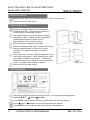
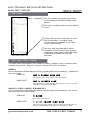
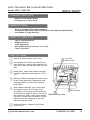
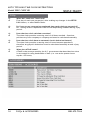
Unlock & remove time clock cover.
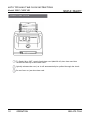
Use canned air to blow out debris from
time card slot, paying close attention to
the sensor area on left hand side of card
slot.
Card Slot
Sensor Area
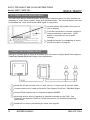
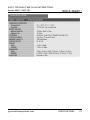
Using cloth, wipe down ribbon carriage
rod then disperse a few drops of oil on
rod.
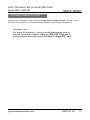
Remove ribbon cartridge from time clock
& use foam applicator dampened with
rubbing alcohol to clean the exposed
print head.
With ribbon removed, run a time card
through the clock 10-15 times. This
procedure will remove any ink build up
from the print head. If there is no ink on
Ribbon Carriage Rod
the time card, add a little more alcohol.
The print should start to darken, & then
lighten up as you continue to run the
card through the clock.
Print Head
Reinstall ribbon, replace & lock time
clock cover.
pyramidtimesystems.com
CLEANING & CARE
13