1
A - 28
RSLinx – Training Guide
Be sure that the comm port selected is enabled in the BIOS / CMOS setup.*
Be sure there are no conflicting devices on the selected comm port. (i.e.
modems, Infrared ports, etc...)
Be sure there are no conflicting devices on the opposing comm port (ie. COM1
vs. COM3 and COM2 vs.COM4)
Be sure there are no low level drivers loading in the AUTOEXEC.BAT or
CONFIG.SYS.
Windows 3.x
Be sure the correct comm port is selected.
Be sure that the selected comm port actually exists on the computer.
Be sure that the comm port selected is enabled in the BIOS / CMOS setup.*
Be sure there are no conflicting devices on the selected comm port. (i.e.
modems, Infrared ports, etc...)
Be sure there are no conflicting devices on the opposing comm port (i.e. COM1
vs. COM3 and COM2 vs.COM4)
Be sure there are no low level drivers loading in the AUTOEXEC.BAT or
CONFIG.SYS.
Be sure there are no drivers loading in the SYSTEM.INI ( [386Enh] section ), or
in the WIN.INI (load= and run= )
Windows 95/98
Be sure the correct comm port is selected.
Be sure that the selected comm port actually exists on the computer.
Be sure that the comm port selected is enabled in the BIOS / CMOS setup.*
Be sure there are no conflicting devices on the selected comm port. (i.e.
modems, Infrared ports, etc...)
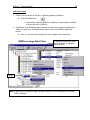
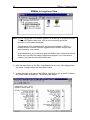
(This information can be found in Device Manager)
Be sure there are no conflicting devices on the opposing comm port (i.e. COM1
vs. COM3 and COM2 vs.COM4)
(This information can be found in Device Manager)
Be sure there are no low level drivers loading in the AUTOEXEC.BAT or
CONFIG.SYS.
Be sure there are no drivers loading in the SYSTEM.INI ( [386Enh] section ), or
in the WIN.INI (load= and run= )
(Run SYSEDIT.EXE to gain access to the system files.)
Be sure there are no drivers loading in the Start-up folder.
Be sure the Palm Pilot autosync program is not being loaded at start-up.
* Please refer to Technote A903 for BIOS/CMOS access keystrokes.