1
EN
DATEQ BCS50 user manual
BCS53 settings
25
R50
C35
R31
C22
C25
U4
R23
R18
R36
R17
C19
R15
OFF
R99
ON
R66
D20
C14
C3
Z1
C23
P12
P11
D28
R65
D29 1
R48
5
C1
C4
C2
Q1
Q2
Q3
Q4
R27
C28
R30
R52
R54
ON
R99
R64
R74
R74
R73
R73
P13
Q6
Q5
Q7
R58
ON-AIR2
OFF
ON-AIR1
R72
R26
U12
U11
C24
4
R53
Q11
Q10
Possibilities
FADER (D)
SWITCH
AUX (2)
POST (D)
PRE
OFF (D)
ON-AIR1
ON-AIR2
ON (D)
OFF
DJ (5)
Q8
C44
D25
C34
C26
Jumper name
CUE (1)
MSTR (4)
OFF
Q20
R57
R56
D24
P10
C57
R90
R67
R69
C37
C17
ON-AIR (3)
3
C36
C20
R28
R16
R39
Q13
D27
D23
C41
R33
R25
DJ:
DJ:
Z3
C21
C27
U3
R32
R29
Q12
R71
C53
R51
D6
C38
R77
C32
C15
D1
MSTR:
PRE
AUX:
U9
C43
R68
D2
P6
R76
C33
U15
POST
D3
C301
R34
R38
R75
1
R35
R301
R37
R101
P7
C54
C18
2
C303
R86
R84
R98
U6
R89
R303
R19
R55
C48
R100
C47
C42
R78
D14
R79
R81
R20
Q26
C46
R302
R24
RT1
D15
R83
R82
C45
R93
U8
R5
U7
R80
C9
Q16
SWITCH
FADER
Q25
R85
C51
R95
R92
C10
C56
U16
C12
CUE:
Q18
R96
R88
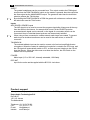
Jumper settings
The jumpers in a BCS53 and BCS53T module have the same functionality and the same
position. That is why only the BCS53 PCB is shown below.
ON
OFF (D)
Description
The channel is activated when the fader is opened.
The channel is activated when the ON-key is pressed. When the fader
is opened and the ON-lamp does not light up no audio will be fed
through.
The after-fader signal is routed to the AUX-buss. Both jumpers (P6
and P7) have to be in the same position!
The pre-fader signal is routed to the AUX-buss. Both jumpers (P6 and
P7) have to be in the same position!
No ON-AIR outputs will be activated when the channel is switched on.
When the channel is switched on ON-AIR1 will be activated. The
studio output will be muted to prevent an acoustical feedback.
When the channel is switched on ON-AIR2 will be activated.
When the PFL-switch is pressed the CR will switch automatically to
PFL. This makes the signal directly audible for the technician.
The signal is mixed to the PFL-buss, but the CR-selector will not
automatically switch to PFL.
When the module is activated all PFL-buttons will reset and the CR
output will be muted to prevent from an acoustical feedback with the
DJ-microphone. It is also possible to let the CR-selector switch to AIR
or PGM. This will be explained later.
This function is disabled.
(D) indicates the default setting