1
Rev. 082614
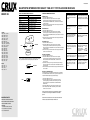
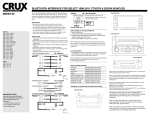
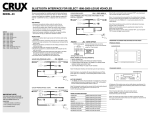
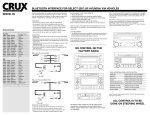
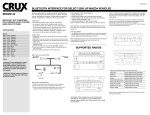
BLUETOOTH INTERFACE FOR SELECT 1998-2011 TOYOTA & SCION VEHICLES
BEEBT-22
PRESS SEEK UP ONCE
END
PRESS SEEK DOWN ONCE
REJECT
PRESS SEEK DOWN ONCE
ANSWER SECOND CALL
PRESS SEEK UP ONCE
SWITCH BETWEEN CALLS
PRESS SEEK UP ONCE
ENTER PRIVACY MODE
PRESS SEEK UP ONCE
INCREASE VOLUME
PRESS VOLUME UP
DECREASE VOLUME
PRESS VOLUME DN
-
+
ANSWER
END
Does the audio on your radio
mute while using the mobile
applications on your mobile
phone?
Try placing your mobile phone
on vibrate, this will avoid the
radio mute interuption.
6-PIN
TO FACTORY
RADIO
Note: All menu structures work in 3 second increments.
If after 3 seconds the interface will time-out.
Use a T-Tap terminal to connect
the mute wire on the harness.
(See Fig.1) on page 2.
(male plug)
FOR CARS 1998-2003, WITH BASE
RADIO. VEHICLE MUST HAVE ONE OF
THE FOLLOWING FOR KIT TO
FUNCTION:
1. STEERING WHEEL CONTROLS
2. AVC CONNECTOR (XM PORT)
3. CD CHANGER PORT
Is there a pop sound being heard
when swtching sources on your
premium JBL radio system?
(male plug)
IMPORTANT NOTE
With the phone paired to the
UBT, enter the “SETTING
TTS
LEXUS
VOLUME” under
PWR VOL
menu structure.
The default level is
at volume 4.
20-PIN
Note: The menu structures only remember the last 24
numbers in the call log from dialed from the mobile
phone.
Have you paired your mobile
device, and get no sound from
the radio? Try reseting the TTS
volume setting.
6-PIN
1. Press the “PWR” button twice.
2. Press the “PWR” button once, to enter the menu options.
Continue pressing the “PWR” button twice till you hear the
interface announce “DO YOU WANT TO DELETE PAIRED
PHONE LIST”.
3. Press the “PWR” button once within 3 seconds to confirm.
4. The interface will ask “ARE YOU SURE”, press the “PWR”
button once to re-confirm..
Reset the radio using the
DVD-ROM originally included
with the vehicle.
(male plug)
END
Have you lost functionality on
your Navigation radio and/or
steering wheel controls?
10-PIN
DELETE ALL PAIRED DEVICES:
This feature allows you to delete all paired devices on the interface.
The module does NOT allow the user to only clear one device. The
module will delete all previously paired devices only
Remove the battery on the
mobile device for a minimum of
15 seconds.
(male plug)
SETTING TTS VOLUME:
1. Press the “PWR” button twice.
2. Press the “PWR” button once to enter the menu options.
Continue to press the “PWR” button twice till you hear the
interface announce “SETTING VOLUME”, and wait for her
announcement.
3. Set the TTS volume by turning the volume knob and waiting for
the announcement. Each announcement will indicate the volume
level of the TTS.
4. When the desired volume level is reached, press the “PWR” button
once to select.
Are you experiencing random
static interuptions durring your
phone calls?
24-PIN
ANSWER
OUTGOING CALLS:
1. Press the “PWR” button twice.
2. Press the “PWR” button once to enter the menu options.
Continue to press the “PWR” button twice till you hear the
interface announce “OUTGOING CALLS”, and wait for the numbers
to be announced.
3. When the number you wish to dial is announced, press the “PWR”
button once to make the call.
Delete all paired devices on your
mobile device and on the UBT.
(See Using The Menu Structure)
(male plug)
If your vehicle is equipped with these type of steering wheel controls,
they may be used to answer and end your phone calls as well.
INCOMING CALLS:
1. Press the “PWR” button twice.
2. Press the “PWR” button once to enter the menu options.
Continue to press the “PWR” button twice till you hear the
interface announce “INCOMING CALLS”, and wait for the numbers
to be announced.
3. When the number you wish to dial is announced, press the “PWR”
button once to make the call.
Have a bad connection when
using the A2DP or Handsfree
profiles?
TO FACTORY
HARNESS
MODE
MISSED CALLS:
1. Press the “PWR” button twice.
2. Press the “PWR” button once to enter the menu options.
Continue to press the “PWR” button twice till you hear the
interface announce “MISSED CALLS”, and wait for the numbers
to be announced.
3. When the number you wish to dial is announced, press the “PWR”
button once to make the call.
(male plug)
xA
xB
tC
xD
ANSWER
12-PIN
SCION
2004 - 2011
2004 - 2011
2004 - 2011
2004 - 2010
HOLD SEEK DOWN FOR 2 SECONDS
(male plug)
4 Runner
Avalon
Camry
Corolla
Celica
Echo
Highlander
Land Cruiser
FJ Cruiser
Matrix
MR2
Prius
RAV4
Sequia
Sienna
Solara
Tacoma
Tundra
Venza
Yaris
VOICE DIAL
3-PIN
TOYOTA
2003 - 2011
2000 - 2009
2002 - 2011
1998 - 2011
2000 - 2005
2000 - 2005
2001 - 2011
1998 - 2011
2007 - 2011
2002 - 2010
2001 - 2005
2004 - 2011
2001 - 2005
2001 - 2011
1998 - 2011
1998 - 2011
2000 - 2011
2000 - 2011
2009 - 2011
2007 - 2011
USING THE MENU STRUCTURE:
USING THE STEERING WHEEL CONTROLS
AM
SEEK TRA