1
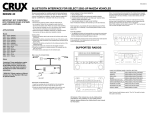
BLUETOOTH INTERFACE FOR SELECT 1998-2009 LEXUS VEHICLES
BEEBL-23
work. Following these instructions from “Start” to” Finish” will ensure
9:00 AM – 5:00PM PDT toll free at 1 (855) 822-1348. We are here to
help.
LEXUS
1998 - 2005
1998 - 2003
2004 - 2005
2006 - 2009
2004 - 2009
2002 - 2005
2006 - 2009
2007 - 2009
2004 - 2008
2009 - 2009
2004 - 2008
2006 - 2008
THIS HARNESS IS NOT INCLUDED AND NEEDS TO BE
SPECIAL OREDERD.
TO FACTORY
HARNESS
PRELIMINARY:
- Disconnect the positive(+) battery cable for radios that are
non-navigation. Radios that are navigation ready should not
disconnect the battery cable. Please use caution when installing.
Do not install the interface near or on the vehicle’s HVAC system.
This will prevent overheating and condensation build up.
GS300
GS400
GS430
GS (Non-ML)
GX470
IS300
IS250/350
LS460
LX470
LX570
RX330/350 (Non-ML)
RX400h (Non-ML)
PN: 1-CDE 1002519
LEXUS IS300 AUDIO
10-PIN
TO FACTORY
RADIO
20-PIN
(male plug)
(male plug)
6-PIN
6-PIN
(male plug)
(male plug)
12-PIN
(male plug)
24-PIN
(male plug)
Use overview to help you determine installation method.
Note: If an incoming call is answered from the mobile phone’s keypad,
the call will direct itself to the headset on the mobile phone. To re-direct
the phone call to the “BEEBL-23”, it must be done directly from the
mobile phone.
Note: When transferring a phone call to the mobile phone for privacy,
the user must re-connect the
BEEBL-23 and the mobile phone by selecting the module from the
device menu on the phone.
Note: If after ending a call the radio is powered “OFF”, you must power
“ON” the radio to regain volume control.
3-PIN
(male plug)
INSTALLATION
1. Remove the factory radio to gain access to the factory radio wiring
connectors.
2. Disconnect the factory connectors from the rear of the factory radio.
3. Connect the male connectors of the interface power harness into the
factory radio.
4. Reconnect the factory connectors into the mating connectors of the
interface harness.
5. Connect the male 3-pin connector into the pigtail.
6. Route the microphone to a desired location, (for example near the
rear view miror).
7. Conduct a sound check before placing the radio back in the dash.
LEXUS NON-PREMIUM AUDIO
TO FACTORY
HARNESS
10-PIN
PN: 1002521
TO FACTORY
RADIO
20-PIN
(male plug)
(male plug)
6-PIN
6-PIN
(male plug)
FIGURE 1
JBL - MUTE-OPTION
12-Pin Connector Conncet the loose mute wire to the
Orange/ Black (pin 7) wire on the harness
12-Pin Connector
using the T-Tap included.
(male plug)
(option)
12-PIN
24-PIN
(male plug)
1. READY (POWER ON)
2. SEARCHING PHONES (FOR PREVIOUS PAIRED PHONES)
3. PLEASE SEARCH AND SELECT THE “BEEBL-23” DEVICE FROM
MOBILE PHONE AND ENTER “0000”.
4. YOU ARE NOW READY TO USE THE HF SYSTEM.
power back on to re-attempt, if unsuccessful please contact our tech
support line.
3-PIN
(male plug)
TO FACTORY
HARNESS
IMPORTANT NOTE
PN: 1002508B
12-PIN
12-PIN
20-PIN
20-PIN
(male plug)
(male plug)
(male plug)
(male plug)
USING THE RADIO BUTTONS
24-PIN
(male plug)
3-PIN
(male plug)
Note: The bluetooth module will re-connect with the last mobile phone’s
it was paired with. If no mobile phone is not found, it will
revert to the pairing process.
TO FACTORY
RADIO
(male plug)
12-PIN
JBL
TOYOTA
STANDARD RADIO
ANSWER/END
LEXUS
TUNE
PWR VOL
AM
AUTO RE-CONNECT:
1. The BEEBL-23 module will automatically re-connect the a previously
paired mobile phone when the ignition is turned “ON” to the vehicle
and the mobile phone’s Bluetooth feature is also on.
LEXUS PREMEIUM/JBL AUDIO
ANSWER/END
(orange/
wire)
INITIAL black
PAIRING
TO THE VOICE PROMPTS:
Note: The Bluetooth interface will remember upto the last 8 devices.
(male plug)
OPERATING THE HANDS-FREE FEATURES ON THE RADIO
PREMIUM RADIO
MUTE
(option)
MUTE
PIN 5
(orange/
PIN black
5 wire)
For JBL: tap into the orange/black wire. (See Fig.1)
8. Re-install a factory radio back into the vehicle’s dash.
FOR CARS 1998-2003, WITH BASE
RADIO. VEHICLE MUST HAVE ONE OF
THE FOLLOWING FOR KIT TO
FUNCTION:
1. STEERING WHEEL CONTROLS
2. AVC CONNECTOR (XM PORT)
3. CD CHANGER PORT
Note: If after a command the radio is powered “OFF”, you must power
“ON” the radio to regain volume control.
VOICE DIAL
PRESS PWR BUTTON TWICE
ANSWER
PRESS PWR BUTTON ONCE
END A CALL
PRESS PWR BUTTON TWICE
REJECT
PRESS PWR BUTTON TWICE
ANSWER SECOND CALL
PRESS PWR BUTTON ONCE
SWITCH BETWEEN CALLS
PRESS PWR BUTTON ONCE
ENTER PRIVACY MODE
PRESS PWR BUTTON ONCE
INCREASE VOLUME
PRESS VOLUME UP ONCE
DECREASE VOLUME
PRESS VOLUME DN ONCE
SEEK TRACK
FM
TAPE
DISC
CH PROG DSIC
All features of this module may vary by mobile phone manufacturer. For
questions on your mobile phone’s features, please reference the mobile
phone’s user manual for
information.
Note: On some older radios, the volume knob works in
reverse. (Eample: To lower the volume, turm the volume
knob clock-wise, and vise versa).
Note: The volume may vary at times. In order to correct the volume
level, you must set the volume knob to 0, then adjust the volume level to
your desired volume level.
BLUETOOTH INTERFACE FOR SELECT 1998-2009 LEXUS VEHICLES
BEEBL-23
GS300
GS400
GS430
GS (Non-ML)
GX470
IS300
IS250/350
LS460
LX470
LX570
RX330/350 (Non-ML)
RX400h (Non-ML)
VOICE DIAL
HOLD SEEK DOWN FOR 2 SECONDS
ANSWER
PRESS SEEK UP ONCE
END
PRESS SEEK DOWN ONCE
REJECT
PRESS SEEK DOWN ONCE
ANSWER SECOND CALL
PRESS SEEK UP ONCE
SWITCH BETWEEN CALLS
PRESS SEEK UP ONCE
ENTER PRIVACY MODE
PRESS SEEK UP ONCE
INCREASE VOLUME
PRESS VOLUME UP
DECREASE VOLUME
PRESS VOLUME DN
-
+
ANSWER
END
MODE
MISSED CALLS:
1. Press the “PWR” button twice.
2. Press the “PWR” button once to enter the menu options.
Continue to press the “PWR” button twice till you hear the
interface announce “MISSED CALLS”, and wait for the numbers
to be announced.
3. When the number you wish to dial is announced, press the “PWR”
button once to make the call.
INCOMING CALLS:
1. Press the “PWR” button twice.
2. Press the “PWR” button once to enter the menu options.
Continue to press the “PWR” button twice till you hear the
interface announce “INCOMING CALLS”, and wait for the numbers
to be announced.
3. When the number you wish to dial is announced, press the “PWR”
button once to make the call.
OUTGOING CALLS:
1. Press the “PWR” button twice.
2. Press the “PWR” button once to enter the menu options.
Continue to press the “PWR” button twice till you hear the
interface announce “OUTGOING CALLS”, and wait for the numbers
to be announced.
3. When the number you wish to dial is announced, press the “PWR”
button once to make the call.
With the phone paired to the
UBT, enter the “SETTING
TTS
LEXUS
VOLUME” under
PWR VOL
menu structure.
The default level is
at volume 4.
Is there a pop sound being heard
when swtching sources on your
premium JBL radio system?
Use a T-Tap terminal to connect
the mute wire on the harness.
(See Fig.1) on page 2.
Does the audio on your radio
mute while using the mobile
applications on your mobile
phone?
Try placing your mobile phone
on vibrate, this will avoid the
radio mute interuption.
10-PIN
6-PIN
(male plug)
(male plug)
6-PIN
20-PIN
(male plug)
(male plug)
TO FACTORY
RADIO
Note: All menu structures work in 3 second increments.
If after 3 seconds the interface will time-out.
Have you paired your mobile
device, and get no sound from
the radio? Try reseting the TTS
volume setting.
24-PIN
FOR CARS 1998-2003, WITH BASE
RADIO. VEHICLE MUST HAVE ONE OF
THE FOLLOWING FOR KIT TO
FUNCTION:
1. STEERING WHEEL CONTROLS
2. AVC CONNECTOR (XM PORT)
3. CD CHANGER PORT
Reset the radio using the
DVD-ROM originally included
with the vehicle.
(male plug)
IMPORTANT NOTE
Note: The menu structures only remember the last 24
numbers in the call log from dialed from the mobile
phone.
Have you lost functionality on
your Navigation radio and/or
steering wheel controls?
12-PIN
4. The interface will ask “ARE YOU SURE”, press the “PWR”
Remove the battery on the
mobile device for a minimum of
15 seconds.
(male plug)
1. Press the “PWR” button twice.
2. Press the “PWR” button once, to enter the menu options.
Continue pressing the “PWR” button twice till you hear the
interface announce “DO YOU WANT TO DELETE PAIRED
PHONE LIST”.
Are you experiencing random
static interuptions durring your
phone calls?
3-PIN
DELETE ALL PAIRED DEVICES:
This feature allows you to delete all paired devices on the interface.
The module does NOT allow the user to only clear one device. The
module will delete all previously paired devices only
Delete all paired devices on your
mobile device and on the UBT.
(See Using The Menu Structure)
(male plug)
SETTING TTS VOLUME:
1. Press the “PWR” button twice.
2. Press the “PWR” button once to enter the menu options.
Continue to press the “PWR” button twice till you hear the
interface announce “SETTING VOLUME”, and wait for her
announcement.
3. Set the TTS volume by turning the volume knob and waiting for
the announcement. Each announcement will indicate the volume
level of the TTS.
4. When the desired volume level is reached, press the “PWR” button
once to select.
NOTE: If not volume is heard please see troubleshooting on TTS
volume.
Have a bad connection when
using the A2DP or Handsfree
TO FACTORY
HARNESS
LEXUS
1998 - 2005
1998 - 2003
2004 - 2005
2006 - 2009
2004 - 2009
2002 - 2005
2006 - 2009
2007 - 2009
2004 - 2008
2009 - 2009
2004 - 2008
2006 - 2008
USING THE MENU STRUCTURE:
USING THE STEERING WHEEL CONTROLS
AM
SEEK TRAC