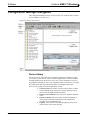
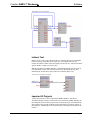
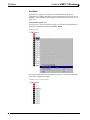
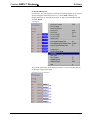
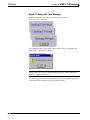
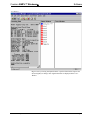
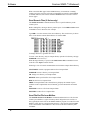
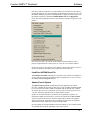
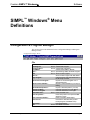
1
Crestron SIMPL™ Windows® Software Installation & Operations Guide This document was prepared and written by the Technical Documentation department at: Crestron Electronics, Inc. 15 Volvo Drive Rockleigh, NJ 07647 1-888-CRESTRON All brand names, product names and trademarks are the property of their respective owners. ©2002 Crestron Electronics, Inc. Crestron SIMPL™ Windows Software Contents Introduction 1 The Intent of this SIMPL™ Windowsâ Manual ...................................................1 SIMPL Windows New Features ..........................................................................1 SIMPL™ Windowsâ Review and Programming Preparation..............................3 SIMPL™ Windowsâ ...............................................................................3 System Design & Programming Process...............................................3 Crestron’s Programming Design Kit ......................................................4 VisionTools™ Pro-e ...............................................................................4 Programming Process ...........................................................................4 Contact Crestron Electronics, Inc. ......................................................................6 Trademark Information........................................................................................6 Installing SIMPL™ Windows® 7 System Requirements.........................................................................................7 Crestron Database Requirements ......................................................................7 Installing from the Crestron Web Site .................................................................7 Installing from the Crestron ControlCD...............................................................8 Uninstall SIMPL™ Windows®.............................................................................8 DOS Workshop 11 Migration to SIMPL Windows............................................................................11 Changes from Workshop ..................................................................................11 Symbol CrossReference ......................................................................11 SpeedKey.............................................................................................12 KeyCombo Shortcut Table...................................................................12 Feature Comparison .........................................................................................14 Importing Workshop Programs .........................................................................15 SIMPL™ Windows®– Getting Started 17 SIMPL Windows Applications ...........................................................................17 Opening SIMPL Windows .................................................................................18 Set Directory Paths ...........................................................................................18 Create A New Program.....................................................................................19 Program Header ..................................................................................19 Configuration Manager 21 Accessing Configuration Manager ....................................................................21 Configuration Manager Navigation ...................................................................22 Installation & Operations Guide – DOC. 5728C Crestron SIMPL Windows • i Software Crestron SIMPL™ Windows Device Library ......................................................................................22 Network System View ..........................................................................24 Detail System View ..............................................................................24 System Device Tree.............................................................................24 Configuration Manager Button Bar ...................................................................25 Configuring the System.....................................................................................26 Selecting Hardware..............................................................................26 Replacing Devices ...............................................................................28 Configure System Control Devices......................................................28 Configure User Devices .......................................................................34 Deleting Devices ..................................................................................39 Automatically Configure Devices .........................................................39 Importing VisionTools™ for Windowsâ and VisionTools™ Pro-e Projects.......40 Default Logic from Crestron Database .............................................................42 Program Manager 43 Accessing Program Manager............................................................................43 Screen Navigation.............................................................................................44 Symbol Library .....................................................................................44 Program View.......................................................................................45 Detail View ...........................................................................................47 Bookmark .............................................................................................47 World View ...........................................................................................48 Signal Tray ...........................................................................................49 Program Manager Button Bar ...........................................................................50 Programming in SIMPL Windows .....................................................................51 Symbols & Signals ............................................................................................52 Symbol Properties................................................................................52 Symbol Categories...............................................................................54 Symbol Title Bar...................................................................................54 Programming a System ....................................................................................55 Define Signals from User Interface......................................................55 Using Logic Symbols ...........................................................................57 Naming Signals....................................................................................59 Subsystems..........................................................................................60 Programming with User Interfaces....................................................................61 Feedback .............................................................................................61 Indirect Text .........................................................................................63 Imported UI Projects ............................................................................63 Using Macros ....................................................................................................64 Crestron Macros ..................................................................................65 User Macros.........................................................................................66 Device Programming Information 71 Serial Driver Programming Information ............................................................71 [TX$].....................................................................................................71 [RX$] ....................................................................................................71 [BREAK] ...............................................................................................71 [RTS] ....................................................................................................72 [CTS] ....................................................................................................72 Other Lines...........................................................................................72 [enable] ................................................................................................72 ii • Crestron SIMPL Windows Installation & Operations Guide – DOC. 5728C Crestron SIMPL™ Windows Programming Features Software 73 Signal Colors.....................................................................................................73 Signal Operations .............................................................................................74 Navigating Symbol Inputs and Outputs ...............................................74 Create New Signals .............................................................................74 Selecting Signals .................................................................................75 Edit Signal Name .................................................................................75 Rename Signal Globally ......................................................................76 Disconnect a Signal .............................................................................76 Replacing a Signal ...............................................................................77 Connect Signals...................................................................................77 Naming a Parameter............................................................................78 Automatically Increase Inputs, Outputs, or Parameters ......................78 Decrease Inputs, Outputs, or Input/Output Pairs.................................80 Automatically Assign Unique Signal Name(s) .....................................80 Signal Routing......................................................................................81 Auto-Increment the First Number.........................................................82 Auto-Increment the Last Number.........................................................83 Auto-Increment the Last Number in a Signal Name ............................83 Copying Signal Names ........................................................................84 Append a Signal Suffix.........................................................................85 SIMPL Windows ExampleBase ........................................................................86 How to Re-Synch Your Programs.....................................................................86 Compile Programs 87 Compiler Settings..............................................................................................87 Compiling the Program .....................................................................................88 Consider Commented Out Symbols and Devices ............................................90 Sharing Programs 91 Copy Program ...................................................................................................91 Import Archived Program ..................................................................................92 Test Manager 93 Test Manager Overview....................................................................................93 Accessing Test Manager ..................................................................................93 Screen Navigation.............................................................................................94 Trace Window ......................................................................................94 Status Window .....................................................................................94 Incoming Data ......................................................................................95 Testing a Program ............................................................................................95 SIMPL Procedures Before Testing ......................................................95 Begin Testing with Test Manager ........................................................98 ViewPort 101 Viewport Overview ......................................................................................... 101 Communication Settings ................................................................................ 101 Hardware Configuration .................................................................................102 Viewport: File Menu ....................................................................................... 103 Viewport: Edit Menu....................................................................................... 103 Viewport: Setup Menu.................................................................................... 103 Installation & Operations Guide – DOC. 5728C Crestron SIMPL Windows • iii Software Crestron SIMPL™ Windows Viewport: Diagnostics Menu .......................................................................... Viewport: Functions Menu ............................................................................. CNX/CN Series .............................................................................................. General .......................................................................................................... Viewport: File Transfer Menu......................................................................... Viewport: Remote Menu ................................................................................ Viewport Shortcut Keys.................................................................................. Network Analyzer 107 110 110 113 117 124 127 129 Overview .........................................................................................................129 Using Network Analyzer..................................................................................129 Starting Network Analyzer .................................................................130 Communication Settings ....................................................................130 Opening Existing Files .......................................................................131 Acquiring New Data ...........................................................................132 Network Analyzer Analysis .............................................................................133 "Delta Y on transmit is too small".......................................................133 "Delta Z on transmit is too small" .......................................................133 "Y and Z lines are not symmetrical on transmit" ................................134 "Delta Y and Delta Z are not within 25% on transmit" .......................134 "Y voltage is too high on transmit" .....................................................134 "Z voltage is too high on transmit" .....................................................135 "Y voltage is too low on transmit".......................................................135 "Z voltage is too low on transmit".......................................................135 "Y and Z voltages do not overlap on transmit"...................................135 "Delta Y on receive is too small" ........................................................136 "Delta Z on receive is too small" ........................................................136 "Y and Z lines are not symmetrical on receive" .................................136 "Delta Y and Delta Z are not within 25% on receive".........................136 "Y voltalge is too high on receive"......................................................137 "Z voltage is too high on receive".......................................................137 "Y voltage is too low on receive"........................................................137 "Z voltage is too low on receive" ........................................................138 "Minimum Y voltage is too high on receive".......................................138 "Minimum Z voltage is too high on receive".......................................138 "Y and Z voltages do not overlap on receive"....................................138 Crestron e-Control™ 139 Ethernet Communications...............................................................................139 Network Requirements/Preparation................................................................139 Hardware Preparation – CNMSX-AV and Pro ................................................140 Hardware Preparation – CEN-IO ....................................................................141 Control System Diagnostics via Ethernet .......................................................141 Programming the System to Communicate with Ethernet Devices ................141 Adding Ethernet Devices to a SIMPL Windows Program..................141 Changing IP Addresses without Changing the Program ...................143 System-to-System Communication ...................................................144 Crestron e-control SDK......................................................................146 Ethernet Connection Information ....................................................................146 Recommended Connection ...............................................................146 Isolated Network Connection .............................................................146 iv • Crestron SIMPL Windows Installation & Operations Guide – DOC. 5728C Crestron SIMPL™ Windows Front Panel Editor Software 147 Front Panel Overview .....................................................................................147 Accessing Front Panel Editor..........................................................................147 Screen Navigation...........................................................................................147 Front Panel Editor Buttons..............................................................................148 Page Buttons .....................................................................................148 Front Panel Editor Programming ....................................................................150 Adding Pages.....................................................................................151 Adding Objects to Pages ...................................................................151 Active/Inactive Text and Join Numbers .............................................155 SIMPL™ Windows® Menu Definitions 159 Configuration & Program Manager .................................................................159 Program Manager Right Mouse Click Menus ....................................163 Front Panel Editor ...........................................................................................164 Test Manager ..................................................................................................165 ViewPort..........................................................................................................167 Network Analyzer Menu Definitions ................................................................171 SIMPL+ Menus ...............................................................................................172 SIMPL+ Right Mouse Click Menus ....................................................173 SIMPL+™ 175 SIMPL+ Overview ...........................................................................................175 Accessing SIMPL+..........................................................................................176 SIMPL+ Programming Text Colors .................................................................177 Saving and Compiling SIMPL+ Files ..............................................................177 SIMPL+ New File Template ............................................................................178 Symbol Card File 179 SIMPL Windows Errors 181 SIMPL Windows Errors Defined .....................................................................181 Device Library Error ...........................................................................181 Symbol Library Error ..........................................................................181 Error Importing SmarTouch System ..................................................181 Program Data Integrity Checks..........................................................181 Program Load/Save Error ..................................................................182 Swapping Devices Error ....................................................................182 Error in Moving a Device....................................................................182 AutoFill Error ......................................................................................182 File Open Error ..................................................................................183 Parameter Format Error.....................................................................183 Versions of Libraries/Databases ........................................................183 Crestron/User Database Dialog Error................................................184 User Interface Dialog Error ................................................................184 Connection Sheet Dialog Error ..........................................................184 Communication Dialog Error..............................................................184 Installation & Operations Guide – DOC. 5728C Crestron SIMPL Windows • v Software Crestron SIMPL™ Windows DSG Not Found Error ........................................................................184 Compiler Errors Defined .................................................................................185 ERROR (CMCVT101)........................................................................185 WARNING (CMCVT102) ...................................................................185 NOTICE (CMCVT103) .......................................................................185 NOTICE (CMCVT104) .......................................................................185 NOTICE (CMCVT105) .......................................................................185 NOTICE (CMCVT106) .......................................................................186 NOTICE (CMCVT107) .......................................................................186 NOTICE (CMCVT108) .......................................................................187 WARNING (CMCVT109) ...................................................................187 WARNING (CMCVT110) ...................................................................187 FAILURE (CMCVT111)......................................................................187 NOTICE (CMCVT112) .......................................................................188 NOTICE (CMCVT113) .......................................................................188 NOTICE (CMCVT114) .......................................................................188 NOTICE (CMCVT115) .......................................................................188 WARNING (CMCVT116) ...................................................................188 NOTICE (CMCVT117) .......................................................................188 FAILURE (CMCVT118)......................................................................189 WARNING (CMCVT119) ...................................................................189 WARNING (CMCVT120) ...................................................................189 FAILURE (CMCVT121)......................................................................189 FAILURE (CMCVT122)......................................................................189 FAILURE (CMCVT123)......................................................................189 WARNING (CMCVT124) ...................................................................189 WARNING (CMCVT125) ...................................................................190 NOTICE (CMCVT126) .......................................................................190 NOTICE (CMCVT127) .......................................................................190 FAILURE (CMCVT128)......................................................................190 NOTICE (CMCVT129) .......................................................................190 ERROR (CMCVT130)........................................................................190 ERROR (CMCVT131)........................................................................191 ERROR (CMCVT132)........................................................................191 ERROR (CMCVT133)........................................................................191 NOTICE (CMCVT134) .......................................................................191 FAILURE (CMCVT135)......................................................................191 NOTICE (CMCVT136) .......................................................................192 NOTICE (CMCVT137) .......................................................................192 NOTICE (CMCVT138) .......................................................................192 NOTICE (CMCVT139) .......................................................................192 FAILURE (CMCVT140)......................................................................192 NOTICE (CMCVT141) .......................................................................193 NOTICE (CMCVT142) .......................................................................193 NOTICE (CMCVT143) .......................................................................193 FAILURE (CMCVT144)......................................................................193 WARNING (CMCVT145) ...................................................................193 NOTICE (CMCVT146) .......................................................................193 NOTICE (CMCVT147) .......................................................................194 NOTICE (CMCVT150) .......................................................................194 FATAL (CMCVT152)..........................................................................194 FATAL (CMCVT153)..........................................................................194 WARNING (CMCVT154) ...................................................................194 FATAL (CMCVT155)..........................................................................194 WARNING (CMCVT157) ...................................................................194 WARNING (CMCVT158) ...................................................................195 vi • Crestron SIMPL Windows Installation & Operations Guide – DOC. 5728C Crestron SIMPL™ Windows Software WARNING (CMCVT159) ...................................................................195 WARNING (CMCVT160) ...................................................................195 Symbol Cross Reference: Workshop – SIMPL Windows 197 Symbol Cross Reference Table ......................................................................197 Symbols A-C ......................................................................................197 Symbols D-M......................................................................................198 Symbols N-Q......................................................................................199 Symbols R-Sm ...................................................................................200 Symbols Sm-Z ...................................................................................201 Tables 203 ASCII Conversion ...........................................................................................203 Dec/Hex/Binary Conversion............................................................................205 Glossary of Terms 207 Index 215 Software License Agreement 217 Return and Warranty Policies 219 Installation & Operations Guide – DOC. 5728C Crestron SIMPL Windows • vii Software Crestron SIMPL™ Windows This page intentionally left blank. viii • Crestron SIMPL Windows Installation & Operations Guide – DOC. 5728C Crestron SIMPL™ Windows Software Introduction The Intent of this SIMPL™ Windows Manual This intent of this SIMPL™ Windows® Help manual is to assist SIMPL Windows users to become familiar with SIMPL windows functionality and environment. This exciting program does much more than replace the DOS Workshop; it offers ease-ofuse and design flexibility never before available to Crestron programmers. For the first time, Crestron control systems offer Crestron e-control, Crestron's Ethernetenabled products. This new frontier offers endless possibilities for system design and control. SIMPL Windows New Features This list highlights some of the new features and improvements in this release. For a comprehensive list, refer to the Release Notes. Crestron e-control Enabled This release of SIMPL Windows is fully compatible with the Crestron’s CNX hardware, Crestron’s new Crestron e-control Enabled control systems. These systems include the CNMSX-PRO, CNMSX-AV, CNRACKX, and the CNRACKX-DP. Direct Processor Access (DPA) Crestron’s exclusive DPA port on all CNX systems provides high-speed access directly to the processor, maintaining high bandwidth network connections. SIMPL Windows now has DPA (10Base-T) card symbols and can program with IP addresses. Front Panel Editor The CNMSX-PRO, CNRACKX, and the CNRACKX-DP control systems have a two-line, 40-character LCD display/control center with six programmable buttons and multi-function LED’s. SIMPL Windows has a symbol for assigning signal names and a Front Panel Editor for programming this panel. Installation & Operations Guide – DOC. 5728C Crestron SIMPL Windows • 1 Software Crestron SIMPL™ Windows Right Mouse Click Menus Many right mouse click menus have been added to SIMPL Windows to increase programming speed and usability. These include multiple device selection and others. Bookmarks The bookmark feature allows programmers to bookmark a particular Detail View setup. This can be very helpful and save time when working on larger programs. The bookmark command will always bring you to the Detail View you bookmarked. SIMPL+ SIMPL+ is a procedural programming language extension of SIMPL Windows. If programmers have familiarity with procedural languages like C or BASIC, they will be comfortable with SIMPL+. Multiple Device Selection SIMPL Windows now has the ability to allow programmers to specify the number of devices with one drag and drop function (right click menu). Multiple Device Selection is a great time saving feature when a design calls for 30 touchpanels! ViewPort - Full Ethernet Support ViewPort has many new features; the most notable is its full Ethernet support for programming and diagnostics. All functions that can be performed with the Viewport through a serial connection can now be performed with the Viewport through Ethernet connection, with the exception of updating the TCP/IP stack. Virtual Workspace Virtual Workspace contains a small control pad that allows easy manipulation of the viewable screen area. This control pad is called WorldView and shows you the whole "program" and what part of it you are currently looking at. With a click of the mouse you can change the view to see any other part of the program. More Speed! Crestron software designers are continually working to optimize SIMPL Windows for the most speed possible. Network Analyzer Network Analyzer can function over the TCP/IP connection. Simply set your communications to TCP/IP using the ViewPort or directly edit comminations from SIMPL Windows. An automated analysis feature has also been added to the Network Analyzer. Improved HELP SIMPL Windows help has been completely rewritten with the end user in mind. It is logically written and methodically laid out with hundreds of index entries for easy location of topics. 2 • Crestron SIMPL Windows Installation & Operations Guide – DOC. 5728C Crestron SIMPL™ Windows Software Passthrough Feature ViewPort now has the Passthrough mode. This mode allows remote access (via modem) to a systems RS-232 devices. This is extremely helpful and time saving for diagnosing logic and mechanical problems. The Passthrough mode is fully functional with Crestron’s CNX control systems. System-to-System Communication over Ethernet System-to-system communication over Ethernet is possible using a "Virtual Communication Port" instead of a physical comm port. In the SIMPL Windows Configuration Manager, you can find this device in the Device Library under "Ethernet Control Modules". Improved "Copy Program" Improved "Copy Program" tool now has checkboxes for selecting components to copy, and allows automatic generation of compressed "zip" files. SIMPL™ Windows Review and Programming Preparation SIMPL™ Windows SIMPL Windows is Crestron Electronics development environment for programming Crestron control systems. It provides the link between Crestron system hardware and the whole world of equipment to be controlled SIMPL (Symbol Intensive Master Programming Language) is an easy-to-use programming language that is completely integrated and compatible with all Crestron system hardware. SIMPL Windows offers drag and drop functionality in a familiar Windows® environment. System Design & Programming Process Understanding the basics of Crestron system design and the steps involved in the programming process will allow programmers to use all of the powerful features of SIMPL Windows. Installation & Operations Guide – DOC. 5728C Crestron SIMPL Windows • 3 Software Crestron SIMPL™ Windows Basic System Design Process Crestron’s Programming Design Kit Crestron recommends starting a control system design by taking advantage of the equipment lists and touchpanel layout pages in the Programming Design Kit DOC. 5277. This kit provides the necessary tools to help develop a carefully designed system by identifying what equipment is going to be controlled and in what manner. Design sheets allow a programmer to list all equipment and control devices. Pages for developing sample touchscreens are also included. The Programming Design Kit will document the equipment to be controlled, the control protocol, and the touch screen layout. Everything the programmer needs to start the project is listed in the Design Kit. VisionTools™ Pro-e VT Pro-e allows programmers to create custom designed projects for touchpanels or web browsers. By supplying SIMPL Windows with the VT Pro-e project name, touchpanel designs can be brought into SIMPL Windows automatically. Each button’s join number and text will be retained. This is a great time saving feature. NOTE: Projects created with Crestron's older product, VisionTools™ for Windows, are also supported. Programming Process Once the basic system is designed on paper using the Programming Design Kit and the touchscreens have been created in VT Pro-e, the system programmer should review the following process. 4 • Crestron SIMPL Windows Installation & Operations Guide – DOC. 5728C Crestron SIMPL™ Windows Software Identify the equipment that is going to be controlled. Programmers should refer to the Device Identification List in the Programming Design Kit, Job Design Specification, or other documentation that lists equipment that is to be controlled. Determine how the equipment is going to be controlled. Knowing how the various pieces of equipment are going to be controlled is very important. This will let the programmer know what control devices (Network Module, Control Card, or other) will be necessary to control the equipment. For example: IR control devices require a CNXIR –8 plug-in card. Configure the system in SIMPL Windows Configure the system by building it in the Configuration Manager. Locate the control system in the Device Library. Drag and drop the system into the System Views window. Complete the system configuration by adding interface devices, network modules, control cards, and other devices. All the necessary Crestron hardware should be included in your configuration. Program the system in SIMPL Windows After the system is built by adding all the necessary Crestron hardware, begin programming the system by working in the Programming Manager. Program each button function from the system touchpanels or other user interface devices. Begin by naming the output signals from the user interface. Select the symbol(s) needed for the program in the Symbol Library. Drag and drop the symbols into the Program View window. Assign signal names to symbol inputs and outputs in the Detail View window. Installation & Operations Guide – DOC. 5728C Crestron SIMPL Windows • 5 Software Crestron SIMPL™ Windows Contact Crestron Electronics, Inc. Telephone Numbers If you cannot locate specific information or have questions, please take advantage of Crestron's award winning technical support team by calling: • In the US and Canada, call Crestron’s corporate headquarters at 1.888.CRESTRON [1.888.273.7876]. • In Europe, call Crestron International at +32.15.50.99.50. • In Asia, call Crestron Asia at +852.2341.2016. • In Latin America, call Crestron Latin America at +5255.5093.2160. • In Australia and New Zealand, call Crestron at +613.9480.2999. Email Technical Support Use the following addresses for Crestron Email technical support: North America • Support U.S. East – [email protected] • Support U.S. Central – [email protected] • Support U.S. West and Canada – [email protected] International • Support Outside North America – [email protected] Crestron on the World Wide Web • www.crestron.com Trademark Information All brand names, product names, and trademarks are the sole property of their respective owners. SIMPL, SIMPL+, SmarTouch, and VisionTools, are trademarks of Crestron Electronics, Inc. Windows is a registered trademark of Microsoft Corporation. Windows 95/98/Me/XP and Windows NT/2000 are trademarks of Microsoft Corporation 6 • Crestron SIMPL Windows Installation & Operations Guide – DOC. 5728C Crestron SIMPL™ Windows Software ™ ® Installing SIMPL Windows System Requirements The PC where SIMPL™ Windows is to be installed should meet these minimum system requirements. • Windows 98/NT/XP Operating System • 64 MB RAM • 100 MB hard drive space • 450 MHz or faster Pentium processor • 640 x 480 or higher screen resolution Crestron Database Requirements Crestron is continually adding the latest equipment to the Crestron Database to ensure that the latest driver files are available. To take advantage of the latest drivers, Crestron recommends that SIMPL Windows be used with Crestron Database v11.7.208 or later. From the Crestron web site, www.crestron.com, select Downloads. Complete the Crestron FTP form and download by following the directions provided. The Crestron database is typically installed in C:\Crestron\CresDB. Installing from the Crestron Web Site From the Crestron web site, www.crestron.com, select Downloads. Complete the Crestron ftp form and download by following the directions provided. SIMPL Windows is typically installed in C:\Crestron\Simpl. Installation & Operations Guide – DOC. 5728C Crestron SIMPL Windows • 7 Software Crestron SIMPL™ Windows Installing from the Crestron ControlCD The Crestron ControlCD is a design tool, packed full of all the latest software technical information, and program examples. Contact Crestron to obtain a copy. Crestron ControlCD Insert the Crestron ControlCD into the PC's CD ROM drive and select Run…from the Windows start menu. Type the letter for the CD-ROM drive and :\Setup. Follow the directions provided. Run…Dialog Box Uninstall SIMPL™ Windows® Follow the procedure in this section to remove SIMPL™ Windows from your hard drive. Select the Windows 8 • Crestron SIMPL Windows button and choose Settings | Control Panel. Installation & Operations Guide – DOC. 5728C Crestron SIMPL™ Windows Software Select Add/Remove Select "Add/Remove Programs". The "Add/Remove Programs Properties" dialog box is displayed. Select SIMPL Windows and click on the Add/Remove… button. Add/Remove Programs Dialog Box Installation & Operations Guide – DOC. 5728C Crestron SIMPL Windows • 9 Software Crestron SIMPL™ Windows This page intentionally left blank. 10 • Crestron SIMPL Windows Installation & Operations Guide – DOC. 5728C Crestron SIMPL™ Windows Software DOS Workshop Migration to SIMPL Windows Crestron has been working hard to develop easy-to use Windows-based programs for our customers. The link between Crestron systems hardware, panels, and controlled devices is Crestron software. The design and programming tools (VisionTools™ Pro-e and SIMPL™ Windows) are a unified and integrated software package that works with all Crestron hardware. Design the touchpanel with the integrated graphics tool, VT Pro-e. VT Pro-e gives programmers the best of both worlds allowing custom touchpanels and push button panels to be designed and programmed. Create the “intelligence” of the system with SIMPL Windows; Crestron’s Windows-based, 32-bit, drag-n-drop software. SIMPL Windows can integrate your touchpanel designs (created in VT Pro-e), automatically naming signals to match the button functions. Crestron Electronics has been hard at work developing and integrating its software. SIMPL Windows retains the methodology of Cresnet II Workshop and incorporates many new features. SIMPL Windows is compatible with all our current control systems. SIMPL Windows is the only programming software for Crestron’s generation CNX line of control systems. Changes from Workshop SIMPL Windows is a Windows®-based program that takes advantage of Windows easy-to-use functions such as multiple windows and drag and drop functionality throughout the program. SIMPL Windows includes several powerful features to help programmers make the transition from the Cresnet II Workshop. New users will find them helpful, as well. Symbol CrossReference Symbol names have been changed to be more descriptive and easier to remember. Typing the DOS Workshop name in SIMPL Windows will still work too. The Symbol CrossReference chart will help programmers easily learn the new names for device and logic symbols. The Symbol CrossReference lists the exact equivalence between the old Workshop and new SIMPL Windows symbol names. Installation & Operations Guide – DOC. 5728C Crestron SIMPL Windows • 11 Software Crestron SIMPL™ Windows SpeedKey Users of the DOS Workshop are familiar with many of the previous symbol names. This knowledge works to the programmer’s advantage in SIMPL Windows, in the form of the SpeedKey feature. This option allows you a quick and easy method for inputting symbols into your program. Workshop users who are familiar with the names of their most-often-used symbols can key them very quickly, hence the name SpeedKey. SpeedKey will let programmers enter Workshop symbol names when building the program; SIMPL Windows will then insert the new symbol name for you automatically, placing each symbol or symbol subsystem directly into the Logic folder, as if it was manually dragged there with the mouse. As each symbol name is typed it appears on the Status Bar. As long as the Logic folder in Program View is highlighted, you can add old or new symbol names, with no case sensitivity. KeyCombo Shortcut Table The following table provides a convenient list of all keyboard and function-key shortcuts for the SIMPL Windows Programming Manager. Each entry in the table on the next page lists a keyboard shortcut, and the result it produces. 12 • Crestron SIMPL Windows Installation & Operations Guide – DOC. 5728C Crestron SIMPL™ Windows Keyboard Combination F1 F3 SHIFT-F4 F4 F5 F6 F7 F8 SHIFT-F8 ALT- PLUS ("+") ALT-MINUS ("-") ENTER (twice) ALT-SHIFT-PLUS ("+") SHIFT-HOME SHIFT-END SHIFT-CLICK DELETE CONTROL-DELETE ALT-1 ALT-2 ALT-3 ALT-4 ALT-5 ALT-6 ALT-C ESCAPE TAB or Arrow Keys POWR/sequence CONTROL-T CONTROL-N CONTROL-M CONTROL-O CONTROL-S CONTROL-P CONTROL-X CONTROL-C CONTROL-V CONTROL-SHIFT-V CONTROL-Z CONTROL-F CONTROL-E CONTROL-SHIFT-E CONTROL-F4 ALT-Y ALT-P ALT-B Installation & Operations Guide – DOC. 5728C Software Description or Result Bring Up Context-Sensitive Help. Find next Symbol Assign sequential names to highlighted Signals, based on first Signal Assign sequential names to highlighted Signals, based on last Signal Refresh window Copy Input Signal to its Output, or vice-versa Resize a Symbol (Detail View) Next pane Previous pane Adds Inputs and/or Outputs one at a time Removes Inputs and/or Outputs one at a time Create new Signal name. Add Inputs or Outputs in specified multiples Select Inputs or Outputs in an upward direction, from present cursor position to first Input or Output. Select Inputs or Outputs in a downward direction, from present cursor position to last Input or Output. Select a variable range of Inputs or Outputs Delete a Signal or Symbol Delete a Signal, and highlight the Input or Output below it Add theSignalSuffix set in Prefs Add theSignalSuffix set in Prefs Add theSignalSuffix set in Prefs Add theSignalSuffix set in Prefs Add theSignalSuffix set in Prefs Add a SignalSuffix when prompted Communications Cancels Edit Mode Moves cursor between Inputs and Outputs Result depends on particular combination of keyboard shortcuts used. Start Create a new program Create a new macro Open a program or macro Save a program or macro Print Cut Copy Paste Paste Special Undo Find Symbol Expand current node Collapse current node Close Detail View Symbol Library Program View Toggle Both Views Crestron SIMPL Windows • 13 Software Crestron SIMPL™ Windows Feature Comparison The Feature Comparison table presents a list and a brief description of the popular Workshop feature and the corresponding SIMPL Windows function. Workshop/SIMPL Windows Comparison Table DOS Workshop SIMPL Windows Programming Language SIMPL I Symbol Names Short, non-descriptive symbol names Viewing Symbols While programming: can only view one Symbol at a time Program Testing Test program by exiting DOS Workshop and opening debugger Entering Information Text, variables, and other information was entered character by character into fields VisionTools for Windows DOS Workshop and VisionTools for Windows completely separate programs Modem Database Adequate modem database Program Subsystems N/A New self explanatory symbol names While programming: can view multiple symbols Test Manager is now called from the program; no longer have to leave the development tool to test and debug Windows drag and drop style & copy/paste shortcuts SIMPL Windows integrates with VisionTools for Windows and imports VTW projects Extensive modem database in ViewPort: can set strings, etc. Symbols can now be clustered and grouped for easy location and manipulation Signal Representation Less consistent approach to signal inputs/outputs Signal Type Identifier N/A Signal inputs on left, Outputs on right Signals color coded: Digital=Blue; Analog=Red; Other=Black Test Environment SAM - Monitors digital signal activity Indirect Text Programming handled using separate SDPM Symbol. Signal Name Length Signal name table would fill up, names had to be shortened to fit Communicating with User Devices N/A 14 • Crestron SIMPL Windows SIMPL Test Manager - Monitors digital, analog, and serial signal activity Easy to program, handled as part of the TouchPanel No limit to signal name length. Pass Thru Mode in ViewPort allows communication with User Devices Installation & Operations Guide – DOC. 5728C Crestron SIMPL™ Windows Software Importing Workshop Programs Workshop programs can be imported to SIMPL Windows by turning them into a macro, importing, and converting back into a program. This requires removing all devices before turning the program into macro. In SIMPL Windows, import the macro and replace the devices that were removed. 1. Make a backup copy of the Workshop program. 2. In Workshop, remove all the net devices, convert to a CNRACK, and delete all the plug-in cards. NOTE: If the original Workshop program contained macros, SIMPL Windows will remove any indication of the macros and install all of the code that used to be within the macros directly into the program. This can become a very tedious when importing large programs. To preserve macros, import them separately into SIMPL Windows by following steps 3-5 for each macro. 3. Install a GENERIC symbol in the Workshop program. In the comment section type “PLACEHOLD”. This symbol will act as a placeholder for the macros signal names. 4. Comment out the Workshop macro so it does not convert by selecting Alt+F1. 5. Transfer the signal names of the macro to the PLACEHOLD symbol. List the signal names in the following format: Output_1, Output_2, Output_3; Input_1, Input_2; (Signal names are followed by a coma. The last signal either output or input, is followed by a semicolon) 6. Install a DEFARGS symbol to make the program into a macro, then convert the program, a ".imc" file will be produced. Workshop will remind user’s that there are incomplete symbols and commented out symbols. This is acceptable, click Yes. 7. Start SIMPL Windows, choose File | Import a Workshop Macro. 8. Choose File | Convert To Program to complete the transfer. 9. Save the program by selecting File | Save. Replace the net devices and connect the necessary signals. 10. In SIMPL Windows select File | Import a Workshop Macro. Import the Workshop macro that was previously commented out. Save the macro as a User Macro in SIMPL Windows. 11. Select the new User Macro from the SIMPL Windows Symbol Library and drag it into the imported program. 12. In the imported program copy the signal names from PLACEHOLD symbol to the new User Macro. Installation & Operations Guide – DOC. 5728C Crestron SIMPL Windows • 15 Software Crestron SIMPL™ Windows This page intentionally left blank. 16 • Crestron SIMPL Windows Installation & Operations Guide – DOC. 5728C Crestron SIMPL™ Windows ™ Software ® SIMPL Windows – Getting Started SIMPL Windows Applications SIMPL™ Windows is an all-encompassing application. It is comprised of several individual applications that interact to help users design, build, and program control systems. SIMPL Windows's main applications are Configuration Manager, Program Manager, Test Manager and ViewPort. SIMPL Windows also integrates with Crestron’s user interface design software, VisionTools™ Pro-e. Installation & Operations Guide – DOC. 5728C Crestron SIMPL Windows • 17 Software Crestron SIMPL™ Windows Opening SIMPL Windows Each time SIMPL Windows is opened the “Quick Access Window” appears and prompts users to select the first task. Quick Access Window The window asks you: "What do you want to do?" and presents four options: 1. Run SIMPL Windows Tutorial 2. Create a New Program 3. Open an Existing Program 4. Exit SIMPL Windows Removing the QuickAccess Window To remove the QuickAccess window, select the Don’t show this at startup box at the bottom of the window and close the window. Call Up the QuickAccess Window QuickAccess Icon Users can call up the QuickAccess window at any time during your program by clicking the Lightning Bolt icon on the SIMPL Windows button bar, or selecting File | Start. Set Directory Paths The install process sets the directory paths, but it is important to make sure the paths are correct after SIMPL Windows is loaded into your PC. 18 • Crestron SIMPL Windows Installation & Operations Guide – DOC. 5728C Crestron SIMPL™ Windows Software Select Edit | Preferences… This will display the “SIMPL Windows Preferences" window. Select the Directories tab and make sure the directory paths are correct. SIMPL Windows Preferences Dialog Box Click OK when all paths are correct. The system will pause for approximately thirty seconds while information is reloaded. Create A New Program New programs can be started in a variety of ways including: Selecting Create a New Program from the QuickAccess Window. Selecting New Program from the button bar. Selecting File | New Program. Installation & Operations Guide – DOC. 5728C Crestron SIMPL Windows • 19 Software Crestron SIMPL™ Windows Program Header When a new program is started the "Program Header Information" window appears. It is important to complete all the information, as it will be printed out on the connection sheet. "Program Header Information" Window NOTE: Information entered into the Dealer Name and Programmer fields of the "Program Header Information" dialog box are recalled from program to program until SIMPL Windows is reloaded or upgraded. After the "Program Header Information" dialog box is complete, click OK. SIMPL Windows will ask if you want to configure the hardware for the system. Configure? Window Click Yes to display the Configuration Manager. 20 • Crestron SIMPL Windows Installation & Operations Guide – DOC. 5728C Crestron SIMPL™ Windows Software Configuration Manager Accessing Configuration Manager Configuration Manager is where programmers will “build” the control system by selecting hardware from the Device Library. Configuration Manager can be opened several different ways. Opening Configuration Manager for a New Program After a new program is started and the program header has been completed, SIMPL Windows will display the “Configure?” window. Configure? Window Click Yes to open Configuration Manager. Open Configuration Manager from Project Menu To open Configuration Manager from the SIMPL Windows menus, select Projects | Configure System. Open Configuration Manager from Button Bar Configuration Manager Select the Configuration Manager button from the SIMPL Windows button bar. Installation & Operations Guide – DOC. 5728C Crestron SIMPL Windows • 21 Software Crestron SIMPL™ Windows Configuration Manager Navigation The Configuration Manager consists of four separate view windows (three of which are sub-windows of System Views). Configuration Manager Main Window Device Library The Device Library is the master list of hardware components available to “build” your control system. This list of devices allows programmers to select the hardware and drag and drop it into the Network System View. These components, or devices, are grouped functionally by device type. Expand the folder for the device you require by clicking on the plus sign (collapse the folder by clicking the minus sign). Device Library groups, with a brief explanation of each: • Control Systems: The "brain" of each Crestron system; a Control System contains the microprocessor, runs the operating system, and executes the SIMPL Windows program. • Ethernet Control Modules: This refers to the Ethernet expansion cards. • Expansion Module: This refers to the Crestron CNIORACK, a device used to expand the functionality of the CNRACK by providing for use of additional cards. • Lighting: Various devices that make up lighting systems, all of which connect to the Cresnet network. 22 • Crestron SIMPL Windows Installation & Operations Guide – DOC. 5728C Crestron SIMPL™ Windows Software • • • • • • • • • • • • • • • • • Installation & Operations Guide – DOC. 5728C Local Control Panels: Plug-in cards that provide a button panel to a Control System. Network Control Modules: Devices that connect to the Cresnet network. Usually external devices. Plug-in Control Cards: Circuit boards that plug-in to an empty card slot in a control system or other device. Cards provide additional capability to a system. Plug-in Control Cards (CNX Series): Plug-in cards compatible with Crestron generation X line of control systems. Plug-in DPA Modules (CNX Series): Plug-in cards provide Direct Processor Access. Serial Drivers (General): General one or two-way serial devices that require the user to provide string input and output information. Use one of these devices if yours is not listed in the Crestron Database. Power Supplies: Used to power your Cresnet network; it is common to need multiple power supplies for a given system. It is not necessary to add power supplies to the program. The power supply symbols are included for documentation purposes such as the Connection Sheet. Touchpanels (Wired): Cresnet-compatible touchpanels. Touchpanels (Wireless): RF touchpanels, one-or two-way, which do not go on a Cresnet network, but require a wireless RF receiver (see below). Wired Panels: User interface such as a button panel, that your end user interacts with to control their Cresnet system. Wireless Receivers (IR): IR receivers used with IR transmitters. Wireless Receivers (RF): RF receivers used with RF transmitters or RF touchpanels. Wireless Remotes (IR): IR transmitters. Wireless Remotes (RF): RF transmitters. User Devices: If your device is not in the Crestron or User databases and you want to program the device yourself in detail. Crestron DB: Information about controlled devices Crestron knows how to program; listed by device type, manufacturer, and model. Crestron updates this database periodically; check your version number to determine whether you have the latest installed. User DB: A place to store information about controlled devices that have been created; and are not yet supported by Crestron. We encourage programmers to send information on these devices to Crestron so that they can be included in the next release of the Crestron Database. The Database has thousands of driver files. We want to be able to support as many devices as possible and welcome your additions. Crestron SIMPL Windows • 23 Software Crestron SIMPL™ Windows Network System View When Configuration Manager is opened, Network System View prompts the user to begin by displaying the message: "Start by dropping a Control System here…". Network System View is where programmers start to “build” the system by dragging over a control system from the Device Library. Configuration Manager-Network Systems View Network System View allows programmers a graphical representation of the entire physical system. Programmers will see the back of the control system, including empty card slots and built-in card slots. Network device icons (Cresnet and Ethernet) are displayed in the space below the system. It may be necessary to use the scroll bars to see all the network devices. Detail System View Detail System View offers the ability to display a graphical view of each module in the control system. Select the module or port to display its configuration information. Detail System View – CNXTVC-3 Module Configuration System Device Tree -TBD- 24 • Crestron SIMPL Windows Installation & Operations Guide – DOC. 5728C Crestron SIMPL™ Windows Software Configuration Manager Button Bar The Configuration Manager Button Bar allows short cuts with only one mouse click. Configuration Manager Button Bar Start Start – "QuickAccess" Window The lightning bolt icon will display the "QuickAccess" window. New Program New Program New Program button will begin new programs with the "Program Header Information" window. Open Program Open The open folder icon will open an existing program. Save Program Save The floppy disc icon is a shortcut for save. It will save the current program. Program Manager Program Manager Program Manager button switches current program to Program Manager for programming activities. Configuration Manager Configuration Manager Configuration Manager button switches current program to Configuration Manager for system building activities. Convert/Compile Convert/Compile Convert / Compile checks the program for errors and compiles. Transfer Program Transfer Program Transfer Program icon transfers program to the control system. ViewPort ViewPort ViewPort button launches the SIMPL Windows ViewPort. Test Manager Test Manager Test Manager button tests and debug program. Realtime monitoring of signal activity. Help Help This button displays the SIMPL Windows help files. Installation & Operations Guide – DOC. 5728C Crestron SIMPL Windows • 25 Software Crestron SIMPL™ Windows Configuring the System The way systems are “built” is by dragging hardware from the Device Library and dropping it into Network Systems View. Start with a control system and add the necessary devices. The system devices should be identified in the design specification or the Device List from the Programming Design Kit. Refer to the Crestron ControlCD for compatibility and specifications. Selecting Hardware Locate the necessary hardware by opening the folder that contains the component. Open the folder by clicking on the plus (+) sign. Highlight the device you want by clicking on it. Drag it to the Network System View area by holding down the left mouse button while dragging the device. Release the mouse button to drop the device. Selecting Control System Once a control system is chosen it will always be displayed in the Network System View. The next step is to add the other devices that comprise the system such as network devices and additional plug-in cards. Macros for controlling hundreds of different pieces of equipment are available in the User Devices folder under Crestron Database. Crestron continually updates this database to include the latest macros. 26 • Crestron SIMPL Windows Installation & Operations Guide – DOC. 5728C Crestron SIMPL™ Windows Software Control System Ready for Additional Hardware SIMPL Windows guides programmers through the building process by continuously providing feedback via the cursor. SIMPL Windows will not allow programmers to install devices that are not compatible with the control system or other installed components. The incompatibility is communicated to the user when the cursor turns into a circle with a strike through it. SIMPL Windows will not allow a drop when the cursor in this state. Cursor Displaying an Impossible Drop When SIMPL Windows displays the cursor as the standard pointer with an added plus (+) sign, this is representative of a legal drop with full compatibility. Installation & Operations Guide – DOC. 5728C Crestron SIMPL Windows • 27 Software Crestron SIMPL™ Windows Cursor Displaying a Compatible Drop Replacing Devices Devices are replaced by selecting a new device, dragging it into Network System View, and dropping it on the device to be replaced. Replace CNRACK with CNMS SIMPL Windows will ask users to verify that a device is to be deleted. Click the appropriate button. Replace Device Confirmation Configure System Control Devices System control devices include plug-in control cards, network devices (NetDevices) and drivers. These are system devices that control the A/V components and other equipment. Plug-in Control Cards Plug-in control cards are added to a control system in the Configuration Manager. Select the plug-in card from the Device Library and drop it into an open card slot in the control system. 28 • Crestron SIMPL Windows Installation & Operations Guide – DOC. 5728C Crestron SIMPL™ Windows Software Selecting Control Cards Configuration Manager will display the card in the slot it was dropped into. By clicking the right mouse button, users can delete the card or configure. For this example, choose Configure. Configure Plug-in Cards After selecting Configure, the “Device Settings” window is displayed. Several parameters of control cards can be configured. The Name tab allows users to change the name for easy identification (especially if multiple cards are used). The card slot number can be changed under the Card Slot tab. The Connection Sheet tab allows users to provide notes that will be printed on the connection report. Installation & Operations Guide – DOC. 5728C Crestron SIMPL Windows • 29 Software Crestron SIMPL™ Windows Device Settings – CNXVTC-3 NetDevices These devices are configured in the Configuration Manager. Select the system control device and drag it into the control system. For this example a CT-3000 touchpanel is dropped into the NetDevices slot. Drop Network Devices into the NetDevice Slot Configuration Manager will display network devices as icons under the control system. Users may have to use the scroll bars to view all the icons. Three CT-3000 touchpanels have been added for this installation. 30 • Crestron SIMPL Windows Installation & Operations Guide – DOC. 5728C Crestron SIMPL™ Windows Software Display of all NetDevices The NetDevices can be configured or deleted by selecting the icon and clicking the right mouse button. Configure NetDevices After selecting Configure, the “Device Settings” dialog box for the NetDevice will be displayed. Several parameters of the NetDevice can be configured. Name The name can be changed under the Name tab (this is recommended if there is more than one NetDevice of the same type). The Device Name tab also shows device power consumption in watts. Device Settings: Device Name Tab Installation & Operations Guide – DOC. 5728C Crestron SIMPL Windows • 31 Software Crestron SIMPL™ Windows Net ID The Net ID tab displays the network ID of the particular NetDevice. Device Settings: Net ID Tab UI Project (for touchpanels only) The UI Project tab refers to the User Interface Project Name as given in VisionTools™ Pro-e. Touchpanel designs from Crestron’s VT Pro-e software can be referenced and brought into the SIMPL Windows program. Join numbers and buttons are brought in when a UI project is specified. This feature can save an enormous amount of typing and referring back and forth between VT Pro-e and SIMPL Windows. Device Settings: UI Project Tab Chain (for touchpanels only) NetDevices can be chained together under the Chain tab. Chaining means that multiple touchpanels are programmed exactly the same. One touchpanel acts as a ‘master’ to which the others are chained. Begin to chain by selecting one of the ‘slave’ touchpanels. Under the right mouse menu click Configure and select the Chain tab. Select the Net ID of the ‘master’ panel. 32 • Crestron SIMPL Windows Installation & Operations Guide – DOC. 5728C Crestron SIMPL™ Windows Software Device Settings: Chain Tab – Select Master After all the ‘slave’ panels have the ‘master’ Net ID set, select the ‘master’ touchpanel and view the Chain Tab. The Chain tab for the ‘master’ displays all the Net Ids that are chained to it. Device Settings: Chain Tab – Display Slaves The device icons will appear with chains across them. This is the visual confirmation that a touchpanel is chained to a ‘master’ panel. Chained Touchpanels (04, 05) with Master (03) Connection Sheet The Connection Sheet tab allows free text to be entered with other helpful descriptions. These notes are printed on the connection report. Installation & Operations Guide – DOC. 5728C Crestron SIMPL Windows • 33 Software Crestron SIMPL™ Windows Device Settings: Connection Sheet Tab Configure User Devices User devices include CD players, VCRs, lighting controls and anything else the end user interfaces with through the Crestron control system. These are usually the devices that are being controlled. Configuring an IR Controlled Device Example (SONY CPC-303ES CD player) Once installed, devices will need to be configured. For example, a device such as a SONY CPC-303ES CD player is controlled with IR signals. The control system specified for our design is a CNMSX-PRO which has a CNXIR-8 control card installed from the factory. The CNXIR-8 is an IR card that has eight serial ports available. Click on the CNXIR-8 to display the eight serial ports in Detail SystemView. Network View of CNMSX-PRO (top), Detail System View of CNXIR-8 (bottom) Select the equipment to be controlled by the IR port A. In this example an IR driver file for a SONY CCP-303ES CD player is selected from the Crestron Database. The 34 • Crestron SIMPL Windows Installation & Operations Guide – DOC. 5728C Crestron SIMPL™ Windows Software database is located in the User Devices folder of the Device Library. Click and drag the SONY CCP-303ES and drop it into IR Port A of the CNXIR-8 control card. Select Equipment to be Controlled and Drop into Appropriate Control Port Right mouse click on the equipment to configure the device settings or delete the device. For this example, select Configure. Right Click to Configure or Delete When Configure is selected the “Device Settings” window will be displayed. The Device Settings dialog box allows the programmer to configure several parameters of each user device, as well as record notes for the connection sheet report. Device Settings Window Installation & Operations Guide – DOC. 5728C Crestron SIMPL Windows • 35 Software Crestron SIMPL™ Windows Example-Serial Driver Configuration Much of the equipment in the A/V industry is controlled by serial communication standards like RS-232, RS-422, and RS-485 for example. The control system specified for our design is a CNMSX-PRO which has a CNXCOM-6 control card installed from the factory. The CNXCOM-6 is a two-way serial card that supports RS-232, RS-422, and RS-485. Click on the CNXCOM-6 to display the six serial ports in Detail System View. Network System View of CNMSX-PRO (top), Detail System View of CNXCOM-6 (bottom) Some serial cards may have a default driver already installed. If this is not the preferred drive, replace it by selecting another driver. Select the serial driver from the Device Library. In this example a ST-COM/CNXCOM two-way serial driver is selected. Click and drag the ST-COM/CNXCOM and drop it into Port A of the CNXCOM-6 control card. Select Serial Driver to be Installed and Drop into Appropriate Control Port Right mouse click on the driver to configure the device settings or delete the device. For this example, select Configure. 36 • Crestron SIMPL Windows Installation & Operations Guide – DOC. 5728C Crestron SIMPL™ Windows Software Right Click to Configure or Delete When Configure is selected the “Device Settings” window will be displayed. The Device Settings dialog box allows the programmer to configure certain parameters of each device, as well as record notes for the connection sheet report. Serial Devices have an additional tab for Serial Settings. Baud Rate, Data Bits, Stop Bits, Parity, Communication Standard, and Handshaking are all configured in the Serial Settings tab. For the default settings simply click OK. Device Settings Window Installation & Operations Guide – DOC. 5728C Crestron SIMPL Windows • 37 Software Crestron SIMPL™ Windows Deleting Devices Devices can be deleted from Configuration Manager by selecting them and clicking the right mouse button. Configuration Manager will display a choice box in which you can choose either Configure or Delete. Deleting a NetDevice Configuration Manager will ask if you are sure that you want to delete the selected device. Delete Prompt Users can also delete devices from the Configuration Manager’s System Device Tree. SIMPL Windows displays a delete confirmation box. Select the appropriate button. Confirming Deletion via the Device List Automatically Configure Devices The SIMPL Windows feature AutoFill automatically configures certain types of devices. AutoFill automatically detects control system devices on your Cresnet network, then configures your system, eliminating the need for programmers to manually configure these devices in Configuration Manager. 38 • Crestron SIMPL Windows Installation & Operations Guide – DOC. 5728C Crestron SIMPL™ Windows Software To Use AutoFill To initiate Auto Fill, select Project | Auto Fill Rack. It is important to remember that AutoFill cannot detect transmitters (IR nor RF) or one-way RF wireless touchpanels such as the ST-1550 (although it will detect two-way wireless touchpanels); nor does it detect User Devices. Therefore, after using AutoFill, make sure to manually configure these kinds of devices in the Configuration Manager. NOTE: Your system must first be physically connected to your PC before initiating AutoFill. Importing VisionTools™ for Windows and VisionTools™ Pro-e Projects Select the touchpanel for which you want to import a VisionTools project. Click the right mouse button and select Configure. Select TouchPanel for VisionTools Project The “Device Settings” dialog box will be displayed. Select the UI Project tab and click the Browse button to display the VisionTools project files. SIMPL Windows supports both .prj (VTW) and .vtp (VT Pro-e) files. Browse for VisionTools Project Installation & Operations Guide – DOC. 5728C Crestron SIMPL Windows • 39 Software Crestron SIMPL™ Windows The Browse button will display a window where you can browse for a specific project file. Select the .prj (VTW) or .vtp (VT Pro-e) file and click Open. Select VisionTools Project Verify that the Project path is correct and click OK. Verify VisionTools Project Path This process will load the VisionTools project and automatically create touchpanel buttons, label signal names, and assign join numbers already specified in the VisionTools project. This will become evident when the touchpanel is viewed in Program Manager. NOTE: This is not a “live” link to VisionTools software. The touchpanel buttons, signal names, and join numbers are brought in when the UI project is specified. It does not actively update. 40 • Crestron SIMPL Windows Installation & Operations Guide – DOC. 5728C Crestron SIMPL™ Windows Software Default Logic from Crestron Database Some driver files in the Crestron Database have a built-in logic. If one of these drivers is selected and dropped into a card port, Configuration Manager will display a Default Logic window. Default Logic Window The window asks if programmers want to load the default logic for the device. Additionally, the window may contain notes and recommendations depending on the particular device. Click Yes to load logic or No to load the device only. Installation & Operations Guide – DOC. 5728C Crestron SIMPL Windows • 41 Software Crestron SIMPL™ Windows This page intentionally left blank. 42 • Crestron SIMPL Windows Installation & Operations Guide – DOC. 5728C Crestron SIMPL™ Windows Software Program Manager Accessing Program Manager Program Manager is where programmers will “program” the control system by selecting symbols from the Symbol Library. Program Manager can be opened several different ways. Opening Program Manager for a New Program After a new program is started and the program header has been completed, SIMPL Windows will display the “Configure?” window. Configure? Window Click No to skip the configuration process and go directly to Program Manager. NOTE: Crestron recommends that programmers new to SIMPL Windows should begin by building the system in Configuration Manager before programming in the Program Manager. Open Program Manager from Project Menu To open Configuration Manager from the SIMPL Windows menus, select Projects | Program System. Open Program Manager from Button Bar Program Manager Select the Program Manager button from the SIMPL Windows button bar. Installation & Operations Guide – DOC. 5728C Crestron SIMPL Windows • 43 Software Crestron SIMPL™ Windows Screen Navigation The Program Manager consists of three main viewing windows. Program Manager Symbol Library Due to the architecture of the Symbol Library, it is sometimes referred to as the Symbol Tree. 44 • Crestron SIMPL Windows The Symbol Library is a master list of every symbol and macro available for use in creating your control system program. The symbols are grouped by symbol type with each group is contained in its own folder. The folders are expanded by clicking on the plus (+) sign. Installation & Operations Guide –DOC. 5728C Crestron SIMPL™ Windows Software The three main folders are Logic Symbols, Crestron Macros, and User Macros. Symbol Library Program View Program View provides a tree type view of the program. Symbols that are selected from the Symbol Library are dropped into the Logic folder in Program View. The folders can be expanded/collapsed by clicking on the plus/minus (+/-) sign. Typical Program in Program View Installation & Operations Guide – DOC. 5728C Crestron SIMPL Windows • 45 Software Crestron SIMPL™ Windows The Signal List folder does not expand. Instead, double click on the folder to open the "Signal List" dialog box, shown below. This dialog box allows the user to search for, sort, and obtain routing details for selected signals. "Signal List" Dialog Box Search for a signal by entering its name in the What to Find field. If only a portion of the name is known, the search can be narrowed by entering the root-portion of the name in the What to Find field and selecting either the Find First or Find Next buttons to navigate to the desired signal. Use the "Signal List" Dialog Box to Search for a Signal Sort the signals in the project by type. There are five options in the Show Signals of Type area, shown after this paragraph. A checked type results in a list of typespecific signals. More than one type can be checked. Of course, minimizing the types checked reduces the list of signals. 46 • Crestron SIMPL Windows Installation & Operations Guide –DOC. 5728C Crestron SIMPL™ Windows Software Show Signals of Type Field in the "Signal List" Dialog Box Select a signal from the list and click on the Details button at the top right corner of the dialog box to reveal the "Signal Detail for…" dialog box. Refer to the Signal Routing paragraph in the Programming Features chapter for routing details. Clicking the Details Button on the "Signal List" Dialog Box Detail View Detail View displays devices and symbols so the input and output signals are visible. This is where programmers will name input/output signals. There are several ways to display a device or symbol in Detail View. The most common methods are: Drag and drop the symbol from Program View Double click on the symbol while in Program View Detail View of Analog Ramp Symbol Bookmark Bookmarks are a terrific time saving way to mark certain symbols in Detail View. When a certain cluster of symbols in Detail View is important and may have to be referred to many times while writing the program, a bookmark should be added. Select Bookmark | Add. SIMPL Windows will display the "Enter New Bookmark Name" window and ask for the new bookmark name. Installation & Operations Guide – DOC. 5728C Crestron SIMPL Windows • 47 Software Crestron SIMPL™ Windows "Enter New Bookmark Name" Window Enter a bookmark name and select OK. The bookmark will be added. Anytime it is necessary to return to the Detail View that was displayed when the bookmark was added, select Bookmark | bookmark name. World View Select View | World View to open a World View window. World View provides a map or overhead view of the current symbols in Detail View. This enables programmers to move around in Detail View very quickly even if many symbols are open. Click on the symbols in the World View window and Detail View will automatically move to that section of the program. The red box in the World View window displays what is shown in Detail View. Clicking inside of it and dragging can move the box. World View World View Properties World View properties are set by selecting Edit | Preferences | General Tab. Clicking the check box enables the Virtual Workspace. The pages included in the WorldView can be increased or decreased by providing the desired number to view. 48 • Crestron SIMPL Windows Installation & Operations Guide –DOC. 5728C Crestron SIMPL™ Windows Software Virtual Workspace Signal Tray Select View | Signal Tray to open a Signal Tray area. The Signal Tray is a powerful holding tool for signals that have already been defined (named). It is a convenient place to store signals that are currently being used repeatedly. Signals are placed into the Signal Tray by dragging them from either the Signal List folder in Program View or the signal itself from Detail View. Signal Tray Installation & Operations Guide – DOC. 5728C Crestron SIMPL Windows • 49 Software Crestron SIMPL™ Windows Program Manager Button Bar The Program Manager Button Bar provides powerful commands. Program Manager Button Bar Start Start – QuickAccess Window The lightning bolt icon will display the “QuickAccess" window. New Program New Program New Program button will begin new programs with the “Program Header Information" window. Open Program Open The open folder icon will open an existing program. Save Program Save The floppy disc icon is a shortcut for save. It will save the current program. Print Print The printer icon will print the contents of the active view. Print Preview Print Preview Print Preview allows you to preview the contents of the active view. Cut Cut Cuts a selection (equivalent to Ctrl+X). Copy Copy Copies a selection (equivalent to Ctrl+C). Paste Paste Pastes a selection (equivalent to Ctrl+V). Program Manager Program Manager (active) This button switches current program to Program Manager for programming activities. Configuration Manager Configuration Manager 50 • Crestron SIMPL Windows Configuration Manager button switches current program to Configuration Manager for system building activities. Installation & Operations Guide –DOC. 5728C Crestron SIMPL™ Windows Software Convert/Compile Convert/Compile Convert / Compile checks the program for errors and compiles. Transfer Program Transfer Program Transfer Program icon will transfers program to the control system. ViewPort ViewPort The ViewPort button launches the SIMPL Windows ViewPort. Test Manager Test Manager This button will begin Test Manager for testing and debugging of the program. Realtime monitoring of signal activity. Help Help This button displays the SIMPL Windows help files. Tile Vertical Tile Vertical Tile Vertical aligns symbols vertically. Tile Horizontal Tile Horizontal This button aligns symbols horizontally. Limited Symbol Mode Limited Symbol Mode This button will limit the number of symbols in Detail View. When enabled, the current number of symbols in Detail View will be maintained. Close All Symbol Details Close All Symbol Details This button will close all symbols by clearing Detail View. Programming in SIMPL Windows SIMPL is an object oriented programming language designed for easy implementation of your control system requirements. The objects that are used in SIMPL are called symbols. Each symbol has a specific set of operations that it will perform. The lines that connect symbols are called signals. The collection of SIMPL symbols and their interconnection to one another are the program. SIMPL Windows combines the familiarity of Microsoft Windows and the programming power of SIMPL. SIMPL includes a wide variety of symbols that are constantly being expanded to support virtually every possible application. As you become proficient at using SIMPL Windows and the SIMPL language it will become obvious that there are many different ways to solve one control problem. This allows for programming creativity and independent flexibility Installation & Operations Guide – DOC. 5728C Crestron SIMPL Windows • 51 Software Crestron SIMPL™ Windows Symbols & Signals Symbol Properties Although each symbol serves a special purpose, all symbols share some basic properties. These properties are inputs, outputs, and parameters. Example: Analog Ramp Symbol Inputs Symbol inputs allow signals to be connected from other parts of the program. Depending upon the symbol type, the current state of the input signal(s) may affect one or more output signal(s). Some symbols have a fixed number of inputs, while others can have a variable number of inputs, determined by the programmer based upon need. Outputs Except for a few special cases, the ultimate purpose of a symbol is to modify the states of its outputs. These output states will depend upon the symbol type, the current or past states of the input signals, and the values of the parameters. Because the symbol alone determines the states of its output signal(s), the symbol is considered the driving source for the output signals. Similar to symbol inputs, the number of symbol outputs is fixed for some symbols, or can be variable based on need for other symbols. Parameters Some symbols also have parameters, which are constant values that help determine how the symbol behaves. For example, a symbol that delays an action for a specified period of time would have a parameter determining how long the delay should be. The exact function of a parameter depends solely on the symbol type itself. For convenience, parameters may be expressed in a variety of formats (all of which are directly related to one another). Although they will default to one format based upon the symbol type, this format can be altered by changing the format specifier at the end of the value. 52 • Crestron SIMPL Windows Installation & Operations Guide –DOC. 5728C Crestron SIMPL™ Windows Software A List of the Format Specifiers and the Corresponding Range Format (specifier) Range decimal (d) 0d - 65535d percentage (%) 0% - 100% 0s - 582s (single precision) 0s - 19,000,000s (double seconds (s) precision) hexadecimal (h) 0h - FFFFh 0t - 65535t ticks (t) (1 tick = 1/112.5 second) Legal String Syntax Strings can consist of a list of printable characters. An example of a string is: Hello, World! A string may be enclosed in quotes ( many macro fles imported from the DOS Workshop have quotes around the strings), such as: “Hello, World!” If there are quotes at the start and end of the string, the quotes are removed when the file is compiled. Quotes anywhere else within a string are retained. Sometimes it is necessary for a string to contain ASCII characters that are not printable. In order to encode any arbitary hex value, the notation \xZZ is ued, where \ signifies that the characters to follow have special meaning (i.e., do not print them literally). The x means that the following two charaters are a hex constant and ZZ is the hex value. For example, to encode the values Hex 05, Hex 06, it would look like this: \x05\x06 For example, it may be necessary to put an STX at the start of the string and an ETX at the end. On any ASCII chart, STX corresponds to Hex 02 and ETX corresponds to Hex 03. So to write the string for STX Hello, World! ETX, it would look like this: \x02Hello, World!\x03 There are several other of these “escape” sequences that SIMPL Windows understands when working with strings: Escape Sequence \a \b \f \n \r \t \v \xZZ \\ Meaning (in Hex) \x07 (BEL) \x08 (Backspace) \x0C (FormFeed) \x0D\x0A (Carriage Return/Linefeed) \x0D (Carriage Return) \x09 (Horizontal Tab) \x0B (Vertical Tab) Arbitrary Hex Value (shown above) \x5C (Backslash Character) Note that \\ has special meaning, which is to print the \ character itself. For example, to actually print the string \x05\x06 (8 characters), the string would be: \\x05\\x06 Installation & Operations Guide – DOC. 5728C Crestron SIMPL Windows • 53 Software Crestron SIMPL™ Windows Of course, all of the above shortcuts can always be encoded with the \xZZ escape sequence. These shortcuts are provided because they are commonly used. For example, a common usage when sending multiple lines of text to an indirect text field is to use a Carriage Return between lines. The following two lines are equivalent: This is Line 1\x0Dthis is Line 2 This is Line 1\rThis is Line 2 Symbol Categories Symbols in SIMPL can be divided into two broad categories: device symbols and logic symbols. Device Symbols Device symbols represent a number of Crestron control devices that can be included in programming. They can be placed into or deleted from the program in the Configuration Manger section of SIMPL Windows only. The Program Manger allows device symbols to be connected but not added or deleted. Device symbols are automatically placed in the program when the corresponding devices are selected in the Configuration Manager. Select the device and drag-anddrop into the control system. Logic Symbols While device symbols allow you to communicate with the outside world, logic symbols allow you to make your program perform exactly the way you want. Logic symbols can range from the very basic ones such as the AND, OR, or NOT symbols, to symbols designed for very special applications. A more in-depth discussion of logic symbols can be found in the Programming with Symbols section. Symbol Title Bar A Program may have multiple instances of the same logic symbol. Other than the symbol designation (eg., S-1) and the symbol's unique inputs and outputs, there is no obvious difference. However, a comment can be added to the symbol title bar to assist in differentiating them. To add more decriptive symbol title bars to a program, right mouse click on the symbol icon in the Logic folder in Program View (or the open symbol window in Detail View) and select View/Edit Symbol Comment (alternatively, highlight the icon or activate the window and depress Ctrl+R). The "View/Enter Symbol Comment" window appears, as shown after this paragraph. 54 • Crestron SIMPL Windows Installation & Operations Guide –DOC. 5728C Crestron SIMPL™ Windows Software "View/Enter Symbol Comment" window Enter a new descriptive name in the field at the top of the window. A check in the Show Extended Comment check box allows for an additional comment to be entered in the Extended Comments field. If unchecked, the Extended Comments field is removed from the window. When a comment is added to a symbol via the "View/Enter Symbol Comment" window, the entered text appears in the symbol title bar between the symbol designation and nomenclature separated by colons (:). The actual extended comment, if used, does not appear in the symbol title bar. Instead, three periods (…) appear after the comment in the symbol title bar to disclose that an extended comment has been implemented. Programming a System After the system is built by adding all the necessary Crestron hardware in Configuration Manager, begin programming the system by working in the Programming Manager. Program each button function from the system touchpanels or other user interface devices. Begin by naming the output signals from the user interface (output signals will already have assigned names if a VisionTools project has been brought in when configuring a touchpanel in Configuration Manager). Select the symbol(s) needed for the program in the Symbol Library. Drag and drop the symbols into the Program View window. Assign signal names to symbol inputs and outputs in the Detail View window. Define Signals from User Interface User interface devices are usually the most convenient place to begin programming. In a program, button presses (whether from a touchpanel, wired or wireless button panel, or other interface) are associated with signals. When a button is pressed, the corresponding signal name is asserted in the control system program. When the button is released, that same signal is disserted. Installation & Operations Guide – DOC. 5728C Crestron SIMPL Windows • 55 Software Crestron SIMPL™ Windows The button press is the end-user’s request for a specific action. Therefore, the output signals of the user interface have to be named or “defined”. This way, each signal can be identified and routed properly. NOTE: Programmers who design touchpanels in VisionTools Pro-e can reference .vtp projects (UI Projects) when configuring touchpanels in Configuration Manager. This will import the necessary VisionTools files and name the user interface input and output signals automatically. User interfaces are represented in the Network Modules folder in Program View. Expand the Network Modules folder in Program View by clicking in the plus (+) sign. Double click on the specific user interface to display its symbol in Detail View. User Interface (Touchpanel) Symbol Name the output signals. Signals should be given a descriptive name like “power_on”, ”screen_up” or “VCR_play”, for example. Name signals by selecting the signal with the pointer. Selected Signal When the signal will appears highlighted, text can be entered. 56 • Crestron SIMPL Windows Installation & Operations Guide –DOC. 5728C Crestron SIMPL™ Windows Software Entering Signal Name Using Logic Symbols Crestron recommends using Subsystems to keep the program organized and easy to modify. Programmers will typically use many symbols when programming in SIMPL Windows. Logic symbols allow programmers independent flexibility by offering many different ways to solve a control problem. Logic symbols can range from the very basic ones such as the AND, OR, or NOT symbols, to symbols designed for very special applications. Logic symbols are brought into the program by selecting them in the Symbol Library and dragging them into the Logic folder or a Subsystem folder in Program View. Drag and Drop Symbols NOTE: It is possible to drop symbols directly into Detail View. However, this will not place the symbol in a subsystem Installation & Operations Guide – DOC. 5728C Crestron SIMPL Windows • 57 Software Crestron SIMPL™ Windows Locating a Symbol Although symbols are broken down into descriptive subfolders in the Symbol Library, it may still be difficult to locate a certain symbol. To alleviate such a problem, simply right mouse click within Symbol Library to reveal additional commands, as shown after this paragraph. Available Commands from a Right Mouse Click on Symbol Library Select Find to display the "Find a Symbol/Module in the Symbol Library" dialog box. Available Commands from a Right Mouse Click on Symbol Library Enter a phrase in the Search For field and check those boxes (Name, Speedkey/File Name, Hint, and Help) for the categories to be searched. Click the Search button. The outcome is listed in the Results box at the bottom of the dialog box. 58 • Crestron SIMPL Windows Installation & Operations Guide –DOC. 5728C Crestron SIMPL™ Windows Software Available Commands from a Right Mouse Click on Symbol Library Placing a Symbol In Program View, double click on the symbol to display it in Detail View. Once in Detail View, the symbols signals can have names assigned and, if necessary, parameters defined. Double Click Symbol to Display Naming Signals Signal names are assigned in Detail View. The signal must be selected or highlighted before text can be entered. By default, the top input signal (top left) is automatically selected when a signal is first displayed. Use the pointer or arrow keys to navigate around the symbol. Installation & Operations Guide – DOC. 5728C Crestron SIMPL Windows • 59 Software Crestron SIMPL™ Windows NOTE: Signals whose symbol label appears in [brackets] are optional and are not necessary for the symbol to operate. Subsystems Crestron recommends using subsystems. They are a simple way to organize programs for easy location of specific logic functions. They can be named for easy identification making future modification easier. To create a subsystem, select the Logic folder in Program View and choose Insert Subsystem from the right mouse menu. Insert Subsystem The “Enter Symbol Comment” window will be displayed. It is advantageous to use descriptive names for each subsystem. This way future programmers can easily navigate through and identify the various parts of the program. Enter the Subsystem name and click Yes. Name Subsystem A new Subsystem will be displayed. Multiple Subsystems are displayed in numerical order (S-1, S-2, S-3…). 60 • Crestron SIMPL Windows Installation & Operations Guide –DOC. 5728C Crestron SIMPL™ Windows Software New Subsystem Displayed in Logic Folder Tree Programming with User Interfaces The heart of any well-designed control system is the user-interface. This is the link between the end-user and the control system itself. Crestron control systems offer an impressive array of user-interface options, from the top-of-the-line video touchpanels, to the cost-effective and simple wired button panels. No matter what type of interface(s) you are using in your system, it is important to know how to program them properly. Feedback Feedback lets the user know that a button press has registered with the system. This is especially important for touchpanels, where the user cannot tell from feel alone whether they pressed in the right spot. Another purpose feedback serves is to provide information to the user about the current state of the system (that the VCR is currently in PLAY mode, for example). Visual Button Feedback Whether a button is pressed or not is determined by the user (or the user's finger to be exact!) but it is a signal that decides whether a button is shown in its feedback state or not. Therefore, the signal is the driving force for the button feedback. Where Installation & Operations Guide – DOC. 5728C Crestron SIMPL Windows • 61 Software Crestron SIMPL™ Windows the signal comes from depends upon what type of feedback is needed. The most basic type of feedback is called "momentary feedback". Momentary feedback causes the button to display in its feedback state only when the button itself is pressed. This type of feedback makes sense for functions that occur only while the button is pressed. For example, volume up and down buttons typically receive momentary feedback because the volume level only changes (goes up or down) while the corresponding button is pressed. Momentary feedback can be achieved simply, by connecting the button press signal name to the feedback signal for the same button Programming Momentary Feedback Certain buttons may call for more complex feedback. For example, a volume mute button may alternately turn the mute on and off. To indicate this with feedback, the button should display in the feedback state when the mute function is on, and turn off when mute turns off. Clearly, momentary feedback will not do the trick here, so we must use logic symbols to generate the desired behavior. This example shows how to do this using the TOGGLE symbol. 62 • Crestron SIMPL Windows Installation & Operations Guide –DOC. 5728C Crestron SIMPL™ Windows Software Volume Mute Toggled Feedback Indirect Text Indirect text is a feature where the particular text string that appears on a touchpanel button can change, depending on the signal state. For example, when the user touches the button to enable it the button might read “Power ON”, and when touched again to disable, it might read “Power OFF”. With the introduction of SIMPL Windows, touchpanel definitions now have built in text fields defined. These text fields will accept serial data signals directly, thus eliminating the need for the serial to indirect text symbol in many cases. Serial Send to Touchpanel text fields Imported UI Projects VisionTools UI projects can be imported into SIMPL Windows. This allows Touchpanel designs created in VisionTools to be referenced by SIMPL Windows for the touchpanels specified in the program. The VisionTools project will automatically assign names to the input (fb-feedback) signals and output (press-button) signals of the touchpanel. Additionally, the VisionTools project will assign join numbers to the buttons! Installation & Operations Guide – DOC. 5728C Crestron SIMPL Windows • 63 Software Crestron SIMPL™ Windows TouchPanel UI Project in Detail View When VisionTools UI projects are used the touchpanel signals are defined automatically. Programmers can continue to use the definitions provided or rename the signals. Using Macros SIMPL Windows provides programmers with a number of Crestron Macros as well as a predefined space to store user created macros called User Macros Things to Remember • When importing newer macros into older programs make sure the macro is compatible with the control systems OPS version. • Programmers should remember that macros can not be tested independently. They must be brought into a program and then compiled. Macros are brought into the program the same way as symbols. Select the macro and drag it into the Logic Folder or a Logic Subsystem. Double click on the macro to display it in Detail View. 64 • Crestron SIMPL Windows Installation & Operations Guide –DOC. 5728C Crestron SIMPL™ Windows Software Steps to Select & Display a Macro To display the parameter routings of a macro, highlight the parameter, right mouse click, and select Show Routings (alternatively depress F2). The "Parameter Routings for" dialog box appears, example is shown after this paragraph. Example of "Parameter Routings for" Dialog Box Use this dialog box to determine how signals are routed through a macro. Use the Goto button to locate signal routing for a selected signal. By default, SIMPL Windows responds by opening the Logic folder in Program View and displaying the location. If the Always open symbol in Detail View check box is checked, SIMPL Windows goes one step further and opens the selected symbol (with highlighted sugnal) in Detail View. Crestron Macros Crestron Macros are prepackaged logic programs. A Crestron macro is a set of prewritten and debugged logic used for controlling a particular device or performing a function. The use of macros saves programming and debugging time since a large portion of the symbol – signal functionality already exists inside the macro. The internal workings of a macro can be viewed by selecting File | Open | Macro. This enables users to view the symbols and signal connections that are within the macro. Beginner programmers can control very complex equipment by using the correct Crestron Macro. Crestron Macros are located in a Symbol Library folder called Crestron Macros. Expand the folder by clicking the plus (+) sign. Select the macro and press F1 for a description. Installation & Operations Guide – DOC. 5728C Crestron SIMPL Windows • 65 Software Crestron SIMPL™ Windows Crestron Macro and F1 Description User Macros Programmers can create their own macros and store them in the User Macros folder in the Symbol Library. Alternatively, programmers can import Crestron Macros, edit them to match their specific needs, and save them as a User Macro. Create a User Macro Create a User Macro by selecting File | New User Macro and complete the fields of the “Program Header Information” window. Write the macro in the same fashion as writing a program. Select symbols in the “Symbol Library” and drag them into the Logic Folder. Writing a Macro 66 • Crestron SIMPL Windows Installation & Operations Guide –DOC. 5728C Crestron SIMPL™ Windows Software Argument Definition is used by SIMPL Windows to create the macro file. It allows you to specify the inputs, outputs, and parameters of the macro, which will be available to the users of the macro. Only one Argument Definition is used per file. Conceptual Representation of a Macro The Argument Definition symbol will define how the macro’s symbol will appear in SIMPL Windows. Name all inputs, outputs, and parameters. The names given to the Argument Definition signals will become the signal cues in the macro symbol. In order to let the macro user specify the parameter values, parameters are named (instead of given values) in the Argument Definition symbol. The “internal” parameters are then given the name #parameter name. The # tells the internal program that the parameter value is specified by the macro user. NOTE: Programmers must name the parameter in the Argument Definition symbol before entering the “#parameter name” in the macro program. Programming the Argument Definition Symbol – Detail View Save the macro by selecting File | Save. Enter a file name and save it with a .umc extension in the Usrmacro folder. Installation & Operations Guide – DOC. 5728C Crestron SIMPL Windows • 67 Software Crestron SIMPL™ Windows Saving a User Macro Once saved, User Macros are available for use in other programs. They reside in the User Macro folder in the Symbol Library. To use a macro, select and drag it into the Logic Folder that same way any other symbol is selected. The Macro as a Symbol Edit a Crestron Macro and Save as a User Macro Many Crestron Macros are available to programmers. These macros can be edited to function in a specific manner. When a Crestron macro is imported and edited, it can only be saved as a User Macro. The macro file name is displayed in the status bar when the macro is highlighted in the Symbol Library. 1. 2. 3. 4. 68 • Crestron SIMPL Windows Select File | Import Crestron Module… Select the Crestron macro that is to be edited. Crestron macros have a .cmc file extension. Open the macro file. Edit the macro to perform the specific tasks necessary. Edit signals and add/remove symbols Save the macro as a User Macro by selecting File | Save. SIMPL Windows will display the Save As window. The Usrmacro folder is the default location. This is the User Macro file folder. Files have a .umc extension. Installation & Operations Guide –DOC. 5728C Crestron SIMPL™ Windows Software Save As Window It may be necessary to restart SIMPL Windows to have the edited macro show up in the User Macro folder. User Macros in Symbol Library Installation & Operations Guide – DOC. 5728C Crestron SIMPL Windows • 69 Software Crestron SIMPL™ Windows This page intentionally left blank. 70 • Crestron SIMPL Windows Installation & Operations Guide –DOC. 5728C Crestron SIMPL™ Windows Software Device Programming Information The purpose of this section is to provide programming information about various devices that can be added to a SIMPL Windows project. Serial Driver Programming Information Serial drivers in SIMPL Windows are used to control communications to Cresnet communication devices (e.g., ST-COM, CEN-COM, CNXCOM-2, CNCOMH-2, etc.) Not all devices support all of the above options. To determine which features a particular device supports, drop the device into a SIMPL Windos project and open one of the ports in Program Manager’s Detail View. [TX$] [TX$] is a serial string (which can come from symbols like Transmit Analog [Speedkey: TXA]). Information on the serial string attached to this input is transmitted out of the COM port, at the COM port parameters specified for that port in Configuration Manager. If there are no symbols driving this input, it may be left blank [RX$] [RX$] is a serial string (which can be routed to symbols such as Serial to Analog [Speedkey: OP103]). Information on the serial string attached to this input is processed by the symbols that this string is driving. If the received data is not processed by other symbols, this ouput may be left blank. [BREAK] [BREAK] generates a BREAK on the transmit pin of the associated COM port. There are several different kinds of BREAKs. Some BREAKs are 17-20 bits of low. Some are generated continuous logical low as long as the BREAK line is held high. Consult the documentation for each specific device to know whick type of BREAK it generates. Some RS-422 based devices use the BREAK for synchronization before communicating other data. If BREAK characters are not going to be generated, this input may be left blank. Installation & Operations Guide – DOC. 5728C Crestron SIMPL Windows • 71 Software Crestron SIMPL™ Windows [RTS] [RTS] changes the state of the physical RTS pin on the associated COM port to high as long as the digital signal tied to this input is high. When the digital input drops low, the RTS line also drops low. If there is no explicit program control of RTS required, this input my be left out. NOTE: If explicit control is needed, the Hardware Handshake for this port must be set to NONE in Configuration Manager. [CTS] [CTS] is a digital output of the symbol. The digital signal tied to this output changes stste when the CTS pin on the associated COM port changes state. When CTSis driven high, the digital signal tied to this output goes high. When CTS is driven low, the digital signal tied to this output goes low. If no explicit monitoring of CTS is required, this output may be left blank. NOTE: If explicit monitoring is required, the Hardware Handshake for this port must be set to NONE in Configuration Manager. Other Lines Other lines are labeled str1, str2, etc. Each has an associated digital input or digital output. On the rising edge of a digital input, the data in the string field is sent out the associated COM port. This allows constant data to be easily transmitted without the need to code other symbols and connect them to the TX$ line. When the COM port receives data, it attempts to match it to strings that have digital outputs associated with them. If it finds a match, the associated digital output is driven high. NOTE: If the same data is received twice by the COM port, the digital output for that string drops low momentarily (a logical impulse) and then is driven high again. In this way, all matches are seen. NOTE: String fields may contain any valid strings. Information on strings can be found at “Legal String Syntax” on page 53. [enable] [enable] is an optional digital input that only affects the transmission of the constant strings and the matching of strings. If nothing is tied to this input, the constant matching/transmission is enabled. If a digital signal is tied to it and is low, the constant matching/transmission is inhibited. This does not affect the usage of the TH$, RX$, BREAK, RTS, or CTS signals. 72 • Crestron SIMPL Windows Installation & Operations Guide –DOC. 5728C Crestron SIMPL™ Windows Software Programming Features Signal Colors Signals are the elements used in your program to interconnect the various device and logic symbols that comprise your program. Signals can be one of three types: digital, analog, or serial. In SIMPL Windows the three signal types are color-coded as follows: Digital = Blue Analog = Red Serial = Green Other = Black NOTE: “Other” signals are neither digital nor analog. These black signals may indicate a combination of signals (e.g. many symbols accept either analog or serial signals where the combination is shown as a black signal). The signal type is displayed on the Status Bar when the signal is highlighted. Example Signal Colors Installation & Operations Guide – DOC. 5728C Crestron SIMPL Windows • 73 Software Crestron SIMPL™ Windows Signal Operations Navigating Symbol Inputs and Outputs You can easily navigate a given symbol by using the arrow keys. Move from input to output using the Tab key. Create New Signals Once a symbol input or output is assigned a signal name, a signal has been created. To create a new signal, assign a name to a symbol input or output: In Detail View 1. Double-click on an input or output arrow. A blinking cursor will appear. 2. Enter a signal name you decide upon, or use AutoName. AutoName's recommendation will always assure you of a unique signal name, one that is not currently used in your program. If you select your own signal name, instead, you will be automatically alerted if the signal name already exists, because the input or output background will be green in color. Enter Signal Name – Detail View 3. Press Enter on your keyboard. In Program View 74 • Crestron SIMPL Windows 1. Navigate through the Program Tree, and find the particular input or output. 2. Double-click the input or output. 3. Enter a signal name Installation & Operations Guide –DOC. 5728C Crestron SIMPL™ Windows Software Enter Signal Name – Program View 4. Press Enter on your keyboard The signal is created! Notice that after a signal is created, it appears in the Signal List folder at the bottom of the Program Tree, in Program View. Selecting Signals Signal selection in SIMPL Windows follows two standard Windows conventions: the SHIFT key is used to select a bloc of signals directly above or below each other in an input or output column. The CONTROL key is used to select two or more signals present in the same input or output column or in the same symbol, but not necessarily directly above or below each other. Select One Signal in Detail View 1. At least one symbol must present in Detail View, in order to select a signal. 2. Click the desired signal once with your mouse to select it. Select Multiple Signals in Detail View 1. Click the first signal in the bloc of signals to be selected 2. Press and hold the SHIFT key 3. Click the last signal in the bloc of signals to be selected The entire bloc will be highlighted. • SHIFT-END will select downward, from the signal your cursor is on, to the last signal. • SHIFT-HOME will select upward, from the signal your cursor is on, to the first signal. Edit Signal Name In Detail View 1. Double-click on an existing signal. A blinking cursor will appear. 2. Make the signal name modifications. 3. Press Enter on your keyboard. Installation & Operations Guide – DOC. 5728C Crestron SIMPL Windows • 75 Software Crestron SIMPL™ Windows In Program View 1. Navigate through the Program Tree until you find the signal, or locate it in the signal List folder at the bottom of the Program Tree. 2. Double-click the signal 3. Make your signal name modifications 4. Press Enter on your keyboard Rename Signal Globally SIMPL Windows makes it “simple” to rename signals globally. This changes the signal name while keeping the connections intact. The signal routings do not change only the signal name changes. In Detail View, select the signal that is going to be renamed. Right mouse click to display the menu and choose Rename Signal Globally. The "Rename Signal" dialog box is displayed. Enter the new signal name and select OK. "Rename Signal" Dialog Box Disconnect a Signal DeletePlus allows you to Delete A If the signal to be deleted is connected to multiple symbols in your program, you will Signal while Highlighting the Input see multiple instances of the signal in Program View, as well as in Detail View if the or Output below it. Hold Ctrl symbols that contain it are open. Exercise caution when selecting a signal for while pressing the Delete key. deletion. Make sure you find the exact instance of the signal you want deleted. In Detail View The symbol containing the particular instance of the signal to be deleted must be in Detail View. 1. Check the symbol header to insure you are deleting the exact instance of the signal. 2. If there are currently multiple symbols present in Detail View, bring the correct symbol to the front in the view, or maximize the correct symbol if it is currently minimized. 3. Select the instance of the signal to be deleted and press the DELETE key. In Program View In the Program Tree: 76 • Crestron SIMPL Windows 1. Find the specific symbol containing the signal to be deleted. 2. If the symbol is currently collapsed, expand it by selecting the plus (+) sign. Installation & Operations Guide –DOC. 5728C Crestron SIMPL™ Windows Software 3. Locate the input or output folder where the signal is located. 4. Select the signal, and press the DELETE key. Replacing a Signal This operation is known as redefining a signal connection. It disconnects a given signal and connects a different signal in its place (by contrast, renaming a signal assigns a new name to a signal, while the signal itself remains the same). Redefinition of signals can occur from one symbol to another symbol, or within the same symbol. In Detail View • Drag and drop the new output signal to the input signal you wish to redefine; this will sever the connection of the existing input signal and replace it with the output signal. In Program View 1. Navigate to the signal you wish to redefine. 2. Double-click on the signal, or right-click and select Rename Signal. 3. Enter the new signal name. 4. Press Enter or click OK as appropriate. 1. Navigate to the signal you want. 2. Drag and drop the signal on the signal to be redefined. OR Connect Signals In Detail View: 1. Drag and Drop an existing signal to the new signal. 2. Double clicking on a signal will create a name field with a blinking cursor. Enter the name of the signal you wish to connect to, and press Enter. NOTE: If an input or output will not accept a name you are trying to give it, make sure you are not trying to connect a digital input or output to an analog input or output, or vice-versa. In Program View: To connect a signal in Program View: 1. In the Signal List, drag and drop one signal to the signal to which it should be connected. The signals are now connected. If the symbols to which these signals are attached happen to be present in Detail View, you will notice the newly connected status of the signals there. Installation & Operations Guide – DOC. 5728C Crestron SIMPL Windows • 77 Software Crestron SIMPL™ Windows Naming a Parameter In Detail View: The parameter field is always at or near the bottom of the signal body. 1. Locate this field, and double-click it. This causes a blinking cursor to appear. 2. Enter a parameter name. 3. Press Enter on the keyboard. For example, the Sequencer Select Symbol has one parameter, called size1, and therefore has one parameter field. By contrast, the String I/O Symbol has three parameters, and so has three parameter fields: Str1 Str2 Delimiter In SIMPL we allow users to enter parameters in various forms. Previously, for parameters where a constant number is expected, the following "type identifiers" could be used: d - decimal h - hex s - seconds t - ticks % - percentage (0-100%) With the release of SIMPL Windows v1.22.0, Crestron has added another parameter form. The new form is a single ASCII character surrounded by single quotations. The value of this parameter is equivalent to the character's ASCII value. For example, 'A' equals 65d, 'B' = 66d, etc. Refer to an ASCII conversion table. Automatically Increase Inputs, Outputs, or Parameters "I/O Grow" is a capability, which allows symbols to increase the number of inputs, outputs, parameters, or all three, possessed by a symbol. The I/O Grow feature is implemented differently on different symbols; there are variations of signal expansion that can, or must, occur. Like the Interlock, some symbols have the capacity to add additional input/output pairs, while other can expand only their inputs, or only their outputs. Or, like the Analog Ramp, some symbols can expand neither their inputs nor their outputs. Additionally, sometimes inputs and outputs are expanded together, or sometimes parameters must be expanded with inputs or some other interdependent pairing. In such a case, when you expand one, you will find the dependent one also expands. If you generate a new input or output you must create a signal for it, in contrast to certain symbols (such as the Interlock) that have optional inputs and outputs. Behavioral information of inputs for a given symbol can also be found in its SymbolCard. 78 • Crestron SIMPL Windows Installation & Operations Guide –DOC. 5728C Crestron SIMPL™ Windows Software I/O Grow Special I/O Grow requires you to manually create each new input, output, or signal you want. By comparison, I/O Grow Special allows you to specify how many new input/outputs you want, and they are created as a bloc, instantly and automatically. Increase Inputs, Outputs, or Parameters with I/O Grow In Program Manager: Activation of I/O Grow for certain symbols will cause a multiple I/O expansion. For example, the Touchpanel symbol expands 32 I/O pairs at a time. 1. Open the Logic Symbols folder, in the Symbol Library. 2. Open your desired specific Symbol folder. 3. Place a symbol into Detail View by dragging or double clicking. 4. Make sure input or output signal is selected. 5. Press ALT + on the keyboard (the ALT key and the plus (+) sign). In most cases, you will now see one additional input/output pairs appear. ALT- will produce the opposite effect that ALT+ does: it will reduce the number of signals. Increase Inputs, Outputs, or Parameters in Multiples with I/O Grow Special 1. In Detail View, drag over your desired symbol and select any of its signal(s). 2. On the keyboard, press SHIFT ALT+. The “Insert Multiple Signals or Parameters” dialog box will appear, asking for the number of inputs or outputs to add. "Insert Multiple Signals or Parameters" Dialog Box 3. Enter the desired number of additional inputs or outputs to be added, and click OK. The number of signals will be added to the symbol. Decrease Inputs, Outputs, or Input/Output Pairs You can increase the number of inputs, outputs, and parameters, or all three possessed by a symbol, you can also manually decrease that number. There is currently no function equivalent to I/O Grow Special, however, that would allow you to remove inputs, outputs, or parameters in a bloc. Installation & Operations Guide – DOC. 5728C Crestron SIMPL Windows • 79 Software Crestron SIMPL™ Windows To clarify: you can delete signals in a bloc (remember, a signal is an input or output, once named), it is the actual inputs or outputs possessed by the symbol that cannot be deleted as a bloc. You can delete them individually, however, using Alt-. To Decrease Inputs, Outputs, or Input/Output Pairs In Program Manager: 1. Open the Logic Symbols folder, in the Symbol Library 2. Open your desired specific symbol folder 3. Place a symbol into Detail View 4. Select the input or output or input/output pair you wish to delete. Use the standard Windows method for selecting non-contiguous items. 5. Press ALT - (the ALT key and the minus (-) sign) to delete the pair. SIMPL Windows will ask if wish to perform the deletion. NOTE: Inputs, outputs, or input/output pairs deleted this way must be done so one at a time. Automatically Assign Unique Signal Name(s) The AutoName feature will automatically assign unique signal names to one or more of your signals. This feature is best used when you need to generate a number of signal names quickly. As the size of your program grows, it will become difficult to recall which signal is which, and what signal does what, unless they are intelligently and descriptively named. It is recommended that you provide your own signal names, even in the cases where AutoName is used to quickly name a group of signals, Crestron recommends that programmers go back when time allows and rename those signals with unique and descriptive names. To use AutoName For a given signal: • Double-click, then click elsewhere in the symbol, or • Click once to select, then press Enter twice. A unique signal name will appear, consisting of a combination of the symbol Number and the Prompt for that input or output. Examples To quickly AutoName a column of Inputs from top to bottom: 1. Double-click on every input. 1. Click the first input to highlight it 2. Press and release the Enter key 3. Press and release the Down arrow OR Repeat steps two and three for each input. 80 • Crestron SIMPL Windows Installation & Operations Guide –DOC. 5728C Crestron SIMPL™ Windows Software NOTE: SIMPL Windows will not allow you to connect a digital input, output, or signal to an analog input, output or signal, or vice-versa. Signal Routing The Signal Routing window displays the specific path between symbols that a signal takes in a given logic bloc. Every symbol a signal is connected to will appear in these two fields. Signal Detail Window The "Signal Detail" Window can be called up in either Program View or Detail View: Select a signal, and press F2. The window that appears contains two large fields: • Driving Sources: This field tells where the selected signal originates. • Signal Routing: This field tells where the selected signal is routed Signal Detail Window Each line within a field contains the following information, in order: • Symbol number, Symbol name, Prompt name, and Symbol comment. Use the "Signal Detail for" dialog box to locate where a signal is used. Select the Goto button to locate the symbol(s) for a selected signal. By default, SIMPL Windows responds by opening the Logic folder in Program View and displaying the location. If the Always open symbol in Detail View check box is checked, SIMPL Windows goes one step further and opens the selected symbol (with highlighted signal) in Detail View. Refer to the example shown after this paragraph. Installation & Operations Guide – DOC. 5728C Crestron SIMPL Windows • 81 Software Crestron SIMPL™ Windows An Example Implementing the "Signal Detail for" Dialog Box Selecting the Open All Symbols button at any time while the "Signal Detail for" dialog box is open results in the opening of all symbols (having the selected signal) in Detail View. Auto-Increment the First Number If a signal name contains one or two numeric values, programmers can use AutoIncrement to increment the first number in signal names or the last number. AutoIncrement First will automatically generate additional signal names that follow in sequential order, based on the first numeric. CAM1-PRESET1 In the above example, AutoIncrement would generate the following signal names: CAM2-PRESET1 CAM3-PRESET1 CAM4-PRESET1 CAM5-PRESET1 82 • Crestron SIMPL Windows Installation & Operations Guide –DOC. 5728C Crestron SIMPL™ Windows Software How to Auto-Increment the First Number 1. Highlight a signal with a name that has a numeric component 2. Move your cursor to the signal below that signal, by pressing the down arrow once, or clicking the lower signal once 3. Press the SHIFT-F4 key. A new signal name will appear, identical to the first except for the first numeric, which will be one increment higher. Auto-Increment the Last Number If a given signal name contains two numeric values, such as: CAM1-PRESET1 AutoIncrement Last will automatically generate additional signal names that follow in sequential order, based on the last numeric. In the above example, AutoIncrement would generate the following signal names: CAM1-PRESET2 CAM1-PRESET3 CAM1-PRESET4 CAM1-PRESET5 To use Auto-Increment Last: 1. Highlight a signal with a name that has a numeric component 2. Move your cursor to the signal below that signal, by pressing the down arrow once, or clicking the lower signal once 3. Press the F4 key. A new signal name will appear, identical to the first except for the last numeric, which will be one increment larger. NOTE: To Auto-Increment both inputs and outputs, it must be done separately. First increment the inputs, then increment the outputs. Auto-Increment the Last Number in a Signal Name If a given signal name contains two numeric values, such as: CAM1-PRESET1 AutoIncrement Last with Highlight will automatically generate further signal names that follow in sequential order, based on the last numeric, and will also highlight the input or output directly below the current signal. If you wish to AutoIncrement both your inputs and your outputs, you must do so separately. First increment your inputs, then increment your outputs, or vice-versa. To use AutoIncrement Last with Highlight 1. Highlight a signal with a name that has a numeric component 2. Move your cursor to the signal below that signal, by pressing the down arrow once, or clicking the lower signal once Installation & Operations Guide – DOC. 5728C Crestron SIMPL Windows • 83 Software Crestron SIMPL™ Windows 3. Press and hold your CONTROL key 4. Press your F4 key. A new signal name will appear, identical to the first except for the last numeric, which will be one increment larger, and the next input or output will be highlighted, ready for editing or copying. NOTE: To Auto-Increment both inputs and outputs, it must be done separately. First increment the inputs, then increment the outputs. Copying Signal Names Copy Input to Output (or vice-versa) This function only works with an input-output pair. If one signal already has a name, this name is carried to its partner, and vice-versa. If both signals are already named, the highlighted signal takes the name of the other. 1. Select a named signal or group of signals. 2. Press F6. Copy Input to Output and Highlight Next Pair 1. Select a named signal (the selected signal will always take the name of the unselected) 2. Press Ctrl-F6. The newly highlighted field is ready for data entry. Just start typing! Copy by Drag and Drop Drag the signal you wish to duplicate to the particular input or output you want to (re) name. The input or output dragged to will now have the same name as the original signal, which will retain its name. To drag multiple signals, first select them (use Shift or Ctrl), then grab any part of the selected bloc and drag it to your desired group of inputs, outputs, or signals. The entire bloc will be copied. Drag and Drop Multiple Signals 84 • Crestron SIMPL Windows Installation & Operations Guide –DOC. 5728C Crestron SIMPL™ Windows Software Append a Signal Suffix This function uses the Signal Suffix, which is a two-character suffix you can append to any output signal(s), to facilitate such things as signal tracking. Select Edit | Preferences and choose the General tab. Under Append Suffix Setup there are five key combinations available for use, allowing you to set shortcuts for five different signal suffixes; you can then track five different signals. Programmers might want to set Alt-1 to enable a signal suffix such as "-fb", which when appended to a particular signal would indicate the signal is used to provide feedback, and would allow you to know the path taken by that signal. How to Append Suffix 1. Select Edit | Preferences and choose the General tab. 2. Use the Append Suffix Setup box to set the particular suffixes you want to append to your signal names (Crestron recommends that each suffix consist of two or more characters, and be preceded by a minus sign. Each should follow the format “-xx”). 3. Close the "SIMPL Windows Preferences" dialog box. Append Suffix Setup on the "SIMPL Windows Preferences" Dialog Box 4. In Detail View, Select the signal(s) to which you want to append a particular suffix. 5. Press the particular Alt combination required to enable the specific suffix you wish to append to the selected signal(s). NOTE: Append Suffix applies to all signals. However, it is usually used with output signals to indicate that they have passed through a gate. Installation & Operations Guide – DOC. 5728C Crestron SIMPL Windows • 85 Software Crestron SIMPL™ Windows SIMPL Windows ExampleBase The SIMPL Windows ExampleBase contains example SIMPL Windows files that support various hardware devices. The ExampleBase is available on the Crestron ControlCD in the directory called "SMW-SMPL". The same examples are also available from the EXAMPLES Library on the Crestron FTP site (www.crestron.com). New users are required to register in order to obtain access to the FTP site. How to Re-Synch Your Programs It may become necessary to Re-Synch programs if the Symbol Library has been updated or modified. For example, a programmer edits a macro. As a result, the number of inputs/outputs to the macro has changed. Re-Synch allows the programmer to open a previous SIMPL Windows program that contains the macro and perform a Re-Synch Macros in Program. This will "update" the Macro to reflect the recent changes made by the programmer. NOTE: Performing a Re-Synch may remove some inputs/outputs of the macro/SIMPL+ symbol if the "newer" or edited version of the symbol has fewer inputs/outputs than the previous version. There are three types of Re-Synch available in the SIMPL Windows Project pulldown menu. Re-Synch Symbols in Program This will rarely be used because symbols cannot be modified (except by Crestron). Re-Synch Macros in Program This feature will "update" all the macros in the program to reflect the recent changes to the macro inputs and outputs. Re-Synch SIMPL+ in Program This feature will "update" all the SIMPL+ symbols in the program to reflect the recent changes to the SIMPL+ symbol. 86 • Crestron SIMPL Windows Installation & Operations Guide –DOC. 5728C Crestron SIMPL™ Windows Software Compile Programs Compiler Settings Prior to compiling it may be necessary to adjust the default compiler settings. In either Configuration Manager or Programming Manager select Edit | Preferences to open the "SIMPL Windows Preferences" dialog box. Click the Compiler Settings tab, as shown after this paragraph, to reveal the default settings. "SIMPL Windows Preferences" Dialog Box – Compiler Settings Tab Generate SIMPL-C Listing Crestron recommends that this item remains unchecked. Checking this item results in Installation & Operations Guide – DOC. 5728C Crestron SIMPL Windows • 87 Software Crestron SIMPL™ Windows the generation of text file (.smp extension) during compilation. This file is a syntax listing of the program that is used by Crestron for debugging purposes. Show Signals without Destinations as Notices If checked, signals without destinations are reported as notices after compilation. Use this information to debug the program. If unchecked, signals without destinations are ignored and may be overlooked before the final compilation. These signals do no harm, but they do take memory and processing time. They could also represent incomplete programming; therefore Crestron recommends that the box remains unchecked. Report Warnings / Notices found in Crestron Macros It is good practice to leave this checked. Crestron macros have already been debugged, so there is no need to use resources to check for warnings and notices within them. Report Warnings / Notices found in User Macros It is good practice to leave this checked. It is likely that user macros have already been debugged separately. There is no need to use resources to check for warnings and notices within them and report them again, if any exist. Don't Compile with Incomplete Symbols It is good practice to leave this checked. If checked, the program will not compile if there are any incomplete signals found. The programmer then has the option to rework the program and complete symbols or comment out symbols. If unchecked, a program with incomplete symbols could compile. The resultant program could lead to unknown problems within the system. However, it may prove useful while writing a program as long as the program is not uploaded to the system. Optimize Serial Strings for Touchpanels It is good practice to leave this checked assuming the required OPS is loaded. Checking this item saves space and makes the program more efficient. Compiling the Program Compile the program by selecting Project | Convert/Compile or click on the Compile button. SIMPL Windows will display several possible message windows and prompt the user to answer them in order to proceed with the compile process. Compile Information Message Box(s) 88 • Crestron SIMPL Windows Installation & Operations Guide – DOC. 5728C Crestron SIMPL™ Windows Software The Compiler will run after the information boxes are answered. While running, the Compile Status window will be displayed. Compile Status When the compile process is complete, SIMPL Windows will display the "Compile Complete" dialog box. The box prompts the use to answer if the program should be transferred to the control system. Click the appropriate button. If the compiler found problems in the program, it will display them in the "Program Compilation" window along with the "Compile Complete" dialog box. "Compile Complete" Dialog Box & "Program Compilation" Window Compiler errors (notice, warning, fatal) are defined in the Compiler Errors Defined section. They are listed by error code such as “CMCVT102”. Installation & Operations Guide – DOC. 5728C Crestron SIMPL Windows • 89 Software Crestron SIMPL™ Windows Consider Commented Out Symbols and Devices If a project containing commented out symbols are devices is compiled, the "Commented out Symbols and/or Devices" dialog box appears, shown after this paragraph. "Commented out Symbols and/or Devices" Dialog Box The user has the option to continue or cancel. It is also possible to avoid this prompt during each compile. Simply check the box at the bottom of the dialog box. 90 • Crestron SIMPL Windows Installation & Operations Guide – DOC. 5728C Crestron SIMPL™ Windows Software Sharing Programs Copy Program This easy way of copying files in Zip format is a feature that can be used often to simplify the archiving, sharing, and e-mailing of SIMPL Windows programs. Starting with SIMPL Windows v1.22, a new Copy Program tool is available. Select Copy Program from the SIMPL Windows File menu to display the "Copy Program" dialog box. Enter a destination directory in the Copy Files to this directory field or use the Browse button to find one. "Copy Program" Dialog Box Installation & Operations Guide – DOC. 5728C Crestron SIMPL Windows • 91 Software Crestron SIMPL™ Windows To compress files using the Zip format, select the Compress Files using the Zip format to this file button and enter a destination file name or use the Browse button to replace an existing file. Once the destination directory/file is identified, select the Begin Copy button. The program will be copied. SIMPL Windows will confirm the copy by displaying the "Copy Program Complete" dialog box. Copy Complete Import Archived Program Easy access to archived SIMPL Windows files is provided by the Import Archived Program feature. Select Import Archived Program from the SIMPL Windows File menu. The "Import an Archived Program" dialog box is displayed. Select Archive (Zip file) to Import Choose an archived file to import. Check the appropriate directory check boxes and click on the button. The archived program will be loaded and displayed by SIMPL Windows. 92 • Crestron SIMPL Windows Installation & Operations Guide – DOC. 5728C Crestron SIMPL™ Windows Software Test Manager Test Manager Overview Test Manager is the application for testing and debugging a SIMPL program. You can call the Test Manager from within SIMPL Windows, or you can launch it independently. Unless communication is over the Ethernet, a DB9 "straight through" serial cable is required in order for Test Manager to communicate with the control system. The essential function performed by the Test Manager is the realtime monitoring of signals; this is the core activity involved in debugging. Each of the three subwindows that make up the Test Manager provides a picture of the realtime status of signals. Accessing Test Manager Test Manager can be accessed from within SIMPL Windows while working on a program or it can be launched independent of a SIMPL Windows program. There are two advantages to launching Test Manager independently: • You can then make use of your old-style DOS.sig files (i.e. the Signal files generated by the DOS Workshop compiler), which allows you to monitor the signal activity of programs written in the DOS Workshop without having to import them into SIMPL Windows. You thus have the ability to debug those programs, and • You can directly access SIMPL Windows files without opening SIMPL Windows, for monitoring the signal activity of those programs. Accessing Test Manager from the Tools Pull-Down Menu Launch Test Manager from within SIMPL Windows buy selecting Tools | Test Manager. This will launch the application, where it will immediately begin monitoring the last saved version of your current program. Accessing Test Manager from Button Bar Test Manager Select the Test Manager button from the SIMPL Windows button bar. Installation & Operations Guide – DOC. 5728C Crestron SIMPL Windows • 93 Software Crestron SIMPL™ Windows Launching Test Manager Independent of SIMPL Windows Test Manager can be opened independently of SIMPL Windows by selecting Test Manager from the Windows Start Menu. Screen Navigation Test Manager’s three subwindows are resizable, as is the entire Test Manager window. Test Manager Trace Window The Trace Window will display all the signals in a program as they change state or value. Digital signals that change state or analog signals change value, these signals will be displayed in realtime. To monitor analog and serial values, use the Status Window. The exclusion list option (Trace Window | Exclude Signals From Trace Window) allows the user to select specific signals that they do not want to see in the Trace Window. This is especially useful if a given program has certain signals that are transitioning rapidly. For example, a fast oscillator may be generating too many signals into the Trace Window, which makes it difficult to see relevant signal transitions. By eliminating the oscillator's signals, it will be easier to examine other parts of the program. The exclusion list is stored for a given program by using the base name of the program with the TM extension. For example, the program test.smw would have its exclusion list stored in the test.tm file. If a program has one or more signals in its exclusion list, an indicator displays the word "Exclusions" in the lower right hand corner of the status bar. Status Window The Status Window only monitors the activity of the signals specified by the programmer, in contrast to the Trace Window, which monitors every signal in the program. This is especially helpful if you want to monitor only two or three signals 94 • Crestron SIMPL Windows Installation & Operations Guide – DOC. 5728C Crestron SIMPL™ Windows Software of a program. As the digital signals selected change state or a selected analog* signal changes value, these signals will be displayed in the Status Window. This view presents programmers with the current state of the selected signals. Digital, serial, and analog signals can be selected anytime for monitoring in this window. When debugging a large program, it is sometimes useful to have multiple sets of signals for observation. The bookmark (Status Window | Bookmarks) feature allows the storage and recall of these lists rapidly. Incoming Data Unlike the other two subwindows that comprise the Test Manager, the Incoming Data window displays data coming in through the serial or Ethernet port that is unrelated to signal monitoring. This data would include error or alert messages transmitted by the system or show SIMPL+ print statements. Testing a Program Testing a program requires that a PC be connected to: 1. The serial port on the control system. A typical DB9 (9-pin) “straight through” serial cable is required. 2. The Ethernet port on the control system. Connecting to Control System SIMPL Procedures Before Testing Compile and Transfer Compile Button Before testing a program, compile and transfer the program to the control system by selecting the compile button on the SIMPL Windows button bar. When the compiler asks to transfer the program, click Yes. Installation & Operations Guide – DOC. 5728C Crestron SIMPL Windows • 95 Software Crestron SIMPL™ Windows Set Watch Signals that are going to be tested have to be identified with the Set Watch command. This command will identify specific signals that the user selects for Test Manager to test and debug. Select the signals to be tested in either Program View or Detail View. Set Watch in Program View In Program View, select the signal by clicking on it. Use the right-mouse button to display the command menu and select Set/clear Watch. Set/Clear Watch The selected signal names will be displayed in bold as a visual verification that the Set Watch is assigned to the signal. Set Watch is active in Program View 96 • Crestron SIMPL Windows Installation & Operations Guide – DOC. 5728C Crestron SIMPL™ Windows Software Set Watch in Detail View In Detail View, select the signal(s) by clicking on it. Multiple signals can be selected when activating Set Watch in the Detail View. Use the Shift or Ctrl keys for multiple selections. Use the right-mouse button to display the command menu and select Set Watch. Select Signals The selected signal names will be displayed in bold as a visual verification that the Set Watch is assigned to the signal. Set Watch is active in Detail View Installation & Operations Guide – DOC. 5728C Crestron SIMPL Windows • 97 Software Crestron SIMPL™ Windows Begin Testing with Test Manager Launch Test Manager from either the button bar or the tools menu. Test Manger Checking Baud Rates If Test Manager cannot communicate with the control system, a warning box will display “No Communications with rack”. No Communication with System NOTE: The control system always runs the last uploaded version of the program. Changes made to a program are not reflected by the control system until the new program is compiled and uploaded. The Test Manager environment will be displayed. The selected signals (signals with the Set Watch active) will be displayed in the Status Window. 98 • Crestron SIMPL Windows Installation & Operations Guide – DOC. 5728C Crestron SIMPL™ Windows Software Test Manager Begin to test by selecting touchpanel buttons or perform function that requires the selected signal(s) to change value. Signal transitions are displayed in the Trace Window. Installation & Operations Guide – DOC. 5728C Crestron SIMPL Windows • 99 Software Crestron SIMPL™ Windows Test Manager – signal transitions Test Manager makes it easy to force signal transitions. There are four signal buttons on Test Manager’s button bar that allow users to force signal transitions. Assert button De-assert button Pulse High Pulse Low The Assert button forces a signal high. The De-assert button forces a signal low. This button pulses a signal high. This button pulses a signal low. Another tool that is accessed by the button bar is the Time Stamp. Time Stamp 100 • Crestron SIMPL Windows The Time Stamp button inserts a time stamp in the Trace Window. Installation & Operations Guide – DOC. 5728C Crestron SIMPL™ Windows Software ViewPort Viewport Overview The Viewport utility is a broad-based mechanism that accomplishes multiple system tasks, primarily via an RS-232 or TCP/IP connection between the control system and a PC. It is used to observe system processes, upload new operating systems and firmware, change system and network parameters, and communicate with network device consoles, among many other tasks. Viewport can also function as a terminal emulator for generic file transfer. All of these functions are accessed through the commands and options in the Viewport menus: File | Edit | Setup | Diagnostics | Functions | File Transfer | Remote Viewport can be from either SIMPL Windows or VT Pro-e: click the toolbar button or select Viewport from the Tools menu. Alternatively, Viewport can be launched as a stand-alone program: from Windows Start menu point to Programs, then Crestron, then SIMPL Windows, and finally click Viewport. To quit Viewport, click the close button or choose Exit on the File menu. Communication Settings As just described, the connection between the PC and the control system can be either serial (RS-232) or TCP/IP. To specify the connection type, click Communications Settings on the Viewport Setup menu. Then click RS-232 or TCP/IP. The available parameters will differ depending on the connection type. For RS-232, the default PC settings match the serial protocol that the control system expects. The default PC settings are as follows: Port = COM 1. Select the correct COM port on the PC (COM 1 through COM 8). Baud rate = 38400. The baud rate should be set to 115200 for 2 Series processors; 57600 for X Series; 38400 for ST-CP. To synchronize the PC and the control system to a different baud rate, use the Set Baud Rate command on the Functions menu. Parity = None. Number of data bits = 8. Number of stop bits = 1. Installation & Operations Guide – DOC. 5728C Crestron SIMPL Windows • 101 Software Crestron SIMPL™ Windows Hardware handshaking (RTS/CTS) enabled. Software handshaking (XON/XOFF) not enabled. For a TCP/IP connection, enter the IP address of the control system in the Fixed text field to connect to the control system automatically when Viewport is launched. Alternatively, choose Prompt on Connect to specify the IP address each time a new connection is established. Hardware Configuration For RS-232, use a DB9 straight-through serial cable to connect the COMPUTER port on the control system to one of the COM ports on the PC. RS-232 Connection For a TCP/IP connection, use Ethernet straight cables to connect the PC and control system to the LAN. TCP/IP Connection 102 • Crestron SIMPL Windows Installation & Operations Guide – DOC. 5728C Crestron SIMPL™ Windows Software Viewport: File Menu Save Current Buffer The Save Current Buffer command saves incoming data to an ASCII text file (the Viewport buffer holds roughly 10K of data). Browse to the desired directory, enter a name for the file (it will have a .cap extension) and click Save. Log Incoming Data to File The Log Incoming Data to File command writes incoming data to an ASCII .log file. To begin logging, click Start, browse to the desired directory, enter a name for the file and click Save. As data comes into the Viewport console it will be written to the file, together with a Time Stamp that gives the date and time (to the nearest second) that the data was received. To halt the logging operation, click Stop or Pause. Exit The Exit command closes Viewport. Viewport: Edit Menu Copy The Copy command copies the selected text to the Clipboard. Paste The Paste command writes the contents of the Clipboard to the Viewport screen and transmits the pasted characters using the selected connection (as if they were typed in). Clear Data The Clear Data command clears the Viewport buffer and all displayed text. Viewport: Setup Menu Use the Setup menu to set preferences for the display of characters in the Viewport Incoming and Outgoing Data panes, and to specify communications and port settings. Auto Baud Search Viewport attempts to establish communication at the baud rate specified in Setup | Communication Settings. However, if the control system is not detected and Auto Baud Search is enabled, Viewport will cycle through all possible baud rates (beginning at 115200 and working back to 300) until it finds the control system. If communication still cannot be established, an error message will be displayed. Installation & Operations Guide – DOC. 5728C Crestron SIMPL Windows • 103 Software Crestron SIMPL™ Windows Local Echo When Local Echo is enabled, any command issued to the COM port will also be displayed in Viewport. Display in Hex Mode When Display in Hex Mode is enabled, all incoming and outgoing data is displayed in hexadecimal notation. When Display in Hex Mode is not enabled, data is displayed in ASCII format. CR to CR/LF (Outgoing) Many devices use the ASCII newline character (CR/LF) as a command delimiter. The CR to CR/LF option converts any carriage return (CR) character that is issued to the COM port to a CR/LF. Sound When Sound is enabled, Viewport interprets any incoming character that represents a sound (for example, the <Bel> character) as a Viewport-specific command, and the corresponding sound will be emitted. Destructive Backspace (Incoming) When Destructive Backspace (Incoming) is enabled, any incoming backspace character is interpreted as a Viewport-specific backspace command, thus removing the previous character from the Incoming Data buffer. Show Program Load Output in Incoming Data Window Program load output is data that is generated at the completion of a Send Program command. In 2 Series control systems, enabling the Show Program Load Output option is identical to clicking Program Reset after a program is transferred to the control system. In X Series control systems, this option will display the same information as with a Hard Reset, in addition to any errors generated during program transfer. (These errors will not be displayed using the Hard Reset command.) Character Mapping Character mapping is used to control how incoming and outgoing data is displayed (when the Display in Hex Mode option is not enabled). The Character Mapping dialog box is divided into three areas, according to the range of ASCII character values (see ASCII Conversions): Low Characters controls the display of characters with ASCII values below 20 hex. These characters represent commands, such as <Esc> or <Line Feed>. The Normal option will display the ASCII equivalent of the character. The Translated option will display the character represented by control and function keys. For example, <Ctrl+@>, which corresponds to the NULL character, would be displayed as <NUL>.) The Hex option displays the character in hexadecimal notation. 104 • Crestron SIMPL Windows Installation & Operations Guide – DOC. 5728C Crestron SIMPL™ Windows Software The Always Interpret CR, LF, and TB option interprets carriage returns, line feeds, and tabs as Viewport-specific commands, and the characters themselves will not be displayed. Standard Characters pertains to characters with values between 20 hex and 7E hex. These can be displayed either in ASCII (click the Normal check box) or hexadecimal notation. High Characters pertains to characters with values above 7E hex. These can be displayed either in ASCII (click the Normal check box) or hexadecimal notation. Each range of characters can be displayed or hidden by selecting or clearing the corresponding Show check box. Font Use the Font dialog box to set a font, font style and point size for Viewport characters. A preview of the resulting text is displayed in the Sample area. Split Window (Alt+W) Viewport data can be displayed in a split window arranged vertically or horizontally, with Incoming Data displayed in one pane and Outgoing Data displayed in the other. Point to Split Window, then click Horizontal or Vertical. To display all data in one window, click Off. Alternatively, press <Alt+W> to cycle through each mode. To resize the split window panes, position the cursor along a border or corner, and drag to the desired size. Setup Sequence Keys Viewport provides up to 10 sequence keys, which are key combinations (<Ctrl+F1> through <Ctrl+F10>) that automatically transmit serial strings when pressed. From the Sequence Setup dialog box, type the string in the text field corresponding to a <Ctrl+F> key combination. Once the sequence keys are configured, the string will be transmitted whenever Viewport is open and the key combination is pressed. Communications Settings (Alt+D) Viewport functions and diagnostics require an RS-232 or TCP/IP connection between the control system and the PC. After making the physical cable connections use Communications Settings to specify the connection type. Simply click RS-232 or TCP/IP. The available parameters differ depending on the connection type. RS-232 Connection For RS-232, the default PC settings match the serial protocol that the control system expects. The default PC settings are as follows: Port = COM 1. Select the correct COM port on the PC (COM 1 through COM 8). Baud rate = 38400. The baud rate should be set to 115200 for 2 Series processors; 57600 for X Series; 38400 for ST-CP. To synchronize the PC and the control system to a different baud rate, use the Set Baud Rate command on the Functions menu. Parity = None. Installation & Operations Guide – DOC. 5728C Crestron SIMPL Windows • 105 Software Crestron SIMPL™ Windows Number of data bits = 8. Number of stop bits = 1. Hardware handshaking (RTS/CTS) enabled. Software handshaking (XON/XOFF) not enabled. TCP/IP Connection For TCP/IP, enter the IP address of the control system in the Fixed text field to connect to the control system automatically whenever Viewport is launched. Alternatively, choose Prompt on Connect to specify the IP address each time a new connection is established. Other Settings The Mode for Network Transfer buttons pertain to the method for uploading firmware to network devices. In most cases firmware is uploaded via XModem, but some devices, such as the CNTV, require ASCII uploads. In these cases the Line Pacing for ASCII Uploads sets the number of milliseconds the Viewport will wait between sending lines of data during the upload. Modem Settings Modem Settings specifies the initialization string that is sent to the PC or control system modem, to configure and prepare it for use. (The actual dial-up connection is made using the commands on the Viewport Remotemenu.) Viewport provides default initialization strings that are standard for most modems; to recall these, click Restore Defaults. Enter a time in seconds for the connection to be attempted before hanging up. Click the Drop DTR check box to close the connection by turning off the Data Terminal Ready signal. Finally, click Turn Modem Speaker Off to disable the sound of the modem connection. Communications Presets Communications presets are shortcut keys or key combinations that can be used to specify communications settings automatically. That is, once a preset is configured, pressing the key combination will set the associated communications parameters (for either RS-232 or TCP/IP). Point to Communications Presets and then click Add. Type a name for the preset, and then select the desired key combination from the Hotkey drop-down list. Click the Communication Settings button and set the desired parameters. Click OK. Click OK again to exit or to assign another preset. After a preset is configured it can be deleted or changed by pointing to Communications Presets and selecting Remove or Modify. Restore Defaults The Restore Defaults command restores the following default settings: 106 • Crestron SIMPL Windows Installation & Operations Guide – DOC. 5728C Crestron SIMPL™ Windows Software Viewport screen set to default size and position. Split Window mode is turned off. Font = Terminal (9 pt). Local Echo is enabled. Display in Hex Mode is disabled. Show Program Load Output is disabled. Character Mappings are set to defaults. CR to CR/LF is enabled. Sound is enabled. Destructive Backspace is enabled. Auto Baud Search is enabled. NOTE: The 2 Series processor has no associated suffix; rather, the operating system version will be preceded by the model name of the control system. Viewport: Diagnostics Menu Use the Diagnostics menu to get information about the control system and network devices, and to determine whether communication exists between the control system and the PC. Establish Communications (Find Rack) The Establish Communications command verifies that communication exists between the control system and the PC, and synchronizes the baud rates when they differ. With an RS-232 connection, Viewport checks baud rates, beginning with the baud rate specified for the PC (in Setup | Communication Settings). If the control system cannot be detected at that baud rate, Viewport jumps to 115200 and cycles back to 300 until the control system is detected. When the control system is found it is set to the same baud rate as the PC. With a TCP/IP connection, the Communication dialog box will display the IP address and port number of the control system. If the control system cannot be located, an error message will be displayed. Installation & Operations Guide – DOC. 5728C Crestron SIMPL Windows • 107 Software Crestron SIMPL™ Windows Check Ops Version The Check Ops Version command displays the current version of the operating system (Ops) as well as the date that the operating system was uploaded. The Ops version number includes a suffix that indicates the type of control system, as follows: Suffix Control System s m l c x w Smartouch CNMS Lighting Rack or Card Cage CNX CNRACKX Report Plug-in Control Cards The Report Plug-in Control Cards command identifies all cards that are installed in the control system, in the following format (internal cards report as if they were plug-in cards): 7:89 CNMSX Internal Relays The first number corresponds to the card slot. (For internal cards this number coincides with the slot in SIMPL Windows where the card is said to be located, even though it is a fixed card.) The number after the colon is a unique identifier that SIMPL Windows uses when it executes an Autofill (found on the SIMPL Windows Project menu). Report Network Devices The Report Network Devices command identifies all detected network devices. The data includes the Net ID, the name and type of device, as well as its operating system or firmware version, where applicable. Report Program Information The Report Program Information command displays detailed information about the SIMPL Windows program that is currently loaded in the control system. The data includes the program directory and source file information, as well as the version numbers of the operating system, database, and libraries. Get Available Mailbox Size The control system mailbox is a region of memory that is designed to store one file at a time, typically the source file for the SIMPL Windows program. In X Series control systems the size of the mailbox is fixed, whereas in the 2 Series (and pre-X Series) the size varies depending on the amount of memory left over after the SIMPL Windows program has been uploaded. The Get Available Mailbox Size command displays the current capacity of the mailbox. It will also display the name of any file that is currently being stored in the mailbox. 108 • Crestron SIMPL Windows Installation & Operations Guide – DOC. 5728C Crestron SIMPL™ Windows Software In X Series processors, the contents of the mailbox is deleted whenever a new program is uploaded to the control system, or a new file is saved to the mailbox. In 2 Series processors, the contents of the mailbox is deleted only when a new file is saved to the mailbox; uploading a new program will not erase the file. Identify Transmitter ID The Identify Transmitter ID command verifies communication between an IR (infrared) or RF (radio frequency) transmitter and a receiver, such as the CNIRGW or CNRFGWA. The control system program must contain a gateway at the ID where the physical gateway is located. Simply point the transmitter at the receiver and press any button; if valid communication exists, the Transmitter ID of the unit will be displayed, and the Button ID field will show the ID of the button that was pressed. Switch Processors (CNRACKX-DP) The Switch Processors command is used with the CNRACKX-DP (dual processor) to switch communication from one processor to the other. Installation & Operations Guide – DOC. 5728C Crestron SIMPL Windows • 109 Software Crestron SIMPL™ Windows Viewport: Functions Menu The Functions menu consists of commands for resetting and restarting the system, and for specifying control system and touchpanel settings. CNX/CN Series Soft Reset The Soft Reset command restarts the program that is currently loaded in the control system's working memory, or RAM. Hard Reset The Hard Reset command loads the program that is in permanent memory, or flash PROM, into RAM. This will overwrite whichever program was previously in RAM. Cold Reboot The Cold Reboot command re-initializes Monitor ROM (a set of system-level routines similar to the BIOS) and restarts the operating system. Boot from ROM In CN Series control systems, the Boot from ROM command re-initializes EPROM. Erase Permanent Memory The Erase Permanent Memory command erases the program that is currently stored in flash PROM. Erase SIMPL+ Directory The Erase SIMPL+ Directory command erases all SIMPL+ modules that are stored in flash PROM. Erase Everything Except the Monitor The Erase Everything except the Monitor command erases all memory (flash PROM, RAM, NVRAM, and SIMPL+) except for Monitor ROM (a set of systemlevel routines similar to the BIOS). 110 • Crestron SIMPL Windows Installation & Operations Guide – DOC. 5728C Crestron SIMPL™ Windows Software Show SIMPL+ Memory Usage In X Series control systems only, the Show SIMPL+ Memory Usage command displays the "tasks" list, which is the list of SIMPL+ tasks/processes running in the control system. The data includes the amount of memory being used by each SIMPL+ module, in the following format: The ROM column represents how much permanent memory the module is using in the control system. A module is stored only once. In the example above, three modules are stored in ROM: BRAND X VCR CONTROL.UF takes up 144 bytes of ROM. BRAND Y VCR CONTROL.UF takes up 128 bytes of ROM. BRAND Z VCR CONTROL.UF takes up 384 bytes of ROM. A module can be instantiated several times; each instance of a module takes up RAM (as shown in the RAM column), but no additional ROM. In the above example, BRAND X VCR CONTROL.UF is instantiated 5 times. Each instance takes up the same amount of RAM. The name in parentheses is the reference name. In SIMPL Windows, all SIMPL+ modules have a <Reference Name> parameter. Whatever is typed into this field is what will be shown in the parentheses. This provides a unique identifier for each copy of a module. If any errors are generated at runtime, the error message will give both the module name and the reference name, as follows: ~TEMP1[7] <-- Array out of bounds in BRAND Z VCR CONTROL.UF (Executive Planning Room) ~TEMP[16][17] <-- Array out of bounds in BRAND Z VCR CONTROL.UF (Executive Planning Room) ~X$[10] <-- Array out of bounds in BRAND Z VCR CONTROL.UF (Executive Planning Room) The reference name makes it easier to track the instance of a module that is causing the run-time error. The Handle column is used internally by the control processor and can be disregarded. The <none> task is a system internal task that is always present. Installation & Operations Guide – DOC. 5728C Crestron SIMPL Windows • 111 Software Crestron SIMPL™ Windows Program Reset The Program Reset command restarts the program that is currently stored in memory. If programs exist both in internal and Compact Flash memory, the program in Compact Flash will be loaded. Otherwise, the program in internal memory is loaded. Use the console command "CFAUTORUN ON/OFF" to control the actions of the control system when a Compact Flash card is inserted into a running system. If CFAUTORUN is enabled, when a Compact Flash card is inserted or removed the system automatically performs a Program Reset and the program in Compact Flash will run. If CFAUTORUN is disabled, then a Program Reset must be issued to switch programs. If programs exist both in internal and Compact Flash memory, the program in Compact Flash will be loaded. Otherwise, the program in internal memory is loaded. Control System Reboot The Control System Reboot command restarts the control system and reloads the program that is currently stored in memory. If programs exist both in internal and Compact Flash memory, the program in Compact Flash will be loaded. Otherwise, the program in internal memory is loaded. Erase Program The Erase Program command erases the current program from either internal memory or Compact Flash. If the Viewport detects a program in Compact Flash, then click Yes to erase the program from Compact Flash, or No to erase the program from internal memory. Click Cancel to cancel the operation. Erase Web Pages The Erase Web Pages command deletes all Web pages from the HTML directory of internal flash or Compact Flash. If the Viewport detects Web pages in Compact Flash, then click Yes to erase the Web pages from Compact Flash, or No to erase Web pages from internal memory. Click Cancel to cancel the operation. Error Log The Error Log submenu provides options for retrieving and saving the error messages that are shown on the front panel of 2 Series control systems when the Msg button is pressed. To display the current error messages in Viewport, click Show Error Log. To write the error messages to the Clipboard, click Copy Error Log to Clipboard. To save the error messages to a file, click Save Error Log to File. Then browse to the desired directory, name the file and click Save. Finally, to erase the front panel error messages, click Clear Error Log. 112 • Crestron SIMPL Windows Installation & Operations Guide – DOC. 5728C Crestron SIMPL™ Windows Software General Send Break The Send Break command issues a break command to the COM port. Another way to issue the break command in Viewport is to press <Alt+K>. A break key is used to tell a computer to halt, or break out of, whatever it is doing. On most PCs, for instance, pressing the <Pause/Break> or <Scroll Lock/Break> key while holding down the <Ctrl> key issues the break command. Set Baud Rate By default, the Viewport and control system are synchronized at a baud rate of 115200. A different baud rate can be specified by clicking Set Baud Rate. Simplyselect the new baud rate from the drop-down list and click OK. Set Control System Clock The Set Control System Clock command sets the control system's internal clock and calendar. Simply enter the date and time (in 24-hour format) and click OK. Alternatively, the time and date can be set using the Time menu on the front panel of the control system itself. Access to this menu requires a password (see Set Front Panel Password, below). The time and date are accessed by the Clock Driver symbol to make the internal clock available to other logic symbols, as well as to synchronize the internal clocks of touchpanels with the control system. Set Front Panel Password The front panel password is a four-digit access code that permits access to the Time menu on the front panel of X Series and 2 Series control systems, for purposes of setting the internal clock and calendar. The factory-set access code is 1-2-3-4; to set a new code, select the four numbers from the drop-down lists. Set Control System IP Information The Set IP Information command is used in Ethernet applications to set the control system's IP address, IP mask and default router address. Each of these is usually obtained from an MIS department or network administrator. Setup IP Table The IP Table is an internal table that contains the IP IDs and associated IP addresses of all Ethernet devices in the program. It is accessed by the control processor to identify and locate Ethernet devices, for purposes of communication through the transfer of packets. (Ethernet devices are located in the Ethernet Control Modules folder of the Device Library.) In SIMPL Windows, each Ethernet device is assigned a unique hexadecimal IP ID that must then be mapped (via the IP Table) to an IP address. IP IDs are set automatically, when the device is brought into the program in Configuration Manager. IP IDs can also be changed in Configuration Manager. Installation & Operations Guide – DOC. 5728C Crestron SIMPL Windows • 113 Software Crestron SIMPL™ Windows There are two ways to create an IP Table. The first method is to specify the IP addresses in Configuration Manager (this will create a "default" IP Table): Double-click each Ethernet device to display the Device Settings dialog box and click the IP Net Address tab. Set a new IP ID, if desired, and then enter the IP address in the Default IP Address text fields. After the SIMPL Windows logic program is complete and is then compiled and transferred to the control system, choose Yes when prompted to "Send the Default IP Table to the Control System." The second method is to use the SIMPL Windows Viewport: Select Setup IP Table on the Viewport Functions menu. Click Add and select the IP ID of the device from the drop-down list. Enter the IP address in the IP Address text fields and click OK to add the entry to the IP Table editor. The entry will be preceded by an icon, denoting that it has not yet been uploaded to the control system. The Set as Master check box pertains only to the following control systems: the CEN-TVAV, CEN-CN and all 2 Series control systems. These units can operate in mixed mode, meaning that they can contain a SIMPL Windows program to control devices, in addition to operating in a master/slave arrangement whereby they can receive commands from a master control system in the larger program. In such cases the IP Table of the master control system must include the IP ID and IP address of the slave device. Similarly, the IP Table of the slave device must have an entry for the master control system. This is accomplished through the following settings: a) The IP ID is the IP ID of the slave device itself, as listed in the IP Table of the master control system. b) The IP address is the address of the master control system. c) The Set as Master check box must be selected. After the master control system has been added to the IP Table editor, the Master? field will read True (the only instance where this field will read True). Only one entry in the IP Table can be listed as Master. After all the device IP IDs and associated IP addresses have been added to the editor, click Send IP Table to Control System. Each entry will now be preceded by an icon, denoting that it has been uploaded to the control system. 114 • Crestron SIMPL Windows Installation & Operations Guide – DOC. 5728C Crestron SIMPL™ Windows Software The IP ID of a device can only be changed in the Device Settings dialog box in Configuration Manager. It cannot be changed in Viewport. Once the IP Table has been uploaded to the control system its entries can be modified or removed: To view the IP Table that is currently loaded in the control system, click Retrieve Current IP Table from Control System. All the entries will be displayed in the IP Table editor, preceded by a icon. To remove an entry from the IP Table editor, select it and click Remove. To erase the contents of the IP Table editor, click Remove All. Note that entries will not actually be removed from the IP Table until the new IP Table is sent to the control system. To change an entry, select it and click Modify. Make the desired changes to the IP ID or IP address and click OK. The modified entry will now appear in the IP Table editor preceded by a icon. To add a new entry, click Add and enter the IP information. The new entry will icon. appear in the IP Table editor preceded by a To erase the IP Table that is currently loaded in the control system, click Clear Current IP Table in the Control System. Installation & Operations Guide – DOC. 5728C Crestron SIMPL Windows • 115 Software Crestron SIMPL™ Windows To save the contents of the IP Table editor to a file, select Save to Disk, browse to the desired directory, name the file and click Save. To retrieve IP Table data that has been saved to disk, click Load from Disk, browse to the file and click Open. To upload the IP Table to the control system, click Send IP Table to Control System. Whenever an IP Table is sent to the control system, whether it is the "default" IP Table created in Configuration Manager or the IP Table created in Viewport, it will overwrite the previously loaded IP Table. Set TCP/IP Console Password The TCP/IP console password restricts TCP/IP access to the control system. The password can be set using either an RS-232 or TCP/IP connection. Simply enter the password in the New Password field and then re-enter the password in the Verify field. Click Disable Password to allow unrestricted access to the control system. Set Network ID The Set Network ID command is used to change the Net IDs of certain network devices. Not all Net IDs can be changed in this way; some devices have different hardware settings, and some touchpanels must be configured locally. Refer to the hardware manual of the device to verify whether its Net ID can be changed using Viewport. As Viewport detects network devices, those devices will be listed in Current Network Devices. The information given here includes the current Net ID of the device, the type of device and its firmware version. Click Search for Devices to refresh this list if any devices are added or removed from the network. To change the Net ID select the device, choose a Net ID from the drop-down list, and then click Set ID. To send the Set ID command directly to a single device, click the Broadcast to All ID's check box and connect only that device to the network. Select a new ID as just described, and click Set ID. Set Transmitter ID Use Set Transmitter ID to change the ID of an infrared (IR) transmitter. This requires a CNIDC (IR probe). First enter the two-digit hexadecimal ID that the transmitter will be set to and click OK. Position the IR probe of the CNIDC over the sensor on the transmitter and click OK to begin programming. Continue to hold the IR probe in position until the LED indicator on the transmitter stops flashing. To verify the new ID, click Identify Transmitter ID on the Viewport Diagnostics menu. Set RFGWX Channel The Set Channel command sets the radio frequency (RF) channel of a CNRFGWX (two-way transceiver for STX Spectrum touchpanels) and STRFGWX (two-way transceiver for the STX-1550C touchpanel). Each transceiver in a system requires a unique hexadecimal RF channel; Crestron provides 16 channels ranging from 00 to 0F. 116 • Crestron SIMPL Windows Installation & Operations Guide – DOC. 5728C Crestron SIMPL™ Windows Software First select the Net ID of the transceiver, then select the desired RF channel. To verify the new channel, click Report Network Devices on the Diagnostics menu. Put touchpanel into Setup Mode/Calibrate Mode To bring a network touchpanel into setup mode or calibrate mode, simply enter the Net ID of the panel and click OK. To bring all touchpanels on the network into setup or calibrate mode, enter "FF" as the Net ID. Enter Passthrough Mode Passthrough Mode enables Viewport access to any serially controlled device on the network. That is, it allows direct communication between the PC and a network device (effectively "passing through" the control system). To establish communication, select the connection type that exists between the control system and the device. The choices are Slot (for devices connected to the control system via one of the card slots on the back panel), Cresnet, or Ethernet. If the connection is through a card slot then select the slot number from the Slot dropdown list. For Cresnet, select the Cresnet ID of the device; for Ethernet, the IP ID. Note that the IP ID and associated IP address of the Ethernet device must be listed in the control system's IP Table. Specify the port (Port A through Port F) that the device is connected to, if applicable. Next, specify the serial protocol that the device expects. The parameters include the baud rate, parity, the number of data bits and stop bits, the protocol (RS-232, RS-422 or RS-485), and the settings for software or hardware handshaking. This information is provided by the unit's documentation. The procedure for exiting passthrough mode differs depending on the control system. For X Series control systems, enter a "timeout" for the connection to be terminated after being idle (the maximum timeout is 5 minutes). Alternatively, use the Ctrl+C console command to exit passthrough mode explicitly. For 2 Series control systems, simply click Exit Passthrough Mode on the Functions menu. Exit Passthrough Mode (2 Series) In 2 Series control systems only, the Exit Passthrough Mode command takes Viewport out of passthrough mode. Viewport: File Transfer Menu The File Transfer menu lists commands for updating, sending, and retrieving files. Send Program The Send Program command uploads the compiled SIMPL Windows program to the control system. With 2 Series processors, the program can be uploaded either to the control system's internal flash memory or to Compact Flash memory, if a Compact Flash card is installed. Click Browse, locate the program file to be uploaded and click Open. This will display the program's header information and enable one or both of the What to Send check boxes. If the program does not contain any SIMPL+ modules only the SIMPL Program check box will be enabled. If the program does contain SIMPL+ Installation & Operations Guide – DOC. 5728C Crestron SIMPL Windows • 117 Software Crestron SIMPL™ Windows modules, then the SIMPL+ check box will also be enabled. Select one or both check boxes and then click Send Program to begin the transfer. With X Series processors, click Make Permanent to load the program to permanent memory (flash PROM). This will overwrite the previous contents of flash PROM. (The 2 Series does not require the Make Permanent command.) With 2-Series processors, choose where the program will be sent: Internal Flash or Compact Flash. With the Compact Flash option, if the Viewport does not detect a Compact Flash card, you will be prompted to insert a card and retry the upload procedure. When the CF card is inserted, the Viewport will check for the presence of the \SIMPL and \SPLUS directories. If those directories are not present they will automatically be created. If they are present, their contents will be overwritten. The program is then sent to Compact Flash and a Program Reset is issued to start the new program. The 2-Series processor also provides the option to retrieve the current program from internal or Compact Flash memory before overwriting it. Simply select the Retrieve Current Program check box and specify the filename and directory. When a program is uploaded, that program's filename is added to the New Program drop-down list. This makes it convenient to reload frequently used programs, as they can be selected from the list without need to browse to a directory. To delete the list click Clear History. Click Check Program to display the header information of the program that is currently loaded in internal or Compact Flash memory. Send Touchpanel The Send Touchpanel command uploads a compiled VT Pro-e project to a specified touchpanel. First select the Net ID of the touchpanel and click OK. Alternatively, click Send Direct to Wired Touchpanel if the touchpanel is connected directly to a COM port on the PC. For non-TPS panels, browse to the project directory containing the .hex file to be uploaded, select the file and click Open to begin the transfer. For TPS panels, browse to the directory containing the .vtz file to be uploaded and click Open. This will display the full file path of the project, as well as the date the project was compiled. Each time a project is selected using the Browse command, that project is added to the File Name drop-down list. This makes it convenient to recall projects without need to browse to a directory. To delete the list click Clear History. Next, choose the pages to send to the TPS panel. The choices are as follows: All Files in Project: sends the entire project. Only Changed Files: sends only the files that are different from those that are currently stored in the panel. Note that if any pages in the panel are not present in the project, those pages will be deleted from the panel. Additional choices include Do not send graphic files and Do not send sound files. These are often very large files that take a long time to load. 118 • Crestron SIMPL Windows Installation & Operations Guide – DOC. 5728C Crestron SIMPL™ Windows Software Send Web Pages The Send Web Pages command uploads Web pages to X Series and 2 Series control systems, both of which can provide Web server functionality in e-Control applications. You can create e-Control Web pages using either the Crestron SDK (software developer's kit) or VisionTools Pro-e. With X Series control systems, the Web server is a built-in component of the CNXENET+ card; with 2 Series control systems, the Web server is built into the control processor itself. In addition, the 2 Series provides an expansion slot for a Compact Flash card; thus Web pages can be uploaded to Compact Flash memory as well. The 2-Series Web server has a built-in gateway that permits up to 30 simultaneous connections to the Web server, whereas the CNXENET+ card supports up to 5 simultaneous connections. In fact, because of security restrictions imposed by Java, only the built-in gateway can be used with the internal Web server, not the CNX (software) gateway. To transfer Web pages, select a destination (for the 2 Series only): choose either Internal Flash or Compact Flash. With the Compact Flash option, if Viewport does not detect a Compact Flash card you will be prompted to insert a card and retry the Web page transfer. Select which files to send: the options are to send an entire HTML project, only files that have changed, or a single HTML page. With the Transfer Entire Project option, click OK when reminded to select a default page, then browse to the HTML project folder. Select a default page, which will be the first page that is displayed when the control system is accessed by a Web browser. The transfer procedure will send the default page along with all other pages and subdirectories that are in the same folder as the default page. Thus it is important to remove unneeded files from the HTML project folder, as uploading extraneous files can exceed the capacity of the Web server. If this occurs, an error message will be generated. If any files in the HTML project folder change, the changed files can be transferred to the control system without need to resend the entire project, by choosing Only Transfer Files that have Changed. Here again, browse to the project folder and select the default page. Click Open, and then OK to transfer the changed files. During transfer, the Viewport compares the files in the project folder with those that currently exist on the Web server. If the Web server contains files that are not present in the project, those files will be deleted from the Web server. Finally, a single HTML file can be sent by selecting Transfer Single File. Browse to the file and click Open. Then specify the file's relative path (from the root directory) and click OK. Note that this will delete any files that reside on the Web server. More on Compact Flash As just described, you can transfer e-Control Web pages to Compact Flash, rather than to internal memory on the 2 Series processor. In addition, if you have a Compact Flash reader/writer drive on your PC, you can load HTML pages to a Compact Flash card using Windows Explorer or any other file transfer method. The Web pages must reside in an \HTML directory on the card. (The HTML directory must also include a configuration file called config.ini, which identifies the default page.) Installation & Operations Guide – DOC. 5728C Crestron SIMPL Windows • 119 Software Crestron SIMPL™ Windows When a card with Web pages in the \HTML directory is inserted into a running control system, the new pages will only be immediately activated if CFAUTORUN is enabled. Otherwise, the console command WEBINIT must be issued to activate the new pages. Send Generic Files (2 Series only) The Send Generic Files command transfers files to a specified directory in the control system. Before sending files, the target directory must be open. Use the DIR and CD console commands to access directories. For example: Type DIR to view the contents of the current directory. The root directory is shown below. Note that the Compact Flash directory is listed as CF0. To change directories, type CD <Directory>. To create a new directory (only in Compact Flash), open the CF0 directory and type MAKEDIR <New Directory>. When the target directory is open, use the Send Generic Files command to browse to the file. Click Open to transfer the file. Following is a list of console commands that work with the Compact Flash directory: CFAUTORUN: enables a program autoboot from Compact Flash. MAKEDIR: creates a directory on Compact Flash. CD: changes to a directory on Compact Flash. DELETE: deletes specified files from Compact Flash. DIR: lists the files in Compact Flash. FREE: If Compact Flash is the current directory, displays the amount of space available on the Compact Flash card. If internal, gives the amount left on internal flash. XGETFILE: retrieves a file from Compact Flash. XPUTFILE: sends a file to Compact Flash. Send File/Get File from Mailbox The Send File/Get File from Mailbox commands send and retrieve a file from the control system mailbox, a region of memory that is designed to store one file at a time, typically the source file for the SIMPL Windows program. To send a file to the mailbox, simply browse to the appropriate directory, select the file and click Open. To save the contents of the mailbox to a file, browse to the desired directory and click Save. 120 • Crestron SIMPL Windows Installation & Operations Guide – DOC. 5728C Crestron SIMPL™ Windows Software In X Series control systems the size of the mailbox is fixed, whereas in the 2 Series (and pre-X Series) the size varies depending on the amount of memory left over after the SIMPL Windows program has been uploaded. To display the current capacity of the mailbox in kilobytes click Get Available Mailbox Size on the Diagnostics menu. This will also display the name of any file that is currently being stored in the mailbox. In X Series processors, the contents of the mailbox is deleted whenever a new program is uploaded to the control system, or a new file is saved to the mailbox. In 2 Series processors, the contents of the mailbox is deleted only when a new file is saved to the mailbox; uploading a new program will not erase the file. Load/Save NVRAM from File The Load/Save NVRAM commands save and retrieve the contents of NVRAM to a .nvr file. This is typically used for data backups. By default, the .nvr file is saved to the SIMPL Windows Program directory. Update Control System The Update Control System command sends system upgrades to the control processor, including the operating system itself, as well as updates to Monitor ROM (a set of system-level routines similar to the BIOS) and the TCP/IP stack. Updates for X Series processors are contained in .upz files; those for 2 Series processors, in .cuz files. Sometimes upgrades must be extracted from .zip files. Updates are obtained from the Crestron Web site (registration is required). To download an update from the Web site, click the file and choose the Save to Disk option, then specify the directory where the update will be stored. If the update is zipped, extract all the zipped files to the same directory and review any "Readme" documentation before continuing with the upload procedure. Once the update has been downloaded to the desired directory, the available options for uploading the files differ depending on the control system. Installation & Operations Guide – DOC. 5728C Crestron SIMPL Windows • 121 Software Crestron SIMPL™ Windows With the 2 Series processor, simply browse to the .cuz file and click Open to start the transfer. With the X Series processor, the Current text fields display the version numbers of the various files that are currently loaded in the control system. These version numbers often differ from each other since some files, such as Monitor ROM, are rarely updated whereas other files, such as the operating system, are updated more often. Browse to the .upz file to be uploaded and click Open. The version numbers for this new .upz file and the updates it contains will be listed in the Selected text fields. (Here again, the version numbers are likely to differ from each other.) Next, verify that all three What to Send check boxes are selected: Operating System, Monitor, and TCP/IP Stack. Selecting all three update files ensures optimum system performance and compatibility with future updates. Finally, click Send to upload the files to the control system. In some cases Microsoft's Internet Explorer may append a .zip extension to a downloaded .cuz or .upz file. For example, a file called "51263x.upz" may appear as "51263x.upz.zip." If this happens, rename the file, removing the .zip extension. Update Touchpanel Firmware The Update Touchpanel Firmware command sends firmware upgrades to network touchpanels. All updates are contained in .csf files, but some must be extracted from .zip files, while others are contained in self-extracting zip files with a .exe extension. Updates are obtained from the Crestron Web site (registration is required). To download an update from the Web site, click the file and choose the Save to Disk option, then specify the directory where the update will be stored. If the update is zipped, extract all the zipped files to the same directory and review any "Readme" documentation before continuing with the upload procedure. To send the update, select the Network ID of the touchpanel from the drop-down list and click OK. Alternatively, click Send Direct to Wired Touchpanel if the touchpanel is connected directly to a COM port on the PC. Browse to the appropriate directory, select the file and click Open to begin the upload procedure. Note that if the upgrade was extracted from a .zip file, then there may be two files, an "a" file and 122 • Crestron SIMPL Windows Installation & Operations Guide – DOC. 5728C Crestron SIMPL™ Windows Software a "b" file. Choose the "a" file; Viewport will automatically retrieve the "b" file during the upload. Load Network Device The Load Network Device command uploads firmware upgrades to network devices. These updates are contained in .upg files, although in many cases upgrades must be extracted from .zip files. Updates are obtained from the Crestron Web site (registration is required). To download an update, click the file and choose the Save to Disk option, then specify the directory where the update will be stored. If the update is zipped, extract all the zipped files to the same directory and review any "Readme" documentation before continuing with the upload procedure. To upload the update, select the Network ID of the device and click OK. Then browse to the appropriate directory, select the .upg file and click Open to begin the transfer. Update Plug-in Card The Update Plug-in Card command uploads firmware upgrades to control cards installed in the control system. As with the network device firmware, these updates are contained in .upg files, although in many cases upgrades must be extracted from .zip files. Updates are obtained from the Crestron Web site (registration is required). To download an update, click the file and choose the Save to Disk option, then specify the directory where the update will be stored. If the update is zipped, extract all the zipped files to the same directory and review any "Readme" documentation before continuing with the upload procedure. To send the update, select the slot where the card is installed and click OK. Then browse to the appropriate directory, select the .upg file and click Open to begin the transfer. Retrieve Program The Retrieve Program command copies the current program from either internal or Compact Flash to disk. If the Viewport detects a program in Compact Flash, click Yes to retrieve the program from Compact Flash, or No to retrieve the program from internal memory. Click Cancel to cancel the operation. General File Transfer The General File Transfer submenu provides options for transferring files in cases where the Viewport operates as a generic terminal emulator. In this mode the Viewport console can transfer files in ASCII, XModem, or XModem 1K formats. The Choose File command helps minimize delays by providing quick access to a file. Before beginning the file transfer, browse to the appropriate directory, select the file and click Open. This will make the file immediately available for selection when the file transfer operation begins. Send SIMPL+ Program to the CEN-OEM The Send SIMPL+ command uploads a SIMPL+ module to the Crestron CENOEM, a device that provides Ethernet capability to third party serial devices. The Installation & Operations Guide – DOC. 5728C Crestron SIMPL Windows • 123 Software Crestron SIMPL™ Windows module translates the serial protocol used by the third party device into standard Crestron digital, analog and serial signals. Browse to the SIMPL+ directory containing the .csz file, select it and click Open to begin the transfer. Viewport: Remote Menu The Remote menu provides options for communicating with remote systems via modem, RS-232 or TCP/IP. Modem The Modem submenu provides options for connecting via modem to a computer or control system. The Modem Settings command on the Viewport Setup menu specifies the initialization strings for a PC or control system modem, as well as for any modem used in PC Passthrough mode. (An initialization string is sent to a modem in order to configure and prepare it for use.) Viewport provides default initialization strings that are standard for most modems. In addition, Modem Settings specifies the time to wait for a connection to be established before hanging up. To begin a dial-up connection, click Dial and enter the number to be dialed (hyphens are permitted); to terminate the connection, click Hang Up. Use Phone Book to store frequently dialed numbers. Click Add to enter a new number in the phone book, enter the name and comments in the text fields and click Save to add the number to the list of entries. To change an entry, select it and click Modify; to remove an entry, select it and click Delete. Use the Copy command to make minor modifications to an entry without need to re-type all the information. To dial a number in the phone book, simply select it and click Dial. Use the Initialize Rack Modem command to configure a control system modem (the control system must be connected to a COM port on the PC). The modem will be configured using the initialization string specified in Setup | Modem Settings. TCP/IP The TCP/IP submenu provides options for connecting to a computer or control system via Ethernet. Simply click Connect and enter the IP address and port number of the desired destination (if connecting to a control system, it may be necessary to enter a password); to terminate communication, click Disconnect (this will restore default TCP/IP settings). Each time a new IP address is entered in the IP Address field, it is added to the IP Address drop-down list. This makes it convenient to connect to frequently-used addresses, as they can simply be selected from the list without need to retype. To delete the list click Clear Connect History. Use AddressBook to store frequently used IP addresses. Click Add to enter a new IP address, enter the name and comments in the text fields and click Save to add the IP 124 • Crestron SIMPL Windows Installation & Operations Guide – DOC. 5728C Crestron SIMPL™ Windows Software address to the list of entries. To change an entry, select it and click Modify; to remove an entry, select it and click Delete. Use the Copy command to make minor modifications to an entry without need to re-type all the information. To connect to an IP address, select it and click Connect. Some IP addresses (usually hosts on the Internet) have associated domain names. The DNS Lookup command retrieves the domain name, if any, of the current IP address. The Wait for Connection command causes the Viewport to listen for a TCP/IP connection to be initiated from another control system or computer. Enter the port number and click OK. To take Viewport out of listening mode, click Cancel. PC Passthrough PC Passthrough refers to a communication method whereby a remote PC connects to a local control system by using a local PC as a bridge. This is typically used in troubleshooting situations where a programmer must access a customer's control system from outside the customer's LAN. Since the control system is likely to be protected behind a firewall, Ethernet access will not be possible; and depending on the location of the control system, a physical link using serial cables may not be an option either. In this scenario a local PC can establish communication with the control system using RS-232 or TCP/IP, as usual. The local PC would then enter PC Passthrough mode. The remote PC then connects to the local PC, usually via modem, enabling the remote PC to communicate with the control system just as if a direct connection existed. Local PC Settings To enter PC Passthrough mode, click PC Passthrough and specify the type of connection that will be established with the remote PC. In the scenario just described, this will a modem connection, although TCP/IP and direct RS-232 are also available options. To specify a modem connection click RS-232 to enable the serial settings options. Click Modem as the connection type and select the COM port where the modem is installed. (Note that the initialization string issued to the modem is specified in Modem Settings on the Viewport Setup menu. For PC Passthrough, the string is given in the PC Passthrough Initialization String field. Viewport provides default initialization strings that are standard for most modems.) Next, select the PC settings for baud rate, parity, and the number of data bits and stop bits. (In most cases the default settings, N, 8, 1 be kept.) Click Start to begin PC Passthrough mode. To specify an RS-232 connection, click RS-232 and then choose Direct. Select the appropriate COM port on the PC and then select the other serial communication settings. (Here again the default settings can be kept in most cases.) Click Start to begin PC Passthrough mode. Finally, to specify an Ethernet connection, simply click TCP/IP, and then click Start. The PC will listen for a connection from the remote PC. Remote PC Settings Once the local PC is brought into PC Passthrough mode, the remote PC can establish communication as follows: Installation & Operations Guide – DOC. 5728C Crestron SIMPL Windows • 125 Software Crestron SIMPL™ Windows For modem to modem communication, point to Modem on the Remote menu, and then click Dial. Enter the number of the local PC and click OK. For Ethernet communication, point to TCP/IP on the Remote menu, and then click Connect. Enter the IP address and port number of the local PC and click Connect. When communication is established, the Viewport screen on the remote PC will appear just as if a direct connection existed with the control system. In contrast, the Viewport screen on the local PC will open a PC Passthrough Mode dialog box, showing the local and remote connection types, and the number of bytes of data being passed back and forth between the control system and the remote PC. Other Viewport functions will be disabled for as long as the local PC is in PC Passthrough mode. To terminate the connection and take the local PC out of PC Passthrough mode, click Stop. Remote Console The Remote Console submenu enables access to the console of a network device, such as a TPS touchpanel or CNTV. Click Connect and then enter the Net ID of the device to be accessed, then click OK. Once the connection is established commands can be issued directly to that device console from Viewport. To terminate communication, click Disconnect. 126 • Crestron SIMPL Windows Installation & Operations Guide – DOC. 5728C Crestron SIMPL™ Windows Software Viewport Shortcut Keys Shortcut Key Viewport Function Alt+X Ctrl+Insert Ctrl+Shift Alt+C Alt+L Alt+H Alt+W Alt+D Alt+B F5 F3 F4 F7 Alt+R F9 F10 Exit Copy Paste Clear Data Local Echo Display in Hex Mode Split Window Communication Settings Establish Communications Check Operating System Version Report Plug-in Control Cards Report Network Devices Report Program Information Identify Transmitter ID Soft Reset (X Series) Hard Reset (X Series) Program Reset (2 Series) Send Break Set Baud Rate Set Control System Clock Send Program Send Touchpanel Update Control System XModem 1K Upload Address Book User-specified presets for communication settings Send user-specified serial strings to the COM port Alt+K F8 F6 Alt+P Alt+T Alt+O Alt+U Alt+A Alt+0 through Alt+9 Ctrl+F1 through Ctrl+F10 Installation & Operations Guide – DOC. 5728C Crestron SIMPL Windows • 127 Software Crestron SIMPL™ Windows This page intentionallyleft blank. 128 • Crestron SIMPL Windows Installation & Operations Guide – DOC. 5728C Crestron SIMPL™ Windows Software Network Analyzer Overview The Crestron Network Analyzer is an application designed for advanced users. It is intended to be a diagnostic tool used to identify problems within a network. Crestron Network Analyzer The Crestron Network Analyzer has been developed to assist system programmers and installation technicians in diagnosing electrical problems in the systems network wiring. By graphing voltage levels and time, the Network Analyzer will help identify the following problems: • Problem network devices • Voltage drops • Electrical shorts • Breaks in network wires or miswired network devices Using Network Analyzer This section will review the necessary procedures to start Network Analyzer, acquire new files, and open existing ones. Installation & Operations Guide – DOC. 5728C Crestron SIMPL Windows • 129 Software Crestron SIMPL™ Windows Starting Network Analyzer Network Analyzer is started from the Windows Start Menu. Click on and select Programs | Crestron | SIMPL Windows. Locate Network Analyzer in the SIMPL Windows group of icons and open it by double clicking on it. Network Analyzer will display an empty window as shown below. Network Analyzer Communication Settings Network Analyzer needs to communicate with the system control processor (rack). To edit the communication settings select Edit | Communication settings (alternatively Alt+D). The "Port Settings" dialog box will be displayed. Make the desired changes and click OK. 130 • Crestron SIMPL Windows Installation & Operations Guide – DOC. 5728C Crestron SIMPL™ Windows Software Select Desired Port Settings Opening Existing Files Network Analyzer files are stored with a CNA extension. To open existing files select File | Open (alternatively Ctrl+O). Network Analyzer will display the "Open" file window. Select the desired file and click Open. Open an Existing CNA File Installation & Operations Guide – DOC. 5728C Crestron SIMPL Windows • 131 Software Crestron SIMPL™ Windows Acquiring New Data To acquire new data to review select File | Acquire (alternatively Ctrl+A). Network Analyzer prompts users for the network ID of the device from which data is to be acquired. In the data field of the "Select Network ID" dialog box enter the desired Net ID. Click the OK button to proceed. Provide Net ID When the proper data is acquired, the Network Analyzer will display graphs plotting voltage levels against time (in milliseconds). Network Analyzer Graphic Display 132 • Crestron SIMPL Windows Installation & Operations Guide – DOC. 5728C Crestron SIMPL™ Windows Software Network Analyzer Graphs Voltage (V) The graphs displayed by Network Analyzer display voltage level from -5V to 10V on the Y axis Time (ms) The time sample runs from 0 to 6.55ms. along the X axis. Labels The blue "Y" represents the wire labeled "Y" in a cresnet network. The red "Z" represents the wire labeled "Z" in a cresnet network. Background Colors The gray area of the graph represents when the control processor (rack) is commanding the network. The white area of the graph represents when the net device that was requested is in control of the network. Network Analyzer Analysis Network Analyzer offers an analysis of the graphs it displays. A brief note is listed in the bottton right corner of the graph box. If no problems are found, the analysis is boxed in green. Problems are boxed in red and a detailed explanation is available. Anaysis displays "No Problems Found" in Green Analysis displays a brief warning in Red. To view a comprehensive analysis, click on the button. "Delta Y on transmit is too small" Description The difference between the maximum voltage on the Y line and the minimum voltage on the Y line must be > 1.88 volts during transmit. Possible Cause This problem can be caused by a faulty network driver in the control system or by a short circuit between the Y line and either power or ground in the network wiring. To verify if this problem is due to a faulty network driver, disconnect all network wires from your control system and repeat the test. If you receive this message again, you have a problem with your control system. If not, there is a probable short circuit in your network wiring. "Delta Z on transmit is too small" Description The difference between the maximum voltage on the Z line and the minimum voltage on the Z line must be > 1.88 volts during transmit. Possible Cause This problem can be caused by a faulty network driver in the control system or by a Installation & Operations Guide – DOC. 5728C Crestron SIMPL Windows • 133 Software Crestron SIMPL™ Windows short circuit between the Z line and either power or ground in the network wiring. To verify if this problem is due to a faulty network driver, disconnect all network wires from your control system and repeat the test. If you receive this message again, you have a problem with your control system. If not, there is a probable short circuit in your network wiring. "Y and Z lines are not symmetrical on transmit" Description The Y and Z logical levels must not be the same for more than 0.25ms during transmit. Possible Cause This problem can be caused by a faulty network driver in the control system, a short circuit between the Y line and either power or ground in the network wiring, or by a short circuit between the Z line and either power or ground in the network wiring. To verify if this problem is due to a faulty network driver, disconnect all network wires from your control system and repeat the test. If you receive this message again, you have a problem with your control system. If not, there is a probable short circuit in your network wiring. "Delta Y and Delta Z are not within 25% on transmit" Description The difference between the maximum voltage on the Y line and the minimum voltage on the Y line (delta y) must be within 25% of the difference between the maximum voltage on the Z line and the minimum voltage on the Z line (delta z) during transmit. That is, delta y must not be 25% greater than delta z and delta z must not be 25% greater than delta y. Possible Cause This problem can be caused by a faulty network driver in the control system, or by a problem in the network wiring. To verify if this problem is due to a faulty network driver, disconnect all network wires from your control system and repeat the test. If you receive this message again, you have a problem with your control system. If not, there is a problem in your network wiring. "Y voltage is too high on transmit" Description The highest voltage on the Y line must not exceed 6.88 volts during transmit. Possible Cause This problem can be caused by a faulty network driver in the control system, by a short circuit between the Y line and power in the network wiring, or by a break in the ground line. To verify if this problem is due to a faulty network driver, disconnect all network wires from your control system and repeat the test. If you receive this message again, you have a problem with your control system. If not, there is a problem in your network wiring. A break in the ground line would also result in the analysis: "Z voltage is too high on transmit". 134 • Crestron SIMPL Windows Installation & Operations Guide – DOC. 5728C Crestron SIMPL™ Windows Software "Z voltage is too high on transmit" Description The highest voltage on the Z line must not exceed 6.88 volts during transmit. Possible Cause This problem can be caused by a faulty network driver in the control system, by a short circuit between the Z line and power in the network wiring, or by a break in the ground line. To verify if this problem is due to a faulty network driver, disconnect all network wires from your control system and repeat the test. If you receive this message again, you have a problem with your control system. If not, there is a problem in your network wiring. A break in the ground line would also result in the analysis: "Y voltage is too high on transmit". "Y voltage is too low on transmit" Description The lowest voltage on the Y line must be greater than -1.25 volts during transmit. Possible Cause This problem can be caused by a faulty network driver in the control system or by a short circuit between the Y line and ground in the network wiring. To verify if this problem is due to a faulty network driver, disconnect all network wires from your control system and repeat the test. If you receive this message again, you have a problem with your control system. If not, there is a probable short circuit in your network wiring. "Z voltage is too low on transmit" Description The lowest voltage on the Z line must be greater than -1.25 volts during transmit. Possible Cause This problem can be caused by a faulty network driver in the control system or by a short circuit between the Z line and ground in the network wiring. To verify if this problem is due to a faulty network driver, disconnect all network wires from your control system and repeat the test. If you receive this message again, you have a problem with your control system. If not, there is a probable short circuit in your network wiring. "Y and Z voltages do not overlap on transmit" Description The lowest voltage on the Y line must not be higher than the highest voltage on the Z line and The lowest voltage on the Z line must not be higher than the highest voltage on the Y line during transmit. Possible Cause This problem can be caused by a faulty network driver in the control system, or by a problem in the network wiring. To verify if this problem is due to a faulty network driver, disconnect all network wires from your control system and repeat the test. If you receive this message again, you have a problem with your control system. If not, there is a problem in your network wiring. Installation & Operations Guide – DOC. 5728C Crestron SIMPL Windows • 135 Software Crestron SIMPL™ Windows "Delta Y on receive is too small" Description The difference between the maximum voltage on the Y line and the minimum voltage on the Y line must be > 0.94 volts during receive. Possible Cause This problem can be caused by a faulty network driver in the selected network device, by the physical length of the Y line being too long, by the gauge of the network wire being too high, by a break in the power line, by a break in the Y line, or by the Y and Z lines being swapped. To verify if this problem is due to a faulty network driver, disconnect all network wires from the control system and attach the selected device directly to the control system using a short length of network wire and repeat the test. If you receive this message again, you have a problem with your network device. If not, you have a wiring problem. A break in the power line or the Y and Z lines being swapped would also result in the analysis: "Delta Z on receive is too small". "Delta Z on receive is too small" Description The difference between the maximum voltage on the Z line and the minimum voltage on the Z line must be > 0.94 volts during receive. Possible Cause This problem can be caused by a faulty network driver in the selected network device, by the physical length of the Z line being too long, by the gauge of the network wire being too high, by a break in the power line, by a break in your Z line, or by the Y and Z lines being swapped. To verify if this problem is due to a faulty network driver, disconnect all network wires from the control system and attach the selected device directly to the control system using a short length of network wire and repeat the test. If you receive this message again, you have a problem with your network device. If not, you have a wiring problem. A break in the power line or the Y and Z lines being swapped would also result in the analysis: "Delta Y on receive is too small". "Y and Z lines are not symmetrical on receive" Description The Y and Z logical levels must not be the same for more than 0.25ms during receive. (Symmetry) Possible Cause This problem can be caused by a faulty network driver in the selected network device, a short circuit between the Y line and either Power or Ground in the network wiring, or by a short circuit between the Z line and either Power or Ground in the network wiring. To verify if this problem is due to a faulty network driver, disconnect all network wires from your control system and attach the selected device directly to the control system using a short length of network wire and repeat the test. If you receive this message again, you have a problem with your network device. If not, there is a probable short circuit in your network wiring. "Delta Y and Delta Z are not within 25% on receive" Description The difference between the maximum voltage on the Y line and the minimum 136 • Crestron SIMPL Windows Installation & Operations Guide – DOC. 5728C Crestron SIMPL™ Windows Software voltage on the Y line (delta y) must be within 25% of the difference between the maximum voltage on the Z line and the minimum voltage on the Z line (delta z) during receive. That is, delta y must not be 25% greater than delta z and delta z must not be 25% greater than delta y. Possible Cause This problem can be caused by a faulty network driver in the selected network device, or by a problem in the network wiring. To verify if this problem is due to a faulty network driver, disconnect all network wires from your control system and attach the selected device directly to the control system using a short length of network wire and repeat the test. If you receive this message again, you have a problem with your network device. If not, there is a problem in your network wiring. "Y voltalge is too high on receive" Description The highest voltage on the Y line must not exceed 6.88 volts during receive. Possible Cause This problem can be caused by a faulty network driver in the selected network device, by a short circuit between the Y line and power in the network wiring, or by a break in the ground line. To verify if this problem is due to a faulty network driver, disconnect all network wires from your control system and attach the selected device directly to the control system using a short length of network wire and repeat the test. If you receive this message again, you have a problem with your network device. If not, there is a problem in your network wiring. "Z voltage is too high on receive" Description The highest voltage on the Z line must not exceed 6.88 volts during receive. Possible Cause This problem can be caused by a faulty network driver in the selected network device, by a short circuit between the Z line and power in the network wiring, or by a break in the ground line. To verify if this problem is due to a faulty network driver, disconnect all network wires from your control system and attach the selected device directly to the control system using a short length of network wire and repeat the test. If you receive this message again, you have a problem with your network device. If not, there is a problem in your network wiring. "Y voltage is too low on receive" Description The lowest voltage on the Y line must be greater than -1.25 volts during receive. Possible Cause This problem can be caused by a faulty network driver in the selected network device or by a short circuit between the Y line and ground in the network wiring. To verify if this problem is due to a faulty network driver, disconnect all network wires from your control system and attach the selected device directly to the control system using a short length of network wire and repeat the test. If you receive this message again, you have a problem with your network device. If not, there is a probable short circuit in your network wiring. Installation & Operations Guide – DOC. 5728C Crestron SIMPL Windows • 137 Software Crestron SIMPL™ Windows "Z voltage is too low on receive" Description The lowest voltage on the Z line must be greater than -1.25 volts during receive. Possible Cause This problem can be caused by a faulty network driver in the selected network device or by a short circuit between the Z line and ground in the network wiring. To verify if this problem is due to a faulty network driver, disconnect all network wires from your control system and attach the selected device directly to the control system using a short length of network wire and repeat the test. If you receive this message again, you have a problem with your network device. If not, there is a probable short circuit in your network wiring. "Minimum Y voltage is too high on receive" Description The lowest voltage on the Y line must be below 2.5 volts during receive Possible Cause This problem can be caused by a faulty network driver in the selected network device, or by a problem in the network wiring such as a break in the ground line. To verify if this problem is due to a faulty network driver, disconnect all network wires from your control system and attach the selected device directly to the control system using a short length of network wire and repeat the test. If you receive this message again, you have a problem with your network device. If not, there is a problem in your network wiring. "Minimum Z voltage is too high on receive" Description The lowest voltage on the Z line must be below 2.5 volts during receive Possible Cause This problem can be caused by a faulty network driver in the selected network device, or by a problem in the network wiring such as a break in the ground line. To verify if this problem is due to a faulty network driver, disconnect all network wires from your control system and attach the selected device directly to the control system using a short length of network wire and repeat the test. If you receive this message again, you have a problem with your network device. If not, there is a problem in your network wiring. "Y and Z voltages do not overlap on receive" Description The lowest voltage on the Y line must not be higher than the highest voltage on the Z line and The lowest voltage on the Z line must not be higher than the highest voltage on the Y line during receive. Possible Cause This problem can be caused by a faulty network driver in the selected network device, or by a problem in the network wiring. To verify if this problem is due to a faulty network driver, disconnect all network wires from your control system and attach the selected device directly to the control system using a short length of network wire and repeat the test. If you receive this message again, you have a problem with your network device. If not, there is a problem in your network wiring. 138 • Crestron SIMPL Windows Installation & Operations Guide – DOC. 5728C Crestron SIMPL™ Windows Software ™ Crestron e-Control Ethernet Communications Crestron is now supporting Ethernet communications with the 2 Series and CNX generation control systems. Crestron e-Control™ support includes: • System-to-system communication • Allowing your web-browser or custom Visual Basic application to act like a Crestron touchpanel using Crestron e-Control Software Development Kit (SDK). • Control of Ethernet-enabled Crestron devices (CEN models), such as the CEN-IO. • Control of system diagnostics from the ViewPort via Ethernet. • Serving Web Pages. • Some router/firewall capability. NOTE: For additional details, refer to the latest revision of the Crestron e-Control Reference Guide (Doc. 6052). It can be obtained from the Docwnloads | Product Manuals section of the Crestron website (www.crestron.com). Network Requirements/Preparation See your MIS department to determine whether or not your network meets these criteria. 1. Any PC designed to communicate to a Crestron device over Ethernet must support TCP/IP. 2. The CNX control system and CEN modules must have static IP addresses; they do not support DHCP servers or BOOTP servers. 3. CNX control system and CEN modules require a 10BaseT attachment. Additional Conditions Running the SDK requires its own licensing fee, including the "CNX Gateway" running on an accessible network PC. This same PC may also need to run a web server in order to allow control via another PC using a web browser, depending on your system configuration. Installation & Operations Guide – DOC. 5728C Crestron SIMPL Windows • 139 Software Crestron SIMPL™ Windows Control via a Visual Basic application requires the CNX Gateway, but does not require a web server. For more detailed information, refer to the SDK documentation. Manuals in Adobe Acrobat format are provided on the CD ROM supplied with the SDK. Hardware Preparation – CNMSX-AV and Pro Follow these steps to enable Ethernet communications in your CNX control system: 140 • Crestron SIMPL Windows 1. Install the Direct Processor Access (DPA) card into the CNMSX. Refer to the latest revision of the CNXENET manual (DOC. 8129) or the CNXENET+ manual (DOC. 8153) for instructions. 2. Connect your PC to the CNMSX computer port via a serial cable, as usual. Refer to the latest revision of the CNMSX manual (DOC. 8118) for instructions. 3. Ensure you have installed SIMPL Windows version 1.21.03 or later. 4. Upgrade the firmware in the control system using the ViewPort (available through SIMPL Windows): you should install a monitor, operating system, and TCP/IP stack, which are delivered along with SIMPL Windows as one compacted file (with extension UPZ). These files will be installed in a directory called “firmware\msx” at the same level as the SIMPL Windows root directory. By default this would be: “c:\crestron\firmware\msx”. It may be necessary to upgrade to an intermediate version of the monitor first and then to the required version of the monitor, but the ViewPort will notify you if this is necessary. After you have completed this step, you may disable the TCP/IP stack if you do not intend to use it. This will provide more memory for your program, but of course will disable Ethernet communications. This is done by setting the control system’s IP address to 0.0.0.0. 5. Assign an IP address to the control system: in the ViewPort select Set Control System IP Information from the Function menu to assign an IP address as well as a gateway address and subnet mask (see these terms defined later in this document for more information). These addresses should be obtained from your MIS department. The IP address must be unique. IP addresses have four fields separated by periods, e.g. 192.168.2.3 6. Connect your control system to the Ethernet network. Your PC may communicate to the control system either via Ethernet (if it is equipped with a network card and has been properly set up with an IP address itself), or continue to operate via the serial connection. 7. Test the IP address of the control system by "pinging" it: From a networked PC bring up an MS-DOS prompt (Windows 95/98) or "Command Prompt" (Windows NT) and type "ping <ip address>". The control system responds with several lines "Reply from address <ip-address>…". If you are running on an "isolated network" (i.e. a network that contains only your PC and the CNMSX equipment and is not connected to the larger intranet) you may see additional lines reporting problems from other addresses, which can be ignored. If you do not get a response from the "ping" to the IP address of the CNMSX, go back to the previous steps to see if you can find an error. 8. If you are setting up a second control system for inter-system communication, repeat the steps above with the second system. Installation & Operations Guide – DOC. 5728C Crestron SIMPL™ Windows Software Hardware Preparation – CEN-IO If you are working with the CEN-IO network interface device, follow these steps to enable CIP communications in your CEN-IO. This will allow the CEN-IO to communicate directly to a CNX control system, or directly to a browser or Visual Basic application using the Crestron e-Control Software Development Kit (SDK). NOTE: This hardware preparation is also valid for other Ethernet-enabled Crestron devices (CEN models). 1. Check the firmware version in each CEN-IO by following the steps described in the CEN-IO manual. If the version is v1.2 or later, you can skip the next two steps; your CEN-IO is already TCP/IP enabled. 2. Update the firmware as described in the CEN-IO manual. Consult Crestron technical support to obtain the proper firmware version upgrade. See Contact Crestron Electronics. 3. Assign an IP address, subnet mask and gateway as described in the CEN-IO manual. Control System Diagnostics via Ethernet All functions that can be performed with the ViewPort through a serial connection can now be performed with the ViewPort through Ethernet connection (with the exception of updating the TCP/IP stack). In ViewPort, select Communications Settings… from the Setup menu and select TCP/IP as the connection type. Set the IP address of the control system with which communication is taking place. Once a connection has been established, any command supported by the ViewPort will work exactly as if the connection were via RS-232 and a serial cable. Refer to the ViewPort and Network Analyzer for more information. In addition, remote access functions such as Test Manager and Network Analyzer can also function over this TCP/IP connection. Simply set your communications to TCP/IP using the ViewPort or directly from SIMPL Windows (Edit | Communications) and then run these utilities as usual. Programming the System to Communicate with Ethernet Devices Adding Ethernet Devices to a SIMPL Windows Program To add Ethernet capability to a program using a CNMSX-AV or PRO, select Configuration Manager. From the Device Library click on the CNXENET card or the CNXENET+ card from the "Plug-In DPA Modules" folder and drop it on the DPA card slot on the CNX control system. Installation & Operations Guide – DOC. 5728C Crestron SIMPL Windows • 141 Software Crestron SIMPL™ Windows Drag-n-Drop DPA Card Ethernet devices that are addressed by the control system may have their IP addresses set either in the SIMPL Windows program or through the ViewPort with a PC. Just as each Cresnet device is assigned a Cresnet ID, e.g. 03 through FE, to be used when programming, an Ethernet device is assigned an IP ID which also may range from 03 through FE. Ultimately, each IP ID is converted into an actual IP address through an IP Table that exists inside the CNX control system. This will be discussed in more detail below. To add Ethernet devices to your program, in the SIMPL Windows' Configuration Manager, drag an Ethernet-connected device, e.g. a CEN-IO or a Virtual Touchpanel symbol, into the program. Drop it on the CNXENET card or the "Ethernet Units" arrow underneath the "Cresnet Units" arrow. (Pull the window divider down further if you don't see it in the System View window.) Drag-n-Drop Ethernet Control Module – CEN-IO to display the "Device Settings…"dialog Double click on the CEN-IO icon box. Select the IP Net Address tab and assign an IP ID and a corresponding IP address. For example, assign IP ID: 03 at IP address 192.168.2.7. 142 • Crestron SIMPL Windows Installation & Operations Guide – DOC. 5728C Crestron SIMPL™ Windows Software Select IP.ID and Enter IP Address Changing IP Addresses without Changing the Program When your SIMPL Windows program is compiled, the compiler makes an "IP Table" consisting of the IP IDs and the IP addresses that were entered in for the various Ethernet devices added to the program. During upload, you can choose whether to load this IP table or whether to use the IP table that already exists in the control system. Send Default IP Table You can modify the corresponding IP address for any IP ID without changing or reloading the program by changing the IP table in the control system directly. From the ViewPort select Setup IP Table… from the Function menu. Click the Retrieve Current IP Table from Control System button. This will extract the IP Table from the CNX system and list it in the dialog box. Installation & Operations Guide – DOC. 5728C Crestron SIMPL Windows • 143 Software Crestron SIMPL™ Windows You are now able to modify or delete existing entries as well as add new ones. When you have made all the changes necessary, you can save the new table to disk and/or load it back into the control system. Once you have made these changes, be careful not to overwrite the IP table in the control system the next time you upload the program (unless the addresses in your program supercede those in the current IP table). System-to-System Communication History Crestron control systems have long been able to exchange information while running, creating a distributed network. The control systems communicated via a serial cable connected to individual RS232 ports on each control system. The SIMPL Windows program uses the "Intersystem Communications" symbol (formerly known as XSIG to Workshop users). This symbol takes lists of digital, analog, and serial signals, and converts them to a stream of serial information that was typically sent out a comm port (e.g. CNXCOM-8) and into the comm port of the receiving system. Another symbol of the same type in the receiving system would convert the information back into separate digital, analog, and serial signals by matching up signals in corresponding list positions. System-to-System via Ethernet System-to-system communication over Ethernet is very similar to past methods, in that the same "Intersystem Communications" symbols are used, but the sending and receiving strings generated by these symbols are sent to a "Virtual Communication Port", instead of a physical comm port. In the SIMPL Windows Configuration Manager, you can find this device under "Ethernet Control Modules" folder. Drag-nDrop it onto the CNXENET card or on the "Ethernet Units" arrow as shown. Double click on the icon and assign an IP ID and corresponding IP address. 144 • Crestron SIMPL Windows Installation & Operations Guide – DOC. 5728C Crestron SIMPL™ Windows Software Drag-n-Drop Ethernet Control Module – Virtual Communication Port In the Program Manager, connect the transmit and receive serial signals from the Intersystem Communications symbol to the transmit and receive terminals of the Virtual Comm Port symbol. Connect Signals One restriction is that the IP IDs of the Virtual Comm Ports (VCP) of any two communicating control systems must match. That is, in system A you may have defined a VCP defined at IP ID 07, with the corresponding IP address of system B. In system B, you also must have a VCP defined at IP ID 07, this time with the corresponding IP address of system A. You can, however, have as many Virtual Comm Ports in a control system as there are valid IP IDs (max of 251), so you can talk to many control systems, or have several different communication channels between the same two control systems. It may be helpful to think of an IP ID as a "channel", and thus the channels must match for information to be exchanged. You can easily debug system-to-system communication by using standard serial communication in a test environment and then re-routing the Intersystem Communications serial signals to Virtual Comm Ports after all of the logic has been confirmed to work. Installation & Operations Guide – DOC. 5728C Crestron SIMPL Windows • 145 Software Crestron SIMPL™ Windows Crestron e-Control SDK The Crestron e-Control SDK is a separately purchased Software Development Kit (SDK) that enables computers to behave like Crestron touchpanels. These "virtual" touchpanels can consist of HTML pages viewed in a browser (WebControl) or may be a stand-alone application written in a language such as Visual Basic or Visual C++ (ActiveCNX). The SDK provides the necessary Java and ActiveX components, the CNX Gateway software (which allows the computer to communicate with Crestron hardware over Ethernet), and full documentation for their use. When working with the SDK, you must add "virtual touchpanel" definitions to the corresponding SIMPL Windows program in order to enable communications between the control system and computers connected to the CNX Gateway, just as you add a VT-3500 definition to your program whenever you program a system using "physical" touchpanels. In the SIMPL Windows Configuration Manager, open the device folder marked "Ethernet Control Modules," and drag-n-drop the "Virtual Touchpanel" device onto the DPA card or the Ethernet Units arrow. Double click on the icon to set the IP ID and the corresponding IP address. The IP address is the address of the computer running the CNX Gateway (to which additional computers may be connected). In the Program Manager, program the Virtual Touchpanel device exactly as you would program an actual touchpanel. See the documentation (PDF format) that comes with the Crestron e-Control SDK for more information. Ethernet Connection Information Recommended Connection CNX control systems and CEN network modules can be connected directly onto an Intranet with static IP addresses and subnet masks assigned by the System Administrator. The "gateway address" is the address of the Intranet's existing router. An inexpensive Ethernet hub may be used to provide physical connections. Isolated Network Connection This method is for connecting devices directly to the PC without connecting to a larger Intranet. It can be used when valid IP addresses have not yet been assigned and should be used for brief testing purposes only, because multiple Ethernet devices may see only the PC, and not each other. Connect all CNX devices to an Ethernet hub, as well as the PC. Disconnect the hub's connection to the Intranet. To conform with TCP/IP standards, you should set all devices to an IP address of 192.168.2.x (where x can range from 1 to 254), as these addresses have been set aside expressly for testing purposes. Set the ARP (Address Resolution Protocol) table on your PC so it knows how to route the packets: Bring up an MS-DOS prompt (Windows 95/98) or a Command Prompt (Windows NT) and type: arp -s <ip-address> <MAC-address> for each device that the PC should see. 146 • Crestron SIMPL Windows Installation & Operations Guide – DOC. 5728C Crestron SIMPL™ Windows Software Front Panel Editor Front Panel Overview Crestron’s CNX technology is available in the CNMNX-PRO and the CNRACKX/-DP control systems. These systems have a programmable front button panel. The CNX front panels are programmed with certain diagnostic, testing, and network device information. The menus under the PANEL soft button are user defined and can be designed in the SIMPL Windows Front Panel Editor. NOTE: Certain areas of the Front Panel require a password. Refer to ViewPort to set the password. CNX Products – Front Panel Display Accessing Front Panel Editor The current SIMPL Windows program must have a Crestron CNX control system installed. The CNMSX-PRO and the CNRACKX/-DP are examples of control systems that have the programmable front panel. Front Panel Editor is launched by selecting Project | Edit Front Panel… The Front Panel Editor will be displayed. Screen Navigation The Front Panel Editor consists of one window with a display of a front panel. Check-box display options change the view of the panel display if enabled. The Legend displays the color code used in the editors panel display. The Pages area lists the pages that are programmed. Installation & Operations Guide – DOC. 5728C Crestron SIMPL Windows • 147 Software Crestron SIMPL™ Windows Front Panel Editor Front Panel Editor Buttons In Front Panel Editor there is no button bar however; there are six time saving buttons in the Pages section. Page Buttons The Add button will display the "Add Page" dialog box. Enter a new page name. "Add Page" Dialog Box The Copy button will display the "Copy Page" dialog box. Enter new page name and the selected page will be copied and given the new name. 148 • Crestron SIMPL Windows Installation & Operations Guide – DOC. 5728C Crestron SIMPL™ Windows Software "Copy Page" Dialog Box The Delete button will delete the selected page. Delete the Selected Page The Rename button displays the "Rename Page" dialog box. Enter the new page name. "Rename Page" Dialog Box The Import button displays a folder/file window. Select a front panel program to import. Installation & Operations Guide – DOC. 5728C Crestron SIMPL Windows • 149 Software Crestron SIMPL™ Windows Select File to Import The Set First button rearranges the pages in the Pages area by positioning the selected page at the top of the list. Front Panel Editor Programming The Front Panel Editor is programmed from Crestron with diagnostic and network device information. Using Front Panel Editor, programmers can edit or create additional functions for the front panel. The CNX front panel is a user interface integrated with the control system. CNX front panels have different pages that are defined by the programmer. Function buttons are assigned to different pages or objects. Front Panel Editor is similar to VisionTools Pro-e in that they are both user interface design tools. The difference is that CNX front panels have a 2x40 character display with six-programmable function buttons in contrast to the custom multi-page screen designs and button layouts that VisionTools can create for Crestron touchpanels. In Front Panel Editor, pages are designed and added to the panel. Each page is one display page (2 x40 characters) and can have as many objects as the physical size of the display allows (objects can not overlap). The top line of the panel is used for informative object displays, such as headings, indirect text, bar graphs and time/date displays. The bottom line of panel is for objects that are accessed by the six function buttons below the display. The buttons only access the page or object whose field is directly over the button. Example Front Panel 150 • Crestron SIMPL Windows Installation & Operations Guide – DOC. 5728C Crestron SIMPL™ Windows Software Adding Pages To start programming a CNX Front Panel, follow the directions the editor displays when it is first opened by selecting a page from the page list or, if this is a new program, add a new page. Front Panel Display Select the Add button and enter a name for the new page. It is a good idea to use descriptive page names or include numbers for easy identification. After entering a page name, click OK. Adding a Page Adding Objects to Pages An alternative way to open the “Edit Panel Object” window is to double click inside the display area. After naming the first menu, select Page | Add/Edit Object to display the “Edit Panel Object” window. Select the object type. This will be a heading, so select Text Object as the object type and enter inactive text where prompted. When complete, click OK. Installation & Operations Guide – DOC. 5728C Crestron SIMPL Windows • 151 Software Crestron SIMPL™ Windows Edit Panel Object The object will be displayed on the panel. Since the object type is Text Object, the field box is black in accordance with the Legend. Objects can be moved around the display by holding the left mouse button (the pointer will become a crosshair) and dragging. Since this object is a heading that does not require jumps to other pages via the function buttons, it is placed in the top row of the display. Text Object in Panel 152 • Crestron SIMPL Windows Installation & Operations Guide – DOC. 5728C Crestron SIMPL™ Windows Software Objects added to the bottom line of the display can have page jumps or logic programming in SIMPL Windows that cause specific events to occur. These objects are initiated by pressing the function button that is associated with it (this is the button below the objects field. Add additional objects to the page by selecting Page | Add/Edit Object or double clicking in the display area where the object is to appear. Place objects over the appropriate function buttons. Object Added to Button Display Row Add pages for each object on the bottom row by selecting the Add button from the Pages section and naming each new page. The new page is displayed in the Pages area. Pages Displayed in List Area After adding the new page names, return to the main page and double click on the first object. In this example the first object is VCR. The “Edit Panel Object” window is displayed. Select the appropriate page jump from the pull-down menu and click OK. Installation & Operations Guide – DOC. 5728C Crestron SIMPL Windows • 153 Software Crestron SIMPL™ Windows Select Appropriate Page Jump Select the Simulate check box. This will make the Front Panel Editor simulate a real CNX front panel. The function buttons will be enabled only if a page jump is defined. Click on the first panel button. Selecting a Function Button 154 • Crestron SIMPL Windows Installation & Operations Guide – DOC. 5728C Crestron SIMPL™ Windows Software Clicking the first button will display the page that was assigned to this page jump. In this example, the VCR button displays Page2-VCR Control. The display is clear because Page2-VCR Control has been named but no objects have been added at this point. Selecting VCR Page Active/Inactive Text and Join Numbers A typical VCR Control page will have a text object that appears as a header on the top row of the display and objects that are control functions assigned to each function button on the bottom row. These objects on the button row are shown in the inactive state (none of the buttons are being pressed). Typical VCR Page To give the user a visual cue that a function button has been pressed, it is possible to program active text. Double click on the object to display the “Edit Panel Object” window. Select a Digital Channel (join number) and enter Active Text. Click OK. Installation & Operations Guide – DOC. 5728C Crestron SIMPL Windows • 155 Software Crestron SIMPL™ Windows Entering Digital Join Number and Active Text In this example, “play” is assigned digital channel (join number) 1 and active text “PLAY” is entered. When the panel button associated with digital channel 1 (the VCR button) is pressed, the active text will be displayed as a visual cue that the button is pressed. Digital channels are also referred to as “join numbers”. Join numbers are numeric identifiers assigned to an object or button. It is necessary to identify objects so the input/output signals of SIMPL program can be named and routed properly. A powerful tool to assist programmers in naming and routing signals for the Front Panel is the synchronize signals command. Select Panel | Synchronize Signals. This will automatically name all the input and output signals for the front panel in the SIMPL Windows program. To display the signal names, open the CNX front panel symbol in SIMPL Windows Detail View. 156 • Crestron SIMPL Windows Installation & Operations Guide – DOC. 5728C Crestron SIMPL™ Windows Software Synchronize Signals-Displayed in Detail View Programmers can close Front Panel Editor and continue connecting signals in SIMPL Windows. Installation & Operations Guide – DOC. 5728C Crestron SIMPL Windows • 157 Software Crestron SIMPL™ Windows This page intentionally left blank. 158 • Crestron SIMPL Windows Installation & Operations Guide – DOC. 5728C Crestron SIMPL™ Windows ™ Software ® SIMPL Windows Menu Definitions Configuration & Program Manager This section will provide definitions for the Configuration Manager and Program Manager menus. Configuration Manager Menus File Ctrl+T Opens QuickAccess Window Ctrl+N Creates New Program Ctrl+M Creates New User Macro Creates a New SIMPL+ Module Ctrl+O Open Existing SIMPL Windows Program Ctrl+S Saves Current Program Saves Current Program with New Name Copies Program and Associated Files to the Directory Provided Imports an Archived Program from a Import Archived Program… Specified Directory Imports a Crestron Module (.cmc file) for Import Crestron Module… Editing Imports a Workshop Macro (.imc file) Import Workshop Macro… Converts a Program to a User Macro Convert To Macro Converts User Macro to a Progam Convert To Program Ctrl+P Prints the Detail View Print Detail View… Prints all Symbols in the Opened SIMPL Print All Symbols… Windows Progam Prints Connection Sheet Report Print Connection Sheets… Previews the Selected View (Symbol Print Preview Library/Program View/Detail View) Print Specifications Page Setup… Alt+F4 Exits SIMPL Windows Exit Start New Program New User Macro New SIMPL+ Open… Save Save As… Copy Program… Installation & Operations Guide – DOC. 5728C Crestron SIMPL Windows • 159 Software Crestron SIMPL™ Windows Edit Ctrl+X Ctrl+C Ctrl+V Ctrl+ Shift+ Ctrl+F Find Symbol in Program… Find Next Symbol in Program F3 Find Symbol in Library… Cut Copy Paste Paste Special… Auto Increment Last Auto Increment First Auto Decrement Last Auto Decrement First Connect Input to Output Append Suffix 1 Append Suffix 2 thru 5 Append Suffix with Prompt Preferences… Communications… 160 • Crestron SIMPL Windows Cut Selection to Clipboard Copy Selection to Clipboard Paste Object in Clipboard Paste Multiple Copies of a Symbol with Option for Incrementing Signal Names Locate a Symbol by Name or Comment Repeats the Last Find Command Locate and Drag Symbol from Symbol Library to Detail View F4 Creates a Signal Name by Copying the Name of the Signal Above and Increments the Last Number by 1 Shift+ Creates a Signal Name by Copying the F4 Name of the Signal Above and Increments the First Number by 1 Creates a Signal Name by Copying the Name of the Signal Above and Decrements the Last Number by 1 Creates a Signal Name by Copying the Name of the Signal Above and Decrements the First Number by 1 F6 Copies Input Signal Name to the Output Signal Name and Vice Versa Alt+1 Append the Signal Name with the Suffix Programmed for Alt+1. See Edit | Preferences - General tab Alt+2 Same as Append Suffix 1 (above), thru except use keyboard commands Alt+2 Alt+5 thru Alt+5 Alt+6 Appends the Signal Name with the Text provided at the Prompt Opens SIMPL Windows Preferences Dialog Box. Tabs Include General , Directories , and Autosave Alt+C Allows Setting of Communication Parameters Installation & Operations Guide – DOC. 5728 Crestron SIMPL™ Windows Software View Arrange Icons Cascade Tile Vertical Tile Horizontal Tile to Virtual Workspace Auto Tile Vertical Auto Tile Horizontal Individual Detail Zoom Global Detail Zoom Close All Symbol Details Detail Font… Expand All Collapse All Expand Current Node Collapse Current Node Refresh Reload Symbol Library from Disk Toolbar Status Bar Signal Tray World View Limited Symbols Mode Symbol Library Program View Toggle Both Next Pane Previous Pane Installation & Operations Guide – DOC. 5728C N/A Cascades Symbol Windows in Detail View Tile Symbols Vertically in Detail View Tile Symbols Horizontally in Detail View Tile Symbols to Virtual Workspace - must have Virtual Workspace Enabled - see Edit | Preferences - General tab Automatically Tile Symbols Vertically When Enabled Automatically Tile Symbols Horizontally When Enabled Zooms Selected Symbol in Detail View Zooms Entire Detail View Closes all Symbols and Clears Detail View Allows Different Fonts/Point Size for Symbol Details Expands all Nodes in Program View Collapses all Nodes in Program View Expands Current Node in Program View Collapses Current Node in Program View Ctrl+E Ctrl+ Shift+E F5 Repaints the Displays in Symbol Library and Program View Updates the symbol list. Use this command after adding a user macro to the directory without editing it in SIMPL Windows (e.g., as done with a copy or drag-and-drop in Windows Explorer). Displays the Toolbar When Enabled Displays the Status bar when Enabled When Enabled, Opens a Temporary Storage Facility for Frequently Used Signals Control Pad for Moving Around Detail View Available When Virtual Workspace is When Enabled, Limits the Number of Symbols Displayed in Detail View Alt+Y Displays Symbol Library When Enabled Alt+P Displays Program view When Enabled Alt+B Shortcut for [(Alt+Y)+(Alt+P)] F8 Move to Next Window Pane or View Symbol Library/Program View/Detail View Shift+F8 Move to Previous Window Pane or View Crestron SIMPL Windows • 161 Software Crestron SIMPL™ Windows Project Displays Program Header Information Window Automatically Configures control system Auto Fill Rack so it does not have to be done manually. Opens the Front Panel Editor (for CNX Edit Front Panel… Systems only) Opens Configuration Manager Configure System Opens Program Manager Program System F12 Converts and Compiles a Program Convert/Compile Displays SIMPL Program Window (begin Transfer Program transfer here) Displays System Power Usage Display Power Usage Displays Symbols that are Specified not to Show Commented Out be Compiled Symbols… Stop debugging "watch" on all signals. Clear Watch for All Signals Reloads program from disk. Compares Re-Synch Symbols in Program each symbol in a program with a new and Re-Synch Macros in Program possibly changed definition (e.g., assume Re-Synch SIMPL+ in Program an input is deleted when editing a macro; Recompute Signal Types any macro in an existing program is not Display Signal List updated until these commands are selected). Edit Program Header Bookmarks Add… Replace Remove Close All Open Details First Create a Bookmark Based on Current View Replace Bookmark with Current View Remove All or Selected Bookmarks Close All Open Symbols Before Implementing a Bookmark Tools Opens the Viewport Opens the Network Analyzer Opens the Test Manager Opens VisionTools Pro-e Opens Deal for Windows Rebuilds the User Database Using Files Viewport Network Analyzer Test Manager VisionTools Pro DEAL for Windows Rebuild User Database Help Help Topics Context Sensitive Design & Specification Guide (DSG) About SIMPL Window… 162 • Crestron SIMPL Windows F1 Opens the SIMPL Windows Help File "What's This?" Field Level Help Accesses the Crestron Design & Specification Guide - Assuming it is Available from the Hard Drive or CD ROM SIMPL Windows Version Information Installation & Operations Guide – DOC. 5728 Crestron SIMPL™ Windows Software Online Support Connect to the Crestron Website See New Crestron Products and Check Out Upcoming Events Crestron Online What's New Program Manager Right Mouse Click Menus Symbol Library Adds Selected Symbol to the End of the Logic Folder Contents Adds Selected Symbol to a Subsystem Locate and Drag Symbol from Symbol Library to Detail View Edit selected user module Import selected Crestron module to edit and save as a user module Provides Help on the Selected Symbol Add to Program Add to Subsystem Find Edit Import Help F1 Program View Insert Subsystem View/Edit Symbol CommentCtrl+R or Tab Ctrl+D Show Detail Find Detail F9 Search and Replace Comment Out Alt+F1 Delete Symbol Insert Signal/Parameter Field Insert Multiple Signal Parameter Fields Remove Signal/Parameter Field Edit Parameter Alt+ Alt+ Shift+ Alt- Change Signal Rename Signal Globally Set/Clear Watch Alt+R Show Routings Edit User Module F2 Import Crestron Module Help Installation & Operations Guide – DOC. 5728C F1 Adds a Subsystem before the Selected Symbol Opens "Edit Symbol Comment" Dialog Box Displays Selected Symbol in Detail View Locates a Symbol in Detail View Opens the "Replace Substrings" Dialog Box Comments a Symbol Out of the Compile Process Prompts User to Verify Deletion of a Symbol Inserts Signal or Parameter (Depending on Symbol Type) Inserts Multiple Signal or Parameter Fields (Depending on Symbol Type) Removes a Signal or Parameter Field (Depending on Symbol Type) Allows the Parameter Value to be Changed Allows the Signal Reference Name to be Changed Allows the signal Reference Name to be Sets a Watch on the Selected Signal for Test Manager to View and Clears a Watch if Set on the Selected Signal Displays the Routings of the Selected Brings up Macro or SIMPL+ Symbol to Edit Edit a Crestron Macro or SIMPL+ Symbol by First Converting to a User Module Provides Help on the Selected Symbol Crestron SIMPL Windows • 163 Software Crestron SIMPL™ Windows Detail View Ctrl+R Opens "Edit Symbol Comment" Dialog Box Locates the Symbol in the Program Tree F9 Opens the "Replace Substrings" Dialog Box Alt+F1 Comments a Symbol Out of the Compile Comment Out Process Ctrl+F4 Removes Selected Symbol from Detail Close Detail View F7 Sizes Window to Height of Symbol Size to Fit Height Shift+ Sizes Window to Width of Symbol Size to Fit Width F7 Prompts User to Verify Deletion of a Delete Symbol Symbol Alt+ Inserts Signal or parameter (Depending Insert Signal/Parameter on Symbol Type) Field Alt+ Inserts Multiple Signal or Parameter Insert Multiple Signal/ Shift+ Fields (Depending on Symbol Type) Parameter Fields Removes a Signal or Parameter Field Remove Signal/Parameter Alt(Depending on Symbol Type) Field Allows the Parameter Value to be Edit Parameter Changed Allows the Signal Reference name to be Change Signal Changed Alt+R Allows the signal Reference Name to be Rename Signal Globally Changed Globally While Keeping the Signal Connections Sets a Watch on the Selected Signal for Set Watch Test Manager to View Clears a Watch if Set on the Selected Clear Watch Signal F2 Displays the Routings of the Selected Show Routings Signal F3 Highlights the Selected Signal in Detail Highlight Routings View Ctrl+A Selects All Signals of a Symbol Select All Signals Brings up Macro or SIMPL+ Symbol to Edit User Module Edit Edit a Crestron Macro or SIMPL+ Import Crestron Module Symbol by First Converting to a User Module F1 Provides Help on the Selected Symbol Help View/Edit Symbol Comment Find Tree Node Search and Replace Front Panel Editor Panel Synchronize Signal Names Close 164 • Crestron SIMPL Windows Synchronizes Panel Input and Output Signals, Defining Them on the Front Panel Symbol in SIMPL Windows Close Front Panel Editor Installation & Operations Guide – DOC. 5728 Crestron SIMPL™ Windows Software Page Add New or Edit Existing Object Delete Selected Object Center Selected Object Add/Edit Object Delete Object Center Object Test Manager File Open Save Program Save Incoming Data Exit Ctrl+O Open a SIMPL Windows SMW file or a SIG file Ctrl+S NOT IMPLEMENTED AT THIS TIME Save All Data in the Incoming Data Window to a User Specified File Exit Test Manager Edit Copy Clear Incoming Data Port Settings Ctrl+C Copy Selected Data in the Incoming Data Window to the Clipboard Ctrl+I Clear All Data in the Incoming Data Window Alt+D Set the Communications Settings (COM Port, Baud Rate, etc.) View Toolbar Status Bar Toggle to View Toolbar Toggle to View Status Bar Status Window Add Signal Add Selected Signals from Trace Window Remove Signal Remove All Signals Assert Signals De-Assert Signals Positive Pulse Signals Negative Pulse Signals Save To Disk Bookmarks Installation & Operations Guide – DOC. 5728C Brings Up a Dialog to Add Signals to the Status Window Adds the Selected Signals to the Status Window Remove Selected Signals from the Status Window Remove All Signals from the Status Window Assert the Selected Signals in the Status Window De-Assert the Selected Signals in the Status Window Assert then De-Assert the Selected Signals in the Status Window De-Assert then Assert the Selected Signals in the Status Window Save Information in the Status Window to a User Specified File Saves/Restores the Current Window Positions for Visual Ease Crestron SIMPL Windows • 165 Software Crestron SIMPL™ Windows Trace Window Pause Trace Clear Add Signal to Status Window Exclude Signals from Trace Window… Trace All Signals Trace Only Signals in Status Window Macro Trace On Macro Trace Off Alt+P Suspends Incoming Signal transitions in the Trace Window Alt+C Clear All Signal Transitions from the Trace Window Add Selected Signals in the Trace Window to the Status Window Do Not Trace These Signals Show All Signal Transitions Show only the Transitions of Signals that are in the Status Window Show the Signal Transitions of Signals that are in Macros Hide the Signal Transitions of Signals that are in Macros Include Analog Signals in Trace Window Show Analogs in Trace Window Include Serial Signals in Trace Window Show Serials in Trace Window Alt+T Insert a Time Stamp Placeholder in the Trace Insert Time Stamp Window Insert a Time Stamp Placeholder on all Signals in Put Time Stamp on All the Trace Window Signals Save Signal Transitions in the Trace Window to a Save To Disk User Specified File As Signal Transitions Occur, Put Them in a User Log To Disk Specified File (Even When in Pause Mode) Options Reset Rack Synchronize with Rack Find Rack Show Analogs as Percent Show Signals as HEX Issue a Command to the Rack to Soft Reset the Rack Synchronize the State of Signals in the Status Window with the Rack (This Command Results in False Data Being Added to the Trace Window) Locate the Rack at a Different Baud Rate and Switch it to the Currently Set Baud Rate of the PC Toggle Between Showing an Analog Signal's Value as a Percentage or a Number Between 0 and 65535 in the Trace and Status Windows Toggle Between Showing an Serial Signal in HEX Format or as a Raw String in the Trace and Status Windows Help Help Topics About Test Manager 166 • Crestron SIMPL Windows Show help Topics Show About Box with Test Manager Version Installation & Operations Guide – DOC. 5728 Crestron SIMPL™ Windows Software ViewPort File Save Current Buffer Exit Saves the Contents of the Outgoing Data or Incoming Data Buffers Alt-X Closes the Serial or Ethernet Port and Exits Edit Ctrl+ Copies Selected Data to the Clipboard Insert Shift+ This Command has a Dual Function: It Sends Data Out of Paste Insert the Current Serial or Ethernet Port to a Connected Device and Pastes the Selected Data into the Outgoing Data Buffer Clear Data Alt+C Clears the Contents of the ViewPort Window Copy Setup Auto Baud Search Local Echo Display in Hex Mode CR to CR/LF (Outgoing) Sound Destructive Backspace (Incoming) Character Mapping… Font… Split Window Locates the Rack Using Baud Rates of 57,600 and 300 Alt+L Displays Outgoing Data - If in Local Echo Mode (LEM), Commands Entered are Sent to the COM Port, as well as Displayed On Screen - If not in LEM, then Commands are only Sent to the COM Port Alt+H The ViewPort Views the Code Types a Device is Sending Back - A Device may Send Back Non-ASCII Characters - Enabling Hex Output Causes all Data Returned to Appear as a TwoDigit hex Number - If Hex Output if off, all Returned is Displayed in Plain ASCII Text Outputs a Carriage Return with a Line Feed Enables Sound Causes Incoming Backspace Characters to Remove the previous Character from the Incoming Data Buffer Brings up the "Character Mapping" Dialog Box Allows a New Font to be Selected Alt+W Splits the Viewing Window Between Incoming Data and Outgoing Data Windows Creates a Diagnostic Tool for RS-232 Communication and Saves Sets of Strings Triggered by One Key Stroke Communications SettingsAlt+D Allows Setting of Communication Parameters Turns Off the Modem Speaker When Enabled Modem Settings… Allows Setting of Presets for Communication Communication Presets Parameters Restores All Setup Screen Settings, Except for Restore Defaults Modem Settings Setup Sequence Keys Installation & Operations Guide – DOC. 5728C Crestron SIMPL Windows • 167 Software Crestron SIMPL™ Windows Diagnostics Establish Communications (Find Rack) Check Operating System Version Report Plug-in Control Cards Report Network Devices Alt+B Checks for a Control System at Various Baud Rates F5 Displays the Version Number of the Operating System (OPS) F3 Report All Modules Present on the System Reports All Network Devices Present on the System F7 Reports Information About the Program Report Program Currently Loaded in the Control System Information Displays the Amount of Space Available in Get Available Mailbox Size the Mailbox Alt+R Determine if RF Transmitter/Receiver Identity Transmitter ID… Combination is Working Properly If Enabled, the Command Electronically Switch Processors Switches Communication from one (CNRACKX-DP) Processor to the Other 168 • Crestron SIMPL Windows F4 Installation & Operations Guide – DOC. 5728 Crestron SIMPL™ Windows Software Functions Resets the Control System Without Changing the Contents of its Working F10 Resets the Control System and Transfers Hard Reset the Programming from Non-Volatile Memory to Working Memory Reboot Rack with the OPS Present in ROM Boot from ROM Reboots the Control System's Monitor Cold Reboot Erases the Permanent Memory Image Erase Permament Memory Stored in the FLASH PROM Erases the SIMPL+ Directory Stored in the Erase SIMPL+ Directory FLASH PROM Alt+K Sends Break Character Out COM Port Send Break Clears the Entire Control System Memory Erase Everything Except Except the Monitor the Monitor F8 Synchronize the Baud Rate of the Rack and Set Baud Rate… ViewPort Set the Control System Real-Time Clock Set Control System Clock F6 Allows User to Set the Password Used to Set CNX Front Panel Enter Certain Areas of the CNX Front Panel Password Set Current IP Information; IP Address, IP Set Control System IP Mask, and Default Router Settings Information Add/View/Edit/Delete Entries from the Setup IP Table Control System's IP Table - This Table is used to Associate the IDs of Ethernet Devices with Their Corresponding IP Permits the User to Set a Password for Set Control System Accessing the Control System via TCP/IP Password (For TCP/IP Connections only) Polls the System for All Network Devices Set Network ID… Set Transmitter ID, One at a Time Set transmitter ID… Change Channel of the CNRFGWX (i.e., Set CNRFGWX Channel Two-Way Transceiver for the STX Spectrum Line of Touchpanels) Puts Touchpanel into Setup Mode Put Touchpanel into Setup Mode… Puts Touchpanel into Calibrate Mode Put Touchpanel into Calibrate Mode Allows Remote Access to RS-232 Controlled Enter Passthrough Mode Devices (CNX only) Permits the User to Generate a CNXTA File Configure CNXTA List Which Contains Files that are Either Telephone Audio Interface Loaded into the CNXTA or Stored on the PC Card (CNX only) Soft Reset Installation & Operations Guide – DOC. 5728C F9 Crestron SIMPL Windows • 169 Software Crestron SIMPL™ Windows File Transfer Send Program Send Touchpanel Send File to Mailbox… Get File from Mailbox… Load NVRAM from file… Save NVRAM to file… Update Control System… Update Operating Update Monitor ROM… Update Touchpanel Firmware… Load Network Device… Alt+P Transfers Program to the Control System Alt+T Sends Touchpanel (.hex file) to Supplied Network ID Sends a File to the Mailbox Area in the Cresnet Control System Retrieves Current File from the Mailbox Loads Non-Volatile Data Used with a SIMPL Program Saves Non-Volatile Data Used with a SIMPL Program Update the Control System's Monitor, OPS, and/or TCP/IP Stack or Update Using the .upz 'Package' Alt+O Sends Selected OPS to the Control System Updates Monitor Low-Level ROM - Used only by Crestron Technical Support Sends Touchpanel firmware (.csf file) to Network ID Supplied Loads a Data File to Support a Network Device Send New Firware to a Plug-in Card Update Plug-in Card… General File Transfer > This grouping of commands is used to transfer or receive files from a nonCrestron system. These are generic file transfer commands, that would be used with any terminal program. They pertain to data coming and going from the ViewPort to the serial port on your PC. Select a File to be Uploaded or Downloaded Choose File… Uploads Selected File Using ASCII ASCII Upload… Transfer ASCII File from the Device ASCII Download… Connected to the PC COM Port Uploads File Using the XMODEM Transfer XModem Upload… Protocol Downloads File Using the XMODEM XModem Download… Transfer Protocol Uploads File Using the XMODEM 1K XModem 1K Upload… Transfer Protocol Downloads File Using the XMODEM 1K XModem 1K Download… Transfer Protocol Loads SIMPL+ to the CEN-OEM Send SIMPL+ Program to the CEN-OEM 170 • Crestron SIMPL Windows Installation & Operations Guide – DOC. 5728 Crestron SIMPL™ Windows Software Remote Modem Dials Local Modem to Connect to Another Modem (the Remote Modem Would Normally be the Rack Modem) Disconnects the Modem Open Phone Book to Keep a Record of Phone Numbers and Comments Sends Initialization String to the Control System Modem Dial Hang-up Phone Book… Initialize Rack Modem TCP/IP Temporary Connection to an IP Address Disconnect Connection to Current IP Address Connect Disconnect and return to default settings Wait for Connection Wait for TCP/IP Connection from Another Copy of the ViewPort Permits User to Build an Address Book - Enter Name, IP Address, and Comment Clear the Connect History List Find Out if the Current IP Address has a Registered Domain Name Address Book… Clear Connect History DNS Lookup Network Analyzer Menu Definitions This section will define the many Network Analyzer commands from the pull-down menus. File Acquire Open Print Setup Recent File Exit Ctrl+A Acquires Data for Graphical Representation Ctrl+O Opens Existing .cna Files Permits User to Setup Printing Parameters Opens a File from a List of Recently Used Files Exits Network Analyzer Edit Communication Settings Alt+D Displays the "Port Settings" Dialog Box View Tool Bar Status Bar Toggle Whether Tool Bar is Visible Toggle Whether Status Bar is Visible Tools Opens the Crestron ViewPort Application ViewPort Help Help Topics About Network Analyzer… Installation & Operations Guide – DOC. 5728C F1 View Network Analyzer Help View network Analyzer Version Information Crestron SIMPL Windows • 171 Software Crestron SIMPL™ Windows SIMPL+ Menus This section provides a list of SIMPL+ menu options, short cuts and definitions. File New Open… Import Crestron SIMPL+ Library Close Save Save As Save As… Print Print Preview Page Setup Recent File Exit Ctrl+N Ctrl+O Creates a New Document Opens an Existing Document Opens SIMPL+ Library Archive File Ctrl+P Close the Active Document Save the Active Document Save the Active Document with a New Name Saves Current Program with New Name Print the Active Document Displays Full Pages Change printer and Print Options Opens a File from a List of Recently Used Files Quit the Application - Prompts to Save Ctrl+Z Ctrl+X Ctrl+C Ctrl+V Ctrl+F Ctrl+H Undo Last Action Cut Selection and Put on Clipboard Copy Selection and Put on Clipboard Insert Clipboard Find Specified Text Replace Specified Text with Different Text Ctrl+S Edit Undo Cut Copy Paste Find Replace View Status Bar Output Window Standard Toolbar Show/Hide Status Bar Show/Hide Output Window at Bottom of Screen Show/Hide Standard Toolbar Build Check Syntax Save and Compile Check the Syntax of the Active Document Save and Compile the Active Document Tools ViewPort Export SIMPL+ for Peripherals Opens the ViewPort Compiles and Exports .csz File Window New Window Cascade Tile Arrange Icons Clear Output Window 172 • Crestron SIMPL Windows Open Another Window for the Active Document Arrange Windows so They Overlap Arrange Windows for Non-Overlapping Arrange Icons at Bottom of Window Clear the Output Window Installation & Operations Guide – DOC. 5728 Crestron SIMPL™ Windows Software Help Help Topics About SIMPL+ Lists Help Topics Displays Program Information (Version, Date) SIMPL+ Right Mouse Click Menus SIMPL+ has right mouse click menus available in the Document window, Output window, and in the application workspace. Document Window Cut Copy Paste Cut Selection and Put on Clipboard Copy Selection and Put on Clipboard Insert Clipboard Contents Output Window Clear Output Window Hide Clears the Output Window Show/Hide Output Window Application Workspace Standard Toolbar Output Window Installation & Operations Guide – DOC. 5728C Show/Hide Standard Toolbar Show/Hide Output Window Crestron SIMPL Windows • 173 Software Crestron SIMPL™ Windows This page intentionally left blank. 174 • Crestron SIMPL Windows Installation & Operations Guide – DOC. 5728 Crestron SIMPL™ Windows SIMPL+ Software ™ SIMPL+ Overview NOTE: SIMPL+ is only available with 2 Series processors and the CNMSX (Pro or AV). SIMPL+ is included in this SIMPL Windows to further extend the programming power of SIMPL Windows. SIMPL+ gives programmers the ability to add their own symbols to the Crestron language. The symbol can perform as much or as little of the SIMPL program as desired. SIMPL+ is a procedural programming language similar to 'C' or BASIC. You do not have to choose between SIMPL Windows and SIMPL+ when writing a program. Instead, programmers can combine the two, using SIMPL+ for the parts of the program they think benefit from it. More advanced programmers can use SIMPL+ exclusively. And because of its familiar syntax, SIMPL+ makes transferring programs written for another platform to a Crestron system easier than ever before. A SIMPL+ Programming Guide (latest revision of Doc. 5789) is available to provide information that instructs a beginner on how to write a SIMPL+ program. A SIMPL+ Language Reference Guide (latest revision of Doc. 5797) is available to provide information on the proper useage of the SIMPL+ language. All available language contructs and functions are described, proper syntax is illustrated, and examples are provided. As the name implies, it is the perfect reference tool to have around when preparing a SIMPL+ program. Installation & Operations Guide – DOC. 5728C Crestron SIMPL Windows • 175 Software Crestron SIMPL™ Windows Accessing SIMPL+ A new SIMPL+ program is started by selecting File | New SIMPL+… from SIMPL Windows. The SIMPL+ Editor will be displayed. SIMPL+ Start Screen New SIMPL+ programs are saved as .usp files and reside in the User SIMPL+ folder. Crestron prepared SIMPL+ programs can be imported by selecting File | Import Crestron SIMPL+. Choose the .csp file to import and click Open. SIMPL+ Example: Checksum 176 • Crestron SIMPL Windows Installation & Operations Guide –DOC. 5728C Crestron SIMPL™ Windows Software SIMPL+ Programming Text Colors Green – comment Blue – keyword Black - regular text Red – strings Gray - compiler directives / / This Program begins Here… FUNCTION, STRING sum : = 0 This is a string #DEFINE_CONSTANT My Const 25 Saving and Compiling SIMPL+ Files From SIMPL+ While in the SIMPL+ application, click the Save button or select Save from the File menu. This will update the SIMPL Windows symbol definition (unless Errors are present within the SIMPL+ program) and enable the program to be compiled. While in the SIMPL+ application , click the Compile button or select Compile from the Build menu. This will compile the program and list any errors. File Saved and Errors detected From SIMPL Windows Select the SIMPL Windows Compile button. This will compile the SIMPL Windows project and all SIMPL+ programs. SIMPL+ errors will be listed with all other errors in the SIMPL Windows error log. Double-click on the error in the log to display the corresponding SIMPL+ file and error line. Installation & Operations Guide – DOC. 5728C Crestron SIMPL Windows • 177 Software Crestron SIMPL™ Windows SIMPL+ New File Template A template is provided when File | New is selected. The template offers several definition headings in each section. Headings that are not used should be deleted. // ////////////////////////////////////////////////////////////////////// // SIMPL+ Source Code Program // ////////////////////////////////////////////////////////////////////// // Compiler Directives // (Uncomment and declare compiler directives as needed) // #SYMBOL_NAME "" // #HINT "" // #HELP "" // ////////////////////////////////////////////////////////////////////// // DIGITAL, ANALOG and SERIAL INPUTS and OUTPUTS // (Uncomment and declare inputs and outputs as needed) // DIGITAL_INPUT // DIGITAL_OUTPUT // ANALOG_INPUT // ANALOG_OUTPUT // STRING_INPUT // STRING_OUTPUT // BUFFER_INPUT // ////////////////////////////////////////////////////////////////////// // Global Variables // (Uncomment and declare global variables as needed) // INTEGER // STRING // ////////////////////////////////////////////////////////////////////// // SIMPL+ Functions // (Add any additional functions here) // ////////////////////////////////////////////////////////////////////// // Event Handlers // (Uncomment and declare additional event handlers as needed) // PUSH digital_input // { // } // RELEASE digital_input // { // } // CHANGE input // { // } // ////////////////////////////////////////////////////////////////////// // Function Main() - starting point for SIMPL+ programs Function Main() { } 178 • Crestron SIMPL Windows Installation & Operations Guide –DOC. 5728C Crestron SIMPL™ Windows Software Symbol Card File SIMPL (Symbol Intensive Master Programming Language) is Crestron's programming language, designed for easy implementation of your control system requirements. The primary objects used in SIMPL are called symbols; they are the fundamental building blocks of the SIMPL language. Each symbol has a specific set of operations it performs. Some symbols, such as a logic inverter, execute relatively simple operations, while other symbols perform extremely complex operations such as sequential programming. For the most up-to-date listing, refer to the latest revision of DOC. 6120, Crestron SIMPL Windows Symbol Guide, available on the Crestron website (www.crestron.com) Downloads | Product Manuals | Software. Installation & Operations Guide – DOC. 5728C Crestron SIMPL Windows • 179 Software Crestron SIMPL™ Windows This page intentionally left blank. 180 • Crestron SIMPL Windows Installation & Operations Guide – DOC. 5728C Crestron SIMPL™ Windows Software SIMPL Windows Errors SIMPL Windows Errors Defined The following is a list of various error messages SIMPL Windows may display: Device Library Error Information about Crestron hardware is stored in a file known as the "device library". The file, iodev.tio, is installed in the same folder as SIMPL Windows itself. If there are any reported errors in reading the file, or in finding it, re-install SIMPL Windows. Occasionally, Crestron will update the device library file to reflect newly designed hardware. If your Crestron hardware does not appear in the Configuration Manager menus, contact Crestron to obtain a newer device library file. Symbol Library Error Information about Crestron programming symbols is stored in a file known as the "symbol library". The file, symlib.tio, is installed in the same folder as SIMPL Windows itself. If there are any reported errors in reading the file, or in finding it, reinstall SIMPL Windows. Occasionally, Crestron will update the symbol library file to reflect new symbols. If the symbol you are looking for does not appear in the Programming Manager menus, contact Crestron to obtain a newer symbol library file. Error Importing SmarTouch System The SmarTouch system file cannot be read or contains errors. The file must be a SmarTouch file, be readable and writable, and not be opened by multiple people or applications simultaneously. It must contain legal SmarTouch information, so there may be a version problem between SmarTouch and SIMPL Windows. Program Data Integrity Checks Crestron performs consistency checks of your program each time your program is loaded and saved. If any problems are found, they are reported to you and you should Installation & Operations Guide – DOC. 5728C Crestron SIMPL Windows • 181 Software Crestron SIMPL™ Windows report them to Crestron along with a description of what you were doing when they occurred, and a saved version of your program both before and after the problem occurred. Errors of this kind should be quite rare, and most DO NOT affect the ability to use your program, but simply reflect errors in disposing of older information that is no longer needed. They are an attempt to detect any problem, no matter how small, when it occurs, before it can propagate and become a bigger problem. We recommend saving your program on a regular basis, perhaps with the AUTOSAVE feature, in order to invoke the consistency checking. Program Load/Save Error These errors occur when a program is loaded or saved, and have the usual causes for failing to find or open a file. Check that: 1. The file exists, the name is spelled correctly, you have read/write/delete privileges for the file, and if saving, that the file is writable. (In Windows Explorer, see the file, right click and choose Properties and see if the file is read-only.) 2. If the file is on a network, make sure that the network accepts long file names if the file's name is not DOS compatible (8.3 format). 3. If saving, that the disk has enough room to save the file. 4. If the file is on a network, make sure that no one else is simultaneously using the file. Swapping Devices Error There is an error in attempting to interchange the addresses of two devices. Check that: 1. One or both devices could be built-in, and therefore its address cannot be changed. 2. The devices may be of two different address types, perhaps one is a card and the other is a network device, and they cannot be interchanged. Error in Moving a Device There is an error in attempting to interchange the addresses of two devices. Check that: 1. The device could be built-in, and therefore its address cannot be changed. 2. You may be trying to move the device to a different address type. Perhaps it is a card and is moving to a network address, and that cannot be allowed. 3. There may be a limitation on the address range of the device. For example, the CNIORACK has only one settable hexadecimal digit for an address, and must reside in network address range 03-0F. AutoFill Error Make sure that your control system is connected via its "computer port" to your PC's serial port. Drag and drop a control system of the appropriate type to the Configuration Manager, then select Autofill. 182 • Crestron SIMPL Windows Installation & Operations Guide – DOC. 5728C Crestron SIMPL™ Windows Software Autofill fails if: 1. There is no communication between the control system and the PC. Check your cabling. Check the serial port settings for baud rate, parity, etc. Go to the Viewport and select "Check Ops" and watch to see if there is communication established there. 2. The control system that you have selected is different than the actual control system. 3. Remember that only cards and network devices can be detected, not transmitters or one-way wireless touchpanels, since they are not physically connected. 4. The hardware returns an identification string that is unknown. If this is a fairly new product, check that the device library contains this device and if not, request the newest device library from Crestron. File Open Error SIMPL Windows program files must follow a defined format and the file extension must be ".smw". SIMPL Windows files should be opened only in versions of SIMPL Windows that are the same or later than the one in which it was created. (If not, some information may be lost, but the program may be usable.) As with all files, a SIMPL Windows file must be spelled correctly, be writable, have network permission to read/write/delete, and not be opened by other people or other applications simultaneously. Parameter Format Error Each parameter of a symbol has one or more types that can be seen on the status bar when the parameter field is highlighted. The allowable types are time, percent, constant, and file, or some combination of those types. In any of these fields, you may type an integer between -16384 and +32767 followed by "d" or a hexadecimal number between -ffff and +ffff followed by "h". The interpretation of this number is not as clear as using the actual unit of seconds or percent or whatever. Time must have the format "xxxs" for seconds, "hh.mm.ss", "hh.mm.ss.tt", or "yyyt" where t stands for "ticks", or units of 1/112 of a second. Typing a number without a following s or t will default to s. The default of "d" or "h" numbers as described above is identical to specifying "ticks". Percent must have the format x.y% where x cannot be negative, x must be between 0 and 100 and y does not have to be specified. Typing a number without a following % will default to %. The default of "d" or "h" described above is equivalent to specifying a ratio of the typed number to 16384 (decimal), e.g. 8192d is 8192/16384 or 50%. Constant is an integer, and it defaults to "d" above. File is a filename that must be a legal Windows 95 filename. Parameters may not be valid because they do not conform to the type required or the number may be out of range. Versions of Libraries/Databases SIMPL Windows files should be opened only in versions of SIMPL Windows that are the same or later than the one with which it was created. (If not, some information may be lost, but the program may be usable.) Installation & Operations Guide – DOC. 5728C Crestron SIMPL Windows • 183 Software Crestron SIMPL™ Windows Similarly, the device library and symbol library also are updated, and SIMPL Windows files must be opened by the same or later versions, or risk containing undefined devices or symbols. Similarly, the Crestron macro collection and user macro collection should contain all of the macros that are used in the SIMPL Windows program. If not, a placeholder macro is used, and the connections are preserved, but the program cannot be successfully compiled. Get the missing macro and place it in the user macro directory. Exit SIMPL Windows and restart, or go to Edit | Preferences and hit OK to reload the libraries. Each SIMPL Windows program must contain a control system before it can be compiled and loaded. Macros are not standalone programs and cannot have control systems. Crestron/User Database Dialog Error Some information is missing from the "Device Info" tab of the device, possibly due to a Crestron database or user database error, or to program integrity problems. Try re-installing the Crestron database, or rebuilding the user database. User Interface Dialog Error Some information is missing from the "UI" tab of the device, or the specified VisionTools project cannot be found or is the wrong format. Connection Sheet Dialog Error Some information is missing from the "Connection Sheet" tab of the device, possibly due to program integrity problems. Communication Dialog Error Some information is missing from the "Serial Settings" tab of the device, possibly due to program integrity problems. DSG Not Found Error You have attempted to access the Crestron Design & Specification Guide (DSG); and this error message appeared. The DSG is accessed directly by SIMPL Windows Help menu or by selecting a Device in the Device Library and pressing F1 for product information. Make sure the DSG is installed on the PC’s hard drive and/or re-install the DSG from the ControlCD. If You Do Not Have the Crestron ControlCD: Please call Crestron at 1.888.CRESTRON [1.888.273.7876] to obtain your free copy. Alternatively, you may visit the Crestron web site: www.crestron.com. 184 • Crestron SIMPL Windows Installation & Operations Guide – DOC. 5728C Crestron SIMPL™ Windows Software Compiler Errors Defined ERROR (CMCVT101) This program has no signals – cannot create C:\ANYDEALER\SIMPL\MYJOB\A12345.BIN For a program to do something useful, it must have at least one signal defined. A program with no signals can’t do anything and therefore the compiler cannot produce a valid binary file. WARNING (CMCVT102) Signal “SIGNAL_NAME” has no driving source. Cresnet programming is like a schematic, and all wires on a schematic should have a source point and a destination point. A signal without destination is like a wire that’s run to a chip but has no point of origin. Often such an error is due to misspelling a signal name while connecting it between gates. NOTICE (CMCVT103) Signal “SIGNAL NAME” has no destination. Cresnet programming is like a schematic, and all wires on a schematic should have a source point and a destination point. A signal without a destination is like a wire that’s run from a chip but goes nowhere. Often such an error is due to misspelling a signal name while connecting it between gates. Often a programmer may attach a signal to the output of a gate if a particular output is considered mandatory, but this signal is never used. On logic gates (not macros), a programmer can put a 0 on an output that is considered mandatory if they are not using that output. Such an example would be on an RMV in which the programmer does not want to use the OUT line but they do want to use the [OUT*] line. NOTICE (CMCVT104) Cannot open C:\ANYDEALER\SIMPL\MYJOB\A12345.BIN The output binary file cannot be opened for write. Generally this happens if another application currently has the file open for write or there is no disk space left. NOTICE (CMCVT105) End Of String encountered before a complete hex constant was specified in S-3, Prompt "string". A valid hex constant is specified as a \ followed by an X or x followed by 2 hexadecimal characters (0-9, A-F). If a hex constant is specified but not completed, as in the above example, then this message is generated. The error message that tells you what symbol the error was encountered in (S-3) and the particular prompt on the symbol where the error occurred (“string”). Installation & Operations Guide – DOC. 5728C Crestron SIMPL Windows • 185 Software Crestron SIMPL™ Windows NOTICE (CMCVT106) Invalid Escape Sequence "\Q" detected in S-1, Prompt "string". An escape sequence starts with the \ character. Valid escape sequences are (the notation \x following the explanations are the character(s) the escape sequence actually produces). \a Bell (alert) \x08 \b Backspace \x07 \f Formfeed \x0C \n Newline \x0D\x0A \r Carriage Return \x0D \t Horizontal Tab \x09 \v Vertical Tab \x0B \\ Backslash \x5C \xYY Hex constant A valid hex constant is specified as a \ followed by an X or x followed by two hexadecimal characters (0-9, A-F). If a hex constant is specified but not completed, a different error is generated, specific to hexadecimal characters. The error message that tells you what symbol the error was encountered in (S-1) and the particular prompt on the symbol where the error occurred (“string”). NOTICE (CMCVT107) Incomplete escape sequence encountered at end of string in S-2, Prompt "string". An escape sequence starts with the \ character. In this case, an escape sequence was specified with \ as the last character of a string and no further data was typed. Valid escape sequences are (the notation \x following the explanations are the character(s) the escape sequence actually produces). \a Bell (alert) \x08 \b Backspace \x07 \f Formfeed \x0C \n Newline \x0D\x0A \r Carriage Return \x0D \t Horizontal Tab \x09 \v Vertical Tab \x0B \\ Backslash \x5C \xYY Hex constant A valid hex constant is specified as a \ followed by an X or x followed by two hexadecimal characters (0-9, A-F). If a hex constant is specified but not completed, a different error is generated, specific to hexadecimal characters. The error message that tells you what symbol the error was encountered in (S-2) and the particular prompt on the symbol where the error occurred (“string”). 186 • Crestron SIMPL Windows Installation & Operations Guide – DOC. 5728C Crestron SIMPL™ Windows Software NOTICE (CMCVT108) Parameter 1000s Exceeds Single Precision (65535, 100%, FFFFh, 582s) in S-1, Prompt “time”. Single precision parameter values can be expressed in raw numbers, percentages, hex, or time, but they are limited to the above values. SIMPL Windows checks parameters for valid ranges so in practice this error message should never appear. WARNING (CMCVT109) Required NVRAM Size exceeds 64K. Symbols can only address NVRAM values 16 bits long. If the NVRAM layout of the program exceeds 64K, then this error message is issued. WARNING (CMCVT110) This message can come from 1 of 3 possible places: A. Two exclusive signals are jammed in the main program. Signal "out" (S-7, Prompt o1) has a previously defined driving source. In this case, the compiler is telling you what signal name has a problem, and what gate (S-7) and prompt on that gate (o1) it was on. B. Two exclusive signals are jammed inside of a macro. Signal "in1-pulsex" (S-3, Prompt out) in Macro S-3.6 (Macro file C:\cresvss\usrmacro\bad2.umc) has a previously defined driving source. In this case, the compiler tells you what symbols (S-3) and prompt on that symbol (out) within the Macro (specified by its number in the program, S-3.6 and its filename) the problem occurred. C. An exclusive from the program is jammed with an exclusive inside of the macro. Signal "out1", Macro S-3.7 Prompt o1, Internal Macro Symbol S-2 Prompt o1 (Macro file C:\cresvss\usrmacro\good1.umc) has a previously defined driving source. In this case, the compiler tells you what macro symbol (S-3.7), the filename of the macro, and what prompt on the macro the error occurred. It also tells what internal (S-2) and prompt (o1) inside the macro is actually being jammed and causing the problem. FAILURE (CMCVT111) Internal Memory Allocation Error in Expression Parser. The compiler could not allocate memory to use data from its configuration files. Installation & Operations Guide – DOC. 5728C Crestron SIMPL Windows • 187 Software Crestron SIMPL™ Windows NOTICE (CMCVT112) Could not create Signal Table file C:\ANYDEALER\SIMPL\MYJOB\A12345.SIG The .SIG file could not be opened for write. Generally this happens if another application currently has the file open for write or there is no disk space left. NOTICE (CMCVT113) No data defined for S-1 Serial I/O str1, skipping A signal name was typed on the input to a Serial I/O symbol or a Serial Driver symbol, but no data was typed in for the symbol to trigger. The compiler will not convert this signal or data field, so it skips over it. NOTICE (CMCVT114) CNIR-8 Slot 1 Port A str1 is greater than 254 characters, truncating to 254. The total length of a function + delimiter on a 1 way serial driver is 254 characters. If the total length exceeds 254 characters, the function is truncated to 254 characters. NOTICE (CMCVT115) Slot 1 Port A str1 is greater than 255 characters, truncating to 255. S-1 Serial I/O str1 is greater than 255 characters, truncating to 255. The total length of a function + delimiter on a 2 way serial driver or Serial I/O symbol is 255 characters. If the total length exceeds 255 characters, the function is truncated to 255 characters. WARNING (CMCVT116) Unable to open IR file C:\ANYDEALER\USERDB\MYFILE.IR on Slot-1 CNIR-6 Port A. This error message may be issued if: An IR Driver is missing from the Crestron Database. This usually happens if you have an older version of the Crestron database than the program with which it was created. When the program is opened through SIMPL Windows, it will tell you if the Crestron database version is older than the program with which it was created. An IR Driver is missing from the User Database. Verify that all the drivers that are required are in the User database, and resort the user database. NOTICE (CMCVT117) RF Receiver, RF/IR ID 01 is illegal (RF/IR Transmitter ID’s must be 10 or greater). Some Transmitters must be set to ID 10 or greater to function properly on a Cresnet system. If one of those transmitters is in use and it’s ID is set to less than 10, this warning is issued. 188 • Crestron SIMPL Windows Installation & Operations Guide – DOC. 5728C Crestron SIMPL™ Windows Software FAILURE (CMCVT118) Unable to allocate Initialization Memory In practice this error is rare, and is issued if the compiler cannot allocate initialization memory. WARNING (CMCVT119) No rack was defined, assuming CNRACK. The rack type must be specified so that the output binary file may be written in the proper format. If no rack is specified, the compiler assumes a particular rack model. WARNING (CMCVT120) Function PLAY referenced by driver C:\CRESTRON\USERDB\MYDRIVER.IR in CNIR-8 Slot 5 Port A does not exist, skipping. This error is rare, and only happens if a function is specified through SIMPL Windows that does not exist in the driver file. Since SIMPL Windows finds the function names in the IR file, the only way this can happen is if the IR driver is edited and a function is changed after putting that driver on a port. FAILURE (CMCVT121) Error allocating memory for Macro C:\MYMACROS\FLY-LOGO.UMC. This error results from the system not being able to allocate memory to load in a macro for processing. FAILURE (CMCVT122) Error loading Macro C:\MYMACROS\FLY-LOGO.UMC. This can happen if the file specified does not contain a valid macro file or the system was unable to read the file off of disk. FAILURE (CMCVT123) Internal memory allocation error processing Macro C:\MYMACROS\FLYLOGO.UMC. This error results from the system not being able to allocate memory to load in a macro for processing. WARNING (CMCVT124) Undefined input INPUT-1 on Macro C:\MYMACROS\FLY-LOGO.UMC, defaulting to 0. A macro must have all inputs and outputs filled. If one of the inputs is left without a signal name, the compiler will hold it at a logic low level. Installation & Operations Guide – DOC. 5728C Crestron SIMPL Windows • 189 Software Crestron SIMPL™ Windows WARNING (CMCVT125) Illegal Hex Character “\xFZ” in S-1, prompt “string” Hexadecimal constants are specified as \x followed by two valid hex digits. Valid hex digits are 0-9 and A-F. If you want to specify single digit hex constants (i.e., B), you should write \x0B not \xB. NOTICE (CMCVT126) Signal “SIGNAL_NAME” in Macro S-1 (Macro name C:\MYMACROS\FLYLOGO.UMC) has no driving source. Cresnet programming is like a schematic, and all wires on a schematic should have a source point and a destination point. A signal without destination is like a wire that’s run to a chip but has no point of origin. Often such an error is due to misspelling a signal name while connecting it between gates. NOTICE (CMCVT127) Signal “SIGNAL_NAME” in Macro S-1 (Macro name C:\MYMACROS\FLYLOGO.UMC) has no destination. Cresnet programming is like a schematic, and all wires on a schematic should have a source point and a destination point. A signal without a destination is like a wire that’s run from a chip but goes nowhere. Often such an error is due to misspelling a signal name while connecting it between gates. Often a programmer may attach a signal to the output of a gate if a particular output is considered mandatory, but this signal is never used. On logic gates (Not macros), a programmer can put a 0 on an output that is considered mandatory if they are not using that output. Such an example would be on an RMV in which the programmer does not want to use the OUT line but they do want to use the [OUT*] line. FAILURE (CMCVT128) Incompatible value 1000s for prompt time on Macro C:\MYMACROS\FLYLOGO.UMC. This error can occur if a parameter specified on a macro is not valid for the parameter it is replacing on a gate internal to the macro. NOTICE (CMCVT129) Invalid serial settings specified for Slot 1 Port A, assuming RS-232, 9600 N81 No Handshake. If invalid serial settings are detected for a serial port, then this error message issued. A know serial specification of 9600 N81, No Handshake, is used in these instances. ERROR (CMCVT130) Number of Digital Signals exceeds system capacity. A given Cresnet system has certain limitations. If the compiler detects that one of these limitations has been exceeded, one or more of these messages may be issued. The status that comes up at the end of the compile will have the particular limitation flagged with a “*” in front of the message. 190 • Crestron SIMPL Windows Installation & Operations Guide – DOC. 5728C Crestron SIMPL™ Windows Software ERROR (CMCVT131) Number of Analog Signals exceeds system capacity A given Cresnet system has certain limitations. If the compiler detects that one of these limitations has been exceeded, one or more of these messages may be issued. The status that comes up at the end of the compile will have the particular limitation flagged with a “*” in front of the message. ERROR (CMCVT132) Required NVRAM exceeds system capacity. A given Cresnet system has certain limitations. If the compiler detects that one of these limitations has been exceeded, one or more of these messages may be issued. The status that comes up at the end of the compile will have the particular limitation flagged with a “*” in front of the message. ERROR (CMCVT133) Program size exceeds system capacity. A given Cresnet system has certain limitations. If the compiler detects that one of these limitations has been exceeded, one or more of these messages may be issued. The status that comes up at the end of the compile will have the particular limitation flagged with a “*” in front of the message. NOTICE (CMCVT134) Cannot find parameter #VAL1 for substitution in S-5 (prompt string) in Macro S-1 (Macro File C:\cresvss\usrmacro\replacements.umc), assuming 0 (Use quotes if this is a literal parameter). If a parameter replacement is given but is not valid, this error occurs. For example, if on a DELAY symbol the time is given as #VAL1 but VAL1 does not exist anywhere on the Define Arguments symbol, this error is given when the program is compiled. The argument to the symbol is then set to 0. FAILURE (CMCVT135) Could not process C:\cresvss\usrmacro\replacements.umc, macro resync required. If a macro was used in a program and then modified such that it's number of inputs or outputs have changed, the compiler will see this discrepancy when it tries to load the macro when generating the output binary file. In order to fix this, the Re-Synch Macros in Program option must be selected from SIMPL Windows. It is possible that more inputs or outputs will be added to the symbol, in which case the macro will now be incomplete. It is also possible that inputs or outputs will be deleted from the symbol. Note that ANY time macros are changed, the program using them should be resynched. If signal types are changed on a macro, the compiler will not catch this. Installation & Operations Guide – DOC. 5728C Crestron SIMPL Windows • 191 Software Crestron SIMPL™ Windows NOTICE (CMCVT136) End of string encountered without finding \] for partial macro substitution in S5 (prompt string) in Macro S-1 (Macro File C:\cresvss\usrmacro\replacements.umc) When performing a partial substitution for a macro, the parameter name must be prefaced by the escape sequence \[ and suffixed with the escape sequence \]. This error results if the programmer did not give the trailing \] sequence. NOTICE (CMCVT137) Partial substitution marker \[ in S-2, Prompt "string" is only valid within a macro. Partial substitution marker \] in S-2, Prompt "string" is only valid within a macro. The escape sequences \[ and \] are used for partial substitution and are therefore only valid when writing a macro. In the context of a main program, they are flagged as invalid. If you need to send the characters \[ or \], you should type \\[ or \\] which will generate a \ character rather than trying to make an escape sequence. NOTICE (CMCVT138) Cannot find parameter #VAL1 for partial substitution in S-5 (prompt string) in Macro S-1 (Macro File C:\cresvss\usrmacro\replacements.umc) ignoring. If a partial parameter specifier is given but is not valid, this error occurs. For example, if on a SEND symbol the string is given as \[#VAL1\] but VAL1 does not exist anywhere on the Define Arguments symbol, this error is given when the program is compiled. NOTICE (CMCVT139) Incompatible value 01xxxxxxxxh after Partial substitution in S-6 (prompt p1) in Macro S-1 (Macro File C:\cresvss\usrmacro\replacements.umc), assuming 0. When a substitution is performed, the final value must fit the characteristics of the symbol. For example, if a Macro had an OP103 symbol and the person wanted to match for a specific byte that was to be specified on the outside of the macro, they could use the following match word: 01\[#MATCH_BYTE\]h When the user goes to fill in the macro parameters, they should only specify a value for MATCH_BYTE that makes the OP103 legal. If they typed in 05, the final word would be 0105h, which is fine. As in the above error, if they typed in xxxxxxxx, this is illegal as the match word becomes 01xxxxxxxxh. FAILURE (CMCVT140) Error creating signal table for main program. This error only happens if there is a memory allocation failure internal to the compiler. 192 • Crestron SIMPL Windows Installation & Operations Guide – DOC. 5728C Crestron SIMPL™ Windows Software NOTICE (CMCVT141) Symbol S-1 is not supported, ignoring. The GENERIC symbol is no longer supported since support for the DOS compiler was removed. If you have a GENERIC symbol in your program that you wrote in an older version of SIMPL Windows (1.18.01 and below), remove the GENERIC and add the symbol to your program from the Symbol Library. NOTICE (CMCVT142) Symbol S-2 in Macro S-5 (Macro file C:\CRESTRON\SIMPL\USRMACRO\MYMACRO.UMC) is not supported, ignoring. The GENERIC symbol is no longer supported since support for the DOS compiler was removed. If you have a GENERIC symbol in a macro that you wrote in an older version of SIMPL Windows (1.18.01 and below), remove the GENERIC and add the symbol to your program from the Symbol Library. NOTICE (CMCVT143) Invalid Chain list "03,04" for ID-03 Touchpanel, ignoring. This error is a result a difference in how chaining works between different versions of SIMPL Windows. Please contact Crestron for assistance. FAILURE (CMCVT144) Could not invoke SIMPL+ Compiler for c:\crestron\usrsplus\myfile.usp. There was an error invoking the SIMPL+ compiler. This can happen when the compiler cannot open or read the specified SIMPL+ module (i.e., if the USP file does not exist on disk or the file is zero length). Check to make sure the path to the User SIMPL+ modules is correct and that the module actually exists in the directory specified. WARNING (CMCVT145) Could not extract Crestron SIMPL+ file c:\crestron\cresspls\cresspls.csp, ignoring. Crestron supplied SIMPL+ modules are stored in an archived format to keep disk space at a minimum and are only extracted when they need to be processed by the compiler. If this error appears, check to make sure the CRESSPLS.CSZ file exists in your SIMPL Windows directory. NOTICE (CMCVT146) Error adding c:\crestron\usrsplus\myfile.uf to SIMPL+ Transfer File. SIMPL+ programs are stored in an archived format for transfer to the control system. This error indicates that the system was unable to add the SIMPL+ program to the archive for transfer. Installation & Operations Guide – DOC. 5728C Crestron SIMPL Windows • 193 Software Crestron SIMPL™ Windows NOTICE (CMCVT147) Symbol S-1 in macro S-5 (Macro file c:\crestron\usrmacro\mymacro.umc) is not supported in this control system, ignoring. All of the control systems do not support all of the available symbols, some symbols are excluded. When a macro is created, there is no particular control system that it is being designed for, so all symbols are allowed. When the macro is put in a program for a particular control system, the compiler checks to make sure all of the symbols in the macro are supported, and if a symbol is not supported, this error message appears. NOTICE (CMCVT150) Symbol S-1 is not supported in this control system, ignoring. The symbol in the program (in this case S-1) is not implemented on the control system for which the program is designed. FATAL (CMCVT152) Error determining padding value from IODEV.TIO. The device library file could not be read. Contact Crestron for further assistance. FATAL (CMCVT153) Error retrieving rack compiler data from IODEV.TIO. The device library file could not be read. Contact Crestron for further assistance. WARNING (CMCVT154) CNX Front panel has signals defined, but no menus have been added. A common error when programming the LCD front panel of a CNX generation control system is to add the menus to the front panel, but forgetting to tie the join numbers to signal names. When this error occurs, no join numbers have been programmed even though there are objects on the front panel that require join numbers. FATAL (CMCVT155) Cannot open temporary SIMPL+ Listing file C:\TEMP\SPLUS.INF. The compiler requires temporary space when compiling SIMPL+ modules. In this case, the temporary file SPLUS.INF in C:\TEMP could not be created. Check to make sure that the file is not already there, that it is not marked as READ ONLY, that the path being used actually exists, and that there is free disk space. WARNING (CMCVT157) CN-TVAV has simulated NVRAM – symbols using NVRAM are reset at startup. Some control systems do not have NVRAM, such as the CEN-TVAV and the CNTVAV. The symbols that use NVRAM are mapped into regular RAM. They are still 194 • Crestron SIMPL Windows Installation & Operations Guide – DOC. 5728C Crestron SIMPL™ Windows Software useful for holding results at runtime (such as storing intermediate computational results for use later on in the program), but their results do not persist between powerdowns. The symbols that cause this warning are: (The speedkey name follows in parenthesis) Analog RAM (RAM) Digital RAM(DRAM) Analog Non-Volatile Ramp (RAMPNV) Serial RAM (SMEM, SRAM) Serial RAM from database (SMEM2, SRAMDB) Serial Memory Search (ISMEM, SMSEARCH) Analog RAM from database (RAM2, RAMDB) WARNING (CMCVT158) CN-TVAV has simulated clock – time must be manually reset at system startup. Some control systems do not have a hardware clock, such as the CEN-TVAV and the CN-TVAV. The clock must be reset at system startup. The symbols that cause this warning are: (The speedkey name follows in parenthesis) Serialize Date (DATE$) Clock Driver (DEVICE SYSTEM,CLOCK) WARNING (CMCVT159) Symbol S-1 in macro S-5 (Macro file c:|\crestron\usrmacro\mymacro\umc) is incomplete. The specified symbol in the specified macro file has been flagged as incomplete (marked with *!*). This should be fixed before continuing. An incomplete symbol is one that is missing inputs, outputs, or parameters. WARNING (CMCVT160) Symbol S-5 is incomplete. The specified symbol has been flagged as incomplete (marked with *!*). This should be fixed before continuing. An incomplete symbol is one that is missing inputs, outputs, or parameters. Installation & Operations Guide – DOC. 5728C Crestron SIMPL Windows • 195 Software Crestron SIMPL™ Windows This page intentionally left blank. 196 • Crestron SIMPL Windows Installation & Operations Guide – DOC. 5728C Crestron SIMPL™ Windows Software Symbol Cross Reference: Workshop – SIMPL Windows Symbol Cross Reference Table This reference table is alphabetized by the Workshop symbol name. Symbols A-C Symbol Cross Reference Table Workshop/SpeedKey SIMPL Windows Type #PAD A/D ABUFFER AFLIP AND ASCII Serial Decoder ASTEP ASUM BARCO.DEV BDA BIN>HEX BUFFER CALENDAR CHANNELS CNET2IEEE Numeric Keypad Analog To Digital Analog Buffer Analog Flip AND ASCII Serial Decoder Analog Step Analog Sum Barco Driver Digital to Analog Serial Binary To Hex Buffer Calendar Scheduler MRMS Channel List Analog to Floating Point Analog Compare Binary Counter Common Common Common Common Common Common Common Common Common Common Common Common Common Common COMPARE COUNTER Installation & Operations Guide – DOC. 5728C Special Common Common Crestron SIMPL Windows • 197 Crestron SIMPL™ Windows Software Symbols D-M Symbol Cross Reference Table (continued) D/A DATE$ DEBOUNCE DECADE DECODE DEFARGS DELAY DFF DIVMOD DPM DRAM DSUM DUPLE EQU FP GATHER GENERIC GV7K HMV IEEE2CNET INIT INTEGRAL INTERLOCK ISMEM JK KSCV MBUFFER MBUFFER2 MI MID$ MMV MSG MV MXB MXBZ 198 • Crestron SIMPL Windows Digital to Scaled Analog Serialize Date Debounce Decade Binary Decoder Argument Definition Delay D Flip Flop Analog DivMod Common Common Common Common Common Common Common Common Common Analog to Indirect Text Digital RAM Digital Sum Duple Encoder Analog Equate Special Common Common Special Common Front Panel Simulator Serial Gather Generic (To be Grass Valley 7000 Interface Layer 1 Pulse Stretcher Floating Point to Analog Analog Initialize Analog Integral Interlock Special Common Special Serial Memory Search JK Flip Flop ASCII to KB Scan Code Analog Scaling Buffer Analog Scaling Buffer about 50% Memory Interlock Serial Substring Multiple One Shots Message to Computer Port One Shot Analog Scaler Analog Scaler with Zero Pass Special Common Special Common Common Common Common Common Common Common Common Common Common Common Special Common Common Common Installation & Operations Guide – DOC. 5728C Crestron SIMPL™ Windows Software Symbols N-Q Symbol Cross Reference Table (continued) NAND NMARK No Workshop or SpeedKey Name No Workshop or SpeedKey Name No Workshop or SpeedKey Name NOR NOT NTRANS NAND Non-Volatile Memory Mark Common ASCII Keypad Indirect Text Broadcast Common Common Common SubSystem NOR NOT Negative Transition Gate Common Common Common Network Transmission Non-Volatile Load/Save MRMS Keyscan Conversion Serial to Analog Keypad Accumulator (Special) Serial Pacer MRMS Barcode Control Grass Valley 7000 Interface Layer 2 Pesa Switch Command Analog 2's Offset Convertor Westec Security Packet Filter OR Oscillator Unity Response Parser Past Analog Preset Analog Variable Preset Button Presser FIFO Queue Common Common NTX NVLS OP102 OP103 OP105 OP117 OP133 OP146 OP83 OP84 OPW OR OSC PARSE UNITY PAST PRESET PRESETV PRESSES QUE Installation & Operations Guide – DOC. 5728C Common Common Common Special Common Common Special Common Common Special Common Common Special Common Common Common Common Common Crestron SIMPL Windows • 199 Crestron SIMPL™ Windows Software Symbols R-Sm Symbol Cross Reference Table (continued) RAM RAM2 RAMP RAMPNV REM RESET1 RESET2 RING RMV ROUTE ROUTE PESA ROUTE UTAH ROUTE VIDMUX ROUTE_AP ROUTE_C ROUTE_DYNAIR ROUTE_E ROUTE_IRIS SAFE CHAN SAMPLE SBUFFER SDAC SDAC2 SDEMUX SDPM SDPMB SEND SEQSEL SEQUENCE SET CLOCK SET_CUTOFF SLEW SMEM SMEM2 200 • Crestron SIMPL Windows Analog RAM Analog RAM From Database Analog Ramp Analog Non-volatile Ramp Comment Soft Reset Hard Reset Ring Counter Retriggerable One Shot Route Connect MRMS Route PESA MRMS Route Utah MRMS Route Vidmux MRMS Route Autopatch Route Control MRMS Route Dynair Route Equipment MRMS Route Iris MRMS Safe Channel Analog Value Sample Serial Buffer Telephone Dialing Keypad w/o Backspace Telephone Dialing Keypad Serial Demultiplexor Serial to Indirect Text Serial to Buffered Indirect Text Serial Send Sequence Selector Sequencer Set System Clock Set Lighting Level Cutoff Analog Rate Limiter Serial RAM Serial RAM from Database Common Common Common Common Common Common Common Common Common Special Common Common Common Common Special Common Special Common Common Common Common Common Common Common Common Common Common Common Common Common Common Common Common Common Installation & Operations Guide – DOC. 5728C Crestron SIMPL™ Windows Software Symbols Sm-Z Symbol Cross Reference Table (continued) SMRX SMTX SMV SPLUS SQUE SR SRCL STEPPER STRINGIO SUM$ SYS5 SYSTEM.DEV TABLE TEST0 TEST1 TEST2 TMSG TOGGLE TPLS TRANS TXA UNDUPLE WHEN XNOR XOR XSIG XSIG2 XSIG3 Installation & Operations Guide – DOC. 5728C Serial Demultiplexor (Special) Serial Multiplexor (Special) Serial/Analog One Shot SimplPlus Serial Queue Set/Reset Latch Serial Memory Dialer Stepper Serial I/O Serial Concatenation System 5 Control Clock Driver Truth Table Serial Debugger (Hex) Serial Debugger (ASCII) Analog Debugger Message to CNMU Toggle Touchpanel Load/Save Transition Gate Analog to Serial Duple Decoder When Exclusive NOR Exclusive OR InterSystem Communications InterSystem Communications w/Offset InterSystem Communications w/Status Request Common Common Common Common Common Common Common Common Common Common Common Common Common Common Common Common Special Common Special Common Common Special Common Common Common Common Common Common Crestron SIMPL Windows • 201 Crestron SIMPL™ Windows Software This page intentionally left blank. 202 • Crestron SIMPL Windows Installation & Operations Guide – DOC. 5728C Crestron SIMPL™ Windows Software Tables ASCII Conversion Installation & Operations Guide – DOC. 5728C Crestron SIMPL Windows • 203 Software 204 • Crestron SIMPL Windows Crestron SIMPL™ Windows Installation & Operations Guide – DOC. 5728C Crestron SIMPL™ Windows Software Dec/Hex/Binary Conversion Dec 0 1 2 3 4 5 6 7 8 9 10 11 12 13 14 15 16 17 18 19 20 21 22 23 24 25 26 27 28 29 30 31 32 33 34 35 36 37 38 39 40 Hex 0 1 2 3 4 5 6 7 8 9 0A 0B 0C 0D 0E 0F 10 11 12 13 14 15 16 17 18 19 1A 1B 1C 1D 1E 1F 20 21 22 23 24 25 26 27 28 Bin 00000000 00000001 00000010 00000011 00000100 00000101 00000110 00000111 00001000 00001001 00001010 00001011 00001100 00001101 00001110 00001111 00010000 00010001 00010010 00010011 00010100 00010101 00010110 00010111 00011000 00011001 00011010 00011011 00011100 00011101 00011110 00011111 00100000 00100001 00100010 00100011 00100100 00100101 00100110 00100111 00101000 Installation & Operations Guide – DOC. 5728C Dec 41 42 43 44 45 46 47 48 49 50 51 52 53 54 55 56 57 58 59 60 61 62 63 64 65 66 67 68 69 70 71 72 73 74 75 76 77 78 79 80 81 Hex 29 2A 2B 2C 2D 2E 2F 30 31 32 33 34 35 36 37 38 39 3A 3B 3C 3D 3E 3F 40 41 42 43 44 45 46 47 48 49 4A 4B 4C 4D 4E 4F 50 51 Bin 00101001 00101010 00101011 00101100 00101110 00101110 00101111 00110000 00110001 00110010 00110011 00110100 00110101 00110110 00110111 00111000 00111001 00111010 00111011 00111100 00111101 00111110 00111111 01000000 01000001 01000010 01000011 01000100 01000101 01000110 01000111 01001000 01001001 01001010 01001011 01001100 01001101 01001110 01001111 01010000 01010001 Dec 82 83 84 85 86 87 88 89 90 91 92 93 94 95 96 97 98 99 100 101 102 103 104 105 106 107 108 109 110 111 112 113 114 115 116 117 118 119 120 121 122 Hex 52 53 54 55 56 57 58 59 5A 5B 5C 5D 5E 5F 60 61 62 63 64 65 66 67 68 69 6A 6B 6C 6D 6E 6F 70 71 72 73 74 75 76 77 78 79 7A Bin 01010010 01010011 01010100 01010101 01010110 01010111 01011000 01011001 01011010 01011100 01011100 01011101 01011110 01011111 01100000 01100001 01100010 01100011 01100100 01100101 01100110 01100111 01101000 01101001 01101010 01101011 01101100 01101101 01101110 01101111 01110000 01110001 01110010 01110011 01110100 01110101 01110110 01110111 01111000 01111001 01111010 Crestron SIMPL Windows • 205 Software Crestron SIMPL™ Windows Dec 123 124 125 126 127 128 129 130 131 132 133 134 135 136 137 138 139 140 141 142 143 144 145 146 147 148 149 150 151 152 153 154 155 156 157 158 159 160 161 162 163 164 165 166 206 • Crestron SIMPL Windows Hex 7B 7C 7D 7E 7F 80 81 82 83 84 85 86 87 88 89 8A 8B 8C 8D 8E 8F 90 91 92 93 94 95 96 97 98 99 9A 9B 9C 9D 9E 9F A0 A1 A2 A3 A4 A5 A6 Bin 01111011 01111100 01111101 01111110 01111111 10000000 10000001 10000010 10000011 10000100 10000101 10000110 10000111 10001000 10001001 10001010 10001011 10001100 10001101 10001110 10001111 10010000 10010001 10010010 10010011 10010100 10010101 10010110 10010111 10011000 10011001 10011010 10011011 10011100 10011101 10011110 10011111 10100000 10100001 10100010 10100011 10100100 10100101 10100110 Dec 167 168 169 170 171 172 173 174 175 176 177 178 179 180 181 182 183 184 185 186 187 188 189 190 191 192 193 194 195 196 197 198 199 200 201 202 203 204 205 206 207 208 209 210 Hex A7 A8 A9 AA AB AC AD AE AF B0 B1 B2 B3 B4 B5 B6 B7 B8 B9 BA BB BC BD BE BF C0 C1 C2 C3 C4 C5 C6 C7 C8 C9 CA CB CC CD CE CF D0 D1 D2 Bin 10100111 10101000 10101001 10101010 10101011 10101100 10101101 10101110 10101111 10110000 10110001 10110010 10110011 10110100 10110101 10110110 10110111 10111000 10111001 10111010 10111011 10111100 10111101 10111110 10111110 11000000 11000001 11000010 11000011 11000100 11000101 11000110 11000111 11001000 11001001 11001010 11001011 11001100 11001101 11001110 11001111 11010001 11010010 11010010 Dec 211 212 213 214 215 216 217 218 219 220 221 222 223 224 225 226 227 228 229 230 231 232 233 234 235 236 237 238 239 240 241 242 243 244 245 246 247 248 249 250 251 252 253 254 255 Hex D3 D4 D5 D6 D7 D8 D9 DA DB DC DD DE DF E0 E1 E2 E3 E4 E5 E6 E7 E8 E9 EA EB EC ED EE EF F0 F1 F2 F3 F4 F5 F6 F7 F8 F9 FA FB FC FD FE FF Bin 11010011 11010100 11010101 11010110 11010111 11011000 11011001 11011010 11011011 11011100 11011101 11011110 11011111 11100000 11100001 11100010 11100011 11100100 11100101 11100110 11100111 11101000 11101001 11101010 11101011 11101100 11101101 11101110 11101111 11110000 11110001 11110010 11110011 11110100 11110101 11110110 11110111 11111000 11111001 11111010 11111011 11111100 11111101 11111110 11111111 Installation & Operations Guide – DOC. 5728C Crestron SIMPL™ Windows Software Glossary of Terms ActiveCNX™ The ActiveCNX control can be thought of as a touch panel symbol in SIMPL Windows. It can send and receive the 3 data types: digital, analog, and serial data. These inputs go into the control system and appear to the control system as a “Ethernet touch panel” symbol. From that point, the user programs the SIMPL logic as if the system was a real touch panel. The ActiveCNX control is distributed as part of Crestron e-control SDK (Software Development Kit). It is a Microsoft ActiveX control for communications with Crestron e-control Enabled devices such as CNMSX and CEN series. It can be used in a browser or called from a Microsoft Visual Basic program. Bookmark The bookmark feature allows programmers to bookmark a particular Detail View setup and save the view. This can be very helpful and save time when working on larger programs. The bookmark command will always bring you to the Detail View you bookmarked. Button Bar Sometimes referred to as Tool Bar. SIMPL Windows and its utilities have numerous time saving commands on the button bars. Most notable are the Program, Configure, and the Convert/Compile buttons. CNMSX-AV The CNMSX-AV is a cost-competitive option of the CNMSX-PRO. CNMSX-AV has all the features of the CNMSX-PRO, with the following exceptions: “Card cage” expansion slots are optional with the CNXCAGE; no front panel status and activity LEDs; no front panel LCD screen and no network Analyzer features. CNMSX-PRO The CNMSX-PRO is a modular control system with (6) IR/ports, (6) bi-directional RS-232/422/485 ports, (8) digital/analog I/O ports, (8) isolated relays, (4) expansion slots and an integrated 110/220VAC power supply. The CNMSX-PRO also features a 40-character front panel reverse LCD display and LED indicators. Installation & Operations Guide – DOC. 5728C Crestron SIMPL Windows • 207 Software Crestron SIMPL™ Windows CNRACKX The CNRACKX is a modular "card cage" offering the ultimate in flexibility and customization. CNRACKX provides (16) expansion slots, including Crestron's exclusive DPA (Direct Processor Access) port for LAN/Ethernet expansion of the control network. CNX CNX is Crestron's next generation of control system technology, highlighted by the newest series of Ethernet/LAN compatible control systems. CNX is about integration and productivity, compatibility and accessibility. CNX Control System Any Crestron control processor in the CNX product line. Currently, these include the CNMSX-PRO and CNMSX-AV. CNX Ethernet Capability Crestron's support of Ethernet communications. This support currently includes WebControl (the network-enabled successor to Vision PC), Ethernet-enabled Crestron devices (CEN-IO and other models), control system diagnostics via the Ethernet, and system-to-system communication. Configuration Manager The area where the control system is "built" in SIMPL Windows. The control system is selected and devices are added in the configuration manager. Control Processor The control processor is the heart of the Crestron control system. It is often referred to as the "rack". Cresnet ID A unique identity code, ranging from 03 to FE (hex), given to all devices that communicate using the Cresnet network protocol. Cresnet II Workshop Workshop was the DOS predecessor to SIMPL Windows. Crestron e-control SDK The Crestron e-control SDK is a separately purchased Software Development Kit (SDK) that enables computers to behave like Crestron touchpanels. These "virtual" touchpanels can consist of HTML pages viewed in a browser (WebControl) or may be a stand-alone application written in a language such as Visual Basic or Visual C++ (ActiveCNX). The SDK provides the necessary Java and ActiveX components, the CNX Gateway software (which allows the computer to communicate with Crestron hardware over Ethernet). Crestron Macros Crestron Macros are prepackaged logic programs. A Crestron macro is a set of prewritten and debugged logic used for controlling a particular device or performing a function. 208 • Crestron SIMPL Windows Installation & Operations Guide – DOC. 5728C Crestron SIMPL™ Windows Software Crestron Network Analyzer The Network Analyzer application is designed to help advanced programmers and installation technicians diagnose network problems. Detail View Located on the right hand side of the Program Manager, Detail View displays devices and symbols so the input and output signals are visible. This is where programmers will name input/output signals. Device Library The Device Library is the master list of hardware components available to "build" your control system. This list of devices allows programmers to select the hardware and drag and drop it into the Network System view or add to the program by right mouse click menus. These components, or devices, are grouped functionally by device type. Device Symbols Device symbols represent a number of Crestron control devices that can be included in programming. They can be placed into or deleted from the program in the Configuration Manger section of SIMPL Windows only. DPA Direct Processor Access (DPA) is an exclusive feature of CNX systems. It provides high-speed access directly to the processor maintaining high bandwidth network connections. Currently, Crestron offers a 10 BaseT Ethernet card as a DPA port. All CNX systems have an IP address and work seamlessly with network technology. Ethernet Hub Inexpensive 4 to 16 port devices that provide a way to physically tap into an existing Ethernet connection. They expand the plugs available, but do not perform any packet routing. Feedback Feedback lets the user know that a button press has registered with the system. This is especially important for TouchPanels, where the user cannot tell from feel alone whether they pressed in the right spot. Front Panel Editor Front Panel Editor is launched from SIMPL Windows and allows the CNX front panels to be programmed with certain diagnostic, testing, and network device information. Select Project | Front Panel Editor. Gateway A router that sends packets within the local network to destinations outside of the local network, or receives them from outside and propagates them onto the local network. Installation & Operations Guide – DOC. 5728C Crestron SIMPL Windows • 209 Software Crestron SIMPL™ Windows Indirect Text Indirect text is a feature where the particular text string that appears on a TouchPanel button can change, depending on the Signal state. For example, when the user touches the button to enable it the button might read "Power ON", and when touched again to disable, it might read "Power OFF". Inputs Symbol inputs allow signals to be connected from other parts of the program. Depending upon the symbol type, the current state of the input signal(s) may affect one or more output signal(s). IP ID A unique identity code, ranging from 03 to FE (in hex), given to all devices that communicate using the Cresnet over IP (CIP) network protocol. Each IP ID is associated with an IP address, determined by an IP Table that resides inside the CNX control system. IP Table A table which lists IP IDs and their corresponding IP addresses. This table is maintained inside each CNX control system, though it may be generated by a SIMPL Windows program, or edited manually using the Viewport utility. Logic Symbols While device symbols allow you to communicate with the outside world, logic symbols allow you to make your program perform exactly the way you want. Logic symbols can range from the very basic ones such as the AND, OR, or NOT symbols, to symbols designed for very special applications. Multiple Device Selection SIMPL Windows has the ability to allow programmers to specify the number of devices with one drag and drop function (right click menu). This is a great time saving feature when a design calls for 30 TouchPanels! Select the device from the Device Library, right mouse click, and choose Add multiple copies of devices… Network Address A pattern of bits in IP address format that is shared by all network devices on a given local network. For example, network address 192.168.2.0 describes the local network where all devices have an IP address of 192.168.2.x, where x is any value from 1 to 254. Network ID The network ID or "net ID" is a unique identifier for every device on a Cresnet network. It is a two digit hexadecimal number between 03 and FE. Network View Network View allows programmers a graphical representation of the entire physical system. Programmers will see the back of the control system, including empty card slots and built-in card slots. Network device icons (Cresnet and Ethernet) are 210 • Crestron SIMPL Windows Installation & Operations Guide – DOC. 5728C Crestron SIMPL™ Windows Software displayed in the space below the system. It may be necessary to use the scroll bars to see all the network devices. Outputs Except for a few special cases, the ultimate purpose of a symbol is to modify the states of its outputs. These output states will depend upon the symbol type, the current or past states of the input signals, and the values of the parameters. Parameters Some symbols also have parameters, which are constant values that help determine how the symbol behaves. For example, a symbol that delays an action for a specified period of time would have a parameter determining how long the delay should be. The exact function of a parameter depends solely on the symbol type itself. Pass-Through mode This mode allows remote access (via modem) to a system's RS-232 devices. This is extremely helpful and time saving for diagnosing logic and mechanical problems. The Pass-Through mode is fully functional with Crestron's CNX control systems. Program The collection of SIMPL symbols and their interconnection to one another are the program. Program Manager Program Manager is the screen where programmers will "program" the control system by selecting symbols from the Symbol Library. Program View Located in the center window of Program manager, Program View provides a tree type view of the program. Symbols that are selected from the Symbol Library are dropped into the Logic folder in Program View. Programming Design Kit This kit provides the necessary tools to help develop a carefully designed system by identifying what equipment is going to be controlled and in what manner. Design sheets allow a programmer to list all equipment and control devices. Pages for developing sample Touchscreens are also included. DOC. 5277 Re-Synch Re-Synch is sometimes necessary if the Symbol Library has been updated or modified since the SIMPL Windows program was created. If a Maco or SIMPL+ symbol is modified, Re-Synch allows the programmer to open a previous SIMPL Windows program that contains the macro or SIMPL+ symbol and perform a ReSynch. This will "update" the Macro/SIMPL+ symbol to reflect the recent changes made by the programmer. Set Watch Signals that are going to be tested have to be identified with the Set Watch command. This command will identify specific signals that the user selects for Test Manager to test and debug. Installation & Operations Guide – DOC. 5728C Crestron SIMPL Windows • 211 Software Crestron SIMPL™ Windows Signal Tray The Signal Tray is a powerful holding tool for signals that have already been defined (named). It is a convenient place to store signals that are currently being used repeatedly. Signals are placed into the Signal Tray by dragging them from either the Signal List folder in Program View or the signal itself from Detail View. SIMPL SIMPL (Symbol Intensive Master Programming Language) is an easy-to-use programming language that is completely integrated and compatible with all Crestron system hardware. SIMPL Windows offers drag and drop functionality in a familiar Windows® environment. SIMPL Windows SIMPL Windows is Crestron Electronics development environment for programming Crestron control systems. It provides the link between Crestron system hardware and the whole world of equipment to be controlled SIMPL+ SIMPL+ is a procedural programming language extension of SIMPL Windows. SIMPL+ is included in this release as a BETA version. If programmers have familiarity with procedural languages like C or BASIC, they will be comfortable with SIMPL+. SpeedKey SpeedKey allows programmer to enter the DOS workshop name of a symbol. Since many Workshop users have the symbol names memorized, SpeedKey enables them to enter the symbol name in the status bar. Subnet Mask A pattern of bits in IP address format (e.g. 255.255.255.0) which, when bitwise "and"ed with your IP address, produces a network address. If an outgoing packet's network address has the same network address as the source of the packet, it is sent on the local network wire, to be received by a device on that local network. Otherwise, it is sent to the gateway address instead, to be routed to a device existing on another network. Symbol Library The Symbol Library is a master list of every symbol and macro available for use in creating your Control System program. The Symbols are grouped by symbol type with each group is contained in its own folder. Symbols The objects in a SIMPL Windows program that signals are connected to are called Symbols. Each symbol has a specific set of operations that it will perform. System Device List Located in the bottom window of Configuration Manager, System Device List is a text-based view of everything in the system. Devices can be configured and deleted 212 • Crestron SIMPL Windows Installation & Operations Guide – DOC. 5728C Crestron SIMPL™ Windows Software from the program from this list by selecting the device and clicking the Configure or Delete buttons. System View Located on the right hand side of Configuration Manager, System View offers the ability to display a graphical view of each module in the control system. Select the module or port to display its configuration information. Test Manager Test Manager is the application for testing and debugging a SIMPL program. You can call the Test Manager from within SIMPL Windows, or you can launch it independently. User Interface User interfaces (UI) are devices that the system user would operate to request an action from the control system. Examples of UIs are TouchPanels, Button Panels, and Wireless Remotes. User Macros Programmers can create their own macros and store them in the User Macros folder in the Symbol Library. Alternatively, programmers can import Crestron Macros, edit them to match their specific needs, and save them as a User Macro. ViewPort ViewPort is used for control system diagnostics and maintenance, e.g. to upload the control system's OPS, change system parameters, and other functions such as sensing and reporting all the physical devices present on the system network or installed in the expansion slots of the system. VT Pro VisionTools Pro (VT Pro) allows programmers to create custom designed TouchPanels. By supplying SIMPL Windows with the VT Pro project name, TouchPanel designs can be brought into SIMPL Windows automatically. Each button's join number and text will be retained. This is a great time saving feature. WebControl WebControl is an add-on to VisionTools Pro (VT Pro). It allows programmers to produce HTML (web pages) from VT Pro projects. World View WorldView is a control pad for the program. It shows an overhead view of the Detail View. This becomes very helpful when multiple symbols are open in Detail View. The WorldView is scalable by selecting Edit | Preferences | Virtual Workspace (size). X axis The X axis is the horizontal axis of a graph as displayed in the Network Analyzer. Installation & Operations Guide – DOC. 5728C Crestron SIMPL Windows • 213 Software Crestron SIMPL™ Windows Y axis The Y axis is the vertical axis of a graph as displayed in the Network Analyzer 214 • Crestron SIMPL Windows Installation & Operations Guide – DOC. 5728C Crestron SIMPL™ Windows Software E Index A Autofill, 182 Autofill, 39 Automatically Configure Devices, 39 B Baud Rate, 38, 183 Bookmark, 2 Button Bar, 21, 25 C Chain, 33, 193 CNMSX-AV, 1 CNMSX-PRO, 1, 35, 37, 147 CNRACKX, 1, 147 CNX, 12 Compile, 25, 177, 190-91 Configuration Manager, 20 Connection Sheet, 19, 23, 29, 34, 36, 38, 184 Contact Crestron Electronics, Inc., 6 ControlCD, 8, 26, 184 Copy Program, 3 Crestron Database, 7, 23, 26, 35, 184, 188 D Deleting Devices, 39 Detail System view, 24 Detail View, 24, 156 Device Library, 21–22, 26, 28, 181 Directory Paths, 18 DOS Workshop, 1, 11–12 Email Technical Support, 6 Errors, 25, 177, 181, 185 Ethernet Connection, 2 Ethernet, 1, 22 F Failure, 187-93 Feature Comparison, 15 Front Panel Editor, 1, 147, 150, 154 I Importing, 16, 181 Indirect Text, 150 Inputs, 5 Installing from the Crestron Web Site, 8 Installing SIMPL Windows, 7 L Logic Folder, 13 Logic Symbols, 12 N Macros, 17, 26, 184-85, 190-91 Multiple Device Selection, 2 Net ID, 32 NetDevice, 24 Network Address, 182 Network Analyzer, 2, 171 Network Device, 24 Network ID, 32 Network System View, 22–24, 26 Network Systems View, 24, 26 Network View, 24, 26, 35, 37 New Features, 1–2, 12 New Programs, 19, 25 NOTICE, 185-93 O OPS, 183 Installation & Operations Guide – DOC. 5728C Crestron SIMPL Windows • 215 Software Crestron SIMPL™ Windows P U Parameter, 183, 187, 190-92 Plug-in Control Cards, 23, 28 Power Consumption, 31 Program Header, 19–20, 21, 25 Program Manager, 17, 25, 41, 159, 163 Program View, 13, 163 Program, 5, 12, 17 Programming Design Kit, 3–4, 26 Programming Process, 3–4 Programming, 2–3, 12, 25–26 UI Projects, 32, 40–41 Uninstall SIMPL Windows, 9 User Interface, 5, 17, 23, 32, 150, 184 V ViewPort, 2, 25, 167 VisionTools Pro, 4, 17, 150 VisionTools Project, 40–41 VT Pro, 4, 17, 150 VTP files, 40 Q QuickAccess Window, 18–19, 25 W Workshop, 1, 11–12, 15, 16–17 R Replacing Devices, 28 Re-Synch, 191 S Selecting Hardware, 21, 26 SIMPL Windows, 1, 3, 12, 15, 17 SIMPL, 1, 3 SpeedKey, 12 Status Window, 165 Subsystem, 13 Symbol CrossReference, 12 Symbol Library, 5, 18, 163, 181, 184, 193 Symbols, 1–3, 3–5, 17–18, 156, 163, 175, 177, 181, 183 System Design, 1, 3–4 System Device List, 24 System Requirements, 7 System View, 22–24, 26–28 T Test Manager, 25 Testing, 147 Trademark Information, 6 Transfer Program, 25 216 • Crestron SIMPL Windows Installation & Operations Guide – DOC. 5728C Crestron SIMPL™ Windows Software Software License Agreement This License Agreement (“Agreement”) is a legal contract between you (either an individual or a single business entity) and Crestron Electronics, Inc. (“Crestron”) for software referenced in this guide, which includes computer software and, as applicable, associated media, printed materials, and “online” or electronic documentation (the “Software”). BY INSTALLING, COPYING, OR OTHERWISE USING THE SOFTWARE, YOU REPRESENT THAT YOU ARE AN AUTHORIZED DEALER OF CRESTRON PRODUCTS OR A CRESTRON AUTHORIZED INDEPENDENT PROGRAMMER AND YOU AGREE TO BE BOUND BY THE TERMS OF THIS AGREEMENT. IF YOU DO NOT AGREE TO THE TERMS OF THIS AGREEMENT, DO NOT INSTALL OR USE THE SOFTWARE. IF YOU HAVE PAID A FEE FOR THIS LICENSE AND DO NOT ACCEPT THE TERMS OF THIS AGREEMENT, CRESTRON WILL REFUND THE FEE TO YOU PROVIDED YOU (1) CLICK THE DO NOT ACCEPT BUTTON, (2) DO NOT INSTALL THE SOFTWARE AND (3) RETURN ALL SOFTWARE, MEDIA AND OTHER DOCUMENTATION AND MATERIALS PROVIDED WITH THE SOFTWARE TO CRESTRON AT: CRESTRON ELECTRONICS, INC., 15 VOLVO DRIVE, ROCKLEIGH, NEW JERSEY 07647, WITHIN 30 DAYS OF PAYMENT. LICENSE TERMS Crestron hereby grants You and You accept a nonexclusive, nontransferable license to use the Software (a) in machine readable object code together with the related explanatory written materials provided by Creston (b) on a central processing unit (“CPU”) owned or leased or otherwise controlled exclusively by You, and (c) only as authorized in this Agreement and the related explanatory files and written materials provided by Crestron. If this software requires payment for a license, you may make one backup copy of the Software, provided Your backup copy is not installed or used on any CPU. You may not transfer the rights of this Agreement to a backup copy unless the installed copy of the Software is destroyed or otherwise inoperable and You transfer all rights in the Software. You may not transfer the license granted pursuant to this Agreement or assign this Agreement without the express written consent of Crestron. If this software requires payment for a license, the total number of CPU’s on which all versions of the Software are installed may not exceed one per license fee (1) and no concurrent, server or network use of the Software (including any permitted back-up copies) is permitted, including but not limited to using the Software (a) either directly or through commands, data or instructions from or to another computer (b) for local, campus or wide area network, internet or web hosting services; or (c) pursuant to any rental, sharing or “service bureau” arrangement. The Software is designed as a software development and customization tool. As such Crestron cannot and does not guarantee any results of use of the Software or that the Software will operate error free and You acknowledge that any development that You perform using the Software or Host Application is done entirely at Your own risk. The Software is licensed and not sold. Crestron retains ownership of the Software and all copies of the Software and reserves all rights not expressly granted in writing. OTHER LIMITATIONS You must be an Authorized Dealer of Crestron products or a Crestron Authorized Independent Programmer to install or use the Software. If Your status as a Crestron Authorized Dealer or Crestron Authorized Independent Programmer is terminated, Your license is also terminated. You may not rent, lease, lend, sublicense, distribute or otherwise transfer or assign any interest in or to the Software. You may not reverse engineer, decompile, or disassemble the Software. You agree that the Software will not be shipped, transferred or exported into any country or used in any manner prohibited by the United States Export Administration Act or any other export laws, restrictions or regulations (“Export Laws”). By downloading or installing the Software You (a) are certifying that You are not a national of Cuba, Iran, Iraq, Libya, North Korea, Sudan, or Syria or any country to which the United States embargoes goods (b) are certifying that You are not otherwise prohibited from receiving the Software and (c) You agree to comply with the Export Laws. If any part of this Agreement is found void and unenforceable, it will not affect the validity of the balance of the Agreement, which shall remain valid and enforceable according to its terms. This Agreement may only be modified by a writing signed by an authorized officer of Crestron. Updates may be licensed to You by Crestron with additional or different terms. This is the entire agreement between Crestron and You relating to the Software and it supersedes any prior representations, discussions, undertakings, communications or advertising relating to the Software. The failure of either party to enforce any right or take any action in the event of a breach hereunder shall constitute a waiver unless expressly acknowledged and set forth in writing by the party alleged to have provided such waiver. Installation & Operations Guide – DOC. 5728C Crestron SIMPL Windows • 217 Software Crestron SIMPL™ Windows If You are a business or organization, You agree that upon request from Crestron or its authorized agent, You will within thirty (30) days fully document and certify that use of any and all Software at the time of the request is in conformity with Your valid licenses from Crestron of its authorized agent. Without prejudice to any other rights, Crestron may terminate this Agreement immediately upon notice if you fail to comply with the terms and conditions of this Agreement. In such event, you must destroy all copies of the Software and all of its component parts. PROPRIETARY RIGHTS Copyright. All title and copyrights in and to the Software (including, without limitation, any images, photographs, animations, video, audio, music, text, and “applets” incorporated into the Software), the accompanying media and printed materials, and any copies of the Software are owned by Crestron or its suppliers. The Software is protected by copyright laws and international treaty provisions. Therefore, you must treat the Software like any other copyrighted material, subject to the provisions of this Agreement. Submissions. Should you decide to transmit to Crestron’s website by any means or by any media any materials or other information (including, without limitation, ideas, concepts or techniques for new or improved services and products), whether as information, feedback, data, questions, comments, suggestions or the like, you agree such submissions are unrestricted and shall be deemed non-confidential and you automatically grant Crestron and its assigns a non-exclusive, royalty-tree, worldwide, perpetual, irrevocable license, with the right to sublicense, to use, copy, transmit, distribute, create derivative works of, display and perform the same. Trademarks. CRESTRON and the Swirl Logo are registered trademarks of Crestron Electronics, Inc. You shall not remove or conceal any trademark or proprietary notice of Crestron from the Software including any back-up copy. GOVERNING LAW This Agreement shall be governed by the laws of the State of New Jersey, without regard to conflicts of laws principles. Any disputes between the parties to the Agreement shall be brought in the state courts in Bergen County, New Jersey or the federal courts located in the District of New Jersey. The United Nations Convention on Contracts for the International Sale of Goods, shall not apply to this Agreement. CRESTRON LIMITED WARRANTY CRESTRON warrants that: (a) the Software will perform substantially in accordance with the published specifications for a period of ninety (90) days from the date of receipt, and (b) that any hardware accompanying the Software will be subject to its own limited warranty as stated in its accompanying written material. Crestron shall, at its option, repair or replace or refund the license fee for any Software found defective by Crestron if notified by you within the warranty period. The foregoing remedy shall be your exclusive remedy for any claim or loss arising from the Software. CRESTRON shall not be liable to honor warranty terms if the product has been used in any application other than that for which it was intended, or if it as been subjected to misuse, accidental damage, modification, or improper installation procedures. Furthermore, this warranty does not cover any product that has had the serial number or license code altered, defaced, improperly obtained, or removed. Notwithstanding any agreement to maintain or correct errors or defects Crestron, shall have no obligation to service or correct any error or defect that is not reproducible by Crestron or is deemed in Crestron’s reasonable discretion to have resulted from (1) accident; unusual stress; neglect; misuse; failure of electric power, operation of the Software with other media not meeting or not maintained in accordance with the manufacturer’s specifications; or causes other than ordinary use; (2) improper installation by anyone other than Crestron or its authorized agents of the Software that deviates from any operating procedures established by Crestron in the material and files provided to You by Crestron or its authorized agent; (3) use of the Software on unauthorized hardware; or (4) modification of, alteration of, or additions to the Software undertaken by persons other than Crestron or Crestron’s authorized agents. ANY LIABILITY OF CRESTRON FOR A DEFECTIVE COPY OF THE SOFTWARE WILL BE LIMITED EXCLUSIVELY TO REPAIR OR REPLACEMENT OF YOUR COPY OF THE SOFTWARE WITH ANOTHER COPY OR REFUND OF THE INITIAL LICENSE FEE CRESTRON RECEIVED FROM YOU FOR THE DEFECTIVE COPY OF THE PRODUCT. THIS WARRANTY SHALL BE THE SOLE AND EXCLUSIVE REMEDY TO YOU. IN NO EVENT SHALL CRESTRON BE LIABLE FOR INCIDENTAL, CONSEQUENTIAL, SPECIAL OR PUNITIVE DAMAGES OF ANY KIND (PROPERTY OR ECONOMIC DAMAGES INCLUSIVE), EVEN IF A CRESTRON REPRESENTATIVE HAS BEEN ADVISED OF THE POSSIBILITY OF SUCH DAMAGES OR OF ANY CLAIM BY ANY THIRD PARTY. CRESTRON MAKES NO WARRANTIES, EXPRESS OR IMPLIED, AS TO TITLE OR INFRINGEMENT OF THIRD-PARTY RIGHTS, MERCHANTABILITY OR FITNESS FOR ANY PARTICULAR PURPOSE, OR ANY OTHER WARRANTIES, NOR AUTHORIZES ANY OTHER PARTY TO OFFER ANY WARRANTIES, INCLUDING WARRANTIES OF MERCHANTABILITY FOR THIS PRODUCT. THIS WARRANTY STATEMENT SUPERSEDES ALL PREVIOUS WARRANTIES. 218 • Crestron SIMPL Windows Installation & Operations Guide – DOC. 5728C Crestron SIMPL™ Windows Software Return and Warranty Policies Merchandise Returns / Repair Service 1. No merchandise may be returned for credit, exchange, or service without prior authorization from CRESTRON. To obtain warranty service for CRESTRON products, contact the factory and request an RMA (Return Merchandise Authorization) number. Enclose a note specifying the nature of the problem, name and phone number of contact person, RMA number, and return address. 2. Products may be returned for credit, exchange, or service with a CRESTRON Return Merchandise Authorization (RMA) number. Authorized returns must be shipped freight prepaid to CRESTRON, Cresskill, N.J., or its authorized subsidiaries, with RMA number clearly marked on the outside of all cartons. Shipments arriving freight collect or without an RMA number shall be subject to refusal. CRESTRON reserves the right in its sole and absolute discretion to charge a 15% restocking fee, plus shipping costs, on any products returned with an RMA. 3. Return freight charges following repair of items under warranty shall be paid by CRESTRON, shipping by standard ground carrier. In the event repairs are found to be non-warranty, return freight costs shall be paid by the purchaser. CRESTRON Limited Warranty CRESTRON ELECTRONICS, Inc. warrants its products to be free from manufacturing defects in materials and workmanship under normal use for a period of three (3) years from the date of purchase from CRESTRON, with the following exceptions: disk drives and any other moving or rotating mechanical parts, pan/tilt heads and power supplies are covered for a period of one (1) year; touchscreen display and overlay components are covered for 90 days; batteries and incandescent lamps are not covered. This warranty extends to products purchased directly from CRESTRON or an authorized CRESTRON dealer. Purchasers should inquire of the dealer regarding the nature and extent of the dealer's warranty, if any. CRESTRON shall not be liable to honor the terms of this warranty if the product has been used in any application other than that for which it was intended, or if it has been subjected to misuse, accidental damage, modification, or improper installation procedures. Furthermore, this warranty does not cover any product that has had the serial number altered, defaced, or removed. This warranty shall be the sole and exclusive remedy to the original purchaser. In no event shall CRESTRON be liable for incidental or consequential damages of any kind (property or economic damages inclusive) arising from the sale or use of this equipment. CRESTRON is not liable for any claim made by a third party or made by the purchaser for a third party. CRESTRON shall, at its option, repair or replace any product found defective, without charge for parts or labor. Repaired or replaced equipment and parts supplied under this warranty shall be covered only by the unexpired portion of the warranty. Except as expressly set forth in this warranty, CRESTRON makes no other warranties, expressed or implied, nor authorizes any other party to offer any other party to offer any warranty, including any implied warranties of merchantability or fitness for a particular purpose. Any implied warranties that may be imposed by law are limited to the terms of this limited warranty. This warranty statement supercedes all previous warranties. Trademark Information All brand names, product names, and trademarks are the sole property of their respective owners. Windows is a registered trademark of Microsoft Corporation. Windows95/98/Me and WindowsNT/200 are trademarks of Microsoft Corporation. Installation & Operations Guide – DOC. 5728C Crestron SIMPL Windows • 219 Crestron Electronics, Inc. 15 Volvo Drive Rockleigh, NJ 07647 Tel: 888.CRESTRON Fax: 201.767.7576 www.crestron.com Operations & Installation Guide - DOC. 5728C 09.02 Specifications subject to change without notice.