1
Chapter 1 Overview
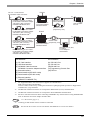
DC24V
GP Unit – Continued from
the GP3000H Cable Connector
(8)
(3)
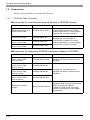
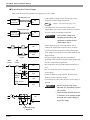
GP3000H Soft-type 3 m Cable
for GP2000H Conversion Adapter
<RS-232C> (with connector)
GP3000H-CBLSD232-3M*4
GP2000H RS-232C
Conversion Adapter
GP2000H-AP232
RS-232C Cable
GP410-IS00-O*5
Host Controller
PLC etc.
RS-232C Cable
(Prepared by user)
GP3000H Soft-type 10 m Cable
for GP2000H Conversion Adapter
<RS-232C> (with connector)
GP3000H-CBLSD232-10M*4
DC24V
(9)
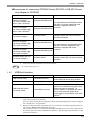
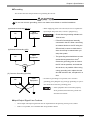
GP3000H Soft-type 3 m Cable
for GP2000H Conversion Adapter
<RS-422> (with connector)
GP3000H-CBLSD422-3M*4
RS-422 Cable
GP2000H RS-422 (Prepared by user)
Conversion Adapter
GP2000H-AP422
Mitsubishi PLC A, QnA,
FX Series'
2 Port Adapter II
GP070-MD11
GP3000H Soft-type 10 m Cable
for GP2000H Conversion Adapter
<RS-422> (with connector)
GP3000H-CBLSD422-10M*4
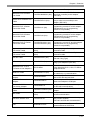
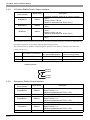
GP Interfaces
PLC Interfaces
(1) CF Card Interface
(2) USB Host Interface
(3) GP3000H Cable Connector
GP3000H Conversion Adapter Interface
(4) External Interface
(5) Serial Interface (RS-232C mode)
(6) Serial Interface (RS-422 mode)
(7) Ethernet Interface
(10BASE-T/100BASE-TX)
(8) RS-232C Port
(9) RS-422 Port
(10) RS-485 Port
(11) Programming Console Port
(12) PG Port
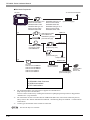
*1
Host Controller
PLC etc.
For supported models, refer to Pro-face’s support site “Otasuke Pro!”
(http://www.pro-face.com/otasuke/).
You can connect to this site by clicking the GP-Pro EX’s [Help (H)] menu-[Connect to Support Site
“Otasuke Pro!” (O)] command.
*2
The RS-232C Isolation Unit does not correspond to RS-422/485 (2 wire) communication.
*3
The RS-232C Isolation Unit does not correspond to Serial Multilink communication.
*4
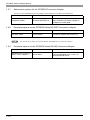
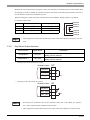
Be sure to read the restrictions when connecting GP3000H to any external devices using GP2000H RS232C or RS-422 Conversion Adapter and this cable.
SEE
*5
SEE
1.1.1 Restrictions (page1-7)
Certain types and models of PLCs cannot be connected.
GP-Pro EX Device/PLC Connection Manual "GP3000H Series Connection Guide"
1-5