1
3.2.2 SYSTEM MANAGEMENT
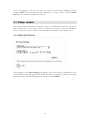
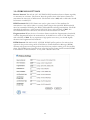
Clicking the System Management button to configure system related parameters to for
the 802.11A/G ACCESS POINT.
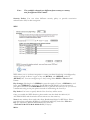
Management Utility Port Definition: The standard port settings for the HTTP Web
server and the Telnet utility may be replaced by entering new port numbers in these
fields.
Management Session Time-out: This setting specifies the duration of idle time
(inactivity) before a web browser or telnet management session times out. The default
time-out value is 10 minutes.
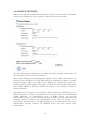
UPnP: The Universal Plug and Play (UPnP) feature allows a Windows XP/ME PC to
discover this 802.11A/G Access Point and automatically show an icon on the screen.
Then a user can double-click the icon to access this device directly (without having to
find out its IP address).
Syslog: Syslog is an IETF (Internet Engineering Task Force - the Internet standards
body)-conformant standard for logging system events (RFC-3164). When the 802.11A/G
ACCESS POINT encounters an error or warning condition (e.g., a log-in attempt with
an invalid password), it will create a log in the system log table. To be able to remotely
view such system log events, you need to check the Enable Syslog box and configure
the IP address of a Syslog daemon. When doing so, the 802.11A/G ACCESS POINT
will send logged events over network to the daemon for future reviewing.
Syslog server IP address: The IP address of the PC where the Syslog daemon is
running.
22