1
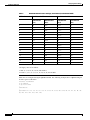
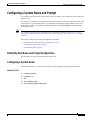
Cisco 3900 Series, 2900 Series, and
1900 Series Integrated Services Routers
Generation 2 Software Configuration
Guide
Americas Headquarters
Cisco Systems, Inc.
170 West Tasman Drive
San Jose, CA 95134-1706
USA
http://www.cisco.com
Tel: 408 526-4000
800 553-NETS (6387)
Fax: 408 527-0883
Text Part Number: OL-21850-01
THE SPECIFICATIONS AND INFORMATION REGARDING THE PRODUCTS IN THIS MANUAL ARE SUBJECT TO CHANGE WITHOUT NOTICE. ALL
STATEMENTS, INFORMATION, AND RECOMMENDATIONS IN THIS MANUAL ARE BELIEVED TO BE ACCURATE BUT ARE PRESENTED WITHOUT
WARRANTY OF ANY KIND, EXPRESS OR IMPLIED. USERS MUST TAKE FULL RESPONSIBILITY FOR THEIR APPLICATION OF ANY PRODUCTS.
THE SOFTWARE LICENSE AND LIMITED WARRANTY FOR THE ACCOMPANYING PRODUCT ARE SET FORTH IN THE INFORMATION PACKET THAT
SHIPPED WITH THE PRODUCT AND ARE INCORPORATED HEREIN BY THIS REFERENCE. IF YOU ARE UNABLE TO LOCATE THE SOFTWARE LICENSE
OR LIMITED WARRANTY, CONTACT YOUR CISCO REPRESENTATIVE FOR A COPY.
The Cisco implementation of TCP header compression is an adaptation of a program developed by the University of California, Berkeley (UCB) as part of UCB’s public
domain version of the UNIX operating system. All rights reserved. Copyright © 1981, Regents of the University of California.
NOTWITHSTANDING ANY OTHER WARRANTY HEREIN, ALL DOCUMENT FILES AND SOFTWARE OF THESE SUPPLIERS ARE PROVIDED “AS IS” WITH
ALL FAULTS. CISCO AND THE ABOVE-NAMED SUPPLIERS DISCLAIM ALL WARRANTIES, EXPRESSED OR IMPLIED, INCLUDING, WITHOUT
LIMITATION, THOSE OF MERCHANTABILITY, FITNESS FOR A PARTICULAR PURPOSE AND NONINFRINGEMENT OR ARISING FROM A COURSE OF
DEALING, USAGE, OR TRADE PRACTICE.
IN NO EVENT SHALL CISCO OR ITS SUPPLIERS BE LIABLE FOR ANY INDIRECT, SPECIAL, CONSEQUENTIAL, OR INCIDENTAL DAMAGES, INCLUDING,
WITHOUT LIMITATION, LOST PROFITS OR LOSS OR DAMAGE TO DATA ARISING OUT OF THE USE OR INABILITY TO USE THIS MANUAL, EVEN IF CISCO
OR ITS SUPPLIERS HAVE BEEN ADVISED OF THE POSSIBILITY OF SUCH DAMAGES.
CCDE, CCENT, CCSI, Cisco Eos, Cisco HealthPresence, Cisco IronPort, the Cisco logo, Cisco Nurse Connect, Cisco Pulse, Cisco SensorBase, Cisco StackPower,
Cisco StadiumVision, Cisco TelePresence, Cisco Unified Computing System, Cisco WebEx, DCE, Flip Channels, Flip for Good, Flip Mino, Flipshare (Design), Flip Ultra,
Flip Video, Flip Video (Design), Instant Broadband, and Welcome to the Human Network are trademarks; Changing the Way We Work, Live, Play, and Learn, Cisco Capital,
Cisco Capital (Design), Cisco:Financed (Stylized), Cisco Store, Flip Gift Card, and One Million Acts of Green are service marks; and Access Registrar, Aironet, AllTouch,
AsyncOS, Bringing the Meeting To You, Catalyst, CCDA, CCDP, CCIE, CCIP, CCNA, CCNP, CCSP, CCVP, Cisco, the Cisco Certified Internetwork Expert logo,
Cisco IOS, Cisco Lumin, Cisco Nexus, Cisco Press, Cisco Systems, Cisco Systems Capital, the Cisco Systems logo, Cisco Unity, Collaboration Without Limitation,
Continuum, EtherFast, EtherSwitch, Event Center, Explorer, Follow Me Browsing, GainMaker, iLYNX, IOS, iPhone, IronPort, the IronPort logo, Laser Link, LightStream,
Linksys, MeetingPlace, MeetingPlace Chime Sound, MGX, Networkers, Networking Academy, PCNow, PIX, PowerKEY, PowerPanels, PowerTV, PowerTV (Design),
PowerVu, Prisma, ProConnect, ROSA, SenderBase, SMARTnet, Spectrum Expert, StackWise, WebEx, and the WebEx logo are registered trademarks of Cisco Systems, Inc.
and/or its affiliates in the United States and certain other countries.
All other trademarks mentioned in this document or website are the property of their respective owners. The use of the word partner does not imply a partnership relationship
between Cisco and any other company. (0910R)
Any Internet Protocol (IP) addresses used in this document are not intended to be actual addresses. Any examples, command display output, and figures included in the
document are shown for illustrative purposes only. Any use of actual IP addresses in illustrative content is unintentional and coincidental.
Cisco 3900 Series, 2900 Series, 1900 Series Integrated Services Routers Software Configuration Guide
© 2009-2010 Cisco Systems, Inc. All rights reserved.
Preface
This preface describes the objectives, audience, organization, conventions of this guide, and the
references that accompany this document set. The following sections are provided:
•
Objectives, page iii
•
Audience, page iii
•
Organization, page iii
•
Conventions, page v
•
Related Documentation, page vi
•
Searching Cisco Documents, page vii
Objectives
This guide provides an overview and explains how to configure the various features for the Cisco 1900
series, Cisco 2900 series, and Cisco 3900 series integrated services routers generation 2 (ISR G2). Some
information may not apply to your particular router model.
Audience
This document is written for experienced technical workers who install, monitor, and troubleshoot
routers under a service contract, or who work for an information technology (IT) department.
Organization
This guide is divided into three parts:
•
Part 1—Configuring the Router
•
Part 2—Configuring the Access Point
•
Part 3—Appendix
Cisco 3900 Series, 2900 Series, and 1900 Series Integrated Services Routers Software Configuration Guide
OL-21850-01
iii
Preface
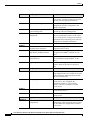
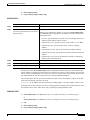
Part 1
Module 1
Configuring the Router
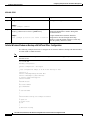
Description
Module 2
Basic Router Configuration
Module 3
Configuring Backup Data Lines and Describes how to configure backup interfaces,
Remote Management
dial backup, and remote management.
Module 4
Configuring Power Efficiency
Management
Describes the hardware and software power
efficiency management features on the router.
See Cisco EnergyWise Configuration Guide for
information about configuring power efficiency
management on modules and interface.
Module 5
Configuring Security Features
Describes how to configure security features.
Module 6
Unified Communications on Cisco
Integrated Services Routers
Describes voice application services that are
supported on these routers.
Module 7
Configuring Next-Generation
High-Density PVDM3 Modules
Describes how to configure the new
next-generation PVDM31 installed on your
router.
Module 8
Multi-Gigabit Fabric
Communication
Describes how modules and interface cards
inter-communicate using the MGF2 on the
router.
Module 9
Upgrading the Cisco IOS Software
Describes how to upgrade the Cisco IOS
software image on the router or the access
point.
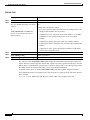
Part 2
Module 1
Configuring the Access Point
Description
Wireless Overview
Describes the autonomous image and recovery
image shipped on the Cisco 1941W access point
flash. Explains the default autonomous mode
and Cisco Unified mode.
Module 2
Configuring the Wireless Device
Describes how to configure the autonomous
wireless device, how to upgrade the
autonomous software to Cisco Unified
software, and how to configure a Unified
wireless device.
Module 3
Configuring the Radio Settings
Describes how to configure the radio settings
for the wireless device.
Module 4
Administering the Wireless Device
Describes many administration tasks for the
wireless device.
Part 3
Appendix A
Appendix
Description
Cisco IOS CLI for Initial
Configuration
Describes how to perform the initial
configuration of the router using the Cisco IOS
CLI, and additional configuration procedures
for the router.
Overview of Hardware and Software Describes new hardware and software features
in this release, features by platform, new slots,
common ports, and getting started tasks.
Describes how to perform the basic router
configuration, interface configuration, and
routing configuration.
Cisco 3900 Series, 2900 Series, and 1900 Series Integrated Services Routers Software Configuration Guide
iv
OL-21850-01
Preface
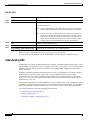
Appendix B
Using CompactFlash Memory Cards Describes how to use Advanced Capability CF3
memory cards on the router.
Appendix C
Using ROM Monitor
Describes how to use the ROM monitor to
manually load a system image, upgrade the
system image when there are no TFTP servers
or network connections, or prepare for disaster
recovery.
Appendix D
Changing the Configuration
Register Settings
Describes the 16-bit configuration register in
NVRAM and how to make changes to the
register settings using the Cisco IOS CLI.
1. PVDM3 = packet voice/data module
2. MGF = Multi-Gigabit Fabric.
3. CF = CompactFlash.
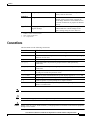
Conventions
This document uses the following conventions:
Convention
Indication
bold font
Commands and keywords and user-entered text appear in bold font.
italic font
Document titles, new or emphasized terms, and arguments for which you supply
values are in italic font.
[ ]
Elements in square brackets are optional.
{x | y | z }
Required alternative keywords are grouped in braces and separated by
vertical bars.
[x|y|z]
Optional alternative keywords are grouped in brackets and separated by
vertical bars.
string
A nonquoted set of characters. Do not use quotation marks around the string or
the string will include the quotation marks.
courier
font
Terminal sessions and information the system displays appear in courier font.
< >
Non-printing characters such as passwords are in angle brackets.
[ ]
Default responses to system prompts are in square brackets.
!, #
An exclamation point (!) or a pound sign (#) at the beginning of a line of code
indicates a comment line.
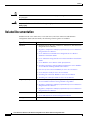
Note
Means reader take note.
Tip
Means the following information will help you solve a problem.
Caution
Means reader be careful. In this situation, you might perform an action that could result in equipment
damage or loss of data.
Cisco 3900 Series, 2900 Series, and 1900 Series Integrated Services Routers Software Configuration Guide
OL-21850-01
v
Preface
Timesaver
Warning
Means the described action saves time. You can save time by performing the action described in
the paragraph.
Means reader be warned. In this situation, you might perform an action that could result in
bodily injury.
Related Documentation
In addition to the Cisco 1900 series, Cisco 2900 series, and Cisco 3900 series ISR Software
Configuration Guide (this document), the following reference guides are included:
Type of Document
Hardware
Regulatory Compliance
Software Activation
Configuration
Links
•
Read Me First for the Cisco 1900 Series, 2900 Series, and 3900 Series
Integrated Services Routers.
•
Regulatory Compliance and Safety Information for Cisco 1900 Series
Integrated Services Routers.
•
Cisco 2900 Series and 3900 Series Integrated Services Routers
Hardware Installation Guide.
•
Cisco 1900 Series Integrated Services Routers Hardware Installation
Guide.
•
Cisco Modular Access Router Cable Specifications
•
Installing, Replacing, and Upgrading Components in Cisco Modular
Access Routers and Integrated Services Routers
•
Overview of Cisco Network Modules for Cisco Access Routers
•
Cisco Interface Cards for Cisco Access Routers
•
Installing Cisco Network Modules in Cisco Access Routers
•
Installing Cisco Interface Cards in Cisco Access Routers
•
Declarations of Conformity and Regulatory Information for Cisco
Access Products with 802.11a/b/g and 802.11b/g Radios
•
Regulatory Compliance and Safety Information for Cisco 2900 Series
Integrated Services Routers
•
Regulatory Compliance and Safety Information for Cisco 3900 Series
Integrated Services Routers
•
Software Activation for Cisco Integrated Services Routers
•
Cisco IOS Software Activation Configuration Guide
•
Cisco CP Express User’s Guide
Cisco 3900 Series, 2900 Series, and 1900 Series Integrated Services Routers Software Configuration Guide
vi
OL-21850-01
Preface
Type of Document
Links
Cisco Internet Operating
System Software (IOS)
Cisco IOS software release 15.0 is the next IOS release following the Cisco
IOS 12.4(24)T release. For information about new features in Cisco IOS
software release 15.0, see the Cisco IOS software pages at Cisco.com.
Go here to read a product bulletin that specifies the software feature sets
available for Cisco 1900, 2900 and 3900 Series Integrated Services
Routers in release 15.0. It also issues recommendations for Flash and
DRAM memory configuration.
http://www.cisco.com/en/US/prod/collateral/iosswrel/ps8802/ps5460/
product_bulletin_c25-566278_ps10537_Products_Bulletin.html
Wireless
Voice
Modules
•
Cisco IOS Command Reference for Cisco Aironet Access Points and
Bridges, versions 12.4(10b) JA and 12.3(8) JEC
•
Wireless LAN Controllers
•
Unified Wireless LAN Access Points
•
Cisco IOS Voice Port Configuration Guide
•
SCCP Controlled Analog (FXS) Ports with Supplementary Features in
Cisco IOS Gateways
•
Cisco SRE Internal Service Modules Configuration Guide.
•
Cisco Services Ready Engine Configuration Guide.
•
Cisco SRE Service Modules Configuration Guide.
•
Connecting Cisco EtherSwitch Service Modules to the Network.
•
Cisco EtherSwitch Service Modules Feature Guide.
Searching Cisco Documents
To search a Hyper Text Markup Language (HTML) document using a web browser, press Ctrl-F
(Windows) or Cmd-F (Apple). In most browsers, the option to search whole words only, invoke case
sensitivity, or search forward and backward is also available.
To search a PDF document in Adobe Reader, use the basic Find toolbar (Ctrl-F) or the Full Reader
Search window (Shift-Ctrl-F). Use the Find toolbar to find words or phrases within a specific document.
Use the Full Reader Search window to search multiple PDF files simultaneously and to change case
sensitivity and other options. Adobe Reader’s online help has more information about how to search PDF
documents.
Cisco 3900 Series, 2900 Series, and 1900 Series Integrated Services Routers Software Configuration Guide
OL-21850-01
vii
Preface
Cisco 3900 Series, 2900 Series, and 1900 Series Integrated Services Routers Software Configuration Guide
viii
OL-21850-01
PA R T
1
Configuring the Router
Overview of the Hardware and Software
The Cisco 3900 series, 2900 series, and 1900 series integrated services routers (ISRs) offer secure,
wire-speed delivery of concurrent data, voice, and video services. The modular design of these routers
provides maximum flexibility, allowing you to configure your router to meet evolving needs.
The routers offer features such as hardware-based virtual private network (VPN) encryption
acceleration, intrusion-protection and firewall functions, and optional integrated call processing and
voice mail. A wide variety of legacy network modules and interfaces, service modules (SMs), internal
services modules (ISMs), next-generation packet voice/data modules (PVDM3), Services Performance
Engines (SPEs), high-density interfaces for a wide range of connectivity requirements, and sufficient
performance and slot density for future network expansion requirements and advanced applications are
available.
Power-saving hardware and software features are incorporated throughout the series. These routers
provide access to the multi-gigabit fabric, which provides a connection between switch ports without
using up external ports. The logical Gigabit Ethernet (GE) interface on the router connects external and
internal modules through the backplane for LAN and WAN switching. Software feature upgrades are
provided through software licensing.
The following sections describe the Cisco 3900 series, 2900 series, and 1900 series ISRs:
•
New Features in this Release, page 2
•
New Features by Platform, page 4
•
New Slots, page 4
•
New Slots and Ports by Platform, page 5
•
Common Ports, page 6
•
Licensing, page 6
•
Getting Started, page 7
Americas Headquarters:
Cisco Systems, Inc., 170 West Tasman Drive, San Jose, CA 95134-1706 USA
Overview of the Hardware and Software
New Features in this Release
New Features in this Release
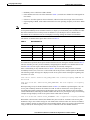
New features in this release are described in Table 1.
Table 1
New Features
Feature
Description
Services Performance
Engine
SPEs1 are modular motherboards on Cisco 3900 series ISRs. The SPE
houses PVDM3 slots, system memory slots, and the ISM slot. The SPE
provides a modular approach to system upgrades. You simply slide out the
SPE from the router to replace internal modules, or upgrade the SPE to
improve router performance. See Cisco 2900 series and 3900 series
Integrated Services Routers Hardware Installation Guide for instructions.
Cryptographic Engine
Accelerator
Cisco 3900 series routers with either Services Performance Engine 200 or
Services Performance Engine 250 have an onboard cryptographic
accelerator that is shared between SSLVPN and IPSec. By default,
acceleration of SSL is disabled so IPSec performance is maximized.
See the “Configuring Security Features” section on page 1 in this guide
for information about enabling the SSLVPN feature.
USB Console
Cisco 3900 series, 2900 series, and 1900 series ISRs provide an additional
mechanism for configuring the system through a USB2 serial console port.
The traditional RJ-45 serial console port is also available.
Power Management
Some modules and interface cards that are inserted in new slots provide
hardware and software power management features described below:
Advanced Capability
CompactFlash
•
High efficiency AC power supplies
•
Electrical components with built-in power saving features, such as
RAM select and clock gating
•
Ability to disable unused clocks to modules and peripherals
•
Ability to power down unused modules and put peripherals into a
reset state, put front panel ports and unused internal components in a
shutdown or reset state
Cisco 3900 series, 2900 series, and 1900 series ISRs use Advanced
Capability CF3 memory to store the system image, configuration files, and
some software data files.
SFP/Gigabit Ethernet Port Cisco 2921, Cisco 2951 and Cisco 3900 Series routers have an
SFP/Gigabit Ethernet port that supports copper and fiber concurrent
connections. Media can be configured for failover redundancy when the
network goes down. For more information, see the “Configuring Backup
Data Lines and Remote Management” section on page 1.
Cisco 3900 Series, 2900 Series, and 1900 Series Integrated Services Routers Software
2
Overview of the Hardware and Software
New Features in this Release
Table 1
New Features (continued)
Feature
Description
New Modules and
Interface Cards
Cisco 3900 series, 2900 series, and 1900 series ISRs introduce the
following new modules and interface cards, which are inserted in the
following new router slots:
•
EHWIC
•
PVDM3
•
ISM
•
SM
Note
See the router’s product page at Cisco.com for a complete list of
supported modules and interfaces.
Multi-Gigabit Fabric
Communication
Cisco 3900 series, 2900 series, and 1900 series ISRs use a MGF4 for the
new modules and interface cards to inter-communicate on the router.
Legacy modules that support Cisco HIMI5 also support MGF to
inter-communicate on the router. Next generation module drivers
integrate with the MGF to perform port configurations, configure packet
flow, and control traffic buffering. All configurations are performed from
the module-side, which may or may not lead to changes on the MGF. For
more information, see the “Configuring Multi-Gigabit Fabric
Communication” section on page 1.
Integrated Application
Services Features
Cisco 3900 series, 2900 series, and 1900 series ISRs offer integrated
security features and voice features.
•
See the “Configuring Security Features” section on page 1
•
See the “Unified Communications on Cisco Integrated Services
Routers” section on page 1
1. SPE = Services Performance Engine
2. USB = universal serial bus
3. CF = CompactFlash
4. MGF = multi-gigabit fabric
5. HIMI = High-Speed Intrachassis Module Interconnect
Cisco 3900 Series, 2900 Series, and 1900 Series Integrated Services Routers Software
OL-21850-01
3
Overview of the Hardware and Software
New Features by Platform
New Features by Platform
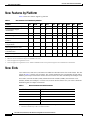
Table 2 shows new feature support by platform.
Table 2
New Features in this Release by Platform
Features
1941
1941W
2901
2911
2921
2951
3925
3925E
3945
3945E
Services Performance Engine
N
N
N
N
N
N
Y
Y
Y
Y
Cryptographic Engine
Acceleration
N
N
N
N
N
N
Y
USB Serial Console
Y
Y
Y
Y
Y
Y
Power Management
Y
Y
Y
Y
Y
New Module and Interface Card
Features
Y
Y
Y
Y
Advanced Capability
CompactFlash
Y
Y
Y
SFP/Gigabit Ethernet Port
N
N
Multi-Gigabit Fabric
Communication
Y
Integrated Application Services
Y3
1
2
Y
Y
Y
Y
Y
Y
Y
Y
Y
Y
Y
Y
Y
Y
Y
Y
Y
Y
Y
Y
Y
Y
Y
Y
Y
N
N
Y
Y
Y
Y
Y
Y
Y
Y
Y
Y
Y
Y
Y
Y
Y
Y4
Y
Y
Y
Y
Y
Y
Y
Y
1. Must have Services Performance Engine 200 installed in the router.
2. Must have Services Performance Engine 250 installed in the router.
3. Does not support Voice application services.
4. Does not support Voice application services. Includes embedded wireless access point that supports Cisco Unified Wireless Architecture.
New Slots
Cisco 3900 series, 2900 series, and 1900 series ISRs have introduced new slots on the chassis. The first
column in Table 3 lists the new slot names. The second column lists the corresponding old slot names.
Modules previously inserted in the old slots now insert in the new slots with the help of an adapter card.
For instance, network modules (NMs), enhanced network modules (NMEs), and extension voice
modules (EVMs) use an adapter, or carrier card, to insert into the SM slot. See your router’s hardware
installation guide for adapter information.
Table 3
New Slot Names and Old Slot Names
New Slot Names
Old Slot Names
EHWIC
HWIC,HWIC-DW, WIC, VWIC, VIC
ISM
AIM1
PVDM3
PVDM
SM
NM, NME, EVM
SPE
2
—
1. AIM is not supported in this release. See your hardware installation guide for more information.
2. The SPE is available only on the Cisco 3900 series ISRs.
Cisco 3900 Series, 2900 Series, and 1900 Series Integrated Services Routers Software
4
Overview of the Hardware and Software
New Slots and Ports by Platform
New Slots and Ports by Platform
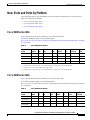
This section provides the type and number of the slots and ports available in the Cisco 3900 series,
2900 series, and 1900 series ISRs.
•
Cisco 3900 Series ISRs, page 5
•
Cisco 2900 Series ISRs, page 5
•
Cisco 1900 Series ISRs, page 6
Cisco 3900 Series ISRs
Table 4 lists the slots and ports available on Cisco 3900 series routers.
To view the installation guide, see the following URL
http://www.cisco.com/en/US/docs/routers/access/2900/hardware/installation/guide/Hardware_Installati
on_Guide.html
Table 4
Router
Cisco 3945
Cisco 3945E
Cisco 3925
Cisco 3925E
Cisco 3900 Series Routers
EHWIC
4
SM
4
3
4
4
2
3
2
Dbl-Wide
SM
ISM
1
PVDM3
1
1
4
0
1
1
2
3
1
2
4
0
GE (RJ-45)/
SFP ports
CF
2
3
2
SPE
3
1
1
4
2
1
3
3
1
4
4
1
1. One RJ-45 GE + two combo GE/SFPs.
2. Four RJ-45 GE, or three RJ-45 GE + one combo GE/SFP, or two RJ-45 GE + two combo GE/SFP.
3. One RJ-45 GE + two combo GE/SFPs, or three RJ-45 GEs.
4. Four RJ-45 GE, or three RJ-45 GE + one combo GE/SFP, or two RJ-45 GE + two combo GE/SFP.
Cisco 2900 Series ISRs
Table 5 lists the slots and ports available on Cisco 2900 series routers.
To view the installation guide, see the following URL
http://www.cisco.com/en/US/docs/routers/access/2900/hardware/installation/guide/Hardware_Installati
on_Guide.html
Table 5
Cisco 2900 Series Routers
Router
EHWIC
SM
Dbl-Wide
SM
ISM
PVDM3
CF
GE (RJ-45)
ports
GE (RJ-45)/
SFP ports
Cisco 2951
4
2
2
1
3
2
2
1
Cisco 2921
4
1
1
1
3
2
2
1
Cisco 2911
4
1
1
1
2
2
3
0
Cisco 2901
4
0
0
1
2
2
3
0
Cisco 3900 Series, 2900 Series, and 1900 Series Integrated Services Routers Software
OL-21850-01
5
Overview of the Hardware and Software
Common Ports
Cisco 1900 Series ISRs
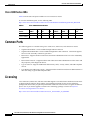
Table 6 lists the slots and ports available on Cisco 1900 series routers.
To view the installation guide, see the following URL
http://www.cisco.com/en/US/docs/routers/access/1900/hardware/installation/guide/1900_HIG.html
Table 6
Cisco 1900 Series ISR Routers
Router
EHWIC
SM
Dbl-Wide
SM
ISM
PVDM3
WLAN
CF
GE (RJ-45)
ports
Cisco 1941
2
0
0
1
0
0
2
2
Cisco 1941W
2
0
0
0
0
1
2
2
Common Ports
The following ports are common among Cisco 3900 series, 2900 series, and 1900 series routers:
•
Gigabit Ethernet RJ45—Ports available through an RJ45 connector.
•
Gigabit Ethernet RJ45/SFP—Ports available through RJ45- SFP connectors. Connection supports
fail-over if the secondary connection goes down.
•
RS232 Aux—Supports modem control lines and remote administration for box-to-box redundancy
applications.
•
RS232 Serial Console—Supports modem control lines and remote administration of the router with
the proprietary cable shipped in the box.
•
Type A USB 2.0—Supports USB-based flash memory sticks, security tokens, and USB-compliant
devices.
•
Type B mini-port USB Serial Console—Supports modem control lines and remote administration of
the router using a type B USB-compliant cable.
Licensing
Cisco 3900 series, 2900 series, and 1900 series ISRs support Cisco IOS software entitlement. Your router
is shipped with the software image and the corresponding permanent licenses for the technology
packages and features that you specified preinstalled. You do not need to activate or register the software
prior to use. If you need to upgrade or install a new technology package or feature see Software
Activation on Integrated Services Router,
http://www.cisco.com/en/US/docs/routers/access/sw_activation/SA_on_ISR.html.
Cisco 3900 Series, 2900 Series, and 1900 Series Integrated Services Routers Software
6
Overview of the Hardware and Software
Getting Started
Getting Started
See the router-specific hardware installation guide to install the router in an appropriate location.
Connect the router with the appropriate cables. Supply power to the router and perform the initial
software configuration using Cisco Configuration Professional Express. After the initial configuration
is completed, perform the following steps:
Step 1
Follow instructions in the “Basic Router Configuration” section on page 1 to perform additional router
configurations.
Step 2
(Optional) If you are setting up the Cisco 1941W ISR, follow instructions in the “Configuring the
Wireless Device” section on page 1 to configure the embedded wireless device on the router.
Step 3
Follow instructions in the “Configuring Security Features” section on page 1 to configure security
features on the router.
Step 4
Follow instructions in the “Unified Communications on Cisco Integrated Services Routers” section on
page 1 to configure Voice features on the router.
Cisco 3900 Series, 2900 Series, and 1900 Series Integrated Services Routers Software
OL-21850-01
7
Overview of the Hardware and Software
Getting Started
CCDE, CCENT, CCSI, Cisco Eos, Cisco HealthPresence, Cisco IronPort, the Cisco logo, Cisco Nurse Connect, Cisco Pulse, Cisco SensorBase,
Cisco StackPower, Cisco StadiumVision, Cisco TelePresence, Cisco Unified Computing System, Cisco WebEx, DCE, Flip Channels, Flip for Good,
Flip Mino, Flipshare (Design), Flip Ultra, Flip Video, Flip Video (Design), Instant Broadband, and Welcome to the Human Network are trademarks;
Changing the Way We Work, Live, Play, and Learn, Cisco Capital, Cisco Capital (Design), Cisco:Financed (Stylized), Cisco Store, Flip Gift Card,
and One Million Acts of Green are service marks; and Access Registrar, Aironet, AllTouch, AsyncOS, Bringing the Meeting To You, Catalyst, CCDA,
CCDP, CCIE, CCIP, CCNA, CCNP, CCSP, CCVP, Cisco, the Cisco Certified Internetwork Expert logo, Cisco IOS, Cisco Lumin, Cisco Nexus,
Cisco Press, Cisco Systems, Cisco Systems Capital, the Cisco Systems logo, Cisco Unity, Collaboration Without Limitation, Continuum, EtherFast,
EtherSwitch, Event Center, Explorer, Follow Me Browsing, GainMaker, iLYNX, IOS, iPhone, IronPort, the IronPort logo, Laser Link, LightStream,
Linksys, MeetingPlace, MeetingPlace Chime Sound, MGX, Networkers, Networking Academy, PCNow, PIX, PowerKEY, PowerPanels, PowerTV,
PowerTV (Design), PowerVu, Prisma, ProConnect, ROSA, SenderBase, SMARTnet, Spectrum Expert, StackWise, WebEx, and the WebEx logo are
registered trademarks of Cisco Systems, Inc. and/or its affiliates in the United States and certain other countries.
All other trademarks mentioned in this document or website are the property of their respective owners. The use of the word partner does not imply
a partnership relationship between Cisco and any other company. (0910R)
Any Internet Protocol (IP) addresses used in this document are not intended to be actual addresses. Any examples, command display output, and
figures included in the document are shown for illustrative purposes only. Any use of actual IP addresses in illustrative content is unintentional and
coincidental.
© 2009-2010 Cisco Systems, Inc. All rights reserved.
Cisco 3900 Series, 2900 Series, and 1900 Series Integrated Services Routers Software
8
Basic Router Configuration
This module provides configuration procedures for Cisco 3900 series, 2900 series, and 1900 series
integrated services routers (ISRs). It also includes configuration examples and verification steps
whenever possible.
Note
See Appendix A, “Cisco IOS CLI for Initial Configuration” for information on how to perform the initial
configuration using the Cisco Internet Operating System (IOS) command line interface on Cisco 3900
series, 2900 series, and 1900 series integrated services routers.
Basic Configuration
•
Default Configuration, page 2
•
Configuring Global Parameters, page 3
Interface Configuration
•
Interface Ports, page 5
•
Configuring Gigabit Ethernet Interfaces, page 6
•
Configuring Wireless LAN Interfaces, page 7
•
Configuring Interface Card and Module Interfaces, page 7
•
Configuring a Loopback Interface, page 7
Routing Configuration
•
Configuring Command-Line Access, page 9
•
Configuring Static Routes, page 11
•
Configuring Dynamic Routes, page 12
Americas Headquarters:
Cisco Systems, Inc., 170 West Tasman Drive, San Jose, CA 95134-1706 USA
Basic Router Configuration
Default Configuration
Default Configuration
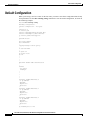
When you boot up your Cisco router for the first time, you notice some basic configuration has already
been performed. Use the show running-config command to view the initial configuration, as shown in
the following example.
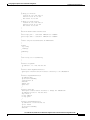
Router# show running-config
Building configuration...
Current configuration : 723 bytes
!
version 12.4
no service pad
service timestamps debug datetime msec
service timestamps log datetime msec
no service password-encryption
!
hostname Router
!
boot-start-marker
boot-end-marker
!
logging message-counter syslog
!
no aaa new-model
!
no ipv6 cef
ip source-route
ip cef
!
!
!
!
multilink bundle-name authenticated
!
!
archive
log config
hidekeys
!
!
!
!
!
interface GigabitEthernet0/0
no ip address
shutdown
duplex auto
speed auto
!
interface GigabitEthernet0/1
no ip address
shutdown
duplex auto
speed auto
!
interface GigabitEthernet0/2
no ip address
shutdown
duplex auto
speed auto
!
ip forward-protocol nd
Cisco 3900 Series, 2900 Series, and 1900 Series Integrated Services Routers Software
2
Basic Router Configuration
Configuring Global Parameters
!
no ip http server
!
!
!
!
!
control-plane
!
!
line con 0
line aux 0
line vty 0 3
login
!
exception data-corruption buffer truncate
scheduler allocate 20000 1000
end
Configuring Global Parameters
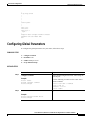
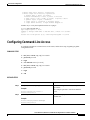
To configure the global parameters for your router, follow these steps.
SUMMARY STEPS
1.
configure terminal
2.
hostname name
3.
enable secret password
4.
no ip domain-lookup
DETAILED STEPS
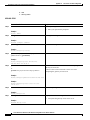
Step 1
Command
Purpose
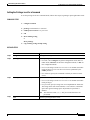
configure terminal
Enters global configuration mode, when using the
console port.
Example:
Use the following to connect to the router with a
remote terminal:
Router> enable
Router# configure terminal
Router(config)#
Step 2
hostname name
telnet router name or address
Login: login id
Password: *********
Router> enable
Specifies the name for the router.
Example:
Router(config)# hostname Router
Router(config)#
Cisco 3900 Series, 2900 Series, and 1900 Series Integrated Services Routers Software
OL-21850-01
3
Basic Router Configuration
Configuring I/O Memory Allocation
Step 3
Command
Purpose
enable secret password
Specifies an encrypted password to prevent
unauthorized access to the router.
Example:
Router(config)# enable secret cr1ny5ho
Router(config)#
Step 4
no ip domain-lookup
Disables the router from translating unfamiliar
words (typos) into IP addresses.
Example:
Router(config)# no ip domain-lookup
Router(config)#
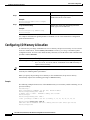
For complete information on global parameter commands, see the Cisco IOS Release configuration
guide documentation set.
Configuring I/O Memory Allocation
To reallocate the percentage of DRAM in use for I/O memory and processor memory on Cisco 3925E
and Cisco 3945E routers, use the memory-size iomem i/o-memory-percentage command in global
configuration mode. To revert to the default memory allocation, use the no form of this command. This
procedure enables smartinit.
Tip
Syntax
Description
i/o-memory-percentage
The percentage of DRAM allocated to I/O memory. The values permitted
are 5, 10, 15, 20, 25, 30, 40, and 50. A minimum of 201 MB of memory is
required for I/O memory.
We recommend that you configure the memory-size iomem below 25%. Any value above 25% should be
used only for enhancing IPSec performance.
When you specify the percentage of I/O memory in the command line, the processor memory
automatically acquires the remaining percentage of DRAM memory.
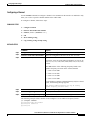
Example
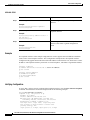
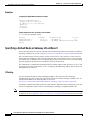
The following example allocates 25% of the DRAM memory to I/O memory and the remaining 75% to
processor memory:
Router#config t
Enter configuration commands, one per line. End with CNTL/Z.
Router(config)# memory-size iomem 5
IO memory size too small: minimum IO memory size is 201M
Router(config)#
Router(config)# memory-size iomem ?
<5-50> percentage of DRAM to use for I/O memory: 5, 10, 15, 20, 25, 30, 40, 50
Router(config)# memory-size iomem 25
Smart-init will be disabled and new I/O memory size will take effect upon reload.
Router(config)# end
Cisco 3900 Series, 2900 Series, and 1900 Series Integrated Services Routers Software
4
Basic Router Configuration
Interface Ports
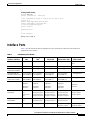
Verifying IOMEM Setting
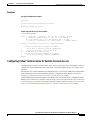
Router# show run
Current configuration : 6590 bytes
!
! Last configuration change at 16:48:41 UTC Tue Feb 23 2010 !
version 15.1
service timestamps debug datetime msec
service timestamps log datetime msec
no service password-encryption
service internal
!
hostname Router1
!
!
no aaa new-model
!
memory-size iomem 25
!
Interface Ports
Table 7 lists the interfaces that are supported on Cisco 3900 series, 2900 series, and 1900 series
integrated services routers.
Table 7
Interfaces by Cisco Router
Slots, Ports, Logical
Interface, Interfaces
1941
29011
Onboard WLAN
Wlan-ap0
not supported
not supported
not supported
not supported
Onboard WLAN GE
connection to MGF2
Wlan-Gi0/0
not supported
not supported
not supported
not supported
Onboard ISM GE
service-module service-module-
interface on the PCIe -name-ISM 0/0 name-ISM 0/0
service-module-
name-ISM 0/0
service-module-
name-ISM 0/0
not supported
Onboard ISM GE
connection to MGF
service-module service-module-
-name-ISM 0/1 name-ISM 0/1
service-module-
name-ISM 0/1
service-module-
name-ISM 0/1
not supported
USB
usbflash0,
usbflash1
usbflash0,
usbflash1
usbflash0,
usbflash1
usbflash0,
usbflash1
usbtoken0,
usbtoken1
usbtoken0,
usbtoken1
usbtoken0,
usbtoken1
usbtoken0,
usbtoken1
Interfaces on HWIC
and VWIC
interface0/0/
port
interface0/1/
port
interface0/0/port
interface0/1/port
interface0/2/port
interface 0/3/port
interface0/0/port
interface0/1/port
interface0/2/port
interface 0/3/port
interface0/0/port
interface0/1/port
interface0/2/port
interface 0/3/port
<int>0/0/<port>
<int>0/1/<port>
<int>0/2/<port>
Interfaces on Double
Wide-HWIC
interface0/1
port
interface0/1/port
interface0/1/port
interface0/1/port
<int>0/1/<port>
interface0/3/port
interface0/3/port
interface0/3/port
interface1/port
interface1-2/port3
interface1-4/port4
not supported
Gi0/0,Gi0/1,GI0/2
3925E & 3945E
Gi0/0,Gi0/1
not supported
Gi0/0,Gi0/1,GI0/2
2951 & 3925 & 3945
Onboard GE ports
Interfaces on SM
Gi0/0,Gi0/1
2911 & 2921
Gi0/0,Gi0/1,GI0/2,
GI0/3
usbflash0, usbflash1
usbtoken0,
usbtoken1
interface1-2/port
interface1-4/port
Cisco 3900 Series, 2900 Series, and 1900 Series Integrated Services Routers Software
OL-21850-01
5
Basic Router Configuration
Configuring Gigabit Ethernet Interfaces
Table 7
Interfaces by Cisco Router (continued)
Slots, Ports, Logical
Interface, Interfaces
29011
1941
2911 & 2921
2951 & 3925 & 3945
5
Interfaces on Double
Wide-SM
not supported
not supported
not supported
interface 2/port
interface4/port6
Interfaces HWIC on
SM
not supported
not supported
interface1wic-slot/ interface1-2/wic-
port
slot/port7
interface1-4/wic-
slot/port8
Interfaces VWIC on
SM
3925E & 3945E
interface 2/port
interface 4/port
interface1-2/wic-
slot/port
interface1-4/wic-
slot/port
1. On the Cisco 2901 router, the numbering format for configuring an asynchronous interface is 0/slot/port. To configure the line associated with an
asynchronous interface, simply use the interface number to specify the asynchronous line. For example, line 0/1/0 specifies the line associated with
interface serial 0/1/0 on a WIC-2A/S in slot 1. Similarly, line 0/2/1 specifies the line associated with interface async 0/2/1 on a WIC-2AM in slot 2.
2. MGF = multi-gigabit fabric
3. Applies only to Cisco 2951, Cisco 3925, and Cisco 3925E routers.
4. Applies only to Cisco 3945 and Cisco 3945E routers.
5. Applies only to Cisco 2951, Cisco 3925, and Cisco 3925E routers.
6. Applies only to Cisco 3945 and Cisco 3945E routers.
7. Applies only to Cisco 2951, Cisco 3925, and Cisco 3925E routers.
8. Applies only to Cisco 3945 and Cisco 3945E routers.
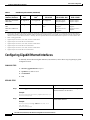
Configuring Gigabit Ethernet Interfaces
To manually define onboard Gigabit Ethernet (GE) interfaces, follow these steps, beginning in global
configuration mode.
SUMMARY STEPS
1.
interface gigabitethernet slot/port
2.
ip address ip-address mask
3.
no shutdown
4.
exit
DETAILED STEPS
Step 1
Command
Purpose
interface gigabitethernet slot/port
Enters the configuration mode for a Gigabit
Ethernet interface on the router.
Example:
Router(config)# interface gigabitethernet 0/1
Router(config-if)#
Step 2
ip address ip-address mask
Sets the IP address and subnet mask for the
specified GE interface.
Example:
Router(config-if)# ip address 192.168.12.2
255.255.255.0
Router(config-if)#
Cisco 3900 Series, 2900 Series, and 1900 Series Integrated Services Routers Software
6
Basic Router Configuration
Configuring Wireless LAN Interfaces
Step 3
Command
Purpose
no shutdown
Enables the GE interface, changing its state
from administratively down to administratively
up.
Example:
Router(config-if)# no shutdown
Router(config-if)#
Step 4
exit
Exits configuration mode for the GE interface
and returns to global configuration mode.
Example:
Router(config-if)# exit
Router(config)#
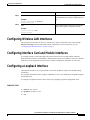
Configuring Wireless LAN Interfaces
The wireless LAN interface on the Cisco 1941W router enables connection to the router through
interface wlan-ap0. For more information about configuring a wireless connection, see the
“Configuring the Wireless Device” section on page 1.
Configuring Interface Card and Module Interfaces
To configure interface cards and modules inserted in internal services module (ISM), enhanced
high-speed WAN interface card (EHWIC), Ethernet WAN interface card (EWIC), and service module
(SM) slots, see the appropriate interface card or module configuration documents on Cisco.com.
Configuring a Loopback Interface
The loopback interface acts as a placeholder for the static IP address and provides default routing
information.
For complete information on the loopback commands, see the Cisco IOS Release configuration guide
documentation set.
To configure a loopback interface, follow these steps, beginning in global configuration mode.
SUMMARY STEPS
1.
interface type number
2.
ip address ip-address mask
3.
exit
Cisco 3900 Series, 2900 Series, and 1900 Series Integrated Services Routers Software
OL-21850-01
7
Basic Router Configuration
Configuring a Loopback Interface
DETAILED STEPS
Step 1
Command
Purpose
interface type number
Enters configuration mode for the loopback
interface.
Example:
Router(config)# interface Loopback 0
Router(config-if)#
Step 2
ip address ip-address mask
Sets the IP address and subnet mask for the
loopback interface.
Example:
Router(config-if)# ip address 10.108.1.1
255.255.255.0
Router(config-if)#
Step 3
exit
Example:
Exits configuration mode for the loopback
interface and returns to global configuration
mode.
Router(config-if)# exit
Router(config)#
Example
The loopback interface in this sample configuration is used to support Network Address Translation
(NAT) on the virtual-template interface. This configuration example shows the loopback interface
configured on the gigabit ethernet interface with an IP address of 200.200.100.1/24, which acts as a static
IP address. The loopback interface points back to virtual-template1, which has a negotiated IP address.
!
interface loopback 0
ip address 200.200.100.1 255.255.255.0 (static IP address)
ip nat outside
!
interface Virtual-Template1
ip unnumbered loopback0
no ip directed-broadcast
ip nat outside
!
Verifying Configuration
To verify that you have properly configured the loopback interface, enter the show interface loopback
command. You should see verification output similar to the following example.
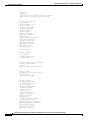
Router# show interface loopback 0
Loopback0 is up, line protocol is up
Hardware is Loopback
Internet address is 200.200.100.1/24
MTU 1514 bytes, BW 8000000 Kbit, DLY 5000 usec,
reliability 255/255, txload 1/255, rxload 1/255
Encapsulation LOOPBACK, loopback not set
Last input never, output never, output hang never
Last clearing of "show interface" counters never
Queueing strategy: fifo
Output queue 0/0, 0 drops; input queue 0/75, 0 drops
Cisco 3900 Series, 2900 Series, and 1900 Series Integrated Services Routers Software
8
Basic Router Configuration
Configuring Command-Line Access
5 minute input rate 0 bits/sec, 0 packets/sec
5 minute output rate 0 bits/sec, 0 packets/sec
0 packets input, 0 bytes, 0 no buffer
Received 0 broadcasts, 0 runts, 0 giants, 0 throttles
0 input errors, 0 CRC, 0 frame, 0 overrun, 0 ignored, 0 abort
0 packets output, 0 bytes, 0 underruns
0 output errors, 0 collisions, 0 interface resets
0 output buffer failures, 0 output buffers swapped out
Another way to verify the loopback interface is to ping it:
Router# ping 200.200.100.1
Type escape sequence to abort.
Sending 5, 100-byte ICMP Echos to 200.200.100.1, timeout is 2 seconds:
!!!!!
Success rate is 100 percent (5/5), round-trip min/avg/max = 1/2/4 ms
Configuring Command-Line Access
To configure parameters to control access to the router, follow these steps, beginning in global
configuration mode.
SUMMARY STEPS
1.
line [aux | console | tty | vty] line-number
2.
password password
3.
login
4.
exec-timeout minutes [seconds]
5.
line [aux | console | tty | vty] line-number
6.
password password
7.
login
8.
end
DETAILED STEPS
Step 1
Command
Purpose
line [aux | console | tty | vty] line-number
Enters line configuration mode, and specifies the
type of line.
Example:
This example specifies a console terminal for
access.
Router(config)# line console 0
Router(config-line)#
Step 2
password password
Specifies a unique password for the console
terminal line.
Example:
Router(config)# password 5dr4Hepw3
Router(config-line)#
Cisco 3900 Series, 2900 Series, and 1900 Series Integrated Services Routers Software
OL-21850-01
9
Basic Router Configuration
Configuring Command-Line Access
Step 3
Command
Purpose
login
Enables password checking at terminal session
login.
Example:
Router(config-line)# login
Router(config-line)#
Step 4
exec-timeout minutes [seconds]
Example:
Router(config-line)# exec-timeout 5 30
Router(config-line)#
Step 5
line [aux | console | tty | vty] line-number
Sets the interval that the EXEC command
interpreter waits until user input is detected. The
default is 10 minutes. Optionally, add seconds to
the interval value.
This example shows a timeout of 5 minutes and
30 seconds. Entering a timeout of 0 0 specifies
never to time out.
Specifies a virtual terminal for remote console
access.
Example:
Router(config-line)# line vty 0 4
Router(config-line)#
Step 6
password password
Specifies a unique password for the virtual
terminal line.
Example:
Router(config-line)# password aldf2ad1
Router(config-line)#
Step 7
login
Enables password checking at the virtual terminal
session login.
Example:
Router(config-line)# login
Router(config-line)#
Step 8
end
Exits line configuration mode, and returns to
privileged EXEC mode.
Example:
Router(config-line)# end
Router#
Example
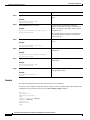
The following configuration shows the command-line access commands.
You do not need to input the commands marked “default.” These commands appear automatically in the
configuration file generated when you use the show running-config command.
!
line con 0
exec-timeout 10 0
password 4youreyesonly
login
transport input none (default)
stopbits 1 (default)
line vty 0 4
password secret
login
!
Cisco 3900 Series, 2900 Series, and 1900 Series Integrated Services Routers Software
10
Basic Router Configuration
Configuring Static Routes
Configuring Static Routes
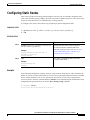
Static routes provide fixed routing paths through the network. They are manually configured on the
router. If the network topology changes, the static route must be updated with a new route. Static routes
are private routes unless they are redistributed by a routing protocol.
To configure static routes, follow these steps, beginning in global configuration mode.
SUMMARY STEPS
1.
ip route prefix mask {ip-address | interface-type interface-number [ip-address]}
2.
end
DETAILED STEPS
Step 1
Command
Purpose
ip route prefix mask {ip-address | interface-type
interface-number [ip-address]}
Specifies the static route for the IP packets.
Example:
Router(config)# ip route 192.168.1.0
255.255.0.0 10.10.10.2
Router(config)#
Step 2
end
For details about this command and about
additional parameters that can be set, see Cisco
IOS IP Command Reference, Volume 2 of 4:
Routing Protocols, Release 12.3
Exits router configuration mode, and enters
privileged EXEC mode.
Example:
Router(config)# end
Router#
Example
In the following configuration example, the static route sends out all IP packets with a destination IP
address of 192.168.1.0 and a subnet mask of 255.255.255.0 on the Gigabit Ethernet interface to another
device with an IP address of 10.10.10.2. Specifically, the packets are sent to the configured PVC.
You do not need to enter the command marked “(default).” This command appears automatically in the
configuration file generated when you use the show running-config command.
!
ip classless (default)
ip route 192.168.1.0 255.255.255.0 10.10.10.2!
Cisco 3900 Series, 2900 Series, and 1900 Series Integrated Services Routers Software
OL-21850-01
11
Basic Router Configuration
Configuring Dynamic Routes
Verifying Configuration
To verify that you have properly configured static routing, enter the show ip route command and look
for static routes signified by the “S.”
You should see verification output similar to the following:
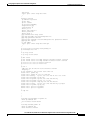
Router# show ip route
Codes: C - connected, S - static, R - RIP, M - mobile, B - BGP
D - EIGRP, EX - EIGRP external, O - OSPF, IA - OSPF inter area
N1 - OSPF NSSA external type 1, N2 - OSPF NSSA external type 2
E1 - OSPF external type 1, E2 - OSPF external type 2
i - IS-IS, su - IS-IS summary, L1 - IS-IS level-1, L2 - IS-IS level-2
ia - IS-IS inter area, * - candidate default, U - per-user static route
o - ODR, P - periodic downloaded static route
Gateway of last resort is not set
10.0.0.0/24 is subnetted, 1 subnets
C
10.108.1.0 is directly connected, Loopback0
S* 0.0.0.0/0 is directly connected, FastEthernet0
Configuring Dynamic Routes
In dynamic routing, the network protocol adjusts the path automatically, based on network traffic or
topology. Changes in dynamic routes are shared with other routers in the network.
The Cisco routers can use IP routing protocols, such as Routing Information Protocol (RIP) or Enhanced
Interior Gateway Routing Protocol (EIGRP), to learn routes dynamically. You can configure either of
these routing protocols on your router.
•
“Configuring Routing Information Protocol” section on page 12
•
“Configuring Enhanced Interior Gateway Routing Protocol” section on page 14
Configuring Routing Information Protocol
To configure the RIP routing protocol on the router, follow these steps, beginning in global configuration
mode.
SUMMARY STEPS
1.
router rip
2.
version {1 | 2}
3.
network ip-address
4.
no auto-summary
5.
end
Cisco 3900 Series, 2900 Series, and 1900 Series Integrated Services Routers Software
12
Basic Router Configuration
Configuring Dynamic Routes
DETAILED STEPS
Step 1
Command
Task
router rip
Enters router configuration mode, and enables RIP
on the router.
Example:
Router> configure terminal
Router(config)# router rip
Router(config-router)#
Step 2
version {1 | 2}
Specifies use of RIP version 1 or 2.
Example:
Router(config-router)# version 2
Router(config-router)#
Step 3
network ip-address
Specifies a list of networks on which RIP is to be
applied, using the address of the network of each
directly connected network.
Example:
Router(config-router)# network 192.168.1.1
Router(config-router)# network 10.10.7.1
Router(config-router)#
Step 4
no auto-summary
Example:
Router(config-router)# no auto-summary
Router(config-router)#
Step 5
end
Disables automatic summarization of subnet routes
into network-level routes. This allows subprefix
routing information to pass across classful network
boundaries.
Exits router configuration mode, and enters
privileged EXEC mode.
Example:
Router(config-router)# end
Router#
Example
The following configuration example shows RIP version 2 enabled in IP network 10.0.0.0 and
192.168.1.0.
To see this configuration, use the show running-config command from privileged EXEC mode.
!
Router# show running-config
router rip
version 2
network 10.0.0.0
network 192.168.1.0
no auto-summary
!
Cisco 3900 Series, 2900 Series, and 1900 Series Integrated Services Routers Software
OL-21850-01
13
Basic Router Configuration
Configuring Dynamic Routes
Verifying Configuration
To verify that you have properly configured RIP, enter the show ip route command and look for RIP
routes signified by “R.” You should see a verification output like the example shown below.
Router# show ip route
Codes: C - connected, S - static, R - RIP, M - mobile, B - BGP
D - EIGRP, EX - EIGRP external, O - OSPF, IA - OSPF inter area
N1 - OSPF NSSA external type 1, N2 - OSPF NSSA external type 2
E1 - OSPF external type 1, E2 - OSPF external type 2
i - IS-IS, su - IS-IS summary, L1 - IS-IS level-1, L2 - IS-IS level-2
ia - IS-IS inter area, * - candidate default, U - per-user static route
o - ODR, P - periodic downloaded static route
Gateway of last resort is not set
C
R
10.0.0.0/24 is subnetted, 1 subnets
10.108.1.0 is directly connected, Loopback0
3.0.0.0/8 [120/1] via 2.2.2.1, 00:00:02, Ethernet0/0
Configuring Enhanced Interior Gateway Routing Protocol
To configure Enhanced Interior Gateway Routing Protocol GRP (EGRP), follow these steps, beginning
in global configuration mode.
SUMMARY STEPS
1.
router eigrp as-number
2.
network ip-address
3.
end
DETAILED STEPS
Step 1
Command
Purpose
router eigrp as-number
Enters router configuration mode, and enables
EIGRP on the router. The autonomous-system
number identifies the route to other EIGRP routers
and is used to tag the EIGRP information.
Example:
Router(config)# router eigrp 109
Router(config)#
Step 2
network ip-address
Example:
Specifies a list of networks on which EIGRP is to
be applied, using the IP address of the network of
directly connected networks.
Router(config)# network 192.145.1.0
Router(config)# network 10.10.12.115
Router(config)#
Step 3
end
Exits router configuration mode, and enters
privileged EXEC mode.
Example:
Router(config-router)# end
Router#
Cisco 3900 Series, 2900 Series, and 1900 Series Integrated Services Routers Software
14
Basic Router Configuration
Configuring Dynamic Routes
Example
The following configuration example shows the EIGRP routing protocol enabled in IP networks
192.145.1.0 and 10.10.12.115. The EIGRP autonomous system number is 109.
To see this configuration use the show running-config command, beginning in privileged EXEC mode.
Router# show running-config
...
!
router eigrp 109
network 192.145.1.0
network 10.10.12.115
!
...
Verifying Configuration
To verify that you have properly configured IP EIGRP, enter the show ip route command, and look for
EIGRP routes indicated by “D.” You should see verification output similar to the following:
Router# show ip route
Codes: C - connected, S - static, R - RIP, M - mobile, B - BGP
D - EIGRP, EX - EIGRP external, O - OSPF, IA - OSPF inter area
N1 - OSPF NSSA external type 1, N2 - OSPF NSSA external type 2
E1 - OSPF external type 1, E2 - OSPF external type 2
i - IS-IS, su - IS-IS summary, L1 - IS-IS level-1, L2 - IS-IS level-2
ia - IS-IS inter area, * - candidate default, U - per-user static route
o - ODR, P - periodic downloaded static route
Gateway of last resort is not set
C
D
10.0.0.0/24 is subnetted, 1 subnets
10.108.1.0 is directly connected, Loopback0
3.0.0.0/8 [90/409600] via 2.2.2.1, 00:00:02, Ethernet0/0
Cisco 3900 Series, 2900 Series, and 1900 Series Integrated Services Routers Software
OL-21850-01
15
Basic Router Configuration
Configuring Dynamic Routes
CCDE, CCENT, CCSI, Cisco Eos, Cisco HealthPresence, Cisco IronPort, the Cisco logo, Cisco Nurse Connect, Cisco Pulse, Cisco SensorBase,
Cisco StackPower, Cisco StadiumVision, Cisco TelePresence, Cisco Unified Computing System, Cisco WebEx, DCE, Flip Channels, Flip for Good,
Flip Mino, Flipshare (Design), Flip Ultra, Flip Video, Flip Video (Design), Instant Broadband, and Welcome to the Human Network are trademarks;
Changing the Way We Work, Live, Play, and Learn, Cisco Capital, Cisco Capital (Design), Cisco:Financed (Stylized), Cisco Store, Flip Gift Card,
and One Million Acts of Green are service marks; and Access Registrar, Aironet, AllTouch, AsyncOS, Bringing the Meeting To You, Catalyst, CCDA,
CCDP, CCIE, CCIP, CCNA, CCNP, CCSP, CCVP, Cisco, the Cisco Certified Internetwork Expert logo, Cisco IOS, Cisco Lumin, Cisco Nexus,
Cisco Press, Cisco Systems, Cisco Systems Capital, the Cisco Systems logo, Cisco Unity, Collaboration Without Limitation, Continuum, EtherFast,
EtherSwitch, Event Center, Explorer, Follow Me Browsing, GainMaker, iLYNX, IOS, iPhone, IronPort, the IronPort logo, Laser Link, LightStream,
Linksys, MeetingPlace, MeetingPlace Chime Sound, MGX, Networkers, Networking Academy, PCNow, PIX, PowerKEY, PowerPanels, PowerTV,
PowerTV (Design), PowerVu, Prisma, ProConnect, ROSA, SenderBase, SMARTnet, Spectrum Expert, StackWise, WebEx, and the WebEx logo are
registered trademarks of Cisco Systems, Inc. and/or its affiliates in the United States and certain other countries.
All other trademarks mentioned in this document or website are the property of their respective owners. The use of the word partner does not imply
a partnership relationship between Cisco and any other company. (0910R)
Any Internet Protocol (IP) addresses used in this document are not intended to be actual addresses. Any examples, command display output, and
figures included in the document are shown for illustrative purposes only. Any use of actual IP addresses in illustrative content is unintentional and
coincidental.
© 2009-2010 Cisco Systems, Inc. All rights reserved.
Cisco 3900 Series, 2900 Series, and 1900 Series Integrated Services Routers Software
16
Configuring Backup Data Lines and Remote
Management
Cisco 3900 series, 2900 series, and 1900 series integrated services routers (ISRs) support remote
management and backup data connectivity by means of ISDN.
The following sections describe how to configure backup data lines and remote management:
•
Configuring Backup Interfaces, page 1
•
Configuring Dial Backup and Remote Management Through the Console Port or Auxiliary Port,
page 13
•
Configuring Data Line Backup and Remote Management Through the ISDN S/T Port, page 20
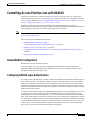
Configuring Backup Interfaces
This section contains the following topics:
•
Configuring the Backup Interface, page 1
•
Configuring Gigabit Ethernet Failover Media, page 3
•
Configuring Cellular Dial-on-Demand Routing Backup, page 5
Configuring the Backup Interface
When the router receives an indication that the primary interface is down, the backup interface is
enabled. After the primary connection is restored for a specified period, the backup interface is disabled.
Note
For dial-on-demand routing (DDR) backup, even if the backup interface comes out of standby mode, the
router does not enable the backup interface unless the router receives the traffic specified for that backup
interface.
To configure the router with a backup interface, follow these steps, beginning in global configuration
mode.
Americas Headquarters:
Cisco Systems, Inc., 170 West Tasman Drive, San Jose, CA 95134-1706 USA
Configuring Backup Data Lines and Remote Management
Configuring Backup Interfaces
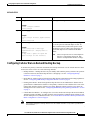
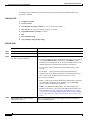
SUMMARY STEPS
1.
interface type number
2.
backup interface interface-type interface-number
3.
backup delay enable-delay disable-delay
4.
exit
DETAILED STEPS
Step 1
Command
Purpose
interface type number
Enters interface configuration mode for the
interface for which you want to configure backup.
Example:
The example shows configuration of a backup
interface for an ATM WAN connection.
Router(config)# interface atm 0/0/0
Router(config-if)#
Step 2
backup interface interface-type
interface-number
Assigns an interface as the secondary or backup
interface.
Example:
This can be a serial interface or an asynchronous
interface. For example, a serial 1 interface could
be configured to back up a serial 0/2/1 interface.
Router(config-if)# backup interface bri
0/0/1
Router(config-if)#
Step 3
backup delay enable-delay disable-delay
Router(config-if)# backup delay enable
delay
Specifies the delay between the physical interface
going down and the backup interface being
enabled, and the delay between the physical
interface coming back up and the backup interface
being disabled.
exit
Exits configuration interface mode.
Example:
Step 4
The example shows a BRI interface configured as
the backup interface for the ATM 0/0/0 interface.
Example:
Router(config-if)# exit
Router(config)#
Cisco 3900 Series, 2900 Series, and 1900 Series Integrated Services Routers Software Configuration Guide
2
Configuring Backup Data Lines and Remote Management
Configuring Backup Interfaces
Configuring Gigabit Ethernet Failover Media
Cisco 2921, Cisco 2951, and Cisco 3900 Series routers provide a Gigabit Ethernet (GE)
small-form-factor pluggable (SFP) port that supports copper and fiber concurrent connections. Media
can be configured for failover redundancy when the network goes down.
Note
Do not connect back-to-back Cisco 2921, Cisco 2951, or Cisco 3900 Series routers with failover or as
auto-detect configured. This is not a supported configuration and the behavior is unpredictable.
Assigning Primary and Secondary Failover Media
To assign primary and secondary failover media on the GE-SFP port, follow these steps, beginning in
EXEC mode.
SUMMARY STEPS
1.
configure terminal
2.
interface gigabitethernet slot/port
3.
media-type sfp
4.
media-type sfp auto-failover
5.
end
DETAILED STEPS
Step 1
Command
Purpose
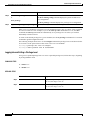
configure terminal
Enters global configuration mode, when using
the console port.
Example:
Use the following commands to connect to the
router with a remote terminal:
Router> enable
Router# configure terminal
Router(config)#
Step 2
interface gigabitethernet slot/port
telnet router name or address
Login: login id
Password: *********
Router> enable
Enters interface configuration mode.
Example:
Router(config)# interface gigabitethernet 0/1
Router(config-if)#
Cisco 3900 Series, 2900 Series, and 1900 Series Integrated Services Routers Software Configuration Guide
OL-21850-01
3
Configuring Backup Data Lines and Remote Management
Configuring Backup Interfaces
Step 3
Command
Purpose
media-type sfp
Designates SFP port as the primary media.
OR
Example:
Designates RJ-45 as the primary media.
Router(config-if)# media-type sfp
Router(config-if)#
Example:
Router(config-if)# media-type rj45
Router(config-if)#
Step 4
media-type sfp auto-failover
Example:
Router(config-if)# media-type sfp
auto-failover
Router(config-if)#
Configures the port with SFP as the primary
media for automatic failover from SFP to
RJ-45.
OR
Configures the port with RJ-45 as the primary
media for automatic failover from RJ-45 to
SFP.
Example:
Router(config-if)# media-type rj45
auto-failover
Router(config-if)#
Step 5
end
Exits to global configuration mode.
Enabling Auto-Detect
The Auto-Detect feature is enabled if media-type is not configured. This feature automatically detects
which media is connected and links up. If both media are connected, whichever media comes up first is
linked up.
Note
The Auto-Detect feature only works with 1 GigE SFPs. This feature does not detect 100M SFPs.
Use the no media-type command in interface configuration mode to enable the Auto-Detect feature.
To configure the Auto-Detect feature, follow these steps, beginning in global configuration mode.
SUMMARY STEPS
1.
configure terminal
2.
interface gigabitethernet slot/port
3.
no media-type
Cisco 3900 Series, 2900 Series, and 1900 Series Integrated Services Routers Software Configuration Guide
4
Configuring Backup Data Lines and Remote Management
Configuring Backup Interfaces
DETAILED STEPS
Step 1
Command
Purpose
configure terminal
Enters global configuration mode.
Example:
Router# configure terminal
Router(config)#
Step 2
interface gigabitethernet slot/port
Enters interface configuration mode.
Example:
Router(config)# interface gigabitethernet
0/1
Router(config-if)#
Step 3
no media-type
Example:
Router(config-if)# no media-type
GigabitEthernet0/1: Changing media to
UNKNOWN.
You may need to update the speed and
duplex settings for this interface.
Enables Auto-Detect. If a 1 GigE SFP is plugged
in, set the speed as 1000 and duplex as full. An
RJ45 connection only works with speed as 1000
and duplex as full. If a SFP is not plugged in, all
speeds and duplexes are available for the RJ45
media.
Note
Do not set speed as 100 or 10 and duplex as
half if a 1 GigE SFP is plugged in. SFP
behavior is unpredictable at these settings.
Configuring Cellular Dial-on-Demand Routing Backup
To monitor the primary connection and initiate the backup connection over the cellular interface when
needed, the router can use one of the following methods:
•
Backup Interface—Backup interface stays in standby mode until the primary interface line protocol
is detected as down; then the backup interface is brought up. See the “Configuring Backup
Interfaces” section on page 1.
•
Dialer Watch—Dialer watch is a backup feature that integrates dial backup with routing capabilities.
See the “Configuring DDR Backup Using Dialer Watch” section on page 6.
•
Floating Static Route—Route through the backup interface has an administrative distance that is
greater than the administrative distance of the primary connection route and therefore is not in the
routing table until the primary interface goes down. When the primary interface goes down, the
floating static route is used. See the “Configuring DDR Backup Using Floating Static Route” section
on page 7.
•
Cellular Wireless Modem—To configure the 3G wireless modem as backup with Network Address
Translation (NAT) and IPSec on either Global System for Mobile Communications (GSM) or code
division multiple access (CDMA) networks, see “Cellular Wireless Modem as Backup with NAT and
IPSec Configuration” section on page 8.
Note
You cannot configure a backup interface for the cellular interface or any other asynchronous
serial interface.
Cisco 3900 Series, 2900 Series, and 1900 Series Integrated Services Routers Software Configuration Guide
OL-21850-01
5
Configuring Backup Data Lines and Remote Management
Configuring Backup Interfaces
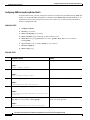
Configuring DDR Backup Using Dialer Watch
To initiate dialer watch, you must configure the interface to perform dial-on-demand routing (DDR) and
backup. Use traditional DDR configuration commands, such as dialer map, for DDR capabilities. To
enable dialer watch on the backup interface and create a dialer list, use the following commands in
interface configuration mode.
SUMMARY STEPS
1.
configure terminal
2.
interface type number
3.
dialer watch group group-number
4.
dialer watch-list group-number ip ip-address address-mask
5.
dialer-list dialer-group protocol protocol-name {permit | deny | list access-list-number |
access-group}
6.
ip access-list access list number permit ip source address
7.
interface cellular 0
8.
dialer string string
DETAILED STEPS
Step 1
Command or Action
Purpose
configure terminal
Enters global configuration mode.
Example:
Router# configure terminal
Step 2
interface type number
Specifies the interface.
Example:
Router (config)# interface ATM 0
Step 3
dialer watch-group group-number
Enables dialer watch on the backup interface.
Example:
Router(config-if)# dialer watch-group 2
Step 4
dialer watch-list group-number ip ip-address address-mask Defines a list of all IP addresses to be watched.
Example:
Router(config-if)# dialer watch-list 2 ip 10.4.0.254
255.255.0.0
Step 5
dialer-list dialer-group protocol protocol-name {permit |
deny | list access-list-number | access-group}>
Creates a dialer list for traffic of interest and permits
access to an entire protocol.
Example:
Router(config)# dialer-list 2 protocol ip permit
Cisco 3900 Series, 2900 Series, and 1900 Series Integrated Services Routers Software Configuration Guide
6
Configuring Backup Data Lines and Remote Management
Configuring Backup Interfaces
Step 6
Step 7
Command or Action
Purpose
ip access-list access-list-number permit ip-source-address
Defines traffic of interest.
Example:
Router(config)# access list 2 permit 10.4.0.0
Do not use the access list permit all command to
avoid sending traffic to the IP network. This may
result in call termination.
interface cellular 0
Specifies the cellular interface.
Example:
Router (config)# interface cellular 0
Step 8
dialer string string
CDMA only—dialer string string specifies the
dialer script. (The dialer script is defined by using
the chat script command).
or
dialer group dialer-group-number
GSM only—dialer group dialer-group-number
maps a dialer list to the dialer interface.
Example:
Router (config-if)# dialer string cdma
*** cdma ***
Example:
Router (config-if)# dialer group 2
*** gsm ***
Configuring DDR Backup Using Floating Static Route
To configure a floating static default route on the secondary interface, use the following commands,
beginning in global configuration mode.
Note
Make sure you have IP classless enabled on your router.
SUMMARY STEPS
1.
configure terminal
2.
ip route network-number network-mask {ip address | interface} [administrative-distance] [name
name]
Cisco 3900 Series, 2900 Series, and 1900 Series Integrated Services Routers Software Configuration Guide
OL-21850-01
7
Configuring Backup Data Lines and Remote Management
Configuring Backup Interfaces
DETAILED STEPS
Step 1
Command or Action
Purpose
configure terminal
Enters global configuration mode from the terminal.
Example:
Router# configure terminal
Step 2
ip route network-number network-mask {ip-address |
interface} [administrative-distance] [name name]
Establishes a floating static route with the
configured administrative distance through the
specified interface.
Example:
A higher administrative distance should be
configured for the route through the backup
interface, so that the backup interface is used only
when the primary interface is down.
Router (config)# ip route 0.0.0.0 Dialer 2 track 234
Cellular Wireless Modem as Backup with NAT and IPSec Configuration
The following example shows how to configure the 3G wireless modem as backup with NAT and IPsec
on either GSM or CDMA networks.
Note
The receive and transmit speeds cannot be configured. The actual throughput depends on the cellular
network service.
Router# sh run
Building configuration...
Current configuration : 5833 bytes
!
! Last configuration change at 18:26:15 UTC Wed Sep 30 2009
!
version 12.4
service timestamps debug datetime msec
service timestamps log datetime msec
no service password-encryption
service internal
!
hostname Router
!
boot-start-marker
boot-end-marker
!
!
no aaa new-model
!
!
!
service-module wlan-ap 0 bootimage autonomous
!
no ipv6 cef
ip source-route
ip cef
!
!
ip multicast-routing
Cisco 3900 Series, 2900 Series, and 1900 Series Integrated Services Routers Software Configuration Guide
8
Configuring Backup Data Lines and Remote Management
Configuring Backup Interfaces
!
ip dhcp pool miercom
network 10.1.0.0 255.255.0.0
default-router 10.1.0.254
dns-server 10.1.0.254
!
ip dhcp pool wlan-clients
network 10.9.0.0 255.255.0.0
default-router 10.9.0.254
dns-server 10.9.0.254
!
!
!
multilink bundle-name authenticated
!
chat-script gsm "" "atdt*99#" TIMEOUT 180 "CONNECT"
chat-script cdma "" "atdt#777" TIMEOUT 180 "CONNECT"
!
!
license udi pid CISCO1941W-A/K9 sn FHH1249P016
!
!
archive
log config
hidekeys
!
redundancy
!
!
!
track 234 ip sla 1 reachability
!
!
!
interface Loopback0
ip address 1.1.1.1 255.255.255.255
!
!
interface Wlan-GigabitEthernet0/0
description Internal switch interface connecting to the embedded AP
!
!
interface GigabitEthernet0/0
ip address dhcp
ip virtual-reassembly
load-interval 30
shutdown
duplex auto
speed auto
!
!
interface wlan-ap0
description Service module interface to manage the embedded AP
ip address 192.168.1.1 255.255.255.0
arp timeout 0
no mop enabled
no mop sysid
!
!
interface GigabitEthernet0/1
ip address 10.1.0.254 255.255.0.0
ip nat inside
ip virtual-reassembly
shutdown
Cisco 3900 Series, 2900 Series, and 1900 Series Integrated Services Routers Software Configuration Guide
OL-21850-01
9
Configuring Backup Data Lines and Remote Management
Configuring Backup Interfaces
duplex auto
speed auto
crypto ipsec client ezvpn hw-client-pri inside
crypto ipsec client ezvpn hw-client inside
!
!
interface Cellular0/0/0
no ip address
ip access-group 131 out
ip nat outside
ip virtual-reassembly
encapsulation ppp
load-interval 30
dialer in-band
dialer pool-member 1
dialer idle-timeout 0
dialer-group 1
no peer default ip address
async mode interactive
no ppp lcp fast-start
ppp ipcp dns request
ppp timeout retry 120
ppp timeout ncp 30
fair-queue 64 16 0
!
routing dynamic
!
interface ATM0/1/0
no ip address
no atm ilmi-keepalive
no dsl bitswap
!
!
interface ATM0/1/0.1 point-to-point
ip virtual-reassembly
pvc 0/35
pppoe-client dial-pool-number 2
!
!
interface Vlan1
ip address 10.9.0.254 255.255.0.0
ip nat inside
ip virtual-reassembly
!
!
interface Dialer1
ip address negotiated
ip access-group 131 out
ip nat outside
ip virtual-reassembly
encapsulation ppp
load-interval 30
dialer pool 1
dialer idle-timeout 0
dialer string cdma
dialer persistent
dialer-group 1
no peer default ip address
no ppp lcp fast-start
ppp chap hostname nousername
ppp chap password 0 nopassword
ppp ipcp dns request
ppp timeout retry 120
ppp timeout ncp 30
Cisco 3900 Series, 2900 Series, and 1900 Series Integrated Services Routers Software Configuration Guide
10
Configuring Backup Data Lines and Remote Management
Configuring Backup Interfaces
fair-queue
crypto ipsec client ezvpn hw-client
!
!
interface Dialer2
ip address negotiated
ip mtu 1492
ip nat outside
ip virtual-reassembly
encapsulation ppp
load-interval 30
dialer pool 2
dialer idle-timeout 0
dialer persistent
dialer-group 2
ppp authentication chap callin
ppp chap hostname [email protected]
ppp chap password 0 Enzo221
ppp pap sent-username [email protected] password 0 Enzo221
ppp ipcp dns request
no cdp enable
crypto ipsec client ezvpn hw-client-pri
!
!
ip local policy route-map track-primary-if
ip forward-protocol nd
!
no ip http server
no ip http secure-server
!
ip dns server
ip nat inside source route-map nat2cell interface Dialer1 overload
ip nat inside source route-map nat2dsl interface Dialer2 overload
ip route 0.0.0.0 0.0.0.0 Dialer2 track 234
ip route 0.0.0.0 0.0.0.0 Dialer1 253
!
ip sla 1
icmp-echo 128.107.248.247 source-interface Dialer2
frequency 5
ip sla schedule 1 life forever start-time now
access-list 1 permit any
access-list 2 permit 10.1.0.0 0.0.255.255
access-list 100 deny
ip 10.1.0.0 0.0.0.255 10.4.0.0 0.0.0.255
access-list 100 permit ip any any
access-list 101 permit ip 10.0.0.0 0.255.255.255 any
access-list 101 permit ip host 1.1.1.1 any
access-list 102 permit icmp any host 128.107.248.247
access-list 131 deny
ip 10.0.0.0 0.255.255.255 any log-input
access-list 131 permit ip any any
dialer-list 1 protocol ip permit
dialer-list 2 protocol ip permit
!
no cdp run
!
!
!
route-map track-primary-if permit 10
match ip address 102
set interface Dialer2 Null0
!
route-map nat2dsl permit 10
match ip address 101
match interface Dialer2
Cisco 3900 Series, 2900 Series, and 1900 Series Integrated Services Routers Software Configuration Guide
OL-21850-01
11
Configuring Backup Data Lines and Remote Management
Configuring Backup Interfaces
!
route-map nat2cell permit 10
match ip address 101
match interface Dialer1
!
!
!
control-plane
!
!
!
line con 0
exec-timeout 0 0
line aux 0
line 0/0/0
exec-timeout 0 0
script dialer cdma
login
modem InOut
no exec
transport input all
transport output all
autoselect ppp
rxspeed 3100000
txspeed 1800000
line 67
no activation-character
no exec
transport preferred none
transport input all
transport output pad telnet rlogin lapb-ta mop udptn v120 ssh
line vty 0 4
login
!
exception data-corruption buffer truncate
scheduler allocate 20000 1000
event manager applet pri_back
event track 234 state any
action 2.0 cli command "clear ip nat trans forced"
!
end
Router#
Cisco 3900 Series, 2900 Series, and 1900 Series Integrated Services Routers Software Configuration Guide
12
Configuring Backup Data Lines and Remote Management
Configuring Dial Backup and Remote Management Through the Console Port or Auxiliary Port
Configuring Dial Backup and Remote Management Through the
Console Port or Auxiliary Port
When customer premises equipment, such as a Cisco 3900 series ISR, is connected to an ISP, an IP
address is dynamically assigned to the router, or the IP address is assigned by the router peer through the
centrally managed function. The dial backup feature can be added to provide a failover route in case the
primary line fails. Cisco 3900 series ISRs can use the auxiliary port for dial backup and remote
management.
Figure 1 shows the network configuration used for remote management access and for providing backup
to the primary WAN line.
Figure 1
Dial Backup and Remote Management Through the Auxiliary Port
1
A
ATM
C
B
2
2
B
PSTN
82269
C
3
2
1
Cisco 3900 series
router
A
Main WAN link; primary connection to Internet service provider
2
Modem
B
Dial backup; serves as a failover link for Cisco 3900 routers when
primary line goes down
3
PC
C
Remote management; serves as dial-in access to allow changes or
updates to Cisco IOS configurations
Cisco 3900 Series, 2900 Series, and 1900 Series Integrated Services Routers Software Configuration Guide
OL-21850-01
13
Configuring Backup Data Lines and Remote Management
Configuring Dial Backup and Remote Management Through the Console Port or Auxiliary Port
To configure dial backup and remote management on Cisco 3900 series, 2900 series, and 1900 series
ISRs, follow these steps, beginning in global configuration mode.
SUMMARY STEPS
1.
ip name-server server-address
2.
ip dhcp pool name
3.
exit
4.
chat-script script-name expect-send
5.
interface type number
6.
exit
7.
interface type number
8.
dialer watch-group group-number
9.
exit
10. ip nat inside source {list access-list-number} {interface type number | pool name} [overload]
11. ip route prefix mask {ip-address | interface-type interface-number [ip-address]}
12. access-list access-list-number {deny | permit} source [source-wildcard]
13. dialerwatch-list group-number {ip ip-address address-mask | delay route-check initial seconds}
14. line [aux | console | tty | vty] line-number [ending-line-number]
15. modem enable
16. exit
17. line [aux | console | tty | vty] line-number [ending-line-number]
18. flowcontrol {none | software [lock] [in | out] | hardware [in | out]}
DETAILED STEPS
Step 1
Command
Purpose
ip name-server server-address
Enters your ISP DNS IP address.
Tip
Example:
You may add multiple server
addresses if available.
Router(config)# ip name-server 192.168.28.12
Router(config)#
Step 2
ip dhcp pool name
Example:
Router(config)# ip dhcp pool 1
Router(config-dhcp)#
Creates a DHCP address pool on the router
and enters DHCP pool configuration
mode. The name argument can be a string
or an integer.
Configure the DHCP address pool. For
sample commands that you can use in
DHCP pool configuration mode, see the
“Example” section on page 17.
Cisco 3900 Series, 2900 Series, and 1900 Series Integrated Services Routers Software Configuration Guide
14
Configuring Backup Data Lines and Remote Management
Configuring Dial Backup and Remote Management Through the Console Port or Auxiliary Port
Step 3
Command
Purpose
exit
Exits DHCP pool configuration mode and
enters global configuration mode.
Example:
Router(config-dhcp)# exit
Router(config)#
Step 4
chat-script script-name expect-send
Example:
Router(config)# chat-script Dialout ABORT ERROR
ABORT BUSY ““ “AT” OK “ATDT 5555102 T” TIMEOUT 45
CONNECT \c
Router(config)#
Step 5
interface type number
Example:
Step 6
Configures a chat script for use in DDR to
give commands for dialing a modem and
for logging in to remote systems. The
defined script is used to place a call over a
modem connected to the PSTN.
Creates asynchronous interface and enters
configuration mode for the asynchronous
interface.
Router(config)# interface Async 1
Router(config-if)#
Configure the asynchronous interface. For
sample commands that you can use in
asynchronous interface configuration
mode, see the “Example” section on
page 17.
exit
Exits interface configuration mode and
enters global configuration mode.
Example:
Router(config-if)# exit
Router(config)#
Step 7
interface type number
Example:
Creates dialer interface and enters
configuration mode for the dialer
interface.
Router(config)# interface Dialer 3
Router(config-if)#
Step 8
dialer watch-group group-number
Specifies the group number for the dialer
watch list.
Example:
Router(config-if)# dialer watch-group 1
Router(config-if)#
Step 9
exit
Exits interface configuration mode and
enters global configuration mode.
Example:
Router(config-if)# exit
Router(config)#
Step 10
ip nat inside source {list access-list-number} {interface Enables dynamic translation of addresses
type number | pool name} [overload]
on the inside interface.
Example:
Router(config)# ip nat inside source list 101
interface Dialer 3 overload
Cisco 3900 Series, 2900 Series, and 1900 Series Integrated Services Routers Software Configuration Guide
OL-21850-01
15
Configuring Backup Data Lines and Remote Management
Configuring Dial Backup and Remote Management Through the Console Port or Auxiliary Port
Step 11
Command
Purpose
ip route prefix mask {ip-address | interface-type
interface-number [ip-address]}
Sets the IP route to point to the dialer
interface as a default gateway.
Example:
Router(config)# ip route 0.0.0.0 0.0.0.0 22.0.0.2
Router(config)#
Step 12
access-list access-list-number {deny | permit} source
[source-wildcard]
Defines an extended access list that
indicates which addresses need
translation.
Example:
Router(config)# access-list 1 permit 192.168.0.0
0.0.255.255 any
Step 13
dialerwatch-list group-number {ip ip-address
address-mask | delay route-check initial seconds}
Example:
Evaluates the status of the primary link,
based on the existence of routes to the
peer. The address 22.0.0.2 is the peer IP
address of the ISP.
Router(config)# dialer watch-list 1 ip 22.0.0.2
255.255.255.255
Router(config)#
Step 14
line [aux | console | tty | vty] line-number
[ending-line-number]
Enters configuration mode for the line
interface.
Example:
Router(config)# line console 0
Router(config-line)#
Step 15
modem enable
Switches the port from console port to
auxiliary port function.
Example:
Router(config-line)# modem enable
Router(config-line)#
Step 16
exit
Exits interface configuration mode.
Example:
Router(config-line)# exit
Router(config)#
Cisco 3900 Series, 2900 Series, and 1900 Series Integrated Services Routers Software Configuration Guide
16
Configuring Backup Data Lines and Remote Management
Configuring Dial Backup and Remote Management Through the Console Port or Auxiliary Port
Step 17
Command
Purpose
line [aux | console | tty | vty] line-number
[ending-line-number]
Enters configuration mode for the
auxiliary interface.
Example:
Router(config)# line aux 0
Router(config)#
Step 18
flowcontrol {none | software [lock] [in | out] | hardware Enables hardware signal flow control.
[in | out]}
Example:
Router(config)# flowcontrol hardware
Router(config)#
Example
The following configuration example specifies an IP address for the ATM interface through PPP and
IP Control Protocol (IPCP) address negotiation and specifies dial backup over the console port.
!
ip name-server 192.168.28.12
ip dhcp excluded-address 192.168.1.1
!
ip dhcp pool 1
import all
network 192.168.1.0 255.255.255.0
default-router 192.168.1.1
!
! Need to use your own correct ISP phone number.
modemcap entry MY-USER_MODEM:MSC=&F1S0=1
chat-script Dialout ABORT ERROR ABORT BUSY ““ “AT” OK “ATDT 5555102\T”
TIMEOUT 45 CONNECT \c
!
!
!
!
interface vlan 1
ip address 192.168.1.1 255.255.255.0
ip nat inside
ip tcp adjust-mss 1452
hold-queue 100 out
!
! Dial backup and remote management physical interface.
interface Async1
no ip address
encapsulation ppp
dialer in-band
dialer pool-member 3
async default routing
async dynamic routing
async mode dedicated
ppp authentication pap callin
!
interface ATM0
mtu 1492
no ip address
no atm ilmi-keepalive
pvc 0/35
pppoe-client dial-pool-number 1
Cisco 3900 Series, 2900 Series, and 1900 Series Integrated Services Routers Software Configuration Guide
OL-21850-01
17
Configuring Backup Data Lines and Remote Management
Configuring Dial Backup and Remote Management Through the Console Port or Auxiliary Port
!
dsl operating-mode auto
!
! Primary WAN link.
interface Dialer1
ip address negotiated
ip nat outside
encapsulation ppp
dialer pool 1
ppp authentication pap callin
ppp pap sent-username account password 7 pass
ppp ipcp dns request
ppp ipcp wins request
ppp ipcp mask request
!
! Dialer backup logical interface.
interface Dialer3
ip address negotiated
ip nat outside
encapsulation ppp
no ip route-cache
no ip mroute-cache
dialer pool 3
dialer idle-timeout 60
dialer string 5555102 modem-script Dialout
dialer watch-group 1
!
! Remote management PC IP address.
peer default ip address 192.168.2.2
no cdp enable
!
! Need to use your own ISP account and password.
ppp pap sent-username account password 7 pass
ppp ipcp dns request
ppp ipcp wins request
ppp ipcp mask request
!
! IP NAT over Dialer interface using route-map.
ip nat inside source route-map main interface Dialer1 overload
ip nat inside source route-map secondary interface Dialer3 overload
ip classless
!
! When primary link is up again, distance 50 will override 80 if dial backup
! has not timed out. Use multiple routes because peer IP addresses are alternated
! among them when the CPE is connected.
ip route 0.0.0.0 0.0.0.0 64.161.31.254 50
ip route 0.0.0.0 0.0.0.0 66.125.91.254 50
ip route 0.0.0.0 0.0.0.0 64.174.91.254 50
ip route 0.0.0.0 0.0.0.0 63.203.35.136 80
ip route 0.0.0.0 0.0.0.0 63.203.35.137 80
ip route 0.0.0.0 0.0.0.0 63.203.35.138 80
ip route 0.0.0.0 0.0.0.0 63.203.35.139 80
ip route 0.0.0.0 0.0.0.0 63.203.35.140 80
ip route 0.0.0.0 0.0.0.0 63.203.35.141 80
ip route 0.0.0.0 0.0.0.0 Dialer1 150
no ip http server
ip pim bidir-enable
!
! PC IP address behind CPE.
access-list 101 permit ip 192.168.0.0 0.0.255.255 any
access-list 103 permit ip 192.168.0.0 0.0.255.255 any
!
! Watch multiple IP addresses because peers are alternated
! among them when the CPE is connected.
Cisco 3900 Series, 2900 Series, and 1900 Series Integrated Services Routers Software Configuration Guide
18
Configuring Backup Data Lines and Remote Management
Configuring Dial Backup and Remote Management Through the Console Port or Auxiliary Port
dialer watch-list 1 ip 64.161.31.254 255.255.255.255
dialer watch-list 1 ip 64.174.91.254 255.255.255.255
dialer watch-list 1 ip 64.125.91.254 255.255.255.255
!
! Dial backup will kick in if primary link is not available
! 5 minutes after CPE starts up.
dialer watch-list 1 delay route-check initial 300
dialer-list 1 protocol ip permit
!
! Direct traffic to an interface only if the dialer is assigned an IP address.
route-map main permit 10
match ip address 101
match interface Dialer1
!
route-map secondary permit 10
match ip address 103
match interface Dialer3
!
! Change console to aux function.
line con 0
exec-timedout 0 0
modem enable
stopbits 1
line aux 0
exec-timeout 0 0
! To enable and communicate with the external modem properly.
script dialer Dialout
modem InOut
modem autoconfigure discovery
transport input all
stopbits 1
speed 115200
flowcontrol hardware
line vty 0 4
exec-timeout 0 0
password cisco
login
!
scheduler max-task-time 5000
end
Cisco 3900 Series, 2900 Series, and 1900 Series Integrated Services Routers Software Configuration Guide
OL-21850-01
19
Configuring Backup Data Lines and Remote Management
Configuring Data Line Backup and Remote Management Through the ISDN S/T Port
Configuring Data Line Backup and Remote Management
Through the ISDN S/T Port
This section contains the following topics:
•
Configuring ISDN Settings, page 21
•
Example, page 24
Cisco 3900 series routers can use the ISDN S/T port for remote management. Figure 2 and Figure 3
show two typical network configurations that provide remote management access and backup for the
primary WAN line.
Figure 2 shows a dial backup link that goes through a customer premises equipment (CPE) splitter, a
digital subscriber line access multiplexer (DSLAM), and a central office (CO) splitter before connecting
to the ISDN switch.
Figure 2
Data Line Backup Through CPE Splitter, DSLAM, and CO Splitter
A
3
2
ATM
network
1
Internet
4
6
5
C
8
1
Cisco 3900 series router
A
Primary DSL interface, FE interface (Cisco 3900
series router)
2
DSLAM
B
3
ATM aggregator
4
Dial backup and remote management through the
ISDN interface (ISDN S/T port); serves as a
failover link when the primary line goes down
ISDN switch
5
ISDN
C
6
ISDN peer router
7
Web server
Provides administrator with remote management
capability through the ISDN interface when the
primary DSL link is down; serves as dial-in access
to allow changes or updates to Cisco IOS
configuration
8
Administrator
Cisco 3900 Series, 2900 Series, and 1900 Series Integrated Services Routers Software Configuration Guide
20
7
82892
B
Configuring Backup Data Lines and Remote Management
Configuring Data Line Backup and Remote Management Through the ISDN S/T Port
Figure 3 shows a dial backup link that goes directly from the router to the ISDN switch.
Figure 3
Data Line Backup Directly from Router to ISDN Switch
A
4
ATM
network
3
2
1
Internet
5
C
7
88208
B
6
1
PC
A
Primary DSL interface
2
Cisco 3900 series ISR
B
3
DSLAM
4
Dial backup and remote management through the ISDN
interface (ISDN S/T port); serves as a failover link when the
primary line goes down
Aggregator
5
ISDN switch
C
6
Web server
7
Administrator
Provides administrator with remote management capability
through the ISDN interface when the primary DSL link is down;
serves as dial-in access to allow changes or updates to Cisco IOS
configuration
Configuring ISDN Settings
Note
Traffic of interest must be present in order to activate the backup ISDN line by means of the backup
interface and floating static routes methods. Traffic of interest is not needed in order for the dialer watch
to activate the backup ISDN line.
To configure your router ISDN interface for use as a backup interface, follow these steps, beginning in
global configuration mode.
SUMMARY STEPS
1.
isdn switch-type switch-type
2.
interface type number
3.
encapsulation encapsulation-type
4.
dialer pool-member number
5.
isdn switch-type switch-type
6.
exit
Cisco 3900 Series, 2900 Series, and 1900 Series Integrated Services Routers Software Configuration Guide
OL-21850-01
21
Configuring Backup Data Lines and Remote Management
Configuring Data Line Backup and Remote Management Through the ISDN S/T Port
7.
interface dialer dialer-rotary-group-number
8.
ip address negotiated
9.
encapsulation encapsulation-type
10. dialer pool number
11. dialer string dial-string# [:isdn-subaddress]
12. dialer-group group-number
13. exit
14. dialer-list dialer-group protocol protocol-name {permit | deny | list access-list-number |
access-group}
DETAILED STEPS
Step 1
Command
Purpose
isdn switch-type switch-type
Specifies the ISDN switch type.
The example specifies a switch type used in
Australia, Europe, and the United Kingdom. For
Example:
Router(config)# isdn switch-type basic-net3 details on other supported switch types, see Cisco
Router(config)#
IOS Dial Technologies Command Reference.
Step 2
interface type number
Enters configuration mode for the ISDN BRI.
Example:
Router(config)# interface bri 0
Router(config-if)#
Step 3
encapsulation encapsulation-type
Sets the BRI0 interface encapsulation type.
Example:
Router(config-if)# encapsulation ppp
Router(config-if)#
Step 4
dialer pool-member number
Specifies the dialer pool membership.
Example:
Router(config-if)# dialer pool-member 1
Router(config-if)#
Step 5
isdn switch-type switch-type
Specifies the ISDN switch type.
Example:
Router(config-if)# isdn switch-type
basic-net3
Router(config-if)#
Step 6
exit
Exits interface configuration mode and enters
global configuration mode.
Example:
Router(config-if)# exit
Router(config)#
Cisco 3900 Series, 2900 Series, and 1900 Series Integrated Services Routers Software Configuration Guide
22
Configuring Backup Data Lines and Remote Management
Configuring Data Line Backup and Remote Management Through the ISDN S/T Port
Step 7
Command
Purpose
interface dialer dialer-rotary-group-number
Creates a dialer interface (numbered 0 to 255) and
enters interface configuration mode.
Example:
Router(config)# interface dialer 0
Router(config-if)#
Step 8
ip address negotiated
Example:
Router(config-if)# ip address negotiated
Router(config-if)#
Step 9
encapsulation encapsulation-type
Specifies that the IP address for the interface is
obtained through PPP/IPCP (IP Control Protocol)
address negotiation. The IP address is obtained
from the peer.
Sets the encapsulation type for the interface.
Example:
Router(config-if)# encapsulation ppp
Router(config-if)#
Step 10
dialer pool number
Specifies the dialer pool to be used.
Example:
In the example, the dialer pool 1 setting associates
the dialer 0 interface with the BRI0 interface
because the BRI0 dialer pool-member value is 1.
Router(config-if)# dialer pool 1
Router(config-if)#
Step 11
dialer string dial-string# [:isdn-subaddress]
Specifies the telephone number to be dialed.
Example:
Router(config-if)# dialer string 384040
Router(config-if)#
Step 12
dialer-group group-number
Assigns the dialer interface to a dialer group
(1–10).
Example:
Router(config-if)# dialer group 1
Router(config-if)#
Step 13
exit
Exits dialer interface configuration mode and
enters global configuration mode.
Example:
Router(config-if)# exit
Router(config)#
Step 14
dialer-list dialer-group protocol protocol-name
{permit | deny | list access-list-number |
access-group}
Creates a dialer list for packets of interest to be
forwarded through the specified interface dialer
group.
Example:
In the example, dialer-list 1 corresponds to
dialer-group 1.
Router(config)# dialer-list 1 protocol ip
permit
Router(config)#
For details about this command and additional
parameters that can be set, see Cisco IOS Dial
Technologies Command Reference.
Cisco 3900 Series, 2900 Series, and 1900 Series Integrated Services Routers Software Configuration Guide
OL-21850-01
23
Configuring Backup Data Lines and Remote Management
Configuring Data Line Backup and Remote Management Through the ISDN S/T Port
Example
The following configuration example configures an aggregated and ISDN peer router.
The aggregator is typically a concentrator router where your Cisco router Asynchronous Transfer Mode
(ATM) permanent virtual connection (PVC) terminates. In the following configuration example, the
aggregator is configured as a PPP over Ethernet (PPPoE) server.
The ISDN peer router is any router that has an ISDN interface and can communicate through a public
ISDN network to reach your Cisco router ISDN interface. The ISDN peer router provides Internet access
for your Cisco router during the ATM network downtime.
! This portion of the example configures the aggregator.
vpdn enable
no vpdn logging
!
vpdn-group 1
accept-dialin
protocol pppoe
virtual-template 1
!
interface Ethernet3
description “4700ref-1”
ip address 40.1.1.1 255.255.255.0
media-type 10BaseT
!
interface Ethernet4
ip address 30.1.1.1 255.255.255.0
media-type 10BaseT
!
interface Virtual-Template1
ip address 22.0.0.2 255.255.255.0
ip mtu 1492
peer default ip address pool adsl
!
interface ATM0
no ip address
pvc 1/40
encapsulation aal5snap
protocol pppoe
!
no atm limi-keepalive
!
ip local pool adsl 22.0.0.1
ip classless
ip route 0.0.0.0 0.0.0.0 22.0.0.1 50
ip route 0.0.0.0 0.0.0.0 30.1.1.2.80
! This portion of the example configures the ISDN peer.
isdn switch-type basic-net3
!
interface Ethernet0
ip address 30.1.1.2 255.0.0.0
!
interface BRI0
description “to 836-dialbackup”
no ip address
encapsulation ppp
dialer pool-member 1
isdn switch-type basic-net3
!
interface Dialer0
Cisco 3900 Series, 2900 Series, and 1900 Series Integrated Services Routers Software Configuration Guide
24
Configuring Backup Data Lines and Remote Management
Configuring Data Line Backup and Remote Management Through the ISDN S/T Port
ip address 192.168.2.2 255.255.255.0
encapsulation ppp
dialer pool 1
dialer string 384020
dialer-group 1
peer default ip address pool isdn
!
ip local pool isdn 192.168.2.1
ip http server
ip classless
ip route 0.0.0.0 0.0.0.0 192.168.2.1
ip route 40.0.0.0 255.0.0.0 30.1.1.1
dialer-list 1 protocol ip permit
Cisco 3900 Series, 2900 Series, and 1900 Series Integrated Services Routers Software Configuration Guide
OL-21850-01
25
Configuring Backup Data Lines and Remote Management
Configuring Data Line Backup and Remote Management Through the ISDN S/T Port
CCDE, CCENT, CCSI, Cisco Eos, Cisco HealthPresence, Cisco IronPort, the Cisco logo, Cisco Nurse Connect, Cisco Pulse, Cisco SensorBase,
Cisco StackPower, Cisco StadiumVision, Cisco TelePresence, Cisco Unified Computing System, Cisco WebEx, DCE, Flip Channels, Flip for Good,
Flip Mino, Flipshare (Design), Flip Ultra, Flip Video, Flip Video (Design), Instant Broadband, and Welcome to the Human Network are trademarks;
Changing the Way We Work, Live, Play, and Learn, Cisco Capital, Cisco Capital (Design), Cisco:Financed (Stylized), Cisco Store, Flip Gift Card,
and One Million Acts of Green are service marks; and Access Registrar, Aironet, AllTouch, AsyncOS, Bringing the Meeting To You, Catalyst,
CCDA, CCDP, CCIE, CCIP, CCNA, CCNP, CCSP, CCVP, Cisco, the Cisco Certified Internetwork Expert logo, Cisco IOS, Cisco Lumin,
Cisco Nexus, Cisco Press, Cisco Systems, Cisco Systems Capital, the Cisco Systems logo, Cisco Unity, Collaboration Without Limitation,
Continuum, EtherFast, EtherSwitch, Event Center, Explorer, Follow Me Browsing, GainMaker, iLYNX, IOS, iPhone, IronPort, the IronPort logo,
Laser Link, LightStream, Linksys, MeetingPlace, MeetingPlace Chime Sound, MGX, Networkers, Networking Academy, PCNow, PIX, PowerKEY,
PowerPanels, PowerTV, PowerTV (Design), PowerVu, Prisma, ProConnect, ROSA, SenderBase, SMARTnet, Spectrum Expert, StackWise, WebEx,
and the WebEx logo are registered trademarks of Cisco Systems, Inc. and/or its affiliates in the United States and certain other countries.
All other trademarks mentioned in this document or website are the property of their respective owners. The use of the word partner does not imply
a partnership relationship between Cisco and any other company. (0910R)
Any Internet Protocol (IP) addresses used in this document are not intended to be actual addresses. Any examples, command display output, and
figures included in the document are shown for illustrative purposes only. Any use of actual IP addresses in illustrative content is unintentional and
coincidental.
© 2009-2010 Cisco Systems, Inc. All rights reserved.
Cisco 3900 Series, 2900 Series, and 1900 Series Integrated Services Routers Software Configuration Guide
26
Configuring Power Efficiency Management
The Cisco 3900 series, 2900 series, and 1900 series integrated services routers generation 2 (ISR G2)
have hardware and software features for reducing power consumption. The hardware features include
high-efficiency AC power supplies and electrical components with built-in power saving features, such
as RAM select and clock gating. See your router’s hardware installation guide for more information on
these hardware features. The software features include EnergyWise, a power efficiency management
feature that will power down unused modules, and disable unused clocks to the modules and peripherals
on the router. ISR G2s must be running Cisco IOS Release 15.0(1)M or later to support EnergyWise.
Detailed configuration procedures are included in the Cisco EnergyWise Configuration Guide, which can
be found at Cisco.com.
The following sections provide general information about the EnergyWise feature running on ISR G2s:
•
Modules and Interface Supporting EnergyWise, page 1
•
Restrictions for Power Efficiency Management and OIR, page 2
Modules and Interface Supporting EnergyWise
Table 1 lists the modules and interface cards that are supported for use with EnergyWise at the time of
this product release.
Table 1
Modules that Support the Power Efficiency Management Feature
Type of Module
Module Name
SM
SM-ES2-16-P
SM-SRE
NM
NM-16-ESW1
NME
NME-16ES-1G-P
HWIC
HWIC-4ESW-POE
HWIC-1G-SFP
HWIC-2FE
ISM
ISM-SRE-300-K9
Americas Headquarters:
Cisco Systems, Inc., 170 West Tasman Drive, San Jose, CA 95134-1706 USA
Configuring Power Efficiency Management
Restrictions for Power Efficiency Management and OIR
Table 1
Modules that Support the Power Efficiency Management Feature (continued)
Type of Module
Module Name
PVDM3
PVDM3-256
SRE
SM-SRE-700-K9
1. NM-16ESW is not supported on Cisco 3945E and Cisco 3925E.
Restrictions for Power Efficiency Management and OIR
The following restrictions apply when using the power efficiency management feature:
•
The online insertion and removal (OIR) commands cannot be used when a module is in power save
mode.
•
When the OIR commands are executed, power efficiency management cannot be configured on a
service module.
Configuring Power Efficiency Management
2
Configuring Power Efficiency Management
Restrictions for Power Efficiency Management and OIR
CCDE, CCENT, CCSI, Cisco Eos, Cisco HealthPresence, Cisco IronPort, the Cisco logo, Cisco Nurse Connect, Cisco Pulse, Cisco SensorBase,
Cisco StackPower, Cisco StadiumVision, Cisco TelePresence, Cisco Unified Computing System, Cisco WebEx, DCE, Flip Channels, Flip for Good,
Flip Mino, Flipshare (Design), Flip Ultra, Flip Video, Flip Video (Design), Instant Broadband, and Welcome to the Human Network are trademarks;
Changing the Way We Work, Live, Play, and Learn, Cisco Capital, Cisco Capital (Design), Cisco:Financed (Stylized), Cisco Store, Flip Gift Card,
and One Million Acts of Green are service marks; and Access Registrar, Aironet, AllTouch, AsyncOS, Bringing the Meeting To You, Catalyst, CCDA,
CCDP, CCIE, CCIP, CCNA, CCNP, CCSP, CCVP, Cisco, the Cisco Certified Internetwork Expert logo, Cisco IOS, Cisco Lumin, Cisco Nexus,
Cisco Press, Cisco Systems, Cisco Systems Capital, the Cisco Systems logo, Cisco Unity, Collaboration Without Limitation, Continuum, EtherFast,
EtherSwitch, Event Center, Explorer, Follow Me Browsing, GainMaker, iLYNX, IOS, iPhone, IronPort, the IronPort logo, Laser Link, LightStream,
Linksys, MeetingPlace, MeetingPlace Chime Sound, MGX, Networkers, Networking Academy, PCNow, PIX, PowerKEY, PowerPanels, PowerTV,
PowerTV (Design), PowerVu, Prisma, ProConnect, ROSA, SenderBase, SMARTnet, Spectrum Expert, StackWise, WebEx, and the WebEx logo are
registered trademarks of Cisco Systems, Inc. and/or its affiliates in the United States and certain other countries.
All other trademarks mentioned in this document or website are the property of their respective owners. The use of the word partner does not imply
a partnership relationship between Cisco and any other company. (0910R)
© 2009-2010 Cisco Systems, Inc. All rights reserved.
Configuring Power Efficiency Management
OL-21850-01
3
Configuring Power Efficiency Management
Restrictions for Power Efficiency Management and OIR
Configuring Power Efficiency Management
4
Configuring Security Features
Cisco 3900 series, 2900 series, and 1900 series integrated services routers (ISRs) provide the following
security features:
•
Configuring the Cryptographic Engine Accelerator, page 1
•
Configuring SSL VPN, page 2
•
Authentication, Authorization, and Accounting, page 2
•
Configuring AutoSecure, page 3
•
Configuring Access Lists, page 3
•
Configuring Cisco IOS Firewall, page 4
•
Zone-Based Policy Firewall, page 5
•
Configuring Cisco IOS IPS, page 5
•
Content Filtering, page 5
•
Configuring VPN, page 6
•
Configuring Dynamic Multipoint VPN, page 23
•
Configuring Group Encrypted Transport VPN, page 24
Configuring the Cryptographic Engine Accelerator
Services Performance Engine 200 and Services Performance Engine 250 have an onboard cryptographic
engine accelerator that is shared between SSLVPN and IPSec protocols.
By default, acceleration of SSL is disabled so IPSec performance is maximized. To set up a router as an
SSLVPN gateway, enable hardware acceleration for SSLVPN with the crypto engine accelerator
bandwidth-allocation ssl fair command from global configuration mode. Issue the reload command.
Americas Headquarters:
Cisco Systems, Inc., 170 West Tasman Drive, San Jose, CA 95134-1706 USA
Configuring Security Features
Configuring SSL VPN
B E TA D R A F T R E V I E W — C I S C O C O N F I D E N T I A L
Configuring SSL VPN
The Secure Socket Layer Virtual Private Network (SSL VPN) feature (also known as WebVPN) provides
support, in Cisco IOS software, for remote user access to enterprise networks from anywhere on the
Internet. Remote access is provided through a SSL–enabled SSL VPN gateway. The SSL VPN gateway
allows remote users to establish a secure VPN tunnel using a web browser. This feature provides a
comprehensive solution that allows easy access to a broad range of web resources and web-enabled
applications using native HTTP over SSL (HTTPS) browser support. SSL VPN delivers three modes of
SSL VPN access: clientless, thin-client, and full-tunnel client support.
For additional information about configuring SSL VPN, see the “SSL VPN” section of Cisco IOS
Security Configuration Guide: Secure Connectivity, Release 12.4T at:
http://www.cisco.com/en/US/docs/ios/sec_secure_connectivity/configuration/guide/12_4t/
sec_secure_connectivity_12_4t_book.html.
Authentication, Authorization, and Accounting
Authentication, Authorization, and Accounting (AAA) network security services provide the primary
framework through which you set up access control on your router. Authentication provides the method
of identifying users, including login and password dialog, challenge and response, messaging support,
and, depending on the security protocol you choose, encryption. Authorization provides the method for
remote access control, including one-time authorization or authorization for each service, per-user
account list and profile, user group support, and support of IP, Internetwork Packet Exchange (IPX),
AppleTalk Remote Access (ARA), and Telnet. Accounting provides the method for collecting and
sending security server information used for billing, auditing, and reporting, such as user identities, start
and stop times, executed commands (such as PPP), number of packets, and number of bytes.
AAA uses protocols such as Remote Authentication Dial-In User Service (RADIUS), Terminal Access
Controller Access Control System Plus (TACACS+), or Kerberos to administer its security functions. If
your router is acting as a network access server, AAA is the means through which you establish
communication between your network access server and your RADIUS, TACACS+, or Kerberos security
server.
For information about configuring AAA services and supported security protocols, authentication
authorization, accounting, RADIUS, TACACS+, or Kerberos, see the following sections of Cisco IOS
Security Configuration Guide: Securing User Services, Release 12.4T at:
http://www.cisco.com/en/US/docs/ios/sec_user_services/configuration/guide/
12_4T/sec_securing_user_services_12.4t_book.html:
•
Configuring Authentication
•
Configuring Authorization
•
Configuring Accounting
•
Configuring RADIUS
•
Configuring TACACS+
•
Configuring Kerberos
Cisco 3900 Series, 2900 Series, and 1900 Series Integrated Services Routers Software Configuration Guide
2
Configuring Security Features
Configuring AutoSecure
Configuring AutoSecure
The AutoSecure feature disables common IP services that can be exploited for network attacks and
enables IP services and features that can aid in the defense of a network when under attack. These IP
services are all disabled and enabled simultaneously with a single command, greatly simplifying security
configuration on your router. For a complete description of the AutoSecure feature, see the AutoSecure
feature document at:
http://www.cisco.com/univercd/cc/td/doc/product/software/ios123/123newft/123_1/ftatosec.htm.
Configuring Access Lists
Access lists permit or deny network traffic over an interface, based on source IP address, destination IP
address, or protocol. Access lists are configured as standard or extended. A standard access list either
permits or denies passage of packets from a designated source. An extended access list allows
designation of both the destination and the source, and it allows designation of individual protocols to
be permitted or denied passage.
For more complete information on creating access lists, see the “Access Control Lists” section of Cisco
IOS Security Configuration Guide: Securing the Data Plane, Release 12.4T at:
http://www.cisco.com/en/US/docs/ios/sec_data_plane/configuration/guide/12_4t/
sec_data_plane_12_4t_book.html.
An access list is a series of commands with a common tag to bind them together. The tag is either a
number or a name. Table 1 lists the commands used to configure access lists.
Table 1
Access List Configuration Commands
Access Control List (ACL) Type Configuration Commands
Numbered
Standard
access-list {1-99}{permit | deny} source-addr [source-mask]
Extended
access-list {100-199}{permit | deny} protocol source-addr
[source-mask] destination-addr [destination-mask]
Named
Standard
ip access-list standard name deny {source | source-wildcard | any}
Extended
ip access-list extended name {permit | deny} protocol {source-addr
[source-mask] | any}{destination-addr [destination-mask] | any}
To create, refine, and manage access lists, see the following sections of the “Access Control Lists”
section of Cisco IOS Security Configuration Guide: Securing the Data Plane, Release 12.4T at:
http://www.cisco.com/en/US/docs/ios/sec_data_plane/configuration/guide/12_4t/
sec_data_plane_12_4t_book.html:
•
Creating an IP Access List and Applying It to an Interface
•
Creating an IP Access List to Filter IP Options, TCP Flags, Noncontiguous Ports, or TTL Values
•
Refining an IP Access List
•
Displaying and Clearing IP Access List Data Using ACL Manageability
Cisco 3900 Series, 2900 Series, and 1900 Series Integrated Services Routers Software Configuration Guide
OL-21850-01
3
Configuring Security Features
Configuring Cisco IOS Firewall
B E TA D R A F T R E V I E W — C I S C O C O N F I D E N T I A L
Access Groups
An access group is a sequence of access list definitions bound together with a common name or number.
An access group is enabled for an interface during interface configuration. Use the following guidelines
when creating access groups:
•
The order of access list definitions is significant. A packet is compared against the first access list
in the sequence. If there is no match (that is, if neither a permit nor a deny occurs), the packet is
compared with the next access list, and so on.
•
All parameters must match the access list before the packet is permitted or denied.
•
There is an implicit “deny all” at the end of all sequences.
For information on configuring and managing access groups, see the “Creating an IP Access List to Filter
IP Options, TCP Flags, Noncontiguous Ports, or TTL Values” section of the “Access Control Lists”
section of Cisco IOS Security Configuration Guide: Securing the Data Plane, Release 12.4T at:
http://www.cisco.com/en/US/docs/ios/sec_data_plane/configuration/guide/12_4t/
sec_data_plane_12_4t_book.html.
Configuring Cisco IOS Firewall
The Cisco IOS Firewall lets you configure a stateful firewall where packets are inspected internally and
the state of network connections is monitored. Stateful firewall is superior to static access lists because
access lists can only permit or deny traffic based on individual packets, not based on streams of packets.
Also, because the Cisco IOS Firewall inspects the packets, decisions to permit or deny traffic can be
made by examining application layer data, which static access lists cannot examine.
To configure a Cisco IOS Firewall, specify which protocols to examine by using the following command
in interface configuration mode:
ip inspect name inspection-name protocol timeout seconds
When inspection detects that the specified protocol is passing through the firewall, a dynamic access list
is created to allow the passage of return traffic. The timeout parameter specifies the length of time that
the dynamic access list remains active without return traffic passing through the router. When the
timeout value is reached, the dynamic access list is removed, and subsequent packets (possibly valid
ones) are not permitted.
Use the same inspection name in multiple statements to group them into one set of rules. This set of rules
can be activated elsewhere in the configuration by using the ip inspect inspection-name { in | out }
command when you configure an interface at the firewall.
For additional information about configuring a Cisco IOS Firewall, see “Cisco IOS Firewall Overview”
at: http://www.cisco.com/en/US/docs/ios/security/configuration/guide/sec_ios_firewall_ov.html.
The Cisco IOS Firewall may also be configured to provide voice security in Session Initiated Protocol
(SIP) applications. SIP inspection provides basic inspection functionality (SIP packet inspection and
detection of pinhole openings), as well protocol conformance and application security. For more
information, see “Cisco IOS Firewall: SIP Enhancements: ALG and AIC” at:
http://www.cisco.com/en/US/docs/ios/security/configuration/guide/sec_sip_alg_aic.html.
Cisco 3900 Series, 2900 Series, and 1900 Series Integrated Services Routers Software Configuration Guide
4
Configuring Security Features
Zone-Based Policy Firewall
Zone-Based Policy Firewall
The Cisco IOS Zone-Based Policy Firewall can be used to deploy security policies by assigning
interfaces to different zones and configuring a policy to inspect the traffic moving between these zones.
The policy specifies a set of actions to be applied on the defined traffic class.
For additional information about configuring zone-based policy firewall, see the “Zone-Based Policy
Firewall” section of Cisco IOS Security Configuration Guide: Securing the Data Plane, Release 12.4T
at:
http://www.cisco.com/en/US/docs/ios/sec_data_plane/configuration/guide/12_4t/
sec_data_plane_12_4t_book.html.
Configuring Cisco IOS IPS
Cisco IOS Intrusion Prevention System (IPS) technology enhances perimeter firewall protection by
taking appropriate action on packets and flows that violate the security policy or represent malicious
network activity.
Cisco IOS IPS identifies attacks using “signatures” to detect patterns of misuse in network traffic.
Cisco IOS IPS acts as an in-line intrusion detection sensor, watching packets and sessions as they flow
through the router, scanning each to match currently active (loaded) attack signatures. When Cisco IOS
IPS detects suspicious activity, it responds before network security can be compromised, it logs the
event, and, depending on the action(s) configured to be taken for the detected signature(s), it does one
of the following:
•
Sends an alarm in syslog format or logs an alarm in Secure Device Event Exchange (SDEE) format
•
Drops suspicious packets
•
Resets the connection
•
Denies traffic from the source IP address of the attacker for a specified amount of time
•
Denies traffic on the connection for which the signature was seen for a specified amount of time
For additional information about configuring Cisco IOS IPS, see the “Cisco IOS IPS 5.x Signature
Format Support and Usability Enhancements” section of Cisco IOS Security Configuration Guide:
Securing the Data Plane, Release 12.4T at:
http://www.cisco.com/en/US/docs/ios/sec_data_plane/configuration/guide/12_4t/
sec_data_plane_12_4t_book.html.
Content Filtering
Cisco 3900 series, 2900 series, and 1900 series ISRs provide category-based URL filtering. The user
provisions URL filtering on the ISR by selecting categories of websites to be permitted or blocked. An
external server, maintained by a third party, is used to check for URLs in each category. Permit and deny
policies are maintained on the ISR. The service is subscription based, and the URLs in each category are
maintained by the third party vendor.
For additional information about configuring URL filtering, see “Subscription-based Cisco IOS Content
Filtering” at: http://www.cisco.com/en/US/docs/ios/security/configuration/guide/sec_url_filtering.html.
Cisco 3900 Series, 2900 Series, and 1900 Series Integrated Services Routers Software Configuration Guide
OL-21850-01
5
Configuring Security Features
Configuring VPN
B E TA D R A F T R E V I E W — C I S C O C O N F I D E N T I A L
Configuring VPN
A Virtual Private Network (VPN) connection provides a secure connection between two networks over
a public network such as the Internet. Cisco 3900 series, 2900 series, and 1900 series ISRs support two
types of VPNs: site-to-site and remote access. Remote access VPNs are used by remote clients to log in
to a corporate network. Site-to-site VPNs connect branch offices to corporate offices. This section gives
an example for each.
Remote Access VPN Example
The configuration of a remote access VPN uses Cisco Easy VPN and an IP Security (IPSec) tunnel to
configure and secure the connection between the remote client and the corporate network. Figure 1
shows a typical deployment scenario.
Figure 1
Remote Access VPN Using IPSec Tunnel
5
3
2
4
6
121782
Internet
1
1
Remote networked users
2
VPN client—Cisco 3900 series, 2900 series, or 1900 series ISR
3
Router—Provides corporate office network access
4
VPN server—Easy VPN server; for example, a Cisco VPN 3000 concentrator with outside
interface address 210.110.101.1
5
Corporate office with a network address of 10.1.1.1
6
IPSec tunnel
The Cisco Easy VPN client feature eliminates much of the tedious configuration work by implementing
the Cisco Unity Client protocol. This protocol allows most VPN parameters, such as internal IP
addresses, internal subnet masks, DHCP server addresses, Windows Internet Naming Service (WINS)
server addresses, and split-tunneling flags, to be defined at a VPN server, such as a Cisco VPN 3000
series concentrator that is acting as an IPSec server.
A Cisco Easy VPN server–enabled device can terminate VPN tunnels initiated by mobile and remote
workers who are running Cisco Easy VPN Remote software on PCs. Cisco Easy VPN server–enabled
devices allow remote routers to act as Cisco Easy VPN Remote nodes.
Cisco 3900 Series, 2900 Series, and 1900 Series Integrated Services Routers Software Configuration Guide
6
Configuring Security Features
Configuring VPN
The Cisco Easy VPN client feature can be configured in one of two modes—client mode or network
extension mode. Client mode is the default configuration and allows only devices at the client site to
access resources at the central site. Resources at the client site are unavailable to the central site.
Network extension mode allows users at the central site (where the Cisco VPN 3000 series concentrator
is located) to access network resources on the client site.
After the IPSec server has been configured, a VPN connection can be created with minimal configuration
on an IPSec client. When the IPSec client initiates the VPN tunnel connection, the IPSec server pushes
the IPSec policies to the IPSec client and creates the corresponding VPN tunnel connection.
Note
The Cisco Easy VPN client feature supports configuration of only one destination peer. If your
application requires creation of multiple VPN tunnels, you must manually configure the IPSec VPN and
Network Address Translation/Peer Address Translation (NAT/PAT) parameters on both the client and the
server.
Cisco 3900 series, 2900 series, and 1900 series ISRs can be also configured to act as Cisco Easy VPN
servers, letting authorized Cisco Easy VPN clients establish dynamic VPN tunnels to the connected
network. For information on configuring Cisco Easy VPN servers, see the Easy VPN Server feature at:
http://www.cisco.com/en/US/docs/ios/12_2t/12_2t8/feature/guide/ftunity.html.
Site-to-Site VPN Example
The configuration of a site-to-site VPN uses IPSec and the generic routing encapsulation (GRE) protocol
to secure the connection between the branch office and the corporate network. Figure 2 shows a typical
deployment scenario.
Figure 2
Site-to-Site VPN Using an IPSec Tunnel and GRE
8
2
6
4
Internet
5
7
1
9
121783
3
1
Branch office containing multiple LANs and VLANs
2
Fast Ethernet LAN interface—With address 192.165.0.0/16 (also the inside interface for NAT)
3
VPN client—Cisco 3900 series, 2900 series, or 1900 series ISR
4
Fast Ethernet or ATM interface—With address 200.1.1.1 (also the outside interface for NAT)
5
LAN interface—Connects to the Internet; with outside interface address of 210.110.101.1
6
VPN client—Another router, which controls access to the corporate network
7
LAN interface—Connects to the corporate network; with inside interface address of 10.1.1.1
8
Corporate office network
9
IPSec tunnel with GRE
Cisco 3900 Series, 2900 Series, and 1900 Series Integrated Services Routers Software Configuration Guide
OL-21850-01
7
Configuring Security Features
Configuring VPN
B E TA D R A F T R E V I E W — C I S C O C O N F I D E N T I A L
For more information about IPSec and GRE configuration, see the Configuring Security for VPNs with
IPSec” chapter of Cisco IOS Security Configuration Guide: Secure Connectivity, Release 12.4T at:
http://www.cisco.com/en/US/docs/ios/sec_secure_connectivity/configuration/guide/12_4t/
sec_secure_connectivity_12_4t_book.html.
Configuration Examples
Each example configures a VPN over an IPSec tunnel, using the procedure given in the “Configure a
VPN over an IPSec Tunnel” section on page 8. Then, the specific procedure for a remote access
configuration is given, followed by the specific procedure for a site-to-site configuration.
The examples shown in this chapter apply only to the endpoint configuration on the Cisco 3900 series,
2900 series, and 1900 series ISRs. Any VPN connection requires both endpoints to be properly
configured in order to function. See the software configuration documentation as needed to configure
VPN for other router models.
VPN configuration information must be configured on both endpoints. You must specify parameters
such as internal IP addresses, internal subnet masks, DHCP server addresses, and Network Address
Translation (NAT).
•
“Configure a VPN over an IPSec Tunnel” section on page 8
•
“Create a Cisco Easy VPN Remote Configuration” section on page 17
•
“Configure a Site-to-Site GRE Tunnel” section on page 20
Configure a VPN over an IPSec Tunnel
Perform the following tasks to configure a VPN over an IPSec tunnel:
•
Configure the IKE Policy, page 9
•
Configure Group Policy Information, page 10
•
Apply Mode Configuration to the Crypto Map, page 12
•
Enable Policy Lookup, page 13
•
Configure IPSec Transforms and Protocols, page 14
•
Configure the IPSec Crypto Method and Parameters, page 15
•
Apply the Crypto Map to the Physical Interface, page 16
•
Where to Go Next, page 17
Cisco 3900 Series, 2900 Series, and 1900 Series Integrated Services Routers Software Configuration Guide
8
Configuring Security Features
Configuring VPN
Configure the IKE Policy
To configure the Internet Key Exchange (IKE) policy, follow these steps, beginning in global
configuration mode.
SUMMARY STEPS
1.
crypto isakmp policy priority
2.
encryption {des | 3des | aes | aes 192 | aes 256}
3.
hash {md5 | sha}
4.
authentication {rsa-sig | rsa-encr | pre-share}
5.
group {1 | 2 | 5}
6.
lifetime seconds
7.
exit
8.
DETAILED STEPS
Step 1
Command or Action
Purpose
crypto isakmp policy priority
Creates an IKE policy that is used during IKE
negotiation. The priority is a number from 1 to
10000, with 1 being the highest.
Example:
Router(config)# crypto isakmp policy 1
Router(config-isakmp)#
Step 2
Also enters the ISAKMP1 policy configuration
mode.
encryption {des | 3des | aes | aes 192 | aes 256}
Specifies the encryption algorithm used in the IKE
policy.
Example:
The example specifies 168-bit DES2.
Router(config-isakmp)# encryption 3des
Router(config-isakmp)#
Step 3
hash {md5 | sha}
Specifies the hash algorithm used in the IKE
policy.
Example:
The example specifies the MD53 algorithm. The
default is SHA-14.
Router(config-isakmp)# hash md5
Router(config-isakmp)#
Step 4
authentication {rsa-sig | rsa-encr | pre-share}
Specifies the authentication method used in the
IKE policy.
Example:
The example specifies a pre-shared key.
Router(config-isakmp)# authentication
pre-share
Router(config-isakmp)#
Step 5
group {1 | 2 | 5}
Specifies the Diffie-Hellman group to be used in
an IKE policy.
Example:
Router(config-isakmp)# group 2
Router(config-isakmp)#
Cisco 3900 Series, 2900 Series, and 1900 Series Integrated Services Routers Software Configuration Guide
OL-21850-01
9
Configuring Security Features
Configuring VPN
B E TA D R A F T R E V I E W — C I S C O C O N F I D E N T I A L
Step 6
Command or Action
Purpose
lifetime seconds
Specifies the lifetime, from 60 to 86400 seconds,
for an IKE SA5.
Example:
Router(config-isakmp)# lifetime 480
Router(config-isakmp)#
Step 7
exit
Exits IKE policy configuration mode and enters
global configuration mode.
Example:
Router(config-isakmp)# exit
Router(config)#
1. ISAKMP = Internet Security Association Key and Management Protocol
2. DES = data encryption standard
3. MD5 = Message Digest 5
4. SHA-1 = Secure Hash standard
5. SA = security association
Configure Group Policy Information
To configure the group policy, follow these steps, beginning in global configuration mode.
SUMMARY STEPS
1.
crypto isakmp client configuration group {group-name | default}
2.
key name
3.
dns primary-server
4.
domain name
5.
exit
6.
ip local pool {default | poolname} [low-ip-address [high-ip-address]]
DETAILED STEPS
Step 1
Command or Action
Purpose
crypto isakmp client configuration group
{group-name | default}
Creates an IKE policy group containing attributes
to be downloaded to the remote client.
Example:
Also enters the ISAKMP group policy
configuration mode.
Router(config)# crypto isakmp client
configuration group rtr-remote
Router(config-isakmp-group)#
Step 2
key name
Specifies the IKE pre-shared key for the group
policy.
Example:
Router(config-isakmp-group)# key
secret-password
Router(config-isakmp-group)#
Cisco 3900 Series, 2900 Series, and 1900 Series Integrated Services Routers Software Configuration Guide
10
Configuring Security Features
Configuring VPN
Step 3
Command or Action
Purpose
dns primary-server
Specifies the primary DNS1 server for the group.
Example:
You may also want to specify WINS2 servers for
the group by using the wins command.
Router(config-isakmp-group)# dns 10.50.10.1
Router(config-isakmp-group)#
Step 4
domain name
Specifies group domain membership.
Example:
Router(config-isakmp-group)# domain
company.com
Router(config-isakmp-group)#
Step 5
exit
Exits IKE group policy configuration mode and
enters global configuration mode.
Example:
Router(config-isakmp-group)# exit
Router(config)#
Step 6
ip local pool {default | poolname}
[low-ip-address [high-ip-address]]
Example:
Specifies a local address pool for the group.
For details about this command and additional
parameters that can be set, see Cisco IOS Dial
Technologies Command Reference.
Router(config)# ip local pool dynpool
30.30.30.20 30.30.30.30
Router(config)#
1. DNS = Domain Name System
2. WINS = Windows Internet Naming Service
Cisco 3900 Series, 2900 Series, and 1900 Series Integrated Services Routers Software Configuration Guide
OL-21850-01
11
Configuring Security Features
Configuring VPN
B E TA D R A F T R E V I E W — C I S C O C O N F I D E N T I A L
Apply Mode Configuration to the Crypto Map
To apply mode configuration to the crypto map, follow these steps, beginning in global configuration
mode.
SUMMARY STEPS
1.
crypto map map-name isakmp authorization list list-name
2.
crypto map tag client configuration address [initiate | respond]
DETAILED STEPS
Command or Action
Step 1
Purpose
crypto map map-name isakmp authorization list Applies mode configuration to the crypto map and
list-name
enables key lookup (IKE queries) for the group
policy from an AAA server.
Example:
Router(config)# crypto map dynmap isakmp
authorization list rtr-remote
Router(config)#
Step 2
crypto map tag client configuration address
[initiate | respond]
Configures the router to reply to mode
configuration requests from remote clients.
Example:
Router(config)# crypto map dynmap client
configuration address respond
Router(config)#
Cisco 3900 Series, 2900 Series, and 1900 Series Integrated Services Routers Software Configuration Guide
12
Configuring Security Features
Configuring VPN
Enable Policy Lookup
To enable policy lookup through AAA, follow these steps, beginning in global configuration mode.
SUMMARY STEPS
1.
aaa new-model
2.
aaa authentication login {default | list-name} method1 [method2...]
3.
aaa authorization {network | exec | commands level | reverse-access | configuration} {default |
list-name} [method1 [method2...]]
4.
username name {nopassword | password password | password encryption-type
encrypted-password}
DETAILED STEPS
Step 1
Command or Action
Purpose
aaa new-model
Enables the AAA access control model.
Example:
Router(config)# aaa new-model
Router(config)#
Step 2
aaa authentication login {default | list-name}
method1 [method2...]
Example:
Router(config)# aaa authentication login
rtr-remote local
Router(config)#
Step 3
This example uses a local authentication database.
You could also use a RADIUS server for this. For
details, see Cisco IOS Security Configuration
Guide: Securing User Services, Release 2.4T and
Cisco IOS Security Command Reference.
aaa authorization {network | exec | commands Specifies AAA authorization of all
level | reverse-access | configuration} {default | network-related service requests, including PPP,
list-name} [method1 [method2...]]
and specifies the method of authorization.
Example:
Router(config)# aaa authorization network
rtr-remote local
Router(config)#
Step 4
Specifies AAA authentication of selected users at
login, and specifies the method used.
username name {nopassword | password
password | password encryption-type
encrypted-password}
Example:
This example uses a local authorization database.
You could also use a RADIUS server for this. For
details, see Cisco IOS Security Configuration
Guide: Securing User Services, Release 2.4T and
Cisco IOS Security Command Reference.
Establishes a username-based authentication
system.
This example implements a username of
username1 with an encrypted password of
password1.
Router(config)# username username1 password
0 password1
Router(config)#
Cisco 3900 Series, 2900 Series, and 1900 Series Integrated Services Routers Software Configuration Guide
OL-21850-01
13
Configuring Security Features
Configuring VPN
B E TA D R A F T R E V I E W — C I S C O C O N F I D E N T I A L
Configure IPSec Transforms and Protocols
A transform set represents a certain combination of security protocols and algorithms. During IKE
negotiation, the peers agree to use a particular transform set for protecting data flow.
During IKE negotiations, the peers search multiple transform sets for a transform that is the same at both
peers. When a transform set is found that contains such a transform, it is selected and applied to the
protected traffic as a part of both peers’ configurations.
To specify the IPSec transform set and protocols, follow these steps, beginning in global configuration
mode.
SUMMARY STEPS
1.
crypto ipsec profile profile-name
2.
crypto ipsec transform-set transform-set-name
3.
crypto ipsec security-association lifetime {seconds seconds | kilobytes kilobytes}
DETAILED STEPS
Step 1
Command or Action
Purpose
crypto ipsec profile profile-name
Configures an IPSec profile to apply protection on
the tunnel for encryption.
Example:
Router(config)# crypto ipsec profile pro1
Router(config)#
Step 2
crypto ipsec transform-set transform-set-name
transform1 [transform2] [transform3]
[transform4]
Defines a transform set—an acceptable
combination of IPSec security protocols and
algorithms.
Example:
See Cisco IOS Security Command Reference for
detail about the valid transforms and
combinations.
Router(config)# crypto ipsec transform-set
vpn1 esp-3des esp-sha-hmac
Router(config)#
Step 3
crypto ipsec security-association lifetime
{seconds seconds | kilobytes kilobytes}
Specifies global lifetime values used when IPSec
security associations are negotiated.
Example:
See Cisco IOS Security Command Reference for
details.
Router(config)# crypto ipsec
security-association lifetime seconds 86400
Router(config)#
Cisco 3900 Series, 2900 Series, and 1900 Series Integrated Services Routers Software Configuration Guide
14
Configuring Security Features
Configuring VPN
Configure the IPSec Crypto Method and Parameters
A dynamic crypto map policy processes negotiation requests for new security associations from remote
IPSec peers, even if the router does not know all the crypto map parameters (for example, IP address).
To configure the IPSec crypto method, follow these steps, beginning in global configuration mode.
SUMMARY STEPS
1.
crypto dynamic-map dynamic-map-name dynamic-seq-num
2.
set transform-set transform-set-name [transform-set-name2...transform-set-name6]
3.
reverse-route
4.
exit
5.
crypto map map-name seq-num [ipsec-isakmp] [dynamic dynamic-map-name] [discover]
[profile profile-name]
DETAILED STEPS
Step 1
Command or Action
Purpose
crypto dynamic-map dynamic-map-name
dynamic-seq-num
Creates a dynamic crypto map entry and enters
crypto map configuration mode.
Example:
See Cisco IOS Security Command Reference for
more detail about this command.
Router(config)# crypto dynamic-map dynmap 1
Router(config-crypto-map)#
Step 2
set transform-set transform-set-name
[transform-set-name2...transform-set-name6]
Specifies which transform sets can be used with
the crypto map entry.
Example:
Router(config-crypto-map)# set
transform-set vpn1
Router(config-crypto-map)#
Step 3
reverse-route
Creates source proxy information for the crypto
map entry.
Example:
See Cisco IOS Security Command Reference for
details.
Router(config-crypto-map)# reverse-route
Router(config-crypto-map)#
Cisco 3900 Series, 2900 Series, and 1900 Series Integrated Services Routers Software Configuration Guide
OL-21850-01
15
Configuring Security Features
Configuring VPN
B E TA D R A F T R E V I E W — C I S C O C O N F I D E N T I A L
Step 4
Command or Action
Purpose
exit
Returns to global configuration mode.
Example:
Router(config-crypto-map)# exit
Router(config)#
Step 5
crypto map map-name seq-num [ipsec-isakmp]
[dynamic dynamic-map-name] [discover]
[profile profile-name]
Creates a crypto map profile.
Example:
Router(config)# crypto map static-map 1
ipsec-isakmp dynamic dynmap
Router(config)#
Apply the Crypto Map to the Physical Interface
The crypto maps must be applied to each interface through which IPSec traffic flows. Applying the
crypto map to the physical interface instructs the router to evaluate all the traffic against the security
associations database. With the default configurations, the router provides secure connectivity by
encrypting the traffic sent between remote sites. However, the public interface still allows the rest of the
traffic to pass and provides connectivity to the Internet.
To apply a crypto map to an interface, follow these steps, beginning in global configuration mode.
SUMMARY STEPS
1.
interface type number
2.
crypto map map-name
3.
exit
DETAILED STEPS
Step 1
Command or Action
Purpose
interface type number
Enters the interface configuration mode for the
interface to which you are applying the crypto
map.
Example:
Router(config)# interface fastethernet 4
Router(config-if)#
Cisco 3900 Series, 2900 Series, and 1900 Series Integrated Services Routers Software Configuration Guide
16
Configuring Security Features
Configuring VPN
Step 2
Command or Action
Purpose
crypto map map-name
Applies the crypto map to the interface.
Example:
See Cisco IOS Security Command Reference for
more detail about this command.
Router(config-if)# crypto map static-map
Router(config-if)#
Step 3
exit
Returns to global configuration mode.
Example:
Router(config-crypto-map)# exit
Router(config)#
Where to Go Next
If you are creating a Cisco Easy VPN remote configuration, go to the “Create a Cisco Easy VPN Remote
Configuration” section on page 17.
If you are creating a site-to-site VPN using IPSec tunnels and GRE, go to the “Configure a Site-to-Site
GRE Tunnel” section on page 20.
Create a Cisco Easy VPN Remote Configuration
The router that is acting as the Cisco Easy VPN client must create a Cisco Easy VPN remote
configuration and assign it to the outgoing interface.
To create the remote configuration, follow these steps, beginning in global configuration mode.
SUMMARY STEPS
1.
crypto ipsec client ezvpn name
2.
group group-name key group-key
3.
peer {ipaddress | hostname}
4.
mode {client | network-extension | network extension plus}
5.
exit
6.
crypto isakmp keepalive seconds
7.
interface type number
8.
crypto ipsec client ezvpn name [outside | inside]
9.
exit
Cisco 3900 Series, 2900 Series, and 1900 Series Integrated Services Routers Software Configuration Guide
OL-21850-01
17
Configuring Security Features
Configuring VPN
B E TA D R A F T R E V I E W — C I S C O C O N F I D E N T I A L
DETAILED STEPS
Step 1
Command or Action
Purpose
crypto ipsec client ezvpn name
Creates a Cisco Easy VPN remote configuration,
and enters Cisco Easy VPN remote configuration
mode.
Example:
Router(config)# crypto ipsec client ezvpn
ezvpnclient
Router(config-crypto-ezvpn)#
Step 2
group group-name key group-key
Specifies the IPSec group and IPSec key value for
the VPN connection.
Example:
Router(config-crypto-ezvpn)# group
ezvpnclient key secret-password
Router(config-crypto-ezvpn)#
Step 3
peer {ipaddress | hostname}
Example:
Specifies the peer IP address or hostname for the
VPN connection.
Note
A hostname can be specified only when
the router has a DNS server available for
hostname resolution.
Note
Use this command to configure multiple
peers for use as backup. If one peer goes
down, the Easy VPN tunnel is established
with the second available peer. When the
primary peer comes up again, the tunnel is
reestablished with the primary peer.
Router(config-crypto-ezvpn)# peer
192.168.100.1
Router(config-crypto-ezvpn)#
Step 4
mode {client | network-extension | network
extension plus}
Specifies the VPN mode of operation.
Example:
Router(config-crypto-ezvpn)# mode client
Router(config-crypto-ezvpn)#
Step 5
exit
Returns to global configuration mode.
Example:
Router(config-crypto-ezvpn)# exit
Router(config)#
Step 6
crypto isakmp keepalive seconds
Example:
Enables dead peer detection messages. Time
between messages is given in seconds, with a
range of 10 to 3600.
Router(config-crypto-ezvpn)# crypto isakmp
keepalive 10
Router(config)#
Cisco 3900 Series, 2900 Series, and 1900 Series Integrated Services Routers Software Configuration Guide
18
Configuring Security Features
Configuring VPN
Step 7
Command or Action
Purpose
interface type number
Enters the interface configuration mode for the
interface to which you are applying the Cisco Easy
VPN remote configuration.
Example:
Router(config)# interface fastethernet 4
Router(config-if)#
Step 8
Note
For routers with an ATM WAN interface,
this command would be interface atm 0.
crypto ipsec client ezvpn name [outside | inside] Assigns the Cisco Easy VPN remote configuration
to the WAN interface which causes the router to
automatically create the NAT or PAT1 and the
Example:
access list configuration needed for the VPN
Router(config-if)# crypto ipsec client
connection.
ezvpn ezvpnclient outside
Router(config-if)#
Step 9
exit
Returns to global configuration mode.
Example:
Router(config-crypto-ezvpn)# exit
Router(config)#
1. PAT = port address translation
Configuration Example
The following configuration example shows a portion of the configuration file for the VPN and IPSec
tunnel described in this chapter.
!
aaa new-model
!
aaa authentication login rtr-remote local
aaa authorization network rtr-remote local
aaa session-id common
!
username username1 password 0 password1
!
crypto isakmp policy 1
encryption 3des
authentication pre-share
group 2
lifetime 480
!
crypto isakmp client configuration group rtr-remote
key secret-password
dns 10.50.10.1 10.60.10.1
domain company.com
pool dynpool
!
crypto ipsec transform-set vpn1 esp-3des esp-sha-hmac
!
crypto ipsec security-association lifetime seconds 86400
!
crypto dynamic-map dynmap 1
set transform-set vpn1
reverse-route
!
crypto map static-map 1 ipsec-isakmp dynamic dynmap
crypto map dynmap isakmp authorization list rtr-remote
crypto map dynmap client configuration address respond
Cisco 3900 Series, 2900 Series, and 1900 Series Integrated Services Routers Software Configuration Guide
OL-21850-01
19
Configuring Security Features
Configuring VPN
B E TA D R A F T R E V I E W — C I S C O C O N F I D E N T I A L
crypto ipsec client ezvpn ezvpnclient
connect auto
group 2 key secret-password
mode client
peer 192.168.100.1
!
interface fastethernet 4
crypto ipsec client ezvpn ezvpnclient outside
crypto map static-map
!
interface vlan 1
crypto ipsec client ezvpn ezvpnclient inside
!
Configure a Site-to-Site GRE Tunnel
To configure a site-to-site GRE tunnel, follow these steps, beginning in global configuration mode.
SUMMARY STEPS
1.
interface type number
2.
ip address ip-address mask
3.
tunnel source interface-type number
4.
tunnel destination default-gateway-ip-address
5.
crypto map map-name
6.
exit
7.
ip access-list {standard | extended} access-list-name
8.
permit protocol source source-wildcard destination destination-wildcard
9.
exit
DETAILED STEPS
Step 1
Command or Action
Purpose
interface type number
Creates a tunnel interface and enters interface
configuration mode.
Example:
Router(config)# interface tunnel 1
Router(config-if)#
Step 2
ip address ip-address mask
Assigns an address to the tunnel.
Example:
Router(config-if)# 10.62.1.193
255.255.255.252
Router(config-if)#
Cisco 3900 Series, 2900 Series, and 1900 Series Integrated Services Routers Software Configuration Guide
20
Configuring Security Features
Configuring VPN
Step 3
Command or Action
Purpose
tunnel source interface-type number
Specifies the source endpoint of the router for the
GRE tunnel.
Example:
Router(config-if)# tunnel source
fastethernet 0
Router(config-if)#
Step 4
tunnel destination default-gateway-ip-address
Specifies the destination endpoint of the router for
the GRE tunnel.
Example:
Router(config-if)# tunnel destination
192.168.101.1
Router(config-if)#
Step 5
crypto map map-name
Assigns a crypto map to the tunnel.
Note
Example:
Router(config-if)# crypto map static-map
Router(config-if)#
Step 6
exit
Dynamic routing or static routes to the
tunnel interface must be configured to
establish connectivity between the sites.
See Cisco IOS Security Configuration
Guide: Secure Connectivity, Release
12.4T for details.
Exits interface configuration mode and returns to
global configuration mode.
Example:
Router(config-if)# exit
Router(config)#
Step 7
ip access-list {standard | extended}
access-list-name
Enters ACL1 configuration mode for the named
ACL that the crypto map uses.
Example:
Router(config)# ip access-list extended
vpnstatic1
Router(config-acl)#
Step 8
permit protocol source source-wildcard
destination destination-wildcard
Specifies that only GRE traffic is permitted on the
outbound interface.
Example:
Router(config-acl)# permit gre host
192.168.100.1 host 192.168.101.1
Router(config-acl)#
Step 9
exit
Returns to global configuration mode.
Example:
Router(config-acl)# exit
Router(config)#
1. ACL = access control list
Cisco 3900 Series, 2900 Series, and 1900 Series Integrated Services Routers Software Configuration Guide
OL-21850-01
21
Configuring Security Features
Configuring VPN
B E TA D R A F T R E V I E W — C I S C O C O N F I D E N T I A L
Configuration Example
The following configuration example shows a portion of the configuration file for a site-to-site VPN
using a GRE tunnel as described in the preceding sections.
!
aaa new-model
!
aaa authentication login rtr-remote local
aaa authorization network rtr-remote local
aaa session-id common
!
username username1 password 0 password1
!
interface tunnel 1
ip address 10.62.1.193 255.255.255.252
tunnel source fastethernet 0
tunnel destination interface 192.168.101.1
ip route 20.20.20.0 255.255.255.0 tunnel 1
crypto isakmp policy 1
encryption 3des
authentication pre-share
group 2
!
crypto isakmp client configuration group rtr-remote
key secret-password
dns 10.50.10.1 10.60.10.1
domain company.com
pool dynpool
!
crypto ipsec transform-set vpn1 esp-3des esp-sha-hmac
!
crypto ipsec security-association lifetime seconds 86400
!
crypto dynamic-map dynmap 1
set transform-set vpn1
reverse-route
!
crypto map static-map 1 ipsec-isakmp dynamic dynmap
crypto map dynmap isakmp authorization list rtr-remote
crypto map dynmap client configuration address respond
!
! Defines the key association and authentication for IPsec tunnel.
crypto isakmp policy 1
hash md5
authentication pre-share
crypto isakmp key cisco123 address 200.1.1.1
!
!
! Defines encryption and transform set for the IPsec tunnel.
crypto ipsec transform-set set1 esp-3des esp-md5-hmac
!
! Associates all crypto values and peering address for the IPsec tunnel.
crypto map to_corporate 1 ipsec-isakmp
set peer 200.1.1.1
set transform-set set1
match address 105
!
!
Cisco 3900 Series, 2900 Series, and 1900 Series Integrated Services Routers Software Configuration Guide
22
Configuring Security Features
Configuring Dynamic Multipoint VPN
! VLAN 1 is the internal home network.
interface vlan 1
ip address 10.1.1.1 255.255.255.0
ip nat inside
ip inspect firewall in ! Inspection examines outbound traffic.
crypto map static-map
no cdp enable
!
! FE4 is the outside or Internet-exposed interface
interface fastethernet 4
ip address 210.110.101.21 255.255.255.0
! acl 103 permits IPsec traffic from the corp. router as well as
! denies Internet-initiated traffic inbound.
ip access-group 103 in
ip nat outside
no cdp enable
crypto map to_corporate ! Applies the IPsec tunnel to the outside interface.
!
! Utilize NAT overload in order to make best use of the
! single address provided by the ISP.
ip nat inside source list 102 interface Ethernet1 overload
ip classless
ip route 0.0.0.0 0.0.0.0 210.110.101.1
no ip http server
!
!
! acl 102 associated addresses used for NAT.
access-list 102 permit ip 10.1.1.0 0.0.0.255 any
! acl 103 defines traffic allowed from the peer for the IPsec tunnel.
access-list 103 permit udp host 200.1.1.1 any eq isakmp
access-list 103 permit udp host 200.1.1.1 eq isakmp any
access-list 103 permit esp host 200.1.1.1 any
! Allow ICMP for debugging but should be disabled because of security implications.
access-list 103 permit icmp any any
access-list 103 deny ip any any ! Prevents Internet-initiated traffic inbound.
! acl 105 matches addresses for the IPsec tunnel to or from the corporate network.
access-list 105 permit ip 10.1.1.0 0.0.0.255 192.168.0.0 0.0.255.255
no cdp run
Configuring Dynamic Multipoint VPN
The Dynamic Multipoint VPN (DMVPN) feature allows users to better scale large and small IP
Security (IPsec) VPNs by combining GRE tunnels, IPsec encryption, and Next Hop Resolution Protocol
(NHRP).
For additional information about configuring DMVPN, see the “Dynamic Multipoint VPN” section of
Cisco IOS Security Configuration Guide: Secure Connectivity, Release 12.4T at:
http://www.cisco.com/en/US/docs/ios/sec_secure_connectivity/configuration/guide/12_4t/
sec_secure_connectivity_12_4t_book.html.
Cisco 3900 Series, 2900 Series, and 1900 Series Integrated Services Routers Software Configuration Guide
OL-21850-01
23
Configuring Security Features
Configuring Group Encrypted Transport VPN
B E TA D R A F T R E V I E W — C I S C O C O N F I D E N T I A L
Configuring Group Encrypted Transport VPN
Group Encrypted Transport (GET) VPN is a set of features that are necessary to secure IP multicast
group traffic or unicast traffic over a private WAN that originates on or flows through a Cisco IOS device.
GET VPN combines the keying protocol Group Domain of Interpretation (GDOI) with IPsec encryption
to provide users with an efficient method of securing IP multicast traffic or unicast traffic. GET VPN
enables the router to apply encryption to nontunneled (that is, “native”) IP multicast and unicast packets
and eliminates the requirement to configure tunnels to protect multicast and unicast traffic.
By removing the need for point-to-point tunnels, meshed networks can scale higher while maintaining
network-intelligence features that are critical to voice and video quality, such as QoS, routing, and
multicast. GET VPN offers a new standards-based IP security (IPsec) security model that is based on the
concept of “trusted” group members. Trusted member routers use a common security methodology that
is independent of any point-to-point IPsec tunnel relationship.
For additional information about configuring GET VPN, see Cisco Group Encrypted Transport VPN at:
http://www.cisco.com/en/US/docs/ios/12_4t/12_4t11/htgetvpn.html.
Cisco 3900 Series, 2900 Series, and 1900 Series Integrated Services Routers Software Configuration Guide
24
Configuring Security Features
Configuring Group Encrypted Transport VPN
CCDE, CCENT, CCSI, Cisco Eos, Cisco HealthPresence, Cisco IronPort, the Cisco logo, Cisco Nurse Connect, Cisco Pulse, Cisco SensorBase,
Cisco StackPower, Cisco StadiumVision, Cisco TelePresence, Cisco Unified Computing System, Cisco WebEx, DCE, Flip Channels, Flip for Good,
Flip Mino, Flipshare (Design), Flip Ultra, Flip Video, Flip Video (Design), Instant Broadband, and Welcome to the Human Network are trademarks;
Changing the Way We Work, Live, Play, and Learn, Cisco Capital, Cisco Capital (Design), Cisco:Financed (Stylized), Cisco Store, Flip Gift Card,
and One Million Acts of Green are service marks; and Access Registrar, Aironet, AllTouch, AsyncOS, Bringing the Meeting To You, Catalyst, CCDA,
CCDP, CCIE, CCIP, CCNA, CCNP, CCSP, CCVP, Cisco, the Cisco Certified Internetwork Expert logo, Cisco IOS, Cisco Lumin, Cisco Nexus,
Cisco Press, Cisco Systems, Cisco Systems Capital, the Cisco Systems logo, Cisco Unity, Collaboration Without Limitation, Continuum, EtherFast,
EtherSwitch, Event Center, Explorer, Follow Me Browsing, GainMaker, iLYNX, IOS, iPhone, IronPort, the IronPort logo, Laser Link, LightStream,
Linksys, MeetingPlace, MeetingPlace Chime Sound, MGX, Networkers, Networking Academy, PCNow, PIX, PowerKEY, PowerPanels, PowerTV,
PowerTV (Design), PowerVu, Prisma, ProConnect, ROSA, SenderBase, SMARTnet, Spectrum Expert, StackWise, WebEx, and the WebEx logo are
registered trademarks of Cisco Systems, Inc. and/or its affiliates in the United States and certain other countries.
All other trademarks mentioned in this document or website are the property of their respective owners. The use of the word partner does not imply
a partnership relationship between Cisco and any other company. (0910R)
Any Internet Protocol (IP) addresses used in this document are not intended to be actual addresses. Any examples, command display output, and
figures included in the document are shown for illustrative purposes only. Any use of actual IP addresses in illustrative content is unintentional and
coincidental.
© 2009-2010 Cisco Systems, Inc. All rights reserved.
Cisco 3900 Series, 2900 Series, and 1900 Series Integrated Services Routers Software Configuration Guide
OL-21850-01
25
Configuring Security Features
Configuring Group Encrypted Transport VPN
B E TA D R A F T R E V I E W — C I S C O C O N F I D E N T I A L
Cisco 3900 Series, 2900 Series, and 1900 Series Integrated Services Routers Software Configuration Guide
26
Unified Communications on Cisco Integrated
Services Routers
The following sections describe Unified Communications (UC) application services that are supported
on Cisco 3900 series and 2900 series integrated services routers (ISRs).
•
Modules and Interface Cards, page 2
•
Call Control, page 2
– Cisco Unified Communications Manager Express, page 2
– Unified Survivable Remote Site Telephony, page 3
– Cisco Unified SIP Proxy (CUSP), page 4
– Gatekeeper, page 4
•
Call Control Protocols, page 4
– Trunk-side Protocols, page 4
– Line-side Protocols, page 5
•
Unified Communications Gateways, page 6
– TDM Gateways, page 7
– Cisco Unified Border Element, page 8
– Unified Messaging Gateway, page 8
•
IP Media Services, page 9
– Conferencing, Transcoding and Media Termination Point (MTP), page 9
– RSVP Agent, page 9
– Trusted Relay Point (TRP), page 9
– Packet Voice Data Module, page 10
•
Voice Security, page 10
– UC Trusted Firewall, page 10
– Signaling and Media Authentication and Encryption, page 11
– Virtual Route Forward, page 11
Americas Headquarters:
Cisco Systems, Inc., 170 West Tasman Drive, San Jose, CA 95134-1706 USA
Unified Communications on Cisco Integrated Services Routers
Modules and Interface Cards
•
Applications and Application Interfaces (APIs), page 11
– Cisco Unity Express, page 12
– Voice XML, page 12
– Hoot-n-Holler, page 13
– Cisco Application Extension Platform, page 13
– APIs, page 13
•
Online Insertion and Removal, page 14
Modules and Interface Cards
Cisco 3900 series and 2900 series ISRs support Unified Communications (UC) modules and interface
cards in the following slots:
Note
•
Next-generation packet voice/data module (PVDM3)
•
Service module (SM)
•
Enhanced high-speed WAN interface card (EHWIC)
The PVDM3 slot and the SM slot are not backwards compatible with legacy modules. Legacy modules
require an adapter for installation in these slots.
For a list of supported UC modules and interface cards see Module Support on Cisco Integrated Services
Routers Generation 2.
Call Control
The Cisco 3900 series and Cisco 2900 series ISRs support the following types of call control
applications and Cisco Voice solutions:
•
Cisco Unified Communications Manager Express, page 2
•
Unified Survivable Remote Site Telephony, page 3
•
Cisco Unified SIP Proxy (CUSP), page 4
•
Gatekeeper, page 4
Cisco Unified Communications Manager Express
Cisco Unified Communications Manager Express (CME) is a feature-rich entry-level IP telephony
solution that is integrated directly into Cisco IOS software. Cisco Unified CME allows small business
customers and autonomous small enterprise branch offices to deploy voice, data, and IP telephony on a
single platform for small offices, thereby streamlining operations and lowering network costs.
Cisco Unified CME is ideal for customers who have data connectivity requirements and also have a need
for a telephony solution in the same office. Whether offered through a service provider's managed
services offering or purchased directly by a corporation, Cisco Unified CME offers most of the core
telephony features required in the small office, and also many advanced features not available with
Cisco 3900 Series, 2900 Series, and 1900 Series Integrated Services Routers Software Configuration Guide
2
Unified Communications on Cisco Integrated Services Routers
Call Control
traditional telephony solutions. The ability to deliver IP telephony and data routing by using a single
converged solution allows customers to optimize their operations and maintenance costs, resulting in a
very cost-effective solution that meets office needs.
A Cisco Unified CME system is extremely flexible because it is modular. A Cisco Unified CME system
consists of a router that serves as a gateway and one or more VLANs that connect IP phones and phone
devices to the router.
See Cisco Unified Communications Manager Express (CME) Overview at:
http://www.cisco.com/en/US/docs/voice_ip_comm/cucme/admin/configuration/guide/cmeover.html.
Unified Survivable Remote Site Telephony
Cisco Unified Survivable Remote Site Telephony (SRST) enables Cisco routers to provide call-handling
support for Cisco IP phones when they lose connection to Cisco Unified Communications Manager
(CUCM) installations, or when the WAN connection is down. In a centralized deployment, under normal
conditions, Cisco IP phones are controlled by the Cisco Unified Communications Manager located at a
central site like the headquarters of an enterprise. When connection to CUCM breaks, for example as
result of a failure in the network, Unified SRST automatically detects the failure and auto configures the
router for providing backup call processing functionality.
During a WAN failure, the router allows all the phones to re-register to the remote site router in SRST
mode, allowing all inbound and outbound dialing to be routed off to the PSTN (on a backup Foreign
Exchange Office (FXO), BRI or Primary Rate Interface (PRI) connection).
Unified SRST provides redundancy for both Cisco IP as well as Analog phones to ensure that the
telephone system remains operational during network failures. Both Skinny Client Control Protocol
(SCCP) and session initiation protocol (SIP) based Cisco IP phones are supported with the Unified
SRST.
When the WAN link or connection to the Cisco Unified Communications Manager is restored, call
handling reverts back to the Cisco Unified Communications Manager automatically without need for any
human intervention.
For general Unified SRST information, see Cisco Unified SRST System Administrator Guide.
•
For information on how the H.323 and Media Gateway Control Protocol (MGCP) call control
protocols relate to SRST, see Cisco Unified SRST System Administrator Guide:
– For H.323, see H.323 Gateways and SRST at Cisco.com.
– For MGCP, see MGCP Gateways and SRST at Cisco.com.
•
Configurations of major SRST features are provided in the following chapters of the Cisco Unified
SRST System Administrator Guide:
– “Setting up the Network”
– “Setting up Cisco Unified IP Phones”
– “Setting up Call Handling”
– “Configuring Additional Call Features”
– “Setting up Secure SRST”
– “Integrating Voice Mail with Cisco Unified SRST”
For SIP-specific SRST information, see Cisco Unified SIP SRST System Administrator Guide. To
configure SIP SRST features, see the Cisco Unified SIP SRST 4.1 chapter.
Cisco 3900 Series, 2900 Series, and 1900 Series Integrated Services Routers Software Configuration Guide
OL-21850-01
3
Unified Communications on Cisco Integrated Services Routers
Call Control Protocols
Cisco Unified SIP Proxy (CUSP)
The Cisco Unified SIP Proxy (CUSP) is a high-performance, highly available Session Initiation Protocol
(SIP) server for centralized routing and SIP signaling normalization. By forwarding requests between
call-control domains, the Cisco Unified SIP Proxy provides the means for routing sessions within
enterprise and service provider networks.
To configure CUSP features, see Configuring Cisco Unified SIP Proxy Version 1.1.3 for an Enterprise
Network at:
http://www.cisco.com/en/US/docs/voice_ip_comm/cusp/rel1_1_3/configuration/guide/cuspgd113.html
Gatekeeper
An H.323 Gatekeeper is an optional node in an H.323 network that manages endpoints (such as H.323
terminals, gateways, and Multipoint Control Units (MCUs), as well as Cisco Unified Communications
Manager Express and Cisco Unified Communications Manager clusters). An H.323 Gatekeeper provides
these endpoints with call routing and call admission control functions. The endpoints communicate with
the Gatekeeper using the H.323 Registration Admission Status (RAS) protocol.
The H.323 Gatekeeper is a special Cisco IOS software image that runs on the Cisco ISR platforms and
the AS5350XM and AS5400XM Universal Gateway platforms. The Cisco IOS H.323 Gatekeeper is an
application that acts as the point of control for a variety of voice and video components that can be
attached to an IP network such as IP telephony devices, IP-PSTN gateways, H.323 video conferencing
endpoints, and H.323 multipoint control units while facilitating buildout of large-scale multimedia
service networks.
To configure Gatekeeper features, see Configuring H.323 Gatekeepers and Proxies at:
http://www.cisco.com/en/US/docs/ios/12_3/vvf_c/cisco_ios_h323_configuration_guide
/old_archives_h323/5gkconf.html.
Call Control Protocols
The Cisco 3900 series and Cisco 2900 series ISRs support the following type of call control protocols:
•
Trunk-side Protocols, page 4
•
Line-side Protocols, page 5
Trunk-side Protocols
The Cisco 3900 series and Cisco 2900 series ISRs support the following trunk-side call control
protocols:
•
Session Initiation Protocol (SIP), page 5
•
Media Gateway Control Protocol (MGCP), page 5
•
H.323, page 5
Cisco 3900 Series, 2900 Series, and 1900 Series Integrated Services Routers Software Configuration Guide
4
Unified Communications on Cisco Integrated Services Routers
Call Control Protocols
Session Initiation Protocol (SIP)
Session Initiation Protocol (SIP) is a peer-to-peer, multimedia signaling protocol developed in the IETF
(IETF RFC 3261). Session Initiation Protocol is ASCII-based. It resembles HTTP, and it reuses existing
IP protocols (such as DNS and SDP) to provide media setup and tear down. See Cisco IOS SIP
Configuration Guide for more information.
For router configuration information under SIP, see Basic SIP Configuration chapter of the Cisco IOS
SIP Configuration Guide.
Voice gateways provide voice security through SIP enhancements within the Cisco IOS Firewall. SIP
inspect functionality (SIP packet inspection and detection of pin-hole openings) is provided, as well as
protocol conformance and application security. The user is given more granular control on the policies
and security checks applied to SIP traffic, and capability to filter out unwanted messages. For more
information, see “Cisco IOS Firewall: SIP Enhancements: ALG and AIC” at Cisco.com.
Media Gateway Control Protocol (MGCP)
Media Gateway Control Protocol (MGCP) RFC 2705 defines a centralized architecture for creating
multimedia applications, including Voice over IP (VoIP). See Cisco IOS MGCP and Related Protocols
Configuration Guide for more information.
ISRs are configured primarily as residential gateways (RGWs) under MGCP. For residential gateway
configuration information, see the Configuring an RGW section of the Basic MGCP Configuration
chapter of Cisco IOS MGCP and Related Protocols Configuration Guide.
H.323
H.323 is an umbrella recommendation from the International Telecommunication Union (ITU) that
defines the protocols to provide voice and video communication sessions on a packet network. The
H.323 standard addresses call signaling and control, multimedia transport and control, and bandwidth
control for point-to-point and multi-point sessions. See Cisco IOS H.323 Configuration Guide for more
information about H.323.
For router configuration information, see the Configuring H.323 Gateways chapter of Cisco IOS H.323
Configuration Guide.
Line-side Protocols
The Cisco 3900 series and Cisco 2900 series ISRs support the following line-side call control protocols:
•
SCCP-Controlled Analog Ports with Supplementary Features, page 6
•
Session Initiation Protocol (SIP), page 6
Cisco 3900 Series, 2900 Series, and 1900 Series Integrated Services Routers Software Configuration Guide
OL-21850-01
5
Unified Communications on Cisco Integrated Services Routers
Unified Communications Gateways
SCCP-Controlled Analog Ports with Supplementary Features
Voice gateway ISRs support the Cisco Skinny Client Control Protocol (SCCP), which supplies basic and
supplementary features on analog voice ports that are controlled by Cisco Unified Communications
Manager or by a Cisco Unified Communications Manager Express system. Supported features include:
•
Audible message waiting indication
•
Call forwarding options
•
Call park/pickup options
•
Call transfer
•
Call waiting
•
Caller ID
•
3-party conference calls
•
Redial
•
Speed dial options
For more information on the features supported and their configuration, see SCCP Controlled Analog
(FXS) Ports with Supplementary Features in Cisco IOS Gateways at Cisco.com.
Session Initiation Protocol (SIP)
Session Initiation Protocol (SIP) is a peer-to-peer, multimedia signaling protocol developed in the IETF
(IETF RFC 3261). Session Initiation Protocol is ASCII-based. It resembles HTTP, and it reuses existing
IP protocols (such as DNS and SDP) to provide media setup and tear down. See Cisco IOS SIP
Configuration Guide for more information.
For router configuration information under SIP, see the Basic SIP Configuration chapter of Cisco IOS
SIP Configuration Guide.
Voice gateways provide voice security through SIP enhancements within the Cisco IOS Firewall. SIP
inspect functionality (SIP packet inspection and detection of pin-hole openings) is provided, as well as
protocol conformance and application security. The user is given more granular control on the policies
and security checks applied to SIP traffic, and capability to filter out unwanted messages. For more
information, see “Cisco IOS Firewall: SIP Enhancements: ALG and AIC” at Cisco.com.
Unified Communications Gateways
The Cisco 3900 series and Cisco 2900 series ISRs support the following Unified Communication
gateways:
•
TDM Gateways, page 7
•
Cisco Unified Border Element, page 8
•
Unified Messaging Gateway, page 8
Cisco 3900 Series, 2900 Series, and 1900 Series Integrated Services Routers Software Configuration Guide
6
Unified Communications on Cisco Integrated Services Routers
Unified Communications Gateways
TDM Gateways
The Cisco 3900 series and Cisco 2900 series ISRs support the following type of time-division
multiplexing (TDM) gateways:
•
Voice Gateways, page 7
•
Video Gateway, page 7
Voice Gateways
Cisco IOS voice gateways connect TDM equipment such as private branch exchanges (PBXs) and the
PSTN to VoIP packet networks. The Cisco ISR voice gateway routers support the widest range of packet
telephony-based voice interfaces and signaling protocols within the industry, providing connectivity
support for more than 90 percent of all PBXs and public-switched-telephone-network (PSTN)
connection points. Signaling support includes T1/E1 Primary Rate Interface (PRI), T1 channel
associated signaling (CAS), E1-R2, T1/E1 QSIG protocol, T1 Feature Group D (FGD), Basic Rate
Interface (BRI), foreign exchange office (FXO), ear and mouth (E&M), and foreign exchange station
(FXS). These voice gateway are highly scalable from just a few analog connections to up to 24 T1 or E1
interfaces.
The Cisco ISR series voice gateway routers can communicate with the Cisco Unified Communications
Manager using Session Initiation Protocol (SIP), H.323, or Media Gateway Control Protocol (MGCP).
The Cisco IOS voice gateway routers can also connect directly to other Cisco voice gateway routers
using SIP or H.323 and to various other VoIP destinations and call agents.
For more information, see ISDN Voice, Video and Data Call Switching with Router TDM Switching
Features at:
http://www.cisco.com/en/US/tech/tk652/tk653/technologies_tech_note09186a00804794c6.shtml.
For details about tuning voice ports, see Cisco IOS Voice Port Configuration Guide, Release 12.4T at
Cisco.com at:
http://www.cisco.com/en/US/docs/ios/voice/voiceport/configuration/guide/12_4t/vp_12_4t_book.html.
Video Gateway
The Integrated Data, Voice, and Video Services for ISDN Interfaces feature allows multimedia
communications between H.320 endpoints and H.323, SIP, or Skinny Client Control Protocol (SCCP)
endpoints.
See Integrating Data, Voice, and Video Services for ISDN Interfaces at Cisco.com for details about
setting up a Video gateway (http://www.cisco.com/en/US/docs/ios/12_4t/12_4t11/h320gw.html.)
See Cisco IOS H.323 Configuration Guide, Release 12.4T at Cisco.com for details about the H.323
protocol (http://www.cisco.com/en/US/docs/ios/voice/h323/configuration/guide/12_4t/
vh_12_4t_book.html).
Cisco 3900 Series, 2900 Series, and 1900 Series Integrated Services Routers Software Configuration Guide
OL-21850-01
7
Unified Communications on Cisco Integrated Services Routers
Unified Communications Gateways
Cisco Unified Border Element
Cisco Unified Border Element (Cisco UBE) is a session border controller that provides the necessary
services for interconnecting independent Unified Communications networks securely, flexibly, and
reliably. Media packets can flow either through the gateway (thus hiding the networks from each other)
or around the border element, if so configured. The Cisco UBE is typically used to connect enterprise
networks to service provider SIP trunks, or to interconnect different nodes in an enterprise network
where protocol or feature incompatibilities exist, or where extra secure demarcation between segments
of the network is needed.
The Cisco Unified Border Element provides the following network-to-network interconnect capabilities:
•
Session Management: Real-time session setup and tear-down services, call admission control,
ensuring QoS, routing of calls if an error occurs, statistics, and billing.
•
Interworking: H.323 and SIP protocol conversion; SIP normalization; DTMF conversion,
transcoding, codec filtering
•
Demarcation: Point of fault isolation, topology hiding, establishing and maintaining network
borders, gathering statistics, and billing information on each network segment separately
•
Security: Provides interworking between encrypted and non-encrypted network segment, SIP
registration services, DOS protection, authentication services, and toll fraud protection on H.323 or
SIP trunks.
See Cisco Unified Border Element Configuration Guide at Cisco.com for more information,
http://www.cisco.com/en/US/docs/ios/voice/cube/configuration/guide/vb_book/vb_book.html.
Unified Messaging Gateway
The Cisco Unified Messaging Gateway provides an open and secure method of intelligently routing
messages and exchanging subscriber and directory information within a unified messaging network. It
acts as the central hub in a network of Cisco unified messaging solutions and third-party gateways that
interface with older voicemail systems.
Unified Messaging Gateway is ideal for companies that need the following key features:
•
Scales the unified messaging network as required for branch-office customers and larger distributed
enterprises
•
Simplifies configuration tasks and centralize voicemail system management
•
Transparently integrates Cisco Unified Communications solutions into existing voicemail
installations
•
Integrates small to large-scale unified messaging deployments that consist of more than five Cisco
Unity Express systems.
•
Integrates up to 10,000 mixed Cisco Unity Express, Cisco Unity, and Cisco Unity Connection
systems.
See Cisco Unified Messaging Gateway 1.0 Command Reference at Cisco.com for more information,
http://www.cisco.com/en/US/docs/voice_ip_comm/umg/rel1_0/command/reference/UMG_1.0_CmdRe
f.html.
Cisco 3900 Series, 2900 Series, and 1900 Series Integrated Services Routers Software Configuration Guide
8
Unified Communications on Cisco Integrated Services Routers
IP Media Services
IP Media Services
The Cisco 3900 series and Cisco 2900 series ISRs support the following media services:
•
Conferencing, Transcoding and Media Termination Point (MTP), page 9
•
RSVP Agent, page 9
•
Trusted Relay Point (TRP), page 9
Conferencing, Transcoding and Media Termination Point (MTP)
Cisco Enhanced Conferencing and Transcoding for Voice Gateway Routers provides conferencing and
transcoding capabilities in Cisco IOS Software-based gateways using the onboard Cisco Packet
Voice/Fax Digital Signal Processor Modules on the Cisco voice gateway routers. This capability is also
supported on Cisco voice gateway router platforms using the Cisco IP Communications Voice/Fax
Network Module and the Cisco IP Communications High-Density Digital Voice/Fax Network Module.
This feature is delivered in Cisco IOS Software and operates in conjunction with Cisco CallManager.
See Configuring Enhanced Conferencing and Transcoding for Voice Gateway Routers at Cisco.com for
configuration information, http://www.cisco.com/en/US/docs/ios/12_3/vvf_c/interop/intcnf2.html.
RSVP Agent
The RSVP Agent feature implements a Resource Reservation Protocol (RSVP) agent on Cisco IOS voice
gateways that support Cisco Unified Communications Manager Version 5.0.1. The RSVP agent enables
Cisco Unified Communications Manager to provide resource reservation for voice and video media to
ensure QoS and call admission control (CAC). Cisco Unified Communications Manager controls the
RSVP agent through Skinny Client Control Protocol (SCCP). This signaling is independent of the
signaling protocol used for the call so SCCP, SIP, H.323, and MGCP calls can all use the RSVP agent.
Benefits of this feature include the following:
•
Improves flexibility and scalability of bandwidth management in a meshed network by
decentralizing call admission control
•
Provides method of managing unpredictable bandwidth requirements of video media
•
Enables RSVP across WAN for Cisco IP phones and other devices that do not support RSVP
See Configuring the RSVP Agent at Cisco.com for information,
http://www.cisco.com/en/US/docs/ios/12_3/vvf_c/interop/int_rsvp.html.
Trusted Relay Point (TRP)
The Cisco Unified Communications system can be deployed in a network virtualization environment.
Cisco Unified Communications Manager enables the insertion of trusted relay points (TRPs). The
insertion of TRPs into the media path constitutes a first step toward VoIP deployment within a virtual
network.
See Media Resource Management at Cisco.com for more information,
http://www.cisco.com/en/US/docs/voice_ip_comm/cucm/admin/7_0_1/ccmsys/
a05media.html#wp1056492.
Cisco 3900 Series, 2900 Series, and 1900 Series Integrated Services Routers Software Configuration Guide
OL-21850-01
9
Unified Communications on Cisco Integrated Services Routers
Voice Security
Packet Voice Data Module
The Next-Generation Packet Voice Data Module (PVDM3) digital signal processor (DSP) modules
provide up to four times the density (per slot) of existing audio applications on Cisco voice gateway
routers. One universal DSP image for these DSP modules provides resources for time-division
multiplexing-to-Internet Protocol (TDM-to-IP) gateway functionality for digital and analog interfaces,
audio transcoding, and audio conferencing.
This enhanced DSP architecture accommodates a new packet-processing engine for rich-media voice
applications and supports the TDM voice framework used by the PVDM2 module. The PDVM3 has a
Gigabit Ethernet interface with a Multi-Gigabit Fabric to increase IP throughput, and a DSP
hardware-based health monitor provides DSP failure detection that is ten times faster than existing
technology.
To configure PVDM3 features, see the “Configuring Next-Generation High-Density PVDM3 Modules”
section on page 1.
Voice Security
The Cisco 3900 series and Cisco 2900 series ISRs support the following voice security services:
•
UC Trusted Firewall, page 10
•
Signaling and Media Authentication and Encryption, page 11
•
Virtual Route Forward, page 11
UC Trusted Firewall
Cisco Unified Communications Trusted Firewall Control pushes intelligent services onto the network
through a Trusted Relay Point (TRP). Firewall traversal is accomplished using Simple Session Traversal
Utilities for NAT (STUN) on a TRP co-located with a Cisco Unified Communications Manager Express
(Cisco Unified CME), Cisco Unified Border Element (CUBE), Media Termination Point (MTP),
Transcoder, or Conference Bridge.
Firewall traversal for Unified Communications is often a difficult problem. Voice over IP (VoIP)
protocols use many ports for a single communication session and most of these ports (those used for
media, H.245 and so forth) are ephemeral. It is not possible to configure static rules for such ports, as
they fall in a large range. Cisco Unified Trusted Firewall opens ports dynamically based on the
conversation of trusted end-points.
By using UC Trusted Firewall in the network, following things can be achieved:
•
Firewall can be made independent of protocol, because only TRP, which is controlled by Call
Control needs to be enhanced for various protocols. Firewall does not need to change.
•
Increase firewall performance while opening firewall ports in the media path dynamically when a
VoIP call is made between two endpoints.
•
Simplify the firewall policy configuration and integration of firewall policy generation with call
control.
•
Provide a solution without compromising on network security.
To configure UC Trusted Firewall features, see Cisco Unified Communications Trusted Firewall Control
at:
http://www.cisco.com/en/US/docs/voice_ip_comm/cucme/feature/guide/TrustedFirewallControll.html.
Cisco 3900 Series, 2900 Series, and 1900 Series Integrated Services Routers Software Configuration Guide
10
Unified Communications on Cisco Integrated Services Routers
Applications and Application Interfaces (APIs)
Signaling and Media Authentication and Encryption
The Media and Signaling Authentication and Encryption Feature for Cisco IOS MGCP Gateways feature
provides support for Cisco Secure Survivable Remote Site Telephony (SRST) and voice security features
that include authentication, integrity, and encryption of voice media and related call control signaling.
See Media and Signaling Authentication and Encryption Feature on Cisco IOS MGCP Gateways at
Cisco.com for configuration information,
http://www.cisco.com/en/US/docs/ios/12_3t/12_3t11/feature/guide/gtsecure.html.
The Media and Signaling Encryption (SRTP/TLS) on DSP Farm Conferencing feature provides secure
conferencing capability for Cisco Unified Communications Manager (Unified CM) networks, including
authentication, integrity and encryption of voice media and related call control signaling to and from the
digital signal processor (DSP) farm.
See Media and Signaling Encryption (SRTP/TLS) on DSP Conferencing Farm at Cisco.com for
configuration information, http://www.cisco.com/en/US/docs/ios/12_4t/12_4t15/itsdsp.html.
See SIP: SIP Support for SRTP at Cisco.com for configuration information,
http://www.cisco.com/en/US/docs/ios/12_4t/12_4t15/srtpstub.html#wp1008975.
Virtual Route Forward
Virtual Route Forward (VRF) is the technique to create multiple virtual networks within a single network
entity. In a single network component, we can create multiple VRFs to create the isolation among each
other. In our regular deployment of Unified Communication, we create different VLANs for voice and
data to separate traffics. This is Layer-2 virtualization. In conjunction with VAN support, Cisco UC also
supports Layer-3 virtualization through VRF for both voice and data.
In a typical UC deployment, hard phones are typically in Voice Segments and PCs are in Data Segments.
PCs are inherently un-trusted devices in the network. Mechanisms based on’s rely on port numbers and
there is no way to ensure only ‘trusted’ media enters UC Segment. VRF implementations in ISR can
create single voice network and multiple data networks, which consolidate voice communication into
one logically partitioned network to separate voice and data communication on a converged multi-media
network.
To configure Virtual Route Forward features, see Virtual Route Forwarding Design Guide at:
http://www.cisco.com/en/US/docs/voice_ip_comm/cucme/vrf/design/guide/vrfDesignGuide.html.
Applications and Application Interfaces (APIs)
The Cisco 3900 series and Cisco 2900 series ISRs support the following applications and application
interfaces:
•
Cisco Unity Express, page 12
•
Voice XML, page 12
•
Hoot-n-Holler, page 13
•
Hoot-n-Holler, page 13
•
Cisco Application Extension Platform, page 13
•
APIs, page 13
Cisco 3900 Series, 2900 Series, and 1900 Series Integrated Services Routers Software Configuration Guide
OL-21850-01
11
Unified Communications on Cisco Integrated Services Routers
Applications and Application Interfaces (APIs)
Cisco Unity Express
Cisco Unity Express provides integrated messaging, voicemail, Automated Attendant services, and
optional interactive voice response (IVR) for the small and medium-sized office or branch office. The
application is delivered on either a network module or advanced integration module, both of which are
supported on a variety of voice-enabled integrated services routers.
This application is ideal for companies that need the following:
•
Integrated messaging, voicemail, Automated Attendant, or interactive-voice-response (IVR)
services at the branch or small office to support local users
•
Up to 250 users per site
•
Networking of multiple Cisco Unity Express systems for easy management of messages across sites
The application features follow:
•
Affordable messaging, greeting services for increased customer service, and rich employee
communications.
•
Intuitive telephone prompts and a web-based interface provide fast, convenient voicemail, and
Automated Attendant administration.
•
Cisco Unity Express can view, sort, search, and play back voice messages using the display of a
Cisco Unified IP Phone or your e-mail client.
•
Scalable solution from 4 to 16 concurrent voicemail or Automated Attendant calls and 12 to 250
mailboxes.
•
Deployable with Cisco Unified Communications Manager Express, Cisco Unified Communications
Manager, Cisco Unity, and Cisco Unity Connection systems.
See the Unity Express Configuration guides at Cisco.com for more information,
http://www.cisco.com/en/US/products/sw/voicesw/ps2237/products_installation_and_configuration_g
uides_list.html.
Voice XML
Cisco IOS unified communications routers provide many rich voice capabilities, including Voice
Extensible Markup Language (VoiceXML) browser services. VoiceXML is an open-standard markup
language used to create voice-enabled Web browsers and interactive-voice-response (IVR) applications.
Available on a wide range of Cisco IOS Software voice gateways, these services are used in conjunction
with a VoiceXML application service such as Cisco Unified Customer Voice Portal (CVP). Other
VoiceXML applications can also use the Cisco IOS routers as a VoiceXML browser to provide IVR
services to callers.
To configure a Voice XML gateway on the Cisco 3900 series or Cisco 2900 series Integrated Services
Router see:
http://www.cisco.com/en/US/docs/ios/voice/ivr/configuration/guide/ivrapp01.html#wp1010676.
Cisco IOS voice features having to do with Cisco IOS Tcl IVR and VoiceXML for developers and
network administrators who are installing, configuring, and maintaining a Tcl or VoiceXML application
on a Cisco voice gateway are provided at:
http://www.cisco.com/en/US/docs/ios/voice/ivr/configuration/guide/Roadmap.html#wp1008602.
Cisco 3900 Series, 2900 Series, and 1900 Series Integrated Services Routers Software Configuration Guide
12
Unified Communications on Cisco Integrated Services Routers
Applications and Application Interfaces (APIs)
Hoot-n-Holler
Cisco Hoot-n-Holler network solution uses Cisco IOS Multicast and Cisco IOS Voice-over-IP
technologies. The Cisco IP-based Hoot network uses bandwidth when it is in use; when it is not, the same
bandwidth can be used to carry other traffic. The IP backbone interoperates with existing Hoot & Holler
end-station equipment, such as microphones, turrets, Hoot phones, or squawk boxes, as well as bridges
and mixers, for a seamless transition. Brokerage houses can adapt this solution to eliminate costly private
telco circuits and reap significant operational cost savings—up to millions of dollars per year—for a
rapid return on investment.
See Cisco Hoot and Holler over IP at Cisco.com for information,
http://www.cisco.com/en/US/docs/ios/12_2/voice/configuration/guide/vvfhhip.html
See Cisco IOS Multicast for Hoot & Holler Networks at Cisco.com for information,
http://www.cisco.com/en/US/netsol/ns340/ns394/ns165/ns70/networking_solutions_white_paper09186
a00800a3e6c.shtml
Cisco Application Extension Platform
Cisco Application Extension Platform (AXP) is an open network platform for application development,
integration and hosting. It is a service module on the Cisco Integrated Services Router (ISR). AXP
realizes the “Network as a Platform” vision of Cisco while bringing collaborative partnerships and
accelerating innovation. Cisco AXP offers the following features:
•
Linux-based integration environment to develop applications that run on routers.
•
Certified libraries to implement C, Python, Perl, and Java applications (http web server and SSH are
also supported).
•
Service APIs for integrating applications into the network.
•
Multiple applications can run in their own virtual instance with the ability to segment and guarantee
CPU, memory, and disk resources.
See Cisco Application eXtension Platform Quick Start Guide at Cisco.com for Getting Started
information,
http://www.cisco.com/en/US/docs/interfaces_modules/services_modules/ax/1.0/quick/guide/axpqs.html.
See Cisco Application eXtension Platform Developer Guide at Cisco.com for developers information,
http://www.cisco.com/en/US/docs/interfaces_modules/services_modules/ax/1.0/developer/
guide/axpdev.html.
APIs
The Cisco 3900 series and Cisco 2900 series ISRs support the following application interfaces:
•
TAPI, page 14
•
AXL, page 14
•
Gatekeeper Transaction Message Protocol (GKTMP), page 14
Cisco 3900 Series, 2900 Series, and 1900 Series Integrated Services Routers Software Configuration Guide
OL-21850-01
13
Unified Communications on Cisco Integrated Services Routers
Online Insertion and Removal
TAPI
The standard Cisco Unified TAPI provides an unchanging programming interface for different
implementations. The goal of Cisco in implementing TAPI for the Cisco Unified Communications
Manager platform remains to conform as closely as possible to the TAPI specification, while providing
extensions that enhance TAPI and expose the advanced features of Cisco Unified Communications
Manager to applications.
See Basic TAPI Implementation at Cisco.com for information,
http://www.cisco.com/en/US/docs/voice_ip_comm/cucm/tapi_dev/7_0_1/tpdevch4.html
AXL
The AXL API provides a mechanism for inserting, retrieving, updating, and removing data from the
Cisco Unified Communications Manager database by using an eXtensible Markup Language (XML)
Simple Object Access Protocol (SOAP) interface. This approach allows a programmer to access the
database by using XML and receive the data in XML form, instead of by using a binary library or DLL.
The AXL API methods, known as requests, use a combination of HTTPS and SOAP. SOAP is an XML
remote procedure call (RPC) protocol. The server receives the XML structures and executes the request.
If the request completes successfully, the system returns the appropriate AXL response. All responses
are named identically to the associated requests, except that the word “Response” is appended.
See Cisco Unified Communications Manager XML Developers Guide Release 7.0(1) at Cisco.com for
information,
http://www.cisco.com/en/US/docs/voice_ip_comm/cucm/devguide/7_0_1/ccmdvCh1.html.
Gatekeeper Transaction Message Protocol (GKTMP)
The Cisco Gatekeeper Transaction Message Protocol (GKTMP) and application programming interface
(API) is available for your use.
See GKTMP Commands (GK API Guide Version 4.4 at Cisco.com for the latest Gatekeeper API inputs
and outputs, http://www.cisco.com/en/US/docs/ios/12_3/gktmpv4_3/guide/gk_cli.html.
Online Insertion and Removal
Online insertion and removal (OIR) is a feature that allows you to replace modules without turning off
the router and without affecting the operation of other interfaces. OIR of a module provides
uninterrupted operation to network users, maintains routing information, and ensures session
preservation.
For instructions on inserting, removing, and replacing the module, see the hardware installation guide
for your router at Cisco.com.
Cisco 3900 Series, 2900 Series, and 1900 Series Integrated Services Routers Software Configuration Guide
14
Unified Communications on Cisco Integrated Services Routers
Online Insertion and Removal
CCDE, CCENT, CCSI, Cisco Eos, Cisco HealthPresence, Cisco IronPort, the Cisco logo, Cisco Nurse Connect, Cisco Pulse, Cisco SensorBase,
Cisco StackPower, Cisco StadiumVision, Cisco TelePresence, Cisco Unified Computing System, Cisco WebEx, DCE, Flip Channels, Flip for Good,
Flip Mino, Flipshare (Design), Flip Ultra, Flip Video, Flip Video (Design), Instant Broadband, and Welcome to the Human Network are trademarks;
Changing the Way We Work, Live, Play, and Learn, Cisco Capital, Cisco Capital (Design), Cisco:Financed (Stylized), Cisco Store, Flip Gift Card,
and One Million Acts of Green are service marks; and Access Registrar, Aironet, AllTouch, AsyncOS, Bringing the Meeting To You, Catalyst, CCDA,
CCDP, CCIE, CCIP, CCNA, CCNP, CCSP, CCVP, Cisco, the Cisco Certified Internetwork Expert logo, Cisco IOS, Cisco Lumin, Cisco Nexus,
Cisco Press, Cisco Systems, Cisco Systems Capital, the Cisco Systems logo, Cisco Unity, Collaboration Without Limitation, Continuum, EtherFast,
EtherSwitch, Event Center, Explorer, Follow Me Browsing, GainMaker, iLYNX, IOS, iPhone, IronPort, the IronPort logo, Laser Link, LightStream,
Linksys, MeetingPlace, MeetingPlace Chime Sound, MGX, Networkers, Networking Academy, PCNow, PIX, PowerKEY, PowerPanels, PowerTV,
PowerTV (Design), PowerVu, Prisma, ProConnect, ROSA, SenderBase, SMARTnet, Spectrum Expert, StackWise, WebEx, and the WebEx logo are
registered trademarks of Cisco Systems, Inc. and/or its affiliates in the United States and certain other countries.
All other trademarks mentioned in this document or website are the property of their respective owners. The use of the word partner does not imply
a partnership relationship between Cisco and any other company. (0910R)
Any Internet Protocol (IP) addresses used in this document are not intended to be actual addresses. Any examples, command display output, and
figures included in the document are shown for illustrative purposes only. Any use of actual IP addresses in illustrative content is unintentional and
coincidental.
© 2009-2010 Cisco Systems, Inc. All rights reserved.
Cisco 3900 Series, 2900 Series, and 1900 Series Integrated Services Routers Software Configuration Guide
OL-21850-01
15
Unified Communications on Cisco Integrated Services Routers
Online Insertion and Removal
Cisco 3900 Series, 2900 Series, and 1900 Series Integrated Services Routers Software Configuration Guide
16
Configuring Next-Generation High-Density
PVDM3 Modules
The next-generation packet voice/data module (PVDM3) digital signal processor (DSP) modules
provide up to four times the density (per slot) of existing audio applications on Cisco voice gateway
routers. One universal DSP image for these DSP modules provides resources for time-division
multiplexing-to-Internet Protocol (TDM-to-IP) gateway functionality for digital and analog interfaces,
audio transcoding, and audio conferencing.
This enhanced DSP architecture accommodates a new packet-processing engine for rich-media voice
applications and supports the TDM voice framework used by the PVDM2 module. The PVDM3 has a
Gigabit Ethernet interface with a MultiGigabit Fabric to increase IP throughput, and a DSP
hardware-based health monitor provides DSP failure detection that is ten times faster than existing
technology.
The DSP Resource Manager has been enhanced so that PVDM3 modules can pool DSP resources and
share DSP resources across voice service modules when there is a combination of PVDM2-based
(using 5510 DSP) modules and PVDM3-based modules in one router. This supports the coexistence of
PVDM2, PVDM2-DM, and PVDM3 modules on separate boards in the same router. However, any
PVDM2 modules inadvertently deployed on the same voice card as PVDM3 modules are shut down.
Note
Different-generation PVDM types can exist on different voice cards within the same router, but not on
the same voice card. Each voice card in a router can support only PVDM2 or PVDM3 modules. There
cannot be a combination of the two different PVDM types on the same voice card. There can be only one
type of PVDM on the router motherboard—either PVDM2 or PVDM3 modules—not a combination of
the two.
PVDM2s can reside on a network module within a router that supports PVDM3 modules on the
motherboard, but PVDM2 and PVDM3 modules cannot be mixed on the network module, and PVDM2s
and PVDM3s may not be mixed on the router motherboard.
Americas Headquarters:
Cisco Systems, Inc., 170 West Tasman Drive, San Jose, CA 95134-1706 USA
Configuring Next-Generation High-Density PVDM3 Modules
Prerequisites for Configuring the PVDM3 Module on Cisco Voice Gateway Routers
This module contains the following sections:
•
Prerequisites for Configuring the PVDM3 Module on Cisco Voice Gateway Routers, page 2
•
Restrictions for Configuring the PVDM3 Module on Cisco Voice Gateway Routers, page 2
•
Information About Configuring the PVDM3 Module on Cisco Voice Gateway Routers, page 3
•
How to Verify and Troubleshoot the Functionality of the PVDM3 Cards on Cisco Voice Gateways,
page 10
•
Configuration Examples for Configuring the PVDM3 Module on Cisco Voice Gateway Routers,
page 17
•
Additional References, page 22
•
Feature Information for Configuring the PVDM3 Module on Cisco Voice Gateway Routers, page 23
•
Feature Information for Configuring the PVDM3 Module on Cisco Voice Gateway Routers, page 23
•
Glossary, page 24
Prerequisites for Configuring the PVDM3 Module on Cisco Voice
Gateway Routers
To configure the PVDM3 Module on your Cisco 2900 or Cisco 3900 series voice gateway router, you
must have Cisco IOS Release 15.0(1)M or a later release installed. The image must provide a
voice-capable feature set.
To configure the PVDM3 Module on your Cisco 3925E or Cisco 3945E voice gateway router you must
have Cisco IOS Release 15.1(1)T or later release installed. The image must provide a voice-capable
feature set.
If you have installed the PVDM3 cards in your Cisco gateway, make certain that you have complied with
the hardware installation instructions in Cisco 2900 Series and 3900 Series Integrated Services Routers
Hardware Installation Guide.
Restrictions for Configuring the PVDM3 Module on Cisco Voice
Gateway Routers
The PVDM3 card can only be installed and used on the following Cisco voice gateway routers:
•
Cisco 2901 and Cisco 2911 (each router supports up to two PVDM3 modules)
•
Cisco 2921 and Cisco 2951 (each router supports up to three PVDM3 modules)
•
Cisco 3925 and Cisco 3945 (each router supports up to four PVDM3 modules)
•
Cisco 3925E and Cisco 3945E (each router supports up to three PVDM3 modules)
All codecs that are supported on the PVDM2 are supported on the PVDM3. However, the PVDM3 DSP
does not support Cisco Fax Relay. The PVDM2 (5510 DSP) does support Cisco Fax Relay.
The coexistence of PVDM2 and PVDM3 modules on the same motherboard is not supported. If these
two modules are installed on the same motherboard, the PVDM2 is shut down.
Cisco 3900 Series, 2900 Series, and 1900 Series Integrated Services Routers Software Configuration Guide
2
Configuring Next-Generation High-Density PVDM3 Modules
Information About Configuring the PVDM3 Module on Cisco Voice Gateway Routers
Information About Configuring the PVDM3 Module on Cisco
Voice Gateway Routers
To take full advantage of the PVDM3 cards on Cisco voice gateway routers, you should understand the
following concepts:
•
DSP Resource Manager Enhancement and DSP Numbering
•
DSP Image for the PVDM3
•
DSP Farms
•
DSP Farm Profiles
•
Conferencing
•
Broadcast Fast Busy Tone for DSP Oversubscription
DSP Resource Manager Enhancement and DSP Numbering
Each PVDM3 DSP card can hold up to two devices, and each device can hold up to three DSP cores. The
host recognizes each DSP card as one individual DSP and each physical DSP as a device. This virtual
DSP concept provides a maximum of six DSPs per PVDM3. For backward compatibility for 5510 DSPs,
the existing numbering scheme is maintained (see Table 1), and for PVDM3 DSPs, a new numbering
scheme is applied (see Table 2).
Note
The numbering schemes shown in Table 1 and Table 2 are examples only, and the DSP cards must be
installed in the PVDM slots as shown for these sample numbering schemes to be correct. For more
information about DSP and device numbering, see the documents listed in the “Additional References”
section on page 22.
Table 1
Example of a DSP Numbering Scheme for 5510 Installation Only (Existing)
PVDM slot 0
PVDM slot 1
PVDM slot 2
PVDM slot 3
5510 Only
PVDM2-16
PVDM2-32
PVDM2-48
PVDM2-64
DSP ID
1
5,6
9,10,11
13,14,15,16
Table 2
Example of a DSP Numbering Scheme for PVDM3 Only, PVDM2 Only, and Mixed
Installation
PVDM slot 0
PVDM slot 1
PVDM slot 2
PVDM slot 3
PVDM3 Only
PVDM3-256
PVDM3-16
PVDM3-64
PVDM3-192
DSP ID
1,2,3,4,5,6
7
13,14
19,20,21,22,23
Device ID
0,0,0,1,1,1
2
4,4
6,6,6,7,7
PVDM2-32
PVDM2-64
PVDM2-16
PVDM2-48
1,2
5,6,7,8
9
13,14,15
PVDM-DM
PVDM3-256
PVDM3-32
—
PVDM2 Only
DSP ID
Mixed Installation
Cisco 3900 Series, 2900 Series, and 1900 Series Integrated Services Routers Software Configuration Guide
OL-21850-01
3
Configuring Next-Generation High-Density PVDM3 Modules
Information About Configuring the PVDM3 Module on Cisco Voice Gateway Routers
Table 2
Example of a DSP Numbering Scheme for PVDM3 Only, PVDM2 Only, and Mixed
Installation (continued)
PVDM slot 0
PVDM slot 1
PVDM slot 2
PVDM slot 3
PVDM3-256
PVDM3-16
PVDM3-64
PVDM3-192
DSP ID
1,2
23,24,25,26,27,28
29
—
Device ID
—
2,2,2,3,3,3
—
—
PVDM3 Only
DSP Image for the PVDM3
The DSP image for the PVDM3 supports all features supported on PVDM2 except Cisco Fax Relay. The
DSP image provides feature capability to implement the signal processing layer for a TDM-to-IP
gateway:
•
TDM-to-IP gateway for voice telephony, including support for multicast conferencing through the
mixing of multiple IP streams out a single TDM port.
•
Low-level processing of CAS from a T1/E1 interface through the use of digital signaling channels.
•
Control and low-level processing of the signaling for analog telephony interface implemented on
Cisco’s voice interface card (VIC) hardware.
•
Support for Voice Band Data (VBD) through the use of upspeeding channels.
•
Support of facsimile using T.38 Fax Relay technology.
•
Support of high-speed modems (V.32 and V.34) using Modem Relay technology.
•
Interface with Secure Telephony (STU) phones using Secure Telephony over IP standard
technology.
•
Support for interfacing VoIP channel to Land Mobile Radio (LMR) networks.
•
Support for secure VoIP through the implementation of SRTP for both encryption and authentication
of RTP packets.
•
Support for text telephony (Baudot) using Text Relay technology.
The DSP image for the PVDM3 also provides a complete set of features to implement the signal
processing layer of an IP-to-IP gateway and an IP-based conference server. Highlights of this
functionality include:
•
G.711 transcoding for implementing a LAN-WAN gateway.
•
Universal Transcoding between any two voice codecs (narrowband or wideband).
•
Trans-scripting services for conversion between SRTP configurations or between secured and
unsecured networks.
•
IP-based voice conferencing, including narrowband and wideband participants.
Cisco 3900 Series, 2900 Series, and 1900 Series Integrated Services Routers Software Configuration Guide
4
Configuring Next-Generation High-Density PVDM3 Modules
Information About Configuring the PVDM3 Module on Cisco Voice Gateway Routers
DSP Farms
DSP Farm is enhanced to support increased transcoding and conference density. For DSPs on PVDM3
modules, existing resource allocation and management mechanisms are enhanced:
•
For the PVDM3 DSP, participant-per-conference support is expanded to a maximum of 64. Note that
this is supported only by low-complexity conference in Cisco IOS Release 15.0(1)M.
•
Transcoding or conferencing channel allocation for a new call is modified to achieve load balancing.
This is supported by the capability to select one channel from one DSP at a time.
DSP Farm Profiles
DSP-farm profiles are created to allocate DSP-farm resources. Under the profile, you select the service
type (conference, transcode, or Media Termination Point [MTP]), associate an application, and specify
service-specific parameters such as codecs and maximum number of sessions. A DSP-farm profile
allows you to group DSP resources based on the service type. Applications associated with the profile,
such as SCCP, can use the resources allocated under the profile. You can configure multiple profiles for
the same service, each of which can register with one Cisco Unified Communications Manager group.
The profile ID and service type uniquely identify a profile, allowing the profile to uniquely map to a
Cisco Unified Communications Manager group that contains a single pool of Cisco Unified
Communications Manager servers.
Conferencing
Voice conferencing involves adding several parties to a phone conversation. In a traditional
circuit-switched voice network, all voice traffic passes through a central device such as a PBX.
Conference services are provided within this central device. In contrast, IP phones normally send voice
signals directly between phones, without the need to go through a central device. Conference services,
however, require a network-based conference bridge.
In an IP telephony network using Cisco Unified Communications Manager, the Conferencing and
Transcoding for Voice Gateway Routers feature provides the conference-bridging service. Cisco Unified
Communications Manager uses a DSP farm to mix voice streams from multiple participants into a single
conference-call stream. The mixed stream is played out to all conference attendees, minus the voice of
the receiving attendee.
The Ad Hoc and Meet Me conferencing features are supported (a conference can be either of these
types):
•
Ad Hoc—The person controlling the conference presses the telephone conference button and adds
callers one by one.
•
Meet Me—Participants call in to a central number and are joined in a single conference.
Participants whose end devices use different codec types are joined in a single conference; no additional
transcoding resource is needed.
Cisco 3900 Series, 2900 Series, and 1900 Series Integrated Services Routers Software Configuration Guide
OL-21850-01
5
Configuring Next-Generation High-Density PVDM3 Modules
Information About Configuring the PVDM3 Module on Cisco Voice Gateway Routers
Broadcast Fast Busy Tone for DSP Oversubscription
There should always be a dial tone when a telephone is lifted. However, when DSP oversubscription
occurs, and a caller goes off-hook, dead-air is received. With this feature, the caller receives a fast-busy
tone instead of silence. This feature is not supported on application-controlled endpoints, Foreign
Exchange Office (FXO) signaling endpoints, and BRI and Primary Rate Interface (PRI) endpoints.
The following lists the maximum number of different fast busy tone (specific to country) that can be
supported by each PVDM type:
•
PVDM3-16 1
•
PVDM3-32 1
•
PVDM3-64 2
•
PVDM3-128 3
•
PVDM3-192 3
•
PVDM3-256 3
Prior to Cisco IOS Release 15.0(1)M, a new call attempt failed and dead silence occurred when DSPs
were oversubscribed. When the PVDM3 is installed, a fast busy tone is broadcast to session application
endpoints when DSP oversubscription occurs for both analog ports and digital ports, except PRI and
BRI. FXO signaling and application controlled endpoints are not supported. This feature does not apply
to insufficient DSP credits due to mid-call codec changes (while a call is already established).
Online Insertion and Removal
Cisco 3900 Series ISRs support only managed online insertion and removal. All voice ports and
controllers should be shut down. Transcoding, conferencing, and MTP DSPfarm profiles need to be shut
down in addition to the controller and voice port shutdown. Also, remove the DSP sharing (that is,
DS0-group and DSPfarm sharing).
If the power efficiency management is configured on the module, the EnergyWise level must be set to
10 or online insertion and removal is not allowed.
Perform the following tasks for managed online insertion and removal on the Cisco 3900 Series ISRs:
1.
Shut down the controller and voice ports.
2.
Perform online insertion and removal.
3.
Restart the controller and voice ports.
Shut down the controller and voice ports
Perform the steps detailed in this section to shut down the controller and voice ports
SUMMARY STEPS
1.
enable
2.
configure terminal
3.
controller e1 slot/port
4.
shutdown
5.
exit
6.
voice-port slot number/port
Cisco 3900 Series, 2900 Series, and 1900 Series Integrated Services Routers Software Configuration Guide
6
Configuring Next-Generation High-Density PVDM3 Modules
Information About Configuring the PVDM3 Module on Cisco Voice Gateway Routers
7.
shutdown
8.
exit
DETAILED STEPS
Step 1
Command or Action
Purpose
enable
Enable privileged EXEC mode
•
Enter your password if prompted.
Example:
Router> enable
Step 2
configure terminal
Enter global configuration mode.
Example:
Router# configure terminal
Step 3
controller e1 slot/port
Enter config-controller mode.
Example:
Router(config)# controller e1 0/0/0
Step 4
shutdown
Administratively shuts down the controller port.
Example:
Router(config-controller)# shutdown
Step 5
exit
Exit config-controller mode.
Example:
Router(config-controller)# exit
Step 6
voice-port slot number/port
Enter config-voiceport mode.
Example:
Router(config)# voice-port 0/0/0:1
Step 7
shutdown
Administratively shuts down the voice port.
Example:
Router(config-voiceport)# shutdown
Step 8
exit
Exit config-voiceport mode.
Example:
Use the exit command till you are in privileged
EXEC mode.
Router(config-voiceport)# exit
Cisco 3900 Series, 2900 Series, and 1900 Series Integrated Services Routers Software Configuration Guide
OL-21850-01
7
Configuring Next-Generation High-Density PVDM3 Modules
Information About Configuring the PVDM3 Module on Cisco Voice Gateway Routers
Perform online insertion and removal
SUMMARY STEPS
1.
hw-module sm slot oir-stop
2.
Confirm that the board is ready for removal.The LED blinks for 3 seconds and turns off. After the
LED is off, the board is ready for removal.
3.
Insert the replacement board in the same slot or in an empty slot.
4.
hw-module sm slot oir-start
DETAILED STEPS
Step 1
Command or Action
Purpose
hw-module sm slot oir-stop
Shuts down the specified module to prepare it for removal.
Example:
Router# hw-module sm 1 oir-stop
Step 2
Wait until the LED signals that the board is ready for removal. The LED blinks for 3 seconds and turns off. After the
LED is off, the board is ready for removal.
Step 3
Insert the replacement board in the same slot or in an empty slot.
Step 4
hw-module sm slot oir-start
Restores power to the module.
Example:
Router# hw-module sm 1 oir-start
Restart the controller and voice ports
SUMMARY STEPS
1.
configure terminal
2.
controller e1 slot/port
3.
no shutdown
4.
exit
5.
voice-port slot number/port
6.
no shutdown
7.
exit
Cisco 3900 Series, 2900 Series, and 1900 Series Integrated Services Routers Software Configuration Guide
8
Configuring Next-Generation High-Density PVDM3 Modules
Information About Configuring the PVDM3 Module on Cisco Voice Gateway Routers
DETAILED STEPS
Step 1
Command or Action
Purpose
configure terminal
Enters global configuration mode.
Example:
Router# configure terminal
Step 2
controller e1 slot/port
Enters config-controller mode.
Example:
Router(config)# controller e1 0/0/0
Step 3
no shutdown
Restarts the controller port.
Example:
Router(config-controller)# no shutdown
Step 4
exit
Exits config-controller mode.
Example:
Router(config-controller)# exit
Step 5
voice-port slot number/port
Enters config-voiceport mode.
Example:
Router(config)# voice-port 0/0/0:1
Step 6
no shutdown
Restarts the voice port.
Example:
Router(config-voiceport)# no shutdown
Step 7
exit
Exits config-voiceport mode.
Example:
Router(config-voiceport)# exit
Cisco 3900 Series, 2900 Series, and 1900 Series Integrated Services Routers Software Configuration Guide
OL-21850-01
9
Configuring Next-Generation High-Density PVDM3 Modules
How to Verify and Troubleshoot the Functionality of the PVDM3 Cards on Cisco Voice Gateways
TDM Sharing/Pooling Configuration
Time-division multiplexing (TDM) sharing/pooling is only allowed among the same type of PVDMs.
For example, if the motherboard has PVDM3 modules, and other voice cards have PVDM2 modules, the
motherboard cannot share or pool DSP resources with other voice cards. If the motherboard has PVDM2
modules, and other voice cards also have PVDM2 modules, the existing CLI command will enable TDM
sharing/pooling:
voice-card 0
dsp tdm pooling
In the case of mixed types of PVDMs existing in the router (for example, the motherboard has PVDM3,
another voice card has PVDM2, and a third voice card has no PVDM), there is a new CLI command
under the voice card CLI that allows the voice card to choose which type of PVDM to use for TDM
sharing/pooling:
voice-card 2
dsp tdm pooling type [PVDM2 | PVDM3]
For more information about TDM sharing/pooling, see the documents listed in the “Additional
References” section on page 22.
How to Verify and Troubleshoot the Functionality of the PVDM3
Cards on Cisco Voice Gateways
Use the following commands in global configuration mode to verify and troubleshoot the functionality
of the PVDM2 and PVDM3 modules in your Cisco voice gateway.
SUMMARY STEPS
1.
show platform hw-module-power
2.
show voice call slot/port
3.
show voice dsp group all
4.
show voice dsp sorted-list
5.
show voice dsp capabilities slot number dsp number
6.
show voice dsp group slot number
7.
show voice dsp statistics device
8.
show voice dsp statistics tx-rx
9.
show voice dsp statistics ack
10. debug voice dsp crash-dump
Cisco 3900 Series, 2900 Series, and 1900 Series Integrated Services Routers Software Configuration Guide
10
Configuring Next-Generation High-Density PVDM3 Modules
How to Verify and Troubleshoot the Functionality of the PVDM3 Cards on Cisco Voice Gateways
DETAILED STEPS
Step 1
show platform hw-module-power
Use this command to display power settings of PVDM3 service modules, for example:
Router# show platform hw-module-power
PVDM:
Slot 0/1
Levels supported 0x441 : SHUT FRUGAL FULL
CURRENT level : 10 (FULL)
Previous level : 10 (FULL)
Transitions : Successful Unsuccessful
SHUT
: 0
0
FRUGAL
: 0
0
FULL
: 0
0
Slot 0/2
Levels supported 0x441 : SHUT FRUGAL FULL
CURRENT level : 10 (FULL)
Previous level : 0 (SHUT)
Transitions : Successful Unsuccessful
SHUT
: 1
0
FRUGAL
: 0
1
FULL
: 1
0
Slot 0/3
Levels supported 0x441 : SHUT FRUGAL FULL
CURRENT level : 10 (FULL)
Previous level : 10 (FULL)
Transitions : Successful Unsuccessful
SHUT
: 0
0
FRUGAL
: 0
0
FULL
: 0
0
Step 2
show voice call slot/port
Note
If you are connected using a Telnet session, you must enter the terminal monitor command
before the show voice call command to see console messages. This step is not necessary if you
are connected to the console port.
Use this command to display statistics for voice calls on a specific slot and port, for example:
Router# show voice call
0/1/1:23
0/1/1:23 1
vtsp level 0 state = S_CONNECT
callid 0x0011 B01 state S_TSP_CONNECT clld 4085001112 cllg 4085001112
0/1/1:23 2
vtsp level 0 state = S_CONNECT
callid 0x0012 B02 state S_TSP_CONNECT clld 4085001112 cllg 4085001112
0/1/1:23 3 - 0/1/1:23 4 - 0/1/1:23 5 - 0/1/1:23 6 - 0/1/1:23 7 - 0/1/1:23 8 - 0/1/1:23 9 - 0/1/1:23 10- 0/1/1:23 11- -
Cisco 3900 Series, 2900 Series, and 1900 Series Integrated Services Routers Software Configuration Guide
OL-21850-01
11
Configuring Next-Generation High-Density PVDM3 Modules
How to Verify and Troubleshoot the Functionality of the PVDM3 Cards on Cisco Voice Gateways
0/1/1:23
0/1/1:23
0/1/1:23
0/1/1:23
0/1/1:23
0/1/1:23
0/1/1:23
0/1/1:23
0/1/1:23
0/1/1:23
0/1/1:23
0/1/1:23
Step 3
121314151617181920212223-
-
-
show voice dsp group all
Use this command to display information for each DSP group, for example:
Router# show voice dsp group all
DSP groups on slot 0:
dsp 1:
State: UP, firmware: 26.0.135
Max signal/voice channel: 43/43
Max credits: 645
num_of_sig_chnls_allocated: 35
Transcoding channels allocated: 0
Group: FLEX_GROUP_VOICE, complexity: FLEX
Shared credits: 630, reserved credits: 0
Signaling channels allocated: 35
Voice channels allocated: 1
Credits used (rounded-up): 15
Voice channels:
Ch01: voice port: 0/1/1:23.2, codec: g711alaw, credits allocated: 15
Slot: 0
Device idx: 0
PVDM Slot: 0
Dsp Type: SP2600
dsp 2:
State: UP, firmware: 26.0.135
Max signal/voice channel: 43/43
Max credits: 645
num_of_sig_chnls_allocated: 0
Transcoding channels allocated: 0
Group: FLEX_GROUP_VOICE, complexity: FLEX
Shared credits: 645, reserved credits: 0
Signaling channels allocated: 0
Voice channels allocated: 0
Credits used (rounded-up): 0
Slot: 0
Device idx: 0
PVDM Slot: 0
Dsp Type: SP2600
dsp 3:
State: UP, firmware: 26.0.135
Max signal/voice channel: 42/43
Max credits: 645
num_of_sig_chnls_allocated: 0
Transcoding channels allocated: 0
Group: FLEX_GROUP_VOICE, complexity: FLEX
Shared credits: 645, reserved credits: 0
Signaling channels allocated: 0
Voice channels allocated: 0
Cisco 3900 Series, 2900 Series, and 1900 Series Integrated Services Routers Software Configuration Guide
12
Configuring Next-Generation High-Density PVDM3 Modules
How to Verify and Troubleshoot the Functionality of the PVDM3 Cards on Cisco Voice Gateways
Credits used (rounded-up): 0
Slot: 0
Device idx: 0
PVDM Slot: 0
Dsp Type: SP2600
dsp 4:
State: UP, firmware: 26.0.135
Max signal/voice channel: 43/43
Max credits: 645
num_of_sig_chnls_allocated: 0
Transcoding channels allocated: 0
Group: FLEX_GROUP_VOICE, complexity: FLEX
Shared credits: 645, reserved credits: 0
Signaling channels allocated: 0
Voice channels allocated: 0
Credits used (rounded-up): 0
Slot: 0
Device idx: 1
PVDM Slot: 0
Dsp Type: SP2600
dsp 5:
State: UP, firmware: 26.0.135
Max signal/voice channel: 43/43
Max credits: 645
num_of_sig_chnls_allocated: 0
Transcoding channels allocated: 0
Group: FLEX_GROUP_VOICE, complexity: FLEX
Shared credits: 645, reserved credits: 0
Signaling channels allocated: 0
Voice channels allocated: 0
Credits used (rounded-up): 0
Slot: 0
Device idx: 1
PVDM Slot: 0
Dsp Type: SP2600
dsp 6:
State: UP, firmware: 26.0.135
Max signal/voice channel: 42/43
Max credits: 645
num_of_sig_chnls_allocated: 0
Transcoding channels allocated: 0
Group: FLEX_GROUP_VOICE, complexity: FLEX
Shared credits: 645, reserved credits: 0
Signaling channels allocated: 0
Voice channels allocated: 0
Credits used (rounded-up): 0
Slot: 0
Device idx: 1
PVDM Slot: 0
Dsp Type: SP2600
Cisco 3900 Series, 2900 Series, and 1900 Series Integrated Services Routers Software Configuration Guide
OL-21850-01
13
Configuring Next-Generation High-Density PVDM3 Modules
How to Verify and Troubleshoot the Functionality of the PVDM3 Cards on Cisco Voice Gateways
dsp 7:
State: UP, firmware: 26.0.135
Max signal/voice channel: 32/32
Max credits: 480
num_of_sig_chnls_allocated: 0
Transcoding channels allocated: 0
Group: FLEX_GROUP_VOICE, complexity: FLEX
Shared credits: 465, reserved credits: 0
Signaling channels allocated: 0
Voice channels allocated: 1
Credits used (rounded-up): 15
Voice channels:
Ch01: voice port: 0/1/1:23.1, codec: g711alaw, credits allocated: 15
Slot: 0
Device idx: 0
PVDM Slot: 1
Dsp Type: SP2600
DSP groups on slot 1:
DSP groups on slot 2:
dsp 1:
State: UP, firmware: 26.0.133
Max signal/voice channel: 16/16
Max credits: 240
num_of_sig_chnls_allocated: 0
Transcoding channels allocated: 0
Group: FLEX_GROUP_VOICE, complexity: FLEX
Shared credits: 240, reserved credits: 0
Signaling channels allocated: 0
Voice channels allocated: 0
Credits used (rounded-up): 0
dsp 2:
State: UP, firmware: 26.0.133
Max signal/voice channel: 16/16
Max credits: 240
num_of_sig_chnls_allocated: 0
Transcoding channels allocated: 0
Group: FLEX_GROUP_VOICE, complexity: FLEX
Shared credits: 240, reserved credits: 0
Signaling channels allocated: 0
Voice channels allocated: 0
Credits used (rounded-up): 0
dsp 3:
State: UP, firmware: 26.0.133
Max signal/voice channel: 16/16
Max credits: 240
num_of_sig_chnls_allocated: 0
Transcoding channels allocated: 0
Group: FLEX_GROUP_VOICE, complexity: FLEX
Shared credits: 240, reserved credits: 0
Signaling channels allocated: 0
Voice channels allocated: 0
Credits used (rounded-up): 0
Cisco 3900 Series, 2900 Series, and 1900 Series Integrated Services Routers Software Configuration Guide
14
Configuring Next-Generation High-Density PVDM3 Modules
How to Verify and Troubleshoot the Functionality of the PVDM3 Cards on Cisco Voice Gateways
dsp 4:
State: UP, firmware: 26.0.133
Max signal/voice channel: 16/16
Max credits: 240
num_of_sig_chnls_allocated: 0
Transcoding channels allocated: 0
Group: FLEX_GROUP_VOICE, complexity: FLEX
Shared credits: 240, reserved credits: 0
Signaling channels allocated: 0
Voice channels allocated: 0
Credits used (rounded-up): 0
DSP groups on slot 3:
This command is not applicable to slot 3
DSP groups on slot 4:
This command is not applicable to slot 4
2 DSP resource allocation failure
Step 4
show voice dsp sorted-list
Use this command to display the hunt order in which DSPs are utilized for particular services (in this
example, voice, conferencing, and transcoding are shown for slot 0):
Router# show voice dsp sorted-list slot 0
DSP id selection list for different service for Card 0:
========================================================
Voice :01,02,03,04,05,06,07
Conf :07,06,05,04,03,02,01
Xcode :01,02,03,04,05,06,07
Step 5
show voice dsp capabilities slot number dsp number
Use this command to display capabilities data for a particular DSP on a particular slot (in this example,
DSP 2 on slot 0):
Router# show voice dsp capabilities slot 0 dsp 2
DSP Type: SP2600 -43
Card 0 DSP id 2 Capabilities:
Credits
645 , G711Credits 15, HC Credits 32,
FC Channel 43, HC Channel 20, MC Channel 32,
Conference 8-party credits:
G711 58 , G729 107, G722 129, ILBC 215
Secure Credits:
Sec LC Xcode 24,
Sec HC Xcode 64,
Sec MC Xcode 35,
Sec G729 conf 161,
Sec G722 conf 215,
Sec ILBC conf 322,
Sec G711 conf 92 ,
Max Conference Parties per DSP:
G711 88, G729 48, G722 40, ILBC 24,
Sec G711 56, Sec G729 32,
Sec G722 24 Sec ILBC 16,
MC Credits
20,
Cisco 3900 Series, 2900 Series, and 1900 Series Integrated Services Routers Software Configuration Guide
OL-21850-01
15
Configuring Next-Generation High-Density PVDM3 Modules
How to Verify and Troubleshoot the Functionality of the PVDM3 Cards on Cisco Voice Gateways
Voice Channels:
g711perdsp = 43, g726perdsp = 32, g729perdsp
g723perdsp = 20, g728perdsp = 20, g723perdsp
gsmefrperdsp = 20, gsmamrnbperdsp = 20,
ilbcperdsp = 20, modemrelayperdsp = 20
g72264Perdsp = 32, h324perdsp = 20,
m_f_thruperdsp = 43, faxrelayperdsp = 32,
maxchperdsp = 43, minchperdsp = 20,
srtp_maxchperdsp = 27, srtp_minchperdsp = 14,
g711_srtp_perdsp = 27, g729_srtp_perdsp = 14,
Step 6
= 20, g729aperdsp = 32,
= 20, gsmperdsp
= 32,
faxrelay_srtp_perdsp = 14,
g729a_srtp_perdsp = 24,
show voice dsp group slot number
Use this command to display the current status or selective statistics of DSP voice channels for a specific
DSP group. For example:
Router# show voice dsp group slot 0
dsp 1:
State: UP, firmware: 8.4.0
Max signal/voice channel: 16/16
Max credits: 240
Group: FLEX_GROUP_VOICE, complexity: FLEX
Shared credits: 240, reserved credits: 0
Signaling channels allocated: 0
Voice channels allocated: 0
Credits used: 0
Oversubscription: can either be an indicator or a counter
DSP type: SP260x
Step 7
show voice dsp statistics device
Use this command to display DSP voice statistics for the device:
Router# show voice dsp statistics device
DEVICE DSP CURR AI/RST/WDT
ID
ID STATE COUNT
======= === ===== =========
0/0/0
1
1
0/0/0
0/0/0
2
1
0/0/0
0/0/0
3
1
0/0/0
0/0/1
4
1
0/0/0
0/0/1
5
1
0/0/0
0/0/1
6
1
0/0/0
Step 8
ACK
FAIL
=====
0
0
0
0
0
0
MAC
ADDRESS
=============
00fa.ce25.0000
00fa.ce25.0000
00fa.ce25.0000
00fa.ce25.0001
00fa.ce25.0001
00fa.ce25.0001
TX/RX PACK
COUNT
=================
51645919/37972871
51645919/37972871
51645919/37972871
28355309/20859980
28355309/20859980
28355309/20859980
show voice dsp statistics tx-rx
Use this command to display transmitted and received packet counts for the device:
Router# show voice dsp statistics tx-rx
Device and Port Statistics: PVDM-0
-----------------------------------8903 input packets at port, 15374 output packets at port
Device 0:
6853 packets from device, 11793 packets to device
0 Ctrl & 0 Media out of sequence packets, 0 packets drop
0 input error packets, 0 output error packets
0 resource errors packets, 0 gaints
vlan id: 2
Cisco 3900 Series, 2900 Series, and 1900 Series Integrated Services Routers Software Configuration Guide
16
KEEPALIVE
TX/RX/SKP
=============
29875/29875/0
29875/29875/0
29875/29875/0
29875/29875/0
29875/29875/0
29875/29875/0
Configuring Next-Generation High-Density PVDM3 Modules
Configuration Examples for Configuring the PVDM3 Module on Cisco Voice Gateway Routers
Device 1:
2048 packets from device, 3579 packets to device
0 Ctrl & 0 Media out of sequence packets, 0 packets drop
0 input error packets, 0 output error packets
0 resource errors packets, 0 gaints
vlan id: 2
Device and Port Statistics: PVDM-1
-----------------------------------29083 input packets at port, 32627 output packets at port
Device 2:
29081 packets from device, 32627 packets to device
0 Ctrl & 0 Media out of sequence packets, 0 packets drop
0 input error packets, 0 output error packets
0 resource errors packets, 0 gaints
vlan id: 2
BP throttle change count 0, Current throttle flag 0
TX messages at congestion count 0
Step 9
show voice dsp statistics ack
Use this command to display ACK statistics for the device:
Router# show voice dsp statistics ack
DSP
ID
===
ACK
Step 10
ACK
RETRY TOTAL
DEPTH COUNT RETRANSMITTION
===== ====== ==============
is enabled
WAITING
FOR ACK
========
debug voice dsp crash-dump
Use this command to display debugging information for the crash dump feature (for detailed information
about this, see the section Voice DSP Crash Dump File Analysis in Cisco IOS Voice Troubleshooting and
Monitoring Guide):
Router# debug voice dsp crash-dump keepalives
Configuration Examples for Configuring the PVDM3 Module on
Cisco Voice Gateway Routers
This section provides an example of a running configuration. This example is for reference purposes only
and contains IP addresses and telephone numbers that are not actual, valid addresses and telephone
numbers; they are provided for illustrative purposes only.
Cisco 3900 Series, 2900 Series, and 1900 Series Integrated Services Routers Software Configuration Guide
OL-21850-01
17
Configuring Next-Generation High-Density PVDM3 Modules
Configuration Examples for Configuring the PVDM3 Module on Cisco Voice Gateway Routers
show running-config: Example
Router# show running-config
Building configuration...
!
!
!
!
voice-card 0:
Mixed PVDM3 and PVDM2 C5510 DSP cards detected.
Mixed DSP types in this slot is an unsupported configuration.
PVDM2 C5510 DSP cards have been disabled.
Current configuration : 3726 bytes
!
version 12.4
no service pad
service timestamps debug datetime msec
service timestamps log datetime msec
no service password-encryption
!
hostname Router
!
boot-start-marker
boot-end-marker
!
card type t1 0 0
card type t1 2 0
card type t1 2 1
logging message-counter syslog
logging buffered 10000000
!
no aaa new-model
clock timezone PST 8
no network-clock-participate slot 2
network-clock-participate wic 0
network-clock-select 1 T1 0/0/1
!
no ipv6 cef
ip source-route
ip cef
!
!
!
!
ip host hostname 223.255.254.254 255.255.255.255
ntp update-calendar
ntp server 10.1.32.153
ntp peer 10.1.32.153
multilink bundle-name authenticated
!
!
!
!
isdn switch-type primary-ni
!
!
!
voice-card 0
dsp services dspfarm
!
voice-card 2
!
!
!
Cisco 3900 Series, 2900 Series, and 1900 Series Integrated Services Routers Software Configuration Guide
18
Configuring Next-Generation High-Density PVDM3 Modules
Configuration Examples for Configuring the PVDM3 Module on Cisco Voice Gateway Routers
voice service voip
allow-connections h323 to h323
allow-connections h323 to sip
allow-connections sip to h323
allow-connections sip to sip
fax protocol cisco
!
!
!
archive
log config
hidekeys
!
!
controller T1 0/0/0
cablelength long 0db
ds0-group 1 timeslots 1-24 type e&m-immediate-start
!
controller T1 0/0/1
cablelength long 0db
pri-group timeslots 1-24
!
controller T1 2/0
!
controller T1 2/1
!
controller T1 2/0/0
cablelength long 0db
!
controller T1 2/0/1
cablelength long 0db
!
!
!
!
interface GigabitEthernet0/0
mtu 9600
ip address 10.1.32.147 255.255.0.0
duplex auto
speed auto
no cdp enable
!
interface GigabitEthernet0/1
mtu 9600
ip address 10.1.1.1 255.255.255.0
duplex auto
speed auto
media-type rj45
no cdp enable
!
interface GigabitEthernet0/2
no ip address
shutdown
duplex auto
speed auto
no cdp enable
!
interface Serial0/0/1:23
no ip address
encapsulation hdlc
isdn switch-type primary-ni
isdn incoming-voice voice
no cdp enable
!
Cisco 3900 Series, 2900 Series, and 1900 Series Integrated Services Routers Software Configuration Guide
OL-21850-01
19
Configuring Next-Generation High-Density PVDM3 Modules
Configuration Examples for Configuring the PVDM3 Module on Cisco Voice Gateway Routers
ip forward-protocol nd
ip route 223.255.254.254 255.255.255.255 10.1.0.1
!
no ip http server
no ip http secure-server
!
!
!
nls resp-timeout 1
cpd cr-id 1
!
!
control-plane
!
!
!
voice-port 0/0/0:1
!
voice-port 0/0/1:23
!
!
mgcp fax t38 ecm
!
sccp local GigabitEthernet0/0
sccp ccm 10.1.32.147 identifier 1 priority 1 version 5.0.1
sccp
!
sccp ccm group 1
associate ccm 1 priority 1
associate profile 3 register CONFERENCE
associate profile 2 register UNIVERSAL
associate profile 1 register G711_ANY
!
dspfarm profile 1 transcode
codec g711ulaw
codec g711alaw
codec g722-64
maximum sessions 40
associate application SCCP
!
dspfarm profile 2 transcode universal
codec g723r63
codec ilbc
codec g729r8
codec g729br8
codec g723r53
maximum sessions 10
associate application SCCP
!
dspfarm profile 3 conference
codec g711ulaw
codec g711alaw
codec g729ar8
codec g729abr8
codec g729r8
codec g729br8
maximum conference-participants 32
maximum sessions 2
associate application SCCP
shutdown
!
!
Cisco 3900 Series, 2900 Series, and 1900 Series Integrated Services Routers Software Configuration Guide
20
Configuring Next-Generation High-Density PVDM3 Modules
Configuration Examples for Configuring the PVDM3 Module on Cisco Voice Gateway Routers
dial-peer voice 201 voip
session protocol sipv2
incoming called-number 408555....
codec g711ulaw
no vad
!
dial-peer voice 202 voip
destination-pattern 408555[0-4]...
session protocol sipv2
session target ipv4:10.1.32.153
codec g722-64
no vad
!
dial-peer voice 203 voip
destination-pattern 408555[5-9]...
session protocol sipv2
session target ipv4:10.1.32.153
codec g723r53
!
!
!
!
gatekeeper
shutdown
!
!
telephony-service
sdspfarm units 5
sdspfarm transcode sessions 128
sdspfarm tag 1 G711_ANY
sdspfarm tag 2 UNIVERAL
sdspfarm tag 4 CONFERENCE
max-ephones 40
max-dn 80
ip source-address 10.1.32.147 port 2000
max-conferences 32 gain -6
transfer-system full-consult
create cnf-files version-stamp Jan 01 2002 00:00:00
!
alias exec dsp show voice dsp group slot 0
!
line con 0
exec-timeout 0 0
line aux 0
line vty 0 4
login
!
exception data-corruption buffer truncate
scheduler allocate 20000 1000
no process cpu autoprofile hog
end
Cisco 3900 Series, 2900 Series, and 1900 Series Integrated Services Routers Software Configuration Guide
OL-21850-01
21
Configuring Next-Generation High-Density PVDM3 Modules
Additional References
Additional References
The following sections provide references related to the PVDM3 on Cisco Gateway Routers feature.
Related Documents
Related Topic
Document Title
Comprehensive command reference information for
Cisco IOS voice commands.
Cisco IOS Voice Command Reference
Configuration information for Cisco Voice Gateway
Routers that are configured for Cisco Unified
Communications Manager.
Cisco Unified Communications Manager and Cisco IOS
Interoperability Guide
Complete hardware installation instructions for
installing the PVDM3.
Cisco 2900 Series and 3900 Series Integrated Services Routers
Hardware Installation Guide
Standards
Standard
Title
None
—
MIBs
MIB
MIBs Link
CISCO-DSP-MGMT-MIB
To locate and download MIBs for selected platforms, Cisco IOS
releases, and feature sets, use Cisco MIB Locator found at:
http://www.cisco.com/go/mibs
RFCs
RFC
Title
None
—
Cisco 3900 Series, 2900 Series, and 1900 Series Integrated Services Routers Software Configuration Guide
22
Configuring Next-Generation High-Density PVDM3 Modules
Feature Information for Configuring the PVDM3 Module on Cisco Voice Gateway Routers
Technical Assistance
Description
Link
The Cisco Support website provides extensive online resources, including
documentation and tools for troubleshooting and resolving technical issues with
Cisco products and technologies.
http://www.cisco.com/techsupport
To receive security and technical information about your products, you can
subscribe to various services, such as the Product Alert Tool (accessed from Field
Notices), the Cisco Technical Services Newsletter, and Really Simple Syndication
(RSS) Feeds.
Access to most tools on the Cisco Support website requires a Cisco.com user ID
and password.
Feature Information for Configuring the PVDM3 Module on Cisco
Voice Gateway Routers
Table 3 lists the release history for this feature.
Not all commands may be available in your Cisco IOS software release. For release information about a
specific command, see the command reference documentation.
Use Cisco Feature Navigator to find information about platform support and software image support.
Cisco Feature Navigator enables you to determine which Cisco IOS and Catalyst OS software images
support a specific software release, feature set, or platform. To access Cisco Feature Navigator, go to
http://www.cisco.com/go/cfn. An account at Cisco.com is not required.
Note
Table 3
Table 3 lists only the Cisco IOS software release that introduced support for a given feature in a given
Cisco IOS software release train. Unless noted otherwise, subsequent releases of that Cisco IOS
software release train also support that feature.
Feature Information for Configuring the PVDM3 Module on Cisco Voice Gateway Routers
Feature Name
Releases
Feature Information
Configuring the PVDM3 Module on Cisco
Voice Gateway Routers
15.0(1)M
The PVDM3 DSP1 modules support high-density audio
applications on the Cisco voice gateways. These DSP
modules provide resources for voice termination, voice
compression algorithms, echo cancellation, conferencing
and transcoding, and support for modems and fax calls.
In Release 15.0(1)M, this feature is supported only on the
Cisco 2901, Cisco 2911, Cisco 2921, Cisco 2951,
Cisco 3925, and Cisco 3945.
15.1(1)T
In Release 15.1(1)T, this feature is supported only on the
Cisco 3925E and Cisco 3945E ISRs.
1. DSP = digital signal processor
Cisco 3900 Series, 2900 Series, and 1900 Series Integrated Services Routers Software Configuration Guide
OL-21850-01
23
Configuring Next-Generation High-Density PVDM3 Modules
Glossary
Glossary
AGC—Automatic Gain Control.
BCN—Backward Congestion Notification.
CM—Connection manager (TDM).
COS—Class of service, 802.1p.
DA—Ethernet Destination Address.
DMA—Direct Memory Access.
DSA—Distributed Switch Architecture.
DSP—Digital Signal Processor.
DSPRM—DSP Resource Manager.
DTMF—Dual-tone multi-frequency.
ECAN—Echo Canceller.
EVSM—Extended Voice Service Module.
FC—Flex Complexity.
FPGA—Field-Programmable Gate Array.
HC—High Complexity.
HDLC—High-level Data Link Control Protocol.
HPI—Host Port Interface.
LC—Low Complexity.
MAC—Media Access Control.
MC—Medium Complexity.
McBSP—Multi-Channel Buffer Serial Port.
MTBF—Mean Time Between Failures.
MTP—Media Termination Point.
NTE—Named Telephone Events.
OIR—Online Insertion and Removal.
PCE—Packet Classification Engine.
PVDM3—Next generation Packet Voice Data Module.
PVDM2—PVDM hosting 5510 DSP.
QOS—Quality of Service.
REA—Ethernet Ready Announcement, like bootp message.
RI—Restart indication from DSP/Device.
RTP—Real-time Transport Protocol.
SA—Ethernet source address.
SGMII—Serial Gigabit Media Independent Interface.
SM—Service Module.
SRTP—Secure Real-time Transport Protocol.
Cisco 3900 Series, 2900 Series, and 1900 Series Integrated Services Routers Software Configuration Guide
24
Configuring Next-Generation High-Density PVDM3 Modules
Glossary
TDM—Time Division Multiplexing.
UHPI—Universal Host Port Interface.
VIC—Voice Interface Card.
VLAN—Virtual LAN.
VNM—Voice Network Module.
VWIC—Voice/WAN Interface Card.
Cisco 3900 Series, 2900 Series, and 1900 Series Integrated Services Routers Software Configuration Guide
OL-21850-01
25
Configuring Next-Generation High-Density PVDM3 Modules
Glossary
CCDE, CCENT, CCSI, Cisco Eos, Cisco HealthPresence, Cisco IronPort, the Cisco logo, Cisco Nurse Connect, Cisco Pulse, Cisco SensorBase,
Cisco StackPower, Cisco StadiumVision, Cisco TelePresence, Cisco Unified Computing System, Cisco WebEx, DCE, Flip Channels, Flip for Good,
Flip Mino, Flipshare (Design), Flip Ultra, Flip Video, Flip Video (Design), Instant Broadband, and Welcome to the Human Network are trademarks;
Changing the Way We Work, Live, Play, and Learn, Cisco Capital, Cisco Capital (Design), Cisco:Financed (Stylized), Cisco Store, Flip Gift Card,
and One Million Acts of Green are service marks; and Access Registrar, Aironet, AllTouch, AsyncOS, Bringing the Meeting To You, Catalyst, CCDA,
CCDP, CCIE, CCIP, CCNA, CCNP, CCSP, CCVP, Cisco, the Cisco Certified Internetwork Expert logo, Cisco IOS, Cisco Lumin, Cisco Nexus,
Cisco Press, Cisco Systems, Cisco Systems Capital, the Cisco Systems logo, Cisco Unity, Collaboration Without Limitation, Continuum, EtherFast,
EtherSwitch, Event Center, Explorer, Follow Me Browsing, GainMaker, iLYNX, IOS, iPhone, IronPort, the IronPort logo, Laser Link, LightStream,
Linksys, MeetingPlace, MeetingPlace Chime Sound, MGX, Networkers, Networking Academy, PCNow, PIX, PowerKEY, PowerPanels, PowerTV,
PowerTV (Design), PowerVu, Prisma, ProConnect, ROSA, SenderBase, SMARTnet, Spectrum Expert, StackWise, WebEx, and the WebEx logo are
registered trademarks of Cisco Systems, Inc. and/or its affiliates in the United States and certain other countries.
All other trademarks mentioned in this document or website are the property of their respective owners. The use of the word partner does not imply
a partnership relationship between Cisco and any other company. (0910R)
Any Internet Protocol (IP) addresses used in this document are not intended to be actual addresses. Any examples, command display output, and
figures included in the document are shown for illustrative purposes only. Any use of actual IP addresses in illustrative content is unintentional and
coincidental.
© 2009-2010 Cisco Systems, Inc. All rights reserved.
Cisco 3900 Series, 2900 Series, and 1900 Series Integrated Services Routers Software Configuration Guide
26
Configuring Multi-Gigabit Fabric Communication
Cisco 3900 series, 2900 series, and 1900 series ISRs use a multi-gigabit fabric (MGF) for the new
modules and interface cards to inter-communicate on the router. Legacy modules that support Cisco
High-Speed Intrachassis Module Interconnect (HIMI) also support the MGF. Next generation module
drivers integrate with the MGF to perform port configurations, configure packet flow, and control traffic
buffering. On the router-side, there are no user-configurable features on the MGF. All configurations are
performed from the module, which may or may not lead to changes on the MGF.
Modules and interface cards inter-communicate using the MGF on the router with or without CPU
involvement. Modules and interface cards that communicate without CPU involvement reduce load and
increase performance on the router. Modules and interface cards that do not utilize the MGF
communicate with the CPU using the PCI Express (PCIe) link.
The following sections describe module and interface card communication through the MGF:
•
Restrictions for Module and Interface Card Communication, page 1
•
Supported Slots, Modules, and Interface Cards, page 2
•
Cisco High-Speed Intrachassis Module Interconnect (HIMI), page 3
•
Viewing Platform Information, page 4
Restrictions for Module and Interface Card Communication
Cisco 1941W
The wireless LAN (WLAN) module is only supported on the Cisco 1941W ISR.
Maximum Number of Legacy Switch Modules
A maximum of two integrated switch modules are supported when a legacy module is present in the
system. In this scenario, the two switch modules have to be externally stacked.
Americas Headquarters:
Cisco Systems, Inc., 170 West Tasman Drive, San Jose, CA 95134-1706 USA
Configuring Multi-Gigabit Fabric Communication
Supported Slots, Modules, and Interface Cards
Supported Slots, Modules, and Interface Cards
The following slots support communication through the MGF:
•
Service module (SM)
•
Enhanced high-speed WAN interface card (EHWIC)
•
Internal service module (ISM)
The following modules and interface cards support communication through the MGF:
•
Wireless LAN Module in the Cisco 1941W ISR, page 2
•
Cisco Etherswitch Service Modules, page 2
Cisco 3900 series, 2900 series, and 1900 series integrated services routers support legacy interface cards
and modules. Some modules will require an adapter. See your router’s hardware installation guide at
Cisco.com for adapter installation information.
See the routers’s Product page at Cisco.com for a complete list of supported new and legacy modules.
Wireless LAN Module in the Cisco 1941W ISR
When configured as an autonomous access point, the wireless LAN (WLAN) device serves as the
connection point between wireless and wired networks or as the center point of a stand-alone wireless
network. In large installations, wireless users within radio range of a device can roam throughout a
facility while maintaining seamless and uninterrupted access to the network.
Cisco 1941W supports ISM-to-EHWIC communication with an integrated switch communicating
through the MGF. In this scenario traffic goes from the WLAN, through the Multi-Gigabit Fabric’s CPU
port, and out through a port on the front panel.
Cisco Etherswitch Service Modules
The following Cisco EtherSwitch service modules provide Cisco modular access routers the ability to
stack Cisco EtherSwitch service modules as Layer 2 switches using Cisco StackWise technology.
•
NME-16ES-1G
•
NME-16ES-1G-P
•
NME-X-23ES-1G
•
NME-X-23ES-1G-P
•
NME-XD-48ES-2S-P
•
NME-XD-24ES-1S-P
The Cisco EtherSwitch service modules are supported by either the IP base image (formerly known as
standard multilayer image [SMI]) or the IP services image (formerly known as the enhanced multilayer
image [EMI]).
The IP base image provides Layer 2+ features, including access control lists, quality of service (QoS),
static routing, and the Routing Information Protocol (RIP). The IP services image provides a richer set
of enterprise-class features, including Layer 2+ features and full Layer 3 routing (IP unicast routing, IP
multicast routing, and fallback bridging). To distinguish it from the Layer 2+ static routing and RIP, the
IP services image includes protocols such as the Enhanced Interior Gateway Routing Protocol (EIGRP)
and the Open Shortest Path First (OSPF) Protocol.
Cisco 3900 Series, 2900 Series, and 1900 Series Integrated Services Routers Software Configuration Guide
2
Configuring Multi-Gigabit Fabric Communication
Cisco High-Speed Intrachassis Module Interconnect (HIMI)
Cisco 3900 series, 2900 series, and 1900 series integrated services routers support the following Cisco
EtherSwitch service modules for SM-to-SM or SM-to-ISM communication.
•
NME-16ES-1G
•
NME-16ES-1G-P
•
NME-X-23ES-1G
•
NME-X-23ES-1G-P
•
NME-XD-48ES-2S-P
•
NME-XD-24ES-1S-P
See the Cisco EtherSwitch Feature Guide documentation at Cisco.com for configuration details,
http://www.cisco.com/en/US/docs/ios/12_3t/12_3t14/feature/guide/miragenm.html#wp1787811.
Cisco High-Speed Intrachassis Module Interconnect (HIMI)
Cisco 3900 series and Cisco 2900 series routers use Cisco High-Speed Intrachassis Module Interconnect
(HIMI) to support SM-to-SM or SM-to-ISM communication through the MGF.
Use the connect connection-name module Module1 Channel-id1 module Module2 Channel-id2
command to establish a maximum of two HIMI connections on the Cisco 3900 series ISR routers and
one HIMI connection on Cisco 2900 series and1900 series ISRs. Module 1 and Module 2 are the slot/port
of the two modules. The Channel-id1 and Channel-id2 variables must always have a value of 0.
When two modules are configured in a HIMI connection, the modules cannot send traffic to any other
module except its HIMI-dedicated partner.
See Cisco High-Speed Intrachassis Module Interconnect (HIMI) Configuration Guide at Cisco.com for
detailed configuration instructions,
http://www.cisco.com/en/US/docs/ios/12_4/12_4_mainline/srdesfm1.html.
Note
See the module documentation to validate HIMI support.
Using HIMI for VLAN Traffic Flows
For HIMI configurations, the port-level VLAN memberships are ignored on the Multi-Gigabit Fabric
(MGF). Use the connect connection-name module module1 vlan-id module module2 command to
redirect VLAN traffic flows from SM-to-SM or SM-to-ISM connections on the MGF.
The following two modules, as well as others, support VLAN traffic redirection:
Note
•
Cisco Etherswitch service module
•
Cisco Services Ready Engine internal service module (ISM-SRE)
See the module documentation to validate HIMI support.
Cisco 3900 Series, 2900 Series, and 1900 Series Integrated Services Routers Software Configuration Guide
OL-21850-01
3
Configuring Multi-Gigabit Fabric Communication
Viewing Platform Information
Viewing Platform Information
The following sections explain how to view VLAN, slot, module, interface card, and MGF statistics on
the router.
•
Viewing VLAN and Slot Assignments, page 4
•
Viewing Module and Interface Card Status on the Router, page 4
•
Viewing Multi-Gigabit Fabric Statistics, page 5
Viewing VLAN and Slot Assignments
Slots on the router are optionally assigned to VLANs. From privileged EXEC mode, enter the show
platform mgf command, then press Enter to display VLAN and slot assignments on the router. An
asterisk next to the slot indicates that the vlan is the slot's default VLAN. The following example
displays output from a Cisco 3945 ISR.
Note
VLAN1 is the default when no other VLAN are listed.
Router# show platform mgf
VLAN
Slots
-----------------------------------------------------------1
ISM*, EHWIC-0*, EHWIC-1*, EHWIC-2*, EHWIC-3*
PVDM-0*, PVDM-1*, PVDM-2*, PVDM-3*, SM-1*
SM-2*, SM-3*, SM-4*
Viewing Module and Interface Card Status on the Router
Multi-gigabit Fabric (MGF) displays module and interface card details. To show the details of the MGF,
use the show platform mgf command in privileged EXEC mode.
The following example displays the output for the show platform mgf module command when entered
on a Cisco 3945 ISR. Table 1 on page 5 displays the information code that appears in the output.
Router# show platform mgf module
Registered Module Information
Code:
NR - Not Registered, TM - Trust Mode, SP - Scheduling Profile
BL - Buffer Level, TR - Traffic Rate, PT - Pause Threshold
slot
---ISM
EHWIC-0
EHWIC-1
EHWIC-2
EHWIC-3
PVDM-0
PVDM-1
PVDM-2
PVDM-3
SM-1
SM-2
SM-3
SM-4
vlan
---NR
NR
NR
NR
NR
NR
NR
NR
NR
1
1
NR
NR
type/ID
----------
SM/6
SM/6
TM
SP
------- ---
UP
UP
1
1
BL
------
high
high
TR
-----
1000
1000
PT
----
high
high
Cisco 3900 Series, 2900 Series, and 1900 Series Integrated Services Routers Software Configuration Guide
4
Configuring Multi-Gigabit Fabric Communication
Viewing Platform Information
Table 1
Show Platform MGF Module Information Code
Code
Description
NR
Not registered
TM
Trust mode (User Priority [UP] or Differentiated Service Code [DSCP])
SP
Scheduling profile
BL
Buffer level
TR
Traffic rate
PT
Pause threshold level
Viewing Multi-Gigabit Fabric Statistics
Statistics reports for each slot show packet performance and packet failures. The following example
displays output from the show platform mgf statistics command when entered on a Cisco 1941 ISR.
Router# show platform mgf statistics
Interface statistics for slot: ISM (port 1)
----------------------------------------------------30 second input rate 0 packets/sec
30 second output rate 0 packets/sec
0 packets input, 0 bytes, 0 overruns
Received 0 broadcasts, 0 multicast, 0 unicast 0 runts, 0 giants, 0 jabbers 0 input errors,
0 CRC, 0 fragments, 0 pause input 0 packets output, 0 bytes, 0 underruns 0 broadcast, 0
multicast, 0 unicast 0 late collisions, 0 collisions, 0 deferred 0 bad bytes received, 0
multiple, 0 pause output
Interface statistics for slot: EHWIC-0 (port 2)
----------------------------------------------------30 second input rate 13844 packets/sec
30 second output rate 13844 packets/sec
3955600345 packets input, 1596845471340 bytes, 26682 overruns Received 0 broadcasts, 0
multicast, 3955600345 unicast 0 runts, 0 giants, 0 jabbers 0 input errors, 0 CRC, 0
fragments, 0 pause input
3955738564 packets output, 1596886171288 bytes, 0 underruns 0 broadcast, 0 multicast,
3955738564 unicast 0 late collisions, 0 collisions, 0 deferred 0 bad bytes received, 0
multiple, 94883 pause output
Interface statistics for slot: EHWIC-1 (port 3)
----------------------------------------------------30 second input rate 13844 packets/sec
30 second output rate 13844 packets/sec
3955973016 packets input, 1598763291608 bytes, 26684 overruns Received 0 broadcasts, 0
multicast, 3955973016 unicast 0 runts, 0 giants, 0 jabbers 0 input errors, 0 CRC, 0
fragments, 0 pause input 3955781430 packets output, 1598708166660 bytes, 0 underruns 0
broadcast, 0 multicast, 3955781430 unicast 0 late collisions, 0 collisions, 0 deferred 0
bad bytes received, 0 multiple, 94987 pause output
Cisco 3900 Series, 2900 Series, and 1900 Series Integrated Services Routers Software Configuration Guide
OL-21850-01
5
Configuring Multi-Gigabit Fabric Communication
Viewing Platform Information
Viewing Multi-Gigabit Fabric CPU Port Statistics
Multi-Gigabit Fabric’s CPU port statistics display details about the hardware status, data transmission
rate, line type, protocols, and packets. The following example displays output for the show platform
mgf statistics cpu command when entered on a Cisco 3945 ISR.
Router# show platform mgf statistics cpu
Backplane-GigabitEthernet0/3 is up, line protocol is up
Hardware is PQ3_TSEC, address is 001b.5428.d403 (bia 001b.5428.d403)
MTU 9600 bytes, BW 1000000 Kbit/sec, DLY 10 usec,
reliability 255/255, txload 1/255, rxload 1/255
Encapsulation ARPA, loopback not set
Full-duplex, 1000Mb/s, media type is internal
output flow-control is unsupported, input flow-control is unsupported
ARP type: ARPA, ARP Timeout 04:00:00
Last input never, output never, output hang never
Last clearing of "show interface" counters never
Input queue: 0/75/0/0 (size/max/drops/flushes); Total output drops: 0
Queueing strategy: fifo
Output queue: 0/40 (size/max)
5 minute input rate 0 bits/sec, 0 packets/sec
5 minute output rate 0 bits/sec, 0 packets/sec
0 packets input, 0 bytes, 0 no buffer
Received 0 broadcasts, 0 runts, 0 giants, 0 throttles
0 input errors, 0 CRC, 0 frame, 0 overrun, 0 ignored
0 watchdog, 0 multicast, 0 pause input
0 input packets with dribble condition detected
0 packets output, 0 bytes, 0 underruns
0 output errors, 0 collisions, 0 interface resets
0 unknown protocol drops
0 babbles, 0 late collision, 0 deferred
0 lost carrier, 0 no carrier, 0 pause output
0 output buffer failures, 0 output buffers swapped out Interface statistics for CPU:
(port 0)
----------------------------------------------------30 second input rate 0 packets/sec
30 second output rate 0 packets/sec
0 packets input, 0 bytes, 0 overruns
Received 0 broadcasts, 0 multicast, 0 unicast 0 runts, 0 giants, 0 jabbers 0 input errors,
0 CRC, 0 fragments, 0 pause input 0 packets output, 0 bytes, 0 underruns 0 broadcast, 0
multicast, 0 unicast 0 late collisions, 0 collisions, 0 deferred 0 bad bytes received, 0
multiple, 0 pause output
Cisco 3900 Series, 2900 Series, and 1900 Series Integrated Services Routers Software Configuration Guide
6
Configuring Multi-Gigabit Fabric Communication
Viewing Platform Information
CCDE, CCENT, CCSI, Cisco Eos, Cisco HealthPresence, Cisco IronPort, the Cisco logo, Cisco Nurse Connect, Cisco Pulse, Cisco SensorBase,
Cisco StackPower, Cisco StadiumVision, Cisco TelePresence, Cisco Unified Computing System, Cisco WebEx, DCE, Flip Channels, Flip for Good,
Flip Mino, Flipshare (Design), Flip Ultra, Flip Video, Flip Video (Design), Instant Broadband, and Welcome to the Human Network are trademarks;
Changing the Way We Work, Live, Play, and Learn, Cisco Capital, Cisco Capital (Design), Cisco:Financed (Stylized), Cisco Store, Flip Gift Card,
and One Million Acts of Green are service marks; and Access Registrar, Aironet, AllTouch, AsyncOS, Bringing the Meeting To You, Catalyst, CCDA,
CCDP, CCIE, CCIP, CCNA, CCNP, CCSP, CCVP, Cisco, the Cisco Certified Internetwork Expert logo, Cisco IOS, Cisco Lumin, Cisco Nexus,
Cisco Press, Cisco Systems, Cisco Systems Capital, the Cisco Systems logo, Cisco Unity, Collaboration Without Limitation, Continuum, EtherFast,
EtherSwitch, Event Center, Explorer, Follow Me Browsing, GainMaker, iLYNX, IOS, iPhone, IronPort, the IronPort logo, Laser Link, LightStream,
Linksys, MeetingPlace, MeetingPlace Chime Sound, MGX, Networkers, Networking Academy, PCNow, PIX, PowerKEY, PowerPanels, PowerTV,
PowerTV (Design), PowerVu, Prisma, ProConnect, ROSA, SenderBase, SMARTnet, Spectrum Expert, StackWise, WebEx, and the WebEx logo are
registered trademarks of Cisco Systems, Inc. and/or its affiliates in the United States and certain other countries.
All other trademarks mentioned in this document or website are the property of their respective owners. The use of the word partner does not imply
a partnership relationship between Cisco and any other company. (0910R)
Any Internet Protocol (IP) addresses used in this document are not intended to be actual addresses. Any examples, command display output, and
figures included in the document are shown for illustrative purposes only. Any use of actual IP addresses in illustrative content is unintentional and
coincidental.
© 2009-2010 Cisco Systems, Inc. All rights reserved.
Cisco 3900 Series, 2900 Series, and 1900 Series Integrated Services Routers Software Configuration Guide
OL-21850-01
7
Configuring Multi-Gigabit Fabric Communication
Viewing Platform Information
Cisco 3900 Series, 2900 Series, and 1900 Series Integrated Services Routers Software Configuration Guide
8
Upgrading the Cisco IOS Software
This module describes how to upgrade the Cisco Internet Operating System (IOS) software image on the
following hardware:
•
Cisco 3900 series ISRs
•
Cisco 2900 series ISRs
•
Cisco 1900 series ISRs
•
Cisco 1941W Wireless Device
This module contains the following sections:
•
Restrictions for Upgrading the System Image, page 1
•
Information About Upgrading the System Image, page 2
•
How to Upgrade the Cisco IOS Image, page 3
•
How to Upgrade the IOS Image on the Access Point, page 23
•
Additional References, page 26
Restrictions for Upgrading the System Image
•
Cisco 3900 series, 2900 series, and 1900 series integrated services routers (ISRs) download images
to new Advanced Capability CompactFlash (CF) memory cards. Legacy CF will not operate in
Cisco 3900 series, 2900 series, and 1900 series ISRs. When legacy CF is inserted, the following
error message appears:
WARNING: Unsupported compact flash detected. Use of this card during normal operation can
impact and severely degrade performance of the system. Please use supported compact flash cards
only.
•
Slot0 is the default CF slot. CF in Slot0 stores system image, configuration, and data files. CF must
be present in this slot for the router to boot and perform normal file operations.
•
Cisco IOS images for the access point download images to the CF embedded on the access point.
Americas Headquarters:
Cisco Systems, Inc., 170 West Tasman Drive, San Jose, CA 95134-1706 USA
Upgrading the Cisco IOS Software
Information About Upgrading the System Image
Table 1 describes the slot number and name for the Advanced Capability CF slots.
Table 1
Slot Number
Slot0
1
Slot1
Compact Flash Slot Numbering and Naming
CF Filenames
flash0:2
flash1:
1. Slot 0 is the default CF slot. It stores the system image,
configurations, and data files. CF must be present in this slot for the
router to boot and perform normal file operations.
2. flash0: is aliased to flash:.
Table 2 describes the slot number and name for the USB slots.
Table 2
USB Slot Numbering and Naming
Slot Number
USB Filenames
Slot0
usbflash0:
Slot1
usbflash1:
Information About Upgrading the System Image
To upgrade the system image on your router review the following sections:
•
Why Would I Upgrade the System Image?, page 2
•
Which Cisco IOS Release Is Running on My Router Now?, page 3
•
How Do I Choose the New Cisco IOS Release and Feature Set?, page 3
•
Where Do I Download the System Image?, page 3
Why Would I Upgrade the System Image?
System images contain the Cisco IOS software. Your router was shipped with an image installed.
Note
The Cisco 1941W access point runs a Cisco IOS image that is separate from the Cisco IOS image on the
router.
At some point, you may want to load a different image onto the router or the access point. For example,
you may want to upgrade your IOS software to the latest release, or you may want to use the same Cisco
IOS release for all the routers in a network. Each system image contains different sets of Cisco IOS
features, therefore select an appropriate system image to suit your network requirements.
Cisco 3900 Series, 2900 Series, and 1900 Series Integrated Services Routers Software
2
Upgrading the Cisco IOS Software
How to Upgrade the Cisco IOS Image
Which Cisco IOS Release Is Running on My Router Now?
To determine the Cisco IOS release that is currently running on your router, and the filename of the
system image, enter the show version command in user EXEC or privileged EXEC mode.
How Do I Choose the New Cisco IOS Release and Feature Set?
To determine which Cisco IOS releases and feature are supported on your platform, go to Cisco Feature
Navigator at http://www.cisco.com/go/cfn. You must have an account at Cisco.com. If you do not have
an account or have forgotten your username or password, click Cancel at the login dialog box and follow
the instructions that appear.
Cisco 3900 series, 2900 series, and 1900 series ISRs support Cisco IOS software entitlement and
enforcement. See Software Activation on Cisco Integrated Services Routers at Cisco.com for feature and
package license information.
Where Do I Download the System Image?
To download a system image you must have an account at Cisco.com to gain access to the following
websites. If you do not have an account or have forgotten your username or password, click Cancel at
the login dialog box, and follow the instructions that appear.
If you know the Cisco IOS release and feature set you want to download, go directly to
http://www.cisco.com/kobayashi/sw-center/index.shtml.
For more information before selecting the Cisco IOS release and feature set, go to the Software
Download Center at:
http://www.cisco.com/public/sw-center/index.shtml.
For more information about Loading and Managing System images, go to
http://www.cisco.com/en/US/docs/ios/fundamentals/configuration/guide/cf_system_images.html.
How to Upgrade the Cisco IOS Image
This section provides information about upgrading the Cisco IOS image on the router.
•
Saving Backup Copies of Your Old System Image and Configuration, page 4
•
Ensuring Adequate DRAM for the New System Image, page 5
•
Ensuring Adequate Flash Memory for the New System Image, page 7
•
Copying the System Image into Flash Memory, page 10
•
Loading the New System Image, page 16
•
Saving Backup Copies of Your New System Image and Configuration, page 21
Cisco 3900 Series, 2900 Series, and 1900 Series Integrated Services Routers Software
OL-21850-01
3
Upgrading the Cisco IOS Software
How to Upgrade the Cisco IOS Image
Saving Backup Copies of Your Old System Image and Configuration
To avoid unexpected downtime in the event you encounter serious problems using a new system image
or startup configuration, we recommend that you save backup copies of your current startup
configuration file and Cisco IOS software system image file on a server.
For more detailed information, see the “Managing Configuration Files” chapter and the “Loading and
Maintaining System Images” chapter of Cisco IOS Configuration Fundamentals Guide at:
http://www.cisco.com/en/US/docs/ios/fundamentals/configuration/guide/12_4t/cf_12_4t_book.html.
To save backup copies of the startup configuration file and the system image file, complete the following
steps.
SUMMARY STEPS
1.
enable
2.
copy nvram:startup-config {ftp: | rcp: | tftp:}
3.
dir {flash0: | flash1:}
4.
copy flash0: {ftp: | rcp: | tftp:}
DETAILED STEPS
Step 1
Command or Action
Purpose
enable
Enables privileged EXEC mode.
•
Enter your password if prompted.
Example:
Router> enable
Step 2
copy nvram:startup-config {ftp: | rcp: | tftp:}
Example:
Copies the startup configuration file to a server.
•
The configuration file copy can serve as a backup copy.
•
Enter the destination URL when prompted.
Router# copy nvram:startup-config ftp:
Step 3
dir flash0:
Example:
Displays the layout and contents of a flash memory file
system. flash0: is aliased onto flash:.
•
Learn the name of the system image file.
Router# dir flash0:
Step 4
copy flash0: {ftp: | rcp: | tftp:}
Copies a file from flash memory to a server.
•
Copy the system image file to a server. This file can
serve as a backup copy.
•
Enter the flash memory partition number if prompted.
•
Enter the filename and destination URL when
prompted.
Example:
Router# copy flash0: ftp:
Cisco 3900 Series, 2900 Series, and 1900 Series Integrated Services Routers Software
4
Upgrading the Cisco IOS Software
How to Upgrade the Cisco IOS Image
Examples
The following examples show how to copy a startup configuration to a TFTP server and how to copy
from flash memory to an FTP server.
Copying the Startup Configuration to a TFTP Server: Example
The following example shows the startup configuration being copied to a TFTP server:
Router# copy nvram:startup-config tftp:
Remote host[]? 192.0.0.1
Name of configuration file to write [rtr2-confg]? rtr2-config-b4upgrade
Write file rtr2-confg-b4upgrade on host 192.0.0.1?[confirm] <cr>
![OK]
Copying from Flash Memory to a TFTP Server: Example
The following example uses the dir flash0: command in privileged EXEC mode to learn the name of the
system image file and the copy flash0: tftp: command in privileged EXEC mode to copy the system
image to a TFTP server. The router uses the default username and password.
Router# copy flash0: tftp:
Source filename [running-config]?
Address or name of remote host []? 192.0.0.1
Destination filename [router-confg]? running-config
983 bytes copied in 0.048 secs (20479 bytes/sec)
Router#
Router# dir flash0:
Directory of flash0:/
1 -rw48311224
Mar 2 1901 11:32:50 +00:00
c3900-universalk9-mz.SSA.XFR_20090407
2 -rw185667 Jan 27 2021 09:03:54 +00:00
3 -rw983 Feb 14 2021 12:41:52 +00:00
crashinfo_20210127-090354
running-config
260173824 bytes total (211668992 bytes free)
Router#
Ensuring Adequate DRAM for the New System Image
This section describes how to check whether your router has enough DRAM for upgrading to the new
system image.
Prerequisites
Choose the Cisco IOS release and system image to which you want to upgrade. See the “Information
About Upgrading the System Image” section on page 2.
Cisco 3900 Series, 2900 Series, and 1900 Series Integrated Services Routers Software
OL-21850-01
5
Upgrading the Cisco IOS Software
How to Upgrade the Cisco IOS Image
SUMMARY STEPS
1.
Select the system image in the Cisco IOS Upgrade Planner at:
http://www.cisco.com/cgi-bin/Software/Iosplanner/Planner-tool/iosplanner.cgi.
2.
Write down the minimum memory requirements for the image, as displayed in the File Download
Information table.
3.
show version
4.
Add the memory sizes that are displayed in the show version command output to calculate your
router’s DRAM size.
5.
Compare the calculated DRAM size with the minimum memory requirements from Step 2.
a. If the DRAM is equal to or greater than the new system image’s minimum memory
requirements, proceed to the “Ensuring Adequate Flash Memory for the New System Image”
section on page 7.
b. If the DRAM is less than the new system image’s minimum flash requirements, you must
upgrade your DRAM. See the hardware installation guide for your router.
DETAILED STEPS
Step 1
Select the system image in the Cisco IOS Upgrade Planner at:
http://www.cisco.com/cgi-bin/Software/Iosplanner/Planner-tool/iosplanner.cgi.
You must have an account at Cisco.com. If you do not have an account or have forgotten your username
or password, click Cancel at the login dialog box and follow the instructions that appear.
Step 2
Write down the minimum memory requirements for the image, as displayed in the File Download
Information table.
Step 3
Use the show version command to display the router processor and memory.
Step 4
Add the memory sizes to calculate the amount of DRAM in your router.
For example, if your memory sizes are 231424 KB and 30720 KB for a total of 262144 KB, it would be
256 MB of DRAM.
Tip
Step 5
To convert from kilobytes (KB) to megabytes (MB), divide the number of kilobytes by 1024.
Compare the amount of DRAM in the router to the minimum memory requirements from Step 2.
a.
If the DRAM is equal to or greater than the new system image’s minimum memory requirements,
proceed to the “Ensuring Adequate Flash Memory for the New System Image” section on page 7.
b.
If the DRAM is less than the new system image’s minimum memory requirements, you must
upgrade your DRAM. See the hardware installation guide for your router.
Cisco 3900 Series, 2900 Series, and 1900 Series Integrated Services Routers Software
6
Upgrading the Cisco IOS Software
How to Upgrade the Cisco IOS Image
Ensuring Adequate Flash Memory for the New System Image
This section describes how to check whether your router has enough flash memory to upgrade to the new
system image and, if necessary, how to properly delete files in flash memory to make room for the new
system image.
Cisco 3900 series, 2900 series, and 1900 series ISRs have two external CF slots and two USB slots. Use
the secondary CF for overflow files, if required. Table 3 lists CF slot number, name, and size.
Table 3
Compact Flash Slot Number, Name, and Size
Slot Number
CF Filename
Size1
Slot02
flash0:
256MB
Slot1
flash1:
0
1. The maximum storage capacity for the CF in Slot0 and Slot1 is 4GB.
2. Slot0 is the default CF slot. CF in Slot0 stores system image, configuration, and
data files. CF must be present in this slot for the router to boot and perform
normal file operations.
Table 4 lists the USB slot number, name, and size.
Table 4
USB Slot Number, Name, and Size
Slot Number
USB Filename
Size1
Slot0
usbflash0:
64MB
Slot1
usbflash1:
0
1. The maximum storage capacity for the USB in Slot0 and Slot1 is 4GB.
Prerequisites
In order to check whether your router has enough flash memory for a new system image, you need to
obtain the image’s flash requirements from Cisco:
•
Choose the Cisco IOS release and system image to which you want to upgrade. See the “Information
About Upgrading the System Image” section on page 2.
•
Select the system image in the Cisco IOS Upgrade Planner at:
http://www.cisco.com/cgi-bin/Software/Iosplanner/Planner-tool/iosplanner.cgi.
You must have an account at Cisco.com. If you do not have an account or have forgotten your
username or password, click Cancel at the login dialog box and follow the instructions that appear.
From the File Download Information table, write down the minimum flash requirements for the
image.
Cisco 3900 Series, 2900 Series, and 1900 Series Integrated Services Routers Software
OL-21850-01
7
Upgrading the Cisco IOS Software
How to Upgrade the Cisco IOS Image
SUMMARY STEPS
1.
enable
2.
dir flash0:
3.
From the displayed output of the dir flash0: command, compare the number of bytes available to
the minimum flash requirements for the new system image.
a. If the available memory is equal to or greater than the new system image’s minimum flash
requirements, proceed to the “Copying the System Image into Flash Memory” section on
page 10.
b. If the available memory is less than the new system image’s minimum flash requirements,
proceed to Step 4.
4.
From the displayed output of the dir flash0: command, compare the number of bytes total to the
size of the system image to which you want to upgrade.
a. If the total memory is less than the new system image’s minimum flash requirements, you must
upgrade your compact flash memory card. See the hardware installation guide for your router.
b. If the total memory is equal to or greater than the new system image’s minimum flash
requirements, proceed to Step 5.
5.
dir /all flash0:
6.
From the displayed output of the dir /all flash0: command, write down the names and directory
locations of the files that you can delete.
7.
(Optional) copy flash0: {tftp | rcp}
8.
(Optional) Repeat Step 7 for each file that you identified in Step 6.
9.
delete flash0:directory-path/filename
10. Repeat Step 9 for each file that you identified in Step 6.
11. dir flash0:[partition-number:]
12. From the displayed output of the dir flash0: command, compare the number of bytes available to
the size of the system image to which you want to upgrade.
a. If the available memory is less than the new system image’s minimum flash requirements, then
you must upgrade your compact flash memory card to a size that can accommodate both the
existing files and the new system image. See the hardware installation guide for your router.
b. If the available memory is equal to or greater than the new system image’s minimum flash
requirements, proceed to the “Copying the System Image into Flash Memory” section on
page 10.
Cisco 3900 Series, 2900 Series, and 1900 Series Integrated Services Routers Software
8
Upgrading the Cisco IOS Software
How to Upgrade the Cisco IOS Image
DETAILED STEPS
Step 1
enable
Use this command to enter privileged EXEC mode. Enter your password if prompted. For example:
Router> enable
Password:
Router#
Step 2
dir flash0:
Use this command to display the layout and contents of flash memory:
Router# dir flash0:
Flash CompactFlash directory:
File Length
Name/status
1
6458208 c39xx.tmp [deleted]
2
6458208 c39xxmz
[12916544 bytes used, 3139776 available, 16056320 total]
15680K bytes of ATA CompactFlash (Read/Write)
Step 3
Step 4
Step 5
From the displayed output of the dir flash0: command, compare the number of bytes available to the
minimum flash requirements for the new system image.
•
If the available memory is equal to or greater than the new system image’s minimum flash
requirements, proceed to the “Copying the System Image into Flash Memory” section on page 10.
•
If the available memory is less than the new system image’s minimum flash requirements, proceed
to Step 4.
From the displayed output of the dir flash0: command, compare the number of bytes total to the size of
the system image to which you want to upgrade.
•
If the total memory is less than the new system image’s minimum flash requirements, you must
upgrade your compact flash memory card. See the hardware installation guide for your router.
•
If the total memory is equal to or greater than the new system image’s minimum flash requirements,
proceed to Step 5.
dir /all flash0:
Use this command to display a list of all files and directories in flash memory:
Router# dir /all flash0:
Directory of flash:/
3
1580
-rw-rw-
6458388
6462268
Mar 01 1993 00:00:58
Mar 06 1993 06:14:02
c39xx.tmp
c39xx-ata
63930368 bytes total (51007488 bytes free)
Step 6
From the displayed output of the dir /all flash0: command, write down the names and directory locations
of the files that you can delete. If you cannot delete any files, you must upgrade your compact flash
memory card. See the hardware installation guide for your router.
Note
Do not delete the system image that the router already uses. If you are not sure which files can
be safely deleted, either consult your network administrator or upgrade your compact flash
memory card to a size that can accommodate both the existing files and the new system image.
See the hardware installation guide for your router.
Cisco 3900 Series, 2900 Series, and 1900 Series Integrated Services Routers Software
OL-21850-01
9
Upgrading the Cisco IOS Software
How to Upgrade the Cisco IOS Image
Step 7
copy flash0:{tftp | rcp}
(Optional) Copy a file to a server before deleting the file from flash memory. When prompted, enter the
filename and the server’s hostname or IP address:
Router# copy flash0: tftp
Step 8
(Optional) Repeat Step 7 for each file that you identified in Step 6.
Step 9
delete flash0:directory-path/filename
Use this command to delete a file in flash memory:
Router# delete flash0:c39xx.tmp
Delete filename [c39xx.tmp]? <cr>
Delete flash0:c39xx.tmp? [confirm] <cr>
Step 10
Repeat Step 9 for each file that you identified in Step 6.
Step 11
dir flash0:
Use this command to display the layout and contents of flash memory:
Router# dir flash0:
Flash CompactFlash directory:
File Length
Name/status
1
6458208 c39xx.tmp [deleted]
2
6458208 c3xx-mz
[12916544 bytes used, 3139776 available, 16056320 total]
15680K bytes of ATA CompactFlash (Read/Write)
Step 12
From the displayed output of the dir flash0: command, compare the number of bytes available to the
size of the system image to which you want to upgrade.
•
If the available memory is less than the new system image’s minimum flash requirements, you must
upgrade your compact flash memory card to a size that can accommodate both the existing files and
the new system image. See the hardware installation guide for your router.
•
If the available memory is equal to or greater than the new system image’s minimum flash
requirements, proceed to the “Copying the System Image into Flash Memory” section on page 10.
What to Do Next
Proceed to the “Copying the System Image into Flash Memory” section on page 10.
Copying the System Image into Flash Memory
This section describes how to copy the system image into the compact flash memory card for your router.
Choose one of the following methods:
•
Using TFTP or Remote Copy Protocol to Copy the System Image into Flash Memory, page 11
•
Using the ROM Monitor to Copy the System Image over a Network, page 13
•
Using a PC with a CompactFlash Card Reader to Copy the System Image into Flash Memory,
page 15
Cisco 3900 Series, 2900 Series, and 1900 Series Integrated Services Routers Software
10
Upgrading the Cisco IOS Software
How to Upgrade the Cisco IOS Image
Using TFTP or Remote Copy Protocol to Copy the System Image into Flash Memory
This section describes how to use TFTP or Remote Copy Protocol (RCP) to upgrade the system image.
This is the recommended and most common method of upgrading the system image.
Prerequisites
The following details the logistics of upgrading the system image.
•
Install a TFTP server or an RCP server application on a TCP/IP-ready workstation or PC. Many
third-party vendors provide free TFTP server software, which you can find by searching for “TFTP
server” in a web search engine.
If you use TFTP:
– Configure the TFTP application to operate as a TFTP server, not a TFTP client.
– Specify the outbound file directory to which you will download and store the system image.
•
Download the new Cisco IOS software image into the workstation or PC. See the “Where Do I
Download the System Image?” section on page 3.
•
Establish a console session to the router. We recommend that you connect your PC directly to the
router console port. See the hardware installation guide for your router.
•
Verify that the TFTP or RCP server has IP connectivity to the router. If you cannot successfully ping
between the TFTP or RCP server and the router, do one of the following:
– Configure a default gateway on the router.
– Make sure that the server and the router each have an IP address in the same network or subnet.
See the Determining IP Addresses: Frequently Asked Questions tech note.
Tip
For more detailed information on how to perform the prerequisites, see the Software Installation and
Upgrade Procedure tech note.
SUMMARY STEPS
1.
enable
2.
copy tftp flash0:
or
copy rcp flash0:
3.
When prompted, enter the IP address of the TFTP or RCP server.
4.
When prompted, enter the filename of the Cisco IOS software image to be installed.
5.
When prompted, enter the filename as you want it to appear on the router.
6.
If an error message appears that says, “Not enough space on device,” do one of the following, as
appropriate:
•
If you are certain that all the files in flash memory should be erased, enter y twice when prompted
to erase flash before copying.
•
If you are not certain that all files in flash memory should be erased, press Ctrl-Z and follow the
instructions in the “Ensuring Adequate Flash Memory for the New System Image” section on
page 7.
7.
If the error message does not appear, enter no when prompted to erase the flash memory before
copying.
Cisco 3900 Series, 2900 Series, and 1900 Series Integrated Services Routers Software
OL-21850-01
11
Upgrading the Cisco IOS Software
How to Upgrade the Cisco IOS Image
DETAILED STEPS
Step 1
enable
Use this command to enter privileged EXEC mode. Enter your password if prompted:
Router> enable
Password: <password>
Router#
Step 2
copy tftp flash0:
or
copy rcp flash0
Use one of these commands to copy a file from a server to flash memory:
Router# copy tftp flash0:
Step 3
When prompted, enter the IP address of the TFTP or RCP server:
Address or name of remote host []? 10.10.10.2
Step 4
When prompted, enter the filename of the Cisco IOS software image to be installed:
Source filename []? c2900-universalk9-mz.bin
Note
Step 5
The filename is case sensitive.
When prompted, enter the filename as you want it to appear on the router. Typically, the same filename
is entered as was used in Step 4:
Destination filename []? c2900-universalk9-mz.bin
Step 6
If an error message appears that says, “Not enough space on device,” do one of the following as
appropriate:
•
If you are certain that all the files in flash memory should be erased, enter y when prompted twice
to confirm that flash memory will be erased before copying:
Accessing tftp://10.10.10.2/c2900-universalk9-mz.bin...
Erase flash0: before copying? [confirm] y
Erasing the flash filesystem will remove all files! Continue? [confirm] y
Erasing device... eeeeeeeeeeeeeeeeeeeeeeeeeeeeeeeeeeeeeeeeeeeeeeeeeeeeee
•
Step 7
If you are not certain that all the files in flash memory should be erased, press Ctrl-Z and follow the
instructions in the “Ensuring Adequate Flash Memory for the New System Image” section on
page 7.
If the error message does not appear, enter no when prompted to erase the flash memory before copying:
Accessing tftp://10.10.10.2/c2900-universalk9-mz.bin...
Erase flash0: before copying? [confirm] no
Troubleshooting Tips
See the Common Problems in Installing Images Using TFTP or an RCP Server tech note.
Cisco 3900 Series, 2900 Series, and 1900 Series Integrated Services Routers Software
12
Upgrading the Cisco IOS Software
How to Upgrade the Cisco IOS Image
What to Do Next
Proceed to the “Loading the New System Image” section on page 16.
Using the ROM Monitor to Copy the System Image over a Network
This section describes how to download a Cisco IOS software image from a remote TFTP server to the
router flash memory by using the tftpdnld ROM monitor command.
Caution
Using the tftpdnld ROM monitor command may erase the system image, configuration, and data files.
System image, configuration, and data files must be present on USB CF in slot0 for the router to boot
and perform normal file operations.
Before you can enter the tftpdnld ROM monitor command, you must set the ROM monitor environment
variables.
Prerequisites
Connect the TFTP server to a fixed network port on your router.
Restrictions
The LAN ports on network modules or interface cards are not active in ROM monitor mode. Therefore,
only a fixed port on your router can be used for TFTP download. This can be either a fixed Ethernet port
on the router or one of the Gigabit Ethernet ports on routers equipped with them.
Note
You can use this command only to download files to the router. You cannot use tftpdnld to get files from
the router.
SUMMARY STEPS
1.
Enter ROM monitor mode
2.
Set the IP_ADDRESS=ip_address configuration variable.
3.
Set the IP_SUBNET_MASK=ip_address configuration variable.
4.
Set the DEFAULT_GATEWAY=ip_address configuration variable.
5.
Set the TFTP_SERVER=ip_address configuration variable.
6.
Set the TFTP_FILE=[directory-path/]filename configuration variable.
7.
(Optional) Set the GE_PORT=[0 | 1| 2 | 3] port number for download.
8.
(Optional) Set the TFTP_MEDIA_TYPE=[0 | 1] copper or fiber.
9.
(Optional) Set the TFTP_MACADDR= mac address of unit.
10. (Optional) Set the TFTP_VERBOSE= [0 | 1| 2] print setting variable.
11. (Optional) Set the TFTP_RETRY_COUNT=retry_times configuration variable.
12. (Optional) Set the TFTP_TIMEOUT=timeout of operation in seconds.
13. (Optional) Set the TFTP_ACK_RETRY=ack retry in seconds.
14. (Optional) Set the TFTP_CHECKSUM=[0 | 1] perform checksum test on image.
Cisco 3900 Series, 2900 Series, and 1900 Series Integrated Services Routers Software
OL-21850-01
13
Upgrading the Cisco IOS Software
How to Upgrade the Cisco IOS Image
15. (Optional) Set the TFTP_DESTINATION=[flash0: | flash1: | usbflash0: | usbflash1:] flash
destination device for file.
16. (Optional) Set the GE_SPEED_MODE= speed configuration.
17. Use the set command to verify that you have set the variables correctly.
18. Use the tftpdnld [-r] command to download the image.
DETAILED STEPS
Step 1
Enter ROM monitor mode.
Step 2
Set the IP address of the router. For example:
rommon > IP_ADDRESS=172.16.23.32
Step 3
Set the IP subnet mask. For example:
rommon > IP_SUBNET_MASK=255.255.255.224
Step 4
Set the default gateway address. For example:
rommon > DEFAULT_GATEWAY=172.16.23.40
Step 5
Set the TFTP server IP address, which is the location from which the software will be downloaded:
rommon > TFTP_SERVER=172.16.23.33
Step 6
Set the name and directory location to which the image file will be downloaded onto the router. For
example:
rommon > TFTP_FILE=archive/rel22/<image name>
Step 7
(Optional) Set the input port to use a Gigabit Ethernet port. Usage is GE_PORT=[0 | 1 | 2]. For example:
rommon > GE_PORT=0
Step 8
(Optional) Set the Ethernet media type. Usage is TFTP_ MEDIA_TYPE=[0 1], where Copper= 0 and
Fiber=1:
rommon > TFTP_MEDIA_TYPE=1
Step 9
(Optional) Decide whether the router will perform a checksum test on the downloaded image. Usage is
TFTP_CHECKSUM=[0 | 1], where 1=checksum test is performed (default) and 0=no checksum test. For
example:
rommon > TFTP_CHECKSUM=0
Step 10
(Optional) Set the number of times that the router will attempt Address Resolution Protocol (ARP) and
TFTP download. The default is 7 attempts. For example:
rommon > TFTP_RETRY_COUNT=10
Step 11
(Optional) Set the amount of time, in seconds, before the download process times out. The default is
2400 seconds (40 minutes). The following example shows 1800 seconds (30 minutes):
TFTP_TIMEOUT=1800
Cisco 3900 Series, 2900 Series, and 1900 Series Integrated Services Routers Software
14
Upgrading the Cisco IOS Software
How to Upgrade the Cisco IOS Image
Step 12
(Optional) Configure the print variable. Usage is TFTP_VERBOSE= [0 | 1 | 2], where print:
0= is quiet.
1= in progress.
2= verbose
Step 13
Use the set command to display the ROM monitor environment variables to verify that you have
configured them correctly. For example:
rommon > set
Step 14
Download the system image, as specified by the ROM monitor environmental variables, using the
tftpdnld [-r] command. Without the -r option, the command downloads the specified image and saves
it in flash memory, deleting all existing data in all partitions in flash memory. Using the -r option
downloads and boots the new software but does not save the software to flash memory.
rommon> tftpdnld [-r]
A prompt is displayed:
Do you wish to continue? y/n:
[n]:
y
Entering y confirms that you want to continue with the TFTP download.
What to Do Next
Proceed to the “Loading the New System Image” section on page 16.
Using a PC with a CompactFlash Card Reader to Copy the System Image into Flash Memory
Because the system image is stored on an external CompactFlash memory card, you can use a PC with
a compact flash card reader to format the card and copy a new system image file onto the card. However,
this upgrade method is not commonly used.
For more information about using flash memory cards, see Appendix B, “Using CompactFlash Memory
Cards.”
Prerequisites
Caution
•
Download the new Cisco IOS Software image to the PC. See the “Where Do I Download the System
Image?” section on page 3.
•
Locate the compact flash memory card slot on the router chassis. For help with locating the slot and
instructions for removing and inserting the card, see the hardware installation guide for your router.
Removing the compact flash memory card may disrupt the network because some software features use
the compact flash memory card to store tables and other important data.
Cisco 3900 Series, 2900 Series, and 1900 Series Integrated Services Routers Software
OL-21850-01
15
Upgrading the Cisco IOS Software
How to Upgrade the Cisco IOS Image
DETAILED STEPS
Step 1
Remove the compact flash memory card from the router.
Step 2
Insert the card into the compact flash card reader on a PC.
Step 3
Use the PC to copy the system image file to the compact flash memory card.
Step 4
Remove the card from the compact flash card reader.
Step 5
Insert the compact flash memory card into the router.
What to Do Next
Proceed to the “Loading the New System Image” section on page 16.
Loading the New System Image
This section describes how to load the new system image that you copied into flash memory. First,
determine whether you are in ROM monitor mode or in the Cisco IOS CLI, then choose one of the
following methods of loading the new system image:
•
Loading the New System Image from the Cisco IOS Software, page 16
•
Loading the New System Image from ROM Monitor Mode, page 19
Loading the New System Image from the Cisco IOS Software
To load the new system image from the Cisco IOS software, follow these steps.
SUMMARY STEPS
1.
dir flash0:
2.
configure terminal
3.
no boot system
4.
(Optional) boot system flash0: system-image-filename
5.
(Optional) Repeat to specify the order in which the router should attempt to load any backup system
images.
6.
exit
7.
show version
8.
If the last digit in the configuration register is 0 or 1, proceed to Step 9. However, if the last digit in
the configuration register is between 2 and F, proceed to Step 12.
9.
configure terminal
10. config-register 0x2102
11. exit
12. copy run start
13. reload
Cisco 3900 Series, 2900 Series, and 1900 Series Integrated Services Routers Software
16
Upgrading the Cisco IOS Software
How to Upgrade the Cisco IOS Image
14. When prompted to save the system configuration, enter no.
15. When prompted to confirm the reload, enter y.
16. show version
DETAILED STEPS
Step 1
dir flash0:
Use this command to display a list of all files and directories in flash memory:
Router# dir flash0:
Directory of flash0:/
3
1580
-rw-rw-
6458388
6462268
Mar 01 1993 00:00:58
Mar 06 1993 06:14:02
c38xx.tmp
c38xx-ata
63930368 bytes total (51007488 bytes free)
Note
Step 2
Determine whether the new system image is the first file or the only file listed in the dir flash0:
command output ( is not required if it is the first file or only file listed).
configure terminal
Use this command to enter global configuration mode:
Router# configure terminal
Router(config)#
Step 3
no boot system
Use this command to delete all entries in the bootable image list, which specifies the order in which the
router attempts to load the system images at the next system reload or power cycle:
Router(config)# no boot system
Step 4
If the new system image is the first file or the only file displayed in the dir flash0: command output, you
do not need to perform the following step.
boot system flash0: system-image-filename
Use this command to load the new system image after the next system reload or power cycle. For
example:
Router(config)# boot system flash0: c2900-universalk9-mz.bin
Step 5
(Optional) Repeat to specify the order in which the router should attempt to load any backup system
images.
Step 6
exit
Use this command to exit global configuration mode:
Router(config)# exit
Router#
Cisco 3900 Series, 2900 Series, and 1900 Series Integrated Services Routers Software
OL-21850-01
17
Upgrading the Cisco IOS Software
How to Upgrade the Cisco IOS Image
Step 7
show version
Use this command to display the configuration register setting:
Router# show version
Cisco Internetwork Operating System Software
.
.
.
Configuration register is 0x0
Router#
Step 8
If the last digit in the configuration register is 0 or 1, proceed to Step 9. However, if the last digit in the
configuration register is between 2 and F, proceed to Step 12.
Step 9
configure terminal
Use this command to enter global configuration mode:
Router# configure terminal
Router(config)#
Step 10
config-register 0x2102
Use this command to set the configuration register so that, after the next system reload or power cycle,
the router loads a system image from the boot system commands in the startup configuration file:
Router(config)# config-register 0x2102
Step 11
exit
Use this command to exit global configuration mode:
Router(config)# exit
Router#
Step 12
copy run start
Use this command to copy the running configuration to the startup configuration:
Router# copy run start
Step 13
reload
Use this command to reload the operating system:
Router# reload
Step 14
When prompted to save the system configuration, enter no:
System configuration has been modified. Save? [yes/no]: no
Cisco 3900 Series, 2900 Series, and 1900 Series Integrated Services Routers Software
18
Upgrading the Cisco IOS Software
How to Upgrade the Cisco IOS Image
Step 15
When prompted to confirm the reload, enter y:
Proceed with reload? [confirm] y
Step 16
show version
Use this command to verify that the router loaded the proper system image:
Router# show version
00:22:25: %SYS-5-CONFIG_I: Configured from console by console
Cisco Internetwork Operating System Software
.
.
.
System returned to ROM by reload
System image file is "flash0:c2900-universalk9-mz.bin"
What to Do Next
Proceed to the “Saving Backup Copies of Your New System Image and Configuration” section on
page 21.
Loading the New System Image from ROM Monitor Mode
To load the new system image from ROM monitor mode, follow these steps.
SUMMARY STEPS
1.
dir flash0:[partition-number:]
2.
confreg 0x2102
3.
boot flash0:[partition-number:]filename
4.
After the system loads the new system image, press Return a few times to display the Cisco IOS
command-line interface (CLI) prompt.
5.
enable
6.
configure terminal
7.
no boot system
8.
boot system flash0: new-system-image-filename
9.
(Optional) Repeat to specify the order in which the router should attempt to load any backup system
images.
10. exit
11. copy run start
Cisco 3900 Series, 2900 Series, and 1900 Series Integrated Services Routers Software
OL-21850-01
19
Upgrading the Cisco IOS Software
How to Upgrade the Cisco IOS Image
DETAILED STEPS
Step 1
dir flash0:[partition-number:]
Use this command to list files in flash memory:
rommon > dir flash0:
program load complete, entry point: 0x4000000, size: 0x18fa0
Directory of flash0:
2
48296872
-rw-
c3900-universalk9-mz.SPA
Note whether the new system image is the first file or the only file listed in the dir flash0: command
output.
Step 2
confreg 0x2102
Use this command to set the configuration register so that, after the next system reload or power cycle,
the router loads a system image from the boot system commands in the startup configuration file:
rommon > confreg 0x2102
Step 3
boot flash0:[partition-number:]filename
Use this command to force the router to load the new system image:
rommon > boot flash0:c2900-universalk9-mz.binT
Step 4
After the system loads the new system image, press Return a few times to display the Cisco IOS CLI
prompt.
Step 5
enable
Use this command to enable privileged EXEC mode, and enter your password if prompted:
Router> enable
Password: <password>
Router#
Step 6
configure terminal
Use this command to enter global configuration mode:
Router# configure terminal
Router(config)#
Step 7
no boot system
Eliminate all entries in the bootable image list, which specifies the system image that the router loads at
startup:
Router(config)# no boot system
Step 8
If the new system image is the first file or only the file displayed in the dir flash0: command output, this
step is not required.
boot system flash0: new-system-image-filename
Use this command to load the new system image after the next system reload or power cycle:
Router(config)# boot system flash0: c2900-universalk9-mz.bin
Step 9
(Optional) Repeat to specify the order in which the router should attempt to load any backup system
images.
Cisco 3900 Series, 2900 Series, and 1900 Series Integrated Services Routers Software
20
Upgrading the Cisco IOS Software
How to Upgrade the Cisco IOS Image
Step 10
exit
Use this command to exit global configuration mode:
Router(config)# exit
Router#
Step 11
copy run start
Use this command to copy the running configuration to the startup configuration:
Router# copy run start
What to Do Next
Proceed to the “Saving Backup Copies of Your New System Image and Configuration” section on
page 21.
Saving Backup Copies of Your New System Image and Configuration
To aid file recovery and to minimize downtime in the event of file corruption, we recommend that you
save backup copies of the startup configuration file and the Cisco IOS software system image file on a
server.
Tip
Do not erase any existing backup copies of your configuration and system image that you saved before
upgrading your system image. If you encounter serious problems using your new system image or startup
configuration, you can quickly revert to the previous working configuration and system image.
For more detailed information, see the “Managing Configuration Files” chapter and the “Loading and
Maintaining System Images” chapter of the Cisco IOS Configuration Fundamentals Configuration
Guide at:
http://www.cisco.com/en/US/docs/ios/fundamentals/configuration/guide/12_4/cf_12_4_book.html.
To save backup copies of the startup configuration file and the system image file, complete the following
steps.
SUMMARY STEPS
1.
enable
2.
copy nvram:startup-config {ftp: | rcp: | tftp:}
3.
dir flash0:
4.
copy flash0: {ftp: | rcp: | tftp:}
Cisco 3900 Series, 2900 Series, and 1900 Series Integrated Services Routers Software
OL-21850-01
21
Upgrading the Cisco IOS Software
How to Upgrade the Cisco IOS Image
DETAILED STEPS
Step 1
Command or Action
Purpose
enable
Enables privileged EXEC mode.
•
Enter your password if prompted.
Example:
Router> enable
Step 2
copy nvram:startup-config {ftp: | rcp: | tftp:}
Example:
Copies the startup configuration file to a server.
•
The configuration file copy serves as a backup copy.
•
Enter the destination URL when prompted.
Router# copy nvram:startup-config ftp:
Step 3
dir flash0:
Displays the layout and contents of a flash memory file
system.
•
Example:
Write down the name of the system image file.
Router# dir flash0:
Step 4
copy flash0: {ftp: | rcp: | tftp:}
Copies a file from flash memory to a server.
•
Copy the system image file to a server to serve as a
backup copy.
•
Enter the flash memory partition number if prompted.
•
Enter the filename and destination URL when
prompted.
Example:
Router# copy flash0: ftp:
Examples
Copying the Startup Configuration to a TFTP Server: Example
The following example shows the startup configuration being copied to a TFTP server:
Router# copy nvram:startup-config tftp:
Remote host[]? 172.16.101.101
Name of configuration file to write [rtr2-confg]? <cr>
Write file rtr2-confg on host 172.16.101.101?[confirm] <cr>
![OK]
Copying from Flash Memory to a TFTP Server: Example
The following example uses the dir flash0: privileged EXEC command to obtain the name of the system
image file and the copy flash0: tftp: privileged EXEC command to copy the system image to a TFTP
server. The router uses the default username and password.
Router# dir flash0:
System flash directory:
File Length Name/status
1 4137888 c2900-mz
[4137952 bytes used, 12639264 available, 16777216 total]
16384K bytes of processor board System flash (Read/Write)\
Cisco 3900 Series, 2900 Series, and 1900 Series Integrated Services Routers Software
22
Upgrading the Cisco IOS Software
How to Upgrade the IOS Image on the Access Point
Router# copy flash0: tftp:
IP address of remote host [255.255.255.255]? 192.0.0.1
filename to write on tftp host? c2900-universalk9-mz
writing c2900-mz !!!!...
successful ftp write.
How to Upgrade the IOS Image on the Access Point
This section describes how to upgrade the Cisco IOS image on the access point.
To upgrade the IOS image on the access point, establish connectivity between the access point and the
download server by following these steps:
•
Define the WAN Interface on the Router, page 23
•
Secure an IP Address on the Access Point, page 24
•
Confirm Connectivity and Settings, page 24
•
Upgrading the IOS Image on the Access Point, page 25
Define the WAN Interface on the Router
To define a WAN interface to connect to a TFTP network for image download, follow these steps,
beginning in global configuration mode.
SUMMARY STEPS
1.
interface gigabitethernet slot/port
2.
ip address ip-address mask
3.
no shutdown
4.
exit
DETAILED STEPS
Step 1
Command
Purpose
interface gigabitethernet slot/port
Enters the configuration mode for a Gigabit
Ethernet interface on the router.
Example:
Router(config)# interface gigabitethernet 0/0
Router(config-if)#
Step 2
ip address ip-address mask
Sets the IP address and subnet mask for the
specified Gigabit Ethernet interface.
Example:
Router(config-if)# ip address 192.168.12.2
255.255.255.0
Router(config-if)#
Cisco 3900 Series, 2900 Series, and 1900 Series Integrated Services Routers Software
OL-21850-01
23
Upgrading the Cisco IOS Software
How to Upgrade the IOS Image on the Access Point
Step 3
Command
Purpose
no shutdown
Enables the Gigabit Ethernet interface,
changing its state from administratively down
to administratively up.
Example:
Router(config-if)# no shutdown
Router(config-if)#
Step 4
exit
Example:
Exits configuration mode for the Gigabit
Ethernet interface and returns to global
configuration mode.
Router(config-if)# exit
Router(config)#
Secure an IP Address on the Access Point
To secure an IP address on the access point so it can communicate with an external server where a Cisco
IOS image is located, use the DHCP server functionality on the router. The host router provides the
access point DHCP server functionality through the DHCP pool. The access point communicates with
the external server and setup option 43 for the controller IP address in the DHCP pool configuration.
Example
The following example shows a dhcp pool configuration:
ip dhcp pool embedded-ap-pool
network 192.168.10.0 255.255.255.0
dns-server 171.70.168.183
default-router 192.168.10.1
int vlan1
ip address 192.168.10.0 255.255.255.0
Confirm Connectivity and Settings
Perform the following steps to confirm connectivity.
1.
Ping the external server from the router to confirm connectivity.
2.
Enter the service-module wlan-ap 0 session command to establish a session into the access point.
For instructions, see “Starting a Wireless Configuration Session” section on page 1.
3.
Ping the external server from the access point to confirm connectivity.
The following example shows a sample router and access point configuration:
Example
interface Wlan-GigabitEthernet0/0
!
interface GigabitEthernet0/0
ip address dhcp
duplex auto
speed auto
!
interface wlan-ap0
Cisco 3900 Series, 2900 Series, and 1900 Series Integrated Services Routers Software
24
Upgrading the Cisco IOS Software
How to Upgrade the IOS Image on the Access Point
description Service module interface to manage the embedded AP
ip address 10.0.0.1 255.0.0.0
arp timeout 0
!
interface GigabitEthernet0/1
no ip address
shutdown
duplex auto
speed auto
!
interface Vlan1
ip address 192.168.10.1 255.255.255.0
!
ip forward-protocol nd
ip route 0.0.0.0 0.0.0.0 GigabitEthernet0/0
!
no ip http server
Upgrading the IOS Image on the Access Point
Follow the image upgrade instructions at Cisco.com using the IOS CLI,
http://www.cisco.com/en/US/docs/wireless/access_point/12.3_8_JA/configuration/guide/
s38mfw.html#wp1035609.
Note
If the access point enters Bootloader mode, manually configure the IP address, default router, netmask,
and default gateway to upgrade the IOS image.
Note
The IP address must be assigned to the same subnet as the VLAN1 interface on the router. Here is an
example configuration.
Example
ap: set
CONTROLLER_TYPE=0x05A4
DEFAULT_ROUTER=192.168.10.1
ENABLE_BREAK=yes
IOS_STATIC_DEFAULT_GATEWAY=192.168.10.1
IP_ADDR=192.168.10.2
MANUAL_BOOT=yes
NETMASK=255.255.255.0
PEP_PRODUCT_ID=AP801AGN-A-K9
PRODUCT_MODEL_NUM=AP801AGN-A-K9
TOP_ASSY_SERIAL_NUM=FHKTESTTEST
ap: copy tftp://223.255.254.254/saek/ap801-k9w7-tar.124-10b.JDA flash0:
ap801-k9w7-tar.124-10b.JDA
Cisco 3900 Series, 2900 Series, and 1900 Series Integrated Services Routers Software
OL-21850-01
25
Upgrading the Cisco IOS Software
Additional References
Additional References
The following sections provide references related to upgrading the system image on your router.
Related Documents and Websites
Related Topic
Document Title or Website
Matching Cisco IOS releases and features to hardware Cisco Feature Navigator
http://www.cisco.com/go/fn
Downloading system images
Cisco IOS Upgrade Planner
Displaying minimum DRAM and flash memory
requirements
http://www.cisco.com/cgi-bin/Software/Iosplanner/Planner-tool/
iosplanner.cgi
Choosing and downloading system images
Software Download Center
http://www.cisco.com/kobayashi/sw-center/index.shtml
Loading and maintaining system images
http://www.cisco.com/en/US/docs/ios/fundamentals/configuration/
guide/cf_system_images.html
Removing, inserting, and upgrading compact flash
memory cards
Hardware installation guide for your router
Connecting your PC to the router console port
Hardware installation guide for your router
Technical Assistance
Description
Link
Technical Assistance Center (TAC) home page,
containing 30,000 pages of searchable technical
content, including links to products, technologies,
solutions, technical tips, and tools. Registered
Cisco.com users can log in from this page to access
even more content.1
http://www.cisco.com/public/support/tac/home.shtml
1. You must have an account at Cisco.com. If you do not have an account or have forgotten your username or password, click Cancel at the login dialog box
and follow the instructions that appear.
Cisco 3900 Series, 2900 Series, and 1900 Series Integrated Services Routers Software
26
Upgrading the Cisco IOS Software
Additional References
CCDE, CCENT, CCSI, Cisco Eos, Cisco HealthPresence, Cisco IronPort, the Cisco logo, Cisco Nurse Connect, Cisco Pulse, Cisco SensorBase,
Cisco StackPower, Cisco StadiumVision, Cisco TelePresence, Cisco Unified Computing System, Cisco WebEx, DCE, Flip Channels, Flip for Good,
Flip Mino, Flipshare (Design), Flip Ultra, Flip Video, Flip Video (Design), Instant Broadband, and Welcome to the Human Network are trademarks;
Changing the Way We Work, Live, Play, and Learn, Cisco Capital, Cisco Capital (Design), Cisco:Financed (Stylized), Cisco Store, Flip Gift Card,
and One Million Acts of Green are service marks; and Access Registrar, Aironet, AllTouch, AsyncOS, Bringing the Meeting To You, Catalyst, CCDA,
CCDP, CCIE, CCIP, CCNA, CCNP, CCSP, CCVP, Cisco, the Cisco Certified Internetwork Expert logo, Cisco IOS, Cisco Lumin, Cisco Nexus,
Cisco Press, Cisco Systems, Cisco Systems Capital, the Cisco Systems logo, Cisco Unity, Collaboration Without Limitation, Continuum, EtherFast,
EtherSwitch, Event Center, Explorer, Follow Me Browsing, GainMaker, iLYNX, IOS, iPhone, IronPort, the IronPort logo, Laser Link, LightStream,
Linksys, MeetingPlace, MeetingPlace Chime Sound, MGX, Networkers, Networking Academy, PCNow, PIX, PowerKEY, PowerPanels, PowerTV,
PowerTV (Design), PowerVu, Prisma, ProConnect, ROSA, SenderBase, SMARTnet, Spectrum Expert, StackWise, WebEx, and the WebEx logo are
registered trademarks of Cisco Systems, Inc. and/or its affiliates in the United States and certain other countries.
All other trademarks mentioned in this document or website are the property of their respective owners. The use of the word partner does not imply
a partnership relationship between Cisco and any other company. (0910R)
Any Internet Protocol (IP) addresses used in this document are not intended to be actual addresses. Any examples, command display output, and
figures included in the document are shown for illustrative purposes only. Any use of actual IP addresses in illustrative content is unintentional and
coincidental.
© 2009-2010 Cisco Systems, Inc. All rights reserved.
Cisco 3900 Series, 2900 Series, and 1900 Series Integrated Services Routers Software
OL-21850-01
27
Upgrading the Cisco IOS Software
Additional References
Cisco 3900 Series, 2900 Series, and 1900 Series Integrated Services Routers Software
28
PA R T
2
Configuring the Access Point
Wireless Device Overview
Wireless devices (also known as access points) provide a secure, affordable, and easy-to-use wireless
LAN solution that combines mobility and flexibility with the enterprise-class features required by
networking professionals. When configured as an access point, the wireless device serves as the
connection point between wireless and wired networks or as the center point of a stand-alone wireless
network. In large installations, wireless users within radio range of an access point can roam throughout
a facility while maintaining seamless, uninterrupted access to the network.
With a management system based on Cisco IOS software, wireless devices are Wi-Fi CERTIFIED™,
802.11a-compliant, 802.11b-compliant, 802.11g-compliant, and 802.11n-compliant wireless LAN
transceivers.
This module contains the following information:
•
Software Modes, page 1
•
Management Options, page 2
Software Modes
The access point is shipped on the Cisco 1941W integrated services router, and it includes an
autonomous image and recovery image on the access point’s flash. The default mode is autonomous,
however the access point can be upgraded to operate in Cisco Unified Wireless mode.
Each mode is described below:
– Autonomous mode—Supports standalone network configurations, where all configuration
settings are maintained locally on the wireless device. Each autonomous device can load its
starting configuration independently, and still operate in a cohesive fashion on the network.
– Cisco Unified Wireless mode—Operates in conjunction with a Cisco Unified Wireless LAN
controller, where all configuration information is maintained within the controller. In the Cisco
Unified Wireless LAN architecture, wireless devices operate in the lightweight mode using
Lightweight Access Point Protocol (LWAPP), (as opposed to autonomous mode). The
lightweight access point, or wireless device, has no configuration until it associates to a
controller. The configuration on the wireless device can be modified by the controller only when
the networking is up and running. The controller manages the wireless device configuration,
firmware, and control transactions such as 802.1x authentication. All wireless traffic is tunneled
through the controller.
Americas Headquarters:
Cisco Systems, Inc., 170 West Tasman Drive, San Jose, CA 95134-1706 USA
Wireless Device Overview
Management Options
See Why Migrate to a Cisco Unified Wireless Network? at Cisco.com for more about this
network architecture design:
http://www.cisco.com/en/US/prod/collateral/wireless/ps5679/ps6548/
prod_white_paper0900aecd804f19e3_ps6305_Products_White_Paper.html
Management Options
The wireless device runs its own version of Cisco IOS software that is separate from the Cisco IOS
software operating on the router. You can configure and monitor the access point with several different
tools:
•
Cisco IOS software command-line interface (CLI)
•
Simple Network Management Protocol (SNMP)
•
Web-browser interface
http://cisco.com/en/US/docs/wireless/access_point/12.4_10b_JA/configuration/guide/
scg12410b-chap2-gui.html
Note
The web-browser interface is fully compatible with Microsoft Internet Explorer version 6.0 on
Windows 98, 2000, and XP platforms, and with Netscape version 7.0 on Windows 98, 2000, XP,
and Solaris platforms.
Note
Avoid using the CLI and the web-browser tools concurrently when configuring the wireless
device. If you configure the wireless device using the CLI, the web-browser interface may
display an inaccurate interpretation of the configuration. This inappropriate display of
information does not necessarily mean the wireless device is not configured properly.
Use the interface dot11radio command in global CLI configuration to place the wireless device into the
radio configuration mode.
Network Configuration Examples
Setup the access point role in any of these common wireless network configurations. The access point
default configuration is a root unit connected to a wired LAN or the central unit in an all-wireless
network.
•
Root Access Point, page 2
•
Central Unit in an All-Wireless Network, page 3
Root Access Point
An access point connected directly to a wired LAN provides a connection point for wireless users. If
more than one access point is connected to the LAN, users can roam from one area of a facility to another
without losing their connection to the network. As users move out of range of one access point, they
automatically connect to the network (associate) through another access point. The roaming process is
seamless and transparent to the user. Figure 1 shows access points acting as root units on a wired LAN.
Cisco 3900 Series, 2900 Series, and 1900 Series Integrated Services Routers Software
2
Wireless Device Overview
Management Options
Figure 1
Access Points as Root Units on a Wired LAN
Access point
135445
Access point
Central Unit in an All-Wireless Network
In an all-wireless network, an access point acts as a stand-alone root unit. The access point is not
attached to a wired LAN; it functions as a hub linking all stations together. The access point serves as
the focal point for communications, increasing the communication range of wireless users. Figure 2
shows an access point in an all-wireless network.
Figure 2
Access Point as Central Unit in All-Wireless Network
135443
Access point
Wireless Overview
OL-21850-01
3
Wireless Device Overview
Management Options
CCDE, CCENT, CCSI, Cisco Eos, Cisco HealthPresence, Cisco IronPort, the Cisco logo, Cisco Nurse Connect, Cisco Pulse, Cisco SensorBase,
Cisco StackPower, Cisco StadiumVision, Cisco TelePresence, Cisco Unified Computing System, Cisco WebEx, DCE, Flip Channels, Flip for Good,
Flip Mino, Flipshare (Design), Flip Ultra, Flip Video, Flip Video (Design), Instant Broadband, and Welcome to the Human Network are trademarks;
Changing the Way We Work, Live, Play, and Learn, Cisco Capital, Cisco Capital (Design), Cisco:Financed (Stylized), Cisco Store, Flip Gift Card,
and One Million Acts of Green are service marks; and Access Registrar, Aironet, AllTouch, AsyncOS, Bringing the Meeting To You, Catalyst, CCDA,
CCDP, CCIE, CCIP, CCNA, CCNP, CCSP, CCVP, Cisco, the Cisco Certified Internetwork Expert logo, Cisco IOS, Cisco Lumin, Cisco Nexus,
Cisco Press, Cisco Systems, Cisco Systems Capital, the Cisco Systems logo, Cisco Unity, Collaboration Without Limitation, Continuum, EtherFast,
EtherSwitch, Event Center, Explorer, Follow Me Browsing, GainMaker, iLYNX, IOS, iPhone, IronPort, the IronPort logo, Laser Link, LightStream,
Linksys, MeetingPlace, MeetingPlace Chime Sound, MGX, Networkers, Networking Academy, PCNow, PIX, PowerKEY, PowerPanels, PowerTV,
PowerTV (Design), PowerVu, Prisma, ProConnect, ROSA, SenderBase, SMARTnet, Spectrum Expert, StackWise, WebEx, and the WebEx logo are
registered trademarks of Cisco Systems, Inc. and/or its affiliates in the United States and certain other countries.
All other trademarks mentioned in this document or website are the property of their respective owners. The use of the word partner does not imply
a partnership relationship between Cisco and any other company. (0910R)
Any Internet Protocol (IP) addresses used in this document are not intended to be actual addresses. Any examples, command display output, and
figures included in the document are shown for illustrative purposes only. Any use of actual IP addresses in illustrative content is unintentional and
coincidental.
© 2009-2010 Cisco Systems, Inc. All rights reserved.
Cisco 3900 Series, 2900 Series, and 1900 Series Integrated Services Routers Software
4
Configuring the Wireless Device
The following sections describe how to configure the wireless device on the Cisco 1941W integrated
services router (ISR):
•
Starting a Wireless Configuration Session, page 1
•
Configuring Wireless Settings, page 4
•
Upgrading to Cisco Unified Software, page 9
•
Related Documentation, page 12
Note
You can upgrade the software on the device to Cisco Unified software. See the “Upgrading to Cisco
Unified Software” section on page 9.
Note
The wireless device is embedded on the router and does not have an external console port for
connections. To configure the wireless device, use a console cable to connect a personal computer to the
host router’s Console serial port, and follow the instruction to establish a configuration session.
Starting a Wireless Configuration Session
Enter the following commands in global configuration mode on the router’s Cisco IOS command-line
interface (CLI).
Americas Headquarters:
Cisco Systems, Inc., 170 West Tasman Drive, San Jose, CA 95134-1706 USA
Configuring the Wireless Device
Starting a Wireless Configuration Session
SUMMARY STEPS
1.
interface wlan-ap0
2.
ip address subnet mask
3.
no shut
4.
interface vlan1
5.
ip address subnet mask
6.
exit
7.
exit
8.
service-module wlan-ap 0 session
DETAILED STEPS
Step 1
Command
Purpose
interface wlan-ap0
Defines the router’s console interface to the
wireless device. It is used for communication
between the router’s Console and the wireless
device.
Example:
router(config)# interface wlan-ap0
router(config-if)#
Always use port 0.
The following message appears:
The wlan-ap 0 interface is used for
managing the embedded AP. Please use the
service-module wlan-ap 0 session command to
console into the embedded AP.
Step 2
ip address subnet mask
Specifies the interface IP address and subnet
mask.
Example:
Note
router(config-if)# ip address
10.21.0.20 255.255.255.0
The IP address can be shared with the IP
address assigned to the Cisco Integrated
Services Router by using the ip
unnumbered vlan1 command.
Example:
router(config-if)# ip unnumbered vlan1
Step 3
no shut
Specifies the internal interface connection
remains open.
Example:
router(config-if)# no shut
Step 4
interface vlan1
Example:
router(config-if)# interface vlan1
2
Specifies the virtual LAN interface for data
communication on the internal GE01 port to other
interfaces.
Configuring the Wireless Device
Starting a Wireless Configuration Session
Step 5
Command
Purpose
ip address subnet mask
Specifies the interface IP address and subnet
mask.
Example:
router(config-if)# ip address
10.10.0.30 255.255.255.0
Step 6
exit
Exits the mode.
Example:
router(config-if)# exit
router(config)#
Step 7
exit
Exits the mode.
Example:
router(config)# exit
router#
Step 8
service-module wlan-ap 0 session
Opens the connection between the wireless device
and the router’s console.
Example:
router# service-module wlan-ap0 session
Trying 10.21.0.20, 2002 ... Open
ap>
1. GE0 = Gigabit Ethernet 0
Tip
If you want to create an IOS software alias for the Console to session into the wireless device, enter the
alias exec dot11radio service-module wlan-ap 0 session command at the EXEC prompt. After entering
this command, you automatically skip to the dot11 radio level in the IOS.
Closing the Session
To close the session between the wireless device and the router’s console, perform both of the following
steps.
Wireless Device
1.
Control-Shift-6 x
Router
OL-21850-01
2.
disconnect
3.
Press Enter twice.
3
Configuring the Wireless Device
Configuring Wireless Settings
Configuring Wireless Settings
Note
If you are configuring the autonomous wireless device for the first time, start a configuration session
between the router and the access point before attempting to configure basic wireless settings. See the
“Starting a Wireless Configuration Session” section on page 1.
Configure the wireless device with the appropriate software tool.
•
Unified software—Cisco Express Setup, page 4
•
Autonomous software—Cisco IOS CLI, page 4
Cisco Express Setup
To configure the Cisco Unified wireless device use the web-browser Cisco Express Setup tool:
Step 1
Establish a Console connection to the wireless device and get the BVI IP address by entering the show
interface bvi1 IOS command.
Step 2
Open a browser window and enter the BVI IP address in the browser-window address line. Press enter
and an Enter Network Password window appears.
Step 3
Enter your username. Cisco is the default User Name.
Step 4
Enter the wireless device password. Cisco is the default password. The Summary Status page appears.
See the following URL for details about using the web-browser configuration page:
http://cisco.com/en/US/docs/wireless/access_point/12.4_10b_JA/configuration/guide/
scg12410b-chap4-first.html#wp1103336
Cisco IOS CLI
To configure the Autonomous wireless device, establish a session between the router and the access
point, then use the Cisco IOS CLI tool:
•
Configuring the Radio, page 4
•
Configuring Wireless Security Settings, page 5
•
Configuring Wireless Quality of Service, page 8 (Optional)
•
Configuring the Access Point in Hot Standby Mode, page 9 (Optional)
Configuring the Radio
Configure the radio parameters on the wireless device to transmit signals. See Chapter 3, “Configuring
Radio Settings,” for specific configuration procedures.
4
Configuring the Wireless Device
Configuring Wireless Settings
Configuring Wireless Security Settings
•
Configuring Authentication, page 5
•
Configuring WEP and Cipher Suites, page 6
•
Configuring Wireless VLANs, page 6
•
Configuring the Access Point in Hot Standby Mode, page 9
Configuring Authentication
Authentication types are tied to the Service Set Identifiers (SSIDs) that are configured for the access
point. If you want to serve different types of client devices with the same access point, configure multiple
SSIDs.
Before a wireless client device can communicate on your network through the access point, it must
authenticate to the access point by using open or shared-key authentication. For maximum security,
client devices should also authenticate to your network using MAC-address or Extensible Authentication
Protocol (EAP) authentication. Both of these authentication types rely on an authentication server on
your network.
See Authentication Types for Wireless Devices at Cisco.com to select an authentication type:
http://www.cisco.com/en/US/docs/routers/access/wireless/software/guide/
SecurityAuthenticationTypes.html
See RADIUS and TACACS+ Servers in a Wireless Environment at Cisco.com to set up a maximum
security environment: http://www.cisco.com/en/US/docs/routers/access/wireless/software/guide/
SecurityRadiusTacacs_1.html.
Configuring Access Point as Local Authenticator
To provide local authentication service or backup authentication service for a WAN link failure or
circumstance where a server fails, you can configure an access point to act as a local authentication
server. The access point can authenticate up to 50 wireless client devices using Light Extensible
Authentication Protocol (LEAP), Extensible Authentication Protocol-Flexible Authentication Secure
Tunneling (EAP-FAST), or MAC-based authentication. The access point performs up to five
authentications per second.
You configure the local authenticator access point manually with client user names and passwords
because it does not synchronize its database with Remote Authentication Dial-In User Service
(RADIUS) servers. You can specify a VLAN and a list of SSIDs that a client is allowed to use.
See Using the Access Point as a Local Authenticator at Cisco.com for details about setting up the
wireless device in this role: http://www.cisco.com/en/US/docs/routers/access/wireless/software/guide/
SecurityLocalAuthent.html
OL-21850-01
5
Configuring the Wireless Device
Configuring Wireless Settings
Configuring WEP and Cipher Suites
Wired Equivalent Privacy (WEP) encryption scrambles the data transmitted between wireless devices to
keep the communication private. Wireless devices and their wireless client devices use the same WEP
key to encrypt and decrypt data. WEP keys encrypt both unicast and multicast messages. Unicast
messages are addressed to one device on the network. Multicast messages are addressed to multiple
devices on the network.
Cipher suites are sets of encryption and integrity algorithms designed to protect radio communication
on your wireless LAN. You must use a cipher suite to enable Wi-Fi Protected Access (WPA) or Cisco
Centralized Key Management (CCKM).
Cipher suites that contain TKIP provide the best security for your wireless LAN. Cipher suites that
contain only WEP are the least secure.
See Configuring WEP and Cipher Suites for encryption procedures:
http://www.cisco.com/en/US/docs/routers/access/wireless/software/guide/
SecurityCipherSuitesWEP.html
Configuring Wireless VLANs
If you use VLANs on your wireless LAN and assign SSIDs to VLANs you can create multiple SSIDs by
using any of the four security settings defined in the “Security Types” section on page 7 section. A
VLAN can be thought of as a broadcast domain that exists within a defined set of switches. A VLAN
consists of a number of end systems, either hosts or network equipment (such as bridges and routers),
connected by a single bridging domain. The bridging domain is supported on various pieces of network
equipment such as LAN switches that operate bridging protocols between them with a separate group of
protocols for each VLAN.
See Configuring Wireless VLANs at Cisco.com for more about wireless VLAN architecture:
http://www.cisco.com/en/US/docs/routers/access/wireless/software/guide/
wireless_vlans.html
Note
If you do not use VLANs on your wireless LAN, the security options that you can assign to
SSIDs are limited because the encryption settings and authentication types are linked on the
Express Security page.
Assigning SSIDs
You can configure up to 16 SSIDs on a wireless device in the role of an access point and configure a
unique set of parameters for each SSID. For example, you might use one SSID to allow guests to have
limited access to the network and another SSID to allow authorized users to have access to secure data.
See Service Set Identifiers at Cisco.com for more about creating multiple SSIDs,
http://www.cisco.com/en/US/docs/routers/access/wireless/software/guide/ServiceSetID.html.
Note
6
Without VLANs, encryption settings (WEP and ciphers) apply to an interface, such as the
2.4-GHz radio, and you cannot use more than one encryption setting on an interface. For
example, when you create an SSID with static WEP with VLANs disabled, you cannot create
additional SSIDs with Wi-Fi Protected Access (WPA) authentication because the SSIDs use
different encryption settings. If you find that the security setting for an SSID conflicts with the
settings for another SSID, you can delete one or more SSIDs to eliminate the conflict.
Configuring the Wireless Device
Configuring Wireless Settings
Security Types
Table 1 describes the four security types that you can assign to an SSID.
Table 1
Types of SSID Security
Security Type
Description
Security Features Enabled
No Security
This is the least secure option. You should use this option None.
only for SSIDs used in a public space and assign it to a
VLAN that restricts access to your network.
Static WEP Key
This option is more secure than no security. However,
static WEP keys are vulnerable to attack. If you
configure this setting, you should consider limiting
association to the wireless device based on MAC
address. See Cipher Suites and WEP at Cisco.com for
configuration procedures,
http://www.cisco.com/en/US/docs/routers/access/
wireless/software/guide/SecurityCipherSuitesWEP.html
.
Mandatory WEP. Client devices
cannot associate using this SSID
without a WEP key that matches the
wireless device key.
Or
If your network does not have a RADIUS server,
consider using an access point as a local authentication
server.
See Using the Access Point as a Local Authenticator at
Cisco.com for instructions,
http://www.cisco.com/en/US/docs/routers/access/
wireless/software/guide/SecurityLocalAuthent.html.
OL-21850-01
7
Configuring the Wireless Device
Configuring Wireless Settings
Table 1
Types of SSID Security (continued)
Security Type
1
EAP Authentication
Description
Security Features Enabled
This option enables 802.1X authentication (such as
LEAP2, PEAP3, EAP-TLS4, EAP-FAST5, EAP-TTLS6,
EAP-GTC7 EAP-SIM8, and other 802.1X/EAP based
products)
Mandatory 802.1X authentication.
Client devices that associate using
this SSID must perform 802.1X
authentication.
If radio clients are configured to
authenticate using EAP-FAST, open
authentication with EAP should also
be configured. If you do not
configure open authentication with
You are required to enter the IP address and shared secret
EAP, the following warning message
for an authentication server on your network (server
appears:
authentication port 1645). Because 802.1X
authentication provides dynamic encryption keys, you do SSID CONFIG WARNING: [SSID]: If
radio clients are using
not need to enter a WEP key.
This setting uses mandatory encryption, WEP, open
authentication + EAP, network EAP authentication, no
key management, RADIUS server authentication port
1645.
EAP-FAST, AUTH OPEN with EAP
should also be configured.
WPA9
This option permits wireless access to users
authenticated against a database through the services of
an authentication server, then encrypts their IP traffic
with stronger algorithms than those used in WEP.
This setting uses encryption ciphers, TKIP10, open
authentication + EAP, network EAP authentication, key
management WPA mandatory, and RADIUS server
authentication port 1645.
Mandatory WPA authentication.
Client devices that associate using
this SSID must be WPA-capable.
If radio clients are configured to
authenticate using EAP-FAST, open
authentication with EAP should also
be configured. If you don’t configure
open authentication with EAP, the
following message appears:
As with EAP authentication, you must enter the IP
address and shared secret for an authentication server on SSID CONFIG WARNING: [SSID]: If
radio clients are using
your network (server authentication port 1645).
EAP-FAST, AUTH OPEN with EAP
should also be configured.
1. EAP = Extensible Authentication Protocol.
2. LEAP = Lightweight Extensible Authentication Protocol.
3. PEAP = Protected Extensible Authentication Protocol.
4. EAP-TLS = Extensible Authentication Protocol - Transport Layer Security.
5. EAP-FAST = Extensible Authentication Protocol-Flexible Authentication via Secure Tunneling.
6. EAP-TTLS = Extensible Authentication Protocol-Tunneled Transport Layer Security.
7. EAP-GTC = Extensible Authentication Protocol--Generic Token Card.
8. EAP-SIM = Extensible Authentication Protocol--Subscriber Identity Module.
9. WA = Wi-Fi Protected Access.
10. TKIP = Temporal Key Integrity Protocol.
Configuring Wireless Quality of Service
Configuring Quality of Service (QoS) can provide preferential treatment to certain traffic at the expense
of other traffic. Without QoS, the device offers best-effort service to each packet, regardless of the packet
contents or size. It sends the packets without any assurance of reliability, delay bounds, or throughput.
To configure quality of service (QoS) for your wireless device, see Quality of Service in a Wireless
Environment at:
http://www.cisco.com/en/US/docs/routers/access/wireless/software/guide/QualityOfService.html.
8
Configuring the Wireless Device
Upgrading to Cisco Unified Software
Configuring the Access Point in Hot Standby Mode
In hot standby mode, an access point is designated as a backup for another access point. The standby
access point is placed near the access point that it monitors and is configured exactly like the monitored
access point. The standby access point associates with the monitored access point as a client and sends
Internet Access Point Protocol (IAPP) queries to the monitored access point through the Ethernet and
radio ports. If the monitored access point fails to respond, the standby access point comes online and
takes the monitored access point’s place in the network.
Except for the IP address, the standby access point’s settings should be identical to the settings on the
monitored access point. If the monitored access point goes off line and the standby access point takes its
place in the network, matching settings ensure that client devices can switch easily to the standby access
point. See Hot Standby Access Points at Cisco.com for more information:
http://www.cisco.com/en/US/docs/routers/access/wireless/software/guide/RolesHotStandby.html.
Upgrading to Cisco Unified Software
To run the access point in Cisco Unified mode, upgrade the software by following these major steps:
•
Preparing for the Upgrade, page 9
•
Performing the Upgrade, page 10
•
Downgrading the Software on the Access Point, page 11
•
Recovering Software on the Access Point, page 11
Software Prerequisites
•
Cisco 1941W ISRs are eligible to upgrade to Cisco Unified software, if the router is running IP Base
feature set and Cisco IOS Release 15.0(1)M.
•
To use the embedded access point in a Cisco Unified Architecture, the Cisco wireless LAN
controller (WLC) must be running version 5.1 or later.
Preparing for the Upgrade
Perform these tasks to prepare for the upgrade:
•
Secure an IP Address on the Access Point, page 9
•
Prior to the Upgrade, page 10
Secure an IP Address on the Access Point
Secure an IP address on the access point so it can communicate with the WLC and download the Unified
image upon boot up. The host router provides the access point DHCP server functionality through the
DHCP pool. Then the access point communicates with the WLC and setup option 43 for the controller
IP address in the DHCP pool configuration. The following is a sample configuration:
ip dhcp pool embedded-ap-pool
network 60.0.0.0 255.255.255.0
dns-server 171.70.168.183
default-router 60.0.0.1
option 43 hex f104.0a0a.0a0f
(single WLC IP address(10.10.10.15) in hex format)
int vlan1
ip address 60.0.0.1 255.255.255.0
OL-21850-01
9
Configuring the Wireless Device
Upgrading to Cisco Unified Software
For more information about the WLC discovery process, see Cisco Wireless LAN Configuration Guide
at Cisco.com:
http://www.cisco.com/en/US/docs/wireless/controller/4.0/configuration/guide/ccfig40.html
Prior to the Upgrade
Perform the following steps.
1.
Ping the WLC from the router to confirm IP connectivity.
2.
Enter the service-module wlan-ap 0 session command to establish a session with the access point.
3.
Confirm that the access point is running an autonomous boot image.
4.
Enter the show boot command on the access point to confirm the mode setting is enabled. The
following is sample output for the command:
Autonomous-AP# show boot
BOOT path-list:
flash:ap801-k9w7-mx.124-10b.JA3/ap801-k9w7-mx.124-10b.JA3
Config file:
flash:/config.txt
Private Config file: flash:/private-config
Enable Break:
yes
Manual Boot:
yes
HELPER path-list:
NVRAM/Config file
buffer size:
32768
Mode Button:
on
Performing the Upgrade
To upgrade to Unified software, follow these steps:
Step 1
Issue the service-module wlan-ap 0 bootimage unified command to change the access point boot image
to the Unified upgrade image, which is also known as a recovery image.
Router# conf terminal
Router(config)# service-module wlan-ap 0 bootimage unified
Router(config)# end
Note
If the service-module wlan-ap 0 bootimage unified command does not work successfully,
check to see whether the software license is still eligible.
On the access point console, use the show boot command to identify the access point’s boot
image path:
autonomous-AP# show boot
BOOT path-list:
flash:/ap801-rcvk9w8-mx/ap801-rcvk9w8-mx
Step 2
Issue the service-module wlan-ap 0 reload command to perform a graceful shutdown and reboot the
access point and complete the upgrade process. Session into the access point and monitor the upgrade
process.
See the “Cisco Express Setup” section on page 4 for details about using the Web-based configuration
page to configure the wireless device settings.
10
Configuring the Wireless Device
Upgrading to Cisco Unified Software
Troubleshooting an Upgrade or Reverting the AP to Autonomous Mode
Q. My access point failed to upgrade from autonomous software to Unified software and it appears to
be stuck in the recovery mode. What is my next step?
A. Check the following items:
– Is the IP address on the BVI interface on the same subnet as the WLC?
– Can you ping the WLC from the router/access point to confirm connectivity?
– Is the access point set to the current date and time? Use the show clock command to confirm
this information.
Q. My access point is attempting to boot, but it keeps failing. Why?
My access point is stuck in the recovery image and will not upgrade to the Unified software. Why?
A. The access point is stuck in recovery mode and you must use the service-module wlan-ap0 reset
bootloader command to return the access point back to bootloader for manual image recovery.
Downgrading the Software on the Access Point
Use the service-module wlan-ap0 bootimage autonomous command to reset the access point BOOT
back to the last autonomous image. Use the service-module wlan-ap 0 reload command to reload the
access point with the autonomous software image.
Recovering Software on the Access Point
To recover the image on the access point, use the service-module wlan-ap0 reset bootloader
command. This command returns the access point to the bootloader for manual image recovery.
Caution
OL-21850-01
Use this command with caution. Use this command only to recover from a shutdown or failed
state.
11
Configuring the Wireless Device
Related Documentation
Related Documentation
See the following documentation for additional autonomous and unified configuration information:
Table 2
•
Autonomous Documentation—Table 2
•
Unified Documentation—Table 3
Autonomous Documentation
Network Design
Links
Description
Wireless Overview
“Wireless Device Overview”
Describes the roles of the wireless device on the network.
Configuration
Links
Configuring the Radio “Configuring Radio Settings”
Describes how to configure the wireless radio.
Security
Links
Authentication Types
for Wireless Devices
http://www.cisco.com/en/US/docs/
routers/access/wireless/software/guide/
SecurityAuthenticationTypes.html
Describes the authentication types that are configured on
the access point.
RADIUS and
http://www.cisco.com/en/US/docs/
TACACS+ Servers in a routers/access/wireless/software/guide/
Wireless Environment SecurityRadiusTacacs_1.html
Describes how to enable and configure the RADIUS1 and
TACACS+2 and provides detailed accounting information
and flexible administrative control over authentication
and authorization processes. RADIUS and TACACS+ are
facilitated through AAA and can be enabled only through
AAA commands.
Using the Access Point http://www.cisco.com/en/US/docs/
as a Local
routers/access/wireless/software/guide/
Authenticator
SecurityLocalAuthent.html
Describes how to use a wireless device in the role of an
access point as a local authenticator, serving as a
standalone authenticator for a small wireless LAN, or
providing backup authentication service. As a local
authenticator, the access point performs LEAP,
EAP-FAST, and MAC-based authentication for up to 50
client devices.
Cipher Suites and
WEP
http://www.cisco.com/en/US/docs/
routers/access/wireless/software/guide/
SecurityCipherSuitesWEP.html
Describes how to configure the cipher suites required for
using WPA3 and CCKM4; WEP5; and WEP features
including AES6, MIC7, TKIP8, and broadcast key
rotation.
Hot Standby Access
Points
http://www.cisco.com/en/US/docs/
routers/access/wireless/software/guide/
RolesHotStandby.html
Describes how to configure your wireless device as a hot
standby unit.
Configuring Wireless
VLANs
http://www.cisco.com/en/US/docs/
routers/access/wireless/software/guide/
wireless_vlans.html
Describes how to configure an access point to operate
with the VLANs set up on a wired LAN.
Service Set Identifiers http://www.cisco.com/en/US/docs/
routers/access/wireless/software/guide/
ServiceSetID.html
In the role of an access point, a wireless device can
support up to 16 SSIDs9. This document describes how to
configure and manage SSIDs on the wireless device.
Administering
Links
Description
Administering the
Access Point
“Administering the Wireless Device”
Describes how to administer the wireless device on the
network.
12
Configuring the Wireless Device
Related Documentation
Table 2
Autonomous Documentation (continued)
Quality of Service
http://www.cisco.com/en/US/docs/
routers/access/wireless/software/guide/
QualityOfService.html
Describes how to configure QoS10 on your Cisco wireless
interface. With this feature, you can provide preferential
treatment to certain traffic at the expense of other traffic.
Without QoS, the device offers best-effort service to each
packet, regardless of the packet contents or size. It sends
the packets without any assurance of reliability, delay
bounds, or throughput.
Regulatory Domains
and Channels
http://www.cisco.com/en/US/docs/
routers/access/wireless/software/guide/
RadioChannelFrequencies.html
Lists the radio channels supported by Cisco access
products in the regulatory domains of the world.
System Message
Logging
http://www.cisco.com/en/US/docs/
Describes how to configure system message logging on
routers/access/wireless/software/guide/S your wireless device.
ysMsgLogging.html
1. RADIUS = Remote Authentication Dial-In User Service
2. TACACS+ = Terminal Access Controller Access Control System Plus
3. WPA = Wireless Protected Access
4. CCKM = Cisco Centralized Key Management
5. WEP = Wired Equivalent Privacy
6. AES = Advanced Encryption Standard
7. MIC = Message Integrity Check
8. TKIP = Temporal Key Integrity Protocol
9. SSID = service set identifiers
10. QoS = quality of service
Table 3
Unified Documentation
Network Design
Links
Why Migrate to the Cisco Unified Wireless
Network?
http://www.cisco.com/en/US/prod/collateral/wireless/ps5679/ps6548/
prod_white_paper0900aecd804f19e3_ps6305_Products_White_Paper.html
Wireless LAN Controller (WLC) FAQ
http://www.cisco.com/en/US/products/ps6366/products_qanda_item09186a0
08064a991.shtml
Cisco IOS Command Reference for Cisco
Aironet Access Points and Bridges, versions
12.4(10b) JA and 12.3(8) JEC
http://www.cisco.com/en/US/docs/wireless/access_point/12.4_10b_JA/
command/reference/cr2410b.html
Cisco Aironet 1240AG Access Point Support http://www.cisco.com/en/US/docs/wireless/access_point/1240/quick/guide/
Documentation
ap1240qs.html
Cisco 4400 Series Wireless LAN Controllers http://www.cisco.com/en/US/products/ps6366/
Support Documentation
tsd_products_support_series_home.html
OL-21850-01
13
Configuring the Wireless Device
Related Documentation
CCDE, CCENT, CCSI, Cisco Eos, Cisco HealthPresence, Cisco IronPort, the Cisco logo, Cisco Nurse Connect, Cisco Pulse, Cisco SensorBase,
Cisco StackPower, Cisco StadiumVision, Cisco TelePresence, Cisco Unified Computing System, Cisco WebEx, DCE, Flip Channels, Flip for Good,
Flip Mino, Flipshare (Design), Flip Ultra, Flip Video, Flip Video (Design), Instant Broadband, and Welcome to the Human Network are trademarks;
Changing the Way We Work, Live, Play, and Learn, Cisco Capital, Cisco Capital (Design), Cisco:Financed (Stylized), Cisco Store, Flip Gift Card,
and One Million Acts of Green are service marks; and Access Registrar, Aironet, AllTouch, AsyncOS, Bringing the Meeting To You, Catalyst, CCDA,
CCDP, CCIE, CCIP, CCNA, CCNP, CCSP, CCVP, Cisco, the Cisco Certified Internetwork Expert logo, Cisco IOS, Cisco Lumin, Cisco Nexus,
Cisco Press, Cisco Systems, Cisco Systems Capital, the Cisco Systems logo, Cisco Unity, Collaboration Without Limitation, Continuum, EtherFast,
EtherSwitch, Event Center, Explorer, Follow Me Browsing, GainMaker, iLYNX, IOS, iPhone, IronPort, the IronPort logo, Laser Link, LightStream,
Linksys, MeetingPlace, MeetingPlace Chime Sound, MGX, Networkers, Networking Academy, PCNow, PIX, PowerKEY, PowerPanels, PowerTV,
PowerTV (Design), PowerVu, Prisma, ProConnect, ROSA, SenderBase, SMARTnet, Spectrum Expert, StackWise, WebEx, and the WebEx logo are
registered trademarks of Cisco Systems, Inc. and/or its affiliates in the United States and certain other countries.
All other trademarks mentioned in this document or website are the property of their respective owners. The use of the word partner does not imply
a partnership relationship between Cisco and any other company. (0910R)
Any Internet Protocol (IP) addresses used in this document are not intended to be actual addresses. Any examples, command display output, and
figures included in the document are shown for illustrative purposes only. Any use of actual IP addresses in illustrative content is unintentional and
coincidental.
© 2009-2010 Cisco Systems, Inc. All rights reserved.
14
Configuring Radio Settings
The following sections describe how to configure radio settings for the wireless device:
•
Enabling the Radio Interface, page 2
•
Configuring the Role in the Radio Network, page 3
•
Configuring Dual-Radio Fallback, page 5
•
Configuring Radio Data Rates, page 6
•
Configuring MCS Rates, page 9
•
Configuring Radio Transmit Power, page 11
•
Configuring Radio Channel Settings, page 13
•
Enabling and Disabling World Mode, page 19
•
Disabling and Enabling Short Radio Preambles, page 21
•
Configuring Transmit and Receive Antennas, page 22
•
Enabling and Disabling Gratuitous Probe Response, page 23
•
Configuring the Ethernet Encapsulation Transformation Method, page 25
•
Enabling and Disabling Public Secure Packet Forwarding, page 26
•
Configuring the Beacon Period and the DTIM, page 28
•
Configure RTS Threshold and Retries, page 29
•
Configuring the Maximum Data Retries, page 30
•
Configuring the Fragmentation Threshold, page 30
•
Enabling Short Slot Time for 802.11g Radios, page 31
•
Performing a Carrier Busy Test, page 31
•
Configuring VoIP Packet Handling, page 32
Americas Headquarters:
Cisco Systems, Inc., 170 West Tasman Drive, San Jose, CA 95134-1706 USA
Configuring Radio Settings
Enabling the Radio Interface
Enabling the Radio Interface
The wireless device radios are disabled by default.
Note
You must create a service set identifier (SSID) before you can enable the radio interface.
To enable the access point radio, follow these steps, beginning in privileged EXEC mode.
SUMMARY STEPS
1.
configure terminal
2.
dot11 ssid ssid
3.
interface dot11radio {0| 1}
4.
ssid ssid
5.
no shutdown
6.
end
7.
copy running-config startup-config
DETAILED STEPS
Command
Purpose
Step 1
configure terminal
Enters global configuration mode.
Step 2
dot11 ssid ssid
Enters the SSID. The SSID consists of up to 32 alphanumeric
characters. SSIDs are case sensitive.
Step 3
interface dot11radio {0| 1}
Enters interface configuration mode for the radio interface.The
2.4-GHz and 802.11g/n 2.4-GHz radios are radio 0.
The 5-GHz and the 802.11n 5-GHz radio is radio 1.
Step 4
ssid ssid
Assigns the SSID that you created in Step 2 to the appropriate
radio interface.
Step 5
no shutdown
Enables the radio port.
Step 6
end
Returns to privileged EXEC mode.
Step 7
copy running-config startup-config (Optional) Saves your entries in the configuration file.
Use the shutdown command to disable the radio port.
2
Configuring Radio Settings
Configuring the Role in the Radio Network
Configuring the Role in the Radio Network
The radio performs the following roles in the wireless network:
•
Access point
•
Access point (fallback to radio shutdown)
•
Root bridge
•
Non-root bridge
•
Root bridge with wireless clients
•
Non-root bridge without wireless clients
You can also configure a fallback role for root access points. The wireless device automatically assumes
the fallback role when its Ethernet port is disabled or disconnected from the wired LAN. The default
fallback role for Cisco ISR wireless devices is as follows:
Shutdown—the wireless device shuts down its radio and disassociates all client devices.
To set the wireless device’s radio network role and fallback role, follow these steps, beginning in
privileged EXEC mode.
SUMMARY STEPS
1.
configure terminal
2.
interface dot11radio {0| 1}
3.
station-role
4.
non-root {bridge | wireless-clients}
root {access-point | ap-only | [bridge | wireless-clients] | [fallback | repeater | shutdown]}
5.
workgroup-bridge {multicast | mode <client | infrastructure>| universal <Ethernet client MAC
address>}
6.
end
7.
copy running-config startup-config
Cisco 3900 Series, 2900 Series, and 1900 Series Integrated Services Routers Software
OL-21850-01
3
Configuring Radio Settings
Configuring the Role in the Radio Network
DETAILED STEPS
Command
Purpose
Step 1
configure terminal
Enters global configuration mode.
Step 2
interface dot11radio {0| 1}
Enters interface configuration mode for the radio interface.
The 2.4-GHz and 802.11g/n 2.4-GHz radios are radio 0.
The 5-GHz and the 802.11n 5-GHz radio is radio 1.
4
Step 3
Sets the wireless device role.
station-role
• Set the role to non-root bridge with or without wireless
non-root {bridge | wireless-clients}
clients, to root access point or bridge, or to workgroup
bridge.
Note
The bridge mode radio supports point-to-point
root {access-point | ap-only |
configuration only.
[bridge | wireless-clients] |
[fallback | repeater | shutdown]}
Note
The repeater and wireless-clients commands are not
supported on Cisco 1941-W Integrated Services
Routers.
workgroup-bridge {multicast |
mode <client | infrastructure>|
Note
The scanner command is not supported on 1941-W
universal <Ethernet client MAC
Integrated Services Routers.
address>}
• The Ethernet port is shut down when any one of the radios
is configured as a repeater. Only one radio per access point
may be configured as a workgroup bridge or repeater. A
workgroup bridge can have a maximum of 25 clients,
presuming that no other wireless clients are associated to
the root bridge or access point.
Step 4
end
Step 5
copy running-config startup-config (Optional) Saves your entries in the configuration file.
Note
When you enable the role of a device in the radio network as a bridge/workgroup bridge and enable the
interface using the no shut command, the physical status and the software status of the interface will be
up (ready) only if the device on the other end (access point or bridge) is up. Otherwise, only the physical
status of the device will be up. The software status will be up when the device on the other end is
configured and ready.
Returns to privileged EXEC mode.
Configuring Radio Settings
Configuring Dual-Radio Fallback
Configuring Dual-Radio Fallback
The dual-radio fallback feature, see Figure 1, allows you to configure access points so that if the non-root
bridge link connecting the access point to the network infrastructure goes down, the root access point
link through which a client connects to the access point shut down. Shutting down the root access point
link causes the client to roam to another access point. Without this feature, the client remains connected
to the access point, but won’t be able to send or receive data from the network.
Figure 1
Dual-Radio Fallback
Access point 11 a Root bridge
mode
Fast Ethernet
11 a Root
bridge mode
Access point
11 a non-root
bridge mode
11 b/g root
access point
mode
Note
146930
Clients
Access point
This feature does not affect the fallback feature for single-radio access points.
You can configure dual-radio fallback in three ways:
•
Radio tracking
•
Fast Ethernet tracking
•
MAC-address tracking
Radio Tracking
You can configure the access point to track or monitor the status of one of its radios. If the tracked radio
goes down or is disabled, the access point shuts down the other radio. If the tracked radio comes up, the
access point enables the other radio.
•
To track radio 0, enter the following command:
# station-role root access-point fallback track d0 shutdown
•
To track radio 1, enter the following command:
# station-role root access-point fallback track d1 shutdown
Cisco 3900 Series, 2900 Series, and 1900 Series Integrated Services Routers Software
OL-21850-01
5
Configuring Radio Settings
Configuring Radio Data Rates
Fast Ethernet Tracking
You can configure the access point for fallback when its Ethernet port is disabled or disconnected from
the wired LAN. You configure the access point for Fast Ethernet tracking as described in the
“Configuring the Role in the Radio Network” section on page 3.
Note
Fast Ethernet tracking does not support the repeater mode.
•
To configure the access point for Fast Ethernet tracking, enter the following command:
# station-role root access-point fallback track fa 0
MAC-Address Tracking
You can configure the radio, whose role is root access point, to come up or go down by tracking a client
access point, and using its MAC address on another radio. If the client disassociates from the access
point, the root access point radio goes down. If the client reassociates with the access point, the root
access point radio comes back up.
MAC-address tracking is most useful when the client is a non-root bridge access point connected to an
upstream wired network.
For example, to track a client whose MAC address is 12:12:12:12:12:12, enter the following command:
# station-role root access-point fallback track mac-address 12:12:12:12:12:12 shutdown
Configuring Radio Data Rates
You use the data rate settings to choose the data rates that the wireless device uses for data transmission.
The rates are expressed in megabits per second (Mb/s). The wireless device always attempts to transmit
at the highest data rate set to basic, also known as required on the browser-based interface. If there are
obstacles or interference, the wireless device steps down to the highest rate that allows data transmission.
You can set each data rate to one of three states:
Note
•
Basic (the GUI labels Basic rates as Required)—Allows transmission at this rate for all packets, both
unicast and multicast. At least one of the wireless device’s data rates must be set to basic.
•
Enabled—The wireless device transmits only unicast packets at this rate; multicast packets are sent
at one of the data rates set to basic.
•
Disabled—The wireless device does not transmit data at this rate.
At least one data rate must be set to basic.
You can use the data rate settings to set an access point to serve client devices operating at specific data
rates. For example, to set the 2.4-GHz radio for 11 Mb/s service only, set the 11-Mb/s rate to basic, and
set the other data rates to disabled. To set the wireless device to serve only client devices operating at 1
and 2 Mb/s, set 1 and 2 to basic, and set the rest of the data rates to disabled. To set the 2.4-GHz, 802.11g
radio to serve only 802.11g client devices, set any orthogonal frequency division multiplexing (OFDM)
data rate (6, 9, 12, 18, 24, 36, 48, 54) to basic. To set the 5-GHz radio for 54-Mb/s service only, set the
54-Mb/s rate to basic, and set the other data rates to disabled.
6
Configuring Radio Settings
Configuring Radio Data Rates
You can configure the wireless device to set the data rates automatically to optimize either the range or
the throughput. When you enter range for the data rate setting, the wireless device sets the 1-Mb/s rate
to basic and sets the other rates to enabled.
The range setting allows the access point to extend the coverage area by compromising on the data rate.
Therefore, if you have a client that cannot connect to the access point while other clients can, the client
might not be within the coverage area of the access point. In such a case, using the range option will help
extend the coverage area, and the client may be able to connect to the access point. Typically the
trade-off is between throughput and range.
When the signal degrades (possibly due to distance from the access point), the rates renegotiate in order
to maintain the link (but at a lower data rate). A link that is configured for a higher throughput simply
drops when the signal degrades enough that it no longer sustains a configured high data rate, or the link
roams to another access point with sufficient coverage, if one is available.
The balance between the two (throughput vs. range) is a design decision that must be made based on
resources available to the wireless project, the type of traffic the users will be passing, the service level
desired, and as always, the quality of the RF environment.When you enter throughput for the data rate
setting, the wireless device sets all four data rates to basic.
Note
When a wireless network has a mixed environment of 802.11b clients and 802.11g clients, make sure
that data rates 1, 2, 5.5, and 11 Mb/s are set to required (basic) and that all other data rates are set to
enable. The 802.11b adapters do not recognize the 54 Mb/s data rate and do not operate if data rates
higher than 11 Mb/s are set to required on the connecting access point.
To configure the radio data rates, follow these steps, beginning in privileged EXEC mode.
SUMMARY STEPS
1.
configure terminal
2.
interface dot11radio {0 | 1}
3.
speed parameters
4.
end
5.
copy running-config startup-config
DETAILED STEPS
Command
Purpose
Step 1
configure terminal
Enters global configuration mode.
Step 2
interface dot11radio {0 | 1}
Enters interface configuration mode for the radio interface. The 2.4-GHz and
the 802.11g/n 2.4-GHz radios are radio 0.
The 5-GHz and the 802.11n 5-GHz radio is radio 1.
Cisco 3900 Series, 2900 Series, and 1900 Series Integrated Services Routers Software
OL-21850-01
7
Configuring Radio Settings
Configuring Radio Data Rates
Step 3
Command
Purpose
speed
Sets each data rate to basic or enabled, or enters range to optimize range or
enters throughput to optimize throughput.
802.11b, 2.4-GHz radio:
{[1.0] [11.0] [2.0] [5.5] [basic-1.0]
[basic-11.0] [basic-2.0] [basic-5.5] |
range | throughput}
•
Enter 1.0, 2.0, 5.5, 6.0, 9.0, 11.0, 12.0, 18.0, 24.0, 36.0, 48.0, and 54.0 to
set these data rates to enabled on the 802.11g, 2.4-GHz radio.
802.11g, 2.4-GHz radio:
{[1.0] [2.0] [5.5] [6.0] [9.0] [11.0]
[12.0] [18.0] [24.0] [36.0] [48.0]
[54.0] [basic-1.0] [basic-2.0]
[basic-5.5] [basic-6.0] [basic-9.0]
[basic-11.0] [basic-12.0]
[basic-18.0] [basic-24.0]
[basic-36.0] [basic-48.0]
[basic-54.0] | range |
throughput [ofdm] | default}
Enter 6.0, 9.0, 12.0, 18.0, 24.0, 36.0, 48.0, and 54.0 to set these data rates
to enabled on the 5-GHz radio.
•
Note
802.11n 5-GHz radio:
{[12.0] [18.0] [24.0] [36.0] [48.0]
[54.0] [6.0] [9.0] [basic-12.0]
[basic-18.0] [basic-24.0]
[basic-36.0] [basic-48.0]
[basic-54.0] [basic-6.0] [basic-9.0]
[default] [m0-7] [m0.] [m1.] [m10.]
[m11.] [m12.] [m13.] [m14.] [m15.]
[m2.] [m3.] [m4.] [m5.] [m6.] [m7.]
[m8-15] [m8.] [m9.] | range |
throughput}
8
If the client must support the basic rate that you select, it cannot
associate to the wireless device. If you select 12-Mb/s or higher for
the basic data rate on the 802.11g radio, 802.11b client devices cannot
associate to the wireless device 802.11g radio.
Enter basic-6.0, basic-9.0, basic-12.0, basic-18.0, basic-24.0,
basic-36.0, basic-48.0, and basic-54.0 to set these data rates to basic on
the 5-GHz radio.
•
802.11n 2.4-GHz radio:
{[1.0] [11.0] [12.0] [18.0] [2.0]
[24.0] [36.0] [48.0] [5.5] [54.0] [6.0]
[9.0] [basic-1.0] [basic-11.0]
[basic-12.0] [basic-18.0]
[basic-24.0] [basic-36.0]
[basic-48.0] [basic-5.5] [basic-54.0]
[basic-6.0] [basic-9.0] [default]
[m0-7] [m0.] [m1.] [m10.] [m11.]
[m12.] [m13.] [m14.] [m15.] [m2.]
[m3.] [m4.] [m5.] [m6.] [m7.]
[m8-15] [m8.] [m9.] [ofdm]
[only-ofdm] | range | throughput}
(Optional) Enter basic-1.0, basic-2.0, basic-5.5, and basic-11.0 to set
these data rates to basic on the 802.11b, 2.4-GHz radio.
Enter basic-1.0, basic-2.0, basic-5.5, basic-6.0, basic-9.0, basic-11.0,
basic-12.0, basic-18.0, basic-24.0, basic-36.0, basic-48.0, and
basic-54.0 to set these data rates to basic on the 802.11g, 2.4-GHz radio.
802.11a 5-GHz radio:
{[6.0] [9.0] [12.0] [18.0] [24.0]
[36.0] [48.0] [54.0] [basic-6.0]
[basic-9.0] [basic-12.0] [basic-18.0]
[basic-24.0] [basic-36.0]
[basic-48.0] [basic-54.0] |
range | throughput |
ofdm-throughput | default}
(Optional) Enter 1.0, 2.0, 5.5, and 11.0 to set these data rates to enabled
on the 802.11b, 2.4-GHz radio.
(Optional) Enter range or throughput or ofdm-throughput (no ERP
protection) to automatically optimize radio range or throughput. When
you enter range, the wireless device sets the lowest data rate to basic and
sets the other rates to enabled. When you enter throughput, the wireless
device sets all data rates to basic.
(Optional) On the 802.11g radio, enter speed throughput ofdm to set all
OFDM rates (6, 9, 12, 18, 24, 36, and 48) to basic (required) and to set
all the CCK rates (1, 2, 5.5, and 11) to disabled. This setting disables
802.11b protection mechanisms and provides maximum throughput for
802.11g clients. However, it prevents 802.11b clients from associating to
the access point.
•
(Optional) Enter default to set the data rates to factory default settings
(not supported on 802.11b radios).
On the 802.11g radio, the default option sets rates 1, 2, 5.5, and 11 to
basic, and sets rates 6, 9, 12, 18, 24, 36, 48, and 54 to enabled. These rate
settings allow both 802.11b and 802.11g client devices to associate to the
wireless device 802.11g radio.
On the 5-GHz radio, the default option sets rates 6.0, 12.0, and 24.0 to
basic, and sets rates 9.0, 18.0, 36.0, 48.0, and 54.0 to enabled.
On the 802.11g/n 2.4-GHz radio, the default option sets rates 1.0, 2.0,
5.5, and 11.0 to enabled.
On the 802.11g/n 5-GHz radio, the default option sets rates to 6.0, 12.0,
and 24.0 to enabled.
The modulation coding scheme (MCS) index range for both 802.11g/n
radios is 0 to 15.
Configuring Radio Settings
Configuring MCS Rates
Command
Purpose
Step 4
end
Returns to privileged EXEC mode.
Step 5
copy running-config
startup-config
(Optional) Saves your entries in the configuration file.
Use the no form of the speed command to remove one or more data rates from the configuration. This
example shows how to remove data rates basic-2.0 and basic-5.5 from the configuration:
ap1200# configure terminal
ap1200(config)# interface dot11radio 0
ap1200(config-if)# no speed basic-2.0 basic-5.5
ap1200(config-if)# end
Configuring MCS Rates
Modulation coding scheme (MCS) is a specification of PHY parameters consisting of modulation order
(binary phase shift keying [BPSK], quaternary phase shift keying [QPSK], 16-quadrature amplitude
modulation [16-QAM], 64-QAM) and forward error correction (FEC) code rate (1/2, 2/3, 3/4, 5/6). MCS
is used in the wireless device 802.11n radios, which define 32 symmetrical settings (8 per spatial
stream):
•
MCS 0–7
•
MCS 8–15
•
MCS 16–23
•
MCS 24–31
The wireless device supports MCS 0–15. High-throughput clients support at least MCS 0–7.
MCS is an important setting because it provides for potentially greater throughput. High-throughput data
rates are a function of MCS, bandwidth, and guard interval. The 802.11a, b, and g radios use 20-MHz
channel widths. Table 1 shows potential data rated based on MCS, guard interval, and channel width.
Cisco 3900 Series, 2900 Series, and 1900 Series Integrated Services Routers Software
OL-21850-01
9
Configuring Radio Settings
Configuring MCS Rates
Table 1
MCS Index
Data Rates Based on MCS Settings, Guard Interval, and Channel Width
Guard Interval = 800 ns
Guard Interval = 400 ns
20-MHz Channel
Width Data Rate
(Mb/s)
40-MHz Channel
Width Data Rate
(Mb/s)
20-MHz Channel
Width Data Rate
(Mb/s)
40-MHz Channel
Width Data Rate
(Mb/s)
0
6.5
13.5
7 2/9
15
1
13
27
14 4/9
30
2
19.5
40.5
21 2/3
45
3
26
54
28 8/9
60
4
39
81
43 1/3
90
5
52
109
57 5/9
120
6
58.5
121.5
65
135
7
65
135
72 2/9
152.5
8
13
27
14 4/9
30
9
26
54
28 8/9
60
10
39
81
43 1/3
90
11
52
108
57 7/9
120
12
78
162
86 2/3
180
13
104
216
115 5/9
240
14
117
243
130
270
15
130
270
144 4/9
300
The legacy rates are as follows:
5 GHz: 6, 9, 12, 18, 24, 36, 48, and 54 Mb/s
2.4 GHz: 1, 2, 5.5, 6, 9, 11, 12, 18, 24, 36, 48, and 54 Mb/s
MCS rates are configured using the speed command. The following example shows a speed setting for
an 802.11g/n 2.4-GHz radio:
interface Dot11Radio0
no ip address
no ip route-cache
!
ssid 800test
!
speed basic-1.0 2.0 5.5 11.0 6.0 9.0 12.0 18.0 24.0 36.0 48.0 54.0 m0. m1. m2. m3. m4. m8.
m9. m10. m11. m12. m13. m14. m15.
10
Configuring Radio Settings
Configuring Radio Transmit Power
Configuring Radio Transmit Power
Radio transmit power is based on the type of radio or radios installed in your access point and the
regulatory domain in which it operates.
To set the transmit power on access point radios, follow these steps, beginning in privileged EXEC mode.
SUMMARY STEPS
1.
configure terminal
2.
interface dot11radio {0| 1}
3.
power local level
4.
end
5.
copy running-config startup-config
DETAILED STEPS
Command
Purpose
Step 1
configure terminal
Enters global configuration mode.
Step 2
interface dot11radio {0| 1}
Enters interface configuration mode for the radio interface.
The 2.4-GHz and the 802.11g/n 2.4-GHz radios are radio 0.
The 5-GHz and the 802.11n 5-GHz radio is radio 1.
Step 3
power local
These options are available for the
2.4-GHz 802.11n radio (in dBm):
Sets the transmit power for the radio, or the 5-GHz radio so that
the power level is allowed in your regulatory domain.
{8 | 9| 11 | 14 | 15 | 17 | maximum}
Step 4
end
Step 5
copy running-config startup-config (Optional) Saves your entries in the configuration file.
Returns to privileged EXEC mode.
Use the no form of the power local command to return the power setting to maximum, the default
setting.
Limiting the Power Level for Associated Client Devices
You can also limit the power level on client devices that associate to the wireless device. When a client
device associates to the wireless device, the wireless device sends the maximum power level setting to
the client.
Note
Cisco AVVID documentation uses the term Dynamic Power Control (DPC) to refer to limiting the power
level on associated client devices.
To specify a maximum allowed power setting on all client devices that associate to the wireless device,
follow these steps, beginning in privileged EXEC mode.
Cisco 3900 Series, 2900 Series, and 1900 Series Integrated Services Routers Software
OL-21850-01
11
Configuring Radio Settings
Configuring Radio Transmit Power
SUMMARY STEPS
1.
configure terminal
2.
interface dot11radio {0| 1}
3.
power client level
4.
end
5.
copy running-config startup-config
DETAILED STEPS
Command
Purpose
Step 1
configure terminal
Enters global configuration mode.
Step 2
interface dot11radio {0| 1}
Enters interface configuration mode for the radio interface. The
2.4-GHz and 802.11g/n 2.4-GHz radios are radio 0.
The 5-GHz and the 802.11n 5-GHz radio is radio 1.
Step 3
power client
These options are available for
802.11n 2.4-GHz clients (in dBm):
{local | 8 | 9 | 11 | 14 | 15 | 17 |
maximum}
These options are available for
802.11n 5-GHz clients (in dBm):
{local | 8 | 11 | 13 | 14 | 15 |
maximum}
Sets the maximum power level allowed on client devices that
associate to the wireless device.
Setting the power level to local sets the client power level to
that of the access point.
Setting the power level to maximum sets the client power to
the allowed maximum.
Note
The settings allowed in your regulatory domain might
differ from the settings listed here.
Step 4
end
Step 5
copy running-config startup-config (Optional) Saves your entries in the configuration file.
Returns to privileged EXEC mode.
Use the no form of the power client command to disable the maximum power level for associated
clients.
Note
12
Aironet extensions must be enabled to limit the power level on associated client devices. Aironet
extensions are enabled by default.
Configuring Radio Settings
Configuring Radio Channel Settings
Configuring Radio Channel Settings
The default channel setting for the wireless device radios is least congested. At startup, the wireless
device scans for and selects the least-congested channel. For the most consistent performance after a site
survey, however, we recommend that you assign a static channel setting for each access point. The
channel settings on the wireless device correspond to the frequencies available in your regulatory
domain. See the hardware installation guide for the access point for the frequencies allowed in your
domain.
Each 2.4-GHz channel covers 22 MHz. Because the bands for channels 1, 6, and 11 do not overlap, you
can set up multiple access points in the same vicinity without causing interference. The 802.11b and
802.11g 2.4-GHz radios use the same channels and frequencies.
The 5-GHz radio operates on 8 channels from 5180 to 5320 MHz, up to 27 channels from 5170 to
5850 MHz depending on regulatory domain. Each channel covers 20 MHz, and the bands for the
channels overlap slightly. For best performance, use channels that are not adjacent (use channels 44 and
46, for example) for radios that are close to each other.
Caution
The presence of too many access points in the same vicinity can create radio congestion that can reduce
throughput. A careful site survey can determine the best placement of access points for maximum radio
coverage and throughput.
802.11n Channel Widths
The 802.11n standard allows both 20-MHz and 40-Mhz channel widths consisting of two contiguous
non-overlapping channels (for example, 2.4-GHz channels 1 and 6).
One of the 20-MHz channels is called the control channel. Legacy clients and 20-MHz high-throughput
clients use the control channel. Only beacons can be sent on this channel. The second 20-MHz channel
is called the extension channel. The 40-MHz stations may use this channel and the control channel
simultaneously.
A 40-MHz channel is specified as a channel and extension, such as 1,1. In this example, the control
channel is channel 1 and the extension channel is above it.
To set the wireless device channel width, follow these steps, beginning in privileged EXEC mode.
SUMMARY STEPS
1.
configure terminal
2.
interface dot11radio {0 | 1}
3.
channel {frequency | least-congested | width [20 | 40-above | 40-below] | dfs}
4.
end
5.
copy running-config startup-config
Cisco 3900 Series, 2900 Series, and 1900 Series Integrated Services Routers Software
OL-21850-01
13
Configuring Radio Settings
Configuring Radio Channel Settings
DETAILED STEPS
Command
Purpose
Step 1
configure terminal
Enters global configuration mode.
Step 2
interface dot11radio {0 | 1}
Enters interface configuration mode for the radio interface. The
802.11g/n 2.4-GHz radio is radio 0.
The 802.11n 5-GHz radio is radio 1.
Step 3
Sets the default channel for the wireless device radio.To search for
channel
the least-congested channel on startup, enter least-congested.
{frequency | least-congested |
width [20 | 40-above | 40-below]
Use the width option to specify a bandwidth to use. This option is
| dfs}
available for the Cisco 800 series ISR wireless devices and consists
of three available settings: 20, 40-above, and 40-below:
•
Choosing 20 sets the channel width to 20 MHz.
•
Choosing 40-above sets the channel width to 40 MHz with the
extension channel above the control channel.
•
Choosing 40-below sets the channel width to 40 MHz with the
extension channel below the control channel.
Note
The channel command is disabled for 5-GHz radios that
comply with European Union regulations on dynamic
frequency selection (DFS). See the “Enabling and
Disabling World Mode” section on page 19 for more
information.
Step 4
end
Returns to privileged EXEC mode.
Step 5
copy running-config
startup-config
(Optional) Saves your entries in the configuration file.
Dynamic Frequency Selection
Access points with 5-GHz radios configured at the factory for use in the United States, Europe,
Singapore, Korea, Japan, Israel, and Taiwan now comply with regulations that require radio devices to
use Dynamic Frequency Selection (DFS) to detect radar signals and avoid interfering with them. When
an access points detects a radar on a certain channel, it avoids using that channel for 30 minutes. Radios
configured for use in other regulatory domains do not use DFS.
When a DFS-enabled 5-GHz radio operates on one of the 15 channels listed in Table 2, the access point
automatically uses DFS to set the operating frequency. When DFS is enabled, the access point monitors
its operating frequency for radar signals. If it detects radar signals on the channel, the access point takes
these steps:
14
•
Blocks new transmissions on the channel.
•
Flushes the power-save client queues.
•
Broadcasts an 802.11h channel-switch announcement.
•
Disassociates remaining client devices.
•
If participating in WDS, sends a DFS notification to the active WDS device that it is leaving the
frequency.
Configuring Radio Settings
Configuring Radio Channel Settings
Note
•
Randomly selects a different 5-GHz channel.
•
If the channel selected is one of the channels in Table 2, scans the new channel for radar signals for
60 seconds.
•
If there are no radar signals on the new channel, enables beacons and accepts client associations.
•
If participating in WDS, sends a DFS notification of its new operating frequency to the active WDS
device.
You cannot manually select a channel for DFS-enabled 5-GHz radios in Europe and Singapore. The
access points randomly selects a channel. However, in Japan, you can manually select a channel if a radar
has not been detected on it for the previous 30 minutes. If you attempt to select a channel that is
unavailable due to radar detection, the CLI displays a message stating the channel is unavailable.
The full list of channels that require DFS is shown in Table 2.
Table 2
DFS Channel List
Channel
Frequency
Channel
Frequency
Channel
Frequency
56
5280 MHz
108
5520 MHz
128
5640 MHz
60
5300 MHz
112
5560 MHz
132
5660 MHz
64
5320 MHz
116
5580 MHz
136
5680 MHz
100
5500 MHz
120
5600 MHz
140
5700 MHz
104
5500 MHz
124
5620 MHz
—
—
For autonomous operation, DFS requires random channel selection among the channels listed in Table 2.
The user interface prevents you from manually configuring these channels. The channels that are not
listed in Table 2 do not require random selection and may be manually configured.
Prior to transmitting on any channels listed in Table 2, the access point radio performs a Channel
Availability Check (CAC). The CAC is a 60 second scan for the presence of radar signals on the channel.
The following sample messages are displayed on the access point console showing the beginning and
end of the CAC scan:
*Mar 6 07:37:30.423: %DOT11-6-DFS_SCAN_START: DFS: Scanning frequency 5500 MHz for
60 seconds
*Mar 6 07:37:30.385: %DOT11-6-DFS_SCAN_COMPLETE: DFS scan complete on frequency
5500 MHz
When operating on any of the DFS channels listed in Table 2, in addition to performing the CAC, the
access point constantly monitors the channel for radar. If radar is detected, the access point stops
forwarding data packets within 200 ms and broadcasts five beacons that include an 802.11h channel
switch announcement, indicating the channel number that the access point begins using. The following
example message displays on the access point console when radar is detected:
*Mar 6 12:35:09.750: %DOT11-6-DFS_TRIGGERED: DFS: triggered on frequency 5500 MHz
When radar is detected on a channel, that channel may not be used for 30 minutes. The access point
maintains a flag in non-volatile storage for each channel that it detects radar on in the last 30 minutes.
After 30 minutes, the flag is cleared for the corresponding channel. If the access point is rebooted before
a flag is cleared, the non-occupancy time is reset to 30 minutes when the channel initializes.
Cisco 3900 Series, 2900 Series, and 1900 Series Integrated Services Routers Software
OL-21850-01
15
Configuring Radio Settings
Configuring Radio Channel Settings
Note
The maximum legal transmit power is greater for some 5-GHz channels than for others. When it
randomly selects a 5-GHz channel on which power is restricted, the access point automatically reduces
transmit power to comply with power limits for that channel.
Note
Cisco recommends that you use the world-mode dot11d country-code configuration interface command
to configure a country code on DFS-enabled radios. The IEEE 802.11h protocol requires access points
to include the country information element (IE) in beacons and probe responses. By default, however,
the country code in the IE is blank. You use the world-mode command to populate the country code IE.
CLI Commands
The following sections describe CLI commands that apply to DFS.
Confirming that DFS is Enabled
Use the show controllers dot11radio1 command to confirm that DFS is enabled. The command also
includes indications that uniform spreading is required and channels that are in the non-occupancy
period due to radar detection.
This example shows a line from the output for the show controller command for a channel on which DFS
is enabled. The indications listed in the previous paragraph are shown in bold:
ap# show controller dot11radio1
!
interface Dot11Radio1
Radio <model>, Base Address 011.9290ec0, BBlock version 0.00, Software version 6.00.0
Serial number FOCO83114WK
Number of supported simultaneous BSSID on Dot11Radio1: 8
Carrier Set: Americas (OFDM) (US )
Uniform Spreading Required: Yes
Current Frequency: 5300 MHz Channel 60 (DFS enabled)
Current Frequency: 5300 MHz Channel 60 (DFS enabled)
Allowed Frequencies: 5180(36) 5200(40) 5220(44) 5240(48) *5260(52) *5280(56) *53
00(60) *5320(64) *5500(100) *5520(104) *5540(108) *5560(112) *5580(116) *5660(13
2) *5680(136) *5700(140) 5745(149) 5765(153) 5785(157) 5805(161)
* = May only be selected by Dynamic Frequency Selection (DFS)
Listen Frequencies: 5170(34) 5190(38) 5210(42) 5230(46) 5180(36) 5200(40) 5220(4
4) 5240(48) 5260(52) 5280(56) 5300(60) 5320(64) 5500(100) 5520(104) 5540(108) 55
60(112) 5580(116) 5600(120) 5620(124) 5640(128) 5660(132) 5680(136) 5700(140) 57
45(149) 5765(153) 5785(157) 5805(161) 5825(165)
DFS Blocked Frequencies: none
Beacon Flags: 0; Beacons are enabled; Probes are enabled
Current Power: 17 dBm
Allowed Power Levels: -1 2 5 8 11 14 15 17
Allowed Client Power Levels: 2 5 8 11 14 15 17
...
16
Configuring Radio Settings
Configuring Radio Channel Settings
Configuring a Channel
Use the channel command to configure a channel. The command for the interface is modified to only
allow you to select a specific channel number and to enable DFS.
To configure a channel, follow these steps.
SUMMARY STEPS
1.
configure terminal
2.
interface dot11radio1 dfs simulate
3.
channel {number | dfs band <1–4>}
4.
end
5.
show running-config
6.
copy running-config startup-config
DETAILED STEPS
Command
Purpose
Step 1
configure terminal
Enters global configuration mode.
Step 2
interface dot11radio1 dfs simulate
Enters the configuration interface for the 802.11a radio
Step 3
channel {number | dfs band <1–4>} Specifies the channel to use.
For number, enter one of the following channels: 36, 40, 44, 48,
149, 153, 157, 161, 5180, 5200, 5220, 5240, 5745, 5765, 5785,
or 5805.
Enter dfs and one of the following frequency bands to use
dynamic frequency selection on the selected channel:
1—5.150 to 5.250 GHz
2—5.250 to 5.350 Ghz
3—5.470 to 5.725 GHz
4—5.725 to 5.825 GHz
If you attempt to configure a channel that may only be selected
by dfs, the following message appears:
This channel number/frequency can only be used by
Dynamic Frequency Selection (DFS)
Step 4
end
Returns to the privileged EXEC mode.
Step 5
show running-config
Verifies your entries
Step 6
copy running-config startup-config (Optional) Saves your entries to the configuration file.
The following example selects channel 36 and configures it to use DFS on a frequency band 1:
ap# configure terminal
ap(config)interface dot11radio1
ap(config-if) channel 36
ap(config-if)
Cisco 3900 Series, 2900 Series, and 1900 Series Integrated Services Routers Software
OL-21850-01
17
Configuring Radio Settings
Configuring Radio Channel Settings
Blocking Channels from DFS Selection
If your regulatory domain limits the channels that you can use in specific locations—for example,
indoors or outdoors—you can block groups of channels to prevent the access point from selecting them
when DFS is enabled. Use this configuration interface command to block groups of channels from DFS
selection:
[no] dfs band [1] [2] [3] [4] block
The 1, 2, 3, and 4 options designate blocks of channels:
•
1—Specifies frequencies 5.150 to 5.250 GHz. This group of frequencies is also known as the UNII-1
band.
•
2—Specifies frequencies 5.250 to 5.350 GHz. This group of frequencies is also known as the UNII-2
band.
•
3—Specifies frequencies 5.470 to 5.725 GHz.
•
4—Specifies frequencies 5.725 to 5.825 GHz. This group of frequencies is also known as the UNII-3
band.
This example shows how to prevent the access point from selecting frequencies 5.150 to 5.350 GHz
during DFS:
ap(config-if)# dfs band 1 2 block
This example shows how to unblock frequencies 5.150 to 5.350 for DFS:
ap(config-if)# no dfs band 1 2 block
This example shows how to unblock all frequencies for DFS:
ap(config-if)# no dfs band block
Simulating Radar Detection
You can simulate radar detection on the current channel using the debug dot11 dfs simulate command.
The following example simulates radar on dfs channel 36. Five beacons are sent.
ap>enable
Password:
ap#debug dot11 dot11radio1 dfs simulate 36 5
The following is an example message displayed on the console when radar is detected:
*Mar 6 12:35:09.750: %DOG11-6-DFS_TRIGGERED: DFS: triggered on frequency 5500 MHz
18
Configuring Radio Settings
Enabling and Disabling World Mode
Setting the 802.11n Guard Interval
The 802.11n guard interval is the period in nanoseconds between packets. Two settings are available:
short (400ns) and long (800ns).
To to set the 802.11n guard interval, follow these steps, beginning in privileged EXEC mode.
SUMMARY STEPS
1.
configure terminal
2.
interface dot11radio {0 | 1}
3.
guard-interval {any | long}
4.
end
5.
copy running-config startup-config
DETAILED STEPS
Command
Purpose
Step 1
configure terminal
Enters global configuration mode.
Step 2
interface dot11radio {0 | 1}
Enters interface configuration mode for the radio interface.The
802.11n 2.4-GHz radio is radio 0.
The 802.11n 5-GHz radio is radio 1.
Step 3
guard-interval {any | long}
Specifies a guard interval.
•
any allows either the short (400ns) or long (800ns) guard
interval.
•
long allows only the long (800ns) guard interval.
Step 4
end
Returns to privileged EXEC mode.
Step 5
copy running-config
startup-config
(Optional) Saves your entries in the configuration file.
Enabling and Disabling World Mode
You can configure the wireless device to support 802.11d world mode, Cisco legacy world mode, or
world mode roaming. When you enable world mode, the wireless device adds channel carrier set
information to its beacon. Client devices with world mode enabled receive the carrier set information
and adjust their settings automatically. For example, a client device used primarily in Japan could rely
on world mode to adjust its channel and power settings automatically when it travels to Italy and joins a
network there. Cisco client devices detect whether the wireless device is using 802.11d or Cisco legacy
world mode and automatically use the world mode that matches the mode used by the wireless device.
You can also configure world mode to be always on. In this configuration, the access point essentially
roams between countries and changes its settings as required.
World mode is disabled by default.
To enable world mode, follow these steps, beginning in privileged EXEC mode.
Cisco 3900 Series, 2900 Series, and 1900 Series Integrated Services Routers Software
OL-21850-01
19
Configuring Radio Settings
Enabling and Disabling World Mode
SUMMARY STEPS
1.
configure terminal
2.
interface dot11radio {0| 1}
3.
world-mode {dot11d country_code code {both | indoor | outdoor} | world-mode roaming |
legacy}
4.
end
5.
copy running-config startup-config
DETAILED STEPS
Command
Purpose
Step 1
configure terminal
Enters global configuration mode.
Step 2
interface dot11radio {0| 1}
Enters interface configuration mode for the radio interface.
Step 3
world-mode
{dot11d country_code code
{both | indoor | outdoor}
| world-mode roaming | legacy}
Enables world mode.
•
Enter the dot11d option to enable 802.11d world mode.
– When you enter the dot11d option, you must enter a
2-character ISO country code (for example, the ISO
country code for the United States is US). You can find
a list of ISO country codes at the ISO website.
– After the country code, you must enter indoor,
outdoor, or both to indicate the placement of the
wireless device.
•
Enter the legacy option to enable Cisco legacy world
mode.
•
Enter the world-mode roaming option to place the access
point in a continuous world mode configuration.
Note
Aironet extensions must be enabled for legacy world
mode operation, but Aironet extensions are not
required for 802.11d world mode. Aironet extensions
are enabled by default.
Step 4
end
Step 5
copy running-config startup-config (Optional) Saves your entries in the configuration file.
Returns to privileged EXEC mode.
Use the no form of the world-mode command to disable world mode.
20
Configuring Radio Settings
Disabling and Enabling Short Radio Preambles
Disabling and Enabling Short Radio Preambles
The radio preamble (sometimes called a header) is a section of data at the head of a packet that contains
information that the wireless device and client devices need when sending and receiving packets. You
can set the radio preamble to long or short:
•
Short—A short preamble improves throughput performance.
•
Long—A long preamble ensures compatibility between the wireless device and all early models of
Cisco Aironet Wireless LAN Adapters. If these client devices do not associate to the wireless
devices, you should use short preambles.
You cannot configure short or long radio preambles on the 5-GHz radio.
To disable short radio preambles, follow these steps, beginning in privileged EXEC mode:
SUMMARY STEPS
1.
configure terminal
2.
interface dot11radio {0| 1}
3.
no preamble-short
4.
end
5.
copy running-config startup-config
DETAILED STEPS
Command
Purpose
Step 1
configure terminal
Enters global configuration mode.
Step 2
interface dot11radio {0| 1}
Enters interface configuration mode for the 2.4-GHz radio
interface.
Step 3
no preamble-short
Disables short preambles and enable long preambles.
Step 4
end
Returns to privileged EXEC mode.
Step 5
copy running-config startup-config (Optional) Saves your entries in the configuration file.
Short preambles are enabled by default. Use the preamble-short command to enable short preambles if
they are disabled.
Cisco 3900 Series, 2900 Series, and 1900 Series Integrated Services Routers Software
OL-21850-01
21
Configuring Radio Settings
Configuring Transmit and Receive Antennas
Configuring Transmit and Receive Antennas
You can select the antenna that the wireless device uses to receive and transmit data. There are three
option settings for both the receive antenna (see step 4) and the transmit antenna (see step 5):
•
Gain—Sets the resultant antenna gain in decibels (dB).
•
Diversity—This default setting tells the wireless device to use the antenna that receives the best
signal. If the wireless device has two fixed (non-removable) antennas, you should use this setting
for both receive and transmit.
•
Right—If the wireless device has removable antennas and you install a high-gain antenna on the
wireless device’s right connector, you should use this setting for both receive and transmit. When
you look at the wireless device’s back panel, the right antenna is on the right.
•
Left—If the wireless device has removable antennas and you install a high-gain antenna on the
wireless device’s left connector, you should use this setting for both receive and transmit. When you
look at the wireless device’s back panel, the left antenna is on the left.
To select the antennas that the wireless device uses to receive and transmit data, follow these steps,
beginning in privileged EXEC mode.
SUMMARY STEPS
1.
configure terminal
2.
interface dot11radio {0| 1}
3.
gain dB
4.
antenna receive {diversity | left | right}
5.
antenna transmit {diversity | left | right}
6.
end
7.
copy running-config startup-config
DETAILED STEPS
Command
Purpose
Step 1
configure terminal
Enters global configuration mode.
Step 2
interface dot11radio {0| 1}
Enters interface configuration mode for the radio interface. The
802.11g/n 2.4-GHz radio is radio 0.
The 802.11n 5-GHz radio is radio 1.
22
Step 3
gain dB
Specifies the resultant gain of the antenna attached to the
device. Enter a value from –128 to 128 dB. If necessary, you
can use a decimal point in the value, such as “1.5”.
Step 4
antenna receive
{diversity | left | right}
Sets the receive antenna to diversity, left, or right.
Note
For best performance with two antennas, leave the
receive antenna setting at the default setting, diversity.
For one antenna, attach the antenna on the right and set
the antenna for right.
Configuring Radio Settings
Enabling and Disabling Gratuitous Probe Response
Command
Purpose
antenna transmit
{diversity | left | right}
Sets the transmit antenna to diversity, left, or right.
Step 6
end
Returns to privileged EXEC mode.
Step 7
copy running-config startup-config (Optional) Saves your entries in the configuration file.
Step 5
Note
For best performance with two antennas, leave the
receive antenna setting at the default setting, diversity.
For one antenna, attach the antenna on the right and set
the antenna for right.
Enabling and Disabling Gratuitous Probe Response
Gratuitous Probe Response (GPR) aids in conserving battery power in dual mode phones that support
cellular and WLAN modes of operation. GPR is available on 5-Ghz radios and is disabled by default.
You can configure two GPR settings:
•
Period—This setting determines the time between GPR transmissions in Kusec intervals from 10 to
255 (similar to the beacon period)
•
Speed—The speed is the data rate used to transmit the GPR
Selecting a longer period reduces the amount of RF bandwidth consumed by the GPR with the possibility
of shorter battery life. Selecting higher transmission speeds also reduces the amount of bandwidth
consumed but at the expense of a smaller cell size.
To enable GPR and set its parameters, follow these steps, beginning in privileged EXEC mode.
SUMMARY STEPS
1.
configure terminal
2.
interface dot11radio {
3.
probe-response gratuitous {period | speed}
4.
period Kusec
5.
speed {[6.0] [9.0] [12.0] [18.0] [24.0] [36.0] [48.0] [54.0]}
6.
end
7.
copy running-config startup-config
DETAILED STEPS
Command
Purpose
Step 1
configure terminal
Enters global configuration mode.
Step 2
interface dot11radio {
Enters interface configuration mode for the 5-GHz radio
interface.
Step 3
probe-response gratuitous
{period | speed}
Enables the Gratuitous Probe Response feature using default
period (10 Kusec) and speed (6.0 Mbps).
Step 4
period Kusec
(Optional) Accepts a value from 10 to 255. The default value is
10
Cisco 3900 Series, 2900 Series, and 1900 Series Integrated Services Routers Software
OL-21850-01
23
Configuring Radio Settings
Disabling and Enabling Aironet Extensions
Command
Purpose
Step 5
speed
{[6.0] [9.0] [12.0] [18.0] [24.0]
[36.0] [48.0] [54.0]}
(Optional) Sets the response speed in Mbps. The default value
is 6.0.
Step 6
end
Returns to privileged EXEC mode.
Step 7
copy running-config startup-config (Optional) Saves your entries in the configuration file.
The optional parameters can be configured independently or combined when you do not want to use the
defaults, as shown in the following examples:
(config-if)# probe-response gratuitous period 30
(config-if)# probe-response gratuitous speed 12.0
(config-if)# probe-response gratuitous period 30 speed 12.0
Use the no form of the command to disable the GPR feature.
Disabling and Enabling Aironet Extensions
By default, the wireless device uses Cisco Aironet 802.11 extensions to detect the capabilities of
Cisco Aironet client devices and to support features that require specific interaction between the wireless
device and associated client devices. Aironet extensions must be enabled to support these features:
•
Load balancing—Wireless device uses Aironet extensions to direct client devices to an access point
that provides the best connection to the network on the basis of such factors as number of users, bit
error rates, and signal strength.
•
Message Integrity Check (MIC)—MIC is an additional WEP security feature that prevents attacks
on encrypted packets called bit-flip attacks. The MIC, implemented on the wireless device and all
associated client devices, adds a few bytes to each packet to make the packets tamper-proof.
•
Cisco Key Integrity Protocol (CKIP)—Cisco’s WEP key permutation technique is based on an early
algorithm presented by the IEEE 802.11i security task group. The standards-based algorithm,
Temporal Key Integrity Protocol (TKIP), does not require Aironet extensions to be enabled.
•
World mode (legacy only)—Client devices with legacy world mode enabled receive carrier set
information from the wireless device and adjust their settings automatically. Aironet extensions are
not required for 802.11d world mode operation.
•
Limiting the power level on associated client devices—When a client device associates to the
wireless device, the wireless device sends the maximum allowed power level setting to the client.
Disabling Aironet extensions disables the features listed above, but it sometimes improves the ability of
non-Cisco client devices to associate to the wireless device. Aironet extensions are enabled by default.
To disable Aironet extensions, follow these steps, beginning in privileged EXEC mode.
SUMMARY STEPS
24
1.
configure terminal
2.
interface dot11radio {0| 1}
3.
no dot11 extension aironet
4.
end
5.
copy running-config startup-config
Configuring Radio Settings
Configuring the Ethernet Encapsulation Transformation Method
DETAILED STEPS
Command
Purpose
Step 1
configure terminal
Enters global configuration mode.
Step 2
interface dot11radio {0| 1}
Enters interface configuration mode for the radio interface.
The 802.11g/n 2.4-GHz radio is radio 0.
The 802.11n 5-GHz radio is radio 1.
Step 3
no dot11 extension aironet
Disables Aironet extensions.
Step 4
end
Returns to privileged EXEC mode.
Step 5
copy running-config startup-config (Optional) Saves your entries in the configuration file.
Use the dot11 extension aironet command to enable Aironet extensions if they are disabled.
Configuring the Ethernet Encapsulation Transformation Method
When the wireless device receives data packets that are not 802.3 packets, the wireless device must
format the packets to 802.3 by using an encapsulation transformation method. These are the two
transformation methods:
•
802.1H—This method provides optimum performance for Cisco wireless products.
•
RFC 1042—Use this setting to ensure interoperability with non-Cisco wireless equipment.
RFC1042 does not provide the interoperability advantages of 802.1H but is used by other
manufacturers of wireless equipment.
To configure the encapsulation transformation method, follow these steps, beginning in privileged EXEC
mode.
SUMMARY STEPS
1.
configure terminal
2.
interface dot11radio {0| 1}
3.
payload-encapsulation {snap | dot1h}
4.
end
5.
copy running-config startup-config
Cisco 3900 Series, 2900 Series, and 1900 Series Integrated Services Routers Software
OL-21850-01
25
Configuring Radio Settings
Enabling and Disabling Public Secure Packet Forwarding
DETAILED STEPS
Command
Purpose
Step 1
configure terminal
Enters global configuration mode.
Step 2
interface dot11radio {0| 1}
Enters interface configuration mode for the radio interface. The
802.11g/n 2.4-GHz radio is radio 0.
The 802.11n 5-GHz radio is radio 1.
Step 3
payload-encapsulation
{snap | dot1h}
Sets the encapsulation transformation method to RFC 1042
(snap) or 802.1h (dot1h, the default setting).
Step 4
end
Returns to privileged EXEC mode.
Step 5
copy running-config startup-config (Optional) Saves your entries in the configuration file.
Enabling and Disabling Public Secure Packet Forwarding
Public Secure Packet Forwarding (PSPF) prevents client devices that are associated to an access point
from inadvertently sharing files or communicating with other client devices that are associated to the
access point. PSPF provides Internet access to client devices without providing other capabilities of a
LAN. This feature is useful for public wireless networks like those installed in airports or on college
campuses.
Note
To prevent communication between clients associated to different access points, you must set up
protected ports on the switch to which the wireless devices are connected. See the “Configuring
Protected Ports” section on page 27 for instructions on setting up protected ports.
To enable and disable PSPF using command-line interface (CLI) commands on the wireless device, you
use bridge groups. You can find a detailed explanation of bridge groups and instructions for
implementing them in this document:
•
Cisco IOS Bridging and IBM Networking Configuration Guide, Release 12.2. Click this link to
browse to the Configuring Transparent Bridging chapter:
http://www.cisco.com/en/US/docs/ios/12_2/ibm/configuration/guide/
bcftb_ps1835_TSD_Products_Configuration_Guide_Chapter.html
PSPF is disabled by default. To enable PSPF, follow these steps, beginning in privileged EXEC mode.
SUMMARY STEPS
26
1.
configure terminal
2.
interface dot11radio {0| 1}
3.
bridge-group group port-protected
4.
end
5.
copy running-config startup-config
Configuring Radio Settings
Enabling and Disabling Public Secure Packet Forwarding
DETAILED STEPS
Command
Purpose
Step 1
configure terminal
Enters global configuration mode.
Step 2
interface dot11radio {0| 1}
Enters interface configuration mode for the radio interface. The
802.11g/n 2.4-GHz radio is radio 0.
The 802.11n 5-GHz radio is radio 1.
Step 3
bridge-group group port-protected
Enables PSPF.
Step 4
end
Returns to privileged EXEC mode.
Step 5
copy running-config startup-config (Optional) Saves your entries in the configuration file.
Use the no form of the bridge group command to disable PSPF.
Configuring Protected Ports
To prevent communication between client devices that are associated to different access points on your
wireless LAN, you must set up protected ports on the switch to which the wireless devices are connected.
To define a port on your switch as a protected port, follow these steps, beginning in privileged EXEC
mode.
SUMMARY STEPS
1.
configure terminal
2.
interface interface-id
3.
switchport protected
4.
end
5.
show interfaces interface-id switchport
6.
copy running-config startup-config
DETAILED STEPS
Command
Purpose
Step 1
configure terminal
Enters global configuration mode.
Step 2
interface interface-id
Enters interface configuration mode. Enter the type and number
of the switch port interface to configure, such as
wlan-gigabitethernet0.
Step 3
switchport protected
Configures the interface to be a protected port.
Step 4
end
Returns to privileged EXEC mode.
Step 5
show interfaces interface-id
switchport
Verifies your entries.
Step 6
copy running-config startup-config (Optional) Saves your entries in the configuration file.
Cisco 3900 Series, 2900 Series, and 1900 Series Integrated Services Routers Software
OL-21850-01
27
Configuring Radio Settings
Configuring the Beacon Period and the DTIM
To disable protected port, use the no switchport protected command.
For detailed information on protected ports and port blocking, see the “Configuring Port-Based Traffic
Control” chapter in Catalyst 3550 Multilayer Switch Software Configuration Guide, 12.1(12c)EA1.
Click this link to browse to that guide:
http://www.cisco.com/en/US/docs/switches/lan/catalyst3550/software/release/12.1_12c_ea1/
configuration/guide/3550scg.html
Configuring the Beacon Period and the DTIM
The beacon period is the amount of time between access point beacons in kilomicroseconds
(Kmicrosecs). One Kmicrosec equals 1,024 microseconds. The data beacon rate, always a multiple of
the beacon period, determines how often the beacon contains a delivery traffic indication message
(DTIM). The DTIM tells power-save client devices that a packet is waiting for them.
For example, if the beacon period is set at 100, its default setting, and if the data beacon rate is set at 2,
its default setting, then the wireless device sends a beacon containing a DTIM every 200 Kmicrosecs.
The default beacon period is 100, and the default DTIM is 2. To configure the beacon period and the
DTIM, follow these steps, beginning in privileged EXEC mode.
SUMMARY STEPS
1.
configure terminal
2.
interface dot11radio {0| 1}
3.
beacon period value
4.
beacon dtim-period value
5.
end
6.
copy running-config startup-config
DETAILED STEPS
Command
Purpose
Step 1
configure terminal
Enters global configuration mode.
Step 2
interface dot11radio {0| 1}
Enters interface configuration mode for the radio interface. The
802.11g/n 2.4-GHz radio is radio 0.
The 802.11n 5-GHz radio is radio 1.
28
Step 3
beacon period value
Sets the beacon period. Enter a value in kilomicroseconds.
Step 4
beacon dtim-period value
Sets the DTIM. Enter a value in kilomicroseconds.
Step 5
end
Returns to privileged EXEC mode.
Step 6
copy running-config startup-config (Optional) Saves your entries in the configuration file.
Configuring Radio Settings
Configure RTS Threshold and Retries
Configure RTS Threshold and Retries
The request to send (RTS) threshold determines the packet size at which the wireless device issues an
RTS before sending the packet. A low RTS threshold setting can be useful in areas where many client
devices are associating with the wireless device, or in areas where the clients are far apart and can detect
only the wireless device and not detect each other. You can enter a setting ranging from 0 to 2347 bytes.
Maximum RTS retries is the maximum number of times the wireless device issues an RTS before
stopping the attempt to send the packet over the radio. Enter a value from 1 to 128.
The default RTS threshold is 2347 for all access points and bridges, and the default maximum RTS
retries setting is 32.
To configure the RTS threshold and maximum RTS retries, follow these steps, beginning in privileged
EXEC mode.
SUMMARY STEPS
1.
configure terminal
2.
interface dot11radio {0| 1}
3.
rts threshold value
4.
rts retries value
5.
end
6.
copy running-config startup-config
DETAILED STEPS
Command
Purpose
Step 1
configure terminal
Enters global configuration mode.
Step 2
interface dot11radio {0| 1}
Enters interface configuration mode for the radio interface. The
2.4-GHz and the 802.11g/n 2.4-GHz radios are radio 0. The
5-GHz and the 802.11n 5-GHz radio is radio 1.
Step 3
rts threshold value
Sets the RTS threshold. Enter an RTS threshold from 0 to 2347.
Step 4
rts retries value
Sets the maximum RTS retries. Enter a setting from 1 to 128.
Step 5
end
Returns to privileged EXEC mode.
Step 6
copy running-config startup-config (Optional) Saves your entries in the configuration file.
Use the no form of the rts command to reset the RTS settings to defaults.
Cisco 3900 Series, 2900 Series, and 1900 Series Integrated Services Routers Software
OL-21850-01
29
Configuring Radio Settings
Configuring the Maximum Data Retries
Configuring the Maximum Data Retries
The maximum data retries setting determines the number of attempts that the wireless device makes to
send a packet before it drops the packet. The default setting is 32.
To configure the maximum data retries, follow these steps, beginning in privileged EXEC mode.
SUMMARY STEPS
1.
configure terminal
2.
interface dot11radio {0| 1}
3.
packet retries value
4.
end
5.
copy running-config startup-config
DETAILED STEPS
Command
Purpose
Step 1
configure terminal
Enters global configuration mode.
Step 2
interface dot11radio {0| 1}
Enters interface configuration mode for the radio interface. The
802.11g/n 2.4-GHz radio is radio 0.
The 802.11n 5-GHz radio is radio 1.
Step 3
packet retries value
Sets the maximum data retries. Enter a setting from 1 to 128.
Step 4
end
Returns to privileged EXEC mode.
Step 5
copy running-config startup-config (Optional) Saves your entries in the configuration file.
Use the no form of the packet retries command to reset the setting to the default.
Configuring the Fragmentation Threshold
The fragmentation threshold determines the size at which packets are fragmented (sent as several pieces
instead of as one block). Use a low setting in areas where communication is poor or where there is a great
deal of radio interference. The default setting is 2346 bytes.
To configure the fragmentation threshold, follow these steps, beginning in privileged EXEC mode.
SUMMARY STEPS
30
1.
configure terminal
2.
interface dot11radio {0| 1}
3.
fragment-threshold value
4.
end
5.
copy running-config startup-config
Configuring Radio Settings
Enabling Short Slot Time for 802.11g Radios
DETAILED STEPS
Command
Purpose
Step 1
configure terminal
Enters global configuration mode.
Step 2
interface dot11radio {0| 1}
Enters interface configuration mode for the radio interface. The
802.11g/n 2.4-GHz and 5-GHz radios are radio 0.
The 802.11n 5-GHz radio is radio 1.
Step 3
fragment-threshold value
Sets the fragmentation threshold. Enter a setting from 256 to
2346 bytes for the 2.4-GHz radio. Enter a setting from 256 to
2346 bytes for the 5-GHz radio.
Step 4
end
Returns to privileged EXEC mode.
Step 5
copy running-config startup-config (Optional) Saves your entries in the configuration file.
Use the no form of the fragment-threshold command to reset the setting to the default.
Enabling Short Slot Time for 802.11g Radios
You can increase throughput on the 802.11g 2.4-GHz radio by enabling short slot time. Reducing the
slot time from the standard 20 microseconds to the 9-microsecond short slot time decreases the overall
backoff, which increases throughput. Backoff, which is a multiple of the slot time, is the random length
of time that a station waits before sending a packet on the LAN.
Many 802.11g radios support short slot time, but some do not. When you enable short slot time, the
wireless device uses the short slot time only when all clients associated to the 802.11g 2.4-GHz radio
support short slot time.
Short slot time is supported only on the 802.11g 2.4-GHz radio. Short slot time is disabled by default.
In radio interface mode, enter the short-slot-time command to enable short slot time:
ap(config-if)# short-slot-time
Enter no short-slot-time command to disable short slot time.
Performing a Carrier Busy Test
You can perform a carrier busy test to check the radio activity on wireless channels. During the carrier
busy test, the wireless device drops all associations with wireless networking devices for 4 seconds while
it conducts the carrier test and then displays the test results.
In privileged EXEC mode, enter this command to perform a carrier busy test:
dot11 interface-number carrier busy
For interface-number, enter dot11radio 0 to run the test on the 2.4-GHz radio, or enter dot11radio 1 to
run the test on the 5-GHz radio.
Use the show dot11 carrier busy command to redisplay the carrier busy test results.
Cisco 3900 Series, 2900 Series, and 1900 Series Integrated Services Routers Software
OL-21850-01
31
Configuring Radio Settings
Configuring VoIP Packet Handling
Configuring VoIP Packet Handling
You can improve the quality of VoIP packet handling per radio on access points by enhancing 802.11
MAC behavior for lower latency for the class of service (CoS) 5 (Video) and CoS 6 (Voice) user
priorities.
To configure VoIP packet handling on an access point, follow these steps:
Step 1
Using a browser, log in to the access point.
Step 2
Click Services in the task menu on the left side of the web-browser interface.
Step 3
When the list of Services expands, click Stream.
The Stream page appears.
Step 4
Click the tab for the radio to configure.
Step 5
For both CoS 5 (Video) and CoS 6 (Voice) user priorities, choose Low Latency from the Packet Handling
drop-down menu, and enter a value for maximum retries for packet discard in the corresponding field.
The default value for maximum retries is 3 for the Low Latency setting (Figure 2). This value indicates
how many times the access point will try to retrieve a lost packet before discarding it.
Figure 2
Note
Step 6
Packet Handling Configuration
You may also configure the CoS 4 (Controlled Load) user priority and its maximum retries value.
Click Apply.
You can also configure VoIP packet handling using the CLI. For a list of Cisco IOS commands for
configuring VoIP packet handling using the CLI, consult Cisco IOS Command Reference for
Cisco Aironet Access Points and Bridges.
32
Configuring Radio Settings
Configuring VoIP Packet Handling
CCDE, CCENT, CCSI, Cisco Eos, Cisco HealthPresence, Cisco IronPort, the Cisco logo, Cisco Nurse Connect, Cisco Pulse, Cisco SensorBase,
Cisco StackPower, Cisco StadiumVision, Cisco TelePresence, Cisco Unified Computing System, Cisco WebEx, DCE, Flip Channels, Flip for Good,
Flip Mino, Flipshare (Design), Flip Ultra, Flip Video, Flip Video (Design), Instant Broadband, and Welcome to the Human Network are trademarks;
Changing the Way We Work, Live, Play, and Learn, Cisco Capital, Cisco Capital (Design), Cisco:Financed (Stylized), Cisco Store, Flip Gift Card,
and One Million Acts of Green are service marks; and Access Registrar, Aironet, AllTouch, AsyncOS, Bringing the Meeting To You, Catalyst, CCDA,
CCDP, CCIE, CCIP, CCNA, CCNP, CCSP, CCVP, Cisco, the Cisco Certified Internetwork Expert logo, Cisco IOS, Cisco Lumin, Cisco Nexus,
Cisco Press, Cisco Systems, Cisco Systems Capital, the Cisco Systems logo, Cisco Unity, Collaboration Without Limitation, Continuum, EtherFast,
EtherSwitch, Event Center, Explorer, Follow Me Browsing, GainMaker, iLYNX, IOS, iPhone, IronPort, the IronPort logo, Laser Link, LightStream,
Linksys, MeetingPlace, MeetingPlace Chime Sound, MGX, Networkers, Networking Academy, PCNow, PIX, PowerKEY, PowerPanels, PowerTV,
PowerTV (Design), PowerVu, Prisma, ProConnect, ROSA, SenderBase, SMARTnet, Spectrum Expert, StackWise, WebEx, and the WebEx logo are
registered trademarks of Cisco Systems, Inc. and/or its affiliates in the United States and certain other countries.
All other trademarks mentioned in this document or website are the property of their respective owners. The use of the word partner does not imply
a partnership relationship between Cisco and any other company. (0910R)
Any Internet Protocol (IP) addresses used in this document are not intended to be actual addresses. Any examples, command display output, and
figures included in the document are shown for illustrative purposes only. Any use of actual IP addresses in illustrative content is unintentional and
coincidental.
© 2009-2010 Cisco Systems, Inc. All rights reserved.
Cisco 3900 Series, 2900 Series, and 1900 Series Integrated Services Routers Software
OL-21850-01
33
Configuring Radio Settings
Configuring VoIP Packet Handling
34
Administering the Wireless Device
The following sections describe administration tasks for the wireless device:
Security on the Wireless Device
•
Disabling the Mode Button Function, page 2
•
Preventing Unauthorized Access to Your Access Point, page 3
•
Protecting Access to Privileged EXEC Commands, page 3
•
Controlling Access Point Access with RADIUS, page 11
•
Controlling Access Point Access with TACACS+, page 16
Administering the Wireless Device
•
Administering the Wireless Hardware and Software, page 20
•
Resetting the Wireless Device to the Factory Default Configuration, page 20
•
Monitoring the Wireless Device, page 21
•
Managing the System Time and Date, page 21
•
Configuring a System Name and Prompt, page 27
•
Creating a Banner, page 30
Configuring Wireless Device Communication
•
Configuring Ethernet Speed and Duplex Settings, page 33
•
Configuring the Access Point for Wireless Network Management, page 34
•
Configuring the Access Point for Local Authentication and Authorization, page 34
•
Configuring the Authentication Cache and Profile, page 36
•
Configuring the Access Point to Provide DHCP Service, page 38
•
Configuring the Access Point for Secure Shell, page 41
•
Configuring Client ARP Caching, page 42
•
Configuring Multiple VLAN and Rate Limiting for Point-to-Multipoint Bridging, page 43
Americas Headquarters:
Cisco Systems, Inc., 170 West Tasman Drive, San Jose, CA 95134-1706 USA
Administering the Wireless Device
Disabling the Mode Button Function
Disabling the Mode Button Function
You can disable the mode button on the wireless device by using the [no] boot mode-button command.
Caution
This command disables password recovery. If you lose the privileged EXEC mode password for the
access point after entering this command, you will need to contact the Cisco Technical Assistance Center
(TAC) to regain access to the access point command line interface (CLI).
Note
To reboot the wireless device, use the service-module wlan-ap reset command from the Cisco IOS CLI.
See the “Rebooting the Wireless Device” section on page 20 for information about this command.
The mode button is enabled by default. To disable the access point’s mode button, Follow these steps,
beginning in privileged EXEC mode.
SUMMARY STEPS
1.
configure terminal
2.
no boot mode-button
3.
end
DETAILED STEPS
Command
Purpose
Step 1
configure terminal
Enters global configuration mode.
Step 2
no boot mode-button
Disables the access point’s mode button.
Step 3
end
Returns to privileged EXEC mode.
Note
It is not necessary to save the configuration.
You can check the status of the mode button by executing the show boot or show boot mode-button
command in privileged EXEC mode. The status does not appear in the running configuration. The
following shows typical responses to the show boot and show boot mode-button commands:
ap# show boot
BOOT path-list: flash:/c1200-k9w7-mx-v123_7_ja.20050430/c1200-k9w7-mx.v123_7_ja.20050430
Config file: flash:/config.txt
Private Config file: flash:/private-config
Enable Break: no
Manual boot:no
Mode button:on
Enable IOS break: no
HELPER path-list:
NVRAM/Config file
buffer size: 32768
ap#show boot mode-button
on
ap#
2
Administering the Wireless Device
Preventing Unauthorized Access to Your Access Point
Note
As long as the privileged EXEC password is known, you can use the boot mode-button command to
restore the mode button to normal operation.
Preventing Unauthorized Access to Your Access Point
You can prevent unauthorized users from reconfiguring the wireless device and viewing configuration
information. Typically, the network administrators must have access to the wireless device while
restricting access to users who connect through a terminal or workstation from within the local network.
To prevent unauthorized access to the wireless device, configure one of these security features:
•
Username and password pairs, which are locally stored on the wireless device. These pairs
authenticate each user before the user can access the wireless device. You can also assign a specific
privilege level (read only or read/write) to each username and password pair. For more information,
see the “Configuring Username and Password Pairs” section on page 7. The default username is
Cisco, and the default password is Cisco. Usernames and passwords are case sensitive.
Note
•
The characters TAB, ?, $, +, and [ are invalid characters for passwords.
Username and password pairs are stored centrally in a database on a security server. For more
information, see the “Controlling Access Point Access with RADIUS” section on page 11.
Protecting Access to Privileged EXEC Commands
A simple way of providing terminal access control in your network is to use passwords and assign
privilege levels. Password protection restricts access to a network or network device. Privilege levels
define what commands users can issue after they have logged in to a network device.
Note
For complete syntax and usage information for the commands used in this section, see Cisco IOS
Security Command Reference for Release 12.4.
This section describes how to control access to the configuration file and privileged EXEC commands.
It contains this configuration information:
OL-21850-01
•
Configuring Default Password and Privilege Level, page 4
•
Setting or Changing a Static Enable Password, page 4
•
Protecting Enable and Enable Secret Passwords with Encryption, page 5
•
Configuring Username and Password Pairs, page 7
•
Configuring Multiple Privilege Levels, page 8
3
Administering the Wireless Device
Protecting Access to Privileged EXEC Commands
Configuring Default Password and Privilege Level
Table 1 shows the default password and privilege level configuration.
Table 1
Default Passwords and Privilege Levels
Privilege Level
Default Setting
Username and password
Default username is Cisco, and the default password is Cisco.
Enable password and privilege level
Default password is Cisco. The default is level 15 (privileged EXEC
level). The password is encrypted in the configuration file.
Enable secret password and privilege level
Default enable password is Cisco. The default is level 15 (privileged
EXEC level). The password is encrypted before it is written to the
configuration file.
Line password
Default password is Cisco. The password is encrypted in the configuration
file.
Setting or Changing a Static Enable Password
The enable password controls access to the privileged EXEC mode.
Caution
The no enable password command in global configuration mode removes the enable password, but you
should use extreme care when using this command. If you remove the enable password, you are locked
out of the privileged EXEC mode.
To set or change a static enable password, follow these steps, beginning in privileged EXEC mode.
SUMMARY STEPS
4
1.
configure terminal
2.
enable password password
3.
end
4.
show running-config
5.
copy running-config startup-config
Administering the Wireless Device
Protecting Access to Privileged EXEC Commands
DETAILED STEPS
Command
Purpose
Step 1
configure terminal
Enters global configuration mode.
Step 2
enable password password
Defines a new password or changes an existing password for access to
privileged EXEC mode.
The default password is Cisco.
For password, specify a string from 1 to 25 alphanumeric characters. The
string cannot start with a number, is case sensitive, and allows spaces but
ignores leading spaces. It can contain the question mark (?) character if
you precede the question mark with the key combination Crtl-V when you
create the password; for example, to create the password abc?123, do this:
1.
Enter abc.
2.
Enter Crtl-V.
3.
Enter ?123.
When the system prompts you to enter the enable password, you need not
precede the question mark with the Ctrl-V; you can simply enter abc?123
at the password prompt.
Note
The characters TAB, ?, $, +, and [ are invalid characters for
passwords.
Step 3
end
Returns to privileged EXEC mode.
Step 4
show running-config
Verifies your entries.
Step 5
copy running-config startup-config
(Optional) Saves your entries in the configuration file.
The enable password is not encrypted and can be read in the wireless device configuration file.
The following example shows how to change the enable password to l1u2c3k4y5. The password is not
encrypted and provides access to level 15 (standard privileged EXEC mode access):
AP(config)# enable password l1u2c3k4y5
Protecting Enable and Enable Secret Passwords with Encryption
To provide an additional layer of security, particularly for passwords that cross the network or that are
stored on a TFTP server, you can use either the enable password or enable secret command in global
configuration mode. The commands accomplish the same thing; that is, you can establish an encrypted
password that users must enter to access privileged EXEC mode (the default) or any privilege level that
you specify.
We recommend that you use the enable secret command because it uses an improved encryption
algorithm.
If you configure the enable secret command, it takes precedence over the enable password command;
the two commands cannot be in effect simultaneously.
OL-21850-01
5
Administering the Wireless Device
Protecting Access to Privileged EXEC Commands
To configure encryption for enable and enable secret passwords, follow these steps, beginning in
privileged EXEC mode.
SUMMARY STEPS
1.
configure terminal
2.
enable password [level level] {password | encryption-type encrypted-password}
or
enable secret [level level] {password | encryption-type encrypted-password}
3.
service password-encryption
4.
end
5.
copy running-config startup-config
DETAILED STEPS
Command
Purpose
Step 1
configure terminal
Enters global configuration mode.
Step 2
enable password [level level] {password |
encryption-type encrypted-password}
Defines a new password or changes an existing password for
access to privileged EXEC mode.
or
or
enable secret [level level] {password |
encryption-type encrypted-password}
Defines a secret password, which is saved using a
nonreversible encryption method.
Step 3
service password-encryption
•
(Optional) For level, the range is from 0 to 15. Level 1 is
normal user EXEC mode privileges. The default level is
15 (privileged EXEC mode privileges).
•
For password, specify a string from 1 to 25
alphanumeric characters. The string cannot start with a
number, is case sensitive, and allows spaces but ignores
leading spaces. By default, no password is defined.
•
(Optional) For encryption-type, only type 5, a Cisco
proprietary encryption algorithm, is available. If you
specify an encryption type, you must provide an
encrypted password—an encrypted password you copy
from another access point wireless device configuration.
Note
If you specify an encryption type and then enter a
clear text password, you cannot reenter privileged
EXEC mode. You cannot recover a lost encrypted
password by any method.
(Optional) Encrypts the password when the password is
defined or when the configuration is written.
Encryption prevents the password from being readable in the
configuration file.
Step 4
end
Returns to privileged EXEC mode.
Step 5
copy running-config startup-config
(Optional) Saves your entries in the configuration file.
6
Administering the Wireless Device
Protecting Access to Privileged EXEC Commands
If both the enable and enable secret passwords are defined, users must enter the enable secret password.
Use the level keyword to define a password for a specific privilege level. After you specify the level and
set a password, give the password only to users who need to have access at this level. Use the privilege
level command in global configuration mode to specify commands accessible at various levels. For more
information, see the “Configuring Multiple Privilege Levels” section on page 8.
If you enable password encryption, it applies to all passwords, including username passwords,
authentication key passwords, the privileged command password, and console and virtual terminal line
passwords.
To remove a password and level, use the no enable password [level level] command or the no enable
secret [level level] command in global configuration mode. To disable password encryption, use the no
service password-encryption command in global configuration mode.
This example shows how to configure the encrypted password $1$FaD0$Xyti5Rkls3LoyxzS8 for
privilege level 2:
AP(config)# enable secret level 2 5 $1$FaD0$Xyti5Rkls3LoyxzS8
Configuring Username and Password Pairs
You can configure username and password pairs, which are locally stored on the wireless device. These
pairs are assigned to lines or interfaces, and they authenticate each user before the user can access the
wireless device. If you have defined privilege levels, you can also assign a specific privilege level (with
associated rights and privileges) to each username and password pair.
To establish a username-based authentication system that requests a login username and a password,
follow these steps, beginning in privileged EXEC mode.
SUMMARY STEPS
OL-21850-01
1.
configure terminal
2.
username name [privilege level] {password encryption-type password}
3.
login local
4.
end
5.
show running-config
6.
copy running-config startup-config
7
Administering the Wireless Device
Protecting Access to Privileged EXEC Commands
DETAILED STEPS
Command
Purpose
Step 1
configure terminal
Enters global configuration mode.
Step 2
username name [privilege level]
{password encryption-type password}
Enters the username, privilege level, and password for each user.
•
For name, specify the user ID as one word. Spaces and quotation
marks are not allowed.
•
(Optional) For level, specify the privilege level the user has after
gaining access. The range is 0 to 15. Level 15 gives privileged EXEC
mode access. Level 1 gives user EXEC mode access.
•
For encryption-type, enter 0 to specify that an unencrypted password
will follow. Enter 7 to specify that a hidden password will follow.
•
For password, specify the password the user must enter to gain access
to the wireless device. The password must be from 1 to 25 characters,
can contain embedded spaces, and must be the last option specified
in the username command.
Step 3
login local
Enables local password checking at login time. Authentication is based on
the username specified in Step 2.
Step 4
end
Returns to privileged EXEC mode.
Step 5
show running-config
Verifies your entries.
Step 6
copy running-config startup-config
(Optional) Saves your entries in the configuration file.
To disable username authentication for a specific user, use the no username name command in global
configuration mode.
To disable password checking and allow connections without a password, use the no login command in
line configuration mode.
Note
You must have at least one username configured, and you must have login local set to open a Telnet
session to the wireless device. If you do not enter a username for the only username, you can be locked
out of the wireless device.
Configuring Multiple Privilege Levels
By default, Cisco IOS software has two modes of password security: user EXEC and privileged EXEC.
You can configure up to 16 hierarchical levels of commands for each mode. By configuring multiple
passwords, you can allow different sets of users to have access to specified commands.
For example, if you want many users to have access to the clear line command, you can assign it
level 2 security and distribute the Level 2 password fairly widely. But if you want more restricted access
to the configure command, you can assign it Level 3 security and distribute that password to a more
restricted group of users.
This section includes this configuration information:
8
•
Setting the Privilege Level for a Command, page 9
•
Logging Into and Exiting a Privilege Level, page 10
Administering the Wireless Device
Protecting Access to Privileged EXEC Commands
Setting the Privilege Level for a Command
To set the privilege level for a command mode, follow these steps, beginning in privileged EXEC mode.
SUMMARY STEPS
1.
configure terminal
2.
privilege mode level level command
3.
enable password level level password
4.
end
5.
show running-config
or
show privilege
6.
copy running-config startup-config
DETAILED STEPS
Command
Purpose
Step 1
configure terminal
Enters global configuration mode.
Step 2
privilege mode level level command
Sets the privilege level for a command.
Step 3
enable password level level password
•
For mode, enter configure for global configuration mode, exec for
EXEC mode, interface for interface configuration mode, or line for
line configuration mode.
•
For level, the range is from 0 to 15. Level 1 is for normal user EXEC
mode privileges. Level 15 is the level of access permitted by the
enable password.
•
For command, specify the command to which you want to restrict
access.
Specifies the enable password for the privilege level.
•
For level, the range is from 0 to 15. Level 1 is for normal user EXEC
mode privileges.
•
For password, specify a string from 1 to 25 alphanumeric characters.
The string cannot start with a number, is case sensitive, and allows
spaces but ignores leading spaces. By default, no password is
defined.
Note
Step 4
end
OL-21850-01
The characters TAB, ?, $, +, and [ are invalid characters for
passwords.
Returns to privileged EXEC mode.
9
Administering the Wireless Device
Protecting Access to Privileged EXEC Commands
Step 5
Command
Purpose
show running-config
Verifies your entries.
or
The show running-config command displays the password and access
level configuration.
show privilege
The show privilege command displays the privilege level configuration.
Step 6
copy running-config startup-config
(Optional) Saves your entries in the configuration file.
When you set a command to a privilege level, all commands whose syntax is a subset of that command
are also set to that level. For example, if you set the show ip route command to level 15, the show
commands and show ip commands are automatically set to privilege level 15 unless you set them
individually to different levels.
To return to the default privilege for a given command, use the no privilege mode level level command
command in global configuration mode.
The following example shows how to set the configure command to privilege level 14 and how to define
SecretPswd14 as the password users must enter to use level 14 commands:
AP(config)# privilege exec level 14 configure
AP(config)# enable password level 14 SecretPswd14
Logging Into and Exiting a Privilege Level
To log in to a specified privilege level or to exit to a specified privilege level, follow these steps, beginning
in privileged EXEC mode.
SUMMARY STEPS
1.
enable level
2.
disable level
DETAILED STEPS
Step 1
Command
Purpose
enable level
Logs in to a specified privilege level.
For level, the range is 0 to 15.
Step 2
disable level
Exits to a specified privilege level.
For level, the range is 0 to 15.
10
Administering the Wireless Device
Controlling Access Point Access with RADIUS
Controlling Access Point Access with RADIUS
This section describes how to control administrator access to the wireless device by using Remote
Authentication Dial-In User Service (RADIUS). For complete instructions on configuring the wireless
device to support RADIUS, see the “Configuring Radius and TACACS+ Servers” chapter in Cisco IOS
Software Configuration Guide for Cisco Aironet Access Points.
RADIUS provides detailed accounting information and flexible administrative control over
authentication and authorization processes. RADIUS is facilitated through authentication, authorization,
and accounting (AAA) and can be enabled only through AAA commands.
Note
For complete syntax and usage information for the commands used in this section, see Cisco IOS
Security Command Reference.
These sections describe RADIUS configuration:
•
Default RADIUS Configuration, page 11
•
Configuring RADIUS Login Authentication, page 11 (required)
•
Defining AAA Server Groups, page 13 (optional)
•
Configuring RADIUS Authorization for User Privileged Access and Network Services, page 15
(optional)
•
Displaying the RADIUS Configuration, page 16
Default RADIUS Configuration
RADIUS and AAA are disabled by default.
To prevent a lapse in security, you cannot configure RADIUS through a network management
application. When enabled, RADIUS can authenticate users who are accessing the wireless device
through the command-line interface (CLI).
Configuring RADIUS Login Authentication
To configure AAA authentication, you define a named list of authentication methods and then apply the
list to various interfaces. The method list defines the types of authentication to be performed and the
sequence in which they are performed; it must be applied to a specific interface before any defined
authentication methods are performed. The only exception is the default method list (which is named
default). The default method list is automatically applied to all interfaces except those that have a named
method list explicitly defined.
A method list describes the sequence and authentication methods to be used to authenticate a user. You
can designate one or more security protocols for authentication, thus ensuring a backup system for
authentication in case the initial method fails. The software uses the first method listed to authenticate
users. If that method fails to respond, the software selects the next authentication method in the method
list. This process continues until there is successful communication with a listed authentication method
or until all defined methods are exhausted. If authentication fails at any point in this cycle—that is, the
security server or local username database responds by denying the user access—the authentication
process stops, and no other authentication methods are attempted.
OL-21850-01
11
Administering the Wireless Device
Controlling Access Point Access with RADIUS
To configure login authentication, follow these steps, beginning in privileged EXEC mode. This
procedure is required.
SUMMARY STEPS
1.
configure terminal
2.
aaa new-model
3.
aaa authentication login {default | list-name} method1 [method2...]
4.
line [console | tty | vty] line-number [ending-line-number]
5.
login authentication {default | list-name}
6.
end
7.
show running-config
8.
copy running-config startup-config
DETAILED STEPS
Command
Purpose
Step 1
configure terminal
Enters global configuration mode.
Step 2
aaa new-model
Enables AAA.
Step 3
aaa authentication login {default |
list-name} method1 [method2...]
Creates a login authentication method list.
•
To create a default list that is used when a named list is not specified
in the login authentication command, use the default keyword
followed by the methods that are to be used in default situations. The
default method list is automatically applied to all interfaces.
•
For list-name, specify a character string to name the list you are
creating.
•
For method1..., specify the actual method the authentication
algorithm tries. The additional methods of authentication are used
only if the previous method returns an error, not if it fails.
Select one of these methods:
Step 4
12
line [console | tty | vty] line-number
[ending-line-number]
•
local—Use the local username database for authentication. You must
enter username information in the database. Use the username
password global configuration command.
•
radius—Use RADIUS authentication. You must configure the
RADIUS server before you can use this authentication method. For
more information, see the “Identifying the RADIUS Server Host”
section of the “Configuring Radius and TACACS+ Servers” chapter
in Cisco IOS Software Configuration Guide for Cisco Aironet Access
Points.
Enters line configuration mode, and configures the lines for which to
apply the authentication list.
Administering the Wireless Device
Controlling Access Point Access with RADIUS
Step 5
Command
Purpose
login authentication {default |
list-name}
Applies the authentication list to a line or set of lines.
•
If you specify default, use the default list that you created with the
aaa authentication login command.
•
For list-name, specify the list that you created with the aaa
authentication login command.
Step 6
end
Returns to privileged EXEC mode.
Step 7
show running-config
Verifies your entries.
Step 8
copy running-config startup-config
(Optional) Saves your entries in the configuration file.
To disable AAA, use the no aaa new-model command in global command mode. To disable AAA
authentication, use the no aaa authentication login {default | list-name} method1 [method2...]
command in global command mode. To either disable RADIUS authentication for logins or to return to
the default value, use the no login authentication {default | list-name} command in line configuration
mode.
Defining AAA Server Groups
You can configure the wireless device to use AAA server groups to group existing server hosts for
authentication. You select a subset of the configured server hosts and use them for a particular service.
The server group is used with a global server-host list, which lists the IP addresses of the selected server
hosts.
Server groups can also include multiple host entries for the same server if each entry has a unique
identifier (the combination of the IP address and UDP port number), allowing different ports to be
individually defined as RADIUS hosts providing a specific AAA service. If you configure two different
host entries on the same RADIUS server for the same service (such as accounting), the second
configured host entry acts as a failover backup to the first one.
You use the server group server configuration command to associate a particular server with a defined
group server. You can either identify the server by its IP address or identify multiple host instances or
entries by using the optional auth-port and acct-port keywords.
To define the AAA server group and associate a particular RADIUS server with it, follow these steps,
beginning in privileged EXEC mode.
SUMMARY STEPS
OL-21850-01
1.
configure terminal
2.
aaa new-model
3.
radius-server host {hostname | ip-address} [auth-port port-number] [acct-port port-number]
[timeout seconds] [retransmit retries] [key string]
4.
aaa group server radius group-name
5.
server ip-address
6.
end
7.
show running-config
13
Administering the Wireless Device
Controlling Access Point Access with RADIUS
8.
copy running-config startup-config
9.
aaa authorization exec radius
DETAILED STEPS
Command
Purpose
Step 1
configure terminal
Enters global configuration mode.
Step 2
aaa new-model
Enables AAA.
Step 3
radius-server host {hostname |
ip-address} [auth-port port-number]
[acct-port port-number] [timeout
seconds] [retransmit retries] [key
string]
Specifies the IP address or hostname of the remote RADIUS server host.
•
(Optional) For auth-port port-number, specify the user datagram
protocol (UDP) destination port for authentication requests.
•
(Optional) For acct-port port-number, specify the UDP destination
port for accounting requests.
•
(Optional) For timeout seconds, specify the time interval that the
wireless device waits for the RADIUS server to reply before
retransmitting. The range is 1 to 1000. This setting overrides the
radius-server timeout global configuration command setting. If no
timeout is set with the radius-server host command, the setting of
the radius-server timeout command is used.
•
(Optional) For retransmit retries, specify the number of times that a
RADIUS request is resent to a server if that server is not responding
or responding slowly. The range is 1 to 1000. If no retransmit value is
set with the radius-server host command, the setting of the
radius-server retransmit global configuration command is used.
•
(Optional) For key string, specify the authentication and encryption
key used between the wireless device and the RADIUS daemon
running on the RADIUS server.
Note
The key is a text string that must match the encryption key that is
used on the RADIUS server. Always configure the key as the last
item in the radius-server host command. Leading spaces are
ignored, but spaces within and at the end of the key are used. If
you use spaces in your key, do not enclose the key in quotation
marks unless the quotation marks are part of the key.
To configure the wireless device to recognize more than one host entry
that is associated with a single IP address, enter this command as many
times as necessary, making sure that each UDP port number is different.
The wireless device software searches for hosts in the order in which you
specify them. Set the timeout, retransmit, and encryption key values to use
with the specific RADIUS host.
Step 4
aaa group server radius group-name
Defines the AAA server-group with a group name.
This command puts the wireless device in a server group configuration
mode.
Step 5
server ip-address
Associates a particular RADIUS server with the defined server group.
Repeat this step for each RADIUS server in the AAA server group.
Each server in the group must be previously defined in Step 2.
14
Administering the Wireless Device
Controlling Access Point Access with RADIUS
Command
Purpose
Step 6
end
Returns to privileged EXEC mode.
Step 7
show running-config
Verifies your entries.
Step 8
copy running-config startup-config
(Optional) Saves your entries in the configuration file.
Step 9
aaa authorization exec radius
Enables RADIUS login authentication. See the “Configuring RADIUS
Login Authentication” section of the “Configuring Radius and TACACS+
Servers” chapter in Cisco IOS Software Configuration Guide for
Cisco Aironet Access Points.
To remove the specified RADIUS server, use the no radius-server host hostname | ip-address command
in global configuration mode. To remove a server group from the configuration list, use the no aaa group
server radius group-name command in global configuration mode. To remove the IP address of a
RADIUS server, use the no server ip-address command in sg-radius configuration mode.
In the following is example, the wireless device is configured to recognize two different RADIUS group
servers (group1 and group2). Group1 has two different host entries on the same RADIUS server which
are configured for the same services. The second host entry acts as a failover backup to the first entry.
AP(config)# aaa new-model
AP(config)# radius-server host 172.20.0.1 auth-port 1000 acct-port 1001
AP(config)# radius-server host 172.10.0.1 auth-port 1645 acct-port 1646
AP(config)# aaa group server radius group1
AP(config-sg-radius)# server 172.20.0.1 auth-port 1000 acct-port 1001
AP(config-sg-radius)# exit
AP(config)# aaa group server radius group2
AP(config-sg-radius)# server 172.20.0.1 auth-port 2000 acct-port 2001
AP(config-sg-radius)# exit
Configuring RADIUS Authorization for User Privileged Access and
Network Services
AAA authorization limits the services that are available to a user. When AAA authorization is enabled,
the wireless device uses information retrieved from the user’s profile, which is in the local user database
or on the security server, to configure the user session. The user is granted access to a requested service
only if the user profile allows it.
You can use the aaa authorization command in global configuration mode with the radius keyword to
set parameters that restrict a user’s network access to privileged EXEC mode.
The aaa authorization exec radius command sets these authorization parameters:
Note
OL-21850-01
•
Use RADIUS for privileged EXEC access authorization if authentication was performed by using
RADIUS.
•
Use the local database if authentication was not performed by using RADIUS.
Authorization is bypassed for authenticated users who log in through the CLI even if authorization has
been configured.
15
Administering the Wireless Device
Controlling Access Point Access with TACACS+
To specify RADIUS authorization for privileged EXEC access and network services, follow these steps,
beginning in privileged EXEC mode.
SUMMARY STEPS
1.
configure terminal
2.
aaa authorization network radius
3.
aaa authorization exec radius
4.
end
5.
show running-config
6.
copy running-config startup-config
DETAILED STEPS
Command
Purpose
Step 1
configure terminal
Enters global configuration mode.
Step 2
aaa authorization network radius
Configures the wireless device for user RADIUS authorization for all
network-related service requests.
Step 3
aaa authorization exec radius
Configures the wireless device for user RADIUS authorization to
determine whether the user has privileged EXEC access.
The exec keyword might return user profile information (such as
autocommand information).
Step 4
end
Returns to privileged EXEC mode.
Step 5
show running-config
Verifies your entries.
Step 6
copy running-config startup-config
(Optional) Saves your entries in the configuration file.
To disable authorization, use the no aaa authorization {network | exec} method1 command in global
configuration mode.
Displaying the RADIUS Configuration
To display the RADIUS configuration, use the show running-config command in privileged EXEC
mode.
Controlling Access Point Access with TACACS+
This section describes how to control administrator access to the wireless device using Terminal Access
Controller Access Control System Plus (TACACS+). For complete instructions on configuring the
wireless device to support TACACS+, see the “Configuring Radius and TACACS+ Servers” chapter in
Cisco IOS Software Configuration Guide for Cisco Aironet Access Points.
TACACS+ provides detailed accounting information and flexible administrative control over
authentication and authorization processes. TACACS+ is facilitated through AAA and can be enabled
only through AAA commands.
16
Administering the Wireless Device
Controlling Access Point Access with TACACS+
Note
For complete syntax and usage information for the commands used in this section, see Cisco IOS
Security Command Reference.
These sections describe TACACS+ configuration:
•
Default TACACS+ Configuration, page 17
•
Configuring TACACS+ Login Authentication, page 17
•
Configuring TACACS+ Authorization for Privileged EXEC Access and Network Services, page 19
•
Displaying the TACACS+ Configuration, page 20
Default TACACS+ Configuration
TACACS+ and AAA are disabled by default.
To prevent a lapse in security, you cannot configure TACACS+ through a network management
application.When enabled, TACACS+ can authenticate administrators who are accessing the wireless
device through the CLI.
Configuring TACACS+ Login Authentication
To configure AAA authentication, you define a named list of authentication methods and then apply the
list to various interfaces. The method list defines the types of authentication to be performed and the
sequence in which they are performed; it must be applied to a specific interface before any defined
authentication methods are performed. The only exception is the default method list (which is named
default). The default method list is automatically applied to all interfaces except those that have a named
method list explicitly defined.
A method list describes the sequence and authentication methods to be used to authenticate a user. You
can designate one or more security protocols for authentication, thus ensuring a backup system for
authentication in case the initial method fails. The software uses the first method listed to authenticate
users. If that method fails to respond, the software selects the next authentication method in the method
list. This process continues until there is successful communication with a listed authentication method
or until all defined methods are exhausted. If authentication fails at any point in this cycle—that is, the
security server or local username database responds by denying the user access—the authentication
process stops, and no other authentication methods are attempted.
To configure login authentication, follow these steps, beginning in privileged EXEC mode. This
procedure is required.
SUMMARY STEPS
OL-21850-01
1.
configure terminal
2.
aaa new-model
3.
aaa authentication login {default | list-name} method1 [method2...]
4.
line [console | tty | vty] line-number [ending-line-number]
5.
login authentication {default | list-name}
6.
end
17
Administering the Wireless Device
Controlling Access Point Access with TACACS+
7.
show running-config
8.
copy running-config startup-config
DETAILED STEPS
Command
Purpose
Step 1
configure terminal
Enters global configuration mode.
Step 2
aaa new-model
Enables AAA.
Step 3
aaa authentication login {default |
list-name} method1 [method2...]
Creates a login authentication method list.
•
To create a default list that is used when a named list is not specified
in the login authentication command, use the default keyword
followed by the methods that are to be used in default situations. The
default method list is automatically applied to all interfaces.
•
For list-name, specify a character string to name the list you are
creating.
•
For method1..., specify the actual method the authentication
algorithm tries. The additional methods of authentication are used
only if the previous method returns an error, not if it fails.
Select one of these methods:
•
local—Use the local username database for authentication. You must
enter username information into the database. Use the username
password command in global configuration mode.
•
tacacs+—Use TACACS+ authentication. You must configure the
TACACS+ server before you can use this authentication method.
Step 4
line [console | tty | vty] line-number
[ending-line-number]
Enters line configuration mode, and configure the lines to which you want
to apply the authentication list.
Step 5
login authentication {default |
list-name}
Applies the authentication list to a line or set of lines.
•
If you specify default, use the default list created with the aaa
authentication login command.
•
For list-name, specify the list created with the aaa authentication
login command.
Step 6
end
Returns to privileged EXEC mode.
Step 7
show running-config
Verifies your entries.
Step 8
copy running-config startup-config
(Optional) Saves your entries in the configuration file.
To disable AAA, use the no aaa new-model command in global configuration mode. To disable AAA
authentication, use the no aaa authentication login {default | list-name} method1 [method2...]
command in global configuration mode. To either disable TACACS+ authentication for logins or to
return to the default value, use the no login authentication {default | list-name} command in line
configuration mode.
18
Administering the Wireless Device
Controlling Access Point Access with TACACS+
Configuring TACACS+ Authorization for Privileged EXEC Access and Network
Services
AAA authorization limits the services available to a user. When AAA authorization is enabled, the
wireless device uses information retrieved from the user profile, which is located either in the local user
database or on the security server, to configure the user session. The user is granted access to a requested
service only if the information in the user profile allows it.
You can use the aaa authorization command in global configuration mode with the tacacs+ keyword
to set parameters that restrict a user network access to privileged EXEC mode.
The aaa authorization exec tacacs+ local command sets these authorization parameters:
Note
•
Use TACACS+ for privileged EXEC access authorization if authentication was performed by using
TACACS+.
•
Use the local database if authentication was not performed by using TACACS+.
Authorization is bypassed for authenticated users who log in through the CLI even if authorization has
been configured.
To specify TACACS+ authorization for privileged EXEC access and network services, follow these
steps, beginning in privileged EXEC mode.
SUMMARY STEPS
1.
configure terminal
2.
aaa authorization network tacacs+
3.
aaa authorization exec tacacs+
4.
end
5.
show running-config
6.
copy running-config startup-config
DETAILED STEPS
Command
Purpose
Step 1
configure terminal
Enters global configuration mode.
Step 2
aaa authorization network tacacs+
Configures the wireless device for user TACACS+ authorization for all
network-related service requests.
Step 3
aaa authorization exec tacacs+
Configures the wireless device for user TACACS+ authorization to
determine whether the user has privileged EXEC access.
The exec keyword might return user profile information (such as
autocommand information).
Step 4
end
Returns to privileged EXEC mode.
Step 5
show running-config
Verifies your entries.
Step 6
copy running-config startup-config
(Optional) Saves your entries in the configuration file.
OL-21850-01
19
Administering the Wireless Device
Administering the Wireless Hardware and Software
To disable authorization, use the no aaa authorization {network | exec} method1 command in global
configuration mode.
Displaying the TACACS+ Configuration
To display TACACS+ server statistics, use the show tacacs command in privileged EXEC mode.
Administering the Wireless Hardware and Software
This section provides instructions for performing the following tasks:
•
Resetting the Wireless Device to the Factory Default Configuration, page 20
•
Rebooting the Wireless Device, page 20
•
Monitoring the Wireless Device, page 21
Resetting the Wireless Device to the Factory Default Configuration
To reset the wireless device hardware and software to its factory default configuration, use the
service-module wlan-ap0 reset default-config command in the router’s Cisco IOS privileged EXEC
mode.
Caution
Because you may lose data, use only the service-module wlan-ap0 reset command to recover from a
shutdown or failed state.
Rebooting the Wireless Device
To perform a graceful shutdown and reboot the wireless device, use the
service-module wlan-ap0 reload command in the router’s Cisco IOS privileged EXEC mode. At the
confirmation prompt, press Enter to confirm the action, or enter n to cancel.
When running in autonomous mode, the reload command saves the configuration before rebooting. If
the attempt is unsuccessful, the following message displays:
Failed to save service module configuration.
When running in Lightweight Access Point Protocol (LWAPP) mode, the reload function is typically
handled by the wireless LAN controller (WLC). If you enter the service-module wlan-ap0 reload
command, you are prompted with the following message:
The AP is in LWAPP mode. Reload is normally handled by WLC controller.
Still want to proceed? [yes]
20
Administering the Wireless Device
Managing the System Time and Date
Monitoring the Wireless Device
This section provides commands for monitoring hardware on the router.
•
Displaying Wireless Device Statistics, page 21
•
Displaying Wireless Device Status, page 21
Displaying Wireless Device Statistics
Use the service-module wlan-ap0 statistics command in privileged EXEC mode to display wireless
device statistics. The following is sample output for the command:
CLI reset count = 0
CLI reload count = 1
Registration request timeout reset count = 0
Error recovery timeout reset count = 0
Module registration count = 10
The last IOS initiated event was a cli reload at *04:27:32.041 UTC Fri Mar 8 2007
Displaying Wireless Device Status
Use the service-module wlan-ap0 status command in privileged EXEC mode to display the status of
the wireless device and its configuration information. The following is sample output for the command:
Service Module is Cisco wlan-ap0
Service Module supports session via TTY line 2
Service Module is in Steady state
Service Module reset on error is disabled
Getting status from the Service Module, please wait..
Image path = flash:c8xx_19xx_ap-k9w7-mx.acregr/c8xx_19xx_ap-k9w7-mx.acre
gr
System uptime = 0 days, 4 hours, 28 minutes, 5 seconds
Router#d was introduced for embedded wireless LAN access points on Integrated Services
Routers.
Managing the System Time and Date
You can manage the system time and date on the wireless device automatically, by using the Simple
Network Time Protocol (SNTP), or manually, by setting the time and date on the wireless device.
Note
For complete syntax and usage information for the commands used in this section, see Cisco IOS
Configuration Fundamentals Command Reference for Release 12.4.
This section provides the following configuration information:
OL-21850-01
•
Understanding Simple Network Time Protocol, page 22
•
Configuring SNTP, page 22
•
Configuring Time and Date Manually, page 22
21
Administering the Wireless Device
Managing the System Time and Date
Understanding Simple Network Time Protocol
Simple Network Time Protocol (SNTP) is a simplified, client-only version of NTP. SNTP can only
receive the time from NTP servers; it cannot provide time services to other systems. SNTP typically
provides time within 100 milliseconds of the accurate time, but it does not provide the complex filtering
and statistical mechanisms of NTP.
You can configure SNTP to request and accept packets from configured servers or to accept NTP
broadcast packets from any source. When multiple sources are sending NTP packets, the server with the
best stratum is selected. Click this URL for more information on NTP and strata:
http://www.cisco.com/en/US/docs/ios/12_1/configfun/configuration/guide/fcd303.html#wp1001075
If multiple servers are at the same stratum, a configured server is preferred rather than a broadcast server.
If multiple servers pass both tests, the first one to send a time packet is selected. SNTP chooses a new
server only if the client stops receiving packets from the currently selected server, or if (according to the
above criteria) SNTP discovers a better server.
Configuring SNTP
SNTP is disabled by default. To enable SNTP on the access point, use one or both of the commands listed
in Table 2 in global configuration mode.
Table 2
SNTP Commands
Command
Purpose
sntp server {address | hostname}
[version number]
Configures SNTP to request NTP packets from an
NTP server.
sntp broadcast client
Configures SNTP to accept NTP packets from any
NTP broadcast server.
Enter the sntp server command once for each NTP server. The NTP servers must be configured to
respond to the SNTP messages from the access point.
If you enter both the sntp server command and the sntp broadcast client command, the access point
accepts time from a broadcast server but prefers time from a configured server, if the strata are equal. To
display information about SNTP, use the show sntp EXEC command.
Configuring Time and Date Manually
If no other source of time is available, you can manually configure the time and date after restarting the
system. The time remains accurate until the next system restart. We recommend that you use manual
configuration only as a last resort. If you have an outside source to which the wireless device can
synchronize, you do not need to manually set the system clock.
This section contains the following configuration information:
22
•
Setting the System Clock, page 23
•
Displaying the Time and Date Configuration, page 23
•
Configuring the Time Zone, page 24
•
Configuring Summer Time (Daylight Saving Time), page 24
Administering the Wireless Device
Managing the System Time and Date
Setting the System Clock
If you have an outside source on the network that provides time services, such as an NTP server, you do
not need to manually set the system clock.
To set the system clock, follow these steps, beginning in privileged EXEC mode.
SUMMARY STEPS
1.
clock set hh:mm:ss day month year
or
clock set hh:mm:ss month day year
2.
show running-config
3.
copy running-config startup-config
DETAILED STEPS
Step 1
Command
Purpose
clock set hh:mm:ss day month year
Manually sets the system clock by using one of these formats:
or
•
For hh:mm:ss, specify the time in hours (24-hour format), minutes,
and seconds. The time specified is relative to the configured time
zone.
•
For day, specify the day by date in the month.
•
For month, specify the month by its full name.
•
For year, specify the year in four digits (no abbreviation).
clock set hh:mm:ss month day year
Step 2
show running-config
Verifies your entries.
Step 3
copy running-config startup-config
(Optional) Saves your entries in the configuration file.
This example shows how to manually set the system clock to 1:32 p.m. on July 23, 2001:
AP# clock set 13:32:00 23 July 2001
Displaying the Time and Date Configuration
To display the time and date configuration, use the show clock [detail] command in privileged EXEC
mode.
The system clock keeps an authoritative flag that shows whether the time is authoritative (believed to be
accurate). If the system clock has been set by a timing source such as NTP, the flag is set. If the time is
not authoritative, it is used only for display purposes. Until the clock is authoritative and the
authoritative flag is set, the flag prevents peers from synchronizing to the clock when the peers’ time is
invalid.
The symbol that precedes the show clock display has this meaning:
OL-21850-01
•
*—Time is not authoritative.
•
(blank)—Time is authoritative.
•
.—Time is authoritative, but NTP is not synchronized.
23
Administering the Wireless Device
Managing the System Time and Date
Configuring the Time Zone
To manually configure the time zone, follow these steps, beginning in privileged EXEC mode.
SUMMARY STEPS
1.
configure terminal
2.
clock timezone zone hours-offset [minutes-offset]
3.
end
4.
show running-config
5.
copy running-config startup-config
DETAILED STEPS
Command
Purpose
Step 1
configure terminal
Enters global configuration mode.
Step 2
clock timezone zone hours-offset
[minutes-offset]
Sets the time zone.
Because the wireless device keeps internal time in UTC1, this command
is used only for display purposes and when the time is manually set.
•
For zone, enter the name of the time zone to be displayed when
standard time is in effect. The default is UTC.
•
For hours-offset, enter the hours offset from UTC.
•
(Optional) For minutes-offset, enter the minutes offset from UTC.
Step 3
end
Returns to privileged EXEC mode.
Step 4
show running-config
Verifies your entries.
Step 5
copy running-config startup-config
(Optional) Saves your entries in the configuration file.
1. UTC = universal time coordinated
The minutes-offset variable in the clock timezone command in global configuration mode is available
for situations where a local time zone is a percentage of an hour different from UTC. For example, the
time zone for some sections of Atlantic Canada (AST) is UTC-3.5, where the 3 means 3 hours, and the
.5 means 50 percent. In this case, the necessary command is clock timezone AST -3 30.
To set the time to UTC, use the no clock timezone command in global configuration mode.
Configuring Summer Time (Daylight Saving Time)
To configure summer time (daylight saving time) in areas where it starts and ends on a particular day of
the week each year, follow these steps, beginning in privileged EXEC mode.
SUMMARY STEPS
24
1.
configure terminal
2.
clock summer-time zone recurring [week day month hh:mm week day month hh:mm [offset]]
3.
end
Administering the Wireless Device
Managing the System Time and Date
4.
show running-config
5.
copy running-config startup-config
DETAILED STEPS
Command
Purpose
Step 1
configure terminal
Enters global configuration mode.
Step 2
clock summer-time zone recurring
Configures summer time to start and end on the specified days every year.
[week day month hh:mm week day month
Summer time is disabled by default. If you specify clock summer-time
hh:mm [offset]]
zone recurring without parameters, the summer time rules default to the
United States rules.
•
For zone, specify the name of the time zone (for example, PDT) to be
displayed when summer time is in effect.
•
(Optional) For week, specify the week of the month (1 to 5 or last).
•
(Optional) For day, specify the day of the week (for example,
Sunday).
•
(Optional) For month, specify the month (for example, January).
•
(Optional) For hh:mm, specify the time (24-hour format) in hours and
minutes.
•
(Optional) For offset, specify the number of minutes to add during
summer time. The default is 60.
Step 3
end
Returns to privileged EXEC mode.
Step 4
show running-config
Verifies your entries.
Step 5
copy running-config startup-config
(Optional) Saves your entries in the configuration file.
The first part of the clock summer-time global configuration command specifies when summer time
begins, and the second part specifies when it ends. All times are relative to the local time zone. The start
time is relative to standard time. The end time is relative to summer time. If the starting month is after
the ending month, the system assumes that you are in the southern hemisphere.
This example shows how to specify that summer time starts on the first Sunday in April at 02:00 and
ends on the last Sunday in October at 02:00:
AP(config)# clock summer-time PDT recurring 1 Sunday April 2:00 last Sunday October 2:00
If summer time in your area does not follow a recurring pattern (configure the exact date and time of the
next summer time events), follow these steps, beginning in privileged EXEC mode.
SUMMARY STEPS
1.
clock summer-time zone date [month date year hh:mm month date year hh:mm [offset]]
or
clock summer-time zone date [date month year hh:mm date month year hh:mm [offset]]
OL-21850-01
2.
end
3.
show running-config
4.
copy running-config startup-config
25
Administering the Wireless Device
Managing the System Time and Date
DETAILED STEPS
Command
Purpose
Step 1
configure terminal
Enters global configuration mode.
Step 2
Configures summer time to start on the first date and end on the second
clock summer-time zone date [month
date year hh:mm month date year hh:mm date.
[offset]]
Summer time is disabled by default.
or
• For zone, specify the name of the time zone (for example, PDT) to be
clock summer-time zone date [date
displayed when summer time is in effect.
month year hh:mm date month year
• (Optional) For week, specify the week of the month (1 to 5 or last).
hh:mm [offset]]
• (Optional) For day, specify the day of the week (for example,
Sunday).
•
(Optional) For month, specify the month (for example, January).
•
(Optional) For hh:mm, specify the time (24-hour format) in hours and
minutes.
•
(Optional) For offset, specify the number of minutes to add during
summer time. The default is 60.
Step 3
end
Returns to privileged EXEC mode.
Step 4
show running-config
Verifies your entries.
Step 5
copy running-config startup-config
(Optional) Saves your entries in the configuration file.
The first part of the clock summer-time global configuration command specifies when summer time
begins, and the second part specifies when it ends. All times are relative to the local time zone. The start
time is relative to standard time. The end time is relative to summer time. If the starting month is after
the ending month, the system assumes that you are in the southern hemisphere.
To disable summer time, use the no clock summer-time command in global configuration mode.
This example shows how to set summer time to start on October 12, 2000, at 02:00, and end on April 26,
2001, at 02:00:
AP(config)# clock summer-time pdt date 12 October 2000 2:00 26 April 2001 2:00
26
Administering the Wireless Device
Configuring a System Name and Prompt
Configuring a System Name and Prompt
You configure the system name on the wireless device to identify it. By default, the system name and
prompt are ap.
If you have not configured a system prompt, the first 20 characters of the system name are used as the
system prompt. A greater-than symbol (>) is appended. The prompt is updated whenever the system
name changes, unless you manually configure the prompt by using the prompt command in global
configuration mode.
Note
For complete syntax and usage information for the commands used in this section, see Cisco IOS
Configuration Fundamentals Command Reference and Cisco IOS IP Addressing Services Command
Reference.
This section contains the following configuration information:
•
Default System Name and Prompt Configuration, page 27
•
Configuring a System Name, page 27
•
Understanding DNS, page 28
Default System Name and Prompt Configuration
The default access point system name and prompt are ap.
Configuring a System Name
To manually configure a system name, follow these steps, beginning in privileged EXEC mode.
SUMMARY STEPS
OL-21850-01
1.
configure terminal
2.
hostname name
3.
end
4.
show running-config
5.
copy running-config startup-config
27
Administering the Wireless Device
Configuring a System Name and Prompt
DETAILED STEPS
Command
Purpose
Step 1
configure terminal
Enters global configuration mode.
Step 2
hostname name
Manually configures a system name.
The default setting is ap.
Note
When you change the system name, the wireless device radios reset,
and associated client devices disassociate and quickly reassociate.
Note
You can enter up to 63 characters for the system name. However,
when the wireless device identifies itself to client devices, it uses
only the first 15 characters in the system name. If it is important for
client users to distinguish between devices, make sure that a unique
portion of the system name appears in the first 15 characters.
Step 3
end
Returns to privileged EXEC mode.
Step 4
show running-config
Verifies your entries.
Step 5
copy running-config startup-config
(Optional) Saves your entries in the configuration file.
When you set the system name, the name is also used as the system prompt.
To return to the default hostname, use the no hostname command in global configuration mode.
Understanding DNS
The DNS protocol controls the Domain Name System (DNS), a distributed database with which you can
map hostnames to IP addresses. When you configure DNS on the wireless device, you can substitute the
hostname for the IP address with all IP commands, such as ping, telnet, connect, and related Telnet
support operations.
IP defines a hierarchical naming scheme that allows a device to be identified by its location or domain.
Domain names are pieced together with periods (.) as the delimiting characters. For example,
Cisco Systems is a commercial organization that IP identifies by a com domain name, so its domain
name is cisco.com. A specific device in this domain, such as the File Transfer Protocol (FTP) system, is
identified as ftp.cisco.com.
To keep track of domain names, IP has defined the concept of a domain name server, which holds a cache
(or database) of names mapped to IP addresses. To map domain names to IP addresses, you must first
identify the hostnames, specify the name server that is present on your network, and enable the DNS.
This section contains the following configuration information:
28
•
Default DNS Configuration, page 29
•
Setting Up DNS, page 29
•
Displaying the DNS Configuration, page 30
Administering the Wireless Device
Configuring a System Name and Prompt
Default DNS Configuration
Table 3 describes the default DNS configuration.
Table 3
Default DNS Configuration
Feature
Default Setting
DNS enable state
Disabled.
DNS default domain name
None configured.
DNS servers
No name server addresses are configured.
Setting Up DNS
To set up the wireless device to use the DNS, follow these steps, beginning in privileged EXEC mode.
SUMMARY STEPS
1.
configure terminal
2.
ip domain-name name
3.
ip name-server server-address1 [server-address2 ... server-address6]
4.
ip domain-lookup
5.
end
6.
show running-config
7.
copy running-config startup-config
DETAILED STEPS
Command
Purpose
Step 1
configure terminal
Enters global configuration mode.
Step 2
ip domain-name name
Defines a default domain name that the software uses to complete unqualified
hostnames (names without a dotted-decimal domain name).
Do not include the initial period that separates an unqualified name from the
domain name.
At boot time, no domain name is configured. However, if the wireless device
configuration comes from a BOOTP or DHCP server, then the default domain
name might be set by the BOOTP or DHCP server (if the servers were
configured with this information).
Step 3
ip name-server server-address1
[server-address2 ...
server-address6]
OL-21850-01
Specifies the address of one or more name servers to use for name and address
resolution.
You can specify up to six name servers. Separate server addresses with a space.
The first server specified is the primary server. The wireless device sends DNS
queries to the primary server first. If that query fails, the backup servers are
queried.
29
Administering the Wireless Device
Creating a Banner
Step 4
Command
Purpose
ip domain-lookup
(Optional) Enables DNS-based hostname-to-address translation on the wireless
device. This feature is enabled by default.
If your network devices require connectivity with devices in networks for which
you do not control name assignment, you can dynamically assign device names
that uniquely identify your devices by using the global Internet naming scheme
(DNS).
Step 5
end
Returns to privileged EXEC mode.
Step 6
show running-config
Verifies your entries.
Step 7
copy running-config
startup-config
(Optional) Saves your entries in the configuration file.
If you use the wireless device IP address as its hostname, the IP address is used and no DNS query
occurs. If you configure a hostname that contains no periods (.), a period followed by the default domain
name is appended to the hostname before the DNS query is made to map the name to an IP address. The
default domain name is the value set by the ip domain-name command in global configuration mode.
If there is a period (.) in the hostname, Cisco IOS software looks up the IP address without appending
any default domain name to the hostname.
To remove a domain name, use the no ip domain-name name command in global configuration mode.
To remove a name server address, use the no ip name-server server-address command in global
configuration mode. To disable DNS on the wireless device, use the no ip domain-lookup command in
global configuration mode.
Displaying the DNS Configuration
To display the DNS configuration information, use the show running-config command in privileged
EXEC mode.
Note
When DNS is configured on the wireless device, the show running-config command sometimes
displays a server IP address instead of its name.
Creating a Banner
You can configure a message-of-the-day (MOTD) and a login banner. The MOTD banner appears on all
connected terminals at login and is useful for sending messages that affect all network users (such as
impending system shutdowns).
The login banner also appears on all connected terminals. It appears after the MOTD banner and appears
before the login prompts appear.
Note
30
For complete syntax and usage information for the commands used in this section, see Cisco IOS
Configuration Fundamentals Command Reference.
Administering the Wireless Device
Creating a Banner
This section contains the following configuration information:
•
Default Banner Configuration, page 31
•
Configuring a Message-of-the-Day Login Banner, page 31
•
Configuring a Login Banner, page 32
Default Banner Configuration
The MOTD and login banners are not configured.
Configuring a Message-of-the-Day Login Banner
You can create a single-line or multiline message banner that appears on the screen when someone logs
into the wireless device.
To configure an MOTD login banner, follow these steps, beginning in privileged EXEC mode.
SUMMARY STEPS
1.
configure terminal
2.
banner motd c message c
3.
end
4.
show running-config
5.
copy running-config startup-config
DETAILED STEPS
Command
Purpose
Step 1
configure terminal
Enters global configuration mode.
Step 2
banner motd c message c
Specifies the message of the day.
For c, enter the delimiting character of your choice, such as a pound sign
(#), and press the Return key. The delimiting character signifies the
beginning and end of the banner text. Characters after the ending
delimiter are discarded.
For message, enter a banner message up to 255 characters. You cannot
use the delimiting character in the message.
Step 3
end
Returns to privileged EXEC mode.
Step 4
show running-config
Verifies your entries.
Step 5
copy running-config startup-config
(Optional) Saves your entries in the configuration file.
To delete the MOTD banner, use the no banner motd command in global configuration mode.
The following is example shows how to configure a MOTD banner for the wireless device. The pound
sign (#) is used as the beginning and ending delimiter:
AP(config)# banner motd #
OL-21850-01
31
Administering the Wireless Device
Creating a Banner
This is a secure site. Only authorized users are allowed.
For access, contact technical support.
#
AP(config)#
This example shows the banner that results from the previous configuration:
Unix> telnet 172.2.5.4
Trying 172.2.5.4...
Connected to 172.2.5.4.
Escape character is '^]'.
This is a secure site. Only authorized users are allowed.
For access, contact technical support.
User Access Verification
Password:
Configuring a Login Banner
You can configure a login banner to appear on all connected terminals. This banner appears after the
MOTD banner and appears before the login prompt appears.
To configure a login banner, follow these steps, beginning in privileged EXEC mode.
SUMMARY STEPS
1.
configure terminal
2.
banner login c message c
3.
end
4.
show running-config
5.
copy running-config startup-config
DETAILED STEPS
Command
Purpose
Step 1
configure terminal
Enters global configuration mode.
Step 2
banner login c message c
Specifies the login message.
For c, enter the delimiting character of your choice, such as a pound sign
(#), and press the Return key. The delimiting character signifies the
beginning and end of the banner text. Characters after the ending delimiter
are discarded.
For message, enter a login message up to 255 characters. You cannot use the
delimiting character in the message.
Step 3
end
Returns to privileged EXEC mode.
Step 4
show running-config
Verifies your entries.
Step 5
copy running-config startup-config
(Optional) Saves your entries in the configuration file.
32
Administering the Wireless Device
Configuring Ethernet Speed and Duplex Settings
To delete the login banner, use the no banner login command in global configuration mode.
The following example shows how to configure a login banner for the wireless device using the dollar
sign ($) as the beginning and ending delimiter:
AP(config)# banner login $
Access for authorized users only. Please enter your username and password.
$
AP(config)#
Configuring Ethernet Speed and Duplex Settings
The Cisco 1941-W ISR interface supports only 1000 Mbps speed and duplex settings by default, and the
interface is always up. When the wireless device receives inline power from a switch, any change in the
speed or duplex settings that resets the Ethernet link reboots the wireless device.
The speed and duplex settings on the wireless device Ethernet port must match the Ethernet
settings on the port to which the wireless device is connected. If you change the settings on the
port to which the wireless device is connected, change the settings on the wireless device
Ethernet port to match.
Note
The Ethernet speed and duplex are set to auto by default. To configure Ethernet speed and duplex, follow
these steps, beginning in privileged EXEC mode.
SUMMARY STEPS
1.
configure terminal
2.
interface fastethernet0
3.
speed {10 | 100 | auto}
4.
duplex {auto | full | half}
5.
end
6.
show running-config
7.
copy running-config startup-config
DETAILED STEPS
Command
Purpose
Step 1
configure terminal
Enters global configuration mode.
Step 2
interface fastethernet0
Enters configuration interface mode.
Step 3
speed {10 | 100 | auto}
Configures the Ethernet speed. we recommend that you use auto, the
default setting.
Step 4
duplex {auto | full | half}
Configures the duplex setting. we recommend that you use auto, the
default setting.
Step 5
end
Returns to privileged EXEC mode.
OL-21850-01
33
Administering the Wireless Device
Configuring the Access Point for Wireless Network Management
Command
Purpose
Step 6
show running-config
Verifies your entries.
Step 7
copy running-config startup-config
(Optional) Saves your entries in the configuration file.
Configuring the Access Point for Wireless Network
Management
You can enable the wireless device for wireless network management. The wireless network manager
(WNM) manages the devices on your wireless LAN.
Enter the following command to configure the wireless device to interact with the WNM:
AP(config)# wlccp wnm ip address ip-address
Enter the following command to check the authentication status between the WDS access point and the
WNM:
AP# show wlccp wnm status
Possible statuses are not authenticated, authentication in progress, authentication fail, authenticated,
and security keys setup.
Configuring the Access Point for Local Authentication and
Authorization
You can configure AAA to operate without a server by configuring the wireless device to implement
AAA in local mode. The wireless device then handles authentication and authorization. No accounting
is available in this configuration.
Note
You can configure the wireless device as a local authenticator for 802.1x-enabled client devices to
provide a backup for your main server or to provide authentication service on a network without a
RADIUS server. See Using the Access Point as a Local Authenticator at Cisco.com for detailed
instructions on configuring the wireless device as a local authenticator:
http://www.cisco.com/en/US/docs/routers/access/wireless/software/guide/SecurityLocalAuthent.html.
To configure the wireless device for local AAA, follow these steps, beginning in privileged EXEC mode.
SUMMARY STEPS
34
1.
configure terminal
2.
aaa new-model
3.
aaa authentication login default local
4.
aaa authorization exec local
5.
aaa authorization network local
6.
username name [privilege level] {password encryption-type password}
7.
end
Administering the Wireless Device
Configuring the Access Point for Local Authentication and Authorization
8.
show running-config
9.
copy running-config startup-config
DETAILED STEPS
Command
Purpose
Step 1
configure terminal
Enters global configuration mode.
Step 2
aaa new-model
Enables AAA.
Step 3
aaa authentication login default local
Sets the login authentication to use the local username database. The
default keyword applies the local user database authentication to all
interfaces.
Step 4
aaa authorization exec local
Configures user AAA authorization to determine whether the user is
allowed to run an EXEC shell by checking the local database.
Step 5
aaa authorization network local
Configures user AAA authorization for all network-related service
requests.
Step 6
username name [privilege level]
{password encryption-type password}
Enters the local database, and establishes a username-based
authentication system.
Repeat this command for each user.
•
For name, specify the user ID as one word. Spaces and quotation
marks are not allowed.
•
(Optional) For level, specify the privilege level that the user has after
gaining access. The range is 0 to 15. Level 15 gives privileged EXEC
mode access. Level 0 gives user EXEC mode access.
•
For encryption-type, enter 0 to specify that an unencrypted password
follows. Enter 7 to specify that a hidden password follows.
•
For password, specify the password that the user must enter to gain
access to the wireless device. The password must be from 1 to 25
characters long, can contain embedded spaces, and must be the last
option specified in the username command.
Note
The characters TAB, ?, $, +, and [ are invalid characters for
passwords.
Step 7
end
Returns to privileged EXEC mode.
Step 8
show running-config
Verifies your entries.
Step 9
copy running-config startup-config
(Optional) Saves your entries in the configuration file.
To disable AAA, use the no aaa new-model command in global configuration mode. To disable
authorization, use the no aaa authorization {network | exec} method1 command in global
configuration mode.
OL-21850-01
35
Administering the Wireless Device
Configuring the Authentication Cache and Profile
Configuring the Authentication Cache and Profile
The authentication cache and profile feature allows the access point to cache the authentication and
authorization responses for a user so that subsequent authentication and authorization requests do not
need to be sent to the AAA server.
Note
On the access point, this feature is supported only for Admin authentication.
The following commands that support this feature are included in Cisco IOS Release 12.3(7):
cache expiry
cache authorization profile
cache authentication profile
aaa cache profile
Note
See Cisco IOS Command Reference for Cisco Aironet Access Points and Bridges, Versions 12.4(10b)JA
and 12.3(8)JEC for information about these commands.
The following is a configuration example for an access point configured for Admin authentication using
TACACS+ with the authorization cache enabled. Although this example is based on a TACACS server,
the access point could be configured for Admin authentication using RADIUS:
version 12.3
no service pad
service timestamps debug datetime msec
service timestamps log datetime msec
service password-encryption
!
hostname ap
!
!
username Cisco password 7 123A0C041104
username admin privilege 15 password 7 01030717481C091D25
ip subnet-zero
!
!
aaa new-model
!
!
aaa group server radius rad_eap
server 192.168.134.229 auth-port 1645 acct-port 1646
!
aaa group server radius rad_mac
server 192.168.134.229 auth-port 1645 acct-port 1646
!
aaa group server radius rad_acct
server 192.168.134.229 auth-port 1645 acct-port 1646
!
aaa group server radius rad_admin
server 192.168.134.229 auth-port 1645 acct-port 1646
cache expiry 1
cache authorization profile admin_cache
cache authentication profile admin_cache
!
aaa group server tacacs+ tac_admin
server 192.168.133.231
cache expiry 1
cache authorization profile admin_cache
cache authentication profile admin_cache
36
Administering the Wireless Device
Configuring the Authentication Cache and Profile
!
aaa group server radius rad_pmip
!
aaa group server radius dummy
!
aaa authentication login default local cache tac_admin group tac_admin
aaa authentication login eap_methods group rad_eap
aaa authentication login mac_methods local
aaa authorization exec default local cache tac_admin group tac_admin
aaa accounting network acct_methods start-stop group rad_acct
aaa cache profile admin_cache
all
!
aaa session-id common
!
!
!
bridge irb
!
!
interface Dot11Radio0
no ip address
no ip route-cache
shutdown
speed basic-1.0 basic-2.0 basic-5.5 6.0 9.0 basic-11.0 12.0 18.0 24.0 36.0 48.0 54.0
station-role root
bridge-group 1
bridge-group 1 subscriber-loop-control
bridge-group 1 block-unknown-source
no bridge-group 1 source-learning
no bridge-group 1 unicast-flooding
bridge-group 1 spanning-disabled
!
interface Dot11Radio1
no ip address
no ip route-cache
shutdown
speed basic-6.0 9.0 basic-12.0 18.0 basic-24.0 36.0 48.0 54.0
station-role root
bridge-group 1
bridge-group 1 subscriber-loop-control
bridge-group 1 block-unknown-source
no bridge-group 1 source-learning
no bridge-group 1 unicast-flooding
bridge-group 1 spanning-disabled
!
interface FastEthernet0
no ip address
no ip route-cache
duplex auto
speed auto
bridge-group 1
no bridge-group 1 source-learning
bridge-group 1 spanning-disabled
!
interface BVI1
ip address 192.168.133.207 255.255.255.0
no ip route-cache
!
ip http server
ip http authentication aaa
no ip http secure-server
ip http help-path http://www.cisco.com/warp/public/779/smbiz/prodconfig/help/eag
ip radius source-interface BVI1
OL-21850-01
37
Administering the Wireless Device
Configuring the Access Point to Provide DHCP Service
!
tacacs-server host 192.168.133.231 key 7 105E080A16001D1908
tacacs-server directed-request
radius-server attribute 32 include-in-access-req format %h
radius-server host 192.168.134.229 auth-port 1645 acct-port 1646 key 7 111918160405041E00
radius-server vsa send accounting
!
control-plane
!
bridge 1 route ip
!
!
!
line con 0
transport preferred all
transport output all
line vty 0 4
transport preferred all
transport input all
transport output all
line vty 5 15
transport preferred all
transport input all
transport output all
!
end
Configuring the Access Point to Provide DHCP Service
The following sections describe how to configure the wireless device to act as a DHCP server:
•
Setting up the DHCP Server, page 38
•
Monitoring and Maintaining the DHCP Server Access Point, page 40
Setting up the DHCP Server
By default, access points are configured to receive IP settings from a DHCP server on your network. You
can also configure an access point to act as a DHCP server to assign IP settings to devices on both wired
and wireless LANs.
Note
When you configure the access point as a DHCP server, it assigns IP addresses to devices on its subnet.
The devices communicate with other devices on the subnet but not beyond it. If data needs to be passed
beyond the subnet, you must assign a default router. The IP address of the default router should be on
the same subnet as the access point configured as the DHCP server.
For detailed information on DHCP-related commands and options, see the DHCP part in Cisco IOS IP
Addressing Services Configuration Guide, Release 12.4. Click this URL to browse to the DHCP part:
http://www.cisco.com/en/US/docs/ios/ipaddr/configuration/guide/
iad_dhcp_rdmp_ps6350_TSD_Products_Configuration_Guide_Chapter.html
38
Administering the Wireless Device
Configuring the Access Point to Provide DHCP Service
To configure an access point to provide DHCP service and to specify a default router, follow these steps,
beginning in privileged EXEC mode.
SUMMARY STEPS
1.
configure terminal
2.
ip dhcp excluded-address low_address [high_address]
3.
ip dhcp pool pool_name
4.
network subnet_number [mask | prefix-length]
5.
lease {days [hours] [minutes] | infinite}
6.
default-router address [address2 ... address 8]
7.
end
8.
show running-config
9.
copy running-config startup-config
DETAILED STEPS
Command
Purpose
Step 1
configure terminal
Enters global configuration mode.
Step 2
ip dhcp excluded-address low_address Excludes the wireless device IP address from the range of addresses that
[high_address]
the wireless device assigns. Enter the IP address in four groups of
characters, such as 10.91.6.158.
The wireless device assumes that all IP addresses in a DHCP address pool
subnet are available for assigning to DHCP clients. You must specify the
IP addresses that the DHCP server should not assign to clients.
(Optional) To enter a range of excluded addresses, enter the address at the
low end of the range, followed by the address at the high end of the range.
Step 3
ip dhcp pool pool_name
Creates a name for the pool of IP addresses that the wireless device
assigns in response to DHCP requests, and enters DHCP configuration
mode.
Step 4
network subnet_number
[mask | prefix-length]
Assigns the subnet number for the address pool. The wireless device
assigns IP addresses within this subnet.
(Optional) Assigns a subnet mask for the address pool, or specifies the
number of bits that compose the address prefix. The prefix is an
alternative way of assigning the network mask. The prefix length must be
preceded by a forward slash (/).
Step 5
lease {days [hours] [minutes] |
infinite}
OL-21850-01
Configures the duration of the lease for IP addresses assigned by the
wireless device.
•
days—configure the lease duration in number of days
•
(optional) hours—configure the lease duration in number of hours
•
(optional) minutes—configure the lease duration in number of
minutes
•
infinite—set the lease duration to infinite
39
Administering the Wireless Device
Configuring the Access Point to Provide DHCP Service
Command
Purpose
Step 6
default-router address [address2 ...
address 8]
Specifies the IP address of the default router for DHCP clients on the
subnet. One IP address is required; however, you can specify up to eight
addresses in one command line.
Step 7
end
Returns to privileged EXEC mode.
Step 8
show running-config
Verifies your entries.
Step 9
copy running-config startup-config
(Optional) Saves your entries in the configuration file.
Use the no forms of these commands to return to default settings.
The following example shows how to configure the wireless device as a DHCP server, how to exclude a
range of IP address, and how to assign a default router:
AP# configure terminal
AP(config)# ip dhcp excluded-address 172.16.1.1 172.16.1.20
AP(config)# ip dhcp pool wishbone
AP(dhcp-config)# network 172.16.1.0 255.255.255.0
AP(dhcp-config)# lease 10
AP(dhcp-config)# default-router 172.16.1.1
AP(dhcp-config)# end
Monitoring and Maintaining the DHCP Server Access Point
The following sections describe commands you can use to monitor and maintain the DHCP server access
point:
•
show Commands, page 40
•
clear Commands, page 41
•
debug Command, page 41
show Commands
To display information about the wireless device as DHCP server, enter the commands in Table 4, in
privileged EXEC mode.
Table 4
Show Commands for DHCP Server
Command
Purpose
show ip dhcp conflict [address]
Displays a list of all address conflicts recorded by
a specific DHCP Server. Enter the wireless device
IP address to show conflicts recorded by the
wireless device.
show ip dhcp database [url]
Displays recent activity on the DHCP database.
Note
show ip dhcp server statistics
40
Use this command in privileged EXEC
mode.
Displays count information about server statistics
and messages sent and received.
Administering the Wireless Device
Configuring the Access Point for Secure Shell
clear Commands
To clear DHCP server variables, use the commands in Table 5, in privileged EXEC mode.
Table 5
Clear Commands for DHCP Server
Command
Purpose
clear ip dhcp binding
{address | *}
Deletes an automatic address binding from the
DHCP database. Specifying the address argument
clears the automatic binding for a specific (client)
IP address. Specifying an asterisk (*) clears all
automatic bindings.
clear ip dhcp conflict
{address | *}
Clears an address conflict from the DHCP
database. Specifying the address argument clears
the conflict for a specific IP address. Specifying
an asterisk (*) clears conflicts for all addresses.
clear ip dhcp server statistics
Resets all DHCP server counters to 0.
debug Command
To enable DHCP server debugging, use the following command in privileged EXEC mode:
debug ip dhcp server {events | packets | linkage}
Use the no form of the command to disable debugging for the wireless device DHCP server.
Configuring the Access Point for Secure Shell
This section describes how to configure the Secure Shell (SSH) feature.
Note
For complete syntax and usage information for the commands used in this section, see the “Secure Shell
Commands” section in Cisco IOS Security Command Reference for Release 12.4.
Understanding SSH
SSH is a protocol that provides a secure, remote connection to a Layer 2 or Layer 3 device. There are
two versions of SSH: SSH version 1 and SSH version 2. This software release supports both SSH
versions. If you do not specify the version number, the access point defaults to version 2.
SSH provides more security for remote connections than Telnet by providing strong encryption when a
device is authenticated. The SSH feature has an SSH server and an SSH integrated client. The client
supports the following user authentication methods:
•
RADIUS (for more information, see the “Controlling Access Point Access with RADIUS” section
on page 11)
•
Local authentication and authorization (for more information, see the “Configuring the Access Point
for Local Authentication and Authorization” section on page 34)
For more information about SSH, see Part 5, “Other Security Features” in the Cisco IOS Security
Configuration Guide for Release 12.4.
OL-21850-01
41
Administering the Wireless Device
Configuring Client ARP Caching
Note
The SSH feature in this software release does not support IP Security (IPsec).
Configuring SSH
Before configuring SSH, download the cryptographic software image from Cisco.com. For more
information, see the release notes for this release.
For information about configuring SSH and displaying SSH settings, see Part 6, “Other Security
Features” in the Cisco IOS Security Configuration Guide for Release 12.4, which is available at
Cisco.com at the following link:
http://www.cisco.com/en/US/docs/ios/security/configuration/guide/12_4/sec_12_4_book.html
Configuring Client ARP Caching
You can configure the wireless device to maintain an address resolution protocol (ARP) cache for
associated client devices. Maintaining an ARP cache on the wireless device reduces the traffic load on
your wireless LAN. ARP caching is disabled by default.
This section contains this information:
•
Understanding Client ARP Caching, page 42
•
Configuring ARP Caching, page 43
Understanding Client ARP Caching
ARP caching on the wireless device reduces the traffic on your wireless LAN by stopping ARP requests
for client devices at the wireless device. Instead of forwarding ARP requests to client devices, the
wireless device responds to requests on behalf of associated client devices.
When ARP caching is disabled, the wireless device forwards all ARP requests through the radio port to
associated clients. The client that receives the ARP request responds. When ARP caching is enabled, the
wireless device responds to ARP requests for associated clients and does not forward requests to clients.
When the wireless device receives an ARP request for an IP address not in the cache, the wireless device
drops the request and does not forward it. In its beacon, the wireless device includes an information
element to alert client devices that they can safely ignore broadcast messages to increase battery life.
Optional ARP Caching
When a non-Cisco client device is associated to an access point and is not passing data, the wireless
device might not know the client IP address. If this situation occurs frequently on your wireless LAN,
you can enable optional ARP caching. When ARP caching is optional, the wireless device responds on
behalf of clients with IP addresses known to the wireless device but forwards out of its radio port any
ARP requests addressed to unknown clients. When the wireless device learns the IP addresses for all
associated clients, it drops ARP requests not directed to its associated clients.
42
Administering the Wireless Device
Configuring Multiple VLAN and Rate Limiting for Point-to-Multipoint Bridging
Configuring ARP Caching
To configure the wireless device to maintain an ARP cache for associated clients, follow these steps,
beginning in privileged EXEC mode.
SUMMARY STEPS
1.
configure terminal
2.
dot11 arp-cache [optional]
3.
end
4.
show running-config
5.
copy running-config startup-config
DETAILED STEPS
Command
Purpose
Step 1
configure terminal
Enters global configuration mode.
Step 2
dot11 arp-cache [optional]
Enables ARP caching on the wireless device.
•
(Optional) Use the optional keyword to enable ARP caching only for
the client devices whose IP addresses are known to the wireless
device.
Step 3
end
Returns to privileged EXEC mode.
Step 4
show running-config
Verifies your entries.
Step 5
copy running-config startup-config
(Optional) Saves your entries in the configuration file.
The following example shows how to configure ARP caching on an access point:
AP# configure terminal
AP(config)# dot11 arp-cache
AP(config)# end
Configuring Multiple VLAN and Rate Limiting for
Point-to-Multipoint Bridging
This feature modifies the way that point-to-multipoint bridging can be configured to operate on multiple
VLANs with the ability to control traffic rates on each VLAN.
Note
A rate-limiting policy can be applied only to Fast Ethernet ingress ports on non-root bridges.
In a typical scenario, multiple-VLAN support permits users to set up point-to-multipoint bridge links
with remote sites, with each remote site on a separate VLAN. This configuration provides the capability
for separating and controlling traffic to each site. Rate limiting ensures that no remote site consumes
more than a specified amount of the entire link bandwidth. Only uplink traffic can be controlled by using
the Fast Ethernet ingress ports of non-root bridges.
OL-21850-01
43
Administering the Wireless Device
Configuring Multiple VLAN and Rate Limiting for Point-to-Multipoint Bridging
Using the class-based policing feature, you can specify the rate limit and apply it to the ingress of the
Ethernet interface of a non-root bridge. Applying the rate at the ingress of the Ethernet interface ensures
that all incoming Ethernet packets conform to the configured rate.
44
Administering the Wireless Device
Configuring Multiple VLAN and Rate Limiting for Point-to-Multipoint Bridging
CCDE, CCENT, CCSI, Cisco Eos, Cisco HealthPresence, Cisco IronPort, the Cisco logo, Cisco Nurse Connect, Cisco Pulse, Cisco SensorBase,
Cisco StackPower, Cisco StadiumVision, Cisco TelePresence, Cisco Unified Computing System, Cisco WebEx, DCE, Flip Channels, Flip for Good,
Flip Mino, Flipshare (Design), Flip Ultra, Flip Video, Flip Video (Design), Instant Broadband, and Welcome to the Human Network are trademarks;
Changing the Way We Work, Live, Play, and Learn, Cisco Capital, Cisco Capital (Design), Cisco:Financed (Stylized), Cisco Store, Flip Gift Card,
and One Million Acts of Green are service marks; and Access Registrar, Aironet, AllTouch, AsyncOS, Bringing the Meeting To You, Catalyst, CCDA,
CCDP, CCIE, CCIP, CCNA, CCNP, CCSP, CCVP, Cisco, the Cisco Certified Internetwork Expert logo, Cisco IOS, Cisco Lumin, Cisco Nexus,
Cisco Press, Cisco Systems, Cisco Systems Capital, the Cisco Systems logo, Cisco Unity, Collaboration Without Limitation, Continuum, EtherFast,
EtherSwitch, Event Center, Explorer, Follow Me Browsing, GainMaker, iLYNX, IOS, iPhone, IronPort, the IronPort logo, Laser Link, LightStream,
Linksys, MeetingPlace, MeetingPlace Chime Sound, MGX, Networkers, Networking Academy, PCNow, PIX, PowerKEY, PowerPanels, PowerTV,
PowerTV (Design), PowerVu, Prisma, ProConnect, ROSA, SenderBase, SMARTnet, Spectrum Expert, StackWise, WebEx, and the WebEx logo are
registered trademarks of Cisco Systems, Inc. and/or its affiliates in the United States and certain other countries.
All other trademarks mentioned in this document or website are the property of their respective owners. The use of the word partner does not imply
a partnership relationship between Cisco and any other company. (0910R)
Any Internet Protocol (IP) addresses used in this document are not intended to be actual addresses. Any examples, command display output, and
figures included in the document are shown for illustrative purposes only. Any use of actual IP addresses in illustrative content is unintentional and
coincidental.
© 2009-2010 Cisco Systems, Inc. All rights reserved.
OL-21850-01
45
Administering the Wireless Device
Configuring Multiple VLAN and Rate Limiting for Point-to-Multipoint Bridging
46
PA R T
3
Appendix
A P P E N D I X
A
Cisco IOS CLI for Initial Configuration
The following sections describe how to perform the initial configuration using the
Cisco Internet Operating System (IOS) command line interface (CLI).
Note
•
Prerequisites for Initial Software Configuration Using the Cisco IOS CLI, page A-1
•
Using the Cisco IOS CLI to Perform Initial Configuration, page A-2
We recommend using Cisco Configuration Professional Express web-based application to configure the
initial router settings. See Cisco Configuration Professional Express User Guide at Cisco.com for
detailed instructions,
http://www.cisco.com/en/US/docs/net_mgmt/cisco_configuration_professional_express/version1_1/
online_help/CCPE11.pdf.
Initial Configuration of the Wireless Access Point on Cisco 1941W Router
The embedded wireless access point (AP) runs its own version of Cisco Internet Operating System (IOS)
software. Use Cisco Configuration Professional Express to perform the initial configuration of the access
point software. For information on how to configure additional wireless parameters see the “Configuring
the Wireless Device” module in this guide.
Prerequisites for Initial Software Configuration Using the
Cisco IOS CLI
Follow the instructions in the hardware installation guide for your router to install the chassis, connect
cables, and supply power to the hardware.
Timesaver
Before supplying power to the router, disconnect all WAN cables from the router to keep it from trying
to run the AutoInstall process. The router may try to run AutoInstall if you power it up while there is a
WAN connection on both ends and the router does not have a valid configuration file stored in NVRAM
(for instance, when you add a new interface). It can take several minutes for the router to determine that
AutoInstall is not connected to a remote TCP/IP host.
Cisco 3900 Series, 2900 Series, and 1900 Series Integrated Services Routers Software
OL-21850-01
A-1
Appendix A
Cisco IOS CLI for Initial Configuration
Using the Cisco IOS CLI to Perform Initial Configuration
Using the Cisco IOS CLI to Perform Initial Configuration
This section contains the following procedures:
•
Configuring the Router Hostname, page A-2 (Optional)
•
Configuring the Enable and Enable Secret Passwords, page A-3 (Required)
•
Configuring the Console Idle Privileged EXEC Timeout, page A-5 (Optional)
•
Configuring Gigabit Ethernet Interfaces, page A-6 (Required)
•
Specifying a Default Route or Gateway of Last Resort, page A-8 (Required)
•
Configuring Virtual Terminal Lines for Remote Console Access, page A-11 (Required)
•
Configuring the Auxiliary Line, page A-13 (Optional)
•
Verifying Network Connectivity, page A-14 (Required)
•
Saving Your Router Configuration, page A-16 (Required)
•
Saving Backup Copies of Configuration and System Image, page A-16 (Optional)
Configuring the Router Hostname
The hostname is used in CLI prompts and default configuration filenames. If you do not configure the
router hostname, the router uses the factory-assigned default hostname “Router.”
Do not expect capitalization and lower casing to be preserved in the hostname. Uppercase and lowercase
characters are treated as identical by many Internet software applications. It may seem appropriate to
capitalize a name as you would ordinarily do, but conventions dictate that computer names appear in all
lowercase characters. For more information, see RFC 1178, Choosing a Name for Your Computer.
The name must also follow the rules for Advanced Research Projects Agency Network (ARPANET)
hostnames. They must start with a letter, end with a letter or digit, and have as interior characters only
letters, digits, and hyphens. Names must be 63 characters or fewer. For more information, see RFC 1035,
Domain Names—Implementation and Specification.
SUMMARY STEPS
1.
enable
2.
configure terminal
3.
hostname name
4.
Verify that the router prompt displays your new hostname.
5.
end
Cisco 3900 Series, 2900 Series, and 1900 Series Integrated Services Routers Software
A-2
OL-21850-01
Appendix A
Cisco IOS CLI for Initial Configuration
Using the Cisco IOS CLI to Perform Initial Configuration
DETAILED STEPS
Step 1
Command or Action
Purpose
enable
Enables privileged EXEC mode.
•
Enter your password if prompted.
Example:
Router> enable
Step 2
configure terminal
Enters global configuration mode.
Example:
Router# configure terminal
Step 3
hostname name
Specifies or modifies the hostname for the network server.
Example:
Router(config)# hostname myrouter
Step 4
Verify that the router prompt displays your new
hostname.
—
Example:
myrouter(config)#
Step 5
end
(Optional) Returns to privileged EXEC mode.
Example:
myrouter# end
Configuring the Enable and Enable Secret Passwords
To provide an additional layer of security, particularly for passwords that cross the network or are stored
on a TFTP server, you can use either the enable password command or enable secret command. Both
commands accomplish the same thing—they allow you to establish an encrypted password that users
must enter to access privileged EXEC (enable) mode.
We recommend that you use the enable secret command because it uses an improved encryption
algorithm. Use the enable password command only if you boot an older image of the Cisco IOS
software or if you boot older boot ROMs that do not recognize the enable secret command.
For more information, see the “Configuring Passwords and Privileges” chapter in Cisco IOS Security
Configuration Guide. Also see the Cisco IOS Password Encryption Facts tech note and the Improving
Security on Cisco Routers tech note.
Restrictions
If you configure the enable secret command, it takes precedence over the enable password command;
the two commands cannot be in effect simultaneously.
Cisco 3900 Series, 2900 Series, and 1900 Series Integrated Services Routers Software
OL-21850-01
A-3
Appendix A
Cisco IOS CLI for Initial Configuration
Using the Cisco IOS CLI to Perform Initial Configuration
SUMMARY STEPS
1.
enable
2.
configure terminal
3.
enable password password
4.
enable secret password
5.
end
6.
enable
7.
end
DETAILED STEPS
Step 1
Command or Action
Purpose
enable
Enables privileged EXEC mode.
•
Enter your password if prompted.
Example:
Router> enable
Step 2
configure terminal
Enters global configuration mode.
Example:
Router# configure terminal
Step 3
enable password password
Example:
(Optional) Sets a local password to control access to various
privilege levels.
•
Router(config)# enable password pswd2
Step 4
enable secret password
Example:
Specifies an additional layer of security over the enable
password command.
•
Router(config)# enable secret greentree
Step 5
end
We recommend that you perform this step only if you
boot an older image of the Cisco IOS software or if you
boot older boot ROMs that do not recognize the enable
secret command.
Do not use the same password that you entered in
Step 3.
Returns to privileged EXEC mode.
Example:
Router(config)# end
Step 6
enable
Enables privileged EXEC mode.
•
Example:
Verify that your new enable or enable secret password
works.
Router> enable
Step 7
end
(Optional) Returns to privileged EXEC mode.
Example:
Router(config)# end
Cisco 3900 Series, 2900 Series, and 1900 Series Integrated Services Routers Software
A-4
OL-21850-01
Appendix A
Cisco IOS CLI for Initial Configuration
Using the Cisco IOS CLI to Perform Initial Configuration
Configuring the Console Idle Privileged EXEC Timeout
This section describes how to configure the console line’s idle privileged EXEC timeout. By default, the
privileged EXEC command interpreter waits 10 minutes to detect user input before timing out.
When you configure the console line, you can also set communication parameters, specify autobaud
connections, and configure terminal operating parameters for the terminal that you are using. For more
information on configuring the console line, see the “Configuring Operating Characteristics for
Terminals” chapter in Cisco IOS Configuration Fundamentals Configuration Guide, and
“Troubleshooting, Fault Management, and Logging” chapter in the Cisco IOS Network Management
Configuration Guide.
SUMMARY STEPS
1.
enable
2.
configure terminal
3.
line console 0
4.
exec-timeout minutes [seconds]
5.
end
6.
show running-config
DETAILED STEPS
Step 1
Command or Action
Purpose
enable
Enables privileged EXEC mode.
•
Enter your password if prompted.
Example:
Router> enable
Step 2
configure terminal
Enters global configuration mode.
Example:
Router# configure terminal
Step 3
line console 0
Configures the console line and starts the line configuration
command collection mode.
Example:
Router(config)# line console 0
Step 4
exec-timeout minutes [seconds]
Sets the idle privileged EXEC timeout, which is the interval
that the privileged EXEC command interpreter waits until
user input is detected.
Example:
Router(config-line)# exec-timeout 0 0
•
The example shows how to specify no timeout. Setting
the exec-timeout value to 0 causes the router to never
log out once logged in. This could have security
implications if you leave the console without manually
logging out using the disable command.
Cisco 3900 Series, 2900 Series, and 1900 Series Integrated Services Routers Software
OL-21850-01
A-5
Appendix A
Cisco IOS CLI for Initial Configuration
Using the Cisco IOS CLI to Perform Initial Configuration
Step 5
Command or Action
Purpose
end
Returns to privileged EXEC mode.
Example:
Router(config)# end
Step 6
show running-config
Displays the running configuration file.
•
Example:
Verify that you properly configured the idle privileged
EXEC timeout.
Router(config)# show running-config
Examples
The following example shows how to set the console idle privileged EXEC timeout to 2 minutes 30
seconds:
line console
exec-timeout 2 30
The following example shows how to set the console idle privileged EXEC timeout to 10 seconds:
line console
exec-timeout 0 10
Configuring Gigabit Ethernet Interfaces
This sections shows how to assign an IP address and interface description to an Ethernet interface on
your router.
For comprehensive configuration information on Gigabit Ethernet interfaces, see the “Configuring LAN
Interfaces” chapter of Cisco IOS Interface and Hardware Component Configuration Guide,
http://www.cisco.com/en/US/docs/ios/12_2/interface/configuration/guide/icflanin.html
For information on interface numbering, see Software Configuration Guide for your router.
SUMMARY STEPS
1.
enable
2.
show ip interface brief
3.
configure terminal
4.
interface gigabitethernet 0/port
5.
description string
6.
ip address ip-address mask
7.
no shutdown
8.
end
9.
show ip interface brief
Cisco 3900 Series, 2900 Series, and 1900 Series Integrated Services Routers Software
A-6
OL-21850-01
Appendix A
Cisco IOS CLI for Initial Configuration
Using the Cisco IOS CLI to Perform Initial Configuration
DETAILED STEPS
Step 1
Command or Action
Purpose
enable
Enables privileged EXEC mode.
•
Enter your password if prompted.
Example:
Router> enable
Step 2
show ip interface brief
Displays a brief status of the interfaces that are configured
for IP.
•
Example:
Router# show ip interface brief
Step 3
configure terminal
Learn which type of Ethernet interface is on your
router.
Enters global configuration mode.
Example:
Router# configure terminal
Step 4
interface gigabitethernet 0/port
Specifies the gigabit Ethernet interface and enters interface
configuration mode.
Example:
Note
Router(config)# interface gigabitethernet 0/0
Step 5
description string
(Optional) Adds a description to an interface configuration.
•
Example:
Router(config-if)# description GE int to 2nd
floor south wing
Step 6
For information on interface numbering, see
Software Configuration Guide.
ip address ip-address mask
The description helps you remember what is attached to
this interface. The description can be useful for
troubleshooting.
Sets a primary IP address for an interface.
Example:
Router(config-if)# ip address 172.16.74.3
255.255.255.0
Step 7
no shutdown
Enables an interface.
Example:
Router(config-if)# no shutdown
Step 8
end
Returns to privileged EXEC mode.
Example:
Router(config)# end
Step 9
show ip interface brief
Example:
Router# show ip interface brief
Displays a brief status of the interfaces that are configured
for IP.
•
Verify that the Ethernet interfaces are up and
configured correctly.
Cisco 3900 Series, 2900 Series, and 1900 Series Integrated Services Routers Software
OL-21850-01
A-7
Appendix A
Cisco IOS CLI for Initial Configuration
Using the Cisco IOS CLI to Perform Initial Configuration
Examples
Configuring the GigabitEthernet Interface: Example
!
interface GigabitEthernet0/0
description GE int to HR group
ip address 172.16.3.3 255.255.255.0
duplex auto
speed auto
no shutdown
!
Sample Output for the show ip interface brief Command
Router# show ip interface brief
Interface
GigabitEthernet0/0
GigabitEthernet0/1
Router#
IP-Address
172.16.3.3
unassigned
OK? Method Status
Protocol
YES NVRAM up
up
YES NVRAM administratively down down
Specifying a Default Route or Gateway of Last Resort
This section describes how to specify a default route with IP routing enabled. For alternative methods of
specifying a default route, see the Configuring a Gateway of Last Resort Using IP Commands tech note.
The Cisco IOS software uses the gateway (router) of last resort if it does not have a better route for a
packet and if the destination is not a connected network. This section describes how to select a network
as a default route (a candidate route for computing the gateway of last resort). The way in which routing
protocols propagate the default route information varies for each protocol.
For comprehensive configuration information about IP routing and IP routing protocols, see Cisco IOS
IP Configuration Guide. In particular, see the “Configuring IP Addressing” chapter and all “Part 2: IP
Routing Protocols” chapters.
IP Routing
You can configure integrated routing and bridging (IRB) so the router can route and bridge
simultaneously. The router will act as an IP host on the network whether routing is enabled or not. To
read more about IRB see the following URL at Cisco.com:
http://www.cisco.com/en/US/tech/tk389/tk815/tk855/tsd_technology_support_sub-protocol_home.html
IP routing is automatically enabled in the Cisco IOS software. When IP routing is configured, the system
will use a configured or learned route to forward packets, including a configured default route.
Note
This task section does not apply when IP routing is disabled. To specify a default route when IP routing
is disabled, see the Configuring a Gateway of Last Resort Using IP Commands tech note at Cisco.com.
Cisco 3900 Series, 2900 Series, and 1900 Series Integrated Services Routers Software
A-8
OL-21850-01
Appendix A
Cisco IOS CLI for Initial Configuration
Using the Cisco IOS CLI to Perform Initial Configuration
Default Routes
A router might not be able to determine the routes to all other networks. To provide complete routing
capability, the common practice is to use some routers as smart routers and give the remaining routers
default routes to the smart router. (Smart routers have routing table information for the entire
internetwork.) These default routes can be passed along dynamically, or can be configured into the
individual routers.
Most dynamic interior routing protocols include a mechanism for causing a smart router to generate
dynamic default information that is then passed along to other routers.
Default Network
If a router has an interface that is directly connected to the specified default network, the dynamic
routing protocols running on the router will generate or source a default route. In the case of RIP, the
router will advertise the pseudo network 0.0.0.0. In the case of IGRP, the network itself is advertised and
flagged as an exterior route.
A router that is generating the default for a network also may need a default of its own. One way a router
can generate its own default is to specify a static route to the network 0.0.0.0 through the appropriate
device.
Gateway of Last Resort
When default information is being passed along through a dynamic routing protocol, no further
configuration is required. The system periodically scans its routing table to choose the optimal default
network as its default route. In the case of RIP, there is only one choice, network 0.0.0.0. In the case of
IGRP, there might be several networks that can be candidates for the system default. The Cisco IOS
software uses both administrative distance and metric information to determine the default route
(gateway of last resort). The selected default route appears in the gateway of last resort display of the
show ip route EXEC command.
If dynamic default information is not being passed to the software, candidates for the default route are
specified with the ip default-network global configuration command. In this usage, the ip
default-network command takes an unconnected network as an argument. If this network appears in the
routing table from any source (dynamic or static), it is flagged as a candidate default route and is a
possible choice as the default route.
If the router has no interface on the default network, but does have a route to it, it considers this network
as a candidate default path. The route candidates are examined and the best one is chosen, based on
administrative distance and metric. The gateway to the best default path becomes the gateway of last
resort.
SUMMARY STEPS
1.
enable
2.
configure terminal
3.
ip routing
4.
ip route dest-prefix mask next-hop-ip-address [admin-distance] [permanent]
5.
ip default-network network-number
or
ip route dest-prefix mask next-hop-ip-address
Cisco 3900 Series, 2900 Series, and 1900 Series Integrated Services Routers Software
OL-21850-01
A-9
Appendix A
Cisco IOS CLI for Initial Configuration
Using the Cisco IOS CLI to Perform Initial Configuration
6.
end
7.
show ip route
DETAILED STEPS
Step 1
Command or Action
Purpose
enable
Enables privileged EXEC mode.
•
Enter your password if prompted.
Example:
Router> enable
Step 2
configure terminal
Enters global configuration mode.
Example:
Router# configure terminal
Step 3
ip routing
Enables IP routing.
Example:
Router(config)# ip routing
Step 4
ip route dest-prefix mask next-hop-ip-address
[admin-distance] [permanent]
Establishes a static route.
Example:
Router(config)# ip route 192.168.24.0
255.255.255.0 172.28.99.2
Step 5
ip default-network network-number
or
ip route dest-prefix mask next-hop-ip-address
Selects a network as a candidate route for computing the
gateway of last resort.
Creates a static route to network 0.0.0.0 0.0.0.0 for
computing the gateway of last resort.
Example:
Router(config)# ip default-network 192.168.24.0
Example:
Router(config)# ip route 0.0.0.0 0.0.0.0
172.28.99.1
Step 6
end
Returns to privileged EXEC mode.
Example:
Router(config)# end
Step 7
show ip route
Displays the current routing table information.
•
Verify that the gateway of last resort is set.
Example:
Router# show ip route
Cisco 3900 Series, 2900 Series, and 1900 Series Integrated Services Routers Software
A-10
OL-21850-01
Appendix A
Cisco IOS CLI for Initial Configuration
Using the Cisco IOS CLI to Perform Initial Configuration
Examples
Specifying a Default Route: Example
!
ip routing
!
ip route 192.168.24.0 255.255.255.0 172.28.99.2
!
ip default-network 192.168.24.0
!
Sample Output for the show ip route Command
Router# show ip route
Codes: C - connected, S - static, I - IGRP, R - RIP, M - mobile, B - BGP
D - EIGRP, EX - EIGRP external, O - OSPF, IA - OSPF inter area
E1 - OSPF external type 1, E2 - OSPF external type 2, E - EGP
i - IS-IS, L1 - IS-IS level-1, L2 - IS-IS level-2, * - candidate default
Gateway of last resort is 172.28.99.2 to network 192.168.24.0
172.24.0.0 255.255.255.0 is subnetted, 1 subnets
172.24.192.0 is directly connected, GigaEthernet0
172.24.0.0 255.255.0.0 [1/0] via 172.28.99.0
192.168.24.0 [1/0] via 172.28.99.2
172.16.0.0 255.255.255.0 is subnetted, 1 subnets
C
172.16.99.0 is directly connected, GigaEthernet1
Router#
C
S
S*
Configuring Virtual Terminal Lines for Remote Console Access
Virtual terminal (vty) lines are used to allow remote access to the router. This section shows you how to
configure the virtual terminal lines with a password, so that only authorized users can remotely access
the router.
The router has five virtual terminal lines by default. However, you can create additional virtual terminal
lines as described in the Cisco IOS Terminal Services Configuration Guide, Release 12.4. See the
Configuring Terminal Operating Characteristics for Dial-In Sessions section.
Line passwords and password encryption is described in the Cisco IOS Security Configuration Guide,
Release 12.4. See the Security with Passwords, Privilege Levels, and Login Usernames for CLI Sessions
on Networking Devices section. If you want to secure the vty lines with an access list, see Access Control
Lists: Overview and Guidelines. Also see the Cisco IOS Password Encryption Facts tech note.
Cisco 3900 Series, 2900 Series, and 1900 Series Integrated Services Routers Software
OL-21850-01
A-11
Appendix A
Cisco IOS CLI for Initial Configuration
Using the Cisco IOS CLI to Perform Initial Configuration
SUMMARY STEPS
1.
enable
2.
configure terminal
3.
line vty line-number [ending-line-number]
4.
password password
5.
login
6.
end
7.
show running-config
8.
From another network device, attempt to open a Telnet session to the router.
DETAILED STEPS
Step 1
Command or Action
Purpose
enable
Enables privileged EXEC mode.
•
Enter your password if prompted.
Example:
Router> enable
Step 2
configure terminal
Enters global configuration mode.
Example:
Router# configure terminal
Step 3
line vty line-number [ending-line-number]
Example:
Starts the line configuration command collection mode for
the virtual terminal lines (vty) for remote console access.
•
Router(config)# line vty 0 4
Note
Step 4
password password
Make sure that you configure all vty lines on your
router.
To verify the number of vty lines on your router, use
the line vty ? command.
Specifies a password on a line.
Example:
Router(config-line)# password guessagain
Step 5
login
Enables password checking at login.
Example:
Router(config-line)# login
Step 6
end
Returns to privileged EXEC mode.
Example:
Router(config-line)# end
Cisco 3900 Series, 2900 Series, and 1900 Series Integrated Services Routers Software
A-12
OL-21850-01
Appendix A
Cisco IOS CLI for Initial Configuration
Using the Cisco IOS CLI to Perform Initial Configuration
Step 7
Command or Action
Purpose
show running-config
Displays the running configuration file.
•
Example:
Verify that you properly configured the virtual terminal
lines for remote access.
Router# show running-config
Step 8
From another network device, attempt to open a Telnet Verifies that you can remotely access the router and that the
session to the router.
virtual terminal line password is correctly configured.
Example:
Router# 172.16.74.3
Password:
Examples
The following example shows how to configure virtual terminal lines with a password:
!
line vty 0 4
password guessagain
login
!
What to Do Next
After you configure the vty lines, follow these steps:
•
(Optional) To encrypt the virtual terminal line password, see the “Configuring Passwords and
Privileges” chapter in Cisco IOS Security Configuration Guide. Also see the Cisco IOS Password
Encryption Facts tech note.
•
(Optional) To secure the VTY lines with an access list, see “Part 3: Traffic Filtering and Firewalls”
in the Cisco IOS Security Configuration Guide.
Configuring the Auxiliary Line
This section describes how to enter line configuration mode for the auxiliary line. How you configure
the auxiliary line depends on your particular implementation of the auxiliary (AUX) port. See the
following documents for information on configuring the auxiliary line:
Configuring a Modem on the AUX Port for EXEC Dialin Connectivity, tech note
http://www.cisco.com/en/US/tech/tk801/tk36/technologies_tech_note09186a0080094bbc.shtml
Configuring Dialout Using a Modem on the AUX Port, sample configuration
http://www.cisco.com/en/US/tech/tk801/tk36/
technologies_configuration_example09186a0080094579.shtml
Configuring AUX-to-AUX Port Async Backup with Dialer Watch, sample configuration
http://www.cisco.com/en/US/tech/tk801/tk36/
technologies_configuration_example09186a0080093d2b.shtml
Modem-Router Connection Guide, tech note
http://www.cisco.com/en/US/tech/tk801/tk36/technologies_tech_note09186a008009428b.shtml
Cisco 3900 Series, 2900 Series, and 1900 Series Integrated Services Routers Software
OL-21850-01
A-13
Appendix A
Cisco IOS CLI for Initial Configuration
Using the Cisco IOS CLI to Perform Initial Configuration
SUMMARY STEPS
1.
enable
2.
configure terminal
3.
line aux 0
4.
See the tech notes and sample configurations to configure the line for your particular
implementation of the AUX port.
DETAILED STEPS
Step 1
Command or Action
Purpose
enable
Enables privileged EXEC mode.
•
Enter your password if prompted.
Example:
Router> enable
Step 2
configure terminal
Enters global configuration mode.
Example:
Router# configure terminal
Step 3
line aux 0
Starts the line configuration command collection mode for
the auxiliary line.
Example:
Router(config)# line aux 0
Step 4
See the tech notes and sample configurations to
configure the line for your particular implementation
of the AUX port.
—
Verifying Network Connectivity
This section describes how to verify network connectivity for your router.
Prerequisites
•
Complete all previous configuration tasks in this document.
•
The router must be connected to a properly configured network host.
1.
enable
2.
ping [ip-address | hostname]
3.
telnet {ip-address | hostname}
SUMMARY STEPS
Cisco 3900 Series, 2900 Series, and 1900 Series Integrated Services Routers Software
A-14
OL-21850-01
Appendix A
Cisco IOS CLI for Initial Configuration
Using the Cisco IOS CLI to Perform Initial Configuration
DETAILED STEPS
Step 1
Command or Action
Purpose
enable
Enables privileged EXEC mode.
•
Enter your password if prompted.
Example:
Router> enable
Step 2
ping [ip-address | hostname]
Diagnoses initial network connectivity.
•
Example:
To verify connectivity, ping the next hop router or
connected host for each configured interface to.
Router# ping 172.16.74.5
Step 3
telnet {ip-address | hostname}
Logs in to a host that supports Telnet.
•
Example:
Router# telnet 10.20.30.40
If you want to test the vty line password, perform this
step from a different network device, and use your
router’s IP address.
Examples
The following display shows sample output for the ping command when you ping the IP address
192.168.7.27:
Router# ping
Protocol [ip]:
Target IP address: 192.168.7.27
Repeat count [5]:
Datagram size [100]:
Timeout in seconds [2]:
Extended commands [n]:
Sweep range of sizes [n]:
Type escape sequence to abort.
Sending 5, 100-byte ICMP Echos to 192.168.7.27, timeout is 2 seconds:
!!!!!
Success rate is 100 percent, round-trip min/avg/max = 1/2/4 ms
The following display shows sample output for the ping command when you ping the IP hostname
username1:
Router# ping username1
Type escape sequence to abort.
Sending 5, 100-byte ICMP Echos to 192.168.7.27, timeout is 2 seconds:
!!!!!
Success rate is 100 percent, round-trip min/avg/max = 1/3/4 ms
Cisco 3900 Series, 2900 Series, and 1900 Series Integrated Services Routers Software
OL-21850-01
A-15
Appendix A
Cisco IOS CLI for Initial Configuration
Using the Cisco IOS CLI to Perform Initial Configuration
Saving Your Router Configuration
This section describes how to avoid losing your configuration at the next system reload or power cycle
by saving the running configuration to the startup configuration in NVRAM. The NVRAM provides
256KB of storage on the router.
SUMMARY STEPS
1.
enable
2.
copy running-config startup-config
DETAILED STEPS
Step 1
Command or Action
Purpose
enable
Enables privileged EXEC mode.
•
Enter your password if prompted.
Example:
Router> enable
Step 2
copy running-config startup-config
Saves the running configuration to the startup
configuration.
Example:
Router# copy running-config startup-config
Saving Backup Copies of Configuration and System Image
To aid file recovery and minimize downtime in case of file corruption, we recommend that you save
backup copies of the startup configuration file and the Cisco IOS software system image file on a server.
SUMMARY STEPS
1.
enable
2.
copy nvram:startup-config {ftp: | rcp: | tftp:}
3.
show {flash0 | flash1}:
4.
copy {flash0 | flash1}: {ftp: | rcp: | tftp:}
Cisco 3900 Series, 2900 Series, and 1900 Series Integrated Services Routers Software
A-16
OL-21850-01
Appendix A
Cisco IOS CLI for Initial Configuration
Using the Cisco IOS CLI to Perform Initial Configuration
DETAILED STEPS
Step 1
Command or Action
Purpose
enable
Enables privileged EXEC mode.
•
Enter your password if prompted.
Example:
Router> enable
Step 2
copy nvram:startup-config {ftp: | rcp: | tftp:}
Example:
Copies the startup configuration file to a server.
•
The configuration file copy can serve as a backup copy.
•
Enter the destination URL when prompted.
Router# copy nvram:startup-config ftp:
Step 3
show {flash0 | flash1}:
Displays the layout and contents of a flash memory file
system.
•
Example:
Learn the name of the system image file.
Router# show {flash0|flash1}:
Step 4
copy {flash0 | flash1}: {ftp: | rcp: | tftp:}
Copies a file from flash memory to a server.
•
Copy the system image file to a server to serve as a
backup copy.
•
Enter the filename and destination URL when
prompted.
Example:
Router# copy {flash0|flash1}: ftp:
Examples
Copying the Startup Configuration to a TFTP Server: Example
The following example shows the startup configuration being copied to a TFTP server:
Router# copy nvram:startup-config tftp:
Remote host[]? 172.16.101.101
Name of configuration file to write [rtr2-confg]? <cr>
Write file rtr2-confg on host 172.16.101.101?[confirm] <cr>
![OK]
Copying from Flash Memory to a TFTP Server: Example
The following example shows the use of the show {flash0|flash1}: command in privileged EXEC to
learn the name of the system image file and the use of the copy {flash0|flash1}: tftp: privileged EXEC
command to copy the system image (c3900-2is-mz) to a TFTP server. The router uses the default
username and password.
Router# show {flash0|flash1}:
System flash directory:
File Length Name/status
1 4137888 c3900-c2is-mz
[4137952 bytes used, 12639264 available, 16777216 total]
16384K bytes of processor board System flash (Read/Write)\
Router# copy {flash0|flash1}: tftp:
IP address of remote host [255.255.255.255]? 172.16.13.110
Cisco 3900 Series, 2900 Series, and 1900 Series Integrated Services Routers Software
OL-21850-01
A-17
Appendix A
Cisco IOS CLI for Initial Configuration
Using the Cisco IOS CLI to Perform Initial Configuration
filename to write on tftp host? c3600-c2is-mz
writing c3900-c2is-mz !!!!...
successful ftp write.
Cisco 3900 Series, 2900 Series, and 1900 Series Integrated Services Routers Software
A-18
OL-21850-01
Appendix A
Cisco IOS CLI for Initial Configuration
Using the Cisco IOS CLI to Perform Initial Configuration
CCDE, CCENT, CCSI, Cisco Eos, Cisco HealthPresence, Cisco IronPort, the Cisco logo, Cisco Nurse Connect, Cisco Pulse, Cisco SensorBase,
Cisco StackPower, Cisco StadiumVision, Cisco TelePresence, Cisco Unified Computing System, Cisco WebEx, DCE, Flip Channels, Flip for Good,
Flip Mino, Flipshare (Design), Flip Ultra, Flip Video, Flip Video (Design), Instant Broadband, and Welcome to the Human Network are trademarks;
Changing the Way We Work, Live, Play, and Learn, Cisco Capital, Cisco Capital (Design), Cisco:Financed (Stylized), Cisco Store, Flip Gift Card,
and One Million Acts of Green are service marks; and Access Registrar, Aironet, AllTouch, AsyncOS, Bringing the Meeting To You, Catalyst,
CCDA, CCDP, CCIE, CCIP, CCNA, CCNP, CCSP, CCVP, Cisco, the Cisco Certified Internetwork Expert logo, Cisco IOS, Cisco Lumin,
Cisco Nexus, Cisco Press, Cisco Systems, Cisco Systems Capital, the Cisco Systems logo, Cisco Unity, Collaboration Without Limitation,
Continuum, EtherFast, EtherSwitch, Event Center, Explorer, Follow Me Browsing, GainMaker, iLYNX, IOS, iPhone, IronPort, the IronPort logo,
Laser Link, LightStream, Linksys, MeetingPlace, MeetingPlace Chime Sound, MGX, Networkers, Networking Academy, PCNow, PIX, PowerKEY,
PowerPanels, PowerTV, PowerTV (Design), PowerVu, Prisma, ProConnect, ROSA, SenderBase, SMARTnet, Spectrum Expert, StackWise, WebEx,
and the WebEx logo are registered trademarks of Cisco Systems, Inc. and/or its affiliates in the United States and certain other countries.
All other trademarks mentioned in this document or website are the property of their respective owners. The use of the word partner does not imply
a partnership relationship between Cisco and any other company. (0910R)
Any Internet Protocol (IP) addresses used in this document are not intended to be actual addresses. Any examples, command display output, and
figures included in the document are shown for illustrative purposes only. Any use of actual IP addresses in illustrative content is unintentional and
coincidental.
© 2009-2010 Cisco Systems, Inc. All rights reserved.
Cisco 3900 Series, 2900 Series, and 1900 Series Integrated Services Routers Software
OL-21850-01
A-19
Appendix A
Cisco IOS CLI for Initial Configuration
Using the Cisco IOS CLI to Perform Initial Configuration
Cisco 3900 Series, 2900 Series, and 1900 Series Integrated Services Routers Software
A-20
OL-21850-01
A P P E N D I X
B
Using CompactFlash Memory Cards
Cisco 3900 series, 2900 series, and 1900 series integrated services routers (ISR) use Advanced
Capability CompactFlash (CF) external memory to store the system image, configuration files, and some
software data files. CF supports True IDE mode and Multi-Word DMA mode.
The following sections explain how to manage directories and files on the CF:
•
Requirements and Restrictions, page B-1
•
Online Insertion and Removal, page B-2
•
How to Format CompactFlash Memory Cards, page B-2
•
File Operations on CompactFlash Memory Cards, page B-4
•
Directory Operations on a CompactFlash Memory Card, page B-7
Requirements and Restrictions
CompactFlash Support
•
Only Advanced Capability CF purchased from Cisco operate in Cisco 3900 series, 2900 series, and
1900 series integrated services routers.
•
Legacy CF will not operate in Cisco 3900 series, 2900 series, and 1900 series integrated services
routers. When legacy CF is inserted, the following error message appears:
WARNING: Unsupported compact flash detected. Use of this card during normal operation
can impact and severely degrade performance of the system. Please use supported
compact flash cards only.
Formatting CompactFlash
•
Only Class C file systems are supported on Cisco Compact Flash (CF).
•
We recommend that you format new CF to initialize a new flash file system. Proper formatting lets
ROM monitor recognize and boot the flash memory. The CF can be formatted on an ISR, and files
copied to or from any PC that is equipped with a CF memory reader. If you use a PC to format the
CF, use the Microsoft File Allocation Table (FAT32) file system.
CompactFlash Slots and Files
•
Cisco 3900 series, 2900 series, and 1900 series ISRs have 2 external CF slots.
•
CF in Slot0 can store the system image, configuration, and data files. The CF must be present in this
slot for the router to boot and perform normal file operations.
Cisco 3900 Series, 2900 Series, and 1900 Series Integrated Services Routers Software
OL-21850-01
B-1
Appendix B
Using CompactFlash Memory Cards
Online Insertion and Removal
Table B-1
Compact Flash Slot Numbering and Naming
Slot Number
CF Filenames
Size1
Slot02
flash0:
256MB
Slot1
flash1:
0
1. The maximum storage capacity for the CF in Slot0 and Slot1 is 4GB.
2. Slot 0 is the default CF slot. CF in slot0 can store system image, configuration, and data files. CF must be present in this slot
for the router to boot and perform normal file operations.
Online Insertion and Removal
Online insertion and removal (OIR) is a feature that allows you to replace CF memory cards without
turning off the router and without affecting the operation of other interfaces. OIR of CF memory cards
provides uninterrupted operation to network users, maintains routing information, and ensures session
preservation.
Caution
The external CF memory card should not be removed if the flash memory busy “CF” LED on the router
is blinking, because this indicates that the software is accessing the CF memory card. Removing the CF
memory card may disrupt the network, because some software features use the CF memory card to store
tables and other important data.
For instructions on inserting, removing, and replacing the external CF memory card, see the hardware
installation guide for your router.
How to Format CompactFlash Memory Cards
This section contains the following procedures:
•
Determining the File System on a CompactFlash Memory Card, page B-2
•
Formatting CompactFlash Memory as a Class C File System, page B-3
Determining the File System on a CompactFlash Memory Card
To determine the file system of a CF memory card, enter the show flash: all command in privileged
EXEC mode.
•
If geometry and format information does not appear in the output, the card is formatted with a
Class B flash file system. Class B files systems are not supported on CF inserted in Cisco 3900
series, 2900 series, and 1900 series integrated services routers.
•
If geometry and format information appears in the output, the card is formatted with a Class C flash
file system.
The following examples show sample outputs for Class B and Class C flash file systems.
Note
Use flash1: in the command syntax to access CF in slot1. Use flash0: in the command syntax
to access CF in slot0.
Cisco 3900 Series, 2900 Series, and 1900 Series Integrated Services Routers Software
B-2
OL-21850-01
Appendix B
Using CompactFlash Memory Cards
How to Format CompactFlash Memory Cards
External Card with Class B Flash File System: Example
The geometry and format information does not appear.
Router# show flash: all
Partition
Mode
1
Direct
Size
125184K
Used
Free
20390K
104793K
Bank-Size
State
0K
Copy
Read/Write
System Compact Flash directory:
File Length
Name/status
addr
fcksum ccksum
1
6658376 c29xx-i-mz
0x40
0xE0FF 0xE0FF
2
14221136 c2900-telcoent-mz
0x6599C8 0x5C3D 0x5C3D
[20879640 bytes used, 107308776 available, 128188416 total]
125184K bytes of ATA System Compact Flash (Read/Write)
Chip information NOT available.
External Card with Class C Flash File System: Example
The geometry and format information is displayed in this format.
Router# show flash: all
-#- --length-- -----date/time------ path
1
6658376 Mar 01 2004 04:27:46 c28xx-i-mz
25268224 bytes available (6664192 bytes used)
******** ATA Flash Card Geometry/Format Info ********
ATA CARD GEOMETRY
Number of Heads:
Number of Cylinders
Sectors per Cylinder
Sector Size
Total Sectors
ATA CARD FORMAT
Number of FAT Sectors
Sectors Per Cluster
Number of Clusters
Number of Data Sectors
Base Root Sector
Base FAT Sector
Base Data Sector
4
490
32
512
62720
31
8
7796
62560
155
93
187
Formatting CompactFlash Memory as a Class C File System
Use the format flash0: command in privileged EXEC mode to:
•
Format CF memory cards with a Class C flash file system
•
Remove the files from a CF memory card previously formatted with a Class C flash file system
Cisco 3900 Series, 2900 Series, and 1900 Series Integrated Services Routers Software
OL-21850-01
B-3
Appendix B
Using CompactFlash Memory Cards
File Operations on CompactFlash Memory Cards
Note
Use flash1: in the command syntax to access CF in slot 1. Use flash0: in the command syntax
to access CF in slot 0.
Formatting CompactFlash Memory as a Class C Flash File System: Example
Router# format flash0:
Format operation may take a while. Continue? [confirm]
Format operation will destroy all data in "flash0:". Continue? [confirm]
Enter volume ID (up to 64 chars)[default flash]:
Current Low End File System flash card in flash will be formatted into DOS
File System flash card! Continue? [confirm]
Format:Drive communication & 1st Sector Write OK...
Writing Monlib sectors ..................................................................
Monlib write complete
Format:All system sectors written. OK...
Format:Total sectors in formatted partition:250592
Format:Total bytes in formatted partition:128303104
Format:Operation completed successfully.
Format of flash complete
File Operations on CompactFlash Memory Cards
This section describes the following file operations for external CF memory cards:
•
Copying Files, page B-4
•
Displaying Files, page B-5
•
Displaying File Content, page B-5
•
Displaying Geometry and Format Information, page B-6
•
Deleting Files, page B-6
•
Renaming Files, page B-6
Copying Files
To copy files, enter the copy command in privileged EXEC mode. To indicate a file that is stored in a
CF memory card, precede the filename with flash1: or flash0:.
Note
Use flash1: in the command syntax to access CF in slot 1. Use flash0: in the command syntax
to access CF in slot 0.
Examples: Copying Files
In the following example, the file my-config1 on the CF memory card is copied into the startup-config
file in the system memory:
Router# copy flash0:my-config1 startup-config
Destination filename [startup-config]?
[OK]
517 bytes copied in 4.188 secs (129 bytes/sec)
Cisco 3900 Series, 2900 Series, and 1900 Series Integrated Services Routers Software
B-4
OL-21850-01
Appendix B
Using CompactFlash Memory Cards
File Operations on CompactFlash Memory Cards
In the following example, the file my-config2 on the CF memory card is copied into the running-config
file in the system memory:
Router# copy flash0:my-config2 running-config
Destination filename [running-config]?
709 bytes copied in 0.72 secs
Displaying Files
To display a list of files on a CF memory card, enter the dir flash0: command in privileged EXEC mode.
Note
Use flash1: in the command syntax to access CF in slot 1. Use flash0: in the command syntax
to access CF in slot 0.
Router# dir flash0:
Directory of flash0:/
1580 -rw6462268
Mar 06 2004 06:14:02 c2900-universalk9-mz.data
3 -rw6458388
Mar 01 2004 00:01:24 c2900-universalk9-mz.bin
63930368 bytes total (51007488 bytes free)
Displaying File Content
To display the content of a file that is stored in flash memory, enter the more flash0: command in
privileged EXEC mode:
Note
Use flash1: in the command syntax to access CF in slot 1. Use flash0: in the command syntax
to access CF in slot 0.
Router# more flash0:c29xx-i-mz
00000000: 7F454C46
00000010: 00020061
00000020: 00000054
00000030: 00050008
00000040: 80008000
00000050: 0000011C
00000060: 80008000
00000070: 00000000
00000080: 00000001
00000090: 00000700
000000A0: 00000000
000000B0: 8000C700
000000C0: 00000000
000000D0: 00000001
000000E0: 00000020
000000F0: 00000000
00000100: 8000CAA0
00000110: 00000000
00000120: 679C4A80
00000130: AC3FC710
00000140: AC25C718
00000150: AC27C720
00000160: AC31C728
--More-- q
01020100
00000001
20000001
00000001
00628A44
0000001B
0000011C
00000008
00000002
00000000
00000029
0000481C
00000004
10000003
00000000
0000002F
00004BBC
00000008
3C018001
3C018001
3C018001
3C018001
3C018001
00000000
80008000
00340020
0000011C
00650EEC
00000001
00004000
00000000
8000C000
00000000
00000001
00000380
00000000
8000CA80
00000000
00000001
00623FA4
00000000
AC3DC70C
AC24C714
AC26C71C
AC30C724
AC32C72C
00000000
00000034
00010028
80008000
00000007
00000006
00000000
00000021
0000411C
00000004
00000003
00000000
0000002F
00004B9C
00000008
10000003
00000000
3C1C8001
3C018001
3C018001
3C018001
3C018001
3C018001
.ELF
...a
...T
....
....
....
....
....
....
....
....
..G.
....
....
...
....
..J
....
g.J.
,?G.
,%G.
,'G
,1G(
....
....
...
....
.b.D
....
....
....
....
....
...)
..H.
....
....
....
.../
..K<
....
<...
<...
<...
<...
<...
....
....
.4.
....
.e.l
....
..@.
....
..@.
....
....
....
....
..J.
....
....
.b?$
....
,=G.
,$G.
,&G.
,0G$
,2G,
....
...4
...(
....
....
....
....
...!
..A.
....
....
....
.../
..K.
....
....
....
<...
<...
<...
<...
<...
<...
Cisco 3900 Series, 2900 Series, and 1900 Series Integrated Services Routers Software
OL-21850-01
B-5
Appendix B
Using CompactFlash Memory Cards
File Operations on CompactFlash Memory Cards
Displaying Geometry and Format Information
To display the geometry and format information of a CF flash file system, enter the show flash0: filesys
command in privileged EXEC mode.
Use flash1: in the command syntax to access CF in slot 1. Use flash0: in the command syntax
to access CF in slot 0.
Note
Router# show flash0: filesys
******** ATA Flash Card Geometry/Format Info ********
ATA CARD GEOMETRY
Number of Heads:
Number of Cylinders
Sectors per Cylinder
Sector Size
Total Sectors
ATA CARD FORMAT
Number of FAT Sectors
Sectors Per Cluster
Number of Clusters
Number of Data Sectors
Base Root Sector
Base FAT Sector
Base Data Sector
4
490
32
512
62720
31
8
7796
62560
155
93
187
Deleting Files
To delete a file from a CF memory card, enter the delete flash0: command.
Note
Use flash1: in the command syntax to access CF in slot 1. Use flash0: in the command syntax to access
CF in slot 0.
Note
The dir flash0: command does not display deleted files and files with errors.
Renaming Files
To rename a file on a CF memory card, enter the rename command in privileged EXEC mode.
Use flash1: in the command syntax to access CF in slot 1. Use flash0: in the command syntax
to access CF in slot 0.
Note
Router# dir flash0:
Directory of flash0:/
3
-rw-
6458388
Mar 01 2004 00:00:58 c2900-universalk9-mz.tmp
Cisco 3900 Series, 2900 Series, and 1900 Series Integrated Services Routers Software
B-6
OL-21850-01
Appendix B
Using CompactFlash Memory Cards
Directory Operations on a CompactFlash Memory Card
1580
-rw-
6462268
Mar 06 2004 06:14:02 c2900-universalk9-mz.3600ata
63930368 bytes total (51007488 bytes free)
Router# rename flash0:c2900-universalk9-mz.tmp flash0:c2900-universalk9-mz
Destination filename [c2900-universalk9-mz]?
Router# dir flash0:
Directory of flash0:/
1580
3
-rw-rw-
6462268
6458388
Mar 06 2004 06:14:02 c2900-universalk9-mz.3600ata
Mar 01 2004 00:01:24 c2900-universalk9-mz
63930368 bytes total (51007488 bytes free)
Directory Operations on a CompactFlash Memory Card
The following sections describe directory operations for external CF memory cards on Cisco routers:
•
Entering a Directory and Determining Which Directory You Are In, page B-7
•
Creating a New Directory, page B-8
•
Removing a Directory, page B-9
Entering a Directory and Determining Which Directory You Are In
To enter a directory of a CF memory card, enter the cd command in privileged EXEC mode. The cd
command specifies or changes the default directory or file system. If you enter cd only, without
specifying a file system, the router enters the default home directory, which is flash0. If you enter cd
flash1:, the router enters the flash1 directory.
Router# cd
To determine which directory you are in, enter the pwd command in privileged EXEC mode. The CLI
displays which directory or file system is specified as the default by the cd command.
Router# pwd
To display a list of files in the directory that you are in, enter the dir command in privileged EXEC mode.
The command-line interface will display the files in the file system that was specified as the default by
the cd command.
Router# dir
Directory of flash0:/
1580
3
-rw-rw-
6462268
6458388
Mar 06 2004 06:14:02 c2900-universalk9-mz.3600ata
Mar 01 2004 00:01:24 c2900-universalk9-mz
63930368 bytes total (51007488 bytes free)
Entering a Directory: Example
To enter the /config directory:
Router# cd config
To verify that you are in the /config directory:
Cisco 3900 Series, 2900 Series, and 1900 Series Integrated Services Routers Software
OL-21850-01
B-7
Appendix B
Using CompactFlash Memory Cards
Directory Operations on a CompactFlash Memory Card
Router# pwd
flash0:/config/
Router# dir
Directory of flash0:/config/
380
203
-rw-rw-
6462268
6458388
Mar 08 2004 06:14:02
Mar 03 2004 00:01:24
myconfig1
myconfig2
63930368 bytes total (51007488 bytes free)
Creating a New Directory
To create a directory in flash memory, enter the mkdir flash0: command in privileged EXEC mode.
Note
Use flash1: in the command syntax to access CF in slot 1. Use flash0: in the command syntax
to access CF in slot 0.
Creating a New Directory: Example
In the following example, a new directory named “config” is created; then a new subdirectory named
“test-config” is created within the “config” directory.
Router# dir flash0:
Directory of flash0:/
1580
3
-rw-rw-
6462268
6458388
Mar 06 2004 06:14:02 c2900-universalk9-mz.3600ata
Mar 01 2004 00:01:24 c2900-universalk9-mz
63930368 bytes total (51007488 bytes free)
Router# mkdir flash0:/config
Create directory filename [config]?
Created dir flash0:/config
Router# mkdir flash0:/config/test-config
Create directory filename [/config/test-config]?
Created dir flash0:/config/test-config
Router# dir flash0:
Directory of flash0:/
3 -rw1580 drw-
6458208
0
Mar 01 2004 00:04:08 c2900-universalk9-mz.tmp
Mar 01 2004 23:48:36 config
128094208 bytes total (121626624 bytes free)
Cisco 3900 Series, 2900 Series, and 1900 Series Integrated Services Routers Software
B-8
OL-21850-01
Appendix B
Using CompactFlash Memory Cards
Directory Operations on a CompactFlash Memory Card
Removing a Directory
To remove a directory in flash memory, enter the rmdir flash0: command in privileged EXEC mode.
Before you can remove a directory, you must remove all files and subdirectories from the directory.
Note
Use flash1: in the command syntax to access CF in slot 1. Use flash0: in the command syntax
to access CF in slot 0.
Example: Removing a Directory
In the following example, the subdirectory test-config is removed.
Router# dir
Directory of flash0:/config/
1581
drw-
0
Mar 01 2004 23:50:08
test-config
128094208 bytes total (121626624 bytes free)
Router# rmdir flash0:/config/test-config
Remove directory filename [/config/test-config]?
Delete flash0:/config/test-config? [confirm]
Removed dir flash0:/config/test-config
Router# dir
Directory of flash0:/config/
No files in directory
128094208 bytes total (121630720 bytes free)
Cisco 3900 Series, 2900 Series, and 1900 Series Integrated Services Routers Software
OL-21850-01
B-9
Appendix B
Using CompactFlash Memory Cards
Directory Operations on a CompactFlash Memory Card
CCDE, CCENT, CCSI, Cisco Eos, Cisco HealthPresence, Cisco IronPort, the Cisco logo, Cisco Nurse Connect, Cisco Pulse, Cisco SensorBase,
Cisco StackPower, Cisco StadiumVision, Cisco TelePresence, Cisco Unified Computing System, Cisco WebEx, DCE, Flip Channels, Flip for Good,
Flip Mino, Flipshare (Design), Flip Ultra, Flip Video, Flip Video (Design), Instant Broadband, and Welcome to the Human Network are trademarks;
Changing the Way We Work, Live, Play, and Learn, Cisco Capital, Cisco Capital (Design), Cisco:Financed (Stylized), Cisco Store, Flip Gift Card,
and One Million Acts of Green are service marks; and Access Registrar, Aironet, AllTouch, AsyncOS, Bringing the Meeting To You, Catalyst,
CCDA, CCDP, CCIE, CCIP, CCNA, CCNP, CCSP, CCVP, Cisco, the Cisco Certified Internetwork Expert logo, Cisco IOS, Cisco Lumin,
Cisco Nexus, Cisco Press, Cisco Systems, Cisco Systems Capital, the Cisco Systems logo, Cisco Unity, Collaboration Without Limitation,
Continuum, EtherFast, EtherSwitch, Event Center, Explorer, Follow Me Browsing, GainMaker, iLYNX, IOS, iPhone, IronPort, the IronPort logo,
Laser Link, LightStream, Linksys, MeetingPlace, MeetingPlace Chime Sound, MGX, Networkers, Networking Academy, PCNow, PIX, PowerKEY,
PowerPanels, PowerTV, PowerTV (Design), PowerVu, Prisma, ProConnect, ROSA, SenderBase, SMARTnet, Spectrum Expert, StackWise, WebEx,
and the WebEx logo are registered trademarks of Cisco Systems, Inc. and/or its affiliates in the United States and certain other countries.
All other trademarks mentioned in this document or website are the property of their respective owners. The use of the word partner does not imply
a partnership relationship between Cisco and any other company. (0910R)
Any Internet Protocol (IP) addresses used in this document are not intended to be actual addresses. Any examples, command display output, and
figures included in the document are shown for illustrative purposes only. Any use of actual IP addresses in illustrative content is unintentional and
coincidental.
© 2009-2010 Cisco Systems, Inc. All rights reserved.
Cisco 3900 Series, 2900 Series, and 1900 Series Integrated Services Routers Software
B-10
OL-21850-01
A P P E N D I X
C
Using ROM Monitor
The ROM monitor is accessed during power up or reload when the router does not find a valid system
image, the last digit of the boot field in the configuration register is 0, or you enter the Break key
sequence during the first 5 seconds after reloading the router.
The following sections describe how to use the ROM monitor in the Cisco 3900 series, 2900 series, 1900
series integrated services routers (ISRs) to manually load a system image or upgrade the system image
for disaster, or when there are no TFTP servers or network connections.
•
Prerequisites for Using the ROM Monitor, page C-1
•
Information About the ROM Monitor, page C-1
•
How to Use the ROM Monitor—Typical Tasks, page C-3
•
Additional References, page C-27
Prerequisites for Using the ROM Monitor
Connect a terminal or PC to the router console port. For help, see the hardware installation guide for
your router.
Information About the ROM Monitor
Before using the ROM monitor, you should understand the following concepts:
•
ROM Monitor Mode Command Prompt, page C-1
•
Why is the Router in ROM Monitor Mode?, page C-2
•
When do I use ROM Monitor?, page C-2
•
Tips for Using ROM Monitor Commands, page C-2
•
Accessibility, page C-3
ROM Monitor Mode Command Prompt
The ROM monitor uses the rommon x > command prompt. The x variable begins at 1 and increments
each time you press Return or Enter in ROM monitor mode.
Cisco 3900 Series, 2900 Series, and 1900 Series Integrated Services Routers Software
OL-21850-01
C-1
Appendix C
Using ROM Monitor
Information About the ROM Monitor
Why is the Router in ROM Monitor Mode?
The router boots to ROM monitor mode when one of the following occurs:
•
During power up or reload, the router did not find a valid system image.
•
The last digit of the boot field in the configuration register is 0 (for example, 0x100 or 0x0).
•
The Break key sequence was entered during the first 60 seconds after reloading the router.
To exit ROM monitor mode, see the “Exiting ROM Monitor Mode” section on page C-25.
When do I use ROM Monitor?
Use ROM monitor in the following situations:
•
Manually loading a system image—You can load a system image without configuring the router to
load that image in future system reloads or power-cycles. This can be useful for testing a new system
image or for troubleshooting. See the “Loading a System Image (boot)” section on page C-8.
•
Upgrading the system image when there are no TFTP servers or network connections, and a direct
PC connection to the router console is the only viable option—See information about upgrading the
system image in the configuration documentation for your router.
•
During troubleshooting if the router crashes and hangs—See the “Troubleshooting Crashes and
Hangs (stack, context, frame, sysret, meminfo)” section on page C-20.
•
Disaster recovery—Use one of the following methods for recovering the system image or
configuration file:
– TFTP download (tftpdnld)—Use this method if you can connect a TFTP server directly to the
fixed LAN port on your router. See the “Recovering the System Image (tftpdnld)” section on
page C-16.
Note
Recovering the system image is different from upgrading the system image. You need to
recover the system image if it becomes corrupt or if it is deleted because of a disaster that
affects the memory device severely enough to require deleting all data on the memory device
in order to load a system image.
Tips for Using ROM Monitor Commands
•
ROM monitor commands are case sensitive.
•
You can halt any ROM monitor command by entering the Break key sequence (Ctrl-Break) on the
PC or terminal. The Break key sequence varies, depending on the software on your PC or terminal.
If Ctrl-Break does not work, see the Standard Break Key Sequence Combinations During Password
Recovery tech note.
•
To find out which commands are available on your router and to display command syntax options,
see the “Displaying Commands and Command Syntax in ROM Monitor Mode (?, help, -?)” section
on page C-7.
Cisco 3900 Series, 2900 Series, and 1900 Series Integrated Services Routers Software
C-2
OL-21850-01
Appendix C
Using ROM Monitor
How to Use the ROM Monitor—Typical Tasks
Accessibility
This product can be configured using the Cisco command-line interface (CLI). The CLI conforms to
accessibility code 508 because it is text based and it relies on a keyboard for navigation. All functions
of the router can be configured and monitored through the CLI.
For a complete list of guidelines and Cisco products adherence to accessibility, see the Cisco
Accessibility Products document at:
http://www.cisco.com/web/about/responsibility/accessibility/products
How to Use the ROM Monitor—Typical Tasks
This section provides the following procedures:
Note
•
Entering ROM Monitor Mode, page C-3
•
Displaying Commands and Command Syntax in ROM Monitor Mode (?, help, -?), page C-7
•
Displaying Files in a File System (dir), page C-8
•
Loading a System Image (boot), page C-8
•
Modifying the Configuration Register (confreg), page C-13
•
Obtaining Information on USB Flash Devices, page C-14
•
Modifying the I/O Memory (iomemset), page C-15
•
Recovering the System Image (tftpdnld), page C-16
•
Troubleshooting Crashes and Hangs (stack, context, frame, sysret, meminfo), page C-20
•
Exiting ROM Monitor Mode, page C-25
This section does not describe how to perform all possible ROM monitor tasks. Use the command help
to perform any tasks that are not described in this document. See the “Displaying Commands and
Command Syntax in ROM Monitor Mode (?, help, -?)” section on page C-7.
Entering ROM Monitor Mode
This section provides two ways to enter ROM monitor mode:
•
Using the Break Key Sequence to Interrupt the System Reload and Enter ROM Monitor Mode,
page C-4
•
Setting the Configuration Register to Boot to ROM Monitor Mode, page C-5
Prerequisites
Connect a terminal or PC to the router console port. For help, see the hardware installation guide for
your router.
Cisco 3900 Series, 2900 Series, and 1900 Series Integrated Services Routers Software
OL-21850-01
C-3
Appendix C
Using ROM Monitor
How to Use the ROM Monitor—Typical Tasks
Using the Break Key Sequence to Interrupt the System Reload and Enter ROM Monitor Mode
To enter ROM monitor mode by reloading the router and entering the Break key sequence, follow these
steps.
SUMMARY STEPS
1.
enable
2.
reload
3.
Press Ctrl-Break.
DETAILED STEPS
Step 1
Command or Action
Purpose
enable
Enables privileged EXEC mode.
•
Enter your password if prompted.
Example:
Router> enable
Step 2
reload
Reloads the operating system.
Example:
Router# reload
Step 3
Press Ctrl-Break.
Interrupts the router reload and enters ROM monitor mode.
•
You must perform this step within 60 seconds after you
enter the reload command.
•
The Break key sequence varies, depending on the
software on your PC or terminal. If Ctrl-Break does
not work, see the Standard Break Key Sequence
Combinations During Password Recovery tech note.
Example:
Router# send break
Example
Sample Output for the reload Command
Use break key sequence to enter rom monitor
Router# reload
Proceed with reload? [confirm]
*Sep 23 15:54:25.871: %SYS-5-RELOAD: Reload requested by console. Reload Reason: Reload
command.
telnet> send break
*** System received an abort due to Break Key ***
signal= 0x3, code= 0x0, context= 0x431aaf40
PC = 0x4008b5dc, Cause = 0x20, Status Reg = 0x3400c102
rommon 1 >
Cisco 3900 Series, 2900 Series, and 1900 Series Integrated Services Routers Software
C-4
OL-21850-01
Appendix C
Using ROM Monitor
How to Use the ROM Monitor—Typical Tasks
Troubleshooting Tips
The Break key sequence varies, depending on the software on your PC or terminal. See the Standard
Break Key Sequence Combinations During Password Recovery tech note.
What to Do Next
•
Proceed to the “Displaying Commands and Command Syntax in ROM Monitor Mode (?, help, -?)”
section on page C-7.
•
If you use the Break key sequence to enter ROM monitor mode when the router would otherwise
have booted the system image, you can exit ROM monitor mode by doing one of the following:
– Enter the i or reset command, which restarts the booting process and loads the system image.
– Enter the cont command, which continues the booting process and loads the system image.
Setting the Configuration Register to Boot to ROM Monitor Mode
This section describes how to enter ROM monitor mode by setting the configuration register to boot to
ROM monitor mode at the next system reload or power-cycle. For more information about the
configuration register, see the Changing the Configuration Register Settings document at:
http://www.cisco.com/en/US/docs/routers/access/1800/1841/software/configuration/guide/b_creg.html
Caution
Do not set the configuration register by using the config-register 0x0 command after you have set the
baud rate. To set the configuration register without affecting the baud rate, use the current configuration
register setting by entering the show ver | inc configuration command, and then replacing the last
(rightmost) number with a 0 in the configuration register command.
SUMMARY STEPS
1.
enable
2.
configure terminal
3.
config-register 0x0
4.
exit
5.
write memory
6.
reload
Cisco 3900 Series, 2900 Series, and 1900 Series Integrated Services Routers Software
OL-21850-01
C-5
Appendix C
Using ROM Monitor
How to Use the ROM Monitor—Typical Tasks
DETAILED STEPS
Step 1
Command or Action
Purpose
enable
Enables privileged EXEC mode.
•
Enter your password if prompted.
Example:
Router> enable
Step 2
configure terminal
Enters global configuration mode.
Example:
Router# configure terminal
Step 3
config-register 0x0
Changes the configuration register settings.
•
Example:
The 0x0 setting forces the router to boot to the ROM
monitor at the next system reload.
Router(config)# config-register 0x0
Step 4
exit
Exits global configuration mode.
Example:
Router(config)# exit
Step 5
write memory
Sets to boot the system image from flash memory.
Example:
Router# write memory
Step 6
reload
Reloads the operating system.
•
Example:
Because of the 0x0 configuration register setting, the
router boots to ROM monitor mode.
Router# reload
<output deleted>
rommon 1>
Examples
The following example shows how to set the configuration register to boot to ROM monitor mode:
Router>
Router> enable
Router# configure terminal
Enter configuration commands, one per line. End with CNTL/Z.
Router(config)# config-register 0x0
Router(config)# exit
Router#
*Sep 23 16:01:24.351: %SYS-5-CONFIG_I: Configured from console by console
Router# write memory
Building configuration...
[OK]
Router# reload
Proceed with reload? [confirm]
Cisco 3900 Series, 2900 Series, and 1900 Series Integrated Services Routers Software
C-6
OL-21850-01
Appendix C
Using ROM Monitor
How to Use the ROM Monitor—Typical Tasks
*Aug 24 11:09:31.167: %SYS-5-RELOAD: Reload requested by console. Reload Reason: Reload
Command.
System Bootstrap, Version 15.0(1r)M1, RELEASE SOFTWARE (fc1)
Technical Support: http://www.cisco.com/techsupport
Copyright (c) 2009 by cisco Systems, Inc.
Total memory size = 2560 MB - On-board = 512 MB, DIMM0 = 2048 MB
C2911 platform with 2621440 Kbytes of main memory
Main memory is configured to 72/72(On-board/DIMM0) bit mode with ECC enabled
Readonly ROMMON initialized
rommon 1 >
What to Do Next
Proceed to the “Displaying Commands and Command Syntax in ROM Monitor Mode (?, help, -?)”
section on page C-7.
Displaying Commands and Command Syntax in ROM Monitor Mode (?, help, -?)
This section describes how to display ROM monitor commands and command syntax options.
SUMMARY STEPS
1.
?
or
help
2.
command -?
DETAILED STEPS
Step 1
Command or Action
Purpose
?
Displays a summary of all available ROM monitor
commands.
or
help
Example:
rommon 1 > ?
Example:
rommon 1 > help
Step 2
command -?
Displays syntax information for a ROM monitor command.
Example:
rommon 16 > display -?
Cisco 3900 Series, 2900 Series, and 1900 Series Integrated Services Routers Software
OL-21850-01
C-7
Appendix C
Using ROM Monitor
How to Use the ROM Monitor—Typical Tasks
Examples
Sample Output for the help ROM Monitor Command
rommon 1 > help
alias
boot
break
confreg
cont
context
cookie
dev
dir
frame
help
history
iomemset
meminfo
repeat
reset
rommon-pref
set
showmon
stack
sync
sysret
tftpdnld
unalias
unset
xmodem
hwpart
set and display aliases command
boot up an external process
set/show/clear the breakpoint
configuration register utility
continue executing a downloaded image
display the context of a loaded image
display contents of cookie PROM in hex
list the device table
list files in file system
print out a selected stack frame
monitor builtin command help
monitor command history
set IO memory percent
main memory information
repeat a monitor command
system reset
select ROMMON
display the monitor variables
display currently selected ROM monitor
produce a stack trace
write monitor environment to NVRAM
print out info from last system return
tftp image download
unset an alias
unset a monitor variable
x/ymodem image download
Read HW resources partition
Displaying Files in a File System (dir)
To display a list of the files and directories in the file system, use the dir command, as shown in the
following example:
rommon 1 > dir flash0:
program load complete, entry point: 0x80803000, size: 0x1b340
Directory of flash0:
2
60199000 -rwc2900-universalk9-mz.SSA.rel1
14700
1267
-rwconfiguration
rommon 2 > dir usbflash0:
program load complete, entry point: 0x80903000, size: 0x4c400
Directory of usbflash0:
2
54212244
-rw-
c2900-universalk9-mz.SSA
Loading a System Image (boot)
This section describes how to load a system image by using the boot ROM monitor command.
Prerequisites
Determine the filename and location of the system image that you want to load.
Cisco 3900 Series, 2900 Series, and 1900 Series Integrated Services Routers Software
C-8
OL-21850-01
Appendix C
Using ROM Monitor
How to Use the ROM Monitor—Typical Tasks
SUMMARY STEPS
1.
boot
or
boot flash0:[filename]
or
boot filename tftpserver
or
boot [filename]
or
boot usbflash0:[filename]
DETAILED STEPS
Step 1
Command or Action
Purpose
boot
In order, the examples here direct the router to:
or
•
Boot the first image in flash memory.
boot flash0:[filename]
•
Boot the first image or a specified image in flash
memory.
Note
In IOS, flash0 will be aliased onto flash.
or
boot filename tftpserver 1
or
•
Boot the specified image over the network from the
specified TFTP server (hostname or IP address).
•
Boot from the boothelper image because it does not
recognize the device ID. This form of the command is
used to boot a specified image from a network (TFTP)
server.
•
Boot the image stored on the USB flash device.
boot [filename]
or
boot usbflash0:[filename]
Example:
ROMMON > boot
Note
Example:
ROMMON > boot flash0:
Example:
ROMMON > boot someimage 172.16.30.40
Platforms can boot from USB in ROM monitor with
or without a compact flash device. It is not
necessary to use a bootloader image from the
compact flash device. Partitions, such as
usbflash0:2:image_name, are not supported on USB
flash drives. The boot usbflash<x>: command will
boot the first file on the device, if it is a valid image.
You can override the default boothelper image setting by
setting the BOOTLDR Monitor environment variable to
point to another image. Any system image can be used for
this purpose.
Example:
ROMMON > boot someimage
•
Example:
ROMMON > boot usbflash0:someimage
Options for the boot command are -x (load image but
do not execute) and -v (verbose).
1. Cisco 3925E and Cisco 3945E do not support this boot option.
Cisco 3900 Series, 2900 Series, and 1900 Series Integrated Services Routers Software
OL-21850-01
C-9
Appendix C
Using ROM Monitor
How to Use the ROM Monitor—Typical Tasks
Examples
The following example shows how to load boot flash memory and USB boot flash memory:
rommon 7 > boot flash0:c2900-universalk9-mz.SSA
program load complete, entry point: 0x80803000, size: 0x1b340
IOS Image Load Test
___________________
Digitally Signed Development Software
program load complete, entry point: 0x81000000, size: 0x3968d28
Self decompressing the image :
##########################################################################################
##########################################################################################
##########################################################################################
################################################################################# [OK]
Smart Init is enabled
smart init is sizing iomem
TYPE
MEMORY_REQ
HWIC Slot 0
0x00200000
HWIC Slot 1
0x00200000
HWIC Slot 2
0x00200000
HWIC Slot 3
0x00200000
PVDM SIMM 0
0x00200000
PVDM SIMM 1
0x00200000
SM Slot 1
0x00600000
ISM Slot 2
0x00600000
Onboard devices &
buffer pools
0x0228F000
----------------------------------------------TOTAL:
0x03A8F000
Rounded IOMEM up to: 60Mb.
Using 5 percent iomem. [60Mb/1024Mb]
Restricted Rights Legend
Use, duplication, or disclosure by the Government is
subject to restrictions as set forth in subparagraph
(c) of the Commercial Computer Software - Restricted
Rights clause at FAR sec. 52.227-19 and subparagraph
(c) (1) (ii) of the Rights in Technical Data and Computer
Software clause at DFARS sec. 252.227-7013.
cisco Systems, Inc.
170 West Tasman Drive
San Jose, California 95134-1706
Cisco IOS Software, C2900SM Software (C2900-UNIVERSALK9-M), Experimental Version
12.4(20090709:004325) [ypatel-secport2 128]
Copyright (c) 1986-2009 by Cisco Systems, Inc.
Compiled Thu 16-Jul-09 12:55 by ypatel
This product contains cryptographic features and is subject to United
States and local country laws governing import, export, transfer and
use. Delivery of Cisco cryptographic products does not imply
third-party authority to import, export, distribute or use encryption.
Importers, exporters, distributors and users are responsible for
compliance with U.S. and local country laws. By using this product you
Cisco 3900 Series, 2900 Series, and 1900 Series Integrated Services Routers Software
C-10
OL-21850-01
Appendix C
Using ROM Monitor
How to Use the ROM Monitor—Typical Tasks
agree to comply with applicable laws and regulations. If you are unable
to comply with U.S. and local laws, return this product immediately.
A summary of U.S. laws governing Cisco cryptographic products may be found at:
http://www.cisco.com/wwl/export/crypto/tool/stqrg.html
If you require further assistance please contact us by sending email to
[email protected].
Cisco c2911 (revision 1.0) with 987136K/61440K bytes of memory.
Processor board ID
3 Gigabit Ethernet interfaces
1 terminal line
DRAM configuration is 64 bits wide with parity enabled.
255K bytes of non-volatile configuration memory.
62960K bytes of USB Flash usbflash0 (Read/Write)
248472K bytes of ATA System CompactFlash 0 (Read/Write)
248472K bytes of ATA CompactFlash 1 (Read/Write)
Press RETURN to get started!
*Nov 22 09:20:19.839: %LINK-3-UPDOWN: Interface GigabitEthernet0/0, changed state to up
*Nov 22 09:20:19.839: %LINK-3-UPDOWN: Interface GigabitEthernet0/1, changed state to down
*Nov 22 09:20:19.839: %LINK-3-UPDOWN: Interface GigabitEthernet0/2, changed state to down
*Nov 22 09:20:19.839: %LINEPROTO-5-UPDOWN: Line protocol on Interface
GigabitEthernet0/0/64, changed state to down
*Nov 22 09:20:19.839: %LINEPROTO-t5-UPDOWN: Line protocol on Interface
GigabitEthernet0/1/64, changed state
Router>
rommon 1 > boot usbflash1:c2900-universalk9-mz.SSA
program load complete, entry point: 0x80803000, size: 0x1b340
IOS Image Load Test
___________________
Digitally Signed Development Software
program load complete, entry point: 0x81000000, size: 0x3968d28
Self decompressing the image :
##########################################################################################
##########################################################################################
##########################################################################################
################################################################################# [OK]
Smart Init is enabled
smart init is sizing iomem
TYPE
MEMORY_REQ
HWIC Slot 0
0x00200000
HWIC Slot 1
0x00200000
HWIC Slot 2
0x00200000
HWIC Slot 3
0x00200000
PVDM SIMM 0
0x00200000
PVDM SIMM 1
0x00200000
SM Slot 1
0x00600000
ISM Slot 2
0x00600000
Onboard devices &
buffer pools
0x0228F000
----------------------------------------------TOTAL:
0x03A8F000
Rounded IOMEM up to: 60Mb.
Using 5 percent iomem. [60Mb/1024Mb]
Restricted Rights Legend
Cisco 3900 Series, 2900 Series, and 1900 Series Integrated Services Routers Software
OL-21850-01
C-11
Appendix C
Using ROM Monitor
How to Use the ROM Monitor—Typical Tasks
Use, duplication, or disclosure by the Government is
subject to restrictions as set forth in subparagraph
(c) of the Commercial Computer Software - Restricted
Rights clause at FAR sec. 52.227-19 and subparagraph
(c) (1) (ii) of the Rights in Technical Data and Computer
Software clause at DFARS sec. 252.227-7013.
cisco Systems, Inc.
170 West Tasman Drive
San Jose, California 95134-1706
Cisco IOS Software, C2900SM Software (C2900-UNIVERSALK9-M), Experimental Version
12.4(20090709:004325) [ypatel-secport2 128]
Copyright (c) 1986-2009 by Cisco Systems, Inc.
Compiled Thu 16-Jul-09 12:55 by ypatel
This product contains cryptographic features and is subject to United
States and local country laws governing import, export, transfer and
use. Delivery of Cisco cryptographic products does not imply
third-party authority to import, export, distribute or use encryption.
Importers, exporters, distributors and users are responsible for
compliance with U.S. and local country laws. By using this product you
agree to comply with applicable laws and regulations. If you are unable
to comply with U.S. and local laws, return this product immediately.
A summary of U.S. laws governing Cisco cryptographic products may be found at:
http://www.cisco.com/wwl/export/crypto/tool/stqrg.html
If you require further assistance please contact us by sending email to
[email protected].
Cisco c2911 (revision 1.0) with 987136K/61440K bytes of memory.
Processor board ID
3 Gigabit Ethernet interfaces
1 terminal line
DRAM configuration is 64 bits wide with parity enabled.
255K bytes of non-volatile configuration memory.
62960K bytes of USB Flash usbflash0 (Read/Write)
248472K bytes of ATA System CompactFlash 0 (Read/Write)
248472K bytes of ATA CompactFlash 1 (Read/Write)
Press RETURN to get started!
*Nov 22 09:20:19.839: %LINK-3-UPDOWN: Interface GigabitEthernet0/0, changed state to up
*Nov 22 09:20:19.839: %LINK-3-UPDOWN: Interface GigabitEthernet0/1, changed state to down
*Nov 22 09:20:19.839: %LINK-3-UPDOWN: Interface GigabitEthernet0/2, changed state to down
*Nov 22 09:20:19.839: %LINEPROTO-5-UPDOWN: Line protocol on Interface
GigabitEthernet0/0/64, changed state to down
*Nov 22 09:20:19.839: %LINEPROTO-t5-UPDOWN: Line protocol on Interface
GigabitEthernet0/1/64, changed state
Router>
What to Do Next
If you want to configure the router to load a specified image at the next system reload or power-cycle,
see the following documents:
•
Booting Commands” chapter of Cisco IOS Configuration Fundamentals Command Reference
•
Cisco IOS Configuration Fundamentals Configuration Guide
Cisco 3900 Series, 2900 Series, and 1900 Series Integrated Services Routers Software
C-12
OL-21850-01
Appendix C
Using ROM Monitor
How to Use the ROM Monitor—Typical Tasks
Modifying the Configuration Register (confreg)
This section describes how to modify the configuration register by using the confreg ROM monitor
command. You can also modify the configuration register setting from the Cisco IOS command-line
interface (CLI) by using the config-register command in global configuration mode.
Caution
Do not set the configuration register by using the config-register 0x0 command after setting the baud
rate. To set the configuration register without affecting the baud rate, use the current configuration
register setting by entering the show ver | inc configuration command and then replacing the last
(rightmost) number with a 0 in the configuration register command.
Restrictions
The modified configuration register value is automatically written into NVRAM, but the new value does
not take effect until you reset or power-cycle the router.
SUMMARY STEPS
1.
confreg [value]
DETAILED STEPS
Step 1
Command or Action
Purpose
confreg [value]
Changes the configuration register settings while in ROM
monitor mode.
Example:
•
Optionally, enter the new hexadecimal value for the
configuration register. The value range is from 0x0 to
0xFFFF.
•
If you do not enter the value, the router prompts for
each bit of the 16-bit configuration register.
rommon > confreg 0x2102
Examples
In the following example, the configuration register is set to boot the system image from flash memory:
rommon 3 > confreg 0x2102
In the following example, no value is entered; therefore, the system prompts for each bit in the register:
rommon 7 > confreg
Configuration Summary
enabled are:
console baud: 9600
boot: the ROM Monitor
do you wish to change the configuration? y/n [n]: y
enable "diagnostic mode"? y/n [n]: y
enable "use net in IP bcast address"? y/n [n]: y
enable "load rom after netboot fails"? y/n [n]: y
enable "use all zero broadcast"? y/n [n]: y
enable "break/abort has effect"? y/n [n]: y
Cisco 3900 Series, 2900 Series, and 1900 Series Integrated Services Routers Software
OL-21850-01
C-13
Appendix C
Using ROM Monitor
How to Use the ROM Monitor—Typical Tasks
enable "ignore system config info"? y/n [n]: y
change console baud rate? y/n [n]: y
enter rate: 0 = 9600, 1 = 4800, 2 = 1200, 3 = 2400 [0]: 0
change the boot characteristics? y/n [n]: y
enter to boot:
0 = ROM Monitor
1 = the boot helper image
2-15 = boot system
[0]: 0
Configuration Summary
enabled are:
diagnostic mode
console baud: 9600
boot: the ROM Monitor
rommon 8>
Obtaining Information on USB Flash Devices
This section describes how to obtain information on USB devices that are installed in the router. For
instructions on booting from a USB flash device, see the “Loading a System Image (boot)” section on
page C-8.
SUMMARY STEPS
1.
dir usbflash [x]:
2.
dev
DETAILED STEPS
Step 1
Step 2
Command or Action
Purpose
dir usbflash [x]:
Displays the contents of the USB flash device, including
directories, files, permissions, and sizes.
Example:
•
0—USB flash device inserted in port 0
rommon > dir usbflash0:
•
1—USB flash device inserted in port 1
dev
Shows the targeted USB flash devices that are inserted in
the router and the valid device names that may or may not
be currently inserted.
Example:
ROMMON > dev
Examples
Sample Output for the dir usbFlash Command
rommon > dir usbflash0:
program load complete, entry point: 0x80903000, size: 0x4c400
Directory of usbflash0:
2 54212244
-rw-
c2900-universalk9-mz
Sample Output for the dev ROM Monitor Command
rommon 2 > dev
Devices in device table:
Cisco 3900 Series, 2900 Series, and 1900 Series Integrated Services Routers Software
C-14
OL-21850-01
Appendix C
Using ROM Monitor
How to Use the ROM Monitor—Typical Tasks
id
name
flash: compact flash
bootflash: boot flash
usbflash0: usbflash0
usbflash1: usbflash1
eprom: eprom
Modifying the I/O Memory (iomemset)
This section describes how to modify the I/O memory by using the memory-size iomemset command.
Note
Use the iomemset command only when it is necessary to temporarily set the I/O memory from the ROM
monitor mode. Using this command improperly can adversely affect the functioning of the router.
The Cisco IOS software can override the I/O memory percentage if the memory-size iomem command
is set in the NVRAM configuration. If the Cisco IOS command is present in the NVRAM configuration,
the I/O memory percentage set in the ROM monitor with the iomemset command is used only the first
time the router is booted up. Subsequent reloads use the I/O memory percentage set by using the
memory-size iomem command that is saved in the NVRAM configuration.
If you need to set the router I/O memory permanently by using a manual method, use the memory-size
iomem Cisco IOS command. If you set the I/O memory from the Cisco IOS software, you must restart
the router for I/O memory to be set properly.
When the configured I/O memory exceeds the IOS limit (1G), IOS will automatically set an appropriate
I/O memory size and print this message: IOMEM size calculated is greater than maximum allowed
during boot up.
SUMMARY STEPS
1.
iomemset i/o-memory percentage
DETAILED STEPS
Step 1
Command or Action
Purpose
iomemset i/o-memory percentage
Reallocates the percentage of DRAM used for I/O memory
and processor memory.
Example:
rommon> iomemset 15
Cisco 3900 Series, 2900 Series, and 1900 Series Integrated Services Routers Software
OL-21850-01
C-15
Appendix C
Using ROM Monitor
How to Use the ROM Monitor—Typical Tasks
Examples
In the following example, the percentage of DRAM used for I/O memory is set to 15:
rommon 2 > iomemset
usage: iomemset [smartinit | 5 | 10 | 15 | 20 | 25 | 30 | 40 | 50 ]
rommon 3 >
rommon 3 > iomemset 15
Invoking this command will change the io memory percent
*****WARNING:IOS may not keep this value*****
Do you wish to continue? y/n: [n]: y
rommon 4 > meminfo
------------------------------------------------Current Memory configuration is:
Onboard SDRAM: Size = 128 MB : Start Addr = 0x10000000
-----Bank 0 128 MB
-----Bank 1
0 MB
Dimm 0: Size = 256 MB : Start Addr = 0x00000000
-----Bank 0 128 MB
-----Bank 1 128 MB
------------------------------------------------Main memory size: 384 MB in 64 bit mode.
Available main memory starts at 0xa0015000, size 393132KB
IO (packet) memory size: 10 percent of main memory.
NVRAM size: 191KB
Recovering the System Image (tftpdnld)
This section describes how to download a Cisco IOS software image from a remote TFTP server to the
router flash memory by using the tftpdnld command in ROM monitor mode.
Caution
Use the tftpdnld command only for disaster recovery because it can erase all existing data in flash
memory before it downloads a new software image to the router.
Before you can enter the tftpdnld command, you must set the ROM monitor environment variables.
Prerequisites
Connect the TFTP server to a fixed network port on your router.
Restrictions
•
LAN ports on network modules or interface cards are not active in ROM monitor mode. Therefore,
only a fixed port on your router can be used for TFTP download. This can be a fixed Ethernet port
on the router, that is either of the two Gigabit Ethernet ports on Cisco routers with those ports.
•
You can only download files to the router. You cannot use the tftpdnld command to retrieve files
from the router.
Cisco 3900 Series, 2900 Series, and 1900 Series Integrated Services Routers Software
C-16
OL-21850-01
Appendix C
Using ROM Monitor
How to Use the ROM Monitor—Typical Tasks
SUMMARY STEPS
1.
IP_ADDRESS=ip_address
2.
IP_SUBNET_MASK=ip_address
3.
DEFAULT_GATEWAY=ip_address
4.
TFTP_SERVER=ip_address
5.
TFTP_FILE=[directory-path/]filename
6.
GE_PORT=[0 | 1 | 2]
7.
GE_SPEED_MODE=[0 | 1 | 2 | 3 | 4 | 5]
8.
TFTP_MEDIA_TYPE=[0 | 1]
9.
TFTP_CHECKSUM=[0 | 1]
10. TFTP_DESTINATION=[flash0: | flash1: | usbflash0: | usbflash1:]
11. TFTP_MACADDR=MAC_address
12. TFTP_RETRY_COUNT=retry_times
13. TFTP_TIMEOUT=time
14. TFTP_VERBOSE=setting
15. set
16. tftpdnld [-h] [-r]
17. y
DETAILED STEPS
Step 1
Command or Action
Purpose
IP_ADDRESS=ip_address
Sets the IP address of the router.
Example:
rommon > IP_ADDRESS=172.16.23.32
Step 2
IP_SUBNET_MASK=ip_address
Sets the subnet mask of the router.
Example:
rommon > IP_SUBNET_MASK=255.255.255.224
Step 3
DEFAULT_GATEWAY=ip_address
Sets the default gateway of the router.
Example:
rommon > DEFAULT_GATEWAY=172.16.23.40
Step 4
TFTP_SERVER=ip_address
Sets the TFTP server from which the software is
downloaded.
Example:
rommon > TFTP_SERVER=172.16.23.33
Cisco 3900 Series, 2900 Series, and 1900 Series Integrated Services Routers Software
OL-21850-01
C-17
Appendix C
Using ROM Monitor
How to Use the ROM Monitor—Typical Tasks
Step 5
Command or Action
Purpose
TFTP_FILE=[directory-path/]filename
Sets the name and location of the file that is downloaded to
the router.
Example:
rommon > TFTP_FILE=archive/rel22/c2801-i-mz
Step 6
GE_PORT=[0 | 1 | 2]
(Optional) Sets the input port to use one of the Gigabit
Ethernet ports. The default is 0.
Example:
rommon > GE_PORT=0
Step 7
Step 8
GE_SPEED_MODE=[0 | 1 | 2 | 3 | 4 | 5]
Example:
•
0—10 Mbps, half-duplex
rommon > GE_SPEED_MODE=3
•
1—10 Mbps, full-duplex
•
2—100 Mbps, half-duplex
•
3—100 Mbps, full-duplex
•
4—1 Gbps, full-duplex
•
5—Automatic selection (default)
TFTP_MEDIA_TYPE=[0 | 1]
Example:
rommon > MEDIA_TYPE=1
Step 9
Step 10
(Optional) Sets the Gigabit Ethernet port speed mode, with
these options:
TFTP_CHECKSUM=[0 | 1]
(Optional) Sets the Gigabit Ethernet connection media type,
RJ-45 (0) or SFP (1). Small form-factor pluggable (SFP)
mode is applicable only if GE_PORT=0 (gig 0/0); RJ-45
mode is available on both gig 0/0 and gig 0/1 (GE_PORT =
0 or 1). The default is 0.
(Optional) Determines whether the router performs a
checksum test on the downloaded image.
Example:
•
1—Checksum test is performed (default).
rommon > TFTP_CHECKSUM=0
•
0—No checksum test is performed.
TFTP_DESTINATION=[flash0: | flash1: |
usbflash0: | usbflash1:]
Example:
(Optional) Designates the targeted flash device as compact
flash or USB flash.
•
flash0:—Compact flash device in port 0(default)
•
flash1:—Compact flash device in port 1
•
usbflash0:—USB flash device inserted in port 0
•
usbflash1:—USB flash device inserted in port 1
rommon > TFTP_DESTINATION=usbflash0:
Step 11
TFTP_MACADDR=MAC_address
(Optional) Sets the Media Access Controller (MAC)
address for this router.
Example:
rommon > TFTP_MACADDR=000e.8335.f360
Step 12
TFTP_RETRY_COUNT=retry_times
Example:
(Optional) Sets the number of times that the router attempts
Address Resolution Protocol (ARP) and TFTP download.
The default is 18.
rommon > TFTP_RETRY_COUNT=10
Cisco 3900 Series, 2900 Series, and 1900 Series Integrated Services Routers Software
C-18
OL-21850-01
Appendix C
Using ROM Monitor
How to Use the ROM Monitor—Typical Tasks
Step 13
Command or Action
Purpose
TFTP_TIMEOUT=time
(Optional) Sets the amount of time, in seconds, before the
download process times out. The default is 7200 seconds
(120 minutes).
Example:
TFTP_TIMEOUT=1800
Step 14
TFTP_ACK_RETRY=time
(Optional) Sets the amount of time, in seconds, before the
client will resend the ACK packet to indicate to the server
to continue transmission of the remaining packets. The
default is 5 seconds.
Example:
TFTP_TIMEOUT=6
Step 15
TFTP_VERBOSE=setting
(Optional) Configures how the router displays file
download progress, with these options:
Example:
•
0—No progress is displayed.
rommon > TFTP_VERBOSE=2
•
1—Exclamation points (!!!) are displayed to indicate
file download progress. This is the default setting.
•
2—Detailed progress is displayed during the file
download process; for example:
Initializing interface.
Interface link state up.
ARPing for 1.4.0.1
ARP reply for 1.4.0.1 received.
MAC address 00:00:0c:07:ac:01
Step 16
set
Displays the ROM monitor environment variables. Verify
that you correctly configured the ROM monitor
environment variables.
Example:
rommon > set
Step 17
Step 18
tftpdnld [-h] [-r]
Downloads the system image specified by the ROM monitor
environment variables.
Example:
•
Entering -h displays command syntax help text.
rommon > tftpdnld
•
Entering -r downloads and boots the new software but
does not save the software to flash memory.
•
Using no option (that is, using neither -h nor -r)
downloads the specified image and saves it in flash
memory.
y
Confirms that you want to continue with the TFTP
download.
Example:
Do you wish to continue? y/n:
[n]:
y
Cisco 3900 Series, 2900 Series, and 1900 Series Integrated Services Routers Software
OL-21850-01
C-19
Appendix C
Using ROM Monitor
How to Use the ROM Monitor—Typical Tasks
Examples
Sample Output for Recovering the System Image (tftpdnld)
rommon
rommon
rommon
rommon
rommon
rommon
16
17
18
19
20
21
>
>
>
>
>
>
IP_ADDRESS=171.68.171.0
IP_SUBNET_MASK=255.255.254.0
DEFAULT_GATEWAY=171.68.170.3
TFTP_SERVER=171.69.1.129
TFTP_FILE=c2801-is-mz.113-2.0.3.Q
tftpdnld
IP_ADDRESS:
IP_SUBNET_MASK:
DEFAULT_GATEWAY:
TFTP_SERVER:
TFTP_FILE:
171.68.171.0
255.255.254.0
171.68.170.3
171.69.1.129
c2801-is-mz.113-2.0.3.Q
Invoke this command for disaster recovery only.
WARNING: all existing data in all partitions on flash will be lost!
Do you wish to continue? y/n: [n]: y
Receiving c2801-is-mz.113-2.0.3.Q from 171.69.1.129 !!!!!.!!!!!!!!!!!!!!!!!!!.!!
File reception completed.
Copying file c2801-is-mz.113-2.0.3.Q to flash.
Erasing flash at 0x607c0000
program flash location 0x60440000
rommon 22 >
Sample Output for the set ROM Monitor Command
rommon 3 > set
PS1=rommon ! >
IP_ADDRESS=172.18.16.76
IP_SUBNET_MASK=255.255.255.192
DEFAULT_GATEWAY=172.18.16.65
TFTP_SERVER=172.18.16.2
TFTP_FILE=anyname/rel22_Jan_16/c2801-i-mz
What to Do Next
If you want to configure the router to load a specified image at the next system reload or power-cycle,
see the “Loading and Managing System Images” section in Cisco IOS Configuration Fundamentals
Command Reference.
Troubleshooting Crashes and Hangs (stack, context, frame, sysret, meminfo)
This section lists and describes some ROM monitor commands that can be used to troubleshoot router
crashes and hangs.
Most ROM monitor debug commands are functional only when the router crashes or hangs. If you enter
a debug command when crash information is not available, the following error message appears:
"xxx: kernel context state is invalid, can not proceed."
The ROM monitor commands in this section are all optional and can be entered in any order.
Cisco 3900 Series, 2900 Series, and 1900 Series Integrated Services Routers Software
C-20
OL-21850-01
Appendix C
Using ROM Monitor
How to Use the ROM Monitor—Typical Tasks
Router Crashes
A router or system crash is a situation in which the system detects an unrecoverable error and restarts
itself. The errors that cause crashes are typically detected by processor hardware, which automatically
branches to special error-handling code in the ROM monitor. The ROM monitor identifies the error,
prints a message, saves information about the failure, and restarts the system. For detailed information
about troubleshooting crashes, see the Troubleshooting Router Crashes and Understanding
Software-forced Crashes tech notes.
Router Hangs
A router or system hang is a situation in which the system does not respond to input at the console port
or to queries sent from the network, such as Telnet and Simple Network Management Protocol (SNMP).
Router hangs occur when:
•
The console does not respond
•
Traffic does not pass through the router
Router hangs are discussed in detail in the Troubleshooting Router Hangs tech note.
ROM Monitor Console Communication Failure
Under certain mis-configuration situations, it can be impossible to establish a console connection with
the router due to a speed mismatch or other incompatibility. The most obvious symptom is erroneous
characters in the console display.
If a ROM monitor failure of this type occurs, you may need to change a jumper setting on the
motherboard so that the router can boot for troubleshooting. Procedures for accessing the motherboard
and jumper locations are described in the installation of internal components section of the hardware
installation document for your router.
The jumper to be changed is DUART DFLT, which sets the console connection data rate to 9600
regardless of user configuration. The jumper forces the data rate to a known good value.
Restrictions
Do not manually reload or power-cycle the router unless reloading or power cycling is required for
troubleshooting a router crash. The system reload or power-cycle can cause important information to be
lost that is needed for determining the root cause of the problem.
SUMMARY STEPS
1.
stack
or
k
2.
context
3.
frame [number]
4.
sysret
5.
meminfo
Cisco 3900 Series, 2900 Series, and 1900 Series Integrated Services Routers Software
OL-21850-01
C-21
Appendix C
Using ROM Monitor
How to Use the ROM Monitor—Typical Tasks
DETAILED STEPS
Step 1
Command or Action
Purpose
stack
(Optional) Obtains a stack trace.
or
•
k
For detailed information on how to effectively use this
command in ROM monitor mode, see the
Troubleshooting Router Hangs tech note.
Example:
rommon > stack
Step 2
context
(Optional) Displays the CPU context at the time of the fault.
•
Example:
If it is available, the context from kernel mode and
process mode of a loaded image is displayed.
rommon > context
Step 3
frame [number]
(Optional) Displays an entire individual stack frame.
•
The default is 0 (zero), which is the most recent frame.
Example:
rommon > frame 4
Step 4
sysret
(Optional) Displays return information from the last booted
system image.
•
Example:
rommon > sysret
Step 5
meminfo [-l]
The return information includes the reason for
terminating the image, a stack dump of up to eight
frames, and, if an exception is involved, the address at
which the exception occurred.
(Optional) Displays memory information, including:
•
Main memory size, starting address, and available
range
•
Packet memory size
•
NVRAM size
Example:
rommon > meminfo
Alternatively, using the meminfo -l command provides
information on supported DRAM configurations for the
router.
Examples
This section provides the following examples:
•
Sample Output for the stack ROM Monitor Command, page C-23
•
Sample Output for the context ROM Monitor Command, page C-23
•
Sample Output for the frame ROM Monitor Command, page C-24
•
Sample Output for the sysret ROM Monitor Command, page C-24
•
Sample Output for the meminfo ROM Monitor Command, page C-24
Cisco 3900 Series, 2900 Series, and 1900 Series Integrated Services Routers Software
C-22
OL-21850-01
Appendix C
Using ROM Monitor
How to Use the ROM Monitor—Typical Tasks
Sample Output for the stack ROM Monitor Command
rommon 6> stack
Kernel Level Stack Trace:
Initial SP = 0x642190b8, Initial PC = 0x607a0d44, RA = 0x61d839f8
Frame 0 : FP= 0x642190b8, PC= 0x607a0d44,
0 bytes
Frame 1 : FP= 0x642190b8, PC= 0x61d839f8, 24 bytes
Frame 2 : FP= 0x642190d0, PC= 0x6079b6c4, 40 bytes
Frame 3 : FP= 0x642190f8, PC= 0x6079ff70, 32 bytes
Frame 4 : FP= 0x64219118, PC= 0x6079eaec,
0 bytes
Process
Initial
Frame 0
Frame 1
Frame 2
Frame 3
Frame 4
Level Stack Trace:
SP = 0x64049cb0, Initial PC = 0x60e3b7f4, RA = 0x60e36fa8
: FP= 0x64049cb0, PC= 0x60e3b7f4, 24 bytes
: FP= 0x64049cc8, PC= 0x60e36fa8, 24 bytes
: FP= 0x64049ce0, PC= 0x607a5800, 432 bytes
: FP= 0x64049e90, PC= 0x607a8988, 56 bytes
: FP= 0x64049ec8, PC= 0x64049f14,
0 bytes
Sample Output for the context ROM Monitor Command
rommon 7> context
Kernel
Reg
-----zero
AT
v0
v1
a0
a1
a2
a3
t0
t1
t2
t3
t4
t5
t6
t7
HI
EPC
Stat
Level Context:
MSW
LSW
---------- ---------: 00000000
00000000
: 00000000
24100000
: 00000000
00000003
: 00000000
00000000
: 00000000
0000002b
: 00000000
00000003
: 00000000
00000000
: 00000000
64219118
: 00000000
00070808
: 00000000
00000000
: 00000000
63e10000
: 00000000
34018001
: ffffffff
ffff80fd
: ffffffff
fffffffe
: 00000000
3401ff02
: 00000000
6408d464
: ffffffff
e57fce22
: 00000000
607a0d44
: 34018002
|
|
|
|
|
|
|
|
|
|
|
|
|
|
|
|
|
|
|
|
|
Reg
----s0
s1
s2
s3
s4
s5
s6
s7
t8
t9
k0
k1
gp
sp
s8
ra
LO
ErrPC
Cause
MSW
LSW
---------- ---------: 00000000
34018001
: 00000000
00000001
: 00000000
00000003
: 00000000
00000000
: 00000000
64219118
: 00000000
62ad0000
: 00000000
63e10000
: 00000000
63e10000
: ffffffff
e7400884
: 00000000
00000000
: 00000000
00000000
: 00000000
63ab871c
: 00000000
63c1c2d8
: 00000000
642190b8
: 00000000
6429274c
: 00000000
61d839f8
: ffffffff
ea545255
: ffffffff
bfc05f2c
: 00000020
Process Level Context:
Reg
MSW
LSW
------ ---------- ---------zero
: 00000000
00000000
AT
: 00000000
63e10000
v0
: 00000000
00000000
v1
: 00000000
00000440
a0
: 00000000
00000000
a1
: 00000000
00070804
a2
: 00000000
00000000
a3
: 00000000
00000000
t0
: 00000000
00000000
t1
: 00000000
64928378
t2
: 00000000
00000001
t3
: ffffffff
ffff00ff
t4
: 00000000
6079eee0
|
|
|
|
|
|
|
|
|
|
|
|
|
|
|
Reg
----s0
s1
s2
s3
s4
s5
s6
s7
t8
t9
k0
k1
gp
MSW
LSW
---------- ---------: 00000000
6401a6f4
: 00000000
00000000
: 00000000
64049cf0
: 00000000
63360000
: 00000000
63360000
: 00000000
62ad0000
: 00000000
63e10000
: 00000000
63e10000
: ffffffff
e7400884
: 00000000
00000000
: 00000000
644822e8
: 00000000
61d86d84
: 00000000
63c1c2d8
Cisco 3900 Series, 2900 Series, and 1900 Series Integrated Services Routers Software
OL-21850-01
C-23
Appendix C
Using ROM Monitor
How to Use the ROM Monitor—Typical Tasks
t5
t6
t7
HI
EPC
Stat
:
:
:
:
:
:
00000000
00000000
00000000
ffffffff
00000000
3401ff03
00000001
00000000
6408d464
e57fce22
60e3b7f4
|
|
|
|
|
|
sp
s8
ra
LO
ErrPC
Cause
:
:
:
:
:
:
00000000
00000000
00000000
ffffffff
ffffffff
ffffffff
64049cb0
6429274c
60e36fa8
ea545255
ffffffff
Sample Output for the frame ROM Monitor Command
rommon 6 > frame 2
Stack Frame
[0x642190d0
[0x642190d4
[0x642190d8
[0x642190dc
[0x642190e0
[0x642190e4
[0x642190e8
[0x642190ec
[0x642190f0
[0x642190f4
2, SP = 0x642190d0, Size = 40 bytes
: sp + 0x000] = 0xffffffff
: sp + 0x004] = 0xbfc05f2c
: sp + 0x008] = 0xffffffff
: sp + 0x00c] = 0xffffffff
: sp + 0x010] = 0x6401a6f4
: sp + 0x014] = 0x00000000
: sp + 0x018] = 0x64049cf0
: sp + 0x01c] = 0x63360000
: sp + 0x020] = 0x63360000
: sp + 0x024] = 0x6079ff70
Sample Output for the sysret ROM Monitor Command
rommon 8> sysret
System Return Info:
count: 19, reason: user break
pc:0x801111b0, error address: 0x801111b0
Stack Trace:
FP: 0x80005ea8, PC: 0x801111b0
FP: 0x80005eb4, PC: 0x80113694
FP: 0x80005f74, PC: 0x8010eb44
FP: 0x80005f9c, PC: 0x80008118
FP: 0x80005fac, PC: 0x80008064
FP: 0x80005fc4, PC: 0xfff03d70
FP: 0x80005ffc, PC: 0x00000000
FP: 0x00000000, PC: 0x00000000
Sample Output for the meminfo ROM Monitor Command
rommon 3> meminfo
------------------------------------------------Current Memory configuration is:
Onboard SDRAM: Size = 128 MB : Start Addr = 0x10000000
-----Bank 0 128 MB
-----Bank 1
0 MB
Dimm 0: Size = 256 MB : Start Addr = 0x00000000
-----Bank 0 128 MB
-----Bank 1 128 MB
------------------------------------------------Main memory size: 384 MB in 64 bit mode.
Available main memory starts at 0xa0015000, size 393132KB
IO (packet) memory size: 10 percent of main memory.
NVRAM size: 191KB
You can also use the meminfo -l command to show the supported DRAM configurations for the router.
The following is sample output for the command:
Cisco 3900 Series, 2900 Series, and 1900 Series Integrated Services Routers Software
C-24
OL-21850-01
Appendix C
Using ROM Monitor
How to Use the ROM Monitor—Typical Tasks
rommon 4 > meminfo -l
The following 64 bit memory configs are supported:
------------------------------------------------Onboard SDRAM
DIMM SOCKET 0
TOTAL MEMORY
Bank 0 Bank1
Bank 0 Bank 1
-----------------------------------128 MB
0 MB
0 MB
0 MB
128 MB
128 MB
0 MB
64 MB
0 MB
192 MB
128 MB
0 MB
64 MB 64 MB
256 MB
128 MB
0 MB
128 MB
0 MB
256 MB
128 MB
0 MB
128 MB 128 MB
384 MB
128 MB
0 MB
256 MB
0 MB
384 MB
Troubleshooting Tips
See the following tech notes:
•
Troubleshooting Router Crashes
•
Understanding Software-forced Crashes
•
Troubleshooting Router Hangs
Exiting ROM Monitor Mode
This section describes how to exit ROM monitor mode and enter the Cisco IOS command-line interface
(CLI). The method that you use to exit ROM monitor mode depends on how your router entered ROM
monitor mode:
•
If you reload the router and enter the Break key sequence to enter ROM monitor mode when the
router would otherwise have booted the system image, you can exit ROM monitor mode by doing
either of the following:
– Enter the i command or the reset command, which restarts the booting process and loads the
system image.
– Enter the cont command, which continues the booting process and loads the system image.
•
If your router entered ROM monitor mode because it could not locate and load the system image,
perform the steps in the following procedure.
1.
dir flash0:[directory]
2.
boot flash0:[directory] [filename]
or
boot filename tftpserver
or
boot [filename]
SUMMARY STEPS
Cisco 3900 Series, 2900 Series, and 1900 Series Integrated Services Routers Software
OL-21850-01
C-25
Appendix C
Using ROM Monitor
How to Use the ROM Monitor—Typical Tasks
DETAILED STEPS
Step 1
Command or Action
Purpose
dir flash0:[directory]
Displays a list of the files and directories in flash memory.
•
Locate the system image that you want the router to
load.
•
If the system image is not in flash memory, use the
second or third option in Step 2.
Example:
rommon > dir flash0:
Step 2
boot flash0:[directory] [filename]
or
In order, the examples here direct the router to:
•
Boot the first image or a specified image in flash
memory.
•
Boot the specified image over the network from the
specified TFTP server (hostname or IP address).
•
Boot from the boothelper image because it does not
recognize the device ID. This form of the command is
used to netboot a specified image.
boot filename tftpserver
or
boot [filename]
Example:
ROMMON > boot flash0:myimage
You can override the default boothelper image setting
by setting the BOOTLDR Monitor environment
variable to point to another image. Any system image
can be used for this purpose.
Example:
ROMMON > boot someimage 172.16.30.40
Note
Example:
Options to the boot command are -x (load image but
do not execute) and -v (verbose).
ROMMON > boot
Examples
Sample Output for the dir flash: Command in ROM Monitor mode
rommon > dir flash0:
File size
2229799 bytes (0x220627)
Checksum
0x469e
File name
c2801-j-m2.113-4T
What to Do Next
If you want to configure the router to load a specified image at the next system reload or power-cycle,
see the “Loading and Managing System Images” section in Cisco IOS Configuration Fundamentals
Command Reference.
Cisco 3900 Series, 2900 Series, and 1900 Series Integrated Services Routers Software
C-26
OL-21850-01
Appendix C
Using ROM Monitor
Additional References
Additional References
The following sections provide references related to using the ROM monitor.
Related Documents
Related Topic
Document Title
Connecting your PC to the router console port
Hardware installation guide for your router
Break key sequence combinations for entering ROM
Standard Break Key Sequence Combinations During Password
monitor mode within the first 60 seconds of rebooting Recovery
the router
Upgrading the ROM monitor
ROM Monitor Download Procedures for Cisco 2691, Cisco, 3631,
Cisco 3725, and Cisco 3745 Routers
Using the boot image (Rx-boot) to recover or upgrade How to Upgrade from ROMmon Using the Boot Image
the system image
Booting and configuration register commands
Cisco IOS Configuration Fundamentals Command Reference
Loading and maintaining system images; rebooting
Cisco IOS Configuration Fundamentals Configuration Guide
Choosing and downloading system images
Software Center at
http://www.cisco.com/kobayashi/sw-center/index.shtml
Router crashes
Troubleshooting Router Crashes
Understanding Software-forced Crashes
Router hangs
Troubleshooting Router Hangs
Technical Assistance
Description
Link
Technical Assistance Center (TAC) home page,
containing 30,000 pages of searchable technical
content, including links to products, technologies,
solutions, technical tips, and tools. Registered
Cisco.com users can log in from this page to access
even more content.1
http://www.cisco.com/public/support/tac/home.shtml
1. You must have an account at Cisco.com. If you do not have an account or have forgotten your username or password, click Cancel at the login dialog
box and follow the instructions that appear.
Cisco 3900 Series, 2900 Series, and 1900 Series Integrated Services Routers Software
OL-21850-01
C-27
Appendix C
Using ROM Monitor
Additional References
CCDE, CCENT, CCSI, Cisco Eos, Cisco HealthPresence, Cisco IronPort, the Cisco logo, Cisco Nurse Connect, Cisco Pulse, Cisco SensorBase,
Cisco StackPower, Cisco StadiumVision, Cisco TelePresence, Cisco Unified Computing System, Cisco WebEx, DCE, Flip Channels, Flip for Good,
Flip Mino, Flipshare (Design), Flip Ultra, Flip Video, Flip Video (Design), Instant Broadband, and Welcome to the Human Network are trademarks;
Changing the Way We Work, Live, Play, and Learn, Cisco Capital, Cisco Capital (Design), Cisco:Financed (Stylized), Cisco Store, Flip Gift Card,
and One Million Acts of Green are service marks; and Access Registrar, Aironet, AllTouch, AsyncOS, Bringing the Meeting To You, Catalyst,
CCDA, CCDP, CCIE, CCIP, CCNA, CCNP, CCSP, CCVP, Cisco, the Cisco Certified Internetwork Expert logo, Cisco IOS, Cisco Lumin,
Cisco Nexus, Cisco Press, Cisco Systems, Cisco Systems Capital, the Cisco Systems logo, Cisco Unity, Collaboration Without Limitation,
Continuum, EtherFast, EtherSwitch, Event Center, Explorer, Follow Me Browsing, GainMaker, iLYNX, IOS, iPhone, IronPort, the IronPort logo,
Laser Link, LightStream, Linksys, MeetingPlace, MeetingPlace Chime Sound, MGX, Networkers, Networking Academy, PCNow, PIX, PowerKEY,
PowerPanels, PowerTV, PowerTV (Design), PowerVu, Prisma, ProConnect, ROSA, SenderBase, SMARTnet, Spectrum Expert, StackWise, WebEx,
and the WebEx logo are registered trademarks of Cisco Systems, Inc. and/or its affiliates in the United States and certain other countries.
All other trademarks mentioned in this document or website are the property of their respective owners. The use of the word partner does not imply
a partnership relationship between Cisco and any other company. (0910R)
Any Internet Protocol (IP) addresses used in this document are not intended to be actual addresses. Any examples, command display output, and
figures included in the document are shown for illustrative purposes only. Any use of actual IP addresses in illustrative content is unintentional and
coincidental.
© 2009-2010 Cisco Systems, Inc. All rights reserved.
Cisco 3900 Series, 2900 Series, and 1900 Series Integrated Services Routers Software
C-28
OL-21850-01
A P P E N D I X
D
Changing the Configuration Register Settings
The following sections describe the 16-bit configuration register in NVRAM in the Cisco 3900 series,
2900 series, and 1900 series integrated services routers (ISRs):
•
About the Configuration Register, page D-1
•
Changing the Configuration Register Settings, page D-4
•
Displaying the Configuration Register Settings, page D-5
•
Configuring the Console Line Speed (Cisco IOS CLI), page D-5
About the Configuration Register
The router has a 16-bit configuration register in NVRAM. Each bit has value 1 (on or set) or value 0 (off
or clear), and each bit setting affects the router behavior upon the next reload power cycle.
You can use the configuration register to
•
Force the router to boot into the ROM monitor (bootstrap program)
•
Select a boot source and default boot filename
•
Enable or disable the Break function
•
Control broadcast addresses
•
Recover a lost password
•
Change the console line speed
Table 1 describes the configuration register bits.
Table 1
Bit
Number
00–03
Configuration Register Bit Descriptions
Hexadecimal Meaning
0x0000–0x00 Boot field. The boot field setting determines whether the router loads an
0F
operating system and where it obtains the system image.
See Table 2 for details.
06
0x0040
Causes the system software to ignore the contents of NVRAM.
07
0x0080
OEM1 bit enabled.
Cisco 3900 Series, 2900 Series, and 1900 Series Integrated Services Routers Software
OL-21850-01
D-1
Appendix D
Changing the Configuration Register Settings
About the Configuration Register
B E TA D R A F T R E V I E W — C I S C O C O N F I D E N T I A L
Table 1
Configuration Register Bit Descriptions (continued)
Bit
Number
Hexadecimal Meaning
08
0x0100
Controls the console Break key:
•
(Factory default) Setting bit 8 causes the processor to ignore the console
Break key.
•
Clearing bit 8 causes the processor to interpret Break as a command to
force the router into the ROM monitor mode, halting normal operation.
Break can always be sent in the first 60 seconds while the router is
rebooting, regardless of the configuration register settings.
09
10
0x0200
0x0400
This bit controls the system boot:
•
Setting bit 9 causes the system to use the secondary bootstrap.
•
(Factory default) Clearing bit 9 causes the system to boot from flash
memory.
•
This bit is typically not modified.
Controls the host portion of the IP broadcast address:
•
Setting bit 10 causes the processor to use all zeros.
•
(Factory default) Clearing bit 10 causes the processor to use all ones.
Bit 10 interacts with bit 14, which controls the network and subnet portions
of the IP broadcast address. See Table 3 for the combined effects of bits 10
and 14.
05, 11,
12
0x0020,
0x0800,
0x1000
Controls the console line speed. See Table 4 for the eight available bit
combinations and console line speeds.
Factory default is 9600 baud, where bits 5, 11, and 12 are all zero (clear).
Note
13
14
0x2000
0x4000
You cannot change the console line speed configuration register bits
from the Cisco IOS CLI2. You can, however, change these bits from
the ROM monitor. Or, instead of changing the configuration register
settings, you can set the console line speed through other Cisco IOS
commands.
Determines how the router responds to a network boot failure:
•
Setting bit 13 causes the router to boot the default ROM software after
6 unsuccessful network boot attempts.
•
(Factory default) Clearing bit 13 causes the router to indefinitely
continue network boot attempts.
Controls the network and subnet portions of the IP broadcast address:
•
Setting bit 10 causes the processor to use all zeros.
•
(Factory default) Clearing bit 10 causes the processor to use all ones.
Bit 14 interacts with bit 10, which controls the host portion of the IP
broadcast address. See Table 3 for the combined effect of bits 10 and 14.
15
0x8000
Enables diagnostic messages and ignores the contents of NVRAM.
1. OEM = Original Equipment Manufacturer
2. CLI = command-line interface
Cisco 3900 Series, 2900 Series, and 1900 Series Integrated Services Routers Software
D-2
OL-21850-01
Appendix D
Changing the Configuration Register Settings
About the Configuration Register
Table 2 describes the boot field, which is the lowest four bits of the configuration register (bits 3, 2, 1,
and 0). The boot field setting determines whether the router loads an operating system and where the
router obtains the system image.
Table 2
Boot Field Configuration Register Bit Descriptions
Boot Field
(Bits 3, 2, 1, and 0)
0000
Meaning
At the next power cycle or reload, the router boots to the ROM monitor (bootstrap
program). To use the ROM monitor, you must use a terminal or PC that is
connected to the router console port. For information about connecting the router
to a PC or terminal, see the hardware installation guide for your router.
(0x0)
In ROM monitor mode, you must manually boot the system image or any other
image by using the boot ROM monitor command.
0001
Boots the first image in flash memory as a system image.
(0x01)
0010 - 1111
(0x02 - 0xF)
At the next power cycle or reload, the router sequentially processes each boot
system command in global configuration mode that is stored in the configuration
file until the system boots successfully.
If no boot system commands are stored in the configuration file, or if executing
those commands is unsuccessful, then the router attempts to boot the first image
file in flash memory.
Table 3 shows how each setting combination of bits 10 and 14 affects the IP broadcast address.
Table 3
Broadcast Address Configuration Register Bit Combinations
Bit 10
Bit 14
Broadcast Address (<net> <host>)
0
0
<ones> <ones>
1
0
<ones> <zeros>
1
1
<zeros> <zeros>
0
1
<zeros> <ones>
Table 4 shows the console line speed for each setting combination of bits 5, 11, and 12.
Table 4
Console Line Speed Configuration Register Bit Combinations
Bit 5
Bit 11
Bit 12
Console Line Speed
(baud)
1
1
1
115200
1
0
1
57600
1
1
0
38400
1
0
0
19200
0
0
0
9600
0
1
0
4800
Cisco 3900 Series, 2900 Series, and 1900 Series Integrated Services Routers Software
OL-21850-01
D-3
Appendix D
Changing the Configuration Register Settings
Changing the Configuration Register Settings
B E TA D R A F T R E V I E W — C I S C O C O N F I D E N T I A L
Table 4
Console Line Speed Configuration Register Bit Combinations (continued)
Bit 5
Bit 11
Bit 12
Console Line Speed
(baud)
0
1
1
2400
0
0
1
1200
Changing the Configuration Register Settings
You can change the configuration register settings from either the ROM monitor or the Cisco IOS CLI.
This section describes how to modify the configuration register settings from the Cisco IOS CLI.
To change the configuration register using the ROM monitor, see Appendix C, “Using ROM Monitor,”
in this guide.
To change the configuration register settings from the Cisco IOS CLI, complete the following steps:
Step 1
Connect a terminal or PC to the router console port. If you need help, see the hardware installation guide
for your router.
Step 2
Configure your terminal or terminal emulation software for 9600 baud (default), 8 data bits, no parity,
and 2 stop bits.
Step 3
Power on the router.
Step 4
If you are asked whether you would like to enter the initial dialog, answer no:
Would you like to enter the initial dialog? [yes]: no
After a few seconds, the user EXEC prompt (Router>) appears.
Step 5
Enter privileged EXEC mode by typing enable and, if prompted, enter your password:
Router> enable
Password: password
Router#
Step 6
Enter global configuration mode:
Router# configure terminal
Enter configuration commands, one per line.
Edit with DELETE, CTRL/W, and CTRL/U; end with CTRL/Z
Step 7
To change the configuration register settings, enter the config-register value command, where value is
a hexadecimal number preceded by 0x:
Router(config)# config-register 0xvalue
Note
Step 8
The Cisco IOS software does not allow you to change the console speed bits directly with the
config-register command. To change the console speed from the Cisco IOS CLI, see the
“Configuring the Console Line Speed (Cisco IOS CLI)” section on page D-5.
Exit global configuration mode:
Router(config)# end
Router#
Cisco 3900 Series, 2900 Series, and 1900 Series Integrated Services Routers Software
D-4
OL-21850-01
Appendix D
Changing the Configuration Register Settings
Displaying the Configuration Register Settings
Step 9
Save the configuration changes to NVRAM:
Router# copy run start
The new configuration register settings are saved to NVRAM, but they do not take effect until the next
router reload or power cycle.
Displaying the Configuration Register Settings
To display the configuration register settings that are currently in effect and the settings that will be used
at the next router reload, enter the show version command in privileged EXEC mode.
The configuration register settings are displayed in the last line of the show version command output:
Configuration register is 0x142 (will be 0x142 at next reload)
Configuring the Console Line Speed (Cisco IOS CLI)
The combined setting of bits 5, 11, and 12 determines the console line speed. You can modify these
particular configuration register bits only from the ROM monitor.
To change the configuration register using the ROM monitor, see Appendix C, “Using ROM Monitor”.
To configure the console line speed from the Cisco IOS command-line interface, complete the following
steps.
SUMMARY STEPS
1.
enable
2.
configure terminal
3.
line console 0
4.
speed baud
DETAILED STEPS
Step 1
Command or Action
Purpose
enable
Enables privileged EXEC mode. Enter your password if
prompted.
Example:
Router> enable
Password: password
Router#
Step 2
configure terminal
Enters global configuration mode.
Example:
Router# configure terminal
Router(config)#
Cisco 3900 Series, 2900 Series, and 1900 Series Integrated Services Routers Software
OL-21850-01
D-5
Appendix D
Changing the Configuration Register Settings
Configuring the Console Line Speed (Cisco IOS CLI)
B E TA D R A F T R E V I E W — C I S C O C O N F I D E N T I A L
Step 3
Command or Action
Purpose
line console 0
Specifies the console line and enters line configuration
mode.
Example:
Router(config)# line console 0
Router(config-line)#
Step 4
speed baud
Example:
Specifies the console line speed. Possible values (in
baud): 1200, 2400, 4800, 9600, 19200, 38400, 57600,
115200.
Router(config-line)# speed baud
Cisco 3900 Series, 2900 Series, and 1900 Series Integrated Services Routers Software
D-6
OL-21850-01
Appendix D
Changing the Configuration Register Settings
Configuring the Console Line Speed (Cisco IOS CLI)
CCDE, CCENT, CCSI, Cisco Eos, Cisco HealthPresence, Cisco IronPort, the Cisco logo, Cisco Nurse Connect, Cisco Pulse, Cisco SensorBase,
Cisco StackPower, Cisco StadiumVision, Cisco TelePresence, Cisco Unified Computing System, Cisco WebEx, DCE, Flip Channels, Flip for Good,
Flip Mino, Flipshare (Design), Flip Ultra, Flip Video, Flip Video (Design), Instant Broadband, and Welcome to the Human Network are trademarks;
Changing the Way We Work, Live, Play, and Learn, Cisco Capital, Cisco Capital (Design), Cisco:Financed (Stylized), Cisco Store, Flip Gift Card,
and One Million Acts of Green are service marks; and Access Registrar, Aironet, AllTouch, AsyncOS, Bringing the Meeting To You, Catalyst,
CCDA, CCDP, CCIE, CCIP, CCNA, CCNP, CCSP, CCVP, Cisco, the Cisco Certified Internetwork Expert logo, Cisco IOS, Cisco Lumin,
Cisco Nexus, Cisco Press, Cisco Systems, Cisco Systems Capital, the Cisco Systems logo, Cisco Unity, Collaboration Without Limitation,
Continuum, EtherFast, EtherSwitch, Event Center, Explorer, Follow Me Browsing, GainMaker, iLYNX, IOS, iPhone, IronPort, the IronPort logo,
Laser Link, LightStream, Linksys, MeetingPlace, MeetingPlace Chime Sound, MGX, Networkers, Networking Academy, PCNow, PIX, PowerKEY,
PowerPanels, PowerTV, PowerTV (Design), PowerVu, Prisma, ProConnect, ROSA, SenderBase, SMARTnet, Spectrum Expert, StackWise, WebEx,
and the WebEx logo are registered trademarks of Cisco Systems, Inc. and/or its affiliates in the United States and certain other countries.
All other trademarks mentioned in this document or website are the property of their respective owners. The use of the word partner does not imply
a partnership relationship between Cisco and any other company. (0910R)
Any Internet Protocol (IP) addresses used in this document are not intended to be actual addresses. Any examples, command display output, and
figures included in the document are shown for illustrative purposes only. Any use of actual IP addresses in illustrative content is unintentional and
coincidental.
© 2009-2010 Cisco Systems, Inc. All rights reserved.
Cisco 3900 Series, 2900 Series, and 1900 Series Integrated Services Routers Software
OL-21850-01
D-7
Appendix D
Changing the Configuration Register Settings
Configuring the Console Line Speed (Cisco IOS CLI)
B E TA D R A F T R E V I E W — C I S C O C O N F I D E N T I A L
Cisco 3900 Series, 2900 Series, and 1900 Series Integrated Services Routers Software
D-8
OL-21850-01