1
Pocket ACE Guide
Creating the Pocket ACE Deployment Package
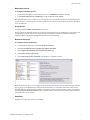
The actual creation of the package for deploying your Pocket ACE instances is done using the Pocket ACE Package Wizard. You can start the Pocket ACE Package Wizard from the workspace tab of the ACE master you created for your Pocket ACE instances by selecting Create Pocket ACE Package.
You must provide a name for the Pocket ACE package and a location for storing the package and its accompanying configuration files. This will typically be the ACE management station where VMware ACE 2 is running and it should be backed up regularly.
Player Selection
Selecting both Windows and Linux creates a package with the necessary files needed for deployment to both platforms. However, it also increases the total amount of storage needed on the portable media. If you expect end users to connect only from Windows‐based hosts, you can package only the Windows player.
Deployment Password
Enter a password that will be used when the Pocket ACE deploy utility is run. Configuring a deployment password ensures that only someone who knows the password can deploy a Pocket ACE instance using the deploy utility. Package Summary
After it has been completed, a package summary is displayed that lets you review your entries before creating the package. Deploying the Pocket ACE package
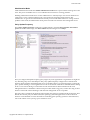
There are a few ways to deploy Pocket ACE packages. One is to run the deploy utility from the directory where the ACE master is stored. Another way to deploy a Pocket ACE package is by using the tabbed workspace. When deploying from the tabbed workspace, the Pocket ACE deploy utility can be accessed by right clicking on the Pocket ACE package from the package history and selecting Properties.
After selecting the package a summary of the Pocket ACE package will appear. From there, you can launch the Pocket ACE deploy utility by clicking the Deploy Pocket ACE button. When deploying the Pocket ACE instance, your portable media should be plugged in and available. After launching the Pocket ACE deploy utility, the Pocket ACE deploy wizard will appear. Copyright © 2007 VMware, Inc. All rights reserved.
10