1
Table 1
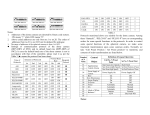
For Example:
ON
ON
1
2
3
4
5
6 7
8
9 10
ON
1
2
3
4
5
6 7
8
9 10
1
2
3
4
5
6 7
8
9 10
Speed Dome Addr ess=1
Speed Dome Addr ess=2
Speed Dome Addr ess=3
ON
ON
ON
1
2
3
4
5
6 7
8
9 10
Speed Dome Addr ess=4
1
2
3
4
5
6 7
8
9 10
1
Speed Dome Addr ess=18
2
3
4
5
6 7
8
9 10
Speed Dome Addr ess=1023
Notes:
1. Addresses of the dome cameras are denoted by binary code system. ON means
“1” while OFF means “0”.
2. Above coded addresses are only from no.1 to no.20. The codes of addresses from
no.21 to no.1023 can be deduced by analogue.
3. The range of addresses of the spherical cameras is from 1 to 1023.
z
Settings of communication protocol of the dome camera (DIP1-DIP4 of SW2)
and its default baud rate (DIP5-DIP6 of SW2). In case the default baud rate of the
dome camera is not in accordance with that of the controller, please reset it as per
the Table 3 (● means the protocol has been done).
Type of Protocols
Minking A01
Minking B01
Santachi
PELCO-D
PELCO-P/4800
PELCO-P/9600
PANASONIC
Longcomity
HUNDA600
LILIN
VICON
MOLYNX
KALATEL
VCL
DAIWA
ALEC
Utralk
Selection of Protocols
Normal Baud Rate
DIP-1
OFF
ON
OFF
ON
DIP-2
OFF
OFF
ON
ON
DIP-3
OFF
OFF
OFF
OFF
DIP-4
OFF
OFF
OFF
OFF
OFF
OFF
ON
OFF
ON
OFF
ON
OFF
ON
OFF
ON
OFF
ON
OFF
ON
OFF
ON
ON
OFF
OFF
ON
ON
OFF
OFF
ON
ON
ON
ON
ON
OFF
OFF
OFF
OFF
ON
ON
ON
ON
OFF
OFF
OFF
ON
ON
ON
ON
ON
ON
ON
ON
DIP-5
ON
OFF
OFF
OFF
ON
OFF
OFF
OFF
OFF
ON
ON
OFF
ON
OFF
OFF
OFF
OFF
DIP-6
OFF
ON
ON
OFF
OFF
ON
ON
ON
ON
OFF
OFF
ON
OFF
ON
ON
ON
ON
Integrated
Protocol
●
●
●
●
●
○
●
●
○
○
○
○
○
○
○
○
Table 2
Protocols mentioned above are suitable for the dome camera. Among them “Santachi”,
“ PELCO-D” and “PELCO-P” have no corresponding orders for some special
functions in the protocols. In order to control some special functions of the spherical
camera, we make some functional transformation upon some common orders.
Normally we take “Call Preset Position / Set Preset position” to transform, and
contents of order transformation are listed below.
4