1
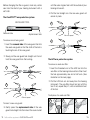
How to Use the Hearing
Instrument
Getting started
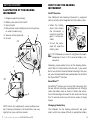
Illustration of the Hearing
InstrumenT
On/Off function
Your ReSound Vea hearing instrument is equipped
with an on/off switch integrated into the battery door.
1.Program selector (optional)
2.Battery door and on/off switch
3.Sound outlet
4.Microphone sound inlet(s) (second microphone
on select models only)
5.Volume control (optional)
3
4
6.Air vent
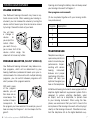
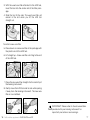
•When the battery
door is fully closed,
the instrument is
turned on and Program 1 will be activated.
ITE
Off
•To turn the instrument off, open the
battery door.
TIP: Whenever you are not using the instrument,
remember to turn it off to reduce battery consumption.
1
2
1
4
5
6
ITC
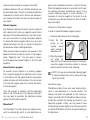
Generally, people prefer to turn on the hearing instrument after it is fully inserted into the ear. If you would
like to turn on the instrument before inserting it into your
ear, your hearing healthcare professional can activate
the SmartStart™ function.
SmartStart™
2
6
5
Note: Since this supplement covers multiple models of hearing instruments, the illustrations may vary
slightly from your particular model.
2
On
ReSound Vea supplement—Custom ITC and ITE
SmartStart™ allows you to insert the instrument into
the ear without annoying, squealing sounds. Starting
when the battery door is closed, it delays the activation of the hearing instrument for ten seconds. During
this 10-second period you will hear a series of single
beeps.
Changing the battery
The batteries for the hearing instrument are quite
small, which may cause difficulty in seeing the battery
3