1
Controls and features
Volume Control
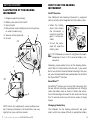
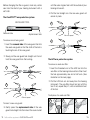
Your ReSound hearing instrument may have an optional volume control. When wearing your hearing instrument, you can increase the volume by turning the
volume control toward your face and reduce volume
by turning it toward the back of your head.
You will hear
a change in
volume
as
you adjust the
control. When
you reach the upper or lower limit of the
volume control range, the
wheel will not move any further.
Program Selector (select models)
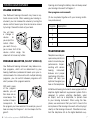
Your ReSound hearing instrument may feature multiple programs, which will be determined by your
hearing healthcare professional based upon your individual needs. For instruments with multiple listening
programs, you can switch between programs with
short presses of the program selector.
With each press
of the program
selector, you will
then hear one or
more beeps. The
number of beeps
corresponds to
the program you have selected. For example, you will
hear one beep for Program 1 and two beeps for Program 2.
6
ReSound Vea supplement—Custom ITC and ITE
Opening and closing the battery door will always reset
your hearing instrument to Program 1.
Your program environments:
(To be completed together with your hearing healthcare professional)
Program Description
1
2
3
4
Telephone Use
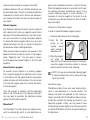
Telephone use may require some practice in
order to maximize your
performance. Experimenting with various
hearing
instrument
features and proper
positioning of the telephone will help you
optimize the signal you
hear on the telephone.
All ReSound hearing instruments are equipped with an
adaptive digital feedback suppression system that is
designed to reduce whistling (feedback) when
an object, such as a telephone, is placed close
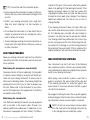
to your hearing instrument. When using the telephone, we recommend that you hold it close to the
microphone of the hearing instrument without laying it
directly on the hearing instrument. If feedback occurs,
hold the telephone still as the digital feedback sup7