1
5
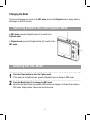
Press OK/Enter on the five-way control button (1) to save the settings and finally press the
MENU button (2) to close the menu
Using the Menu in Playback Mode
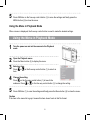
When a menu is displayed, the five-way control button is used to make the desired settings.
Using the Menu in Playback Mode
Turn the power on and set the camera to the Playback
mode 1
2
3
4
5
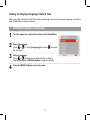
Open the Playback menu.
Press the Menu button (2) to display the menu.
Select an item.
Press
or
on the five-way control button (1) to select an
item.
Change the setting.
Press
on the five-way control button (1) to launch the
submenu. Press
or
on the five-way control button (1) to change the setting.
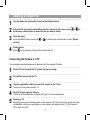
Press OK/Enter (1) to save the settings and finally press the Menu button (2) to close the menu.
Caution
If the item in the menu list is gray it means this item doesn’t work in this file format.