1
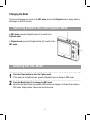
Display
Title
Description
Capture mode
For taking still photos.
Video mode
For recording movie clips.
Audio mode
For recording audio files.
Caution
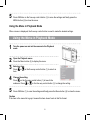
The Mode button will not work when the camera is in Playback mode.
Using the Menu in REC Mode
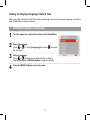
When a menu is displayed, the five-way control button is used to make the desired settings. The
Audio mode does not have a menu so the MENU button will not work in Audio mode.
1
Capture menu.
Turn the power on, and set the camera to the Capture
mode
2
Open the Capture menu.
3
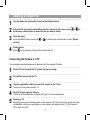
Select an item.
Press
or
on the five-way control button (1) to select
an item.
Change the setting.
4
Press the MENU button (2) to display the menu. Press
on the five-way control button (1) to launch the
submenu. Press
or
on the five-way control button (1)
to change the setting.