1
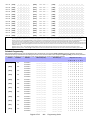
= Default setting
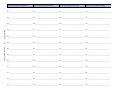
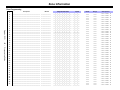
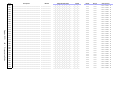
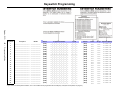
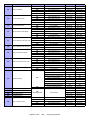
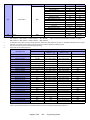
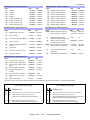
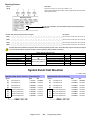
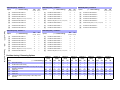
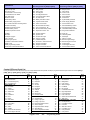
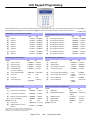
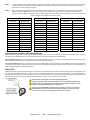
SECTION [3031] : Partition Options 1
SECTION [3032] : Partition Options 2
OFF
Option
[1]
Partition 1
N Disabled
[2]
Partition 2
Disabled
[3]
Partition 3
Disabled
[4]
Partition 4
Disabled
[5]
Partition 5 (EVO192 only)
Disabled
[6]
Partition 6 (EVO192 only)
Disabled
[7]
Partition 7 (EVO192 only)
Disabled
[8]
Partition 8 (EVO192 only)
Disabled
ON
Enabled
N Enabled
N Enabled
N Enabled
N Enabled
N Enabled
N Enabled
N Enabled
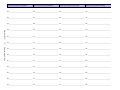
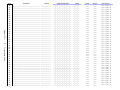
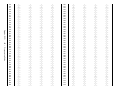
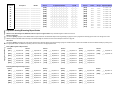
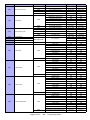
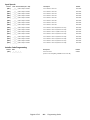
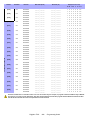
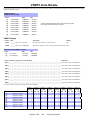
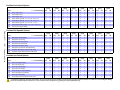
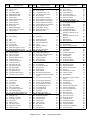
SECTION [3033] : System Options 3
[1]
Bell/siren output in partition 1
N Disabled
[2]
Bell/siren output in partition 2
Disabled
[3]
Bell/siren output in partition 3
Disabled
[4]
Bell/siren output in partition 4
Disabled
[5]
Bell/siren output in partition 5
Disabled
[6]
Bell/siren output in partition 6
Disabled
[7]
Bell/siren output in partition 7
Disabled
[8]
Bell/siren output in partition 8
Disabled
ON
Enabled
N Enabled
N Enabled
N Enabled
N Enabled
N Enabled
N Enabled
N Enabled
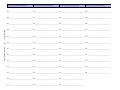
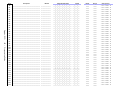
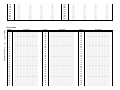
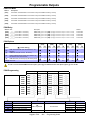
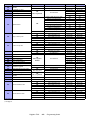
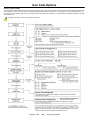
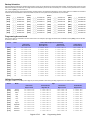
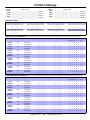
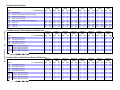
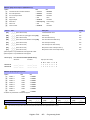
SECTION [3034] : System Options 4
OFF
Option
OFF
Option
ON
Option
[1]&[2] Wireless Transmitter Supervision
Options (see Table on page 37)
[1]
Multiple actions in user menu
Disabled
N Enabled
[2]
User code length
Fixed
N Flexible
[3]
User code length (if option [2] OFF)
4-digits
N 6-digits
[4]
Power save mode
[5]
Bypass not displayed while system
is armed
[6]
OFF
ON
N See Table N See Table
N See Table N See Table
[3]
Generate supervision failure if
detected on a bypassed wireless zone
Yes
N No
[4]
Restrict arming on a wireless
transmitter supervision failure
Disabled
N Enabled
N Disabled
Enabled
N Disabled
Enabled
Trouble Latch
Disabled
N Enabled
[7]
EOL resistor on hardwire zones
Disabled
N Enabled
[7]
[8]
(ATZ) Zone Doubling
Disabled
N Enabled
Generate tamper if detected on
bypass zone
[8]
Restrict arming on tamper trouble
[5]&[6] Zone & Module Tamper Recognition
Options (see Table on page 37)
N See Table N See Table
N See Table N See Table
NYes
Disabled
No
N Enabled
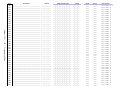
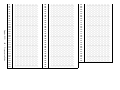
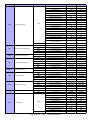
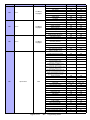
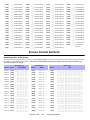
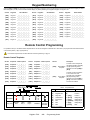
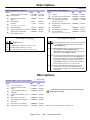
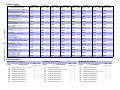
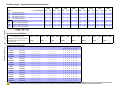
SECTION [3035] : System Options 5
OFF
Option
ON
N Enabled
[1]
Restrict arming on AC failure
Disabled
[2]
Restrict arming on battery failure
Disabled
[3]
Restrict arming on bell or auxiliary
failure
Disabled
N Enabled
[4]
Restrict arming on TLM failure
Disabled
N Enabled
[5]
Restrict arming on module
troubles
Disabled
[6]
Account Number Transmission
Partition #
[7]
Transmit zone status on serial
port*
Disabled
N Enabled
N Enabled
N Tel #
N Enabled
[8]
Serial Port Baud Rate
N38,400
57,600
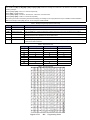
*This option is used by some event monitoring software such as Hyperterminal. With WinLoad and printers, it is always being transmitted,
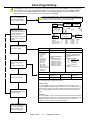
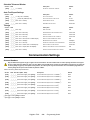
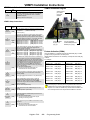
Wireless Transmitter Supervision Options
Zone & Module Tamper Recognition Options*
(Section [3034]; options [1] & [2])
(Section [3034]: options [5] & [6])
[1]
OFF
[2]
OFF - Disabled (default)
[5] [6]
OFF OFF - Disabled (default)
OFF
ON
ON
OFF - When disarmed: GENERATES TROUBLE ONLY
- GENERATES TROUBLE ONLY (WHEN ARMED OR DISARMED)
OFF ON - GENERATES TROUBLE ONLY (WHEN ARMED OR DISARMED)
ON OFF - When disarmed: GENERATES TROUBLE ONLY
- When armed: Follows Zone Alarm Types (page 9) for Zone
Tamper. Generates Trouble for Module Tamper.
- When armed: Follows Zone Alarm Types (page 9)
ON
ON
- When disarmed: GENERATES AUDIBLE ALARM
- When armed: Follows Zone Alarm Types (page 9)
Digiplex -EVO-
ON
ON - When disarmed: GENERATES AUDIBLE ALARM
- When armed: Follows Zone Alarm Types (page 9)
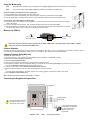
*For instructions on wiring a panel for tamper recognition, see page 61.
- 37 -
Programming Guide