1
THE FRONT PANEL - Effects Loop, Eek & Ugh:
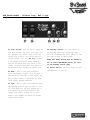
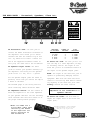
23.Loop Switch: When you want to engage the
rear panel effects loop, press this switch. The
blue LED above this switch lights up when the
effects loop is active. This can be used as a
“boost” feature – see the “Hot Tip” on page
9. The BV300H uses instant access switching –
when the footswitch (#28, rear panel) is connected, either the front panel loop switch or
the footswitch will activate the effects loop.
24.Eek!: This is your high frequency
power amp damping control. This is used to
add definition and edge to your sound. The
Eek! control helps to compensate for dark
rooms and/or speaker cabinets.
26.Standby Switch: Use this switch to
put the amplifier into “Stand By” mode the tube filaments are still turned on, but
the high voltage is deactivated.
NOTE: The Power switch must be turned on
for at least ONE MINUTE before you turn
on the Standby switch (#26).
27.Power Switch: Use this switch to turn
the amplifier on and off.
25.Ugh!: This is your low frequency power
amp damping control. This is used to control and shape the low end. Towards the “–”
side tightens up the bass and controls the
speaker cones better. Towards the “+” side
makes it more “thumpy” and allows the speaker
cones to move easier.
7