1
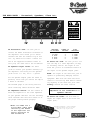
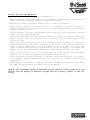
THE REAR PANEL - Effects Loop, Bias, AC Power:
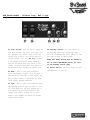
33.Effects Loop Send Level: Use this
knob to adjust the level of the Effects
Loop Send signal (#34). Some effects are
picky as to what they like for an input
level, so use this knob to get them to
smile.
34.Effects Loop Send Jack*: When connecting the amp to an external effects
device, use this jack to send the signal
to the Input jack of the effect.
35.Series/Parallel Switch: Use this
switch to configure the effects loop in
series or in parallel with the signal path.
Certain effects sound better one way than
the other.
36.Effects Loop Return Jack*: When
connecting the amp to an external effects
device, use this jack to return the signal
from the output of the effects device back
into the amplifier.
37.Effects Loop Return Level: Use this
knob to adjust the level of the Effects
Loop Return signal (#36). Some effects have
hotter outputs than others, so use this
knob to adjust the return signal level for
the best level of effect.
38.Bias Controls: Authorized Service
personnel use this section to work their
magic on the amplifier. Like it says on
the amp: Don’t mess with the Bias!
Your Authorized Crate Service Center will
have all the information needed to re-bias
your amplifier if and when it becomes necessary.
39.Fuse: The fuse helps protect the
amplifier against damage from faulty AC
line voltages and other possible problems.
If the amp stops working, check the fuse.
If the fuse is blown, replace it ONLY with
the exact same size and type as indicated!
If the problem persists, contact your
Authorized Crate Service Center.
40.AC Inlet Jack: Insert the female end
of the power cord firmly into this jack.
The grounded power cord should only be
plugged into a grounded power outlet that
meets all applicable electrical codes and
is compatible with the voltage, power, and
frequency requirements stated on the rear
panel. Do not attempt to defeat the
safety ground connection!
* H O T T I P ! If you connect a signal cable from
the Effects Loop Send jack (#34) to the Effects
Loop Return jack (#36), the loop level control
adjust the amount of boost engaged - up to 6dB in
the series mode, up to 9dB in the parallel mode!
9