1
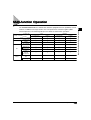
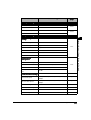
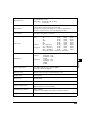
Additional Function
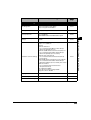
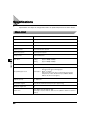
Available settings
Applicable
page
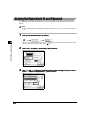
Common Settings
Tray A: Copy*/Printer*/Fax/Other
Tray B: Copy/Printer/Fax*/Other*
Tray C: Copy/Printer/Fax/Other
P.3-21
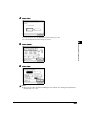
Printing Priority
1: Copy (Priority)/2:Printer/3:Other
P.3-22
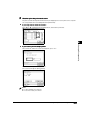
Envelope Cassette
Env. 1 (COM10*)
Env. 2 (COM10*)
COM10/ISO-B5/Monarch/ISO-C5/DL/Yougata
P.3-23
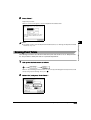
Standard Stack Bypass
Settings
On/Off*
P.3-25
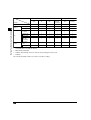
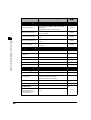
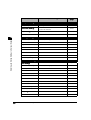
Standard Local Print Settings
Paper Select: Auto*/Select paper supply
Copies: 1* to 2,000 sets
Finisher:
With the Finisher-J1
Do not Collate/Collate/Offset Collate*/Group/
Offset Group/Staple (Corner)
With the Saddle Finisher-G1+Inner 2way Tray-A1
Do not Collate/Collate*/Offset Collate/Group/
Offset Group/Staple (Corner, Double)
With the Inner 2way Tray-A1
Do not Collate/Collate*/Rotate Collate/Group/
Rotate Group
With Saddle Finisher-G1+Puncher Unit-J1/G1/H1
Do not Collate/Collate*/Offset Collate/Group/
Offset Group/Staple (Corner, Double) /Hole Punch
Without a Finisher
Do not Collate/Collate*/Rotate Collate/
Group/Rotate Group
Two-sided Print: On/Off*
Erase Document After Printing: On/Off*
Merge Documents: On/Off*
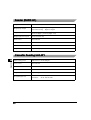
P.3-27
Language Switch
On/Off*
P.3-29
Reversed Display
On/Off*
P.3-30
Initialise Common Settings
Initialise
P.3-31
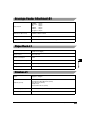
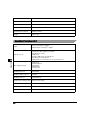
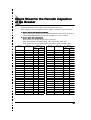
Additional Functions Settings Table
3
Selecting and Storing Settings to Suit your Needs
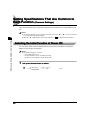
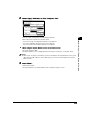
Tray Designation
3-3