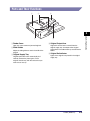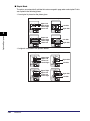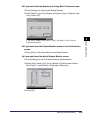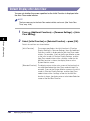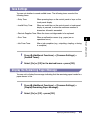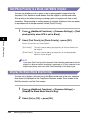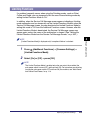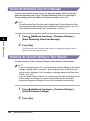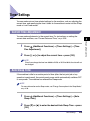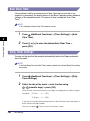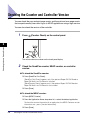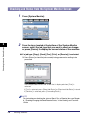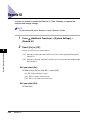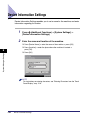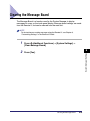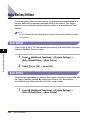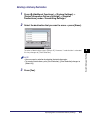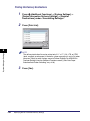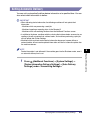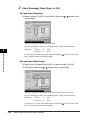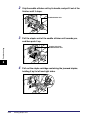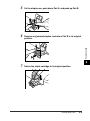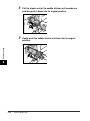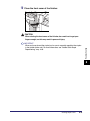
1
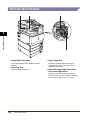
Reference Guide
Please read this guide before operating this product.
After you finish reading this guide, store it in a safe place for future reference.
ENG
0
Ot¯
Color imageRUNNER
C3480/C3480i
C3080/C3080i
C2550
Reference Guide
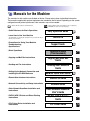
Manuals for the Machine
The manuals for this machine are divided as follows. Please refer to them for detailed information.
The manuals supplied with optional equipment are included in the list below. Depending on the system
configuration and product purchased, some manuals may not be needed.
Guides with this symbol are printed manuals.
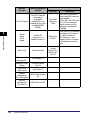
• Quick Reference for Basic Operations
• Learn How to Use Your Machine
The Tutorial CD is a teaching aid, designed to help you learn the various
functions of the machine.
• Precautions for Using Your Machine
• Troubleshooting
• Specifications
• Basic Operations
• Copying and Mail Box Instructions
• Sending and Fax Instructions
• Setting Up the Network Connection and
Installing the CD-ROM Software
• Remote User Interface Instructions
• Network Connectivity and Setup Instructions
• Color Network ScanGear Installation and
Instructions
• PS/PCL/UFR II Printer and Direct Printing
Instructions
• PCL Printer Driver Installation and
Instructions
CD-ROM
Guides with this symbol are included on the accompanying
CD-ROM. (See footnote on the next page.)
Easy Operation Guide
Tutorial CD
CD-ROM
Support Guide
Reference Guide
(This Document)
CD-ROM
Copying and Mail Box
Guide
CD-ROM
Sending and Facsimile
Guide
CD-ROM
Network Quick Start Guide
Remote UI Guide
CD-ROM
Network Guide
CD-ROM
Color Network ScanGear
User's Guide
CD-ROM
PS/PCL/UFR II Printer
Guide
CD-ROM
PCL Driver Guide
CD-ROM
• PS Printer Driver Installation and
Instructions
• UFR II Printer Driver Installation and
Instructions
• Mac OS X PS Printer Driver Installation and
Instructions
• Mac OS X UFR II Printer Driver Installation
and Instructions
• Fax Driver Installation and Instructions
• Installing MEAP Applications and Using the
Login Service
PS Driver Guide
CD-ROM
UFR II Driver Guide
CD-ROM
Mac PS Driver Guide
CD-ROM
Mac UFR II Driver Guide
CD-ROM
Fax Driver Guide
CD-ROM
MEAP SMS Administrator
Guide
CD-ROM
• To view the manual in PDF format, Adobe Reader/Acrobat Reader/Acrobat is required. If Adobe Reader/Acrobat Reader/Acrobat is not installed on
your system, please download it from the Adobe Systems Incorporated website (http://www.adobe.com).
• The machine illustration on the cover may differ slightly from your machine.
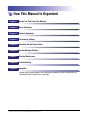
How This Manual Is Organized
Chapter 1
Before You Start Using This Machine
Chapter 2
Basic Operations
Chapter 3
Optional Equipment
Chapter 4
Customizing Settings
Chapter 5
Checking Job and Device Status
Chapter 6
System Manager Settings
Chapter 7
Routine Maintenance
Chapter 8
Troubleshooting
Chapter 9
Appendix
Includes the Sample Reports, the Relationship between Original Orientation and
Preprinted Paper Output Chart, and index.
Considerable effort has been made to ensure that this manual is free of inaccuracies and omissions. However, as we are constantly improving our
products, if you need an exact specification, please contact Canon.
Contents
Preface . . . . . . . . . . . . . . . . . . . . . . . . . . . . . . . . . . . . . . . . . . . . . . . . . . . . . . . . . xiv
How To Use This Manual. . . . . . . . . . . . . . . . . . . . . . . . . . . . . . . . . . . . . . . . . . . xiv
Symbols Used in This Manual . . . . . . . . . . . . . . . . . . . . . . . . . . . . . . . . . . . . . xiv
Keys Used in This Manual . . . . . . . . . . . . . . . . . . . . . . . . . . . . . . . . . . . . . . . . .xv
Displays Used in This Manual . . . . . . . . . . . . . . . . . . . . . . . . . . . . . . . . . . . . . .xv
Illustrations Used in This Manual . . . . . . . . . . . . . . . . . . . . . . . . . . . . . . . . . . . xvi
Abbreviations Used in This Manual . . . . . . . . . . . . . . . . . . . . . . . . . . . . . . . . . xvi
Trademarks . . . . . . . . . . . . . . . . . . . . . . . . . . . . . . . . . . . . . . . . . . . . . . . . . . . xvi
Chapter 1
Before You Start Using This Machine
Installation Location and Handling . . . . . . . . . . . . . . . . . . . . . . . . . . . . . . . . . . 1-2
Installation Precautions . . . . . . . . . . . . . . . . . . . . . . . . . . . . . . . . . . . . . . . . . . 1-2
Avoid Installing the Machine in the Following Locations . . . . . . . . . . . . . . 1-2
Select a Safe Power Supply. . . . . . . . . . . . . . . . . . . . . . . . . . . . . . . . . . . . 1-5
Moving the Machine. . . . . . . . . . . . . . . . . . . . . . . . . . . . . . . . . . . . . . . . . . 1-5
Handling Precautions. . . . . . . . . . . . . . . . . . . . . . . . . . . . . . . . . . . . . . . . . . . . 1-6
Backing Up Data . . . . . . . . . . . . . . . . . . . . . . . . . . . . . . . . . . . . . . . . . . . . . . . . . 1-9
Parts and Their Functions . . . . . . . . . . . . . . . . . . . . . . . . . . . . . . . . . . . . . . . . 1-10
External View . . . . . . . . . . . . . . . . . . . . . . . . . . . . . . . . . . . . . . . . . . . . . . . . . 1-10
Internal View . . . . . . . . . . . . . . . . . . . . . . . . . . . . . . . . . . . . . . . . . . . . . . . . . 1-12
Control Panel Parts and Functions . . . . . . . . . . . . . . . . . . . . . . . . . . . . . . . . 1-13
Main Power and Control Panel Power . . . . . . . . . . . . . . . . . . . . . . . . . . . . . . . 1-14
How to Turn ON the Main Power . . . . . . . . . . . . . . . . . . . . . . . . . . . . . . . . . . 1-14
Control Panel Power Switch. . . . . . . . . . . . . . . . . . . . . . . . . . . . . . . . . . . . . . 1-19
Shutting Down the Machine . . . . . . . . . . . . . . . . . . . . . . . . . . . . . . . . . . . . . . 1-20
System Settings. . . . . . . . . . . . . . . . . . . . . . . . . . . . . . . . . . . . . . . . . . . . . . . . . 1-25
Chapter 2
Basic Operations
What This Machine Can Do . . . . . . . . . . . . . . . . . . . . . . . . . . . . . . . . . . . . . . . . 2-2
Overview of the Color imageRUNNER
C3480/C3480i/C3080/C3080i/C2550 . . . . . . . . . . . . . . . . . . . . . . . . . . . . . . . . . . 2-5
The Touch Panel Display . . . . . . . . . . . . . . . . . . . . . . . . . . . . . . . . . . . . . . . . . 2-5
Switching the Functions Indicated on the Touch Panel Display . . . . . . . . 2-5
Various Touch Panel Display Screens . . . . . . . . . . . . . . . . . . . . . . . . . . . . 2-8
Adding New Functions . . . . . . . . . . . . . . . . . . . . . . . . . . . . . . . . . . . . . . . . . . . 2-8
v
Specifying Settings. . . . . . . . . . . . . . . . . . . . . . . . . . . . . . . . . . . . . . . . . . . . .2-10
Functions That Conserve Power . . . . . . . . . . . . . . . . . . . . . . . . . . . . . . . . . .2-11
Checking, Changing, and Canceling Print Jobs . . . . . . . . . . . . . . . . . . . . . . .2-13
Displaying a Help Screen . . . . . . . . . . . . . . . . . . . . . . . . . . . . . . . . . . . . . . . .2-15
Reading Messages from the System Manager . . . . . . . . . . . . . . . . . . . . . . .2-17
Types of Message Boards . . . . . . . . . . . . . . . . . . . . . . . . . . . . . . . . . . . .2-17
Other Useful Functions . . . . . . . . . . . . . . . . . . . . . . . . . . . . . . . . . . . . . . . . .2-18
Using the Touch Panel Display. . . . . . . . . . . . . . . . . . . . . . . . . . . . . . . . . . . . .2-21
Frequently Used Keys . . . . . . . . . . . . . . . . . . . . . . . . . . . . . . . . . . . . . . . . . .2-21
Touch Panel Key Display . . . . . . . . . . . . . . . . . . . . . . . . . . . . . . . . . . . . . . . .2-22
Adjusting the Brightness . . . . . . . . . . . . . . . . . . . . . . . . . . . . . . . . . . . . . . . .2-23
Entering Characters from the Touch Panel Display . . . . . . . . . . . . . . . . . . . .2-24
Entering Characters . . . . . . . . . . . . . . . . . . . . . . . . . . . . . . . . . . . . . . . . . . . .2-24
Values in Inches . . . . . . . . . . . . . . . . . . . . . . . . . . . . . . . . . . . . . . . . . . . . . . .2-25
Entering the Department ID and Password . . . . . . . . . . . . . . . . . . . . . . . . . . .2-26
Using a Login Service . . . . . . . . . . . . . . . . . . . . . . . . . . . . . . . . . . . . . . . . . . . .2-29
Placing Originals . . . . . . . . . . . . . . . . . . . . . . . . . . . . . . . . . . . . . . . . . . . . . . . .2-34
Document Sizes . . . . . . . . . . . . . . . . . . . . . . . . . . . . . . . . . . . . . . . . . . . . . . .2-34
Orientation . . . . . . . . . . . . . . . . . . . . . . . . . . . . . . . . . . . . . . . . . . . . . . . . . . .2-35
Platen Glass . . . . . . . . . . . . . . . . . . . . . . . . . . . . . . . . . . . . . . . . . . . . . . . . . .2-36
Feeder . . . . . . . . . . . . . . . . . . . . . . . . . . . . . . . . . . . . . . . . . . . . . . . . . . . . . .2-39
Making Prints Using the Stack Bypass . . . . . . . . . . . . . . . . . . . . . . . . . . . . . .2-42
Multifunctional Operations . . . . . . . . . . . . . . . . . . . . . . . . . . . . . . . . . . . . . . . .2-55
Available Paper Stock . . . . . . . . . . . . . . . . . . . . . . . . . . . . . . . . . . . . . . . . . . . .2-57
Chapter 3
Optional Equipment
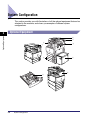
System Configuration . . . . . . . . . . . . . . . . . . . . . . . . . . . . . . . . . . . . . . . . . . . . .3-2
Optional Equipment . . . . . . . . . . . . . . . . . . . . . . . . . . . . . . . . . . . . . . . . . . . . .3-2
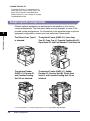
Sample System Configurations . . . . . . . . . . . . . . . . . . . . . . . . . . . . . . . . . . . .3-4
System Options . . . . . . . . . . . . . . . . . . . . . . . . . . . . . . . . . . . . . . . . . . . . . . . .3-5
Available Combinations of Options. . . . . . . . . . . . . . . . . . . . . . . . . . . . . . . . . .3-9
Utilities . . . . . . . . . . . . . . . . . . . . . . . . . . . . . . . . . . . . . . . . . . . . . . . . . . . . . .3-12
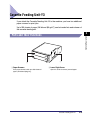
Cassette Feeding Unit-Y3 . . . . . . . . . . . . . . . . . . . . . . . . . . . . . . . . . . . . . . . . .3-13
Parts and Their Functions . . . . . . . . . . . . . . . . . . . . . . . . . . . . . . . . . . . . . . .3-13
Optional Accessories . . . . . . . . . . . . . . . . . . . . . . . . . . . . . . . . . . . . . . . . . . .3-14
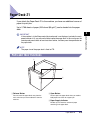
Paper Deck-Z1 . . . . . . . . . . . . . . . . . . . . . . . . . . . . . . . . . . . . . . . . . . . . . . . . . .3-15
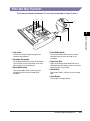
Parts and Their Functions . . . . . . . . . . . . . . . . . . . . . . . . . . . . . . . . . . . . . . .3-15
Envelope Feeder Attachment-C2 . . . . . . . . . . . . . . . . . . . . . . . . . . . . . . . . . . .3-16
Parts and Their Functions . . . . . . . . . . . . . . . . . . . . . . . . . . . . . . . . . . . . . . .3-17
vi
Feeder (DADF-L1) . . . . . . . . . . . . . . . . . . . . . . . . . . . . . . . . . . . . . . . . . . . . . . . 3-18
Parts and Their Functions . . . . . . . . . . . . . . . . . . . . . . . . . . . . . . . . . . . . . . . 3-19
Finisher-Z1 . . . . . . . . . . . . . . . . . . . . . . . . . . . . . . . . . . . . . . . . . . . . . . . . . . . . . 3-20
Parts and Their Functions . . . . . . . . . . . . . . . . . . . . . . . . . . . . . . . . . . . . . . . 3-20
Finishing Modes. . . . . . . . . . . . . . . . . . . . . . . . . . . . . . . . . . . . . . . . . . . . . . . 3-21
Finisher-Y1, Saddle Finisher-Y2, and Puncher Unit-M1. . . . . . . . . . . . . . . . . 3-25
Parts and Their Functions . . . . . . . . . . . . . . . . . . . . . . . . . . . . . . . . . . . . . . . 3-25
Finishing Modes. . . . . . . . . . . . . . . . . . . . . . . . . . . . . . . . . . . . . . . . . . . . . . . 3-27
Inner 2way Tray-D1 . . . . . . . . . . . . . . . . . . . . . . . . . . . . . . . . . . . . . . . . . . . . . . 3-33
Parts and Their Functions . . . . . . . . . . . . . . . . . . . . . . . . . . . . . . . . . . . . . . . 3-34
Copy Tray-J1 . . . . . . . . . . . . . . . . . . . . . . . . . . . . . . . . . . . . . . . . . . . . . . . . . . . 3-36
Parts and Their Functions . . . . . . . . . . . . . . . . . . . . . . . . . . . . . . . . . . . . . . . 3-36
Card Reader-C1 . . . . . . . . . . . . . . . . . . . . . . . . . . . . . . . . . . . . . . . . . . . . . . . . . 3-38
Procedure before Using the Machine . . . . . . . . . . . . . . . . . . . . . . . . . . . . . . 3-39
Procedure after Using the Machine . . . . . . . . . . . . . . . . . . . . . . . . . . . . . . . . 3-39
Department ID Management . . . . . . . . . . . . . . . . . . . . . . . . . . . . . . . . . . . . . 3-40
Flow of Additional Functions Operations . . . . . . . . . . . . . . . . . . . . . . . . . 3-40
Changing the Password and Page Limit . . . . . . . . . . . . . . . . . . . . . . . . . 3-42
Checking the Page Counts on a Control Card. . . . . . . . . . . . . . . . . . . . . 3-47
Checking and Printing Counter Information. . . . . . . . . . . . . . . . . . . . . . . 3-48
Clearing Page Totals . . . . . . . . . . . . . . . . . . . . . . . . . . . . . . . . . . . . . . . . 3-49
Accepting Print and Scan Jobs with Unknown IDs . . . . . . . . . . . . . . . . . 3-49
Accepting B&W Copy and Print Jobs without a Control Card . . . . . . . . . 3-51
Chapter 4
Customizing Settings
What Are Additional Functions? . . . . . . . . . . . . . . . . . . . . . . . . . . . . . . . . . . . . 4-3
Additional Functions Settings Table . . . . . . . . . . . . . . . . . . . . . . . . . . . . . . . . . 4-6
Specifying Common Settings. . . . . . . . . . . . . . . . . . . . . . . . . . . . . . . . . . . . . . 4-27
Initial Function at Power ON . . . . . . . . . . . . . . . . . . . . . . . . . . . . . . . . . . . . . 4-27
Default Display after Auto Clear. . . . . . . . . . . . . . . . . . . . . . . . . . . . . . . . . . . 4-30
Tone Settings . . . . . . . . . . . . . . . . . . . . . . . . . . . . . . . . . . . . . . . . . . . . . . . . . 4-31
Display the Remaining Paper Message . . . . . . . . . . . . . . . . . . . . . . . . . . . . . 4-31
Text/Photo Priority in a Black-and-White Original . . . . . . . . . . . . . . . . . . . . . 4-32
Display the Black Mode Shortcut Key . . . . . . . . . . . . . . . . . . . . . . . . . . . . . . 4-32
Inch Entry. . . . . . . . . . . . . . . . . . . . . . . . . . . . . . . . . . . . . . . . . . . . . . . . . . . . 4-33
Auto Paper Selection/Auto Drawer Switching . . . . . . . . . . . . . . . . . . . . . . . . 4-33
Designating the Envelope Type . . . . . . . . . . . . . . . . . . . . . . . . . . . . . . . . . . . 4-35
Identifying the Type of Paper in a Paper Source . . . . . . . . . . . . . . . . . . . . . . 4-35
Paper Select Screen Priority . . . . . . . . . . . . . . . . . . . . . . . . . . . . . . . . . . . . . 4-37
vii
Energy Consumption in the Sleep Mode . . . . . . . . . . . . . . . . . . . . . . . . . . . .4-38
Distinguishing LTRR and STMT Originals . . . . . . . . . . . . . . . . . . . . . . . . . . .4-39
Output Tray Designation. . . . . . . . . . . . . . . . . . . . . . . . . . . . . . . . . . . . . . . . .4-40
Setting the Printing Priority. . . . . . . . . . . . . . . . . . . . . . . . . . . . . . . . . . . . . . .4-42
Image Form . . . . . . . . . . . . . . . . . . . . . . . . . . . . . . . . . . . . . . . . . . . . . . . . . .4-43
Storing an Image Form. . . . . . . . . . . . . . . . . . . . . . . . . . . . . . . . . . . . . . .4-43
Checking Image Form Details . . . . . . . . . . . . . . . . . . . . . . . . . . . . . . . . .4-44
Erasing an Image Form . . . . . . . . . . . . . . . . . . . . . . . . . . . . . . . . . . . . . .4-45
Setting the Image Priority. . . . . . . . . . . . . . . . . . . . . . . . . . . . . . . . . . . . . . . .4-46
User-Defined Text for Page Numbers and Watermarks . . . . . . . . . . . . . . . . .4-46
Registering User-Defined Text . . . . . . . . . . . . . . . . . . . . . . . . . . . . . . . . .4-46
Editing User-Defined Text. . . . . . . . . . . . . . . . . . . . . . . . . . . . . . . . . . . . .4-47
Erasing User-Defined Text . . . . . . . . . . . . . . . . . . . . . . . . . . . . . . . . . . . .4-47
Standard Paper for the Stack Bypass . . . . . . . . . . . . . . . . . . . . . . . . . . . . . .4-48
Irregular Paper Size Settings for the Stack Bypass . . . . . . . . . . . . . . . . . . . .4-50
Registering and Editing Irregular Paper Sizes . . . . . . . . . . . . . . . . . . . . .4-50
Naming a Size Key . . . . . . . . . . . . . . . . . . . . . . . . . . . . . . . . . . . . . . . . . .4-51
Erasing Irregular Paper Sizes. . . . . . . . . . . . . . . . . . . . . . . . . . . . . . . . . .4-51
Setting the Speed or Print Side Priority . . . . . . . . . . . . . . . . . . . . . . . . . . . . .4-52
Standard Local Print Settings. . . . . . . . . . . . . . . . . . . . . . . . . . . . . . . . . . . . .4-54
Changing the Language Shown on the Touch Panel Display. . . . . . . . . . . . .4-55
Reversing the Contrast of the Touch Panel Display . . . . . . . . . . . . . . . . . . . .4-56
Alternating the Print Output (Offset Jobs) . . . . . . . . . . . . . . . . . . . . . . . . . . .4-56
Inserting a Job Separation Sheet between Print Jobs . . . . . . . . . . . . . . . . . .4-57
Inserting a Job Separation Sheet between Copy Sets. . . . . . . . . . . . . . . . . .4-57
Job Duration Display . . . . . . . . . . . . . . . . . . . . . . . . . . . . . . . . . . . . . . . . . . .4-58
Number of Copies/Wait Time Status Display . . . . . . . . . . . . . . . . . . . . . . . . .4-58
Clean the Original Scanning Area Prompt . . . . . . . . . . . . . . . . . . . . . . . . . . .4-59
Data Compression Ratio for Remote Scans . . . . . . . . . . . . . . . . . . . . . . . . .4-59
Setting the Gamma Value for Remote Scans. . . . . . . . . . . . . . . . . . . . . . . . .4-60
Limiting Functions . . . . . . . . . . . . . . . . . . . . . . . . . . . . . . . . . . . . . . . . . . . . .4-61
Erasing the Remaining Toner Error Message . . . . . . . . . . . . . . . . . . . . . . . .4-62
Returning the Common Settings to Their Defaults. . . . . . . . . . . . . . . . . . . . .4-62
Timer Settings . . . . . . . . . . . . . . . . . . . . . . . . . . . . . . . . . . . . . . . . . . . . . . . . . .4-63
Current Time Adjustment . . . . . . . . . . . . . . . . . . . . . . . . . . . . . . . . . . . . . . . .4-63
Auto Sleep Time. . . . . . . . . . . . . . . . . . . . . . . . . . . . . . . . . . . . . . . . . . . . . . .4-63
Auto Clear Time . . . . . . . . . . . . . . . . . . . . . . . . . . . . . . . . . . . . . . . . . . . . . . .4-64
Daily Timer Settings . . . . . . . . . . . . . . . . . . . . . . . . . . . . . . . . . . . . . . . . . . . .4-64
Low-Power Mode Time. . . . . . . . . . . . . . . . . . . . . . . . . . . . . . . . . . . . . . . . . .4-65
viii
Adjusting the Machine . . . . . . . . . . . . . . . . . . . . . . . . . . . . . . . . . . . . . . . . . . . 4-66
Zoom Fine Adjustment. . . . . . . . . . . . . . . . . . . . . . . . . . . . . . . . . . . . . . . . . . 4-66
Saddle Stitch Staple Repositioning . . . . . . . . . . . . . . . . . . . . . . . . . . . . . . . . 4-66
Saddle Stitch Position Adjustment . . . . . . . . . . . . . . . . . . . . . . . . . . . . . . . . . 4-67
Adjusting Creep (Displacement) Correction. . . . . . . . . . . . . . . . . . . . . . . . . . 4-68
Automatic Gradation Adjustment . . . . . . . . . . . . . . . . . . . . . . . . . . . . . . . . . . 4-68
Quick Adjustment. . . . . . . . . . . . . . . . . . . . . . . . . . . . . . . . . . . . . . . . . . . 4-69
Full Adjustment . . . . . . . . . . . . . . . . . . . . . . . . . . . . . . . . . . . . . . . . . . . . 4-69
Exposure Recalibration . . . . . . . . . . . . . . . . . . . . . . . . . . . . . . . . . . . . . . . . . 4-71
Color Mismatch Correction . . . . . . . . . . . . . . . . . . . . . . . . . . . . . . . . . . . . . . 4-71
Character/Background Contrast Adjustment . . . . . . . . . . . . . . . . . . . . . . . . . 4-71
Cleaning the Inside of the Main Unit . . . . . . . . . . . . . . . . . . . . . . . . . . . . . . . 4-74
Automatic Feeder Cleaning . . . . . . . . . . . . . . . . . . . . . . . . . . . . . . . . . . . . . . 4-75
Replacing the Toner While Printing Is Possible . . . . . . . . . . . . . . . . . . . . . . . 4-76
Chapter 5
Checking Job and Device Status
Checking the Counter and Controller Version . . . . . . . . . . . . . . . . . . . . . . . . . 5-2
Checking Job Status . . . . . . . . . . . . . . . . . . . . . . . . . . . . . . . . . . . . . . . . . . . . . . 5-4
Checking Job Status from the System Monitor Screen . . . . . . . . . . . . . . . . . . 5-6
Checking Job Status from the Print Job Screen . . . . . . . . . . . . . . . . . . . . . . . 5-8
Job Details . . . . . . . . . . . . . . . . . . . . . . . . . . . . . . . . . . . . . . . . . . . . . . . . . . . . . 5-10
Checking Copy/Print Job Details . . . . . . . . . . . . . . . . . . . . . . . . . . . . . . . . . . 5-10
Checking Copy/Print Job Details from the System Monitor Screen. . . . . 5-10
Checking Copy/Print Job Details from the Print Job Screen . . . . . . . . . . 5-11
Printing the Copy/Print Log . . . . . . . . . . . . . . . . . . . . . . . . . . . . . . . . . . . . . . 5-12
Printing Copy/Print Log from the System Monitor Screen . . . . . . . . . . . . 5-12
Printing the Copy/Print Log from the Print Job Screen . . . . . . . . . . . . . . 5-13
Priority Printing . . . . . . . . . . . . . . . . . . . . . . . . . . . . . . . . . . . . . . . . . . . . . . . . . 5-14
Selecting the Job for Priority Printing from the System Monitor Screen . . . . 5-14
Selecting the Job for Priority Printing from the Print Job Screen. . . . . . . . . . 5-15
Chapter 6
System Manager Settings
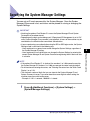
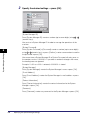
Specifying the System Manager Settings . . . . . . . . . . . . . . . . . . . . . . . . . . . . . 6-3
Department ID Management . . . . . . . . . . . . . . . . . . . . . . . . . . . . . . . . . . . . . . . . 6-6
Registering the Department ID, Password, and Page Limit . . . . . . . . . . . . . . . 6-8
Changing the Password and Page Limit . . . . . . . . . . . . . . . . . . . . . . . . . . . . 6-12
Erasing the Department ID and Password. . . . . . . . . . . . . . . . . . . . . . . . . . . 6-14
Checking and Printing Counter Information . . . . . . . . . . . . . . . . . . . . . . . . . . 6-15
Clearing Page Totals . . . . . . . . . . . . . . . . . . . . . . . . . . . . . . . . . . . . . . . . . . . 6-16
ix
Accepting Print and Scan Jobs with Unknown IDs . . . . . . . . . . . . . . . . . . . .6-17
Accepting B&W Copy and Print Jobs without Entering a Department ID. . . .6-18
Remote UI . . . . . . . . . . . . . . . . . . . . . . . . . . . . . . . . . . . . . . . . . . . . . . . . . . . . . .6-20
Device Information Settings . . . . . . . . . . . . . . . . . . . . . . . . . . . . . . . . . . . . . . .6-22
Clearing the Message Board. . . . . . . . . . . . . . . . . . . . . . . . . . . . . . . . . . . . . . .6-23
Auto Online/Offline . . . . . . . . . . . . . . . . . . . . . . . . . . . . . . . . . . . . . . . . . . . . . .6-24
Auto Online. . . . . . . . . . . . . . . . . . . . . . . . . . . . . . . . . . . . . . . . . . . . . . . . . . .6-24
Auto Offline. . . . . . . . . . . . . . . . . . . . . . . . . . . . . . . . . . . . . . . . . . . . . . . . . . .6-24
Current Date and Time . . . . . . . . . . . . . . . . . . . . . . . . . . . . . . . . . . . . . . . . . . .6-26
Limiting Functions When the Optional Security Key Is Turned OFF . . . . . .6-29
License Registration . . . . . . . . . . . . . . . . . . . . . . . . . . . . . . . . . . . . . . . . . . . . .6-30
Setting System Monitor Screen Restrictions . . . . . . . . . . . . . . . . . . . . . . . . .6-33
Restricting Access to the System Monitor Screen . . . . . . . . . . . . . . . . . . . . .6-33
Setting to Allow Secured Printing from the System Monitor Screen . . . . . . .6-34
Setting to Display Job Logs from the System Monitor Screen . . . . . . . . . . . .6-34
MEAP Settings . . . . . . . . . . . . . . . . . . . . . . . . . . . . . . . . . . . . . . . . . . . . . . . . . .6-36
Use HTTP Server . . . . . . . . . . . . . . . . . . . . . . . . . . . . . . . . . . . . . . . . . . . . . .6-36
Printing Installed Application Information . . . . . . . . . . . . . . . . . . . . . . . . . . . .6-37
Copy Set Numbering Options. . . . . . . . . . . . . . . . . . . . . . . . . . . . . . . . . . . . . .6-40
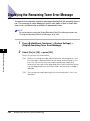
Displaying the Remaining Toner Error Message . . . . . . . . . . . . . . . . . . . . . .6-42
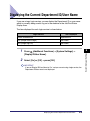
Displaying the Current Department ID/User Name . . . . . . . . . . . . . . . . . . . . .6-43
USB Settings . . . . . . . . . . . . . . . . . . . . . . . . . . . . . . . . . . . . . . . . . . . . . . . . . . .6-44
Using a USB Device. . . . . . . . . . . . . . . . . . . . . . . . . . . . . . . . . . . . . . . . . . . .6-44
Using a USB Host . . . . . . . . . . . . . . . . . . . . . . . . . . . . . . . . . . . . . . . . . . . . .6-44
Specifying Device Information Delivery Settings . . . . . . . . . . . . . . . . . . . . . .6-45
Registering/Deleting/Printing Delivery Destinations. . . . . . . . . . . . . . . . . . . .6-48
Registering Delivery Destinations . . . . . . . . . . . . . . . . . . . . . . . . . . . . . .6-48
Confirming Delivery Destination Settings . . . . . . . . . . . . . . . . . . . . . . . . .6-50
Deleting a Delivery Destination . . . . . . . . . . . . . . . . . . . . . . . . . . . . . . . .6-51
Printing the Delivery Destinations. . . . . . . . . . . . . . . . . . . . . . . . . . . . . . .6-52
Setting Automatic Delivery . . . . . . . . . . . . . . . . . . . . . . . . . . . . . . . . . . . . . . .6-53
Setting Manual Delivery . . . . . . . . . . . . . . . . . . . . . . . . . . . . . . . . . . . . . . . . .6-56
Restricting the Reception of Device Information . . . . . . . . . . . . . . . . . . . . . .6-57
Restoring Device Information . . . . . . . . . . . . . . . . . . . . . . . . . . . . . . . . . . . . .6-58
Restricting the Type of Information That Is Updated . . . . . . . . . . . . . . . . . . .6-59
Checking/Printing the Communication Log . . . . . . . . . . . . . . . . . . . . . . . . . .6-60
Checking the Communication Log. . . . . . . . . . . . . . . . . . . . . . . . . . . . . .6-60
Printing the Communication Log . . . . . . . . . . . . . . . . . . . . . . . . . . . . . . .6-60
Initializing All Data/Settings . . . . . . . . . . . . . . . . . . . . . . . . . . . . . . . . . . . . . . .6-62
x
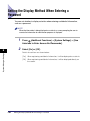
Setting the Display Method When Entering a Password . . . . . . . . . . . . . . . . 6-64
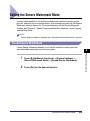
Setting the Secure Watermark Mode . . . . . . . . . . . . . . . . . . . . . . . . . . . . . . . . 6-65
Forced Secure Watermark. . . . . . . . . . . . . . . . . . . . . . . . . . . . . . . . . . . . . . . 6-65
Printer Driver Secure Watermark. . . . . . . . . . . . . . . . . . . . . . . . . . . . . . . . . . 6-68
Specifying Encrypted Secured Printing Settings. . . . . . . . . . . . . . . . . . . . . . 6-72
Setting to Receive Only Encrypted Secured Print Jobs. . . . . . . . . . . . . . . . . 6-72
Storing/Editing Irregular Paper Types . . . . . . . . . . . . . . . . . . . . . . . . . . . . . . . 6-73
Storing Irregular Paper Types . . . . . . . . . . . . . . . . . . . . . . . . . . . . . . . . . . . . 6-73
Editing Irregular Paper Types. . . . . . . . . . . . . . . . . . . . . . . . . . . . . . . . . . . . . 6-74
Erasing Irregular Paper Types . . . . . . . . . . . . . . . . . . . . . . . . . . . . . . . . . . . . 6-77
Detecting and Installing Drivers that Support Functions Specified on
the Machine into Your Computer . . . . . . . . . . . . . . . . . . . . . . . . . . . . . . . . . . . 6-78
Specifying Settings for All User Inboxes . . . . . . . . . . . . . . . . . . . . . . . . . . . . 6-79
Setting the Time until Documents Are Automatically Erased. . . . . . . . . . . . . 6-79
Printing upon Storing from the Printer Driver. . . . . . . . . . . . . . . . . . . . . . . . . 6-80
Restricting Printer Jobs . . . . . . . . . . . . . . . . . . . . . . . . . . . . . . . . . . . . . . . . . . 6-81
Restricting the Color Mode of Copy Jobs. . . . . . . . . . . . . . . . . . . . . . . . . . . . 6-82
Restricting Use of Auto-Color Select . . . . . . . . . . . . . . . . . . . . . . . . . . . . . . . 6-82
Restricting the Use of Full Color . . . . . . . . . . . . . . . . . . . . . . . . . . . . . . . . . . 6-82
Chapter 7
Routine Maintenance
Paper Drawers . . . . . . . . . . . . . . . . . . . . . . . . . . . . . . . . . . . . . . . . . . . . . . . . . . . 7-2
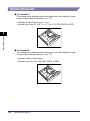
Loading Paper . . . . . . . . . . . . . . . . . . . . . . . . . . . . . . . . . . . . . . . . . . . . . . . . . 7-2
Adjusting a Paper Drawer to Hold a Different Paper Size . . . . . . . . . . . . . . . . 7-7
Paper Deck-Z1 (Optional) . . . . . . . . . . . . . . . . . . . . . . . . . . . . . . . . . . . . . . . . . 7-10
Loading Paper . . . . . . . . . . . . . . . . . . . . . . . . . . . . . . . . . . . . . . . . . . . . . . . . 7-10
Envelope Feeder Attachment-C2 (Optional) . . . . . . . . . . . . . . . . . . . . . . . . . . 7-14
How to Use the Envelope Feeder Attachment . . . . . . . . . . . . . . . . . . . . . . . . 7-14
Preparing the Envelopes . . . . . . . . . . . . . . . . . . . . . . . . . . . . . . . . . . . . . . . . 7-16
Loading Envelopes . . . . . . . . . . . . . . . . . . . . . . . . . . . . . . . . . . . . . . . . . . . . 7-18
Changing Envelope Sizes . . . . . . . . . . . . . . . . . . . . . . . . . . . . . . . . . . . . . . . 7-21
Feeder (DADF-L1) (Optional) . . . . . . . . . . . . . . . . . . . . . . . . . . . . . . . . . . . . . . 7-27
Replacing the Stamp Cartridge . . . . . . . . . . . . . . . . . . . . . . . . . . . . . . . . . . . 7-27
Finisher-Z1 (Optional) . . . . . . . . . . . . . . . . . . . . . . . . . . . . . . . . . . . . . . . . . . . . 7-29
Replacing the Staple Cartridge . . . . . . . . . . . . . . . . . . . . . . . . . . . . . . . . . . . 7-29
Finisher-Y1/Saddle Finisher-Y2/Puncher Unit-M1 (Optional) . . . . . . . . . . . . 7-33
Replacing the Staple Cartridge in the Stapler Unit . . . . . . . . . . . . . . . . . . . . 7-33
Replacing the Staple Cartridge in the Saddle Stitcher Unit . . . . . . . . . . . . . . 7-37
Removing Punch Waste . . . . . . . . . . . . . . . . . . . . . . . . . . . . . . . . . . . . . . . . 7-40
xi
Replacing the Toner Cartridge . . . . . . . . . . . . . . . . . . . . . . . . . . . . . . . . . . . . .7-43
Replacing the Waste Toner Container . . . . . . . . . . . . . . . . . . . . . . . . . . . . . . .7-51
Routine Cleaning . . . . . . . . . . . . . . . . . . . . . . . . . . . . . . . . . . . . . . . . . . . . . . . .7-55
Platen Glass and Underside of the Feeder/Platen Cover. . . . . . . . . . . . . . . .7-55
Manual Feeder Cleaning . . . . . . . . . . . . . . . . . . . . . . . . . . . . . . . . . . . . . . . .7-56
Cleaning the Inside of the Main Unit . . . . . . . . . . . . . . . . . . . . . . . . . . . . . . .7-60
Cleaning the Dust Proof Glass . . . . . . . . . . . . . . . . . . . . . . . . . . . . . . . . . . . .7-61
Automatic Feeder Cleaning . . . . . . . . . . . . . . . . . . . . . . . . . . . . . . . . . . . . . .7-63
Consumables . . . . . . . . . . . . . . . . . . . . . . . . . . . . . . . . . . . . . . . . . . . . . . . . . . .7-64
Chapter 8
Troubleshooting
Reducing the Frequency of Paper Jams . . . . . . . . . . . . . . . . . . . . . . . . . . . . . .8-3
Clearing Paper Jams . . . . . . . . . . . . . . . . . . . . . . . . . . . . . . . . . . . . . . . . . . . . . .8-4
Screens Indicating the Locations of Paper Jams . . . . . . . . . . . . . . . . . . . . . . .8-4
Fixing Unit (Inside the Main Unit) . . . . . . . . . . . . . . . . . . . . . . . . . . . . . . . . . .8-11
Entrance of Duplexing Unit (Inside the Main Unit) . . . . . . . . . . . . . . . . . . . . .8-13
Duplexing Unit (Inside the Main Unit). . . . . . . . . . . . . . . . . . . . . . . . . . . . . . .8-16
Stack Bypass . . . . . . . . . . . . . . . . . . . . . . . . . . . . . . . . . . . . . . . . . . . . . . . . .8-18
Paper Drawer 1 . . . . . . . . . . . . . . . . . . . . . . . . . . . . . . . . . . . . . . . . . . . . . . .8-21
Paper Drawer 2 . . . . . . . . . . . . . . . . . . . . . . . . . . . . . . . . . . . . . . . . . . . . . . .8-26
Cassette Feeding Unit-Y3 (Optional) . . . . . . . . . . . . . . . . . . . . . . . . . . . . . . .8-29
Paper Deck-Z1 (Optional) . . . . . . . . . . . . . . . . . . . . . . . . . . . . . . . . . . . . . . .8-33
Feeder (DADF-L1) (Optional) . . . . . . . . . . . . . . . . . . . . . . . . . . . . . . . . . . . . .8-36
Finisher-Z1 (Optional) . . . . . . . . . . . . . . . . . . . . . . . . . . . . . . . . . . . . . . . . . .8-40
Inside the Top Cover of the Finisher-Y1 or Saddle Finisher-Y2
(Optional) . . . . . . . . . . . . . . . . . . . . . . . . . . . . . . . . . . . . . . . . . . . . . . . . . . . .8-44
Inside the Buffer Pass Unit-E2 of the Finisher-Y1 or Saddle Finisher-Y2
(Optional) . . . . . . . . . . . . . . . . . . . . . . . . . . . . . . . . . . . . . . . . . . . . . . . . . . . .8-47
Inside the Front Cover of the Saddle Finisher-Y2 (Optional) . . . . . . . . . . . . .8-49
Saddle Stitcher Unit (Optional). . . . . . . . . . . . . . . . . . . . . . . . . . . . . . . . . . . .8-52
Puncher Unit-M1 (Optional) . . . . . . . . . . . . . . . . . . . . . . . . . . . . . . . . . . . . . .8-56
Inner 2way Tray-D1 (Optional) . . . . . . . . . . . . . . . . . . . . . . . . . . . . . . . . . . . .8-58
Copy Tray-J1 (Optional) . . . . . . . . . . . . . . . . . . . . . . . . . . . . . . . . . . . . . . . . .8-61
Clearing Staple Jams. . . . . . . . . . . . . . . . . . . . . . . . . . . . . . . . . . . . . . . . . . . . .8-64
Finisher-Z1 (Optional) . . . . . . . . . . . . . . . . . . . . . . . . . . . . . . . . . . . . . . . . . .8-64
Finisher-Y1/Saddle Finisher-Y2 (Optional) . . . . . . . . . . . . . . . . . . . . . . . . . .8-68
Saddle Stitcher Unit (Optional). . . . . . . . . . . . . . . . . . . . . . . . . . . . . . . . . . . .8-71
List of Error Messages . . . . . . . . . . . . . . . . . . . . . . . . . . . . . . . . . . . . . . . . . . .8-76
Self-Diagnostic Display . . . . . . . . . . . . . . . . . . . . . . . . . . . . . . . . . . . . . . . . .8-76
xii
List of Error Codes without Messages . . . . . . . . . . . . . . . . . . . . . . . . . . . . . . 8-80
If Memory Becomes Full during Scanning . . . . . . . . . . . . . . . . . . . . . . . . . . . 8-87
Service Call Message . . . . . . . . . . . . . . . . . . . . . . . . . . . . . . . . . . . . . . . . . . . . 8-89
Contacting Your Local Authorized Canon Dealer. . . . . . . . . . . . . . . . . . . . . . 8-89
Setting the Limited Functions Mode from the Service Call Message
Screen . . . . . . . . . . . . . . . . . . . . . . . . . . . . . . . . . . . . . . . . . . . . . . . . . . . . . . 8-91
When the Power Does Not Turn ON . . . . . . . . . . . . . . . . . . . . . . . . . . . . . . . . . 8-93
Chapter 9
Appendix
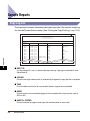
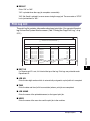
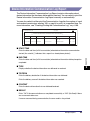
Sample Reports . . . . . . . . . . . . . . . . . . . . . . . . . . . . . . . . . . . . . . . . . . . . . . . . . . 9-2
Copy Log List . . . . . . . . . . . . . . . . . . . . . . . . . . . . . . . . . . . . . . . . . . . . . . . . . . 9-2
Print Log List . . . . . . . . . . . . . . . . . . . . . . . . . . . . . . . . . . . . . . . . . . . . . . . . . . 9-3
Device Information Delivery Destination List . . . . . . . . . . . . . . . . . . . . . . . . . . 9-4
Device Information Communication Log Report . . . . . . . . . . . . . . . . . . . . . . . 9-5
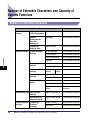
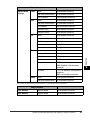
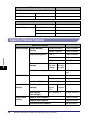
Number of Enterable Characters and Capacity of Various Functions . . . . . . 9-6
Number of Enterable Characters . . . . . . . . . . . . . . . . . . . . . . . . . . . . . . . . . . . 9-6
Capacity of Various Functions . . . . . . . . . . . . . . . . . . . . . . . . . . . . . . . . . . . . . 9-8
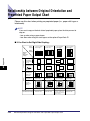
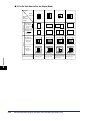
Relationship between Original Orientation and Preprinted Paper
Output Chart . . . . . . . . . . . . . . . . . . . . . . . . . . . . . . . . . . . . . . . . . . . . . . . . . . . 9-10
Index . . . . . . . . . . . . . . . . . . . . . . . . . . . . . . . . . . . . . . . . . . . . . . . . . . . . . . . . . . 9-13
xiii
Preface
Thank you for purchasing the Canon Color imageRUNNER C3480/C3480i/C3080/C3080i/
C2550. Please read this manual thoroughly before operating the machine to familiarize
yourself with its capabilities, and to make the most of its many functions. After reading this
manual, store it in a safe place for future reference.
How To Use This Manual
Symbols Used in This Manual
The following symbols are used in this manual to explain procedures, restrictions,
handling precautions, and instructions that should be observed for safety.
.
WARNING
Indicates a warning concerning operations that may lead to death or
injury to persons if not performed correctly. To use the machine safely,
always pay attention to these warnings.
.
CAUTION
Indicates a caution concerning operations that may lead to injury to
persons, or damage to property if not performed correctly. To use the
machine safely, always pay attention to these cautions.
.
IMPORTANT
Indicates operational requirements and restrictions. Be sure to read
these items carefully to operate the machine correctly, and avoid
damage to the machine.
.
NOTE
xiv
Indicates a clarification of an operation, or contains additional
explanations for a procedure. Reading these notes is highly
recommended.
Keys Used in This Manual
The following symbols and key names are a few examples of how keys to be
pressed are expressed in this manual:
• Touch Panel Display Keys: [Key Name]
Examples:
[Cancel]
[Done]
• Control Panel Keys:
Examples:
Key Icon (Key Name)
(Start)
(Stop)
Displays Used in This Manual
Screen shots of the touch panel display used in this manual are those taken when
the following optional equipment is attached to the Color imageRUNNER C3480i:
the Super G3 FAX Board, Finisher-Z1, and Cassette Feeding Unit-Y3.
Note that functions that cannot be used depending on the model or options, are not
displayed on the touch panel display.
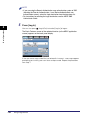
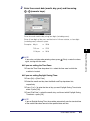
The keys which you should press are marked with a
, as shown below.
When multiple keys can be pressed on the touch panel display, all keys are marked.
Select the keys which suit your needs.
Place your originals ➞ press [Special Features].
Press this key for operation.
xv
Illustrations Used in This Manual
Illustrations used in this manual are those displayed when the Color
imageRUNNER C3480i has the following optional equipment attached to it: the
Finisher-Z1 and Cassette Feeding Unit-Y3.
Abbreviations Used in This Manual
In this manual, product names and model names are abbreviated as follows:
Novell NetWare®:
NetWare
Trademarks
MEAP and the MEAP logo are trademarks of Canon Inc.
AppleTalk, Macintosh, and Mac OS are trademarks of Apple Inc., registered in the
U.S. and other countries.
Windows is a registered trademark of Microsoft Corporation in the United States
and/or other countries.
The following fonts are licensed from Bitstream Technologies, Inc.
Dutch 801 Bold, Dutch 801 Roman, Fixed Pitch 810 Courier 10 Pitch/Text.
The following font is a trademark of Bitstream Inc.
Dutch 801
© Copyright 1987, Bitstream Inc., Cambridge Massachusetts USA.
All rights reserved.
Other product and company names herein may be the trademarks of their
respective owners.
xvi
Before You Start Using This
Machine
1
CHAPTER
This chapter describes what you should know before using this machine, such as parts and
their functions, and how to turn ON the main power.
Installation Location and Handling . . . . . . . . . . . . . . . . . . . . . . . . . . . . . . . . . . . . . . . . . . 1-2
Installation Precautions . . . . . . . . . . . . . . . . . . . . . . . . . . . . . . . . . . . . . . . . . . . . . . . . . . . . . . . .1-2
Handling Precautions . . . . . . . . . . . . . . . . . . . . . . . . . . . . . . . . . . . . . . . . . . . . . . . . . . . . . . . . . .1-6
Backing Up Data. . . . . . . . . . . . . . . . . . . . . . . . . . . . . . . . . . . . . . . . . . . . . . . . . . . . . . . . 1-9
Parts and Their Functions. . . . . . . . . . . . . . . . . . . . . . . . . . . . . . . . . . . . . . . . . . . . . . . . 1-10
External View . . . . . . . . . . . . . . . . . . . . . . . . . . . . . . . . . . . . . . . . . . . . . . . . . . . . . . . . . . . . . . .1-10
Internal View. . . . . . . . . . . . . . . . . . . . . . . . . . . . . . . . . . . . . . . . . . . . . . . . . . . . . . . . . . . . . . . .1-12
Control Panel Parts and Functions . . . . . . . . . . . . . . . . . . . . . . . . . . . . . . . . . . . . . . . . . . . . . . .1-13
Main Power and Control Panel Power . . . . . . . . . . . . . . . . . . . . . . . . . . . . . . . . . . . . . . 1-14
How to Turn ON the Main Power . . . . . . . . . . . . . . . . . . . . . . . . . . . . . . . . . . . . . . . . . . . . . . . .1-14
Control Panel Power Switch . . . . . . . . . . . . . . . . . . . . . . . . . . . . . . . . . . . . . . . . . . . . . . . . . . . .1-19
Shutting Down the Machine . . . . . . . . . . . . . . . . . . . . . . . . . . . . . . . . . . . . . . . . . . . . . . . . . . . .1-20
System Settings . . . . . . . . . . . . . . . . . . . . . . . . . . . . . . . . . . . . . . . . . . . . . . . . . . . . . . . 1-25
1-1
Installation Location and Handling
Before You Start Using This Machine
1
This section describes precautions for installation location and handling. We
recommend that you read this section prior to using this machine.
Installation Precautions
Avoid Installing the Machine in the Following Locations
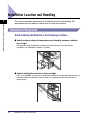
■ Avoid locations subject to temperature and humidity extremes, whether
low or high.
For example, avoid installing the machine near water faucets, hot water heaters,
humidifiers, air conditioners, heaters, or stoves.
■ Avoid installing the machine in direct sunlight.
If this is unavoidable, use curtains to shade the machine. Be sure that the curtains do not
block the machine's ventilation slots or louvers, or interfere with the electrical cord or
power supply.
1-2
Installation Location and Handling
■ Avoid poorly ventilated locations.
This machine generates a slight amount of ozone during normal use. Although sensitivity
to ozone may vary, this amount is not harmful. Ozone may be more noticeable during
extended use or long production runs, especially in poorly ventilated rooms. It is
recommended that the room be appropriately ventilated, sufficient to maintain a
comfortable working environment, in areas of machine operation.
Before You Start Using This Machine
1
■ Avoid locations where a considerable amount of dust accumulates.
■ Avoid locations where ammonia gas is emitted.
■ Avoid locations near volatile or flammable materials, such as alcohol or
paint thinner.
■ Avoid locations that are subject to vibration.
For example, avoid installing the machine on unstable floors or stands.
Installation Location and Handling
1-3
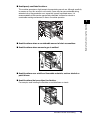
■ Avoid exposing the machine to rapid changes in temperature.
If the room in which the machine is installed is cold but rapidly heated, water droplets
(condensation) may form inside the machine. This may result in a noticeable degradation
in the quality of the copied image, the inability to properly scan an original, or the copies
having no printed image at all.
Before You Start Using This Machine
1
■ Avoid installing the machine near computers or other precision electronic
equipment.
Electrical interference and vibrations generated by the machine during printing can
adversely affect the operation of such equipment.
■ Avoid installing the machine near televisions, radios, or similar electronic
equipment.
The machine might interfere with sound and picture signal reception. Insert the power
plug into a dedicated power outlet, and maintain as much space as possible between the
machine and other electronic equipment.
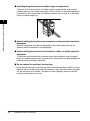
■ Do not remove the machine's leveling feet.
Do not remove the machine's leveling feet after the machine has been installed. If you put
weight on the front of the machine while the drawers or units within the machine are pulled
out, the machine may fall forward. To prevent this from happening, make sure that the
machine's leveling feet are in place.
1-4
Installation Location and Handling
Select a Safe Power Supply
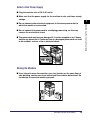
■ Plug the machine into a 120 V AC outlet.
■ Make sure that the power supply for the machine is safe, and has a steady
voltage.
■ Do not connect the power cord to a multiplug power strip, as this may
cause a fire or electrical shock.
■ The power cord may become damaged if it is often stepped on or if heavy
objects are placed on it. Continued use of a damaged power cord can lead
to an accident, such as a fire or electrical shock.
Moving the Machine
■ If you intend to move the machine, even to a location on the same floor of
your building, contact your local authorized Canon dealer beforehand. Do
not attempt to move the machine yourself.
Installation Location and Handling
1-5
Before You Start Using This Machine
1
■ Do not connect other electrical equipment to the same power outlet to
which the machine is connected.
Handling Precautions
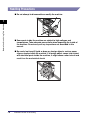
■ Do not attempt to disassemble or modify the machine.
Before You Start Using This Machine
1
■ Some parts inside the machine are subject to high-voltages and
temperatures. Take adequate precautions when inspecting the inside of
the machine. Do not carry out any inspections not described in this
manual.
■ Be careful not to spill liquid or drop any foreign objects, such as paper
clips or staples inside the machine. If a foreign object comes into contact
with electrical parts inside the machine, it might cause a short circuit and
result in a fire or electrical shock.
1-6
Installation Location and Handling
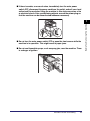
■ If there is smoke, or unusual noise, immediately turn the main power
switch OFF, disconnect the power cord from the outlet, and call your local
authorized Canon dealer. Using the machine in this state may cause a fire
or electrical shock. Also, avoid placing objects around the power plug so
that the machine can be disconnected whenever necessary.
■ Do not turn the main power switch OFF or open the front covers while the
machine is in operation. This might result in paper jams.
■ Do not use flammable sprays, such as spray glue, near the machine. There
is a danger of ignition.
Installation Location and Handling
1-7
Before You Start Using This Machine
1
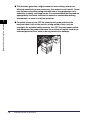
■ This machine generates a slight amount of ozone during normal use.
Although sensitivity to ozone may vary, this amount is not harmful. Ozone
may be more noticeable during extended use or long production runs,
especially in poorly ventilated rooms. It is recommended that the room be
appropriately ventilated, sufficient to maintain a comfortable working
environment, in areas of machine operation.
1
Before You Start Using This Machine
■ For safety reasons, turn OFF the control panel power switch of the
machine when it will not be used for a long period of time, such as
overnight. As an added safety measure, turn OFF the main power switch,
and disconnect the power cord when the machine will not be used for an
extended period of time, such as during consecutive holidays.
OFF
1-8
Installation Location and Handling
Backing Up Data
Please regularly back up your important data, as it is possible that a malfunction in
the hard disk may cause received data and stored data to be lost.
Please note that Canon will not be held responsible for any damages caused by the
loss of data.
The data that can be backed up is indicated below.
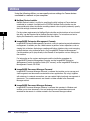
■ Address Book, Additional Functions settings, forwarding settings, Mail
Box function data (User Inbox data, forms for the Form Composition mode)
For information on backing up (exporting) this data, see Chapter 3, "Customizing
Settings," in the Remote UI Guide.
■ Data that can be backed up using the Device Information Delivery Settings
mode
You can perform temporary backing up of your data by delivering data registered in the
machine to other client machines. For information on the Device Information Delivery
Settings mode, see "Specifying Device Information Delivery Settings," on p. 6-45.
■ Data relating to MEAP
• License files for MEAP applications
For information on backing up (downloading) license files, see the MEAP SMS
Administrator Guide.
• User authentication information registered for the Local Device Authentication system of
SDL (Simple Device Login)/SSO (Single Sign-On)
For information on backing up (exporting) user authentication information, see the MEAP
SMS Administrator Guide.
• Data stored by MEAP applications
You may be able to back up data stored by MEAP applications, depending on the
application. For more information, see the documentation for each MEAP application.
NOTE
If your machine is not connected to a network. it is recommended you print and store
important information such as the Address Book. See Chapter 12, "Printing
Communication Reports," in the Sending and Facsimile Guide.
Backing Up Data
1-9
1
Before You Start Using This Machine
Data such as the Address Book and Additional Functions settings are stored on the
internal hard disk of the machine.
Parts and Their Functions
Before You Start Using This Machine
1
This section provides you with the names and functions of all the parts on the
outside and inside of the main unit, control panel, and the touch panel display. An
illustration of the machine with some optional equipment attached to it is also
provided. For more information on optional equipment, parts and their functions,
see Chapter 3, "Optional Equipment."
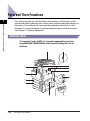
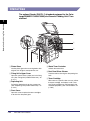
External View
The optional Feeder (DADF-L1) (standard-equipped for the Color
imageRUNNER C3480i/C3080i) and Cassette Feeding Unit-Y3 are
attached.
a
b
c
m
d
e
l
f
k
j
i
1-10
Parts and Their Functions
h
g
Originals placed in the feeder are automatically
fed sheet by sheet to the platen glass for
scanning. The feeder also automatically turns
over two-sided originals to make two or one
sided copies. The feeder is standard-equipped
for the Color imageRUNNER C3480i/C3080i.
b Security Key (Optional)
For managing the use of the machine and
preventing unauthorized copies.
c Control Panel
Includes the keys, touch panel display, and
indicators required for operating the machine.
(See "Control Panel Parts and Functions," on p.
1-13.)
d Main Unit's Upper Right Cover, Main
Unit's Lower Right Cover
Open this cover when clearing a paper jam
inside the main unit. (See "Screens Indicating
the Locations of Paper Jams," on p. 8-4.)
e Stack Bypass
Use the stack bypass to feed paper manually,
and for loading nonstandard paper stock, such
as envelopes. (See "Making Prints Using the
Stack Bypass," on p. 2-42.)
f Main Power Switch
Press to the "I" side to turn the power ON. (See
"Main Power and Control Panel Power," on p.
1-14.)
g Test Button
Press this button to periodically test the circuit
breaker.
1
h Breaker
Detects excess current or leakage current. (See
the Support Guide.)
i Paper Drawer's Right Cover
Open this cover when clearing a paper jam in
Paper Drawers 1 and 2.
j Paper Drawer 2
Holds up to 550 sheets of paper (20 lb bond
(80 g/m2)).
k Paper Drawer 1
Holds up to 550 sheets of paper (20 lb bond
(80 g/m2)).
l Output Tray
Prints and copies are output to this tray.
m Output Paper Tray Guide
Tilt the output paper tray guide up to prevent
output papers from falling down.
NOTE
For more information on the optional equipment that can be attached to the machine, see
Chapter 3, "Optional Equipment."
Parts and Their Functions
1-11
Before You Start Using This Machine
a Feeder (DADF-L1) (Optional)
Internal View
The optional Feeder (DADF-L1) (standard-equipped for the Color
imageRUNNER C3480i/C3080i) and Cassette Feeding Unit-Y3 are
attached.
Before You Start Using This Machine
1
a
b
c
g
f
e d
a Platen Glass
Use the platen glass when scanning books, thick
originals, thin originals, transparencies, etc.
b Fixing Unit's Upper Cover
Open this cover to clear a paper jam in the fixing
unit. (See "Fixing Unit (Inside the Main Unit)," on
p. 8-11.)
c Duplexing Unit
Pull out the duplexing unit to clear a paper jam.
(See "Duplexing Unit (Inside the Main Unit)," on
p. 8-16.)
d Front Cover
Open this cover to replace the toner cartridges
or to clean the dust proof glass.
1-12
Parts and Their Functions
e Waste Toner Container
Collects the waste toner.
f Dust Proof Glass Cleaner
Place the tool for cleaning the dust proof glass
here.
g Toner Cartridge
When toner of a specific color runs out, pull out
the toner cartridge, and replace it with a new
one. Toner cartridges are sold separately (not
standard equipment). (See "Consumables," on
p. 7-64.)
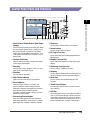
Control Panel Parts and Functions
a
Before You Start Using This Machine
1
b
c
d
p
o
n m l k j ih g f
a Control Panel Power Switch (Sub Power
Supply)
Press to turn the control panel ON or OFF. When
the control panel power switch is held for more
than three seconds, it initiates the Shutdown
mode. (See "Shutting Down the Machine," on p.
1-20.) When turned OFF, the machine is in the
Sleep mode.
b Counter Check key
Press to display the copy and print count totals
on the touch panel display.
c Stop key
Press to stop a job in progress, such as a scan,
copy, or fax (scanning only) job.
d Start key
Press to start an operation.
e Main Power Indicator
Lights when the main power is turned ON.
f Error Indicator
Flashes or lights if there is an error in the
machine. When the Error indicator flashes,
follow the instructions that appear on the touch
panel display. When the Error indicator
maintains a steady red light, contact your local
authorized Canon dealer.
g Processing/Data Indicator
Flashes or blinks green when the machine is
performing operations, and maintains a steady
green light when fax data is stored in memory.
e
h Clear key
Press to clear entered values or characters.
i Numeric keys
Press to enter numerical values.
j ID (Log in/Out) key
Press when setting or enabling Department ID
Management.
k Display Contrast Dial
Use to adjust the brightness of the touch panel
display.
l Additional Functions key
Press to specify additional functions.
m Help key
Press to display explanations and instructions of
modes or functions on the touch panel display.
n Reset key
Press to restore the standard settings of the
machine.
o Touch Panel Display
The settings screen for each function is shown
on this display.
p Edit Pen
Use to designate areas on the original to copy or
scan. If you lose the edit pen, contact your local
authorized Canon dealer. Do not use an object
with a sharp end on the control panel, such as a
pencil or ballpoint pen, in place of the edit pen.
Parts and Their Functions
1-13
Main Power and Control Panel Power
Before You Start Using This Machine
1
The machine is provided with two power switches, a main power switch and a
control panel power switch, as well as a breaker that detects excess current or
leakage current.
How to Turn ON the Main Power
This section explains how to turn ON the main power.
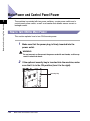
1
Make sure that the power plug is firmly inserted into the
power outlet.
WARNING
Do not connect or disconnect the power cord with wet hands, as this may
result in electrical shock.
2
If the optional security key is inserted into the machine, make
sure that it is in the ON position (turn it to the right).
Security Key
1-14
Main Power and Control Panel Power
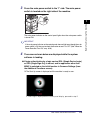
3
Press the main power switch to the "I" side. The main power
switch is located on the right side of the machine.
( I side)
1
side)
The main power indicator on the control panel lights when the main power switch
is turned ON.
IMPORTANT
If the main power indicator on the control panel does not light even though the main
power switch is ON, be sure to check the breaker to see if it is OFF. (See "When the
Power Does Not Turn ON," on p. 8-93.)
4
The screens shown below are displayed while the system
software is loading.
● If login authentication by a login service (SDL (Simple Device Login)
or SSO (Single Sign-On)) is not set, and an application other than
MEAP is selected as the initial function in Common Settings (from
the Additional Functions screen):
❑ The Start Up screen is displayed until the machine is ready to scan.
If a message is displayed on the touch panel display, proceed to step 5.
Main Power and Control Panel Power
1-15
Before You Start Using This Machine
(
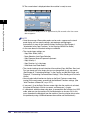
❑ The screen below is displayed when the machine is ready to scan.
Before You Start Using This Machine
1
The machine is ready to scan in approximately 38 seconds after the screen
above appears.
NOTE
• Once the message <Reservation copies can be made.> appears on the touch
panel display, you can specify settings, and copying or printing begins
automatically as soon as the machine finishes warming up. (See Chapter 1,
"Introduction to the Copy Functions," in the Copying and Mail Box Guide.)
• In the case above, the standard settings are selected.
• The standard copy settings are:
- Copy Ratio: Direct (100%)
- Paper Selection: Auto Paper Selection
- Copy Exposure: Manual Exposure Adjustment
- Copy Quantity: 1
- Copy Function: 1 1-sided copy
- Color Mode: Auto-Color Select
• The standard settings for each function of the machine (Copy, Mail Box, Send, and
Fax) are already set at the factory, but you can change them to suit your needs.
(See Chapter 8, "Customizing Settings," in the Copying and Mail Box Guide, and
Chapter 9, "Customizing Communications Settings," in the Sending and Facsimile
Guide.)
• You can select which functions to display on the Basic Features screen when
turning ON the main power, according to the Additional Functions settings. (See
"Initial Function at Power ON," on p. 4-27.)
• If you press [➞] on the Basic Features screen right after the machine is activated,
the screen will be blank. Wait for a moment, and then press [➞] again.
• If a Macintosh, which has been shut down, is connected to the machine via a USB
cable, when you turn the machine ON, the Macintosh may also turn ON. In this
case, disconnect the Macintosh from the machine. (You may also be able to solve
this problem by using a USB hub between the machine and the Macintosh.)
1-16
Main Power and Control Panel Power
● If login authentication by a login service (SDL or SSO) is not set, and
MEAP is selected as the initial function in Common Settings (from
the Additional Functions screen):
❑ The Start Up screen is displayed until the machine is ready to scan.
❑ After the Start Up screen disappears, the MEAP Start Up screen is displayed.
You can press [➞] to switch to the Basic Features screen to use the Copy, Mail
Box, etc. functions even if the MEAP Start Up screen is still displayed.
❑ The MEAP Application screen is displayed.
Main Power and Control Panel Power
1-17
Before You Start Using This Machine
1
● If login authentication by a login service (SDL or SSO) is set:
❑ The Start Up screen is displayed until the machine is ready to scan.
Before You Start Using This Machine
1
❑ After the Start Up screen disappears, the MEAP Start Up screen is displayed
regardless of the Set as Initial Function settings.
IMPORTANT
• If you turn OFF the main power, wait at least 10 seconds before turning the main
power back ON. For instructions on restarting (turning the main power switch OFF
and then ON) the machine, see "Main Power and Control Panel Power," on p. 1-14.
• Do not turn the main power OFF, if you want to send or receive I-fax documents.
Also, do not turn the main power OFF, if the optional Super G3 FAX Board or Super
G3 Multi-Line Fax Board is installed, and you want to be able to send or receive fax
documents. Sending or receiving I-fax or fax documents cannot be done when the
main power is turned OFF.
• If SSO or SDL is set as the login service, the machine will take longer to become
ready to scan.
1-18
Main Power and Control Panel Power
If you are using a login service, log in using the procedure for
the login service you are using.
NOTE
• If you are using Department ID Management with the optional Card Reader-C1,
see "Procedure before Using the Machine," on p 3-39.
• If you are using Department ID Management, see "Entering the Department ID and
Password," on p. 2-26.
• If you are using SDL or SSO, see "Using a Login Service," on p. 2-29.
Control Panel Power Switch
Press the control panel power switch to cancel the Sleep mode and resume normal
machine operations.
NOTE
• The machine can receive and print documents from a personal computer when it is in the
Sleep mode. I-fax and fax documents can also be received while the machine is in the
Sleep mode.
• It takes 15 to 30 seconds to recover after the Sleep mode is deactivated.
• If Energy Consumption in Sleep Mode is set to 'Low', it may take more than 10 seconds
for the touch panel display to be displayed after pressing the control panel power switch.
Main Power and Control Panel Power
1-19
1
Before You Start Using This Machine
5
Shutting Down the Machine
If there are any jobs currently being processed, or a MEAP application is running
when the Shutdown mode is activated, the machine asks you to confirm and cancel
any existing jobs, and then access to the hard disk is restricted. This procedure
protects the hard disk from access errors the next time the machine is turned ON.
Follow the instructions below to safely shutdown the machine.
Before You Start Using This Machine
1
CAUTION
If you turn the main power of the machine OFF without following the procedure
below, copies output the next time the machine is turned ON may not be printed
correctly. In this case, printing will return to normal after a certain number of
copies are output.
1
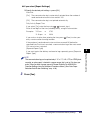
Press and hold the control panel power switch for more than
three seconds.
If the machine is in the Sleep mode, press the control panel power switch one
time to cancel the Sleep mode, and then press and hold the control panel power
switch again for more than three seconds.
The job confirmation screen is displayed and the machine goes into the Shutdown
mode.
IMPORTANT
Do not initiate the Shutdown mode while fonts are being downloaded.
NOTE
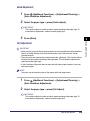
• You can also force the machine into the Shutdown mode by pressing
(Additional Functions) ➞ [Common Settings] ➞ [Shutdown Mode].
• You cannot force the machine into the Shutdown mode in the following cases:
- When the machine is receiving and updating device information
- When the machine is browsing device information
- When the machine is importing or exporting data using the Remote UI function
• In a rare instance, the machine may not go into the Shutdown mode even if you
press and hold the control panel power switch for more than three seconds. In this
case, follow the instructions on the touch panel display to turn OFF the main power.
• If print data is sent while the machine is in the Shutdown mode, the machine may
receive the data, depending on the print data's size. However, the print data is not
printed.
1-20
Main Power and Control Panel Power
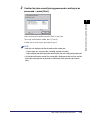
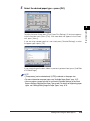
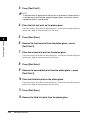
Confirm the jobs currently being processed or waiting to be
processed ➞ press [Start].
1
Jobs continue to be processed until [Start] is pressed.
To cancel the Shutdown mode, press [Cancel].
If there are no current jobs, proceed to step 4.
NOTE
• Jobs that are displayed on the job confirmation screen are:
- Current copy, fax, and print jobs (including secured print jobs)
- Copy and print jobs (including secured print jobs) that are waiting to be processed
• On the job confirmation screen, the current job is displayed on the first line, and the
other jobs are processed in the order in which they were reserved (up to seven
jobs).
Main Power and Control Panel Power
1-21
Before You Start Using This Machine
2
3
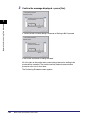
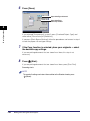
Confirm the message displayed ➞ press [Yes].
Before You Start Using This Machine
1
If There Are Jobs Currently Being Processed or Waiting to Be Processed
If the Device Information Is Being Delivered
All of the jobs on the confirmation screen being processed or waiting to be
processed are canceled. The machine and any network communication
processes also start to shut down.
The Performing Shutdown screen appears.
1-22
Main Power and Control Panel Power
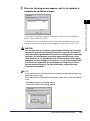
When the following screen appears, wait for the machine to
complete the shutdown process.
1
If you need to immediately operate the machine after starting the shutdown
process, press [Restart] ➞ [Yes].
If you press [Restart] when device information is being updated, a message
asking for your confirmation to continue appears on the screen. Press [Yes].
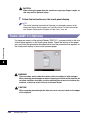
CAUTION
You can also force the shutdown of the machine (omitting the normal job
cancellation process) by pressing [Forced Off]. If you press [Forced Off]
while data is being processed or the machine is shutting down, a message
asking for your confirmation to continue appears on the screen. Press
[Yes]. However, as it is possible that this will destroy data which is being
processed or cause damage to the machine, it is not recommended. Note
that Canon will not be liable for any damages resulting from the loss of
data on the hard disk drive. For more information, contact your local
authorized Canon dealer.
NOTE
• It may take some time for the machine to completely shut down depending on the
application you are using.
• The screen below is displayed when you press [Forced Off] in any of the following
cases.
- When the hardware is in finishing process
- When device information is being updated
Main Power and Control Panel Power
1-23
Before You Start Using This Machine
4
5
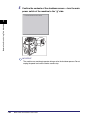
Confirm the contents of the shutdown screen ➞ turn the main
power switch of the machine to the " " side.
Before You Start Using This Machine
1
( I side)
(
side)
IMPORTANT
The machine may continue to operate during or after the shutdown process. Do not
unplug the power cord until the device sounds stop.
1-24
Main Power and Control Panel Power
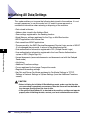
System Settings
To set up the machine, refer to the following guides or sections for instructions:
■ Connecting the Machine to the Network
See the Network Quick Start Guide.
■ Setting Up the Network
See the Network Guide.
■ Installing the Printer Driver
See the PS Driver Guide, PCL Driver Guide, UFR II Driver Guide, Mac PS Driver Guide,
or Mac UFR II Driver Guide.
■ Using the Send Function
See the Sending and Facsimile Guide.
■ Using the Fax Function
See the Sending and Facsimile Guide.
■ Date and Time Settings
See "Current Date and Time," on p. 6-26.
■ System Manager Settings
See "Specifying the System Manager Settings," on p. 6-3.
System Settings
1-25
1
Before You Start Using This Machine
It is necessary to set up the machine before using it on a network, as a printer, or
with the Fax function.
Before You Start Using This Machine
1
1-26
System Settings
Basic Operations
2
CHAPTER
This chapter describes the main features and basic operations of the machine.
What This Machine Can Do . . . . . . . . . . . . . . . . . . . . . . . . . . . . . . . . . . . . . . . . . . . . . . . 2-2
Overview of the Color imageRUNNER C3480/C3480i/C3080/C3080i/C2550 . . . . . . . . . 2-5
The Touch Panel Display . . . . . . . . . . . . . . . . . . . . . . . . . . . . . . . . . . . . . . . . . . . . . . . . . . . . . . .2-5
Adding New Functions . . . . . . . . . . . . . . . . . . . . . . . . . . . . . . . . . . . . . . . . . . . . . . . . . . . . . . . . .2-8
Specifying Settings . . . . . . . . . . . . . . . . . . . . . . . . . . . . . . . . . . . . . . . . . . . . . . . . . . . . . . . . . . .2-10
Functions That Conserve Power . . . . . . . . . . . . . . . . . . . . . . . . . . . . . . . . . . . . . . . . . . . . . . . .2-11
Checking, Changing, and Canceling Print Jobs . . . . . . . . . . . . . . . . . . . . . . . . . . . . . . . . . . . . .2-13
Displaying a Help Screen . . . . . . . . . . . . . . . . . . . . . . . . . . . . . . . . . . . . . . . . . . . . . . . . . . . . . .2-15
Reading Messages from the System Manager . . . . . . . . . . . . . . . . . . . . . . . . . . . . . . . . . . . . .2-17
Other Useful Functions. . . . . . . . . . . . . . . . . . . . . . . . . . . . . . . . . . . . . . . . . . . . . . . . . . . . . . . .2-18
Using the Touch Panel Display . . . . . . . . . . . . . . . . . . . . . . . . . . . . . . . . . . . . . . . . . . . . 2-21
Frequently Used Keys. . . . . . . . . . . . . . . . . . . . . . . . . . . . . . . . . . . . . . . . . . . . . . . . . . . . . . . . .2-21
Touch Panel Key Display . . . . . . . . . . . . . . . . . . . . . . . . . . . . . . . . . . . . . . . . . . . . . . . . . . . . . .2-22
Adjusting the Brightness. . . . . . . . . . . . . . . . . . . . . . . . . . . . . . . . . . . . . . . . . . . . . . . . . . . . . . .2-23
Entering Characters from the Touch Panel Display . . . . . . . . . . . . . . . . . . . . . . . . . . . . 2-24
Entering Characters . . . . . . . . . . . . . . . . . . . . . . . . . . . . . . . . . . . . . . . . . . . . . . . . . . . . . . . . . .2-24
Values in Inches . . . . . . . . . . . . . . . . . . . . . . . . . . . . . . . . . . . . . . . . . . . . . . . . . . . . . . . . . . . . .2-25
Entering the Department ID and Password . . . . . . . . . . . . . . . . . . . . . . . . . . . . . . . . . . 2-26
Using a Login Service. . . . . . . . . . . . . . . . . . . . . . . . . . . . . . . . . . . . . . . . . . . . . . . . . . . 2-29
Placing Originals. . . . . . . . . . . . . . . . . . . . . . . . . . . . . . . . . . . . . . . . . . . . . . . . . . . . . . . 2-34
Document Sizes . . . . . . . . . . . . . . . . . . . . . . . . . . . . . . . . . . . . . . . . . . . . . . . . . . . . . . . . . . . . .2-34
Orientation . . . . . . . . . . . . . . . . . . . . . . . . . . . . . . . . . . . . . . . . . . . . . . . . . . . . . . . . . . . . . . . . .2-35
Platen Glass . . . . . . . . . . . . . . . . . . . . . . . . . . . . . . . . . . . . . . . . . . . . . . . . . . . . . . . . . . . . . . . .2-36
Feeder . . . . . . . . . . . . . . . . . . . . . . . . . . . . . . . . . . . . . . . . . . . . . . . . . . . . . . . . . . . . . . . . . . . .2-39
Making Prints Using the Stack Bypass . . . . . . . . . . . . . . . . . . . . . . . . . . . . . . . . . . . . . . 2-42
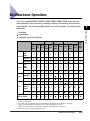
Multifunctional Operations . . . . . . . . . . . . . . . . . . . . . . . . . . . . . . . . . . . . . . . . . . . . . . . 2-55
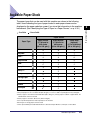
Available Paper Stock . . . . . . . . . . . . . . . . . . . . . . . . . . . . . . . . . . . . . . . . . . . . . . . . . . . 2-57
2-1
What This Machine Can Do
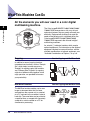
All the elements you will ever need in a color digital
multitasking machine.
2
Basic Operations
Copy
Scan
Print
Fax
Send
Remote UI
The Color imageRUNNER C3480/C3480i/C3080/
C3080i/C2550 incorporates a rich array of input
and output features that can greatly enhance your
efficiency. Equipped with features that meet the
needs of document work in a digitized office, the
Color imageRUNNER C3480/C3480i/C3080/
C3080i/C2550 represents the ultimate in digital
multitasking machines.
An asterisk (*) indicates functions which require
optional equipment. For information on the optional
equipment required to use each function, and the
available combinations of optional equipment, see
"Available Combinations of Options," on p. 3-9.
Copying
1
2
3
4
7
2
1
5
8
4
In addition to normal copying functions,
convenient new functions, such as "Sample
Set," which helps to avoid copy errors,
"Booklet" for making copies into booklets,
and "Different Size Originals" for copying
originals of different sizes together in one
copy operation, are provided to increase
your productivity.
See the Copying and Mail Box Guide
6
3
1
8
6
3
5
6
7
8
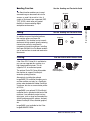
Mail Box Function
The Mail Box function enables you to save
image or document data that has been
scanned from the scanner unit, or created
on a PC and sent to the machine's internal
hard disk. The saved data can be printed at
a specified time, or merged with separately
saved data, or data created on a PC for
simultaneous processing.
2-2
What This Machine Can Do
See the Copying and Mail Box Guide
Printing merged
documents
Scanning
various
originals
1
Sending
data from
computers
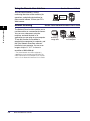
Sending Function
The Send function enables you to send
scanned image or document data to file
servers, or send it by e-mail or I-fax. A
variety of file formats are supported (PDF,
TIFF, JPEG), which offer you greater
flexibility in accommodating digital
workplace environments.
See the Sending and Facsimile Guide
Original
E-mail
File
I-Fax
Faxing*
In addition to normal facsimile functions,
the machine offers you Super G3
compatibility. This enables you to transmit
documents at high speeds, greatly reducing
transmission costs as compared to
conventional facsimile machines. Installing
the Super G3 Multi-Line Fax Board enables
you to use two lines to send and receive fax
documents.
Printing
See the Sending and Facsimile Guide
Original
See the PS/PCL/UFR II Printer Guide
If the Color PCL Printer Kit is available for
use, you can upgrade this machine to a
high-speed network printer. This kit
supports PCL at maximized speed.
The optional Color PS Printer Kit enables
the machine to support PostScript 3
emulation printing function.
Fax
1
Sending data
from computers
Printing
Alternatively, installing the optional
imagePASS (PS controller) enables you to
use the machine, not only as a PostScript
printer when loaded with Adobe PostScript
3 software, but also as an emulation printer
of PCL5c.
imagePASS is an optional PS (PostScript)
controller that is attached to the back of the
machine. It can efficiently output various
data types, such as large and complex files
(which combine graphics, photos, and text),
Adobe PostScript 3 files, detailed graphics,
etc.
imagePASS is not available for the Color
imageRUNNER C2550.
What This Machine Can Do
2-3
Basic Operations
2
Using the Remote User Interface
See the Remote UI Guide
You can control functions, such as
confirming the status of the machine, job
operations, and printing instructions for
data saved in inboxes, all from your PC's
Web browser.
Network Scanning
2
Web
Browser
See the Color Network ScanGear User's Guide
Basic Operations
The Network Scan function enables you to
use the machine as a conventional scanner.
You can scan a document using the
machine, and read the data in an
application you are using on your computer.
To use this function, the machine is
required to be connected to a network, and
the Color Network ScanGear software*
installed at your computer. You can scan
images of up to 11" x 17" in size at a
resolution of 600 x 600 dpi.
* The Color Network ScanGear software is
supplied on the accompanying CD-ROM. For
more information on the Network Scan function,
see the Color Network ScanGear User's Guide.
2-4
What This Machine Can Do
Original
Scanning
image data
Exporting data
to a computer
Overview of the Color imageRUNNER C3480/C3480i/
C3080/C3080i/C2550
CAUTION
Press the touch panel display keys gently with your fingers or the edit pen. Do
not press the touch panel display with a pencil, ballpoint pen, or other sharp
objects that can scratch the surface of the touch panel display or break it.
NOTE
Before using the touch panel display, peel off the protective film from the display.
The Touch Panel Display
Keys for using the machine's main functions are located on the top of the touch
panel display. To use any of the desired function's features, you must first press the
key for the desired function. The area on the bottom of the touch panel display is
used for messages that indicate the status of the machine.
Switching the Functions Indicated on the Touch Panel Display
After the power is turned ON, the following screen appears on the touch panel
display. You can press [Copy], [Send], [Mail Box], [Print Job], [Scan], or [System
Monitor] to change functions. (See "Initial Function at Power ON," on p. 4-27.)
To display other functions, such as an installed MEAP (Multifunctional Embedded
Application Platform) application, press [➞].
NOTE
• For information on the various keys displayed on the touch panel display, see "Various
Touch Panel Display Screens," on p. 2-8.
• You can set the initial screen (the first screen that appears when the machine is turned
ON) from the Additional Functions screen. The initial screen can be the Copy, Send or
Fax, Mail Box, Print Job, MEAP, or System Monitor screen.
• In this guide, only [Copy] is displayed in screen shots of the touch panel display. However,
both [Copy] and [Express Copy] are displayed by default.
Overview of the Color imageRUNNER C3480/C3480i/C3080/C3080i/C2550
2-5
2
Basic Operations
Most operations on this machine are executed from the touch panel display. By
pressing the keys according to the instructions on the touch panel display, you can
utilize almost all of the functions of this machine.
■ Keys Displayed on the Touch Panel Display
The Copy Basic Features screen is shown as an example below.
a
b
c
d
e
Basic Operations
2
g
f
Page 1 of the Basic Features Screen
(Group A)
h
i
MEAP Application Screen
j
Page 2 of the Basic Features Screen
(Group B)
2-6
Overview of the Color imageRUNNER C3480/C3480i/C3080/C3080i/C2550
f System Monitor
Press this key to access the machine's copying
functions. (See Chapter 1, "Introduction to the
Copy Functions," in the Copying and Mail Box
Guide.)
b Send
Press this key to access the machine's sending
functions, and facsimile functions. (See Chapter
1, "Introduction to Sending and Fax Functions,"
in the Sending and Facsimile Guide.)
c Mail Box
Press this key to access the machine's mailbox
functions. (See Chapter 2, "Introduction to the
Mail Box Functions," in the Copying and Mail
Box Guide.)
d Print Job
Press this key to check or cancel print jobs, and
to check or print the print job log. (See Chapter
5, "Checking Job and Device Status.")
e➞
Press this key to change, check, or cancel jobs,
and to check or print the job log. (See Chapter 5,
"Checking Job and Device Status.")
g Job/Print Status Display Area
The progress of jobs and copy operations, and
the status of devices and consumables are
displayed here. Also, depending on the login
service you are using, the current ID or user
name can be displayed here. (See "Displaying
the Current Department ID/User Name," on p.
6-43.)
2
h Scan
Press this key to use the Network Scan function.
(See the Color Network ScanGear User's
Guide.)
i Printer
Press this key to access the machine's printing
functions.
j Web Access
Press this key to gain access to hidden function
keys. The function keys are displayed on two
screens. You can also customize the order of the
function keys in Function Display Settings in
Common Settings (from the Additional Functions
screen). (See "Initial Function at Power ON," on
p. 4-27.)
Press this key to view Web pages.
Overview of the Color imageRUNNER C3480/C3480i/C3080/C3080i/C2550
2-7
Basic Operations
a Copy
Various Touch Panel Display Screens
The top of the touch panel display may differ according to the optional equipment
attached to the machine.
Attached Optional Equipment
Displayed Function Keys
None
2
Basic Operations
imagePASS
imagePASS and Web Access Software
* imagePASS is not available for the Color imageRUNNER C2550.
Adding New Functions
This machine is compliant with MEAP (Multifunctional Embedded Application
Platform). MEAP is a software platform that enables the development of custom
applications based on Sun Microsystems' Java and Java 2 Platform Micro Edition
(J2ME) Technology.
MEAP enables you to do the following:
■ Install/Uninstall Customized Applications
Installing MEAP applications enables you to utilize new customizable functions for the
machine. You can also uninstall these applications.
NOTE
For instructions on installing and uninstalling MEAP applications, see the MEAP SMS
Administrator Guide.
2-8
Overview of the Color imageRUNNER C3480/C3480i/C3080/C3080i/C2550
■ User Management and Restriction Using a Login Service
A login service manages data relating to users using the machine. The following three
login services are available:
• Default Authentication
Use the authentication method set on the machine, such as Department ID
Management or System Manager Settings, as the login service.
• SDL (Simple Device Login)
• SSO (Single Sign-On)
A login service which can be used in an Active Directory environment or in the machine.
It contains the following user authentication systems. (See the MEAP SMS Administrator
Guide.)
- 'Domain Authentication'
- 'Local Device Authentication'
- 'Domain Authentication + Local Device Authentication'
IMPORTANT
To use the Domain Authentication system of SSO (including when performing domain
authentication with the 'Domain Authentication + Local Device Authentication' system), a
Windows server in which Active Directory is installed and Security Agent are necessary.
Security Agent is supplied on the accompanying CD-ROM. For instructions on installing
Security Agent, see the Readme.pdf file on the CD-ROM.
NOTE
Default Authentication is selected as the default login service. For instructions on
selecting and setting a login service other than default authentication, see the MEAP
SMS Administrator Guide.
Overview of the Color imageRUNNER C3480/C3480i/C3080/C3080i/C2550
2-9
2
Basic Operations
A login service that is linked to the Department ID Management function of this machine.
You can register user information from a Web browser, such as user and login names
corresponding to a specific Department ID. (See the MEAP SMS Administrator Guide.)
Specifying Settings
2
• Copy Settings:
The Copying and Mail Box Guide
Basic Operations
The Additional Functions screen appears when you press (Additional Functions).
The Additional Functions screen enables you to make common settings related to
many functions of the machine, as well as customize specific functions to suit your
needs. For more information on the settings not explained in this manual, see the
following manuals:
• Communications Settings and
Address Book Settings:
The Sending and Facsimile Guide
• Mail Box Settings:
The Copying and Mail Box Guide
• Printer Settings:
The PS/PCL/UFR II Printer Guide
• Network Settings:
The Network Guide
The Additional Functions Screen
The System Functions Screen
NOTE
• Settings made from the Additional Functions screen are not changed even if you press
(Reset).
• For instructions on customizing settings, see Chapter 4, "Customizing Settings."
• For instructions on specifying System Settings, see Chapter 6, "System Manager
Settings."
• For instructions on specifying Printer Settings, see the PS/PCL/UFR II Printer Guide.
• For instructions on specifying Network Settings, see the Network Guide.
2-10
Overview of the Color imageRUNNER C3480/C3480i/C3080/C3080i/C2550
Functions That Conserve Power
You can conserve power efficiently when the machine is not being used by using
the following modes.
NOTE
• The touch panel display turns OFF when the machine enters one of the energy saving
modes.
• The machine can continue to receive I-fax or fax documents, and process or print data
sent from computers even if it is in one of the energy saving modes described below.
■ Auto Sleep Mode
You can set the machine to enter the Sleep mode whenever you desire, by pressing the
control panel power switch. To reactivate the machine, press the control panel power
switch again.
NOTE
• The machine may not enter the Sleep mode completely depending on certain conditions.
(For more information, see "Energy Consumption in the Sleep Mode," on p. 4-38.)
• The Auto Sleep mode enables you to conserve more energy than the Low-Power mode.
• Turn the control panel power switch OFF when not using the machine for a prolonged
period of time, for example, at night.
• If a Macintosh, which has been shut down, is connected to the machine via a USB cable,
when the machine returns from the Sleep mode, the Macintosh may turn ON. In this
case, disconnect the Macintosh from the machine. (You may also be able to solve this
problem by using a USB hub between the machine and the Macintosh).
• The time it takes for the machine to automatically enter the Sleep mode can be set from
10 minutes to 4 hours. The default setting is '20' minutes. (See "Auto Sleep Time," on p.
4-63.)
• If Energy Consumption in Sleep Mode is set to 'Low', it may take more than 10 seconds
for the touch panel to be displayed after pressing the control panel power switch.
Overview of the Color imageRUNNER C3480/C3480i/C3080/C3080i/C2550
2-11
2
Basic Operations
IMPORTANT
Even if the main power switch is turned OFF, a small amount of energy is consumed if the
power plug is left inserted into the power outlet. If you do not want any energy consumed,
remove the power plug from the power outlet.
■ Low-Power Mode
The Low-Power mode conserves energy by turning OFF the control panel, and reducing
the power consumption of the fixing unit when the machine is idle for a certain period of
time (after the last print job or key operation is performed). To reactivate the machine,
press the control panel power switch.
NOTE
The time it takes for the machine to automatically enter the Low-Power mode can be set
from five minutes to 4 hours. The default setting is '5' minutes. (See "Low-Power Mode
Time," on p. 4-65.)
Basic Operations
2
■ Daily Timer
The machine automatically enters the Sleep mode at the specified time and day of the
week set with the daily timer. To reactivate the machine, press the control panel power
switch.
NOTE
The Daily Timer settings can be set from Sunday to Saturday and 00:00 to 23:59. (See
"Daily Timer Settings," on p. 4-64.)
2-12
Overview of the Color imageRUNNER C3480/C3480i/C3080/C3080i/C2550
Checking, Changing, and Canceling Print Jobs
The System Monitor screen enables you to check the status of the machine, cancel
print jobs, or specify the printing priority.
The System Monitor Screen (Print)
The System Monitor Screen (Device)
On the Print Job screen, you can confirm, cancel, or change the priority of print
jobs.
The Print Job Screen
Overview of the Color imageRUNNER C3480/C3480i/C3080/C3080i/C2550
2-13
Basic Operations
2
NOTE
• For instructions on checking the status of each job, see Chapter 5, "Checking Job and
Device Status," in this manual, and Chapter 8, "Checking/Changing the Send/Receive
Status," in the Sending and Facsimile Guide.
• The meanings of the icons that appear in the Job/Print Status Display Area (on the
bottom left of the screen) are described below:
Icon (Type of Job)
Description
Copy Job
2
Basic Operations
Send/Fax Job
Mail Box Job
Printer Job
Report Job
Network Scan Job
Additional Functions Job
Icon (Machine Status)
Description
Error
Paper Jam
Staple Jam
Replace Toner Cartridge
Replace Waste Toner Container
2-14
Overview of the Color imageRUNNER C3480/C3480i/C3080/C3080i/C2550
Displaying a Help Screen
Pressing (Help) brings up a guidance screen with information about the various
features that are available with your machine. Follow the instructions on the screen
to select the operation you want to perform. An explanation of the function and how
to set it is displayed.
■ Main Menu
(Help).
2
Basic Operations
This is the first screen displayed when you press
Press [Using the Help Function] to display an explanation of how to use the Help function.
NOTE
Press (Help) after selecting a mode of the Copying, Sending, or Mail Box function to
bring up a guidance screen with an explanation of that mode.
■ List Screen
Displays a list of the functions selected on the main menu.
Overview of the Color imageRUNNER C3480/C3480i/C3080/C3080i/C2550
2-15
■ Explanation Screen
Displays a detailed explanation of the function selected on the list screen.
Basic Operations
2
Press [Try It] to jump to the screen for setting the selected function.
Press [Display more detailed settings.] to display more detailed information and related
topics.
NOTE
The [Try It] key is only displayed on the Explanation Screen for some Copy and Send
functions.
Example:
The procedure for making a copy of a photo.
1
Press [Making Copies] ➞ [Original Type Settings].
2
Check the detailed information for the function.
Press [Try It] ➞ [Yes] to try using the function.
2-16
Overview of the Color imageRUNNER C3480/C3480i/C3080/C3080i/C2550
Reading Messages from the System Manager
The System Manager uses the Message Board feature to convey messages to the
users of this machine. The messages are sent through the Remote User Interface
and displayed on the touch panel display. (See Chapter 3, "Customizing Settings,"
in the Remote UI Guide.)
Types of Message Boards
The following three types of message boards are available:
■ A Message Board without [Done]
■ A Message Board with [Done]
If you press [Done] and close the message board, you can perform normal operations.
The message appears again when the main power is turned OFF, and then turned back
ON again, or after the Auto Clear mode has initiated.
Overview of the Color imageRUNNER C3480/C3480i/C3080/C3080i/C2550
2-17
2
Basic Operations
NOTE
• The message board can be used only if the machine is connected to a network.
• For instructions on erasing the message board, see "Clearing the Message Board," on p.
6-23.
NOTE
The Auto Clear mode does not activate if Auto Clear Time is set to '0'. (See "Auto Clear
Time," on p. 4-64.)
■ A Message Board Where the Message Appears in the Job/Print Status
Display Area
Basic Operations
2
Job/Print Status Display Area
Other Useful Functions
Other useful functions are:
■ Auto Drawer Switching
If a paper drawer runs out of paper during printing, the machine automatically locates
another paper drawer loaded with the same size paper, and begins feeding paper from
that paper drawer.
NOTE
You can set whether a paper drawer is subject to automatic paper drawer switching for
each function. The default setting is 'Off' for the stack bypass, and 'On' for the other paper
drawers. (See "Auto Paper Selection/Auto Drawer Switching," on p. 4-33.)
■ Auto Clear
If the machine is not used for a period of approximately two minutes after the last print job
or key operation is performed, the machine automatically restores the standard settings.
NOTE
You can set the Auto Clear Time from 0 to 9 minutes in one minute increments. The
default setting is '2' minutes. (See "Auto Clear Time," on p. 4-64.)
■ Job Duration Display
If you set Job Duration Display to 'On' in Common Settings (from the Additional Functions
screen), the display shows the time duration before a copy job completes.
2-18
Overview of the Color imageRUNNER C3480/C3480i/C3080/C3080i/C2550
NOTE
Even if Job Duration Display is set to 'On', the job duration time is not displayed when the
wait time is less than one minute. (See "Job Duration Display," on p. 4-58.)
■ Number of Copies/Job Duration Status Display
NOTE
The approximate time is not displayed when the wait time is less than one minute. (See
"Number of Copies/Wait Time Status Display," on p. 4-58.)
■ Paper Supply Indicator
The paper supply indicator shows the remaining amount of paper in each paper drawer on
the Paper Select screen, and on the screen that appears when paper in a paper drawer
has run out during printing. (See Chapter 3, "Basic Copying and Mail Box Features," in the
Copying and Mail Box Guide.)
The Paper Select Screen
Paper Supply Indicator
Display When Paper Has Run Out
Overview of the Color imageRUNNER C3480/C3480i/C3080/C3080i/C2550
2-19
2
Basic Operations
If you set Number of Copies/Job Duration Status Display to 'On' in Common Settings
(from the Additional Functions screen), the number of copies specified and the
approximate time before the current job completes is displayed in the Job/Print Status
Display Area.
There are four different paper supply indicators, as shown below:
Display
Remaining Paper
Paper drawer is approximately 50% - 100% full.
Paper drawer is approximately 10% - 50% full.
Paper drawer is less than 10% full.
Paper drawer is empty.
2
Basic Operations
■ Auto Orientation
Using information, such as the size of the original and zoom ratio, the machine
automatically rotates the image to the most suitable orientation for the selected paper
size.
If the image does not fit onto the paper after it is rotated, the machine will not rotate the
image, and will print it as is, with part of the image cut off.
Even if Auto Orientation is set to 'On', the image is not rotated if the Different Size
Originals, Cover/Sheet Insertion, Staple (Double), Transparency Interleaving, Framing,
XY Zoom, Shift, or Image Repeat mode is set, or a nonstandard paper size is specified.
(See Chapter 8, "Customizing Settings," in the Copying and Mail Box Guide.)
2-20
Overview of the Color imageRUNNER C3480/C3480i/C3080/C3080i/C2550
Using the Touch Panel Display
CAUTION
Press the touch panel display keys gently with your fingers or the edit pen. Do
not press the touch panel display with a pencil, ballpoint pen, or other sharp
objects that can scratch the surface of the touch panel display or break it.
NOTE
Before using the touch panel display, peel off the protective film from the display.
Frequently Used Keys
The following keys on the touch panel display are used frequently:
Press to cancel the mode that you are currently setting, or a mode
that has already been set, on screens other than the Additional
Functions screen. Also, press to close the current mode's setting
screen, and keep the original settings set from the Additional
Functions screen.
Press to confirm the current settings and proceed to the next step in
the procedure.
Press to go back to the previous step in the procedure, without
saving the current settings.
Press to close the current screen.
Press to confirm the current settings of a mode.
Using the Touch Panel Display
2-21
2
Basic Operations
This section describes the keys that are frequently used on the touch panel display.
Information on how to adjust the brightness of the touch panel display is also
provided.
Touch Panel Key Display
When you press a key on the touch panel display, that key is highlighted, and the
corresponding mode is set. When you set certain modes, the characters on some
keys may become grayed out. You cannot press keys that are grayed out. This
means that you cannot set these modes in combination with the presently set
mode.
■ Mode Setting Keys
2
Basic Operations
State of Keys
Description
The Shift mode is not set, and can be
selected.
The Shift mode is set, and can be selected.
(The key is highlighted)
(The characters on the key are grayed out.)
The Shift mode cannot be set in
combination with the presently set mode.
■ Keys That Indicate When a Mode Is Turned On or Off
Mode Is Turned Off
Mode Is Turned On
(Checked)
(Highlighted)
Keys that have a right triangle ( ) indicate that those keys have additional screens to set
their functions. If you press a key that does not have a right triangle ( ), it turns that mode
on or off.
Keys That Display Additional Settings
Keys That Turn Modes On/Off
Keys that have a colored triangle ( ) in the lower right corner and that appear on screens
for storing settings, are keys that already have settings stored in them.
Settings Are Stored
2-22
Using the Touch Panel Display
No Settings Are Stored
■ Keys That Display a Drop-Down List
Pressing a key that has a down triangle (▼) to the right of the name of the selection,
displays a drop-down list containing other setting options.
Before Selection
Drop-Down List
After Selection
■ Numeric Keys
Anytime the numeric keys icon is displayed on the screen, you can use the numeric keys
on the control panel to enter values.
You can enter values using the numeric keys on the
touch panel display or on the control panel.
You can only enter values using the numeric keys on
the control panel.
Adjusting the Brightness
If the touch panel display is difficult to view, use the display contrast dial on the
control panel to adjust its brightness.
Display Contrast
Lighter
Darker
NOTE
To make the touch panel display brighter, turn the dial counterclockwise. To make it
darker, turn the dial clockwise.
Using the Touch Panel Display
2-23
Basic Operations
2
Entering Characters from the Touch Panel Display
For screens that require alphanumeric entries, enter characters using the keys
displayed on the touch panel display, as shown below.
Basic Operations
2
NOTE
When entering characters on the SDL or SSO authentication screen or in MEAP
application functions, the screen you actually see may be different.
Entering Characters
1
Press the entry mode drop-down list ➞ select the entry mode
➞ enter characters.
Entry Mode
The procedure for entering characters with the entry mode is as follows.
Entry Mode
Example
Procedure
Alphanum.
Canon
Enter 'Canon'.
Symbol
é
Press [é].
To enter uppercase letters, press [Shift].
To enter a space, press [Space].
To move the cursor, press [ ] or [ ].
To switch the entry mode, press the entry mode drop-down list ➞ select the entry
mode ➞ enter the desired characters or symbols.
2-24
Entering Characters from the Touch Panel Display
NOTE
• If you make a mistake when entering characters, press [ ] or [ ] to position the
cursor ➞ press [Backspace] to delete the characters ➞ enter the correct
characters.
• To delete all of the characters you have entered, press
(Clear).
• The available entry modes, and the maximum number of characters that you can
enter vary, depending on the type of entries you are making.
2
When you have entered all characters, press [OK].
Values in Inches
If you want to enter values in inches in all modes which require a numeric entry, set
Inch Entry to 'On' in Common Settings (from the Additional Functions screen). (See
"Inch Entry," on p. 4-33.) This enables you to enter values in inches when you press
[Inch] on a screen requiring a numeric entry or measurement.
The following example shows you how to enter 1 1/2" for Original Size in the Zoom
Program mode.
1
Press [1] ➞ [_] ➞ [1] ➞ [/] ➞ [2] using the numeric keys on the
touch panel display.
NOTE
• If you make a mistake when entering values, press [C] on the touch panel display
➞ enter the correct values.
• You can enter only 2, 4, 8, or 16 as the denominator.
• The value entered in inches is converted to millimeters by the machine each time it
is entered. Thus, there may be a slight difference between the value calculated and
the actual value entered.
• To enter values in millimeters, press [mm].
Entering Characters from the Touch Panel Display
2-25
Basic Operations
2
Entering the Department ID and Password
If Department ID Management has been set, the Department ID and password
must be entered before using this machine.
2
Basic Operations
NOTE
• For instructions on setting the Department ID and password, see "Department ID
Management," on p. 6-6.
• If you are using a control card for Department ID management, the message <You must
insert a control card.> appears on the touch panel display. Insert the control card into the
card slot. (See "Card Reader-C1," on p. 3-38.)
• The use of some functions may be restricted, and a screen asking you to enter your
Department ID and password or insert your control card may appear while you are using
the machine. Follow the instructions on the touch panel display to continue using the
selected function.
• If you are using a MEAP application to manage user authentication, and SDL or SSO is
set as the login service, the following procedure is not necessary. (See "Using a Login
Service," on p. 2-29.)
1
Use
(numeric keys) to enter your Department ID and
password.
❑ Press [Dept. ID] ➞ enter your Department ID.
❑ Press [Password] ➞ enter the password.
If no password has been set, proceed to step 2.
The numbers that you enter for the password are displayed as asterisks
(*******).
2-26
Entering the Department ID and Password
NOTE
• If you make a mistake when entering the Department ID or password, press
(Clear) ➞ enter the correct values.
• Check with your system manager if you do not know your department ID or
password.
Press
(Log in/Out).
2
Basic Operations
2
The Basic Features screen of the selected function appears on the touch panel
display.
NOTE
If the Department ID or password that you entered is incorrect, the message <This
number has not been stored. Enter the number again.> appears. Repeat this
procedure from step 1.
Entering the Department ID and Password
2-27
3
When your operations are complete, press
the control panel.
(Log in/Out) on
If you are using a control card, remove the control card, and take it with you. (See
"Card Reader-C1," on p. 3-38.)
Basic Operations
2
NOTE
• To perform operations again, you have to re-enter your Department ID and
password.
• If you do not press
(Log in/Out) after you are finished operating the machine,
any subsequent copies made are added to the total of the Department ID you
previously entered.
• Even if you forget to press
(Log in/Out) after you are finished operating the
machine, the screen for entering the Department ID and password automatically
appears after the set Auto Clear Time elapses. (See "Auto Clear Time," on p. 4-64.)
• After pressing
(Log in/Out), all settings are canceled, and the machine returns to
the Standard mode.
2-28
Entering the Department ID and Password
Using a Login Service
NOTE
• SDL and SSO are used as examples to explain the procedure. However, if you are using
a different login service, the login procedure may vary.
• For instructions on selecting and setting a login service, see the MEAP SMS
Administrator Guide.
• For instructions on registering user data for SDL and the Local Device Authentication
user authentication system of SSO, see the MEAP SMS Administrator Guide.
• For information on the user name used for the Domain Authentication user authentication
system of SSO (including when performing Domain Authentication with 'Domain
Authentication + Local Device Authentication' user authentication system), contact your
system administrator.
1
Press [User Name].
If SDL is set as login service, a screen similar to the following is displayed.
Using a Login Service
2-29
2
Basic Operations
If you are managing the machine with a login service, such as SDL (Simple Device
Login) or SSO (Single Sign-On), enter the user name and password before using
this machine.
If SSO is set as a login service, the login destination is also displayed.
Basic Operations
2
IMPORTANT
• To use the Domain Authentication system of SSO (including when performing
domain authentication with the 'Domain Authentication + Local Device
Authentication' system), a Windows server in which Active Directory is installed
and Security Agent are necessary.
• If there is more than a 30 minute time difference between the current time set in the
computer's registry using Windows Active Directory and the time set on the
machine, an error will occur if you log on using the Domain Authentication system
of SSO (including when performing domain authentication with the 'Domain
Authentication + Local Device Authentication' system). To be able to log on using
SSO, the current time on both the computer and the machine must match. For
instructions on setting the current date and time on the machine, see "Current Date
and Time," on p. 6-26.
NOTE
• You can also specify the number of user's logs displayed on the touch panel display
when logging in. (For more information, see the MEAP SMS Administrator Guide.)
• When using SDL, you can use only alphanumeric characters for user names and
passwords.
• When using the Domain Authentication system of SSO (including when performing
domain authentication with the 'Domain Authentication + Local Device
Authentication' system), you can use only alphanumeric characters, . (period), (hyphen), _ (underscore), or % (percent) for a user name. You can log in only if you
use valid characters.
• When using the Local Device system of SSO (including when performing local
device authentication with the 'Domain Authentication + Local Device
Authentication' system), you can set only alphanumeric characters for user names
and passwords.
2-30
Using a Login Service
2
Enter the user name ➞ press [OK].
3
Basic Operations
2
Press [Password].
The SDL Login Screen
4
Enter the password ➞ press [OK].
Using a Login Service
2-31
NOTE
• If you are using the Domain Authentication user authentication system of SSO
(including the 'Domain Authentication + Local Device Authentication' user
authentication system), select the Login destination from the drop-down list.
• For instructions on selecting the Login destination, see the MEAP SMS
Administrator Guide.
5
2
Press [Log In].
Basic Operations
You can also press
(Log in/Out) instead of [Log In] to log on.
The Basic Features screen of the selected function (or the MEAP application
screen) appears on the touch panel display.
If the user name or password that you entered is incorrect, a message appears
prompting you to verify your user name and password. Repeat the procedure
from step 1.
2-32
Using a Login Service
When your operations are complete, press
the control panel.
(Log in/Out) on
2
The screen for entering the user name and password appears.
NOTE
• To perform operations again, you have to re-enter your user name and password.
• If you do not press
(Log in/Out) after you are finished operating the machine,
any subsequent copies made are added to the total of the user who previously
logged on to the machine.
• Even if you forget to press
(Log in/Out) after you are finished operating the
machine, the screen for entering the user name and password automatically
appears after the set Auto Clear Time elapses. (See "Auto Clear Time," on p. 4-64.)
• After pressing
(Log in/Out), all settings are canceled, and the machine returns to
the Standard mode.
Using a Login Service
2-33
Basic Operations
6
Placing Originals
Place your originals on the platen glass or into the feeder, depending on the size
and type of the original, and the copy modes that you want to use.
2
Basic Operations
NOTE
If the original has too many pages to be placed in the feeder all at once, use the Job Build
mode on the Special Features screen. (See Chapter 4, "Special Copying and Mail Box
Features," in the Copying and Mail Box Guide or Chapter 4, "Special Scanning Features,"
in the Sending and Facsimile Guide.)
■ Platen Glass
Place the originals on the platen glass when copying bound originals (such as books and
magazines), heavy or lightweight originals, and transparencies.
■ Feeder
Place the originals into the feeder when you want to copy several originals at the same
time, and press
(Start). The machine automatically feeds the originals to the platen
glass and scans them. Two-sided originals can also be automatically turned over and
scanned as two-sided documents.
Document Sizes
The size of the original is automatically detected, and the document is scanned.
When you are sending fax documents, if the output paper in the recipient's machine
is not equal to the scanned document size, the original image may be either
reduced in size or divided into smaller parts before it is sent.
The machine cannot always detect the size of the original if it is a nonstandard
paper size, such as a book. In this case, specify the size at which you want to scan
the original. (See Chapter 3, "Basic Scanning Features," in the Sending and
Facsimile Guide.)
2-34
Placing Originals
Orientation
You can place an original either vertically or horizontally. Always align the top edge
of your original with the back edge of the platen glass (by the arrow in the top left
corner) or the back edge of the feeder.
Platen Glass
Place the original
face down.
Basic Operations
2
Place the original
face down.
Vertical Placement
Horizontal Placement
Feeder
Place the original
face up.
Vertical Placement
Place the original
face up.
Horizontal Placement
NOTE
• If the top edge of the original is not aligned with the back edge of the platen glass (by the
arrow in the top left corner), your original may not be scanned correctly, depending on the
copy mode that you have set.
• LTR and STMT originals can be placed either vertically or horizontally. However, the
scanning speed for horizontally placed originals is somewhat slower than vertically
placed originals. Place originals horizontally when scanning with a Preset Zoom, such as
when enlarging an LTR original onto 11" x 17" paper.
• Horizontally placed LTR and STMT originals are referred to as LTRR and STMTR.
• 12" x 18", 11" x 17", and LGL originals must be placed horizontally.
Placing Originals
2-35
Platen Glass
You should use the platen glass when copying bound originals (such as books and
magazines), heavy or lightweight originals, and transparencies. You should also
place originals onto the platen glass when you want to copy an 11" x 17" original
with an image that extends all the way to the edges without the periphery of the
original being cut off. (See Chapter 1, "Introduction to the Copy Functions," or
Chapter 3, "Basic Copying Features," in the Copying and Mail Box Guide, or
Chapter 3, "Basic Scanning Features," in the Sending and Facsimile Guide.)
Basic Operations
2
NOTE
The machine automatically detects the size of the following originals: 11" x 17", LGL,
LTR, and LTRR.
1
Lift the feeder/platen cover.
Sensor
IMPORTANT
This machine is equipped with an open/close sensor on the feeder/platen cover
(see circled area in the above illustration). When placing originals on the platen
glass, lift the feeder/platen cover approximately 11 7/8" (300 mm) so that the
sensor detaches from the feeder/platen cover. If the sensor does not detach from
the feeder/platen cover, the size of the originals may not be detected correctly.
2-36
Placing Originals
2
Place your originals face down.
The surface of the original that you want to copy must be placed face down.
Align the top edge of your original with the back edge of the platen glass (by the
arrow in the top left corner).
Place books and other bound originals on the platen glass in the same way.
NOTE
When you are enlarging an LTR or STMT original onto 11" x 17" or LGL paper,
place the original horizontally on the platen glass, and align it with the LTRR or
STMTR marks.
3
Gently close the feeder/platen cover.
Placing Originals
2-37
Basic Operations
2
CAUTION
• Close the feeder/platen cover gently to avoid catching your hands, as this
may result in personal injury.
• Do not press down hard on the feeder/platen cover when using the platen
glass to make copies of thick books. Doing so may damage the platen
glass and result in personal injury.
• Be aware that the light emitted from the platen glass may be very bright
when closing the feeder/platen cover.
2
Basic Operations
IMPORTANT
• When using the platen glass to make copies of a bound original, such as a thick
book, in the Auto-Color Select mode, press the book flat against the platen glass,
leaving no space. Otherwise, a black-and-white original may be detected as a color
original.
• If you are placing the original on the platen glass, the size of the original is detected
after the feeder/platen cover is closed. Be sure to close the feeder/platen cover
before copying.
NOTE
• Remove the original from the platen glass when scanning is complete.
• The size of STMT and STMTR originals cannot be detected. After pressing
(Start), follow the instructions on the screen to specify the original size. You can
also manually select the paper size.
2-38
Placing Originals
Feeder
You should use the feeder when you want to copy several originals at the same
time. Place the originals into the feeder and press (Start). The machine
automatically feeds the originals to the platen glass and scans them. Two-sided
originals can also be automatically turned over and scanned as two-sided
documents.
• Weight:
2
Basic Operations
- One-sided scanning: 11 to 32 lb bond (42 to 128 g/m2)
- Two-sided scanning: 13 to 32 lb bond (50 to 128 g/m2)
• Size: 11" x 17", LGL, LTR, LTRR, or STMT
• Tray Capacity: up to 50 sheets (20 lb bond (80 g/m2))
(up to 10 sheets if using 11 lb bond (42 g/m2) paper)
IMPORTANT
• Thin originals may become creased, if used in a high temperature or high humidity
environment.
• Do not place the following types of originals into the feeder:
- Originals with tears or large binding holes
- Severely curled originals or originals with sharp folds
- Clipped or stapled originals
- Carbon backed paper or other originals which may not feed smoothly
- Transparencies and other highly transparent originals
• If the same original is fed through the feeder repeatedly, the original may fold or become
creased, and make feeding impossible. Limit repeated feeding to a maximum of 30 times
(this number varies, depending on the type and quality of the original).
• If the feeder rollers are dirty from scanning originals written in pencil, perform the feeder
cleaning procedure. (See "Routine Cleaning," on p. 7-55.)
• Always smooth out any folds in your originals before placing them into the feeder.
1
Adjust the slide guides to fit the size of your originals.
Placing Originals
2-39
2
Neatly place your originals with the side to be copied face up
into the original supply tray.
Place your originals as far into the feeder as they will go, until the Original Set
indicator is lit.
2
Basic Operations
Original Set Indicator
If any dirt on the original scanning area is detected when the originals are placed
in the feeder, the following screen appears. Even though streaks may appear on
the copies, you can continue to scan your documents by pressing [Done].
It is recommended, however, that you open the feeder, clean the scanning area,
and then close the feeder. The following screen will not appear once the
scanning area is clean.
For instructions on cleaning the original scanning area, see "Routine Cleaning,"
on p. 7-55.
If you still find streaks on the output after the original scanning area has been
cleaned, specify the Remove Background mode to erase the streaks. (See
Chapter 4, "Special Copying and Mail Box Features," in the Copying and Mail
Box Guide, and Chapter 4, "Special Scanning Features," in the Sending and
Facsimile Guide.)
2-40
Placing Originals
IMPORTANT
• Do not add or remove originals while they are being scanned.
• When scanning is complete, remove the originals from the original output area to
avoid paper jams.
Original Output Area
NOTE
• When you are enlarging an LTR or STMT original onto 11" x 17" or LGL paper,
place the original horizontally.
• The scanned originals are output to the original output area in the order they are
fed into the feeder.
• You can place different size originals together into the feeder if you set the Different
Size Originals mode. (See Chapter 4, "Special Copying and Mail Box Features," in
the Copying and Mail Box Guide, and Chapter 4, "Special Scanning Features," in
the Sending and Facsimile Guide.)
Placing Originals
2-41
Basic Operations
2
Making Prints Using the Stack Bypass
If you are making prints on tracing paper, labels, transparencies, nonstandard
paper size stock, or envelopes, load the paper stock into the stack bypass.
2
Basic Operations
IMPORTANT
• Note the following points when using the stack bypass:
- Paper Quantity: one to approximately 50 sheets (20 lb bond (80 g/m2), stack
approximately 1/4" (5 mm) high)
- Paper Size: 3 15/16" x 5 7/8" to 12 5/8" x 18" (99 mm x 140 mm to 320 mm x 457 mm)
- Paper Weight: 17 lb bond to 80 lb cover (64 to 220 g/m2)
- Paper which has been rolled or curled must be straightened out prior to use, to allow
the paper to feed smoothly through the stack bypass (allowable curl amount: less than
3/8" (10 mm) for normal paper, less than 1/5" (5 mm) for heavy paper). There are some
types of paper stock which may meet the above specifications, but cannot be fed into
the stack bypass.
• Do not load different size/type paper at the same time.
• Feed coated paper one sheet at a time. Loading several sheets together may cause
paper jams.
• Feed tracing paper one sheet at a time, and remove each sheet as it is delivered to the
output tray. Loading several sheets of tracing paper together may cause paper jams.
• Depending on the type of heavy paper you want to load, if you load multiple sheets of
heavy paper into the stack bypass, a paper jam may occur. In this case, load only one
sheet of heavy paper at a time.
• If you are making two-sided prints, select the 2-Sided mode. The printed paper may
crease depending on the moisture absorption condition of the paper, and if you copy the
two pages as two one-sided documents.
• To print on the back side of preprinted paper, load the paper into the stack bypass, and
press [2nd Side of 2-Sided Page] on the paper selection screen that appears.
• When printing on special types of paper, such as heavy paper or transparencies, be sure
to correctly set the paper type, especially if you are using heavy paper. If the type of
paper is not set correctly, it could adversely affect the quality of the image. Moreover, the
fixing unit may become dirty and require a service repair, or the paper could jam.
• If you are printing on envelopes, do not allow more than 10 envelopes to accumulate in
the output tray. Always empty the output tray once 10 envelopes have accumulated.
• If you select [Irreg. Size] for copying, you cannot use the Poster, Rotate Collate, Rotate
Group, Offset Collate, Offset Group, Staple, Hole Punch, 1 2-Sided, 2 2-sided,
Book 2-Sided, 2-Page Separation, Cover/Sheet Insertion, Image Combination, Booklet,
Transparency Interleaving, Job Block Combination, or Store In User Inbox mode. (See
Chapter 1, "Introduction to the Copy Functions," in the Copying and Mail Box Guide.)
2-42
Making Prints Using the Stack Bypass
• If you select [Envelope] for copying, you cannot use the Poster, Finishing, 1 2-Sided, 2
NOTE
• When scanning the following originals, you cannot use the Automatic Paper Selection
mode. Use the Manual Paper Selection mode when scanning these types of originals:
- Highly transparent originals, such as transparencies
- Originals with an extremely dark background
• Envelopes may be creased in the printing process.
• For high-quality printouts, use paper recommended by Canon.
■ Standard Size
You can select standard inch paper, or A or B series paper.
■ Irreg. Size
You can load nonstandard paper sizes (3 15/16" x 5 7/8" to 12 5/8" x 18"
(99 mm x 140 mm to 320 mm x 457 mm)).
■ Envelope
The following envelopes can be loaded into the stack bypass:
•
•
•
•
•
•
COM10 No.10:
ISO-B5:
Monarch: Catalog Glove No.8:
ISO-C5:
DL:
Yougata 4:
4 1/18" x 9 1/2" (104.7 mm x 241.3 mm)
7" x 9 7/8" (176 mm x 250 mm)
3 7/8" x 7 1/2" (98.4 mm x 190.5 mm)
6 3/8" x 9" (162 mm x 229 mm)
4 3/8" x 8 5/8" (110 mm x 220 mm)
4 1/8" x 9 1/4" (105 mm x 235 mm)
Making Prints Using the Stack Bypass
2-43
2
Basic Operations
2-Sided, Book 2-Sided, 2-Page Separation, Cover/Sheet Insertion, Image Combination,
Booklet, Transparency Interleaving, Form Composition, or Job Block combination mode.
(See Chapter 1, "Introduction to the Copy Functions," in the Copying and Mail Box
Guide.)
• If you select [Irreg. Size] for printing documents stored in an inbox, you cannot use the
Rotate Collate, Rotate Group, Offset Collate, Offset Group, Staple, Hole Punch, 2-Sided,
Booklet, Cover/Sheet Insertion, or Cover/Job Separator mode. (See Chapter 2,
"Introduction to the Mail Box Functions," in the Copying and Mail Box Guide.)
• If you select [Envelope] for printing documents stored in an inbox, you cannot use the
Finishing, 2-Sided, Cover/Sheet Insertion, Cover/Job Separator, Booklet, or Form
Composition mode. (See Chapter 2, "Introduction to the Mail Box Functions," in the
Copying and Mail Box Guide.)
1
Open the stack bypass.
Basic Operations
2
NOTE
If the paper size you are going to load into the stack bypass is different from the
paper size stored in Stack Bypass Standard Settings, set Stack Bypass Standard
Settings to 'Off' in Common Settings (from the Additional Functions screen). (See
"Standard Paper for the Stack Bypass," on p. 4-48.)
● If the paper you want to specify is already loaded in the stack
bypass:
❑ Press [Paper Select] ➞ [Stack Bypass] ➞ select the paper size and type loaded
in the stack bypass ➞ proceed to step 6.
● If the paper loaded in the stack bypass is not the paper that you
want to specify:
❑ Check to see if any job is reserved. (See "Checking Job Status," on p. 5-4.)
If there is a current or reserved job, you can reserve a change of paper for the
stack bypass. (See Chapter 1, "Introduction to the Copy Functions," in the
Copying and Mail Box Guide.)
If there is no reserved job, remove any paper remaining in the stack bypass ➞
continue the procedure from step 2.
2-44
Making Prints Using the Stack Bypass
2
Adjust the slide guides to match the size of the paper.
2
Basic Operations
Slide Guide
If you are feeding large size paper, pull out the auxiliary tray.
Wire Auxiliary Tray
Auxiliary Tray
3
Load the paper into the stack bypass.
Make sure that the height of the paper stack does not exceed the loading limit
mark ( ).
Making Prints Using the Stack Bypass
2-45
When you use the stack bypass to make copies, straighten out curled papers
prior to use, as shown below. Curled paper may cause a paper jam.
2
Basic Operations
Feeding Direction
To print on the back side of preprinted paper, load the preprinted paper face
down into the stack bypass, as shown in the illustration below.
Output
Direction
After the first one-sided
copy is made
Feeding
Direction
When copying on the back
side of a preprinted sheet
IMPORTANT
When loading paper into the stack bypass, align the paper stack neatly between
the slide guides. If the paper is not loaded correctly, a paper jam may occur.
NOTE
• If there are instructions on the paper package about which side of the paper to
load, follow those instructions.
• When the paper is loaded into the stack bypass, the side facing down is the one
printed on.
• If problems, such as poor print quality or paper jams occur, try turning the paper
stack over and reload it.
• For more information on the print direction of preprinted paper (paper which has
logos or patterns already printed on it), see "Relationship between Original
Orientation and Preprinted Paper Output Chart," on p. 9-10.
2-46
Making Prints Using the Stack Bypass
● If you are loading envelopes into the stack bypass:
❑ Take five envelopes, loosen them as shown, and then stack them together.
Repeat this step five times for each set of five envelopes.
❑ Place the envelopes on a clean, level surface, and press all the way around the
envelopes by hand, in the direction of the arrows, to remove any curls. Repeat
this step five times for each set of five envelopes.
If you are using ISO-B5, ISO-C5, COM10 No.10, Monarch: Catalog Glove
No.8, or DL envelopes, hold down the four corners of the envelopes firmly, so
that they and the sealed or glued portion stay flat.
Flap
If you are using Yougata 4 envelopes, load the envelopes without folding
them.
Making Prints Using the Stack Bypass
2-47
Basic Operations
2
IMPORTANT
• If you use envelopes that have glue attached to their flaps, the glue may melt due to
the heat and pressure of the fixing unit.
• Take particular care to spread the envelopes out in the direction that they will be
fed.
• Do not print on the back side of the envelopes (the side with the flap).
• If the envelopes become filled with air, flatten them by hand before loading them
into the stack bypass.
Basic Operations
2
Flap
❑ Load the envelopes, as shown below.
Feeding
Direction
When printing on the front side of the envelopes.
IMPORTANT
• The stack bypass can hold five envelopes at a time.
• Envelopes may be creased in the printing process.
2-48
Making Prints Using the Stack Bypass
Select the desired paper size.
● If you want to select a standard paper size:
❑ Select the desired paper size ➞ press [Next].
2
Basic Operations
4
NOTE
To select an A or B series paper size, press [A/B-size].
● If you want to select an irregular paper size:
❑ Press [Irreg. Size].
Making Prints Using the Stack Bypass
2-49
❑ Enter the size of the paper using the numeric keys on the touch panel display.
❑ Press [X] ➞ enter a value.
❑ Press [Y] ➞ enter a value.
❑ Press [OK].
Basic Operations
2
You can also select a size key ([S1] to [S5]) containing a stored paper size
setting, instead of entering values.
The display returns to the paper size selection screen.
NOTE
• To enter values in millimeters, press [mm].
• For instructions on entering values in inches, see "Values in Inches," on p. 2-25.
• If you make a mistake when entering values, press [C] on the touch panel display
➞ enter the correct values.
• To select a registered paper size stored in a size key ([S1] to [S5]), you must store
the irregular paper size in the size key beforehand. For instructions on storing
irregular paper sizes, see "Irregular Paper Size Settings for the Stack Bypass," on
p. 4-50.
❑ Press [Next].
2-50
Making Prints Using the Stack Bypass
● If you want to select an envelope size:
❑ Press [Envelope].
Basic Operations
2
❑ Select the envelope type ➞ press [OK].
IMPORTANT
If the envelope type is not selected correctly, a paper jam will occur.
Making Prints Using the Stack Bypass
2-51
❑ Press [OK] ➞ proceed to step 6.
If the following screen is displayed, press [OK] ➞ adjust the width of the slide
guides ➞ specify the desired paper size.
Basic Operations
2
If the following screen is displayed, adjust the width of the slide guides to
match the paper size stored in Stack Bypass Standard Settings, or set Stack
Bypass Standard Settings to 'Off' in Common Settings (from the Additional
Functions screen). (See "Standard Paper for the Stack Bypass," on p. 4-48.)
IMPORTANT
Set the paper size to the same size as the paper loaded in the Stack Bypass.
2-52
Making Prints Using the Stack Bypass
Select the desired paper type ➞ press [OK].
2
To adjust the toner fixing, press [Plain Paper Print Settings]. If the toner appears
to have fixed too much, press [Thin]. If the toner does not appear to have fixed
well, press [Heavy].
If you are using a paper type that is not listed, press [Detailed Settings] ➞ select
the paper type ➞ press [OK].
If you are printing on the back side of a previously printed sheet, press [2nd Side
of 2-Sided Page].
NOTE
• [Transparency] can be selected only if [LTR] is selected as the paper size.
• For more information on paper types, see "Available Paper Stock," on p. 2-57.
• You can register a paper type that is not listed in [Detailed Settings] in the Stack
Bypass Settings: Selecting the Paper Type screen. For details on registering paper
types, see "Storing/Editing Irregular Paper Types," on p. 6-73.
Making Prints Using the Stack Bypass
2-53
Basic Operations
5
6
Press [Done].
Paper Size/Type Selected
Paper Size/Type
Currently Loaded
Basic Operations
2
If you selected [Transparancy] in step 5, press [Overhead Project. Type] and
select either [Transmissive] or [Reflective].
If you press [Stack Bypass Settings], follow the procedures and screens in step 4
to reset the paper size and type settings.
7
If the Copy function is selected, place your originals ➞ select
the desired copy settings.
If you are printing documents that are stored in an inbox, this step is not
necessary.
8
Press
(Start).
If you are printing documents that are stored in an inbox, press [Start Print].
Scanning starts.
NOTE
To cancel all settings and return the machine to the Standard mode, press
(Reset).
2-54
Making Prints Using the Stack Bypass
Multifunctional Operations
The Color imageRUNNER C3480/C3480i/C3080/C3080i/C2550 offers the user
many functions, such as printing, scanning, copying, and sending, which can be
used together. The following table provides you with the details of multifunctional
operations.
: Available
: Unavailable
: Available, but with conditions
Receive
Send
via
via
via Print
NetNetFax Data
work
work
Receive
*5
Print Data
Copy/
RX
Print
Mail Send Copy DocuData
Box
ment
*5
*5
*3
*3
*3
*5
Copy/
Mail Box
*3
Send
*3
*3
*3
*1*3
*1*3
*1*3
*1
*1
*1
*1*3
*1*3
*1*3
*2
*2
*2*3
*1
Copy
Print
Copy:
Scan
and
Print
via
Network
via Fax
Scan
via
Fax
Print
via
Network
via Fax
Send
Scan
RX
Document
Print Data
*4
*3
*3
Copy:
Scan and Print
*4
*1*3
*1
*1*3
*2
*2*3
*1*3
*1
*1*3
*2
*2*3
*1
*2
*1
*2
*2
*2
*1 The machine's performance may be affected if image processing, such as compression, enlargement/reduction, and
rotation are carried out.
*2 The output order of competing jobs varies, depending on whether an optional finisher is attached.
- When an optional finisher is attached: one set is output alternately for each job
- When an optional finisher is not attached: one page is output alternately for each job
*3 The machine's processing speed may be slower.
Multifunctional Operations
2-55
Basic Operations
2
*4 When a PDF (Compact), PDF (OCR), or PDF (Trace) file or I-fax is being sent, memory conflicts may arise if a
received print job or image data processing job is executed. The performance of all operations affected by this
memory conflict may decrease, depending on the amount of available memory.
*5 Only available if the optional Super G3 Multi-Line Fax Board is installed. Jobs three, four, etc. can only be reserved.
NOTE
• Even if it is possible to perform multifunctional operations, the operation performance
may decrease.
• The machine's performance may be affected if several network send and receive jobs are
being carried out at the same time.
• The operation of printing data from an inbox is included in "Print Data" under "Print" in the
table.
Basic Operations
2
2-56
Multifunctional Operations
Available Paper Stock
: Available
: Unavailable
Paper Source
Paper Type
Paper Drawer
(17 lb bond to
90 lb index
(64 to 163 g/m2))
Stack Bypass
(17 lb bond to
80 lb cover
(64 to 220 g/m2))
Paper Deck
(optional)
(17 to 28 lb bond
(64 to 105 g/m2))
Plain*1
Recycled*2
Color*1
Pre-punched*1
Bond
Heavy 1*3
Heavy 2*4
Transparency*5
Tracing Paper*6
Labels
Coated
Envelopes
*7
*1 Plain, Color, and Pre-punched paper are from 17 to 28 lb bond (64 to 105 g/m2).
*2 Recycled paper is from 17 to 20 lb bond (64 to 80 g/m2). You can use 100% recycled paper for Recycled paper.
*3 Heavy 1 paper is from 32 lb bond to 90 lb index (106 to 163 g/m2). If heavy paper is loaded in a paper drawer, the
2-Sided mode cannot be selected.
*4 Heavy 2 paper is from 65 to 80 lb cover (164 to 220 g/m2)
*5 Use only LTR transparencies made especially for this machine.
*6 Some types of tracing paper cannot be used.
*7 If the optional Envelope Feeder Attachment-C2 is attached to Paper Drawer 1, envelopes can be loaded.
Available Paper Stock
2-57
2
Basic Operations
The paper types that can be used with this machine are shown in the following
table. Icons indicating the type of paper loaded in each paper drawer can be
displayed on the paper selection screen if you store that information in the machine
beforehand. (See "Identifying the Type of Paper in a Paper Source," on p. 4-35.)
: Available
: Unavailable
Paper Source
Paper Size
12 5/8" x 17 11/16"
Basic Operations
2
Width x Length
Paper
Drawer 1
12" x 18"
11" x 17"
11" x 17"
LGL
8 1/2" x 14"
LTR
8 1/2" x 11"
LTRR
11" x 8 1/2"
STMT
8 1/2" x 5 1/2"
STMTR
5 1/2" x 8 1/2"
EXEC
7 1/4" x 10 1/2"
COM10
No.10
4 1/8" x 9 1/2"
(104.7 mm x 241.3
mm)
*1
Monarch:
Catalog
Glove No.8
3 7/8" x 7 1/2"
(98.4 mm x 190.5
mm)
*1
4 3/8" x 8 5/8"
(110 mm x 220 mm)
*1
ISO-B5
7" x 9 7/8"
(176 mm x 250 mm)
*1
ISO-C5
6 3/8" x 9"
(162 mm x 229 mm)
*1
Yougata 4
4 1/8" x 9 1/4"
(105 mm x 235 mm)
*1
Irregular Size
Stack
Bypass
Paper
Deck
(optional)
12 5/8" x 17 11/16"
12" x 18"
Envelope DL
Paper
Drawer
2, 3, 4
3 7/8" x 5 9/16" to
12 5/8" x 18"
(99 mm x 140 mm to
320 mm x 457 mm)
*1 If the optional Envelope Feeder Attachment-C2 is attached to Paper Drawer 1, envelopes can be loaded.
2-58
Available Paper Stock
NOTE
• For instructions on loading paper, see the following sections:
- Paper Drawers: "Loading Paper," on p. 7-2
- Paper Deck: "Paper Deck-Z1 (Optional)," on p. 7-10
- Stack Bypass: "Making Prints Using the Stack Bypass," on p. 2-42
• Paper Drawers 3, 4, and the Paper Deck-Z1 are optional.
Basic Operations
2
Available Paper Stock
2-59
Basic Operations
2
2-60
Available Paper Stock
Optional Equipment
3
CHAPTER
This chapter describes the uses of optional equipment, and their special functions.
System Configuration . . . . . . . . . . . . . . . . . . . . . . . . . . . . . . . . . . . . . . . . . . . . . . . . . . . . 3-2
Optional Equipment . . . . . . . . . . . . . . . . . . . . . . . . . . . . . . . . . . . . . . . . . . . . . . . . . . . . . . . . . . .3-2
Sample System Configurations . . . . . . . . . . . . . . . . . . . . . . . . . . . . . . . . . . . . . . . . . . . . . . . . . .3-4
System Options . . . . . . . . . . . . . . . . . . . . . . . . . . . . . . . . . . . . . . . . . . . . . . . . . . . . . . . . . . . . . .3-5
Available Combinations of Options. . . . . . . . . . . . . . . . . . . . . . . . . . . . . . . . . . . . . . . . . . . . . . . .3-9
Utilities . . . . . . . . . . . . . . . . . . . . . . . . . . . . . . . . . . . . . . . . . . . . . . . . . . . . . . . . . . . . . . . . . . . .3-12
Cassette Feeding Unit-Y3. . . . . . . . . . . . . . . . . . . . . . . . . . . . . . . . . . . . . . . . . . . . . . . . 3-13
Parts and Their Functions . . . . . . . . . . . . . . . . . . . . . . . . . . . . . . . . . . . . . . . . . . . . . . . . . . . . .3-13
Optional Accessories . . . . . . . . . . . . . . . . . . . . . . . . . . . . . . . . . . . . . . . . . . . . . . . . . . . . . . . . .3-14
Paper Deck-Z1 . . . . . . . . . . . . . . . . . . . . . . . . . . . . . . . . . . . . . . . . . . . . . . . . . . . . . . . . 3-15
Parts and Their Functions . . . . . . . . . . . . . . . . . . . . . . . . . . . . . . . . . . . . . . . . . . . . . . . . . . . . .3-15
Envelope Feeder Attachment-C2 . . . . . . . . . . . . . . . . . . . . . . . . . . . . . . . . . . . . . . . . . . 3-16
Parts and Their Functions . . . . . . . . . . . . . . . . . . . . . . . . . . . . . . . . . . . . . . . . . . . . . . . . . . . . .3-17
Feeder (DADF-L1) . . . . . . . . . . . . . . . . . . . . . . . . . . . . . . . . . . . . . . . . . . . . . . . . . . . . . 3-18
Parts and Their Functions . . . . . . . . . . . . . . . . . . . . . . . . . . . . . . . . . . . . . . . . . . . . . . . . . . . . .3-19
Finisher-Z1 . . . . . . . . . . . . . . . . . . . . . . . . . . . . . . . . . . . . . . . . . . . . . . . . . . . . . . . . . . . 3-20
Parts and Their Functions . . . . . . . . . . . . . . . . . . . . . . . . . . . . . . . . . . . . . . . . . . . . . . . . . . . . .3-20
Finishing Modes . . . . . . . . . . . . . . . . . . . . . . . . . . . . . . . . . . . . . . . . . . . . . . . . . . . . . . . . . . . . .3-21
Finisher-Y1, Saddle Finisher-Y2, and Puncher Unit-M1. . . . . . . . . . . . . . . . . . . . . . . . . 3-25
Parts and Their Functions . . . . . . . . . . . . . . . . . . . . . . . . . . . . . . . . . . . . . . . . . . . . . . . . . . . . .3-25
Finishing Modes . . . . . . . . . . . . . . . . . . . . . . . . . . . . . . . . . . . . . . . . . . . . . . . . . . . . . . . . . . . . .3-27
Inner 2way Tray-D1 . . . . . . . . . . . . . . . . . . . . . . . . . . . . . . . . . . . . . . . . . . . . . . . . . . . . . 3-33
Parts and Their Functions . . . . . . . . . . . . . . . . . . . . . . . . . . . . . . . . . . . . . . . . . . . . . . . . . . . . .3-34
Copy Tray-J1. . . . . . . . . . . . . . . . . . . . . . . . . . . . . . . . . . . . . . . . . . . . . . . . . . . . . . . . . . 3-36
Parts and Their Functions . . . . . . . . . . . . . . . . . . . . . . . . . . . . . . . . . . . . . . . . . . . . . . . . . . . . .3-36
Card Reader-C1 . . . . . . . . . . . . . . . . . . . . . . . . . . . . . . . . . . . . . . . . . . . . . . . . . . . . . . . 3-38
Procedure before Using the Machine . . . . . . . . . . . . . . . . . . . . . . . . . . . . . . . . . . . . . . . . . . . . .3-39
Procedure after Using the Machine . . . . . . . . . . . . . . . . . . . . . . . . . . . . . . . . . . . . . . . . . . . . . .3-39
Department ID Management . . . . . . . . . . . . . . . . . . . . . . . . . . . . . . . . . . . . . . . . . . . . . . . . . . .3-40
3-1
System Configuration
This section provides you with illustrations of all the optional equipment that can be
attached to the machine, and shows you examples of different system
configurations.
Optional Equipment
Optional Equipment
3
b
c
g
a
d
f
e
i
h
3-2
System Configuration
k
j
o
n
m
l
The Platen Cover Type H secures the originals
placed on the platen glass.
b Feeder (DADF-L1)
Originals placed in the feeder are automatically
fed sheet by sheet to the platen glass for
scanning. The feeder also automatically turns
over two-sided originals to make one or
two-sided copies. The Feeder (DADF-L1) is
standard-equipped for the Color imageRUNNER
C3480i/C3080i.
c Card Reader-C1
The Card Reader-C1 enables Department ID
Management to be performed.
d Copy Tray-J1
The Copy Tray-J1 provides an additional paper
output tray, and is equipped with the following
features: Collate, Group, and Rotate.
e Paper Deck-Z1
The Paper Deck-Z1 provides an additional
source of paper for printing jobs.
The Paper Deck-Z1 holds up to 2,700 sheets of
paper (20 lb bond (80 g/m2)).
f Cassette Feeding Unit-Y3
The Cassette Feeding Unit-Y3 provides two
additional sources of paper for printing jobs.
Each paper drawer holds up to 550 sheets of
paper (20 lb bond (80 g/m2)).
g Inner 2way Tray-D1
The Inner 2way Tray-D1 is equipped with the
following features: Collate, Group, and Rotate.
Optional Equipment
a Platen Cover Type H
3
h Envelope Feeder Attachment-C2
The Envelope Feeder Attachment-C2 can only
be attached to Paper Drawer 1, and holds only
envelopes.
i Finisher-Z1
The Finisher-Z1 is equipped with the following
features: Collate, Group, Offset, and Staple
(Corner and Double).
j Finisher-Y1
The Finisher-Y1 is equipped with the following
features: Collate, Group, Offset, and Staple
(Corner and Double). Finisher-Y1 is not available
for the Color imageRUNNER C2550.
k Buffer Pass Unit-E2
The Buffer Pass Unit-E2 is required to attach the
Finisher-Y1 or Saddle Finisher-Y2 to the main
unit. Buffer Pass Unit-E2 is not available for the
Color imageRUNNER C2550.
l Puncher Unit-M1
The Puncher Unit-M1 is equipped with the Hole
Punch mode. The Puncher Unit-M1 can be
attached only if the Finisher-Y1 or Saddle
Finisher-Y2 is attached. Puncher Unit-M1 is not
available for the Color imageRUNNER C2550.
m Staple Cartridge-D2
The Staple Cartridge-D2 can be attached to the
optional Saddle Finisher-Y2 for saddle stitching.
Staple Cartridge-D2 is not available for the Color
imageRUNNER C2550.
n Staple-J1
The Staple-J1 can be attached to the optional
finisher for stapling (Corner and Double).
System Configuration
3-3
o Saddle Finisher-Y2
The Saddle Finisher-Y2 is equipped with the
following features: Collate, Group, Offset, and
Staple (Corner, Double, and Saddle Stitch).
Saddle Finisher-Y2 is not available for the Color
imageRUNNER C2550.
Sample System Configurations
Different optional equipment can be attached to the machine to form various
system configurations. The illustrations below are only examples of some of the
possible system configurations. For information on the complete range of optional
equipment configurations, contact your local authorized Canon dealer.
Optional Equipment
3
The Platen Cover Type H
is attached.
The optional Feeder (DADF-L1), Inner 2way
Tray-D1, Copy Tray-J1, Cassette Feeding Unit-Y3,
Paper Deck-Z1, and Card Reader-C1 are attached.
The optional Feeder
(DADF-L1), Finisher-Z1,
and Cassette Feeding
Unit-Y3 are attached.
The optional Feeder (DADF-L1), Saddle
Finisher-Y2, Puncher Unit-M1, Buffer Pass
Unit-E2, and Cassette Feeding Unit-Y3 are
attached.
* The Feeder (DADF-L1) is standard-equipped for the Color imageRUNNER C3480i/C3080i.
3-4
System Configuration
* The Saddle Finisher-Y2, Puncher Unit-M1, and Buffer Pass Unit-E2 are not available for the Color imageRUNNER
C2550.
System Options
By installing system related optional accessories, the user can expand the
functionality of the machine. This section describes the system related optional
accessories and their functions.
■ Color PCL Printer Kit
NOTE
• For the Color imageRUNNER C3480i/C3080i, the machine is equipped with the PCL
Printer function as standard, therefore you do not need to activate this option.
• For the Color imageRUNNER C3480/C3080/C2550, to use the PCL Printer function, the
Color PCL Printer Kit must be activated for use.
■ Color PS Printer Kit
The Color PS Printer Kit supports PostScript 3 emulation printing solutions.
NOTE
To use the features of the Color PS Printer Kit, it must be activated by registering a
license key, after the memory of the machine has been expanded to 1,536 MB.
■ 1200dpi Print Expansion Board
This expansion board enables you to print at resolutions of 1200 dpi using the printer
driver, and is optional for the Color imageRUNNER C2550. (Standard-equipped for Color
imageRUNNER C3480/C3480i/C3080/C3080i.)
■ imagePASS
imagePASS is a piggyback printer controller which attaches to the back of the machine.
imagePASS supports Adobe Genuine PostScript 3 and PCL5c, and is suited for office
environments in which larger print volumes are frequently processed, or for users who use
Adobe PostScript or other PostScript applications.
IMPORTANT
imagePASS is not available for the Color imageRUNNER C2550.
NOTE
imagePASS cannot be used with the optional Color PS Printer Kit.
System Configuration
3-5
3
Optional Equipment
The Color PCL Printer Kit can be available only to the Color imageRUNNER C3480/
C3080/C2550, and is well-suited for users who are using Microsoft Office applications. It
supports PCL 5c emulation printing solutions.
■ iR 512MB Expansion RAM
This option expands the memory capacity (1,024 MB as standard) of the machine. To
enable some optional functions, it is necessary to install the iR 512 MB Expansion RAM to
expand the memory capacity of the machine to 1,536 MB.
■ Super G3 FAX Board
Installing the Super G3 FAX Board enables you to fax documents that have been created
in applications directly from your PC via a network.
NOTE
• The Canon Fax Driver is supplied with the Super G3 FAX Board, and enables you to
send fax images from a PC via the machine.
3
Optional Equipment
• The optional Super G3 FAX Board and Super G3 Multi-Line Fax Board cannot be
installed at the same time.
■ Super G3 Multi-Line Fax Board
Installing the Super G3 Multi-Line Fax Board enables you to use two lines to send and
receive fax documents that have been created in applications directly from your PC via a
network.
NOTE
The optional Super G3 FAX Board and Super G3 Multi-Line Fax Board cannot be
installed at the same time.
■ Wireless Network Interface Adapter
Attaching the Wireless Network Interface Adapter will allow the machine to connect to a
network without using cables, and transfer data in infrastructure mode via an access
point. Setting a password and authentication method reduces the risk of stolen data or
unauthorized access by a third party.
IMPORTANT
The Wireless Network Interface Adapter cannot be used at the same time as the network
interface standard-equipped with the machine (standard network).
■ Universal Send PDF Advanced Feature Set
The Universal Send PDF Advanced Feature Set improves the performance of PDF files
created on the machine. It enables the Compact PDF, Trace & Smooth, and Searchable
PDF modes.
NOTE
• For the Color imageRUNNER C3480i/C3080i, the machine is equipped with the features
of the Universal Send PDF Advanced Feature Set as standard, therefore you do not need
to activate this option.
• For the Color imageRUNNER C3480/C3080/C2550, to use the features of the Universal
Send PDF Advanced Feature Set, it must be activated by registering a license key.
3-6
System Configuration
■ Universal Send PDF Security Feature Set
The Universal Send PDF Security Feature Set improves the performance of PDF files
created on the machine. It enables you to encrypt the PDF files and set a password to
send them safely to a file server or e-mail address. It also enables the recipient of a PDF
file sent to an e-mail or file server destination to verify which device scanned it.
NOTE
• For the Color imageRUNNER C3480i/C3080i, the machine is equipped with the features
of the Universal Send PDF Security Feature Set as standard, therefore you do not need
to activate this option.
• For the Color imageRUNNER C3480/C3080/C2550, to use the features of the Universal
Send PDF Security Feature Set, it must be activated by registering a license key.
■ Digital User Signature PDF Kit
The Digital User Signature PDF Kit improves the performance of PDF files created on the
machine. It enables the recipient of a PDF file sent to an e-mail or file server destination to
verify which user signed it.
NOTE
To use the features of the Digital User Signature PDF Kit, it must be activated by
registering a license key. A separate contract with a certificate authority is also
necessary.
■ Secure Watermark
The Secure Watermark enables you to embed hidden text in the background of copies.
You can embed text, such as "CONFIDENTIAL," the date and time, or a department
name. The embedded text only appears when the machine prints the copies.
NOTE
To use the features of the Secure Watermark, it must be activated by registering a license
key, after the memory of the machine has been expanded to 1,536 MB.
■ HDD Data Encryption Kit
The HDD Data Encryption Kit is a tool that enables you to prevent data leakages by
encrypting all of the data stored in the hard disk of the machine. Encrypted hard disk data
that is extracted from the machine cannot be read properly.
■ HDD Data Erase Kit
The HDD Data Erase Kit enables you to erase the data stored in the hard disk completely.
NOTE
To use the Data Erase function, the HDD Data Erase Kit must be activated.
System Configuration
3-7
Optional Equipment
3
■ Web Access Software
The Web Access Software enables the user to view web pages from the touch panel
display of the machine.
NOTE
To print web pages and PDF files using the Web Access Software, the optional Color PS
Printer Kit must be activated by registering a license key, after the memory of the
machine has been expanded to 1,536 MB.
■ Encrypted Secure Print Software
The Encrypted Secure Print Software enables you to encrypt print data sent from a
computer using the Secured Print function, and decrypt it at the machine. This enables
you to strengthen the security of print data by preventing the contents of your printed
documents from being seen by other users, and preventing the unauthorized use of
confidential information.
Optional Equipment
3
■ Access Management System Kit
The Access Management System Kit enables you to restrict the various features of the
Copy, Print, Mail Box, and Send functions that each user can use. Restricting the Send
function enables you to reduce the risk of confidential information being leaked, and
restricting users to only allow two-sided printing of multiple page documents enables
printing costs to be reduced.
■ Workflow Composer
Workflow Composer is an option that enables you to register combinations of functions
(such as Scan, Print, and Send functions). For example, you can execute multiple
operations such as scanning and then sending an original, or combining documents
stored in a User Inbox and then printing them as a booklet, all with a single operation.
The authentication function of Workflow Composer also enables each user to register and
execute their own settings.
3-8
System Configuration
Available Combinations of Options
This table describes the optional equipment that is needed to use each function,
the available combinations of options that can be installed simultaneously, and the
limitations when installing optional equipment.
Optional
Equipment
Needed
Compact PDF
Trace & Smooth
Searchable PDF
(standard equipped for the
Color imageRUNNER
C3480i/C3080i)
Simultaneous Installation
Required
Limitations
Universal Send
PDF Advanced
Feature Set
-
-
Encrypted PDF
Device Signature
(standard equipped for the
Color imageRUNNER
C3480i/C3080i)
Universal Send
PDF Security
Feature Set
-
-
Fax Function
Super G3
FAX Board or
Super G3
Multi-Line Fax
Board
Right Side
Output Tray
Copy Tray-J1
-
The Super G3 FAX
Board and Super G3
Multi-Line Fax Board
cannot be installed
together.
-
The Copy Tray-J1
cannot be used with the
Finisher-Y1 or Saddle
Finisher-Y2.
-
The Inner 2way Tray-D1
cannot be used with the
Finisher-Z1,
Finisher-Y1, or Saddle
Finisher-Y2.
Additional
Copy Tray
Inner Output
Tray
Inner 2way
Tray-D1
Secure Watermark
Secure
Watermark
(activated)
PCL Print Function
(standard equipped for the
Color imageRUNNER
C3480i/C3080i)
Color PCL Printer
Kit
(activated)
3
Optional Equipment
Machine
Function
To use the features of
the Secure Watermark,
iR 512MB
it must be activated
Expansion RAM after the memory of the
machine is expanded to
1,536 MB.
-
To use the PCL printer
function, the Color PCL
Printer Kit must be
available for use
System Configuration
3-9
3
Machine
Function
Optional Equipment
Needed
PS Print Function
Color PS Printer Kit
(activated) or
imagePASS
(imagePASS is not
available for the Color
imageRUNNER
C2550.)
Required
Limitations
iR 512MB
Expansion
RAM
The Color PS Printer Kit
and imagePASS cannot be
used together.
To use the Color PS Printer
Kit, it must be activated
after the memory of the
machine is expanded to
1.536MB.
Finisher-Z1,
Finisher-Y1, or
Saddle Finisher-Y2
Buffer Pass
Unit-E2*1
The Copy Tray-J1 cannot be
attached to the Finisher-Y1
or Saddle Finisher-Y2.
The Finisher-Y1, and
Saddle Finisher-Y2 cannot
be attached at the same
time.
Hole Punch
Puncher Unit-M1
Finisher-Y1,
Saddle
Finisher-Y2, or
Buffer Pass
Unit-E2
-
Department ID
Management*2
Card Reader-C1
-
-
Additional Paper
Supply
Cassette Feeding
Unit-Y3
-
-
Large Scale
Paper Supply
Paper Deck-Z1
-
-
Security
Management
(Data Encryption)
HDD Data Encryption
Kit
-
-
Security
Management
(Data Erase)
HDD Data Erase Kit
-
-
Optional Equipment
Collate
Group
Offset
Staple
3-10
Simultaneous Installation
System Configuration
Optional
Equipment
Needed
Simultaneous Installation
Required
Limitations
-
-
Viewing
Displaying
Web
Pages
Printing
Web
Pages
Web Access
Software
Printing
PDF Files
Encrypted Secured
Printing
If the imagePASS is
installed, you cannot
Color PS Printer Kit print web pages or
(activated)
PDF files using the
Web Access
Software.
Encrypted Secure
Print Software
-
-
3
*1 If the Finisher-Z1 is attached, the Buffer Pass Unit-E2 is not necessary.
*2 The Department ID Management function is a standard function in this machine. If the optional Card Reader-C1 is
attached, Department ID Management is performed automatically, and you do not have to enter the Department ID
and password manually. The Card Reader-C1 enables you to check the print totals and the remaining number of
pages that can be printed on the touch panel display.
System Configuration
3-11
Optional Equipment
Machine
Function
Utilities
Using the following utilities, you can specify various settings for Canon devices
connected to a network on your computer.
■ NetSpot Device Installer
NetSpot Device Installer is a utility for specifying the initial settings of Canon devices
connected to a network. Available on the CD-ROM, NetSpot Device Installer can be
accessed directly without installation, enabling network users to quickly and easily specify
the initial settings of network devices.
For the system requirements for NetSpot Device Installer and instructions on how to install
the utility, see the Readme file for NetSpot Device Installer. For instructions on how to
display the Readme file, see the Network Quick Start Guide.
Optional Equipment
3
■ imageWARE Enterprise Management Console
imageWARE Enterprise Management Console is a utility for performing centralized device
management. It enables you use a Web browser to perform various operations, such as
viewing lists of devices, displaying or sending notification of device status, and managing
multiple devices using automated tasks. Also, imageWARE Enterprise Management
Console enables you to jump directly to the Remote UI and perform various settings for
the machine.
For information on the system requirements and the installation procedure for
imageWARE Enterprise Management Console, see the imageWARE Enterprise
Management Console Installation Guide (PDF manual), on the imageWARE Enterprise
Management Console CD-ROM.
■ imageWARE Document Manager Personal
imageWARE Document Manager Personal is software that enables you to manage and
view image data and documents created with various applications. By using it together
with a device via a network connection, you can conduct highly-functional management of
documents. The saved documents are stored in a folder created in the Document
Manager cabinet.
■ imageWARE Document Manager Gateway
imageWARE Document Manager Gateway is software that operates in Windows and
enables you to store documents. You can send and store scanned documents and
received fax documents in a folder created in the Document Manager cabinet.
3-12
System Configuration
Cassette Feeding Unit-Y3
If you attach the Cassette Feeding Unit-Y3 to the machine, you have two additional
paper sources for print jobs.
Up to 550 sheets of paper (20 lb bond (80 g/m2)) can be loaded into each drawer of
the cassette feeding unit.
3
a
a Paper Drawers
Each paper drawer holds up to 550 sheets of
paper (20 lb bond (80 g/m2)).
Optional Equipment
Parts and Their Functions
b
b Lower Right Cover
Open this cover to remove jammed paper.
Cassette Feeding Unit-Y3
3-13
Optional Accessories
■ FL Cassette-Y1
This cassette can be adjusted to hold various paper sizes. (See "Adjusting a Paper
Drawer to Hold a Different Paper Size," on p. 7-7.)
• Available Locations: Paper Drawer 2, 3, or 4
• Available Paper Sizes: 12" x 18", 11" x 17", LGL, LTR, LTRR, STMTR, or EXEC
Optional Equipment
3
■ FL Cassette-Z1
This cassette can be adjusted to hold various paper sizes. (See "Adjusting a Paper
Drawer to Hold a Different Paper Size," on p. 7-7.)
• Available Locations: Paper Drawer 1
• Available Paper Sizes: LGL, LTR, LTRR, STMTR, or EXEC
3-14
Cassette Feeding Unit-Y3
Paper Deck-Z1
If you attach the Paper Deck-Z1 to the machine, you have one additional source of
paper for print jobs.
Up to 2,700 sheets of paper (20 lb bond (80 g/m2)) can be loaded into the paper
deck.
NOTE
The paper size of the paper deck is fixed to LTR.
Parts and Their Functions
a
b
c
a Release Button
Press to move the paper deck away from the
main unit when you want to detach it from the
machine.
b Open Button
Press to open the paper deck when you need to
load paper or to check for a paper jam.
c Paper Supply Indicator
Enables you to check the amount of paper
remaining in the paper deck.
Paper Deck-Z1
3-15
3
Optional Equipment
IMPORTANT
If the machine is in the Sleep mode (the touch panel is not displayed, and only the main
power indicator is lit), you may not be able to open the paper deck. In this case, press the
control panel power switch to reactivate the machine, and then press the open button on
the paper deck.
Envelope Feeder Attachment-C2
The following six types of envelopes can be loaded into the envelope feeder
attachment:
4 1/8" x 9 1/2" (104.7 mm x 241.3 mm)
3
Monarch: Catalog Glove No.8: 3 7/8" x 7 1/2" (98.4 mm x 190.5 mm)
Optional Equipment
COM10 No.10:
DL:
4 3/8" x 8 5/8" (110 mm x 220 mm)
ISO-B5:
7" x 9 7/8" (176 mm x 250 mm)
ISO-C5:
6 3/8" x 9" (162 mm x 229 mm)
Yougata 4:
4 1/8" x 9 1/4" (105 mm x 235 mm)
3-16
Envelope Feeder Attachment-C2
Parts and Their Functions
The Envelope Feeder Attachment-C2 can only be attached to Paper Drawer 1.
a bc
d
e
g
a Left Guide
Use the Left Guide to align the length of the
envelopes being loaded.
b Envelope Receptacle
The Envelope Receptacle pushes the envelopes
up so that they can be fed correctly, even when
there are only a few envelopes left.
c Back Width Guide
Fix the Back Width Guide in place using the
provided screws to match the width of the
envelopes.
Optional Equipment
3
f
d Front Width Guide
Fix the Front Width Guide in place using the
provided screws to match the width of the
envelopes.
e Paper Size Dial
When the Envelope Feeder Attachment-C2 is
attached to the paper drawer, make sure that the
Paper Size Dial is set to 'ENV.'.
f Size Switch
Select either 'ENV.1' or 'ENV.2' for the envelope
type.
g Open Button
Press to open the paper drawer.
Envelope Feeder Attachment-C2
3-17
Feeder (DADF-L1)
Originals placed in the feeder are automatically fed sheet by sheet to the platen
glass for scanning. The feeder also automatically turns over two-sided originals to
make one or two-sided copies.
CAUTION
3
Optional Equipment
Do not insert your fingers into the gaps around the original supply tray, as your
fingers may get caught. Also, be careful not to drop objects, such as paper clips
into the gaps, as doing so may cause damage to the machine or cause it to
break down.
IMPORTANT
• When using the platen glass to copy or scan thick originals, such as books or magazines,
do not press down hard on the feeder.
• If the original output area is blocked, originals may get damaged, and printing may not be
performed correctly. Therefore, do not place any objects in the original output area.
NOTE
The Feeder (DADF-L1) is standard-equipped for the Color imageRUNNER C3480i/
C3080i.
3-18
Feeder (DADF-L1)
Parts and Their Functions
b
a
c
e
a Feeder Cover
Open this cover to remove jammed originals.
b Slide Guides
Adjust the slide guides to match the width of the
original.
c Original Supply Tray
Originals placed here are automatically fed
sheet by sheet to the platen glass. Place
originals into this tray with the surface that you
want to scan face up.
d
d Original Output Area
Originals that have been scanned from the
original supply tray are output to the Original
Output Area in the order that they are fed into the
feeder.
e Original Set Indicator
Lights when originals are placed in the original
supply tray.
Feeder (DADF-L1)
3-19
Optional Equipment
3
Finisher-Z1
The Finisher-Z1 is equipped with the following modes: Collate, Group, Offset, and
Staple. (See "Finishing Modes," on p. 3-21.)
If the optional Copy Tray-J1 is attached to the right side of the machine, prints can
be delivered to two different locations.
Optional Equipment
3
IMPORTANT
The Finisher-Z1 cannot be installed with the optional Inner 2way Tray-D1.
Parts and Their Functions
a
b
c
e
d
a Auxiliary Tray
If you are printing on large size paper, such as
11" x 17", LGL, or LTRR, pull out the auxiliary
tray.
b Output Tray
Paper is output to the output tray.
3-20
Finisher-Z1
c Front Cover
Open this cover to replace the staple cartridge in
the stapler unit, or to clear a staple jam. (For
instructions on replacing the staple cartridge,
see "Replacing the Staple Cartridge," on p. 7-29.
For instructions on clearing a staple jam, see
"Finisher-Z1 (Optional)," on p. 8-64.)
d Main Unit's Upper Right Cover, Main
Unit's Lower Right Cover
Open this cover when clearing a paper jam
inside the main unit. (See "Screens Indicating
the Locations of Paper Jams," on p. 8-4.)
e Paper Output Unit
Pull out the paper output unit to remove jammed
paper. (See "Finisher-Z1 (Optional)," on p. 8-40.)
Finishing Modes
The Finisher-Z1 is equipped with the following finishing modes.
■ Collate Mode
The prints are automatically collated into sets arranged in page order. The collated print
sets can be shifted by pressing [Offset].
■ Group Mode
All prints of the same original page are grouped together. The grouped print sets can be
shifted by pressing [Offset].
■ Offset Mode
The print output is shifted alternately to the front and back of the tray, in a vertical (portrait)
orientation, or a horizontal (landscape) orientation depending on the orientation of your
originals. For example, if you place LTRR originals, the paper is output and shifted in the
horizontal direction. If you place LTR originals, the paper is output and shifted in the
vertical direction.
NOTE
If you press [Offset] when either the Collate or Group mode is set, each set of prints is
shifted approximately 1 1/4" (30 mm) before it is delivered to the output tray.
Finisher-Z1
3-21
3
Optional Equipment
NOTE
If the Collate or Group mode is set, the output tray moves downward as the stack of
paper that is output increases in quantity and thickness. Once the output tray has
reached its stacking limit, printing stops temporarily. Remove all of the prints from the
output tray, and printing resumes.
■ Staple Mode
The prints are automatically collated into sets arranged in page order and stapled. Prints
are stapled in the following places:
• If an original is placed on the platen glass:
Corner Staple Area
Double Staple Area
Upper Left
Upper Right
Lower Right
Lower Left
Left Side
Right Side
Optional Equipment
3
Upper Left
Upper Right
Lower Right
Lower Left
Left Side
Right Side
• If originals are placed in the optional feeder:
Corner Staple Area
3-22
Finisher-Z1
Double Staple Area
Upper Right
Upper Left
Lower Left
Lower Right
Right Side
Upper Right
Upper Left
Lower Left
Lower Right
Right Side
Left Side
Left Side
CAUTION
Do not place your hand in the part of the tray where stapling is performed if a
finisher is attached, as this may result in personal injury.
IMPORTANT
• If the Staple mode is set, the output tray moves downward as the stack of paper that is
output increases in quantity and thickness. Once the output tray has reached its stacking
limit, or after 30 sets of prints have been output, printing and stapling stop temporarily.
Remove all of the stapled prints from the output tray, and printing and stapling resume.
• Only the following paper sizes can be stapled: 11" x 17", LGL, LTR, or LTRR.
• You cannot staple envelopes, transparencies, coated paper, tracing paper, or labels.
• Do not pull copies or prints out of the output area while they are being stapled. Remove
the copies or prints after they are output to one of the output trays.
NOTE
• The maximum number of sheets, including cover sheets, that can be stapled together is
as follows (Only 17 to 28 lb bond (64 to 105 g/m2) paper can be used for the main
document, and 17 lb bond to 90 lb index (64 to 163 g/m2) paper can be used for the cover
page):
- LTR
50 sheets (17 to 20 lb bond (64 to 80 g/m2))
30 sheets (20 to 28 lb bond (81 to 105 g/m2))
2 sheets (28 lb bond to 90 lb index (106 to 163 g/m2))
- 11" x 17", LGL, LTRR
30 sheets (17 to 20 lb bond (64 to 80 g/m2))
20 sheets (20 to 28 lb bond (81 to 105 g/m2))
2 sheets (28 lb bond to 90 lb index (106 to 163 g/m2))
• If the machine stops while stapling and the message <Load staples.> appears, almost all
of the staples have been used, and the staple cartridge must be replaced. To proceed,
replace the staple cartridge. (See "Replacing the Staple Cartridge," on p. 7-29.)
Finisher-Z1
3-23
Optional Equipment
3
• The following are paper sizes that can be output from the output trays of the machine.
However, some paper sizes may not be output depending on the set functions.
: Available : Unavailable
Paper Size
12 5/8" x 17 11/16"
12" x 18"
11" x 17"
3
LTR
Optional Equipment
LGL
LTRR
STMT
STMTR
EXEC
COM10 No.10
Monarch: Catalog Glove No.8
DL
Envelope
ISO-B5
ISO-C5
Yougata
Irregular size
3-24
Finisher-Z1
3 7/8" x 5 9/16" to 12 5/8" x 18"
(99 mm x 140 mm to 320 mm x 457 mm)
Output Tray
Finisher-Y1, Saddle Finisher-Y2, and Puncher
Unit-M1
The Finisher-Y1 and Saddle Finisher-Y2 are equipped with the following finishing
modes: Collate, Group, Offset, and Staple.
The Saddle Finisher-Y2 is also equipped with the Saddle Stitch mode.
The Puncher Unit-M1 is equipped with the Hole Punch mode.
NOTE
• Either the Finisher-Y1 or Saddle Finisher-Y2 can be attached to the main unit.
• The Puncher Unit-M1 can be attached only if the Finisher-Y1 or Saddle Finisher-Y2 is
attached.
Parts and Their Functions
ab
c
d
a e
j
j
i
i
h
g
f
Saddle Finisher-Y2, Puncher
Unit-M1, and Buffer Pass Unit-E2
Finisher-Y1
Finisher-Y1, Saddle Finisher-Y2, and Puncher Unit-M1
3-25
Optional Equipment
3
IMPORTANT
• To attach the Finisher-Y1 or Saddle Finisher-Y2, the optional Buffer Pass Unit-E2 is
required.
• The Finisher-Y1, Saddle Finisher-Y2, and Puncher Unit-M1 are not available for the
Color imageRUNNER C2550.
a Top Cover of the Finisher
Open this cover to remove jammed paper. (See
"Inside the Top Cover of the Finisher-Y1 or
Saddle Finisher-Y2 (Optional)," on p. 8-44.)
b Top Cover of the Puncher Unit-M1
Open this cover to remove jammed paper. (See
"Puncher Unit-M1 (Optional)," on p. 8-56.)
c Front Cover of the Punch Waste Tray
Open this cover to remove punch waste or to
remove jammed paper. (For instructions on
removing punch waste, see "Removing Punch
Waste," on p. 7-40. For instructions on clearing a
paper jam, see "Puncher Unit-M1 (Optional)," on
p. 8-56.)
Optional Equipment
3
d Buffer Pass Unit-E2
Open the Buffer Pass Unit-E2 to remove jammed
paper. (See "Inside the Buffer Pass Unit-E2 of
the Finisher-Y1 or Saddle Finisher-Y2
(Optional)," on p. 8-47.)
e Front Cover of the Finisher-Y1
Open this cover to replace the staple cartridge in
the stapler unit, or to clear a staple jam. (For
instructions on replacing the staple cartridge,
see "Replacing the Staple Cartridge in the
Stapler Unit," on p. 7-33. For instructions on
clearing a staple jam, see "Finisher-Y1/Saddle
Finisher-Y2 (Optional)," on p. 8-68.)
f Front Cover of the Saddle
Finisher-Y2
Open this cover to replace the staple cartridge,
remove jammed paper, or clear a staple jam in
the stapler unit and saddle stitcher unit. (For
instructions on replacing the staple cartridge in
the stapler unit, see "Replacing the Staple
Cartridge in the Stapler Unit," on p. 7-33. For
instructions on replacing the staple cartridge in
the saddle stitcher unit, see "Replacing the
Staple Cartridge in the Saddle Stitcher Unit," on
p. 7-37. For instructions on clearing a paper jam,
see "Inside the Front Cover of the Saddle
Finisher-Y2 (Optional)," on p. 8-49, and "Saddle
Stitcher Unit (Optional)," on p. 8-71. For
instructions on clearing a staple jam in the
stapler unit, see "Finisher-Y1/Saddle
Finisher-Y2 (Optional)," on p. 8-68. For
instructions on clearing a staple jam in the
saddle stitcher unit, see "Saddle Stitcher Unit
(Optional)," on p. 8-71.)
g Booklet Tray (Saddle Finisher-Y2 Only)
Prints that are saddle stitched are output to this
tray.
h Booklet Tray Guide (Saddle
Finisher-Y2 Only)
Set this guide to match the size of the output
paper. (See "Finishing Modes," on p. 3-27.)
i Lower Output Tray
Prints are output to this tray. You can set the Tray
Designation mode to designate this tray for
outputting prints when using certain functions.
(See "Output Tray Designation," on p. 4-40.)
j Upper Output Tray
Prints are output to this tray. You can set the Tray
Designation mode to designate this tray for
outputting prints when using certain functions.
(See "Output Tray Designation," on p. 4-40.)
3-26
Finisher-Y1, Saddle Finisher-Y2, and Puncher Unit-M1
Finishing Modes
The Finisher-Y1 and Saddle Finisher-Y2 are equipped with the following finishing
modes.
CAUTION
• Do not place anything other than output paper in the trays of the finisher, as
doing so may damage the trays.
• Do not place anything under the trays of the finisher, as doing so may damage
the trays.
Optional Equipment
3
IMPORTANT
Finishing modes cannot be set if you are using 12" x 18" (305 mm x 457 mm) or
12 5/8" x 17 11/16" (320 mm x 450 mm) paper.
NOTE
If the Collate or Group mode is set, the output trays move downward as the stack of
paper that is output increases in quantity and thickness. Once an output tray has reached
its stacking limit, subsequent prints are automatically delivered to the next available tray.
If all of the available trays have reached their stacking limits, printing stops temporarily.
Remove all of the output paper from the trays. The trays move upward, and printing
resumes.
■ Collate Mode
The prints are automatically collated into sets arranged in page order. The collated print
sets can be shifted by pressing [Offset].
■ Group Mode
All prints of the same original page are grouped together. The grouped print sets can be
shifted by pressing [Offset].
Finisher-Y1, Saddle Finisher-Y2, and Puncher Unit-M1
3-27
■ Offset Mode
The print output is shifted alternately to the front and back of the tray, in a vertical (portrait)
orientation, or a horizontal (landscape) orientation, depending on the orientation of your
originals. For example, if you place LTRR originals, the paper is output and shifted in the
horizontal direction. If you place LTR originals, the paper is output and shifted in the
vertical direction.
NOTE
If you press [Offset] when either the Collate or Group mode is set, each set of prints is
shifted approximately 1 1/4" (30 mm) before it is delivered to the output tray.
■ Staple Mode
3
Optional Equipment
The prints are automatically collated into sets arranged in page order and stapled. Prints
are stapled in the following places:
• If an original is placed on the platen glass:
Corner Staple Area
Double Staple Area
Upper Left
Upper Right
Lower Right
Lower Left
Upper Left
Upper Right
Lower Right
Lower Left
Left Side
Right Side
Left Side
Right Side
• If originals are placed in the optional feeder:
Corner Staple Area
3-28
Double Staple Area
Upper Right
Upper Left
Lower Left
Lower Right
Right Side
Upper Right
Upper Left
Lower Left
Lower Right
Right Side
Finisher-Y1, Saddle Finisher-Y2, and Puncher Unit-M1
Left Side
Left Side
CAUTION
Do not place your hand in the part of the tray where stapling is performed (near
the rollers) if a finisher is attached, as this may result in personal injury.
IMPORTANT
• If the Staple mode is set, the output trays move downward as the stack of paper that is
output increases in quantity and thickness. Once an output tray has reached its stacking
limit, or after 30 sets of prints have been output, printing and stapling stop temporarily.
Remove all of the stapled prints from the output tray, and printing and stapling resume.
• You can corner and double staple 11" x 17", LGL, LTR, LTRR, and EXEC paper.
• You cannot staple envelopes, transparencies, coated paper, tracing paper, or labels.
• Do not pull copies or prints out of the output area while they are being stapled. Remove
the copies or prints after they are output to one of the output trays.
NOTE
• The maximum number of sheets, including cover sheets, that can be stapled together is
as follows (Only 17 to 28 lb bond (64 to 105 g/m2) paper can be used for the main
document, and 17 lb bond to 90 lb index (64 to 163 g/m2) paper can be used for the cover
page):
- LTR, EXEC
50 sheets (17 to 20 lb bond (64 to 80 g/m2))
30 sheets (20 to 28 lb bond (81 to 105 g/m2))
2 sheets (28 lb bond to 80 lb cover (106 to 220 g/m2))
- 11" x 17", LGL, LTRR
30 sheets (17 to 20 lb bond (64 to 80 g/m2))
20 sheets (20 to 28 lb bond (81 to 105 g/m2))
2 sheets (28 lb bond to 80 lb cover (106 to 220 g/m2))
• If the machine stops while stapling and the message <Load staples.> appears, almost all
of the staples have been used, and the staple cartridge must be replaced. To proceed,
replace the staple cartridge. (See "Replacing the Staple Cartridge in the Stapler Unit," on
p. 7-33.)
Finisher-Y1, Saddle Finisher-Y2, and Puncher Unit-M1
3-29
Optional Equipment
3
■ Saddle Stitch Mode
The Saddle Stitch mode enables you to make booklets, consisting of pages folded and
stapled in the center.
Originals
Copy
1
2
3
4
7
2
8
1
5
4
3
Optional Equipment
6
3
1
8
6
3
The pages are folded
and stapled in the center to
form a booklet.
5
6
7
8
IMPORTANT
• The Saddle Stitch mode is available only if the Saddle Finisher-Y2 is attached.
• The maximum number of sheets, including cover sheets, that can be saddle stitched is
as follows:
- 15 sheets (17 to 20 lb bond (64 to 80 g/m2))
- 10 sheets (20 to 28 lb bond (81 to 105 g/m2))
• To change the amount of pages that can be saddle stitched, contact your local authorized
Canon dealer.
• The paper sizes that can be saddle stitched are: 12" x 18", 11" x 17", LGL, or LTRR.
• The accuracy of folds created in the Saddle Stitch mode may vary depending on the
paper type and the number of sheets.
• Make sure to adjust the Booklet Tray guide to match the size of the output paper before
outputting saddle stitched prints, as shown below.
12" x 18" or 11" x 17"
LGL or LTRR
• A paper jam may occur if the Booklet Tray guide is not adjusted to match the size of the
output paper.
3-30
Finisher-Y1, Saddle Finisher-Y2, and Puncher Unit-M1
■ Hole Punch Mode
The Hole Punch mode punches two or three holes (depending on the paper size) in the
printed sheets.
NOTE
• The hole punched areas are shown in the illustration below.
Feeder
Hole
Punched
Area
Hole
Punched
Area
Hole
Punched
Area
Hole
Punched
Area
3
Optional Equipment
Platen Glass
• The distance between the punch holes is shown in the illustration below.
4 1/4"
(108 mm)
2 3/4"
(70 mm)
4 1/4"
(108 mm)
Three Holes
Two Holes
IMPORTANT
• Only the following paper sizes can be hole punched: 11" x 17", LGL, LTR, or LTRR.
• Holes cannot be punched in transparencies, coated paper, envelopes, tracing paper,
labels, or prepunched paper.
• The machine automatically selects how many holes to punch depending on the selected
paper size.
-
Two holes:
LGL, LTRR
-
Three holes:
11" x 17", LTR
Finisher-Y1, Saddle Finisher-Y2, and Puncher Unit-M1
3-31
NOTE
• The following are paper sizes that can be output from the output trays of the machine.
However, some paper sizes may not be output depending on the set functions.
: Available : Unavailable
Output Tray
Paper Size
Tray A Tray B Tray C
12 5/8" x 17 11/16"
12" x 18"
3
Optional Equipment
11" x 17"
LGL
LTR
LTRR
STMT
STMTR
EXEC
COM10 No.10
Monarch: Catalog Glove No.8
DL
Envelope
ISO-B5
ISO-C5
Yougata 4
3 7/8" x 5 9/16" to 12 5/8" x 18"
Irregular Size (99 mm x 140 mm to 320 mm x
457 mm)
• The Booklet Tray can only be used when the Saddle Finisher-Y2 is attached.
3-32
Finisher-Y1, Saddle Finisher-Y2, and Puncher Unit-M1
Booklet
Tray
Inner 2way Tray-D1
If you attach the Inner 2way Tray-D1 to the machine, prints can be delivered to both
the main tray and the Inner 2way Tray-D1.
Additionally, if the optional Copy Tray-J1 is attached to the right side of the machine,
prints can be delivered to three different locations.
IMPORTANT
If the optional Finisher-Z1, Finisher-Y1, or Saddle Finisher-Y2 is attached, the Inner 2way
Tray-D1 cannot be attached.
■ Collate Mode
The prints are automatically collated into sets arranged in page order before they are
delivered to the Inner 2way Tray-D1.
■ Group Mode
All prints of the same original page are grouped together into sets before they are
delivered to the Inner 2way Tray-D1.
■ Rotate Mode
If originals of the same size are printed, the prints are automatically collated into sets
arranged in page order, and are output in alternating directions to the Inner 2way Tray-D1.
Inner 2way Tray-D1
3-33
3
Optional Equipment
When the Inner 2way Tray-D1 is attached to the machine, the following finishing
modes are available:
Parts and Their Functions
a
b
c
Optional Equipment
3
d
a Output Paper Tray Guide
Tilt up the output paper tray guide to catch the
printouts.
b Inner 2way Tray
Prints are output to this tray.
c Paper Output Unit
Pull out the Paper Output Unit to remove
jammed paper. (See "Inner 2way Tray-D1
(Optional)," on p. 8-58.)
d Main Unit's Upper Right Cover, Main
Unit's Lower Right Cover
Open this cover when clearing a paper jam
inside the main unit. (See "Screens Indicating
the Locations of Paper Jams," on p. 8-4.)
3-34
Inner 2way Tray-D1
NOTE
The following are paper sizes that can be output from the output trays of the machine.
However, some paper sizes may not be output depending on the set functions.
: Available : Unavailable
Paper Size
Output Tray
Tray A
Tray B
12 5/8" x 17 11/16"
12" x 18"
11" x 17"
3
Optional Equipment
LGL
LTR
LTRR
STMT
STMTR
EXEC
COM10 No.10
Monarch: Catalog Glove No.8
DL
Envelope
ISO-B5
ISO-C5
Yougata 4
3 7/8" x 5 9/16" to 12 5/8" x 18"
Irregular Size (99 mm x 140 mm to 320 mm x
457 mm)
Inner 2way Tray-D1
3-35
Copy Tray-J1
If the Copy Tray-J1 is attached to the machine, the following modes are available:
■ Collate Mode
The prints are automatically collated into sets arranged in page order before they are
delivered to the output tray.
3
Optional Equipment
■ Group Mode
All prints of the same original page are grouped together into sets before they are
delivered to the output tray.
■ Rotate Mode
If originals of the same size are printed, the prints are automatically collated into sets
arranged in page order, and are output in alternating directions to the output tray.
NOTE
[Rotate] can be selected only if the machine is not equipped with an optional finisher.
Parts and Their Functions
a
a Output Tray
Prints are output to this tray.
3-36
Copy Tray-J1
b
b Auxiliary Tray
Pull out the auxiliary tray if you are printing on
large size paper (11" x 17", LGL, or LTRR).
NOTE
The following are paper sizes that can be output from the output trays of the machine.
However, some paper sizes may not be output depending on the set functions.
: Available : Unavailable
Paper Size
Output Tray
12 5/8" x 17 11/16"
12" x 18"
11" x 17"
3
LGL
Optional Equipment
LTR
LTRR
STMT
STMTR
EXEC
COM10 No.10
Monarch: Catalog Glove No.8
DL
Envelope
ISO-B5
ISO-C5
Yougata 4
Irregular Size
3 7/8" x 5 9/16" to 12 5/8" x 18"
(99 mm x 140 mm to 320 mm x
457 mm)
Copy Tray-J1
3-37
Card Reader-C1
If the Card Reader-C1 is attached to the machine, you must insert a control card to
operate it. The Card Reader-C1 performs Department ID Management by using the
control card.
IMPORTANT
• If you are using a login service other than the default authentication, the Limit Functions
mode will not be available.
• If SSO is set as the login service, you cannot use the optional Card Reader-C1.
• If SDL is set as the login service, enter your card number in the card ID field. For more
information, see the MEAP SMS Administrator Guide.
Optional Equipment
3
NOTE
• If the Basic Features screen does not appear on the touch panel display when the control
card is inserted, make sure that:
- The control card is inserted in the correct direction.
- The control card is inserted as far as it can go.
- An unusable control card is not inserted. (For example, cards which are damaged or
cards prohibited from use.)
• Insert a usable control card correctly.
• For instructions on turning the power ON, see "Main Power and Control Panel Power," on
p. 1-14.
• If the Card Reader-C1 is attached, the type of card shown below can be used. An optical
type card can manage up to 200 departments.
Optical Type Card
3-38
Card Reader-C1
Procedure before Using the Machine
1
Insert the control card into the card slot, making sure that it is
facing in the correct direction.
The Basic Features screen of the selected function appears on the touch panel
display.
Procedure after Using the Machine
1
After you finish using the machine, remove the control card.
The touch panel display returns to the screen for inserting the control card.
Card Reader-C1
3-39
Optional Equipment
3
IMPORTANT
Once you have removed the control card, you cannot operate the machine until the
control card is inserted again.
Department ID Management
This section describes how to change the password and page limit, and how to
check the print totals when the control card is being used.
NOTE
The maximum number of digits that you can register for the password is seven. If you
enter fewer than seven digits, the machine registers the password with leading zeros.
- Example: If <321> is entered, then <0000321> is registered.
Optional Equipment
3
Flow of Additional Functions Operations
This section describes the flow of Additional Functions operations when the
optional Card Reader-C1 is attached.
NOTE
Settings specified from the Additional Functions screen are never changed when you
press
(Reset).
1
Press
(Additional Functions) ➞ [System Settings].
If the System Manager ID and System Password have been set, enter the System
Manager ID and System Password using
(numeric keys) ➞ press
(Log
in/Out).
The System Settings screen is displayed.
3-40
Card Reader-C1
2
Press [Dept. ID Management].
3
3
Select the desired mode.
4
Specify the desired mode ➞ press [OK].
5
Optional Equipment
NOTE
If the desired setting is not displayed, press [▼] or [▲] to scroll to the desired
setting.
Press [Done] repeatedly until the Basic Features screen
appears.
Card Reader-C1
3-41
Changing the Password and Page Limit
1
2
Press
(Additional Functions) ➞ [System Settings] ➞ [Dept.
ID Management].
Press [Register Dept. ID/Password].
Optional Equipment
3
3
Press [▼] or [▲] to display the department whose password
you want to change ➞ select the department ➞ press [Edit].
NOTE
Press and hold down [▼] or [▲] to quickly and continuously scroll through the
available Department ID pages. Continuous scrolling is useful when a large
number of Department IDs are registered.
3-42
Card Reader-C1
4
Enter the new password (up to seven digits) using
(numeric keys).
❑ Press [Password].
❑ Press [Password] ➞ enter the desired password.
❑ Press [Confirm] ➞ enter the same number to confirm the password ➞ press
[OK].
You cannot store a password with only zeros as the number, such as
<0000000>. If you enter a number that begins with zeros, the leading zeros
are ignored.
Example: If <02> or <002> is entered, <0000002> is stored.
NOTE
• If you make a mistake when entering the password, press
(Clear) to clear the
password.
• You cannot change the Department ID.
• If Use Asterisks to Enter Access No./Passwords in System Settings (from the
Additional Functions screen) is set to 'Off', passwords you enter are not displayed
as asterisks (*******). (See "Setting the Display Method When Entering a
Password," on p. 6-64.)
5
6
If you want to change or set a page limit restriction, press
[Turn Limits On/Off and Set Page Limits].
Set the page limit restriction.
❑ Press [On] under the desired function(s).
To cancel setting a page limit restriction for a function, press [Off] under the
desired function's name.
Card Reader-C1
3-43
Optional Equipment
3
NOTE
• <Total Print Limit> is the sum of <Total Color Print Limit> and <Total Black Print
Limit>.
• <Total Color Print Limit> is the sum of <Color Copy Limit> and <Color Print Limit>.
• <Total Black Print Limit> is the sum of <Black Copy Limit> and <Black Print Limit>.
❑ Press [
] (Page Limit) next to [On]/[Off] of the desired function(s) ➞ enter the
page limit restriction using
(numeric keys).
IMPORTANT
• If any one of the color or black-and-white page limits is reached when [Auto-Color
Select] is selected as the color mode, you cannot perform any operations.
• The machine stops printing if any one of the color or black-and-white page limits is
reached while printing a document that contains both color and black-and-white
areas.
• The machine stops copying if any one of the total print limits or copy limits is
reached while copying a document that contains both color and black-and-white
areas.
• The machine stops sending a fax if the Black Scan Limit is reached while faxing a
document either from memory or directly to the recipient.
• The machine stops scanning if a scan limit is reached while the machine is
scanning originals that are being fed from the optional feeder. (Those originals that
were scanned before the limit is reached are not added to the scan count.)
Optional Equipment
3
NOTE
• If you make a mistake when entering a number, press
(Clear) to clear the
number.
• You can set the page limit from 0 to 999,999 pages. Once the page limit is reached,
copying, scanning, or printing is not possible.
• The page limit refers to the number of printed surfaces. Therefore, a two-sided print
is counted as two pages.
❑ Press [OK] ➞ [OK].
3-44
Card Reader-C1
7
8
If you would like to limit users to certain functions of the
machine, press [Limit Functions].
Press [On] or [Off] next to the functions you want to limit
using Department ID Management ➞ press [OK].
If you select [On] for all of the functions on the screen, Department ID
Management is set for all of the machine's functions.
If you select [Off] for all of the functions on the screen, Department ID
Management is set only for copying or printing operations from computers.
9
Press [Done] ➞ [OK].
If the page limit setting is set to 'On', the remaining number of pages that can be
printed (page limit minus the current page count) is displayed on the screen, as
shown below.
Copy Basic Features Screen
The icons that are displayed on the screen are explained below:
: Total number of sheets remaining that can be copied or printed
: Remaining number of sheets that can be copied or printed in color
: Remaining number of sheets that can be copied or printed in black
: Remaining number of sheets that can be copied in color
: Remaining number of sheets that can be copied in black
Card Reader-C1
3-45
3
Optional Equipment
<Other> is for functions other than the Copy, Mail Box, Send, and Fax functions,
such as the Printer and Network Scan functions.
Scan Screen
3
Optional Equipment
The icons that are displayed on the screen are explained below:
: Remaining number of sheets that can be scanned in color
: Remaining number of sheets that can be scanned in black
Print Screen
The icons that are displayed on the screen are explained below:
: Total number of sheets remaining that can be copied or printed
: Remaining number of sheets that can be copied or printed in color
: Remaining number of sheets that can be copied or printed in black
: Remaining number of sheets that can be printed in color
: Remaining number of sheets that can be printed in black
3-46
Card Reader-C1
Send Screen
: Remaining number of sheets that can be scanned in color
: Remaining number of sheets that can be scanned in black
NOTE
• Only the page limits for functions that are set to 'On' are displayed.
• The page limits for the two functions with the least remaining pages are displayed
on the Copy Basic Features screen and Print Settings screen. However, only the
lowest remaining total out of the copy and print limits is displayed.
Checking the Page Counts on a Control Card
You can check the page counts on the control card you are currently using.
1
Press [System Monitor].
2
Press [Pg Ct Check].
3
Check the page counts ➞ press [Done] ➞ [Done].
Card Reader-C1
3-47
Optional Equipment
3
The icons that are displayed on the screen are explained below:
Checking and Printing Counter Information
You can display and print a list of how much paper was used by each department.
1
Press
(Additional Functions) ➞ [System Settings] ➞
[Dept. ID Management].
2
Press [Page Totals].
3
Check or print the page total count.
Optional Equipment
3
The print page totals that belong to print jobs without a Department ID (left blank)
are the number of prints from computers that do not correspond with a registered
Department ID. These prints are referred to as prints with unknown IDs.
The scan page totals that belong to scan jobs without a Department ID (left
blank) are the number of pages that have been scanned from computers that do
not correspond with a registered Department ID. The scanned pages from
computers are referred to as network scans with unknown IDs.
● If you only want to check the counter information:
❑ Press [▼] or [▲] to display the desired Department ID ➞ press [ ] or [ ] to
display and view the desired page totals.
NOTE
Press and hold down [▼] or [▲] to quickly and continuously scroll through the
available Department ID pages. Continuous scrolling is useful when a large
number of Department IDs are registered.
● If you want to print the displayed list:
❑ Press [Print List].
❑ Select the type of page count list that you want to print ➞ press [Start Print].
3-48
Card Reader-C1
NOTE
• To cancel printing, press [Cancel].
• To close the screen that is displayed while the machine is printing the Page Count
List, press [Done].
• The counter information can be printed only if 11" x 17", LGL, LTR, or LTRR (plain,
recycled, or color paper) is loaded in a paper source that is set to 'On' when you
press [Other] to select a paper source in Drawer Eligibility For APS/ADS in
Common Settings (from the Additional Functions screen). (See "Auto Paper
Selection/Auto Drawer Switching," on p. 4-33.)
Press [Done] ➞ [OK].
3
Clearing Page Totals
You can clear the page totals made for all departments or for specific departments.
1
2
Press
(Additional Functions) ➞ [System Settings] ➞
[Dept. ID Management].
Press [Page Totals].
If necessary, see the screen shot is step 2 of "Checking and Printing Counter
Information," on p. 3-48.
3
Press [Clear All Totals].
To clear one page total at a time by department, press [▼] or [▲] to display the
desired department ➞ select the department ➞ press [Clear].
4
Press [Yes].
5
Press [Done] ➞ [OK].
Accepting Print and Scan Jobs with Unknown IDs
You can specify whether to accept or reject print and network scan jobs from
computers that do not correspond with a registered Department ID.
Card Reader-C1
3-49
Optional Equipment
4
1
Press
(Additional Functions) ➞ [System Settings] ➞
[Dept. ID Management].
2
Select [On] or [Off] ➞ press [OK].
Optional Equipment
3
<Allow Printer Jobs with Unknown IDs>:
[On]: The machine accepts print jobs from computers that do not correspond
with a registered Department ID.
[Off]: The machine does not accept print jobs from computers that do not
correspond with a registered Department ID.
<Allow Remote Scan Jobs with Unknown IDs>:
[On]: The machine accepts remote scan jobs from computers that do not
correspond with a registered Department ID.
[Off]: The machine does not accept remote scan jobs from computers that do
not correspond with a registered Department ID.
3-50
Card Reader-C1
Accepting B&W Copy and Print Jobs without a Control Card
The Allow Black Copy/Inbox Print Jobs and Allow Black Printer Jobs modes are
useful because they enable you to restrict the machine to accept only
black-and-white jobs, and reject color jobs without inserting a control card.
1
Press
(Additional Functions) ➞ [System Settings] ➞ [Dept.
ID Management].
2
Select [On] or [Off] ➞ press [OK].
Optional Equipment
3
<Allow Black Copy/Inbox Print Jobs>:
[On]: [Allow Black Copy/Black Inbox Print] appears on the Insert a Control Card
screen.
[Off]: [Allow Black Copy/Black Inbox Print] does not appear on the Insert a
Control Card screen.
<Allow Black Printer Jobs>:
[On]: The machine accepts black-and-white print jobs from computers that do
not correspond with a registered Department ID.
[Off]: The machine does not accept black-and-white print jobs from computers
that do not correspond with a registered Department ID.
Card Reader-C1
3-51
3
To copy or print in black-and-white, press [Allow Black Copy/Black Inbox Print].
Optional Equipment
[Allow Black Copy/Black Inbox Print] appears on the Insert a Control Card
screen, if <Allow Black Copy/Inbox Print Jobs> is set to 'On'.
NOTE
• If you set <Allow Printer Jobs with Unknown IDs> to 'On', all print jobs are
accepted. Therefore, the Allow Black Printer Jobs setting is ignored.
• To copy or print in the Auto-Color Select or Single Color mode, store an original in
an inbox, send a document, or use other functions except for black-and-white
copying and printing, you must insert a control card.
3-52
Card Reader-C1
Customizing Settings
4
CHAPTER
This chapter explains how to change the machine's Common Settings, and customizing them
to suit your needs.
What Are Additional Functions? . . . . . . . . . . . . . . . . . . . . . . . . . . . . . . . . . . . . . . . . . . . . 4-3
Additional Functions Settings Table . . . . . . . . . . . . . . . . . . . . . . . . . . . . . . . . . . . . . . . . . 4-6
Specifying Common Settings . . . . . . . . . . . . . . . . . . . . . . . . . . . . . . . . . . . . . . . . . . . . . 4-27
Initial Function at Power ON . . . . . . . . . . . . . . . . . . . . . . . . . . . . . . . . . . . . . . . . . . . . . . . . . . . .4-27
Default Display after Auto Clear . . . . . . . . . . . . . . . . . . . . . . . . . . . . . . . . . . . . . . . . . . . . . . . . .4-30
Tone Settings . . . . . . . . . . . . . . . . . . . . . . . . . . . . . . . . . . . . . . . . . . . . . . . . . . . . . . . . . . . . . . .4-31
Display the Remaining Paper Message . . . . . . . . . . . . . . . . . . . . . . . . . . . . . . . . . . . . . . . . . . .4-31
Text/Photo Priority in a Black-and-White Original. . . . . . . . . . . . . . . . . . . . . . . . . . . . . . . . . . . .4-32
Display the Black Mode Shortcut Key. . . . . . . . . . . . . . . . . . . . . . . . . . . . . . . . . . . . . . . . . . . . .4-32
Inch Entry . . . . . . . . . . . . . . . . . . . . . . . . . . . . . . . . . . . . . . . . . . . . . . . . . . . . . . . . . . . . . . . . . .4-33
Auto Paper Selection/Auto Drawer Switching. . . . . . . . . . . . . . . . . . . . . . . . . . . . . . . . . . . . . . .4-33
Designating the Envelope Type . . . . . . . . . . . . . . . . . . . . . . . . . . . . . . . . . . . . . . . . . . . . . . . . .4-35
Identifying the Type of Paper in a Paper Source . . . . . . . . . . . . . . . . . . . . . . . . . . . . . . . . . . . .4-35
Paper Select Screen Priority . . . . . . . . . . . . . . . . . . . . . . . . . . . . . . . . . . . . . . . . . . . . . . . . . . .4-37
Energy Consumption in the Sleep Mode . . . . . . . . . . . . . . . . . . . . . . . . . . . . . . . . . . . . . . . . . .4-38
Distinguishing LTRR and STMT Originals . . . . . . . . . . . . . . . . . . . . . . . . . . . . . . . . . . . . . . . . .4-39
Output Tray Designation . . . . . . . . . . . . . . . . . . . . . . . . . . . . . . . . . . . . . . . . . . . . . . . . . . . . . . .4-40
Setting the Printing Priority. . . . . . . . . . . . . . . . . . . . . . . . . . . . . . . . . . . . . . . . . . . . . . . . . . . . .4-42
Image Form . . . . . . . . . . . . . . . . . . . . . . . . . . . . . . . . . . . . . . . . . . . . . . . . . . . . . . . . . . . . . . . .4-43
Setting the Image Priority . . . . . . . . . . . . . . . . . . . . . . . . . . . . . . . . . . . . . . . . . . . . . . . . . . . . . .4-46
User-Defined Text for Page Numbers and Watermarks . . . . . . . . . . . . . . . . . . . . . . . . . . . . . . .4-46
Standard Paper for the Stack Bypass. . . . . . . . . . . . . . . . . . . . . . . . . . . . . . . . . . . . . . . . . . . . .4-48
Irregular Paper Size Settings for the Stack Bypass . . . . . . . . . . . . . . . . . . . . . . . . . . . . . . . . . .4-50
Setting the Speed or Print Side Priority . . . . . . . . . . . . . . . . . . . . . . . . . . . . . . . . . . . . . . . . . . .4-52
Standard Local Print Settings . . . . . . . . . . . . . . . . . . . . . . . . . . . . . . . . . . . . . . . . . . . . . . . . . . .4-54
Changing the Language Shown on the Touch Panel Display . . . . . . . . . . . . . . . . . . . . . . . . . . .4-55
Reversing the Contrast of the Touch Panel Display . . . . . . . . . . . . . . . . . . . . . . . . . . . . . . . . . .4-56
Alternating the Print Output (Offset Jobs) . . . . . . . . . . . . . . . . . . . . . . . . . . . . . . . . . . . . . . . . .4-56
Inserting a Job Separation Sheet between Print Jobs . . . . . . . . . . . . . . . . . . . . . . . . . . . . . . . .4-57
Inserting a Job Separation Sheet between Copy Sets . . . . . . . . . . . . . . . . . . . . . . . . . . . . . . . .4-57
4-1
4. Customizing Settings
Job Duration Display . . . . . . . . . . . . . . . . . . . . . . . . . . . . . . . . . . . . . . . . . . . . . . . . . . . . . . . . . 4-58
Number of Copies/Wait Time Status Display . . . . . . . . . . . . . . . . . . . . . . . . . . . . . . . . . . . . . . 4-58
Clean the Original Scanning Area Prompt . . . . . . . . . . . . . . . . . . . . . . . . . . . . . . . . . . . . . . . . 4-59
Data Compression Ratio for Remote Scans . . . . . . . . . . . . . . . . . . . . . . . . . . . . . . . . . . . . . . . 4-59
Setting the Gamma Value for Remote Scans . . . . . . . . . . . . . . . . . . . . . . . . . . . . . . . . . . . . . . 4-60
Limiting Functions . . . . . . . . . . . . . . . . . . . . . . . . . . . . . . . . . . . . . . . . . . . . . . . . . . . . . . . . . . . 4-61
Erasing the Remaining Toner Error Message . . . . . . . . . . . . . . . . . . . . . . . . . . . . . . . . . . . . . . 4-62
Returning the Common Settings to Their Defaults . . . . . . . . . . . . . . . . . . . . . . . . . . . . . . . . . . 4-62
4
Current Time Adjustment . . . . . . . . . . . . . . . . . . . . . . . . . . . . . . . . . . . . . . . . . . . . . . . . . . . . . 4-63
Customizing Settings
Timer Settings. . . . . . . . . . . . . . . . . . . . . . . . . . . . . . . . . . . . . . . . . . . . . . . . . . . . . . . . . 4-63
Auto Clear Time . . . . . . . . . . . . . . . . . . . . . . . . . . . . . . . . . . . . . . . . . . . . . . . . . . . . . . . . . . . . 4-64
Auto Sleep Time . . . . . . . . . . . . . . . . . . . . . . . . . . . . . . . . . . . . . . . . . . . . . . . . . . . . . . . . . . . . 4-63
Daily Timer Settings . . . . . . . . . . . . . . . . . . . . . . . . . . . . . . . . . . . . . . . . . . . . . . . . . . . . . . . . . 4-64
Low-Power Mode Time . . . . . . . . . . . . . . . . . . . . . . . . . . . . . . . . . . . . . . . . . . . . . . . . . . . . . . . 4-65
Adjusting the Machine . . . . . . . . . . . . . . . . . . . . . . . . . . . . . . . . . . . . . . . . . . . . . . . . . . 4-66
Zoom Fine Adjustment . . . . . . . . . . . . . . . . . . . . . . . . . . . . . . . . . . . . . . . . . . . . . . . . . . . . . . . 4-66
Saddle Stitch Staple Repositioning . . . . . . . . . . . . . . . . . . . . . . . . . . . . . . . . . . . . . . . . . . . . . . 4-66
Saddle Stitch Position Adjustment . . . . . . . . . . . . . . . . . . . . . . . . . . . . . . . . . . . . . . . . . . . . . . 4-67
Adjusting Creep (Displacement) Correction . . . . . . . . . . . . . . . . . . . . . . . . . . . . . . . . . . . . . . . 4-68
Automatic Gradation Adjustment. . . . . . . . . . . . . . . . . . . . . . . . . . . . . . . . . . . . . . . . . . . . . . . . 4-68
Exposure Recalibration . . . . . . . . . . . . . . . . . . . . . . . . . . . . . . . . . . . . . . . . . . . . . . . . . . . . . . . 4-71
Color Mismatch Correction . . . . . . . . . . . . . . . . . . . . . . . . . . . . . . . . . . . . . . . . . . . . . . . . . . . . 4-71
Character/Background Contrast Adjustment. . . . . . . . . . . . . . . . . . . . . . . . . . . . . . . . . . . . . . . 4-71
Cleaning the Inside of the Main Unit . . . . . . . . . . . . . . . . . . . . . . . . . . . . . . . . . . . . . . . . . . . . . 4-74
Automatic Feeder Cleaning. . . . . . . . . . . . . . . . . . . . . . . . . . . . . . . . . . . . . . . . . . . . . . . . . . . . 4-75
Replacing the Toner While Printing Is Possible. . . . . . . . . . . . . . . . . . . . . . . . . . . . . . . . . . . . . 4-76
4-2
What Are Additional Functions?
Additional Functions enable you to customize the machine's various settings.
NOTE
Settings specified from the Additional Functions screen are never changed, even if you
press
(Reset).
1
Press
(Additional Functions).
The Additional Functions screen is displayed.
2
Select an Additional Functions setting.
If you select System Settings and the System Manager ID and System Password
have been set, enter the System Manager ID and System Password using (numeric keys) ➞ press
(Log in/Out).
What Are Additional Functions?
4-3
4
Customizing Settings
IMPORTANT
• If you are performing user authentication using the SDL or SSO login service, you cannot
change the Additional Functions settings of the machine if you are logged in as a general
user.
• If you are logged in as an Administrator, you can change the Additional Functions
settings of the machine. (When the dialog box prompting you to enter the System
Manager ID and System Password appears, enter the System Manager ID and System
Password.)
3
Press a mode key to specify its settings.
For an overview of all the settings you can change from the Additional Functions
screen, see "Additional Functions Settings Table," on p. 4-6.
4
Customizing Settings
NOTE
The Common Settings, Timer Settings, Adjustment/Cleaning, System Settings,
Copy Settings, and Communications Settings screens consist of a list of individual
settings. Press [▼] or [▲] to scroll to the desired setting.
4
Specify the desired mode ➞ press [OK].
The selected mode is set.
4-4
What Are Additional Functions?
Press [Done] repeatedly until the Basic Features screen
appears.
4
Customizing Settings
5
What Are Additional Functions?
4-5
Additional Functions Settings Table
The following settings can be selected or stored from the Additional Functions
screen. (*1 indicates the default setting.) For more information, consult the following
guides.
• Copy Settings:
Copying and Mail Box Guide
• Report Settings, Communications Settings,
and Address Book Settings:
Sending and Facsimile Guide
Customizing Settings
4
• Mail Box Settings:
Copying and Mail Box Guide
• Printer Settings and Report Settings:
PS/PCL/UFR II Printer Guide
• Network Settings and Report Settings:
Network Guide
• Remote UI Settings:
Remote UI Guide
The Additional Functions Screen
4-6
Additional Functions Settings Table
The System Settings Screen
■ Common Settings
Item
Settings
Delivered
Applicable
Page
No
p. 4-27
Function Display Settings
Initial Functions and
Copy*1, Express Copy, Send, Mail
Function Order Settings Box, Print Job, Scan, MEAP
Regular Copy Only, Regular and
Express Copy*1, Express Copy
Only
Set System Monitor as
the Default Screen
On, Off*1
Set the Default Screen
for System Monitor
Copy, Send, Fax, Print, Receive,
Device*1
4
Auto Clear Setting
Initial Function*1, Selected
Function
Yes
p. 4-30
Audible Tones
Entry Tone: On*1, Off
Invalid Entry Tone: On, Off*1
Restock Supplies Tone: On, Off*1
Error Tone: On*1, Off
Job Done Tone: On*1, Off
Yes
p. 4-31
Display Remaining Paper
On*1, Off
Message
No
p. 4-31
Text/photo priority when
ACS is set to Black
Text Priority*1, Photo Priority
Yes
p. 4-32
Display the Black Mode
Shortcut Key
On, Off*1
No
p. 4-32
Inch Entry
On*1, Off
Yes
p. 4-33
Copy, Printer, Mail Box, Receive,
Fax, Other: (Stack Bypass: On,
Off*1, All Other Paper Sources:
On*1, Off)
No
p. 4-33
No
p. 4-35
Drawer Eligibility For
APS/ADS
Copy: Consider Paper Type: On,
Off*1
Envelope Cassette
Env. 1: COM10, ISO-B5,
Monarch, ISO-C5, DL, Yougata
4*1
Env. 2: COM10*1, ISO-B5,
Monarch, ISO-C5, DL, Yougata 4
Additional Functions Settings Table
4-7
Customizing Settings
Copy Screen Display
Settings
Item
Settings
Delivered
Applicable
Page
Register Paper Type
Plain*1, Recycled, Color,
Pre-punched, Bond, Heavy 1,
Transparency
No
p. 4-35
Paper Select Screen
Priority
Simple*1, Detailed
No
p. 4-37
Energy Consumption in
Sleep Mode
Low*1, High
Yes
p. 4-38
LTRR/STMT Original
Selection
Distinguish Manually, Use LTRR
Format*1, Use STMT Format
Yes
p. 4-39
No*3
p. 4-40
If the Optional Copy Tray-J1 Is
Attached:
Customizing Settings
4
Tray A:
Copy*1, Mail Box*1,
Printer, Receive, Fax,
Other
Tray B:
Copy, Mail Box,
Printer*1, Receive*1,
Fax*1, Other*1
If the Optional Inner 2way
Tray-D1 Is Attached:
Tray Designation*2
Tray A:
Copy*1, Mail Box*1,
Printer, Receive, Fax,
Other
Tray B:
Copy, Mail Box,
Printer*1, Receive*1,
Fax*1, Other*1
If the Optional Inner 2way
Tray-D1 and Copy Tray-J1 Are
Attached:
4-8
Additional Functions Settings Table
Tray A:
Copy*1, Mail Box*1,
Printer, Receive, Fax,
Other
Tray B:
Copy, Mail Box,
Printer*1, Receive,
Fax, Other
Tray C:
Copy, Mail Box,
Printer, Receive*1,
Fax*1, Other*1
Delivered
Applicable
Page
No*3
p. 4-40
Printing Priority
Copy: 1*1, 2, 3
Printer: 1, 2*1, 3
Mail Box, Receive/Fax, Other: 1,
2, 3*1
Yes
p. 4-42
Register Form for Form
Composition
Register, Erase, Check Print,
Details
No
p. 4-43
Image Priority for Form
Composition
Auto*1, Original Priority, Form
Priority
Yes
p. 4-46
Register Characters for
Page No./Watermark
Register, Edit, Erase
Yes
p. 4-46
Stack Bypass Standard
Settings
On, Off*1
No
p. 4-48
Registering Irregular Size
Register/Edit, Erase, Register
Name
Yes
p. 4-50
Paper Feed Method
Switch
Speed Priority*1, Print Side
Priority
No
p. 4-52
Item
Settings
If the Optional Finisher-Z1 and
Copy Tray-J1 Are Attached:
Tray A:
Copy*1, Mail Box*1,
Printer*1, Receive,
Fax, Other
Tray B:
Copy, Mail Box,
Printer, Receive*1,
Fax*1, Other*1
If the Optional Finisher-Y1 or
Saddle Finisher-Y2, and Buffer
Pass Unit-E2 Are Attached:
Tray A:
Copy*1, Mail Box*1,
Printer, Receive, Fax,
Other
Tray B:
Copy, Mail Box,
Printer*1, Receive,
Fax, Other
Tray C:
Copy, Mail Box,
Printer, Receive*1,
Fax*1, Other*1
4
Customizing Settings
Tray Designation*2
Tray Home Position:
Tray A*1, Tray B, Off
Additional Functions Settings Table
4-9
Item
Settings
Delivered
Applicable
Page
No
p. 4-54
Standard Local Print
Settings
Paper Select
All Paper Sources, Auto*1
Copies
1*1 to 9,999 sets
If No Finisher Is Attached or Only
the Optional Inner 2way Tray-D1
is Attached:
Do Not Collate, Collate*1,
Rotate Collate, Group, Rotate
Group
4
Customizing Settings
If the Optional Finisher-Z1 Is
Attached:
Do Not Collate, Collate, Offset
Collate*1, Group, Offset Group,
Staple (Corner: Top Left,
Bottom Left, Top Right, Bottom
Right), (Double: Left, Right)
Finishing
If the Optional Finisher-Y1 or
Saddle Finisher-Y2, and Buffer
Pass Unit-E2 Are Attached:
Do Not Collate, Collate, Offset
Collate*1, Group, Offset Group,
Staple (Corner: Top Left,
Bottom Left, Top Right, Bottom
Right), (Double: Left, Right)
If the Optional Finisher-Y1 or
Saddle Finisher-Y2, and Buffer
Pass Unit-E2 and Puncher
Unit-M1 Are Attached:
Do Not Collate, Collate, Offset
Collate*1, Group, Offset Group,
Staple (Corner: Top Left,
Bottom Left, Top Right, Bottom
Right), (Double: Left, Right),
Hole Punch
4-10
2-Sided Print
On, Off*1
Erase Document After
Printing
On, Off*1
Merge Documents
On, Off*1
Additional Functions Settings Table
Applicable
Page
On*1, Off
Yes
p. 4-55
Reversed Display (Color) On, Off*1
Yes
p. 4-56
Offset Jobs*2
On*1, Off
Yes
p. 4-56
Job Separator between
Jobs
On, Off*1
Yes
p. 4-57
Job Separator between
Copies
On, Off*1
No
p. 4-57
Job Duration Display
Copy:
Mail Box:
Other:
No
p. 4-58
Number of Copies/Job
Duration Status Display
On*1, Off
No
p. 4-58
Cleaning Display for the
Original Scanning Area*4
On*1, Off
No
p. 4-59
Data Compression Ratio
for Remote Scans
High Ratio, Normal*1, Low Ratio
Yes
p. 4-59
Gamma Value for
Remote Scans
Gamma 1.0, Gamma 1.4,
Gamma 1.8*1, Gamma 2.2
Yes
p. 4-60
Limited Functions Mode*2 On, Off*1
Yes
p. 4-61
Erase Remaining Toner
Error Message
Erase
No
p. 4-62
Shutdown Mode
Press [Start]
No
p. 1-20
Initialize Common
Settings
Initialize
No
p. 4-62
Language Switch
Settings
On, Off*1
On, Off*1
On, Off*1
*1 Indicates the default setting.
*2 Indicates items that appear only when the appropriate optional equipment is attached.
*3 Indicates information that is delivered only if the number of output trays in the host machine and client machines
is the same.
*4 Indicates items that appear only when the appropriate optional equipment is attached to the Color
imageRUNNER C3480/C3080/C2550. For the Color imageRUNNER C3480i/C3080i, these items are displayed
by default.
Additional Functions Settings Table
4-11
4
Customizing Settings
Delivered
Item
■ Timer Settings
Item
4
Settings
Delivered
Applicable
Page
Time Fine Adjustment
00:00 to 23:59, in one minute
increments
No
p. 4-63
Auto Sleep Time
10, 15, 20*1, 30, 40, 50 min.,
1 hour, 90 min., 2, 3, 4 hours
Yes
p. 4-63
Auto Clear Time
0 (Off) to 9 minutes, in one minute
increments; 2 min.*1
Yes
p. 4-64
Daily Timer Settings
Sunday to Saturday, 00:00 to 23:59,
in one minute increments
Yes
p. 4-64
Low-power Mode Time
5*1,10, 15, 20, 30, 40, 50 min.,
1 hour, 90 min., 2, 3, 4 hours
Yes
p. 4-65
Delivered
Applicable
Page
Customizing Settings
*1 Indicates the default setting.
■ Adjustment/Cleaning
Item
Settings
Zoom Fine Adjustment
X, Y: -1.0% to +1.0%, in 0.1%
increments; 0.0%*1
No
p. 4-66
Saddle Stitcher Staple
Repositioning*2
Press [Start]
No
p. 4-66
Saddle Stitch Position
Adjustment*2
All paper sizes: -2.0 mm to +2.0
mm, in 0.25 mm increments; 0.00
mm*1
Yes
p. 4-67
Creep (Displacement)
Correction Adjustment
Correction (for each paper type)
0.000" to 0.078" (0.00 mm to 2.00
mm), in 0.002" (0.05 mm)
increments; 0.010" (0.25 mm)*1
No
p. 4-68
No
p. 4-68
No
p. 4-71
No
P. 4-71
Full Adjust:
Auto Gradation
Adjustment
Quick Adjust:
Exposure Recalibration
Color Mismatch
Correction
4-12
Additional Functions Settings Table
Automatic after the
machine prints and
scans three sets of
test prints
Press [Start]
Copy/Inbox, Send (B&W), Send
(Color):
Light, Dark: 1 to 9 levels; 5*1
Press [Start]
Delivered
Applicable
Page
No
p. 4-71
Cleaning inside Main Unit Press [Start]
No
p. 4-74
Feeder Cleaning*4
No
p. 4-75
No
P. 4-76
Item
Settings
For Printer 1200 dpi*5, Standard
Black, Cyan, Magenta
Character/Background
Contrast Adjustment*2
Relative Contrast Value: -7 to +7;
-1*1
Standard Value Settings: 0 to 64;
24*1, Sample Print, Sample Print
Settings:
Latent String Density: 0 to 36; 8*1
Toner Replacement
Black, Cyan, Magenta, Yellow: Yes,
While Printing is Possible No
*1 Indicates the default setting.
*2 Indicates items that appear only when the appropriate optional equipment is attached.
*4 Indicates items that appear only when the appropriate optional equipment is attached to the Color
imageRUNNER C3480/C3080/C2550. For the Color imageRUNNER C3480i/C3080i, these items are displayed
by default.
*5 Indicates items that appear only when the appropriate optional equipment is attached to the Color
imageRUNNER C2550. For the Color imageRUNNER C3480i/C3480/C3080i/C3080, these items are displayed
by default.
Additional Functions Settings Table
4-13
4
Customizing Settings
Press [Start]
■ Report Settings
Item
Settings
Delivered
Applicable
Page
Settings: Send
For Error Only*1, On, Off
TX Report
Report with TX Image: On*1,
Off
Report with Color TX Image:
On, Off*1
Yes
Activity Report
Auto Print
4
Daily Activity Report Time
On*1, Off
On, Off*1
Yes
Customizing Settings
Timer Setting: 00:00 to 23:59
Send/Receive Separate
On, Off*1
Settings: Fax*2
For Error Only*1, On, Off
Fax TX Report
Report with TX Image: On*1,
Off
Yes
Fax Activity Report
Auto Print
Daily Activity Report Time
On*1, Off
On, Off*1
Yes
Timer Setting: 00:00 to 23:59
Send/Receive Separate
On, Off*1
Fax RX Report
For Error Only, On, Off*1
Yes
Confidential Fax Inbox RX
Report
On*1, Off
Yes
Address Book List
Address Book 1 to 10;
One-touch Buttons, Print List
No
User Data List
Print List
No
Print List
No
Print List: Send
Print List: Fax*2
User Data List
*1 Indicates the default setting.
*2 Indicates items that appear only when the appropriate optional equipment is attached.
4-14
Additional Functions Settings Table
Sending
and
Facsimile
Guide
■ System Settings
Item
Settings
Delivered
Applicable
Page
Yes
p. 6-3
System Manager
Settings
System Manager ID
Seven digit number maximum
System Password
Seven digit number maximum
System Manager
32 characters maximum
E-mail Address
64 characters maximum
Contact Information
32 characters maximum
Comment
32 characters maximum
Dept. ID Management
On, Off*1
Yes
Register Dept. ID/
Password
Register, Edit, Erase, Limit
Functions
Yes
Page Totals
Clear, Print List, Clear All Totals
No
Allow Printer Jobs with
Unknown IDs
On*1, Off
Yes
Allow Remote Scan Jobs
with Unknown IDs
On*1, Off
Yes
Allow Black Copy/Inbox
Print Jobs
On, Off*1
Yes
Allow Black Printer Jobs
On, Off*1
Yes
p. 6-6
Communications
Settings
E-mail/I-Fax Common
Settings
Maximum Data Size for
0 (Off), 1 to 99 MB; 3 MB*1
Sending
Default Subject
40 characters maximum;
Attached Image*1
Specify Authorized User
On, Off*1
Reply-to Destination
Yes
Sending
and
Facsimile
Guide
No
E-mail Settings
Specify Authorized User
On, Off*1
Dest. Sender
No
Additional Functions Settings Table
4-15
Customizing Settings
4
Dept. ID Management
Item
Settings
Delivered
Applicable
Page
I-Fax Settings
Customizing Settings
4
Full Mode TX Timeout
1 to 99 hours; 24 hours*1
Divided Data RX
Timeout
0 to 99 hours; 24 hours*1
Print MDN/DSN on
Receipt
On, Off*1
Always send notice for
RX errors
On*1,
Use Send Via Server
On, Off*1
Allow MDN Not Via
Server
On*1, Off
Yes
Off
Fax Settings*2
Send Start Speed
33600 bps*1, 14400 bps,
9600 bps, 7200 bps,
4800 bps, 2400 bps
Yes
Receive Start Speed
33600 bps*1, 14400 bps,
9600 bps, 7200 bps,
4800 bps, 2400 bps
Yes
Receive Password
20 digits maximum
No
PIN Code Access
On,
Off*1
Sending
and
Facsimile
Guide
Yes
Memory RX Inbox
Settings
Memory RX Inbox
Password
No
Use Fax Memory Lock*2 On, Off*1
Yes
Use I-Fax Memory Lock On, Off*1
Yes
Memory Lock Start
Time
Everyday, Select Days, Off*1
Yes
Memory Lock End Time Everyday, Select Days, Off*1
Yes
Remote UI
4-16
Seven digit number
Additional Functions Settings Table
On*1, Off
Use SSL*6: On, Off*1
Yes
p. 6-20
Item
Settings
Delivered
Applicable
Page
Restrict the Send
Function
Seven digit number
Yes
Access Number
Management
On, Off*1
Yes
Restrict New Addresses
Fax: On, Off*1
E-mail: On, Off*1
I-fax: On, Off*1
File: On, Off*1
Yes
On*1,
Off
Yes
Confirm Entered Fax
Numbers*2
On, Off*1
Yes
E-mail/I-Fax Domain
Sending Restriction
Restrict Sending to Domains;
On, Off*1
Register, Edit, Erase
Yes
Allow PDF Send with
Expired Certificates*2
On, Off*1
Yes
Always Add Device
Signature to Send PDF*2
On, Off*1
Yes
Allow Fax Driver
TX*2
Sending
and
Facsimile
Guide
Device Information
Settings
No
p. 6-22
Receive Type, E-mail Priority, Edit,
Erase, Print List
No
Validate/Invalidate, Register
(Registered Forwarding Settings),
Forward w/o Conditions
Yes
Sending
and
Facsimile
Guide
Clear
No
p. 6-23
Device Name
32 characters maximum
Location
32 characters maximum
Forwarding Settings
Clear Message Board
Auto Online/Offline
p. 6-24
Auto Online
On, Off*1
Auto Offline
Off*1
On,
Yes
4
Customizing Settings
Address Book Password
p. 6-24
p. 6-24
Additional Functions Settings Table
4-17
Delivered
Applicable
Page
No
p. 6-26
Limit Functions with the
Partial Functions*1, All Functions
Security Key OFF*2
Yes
p. 6-29
License Registration
24 characters maximum
No
p. 6-30
Display Status Before
Authentication
On*1, Off
No
p. 6-33
Allow Secured Print from
Print Status Screen
On, Off*1
No
p. 6-34
No
p. 6-34
No
Sending
and
Facsimile
Guide
Yes
p. 6-36
No
p. 6-37
Yes
p. 6-40
Item
Settings
Date and Time Setting (12 digit
number)
Date & Time Settings
Time Zone:
GMT -12:00 to GMT +12:00;
GMT 00:00*1
Daylight Saving Time: On, Off*1
4
Customizing Settings
System Monitor Screen
Restriction
On*1, Off
Job Log Display
Register LDAP Server
Obtain Job Log From
Management Software: Allow, Do
Not Allow*1
Register, Edit, Erase, Register/Edit
LDAP Search, Print List
MEAP Settings
Use HTTP
On*1, Off
Use SSL*6: On, Off*1
Print System Information
Print
Copy Set Num. Op: On, Off*1
Copy Set Numbering
Option Settings
4-18
ID/User Name: On, Off*1
Date: On, Off*1
Characters: On, Off*1
Display Remaining
Toner Error Message
On, Off*1
No
p. 6-42
Display ID/User Name
On*1, Off
No
p. 6-43
Additional Functions Settings Table
Item
Settings
Delivered
Applicable
Page
USB Settings
Use USB Device
On*1, Off
Yes
p. 6-44
USB Host
On*1,
Yes
p. 6-44
Off
Device Information
Delivery Settings
Register Destinations
p. 6-45
Auto Search/Register, Register,
Details, Erase, Print List
p. 6-48
Everyday, Select Days, Off*1
Add. Functions Settings Value: On
(Network Settings: Include,
Exclude*1), Off*1
p. 6-53
Dept. ID: On, Off*1
Address Book: On, Off*1
Printer Settings: On, Off*1
Paper Information: On, Off*1
Add. Functions Settings Value: On
(Network Settings: Include,
Exclude*1), Off*1
Manual Delivery
p. 6-56
Dept. ID: On, Off*1
Address Book: On, Off*1
Printer Settings: On, Off*1
Paper Information: On, Off*1
Restrictions for
Receiving Device Info.
Restore Data
On*1, Off
p. 6-57
Add. Functns Set. Value, Dept. ID,
Address Book, Printer Settings
p. 6-58
Paper Information: On, Off*1
Add. Functions Settings Value: On*1,
Off
Dept. ID: On*1, Off
Receive Restriction for
Each Function
Address Book: On*1, Off
p. 6-59
Printer Settings: On, Off*1
Paper Information: On*1, Off
Additional Functions Settings Table
4-19
Customizing Settings
Auto Delivery Settings
4
Item
Settings
Delivered
Applicable
Page
Details, Print List, Report Settings
Auto Print: On*1, Off
Communication Log
p. 6-60
Daily Activity Report Time: On
(00:00 to 23:59), Off*1
Separate Report Type: On, Off*1
Initialize All Data/
Settings
Initialize
No
p. 6-62
Use Asterisks to Enter
On*1, Off
Access No./Passwords
Yes
p. 6-64
Yes
p. 6-65
Secure Watermark
Mode*2
Customizing Settings
4
Forced Secure
Watermark
Copy:
Mail Box:
Printer:
Printer Driver Secure
Watermark
Do Not Set*1, Set
Yes
p. 6-68
On, Off*1
No
p. 6-72
Do Not Set*1, Set
Do Not Set*1, Set
Do Not Set*1, Set
Encrypted Print
Settings*2
Only Allow Encrypted
Print Jobs
Details/Edit
Name, Basis Weight, Type, Finish,
Creep (Displacement) Correction
Adjustment, Color
Paper Type
Management Settings
Yes
p. 6-73
Duplicate, Erase
No
UFR II, PCL5e, PCL5c, PCL6, PS3,
FAX
No
p. 6-78
0=Off, 1, 2, 3, 6, 12 hours, 1, 2, 3*1,
7, 30 days
No
p. 6-79
Print Upon Storing From
On, Off*1
the Printer Driver
No
p. 6-80
Restrict Printer Jobs
On, Off*1
Yes
p. 6-81
On*1, Off
Yes
p. 6-82
PDL Selection (PnP) *2
Settings for All r
Inboxes
Time until Document
Auto Erase
Color Mode for Copy
Auto-Color Select
4-20
Additional Functions Settings Table
Item
Full Color
Settings
On*1, Off
Delivered
Applicable
Page
Yes
p. 6-82
*1 Indicates the default setting.
*2 Indicates items that appear only when the appropriate optional equipment is attached.
*6 Indicates items that are not delivered as device information.
■ Copy Settings
Settings
Delivered
Large*1: Four paper sources
maximum (Stack Bypass, Stack
Bypass Settings,
1: Paper Drawer 1,
Paper Select Key Size for
2: Paper Drawer 2,
Express Copy Screen
3: Paper Drawer 3,
4: Paper Drawer 4,
5: Paper Deck-Z1),
Small
No
Standard Key 1, 2
Settings for Regular
Screen
No
Various modes; No Settings*1
Applicable
Page
4
Displayed Standard Keys:
Standard Key Settings
Up to 5 Set Keys*1, Up to 10 Set
for Express Copy Screen Keys, Settings:
Various modes; No Settings*1
No
Auto Collate*4
On*1, Off
Yes
Auto Orientation
On*1,
Off
Yes
Standard Settings
Store, Initialize
No
Initialize Copy Settings
Initialize
No
Copying
and Mail
Box Guide
*1 Indicates the default setting.
*4 Indicates items that appear only when the appropriate optional equipment is attached to the Color
imageRUNNER C3480/C3080/C2550. For the Color imageRUNNER C3480i/C3080i, these items are displayed
by default.
Additional Functions Settings Table
4-21
Customizing Settings
Item
■ Communications Settings
Item
Settings
Delivered
Applicable
Page
Common Settings:
TX Settings
Sender's Names (TTI)*2 01 to 99, Register/Edit, Erase
No
Unit Name
24 characters maximum
No
Erase Failed TX
On*1,
Yes
Data Compression
Ratio
High Ratio, Normal*1, Low Ratio
Off
Handle Documents with
Always Print, Store/Print, Off*1
Forwarding Errors
Customizing Settings
4
Yes
Retry Times
0 to 5 times; 3 times*1
Yes
Edit Standard Send
Settings
Scanning Mode: Clr/B&W 200x200 dpi
File Format: TIFF/PDF Auto Select
Stamp: Off
No
Register Favorites
Button
Register/Edit, Erase (M1 to M18),
Display Comment: On, Off*1
Yes
Display Confirmation
for Favorites Button
On*1, Off
No
Image Level in Text/Photo or Photo
Mode:
Data Size Priority, Normal*1, Image
Priority
Yes
Image Level for PDF
(Compct)*4
Image Level in Text Mode:
Data Size Priority, Normal*1, Image
Priority
Smart Scan: On*1, Off
Num. of Char. for Doc. Name Setting:
1 to 24 characters; 24 characters*1
Yes
PDF (Trace & Smooth)
Settings*4
Outline Graphics: On, Off*1
Graphics Recognition Level:
Normal*1, Moderate, High
Background Image Level:
Data Size Priority, Normal*1, Image
Priority
Yes
Check Device
Signature Certificate*4
Certificate Details: Certificate
Verification
No
Check User Signature
Certificate*2
Certificate Details: Certificate
Verification
No
PDF(OCR)
4-22
Yes
Settings*4
Additional Functions Settings Table
Sending
and
Facsimile
Guide
Settings
Favorites Buttons (Enlarged Display:
Default Screen for Send On, Off*1), One-touch Buttons, New
Address*1
TX Terminal ID
On*1 (Printing Position: Inside,
Outside*1;Display Destination Name:
On*1, Off; Telephone # Mark: FAX*1,
TEL), Off;
Use Chunked Encoding
On*1, Off
with WebDav Sending
Delivered
Applicable
Page
No
Yes
Yes
Gamma Value for
YCbCr Send Jobs
Gamma 1.0, Gamma 1.4,
Gamma 1.8*1, Gamma 2.2
Yes
Initialize TX Settings
Initialize
No
2-Sided Print
On, Off*1
Yes
Select Drawer
Switch A: On*1, Off
Switch B: On*1, Off
Switch C: On*1, Off
Switch D: On*1, Off
Yes
4
Common Settings:
RX Settings
On*1, Off
Receive Reduction
RX Reduction: Auto*1, Fixed
Reduction
Reduce %: 75 to 97% (in 1%
increments); 90%*1
Reduce Direction: Vertical &
Horizontal, Vertical Only*1
Sending
and
Facsimile
Guide
Yes
Received Page Footer
On, Off*1
Yes
2 On 1 Log
On, Off*1
Yes
Gamma Value for
YCbCr Received Jobs
Gamma 1.0, Gamma 1.4,
Gamma 1.8*1, Gamma 2.2
Yes
Unit Telephone #
20 digits maximum
No
Tel Line Type
Pulse, Tone*1
No
Volume Control
Alarm Volume: 0 to 8 levels; 4*1
Monitor Volume: 0 to 8 levels; 4*1
Yes
Fax Settings:
User Settings*2
Additional Functions Settings Table
4-23
Customizing Settings
Item
Item
Settings
Delivered
Applicable
Page
Fax Settings:
TX Settings*2
ECM TX
On*1, Off
Yes
Pause Time
1 to 15 seconds; 2 seconds*1
Yes
On*1:
Option:
Redial Times:
1 to 10 times;
2 times*1
Redial Interval:
2 to 99 minutes;
2 minutes*1
Auto Redial
Customizing Settings
4
Yes
TX Error Resend
Sending
and
Facsimile
Guide
Error and 1st Page*1, All
pages, Off
Off
Check Dial Tone Before
On*1, Off
Sending
Yes
Fax Settings:
RX Settings*2
On, Off*1
Yes
Unit Telephone #
20 digits maximum
No
Unit Name
24 characters maximum
No
Tel Line Type
Pulse, Tone*1
No
TX Line Selection
Line 1: Priority TX*1, Prohibit TX
Line 2: Priority TX, Prohibit TX
No
ECM RX
Fax Settings:
Dual Line Options*2
*1 Indicates the default setting.
*2 Indicates items that appear only when the appropriate optional equipment is attached.
*4 Indicates items that appear only when the appropriate optional equipment is attached to the Color
imageRUNNER C3480/C3080/C2550. For the Color imageRUNNER C3480i/C3080i, these items are displayed
by default.
4-24
Additional Functions Settings Table
■ Mail Box Settings
User Inboxes Settings
Settings
Inbox No.: 00 to 99
Register Inbox Name: 24 characters
maximum
Password: Seven digits maximum
Time until Document Auto Erase: 0
(Off), 1, 2, 3, 6, 12 hours, 1, 2, 3*1, 7,
30 days
URL Send Settings
Print upon storing from the printer
driver: On, Off*1
Initialize*6
Standard Scan Settings Store, Initialize
Confidential Fax
Inboxes Settings
Delivered
Applicabl
e Page
Yes*7
Copying
and Mail
Box Guide
4
No
Inbox No.: 00 to 49
Register Inbox Name: 24 characters
maximum
Password: Seven digits maximum
URL Send Settings
Initialize*6
Customizing Settings
Item
Yes*7
*1 Indicates the default setting.
*6 Indicates items that are not delivered as device information.
*7 Information is not delivered if a password is set for the inbox.
Additional Functions Settings Table
4-25
■ Address Book Settings
Item
Settings
Delivered
Register Address
Register New Address, Edit, Erase
Yes
Register Address Book
Name
Register Name
Yes
One-touch Buttons
Register/Edit (from 001 to 200),
Erase
Yes
Applicable
Page
Sending
and
Facsimile
Guide
IMPORTANT
• If you are performing user authentication using the SDL or SSO login service, you cannot
change the Additional Functions settings of the machine if you are logged in as a general
user.
• If you are logged in as an Administrator, you can change the Additional Functions
settings of the machine. (When the dialog box prompting you to enter the System
Manager ID and System Password appears, enter the System Manager ID and System
Password).
Customizing Settings
4
NOTE
Information that is delivered when the Device Information Delivery Settings mode is set,
is marked with "Yes" in the "Delivered" column. For information on the Device Information
Delivery Settings, see "Specifying Device Information Delivery Settings," on p. 6-45.
4-26
Additional Functions Settings Table
Specifying Common Settings
You can specify the settings that are common to the Copy, Mail Box, Send, and Fax
functions.
Initial Function at Power ON
You can specify the screen that is displayed when you turn ON the main power, or
after the Auto Clear mode initiates.
1
Press
(Additional Functions) ➞ [Common Settings] ➞
[Function Display Settings].
2
Specify each setting ➞ press [OK].
Customizing Settings
4
● If you want to change the initial function screen or change the order
of the function keys:
❑ Press [Settings] for <Initial Function and Function Order Settings>.
❑ Select a function.
To set the screen of the selected function as the initial function screen, press
[Set as Initial Function].
NOTE
If you select [MEAP], it takes longer to start the machine. If no MEAP applications
are installed, a message telling you that there are no MEAP applications installed
appears.
Specifying Common Settings
4-27
❑ Press [Up] or [Down] to move the function's key to the desired position or group
➞ press [Next].
The function keys are divided into the following groups:
Group A: The selected function keys are displayed on page 1 of the Basic
Features screen.
4
Customizing Settings
Group B: The selected function keys are displayed on page 2 of the Basic
Features screen.
❑ Select a function group.
❑ Press [Up] or [Down] to move the function group to the desired position ➞
press [OK].
4-28
Specifying Common Settings
● If you want to set the display for the Copy Basic Features screen:
❑ Press [Settings] for <Copy Screen Display Settings>.
❑ Press [Regular Copy Only], [Regular and Express Copy], or [Express Copy
Only] ➞ press [OK].
● If you want to set the System Monitor screen as the initial function
screen:
❑ Press [On] for <Set System Monitor as the Default Screen>.
● If you want to set the default System Monitor screen:
❑ Press [Settings] for <Set the Default Screen for System Monitor>.
❑ Select [Copy], [Send], [Fax], [Print], [Receive], or [Device] under <Default
Status Type> ➞ select [Status] or [Log] under <Status/Log>.
❑ Press [OK].
Specifying Common Settings
4-29
Customizing Settings
4
If you select [Regular and Express Copy], the Regular Copy Screen is
displayed by priority.
Default Display after Auto Clear
You can set whether the screen specified as the Initial Function is displayed after
the Auto Clear mode initiates.
NOTE
The time necessary for the Auto Clear mode to initiate can be set. (See "Auto Clear
Time," on p. 4-64.)
Customizing Settings
4
1
Press
(Additional Functions) ➞ [Common Settings] ➞ [Auto
Clear Setting].
2
Select [Initial Function] or [Selected Function] ➞ press [OK].
Details of each item are shown below.
[Initial Function]:
The screen specified as the initial function in [Function
Display Settings] in Common Settings (from the Additional
Functions screen) is displayed after the Auto Clear mode
initiates. For example, if you set the System Monitor screen
as the initial screen in Function Display Settings, and the
Auto Clear mode initiates while a settings screen for the
Mail Box function is shown, the display returns to the
System Monitor screen.
[Selected Function]: The display returns to the main screen of the function that
was displayed before the Auto Clear mode initiated. For
example, if you set the System Monitor screen as the initial
screen in Function Display Settings, and the Auto Clear
mode initiates while a settings screen for the Mail Box
function is shown, the display returns to the Inbox Selection
screen of the Mail Box Function.
4-30
Specifying Common Settings
Tone Settings
You can set whether to sound audible tones. The following tones sound at the
following times:
• Entry Tone:
When pressing keys on the control panel or keys on the
touch panel display
• Invalid Entry Tone:
When an invalid key on the control panel or touch panel
display is pressed, or when the maximum number of
characters allowed is exceeded
• Restock Supplies Tone: When the toner cartridge needs to be replaced
• Error Tone:
When a malfunction occurs (e.g., paper jam or
operational error)
• Job Done Tone:
After a job completes (e.g., outputting, stapling, or faxing
is complete)
Press
(Additional Functions) ➞ [Common Settings] ➞
[Audible Tones].
2
Select [On] or [Off] for the desired tones ➞ press [OK].
Display the Remaining Paper Message
You can set to display the message indicating that the remaining paper loaded in a
paper drawer is low.
1
Press
(Additional Functions) ➞ [Common Settings] ➞
[Display Remaining Paper Message].
2
Select [On] or [Off] ➞ press [OK].
Specifying Common Settings
4-31
Customizing Settings
1
4
Text/Photo Priority in a Black-and-White Original
You can set whether priority is given to text or photographic images when the
Automatic Color Selection mode detects that the original is in black-and-white.
Give priority to text when printing or making copies of originals with fine or faint
characters. When printing or making copies of originals with photos that you prefer
to reproduce with a sharper contrast, select [Photo Priority].
Customizing Settings
4
1
Press
(Additional Functions) ➞ [Common Settings] ➞ [Text/
photo priority when ACS is set to Black].
2
Select [Text Priority] or [Photo Priority] ➞ press [OK].
Details of each item are shown below.
[Text Priority]:
The job is processed by giving priority to the text elements on
the original.
[Photo Priority]: The job is processed by giving priority to the photographic
elements on the original.
NOTE
If you select [Text Priority] and the Automatic Color Selection mode detects that the
original is in black-and-white, the original is processed as if [Text] is selected as the
original type setting, even if you select [Text/Photo/Map] as the original type.
Display the Black Mode Shortcut Key
You can set to display a shortcut key to the Black mode next to the color selection
drop-down list displayed on the Copy Basic Features screen, Scan screen of the
Mail Box function, and the Print screen.
4-32
1
Press
(Additional Functions) ➞ [Common Settings] ➞
[Display the Black Mode Shortcut Key].
2
Select [On] or [Off] ➞ press [OK].
Specifying Common Settings
Inch Entry
Specifying this setting ensures that the key for entering values in inches is
displayed on the various numeric entry screens.
NOTE
Even if Inch Entry is set to 'On', you still have the option to enter measurements in
millimeters by pressing [mm] on the various numeric entry screens.
2
Press
Entry].
(Additional Functions) ➞ [Common Settings] ➞ [Inch
4
Select [On] or [Off] ➞ press [OK].
Auto Paper Selection/Auto Drawer Switching
You can set which paper sources can be used for Automatic Paper Selection and
Auto Drawer Switching. This setting can be made independently for all functions of
the machine, and is especially useful when you want to use different paper sources
for different purposes.
NOTE
Paper sources set to 'On' are used for the following functions:
- APS (Auto Paper Selection): The machine automatically selects the appropriate paper
size (paper source) based on the original's size and copy ratio settings (when making a
copy), or the set ratio of the image (when receiving a fax).
- ADS (Auto Drawer Switching): If a paper source runs out of paper during a continuous
print job, the machine automatically selects another paper source with the same paper
size, and begins feeding paper from that paper source.
1
2
Press
(Additional Functions) ➞ [Common Settings] ➞
[Drawer Eligibility For APS/ADS].
Select [Copy], [Printer], [Mail Box], [Receive/Fax], or [Other].
[Receive/Fax] appears only if the optional Super G3 FAX Board or Super G3
Multi-Line Fax Board is installed. [Receive] appears only if the optional Super G3
FAX Board or Super G3 Multi-Line Fax Board is not installed.
[Other] is used for specifying the paper source for printing reports.
Specifying Common Settings
4-33
Customizing Settings
1
3
Select [On] or [Off] for the stack bypass and the other paper
sources ➞ press [OK].
Details of each item are shown below.
[On]: The paper source is eligible for APS/ADS.
[Off]: The paper source is ineligible for APS/ADS.
The numbers on the screen represent the following paper sources:
4
Customizing Settings
Stack Bypass
Paper Drawer 1
Paper Drawer 2
Paper Drawer 3 (optional)
Paper Drawer 4 (optional)
Paper Deck-Z1 (optional)
The optional Cassette Feeding Unit-Y3 and Paper Deck-Z1 are attached.
NOTE
• Regardless of the stack bypass setting, you cannot select 'Off' for all of the paper
sources at the same time. At least one of the paper sources, besides the stack
bypass must be set to 'On'.
• The settings under [Copy] include an option called [Consider Paper Type], which
determines whether the machine considers the paper type loaded in a paper
source.
- If [Consider Paper Type] is set to 'On', paper is not fed from another paper source
when the original paper source runs out of paper, unless another paper source is
loaded with the same paper size and type. For more information on stored paper
types, see "Identifying the Type of Paper in a Paper Source," on p. 4-35.
- If [Consider Paper Type] is set to 'Off', paper is fed from another paper source
when paper in the current paper source runs out, as long as the same paper size/
type is loaded in that paper source.
• If you selected [Printer] in step 2, the Stack Bypass icon ( ) will not be displayed
on the paper selection screen.
4-34
Specifying Common Settings
Designating the Envelope Type
You can use Paper Drawer 1 as an envelope cassette, if you attach the optional
Envelope Feeder Attachment-C2, set the size switch to the appropriate envelope
type, and the paper size dial to 'ENV.'.
IMPORTANT
This procedure is necessary only if the optional Envelope Feeder Attachment-C2 is
attached to Paper Drawer 1.
2
Press
(Additional Functions) ➞ [Common Settings] ➞
[Envelope Cassette].
4
Select [ENV.1] or [ENV.2] ➞ select the envelope type ➞
press [OK].
NOTE
Make sure that the selected envelope type is the same envelope type that is loaded
in Paper Drawer 1.
Identifying the Type of Paper in a Paper Source
This setting enables you to specify the paper type loaded in each paper source.
IMPORTANT
Be sure to correctly set the paper type. If the type of paper is not set correctly, it could
adversely affect the quality of the image. Moreover, the fixing unit may become dirty and
require a service repair, or the paper could jam.
1
Press
(Additional Functions) ➞ [Common Settings] ➞
[Register Paper Type].
Specifying Common Settings
4-35
Customizing Settings
1
2
Select the paper source in which you want to register the
paper type ➞ press [Settings]
The numbers on the screen represent the following paper sources:
Paper Drawer 1
Paper Drawer 2
Paper Drawer 3 (optional)
Paper Drawer 4 (optional)
Paper Deck-Z1 (optional)
4
Customizing Settings
The optional Cassette Feeding Unit-Y3 and Paper Deck-Z1 are attached.
3
Select the desired paper type loaded in the paper source ➞
press [OK].
Make sure that the registered paper type setting is the same paper type that is
loaded in the paper source.
If you selected the optional Paper Deck-Z1 as the paper source, [Transparency]
is not displayed on the Register Paper Type screen.
To adjust the toner fixing, press [Plain Paper Print Settings]. If the toner appears
to have fixed too much, press [Thin]. If the toner does not appear to have fixed
well, press [Heavy].
IMPORTANT
If you select [Transparency] as the paper type loaded in the paper source, but load
plain paper instead, a paper jam may occur. Make sure to load transparencies into
the paper source.
4-36
Specifying Common Settings
NOTE
• For more information on paper types, see "Available Paper Stock," on p. 2-57.
• You can register a paper type that is not listed in [Detailed Settings] in the Stack
Bypass Settings: Selecting the Paper Type screen. For details on registering paper
types, see "Storing/Editing Irregular Paper Types," on p. 6-73.
• The registered paper type information is displayed through the use of icons on the
paper selection screen, as shown below.
Paper Select Screen Priority
You can set whether priority is given to the simple setting screen for paper type, or
the detailed setting screen when displaying the paper type selection screen from
the paper size selection screen.
1
Press
(Additional Functions) ➞ [Common Settings] ➞
[Paper Select Screen Priority].
2
Select [Simple] or [Detailed] ➞ press [OK].
Specifying Common Settings
4-37
Customizing Settings
4
Energy Consumption in the Sleep Mode
You can set the amount of energy that the machine consumes when it is in the
Sleep mode.
NOTE
• The machine may not enter the Sleep mode completely, depending on the status and
type of installed MEAP applications (e.g., there still may be applications running in the
background consuming power).
• If there are less than two hours remaining before a Delayed Send job is to be sent, the
machine will not enter the Sleep mode completely.
• If you are using a management application (such as NetSpot Console) to view or
manage the settings and status of the machine via the network, the machine may not
enter the Sleep mode completely.
• If you are using the machine as a Windows printer, the machine may not enter the Sleep
mode completely if SNMP Status is enabled for your operating system (unless your
computer is turned OFF). For more information on disabling SNMP Status, contact your
network administrator.
• The machine will not enter the Sleep mode completely when the Wireless Network
Interface Adapter is attached.
• In some cases, the energy consumption level in the Sleep mode is 'High' even when the
energy consumption level is set to 'Low' when:
- A job is being processed (including a forwarding job, report job, receive job, and
sending a forwarding done notice).
- The optional imagePASS is installed.
- Any of the following settings are set from the Additional Functions screen:
Customizing Settings
4
Report Settings
Settings
Send
The Daily Activity Report Time setting for
the Activity Report is set to 'On'.*1
Fax
The Daily Activity Report Time setting for
the FAX Activity Report is set to 'On'.*1
Communications
Settings
Memory RX Inbox
Settings
Time limit for receiving fax documents in
memory is set.*1
Network Settings
TCP/IP Settings
DHCP is set to 'On'.
NetWare Settings
NetWare is set to 'On'.
AppleTalk Settings
AppleTalk is set to 'On'.
SMB Settings
SMB is set to 'On'.
E-Mail/I-Fax
The POP Interval setting is set to more
than '1' minute.
System Settings
4-38
Specifying Common Settings
*1 If there is more than 120 minutes remaining before the specified time, the machine consumes the same amount
of energy as when the energy consumption level is set to 'Low'.
1
Press
(Additional Functions) ➞ [Common Settings] ➞
[Energy Consumption in Sleep Mode].
2
Select [Low] or [High] ➞ press [OK].
Details of each item are shown below.
[Low]: Energy consumption in the Sleep mode is low, but it takes longer to
recover from the Sleep mode.
NOTE
If Energy Consumption in Sleep Mode is set to 'Low', it may take more than 10
seconds for the touch panel to be displayed after pressing the control panel power
switch.
Distinguishing LTRR and STMT Originals
You can designate the way the machine handles LTRR and STMT originals that are
placed on the platen glass.
1
2
Press
(Additional Functions) ➞ [Common Settings] ➞
[LTRR/STMT Original Selection].
Select [Distinguish Manually], [Use LTRR Format], or [Use
STMT Format] ➞ press [OK].
If you select [Distinguish Manually], a screen enabling you to select the original
size appears when scanning.
If you select [Use LTRR Format], the machine detects the original as LTRR.
If you select [Use STMT Format], the machine detects the original as STMT.
Specifying Common Settings
4-39
4
Customizing Settings
[High]: Energy consumption in the Sleep mode is high, but it takes shorter to
recover from the Sleep mode.
Output Tray Designation
You can designate the machine's output trays to be used for specific functions.
The output trays indicated by Tray A, B, and C vary according to the attached
optional equipment.
Options Attached
Default Settings
Copy Tray-J1
Tray A: Copy, Mail Box
Tray B: Printer, Receive, Fax,
Other
Inner 2way Tray-D1
Tray A: Copy, Mail Box
Tray B: Printer, Receive, Fax,
Other
Inner 2way Tray-D1 and
Copy Tray-J1
Tray A: Copy, Mail Box
Tray B: Printer
Tray C: Receive, Fax, Other
Finisher-Z1 and Copy
Tray-J1
Tray A: Copy, Mail Box, Printer
Tray B: Receive, Fax, Other
Finisher-Y1 or Saddle
Finisher-Y2
Tray A: Copy, Mail Box
Tray B: Printer
Tray C: Receive, Fax, Other
Tray Home Position: Tray A
Tray A/B/C
Customizing Settings
4
IMPORTANT
The Finisher-Y1 and Saddle Finisher-Y2 are not available for the Color imageRUNNER
C2550.
4-40
Specifying Common Settings
NOTE
• The same output tray can be designated for multiple functions.
• The priority order of the output destinations is determined by the order of the selected
output trays. The priority is displayed as "1," "2," and "3."
2
Press
(Additional Functions) ➞ [Common Settings] ➞ [Tray
Designation].
Select the functions for which to designate output Trays A, B,
and C and the priority order of the trays ➞ press [OK].
4
Customizing Settings
1
The optional Saddle Finisher-Y2 is attached.
[Other] is used for designating a tray for printing reports.
[Receive/Fax] appears only if the optional Super G3 FAX Board or Super G3
Multi-Line Fax Board is installed. [Receive] appears only if the optional Super G3
FAX Board or Super G3 Multi-Line Fax Board is not installed.
If the optional Super G3 Multi-Line Fax Board is installed, you can set two
different trays for receiving faxes.
If you want to use an output tray for only one function, select only that function.
Specifying Common Settings
4-41
IMPORTANT
• If a certain tray reaches its stacking limit, the machine automatically uses another
tray that is designated for the same function. However, it is recommended that you
only designate one tray for fax/I-fax documents to prevent them from getting lost.
• If the optional Finisher-Z1 and Copy Tray-J1 are attached and the Staple mode is
set, the sheets are output to Tray A, regardless of the Tray Designation settings.
• If the optional Finisher-Z1 and Copy Tray-J1 are attached and the following paper is
selected, the sheets are output to trays other than the Copy Tray-J1, regardless of
the Tray Designation settings: irregular paper size, envelopes, heavy paper,
transparencies, coated paper, labels, or tracing paper.
• If the optional Inner 2way Tray-D1 and Copy Tray-J1 are attached and the following
paper is selected, the sheets are output to trays other than the Copy Tray-J1, even
if the Copy Tray-J1 is specified as the destination: irregular paper size, envelopes,
heavy paper, transparencies, coated paper, labels, or tracing paper.
4
Customizing Settings
● If you want to select the tray home position (when the optional
Finisher-Y1 or Saddle Finisher-Y2 is attached):
❑ Press the Tray Home Position drop-down list ➞ select the tray home position to
be used while jobs are being processed.
Tray Home Position
[Tray A]: Tray A moves closer to the output area.
[Tray B]: Tray B moves closer to the output area.
[Off]:
The tray home position is not set. The output tray stops at the
position it is in when printing finishes.
Setting the Printing Priority
You can set the machine's printing priority. A job that belongs to a function with a
higher set priority is printed after the job currently being processed is complete.
NOTE
Priority printing does not take place until the current job is complete. However, if the
current job is paused, the printing of a job that belongs to a function with a higher set
priority may start, depending on the settings.
1
4-42
Press
(Additional Functions) ➞ [Common Settings] ➞
[Printing Priority].
Specifying Common Settings
2
Select the printing priority for the various functions ➞
press [OK].
If you select [1] for a function, that function is given the highest printing priority.
[Receive/Fax] appears only if the optional Super G3 FAX Board or Super G3
Multi-Line Fax Board is installed. [Receive] appears only if the optional Super G3
FAX Board or Super G3 Multi-Line Fax Board is not installed.
<Other> is used for setting the priority for printing reports.
PDL prints from MEAP applications are included in <Printer>. However, local
print jobs from MEAP applications are included in <Mail Box>.
Image Form
You can store image forms and superimpose them on the output using the Form
Composition mode in the Copy and Mail Box functions. For instructions on using
the Form Composition mode, see Chapter 4, "Special Copying and Mail Box
Features," in the Copying and Mail Box Guide.
IMPORTANT
• Up to 100 image forms can be stored. However, this number varies depending on the
capacity of the hard disk.
• Be sure to place the original that contains the image form on the platen glass. It is not
possible to scan an image form from the feeder.
NOTE
Image forms can also be retrieved from a personal computer and stored in the machine.
Storing an Image Form
1
2
Press
(Additional Functions) ➞ [Common Settings] ➞
[Register Form for Form Composition].
Press [Register].
Specifying Common Settings
4-43
4
Customizing Settings
NOTE
If the same printing priority has been specified for multiple functions, printing starts
with the first processed print job.
3
Select the size of the original that contains the image form ➞
press [Next].
NOTE
To select an A or B series paper size, press [A/B-size].
4
Set the desired scan settings.
If you want to change the zoom ratio, press [Copy Ratio]. (See Chapter 3, "Basic
Copying and Mail Box Features," in the Copying and Mail Box Guide.)
If you want to change the scan exposure, press [ ] or [ ]. (See Chapter 3,
"Basic Copying and Mail Box Features," in the Copying and Mail Box Guide.)
If you want to select the image quality for scanning, select the original type from
the original type drop-down list. (See Chapter 3, "Basic Copying and Mail Box
Features," in the Copying and Mail Box Guide.)
Customizing Settings
4
If you want to invert images, adjust the contrast of images, or set the automatic
copy/scan exposure, press [Special Features], and then set each function. (See
Chapter 4, "Special Copying and Mail Box Features," in the Copying and Mail
Box Guide.)
If you want to assign a name to the image form, press [Form Name] ➞ enter a
name ➞ press [OK].
NOTE
• For instructions on entering characters, see "Entering Characters from the Touch
Panel Display," on p. 2-24.
• If you press [OK] without entering any characters, the machine automatically
assigns the image form a name using the year, month, day, and time the image
form was stored.
5
Place the original that contains the image form on the platen
glass ➞ press
(Start).
Checking Image Form Details
1
4-44
Press
(Additional Functions) ➞ [Common Settings] ➞
[Register Form for Form Composition].
Specifying Common Settings
2
Select the desired image form ➞ press [Details].
NOTE
To check the image of the stored form, press [Check Print] ➞ select the paper size
➞ press [Start Print]. (See Chapter 4, "Special Copying and Mail Box Features," in
the Copying and Mail Box Guide.)
3
Check the detailed information ➞ press [Done].
If you want to change the name of the image form, press [Change Form Name].
Erasing an Image Form
1
Press
(Additional Functions) ➞ [Common Settings] ➞
[Register Form for Form Composition].
2
Select the image form that you want to erase ➞ press [Erase].
NOTE
To check the image of the stored form, press [Check Print] ➞ select the paper size
➞ press [Start Print]. (See Chapter 4, "Special Copying and Mail Box Features," in
the Copying and Mail Box Guide.)
3
Press [Yes].
Specifying Common Settings
4-45
4
Customizing Settings
NOTE
For instructions on entering characters, see "Entering Characters from the Touch
Panel Display," on p. 2-24.
Setting the Image Priority
This mode enables you to set the machine to automatically select whether the print
quality of your original has priority or the print quality of the stored image form has
priority. You can also select these settings manually.
1
Press
(Additional Functions) ➞ [Common Settings] ➞
[Image Priority for Form Composition].
2
Select [Auto], [Original Priority], or [Form Priority] ➞
press [OK].
4
Customizing Settings
Details of each item are shown below.
[Auto]:
The machine automatically selects the print quality of the
original and image form.
[Original Priority]: Priority is given to the print quality of the original image.
[From Priority]:
Priority is given to the print quality of the image form.
User-Defined Text for Page Numbers and Watermarks
You can register specific text to be placed on your documents using the Pg/Copy
Set Numbering, Print Watermark/Date, or [Watermark] for the Secure Watermark
mode. For instructions on using the Pg/Copy Set Numbering, Print Watermark/
Date, and Secure Watermark modes, see Chapter 4, "Special Copying and Mail
Box Features," in the Copying and Mail Box Guide.
NOTE
The maximum number of user-defined text strings for watermarks and page numbers
that can be registered is 30.
Registering User-Defined Text
1
4-46
Press
(Additional Functions) ➞ [Common Settings] ➞
[Register Characters for Page No./Watermark].
Specifying Common Settings
2
Press [Register] ➞ enter the desired characters ➞ press [OK].
NOTE
For instructions on entering characters, see "Entering Characters from the Touch
Panel Display," on p. 2-24.
3
Press [Done].
Editing User-Defined Text
Press
(Additional Functions) ➞ [Common Settings] ➞
[Register Characters for Page No./Watermark].
2
Select the text to edit ➞ press [Edit].
3
Enter the new text ➞ press [OK].
4
NOTE
For instructions on entering characters, see "Entering Characters from the Touch
Panel Display," on p. 2-24.
4
Press [Done].
Erasing User-Defined Text
1
Press
(Additional Functions) ➞ [Common Settings] ➞
[Register Characters for Page No./Watermark].
2
Select the text to erase ➞ press [Erase].
3
Press [Yes].
4
Press [Done].
Specifying Common Settings
4-47
Customizing Settings
1
Standard Paper for the Stack Bypass
You can set the paper size and type that the stack bypass uses beforehand. This
setting is useful if you always load the same paper size and type into the stack
bypass.
If the Stack Bypass Standard Settings are stored when using the optional Fax
function, you can also use the stack bypass to receive faxes.
IMPORTANT
When printing on special types of paper, such as heavy paper or transparencies, be sure
to correctly set the paper type, especially if you are using heavy paper. If the type of
paper is not set correctly, it could adversely affect the quality of the image. Moreover, the
fixing unit may become dirty and require a service repair, or the paper could jam.
4
Customizing Settings
NOTE
If you are using the stack bypass as a paper source for the Copy, Mail Box, and Fax
(Receive) functions, you must select the stack bypass when specifying the Drawer
Eligibility for APS/ADS setting. (See "Auto Paper Selection/Auto Drawer Switching," on p.
4-33.)
1
Press
(Additional Functions) ➞ [Common Settings] ➞
[Stack Bypass Standard Settings].
2
Press [On] ➞ [Store].
If you press [Off], proceed to step 5.
3
Select the desired paper size.
● If you want to select a standard paper size:
❑ Select the desired paper size ➞ press [Next].
NOTE
To select an A or B series paper size, press [A/B-size].
● If you want to select an irregular paper size:
❑ Press [Irreg. Size].
❑ Enter the size of the paper using the numeric keys on the touch panel display.
❑ Press [X] ➞ enter a value.
❑ Press [Y] ➞ enter a value.
4-48
Specifying Common Settings
❑ Press [OK].
You can also select a size key ([S1] to [S5]) containing a stored paper size
setting, instead of entering values.
NOTE
• To enter values in millimeters, press [mm].
• For instructions on entering values in inches, see "Values in Inches," on p. 2-25.
• If you make a mistake when entering values, press [C] on the touch panel display
➞ enter the correct values.
• To select a registered paper size stored in a size key ([S1] to [S5]), you must store
the irregular paper size in the size key beforehand. For instructions on storing
irregular paper sizes, see "Irregular Paper Size Settings for the Stack Bypass," on
p. 4-50.
❑ Press [Next].
4
Customizing Settings
● If you want to select an envelope size:
❑ Press [Envelope].
❑ Select the envelope type ➞ press [OK].
IMPORTANT
If the envelope type is not selected correctly, a paper jam will occur.
❑ Press [OK] ➞ proceed to step 5.
4
Select the desired paper type ➞ press [OK].
To adjust the toner fixing, press [Plain Paper Print Settings]. If the toner appears
to have fixed too much, press [Thin]. If the toner does not appear to have fixed
well, press [Heavy].
NOTE
• [Transparency] can be selected only if [LTR] is selected as the paper size.
• For more information on paper types, see "Available Paper Stock," on p. 2-57.
• You can register a paper type that is not listed in [Detailed Settings] in the Stack
Bypass Settings: Selecting the Paper Type screen. For details on registering paper
types, see "Storing/Editing Irregular Paper Types," on p. 6-73.
5
Press [OK].
Specifying Common Settings
4-49
Irregular Paper Size Settings for the Stack Bypass
You can store an irregular paper size in a Size key ([S1] to [S5]), that can be
selected when you press [Irreg. Size] on a paper selection screen. There are five
Size keys, and they can be assigned names for increased convenience. This mode
is useful for storing and editing frequently used irregular paper sizes.
NOTE
The irregular paper size settings stored in memory are not erased, even if you turn OFF
the machine's power.
Registering and Editing Irregular Paper Sizes
4
Customizing Settings
1
2
Press
(Additional Functions) ➞ [Common Settings] ➞
[Registering Irregular Size].
Select a Size key ([S1] to [S5]) to register or edit an irregular
paper size ➞ press [Register/Edit].
NOTE
• Size keys that already have settings stored in them are displayed with a colored
triangle ( ) in the lower right corner of the key.
• If you select a size key that already has settings stored in it, the settings are
displayed.
3
Enter the irregular paper size using the numeric keys on the
touch panel display.
❑ Press [X] ➞ enter a value.
❑ Press [Y] ➞ enter a value.
❑ Press [OK].
NOTE
• To enter values in millimeters, press [mm].
• For instructions on entering values in inches, see "Values in Inches," on p. 2-25.
• If you make a mistake when entering values, press [C] on the touch panel display
➞ enter the correct values.
4-50
Specifying Common Settings
Naming a Size Key
Press
(Additional Functions) ➞ [Common Settings] ➞
[Registering Irregular Size].
2
Select a Size key ([S1] to [S5]) to name ➞ press [Register
Name].
NOTE
• Size keys that already have settings stored in them are displayed with a colored
triangle ( ) in the lower right corner of the key.
• If you select a Size key that already has settings stored in it, the settings are
displayed.
• You can also name keys with no settings stored in them.
3
Enter a name ➞ press [OK].
NOTE
• For instructions on entering characters, see "Entering Characters from the Touch
Panel Display," on p. 2-24.
• If you press [OK] without entering any characters, the key name reverts to its
current name (default S1 to S5).
Erasing Irregular Paper Sizes
1
2
Press
(Additional Functions) ➞ [Common Settings] ➞
[Registering Irregular Size].
Select the size key containing the irregular paper size settings
that you want to erase ➞ press [Erase].
IMPORTANT
Make sure to check the settings first before erasing them.
NOTE
• Size keys that already have settings stored in them are displayed with a colored
triangle ( ) in the lower right corner of the key.
• If you select a Size key that already has settings stored in it, the settings are
displayed.
Specifying Common Settings
4-51
4
Customizing Settings
1
3
Press [Yes].
NOTE
Size key names are not erased. For instructions on changing a key name, see
"Naming a Size Key," on p. 4-51.
Setting the Speed or Print Side Priority
You can set whether the printer speed is the priority for your job, or whether to print
on a specific side of the paper. This is useful when you want to make one or
two-sided prints on preprinted paper (paper which has logos or patterns already
printed on it) without changing the orientation of the paper loaded in a paper
source.
4
Customizing Settings
NOTE
When using preprinted paper (paper which has logos or patterns already printed on it)
whose orientation is important, it is recommended that you set [Print Side Priority] for the
paper source which is loaded with that paper.
1
4-52
Press
(Additional Functions) ➞ [Common Settings] ➞
[Paper Feed Method Switch].
Specifying Common Settings
Select [Speed Priority] or [Print Side Priority] for each paper
source ➞ press [OK].
Details of each item are shown below.
[Speed Priority]: When you feed one or two-sided prints into the machine, the
method for delivering paper inside the machine changes, and
this affects the printing speed. Therefore, to maximize the
printing speed, load the paper manually as follows:
One-Sided Prints: Load the paper face up in a paper drawer, or
face down into the stack bypass and the
optional paper deck. The side facing up in
the paper drawer, and the side facing down
in the stack bypass and paper deck are the
sides printed on.
Two-Sided Prints: Load the paper face down in a paper drawer,
or face up in the stack bypass and the paper
deck. The side facing down in the paper
drawer, and the side facing up in the stack
bypass and paper deck are the first sides
that are printed on.
[Print Side
Priority]:
If you load paper in a paper drawer and select [Print Side
Priority], no matter whether you are printing one or two-sided
prints, the side of the paper facing up is always the one printed
on first. (The side facing down is the one printed on first for the
stack bypass and paper deck.) However, some speed will be
sacrificed when printing one-sided prints.
If [Print Side Priority] is selected for a paper source, and Drawer Eligibility For
APS/ADS in Common Settings (from the Additional Functions screen) is set to
'On', the Automatic Paper Selection and Automatic Drawer Switching settings are
ignored. Also, the machine's printing speed may become slower when you print
one-sided documents.
Specifying Common Settings
4-53
4
Customizing Settings
2
Standard Local Print Settings
You can set the standard print settings for the machine. The Standard Local Print
Settings are used in the following cases:
• If
you print documents stored in inboxes without changing the print settings
• If you merge and print multiple documents stored in an inbox
• If you reset the settings before printing a document that has been sent from a
computer and stored in an inbox
1
Customizing Settings
4
2
Press
(Additional Functions) ➞ [Common Settings] ➞
[Standard Local Print Settings].
Select the desired standard local print settings for each mode
➞ press [Done].
Details of each item are shown below.
[Paper Select]: Select the paper source.
[Copies]: Set the number of copies from 1 to 9,999 sets.
[Finishing]: Set the type of finishing.
[2-Sided Print]: Set whether to perform two-sided printing.
[Erase Document After Printing]: Set whether to erase a document from memory
after it prints.
[Merge Documents]: Set whether to merge documents, if you select multiple
documents that are stored in an inbox for printing.
4-54
Specifying Common Settings
Changing the Language Shown on the Touch Panel Display
You can select the language displayed on the touch panel display.
NOTE
• If Language Switch is set to 'On', some characters are restricted and cannot be entered.
To be able to enter all characters, set Language Switch to 'Off'.
• Even if Language Switch is set to 'On', there are some languages that cannot be
displayed.
2
Press
(Additional Functions) ➞ [Common Settings] ➞
[Language Switch].
4
Press [On] ➞ select the desired language ➞ press [OK].
If you do not want to change the display language, press [Off].
If you press [Display Shortcut Key], [ ] will be displayed next to [System
Monitor] on the Basic Features screen. [ ] is a shortcut key to the Language
Switch screen.
IMPORTANT
• Some messages may not be displayed properly in the language that you just
selected. In this case, restart the machine (turn the machine OFF, and then back
ON). For instructions on restarting (turning the main power switch OFF and then
ON) the machine, see "Main Power and Control Panel Power," on p. 1-14.
• If SSO is set as the login service, and there is a difference between the language
set on the machine and the one set in Active Directory, the sender's full name will
not be displayed in e-mail messages sent to the recipient.
Specifying Common Settings
4-55
Customizing Settings
1
Reversing the Contrast of the Touch Panel Display
You can reverse the contrast on the touch panel display for better viewing. The
Reversed Display mode reverses the light and dark areas on the touch panel
display. If you find it hard to read what is being shown on the touch panel display, try
using this mode.
Customizing Settings
4
1
Press
(Additional Functions) ➞ [Common Settings] ➞
[Reversed Display (Color)].
2
Select [On] or [Off] ➞ press [OK].
Details of each item are shown below.
[On]: The colors of the touch panel display screen are reversed (i.e., the areas
that are normally light become dark, and the dark areas become light).
[Off]: The touch panel display screen returns to its default colors.
Alternating the Print Output (Offset Jobs)
The Offset Jobs mode automatically sorts the print output by job when multiple print
jobs are specified. It also ensures that output pages are always sorted even if you
forget to specify a finishing mode.
NOTE
[Offset Jobs] is displayed only if an optional finisher is attached.
4-56
1
Press
(Additional Functions) ➞ [Common Settings] ➞
[Offset Jobs].
2
Select [On] or [Off] ➞ press [OK].
Specifying Common Settings
Inserting a Job Separation Sheet between Print Jobs
This mode enables you to insert blank pages before the first page of each print job
from a selected paper drawer. This is useful when you want to separate one print
job from another when printing multiple jobs.
IMPORTANT
If you are using the Booklet or Saddle Stitch mode, job separation sheets cannot be
inserted between jobs.
2
Press
(Additional Functions) ➞ [Common Settings] ➞ [Job
Separator between Jobs].
Select [On] or [Off].
● If you select [On]:
❑ Press [Paper Select] ➞ select the paper drawer containing the desired paper
size for the job separation sheet ➞ press [OK].
❑ Press [OK].
● If you select [Off]:
❑ Press [OK].
Inserting a Job Separation Sheet between Copy Sets
If you are using the Collate, Offset Collate, or Staple mode, you can insert blank
pages from a selected paper drawer to separate a specified number of copies.
IMPORTANT
If you are using the Do not Collate, Rotate Collate, Group, Offset Group, Booklet, or
Saddle Stitch mode, job separation sheets cannot be inserted between copy sets.
1
2
Press
(Additional Functions) ➞ [Common Settings] ➞ [Job
Separator between Copies].
Select [On] or [Off].
Specifying Common Settings
4-57
4
Customizing Settings
1
● If you select [On]:
❑ Press [Paper Select] ➞ select the paper drawer containing the desired paper
size for the job separation sheet ➞ press [OK].
❑ Use
(numeric keys) to specify the number of pages after which a job
separation sheet will be inserted.
❑ Press [OK].
● If you select [Off]:
❑ Press [OK].
Job Duration Display
4
Customizing Settings
If the Job Duration Display mode is set to 'On', the remaining time that it takes to
complete an operation is displayed in minutes on the touch panel display.
NOTE
• The wait time is displayed as <Approx Prt Time> (approximate printing time) on the
screen that is displayed when the machine is printing.
• Even if Job Duration Display is set to 'On', the wait time is not displayed if the wait time is
less than one minute.
1
Press
(Additional Functions) ➞ [Common Settings] ➞ [Job
Duration Display].
2
Select [On] or [Off] for each function ➞ press [OK].
Number of Copies/Wait Time Status Display
If the Number of Copies/Wait Time Status Display mode is set to 'On', the number
of copies specified and the approximate time before the current job completes is
displayed in the Job/Print Status Display Area.
NOTE
• The accuracy of the approximate times displayed in the Job/Print Status Display Area
may vary, depending on the status of the machine.
• The approximate time is not displayed when the wait time is less than one minute.
4-58
Specifying Common Settings
1
Press
(Additional Functions) ➞ [Common Settings] ➞
[Number of Copies/Job Duration Status Display].
2
Select [On] or [Off] ➞ press [OK].
Clean the Original Scanning Area Prompt
NOTE
[Cleaning Display for the Original Scanning Area] appears only if the optional Feeder
(DADF-L1) (standard-equipped for the Color imageRUNNER C3480i/C3080i) is
attached.
1
Press
(Additional Functions) ➞ [Common Settings] ➞
[Cleaning Display for the Original Scanning Area].
2
Select [On] or [Off] ➞ press [OK].
Data Compression Ratio for Remote Scans
You can set the compression ratio for network scanning. A high compression ratio
reduces the amount of memory used for scanning the document, but results in a
lower image quality. On the contrary, a low compression ratio increases the amount
of memory used for scanning the document, but results in a higher image quality.
NOTE
For more information on the Network Scan function, see the Color Network ScanGear
User's Guide.
1
Press
(Additional Functions) ➞ [Common Settings] ➞ [Data
Compression Ratio for Remote Scans].
Specifying Common Settings
4-59
4
Customizing Settings
You can use the Cleaning Display for the Original Scanning Area mode to prompt
you to clean the scanning area when the machine detects streaks or stains. If the
feeder is not clean, the machine will scan and print dust and grime on the output.
The Clean the Original Scanning Area Prompt appears when originals are placed in
the feeder. For instructions on cleaning the feeder's scanning area, see "Manual
Feeder Cleaning," on p. 7-56.
2
Select [High Ratio], [Normal], or [Low Ratio] ➞ press [OK].
Details of each item are shown below.
[High Ratio]: A small amount of memory is used for scanning the document, but
the images have a lower image quality.
[Normal]:
The amount of memory used for the document and the quality of
the images are moderate. The compression ratio is between the
High Ratio and Low Ratio settings.
[Low Ratio]: A large amount of memory is used for the document, but the
images have a higher image quality.
Setting the Gamma Value for Remote Scans
You can set the gamma value that is used for scanning color documents into your
computer through the Network Scan function. Select a gamma value that is most
suited to your computer settings so that you can print the document from your
computer with the most optimal density.
Customizing Settings
4
NOTE
For more information on the Network Scan function, see the Color Network ScanGear
User's Guide.
1
2
4-60
Press
(Additional Functions) ➞ [Common Settings] ➞
[Gamma Value for Remote Scans].
Select the gamma value ([Gamma 1.0], [Gamma 1.4], [Gamma
1.8], or [Gamma 2.2]) ➞ press [OK].
Specifying Common Settings
Limiting Functions
If a problem frequently occurs when using the Finishing modes, such as Offset
Collate and Staple, you can temporarily limit the use of these finishing modes by
setting Limited Functions Mode to 'On'.
In addition, when the Service Call Message screen appears indicating a finishing
mode malfunction and you temporally set the Limited Functions Mode to clear the
Service Call Message screen, you can deactivate the Limited Functions Mode by
setting this mode to 'Off' from the Additional Functions screen. However, after the
Limited Functions Mode is deactivated, the Service Call Message screen may
appear again, unless the cause of the malfunction is cleared. (See "Setting the
Limited Functions Mode from the Service Call Message Screen," on p. 8-91.)
4
1
Press
(Additional Functions) ➞ [Common Settings] ➞
[Limited Functions Mode].
2
Select [On] or [Off] ➞ press [OK].
Customizing Settings
NOTE
[Limited Functions Mode] is displayed only if an optional finisher is attached.
NOTE
The Limited Functions Mode is enabled only after you restart the machine (the
main power switch is turned OFF, and then back ON). For instructions on restarting
(turning the main power switch OFF and then ON) the machine, see "Main Power
and Control Panel Power," on p. 1-14.
Specifying Common Settings
4-61
Erasing the Remaining Toner Error Message
You can erase the Remaining Toner Error Message screen, which is displayed
when the remaining toner is low, if Display Remaining Toner Error Message in
System Settings (from the Additional Functions screen) is set to 'On'.
NOTE
[Erase Remaining Toner Error Message] is displayed only if Display Remaining Toner
Error Message in System Settings (from the Additional Functions screen) is set to 'On'.
(See "Displaying the Remaining Toner Error Message," on p. 6-42.)
1
Customizing Settings
4
2
Press
(Additional Functions) ➞ [Common Settings] ➞
[Erase Remaining Toner Error Message].
Press [Yes].
The Remaining Toner Error Message screen will be displayed again when a
different color toner becomes low.
Returning the Common Settings to Their Defaults
You can restore all of the Common Settings to their defaults (initial settings).
NOTE
• If you set Language Switch to 'On', and then return the Common Settings to their default
settings, Language Switch is turned 'Off', but the language shown on the touch panel
display remains unchanged. (See "Changing the Language Shown on the Touch Panel
Display," on p. 4-55.)
• If you set Limited Functions Mode to 'On', and then return the Common Settings to their
default settings, the setting for the Limited Functions Mode remains unchanged.
• Image forms registered for Register Form for Form Composition are not erased.
1
2
4-62
Press
(Additional Functions) ➞ [Common Settings] ➞
[Initialize Common Settings].
Press [Yes].
Specifying Common Settings
Timer Settings
You can make various timer related settings for the machine, such as adjusting the
current time, and specifying the time it takes for the machine to enter into the Sleep
mode or Low-Power mode.
Current Time Adjustment
You can make adjustments to the current time. For instructions on setting the
current date and time, see "Current Date and Time," on p. 6-26.
1
Press
(Additional Functions) ➞ [Timer Settings] ➞ [Time
Fine Adjustment].
2
Press [-] or [+] to adjust the current time ➞ press [OK].
NOTE
Even if you change the time from 00:00 to 23:59, or 23:59 to 00:00, the date will not
be changed.
Auto Sleep Time
If the machine is idle for a certain period of time (after the last print job or key
operation is performed), the control panel power switch automatically switches OFF
to save power. The machine has entered the Sleep mode.
NOTE
For more information on the Sleep mode, see "Energy Consumption in the Sleep Mode,"
on p. 4-38.
1
Press
(Additional Functions) ➞ [Timer Settings] ➞ [Auto
Sleep Time].
2
Press [▼] or [▲] to enter the desired Auto Sleep Time ➞ press
[OK].
Timer Settings
4-63
Customizing Settings
4
Auto Clear Time
If the machine is idle for a certain period of time (after the last print job or key
operation is performed), the display returns to the Basic Features screen (standard
settings) of the selected function. This period of time is called the "Auto Clear
Time."
NOTE
If '0' is selected, the Auto Clear Time mode is not set.
1
Press
(Additional Functions) ➞ [Timer Settings] ➞ [Auto
Clear Time].
2
Press [-] or [+] to enter the desired Auto Clear Time ➞
press [OK].
Customizing Settings
4
Daily Timer Settings
You can set the time that the machine automatically enters the Sleep mode each
day of the week.
NOTE
If the Auto Sleep Time and Daily Timer modes are both set, the Auto Sleep Time setting
has priority.
1
Press
(Additional Functions) ➞ [Timer Settings] ➞ [Daily
Timer Settings].
2
Select the day of the week ➞ enter the time using
(numeric keys) ➞ press [OK].
Enter the time in 24-hour notation as four digits (including zeros) without a space.
Examples:
7:05 a.m.
➞
0705
11:18 p.m.
➞
2318
If you make a mistake when entering the time, select the day of the week again ➞
enter another four digit number.
You can also press
4-64
Timer Settings
(Clear) to clear the incorrect values.
Low-Power Mode Time
The Low-Power mode conserves energy by turning OFF the fixing unit when the
machine is idle for a certain period of time (after the last print job or key operation is
performed). This period of time is called the "Low-Power Mode Time."
When the machine is in the Low-Power mode, the touch panel display is turned
OFF.
Press
(Additional Functions) ➞ [Timer Settings] ➞
[Low-power Mode Time].
2
Press [▼] or [▲] to enter the desired Low-power Mode Time ➞
press [OK].
Timer Settings
4-65
4
Customizing Settings
1
Adjusting the Machine
This section describes how you can make fine adjustments to the settings of the
machine, such as making a fine adjustment to the printed image and the page
number or watermark position.
It is recommended that you perform an Automatic Gradation Adjustment and clean
the machine regularly.
Zoom Fine Adjustment
When you print a copy or a document from an inbox, a slight difference in size may
occur between the size of the original image, and the size of the copied/printed
image. In this case, you can perform a fine adjustment to compensate for this
difference.
Customizing Settings
4
1
Press
(Additional Functions) ➞ [Adjustment/Cleaning] ➞
[Zoom Fine Adjustment].
2
Press [-] or [+] to adjust the percentage (%) ➞ press [OK].
If you are making an adjustment to either the X (horizontal) or Y (vertical)
direction, press [-] or [+] to enter a value for that direction only.
Saddle Stitch Staple Repositioning
You can reposition the stapler of the saddle stitcher unit after clearing a staple jam,
or after replacing the staple cartridge. Saddle stitch staple repositioning works by
feeding several sheets of paper into the saddle stitcher unit and stapling them
together.
CAUTION
If transparencies are loaded in a paper drawer, make sure to pull out that paper
drawer slightly so that transparencies are not fed for the saddle stitch staple
repositioning procedure. Damage to the machine may occur if transparencies
are fed during this procedure.
4-66
Adjusting the Machine
IMPORTANT
• Only use 12" x 18", 11" x 17", LGL, or LTRR paper for the saddle stitch staple
repositioning procedure.
• Make sure to remove all output booklets from the optional Booklet Tray before performing
the saddle stitch staple repositioning procedure.
NOTE
• Saddle stitch staple repositioning can be performed only if the optional Saddle
Finisher-Y2 is attached.
• Paper that is required for the saddle stitch staple repositioning procedure is automatically
fed to the saddle stitcher unit by the machine.
2
Press
(Additional Functions) ➞ [Adjustment/Cleaning] ➞
[Saddle Stitcher Staple Repositioning].
Press [Start].
Saddle Stitch Position Adjustment
If you are using the Saddle Stitch mode of the optional Saddle Finisher-Y2, and you
notice that the folds of the paper are not exactly in the middle of the booklet, you
can make adjustments to the saddle stitch position to compensate for this error.
NOTE
The saddle stitch position can only be adjusted if the optional Saddle Finisher-Y2 is
attached.
1
2
Press
(Additional Functions) ➞ [Adjustment/Cleaning] ➞
[Saddle Stitch Position Adjustment].
Select the paper size for which you want to adjust the saddle
stitch position.
NOTE
Some of the paper sizes displayed may not be available in certain countries.
3
Press [▼] or [▲] to adjust the saddle stitch position ➞
press [OK].
Adjusting the Machine
4-67
4
Customizing Settings
1
Adjusting Creep (Displacement) Correction
This mode enables you to adjust the displacement of pages that occurs between
the outermost and center page when the Booklet mode is set.
Customizing Settings
4
1
Press
(Additional Functions) ➞ [Adjustment/Cleaning] ➞
[Creep (Displacement) Correction Adjustment].
2
Select the desired paper type ➞ press [Adjust].
3
Press [▼] or [▲] to adjust the correction width ➞ press [OK].
NOTE
To enter values in millimeters, press [mm].
Automatic Gradation Adjustment
You can recalibrate the machine when you notice irregularities in the color of the
copies or prints, such as when copies turn out to be different from the original in
gradation, density, or color.
The following two types of gradation adjustments can be made:
■ Quick Adjustment
This is a quick and simple adjustment that is made to the gradation, density, and color
settings of the machine. Recalibrations are made internally without outputting any test
prints.
■ Full Adjustment
This is a precise recalibration that is made to the gradation, density, and color settings of
the machine. The procedure involves making test prints and placing them on the platen
glass for scanning. Once this is complete, the machine automatically corrects the
irregularities.
IMPORTANT
It is recommended that you select [Full Adjust] when performing an automatic gradation
adjustment. Select [Quick Adjust] for a quick, but less complete adjustment between
regular full adjustment recalibrations.
4-68
Adjusting the Machine
Quick Adjustment
1
Press
(Additional Functions) ➞ [Adjustment/Cleaning] ➞
[Auto Gradation Adjustment].
2
Select the paper type ➞ press [Quick Adjust].
IMPORTANT
This machine adjusts the toner and print speed according to the paper type. To
make effective adjustments, select the correct paper type.
Press [Start].
4
Full Adjustment
IMPORTANT
• Make sure that you place the test prints properly. Accurate recalibrations of the gradation,
density, and color settings of the machine cannot be made if the test prints are not
scanned correctly.
• Three test prints are output by the machine during this adjustment. This machine adjusts
the toner and print speed according to the paper type. To make effective adjustments,
select the correct paper type.
• If Auto Gradation Adjustment does not work well with heavy paper, conduct a test print
with normal paper.
NOTE
Test prints are not counted as part of the copy or print total page counts.
1
Press
(Additional Functions) ➞ [Adjustment/Cleaning] ➞
[Auto Gradation Adjustment].
2
Select the paper type ➞ press [Full Adjust].
IMPORTANT
This machine adjusts the toner and print speed according to the paper type. To
make effective adjustments, select the correct paper type.
Adjusting the Machine
4-69
Customizing Settings
3
3
Press [Test Print 1].
NOTE
If the paper which is appropriate for the test print is not loaded in a paper source, a
message asking you to load the appropriate paper appear. In this case, load the
appropriate paper in a paper source.
4
Place the first test print on the platen glass.
Place the test print face down on the platen glass, with the black bands along the
top left back edge of the platen glass by the arrow.
5
Customizing Settings
4
6
7
Press [Start Scan].
Remove the first test print from the platen glass ➞ press
[Test Print 2].
Place the second test print on the platen glass.
Place the test print face down on the platen glass, with the black bands along the
top left back edge of the platen glass by the arrow.
8
9
10
Press [Start Scan].
Remove the second test print from the platen glass ➞ press
[Test Print 3].
Place the third test print on the platen glass.
Place the test print face down on the platen glass, with the black bands along the
top left back edge of the platen glass by the arrow.
4-70
11
Press [Start Scan].
12
Remove the third test print from the platen glass.
Adjusting the Machine
Exposure Recalibration
You can recalibrate the exposure adjustment scale if differences between the image
on the original and the print occur.
2
Press
(Additional Functions) ➞ [Adjustment/Cleaning] ➞
[Exposure Recalibration].
Press [Light] or [Dark] for each function to adjust the
exposure ➞ press [OK].
4
Color Mismatch Correction
You can automatically correct color mismatching that occurs in the output.
1
2
Press
(Additional Functions) ➞ [Adjustment/Cleaning] ➞
[Auto Color Mismatch Correction].
Press [Start].
NOTE
An error message is displayed if auto color mismatch correction is canceled. In this
case, repeat the procedure from step 1.
Character/Background Contrast Adjustment
This mode enables you to adjust the relative contrast (brightness) of the hidden text
and the background when using the Secure Watermark mode. For more
information on the Secure Watermark mode, see Chapter 4, "Special Copying and
Mail Box Features," in the Copying and Mail Box Guide.
IMPORTANT
Load LTR or 11" x 17" size regular or heavy paper when making sample prints.
NOTE
[Character/Background Contrast Adjustment] is displayed only if the optional Secure
Watermark is activated.
Adjusting the Machine
4-71
Customizing Settings
1
1
Press
(Additional Functions) ➞ [Adjustment/Cleaning] ➞
[Character/Background Contrast Adjustment].
You can adjust the relative contrast (brightness) of the hidden text and the
background when using the Secure Watermark mode.
2
Press [For Printer 1200 dpi] or [Standard].
Press [For Printer 1200 dpi] if the resolution is set at 1200 dpi during printing.
NOTE
To print at resolutions of 1200 dpi using the Color imageRUNNER C2550, the
1200dpi Print Expansion Board is required.
4
Customizing Settings
3
Select the color ➞ press [Sample Print] ➞ [Yes].
The setting range for the Relative Contrast Value will differ, depending on the
Standard Value Settings you have set.
Standard Value Settings
Relative Contrast Value
0
0 to +7
4
-4 to +7
8 to 56
-7 to +7
60
-7 to +4
64
-7 to 0
NOTE
• If adjusting the contrast of the background and characters (latent image), specify
the relative contrast value.
• The area within the frame on the sample print is the output sample for the currently
set relative contrast value.
4-72
Adjusting the Machine
● If you want to specify print settings for the sample print:
❑ Press [Sample Print Settings] ➞ specify the desired settings ➞ press [OK].
You can set the background pattern, the text size, color, and orientation.
4
Refer to the sample print and set the contrast value indicated
for an image where the hidden text is difficult to see using [▼]
or [▲].
● If there is no image where the text is difficult to see:
❑ Press [Standard Value Settings] ➞ [Sample Print] ➞ [Yes].
❑ Refer to the standard value sample print and set the standard value indicated
for the image which has the most even contrast for the inner and outer squares.
❑ Press [OK] ➞ return to step 3.
NOTE
When changing the adjustment area on the sample print for the relative contrast,
specify settings for [Standard Value Settings].
● If you want to adjust the density of the text:
❑ Press [Latent String Density] ➞ adjust the density using [-] or [+].
❑ Press [OK] ➞ return to step 3.
Adjusting the Machine
4-73
Customizing Settings
4
NOTE
When adjusting the density of the characters (latent image), specify settings for
[Latent String Density].
5
Press [OK].
The more even the contrast between the hidden text and the background is, the
harder it will be to see the hidden text on the original, but the less the hidden text
will appear when it is copied. It is recommended you make a copy of the original
after adjusting the contrast to confirm that the secure watermark becomes visible
as desired.
NOTE
The contents of the settings changed in [Character/Background Contrast
Adjustment] are retained until the next time the settings are changed.
Customizing Settings
4
Cleaning the Inside of the Main Unit
If streaks appear on printed output, or random parts of the printed image are
missing, the inside of the main unit may be dirty. In this case, clean the inside of the
main unit, as described below.
NOTE
It takes three minutes and 10 seconds to clean the inside of the main unit.
1
2
Press
(Additional Functions) ➞ [Adjustment/Cleaning] ➞
[Cleaning inside Main Unit].
Press [Start].
When cleaning is complete, try printing again.
4-74
Adjusting the Machine
Automatic Feeder Cleaning
If your originals have black streaks or appear dirty after scanning them through the
feeder, clean the rollers of the feeder.
NOTE
• [Feeder Cleaning] appears only if the optional Feeder (DADF-L1) (standard-equipped for
the Color imageRUNNER C3480i/C3080i) is attached.
• It takes approximately 25 seconds to clean the feeder.
2
Press
(Additional Functions) ➞ [Adjustment/Cleaning] ➞
[Feeder Cleaning].
Place 10 sheets of blank paper into the feeder ➞ press [Start].
Make sure that you fan the sheets of paper well.
Use LTR paper (16 to 20 lb bond (60 to 80 g/m2)).
When cleaning is complete, try scanning again.
NOTE
To cancel feeder cleaning while it is in progress, press [Cancel].
Adjusting the Machine
4-75
4
Customizing Settings
1
Replacing the Toner While Printing Is Possible
If you replace the toner cartridge when the message <Black toner is low.
Replacement not yet needed.>, follow the procedure below to erase the displayed
message.
NOTE
• The message displayed differs, depending on the color of the replaced toner cartridge.
• If several toner cartridges are replaced simultaneously, a message for each is displayed
in order.
1
Customizing Settings
4
4-76
Press
(Additional Functions) ➞ [Adjustment/Cleaning] ➞
[Toner Replacement While Printing is Possible].
2
Press the key for the color of the replaced toner.
3
Press [Yes].
Adjusting the Machine
Checking Job and Device
Status
5
CHAPTER
This chapter explains how to check the counter, and how to use the System Monitor screen to
change or check the status of print and copy jobs.
Checking the Counter and Controller Version. . . . . . . . . . . . . . . . . . . . . . . . . . . . . . . . . . 5-2
Checking Job Status. . . . . . . . . . . . . . . . . . . . . . . . . . . . . . . . . . . . . . . . . . . . . . . . . . . . . 5-4
Checking Job Status from the System Monitor Screen . . . . . . . . . . . . . . . . . . . . . . . . . . . . . . . .5-6
Checking Job Status from the Print Job Screen. . . . . . . . . . . . . . . . . . . . . . . . . . . . . . . . . . . . . .5-8
Job Details . . . . . . . . . . . . . . . . . . . . . . . . . . . . . . . . . . . . . . . . . . . . . . . . . . . . . . . . . . . 5-10
Checking Copy/Print Job Details . . . . . . . . . . . . . . . . . . . . . . . . . . . . . . . . . . . . . . . . . . . . . . . .5-10
Printing the Copy/Print Log. . . . . . . . . . . . . . . . . . . . . . . . . . . . . . . . . . . . . . . . . . . . . . . . . . . . .5-12
Priority Printing . . . . . . . . . . . . . . . . . . . . . . . . . . . . . . . . . . . . . . . . . . . . . . . . . . . . . . . . 5-14
Selecting the Job for Priority Printing from the System Monitor Screen. . . . . . . . . . . . . . . . . . .5-14
Selecting the Job for Priority Printing from the Print Job Screen . . . . . . . . . . . . . . . . . . . . . . . .5-15
5-1
Checking the Counter and Controller Version
You can check the copy and print page counts, and the print and scan page counts
that are performed by users who log on to MEAP applications using a login service.
You can also check the version of the controller.
1
Press
(Counter Check) on the control panel.
Checking Job and Device Status
5
The various counts are shown on the touch panel display.
2
Check the Send/Fax counter, MEAP counter, or controller
version.
● To check the Send/Fax counter:
❑ Press [Send/Fax Cntr Check].
[Send/Fax Cntr Check] appears only if the optional Super G3 FAX Board or
Super G3 Multi-Line Fax Board is installed.
[Send Counter Check] appears only if the optional Super G3 FAX Board or
Super G3 Multi-Line Fax Board is not installed.
❑ Press [Done].
● To check the MEAP counter:
❑ Press [MEAP Counter].
❑ Press the Application Name drop-down list ➞ select the desired application.
To check the version information of an application, the MEAP Contents version
information, etc., press [Version Information].
❑ Press [Done].
5-2
Checking the Counter and Controller Version
● To check the controller version:
❑ Press [Device Configuration].
❑ Press [Done].
Press [Done].
5
Checking Job and Device Status
3
Checking the Counter and Controller Version
5-3
Checking Job Status
If you press [System Monitor], the System Monitor screen appears, enabling you to
check and change the status of Copy, Send, Fax, Print, and Receive jobs. For
example, you can change the order of jobs in the print queue, cancel a job, or check
the details of a job.
By displaying the status for each job type, it is possible to check the current job or a
job waiting to be processed. By displaying the Log, you can view all of the
completed jobs or confirm that a job has been processed. It is also possible to print
a fax transmissions/receptions report from the System Monitor screen.
Press [Print Jobs] to confirm or edit print jobs on the Print Job screen.
5
Checking Job and Device Status
From the System Monitor screen, it is possible to quickly acquire information about
the machine, check the amount of paper remaining in all of the standard and
optional paper sources, check the available system memory, and the status of
consumables. You can also view a list of error messages.
5-4
Checking Job Status
Checking Job Status
5-5
5
Checking Job and Device Status
NOTE
• If Department ID Management or a login service (such as SSO or SDL) is set and
Display Status Before Authentication in System Monitor Screen Restriction in System
Settings (from the Additional Functions screen) is set to 'Off', operations other than
displaying the Device Status screen cannot be performed from the System Monitor
screen before logging in to the machine. (See "Restricting Access to the System Monitor
Screen," on p. 6-33.)
• If the Job Log Display in System Settings (from the Additional Functions screen) is set to
'Off', the following items are not displayed:
- On the System Monitor screen
<Activity Report (RX)>, [Details], and [Print List] on the Receive screen
Copy, Send, Fax, and Print job logs
- On the Print Job screen
[Log]
• For information on the operations that can be performed on printer jobs using the Print
function, see the PS/PCL/UFR II Printer Guide.
• Many of the check/change operations can also be performed from the Remote User
Interface. (See Chapter 2, "Checking and Managing Functions," in the Remote UI
Guide.)
• The status bars on the keys located on the bottom of the System Monitor screen, flash in
red or green to indicate the status of jobs. The status bars flash green when there are
current jobs that are being processed, and maintain a steady green light when there are
jobs in the print queue. Flashing red status bars indicate errors. For instructions on
resolving errors, see Chapter 8, "Troubleshooting."
• The Fax function is available only if the optional Super G3 FAX Board or Super G3
Multi-Line Fax Board is installed.
Checking Job Status from the System Monitor Screen
1
2
Checking Job and Device Status
5
Press [System Monitor].
From the keys located at the bottom of the System Monitor
screen, select the job type that you want to check or change,
or press [Device] to display the current status of the machine.
● If a job type ([Copy], [Send], [Fax], [Print], or [Receive]) is selected:
❑ Press [Status] to check the jobs currently being processed or waiting to be
processed.
The example above shows the screen that is displayed when [Print] is
selected.
If [Fax] is selected, press [Send Job Status] or [Received Job Status] instead.
If [Receive] is selected, press [Forwarding Status].
NOTE
For instructions on checking the status of Send, Fax, or Receive jobs, see Chapter
8, "Checking/Changing the Send/Receive Status," in the Sending and Facsimile
Guide.
5-6
Checking Job Status
❑ Press [Log] to check the jobs that have already been processed.
The log is organized according to the type of job. Press the Select Type
drop-down list ➞ select the type of job whose log you want to check.
If you select [RX Print] from the Select Type drop-down list, the log for all
receive jobs is displayed in chronological order.
NOTE
• The status of Receive jobs can only be confirmed by the log.
• The table below describes the icons that are displayed on the status and log
screens.
Checking Job and Device Status
Icon (Job Status)
5
Description
Executing
Waiting
Error
Canceling
Paused
Secured Print
Sent
Icon (Job Type)
Description
Copy Job
Send/Fax Job
Mail Box Job
Print Job
Report Print Job
• The most recent 100 copy, fax, or print jobs, and a total of the most recent 100
send and receive jobs are displayed in the log.
Checking Job Status
5-7
● If [Device] is selected:
❑ Check the current machine status.
The status of the
device and the current
job are displayed here.
This area displays
recovery procedures
for problems, such as
clearing a paper jam or
replacing the toner and
staple cartridges.
The remaining amount of available system
memory is displayed in percentage, and the
status of consumables are displayed.
The remaining amount of paper, the paper type, and
paper size loaded in the paper sources are displayed.
❑ Press [Consumables] to display the remaining amount of toner and staples.
Checking Job and Device Status
5
❑ When you are finished checking the status of the consumables, press [Done].
NOTE
All displays are approximations of the actual amount of consumables remaining.
3
Press [Done].
Checking Job Status from the Print Job Screen
1
5-8
Press [Print Job].
Checking Job Status
Check the status of the print jobs.
❑ Press [Status] to check the jobs currently being processed or waiting to be
processed.
NOTE
If you are using a login service, [My Job Status] is displayed. Press this key to
display only the jobs for the user that is currently logged on to the machine.
5
❑ Press [Log] to check the jobs that have already been processed.
Checking Job and Device Status
2
❑ Press the Select Type drop-down list ➞ select the type of job whose log you
want to check.
NOTE
For information on the displayed icons, see "Checking Job Status from the System
Monitor Screen," on p. 5-6.
Checking Job Status
5-9
Job Details
You can check the details of copy and print jobs, such as the date and time the
machine received and processed the jobs, and the number of pages.
NOTE
• If the Job Log Display in System Settings (from the Additional Functions screen) is set to
'Off', the following items are not displayed on the System Monitor screen:
- On the System Monitor screen
<Activity Report (RX)>, [Details], and [Print List] on the Receive screen
Copy, Send, Fax, and Print job logs
- On the Print Job screen
[Log]
• For information on the operations that can be performed on printer jobs using the Print
function, see the PS/PCL/UFR II Printer Guide.
• Only operations for print jobs can be performed on the Print Job screen.
Checking Job and Device Status
5
Checking Copy/Print Job Details
Checking Copy/Print Job Details from the System Monitor Screen
1
Press [System Monitor] ➞ select the job type ([Copy] or
[Print]).
IMPORTANT
To check the details of jobs specified through a MEAP application, select [Print] for
both MEAP copy and print jobs.
5-10
Job Details
2
Press [Status] or [Log] ➞ select the job whose details you
want to check ➞ press [Details].
3
Check the detailed information ➞ press [Done] repeatedly
until the Basic Features screen appears.
5
1
Checking Job and Device Status
Checking Copy/Print Job Details from the Print Job Screen
Press [Print Job].
If necessary, see the screen shot in step 1 of "Checking Job Status from the
System Monitor Screen," on p. 5-6.
2
Press [Status] or [Log] ➞ select the job whose details you
want to check ➞ press [Details].
3
Check the detailed information ➞ press [Done] repeatedly
until the Basic Features screen appears.
Job Details
5-11
Printing the Copy/Print Log
Printing Copy/Print Log from the System Monitor Screen
1
Press [System Monitor] ➞ select the job type ([Copy] or
[Print]).
If necessary, see the screen shot in step 1 of "Checking Job Status from the
System Monitor Screen," on p. 5-6.
2
Press [Log] ➞ [Print List].
Checking Job and Device Status
5
If you selected [Print], press the Select Type drop-down list ➞ select the type of
job whose log you want to print ➞ press [Print List].
NOTE
The log can be printed only if 11" x 17", LGL, LTR, or LTRR (plain, recycled, or
color paper) is loaded in one of the paper sources that are set to 'On' when you
press [Other] to select a paper source in Drawer Eligibility For APS/ADS in
Common Settings (from the Additional Functions screen). (See "Auto Paper
Selection/Auto Drawer Switching," on p. 4-33.)
3
Press [Yes].
If you selected [Copy], the Copy Log List is printed. If you selected [Print], the Print
Log List is printed.
4
Press [Done].
NOTE
For samples of the Copy and Print Logs, see "Sample Reports," on p. 9-2.
5-12
Job Details
Printing the Copy/Print Log from the Print Job Screen
1
Press [Print Job] ➞ [Log].
2
Press the Select Type drop-down list ➞ select the type of job
whose log you want to print ➞ press [Print List].
3
Checking Job and Device Status
5
Press [Yes].
Job Details
5-13
Priority Printing
You can change the printing priority of a job, so that it is printed right after the
current job is complete.
Selecting the Job for Priority Printing from the System
Monitor Screen
Checking Job and Device Status
5
1
Press [System Monitor] ➞ [Print].
2
Press [Status] ➞ select the job for priority printing ➞ press
[Print Next].
3
5-14
Press [Done].
Priority Printing
Selecting the Job for Priority Printing from the Print Job
Screen
1
Press [Print Job] ➞ [Status].
2
Select the job for priority printing ➞ press [Print Next].
Checking Job and Device Status
5
Priority Printing
5-15
Checking Job and Device Status
5
5-16
Priority Printing
System Manager Settings
6
CHAPTER
This chapter describes the settings that can be made by the person in charge of the machine's
operation, such as the System Manager.
Specifying the System Manager Settings . . . . . . . . . . . . . . . . . . . . . . . . . . . . . . . . . . . . . 6-3
Department ID Management . . . . . . . . . . . . . . . . . . . . . . . . . . . . . . . . . . . . . . . . . . . . . . 6-6
Registering the Department ID, Password, and Page Limit . . . . . . . . . . . . . . . . . . . . . . . . . . . . .6-8
Changing the Password and Page Limit. . . . . . . . . . . . . . . . . . . . . . . . . . . . . . . . . . . . . . . . . . .6-12
Erasing the Department ID and Password . . . . . . . . . . . . . . . . . . . . . . . . . . . . . . . . . . . . . . . . .6-14
Checking and Printing Counter Information . . . . . . . . . . . . . . . . . . . . . . . . . . . . . . . . . . . . . . . .6-15
Clearing Page Totals . . . . . . . . . . . . . . . . . . . . . . . . . . . . . . . . . . . . . . . . . . . . . . . . . . . . . . . . .6-16
Accepting Print and Scan Jobs with Unknown IDs. . . . . . . . . . . . . . . . . . . . . . . . . . . . . . . . . . .6-17
Accepting B&W Copy and Print Jobs without Entering a Department ID. . . . . . . . . . . . . . . . . .6-18
Remote UI. . . . . . . . . . . . . . . . . . . . . . . . . . . . . . . . . . . . . . . . . . . . . . . . . . . . . . . . . . . . 6-20
Device Information Settings . . . . . . . . . . . . . . . . . . . . . . . . . . . . . . . . . . . . . . . . . . . . . . 6-22
Clearing the Message Board . . . . . . . . . . . . . . . . . . . . . . . . . . . . . . . . . . . . . . . . . . . . . 6-23
Auto Online/Offline . . . . . . . . . . . . . . . . . . . . . . . . . . . . . . . . . . . . . . . . . . . . . . . . . . . . . 6-24
Auto Online. . . . . . . . . . . . . . . . . . . . . . . . . . . . . . . . . . . . . . . . . . . . . . . . . . . . . . . . . . . . . . . . .6-24
Auto Offline. . . . . . . . . . . . . . . . . . . . . . . . . . . . . . . . . . . . . . . . . . . . . . . . . . . . . . . . . . . . . . . . .6-24
Current Date and Time . . . . . . . . . . . . . . . . . . . . . . . . . . . . . . . . . . . . . . . . . . . . . . . . . . 6-26
Limiting Functions When the Optional Security Key Is Turned OFF. . . . . . . . . . . . . . . . 6-29
License Registration . . . . . . . . . . . . . . . . . . . . . . . . . . . . . . . . . . . . . . . . . . . . . . . . . . . . 6-30
Setting System Monitor Screen Restrictions . . . . . . . . . . . . . . . . . . . . . . . . . . . . . . . . . 6-33
Restricting Access to the System Monitor Screen . . . . . . . . . . . . . . . . . . . . . . . . . . . . . . . . . . .6-33
Setting to Allow Secured Printing from the System Monitor Screen. . . . . . . . . . . . . . . . . . . . . .6-34
Setting to Display Job Logs from the System Monitor Screen . . . . . . . . . . . . . . . . . . . . . . . . . .6-34
MEAP Settings . . . . . . . . . . . . . . . . . . . . . . . . . . . . . . . . . . . . . . . . . . . . . . . . . . . . . . . . 6-36
Use HTTP Server . . . . . . . . . . . . . . . . . . . . . . . . . . . . . . . . . . . . . . . . . . . . . . . . . . . . . . . . . . . .6-36
Printing Installed Application Information . . . . . . . . . . . . . . . . . . . . . . . . . . . . . . . . . . . . . . . . . .6-37
Copy Set Numbering Options . . . . . . . . . . . . . . . . . . . . . . . . . . . . . . . . . . . . . . . . . . . . . 6-40
Displaying the Remaining Toner Error Message . . . . . . . . . . . . . . . . . . . . . . . . . . . . . . 6-42
6-1
6. System Manager Settings
Displaying the Current Department ID/User Name. . . . . . . . . . . . . . . . . . . . . . . . . . . . . 6-43
USB Settings . . . . . . . . . . . . . . . . . . . . . . . . . . . . . . . . . . . . . . . . . . . . . . . . . . . . . . . . . 6-44
Using a USB Device . . . . . . . . . . . . . . . . . . . . . . . . . . . . . . . . . . . . . . . . . . . . . . . . . . . . . . . . . 6-44
Using a USB Host . . . . . . . . . . . . . . . . . . . . . . . . . . . . . . . . . . . . . . . . . . . . . . . . . . . . . . . . . . . 6-44
Specifying Device Information Delivery Settings . . . . . . . . . . . . . . . . . . . . . . . . . . . . . . 6-45
Registering/Deleting/Printing Delivery Destinations . . . . . . . . . . . . . . . . . . . . . . . . . . . . . . . . . 6-48
Setting Automatic Delivery . . . . . . . . . . . . . . . . . . . . . . . . . . . . . . . . . . . . . . . . . . . . . . . . . . . . 6-53
Setting Manual Delivery . . . . . . . . . . . . . . . . . . . . . . . . . . . . . . . . . . . . . . . . . . . . . . . . . . . . . . 6-56
Restricting the Reception of Device Information . . . . . . . . . . . . . . . . . . . . . . . . . . . . . . . . . . . . 6-57
Restoring Device Information . . . . . . . . . . . . . . . . . . . . . . . . . . . . . . . . . . . . . . . . . . . . . . . . . . 6-58
Restricting the Type of Information That Is Updated . . . . . . . . . . . . . . . . . . . . . . . . . . . . . . . . . 6-59
Checking/Printing the Communication Log . . . . . . . . . . . . . . . . . . . . . . . . . . . . . . . . . . . . . . . . 6-60
6
Setting the Display Method When Entering a Password. . . . . . . . . . . . . . . . . . . . . . . . . 6-64
System Manager Settings
Initializing All Data/Settings . . . . . . . . . . . . . . . . . . . . . . . . . . . . . . . . . . . . . . . . . . . . . . 6-62
Setting the Secure Watermark Mode . . . . . . . . . . . . . . . . . . . . . . . . . . . . . . . . . . . . . . . 6-65
Forced Secure Watermark . . . . . . . . . . . . . . . . . . . . . . . . . . . . . . . . . . . . . . . . . . . . . . . . . . . . 6-65
Printer Driver Secure Watermark . . . . . . . . . . . . . . . . . . . . . . . . . . . . . . . . . . . . . . . . . . . . . . . 6-68
Specifying Encrypted Secured Printing Settings . . . . . . . . . . . . . . . . . . . . . . . . . . . . . . 6-72
Setting to Receive Only Encrypted Secured Print Jobs . . . . . . . . . . . . . . . . . . . . . . . . . . . . . . 6-72
Storing/Editing Irregular Paper Types . . . . . . . . . . . . . . . . . . . . . . . . . . . . . . . . . . . . . . . 6-73
Storing Irregular Paper Types . . . . . . . . . . . . . . . . . . . . . . . . . . . . . . . . . . . . . . . . . . . . . . . . . . 6-73
Editing Irregular Paper Types . . . . . . . . . . . . . . . . . . . . . . . . . . . . . . . . . . . . . . . . . . . . . . . . . . 6-74
Erasing Irregular Paper Types. . . . . . . . . . . . . . . . . . . . . . . . . . . . . . . . . . . . . . . . . . . . . . . . . . 6-77
Detecting and Installing Drivers that Support Functions Specified on the Machine into
Your Computer . . . . . . . . . . . . . . . . . . . . . . . . . . . . . . . . . . . . . . . . . . . . . . . . . . . . . . . . 6-78
Specifying Settings for All User Inboxes . . . . . . . . . . . . . . . . . . . . . . . . . . . . . . . . . . . . . 6-79
Setting the Time until Documents Are Automatically Erased . . . . . . . . . . . . . . . . . . . . . . . . . . 6-79
Printing upon Storing from the Printer Driver . . . . . . . . . . . . . . . . . . . . . . . . . . . . . . . . . . . . . . 6-80
Restricting Printer Jobs. . . . . . . . . . . . . . . . . . . . . . . . . . . . . . . . . . . . . . . . . . . . . . . . . . 6-81
Restricting the Color Mode of Copy Jobs . . . . . . . . . . . . . . . . . . . . . . . . . . . . . . . . . . . . 6-82
Restricting Use of Auto-Color Select. . . . . . . . . . . . . . . . . . . . . . . . . . . . . . . . . . . . . . . . . . . . . 6-82
Restricting the Use of Full Color . . . . . . . . . . . . . . . . . . . . . . . . . . . . . . . . . . . . . . . . . . . . . . . . 6-82
6-2
Specifying the System Manager Settings
You can set an ID and a password for the System Manager. Once the System
Manager ID/password is set, restrictions can be placed on storing or changing the
System Settings.
NOTE
• If the optional Card Reader-C1 is attached, the numbers 1 to 1,000 cannot be used for
the System Manager ID. Numbers 1 to 1,000 are reserved for control cards by default.
• For instructions on entering characters, see "Entering Characters from the Touch Panel
Display," on p. 2-24.
• The maximum number of digits that you can store for the System Manager ID and
System Password is seven. If you enter fewer than seven digits for either setting, the
machine stores them with leading zeros.
- Example: If <321> is entered, <0000321> is stored.
1
Press
(Additional Functions) ➞ [System Settings] ➞
[System Manager Settings].
Specifying the System Manager Settings
6-3
6
System Manager Settings
IMPORTANT
• Attaching the optional Card Reader-C1 erases the System Manager ID and System
Password that have been stored.
• Depending on the login service being used, if Department ID Management is set to 'Off'
and a System Manager ID or password is not specified, all users of the machine may be
considered as the Administrator even without authentication.
• If you are performing user authentication using the SDL or SSO login service, the System
Settings mode is restricted in the following way:
- Users registered as a general user cannot change the System Settings, regardless of
the System Manager ID setting.
- Users registered as an Administrator can change the System Settings by entering the
correct System Manager ID and System Password or registering them in their user data
in advance.
2
Specify the desired settings ➞ press [OK].
[System Manager ID]:
Press [System Manager ID] ➞ enter a number (up to seven digits) using
(numeric keys).
-
You must set a System Manager ID in order to manage the operations of the
machine.
[System Password]:
Press [System Password] ➞ [Password] ➞ enter a number (up to seven digits)
using
(numeric keys) ➞ press [Confirm] ➞ enter same number to confirm
the password ➞ press [OK].
System Manager Settings
6
You cannot store a System Manager ID or System Password with only zeros as
the number, such as <0000000>. If you enter a number that begins with zeros,
the leading zeros are ignored.
Example: If <02> or <002> is entered, <0000002> is stored.
[System Manager]:
Press [System Manager] ➞ enter the System Manager's name ➞ press [OK].
[E-mail Address]:
Press [E-mail Address] ➞ enter the System Manager's e-mail address ➞ press
[OK].
[Contact Information]:
Press [Contact Information] ➞ enter the contact information for the System
Manager ➞ press [OK].
[Comment]:
Press [Comment] ➞ enter any comment for the System Manager ➞ press [OK].
6-4
Specifying the System Manager Settings
NOTE
• If you make a mistake when entering a number or character, press
(Clear) to
clear your entry.
• If Asterisks for Entering Access No./Passwords in Use Asterisks to Enter Access
No./Passwords in System Settings (from the Additional Functions screen) is set to
'Off', passwords you enter are not displayed as asterisks (********). (See "Setting
the Display Method When Entering a Password," on p. 6-64.)
System Manager Settings
6
Specifying the System Manager Settings
6-5
Department ID Management
You can register a Department ID and password for each department, and manage
the machine by limiting its use to only those who enter the correct Department ID
and password. This is called Department ID Management. Department IDs and
passwords for up to 1,000 departments can be registered. Use Department ID
Management to keep track of the copy, scan, and print totals for each department.
With Department ID Management, the following settings can be specified:
• Turn
Department ID Management 'On' or 'Off'.
• Register the Department ID and password.
• Set page limits for color/black-and-white scans, color/black-and-white prints, and
color/black-and-white copies.
• Set whether to use Department ID Management for the Mail Box, Send, Fax, and
Network Scan functions. If the Copy function is specified, it is automatically
restricted when Department ID Management is set.
• Set up copy, scan, and print restrictions.
System Manager Settings
6
6-6
Department ID Management
NOTE
• The maximum number of digits that you can store for the Department ID and password is
seven. If you enter fewer than seven digits for either setting, the machine stores them
with leading zeros.
- Example: If <321> is entered, <0000321> is stored.
• Other than using Department ID Management, this machine enables you to manage user
information using SDL or SSO.
Department ID Management
6-7
6
System Manager Settings
IMPORTANT
• If SDL or SSO is set as the login service, Department ID Management is performed on
the Department ID that shares the same user name and password as the one registered
for MEAP User Authentication.
• If you are using SSO and set Department ID Management to 'On', you may not be able to
log on. In this case, change the login service to Default Authentication, and then set
Department ID Management to 'Off'. For instructions on setting a login service, see
Chapter 4, "MEAP System Management," in the MEAP SMS Administrator Guide.
• If the optional Card Reader-C1 is attached, and SDL or Default Authentication is set as
the login service, Department ID Management is activated. (See "Card Reader-C1," on
p. 3-38.)
• Optional imageWARE Accounting Manager software is necessary to use the Domain
Authentication system of SSO (including when performing domain authentication with the
'Domain Authentication + Local Device Authentication' system) and Department ID
Management simultaneously. If imageWARE Accounting Manager is not installed, and
SSO is set as the login service, make sure that Department ID Management is set to
'Off'. Otherwise, you will not be able to log on.
• The user information registered for SDL or the Local Device Authentication system of
SSO, and the registered Department ID and password set for Department ID
Management must match. If the registered Department ID and password have been
changed because information was updated or changed by the Device Information
Delivery Settings mode, make sure that you change/update the user information
registered for SDL or the Local Device Authentication system of SSO accordingly. For
instructions on registering SDL or SSO user information, see the MEAP SMS
Administrator Guide.
• If SDL or SSO is set as the login service, the Limit Functions mode will not be available.
Registering the Department ID, Password, and Page Limit
1
Press
(Additional Functions) ➞ [System Settings] ➞
[Dept. ID Management].
2
Press [On] ➞ [Register Dept. ID/Password].
6
System Manager Settings
If you do not want to store a Department ID, password, or page limit restriction,
proceed to step 10.
3
6-8
Press [Register].
Department ID Management
4
Use
(numeric keys) to enter the Department ID and
password.
❑ Press [Dept. ID] ➞ enter the Department ID.
❑ Press [Password].
❑ Press [Password] ➞ enter the desired password.
❑ Press [Confirm] ➞ enter the same number to confirm the password ➞ press
[OK].
Example: If <02> or <002> is entered, <0000002> is stored.
NOTE
• If you make a mistake when entering a number, press
(Clear) to clear the entire
number ➞ enter the correct number.
• If you do not want to set a password, you can use the machine by entering only the
Department ID.
• If Use Asterisks to Enter Access No./Passwords in System Settings (from the
Additional Functions screen) is set to 'Off', passwords you enter are not displayed
as asterisks (********). (See "Setting the Display Method When Entering a
Password," on p. 6-64.)
5
Press [Turn Limits On/Off and Set Page Limits].
6
Set the page limits.
❑ Press [On] under the desired function(s).
If you do not want to set a page limit restriction for a function, press [Off] under
the desired function's name.
Department ID Management
6-9
6
System Manager Settings
You cannot register a Department ID or password with only zeros as the
number, such as <0000000>. If you enter a number that begins with zeros, the
leading zeros are ignored.
NOTE
• <Total Print Limit> is the sum of <Total Color Print Limit> and <Total Black Print
Limit>.
• <Total Color Print Limit> is the sum of <Color Copy Limit> and <Color Print Limit>.
• <Total Black Print Limit> is the sum of <Black Copy Limit> and <Black Print Limit>.
• <Color Scan Limit> and <Black Scan Limit> are not included in the Total Print Limit.
❑ Press [
] (Page Limit) next to [On]/[Off] of the desired function(s) ➞ enter the
page limit restriction using
(numeric keys).
IMPORTANT
• If any one of the color or black-and-white page limits is reached when [Auto-Color
Select] is selected as the color mode, you cannot perform any operations.
• The machine stops printing if any one of the color or black-and-white page limits is
reached while printing a document that contains both color and black-and-white
areas.
• The machine stops copying if any one of the total color or black-and-white print or
copy limits is reached while copying a document that contains both color and
black-and-white areas.
• The machine stops sending a fax if the Black Scan Limit is reached while faxing a
document either from memory or directly to the recipient.
• The machine stops scanning if a scan limit is reached while the machine is
scanning originals that are being fed from the optional feeder. (Those originals that
were scanned before the limit is reached are not added to the scan count.)
System Manager Settings
6
NOTE
• If you make a mistake when entering a number, press
(Clear) to clear the
number ➞ enter the correct number.
• You can set the page limit from 0 to 999,999 pages. Once a page limit is reached,
copying, scanning, or printing is not possible.
• The page limit refers to the number of printed surfaces. Therefore, a two-sided print
is counted as two pages.
❑ Press [OK] ➞ [OK].
6-10
Department ID Management
7
8
If you would like to limit users to certain functions of the
machine, press [Limit Functions].
Select [On] or [Off] next to the functions (other than the Copy
function) you want to limit using Department ID Management
➞ press [OK].
Details of each item are shown below.
[On]: Department ID Management is set for the selected function(s).
[Off]: Department ID Management is set only for copying and printing
operations from computers.
Press [Done].
10
Press [OK].
6
NOTE
If you selected [On] in step 2, pressing [OK] activates Department ID Management.
Department ID Management
6-11
System Manager Settings
9
Changing the Password and Page Limit
You can change the password and page limit settings that you have registered.
1
Press
(Additional Functions) ➞ [System Settings] ➞
[Dept. ID Management].
2
Press [On] ➞ [Register Dept. ID/Password].
3
Press [▼] or [▲] to display the department whose password
you want to change ➞ select the department ➞ press [Edit].
System Manager Settings
6
NOTE
Press and hold down [▼] or [▲] to quickly and continuously scroll through the
available Department ID pages. Continuous scrolling is useful when a large
number of Department IDs are registered.
4
Enter the new password (up to seven digits) using
(numeric keys).
❑ Press [Password].
❑ Press [Password] ➞ enter the desired password using
-
(numeric keys).
❑ Press [Confirm] ➞ enter the same number to confirm the password using
-
(numeric keys) ➞ press [OK].
You cannot store a password with only zeros as the number, such as
<0000000>. If you enter a number that begins with zeros, the leading zeros
are ignored.
Example: If <02> or <002> is entered, <0000002> is stored.
6-12
Department ID Management
NOTE
• If you make a mistake when entering the password, press
(Clear) to clear the
password ➞ enter the correct password.
• You cannot change the Department ID.
• If Use Asterisks to Enter Access No./Passwords in System Settings (from the
Additional Functions screen) is set to 'Off', passwords you enter are not displayed
as asterisks (********). (See "Setting the Display Method When Entering a
Password," on p. 6-64.)
5
6
If you want to change or set a page limit restriction, press
[Turn Limits On/Off and Set Page Limits].
Change the page limit restriction, if necessary.
❑ Press [On] under the desired function(s).
❑ Press [
] (Page Limit) next to [On]/[Off] of the desired function(s) ➞ enter the
page limit restriction using
(numeric keys).
❑ Press [OK] ➞ [OK].
NOTE
• If you make a mistake when entering a number, press
(Clear) to clear the
number ➞ enter the correct number.
• You can set the page limit from 0 to 999,999 pages. Once a page limit is reached,
copying, scanning, or printing is not possible.
• The page limit refers to the number of printed surfaces. Therefore, a two-sided print
is counted as two pages.
7
Press [Done] ➞ [OK].
NOTE
If you selected [On] in step 2, pressing [OK] activates Department ID Management.
Department ID Management
6-13
System Manager Settings
6
If you do not want to set a page limit restriction for a function, press [Off] under
the desired function's name.
Erasing the Department ID and Password
You can erase the Department ID and password that you have registered.
NOTE
If Department ID Management is activated through the optional Card Reader-C1, you
cannot delete the Department ID.
1
Press
(Additional Functions) ➞ [System Settings] ➞
[Dept. ID Management].
2
Press [On] ➞ [Register Dept. ID/Password].
3
System Manager Settings
6
Press [▼] or [▲] to display the Department ID that you want to
erase ➞ select the Department ID ➞ press [Erase].
NOTE
Press and hold down [▼] or [▲] to quickly and continuously scroll through the
available Department ID pages. Continuous scrolling is useful when a large
number of Department IDs are registered.
4
Press [Yes].
5
Press [Done] ➞ [OK].
NOTE
If you selected [On] in step 2, pressing [OK] activates Department ID Management.
6-14
Department ID Management
Checking and Printing Counter Information
You can display and print a list of how much paper was used by each department.
1
Press
(Additional Functions) ➞ [System Settings] ➞
[Dept. ID Management].
2
Press [On] ➞ [Page Totals].
3
Check or print the page total count.
The page totals that belong to print jobs without a Department ID (left blank) are
the number of prints from computers that do not correspond with a registered
Department ID. These prints are referred to as prints with unknown IDs.
The page totals that belong to scan jobs without a Department ID (left blank) are
the number of pages that have been scanned from computers that do not
correspond with a registered Department ID. These scanned pages from
computers are referred to as network scans with unknown IDs.
● If you only want to check the counter information:
❑ Press [▼] or [▲] to display the desired Department ID ➞ press [ ] or [ ] to
display and view the desired page totals.
NOTE
Press and hold down [▼] or [▲] to quickly and continuously scroll through the
available Department ID pages. Continuous scrolling is useful when a large
number of Department IDs are registered.
● If you want to print the displayed list:
❑ Press [Print List].
❑ Select the type of page count list that you want to print ➞ press [Start Print].
Department ID Management
6-15
System Manager Settings
6
NOTE
• To cancel printing, press [Cancel].
• To close the screen that is displayed while the machine is printing the Page Count
List, press [Done].
• The counter information can be printed only if 11" x 17", LGL, LTR, or LTRR (plain,
recycled, or color paper) is loaded in a paper source that is set to 'On' when you
press [Other] to select a paper source in Drawer Eligibility For APS/ADS in
Common Settings (from the Additional Functions screen). (See "Auto Paper
Selection/Auto Drawer Switching," on p. 4-33.)
4
Press [Done] ➞ [OK].
NOTE
If you selected [On] in step 2, pressing [OK] activates Department ID Management.
Clearing Page Totals
You can clear the page totals for all departments or for specific departments.
System Manager Settings
6
1
Press
(Additional Functions) ➞ [System Settings] ➞
[Dept. ID Management].
2
Press [On] ➞ [Page Totals].
If necessary, see the screen shot is step 2 of "Checking and Printing Counter
Information," on p. 6-15.
3
Press [Clear All Totals].
To clear one page total at a time by department, press [▼] or [▲] to display the
desired department ➞ select the department ➞ press [Clear].
4
Press [Yes].
5
Press [Done] ➞ [OK].
NOTE
If you selected [On] in step 2, pressing [OK] activates Department ID Management.
6-16
Department ID Management
Accepting Print and Scan Jobs with Unknown IDs
You can specify whether to accept or reject print and network scan jobs from
computers that do not correspond with a registered Department ID.
NOTE
<Allow Printer Jobs with Unknown IDs> is displayed only if the optional Color PCL Printer
Kit (standard equipped with the Color imageRUNNER C3480i/C3080i), Color PS Printer
Kit, or imagePASS (not available for the Color imageRUNNER C2550) is installed.
1
Press
(Additional Functions) ➞ [System Settings] ➞
[Dept. ID Management].
Press [On].
3
Select [On] or [Off] ➞ press [OK].
6
System Manager Settings
2
<Allow Printer Jobs with Unknown IDs>
[On]: The machine accepts print jobs from computers that do not correspond
with a registered Department ID.
[Off]: The machine does not accept print jobs from computers that do not
correspond with a registered Department ID
<Allow Remote Scan Jobs with Unknown IDs>
[On]: The machine accepts network scan jobs from computers that do not
correspond with a registered Department ID.
[Off]: The machine does not accept network scan jobs from computers that do
not correspond with a registered Department ID.
Department ID Management
6-17
NOTE
If you selected [On] in step 2, pressing [OK] activates Department ID Management.
Accepting B&W Copy and Print Jobs without Entering a
Department ID
The Allow Black Copy/Inbox Print Jobs and Allow Black Printer Jobs modes enable
you to restrict the machine to accept only black-and-white print jobs, and reject
color print jobs without entering a Department ID and password.
1
System Manager Settings
6
Press
(Additional Functions) ➞ [System Settings] ➞
[Dept. ID Management].
2
Press [On].
3
Select [On] or [Off] ➞ press [OK].
<Allow Black Copy/Inbox Print Jobs>
[On]: [Allow Black Copy/Black Inbox Print] appears on the Enter the Department
ID and Password screen.
[Off]: [Allow Black Copy/Black Inbox Print] does not appear on the Enter the
Department ID and Password screen.
<Allow Black Printer Jobs>
[On]: The machine accepts only black-and-white print jobs from computers that
do not correspond with a registered Department ID.
[Off]: The machine does not accept black-and-white print jobs from computers
that do not correspond with a registered Department ID.
6-18
Department ID Management
If you set <Allow Black Copy/Inbox Print Jobs> to 'On', [Black Copy/Black Inbox
Print] appears on the screen for entering the Department ID and password.
To copy or print in black-and-white, press [Allow Black Copy/Black Inbox Print].
6
System Manager Settings
NOTE
• If you set <Allow Printer Jobs with Unknown IDs> to 'On', all print jobs are
accepted. Therefore, the Allow Black Printer Jobs setting is ignored.
• To copy or print in the Auto-Color Select or Single Color mode, store an original in
an inbox, send a document, or use any other function except black-and-white
copying and printing, you must enter a Department ID and password.
• If you selected [On] in step 2, pressing [OK] activates Department ID Management.
Department ID Management
6-19
Remote UI
You can set whether to enable the Remote UI (User Interface) to operate the
machine and change settings.
NOTE
For more information on the Remote UI, see the Remote UI Guide.
1
Press
(Additional Functions) ➞ [System Settings] ➞
[Remote UI].
2
Select [On] or [Off].
6
System Manager Settings
Details of each item are shown below.
[On]: Settings can be specified and the machine can be operated through the
Remote UI.
[Off]: Settings cannot be specified and the machine cannot be operated through
the Remote UI.
● If you select [On]:
❑ Select [On] or [Off] for <Use SSL> ➞ press [OK].
Use SSL (Secure Sockets Layer)
[On]: SSL is used to communicate.
[Off]: SSL is not used to communicate.
● If you select [Off]:
❑ Press [OK].
6-20
Remote UI
NOTE
• Before setting <Use SSL> to 'On', it is necessary to set a default key in Network
Settings (from the Additional Functions screen). (See Chapter 3, "Using a TCP/IP
Network," in the Network Guide.)
• The Remote UI is enabled only after you restart the machine (the main power
switch is turned OFF, and then back ON). For instructions on restarting (turning the
main power switch OFF and then ON) the machine, see "Main Power and Control
Panel Power," on p. 1-14.
• Any changes made to <Use SSL> are also applied to <Use SSL> in <Use HTTP>
in MEAP Settings in System Settings (from the Additional Functions screen).
System Manager Settings
6
Remote UI
6-21
Device Information Settings
Device Information Settings enables you to set a name for the machine, and enter
information regarding its location.
1
2
Press
(Additional Functions) ➞ [System Settings] ➞
[Device Information Settings].
Enter the name and location of the machine.
❑ Press [Device Name] ➞ enter the name of the machine ➞ press [OK].
❑ Press [Location] ➞ enter the place where the machine is located ➞
press [OK].
6
System Manager Settings
❑ Press [OK].
NOTE
For instructions on entering characters, see "Entering Characters from the Touch
Panel Display," on p. 2-24.
6-22
Device Information Settings
Clearing the Message Board
The Message Board is a function used by the System Manager to display
messages for users on the touch panel display. Message board settings are made
from the Remote UI, but can be cleared from the main unit.
NOTE
For instructions on creating messages using the Remote UI, see Chapter 3,
"Customizing Settings," in the Remote UI Guide.
2
Press
(Additional Functions) ➞ [System Settings] ➞
[Clear Message Board].
6
Press [Yes].
System Manager Settings
1
Clearing the Message Board
6-23
Auto Online/Offline
To use the optional Network Scan function, the machine must be connected to a
network, and must be separately switched online to the network. This section
explains how to switch the machine online and offline to use the Network Scan
function.
NOTE
For more information on the Network Scan function, see the Color Network ScanGear
User's Guide.
Auto Online
If Auto Online is set to 'On', the machine automatically goes online when you press
[Scan] on the Basic Features screen.
System Manager Settings
6
1
Press
(Additional Functions) ➞ [System Settings] ➞
[Auto Online/Offline] ➞ [Auto Online].
2
Select [On] or [Off] ➞ press [OK].
Auto Offline
If the machine is connected to a network that is online, scanning is not possible with
the Copy or Mail Box function. By setting Auto Offline to 'On', the machine
automatically goes offline when the Auto Clear mode initiates.
1
6-24
Press
(Additional Functions) ➞ [System Settings] ➞
[Auto Online/Offline] ➞ [Auto Offline].
Auto Online/Offline
Select [On] or [Off] ➞ press [OK].
NOTE
If Auto Offline is set to 'On', the machine automatically goes offline once the Auto
Clear mode initiates. If the Auto Clear mode is not set (the Auto Clear Time is set to
'0'), the machine automatically goes offline after approximately two minutes. (See
"Auto Clear Time," on p. 4-64.)
6
System Manager Settings
2
Auto Online/Offline
6-25
Current Date and Time
Setting the current date and time is very important. The current date and time
settings are used as standard timer settings for functions that require them.
• GMT:
The time at the Greenwich Observatory in England is
called GMT (Greenwich Mean Time).
• Time Zone:
The standard time zones of the world are expressed
globally in terms of the difference in hours ( up to 12
hours) from GMT ( 0 hours). A time zone is a region
throughout which this time difference is the same.
• Daylight Saving Time: In some countries, time is advanced throughout the
summer season. The period in which this is applied is
called "Daylight Saving Time."
System Manager Settings
6
NOTE
You can also specify to automatically synchronize the date and time with a server on the
network from the Additional Functions screen. (See Chapter 3, "Using a TCP/IP
Network," in the Network Guide.)
1
6-26
Press
(Additional Functions) ➞ [System Settings] ➞ [Date
& Time Settings].
Current Date and Time
Enter the current date (month, day, year) and time using
(numeric keys).
Enter the month and the day using four digits (including zeros).
Enter all four digits of the year, and the time in 24-hour notation, as four digits
(including zeros) without a space.
➞
0506
➞
0705
11:18 p.m. ➞
2318
Examples: May 6
7:05 a.m.
NOTE
If you make a mistake when entering values, press
again, starting with the month.
6
(Clear) ➞ enter the values
● If you are setting the Time Zone:
❑ Press the Time Zone drop-down list ➞ select the time zone in which the
machine is located.
● If you are setting Daylight Saving Time:
❑ Press [On] ➞ [Start Date].
❑ Select the month and day from the Month and Day drop-down lists,
respectively.
❑ Press [-] or [+] to enter the time of day you want Daylight Saving Time to take
effect ➞ press [OK].
❑ Press [End Date] ➞ select the month, day, and time at which Daylight Saving
Time ends ➞ press [OK].
NOTE
If you set Daylight Saving Time, the machine automatically sets the standard time
of the machine one hour forward at the specified date and time.
Current Date and Time
6-27
System Manager Settings
2
3
Press [OK].
System Manager Settings
6
6-28
Current Date and Time
Limiting Functions When the Optional Security Key
Is Turned OFF
You can restrict the use of the machine when the optional security key is turned to
the OFF position.
NOTE
Limit Functions with the Security Key Off mode can be set only if the optional Key Switch
Unit is installed.
1
Press
(Additional Functions) ➞ [System Settings] ➞ [Limit
Functions with the Security Key OFF].
2
Select [Partial Functions] or [All Functions] ➞ press [OK].
[Partial Functions]: The Copy, Mail Box, Send, Remote UI, report printing (user
specified), and Network Scan functions are prohibited from
use. Only printing from a computer and the printing of
received documents are permitted.
[All Functions]:
All of the machine's functions are prohibited from use.
Limiting Functions When the Optional Security Key Is Turned OFF
6-29
System Manager Settings
6
Details of each item are shown below.
License Registration
You must register a license key to enable optional modes and functions.
Each optional mode and function requires their own license key to be registered.
There is no limit to the number of license keys that can be registered in the
machine.
IMPORTANT
Some optional modes and functions require optional equipment to be installed in addition
to obtaining and registering a license key. For more information, see "System Options,"
on p. 3-5, and "Available Combinations of Options," on p. 3-9.
NOTE
A license key can be obtained via a Web browser to access the license management
system. Access the system by entering the following URL: http://www.canon.com/lms/
license/. For more information on obtaining the license key, see the License Access
Number Certificate and the License Registration Booklet included with the various
optional kits.
System Manager Settings
6
1
6-30
Press
(Additional Functions) ➞ [System Settings] ➞
[License Registration].
License Registration
Enter the license key using
[Start].
-
(numeric keys) ➞ press
Details of each item are shown below.
[ ][ ]:
Press to move the cursor to the desired position.
[Backspace]: Press to delete the last number entered.
If the following screen is displayed, press [OK] ➞ enter the correct license key.
6
System Manager Settings
2
If the following screen is displayed, the required optional equipment needed for
license registration has not been installed. Press [OK] ➞ install the required
optional equipment or make sure that the required optional equipment is installed
properly ➞ try registering the license key again.
License Registration
6-31
3
Press [OK].
IMPORTANT
The registered information is only enabled after you restart the machine (the main
power switch is turned OFF, and then back ON). (See "Main Power and Control
Panel Power," on p. 1-14.)
System Manager Settings
6
6-32
License Registration
Setting System Monitor Screen Restrictions
You can set restrictions relating to the System Monitor screen.
IMPORTANT
• To access [User Management/Settings] from the SDL, set USE HTTP to 'On'.
• To manage user information for the Local Device Authentication system of SSO, set USE
HTTP to 'On'.
• To change the SSO user authentication system to Domain Authentication, Domain
Authentication + Local Device Authentication, or Local Device Authentication, set USE
HTTP to 'On'.
• Use the Remote UI, set USE HTTP to 'On'.
Restricting Access to the System Monitor Screen
1
Press
(Additional Functions) ➞ [System Settings] ➞
[System Monitor Screen Restriction] ➞ [Display Status Before
Authentication].
2
Select [On] or [Off] ➞ press [OK].
If the Display Status Before Authentication mode is set to 'Off':
: Displayed
: Not Displayed
Department ID Management
or Log in Service, such as
SSO and SDL
The System Monitor Screen
Print, Copy, Send, Fax,
and Receive Status
Screens
Device Status
Screen
Before Logging In
After Logging In
IMPORTANT
Even if you set the Display Status Before Authentication mode to 'Off', access to
the System Monitor screen is only restricted if a login service is set.
Setting System Monitor Screen Restrictions
6-33
System Manager Settings
6
If you are using a login service, you can restrict access to the System Monitor
screen.
Setting to Allow Secured Printing from the System Monitor
Screen
You can set whether to allow secured printing from the System Monitor screen.
1
Press
(Additional Functions) ➞ [System Settings] ➞
[System Monitor Screen Restriction] ➞ [Allow Secured Print
from Print Status Screen].
2
Select [On] or [Off] ➞ press [OK].
Setting to Display Job Logs from the System Monitor
Screen
6
System Manager Settings
You can set whether to display job logs from the System Monitor screen.
1
2
Press
(Additional Functions) ➞ [System Settings] ➞
[System Monitor Screen Restriction] ➞ [Job Log Display].
Select [On] or [Off].
Details of each item are shown below.
[On]: Job logs are displayed.
[Off]: Job logs are not displayed.
If [Off] is selected, the following items are not displayed/cannot be selected.
- On the System Monitor screen:
[Details] and [Print List] on the Receive screen
[Log] on the Copy, Send, Fax, and Print screens
- On the Print Job screen:
[Log]
● If you select [On]:
❑ Press [OK].
6-34
Setting System Monitor Screen Restrictions
● If you select [Off]:
❑ Select [Allow] or [Do Not Allow] for <Obtain Job Log From Management
Software> ➞ press [OK].
Obtain Job Log From Management Software
[Allow]:
Permits collection of job logs using management software.
[Do Not Allow]: Does not permit collection of job logs using management
software.
System Manager Settings
6
Setting System Monitor Screen Restrictions
6-35
MEAP Settings
You can print information about installed MEAP applications.
Use HTTP Server
Set Use HTTP to 'On' to access this machine from a Web browser, and utilize the
installed MEAP applications.
IMPORTANT
• To access [User Management/Settings] from the SDL, set USE HTTP to 'On'.
• To manage user information for the Local Device Authentication system of SSO, set USE
HTTP to 'On'.
• To change the SSO user authentication system to Domain Authentication, Domain
Authentication + Local Device Authentication, or Local Device Authentication, set USE
HTTP to 'On'.
• To use the Remote UI, set USE HTTP to 'On'.
System Manager Settings
6
NOTE
• Set Use HTTP to 'On' if HTTP is required for MEAP functions and MEAP applications. To
use HTTP for functions other than MEAP (e.g., the Remote UI), set Use HTTP in
Network Settings (from the Additional Functions screen) to 'On'. (See Chapter 3, "Using
a TCP/IP Network," in the Network Guide.)
• If you set Use HTTP in System Settings (from the Additional Functions screen) to 'On',
the port number for MEAP functions and MEAP applications is automatically set to
'8000'.
1
2
Press
(Additional Functions) ➞ [System Settings] ➞ [MEAP
Settings] ➞ [Use HTTP].
Select [On] or [Off].
Details of each item are shown below.
[On]: An HTTP server is used.
[Off]: An HTTP server is not used.
6-36
MEAP Settings
● If you select [On]:
❑ Select [On] or [Off] for <Use SSL> ➞ press [OK].
Use SSL (Secure Sockets Layer)
[On]: SSL is used to communicate.
[Off]: SSL is not used to communicate.
● If you select [Off]:
❑ Press [OK].
Printing Installed Application Information
You can print the MEAP application information, as well as certain system
application information.
NOTE
The information is printed as a report.
1
Press
(Additional Functions) ➞ [System Settings] ➞ [MEAP
Settings] ➞ [Print System Information].
MEAP Settings
6
System Manager Settings
NOTE
• Before setting <Use SSL> to 'On', it is necessary to set a default key in Network
Settings (from the Additional Functions screen). (See Chapter 3, "TCP/IP
Network," in the Network Guide.)
• The Use HTTP mode is enabled only after you restart the machine (the main power
switch is turned OFF, and then back ON). For instruction on restarting (turning the
main power switch OFF and then ON) the machine, see "Main Power and Control
Panel Power, " on p. 1-14.
• Any changes made to <Use SSL> are also applied to <Use SSL> in Remote UI in
System Settings (from the Additional Functions screen).
6-37
2
Press [Yes].
Items printed for each application are as follows:
• MEAP Contents: Prints the MEAP version.
• MEAP Specifications: Prints information regarding the MEAP function.
• Application Name: Prints the name of the application.
• Application ID/System Application Name: Prints the system application's file
name or the Application ID of a standard application.
• Application Version: Prints the application's version number.
• Status: Prints the status of the application.
System Manager Settings
6
- Installed:
The application has been installed successfully.
- Active:
The application is running.
- Stopped:
The application is idle.
• Installed on: Prints the date and time the application was installed.
• Vendor: Prints the name of the application vendor.
• License Status: Prints the license status.
- Installed:
An effective license has been installed.
- Invalid:
The license is invalid.
- Overlimit:
The installed license has exceeded its user limit.
- Unnecessary:
You do not need a license to run the application.
• License Expires After: Prints the expiration date of the license. If License Status
shows "Unnecessary" as its value, the expiration date is not printed.
• License Upper Limit: Prints the upper license limit for each counter. If License
Status shows "Unnecessary" as its value, the upper license limit is not printed.
• Counter Value: Prints the current value for each counter. If License Status shows
"Unnecessary" as its value, the current counter value is not printed.
6-38
MEAP Settings
• Maximum Memory Usage: Prints the maximum amount of memory that can be
used by each application. The Maximum Memory Usage number is printed in
kilobytes (KB).
• Registered Service: Prints the service registered on the MEAP framework from
the application. The Registered Service is printed only if there is data that
corresponds to it.
NOTE
• The printed items are subject to change, as we are constantly improving our
products.
• In the sample printout, an application called "PortalService" is installed on the
machine. This application can be installed using the MEAP Administration Software
CD-ROM.
System Manager Settings
6
MEAP Settings
6-39
Copy Set Numbering Options
You can specify the detailed settings of the Copy Set Numbering mode for both the
Copying and Mail Box functions. For instructions on using the Copy Set Numbering
mode, see Chapter 4, "Special Copying and Mail Box Features," in the Copying and
Mail Box Guide.
1
2
Press
(Additional Functions) ➞ [System Settings] ➞ [Copy
Set Numbering Option Settings].
Select [On] or [Off] for <Copy Set Num. Op>.
Details of each item are shown below.
6
System Manager Settings
[On]: [Full Surface] and [Numbers in 5 Locations] are grayed out, and cannot
be selected on the Orientation and Position Settings screen when you set
the Copy Set Numbering mode. The font sizes of the copy set numbers
are as follows: [Small]: 10.5 point, [Medium]: 12 point, [Large]: 14 point
[Off]: [Full Surface] and [Numbers in 5 Locations] can be selected on the
Orientation and Position Settings screen when you set the Copy Set
Numbering mode. The font sizes of the copy set numbers are as follows:
[Small]: 12 point, [Medium]: 24 point, [Large]: 36 point
6-40
Copy Set Numbering Options
● If you select [On]:
❑ Select [On] or [Off] for each of the items ➞ press [Next].
ID/User Name
[On]: The Department ID is printed. If you are using a login service other
than Department ID Management, the user name is printed instead.
[Off]: Only the user name is printed.
Date
[On]: The date is printed.
Characters
[On]: User-defined text is printed.
[Off]: User-defined text is not printed.
❑ If you select [On] for <Date>, select the date format ➞ press [Next].
If you select [Off] for <Date>, proceed to the next step.
❑ If you select [On] for <Characters>, press [Enter] ➞ enter the text to print ➞
press [OK] ➞ [Next].
If you select [Off] for <Characters>, proceed to the next step.
If you have registered characters in Register Characters for Page No./
Watermark in Common Settings (from the Additional Functions screen), you
can select the characters from the list.
❑ Select the way you would like to align the selected or entered characters on the
page ➞ press [OK].
● If you select [Off]:
❑ Press [OK].
Copy Set Numbering Options
6-41
System Manager Settings
6
[Off]: The date is not printed.
Displaying the Remaining Toner Error Message
You can set the machine to display a message indicating that the remaining toner is
low. This message is useful because it gives a user plenty of time to check their
toner stock, and ensure the availability of replacement toner.
NOTE
For instructions on erasing the Display Remaining Toner Error Message screen, see
"Erasing the Remaining Toner Error Message," on p. 4-62.
System Manager Settings
6
1
Press
(Additional Functions) ➞ [System Settings] ➞
[Display Remaining Toner Error Message].
2
Select [On] or [Off] ➞ press [OK].
Details of each item are shown below.
[On]: Displays a warning message indicating that the remaining toner is low.
This message is displayed when the remaining amount of toner is less
than 10%. You can clear the message screen by pressing [Done];
however, the message will be displayed every time the machine returns
from the Sleep mode and Low-Power mode, until the toner cartridge is
replaced.
[Off]: The warning message indicating that the remaining toner is low is not
displayed.
6-42
Displaying the Remaining Toner Error Message
Displaying the Current Department ID/User Name
If you are using a login service, you can display the Department ID or user name
which is currently being used to log on to the machine in the Job/Print Status
Display Area.
The item displayed for each login service is shown below:
Item Displayed
Default Authentication
Department ID
SDL (Simple Device Login)
User Name
SSO (Single Sign-On)
User Name
1
Press
(Additional Functions) ➞ [System Settings] ➞
[Display ID/User Name].
2
Select [On] or [Off] ➞ press [OK].
6
IMPORTANT
If you set Display ID/User Name to 'On', and you are not using a login service, the
Department ID/user name is not displayed.
Displaying the Current Department ID/User Name
6-43
System Manager Settings
Login Service
USB Settings
This mode enables you to specify the USB settings.
NOTE
Changes are only effective after you restart the machine (the main power switch is turned
OFF, and then back ON). For instruction on restarting (turning the main power switch
OFF and then ON) the machine, see "Main Power and Control Panel Power, " on p. 1-14.
Using a USB Device
Set Use USB Device to 'On' to connect a computer with the machine via the USB
port.
System Manager Settings
6
1
Press
(Additional Functions) ➞ [System Settings] ➞ [USB
Settings] ➞ [Use USB Device].
2
Select [On] or [Off] ➞ press [OK].
Using a USB Host
Set Use USB Host to 'On' to connect a host device with the machine via the USB
port.
6-44
1
Press
(Additional Functions) ➞ [System Settings] ➞ [USB
Settings] ➞ [Use USB Host].
2
Select [On] or [Off] ➞ press [OK].
USB Settings
Specifying Device Information Delivery Settings
Registering device information in your machine enables you to set the machine to
deliver the same device information to other machines that are connected to the
same network. This enables you to easily manage multiple machines at the same
time.
Your machine is capable of both sending and receiving device information, which
can be delivered manually and automatically.
Host
The host machine delivers
device information to client
machines on the same network.
System Manager Settings
6
Client
Client
Client
Specifying Device Information Delivery Settings
6-45
The following device information can be delivered:
Delivered
Information
Address Book
Contents
The Address Book,
forwarding settings, and
favorites buttons
Notes
• All of the currently stored destinations are
deleted, and then the destinations that are
delivered are registered.
• Only Department IDs existing in the client
machines are deleted.
• If an identical Department ID exists in the
client machine, its password and set
counter limits are overwritten. Counter
values, however, are not overwritten.
Department ID
System Manager and
Department ID
Management settings
6
• If a Department ID exists in the host
machine, but not in the client machine, the
Department ID, password, and set
counter limits from the host machine are
added to the client machine. Counter
values are also added and reset.
System Manager Settings
• If the optional Card Reader-C1 is attached
to the host machine and is not attached to
the client machine, or vice versa, only
System Manager Settings are delivered.
Printer Settings
Printer Settings
• Some Additional Functions settings are
not delivered. For more information, see
the PS/PCL/UFR II Printer Guide.
• Some Additional Functions settings are
not delivered. For more information, see
"Additional Functions Settings Table," on
p. 4-6.
Additional
Functions
Settings Value
6-46
Settings made from the
Additional Functions
screen (excluding the
above settings)
Specifying Device Information Delivery Settings
• Information for inboxes set with a
password is not delivered. Information for
inboxes set with a password in the client
machine is not overwritten.
• If you do not deliver Additional Functions
settings and the Address Book at the
same time, the settings in URL Send
Settings in Mail Box Settings (from the
Additional Functions screen) may be
erased.
Delivered
Information
Contents
Notes
Importing and exporting
Paper Information of the Paper Type
Management Settings
• The user-defined paper types that are
already stored are delivered. Upon
exporting, the user-defined paper
information is duplicated and delivered.
Upon importing, the user-defined paper
types that are already stored are
overwritten by the paper information.
CAUTION
Preparing for delivery and updating the information after it is received may take
several minutes. Do not turn the main power OFF until these operations are
complete. Doing so may result in loss of data or damage to the data.
NOTE
Unique machine information, such as the IP address, is not delivered.
Specifying Device Information Delivery Settings
6-47
6
System Manager Settings
IMPORTANT
• Device information can be shared between machines of the same model (Color
imageRUNNER C3480/C3480i/C3080/C3080i/C2550), and which have the Device
Information Delivery Settings mode. However, some information may not be delivered
correctly depending on the optional equipment that is attached to the machines.
• If [Restrictions for Receiving Device Info.] under <Receiving Settings> is set to 'Off' in
System Settings (from the Additional Functions screen), device information can be
delivered from different machine models; however, some information may not be
delivered correctly. (See "Restricting the Reception of Device Information," on p. 6-57.)
• Device information cannot be delivered if the System Manager ID and System Password
registered in the client machine differs from the System Manager ID and System
Password registered in the host machine.
• Printer settings can only be delivered if the same printer kit has been activated for both
the client and host machine.
Registering/Deleting/Printing Delivery Destinations
You can register, confirm, and delete delivery destinations.
NOTE
The maximum number of destinations you can register is 100.
Registering Delivery Destinations
1
2
Press
(Additional Functions) ➞ [System Settings] ➞
[Device Information Delivery Settings] ➞ [Register
Destinations] under <Transmitting Settings>.
Register a destination.
● To manually register a destination:
6
System Manager Settings
❑ Press [Register].
❑ Enter the IP address of the destination or FQDN (Fully Qualified Domain
Name) (i.e., starfish.organization.company.com) ➞ press [OK].
NOTE
• For instructions on entering characters, see "Entering Characters from the Touch
Panel Display," on p. 2-24.
• If any of the following is true for the destination machine, a message <Could not
retrieve information for the device to register. Register as a destination?> is
displayed. If you press [Yes], <Deliverable Settings> on the Details screen will be
blank.
- The main power is turned OFF
- The destination machine is not connected to the network
- Every function in Receive Restriction for Each Function under <Receiving
Settings> in Device Information Delivery Settings is set to 'On'
6-48
Specifying Device Information Delivery Settings
● To automatically search for destinations:
❑ Press [Auto Search/Register].
❑ Press [Auto Search Start].
Press [-] or [+] to set the search depth (how many routers to search).
NOTE
• Since searching uses SLP (Service Location Protocol), machines behind a router
will not be detected if the router is set to restrict passing with the SLP protocol.
• If any of the following is true for the destination machine, you cannot search the
destination.
- The main power is turned OFF
- The destination machine is not connected to the network
- Every function in Receive Restriction for Each Function under <Receiving
Settings> in Device Information Delivery Settings is set to 'On'
❑ Select the destination ➞ press [OK].
To select all of the destinations, press [Select All]. However, if a destination is
selected, this key changes to [Clear Selection].
NOTE
• You can cancel a selection by selecting the destination again.
• To cancel all destinations, press [Clear Selection]. ([Clear Selection] changes to
[Select All].)
3
Press [Done].
Specifying Device Information Delivery Settings
6-49
System Manager Settings
6
Confirming Delivery Destination Settings
1
Press
(Additional Functions) ➞ [System Settings] ➞
[Device Information Delivery Settings] ➞ [Register
Destinations] under <Transmitting Settings>.
2
Select the destination whose settings you want to confirm ➞
press [Details].
3
Confirm the settings ➞ press [OK].
System Manager Settings
6
If you have changed the destination machine's settings in Receive Restriction for
Each Function under <Receiving Settings> in Device Information Delivery
Settings, press [Get Information] to update the destination machine's
information.
NOTE
If any of the following is true for the destination machine whose settings you want to
confirm, <Deliverable Settings> on the Details screen will be blank.
- The main power is turned OFF
- The destination machine is not connected to the network
- Every function in Receive Restriction for Each Function under <Receiving
Settings> in Device Information Delivery Settings is set to 'On'
6-50
Specifying Device Information Delivery Settings
Deleting a Delivery Destination
Press
(Additional Functions) ➞ [System Settings] ➞
[Device Information Delivery Settings] ➞ [Register
Destinations] under <Transmitting Settings>.
2
Select the destination that you want to erase ➞ press [Erase].
To select all destinations, press [Select All]. However, if a destination is selected,
this key changes to [Clear Selection].
NOTE
• You can cancel a selection by selecting the destination again.
• To cancel all destinations, press [Clear Selection]. ([Clear Selection] changes to
[Select All].)
3
Press [Yes].
Specifying Device Information Delivery Settings
6-51
6
System Manager Settings
1
Printing the Delivery Destinations
1
2
6
Press
(Additional Functions) ➞ [System Settings] ➞
[Device Information Delivery Settings] ➞ [Register
Destinations] under <Transmitting Settings>.
Press [Print List].
System Manager Settings
NOTE
The delivery destination list can be printed only if 11" x 17", LGL, LTR, or LTRR
(plain, recycled, or color paper) is loaded in a paper source that is set to 'On' when
you press [Other] to select a paper source in Drawer Eligibility For APS/ADS in
Common Settings (from the Additional Functions screen). (See "Auto Paper
Selection/Auto Drawer Switching," on p. 4-33.)
3
6-52
Press [Yes].
Specifying Device Information Delivery Settings
Setting Automatic Delivery
You can set to automatically deliver device information at a specified time. You can
also select which information to deliver.
IMPORTANT
• When delivering device information, the following machines will not update their
information:
- Machines which are processing a send job
- Machines importing or exporting data via the Remote UI
- Machines which are executing functions from the Additional Functions screen
• In addition to the above, machines which are having their address books accessed or are
sending a job will not update their address books, and machines performing a print job
will not update their Printer Settings.
• Machines which could not receive device information because of a power failure or
network trouble, will not receive updated information until the first automatic update after
the machine recovers.
1
Press
(Additional Functions) ➞ [System Settings] ➞
[Device Information Delivery Settings] ➞ [Auto Delivery
Settings] under <Transmitting Settings>.
Specifying Device Information Delivery Settings
6-53
6
System Manager Settings
NOTE
Device information is not delivered if the machine goes into the Shutdown mode, even if
an automatic delivery time is set.
2
Select [Everyday], [Select Days], or [Off].
● If you select [Everyday]:
❑ Select a number ([1] to [5]) ➞ enter the start time using
-
(numeric keys)
➞ press [Next].
You can store up to five different start times.
Enter all four digits of the time (including zeros), using 24-hour notation.
Examples:
System Manager Settings
6
➞
0705
11:18 p.m. ➞
2318
7:05 a.m.
If you make a mistake when entering the time, press
entry ➞ enter another four digit number.
(Clear) to clear your
● If you select [Select Days]:
❑ Select a day of the week ([Sun] to [Sat]) ➞ select a number ([1] to [5]).
❑ Enter the start time using
-
(numeric keys) ➞ press [Next].
You can store up to five different start times for each day of the week.
Enter all four digits of the time (including zeros), using 24-hour notation.
Examples:
➞
0705
11:18 p.m. ➞
2318
7:05 a.m.
If you make a mistake when entering the time, press
entry ➞ enter another four digit number.
6-54
Specifying Device Information Delivery Settings
(Clear) to clear your
● If you select [Off]:
❑ Press [OK].
3
Select which device information you want to deliver ➞ press
[Next].
Details of each item are shown below.
[On]: The machine will deliver the selected device information.
<Network Settings>:
Available when [On] is selected for <Add. Functions Settings Value>. Select
[Include] to deliver the network settings, or [Exclude] to not deliver the network
settings ➞ press [Done].
NOTE
If the optional imagePASS is attached, <Network Settings> is always set to
'Exclude'.
4
Select the destinations ➞ press [OK].
Specifying Device Information Delivery Settings
6-55
System Manager Settings
6
[Off]: The machine will not deliver the selected device information.
Setting Manual Delivery
You can set to manually deliver device information.
IMPORTANT
• When delivering device information, the following machines will not update their
information:
- Machines which are processing a send job
- Machines importing or exporting data via the Remote UI
- Machines which are executing functions from the Additional Functions screen
• In addition to the above, machines which are having their address books accessed or are
sending a job will not update their address books, and machines performing a print job
will not update their Printer Settings.
1
Press
(Additional Functions) ➞ [System Settings] ➞
[Device Information Delivery Settings] ➞ [Manual Delivery]
under <Transmitting Settings>.
2
Select which device information you want to deliver ➞ press
[Next].
System Manager Settings
6
Details of each item are shown below.
[On]: The machine delivers the selected device information.
[Off]: The machine does not deliver the selected device information.
<Network Settings>:
Available when [On] is selected for <Add. Functions Settings Value>. Select
[Include] to deliver the network settings, or [Exclude] to not deliver the network
settings ➞ press [Done].
6-56
Specifying Device Information Delivery Settings
NOTE
If the optional imagePASS is attached, <Network Settings> is always set to
'Exclude'.
3
Select the destinations ➞ press [Manual delivery Start].
NOTE
Even if you press [Cancel] on the delivery in progress screen, delivery will not be
canceled for machines to which information has already been delivered. Delivery to
the next selected machine will be canceled.
4
When delivery is complete, confirm the delivery results
displayed in the <Status> column on the Manual Delivery
screen.
Restricting the Reception of Device Information
1
Press
(Additional Functions) ➞ [System Settings] ➞
[Device Information Delivery Settings] ➞ [Restrictions for
Receiving Device Info.] under <Receiving Settings>.
2
Select [On] or [Off] ➞ press [OK].
Details of each item are shown below.
[On]: Device information can only be delivered from other Color imageRUNNER
C3480/C3480i/C3080/C3080i/C2550 machines with the Device
Information Delivery Settings mode.
[Off]: Device information can be delivered from different machine models.
Specifying Device Information Delivery Settings
6-57
6
System Manager Settings
You can set whether to receive delivered device information from other model
machines, besides the Color imageRUNNER C3480/C3480i/C3080/C3080i/C2550,
which have the Device Information Delivery Settings mode.
Restoring Device Information
You can restore device information to what it was before it was updated. This is
useful when you have accidentally updated the device information.
NOTE
You can return device information only to what it was at the time of the very last update.
1
Press
(Additional Functions) ➞ [System Settings] ➞
[Device Information Delivery Settings] ➞ [Restore Data] under
<Receiving Settings>.
2
Select the information to restore ➞ press [Start].
System Manager Settings
6
IMPORTANT
• If you do not restore the Additional Functions settings and the Address Book at the
same time, the URL Send Settings in Mail Box Settings (from the Additional
Functions screen) may be erased.
• You cannot restore the settings of optional Workflow Composer to what they were
before the device information was updated.
3
6-58
Press [Yes].
Specifying Device Information Delivery Settings
Restricting the Type of Information That Is Updated
You can restrict the type of device information that is received and updated.
IMPORTANT
While receiving and updating device information, the screen indicating that the settings
are being updated is displayed. Operations on this machine cannot be performed until
the update completes.
1
Press
(Additional Functions) ➞ [System Settings] ➞
[Device Information Delivery Settings] ➞ [Receive Restriction
for Each Function] under <Receiving Settings>.
2
Select [On] or [Off] next to the functions you want to restrict ➞
press [Done].
Details of each item are shown below.
[On]: The machine is restricted, and does not update the selected device
information.
[Off]: The machine is not restricted, and updates the device information.
Specifying Device Information Delivery Settings
6-59
System Manager Settings
6
NOTE
• Before setting <Add. Functions Settings Value>, <Dept. ID>, or <Address Book> to
'Off', it is necessary to set a default key in Network Settings (from the Additional
Functions screen). (See Chapter 3, "TCP/IP Network," in the Network Guide.)
• Changes are only effective after you restart the machine (the main power switch is
turned OFF, and then back ON). For instructions on restarting (turning the main
power switch OFF and then ON) the machine, see "Main Power and Control Panel
Power," on p. 1-14.
Checking/Printing the Communication Log
You can check and print the following information on the Communication log: Start
time, destination address, delivery result, end time, data content, and end code.
Checking the Communication Log
1
Press
(Additional Functions) ➞ [System Settings] ➞
[Device Information Delivery Settings] ➞ [Communication
Log].
2
Check the communication logs ➞ press [Done].
System Manager Settings
6
NOTE
To view the detailed information of a communication log, select the log ➞ press
[Details].
Printing the Communication Log
NOTE
For details on the Device Information Communication Log, see "Device Information
Communication Log Report," on p. 9-5.
1
2
Press
(Additional Functions) ➞ [System Settings] ➞
[Device Information Delivery Settings] ➞ [Communication
Log].
Press [Print List].
If you want to print the list automatically at a specified time, press [Report
Settings].
6-60
Specifying Device Information Delivery Settings
● If you select [Report Settings]:
❑ Specify the desired print settings ➞ press [OK].
Auto Print
[On]: The communication log is automatically printed when the number of
send and receive transmissions reaches 100.
[Off]: The communication log is not printed automatically.
Daily Activity Report Time
If you select [On], enter the time using
-
(numeric keys).
Enter all four digits of the time (including zeros), using 24-hour notation.
Examples:
➞
0705
11:18 p.m. ➞
2318
7:05 a.m.
If you make a mistake when entering the time, press
entry ➞ enter another four digit number.
(Clear) to clear your
If the number of send and receive transmissions exceed 100 before the
specified Auto Print time is reached, a communication log of the most recent
100 transmissions is printed.
If you want to print the delivery and receive logs separately, press [Separate
Report Type].
NOTE
The communication log can be printed only if 11" x 17", LGL, LTR, or LTRR (plain,
recycled, or color paper) is loaded in a paper source that is set to 'On' when you
press [Other] to select a paper source in Drawer Eligibility For APS/ADS in
Common Settings (from the Additional Functions screen). (See "Auto Paper
Selection/Auto Drawer Switching," on p. 4-33.)
3
Press [Yes].
Specifying Device Information Delivery Settings
6-61
6
System Manager Settings
[Separate Report Type]
Initializing All Data/Settings
This mode enables you to erase the following data stored in the machine. It is not
normally necessary to use this mode, but it is useful to erase personal or
confidential information when returning or disposing of the machine.
• Data
stored in inboxes
data stored in the Address Book
• Scan settings registered for the Sending function
• Mode Memory settings registered for the Copy or Mail Box function
• MEAP applications and license files
• Data saved from MEAP applications
• The password for the SMS (Service Management Service) login service of MEAP
(If you changed the password, it returns to the default password.)
• User authentication information registered in SDL (Simple Device Login)
• User authentication information registered in the Local Device Authentication
system of SSO (Single Sign-On)
• Unsent documents (reserved documents and documents set with the Delayed
Send mode)
• Job history
• Additional Functions settings
• Forms registered for the Image Composition mode
• Registered forwarding settings
• Key Pair and Server Certificate registered in Certificate Settings in TCP/IP
Settings in Network Settings in System Settings (from the Additional Functions
screen)
• Address
System Manager Settings
6
CAUTION
• Before initiating the Initialize All Data/Settings mode, make sure that the data
you are erasing is completely unnecessary. Note that Canon will not be liable for
any damages resulting from the loss of data.
• If the optional Card Reader-C1 is attached to the machine, and does not operate
properly after initializing the data, contact your local authorized Canon dealer.
6-62
Initializing All Data/Settings
IMPORTANT
• To prevent other users from accidentally erasing all the data on the hard disk, it is
recommended to register a System Manager ID and System Password so that only the
System Manager can perform this procedure.
• Confirm that there are no current jobs being processed before using the Initialize All
Data/Settings mode.
• Make sure to back up necessary data before you erase the data. For information on the
data that can be backed up, see "Backing Up Data," on p. 1-9.
• You cannot access the machine while the hard disk is being initialized.
• The Initialize All Data/Settings mode does not delete any data the machine has stored on
a server or computer.
2
Press
(Additional Functions) ➞ [System Settings] ➞
[Initialize All Data/Settings].
Press [Yes].
6
It may take more than 30 minutes to initialize the hard disk.
IMPORTANT
If there are any current jobs being processed, they will be canceled, and then
erased.
3
After the hard disk is initialized, press the main power switch
to the " " side.
IMPORTANT
After the hard disk is initialized, and the printed colors are different from the colors
printed before the hard disk is initialized, perform [Full Adjust] in Automatic
Gradation Adjustment. For more information, see "Automatic Gradation
Adjustment," on p. 4-68.
Initializing All Data/Settings
6-63
System Manager Settings
1
Setting the Display Method When Entering a
Password
You can set whether to display asterisks when entering confidential information,
such as a password.
NOTE
When the information is being displayed as asterisks, a screen prompting the user to
re-enter the information for confirmation purposes is displayed.
1
2
6
Press
(Additional Functions) ➞ [System Settings] ➞ [Use
Asterisks to Enter Access No./Passwords].
Select [On] or [Off].
System Manager Settings
Details of each item are shown below.
[On]: When registering confidential information, it will be displayed as asterisks.
[Off]: When registering confidential information, it will be displayed directly on
the screen.
6-64
Setting the Display Method When Entering a Password
Setting the Secure Watermark Mode
You can select whether to set the Secure Watermark function for each copy job,
print job, and print jobs from printer drivers, if performing such jobs with the Secure
Watermark function always set. For more information on the Secure Watermark
function, see Chapter 4, "Special Copying and Mail Box Features," in the Copying
and Mail Box Guide.
NOTE
Secure Watermark Mode is displayed only if the optional Secure Watermark is activated.
Forced Secure Watermark
Forced Secure Watermark enables you to set the machine to always print the
specified hidden watermark on prints and copies.
2
System Manager Settings
1
6
Press
(Additional Functions) ➞ [System Settings] ➞
[Secure Watermark Mode] ➞ [Forced Secure Watermark].
Press [Set] for the desired function.
Setting the Secure Watermark Mode
6-65
3
Select the type of secure watermark to embed (Watermark,
Date, Copy Set Numbering, Serial Number, or ID/User Name).
● If you select [Watermark]:
❑ Select a preset watermark ➞ press [Next].
● If you select [Watermark] ➞ [Create]:
❑ Press [Enter] ➞ enter the desired text ➞ press [OK] ➞ [OK] ➞ [Next].
6
System Manager Settings
If you have registered characters in Register Characters for Page No./
Watermark in Common Settings (from the Additional Functions screen), you
can select the characters from the list.
NOTE
For instructions on entering characters, see "Entering Characters from the Touch
Panel Display," on p. 2-24.
● If you select [Date]:
❑ Select the date format ➞ press [Next].
6-66
Setting the Secure Watermark Mode
● If you select [Copy Set Numbering]:
❑ Enter the starting number using
-
(numeric keys) ➞ press [Next].
● If you select [Serial Number]:
❑ Press [Next].
NOTE
The serial number that is displayed in the Job/Print Status Display Area when you
press (Counter Check) on the control panel is printed.
● If you select [ID/User Name]:
❑ Press [Next].
NOTE
• If you are using a login service, the name of the Department ID/User logged in is
printed.
• If you are not using a login service, the "COPY" watermark is printed.
Setting the Secure Watermark Mode
6-67
System Manager Settings
6
4
Select the background pattern ➞ select the size and color of
the text ➞ press [OK].
To print a pattern on the background of a copy, select the background pattern
from the Background Pattern drop-down list.
You can select [Small] (36 pt.), [Medium] (54 pt.), or [Large] (72 pt.) for the size
of the text.
To print the characters vertically across the page, press [Print Characters
Vertically].
System Manager Settings
6
To use white letters on a colored background, press [White Letters on Colored
Backgnd].
Printer Driver Secure Watermark
If you set the Printer Driver Secure Watermark mode, you can select whether to set
the Secure Watermark function for each job.
NOTE
If both Forced Secure Watermark and Printer Driver Secure Watermark are set at the
same time, Forced Secure Watermark is given priority.
1
2
3
6-68
(Additional Functions) ➞ [System Settings] ➞ [Secure
Watermark Mode] ➞ [Printer Driver Secure Watermark].
Press [Set].
Select the type of secure watermark to embed (Watermark,
Date, Copy Set Numbering, Serial Number, or ID/User Name).
Setting the Secure Watermark Mode
● If you select [Watermark]:
❑ Select a preset watermark ➞ press [Next].
● If you select [Watermark] ➞ [Create]:
❑ Press [Enter] ➞ enter the desired text ➞ press [OK] ➞ [OK] ➞ [Next].
If you have registered characters in Register Characters for Page No./
Watermark in Common Settings (from the Additional Functions screen), you
can select the characters from the list.
● If you select [Date]:
❑ Select the date format ➞ press [Next].
Setting the Secure Watermark Mode
6-69
6
System Manager Settings
NOTE
For instructions on entering characters, see "Entering Characters from the Touch
Panel Display," on p. 2-24.
● If you select [Copy Set Numbering]:
❑ Enter the starting number using
-
(numeric keys) ➞ press [Next].
● If you select [Serial Number]:
❑ Press [Next].
NOTE
The serial number that is displayed in the Job/Print Status Display Area when you
press (Counter Check) on the control panel is printed.
System Manager Settings
6
● If you select [ID/User Name]
❑ Press [Next].
NOTE
• If you are using a login service, the name of the Department ID/User logged in is
printed.
• If you are not using a login service, the "COPY" watermark is printed.
6-70
Setting the Secure Watermark Mode
Select the background pattern ➞ select the size and color of
the text ➞ press [OK].
To print a pattern on the background of a copy, select the background pattern
from the Background Pattern drop-down list.
You can select [Small] (36 pt.), [Medium] (54 pt.), or [Large] (72 pt.) for the size
of the text.
To print the characters vertically across the page, press [Print Characters
Vertically].
To use white letters on a colored background, press [White Letters on Colored
Backgnd].
Setting the Secure Watermark Mode
6-71
6
System Manager Settings
4
Specifying Encrypted Secured Printing Settings
You can specify settings relating to encrypted secured printing.
NOTE
Encrypted Print Settings can be set only if the Encrypted Secure Print Software is
activated.
Setting to Receive Only Encrypted Secured Print Jobs
6
1
System Manager Settings
You can set the machine to only receive encrypted secured print jobs from
computers.
Press
(Additional Functions) ➞ [System Settings] ➞
[Encrypted Print Settings] ➞ [Only Allow Encrypted Print
Jobs].
2
Select [On] or [Off] ➞ press [OK].
6-72
Specifying Encrypted Secured Printing Settings
Storing/Editing Irregular Paper Types
You can register up to 200 paper types with new names other than the default
paper types registered in the machine. You can register a paper type by editing the
name after duplicating the closest paper type from a registered paper type.
Storing Irregular Paper Types
2
3
Press
(Additional Functions) ➞ [System Settings] ➞ [Paper
Type Management Settings].
Select from the list a paper type that has closely resembling
characteristics to the paper type you are going to register ➞
press [Duplicate].
Enter a name ➞ press [OK].
Storing/Editing Irregular Paper Types
6-73
6
System Manager Settings
1
NOTE
You cannot register a paper type with the same name as a default paper type.
Editing Irregular Paper Types
1
Press
(Additional Functions) ➞ [System Settings] ➞ [Paper
Type Management Settings].
2
Select a paper type that you have registered from the list ➞
press [Details/Edit].
System Manager Settings
6
NOTE
• The icons displayed for irregular paper types indicate the following:
: A paper type registered by pressing [Duplicate] without its settings changed.
: A paper type registered by pressing [Duplicate], with its settings changed.
• You can press the drop-down list to select the paper types to display.
[All]: Select to display both default paper types and irregular paper types.
[Standard]: Select to display only default paper types.
[Custom]: Select to display only irregular paper types.
• You can use the Sort List by drop-down list to sort the list according to the order the
paper types were registered, the names of the paper types, or the weight of the
paper types.
6-74
Storing/Editing Irregular Paper Types
Press [Change] for the item that you want to change ➞ change
the settings ➞ press [OK].
NOTE
You cannot change the settings of the default paper types.
● If you want to change the paper type's name:
❑ Enter a name ➞ press [OK].
6
System Manager Settings
3
● If you want to change the basis weight:
❑ Press [-] or [+] to set the paper weight ➞ press [OK].
Storing/Editing Irregular Paper Types
6-75
● If you want to change the paper type:
❑ Select the paper type ➞ press [OK].
● If you want to change the paper's finishing type:
❑ Select the paper's finishing type ➞ press [OK].
System Manager Settings
6
● If you want to adjust the creep (displacement) correction:
❑ Press [▼] or [▲] to adjust the correction width ➞ press [OK].
You can set or change the correction width for each page and paper type
when the Booklet mode is set. The value you set here becomes the default
correction witdth when the selected paper type is used for saddle stitching
with automatic creep (displacement) correction.
6-76
Storing/Editing Irregular Paper Types
● If you want to change the color:
❑ Select the paper color ➞ press [OK].
Erasing Irregular Paper Types
1
Press
(Additional Functions) ➞ [System Settings] ➞ [Paper
Type Management Settings].
2
Select a paper type that you have registered from the list ➞
press [Erase].
IMPORTANT
Confirm the contents to be erased.
3
Press [Yes].
Storing/Editing Irregular Paper Types
6-77
System Manager Settings
6
Detecting and Installing Drivers that Support
Functions Specified on the Machine into Your
Computer
From the machine, you can specify functions suitable for the fax board or printer kit
installed in the machine. From your computer, you can detect and install drivers that
are compatible with the specified functions.
IMPORTANT
• The PDL Selection (PnP) function is displayed only when one of the following cases is
true.
- When either of the PCL or PS printer functions is available for use.
- When the optional fax board is installed.
• If the desired driver is not in your computer, detection and installation cannot be
performed.
6
System Manager Settings
1
2
Press
(Additional Functions) ➞ [System Settings] ➞ [PDL
Selection (PnP)].
Select the button for the function that is applicable to Plug
and Play settings ➞ press [OK].
The displayed function buttons may differ, depending on the optional equipment
that is attached.
6-78
Detecting and Installing Drivers that Support Functions Specified on the Machine
into Your Computer
Specifying Settings for All User Inboxes
You can specify settings for the time until documents in all of the user inboxes are
erased automatically, as well as whether to print upon storing from the printer
driver.
IMPORTANT
• If these settings have been previously specified for individual user inboxes, the settings
set in [Settings for All User Inboxes] are given priority, regardless of password settings for
each user inbox.
• If settings for individual user inboxes are changed after specifying settings in [Setting for
All User Inboxes], the settings for each individual user inbox are given priority.
Setting the Time until Documents Are Automatically
Erased
You can specify the time until the documents in user inboxes are automatically
erased.
1
2
Press
(Additional Functions) ➞ [System Settings] ➞
[Settings for All User Inboxes] ➞ [Time until Document Auto
Erase].
Press [▼] or [▲] to set the time until documents are
automatically erased ➞ press [OK].
Specifying Settings for All User Inboxes
6-79
System Manager Settings
6
Printing upon Storing from the Printer Driver
When storing documents from a computer into a user inbox, you can set whether to
print the result of the storing process. Select [On] to print the results.
1
Press
(Additional Functions) ➞ [System Settings] ➞
[Settings for All User Inboxes] ➞ [Print Upon Storing From the
Printer Driver].
2
Select [On] or [Off] ➞ press [OK].
System Manager Settings
6
6-80
Specifying Settings for All User Inboxes
Restricting Printer Jobs
You can specify whether to restrict printer jobs so that they can only be stored in
user inboxes.
1
Press
[Additional Functions] ➞ [System Settings] ➞
[Restrict Printer Jobs].
2
Select [On] or [Off] ➞ press [OK].
Details of each item are shown below.
[On]: Restricts jobs from printer drivers.
Jobs can only be stored in user inboxes.
6
Restricting Printer Jobs
System Manager Settings
[Off]: There are no restrictions for jobs from printer drivers.
Jobs can be stored in user inboxes and/or can be printed.
6-81
Restricting the Color Mode of Copy Jobs
You can set restrictions for the color mode of copy jobs.
Restricting Use of Auto-Color Select
You can restrict the use of the color mode (Auto-Color Select).
System Manager Settings
6
1
Press
(Additional Functions) ➞ [System Settings] ➞ [Color
Mode for Copy] ➞ [Use Auto-Color Select].
2
Select [On] or [Off] ➞ press [OK].
Restricting the Use of Full Color
You can restrict the use of the color mode (Full Color).
6-82
1
Press
(Additional Functions) ➞ [System Settings] ➞ [Color
Mode for Copy] ➞ [Use Full Color].
2
Select [On] or [Off] ➞ press [OK].
Restricting the Color Mode of Copy Jobs
Routine Maintenance
7
CHAPTER
This chapter describes how to load paper, perform routine cleaning operations, and replace
consumables, such as toner and staple cartridges.
Paper Drawers . . . . . . . . . . . . . . . . . . . . . . . . . . . . . . . . . . . . . . . . . . . . . . . . . . . . . . . . . 7-2
Loading Paper . . . . . . . . . . . . . . . . . . . . . . . . . . . . . . . . . . . . . . . . . . . . . . . . . . . . . . . . . . . . . . .7-2
Adjusting a Paper Drawer to Hold a Different Paper Size. . . . . . . . . . . . . . . . . . . . . . . . . . . . . . .7-7
Paper Deck-Z1 (Optional) . . . . . . . . . . . . . . . . . . . . . . . . . . . . . . . . . . . . . . . . . . . . . . . . 7-10
Loading Paper . . . . . . . . . . . . . . . . . . . . . . . . . . . . . . . . . . . . . . . . . . . . . . . . . . . . . . . . . . . . . .7-10
Envelope Feeder Attachment-C2 (Optional). . . . . . . . . . . . . . . . . . . . . . . . . . . . . . . . . . 7-14
How to Use the Envelope Feeder Attachment . . . . . . . . . . . . . . . . . . . . . . . . . . . . . . . . . . . . . .7-14
Preparing the Envelopes . . . . . . . . . . . . . . . . . . . . . . . . . . . . . . . . . . . . . . . . . . . . . . . . . . . . . .7-16
Loading Envelopes . . . . . . . . . . . . . . . . . . . . . . . . . . . . . . . . . . . . . . . . . . . . . . . . . . . . . . . . . . .7-18
Changing Envelope Sizes. . . . . . . . . . . . . . . . . . . . . . . . . . . . . . . . . . . . . . . . . . . . . . . . . . . . . .7-21
Feeder (DADF-L1) (Optional) . . . . . . . . . . . . . . . . . . . . . . . . . . . . . . . . . . . . . . . . . . . . . 7-27
Replacing the Stamp Cartridge . . . . . . . . . . . . . . . . . . . . . . . . . . . . . . . . . . . . . . . . . . . . . . . . .7-27
Finisher-Z1 (Optional). . . . . . . . . . . . . . . . . . . . . . . . . . . . . . . . . . . . . . . . . . . . . . . . . . . 7-29
Replacing the Staple Cartridge . . . . . . . . . . . . . . . . . . . . . . . . . . . . . . . . . . . . . . . . . . . . . . . . .7-29
Finisher-Y1/Saddle Finisher-Y2/Puncher Unit-M1 (Optional) . . . . . . . . . . . . . . . . . . . . . 7-33
Replacing the Staple Cartridge in the Stapler Unit. . . . . . . . . . . . . . . . . . . . . . . . . . . . . . . . . . .7-33
Replacing the Staple Cartridge in the Saddle Stitcher Unit . . . . . . . . . . . . . . . . . . . . . . . . . . . .7-37
Removing Punch Waste . . . . . . . . . . . . . . . . . . . . . . . . . . . . . . . . . . . . . . . . . . . . . . . . . . . . . . .7-40
Replacing the Toner Cartridge . . . . . . . . . . . . . . . . . . . . . . . . . . . . . . . . . . . . . . . . . . . . 7-43
Replacing the Waste Toner Container . . . . . . . . . . . . . . . . . . . . . . . . . . . . . . . . . . . . . . 7-51
Routine Cleaning . . . . . . . . . . . . . . . . . . . . . . . . . . . . . . . . . . . . . . . . . . . . . . . . . . . . . . 7-55
Platen Glass and Underside of the Feeder/Platen Cover. . . . . . . . . . . . . . . . . . . . . . . . . . . . . .7-55
Manual Feeder Cleaning . . . . . . . . . . . . . . . . . . . . . . . . . . . . . . . . . . . . . . . . . . . . . . . . . . . . . .7-56
Cleaning the Inside of the Main Unit. . . . . . . . . . . . . . . . . . . . . . . . . . . . . . . . . . . . . . . . . . . . . .7-60
Cleaning the Dust Proof Glass . . . . . . . . . . . . . . . . . . . . . . . . . . . . . . . . . . . . . . . . . . . . . . . . . .7-61
Automatic Feeder Cleaning . . . . . . . . . . . . . . . . . . . . . . . . . . . . . . . . . . . . . . . . . . . . . . . . . . . .7-63
Consumables . . . . . . . . . . . . . . . . . . . . . . . . . . . . . . . . . . . . . . . . . . . . . . . . . . . . . . . . . 7-64
7-1
Paper Drawers
This section describes how to load paper into the paper drawers.
NOTE
• The following paper sizes can be loaded into Paper Drawers 1, 2, 3, and 4.
- Paper Drawer 1: LGL, LTR, LTRR, STMTR, EXEC, and envelopes
- Paper Drawers 2, 3, and 4: 12" x 18", 11" x 17", LGL, LTR, LTRR, STMTR, and EXEC
- Envelopes can be loaded into Paper Drawer 1 only if the optional Envelope Feeder
Attachment-C2 is attached.
- Paper Drawers 3 and 4 can be used only if the optional Cassette Feeding Unit-Y3 is
attached.
• For more information on available paper stock that can be loaded into the paper drawers,
see "Available Paper Stock," on p. 2-57.
Loading Paper
7
Routine Maintenance
If the selected paper runs out, or the selected paper drawer runs out of paper
during printing, a screen prompting you to load paper appears on the touch panel
display.
Follow the procedure below to load paper into the paper drawers.
CAUTION
When loading paper, take care not to cut your hands on the edges of the paper.
7-2
Paper Drawers
IMPORTANT
• A screen prompting you to load paper also appears if the selected paper drawer is not
fully inserted into the machine. Make sure that the paper drawer is properly in place.
• Do not load envelopes and nonstandard paper sizes into the paper drawers.
• Do not load the following types of paper into the paper drawers. Doing so may cause a
paper jam.
- Severely curled or wrinkled paper
- Thin straw paper
- Heavy 2 paper 65 to 80 lb cover (164 to 220 g/m2)
- Paper which has been printed on using a thermal transfer printer (Do not print on the
reverse side of this paper either.)
• Fan the stack of paper well before loading it, and align the edges of the paper stack on a
flat surface.
• Never place paper or any other items in the empty part of the drawer next to the paper
stack. Doing so may cause paper jams.
7
Routine Maintenance
NOTE
• If a message prompting you to load paper appears during printing, the remaining prints
are automatically made after you load the correct paper. If you select another paper
drawer, the remaining prints are made after you press [OK].
• To cancel printing, press [Cancel].
• To use another available function, press [Another Function] ➞ select [Copy], [Send], [Mail
Box], [Print Job], or [Scan] ➞ press [Done].
Paper Drawers
7-3
1
Press and release the button on the paper drawer in which
you want to load paper.
2
Grip the handle, and pull out the paper drawer until it stops.
3
Open a package of paper, and remove the paper stack.
Routine Maintenance
7
CAUTION
When loading paper, take care not to cut your hands on the edges of the
paper.
7-4
Paper Drawers
IMPORTANT
Rewrap any remaining paper in its original package, and store it in a dry place,
away from direct sunlight.
NOTE
• For high-quality printouts, use paper recommended by Canon.
• Before loading paper, always fan the sheets several times, and align the edges to
facilitate feeding. Also, you should always fan paper that has just been removed
from a newly opened paper package.
Load the paper stack face down into the paper drawer.
Even out the edges of the paper stack. Load the paper stack against the right
wall of the paper drawer.
When loading paper into the paper drawer for the first time, set the paper size
dial to match the paper size being loaded. (See "Adjusting a Paper Drawer to
Hold a Different Paper Size," on p. 7-7.)
When loading paper into the paper drawer, make sure that the paper size setting
is the same size of the paper that is being loaded.
IMPORTANT
• Paper which has been rolled or curled must be straightened out prior to use.
• Make sure that the height of the paper stack does not exceed the loading limit mark
( ) at the back of the paper drawer.
Paper Drawers
7-5
7
Routine Maintenance
4
NOTE
• Each paper drawer holds approximately 550 sheets of paper (20 lb bond (80
g/m2)).
• If there are instructions on the package of paper about which side of the paper to
load, follow those instructions.
• When the paper is loaded into the paper drawer, the side facing up is the one
printed on.
• If problems occur, such as poor print quality or paper jams, try turning the paper
stack over, and reload it.
• For more information on the print direction of preprinted paper (paper which has
logos or patterns already printed on it), see "Relationship between Original
Orientation and Preprinted Paper Output Chart," on p. 9-10.
5
Gently push the paper drawer back into the machine until it
clicks into place in the closed position.
Routine Maintenance
7
CAUTION
When returning the paper drawer to its original position, be careful not to
get your fingers caught, as this may result in personal injury.
IMPORTANT
You will not be able to make copies or print if you load paper that exceeds the
loading limit, or if the paper drawer is not completely pushed into the machine.
Always check that the paper drawers are in place, and that the paper does not
exceed the loading limit.
NOTE
If paper runs out during copying or printing, load a new paper stack, and follow the
instructions on the touch panel display. The machine automatically restarts, and
produces the remaining copies or prints.
7-6
Paper Drawers
Adjusting a Paper Drawer to Hold a Different Paper Size
If you want to load a different paper size into a paper drawer, follow the procedure
described below to adjust the paper drawer guides.
IMPORTANT
Only LTR transparencies can be used. Make sure that the paper size dial is set to 'LTR'
when loading transparencies in a paper drawer. If transparencies of a different size (other
than LTR) are loaded in a paper drawer, the paper size and remaining amount of paper
will not be detected correctly.
1
Press and release the button on the paper drawer that you
want to adjust. Grip the handle, and pull out the paper drawer
until it stops. Remove all of the remaining paper.
2
Lift out the left guide, and insert it into the holes marked for
the desired paper size.
Left Guide
IMPORTANT
When loading 12" x 18" paper in the paper drawer, remove the left guide and insert
it into the holes in the front left side of the paper drawer.
Paper Drawers
7-7
Routine Maintenance
7
3
Squeeze the lever on the front guide, as shown below. Without
releasing the lever, slide the front guide to align it with the
mark for the desired paper size.
Front Guide
IMPORTANT
Adjust the guides correctly to avoid causing a paper jam, dirty prints, or make the
inside of the machine dirty.
4
7
Load the appropriate size paper into the paper drawer.
CAUTION
Routine Maintenance
When loading paper, take care not to cut your hands on the edges of the
paper.
5
Move the paper size dial on the right side of the paper drawer,
so that the arrow points to the paper size being loaded.
Paper Size dial
Arrow
IMPORTANT
If the paper size dial is not positioned correctly to the paper size loaded in the
paper drawer, the wrong paper size will be shown on the touch panel display. This
may also cause paper jams, dirty prints, or make the inside of the machine dirty.
7-8
Paper Drawers
6
Change the paper drawer's size sticker to match the new
paper size.
Size Sticker
Gently push the paper drawer back into the machine until it
clicks into place in the closed position.
CAUTION
When returning the paper drawer to its original position, be careful not to
get your fingers caught, as this may result in personal injury.
7
Routine Maintenance
7
Paper Drawers
7-9
Paper Deck-Z1 (Optional)
If you attach the optional Paper Deck-Z1 to the machine, you have one additional
source of paper for printing jobs. The Paper Deck-Z1 holds up to 2,700 sheets of
paper (20 lb bond (80 g/m2)).
IMPORTANT
If the machine is in the Sleep mode (the touch panel is not displayed, and only the main
power indicator is lit), you may not be able to open the paper deck. In this case, press the
control panel power switch to reactivate the machine, and then press the open button on
the paper deck.
NOTE
The paper size of the optional Paper Deck-Z1 is fixed to LTR.
Loading Paper
7
Routine Maintenance
If you select the paper deck when it has no paper, or if the paper deck runs out of
paper during a print job, a screen prompting you to load paper appears on the
touch panel display.
Follow the procedure below to load paper into the paper deck.
CAUTION
When loading paper, take care not to cut your hands on the edges of the paper.
IMPORTANT
The paper deck can only accommodate paper from 17 lb to 28 lb bond (64 to 105 g/m2)
in weight. Use the stack bypass to load paper that is heavier.
7-10
Paper Deck-Z1 (Optional)
NOTE
If a message prompting you to load paper appears during printing, the remaining prints
are automatically made after you load the correct paper. If you select another paper
source, the remaining prints are made after you press [OK].
1
Press the open button to open the paper deck.
The inside lifter automatically descends to the paper loading position.
Open a package of paper, and remove the paper stack.
7
Routine Maintenance
2
CAUTION
When loading paper, take care not to cut your hands on the edges of the
paper.
Paper Deck-Z1 (Optional)
7-11
IMPORTANT
• Rewrap any remaining paper in its original package, and store it in a dry place,
away from direct sunlight.
• Do not load the following types of paper into the paper deck. Doing so may cause a
paper jam.
- Severely curled or wrinkled paper
- Thin straw paper
- Transparencies
- Paper which has been printed on using a thermal transfer printer (Do not print on
the reverse side of this paper either.)
NOTE
• For high-quality printouts, use paper recommended by Canon.
• Before loading paper, always fan the sheets several times, and align the edges to
facilitate feeding. Also, you should always fan paper that has just been removed
from a newly opened paper package.
Routine Maintenance
7
3
Load the paper stack into the paper deck.
Make sure that the inside lifter has lowered before loading paper, and even out
the edges of the paper stack.
7-12
Paper Deck-Z1 (Optional)
IMPORTANT
• Paper which has been rolled or curled must be straightened out before loading it
into the paper deck.
• Make sure that the height of the paper stack does not exceed the loading limit mark
( ) on the inside of the paper deck.
NOTE
• The paper deck holds approximately 2,700 sheets of paper (20 lb bond (80 g/m2)).
• Load the paper stack in stages, adding approximately 500 sheets of paper (20 lb
bond (80 g/m2)) at a time. If the paper deck can accommodate more paper, the
lifter will descend.
• Only load LTR paper into the paper deck. Paper cannot be loaded horizontally.
• If there are instructions on the package of paper about which side of the paper to
load, follow those instructions.
• When the paper is loaded into the paper deck, the side facing down is the one
printed on.
• If problems occur, such as poor print quality or paper jams, try turning the paper
stack over, and reload it.
• For more information on the print direction of preprinted paper (paper which has
logos or patterns already printed on it), see "Relationship between Original
Orientation and Preprinted Paper Output Chart," on p. 9-10.
7
Close the paper deck.
Routine Maintenance
4
The inside lifter automatically rises, and prepares the paper deck for feeding.
CAUTION
When closing the paper deck, be careful not to get your fingers caught, as
this may result in personal injury.
Paper Deck-Z1 (Optional)
7-13
Envelope Feeder Attachment-C2 (Optional)
This section explains how to use the optional Envelope Feeder Attachment-C2.
How to Use the Envelope Feeder Attachment
The following six types of envelopes can be loaded into the envelope feeder
attachment: COM10 No.10, Monarch: Catalog Glove No.8, DL, ISO-B5, ISO-C5,
and Yougata 4.
If you are using COM10 No.10 envelopes, load them after checking the following:
• Make
sure that [COM10] is selected for ENV.1 in Common Settings (from the
Additional Functions screen).
• The guides are adjusted to hold COM10 No.10 envelopes.
• The paper size dial is set to 'Env.', and the size switch is set to 'ENV.1'.
IMPORTANT
• When you attach the envelope feeder attachment to the paper drawer, do not forcefully
move the front guide of the paper drawer in the wrong direction. Doing so may detach the
envelope feeder attachment from the paper drawer.
• Do not print on both sides of an envelope. Doing so may cause paper jams, dirty prints,
or make the inside of the machine dirty.
• Do not load the following types of envelopes inside the envelope cassette. Doing so may
cause paper jams, dirty prints, or make the inside of the machine dirty.
- Curled, creased, or folded envelopes
- Very thick or thin envelopes
- Damp or wet envelopes
- Torn envelopes
- Irregularly shaped envelopes
- Envelopes with clasps or windows
- Envelopes that have already been sealed
- Envelopes with holes or perforations
- Envelopes with specially coated surfaces
- Envelopes made of surface treated colored paper
Routine Maintenance
7
7-14
Envelope Feeder Attachment-C2 (Optional)
- Envelopes that are self-sticking, which use ink, glue, or other substances that can melt,
burn, vaporize, or emit smells under the heat of a fixing unit (approximately 418 ).
Depending on the materials used for the seal, the glue may melt under the fixing unit's
heat, sealing the envelopes.
• If the optional Finisher-Z1 and Copy Tray-J1 are attached, envelopes are output to Tray
A, regardless of the Tray Designation settings.
• If the optional Inner 2way Tray-D1 and Copy Tray-J1 are attached, envelopes are output
to Tray A, even if Copy Tray-J1 is specified as the output destination.
• If you are printing on envelopes, empty the output tray when up to 10 printed envelopes
accumulate in the tray.
• Envelopes should be stored in a place away from high-temperatures and humidity.
• If there is a temperature difference between the location where the envelopes were
stored and the location where the envelopes are being printed, leave the envelopes in the
printing location at room temperature before you use them.
• Correctly match the paper size dial, size switch, and Envelope Cassette settings in
Common Settings (from the Additional Functions screen) with the size of the envelopes
being loaded. Failure to do so may cause paper jams, dirty prints, or make the inside of
the machine dirty.
• The width guides on the envelope feeder attachment can be changed so that the
following envelopes can be loaded. Using envelopes other than these may result in paper
jams, dirty prints, or make the inside of the machine dirty.
COM10 No.10:
Monarch: Catalog Glove No.8:
DL:
Yougata 4:
Mailwell No.582
Mailwell No.553
Mailwell/Schneidersöne No.11345
Uzumaki Y-401
7
• If you want to adjust the width guides to load ISO-C5 or ISO-B5 envelopes, contact your
local authorized Canon dealer.
NOTE
• For more information on using envelopes other than COM10 No.10, see "Changing
Envelope Sizes," on p. 7-21.
• The optional Envelope Feeder Attachment-C2 can only be attached to Paper Drawer 1.
• For more information on envelope types that can be loaded in the envelope feeder
attachment, see "Available Paper Stock," on p. 2-57.
Envelope Feeder Attachment-C2 (Optional)
7-15
Routine Maintenance
-
Preparing the Envelopes
This section explains how to prepare the envelopes before loading them into the
paper drawer.
IMPORTANT
Using curled, creased, or folded envelopes may cause paper jams. Follow the following
procedure before loading the envelopes.
1
Take five envelopes, loosen them as shown, and then stack
them together.
Repeat this step five times for each set of five envelopes.
Routine Maintenance
7
2
Place the envelopes on a clean, level surface, and press all the
way around the envelopes by hand, in the direction of the
arrows, to remove any curls.
Repeat this step five times for each set of five envelopes.
7-16
Envelope Feeder Attachment-C2 (Optional)
If you are using ISO-B5, ISO-C5, COM10 No.10, Monarch: Catalog Glove No.8,
or DL envelopes, hold down the four corners of the envelopes firmly, so that they
and the sealed or glued portion stay flat.
Flap
If you are using Yougata 4 envelopes, load the envelopes without folding them.
Flap
Envelope Feeder Attachment-C2 (Optional)
7
Routine Maintenance
IMPORTANT
• If you use envelopes that have glue attached to their flaps, the glue may melt due to
the heat and pressure of the fixing unit.
• Take particular care to spread the envelopes out in the direction that they will be
fed.
• Do not print on the back side of the envelopes (the side with the flap).
• If the envelopes become filled with air, flatten them by hand before loading them
into the envelope feeder attachment.
7-17
Loading Envelopes
This section explains how to load envelopes into Paper Drawer 1.
1
Press and release the button on Paper Drawer 1.
2
Grip the handle, and pull out the paper drawer until it stops.
Routine Maintenance
7
7-18
Envelope Feeder Attachment-C2 (Optional)
Load 10 envelopes at a time with the side you want to print on
face up. While loading the envelopes, press down on the right
side of the receptacle to lock them into place.
Claw
Load the envelopes, as shown below.
7
Front
Align the leading edges of the envelopes, and make sure that they are held in
place under the claw.
Claw
Envelope Feeder Attachment-C2 (Optional)
7-19
Routine Maintenance
3
IMPORTANT
• Envelopes which have been rolled or curled must be straightened out prior to use.
• Make sure that the height of the envelope stack does not fall below the height limit
mark ( ).
• The maximum height (quantity) of envelopes that can be loaded into the cassette is
approximately 1 1/4" (30 mm).
• The maximum height (quantity) of envelopes varies according to the envelope type
and user operating conditions; but, as a reference, 1 1/4" (30 mm) is approximately
50 envelopes.
4
Gently push the paper drawer back into the machine until it
clicks into place in the closed position.
Routine Maintenance
7
CAUTION
When returning the paper drawer to its original position, be careful not to
get your fingers caught, as this may result in personal injury.
IMPORTANT
Never place paper or any other items in the empty part of the paper drawer next to
the envelopes. Doing so may cause paper jams.
NOTE
If output has been stopped due to an insufficient number of envelopes, load more
envelopes, and follow the instructions on the touch panel display. Printing resumes.
7-20
Envelope Feeder Attachment-C2 (Optional)
Changing Envelope Sizes
This section explains how to load different types of envelopes into the envelope
cassette from the settings made in Envelope Cassette in Common Settings (from
the Additional Functions screen).
1
Press and release the button on Paper Drawer 1.
2
Grip the handle, and pull out the paper drawer until it stops.
Routine Maintenance
7
3
Pull and lift out the paper drawer of the machine by holding its
left and right sides with both hands.
Envelope Feeder Attachment-C2 (Optional)
7-21
4
5
Remove all of the envelopes that are loaded in the paper
drawer (several envelopes at a time).
Remove the left guide of the envelope feeder attachment, and
insert the left guide into the appropriate slot for the desired
envelope size.
To remove the left guide, tilt it to the right, and then pull it up.
7
Routine Maintenance
Left Guide
6
7-22
Loosen the two screws fixing the front width guide of the
envelope feeder attachment.
Envelope Feeder Attachment-C2 (Optional)
7
8
Press down on the envelope receptacle, and move the front
width guide to align it with the mark for the desired envelope
size.
Fix the front width guide in place with the screws.
9
Move the back width guide of the envelope feeder attachment
in accordance with steps 6 to 8.
Envelope Feeder Attachment-C2 (Optional)
7-23
Routine Maintenance
7
10
Load 10 envelopes at a time with the side you want to print on
face up. While loading the envelopes, press down on the right
side of the receptacle to lock them into place.
Claw
Load the envelopes, as shown below.
7
Routine Maintenance
Front
Align the leading edges of the envelopes, and make sure that they are held in
place under the claw.
Claw
7-24
Envelope Feeder Attachment-C2 (Optional)
IMPORTANT
• Envelopes which have been rolled or curled must be straightened out prior to use.
• Make sure that the height of the envelope stack does not fall below the height limit
mark ( ).
• The maximum height (quantity) of envelopes that can be loaded into the cassette is
approximately 1 1/4" (30 mm).
• The maximum height (quantity) of envelopes varies according to the envelope type
and user operating conditions; but, as a reference, 1 1/4" (30 mm) is approximately
50 envelopes.
11
Turn the paper size dial on the right side of the paper drawer,
so that the arrow points to 'ENV.'. Then, set the size switch to
'ENV.1' or 'ENV.2'.
Arrow
Paper Size
Dial
Size Switch
[ENV.1] enables the envelope size and type stored in ENV.1 in Envelope Cassette
in Common Settings (from the Additional Functions screen) to be loaded.
[ENV.2] enables the envelope size and type stored in ENV.2 in Envelope Cassette
in Common Settings (from the Additional Functions screen) to be loaded.
NOTE
To change the stored envelope setting, see "Designating the Envelope Type," on p.
4-35.
12
Gently push the paper drawer back into the machine until it
clicks into place in the closed position.
Envelope Feeder Attachment-C2 (Optional)
7-25
Routine Maintenance
7
CAUTION
When returning the paper drawer to its original position, be careful not to
get your fingers caught, as this may result in personal injury.
IMPORTANT
Never place paper or any other items in the empty part of the paper drawer next to
the envelopes. Doing so may cause paper jams.
NOTE
If output has been stopped due to an insufficient number of envelopes, load more
envelopes, and follow the instructions on the touch panel display. Printing resumes.
13
Check the size switch, and store the envelope size and type in
Envelope Cassette in Common Settings (from the Additional
Functions screen).
For more information on storing the envelope type, see "Designating the
Envelope Type," on p. 4-35.
Routine Maintenance
7
7-26
Envelope Feeder Attachment-C2 (Optional)
Feeder (DADF-L1) (Optional)
Originals sent by fax or the Send function via the feeder, can be stamped to indicate
that they have been sent. Replace the stamp cartridge when this mark is faint or no
longer visible.
IMPORTANT
When replacing the stamp cartridge, take care not to allow toner to come into contact
with your hands or clothing. If toner gets onto your hands or clothing, wash it off
immediately with cold water.
Replacing the Stamp Cartridge
1
Open the feeder cover, and open the inner cover.
7
Routine Maintenance
Stamp Cartridge
Inner Cover
2
Remove the old stamp cartridge, using tweezers.
Feeder (DADF-L1) (Optional)
7-27
3
Push in the new stamp cartridge until it clicks, using tweezers.
IMPORTANT
• Make sure that the stamp cartridge is not protruding from the surface.
• Insert the stamp cartridge properly, or it may cause paper jams.
4
Gently close the inner cover and the feeder cover.
Routine Maintenance
7
CAUTION
When closing the covers, be careful not to get your fingers caught, as this
may result in personal injury.
7-28
Feeder (DADF-L1) (Optional)
Finisher-Z1 (Optional)
This section describes the procedure for replacing the staple cartridge in the
optional Finisher-Z1.
Replacing the Staple Cartridge
When the optional Finisher-Z1 is almost out of staples and the staple cartridge
must be replaced, a screen similar to the one shown below appears on the touch
panel display. Follow the procedure described below to replace the staple cartridge.
Use only staple cartridges intended for use with this machine.
NOTE
We recommend that you order staple cartridges from your local authorized Canon dealer
before your stock runs out.
1
Open the front cover of the finisher.
Finisher-Z1 (Optional)
7-29
Routine Maintenance
7
2
3
Pull out the staple case, holding it by the green tab.
Place the staple case, as shown below, press the area
indicated by PUSH, and then pull out the staple cartridge.
PUS
7
Routine Maintenance
PUS
4
H
H
Insert the new staple cartridge.
Press the spring-loaded case down until it clicks into place.
PUS
H
PUS
H
IMPORTANT
• Use only staple cartridges intended for use with this machine.
• Do not remove the seal that holds the staples together before you place the staple
cartridge into the staple case.
7-30
Finisher-Z1 (Optional)
NOTE
Only one staple cartridge can be inserted at a time.
5
Remove the seal holding the staples together, by pulling it
straight out, and then down.
PUS
H
IMPORTANT
Make sure you pull the seal straight out, and then down. If you pull it out at an
angle, it may tear.
Gently push the staple case into the finisher until it is securely
in place.
7
Routine Maintenance
6
7
Close the front cover of the finisher.
Finisher-Z1 (Optional)
7-31
CAUTION
When closing the front cover of the finisher, be careful not to get your
fingers caught, as this may result in personal injury.
NOTE
If there are no staples ready for stapling after the cover is closed, the stapler unit
automatically performs a "dry" stapling operation to reposition the staples.
Routine Maintenance
7
7-32
Finisher-Z1 (Optional)
Finisher-Y1/Saddle Finisher-Y2/Puncher Unit-M1
(Optional)
This section describes the procedure for replacing the staple cartridge in the
optional Finisher-Y1 or Saddle Finisher-Y2, and how to remove the punch waste
from the optional Puncher Unit-M1.
IMPORTANT
The Finisher-Y1, Saddle Finisher-Y2, and Puncher Unit-M1 are not available for the
Color imageRUNNER C2550.
Replacing the Staple Cartridge in the Stapler Unit
When the optional Finisher-Y1 or Saddle Finisher-Y2 is almost out of staples, and
the staple cartridge in the stapler unit must be replaced, a screen similar to the one
shown below appears on the touch panel display. Follow the procedure described
below to replace the staple cartridge.
Use only staple cartridges intended for use with this machine.
Routine Maintenance
7
NOTE
We recommend that you order staple cartridges from your local authorized Canon dealer
before your stock runs out.
Finisher-Y1/Saddle Finisher-Y2/Puncher Unit-M1 (Optional)
7-33
1
Open the front cover of the finisher.
The Optional Saddle Finisher-Y2
2
The Optional Finisher-Y1
Lift and pull out the staple case from the stapler unit, holding
it by its green tab.
Routine Maintenance
7
3
Place the staple case, as shown below, press the area
indicated by PUSH, and then pull out the staple cartridge.
PUS
PUS
7-34
H
Finisher-Y1/Saddle Finisher-Y2/Puncher Unit-M1 (Optional)
H
4
Insert the new staple cartridge.
Press the spring-loaded case down until it clicks into place.
PUS
H
PUS
H
IMPORTANT
• Use only staple cartridges intended for use with this machine.
• Do not remove the seal that holds the staples together before you place the staple
cartridge into the staple case.
NOTE
Only one staple cartridge can be inserted at a time.
7
Remove the seal holding the staples together, by pulling it
straight out, and then down.
PUS
Routine Maintenance
5
H
IMPORTANT
Make sure that you pull the seal straight out, and then down. If you pull it out at an
angle, it may tear.
Finisher-Y1/Saddle Finisher-Y2/Puncher Unit-M1 (Optional)
7-35
6
7
Gently push the staple case into the stapler unit, until it is
securely in place.
Close the front cover of the finisher.
Routine Maintenance
7
The Optional Saddle Finisher-Y2
The Optional Finisher-Y1
CAUTION
When closing the front cover of the finisher, be careful not to get your
fingers caught, as this may result in personal injury.
NOTE
If there are no staples ready for stapling after the cover is closed, the stapler unit
automatically performs a "dry" stapling operation to reposition the staples.
7-36
Finisher-Y1/Saddle Finisher-Y2/Puncher Unit-M1 (Optional)
Replacing the Staple Cartridge in the Saddle Stitcher Unit
When the saddle stitcher unit of the optional Saddle Finisher-Y2 is almost out of
staples, and the staple cartridge must be replaced, a screen similar to the one
shown below appears on the touch panel display. Follow the procedure described
below to replace the staple cartridge.
Use only staple cartridges intended for use with this machine.
IMPORTANT
If necessary, remove all of the output paper in the Booklet Tray before replacing the
staple cartridge in the saddle stitcher unit.
NOTE
• This procedure is necessary only if the optional Saddle Finisher-Y2 is attached.
• We recommend that you order staple cartridges from your local authorized Canon dealer
before your stock runs out.
1
Open the front cover of the finisher.
Finisher-Y1/Saddle Finisher-Y2/Puncher Unit-M1 (Optional)
7-37
Routine Maintenance
7
2
Grip the saddle stitcher unit by its handle, and pull it out of the
finisher until it stops.
Saddle Stitcher Unit
3
Pull the stapler unit of the saddle stitcher unit towards you,
and then push it up.
Stapler Unit of the
Saddle Stitcher Unit
Routine Maintenance
7
4
7-38
Pull out the empty staple cartridge, holding it by its left and
right sides.
Finisher-Y1/Saddle Finisher-Y2/Puncher Unit-M1 (Optional)
5
Insert the new staple cartridge.
NOTE
Only one front and rear staple cartridge can be inserted at a time.
6
Pull the stapler unit of the saddle stitcher unit towards you,
and then push it down into its original position.
7
Routine Maintenance
7
Gently push the saddle stitcher unit back into its original
position.
Finisher-Y1/Saddle Finisher-Y2/Puncher Unit-M1 (Optional)
7-39
8
Close the front cover of the finisher.
CAUTION
When closing the front cover of the finisher, be careful not to get your
fingers caught, as this may result in personal injury.
IMPORTANT
When you have replaced the staple cartridge, be sure to manually reposition the
staples in the saddle stitcher unit. (See "Saddle Stitch Staple Repositioning," on p.
4-66.)
Removing Punch Waste
Routine Maintenance
7
When the punch waste tray of the optional Puncher Unit-M1 becomes full, a screen
similar to the one shown below appears on the touch panel display. Follow the
procedure described below to remove the punch waste.
NOTE
This procedure is necessary only if the optional Puncher Unit-M1 is attached.
7-40
Finisher-Y1/Saddle Finisher-Y2/Puncher Unit-M1 (Optional)
1
Open the front cover of the punch waste tray.
2
Pull out the punch waste tray.
3
Routine Maintenance
7
Discard the punch waste.
NOTE
Make sure that the punch waste tray is completely emptied.
Finisher-Y1/Saddle Finisher-Y2/Puncher Unit-M1 (Optional)
7-41
4
Return the punch waste tray to its original position.
NOTE
If the punch waste tray is not securely in place, you cannot make prints in the Hole
Punch mode.
5
Close the front cover of the punch waste tray.
Routine Maintenance
7
CAUTION
When closing the front cover of the punch waste tray, be careful not to get
your fingers caught, as this may result in personal injury.
7-42
Finisher-Y1/Saddle Finisher-Y2/Puncher Unit-M1 (Optional)
Replacing the Toner Cartridge
When there is only a small amount of toner remaining inside the machine, the
following message appears on the touch panel display, as shown below. You can
continue printing, but at this time you should purchase a new toner cartridge of the
indicated color, to have it available when needed.
If you press [Recover Later], you can continue operations, such as setting modes
and scanning originals, even if you do not replace the toner cartridge immediately.
WARNING
Do not burn or throw used toner cartridges into open flames, as this may cause
the toner remaining inside the cartridges to ignite, resulting in burns or a fire.
Replacing the Toner Cartridge
7-43
7
Routine Maintenance
When toner runs out completely and prints can no longer be made, a screen with
instructions on how to replace the toner cartridge, like the one shown below,
appears on the touch panel display. Follow the instructions on the touch panel
display, and the procedure described below to help you replace the toner cartridge.
CAUTION
• Keep toner out of the reach of small children. If toner is ingested, consult a
physician immediately.
• If toner gets onto your hands or clothing, wash it off immediately with cold
water. Do not use warm water as this may set the toner permanently, and you
may not be able to remove the toner stains.
IMPORTANT
• Use only toner cartridges intended for use with this machine.
• Do not replace toner cartridges until the message prompting you to do so appears.
• Do not replace toner cartridges when the machine is printing, as this may cause a paper
jam to occur.
• The color of the toner to be replaced is shown on the touch panel display.
• If you continue copying or printing in black-and-white after cyan, magenta, or yellow toner
runs out, do not remove the depleted toner cartridges from the machine.
• You can display an error message informing the user that the remaining toner is low. For
instructions on displaying the remaining toner error message, see "Displaying the
Remaining Toner Error Message," on p. 6-42. For instructions on erasing the remaining
toner error message, see "Erasing the Remaining Toner Error Message," on p. 4-62.
• Do not touch the shutter door and gear on the toner cartridge, as this may cause the
toner cartridge to leak.
Routine Maintenance
7
Black Toner Cartridge
7-44
Replacing the Toner Cartridge
Cyan, Magenta, or
Yellow Toner Cartridge
NOTE
• When the message <Black toner is low. Replacement not yet needed.> appears,
approximately 10% of the toner is left. It is recommended that you get a new toner
cartridge ready for replacement before the displayed toner color runs out.
• Complete instructions on how to replace the toner cartridge can be accessed by pressing
[Previous] or [Next] on the touch panel display.
• If toner runs out during a print job, the remaining prints are made after you replace the
toner cartridge.
• If black toner is left, you can continue copying and printing in black-and-white. However, if
a job is interrupted because cyan, magenta, or yellow toner runs out, copying and
printing in black-and-white is only possible for functions other than the function being
used for the interrupted job.
• After replacing toner cartridges, if printed colors are different from the colors printed
before you replaced the toner cartridges, perform an Automatic Gradation Adjustment in
Common Settings (from the Additional Functions screen). (See "Automatic Gradation
Adjustment," on p. 4-68.)
Open the box with the new toner cartridge in the upright
position.
7
Routine Maintenance
1
IMPORTANT
The box and protective packaging will be used again as the packaging for the used
toner cartridge from the machine. Do not destroy the box or packaging.
Replacing the Toner Cartridge
7-45
2
3
Hold the upper part of the protective packaging as in the
illustration below, and pull out the protective packaging and
the toner cartridge.
Open the top portion of the protective packaging by pulling it
apart sideways, as in the illustration below.
Routine Maintenance
7
4
7-46
After opening the protective packaging, the used toner
cartridge will be removed from the machine. Leave the
packaging as is.
Replacing the Toner Cartridge
5
6
Open the front cover of the main unit.
Turn the knob that corresponds with the toner color you want
to replace in the direction of the arrow.
Black Toner Cartridge
Routine Maintenance
7
Cyan, Magenta, or
Yellow Toner Cartridge
IMPORTANT
Turn the knob on the toner cartridge until the arrow points to 'Unlock'.
7
Grip the top notch on the toner cartridge, and pull the toner
cartridge out of the toner supply port.
Black Toner Cartridge
Cyan, Magenta, or
Yellow Toner Cartridge
Replacing the Toner Cartridge
7-47
WARNING
Do not burn or throw used toner cartridges into open flames, as this may
cause the toner remaining inside the cartridges to ignite resulting in burns
or a fire.
IMPORTANT
If the toner cartridge cannot be pulled out, check that the knob is turned all the way
to the appropriate position.
8
Hold the new toner cartridge in your hands, as shown below,
and gently tilt it up and down five times.
7
Routine Maintenance
9
Push the new toner cartridge in as far as possible.
Black Toner Cartridge
Cyan, Magenta, or
Yellow Toner Cartridge
IMPORTANT
When replacing toner cartridges, make sure that the color of the toner cartridge
matches the color of the toner supply port. If the color is different, the toner
cartridge will not fit into the port.
7-48
Replacing the Toner Cartridge
10
Return the knob to its original position.
Black Toner Cartridge
Cyan, Magenta, or
Yellow Toner Cartridge
IMPORTANT
Before you turn the knob, make sure that the toner cartridge is pushed into the
machine as far as possible.
Close the front cover of the main unit.
7
Routine Maintenance
11
CAUTION
When closing the front cover of the main unit, be careful not to get your
fingers caught, as this may result in personal injury.
Replacing the Toner Cartridge
7-49
12
13
Close the protective packaging with the used toner cartridge
inside, in the same way as how the new toner cartridge was
packaged.
Hold the top portion of the protective packaging, and place it
in the box that was used for the new toner cartridge.
Routine Maintenance
7
14
Close the flaps of the box.
When closing the flaps, close the right flap first, and then close the left flap.
Lastly, insert the tab into the slot.
IMPORTANT
Make sure to insert the tab into the slot completely when closing the flaps of the
box.
7-50
Replacing the Toner Cartridge
Replacing the Waste Toner Container
When the waste toner container is full, the procedure for replacing the container
appears on the touch panel display, as shown below. Follow the instructions on the
touch panel display, and the procedure described below to help you replace the
waste toner container.
WARNING
• Do not burn or throw used waste toner containers into open flames. Also, do not
store waste toner containers in places exposed to open flames, as this may
cause the toner to ignite, resulting in burns or a fire.
• Your local authorized Canon dealer will dispose of the used waste toner
container. Use the provided cover to cover up the opening of the used waste
toner container.
CAUTION
Used toner cannot be reused. Do not mix new and used toner together.
IMPORTANT
• Use only waste toner containers intended for use with this machine.
• Do not replace the waste toner container before the message prompting you to replace it
appears on the touch panel display.
NOTE
• Complete instructions on how to replace the waste toner container can be accessed by
pressing [Previous] or [Next] on the touch panel display.
• If the waste toner container must be replaced during a print job, the remaining prints are
made after the new waste toner container is installed.
Replacing the Waste Toner Container
7-51
7
Routine Maintenance
If you press [Recover Later], you can continue operations, such as setting modes
and scanning originals, even if you do not replace the waste toner container
immediately.
1
Open the front cover of the main unit.
2
Lift the lever.
Lever
Routine Maintenance
7
3
Pull out the waste toner container.
CAUTION
When removing the waste toner container, be careful not to tilt it, as the
toner may spill and get onto your hands or clothing. If toner gets onto your
hands or clothing, wash them immediately with cold water. Washing them
with warm water will set the toner, and make it impossible to remove the
toner stains.
7-52
Replacing the Waste Toner Container
4
5
Use the provided cover to cover up the opening of the used
waste toner container.
Insert the new waste toner container.
When inserting the new waste toner container, line up the part indicated by the
circle on the waste toner container with the main unit, as shown below.
6
Routine Maintenance
7
Return the lever to its original position.
Lever
Replacing the Waste Toner Container
7-53
7
Close the front cover of the main unit.
CAUTION
When closing the front cover, be careful not to get your fingers caught, as
this may result in personal injury.
Routine Maintenance
7
7-54
Replacing the Waste Toner Container
Routine Cleaning
If the original is not copied clearly, clean the following parts of the machine. For
high-quality printouts, we recommend cleaning these parts once or twice a month.
• Platen
glass
of the platen cover
• Feeder/Feeder's roller
• Underside
WARNING
• When cleaning the machine, first turn OFF the main power switch, and
Platen Glass and Underside of the Feeder/Platen Cover
Clean the platen glass and the underside of the feeder/platen cover by following the
procedure below.
IMPORTANT
If the platen glass or the underside of the feeder/platen cover is dirty, the original may not
be scanned clearly, or the size of the original may be detected incorrectly.
NOTE
Cleaning the underside of the platen cover is necessary only if the platen cover is
attached.
Routine Cleaning
7-55
7
Routine Maintenance
disconnect the power cord. Failure to observe these steps may result in a fire or
electrical shock.
• Do not use alcohol, benzene, paint thinner, or other solvents for cleaning. Doing
so may result in damage to the plastic parts.
• Disconnect the power cord from the power outlet regularly, and clean the area
around the base of the power plug's metal pins and the power outlet with a dry
cloth to ensure that all dust and grime is removed. If the power cord is
connected for a long period of time in a damp, dusty, or smoky location, dust
can build up around the power plug and become damp. This may cause a short
circuit and result in a fire.
1
Clean the platen glass and the underside of the feeder/platen
cover with a cloth dampened with water, and then wipe them
with a soft, dry cloth.
CAUTION
Do not dampen the cloth too much, as this may damage the original or
break the machine.
Manual Feeder Cleaning
7
Routine Maintenance
If originals that have been fed through the feeder have streaks or appear dirty, clean
the feeder's rollers.
CAUTION
Do not dampen the cloth too much, as this may damage the original or break the
machine.
IMPORTANT
• Spin the rollers while cleaning them.
• This procedure is necessary only if the optional Feeder (DADF-L1) is attached.
1
7-56
Open the feeder cover.
Routine Cleaning
2
3
Clean the rollers (a total of three places) inside the feeder
cover with a cloth dampened with water. Then, wipe the area
with a soft, dry cloth.
Open the inner cover, holding it by its front tab.
4
Clean the rollers (a total of three places) inside the inner cover
with a cloth dampened with water. Then, wipe the area with a
soft, dry cloth.
Routine Cleaning
7-57
Routine Maintenance
7
5
6
Clean the transparent plastic part of the inner cover with a
cloth dampened with water. Then, wipe the area with a soft,
dry cloth.
Close the inner cover.
Routine Maintenance
7
CAUTION
When closing the inner cover, be careful not to get your fingers caught, as
this may result in personal injury.
7
7-58
Close the feeder cover.
Routine Cleaning
CAUTION
When closing the feeder cover, be careful not to get your fingers caught,
as this may result in personal injury.
8
9
Lift the feeder.
Clean the feeder scanning area with a cloth dampened with
water. Then, wipe the area with a soft, dry cloth.
Routine Maintenance
7
10
Clean the part located next to the rubber roller with a cloth
dampened with water. Then, wipe the area with a soft, dry
cloth.
Routine Cleaning
7-59
11
Close the feeder.
CAUTION
• When closing the feeder, be careful not to get your fingers caught, as this
may result in personal injury.
• Be aware that the light emitted from the platen glass may be very bright
when closing the feeder.
Cleaning the Inside of the Main Unit
If streaks appear on printed output, or random parts of the printed image are
missing, the inside of the main unit may be dirty. In this case, clean the inside of the
main unit, as described below.
Routine Maintenance
7
NOTE
It takes approximately three minutes and 10 seconds to clean the inside of the main unit.
1
2
Press
(Additional Functions) ➞ [Adjustment/Cleaning] ➞
[Cleaning inside Main Unit].
Press [Start].
When cleaning is complete, try printing again.
7-60
Routine Cleaning
Cleaning the Dust Proof Glass
If the dust proof glass is dirty, print defects may occur on the print output. Follow the
procedure described below to clean the dust proof glass.
2
Open the front cover of the main unit.
Remove the dust proof glass cleaner from the rear side of the
front cover.
7
Routine Maintenance
1
Dust Proof Glass Cleaner
Routine Cleaning
7-61
3
Grip the dust proof glass cleaner by its tab, and slowly pull
and push it back and forth inside the machine (five or six
times).
Clean the four locations as shown below. There are marks on the main unit that
indicate the cleaning locations. Check these marks when cleaning the dust proof
glass.
4
7
When you have finished cleaning the dust proof glass, gently
push the dust proof glass cleaner back onto the rear side of
the front cover.
Routine Maintenance
Place the dust proof glass cleaner back on the rear side of the front cover with its
tip facing the left direction.
5
Close the front cover of the main unit.
CAUTION
When closing the front cover of the main unit, be careful not to get your
fingers caught, as this may result in personal injury.
7-62
Routine Cleaning
Automatic Feeder Cleaning
If your originals have black streaks or appear dirty after scanning them through the
feeder, clean the roller of the feeder by repeatedly feeding blank sheets of paper
through it.
IMPORTANT
This procedure is necessary only if the optional Feeder (DADF-L1) is attached.
NOTE
It takes approximately 25 seconds to clean the feeder.
1
Press
(Additional Functions) ➞ [Adjustment/Cleaning] ➞
[Feeder Cleaning].
2
Place 10 sheets of blank paper into the feeder ➞ press [Start].
Make sure that you fan the sheets of paper well.
Use LTR paper (16 to 20 lb bond (60 to 80 g/m2)).
7
Routine Maintenance
When cleaning is complete, try scanning again.
NOTE
To cancel feeder cleaning while it is in progress, press [Cancel].
Routine Cleaning
7-63
Consumables
The following consumables are available from Canon. For more information,
contact your local authorized Canon dealer.
We recommend that you order paper stock and toner from your local authorized
Canon dealer before your stock runs out.
■ Paper Stock
In addition to plain paper (11" x 17", LGL, LTR, and STMT), recycled paper, color paper,
transparencies (recommended for this machine), tracing paper, labels, and other types of
paper stock are available. For more information, contact your local authorized Canon
dealer.
Routine Maintenance
7
CAUTION
Do not store paper in places exposed to open flames, as this may cause the
paper to ignite, resulting in burns or a fire.
IMPORTANT
To prevent moisture build-up, tightly wrap any remaining paper in its original package for
storage.
NOTE
• For high-quality printouts, use paper recommended by Canon.
• Some commercially available paper types are not suited for this machine. Contact your
local authorized Canon dealer when you need to purchase paper.
7-64
Consumables
■ Toner
If a message prompting you to replace the toner cartridge appears on the touch panel
display, replace the used toner cartridge with a new one of the color displayed.
Toner comes in four colors: black, cyan, magenta, and yellow.
Check the toner color that you need to replace before ordering toner from your local
authorized Canon dealer. Also, when replacing the toner cartridge, make sure that you
replace toner of the correct color.
Use only toner cartridges intended for use with this machine.
Cyan, Magenta,
or Yellow Toner Cartridge
WARNING
• Do not burn or throw used toner cartridges into open flames, as this may cause
the toner remaining inside the cartridges to ignite, resulting in burns or a fire.
• Do not store toner cartridges in places exposed to open flames, as this may
cause the toner to ignite, resulting in burns or a fire.
CAUTION
Keep toner and other consumables out of the reach of small children. If these
items are ingested, consult a physician immediately.
IMPORTANT
Store toner cartridges in a cool location, away from direct sunlight. (The recommended
storage conditions are: temperatures below 86ºF , and humidity below 80%.)
Consumables
7-65
7
Routine Maintenance
Black Toner Cartridge
■ Stamp Cartridge
The stamp cartridge is used to stamp originals. Use the tweezers provided to remove and
replace the stamp cartridge when necessary.
■ Genuine Supplies
Canon has developed and manufactured Toner, Parts, and Supplies specifically for use in
this machine. For optimal print quality and for optimal machine performance and
productivity, we recommend that you use Genuine Canon Toner, Parts, and Supplies.
Contact your Canon Authorized Dealer or Service Provider for Genuine Canon Supplies.
Routine Maintenance
7
7-66
Consumables
Troubleshooting
8
CHAPTER
This chapter explains what to do in response to a paper jam in the main unit, or optional units,
and an error message display.
Reducing the Frequency of Paper Jams. . . . . . . . . . . . . . . . . . . . . . . . . . . . . . . . . . . . . . 8-3
Clearing Paper Jams . . . . . . . . . . . . . . . . . . . . . . . . . . . . . . . . . . . . . . . . . . . . . . . . . . . . 8-4
Screens Indicating the Locations of Paper Jams . . . . . . . . . . . . . . . . . . . . . . . . . . . . . . . . . . . . .8-4
Fixing Unit (Inside the Main Unit) . . . . . . . . . . . . . . . . . . . . . . . . . . . . . . . . . . . . . . . . . . . . . . . .8-11
Entrance of Duplexing Unit (Inside the Main Unit) . . . . . . . . . . . . . . . . . . . . . . . . . . . . . . . . . . .8-13
Duplexing Unit (Inside the Main Unit) . . . . . . . . . . . . . . . . . . . . . . . . . . . . . . . . . . . . . . . . . . . . .8-16
Stack Bypass . . . . . . . . . . . . . . . . . . . . . . . . . . . . . . . . . . . . . . . . . . . . . . . . . . . . . . . . . . . . . . .8-18
Paper Drawer 1. . . . . . . . . . . . . . . . . . . . . . . . . . . . . . . . . . . . . . . . . . . . . . . . . . . . . . . . . . . . . .8-21
Paper Drawer 2. . . . . . . . . . . . . . . . . . . . . . . . . . . . . . . . . . . . . . . . . . . . . . . . . . . . . . . . . . . . . .8-26
Cassette Feeding Unit-Y3 (Optional) . . . . . . . . . . . . . . . . . . . . . . . . . . . . . . . . . . . . . . . . . . . . .8-29
Paper Deck-Z1 (Optional). . . . . . . . . . . . . . . . . . . . . . . . . . . . . . . . . . . . . . . . . . . . . . . . . . . . . .8-33
Feeder (DADF-L1) (Optional) . . . . . . . . . . . . . . . . . . . . . . . . . . . . . . . . . . . . . . . . . . . . . . . . . . .8-36
Finisher-Z1 (Optional). . . . . . . . . . . . . . . . . . . . . . . . . . . . . . . . . . . . . . . . . . . . . . . . . . . . . . . . .8-40
Inside the Top Cover of the Finisher-Y1 or Saddle Finisher-Y2 (Optional). . . . . . . . . . . . . . . . .8-44
Inside the Buffer Pass Unit-E2 of the Finisher-Y1 or Saddle Finisher-Y2 (Optional) . . . . . . . . .8-47
Inside the Front Cover of the Saddle Finisher-Y2 (Optional) . . . . . . . . . . . . . . . . . . . . . . . . . . .8-49
Saddle Stitcher Unit (Optional) . . . . . . . . . . . . . . . . . . . . . . . . . . . . . . . . . . . . . . . . . . . . . . . . . .8-52
Puncher Unit-M1 (Optional) . . . . . . . . . . . . . . . . . . . . . . . . . . . . . . . . . . . . . . . . . . . . . . . . . . . .8-56
Inner 2way Tray-D1 (Optional) . . . . . . . . . . . . . . . . . . . . . . . . . . . . . . . . . . . . . . . . . . . . . . . . . .8-58
Copy Tray-J1 (Optional) . . . . . . . . . . . . . . . . . . . . . . . . . . . . . . . . . . . . . . . . . . . . . . . . . . . . . . .8-61
Clearing Staple Jams . . . . . . . . . . . . . . . . . . . . . . . . . . . . . . . . . . . . . . . . . . . . . . . . . . . 8-64
Finisher-Z1 (Optional). . . . . . . . . . . . . . . . . . . . . . . . . . . . . . . . . . . . . . . . . . . . . . . . . . . . . . . . .8-64
Finisher-Y1/Saddle Finisher-Y2 (Optional). . . . . . . . . . . . . . . . . . . . . . . . . . . . . . . . . . . . . . . . .8-68
Saddle Stitcher Unit (Optional) . . . . . . . . . . . . . . . . . . . . . . . . . . . . . . . . . . . . . . . . . . . . . . . . . .8-71
List of Error Messages . . . . . . . . . . . . . . . . . . . . . . . . . . . . . . . . . . . . . . . . . . . . . . . . . . 8-76
Self-Diagnostic Display. . . . . . . . . . . . . . . . . . . . . . . . . . . . . . . . . . . . . . . . . . . . . . . . . . . . . . . .8-76
List of Error Codes without Messages . . . . . . . . . . . . . . . . . . . . . . . . . . . . . . . . . . . . . . . . . . . .8-80
If Memory Becomes Full during Scanning . . . . . . . . . . . . . . . . . . . . . . . . . . . . . . . . . . . 8-87
Service Call Message. . . . . . . . . . . . . . . . . . . . . . . . . . . . . . . . . . . . . . . . . . . . . . . . . . . 8-89
8-1
8. Troubleshooting
Contacting Your Local Authorized Canon Dealer . . . . . . . . . . . . . . . . . . . . . . . . . . . . . . . . . . . 8-89
Setting the Limited Functions Mode from the Service Call Message Screen . . . . . . . . . . . . . . 8-91
Troubleshooting
When the Power Does Not Turn ON . . . . . . . . . . . . . . . . . . . . . . . . . . . . . . . . . . . . . . . . 8-93
8
8-2
Reducing the Frequency of Paper Jams
If paper jams occur frequently, even though there is no apparent problem with the
machine, either one of the following two reasons may be the cause. Follow the
instructions described below to reduce the frequency of paper jams.
■ There are torn pieces of paper left inside the machine.
Pulling jammed paper out of the machine by force may leave parts of the paper torn
inside, leading to frequent paper jams. If paper tears while you are trying to remove
jammed paper from the machine, make sure that you remove all of the torn pieces.
Make sure that the paper size dial located on the right side of a paper drawer matches the
size of the paper loaded in the paper drawer. If the paper size dial is set incorrectly, paper
jams may occur more frequently.
Troubleshooting
■ The paper size dial is set incorrectly.
8
Reducing the Frequency of Paper Jams
8-3
Clearing Paper Jams
If a paper jam occurs, the following screens appear on the touch panel display.
IMPORTANT
The Finisher-Y1, Saddle Finisher-Y2, and Puncher Unit-M1 are not available for the
Color imageRUNNER C2550.
Screens Indicating the Locations of Paper Jams
Troubleshooting
The screen indicating the location of the paper jam and instructions on how to clear
the paper jam appears on the touch panel display. This screen repeatedly appears
on the touch panel display until the paper jam is entirely cleared.
■ Example of a Screen Indicating the Location of the Paper Jam
The location of the paper jam is indicated by a red circle in the upper right corner of the
screen.
If you press [Recover Later], you can continue operations, such as setting modes and
scanning originals, even if the jammed paper is not removed immediately.
8
IMPORTANT
• If a paper jam occurs in the feeder, you cannot continue operating the machine. Follow
the directions on the touch panel display to clear the paper jam. (See "Feeder (DADF-L1)
(Optional)," on p. 8-36.)
• If the MEAP screen is displayed, a message appears in the Job/Print monitor area. Press
[System Monitor] ➞ follow the procedures that appear on the touch panel display to help
you remove the jammed paper.
8-4
Clearing Paper Jams
■ Example of a Screen Indicating How to Clear the Paper Jam
WARNING
CAUTION
• When removing jammed originals or paper, take care not to cut your hands on
the edges of the originals or paper.
• When removing jammed originals or paper, take care not to cut your hands on
the inside of the machine. If you cannot remove the paper, contact your local
authorized Canon dealer.
• When removing paper which has become jammed inside the machine, take care
not to allow the toner on the jammed paper to come into contact with your
hands or clothing, as this will dirty your hands or clothing. If they become dirty,
wash them immediately with cold water. Washing them with warm water will set
the toner, and make it impossible to remove the toner stains.
• When removing paper which has become jammed inside the machine, remove
the jammed paper gently to prevent the toner on the paper from scattering and
getting into your eyes or mouth. If the toner gets into your eyes or mouth, wash
them immediately with cold water and immediately consult a physician.
• The fixing unit and its surroundings inside the machine may become hot during
use. When removing jammed paper or when inspecting the inside of the
machine, do not touch the fixing unit and its surroundings, as doing so may
result in burns or electrical shock.
• After clearing all paper jams, remove your hands from the machine immediately.
Even if the machine is not in operation, your hands, hair, or clothing may get
caught in the feed rollers, which could result in personal injury or damage if the
machine suddenly starts printing.
NOTE
If paper is jammed in several locations, remove the jammed paper in the order indicated
on the touch panel display.
Clearing Paper Jams
8-5
Troubleshooting
There are some areas inside the machine which are subject to high-voltages.
When removing jammed paper or when inspecting the inside of the machine, do
not allow necklaces, bracelets, or other metal objects to touch the inside of the
machine, as this may result in burns or electrical shock.
8
1
Inspect all paper jam locations indicated on the touch panel
display, and remove any jammed paper.
See the appropriate pages below for instructions on finding and removing
jammed paper. Or, you can follow the instructions on the touch panel display.
If jammed paper tears while it is being removed, be sure to remove any
remaining pieces from inside the machine.
IMPORTANT
If the machine's power is turned OFF when there is a paper jam, detection of paper
jams in the paper drawers is not possible after the power is turned back ON. Clear
paper jams without turning the power OFF.
Troubleshooting
NOTE
• Some areas that are shown to have paper jams may not actually have paper jams.
However, always check all locations indicated on the touch panel display in the
order that is given.
• The following image, which is displayed in the upper right corner of the screen,
indicates the possible locations where paper jams may occur. The page number
describing how to remove the jammed paper is also shown below.
a
8
b
c
d
e
f
a Fixing Unit (See "Fixing Unit (Inside the Main Unit)," on p. 8-11.)
b Entrance of Duplexing Unit (See "Entrance of Duplexing Unit (Inside the Main
Unit)," on p. 8-13.)
c Duplexing Unit (See "Duplexing Unit (Inside the Main Unit)," on p. 8-16.)
d Stack Bypass (See "Stack Bypass," on p. 8-18.)
e Paper Drawer 1 (See "Paper Drawer 1," on p. 8-21.)
f Paper Drawer 2 (See "Paper Drawer 2," on p. 8-26.)
2
8-6
If a paper jam occurs inside an optional unit, see the
instructions on the following pages.
Clearing Paper Jams
● Cassette Feeding Unit-Y3
❑ See "Cassette Feeding Unit-Y3 (Optional)," on p. 8-29.
● Paper Deck-Z1
Troubleshooting
❑ See "Paper Deck-Z1 (Optional)," on p. 8-33.
8
● Feeder (DADF-L1)
❑ See "Feeder (DADF-L1) (Optional)," on p. 8-36.
Clearing Paper Jams
8-7
● Finisher-Z1
❑ See "Finisher-Z1 (Optional)," on p. 8-40.
● Inner 2way Tray-D1
Troubleshooting
❑ See "Inner 2way Tray-D1 (Optional)," on p. 8-58.
8
● Copy Tray-J1
❑ See "Copy Tray-J1 (Optional)," on p. 8-61.
8-8
Clearing Paper Jams
● Finisher-Y1
❑ See "Inside the Top Cover of the Finisher-Y1 or Saddle Finisher-Y2 (Optional),"
on p. 8-44.
❑ See "Inside the Buffer Pass Unit-E2 of the Finisher-Y1 or Saddle Finisher-Y2
(Optional)," on p. 8-47.
● Saddle Finisher-Y2
❑ See "Inside the Front Cover of the Saddle Finisher-Y2 (Optional)," on p. 8-49.
Troubleshooting
❑ See "Inside the Top Cover of the Finisher-Y1 or Saddle Finisher-Y2 (Optional),"
❑ See "Saddle Stitcher Unit (Optional)," on p. 8-52.
8
on p. 8-44.
❑ See "Inside the Buffer Pass Unit-E2 of the Finisher-Y1 or Saddle Finisher-Y2
(Optional)," on p. 8-47.
Clearing Paper Jams
8-9
● Puncher Unit-M1
❑ See "Puncher Unit-M1 (Optional)," on p. 8-56.
Troubleshooting
3
4
After you have removed all of the jammed paper at the
locations indicated on the touch panel display, restore all
levers and covers to their original positions.
Continue to follow the procedure and instructions on the
touch panel display.
Once you have removed all of the jammed paper in locations other than the
feeder, printing or copying resumes.
If there is paper that still needs to be removed, a screen indicating how to clear
that paper jam appears on the touch panel display. Repeat the procedure from
step 1.
8
NOTE
You do not have to re-enter the number of copies or prints, even if you are printing
multiple sets. The machine automatically recalculates the number of copies or
prints to make based on the number of sheets that have jammed.
8-10
Clearing Paper Jams
Fixing Unit (Inside the Main Unit)
CAUTION
The fixing unit and its surroundings inside the machine may become hot during
use. When removing jammed paper or when inspecting the inside of the
machine, do not touch the fixing unit and its surroundings, as doing so may
result in burns or electrical shock.
1
Troubleshooting
If a paper jam occurs in the fixing unit, a screen similar to the one shown below
appears on the touch panel display. Check the location of the paper jam, and follow
the procedure described below, and the procedure that appears on the touch panel
display, to remove the jammed paper.
8
Press the button on the lower right cover of the main unit, and
open the upper and lower right covers.
If the optional Paper Deck-Z1 is attached to the main unit, move the paper deck
away from the main unit before proceeding with this procedure. For more
information, see "Paper Deck-Z1," on p. 3-15.
If the optional Copy Tray-J1 is attached to the main unit, remove all of the output
paper from the tray. For more information, see "Copy Tray-J1," on p. 3-36.
Clearing Paper Jams
8-11
2
Pull down the upper cover of the fixing unit by its tab, and
then remove any jammed paper.
If you cannot remove the jammed paper, remove it from the lower part of the
fixing unit.
CAUTION
Troubleshooting
The parts inside the fixing unit are subject to high-temperatures. When
removing jammed paper, take care not to touch anything in this area,
except the jammed paper and the upper cover.
3
Gently close the upper right cover and then close the lower
right cover until it clicks into place in the closed position.
If the optional Paper Deck-Z1 was moved away from the main unit, reconnect it to
the main unit. For more information, see "Paper Deck-Z1," on p. 3-15.
8
CAUTION
When closing the upper and lower right covers of the main unit, be careful
not to get your fingers caught, as this may result in personal injury.
8-12
Clearing Paper Jams
4
Follow the instructions on the touch panel display.
NOTE
The screen indicating the location of the paper jam repeatedly appears on the
touch panel display until the paper jam is entirely cleared. For more information,
see "Screens Indicating the Locations of Paper Jams," on p. 8-4.
Entrance of Duplexing Unit (Inside the Main Unit)
Troubleshooting
If a paper jam occurs in the entrance of the duplexing unit, a screen similar to the
one shown below appears on the touch panel display. Check the location of the
paper jam, and follow the procedure described below, and the procedure that
appears on the touch panel display, to remove the jammed paper.
8
CAUTION
The fixing unit and its surroundings inside the machine may become hot during
use. When removing jammed paper or when inspecting the inside of the
machine, do not touch the fixing unit and its surroundings, as doing so may
result in burns or electrical shock.
Clearing Paper Jams
8-13
1
Press the button on the lower right cover of the main unit, and
open the upper and lower right covers.
If the optional Paper Deck-Z1 is attached to the main unit, move the paper deck
away from the main unit before proceeding with this procedure. For more
information, see "Paper Deck-Z1," on p. 3-15.
Troubleshooting
If the optional Copy Tray-J1 is attached to the main unit, remove all of the output
paper from the tray. For more information, see "Copy Tray-J1," on p. 3-36.
2
Remove any jammed paper in the upper part of the duplexing
unit.
8
8-14
Clearing Paper Jams
3
4
Remove any jammed paper in the lower part of the duplexing
unit.
Gently close the upper right cover and then close the lower
right cover until it clicks into place in the closed position.
Troubleshooting
If the optional Paper Deck-Z1 was moved away from the main unit, reconnect it to
the main unit. For more information, see "Paper Deck-Z1," on p. 3-15.
8
CAUTION
When closing the upper and lower right covers of the main unit, be careful
not to get your fingers caught, as this may result in personal injury.
5
Follow the instructions on the touch panel display.
NOTE
The screen indicating the location of the paper jam repeatedly appears on the
touch panel display until the paper jam is entirely cleared. For more information,
see "Screens Indicating the Locations of Paper Jams," on p. 8-4.
Clearing Paper Jams
8-15
Duplexing Unit (Inside the Main Unit)
If a paper jam occurs inside the duplexing unit, a screen similar to the one shown
below appears on the touch panel display. Check the location of the paper jam, and
follow the procedure described below, and the procedure that appears on the touch
panel display, to remove the jammed paper.
Troubleshooting
CAUTION
The fixing unit and its surroundings inside the machine may become hot during
use. When removing jammed paper or when inspecting the inside of the
machine, do not touch the fixing unit and its surroundings, as doing so may
result in burns or electrical shock.
8
1
Press the button on the lower right cover of the main unit, and
open the upper and lower right covers.
If the optional Paper Deck-Z1 is attached to the main unit, move the paper deck
away from the main unit before proceeding with this procedure. For more
information, see "Paper Deck-Z1," on p. 3-15.
If the optional Copy Tray-J1 is attached to the main unit, remove all of the output
paper from the tray. For more information, see "Copy Tray-J1," on p. 3-36.
8-16
Clearing Paper Jams
2
3
Remove any jammed paper.
Gently close the upper right cover and then close the lower
right cover until it clicks into place in the closed position.
Troubleshooting
If the optional Paper Deck-Z1 was moved away from the main unit, reconnect it to
the main unit. For more information, see "Paper Deck-Z1," on p. 3-15.
8
CAUTION
When closing the upper and lower right covers of the main unit, be careful
not to get your fingers caught, as this may result in personal injury.
4
Follow the instructions on the touch panel display.
NOTE
The screen indicating the location of the paper jam repeatedly appears on the
touch panel display until the paper jam is entirely cleared. For more information,
see "Screens Indicating the Locations of Paper Jams," on p. 8-4.
Clearing Paper Jams
8-17
Stack Bypass
Troubleshooting
If a paper jam occurs inside the stack bypass, a screen similar to the one shown
below appears on the touch panel display. Check the location of the paper jam, and
follow the procedure described below, and the procedure that appears on the touch
panel display, to remove the jammed paper.
1
Remove all of the paper that is not jammed from the stack
bypass.
8
2
8-18
Remove any jammed paper.
Clearing Paper Jams
3
Press the button on the lower right cover of the main unit, and
open the upper and lower right covers.
If the optional Paper Deck-Z1 is attached to the main unit, move the paper deck
away from the main unit before proceeding with this procedure. For more
information, see "Paper Deck-Z1," on p. 3-15.
4
Remove any jammed paper from the stack bypass inside the
lower right cover of the main unit.
Troubleshooting
If the optional Copy Tray-J1 is attached to the main unit, remove all of the output
paper from the tray. For more information, see "Copy Tray-J1," on p. 3-36.
8
Clearing Paper Jams
8-19
5
Gently close the upper right cover and then close the lower
right cover until it clicks into place in the closed position.
If the optional Paper Deck-Z1 was moved away from the main unit, reconnect it to
the main unit. For more information, see "Paper Deck-Z1," on p. 3-15.
CAUTION
Troubleshooting
When closing the upper and lower right covers of the main unit, be careful
not to get your fingers caught, as this may result in personal injury.
6
Follow the instructions on the touch panel display.
NOTE
The screen indicating the location of the paper jam repeatedly appears on the
touch panel display until the paper jam is entirely cleared. For more information,
see "Screens Indicating the Locations of Paper Jams," on p. 8-4.
8
8-20
Clearing Paper Jams
Paper Drawer 1
CAUTION
When removing jammed paper, take care not to cut your hands on the edges of
the paper.
1
Press the button on the lower right cover of the main unit, and
open the upper and lower right covers.
If the optional Paper Deck-Z1 is attached to the main unit, move the paper deck
away from the main unit before proceeding with this procedure. For more
information, see "Paper Deck-Z1," on p. 3-15.
If the optional Copy Tray-J1 is attached to the main unit, remove all of the output
paper from the tray. For more information, see "Copy Tray-J1," on p. 3-36.
Clearing Paper Jams
8-21
Troubleshooting
If a paper jam occurs inside Paper Drawer 1, a screen similar to the one shown
below appears on the touch panel display. Check the location of the paper jam, and
follow the procedure described below, and the procedure that appears on the touch
panel display, to remove the jammed paper.
8
Remove any jammed paper.
3
Open the paper drawer's upper right cover.
4
Remove any jammed paper.
Troubleshooting
2
8
8-22
Clearing Paper Jams
Press and release the button on Paper Drawer 1.
6
Grip the handle, and pull out the paper drawer until it stops.
7
Remove any jammed paper.
Troubleshooting
5
8
Clearing Paper Jams
8-23
8
Gently push Paper Drawer 1 back into the machine until it
clicks into place in the closed position.
CAUTION
When returning the paper drawer to its original position, be careful not to
get your fingers caught, as this may result in personal injury.
Troubleshooting
9
Close the paper drawer's upper right cover.
8
CAUTION
When closing the paper drawer's upper right cover, be careful not to get
your fingers caught, as this may result in personal injury.
8-24
Clearing Paper Jams
10
Gently close the upper right cover and then close the lower
right cover until it clicks into place in the closed position.
If the optional Paper Deck-Z1 was moved away from the main unit, reconnect it to
the main unit. For more information, see "Paper Deck-Z1," on p. 3-15.
CAUTION
11
Follow the instructions on the touch panel display.
NOTE
The screen indicating the location of the paper jam repeatedly appears on the
touch panel display until the paper jam is entirely cleared. For more information,
see "Screens Indicating the Locations of Paper Jams," on p. 8-4.
Clearing Paper Jams
8-25
Troubleshooting
When closing the upper and lower right covers of the main unit, be careful
not to get your fingers caught, as this may result in personal injury.
8
Paper Drawer 2
If a paper jam occurs inside Paper Drawer 2, a screen similar to the one shown
below appears on the touch panel display. Check the location of the paper jam, and
follow the procedure described below, and the procedure that appears on the touch
panel display, to remove the jammed paper.
Troubleshooting
CAUTION
When removing jammed paper, take care not to cut your hands on the edges of
the paper.
1
8
Open the paper drawer's upper right cover.
If the optional Paper Deck-Z1 is attached to the main unit, move the paper deck
away from the main unit before proceeding with this procedure. For more
information, see "Paper Deck-Z1," on p. 3-15.
8-26
Clearing Paper Jams
Remove any jammed paper.
3
Press and release the button on Paper Drawer 2.
4
Grip the handle, and pull out the paper drawer until it stops.
Troubleshooting
2
Clearing Paper Jams
8-27
8
5
Gently push Paper Drawer 2 back into the machine until it
clicks into place in the closed position.
Troubleshooting
6
Remove any jammed paper.
8
CAUTION
When returning the paper drawer to its original position, be careful not to
get your fingers caught, as this may result in personal injury.
7
Close the paper drawer's upper right cover.
If the optional Paper Deck-Z1 was moved away from the main unit, reconnect it to
the main unit. For more information, see "Paper Deck-Z1," on p. 3-15.
8-28
Clearing Paper Jams
CAUTION
When closing the paper drawer's upper right cover, be careful not to get
your fingers caught, as this may result in personal injury.
8
Follow the instructions on the touch panel display.
NOTE
The screen indicating the location of the paper jam repeatedly appears on the
touch panel display until the paper jam is entirely cleared. For more information,
see "Screens Indicating the Locations of Paper Jams," on p. 8-4.
If a paper jam occurs inside the optional Cassette Feeding Unit-Y3, a screen similar
to the one shown below appears on the touch panel display. Check the location of
the paper jam, and follow the procedure described below, and the procedure that
appears on the touch panel display, to remove the jammed paper.
Troubleshooting
Cassette Feeding Unit-Y3 (Optional)
8
WARNING
There are some areas inside the machine which are subject to high-voltages.
When removing jammed paper or when inspecting the inside of the machine, do
not allow necklaces, bracelets, or other metal objects to touch the inside of the
machine, as this may result in burns or electrical shock.
CAUTION
When removing jammed paper, take care not to cut your hands on the edges of
the paper.
IMPORTANT
If paper is jammed inside the cassette feeding unit, make sure to remove any jammed
paper from inside the lower right cover first. Removing jammed paper from the cassette
feeding unit first may tear the jammed paper, and leave pieces of the paper jammed
inside the machine.
Clearing Paper Jams
8-29
1
Open the lower right cover of the cassette feeding unit.
If the optional Paper Deck-Z1 is attached to the main unit, move the paper deck
away from the main unit before proceeding with this procedure. For more
information, see "Paper Deck-Z1," on p. 3-15.
Remove any jammed paper.
Troubleshooting
2
8
3
8-30
Press and release the button on the paper drawer indicated on
the touch panel display.
Clearing Paper Jams
Grip the handle, and pull out the paper drawer until it stops.
5
Remove any jammed paper.
Troubleshooting
4
6
Gently push the paper drawer back into the machine until it
clicks into place in the closed position.
CAUTION
When returning the paper drawer to its original position, be careful not to
get your fingers caught, as this may result in personal injury.
Clearing Paper Jams
8-31
8
7
Close the lower right cover of the cassette feeding unit.
If the optional Paper Deck-Z1 was moved away from the main unit, reconnect it to
the main unit. For more information, see "Paper Deck-Z1," on p. 3-15.
CAUTION
Troubleshooting
When closing the lower right cover of the cassette feeding unit, be careful
not to get your fingers caught, as this may result in personal injury.
8
Follow the instructions on the touch panel display.
NOTE
The screen indicating the location of the paper jam repeatedly appears on the
touch panel display until the paper jam is entirely cleared. For more information,
see "Screens Indicating the Locations of Paper Jams," on p. 8-4.
8
8-32
Clearing Paper Jams
Paper Deck-Z1 (Optional)
WARNING
There are some areas inside the machine which are subject to high-voltages.
When removing jammed paper or when inspecting the inside of the machine, do
not allow necklaces, bracelets, or other metal objects to touch the inside of the
machine, as this may result in burns or electrical shock.
CAUTION
When removing jammed paper, take care not to cut your hands on the edges of
the paper.
1
Press the release button, and move the paper deck away from
the main unit.
Clearing Paper Jams
8-33
Troubleshooting
If a paper jam occurs in the optional Paper Deck-Z1, a screen similar to the one
shown below appears on the touch panel display. Check the location of the paper
jam, and follow the procedure described below, and the procedure that appears on
the touch panel display, to remove the jammed paper.
8
2
Push down the lever on the side of the paper deck that
attaches to the main unit, and remove any jammed paper from
the feeding area.
Troubleshooting
Paper can also be jammed in the feeding slot on the side of the main unit.
Remove any jammed paper from the feeding slot.
8
3
Reconnect the paper deck to the main unit.
If the screen indicating the paper jam is no longer displayed after reconnecting
the paper deck to the main unit, proceed to step 7.
CAUTION
When reconnecting the paper deck to the main unit, be careful not to get
your fingers caught, as this may result in personal injury.
8-34
Clearing Paper Jams
4
Press the open button to open the paper deck.
IMPORTANT
If the machine is in the Sleep mode (the touch panel is not displayed, and only the
main power indicator is lit), you may not be able to open the paper deck. In this
case, press the control panel power switch to reactivate the machine, then press
the open button on the paper deck.
5
Remove any jammed paper.
Look carefully, as jammed paper may be difficult to see.
Troubleshooting
The inside lifter descends automatically.
8
6
Close the paper deck.
Clearing Paper Jams
8-35
CAUTION
When closing the paper deck, be careful not to get your fingers caught, as
this may result in personal injury.
7
Follow the instructions on the touch panel display.
NOTE
The screen indicating the location of the paper jam repeatedly appears on the
touch panel display until the paper jam is entirely cleared. For more information,
see "Screens Indicating the Locations of Paper Jams," on p. 8-4.
Feeder (DADF-L1) (Optional)
Troubleshooting
If a paper jam occurs in the optional Feeder (DADF-L1), a screen similar to the one
shown below appears on the touch panel display. Check the location of the paper
jam, and follow the procedure described below, and the procedure that appears on
the touch panel display, to remove the jammed paper.
8
WARNING
There are some areas inside the machine which are subject to high-voltages.
When removing jammed paper or when inspecting the inside of the machine, do
not allow necklaces, bracelets, or other metal objects to touch the inside of the
machine, as this may result in burns or electrical shock.
CAUTION
When removing jammed originals, take care not to cut your hands on the edges
of the originals.
8-36
Clearing Paper Jams
1
Open the feeder cover.
2
Remove any jammed originals.
Troubleshooting
If there is difficulty in removing jammed paper, do not try to remove it forcibly, and
proceed to step 3.
8
3
Open the inner cover, holding it by its front tab.
Clearing Paper Jams
8-37
Turn the feed dial, and remove any jammed originals.
5
Close the inner cover.
Troubleshooting
4
8
CAUTION
When closing the inner cover, be careful not to get your fingers caught, as
this may result in personal injury.
6
Close the feeder cover.
CAUTION
When closing the feeder cover, be careful not to get your fingers caught,
as this may result in personal injury.
8-38
Clearing Paper Jams
Lift the feeder, and remove any jammed originals.
8
Close the feeder.
Troubleshooting
7
8
CAUTION
When closing the feeder, be careful not to get your fingers caught, as this
may result in personal injury.
9
Follow the instructions on the touch panel display.
NOTE
The screen indicating the location of the paper jam repeatedly appears on the
touch panel display until the paper jam is entirely cleared. For more information,
see "Screens Indicating the Locations of Paper Jams," on p. 8-4.
Clearing Paper Jams
8-39
Finisher-Z1 (Optional)
If a paper jam occurs in the optional Finisher-Z1, a screen similar to the one shown
below appears on the touch panel display. Check the location of the paper jam, and
follow the procedure described below, and the procedure that appears on the touch
panel display, to remove the jammed paper.
Troubleshooting
WARNING
There are some areas inside the machine which are subject to high-voltages.
When removing jammed paper or when inspecting the inside of the machine, do
not allow necklaces, bracelets, or other metal objects to touch the inside of the
machine, as this may result in burns or electrical shock.
CAUTION
8
• When removing jammed paper, take care not to cut your hands on the edges of
the paper.
• When removing jammed paper, take care not to cut your hands on the inside of
the machine. If you cannot remove the paper, contact your local authorized
Canon dealer.
• When removing paper which has become jammed inside the machine, take care
not to allow the toner on the jammed paper to come into contact with your
hands or clothing, as this will dirty your hands or clothing. If they become dirty,
wash them immediately with cold water. Washing them with warm water will set
the toner, and make it impossible to remove the toner stains.
• When removing paper which has become jammed inside the machine, remove
the jammed paper gently to prevent the toner on the paper from scattering and
getting into your eyes or mouth. If the toner gets into your eyes or mouth, wash
them immediately with cold water and immediately consult a physician.
8-40
Clearing Paper Jams
1
Press the button on the lower right cover of the main unit, and
open the upper and lower right covers.
If the optional Paper Deck-Z1 is attached to the main unit, move the paper deck
away from the main unit before proceeding with this procedure. For more
information, see "Paper Deck-Z1," on p. 3-15.
2
Troubleshooting
If the optional Copy Tray-J1 is attached to the main unit, remove all of the output
paper from the tray. For more information, see "Copy Tray-J1," on p. 3-36.
Pull out the paper output unit.
8
3
Remove any jammed paper in the paper output unit.
Clearing Paper Jams
8-41
4
Remove any jammed paper protruding from the output tray.
Troubleshooting
5
Pull down any one of the four inner guides, and remove any
jammed paper.
8
IMPORTANT
If a paper jam occurs when you are printing in the Staple mode, do not remove the
output sheets that are waiting to be stapled. (Printing and stapling resume after you
clear the paper jam.)
6
Push the paper output unit back into its original position.
CAUTION
When pushing the paper output unit back into its original position, be
careful not to get your fingers caught, as this may result in personal injury.
8-42
Clearing Paper Jams
7
Gently close the upper right cover and then close the lower
right cover until it clicks into place in the closed position.
If the optional Paper Deck-Z1 was moved away from the main unit, reconnect it to
the main unit. For more information, see "Paper Deck-Z1," on p. 3-15.
CAUTION
8
Follow the instructions on the touch panel display.
NOTE
The screen indicating the location of the paper jam repeatedly appears on the
touch panel display until the paper jam is entirely cleared. For more information,
see "Screens Indicating the Locations of Paper Jams," on p. 8-4.
Clearing Paper Jams
8-43
Troubleshooting
When closing the upper and lower right covers of the main unit, be careful
not to get your fingers caught, as this may result in personal injury.
8
Inside the Top Cover of the Finisher-Y1 or Saddle
Finisher-Y2 (Optional)
Troubleshooting
If a paper jam occurs inside the top cover of the optional Finisher-Y1 or optional
Saddle Finisher-Y2, a screen similar to the one shown below appears on the touch
panel display. Check the location of the paper jam, and follow the procedure
described below, and the procedure that appears on the touch panel display, to
remove the jammed paper.
WARNING
There are some areas inside the machine which are subject to high-voltages.
When removing jammed paper or when inspecting the inside of the machine, do
not allow necklaces, bracelets, or other metal objects to touch the inside of the
machine, as this may result in burns or electrical shock.
8
CAUTION
• When removing jammed paper, take care not to cut your hands on the edges of
the paper.
• When removing jammed paper, take care not to cut your hands on the inside of
the machine. If you cannot remove the paper, contact your local authorized
Canon dealer.
• When removing paper which has become jammed inside the machine, take care
not to allow the toner on the jammed paper to come into contact with your
hands or clothing, as this will dirty your hands or clothing. If they become dirty,
wash them immediately with cold water. Washing them with warm water will set
the toner, and make it impossible to remove the toner stains.
• When removing paper which has become jammed inside the machine, remove
the jammed paper gently to prevent the toner on the paper from scattering and
getting into your eyes or mouth. If the toner gets into your eyes or mouth, wash
them immediately with cold water and immediately consult a physician.
8-44
Clearing Paper Jams
1
Open the output slot on the outside of the finisher, and
remove any jammed paper that is visible.
IMPORTANT
If a paper jam occurs when you are printing in the Staple mode, do not remove the
output sheets that are waiting to be stapled. (Printing and stapling resume after you
clear the paper jam.)
NOTE
When opening the output slot, lift the area indicated by the label on the output slot.
2
Open the top cover of the finisher, and remove any jammed
paper.
The Optional Saddle Finisher-Y2
The Optional Finisher-Y1
Clearing Paper Jams
8-45
Troubleshooting
If you cannot see any jammed paper, check if any jammed paper is stuck inside
the output area of the finisher.
8
3
Close the top cover of the finisher.
The Optional Saddle Finisher-Y2
The Optional Finisher-Y1
CAUTION
When closing the top cover of the finisher, be careful not to get your
fingers caught, as this may result in personal injury.
Troubleshooting
4
Follow the instructions on the touch panel display.
NOTE
The screen indicating the location of the paper jam repeatedly appears on the
touch panel display until the paper jam is entirely cleared. For more information,
see "Screens Indicating the Locations of Paper Jams," on p. 8-4.
8
8-46
Clearing Paper Jams
Inside the Buffer Pass Unit-E2 of the Finisher-Y1 or Saddle
Finisher-Y2 (Optional)
WARNING
There are some areas inside the machine which are subject to high-voltages.
When removing jammed paper or when inspecting the inside of the machine, do
not allow necklaces, bracelets, or other metal objects to touch the inside of the
machine, as this may result in burns or electrical shock.
CAUTION
• When removing jammed paper, take care not to cut your hands on the edges of
the paper.
• When removing jammed paper, take care not to cut your hands on the inside of
the machine. If you cannot remove the paper, contact your local authorized
Canon dealer.
• When removing paper which has become jammed inside the machine, take care
not to allow the toner on the jammed paper to come into contact with your
hands or clothing, as this will dirty your hands or clothing. If they become dirty,
wash them immediately with cold water. Washing them with warm water will set
the toner, and make it impossible to remove the toner stains.
• When removing paper which has become jammed inside the machine, remove
the jammed paper gently to prevent the toner on the paper from scattering and
getting into your eyes or mouth. If the toner gets into your eyes or mouth, wash
them immediately with cold water and immediately consult a physician.
Clearing Paper Jams
8-47
Troubleshooting
If a paper jam occurs inside the buffer pass unit of the optional Finisher-Y1 or
optional Saddle Finisher-Y2, a screen similar to the one shown below appears on
the touch panel display. Check the location of the paper jam, and follow the
procedure described below and the procedure that appears on the touch panel
display, to remove the jammed paper.
8
Open the buffer pass unit, and remove any jammed paper.
2
Close the buffer pass unit.
Troubleshooting
1
8
CAUTION
When closing the buffer pass unit, be careful not to get your fingers
caught, as this may result in personal injury.
3
Follow the instructions on the touch panel display.
NOTE
The screen indicating the location of the paper jam repeatedly appears on the
touch panel display until the paper jam is entirely cleared. For more information,
see "Screens Indicating the Locations of Paper Jams," on p. 8-4.
8-48
Clearing Paper Jams
Inside the Front Cover of the Saddle Finisher-Y2 (Optional)
WARNING
There are some areas inside the machine which are subject to high-voltages.
When removing jammed paper or when inspecting the inside of the machine, do
not allow necklaces, bracelets, or other metal objects to touch the inside of the
machine, as this may result in burns or electrical shock.
CAUTION
• When removing jammed paper, take care not to cut your hands on the edges of
the paper.
• When removing jammed paper, take care not to cut your hands on the inside of
the machine. If you cannot remove the paper, contact your local authorized
Canon dealer.
• When removing paper which has become jammed inside the machine, take care
not to allow the toner on the jammed paper to come into contact with your
hands or clothing, as this will dirty your hands or clothing. If they become dirty,
wash them immediately with cold water. Washing them with warm water will set
the toner, and make it impossible to remove the toner stains.
• When removing paper which has become jammed inside the machine, remove
the jammed paper gently to prevent the toner on the paper from scattering and
getting into your eyes or mouth. If the toner gets into your eyes or mouth, wash
them immediately with cold water and immediately consult a physician.
Clearing Paper Jams
8-49
Troubleshooting
If a paper jam occurs inside the front cover of the optional Saddle Finisher-Y2, a
screen similar to the one shown below appears on the touch panel display. Check
the location of the paper jam, and follow the procedure described below, and the
procedure that appears on the touch panel display, to remove the jammed paper.
8
1
2
Open the front cover of the finisher.
Tilt the upper delivery guide to the right, and remove any
jammed paper.
Troubleshooting
Springs are attached to the upper delivery guide, so it returns to its original
position when released.
Upper Delivery Guide
8
8-50
Clearing Paper Jams
3
Tilt the lower delivery guide to the right, and remove any
jammed paper.
Turn the lever on the lower delivery guide to the right until it stops, and then tilt
the lower delivery guide to the right.
Lower Delivery Guide
Return the lower delivery guide to its original position.
Troubleshooting
4
8
5
Close the front cover of the finisher.
CAUTION
When closing the front cover of the finisher, be careful not to get your
fingers caught, as this may result in personal injury.
Clearing Paper Jams
8-51
6
Follow the instructions on the touch panel display.
NOTE
The screen indicating the location of the paper jam repeatedly appears on the
touch panel display until the paper jam is entirely cleared. For more information,
see "Screens Indicating the Locations of Paper Jams," on p. 8-4.
Saddle Stitcher Unit (Optional)
Troubleshooting
If a paper jam occurs inside the saddle stitcher unit of the optional Saddle
Finisher-Y2, a screen similar to the one shown below appears on the touch panel
display. Check the location of the paper jam, and follow the procedure described
below, and the procedure that appears on the touch panel display, to remove the
jammed paper.
8
WARNING
There are some areas inside the machine which are subject to high-voltages.
When removing jammed paper or when inspecting the inside of the machine, do
not allow necklaces, bracelets, or other metal objects to touch the inside of the
machine, as this may result in burns or electrical shock.
8-52
Clearing Paper Jams
CAUTION
• When removing jammed paper, take care not to cut your hands on the edges of
the paper.
• When removing jammed paper, take care not to cut your hands on the inside of
the machine. If you cannot remove the paper, contact your local authorized
Canon dealer.
• When removing paper which has become jammed inside the machine, take care
not to allow the toner on the jammed paper to come into contact with your
hands or clothing, as this will dirty your hands or clothing. If they become dirty,
wash them immediately with cold water. Washing them with warm water will set
the toner, and make it impossible to remove the toner stains.
• When removing paper which has become jammed inside the machine, remove
the jammed paper gently to prevent the toner on the paper from scattering and
getting into your eyes or mouth. If the toner gets into your eyes or mouth, wash
them immediately with cold water and immediately consult a physician.
Open the front cover of the finisher.
Troubleshooting
1
8
2
Turn the small knob on the right in the direction of the arrow
(counterclockwise).
Clearing Paper Jams
8-53
3
Remove any jammed paper protruding from the saddle
stitcher unit.
Troubleshooting
4
While pushing in the larger knob on the left, turn it in the
direction of the arrow (clockwise).
8
5
Tilt the lower delivery guide to the right, and remove any
jammed paper.
Turn the lever on the lower delivery guide to the right until it stops, and then tilt
the lower delivery guide to the right.
Lower Delivery Guide
8-54
Clearing Paper Jams
Return the lower delivery guide to its original position.
7
Close the front cover of the finisher.
Troubleshooting
6
8
CAUTION
When closing the front cover of the finisher, be careful not to get your
fingers caught, as this may result in personal injury.
8
Follow the instructions on the touch panel display.
NOTE
The screen indicating the location of the paper jam repeatedly appears on the
touch panel display until the paper jam is entirely cleared. For more information,
see "Screens Indicating the Locations of Paper Jams," on p 8-4.
Clearing Paper Jams
8-55
Puncher Unit-M1 (Optional)
Troubleshooting
If a paper jam occurs inside the optional Puncher Unit-M1, a screen similar to the
one shown below appears on the touch panel display. Check the location of the
paper jam, and follow the procedure described below, and the procedure that
appears on the touch panel display, to remove the jammed paper.
1
Open the front cover of the punch waste tray.
8
2
8-56
Align the pointed notch on the knob within the shaded
region ( ).
Clearing Paper Jams
Open the top cover of the puncher unit.
4
Remove any jammed paper.
5
Close the top cover of the puncher unit.
Troubleshooting
3
8
CAUTION
When closing the top cover of the puncher unit, be careful not to get your
fingers caught, as this may result in personal injury.
Clearing Paper Jams
8-57
6
Close the front cover of the punch waste tray.
CAUTION
When closing the front cover of the punch waste tray, be careful not to get
your fingers caught, as this may result in personal injury.
Troubleshooting
7
8
Follow the instructions on the touch panel display.
NOTE
The screen indicating the location of the paper jam repeatedly appears on the
touch panel display until the paper jam is entirely cleared. For more information,
see "Screens Indicating the Locations of Paper Jams," on p. 8-4.
Inner 2way Tray-D1 (Optional)
If a paper jam occurs inside the optional Inner 2way Tray-D1, a screen similar to the
one shown below appears on the touch panel display. Check the location of the
paper jam, and follow the procedure described below, and the procedure that
appears on the touch panel display, to remove the jammed paper.
8-58
Clearing Paper Jams
WARNING
There are some areas inside the machine which are subject to high-voltages.
When removing jammed paper or when inspecting the inside of the machine, do
not allow necklaces, bracelets, or other metal objects to touch the inside of the
machine, as this may result in burns or electrical shock.
CAUTION
• When removing jammed paper, take care not to cut your hands on the edges of
the paper.
the machine. If you cannot remove the paper, contact your local authorized
Canon dealer.
• When removing paper which has become jammed inside the machine, take care
not to allow the toner on the jammed paper to come into contact with your
hands or clothing, as this will dirty your hands or clothing. If they become dirty,
wash them immediately with cold water. Washing them with warm water will set
the toner, and make it impossible to remove the toner stains.
• When removing paper which has become jammed inside the machine, remove
the jammed paper gently to prevent the toner on the paper from scattering and
getting into your eyes or mouth. If the toner gets into your eyes or mouth, wash
them immediately with cold water and immediately consult a physician.
1
Press the button on the lower right cover of the main unit, and
open the upper and lower right covers.
If the optional Paper Deck-Z1 is attached to the main unit, move the paper deck
away from the main unit before proceeding with this procedure. For more
information, see "Paper Deck-Z1," on p. 3-15.
If the optional Copy Tray-J1 is attached to the main unit, remove all of the output
paper from the tray. For more information, see "Copy Tray-J1," on p. 3-36.
Clearing Paper Jams
8-59
Troubleshooting
• When removing jammed paper, take care not to cut your hands on the inside of
8
2
3
Remove any jammed paper.
Gently close the upper right cover and then close the lower
right cover until it clicks into place in the closed position.
Troubleshooting
If the optional Paper Deck-Z1 was moved away from the main unit, reconnect it to
the main unit. For more information, see "Paper Deck-Z1," on p. 3-15.
8
CAUTION
When closing the upper and lower right covers of the main unit, be careful
not to get your fingers caught, as this may result in personal injury.
4
Follow the instructions on the touch panel display.
NOTE
The screen indicating the location of the paper jam repeatedly appears on the
touch panel display until the paper jam is entirely cleared. For more information,
see "Screens Indicating the Locations of Paper Jams," on p. 8-4.
8-60
Clearing Paper Jams
Copy Tray-J1 (Optional)
WARNING
There are some areas inside the machine which are subject to high-voltages.
When removing jammed paper or when inspecting the inside of the machine, do
not allow necklaces, bracelets, or other metal objects to touch the inside of the
machine, as this may result in burns or electrical shock.
CAUTION
• When removing jammed paper, take care not to cut your hands on the edges of
the paper.
• When removing jammed paper, take care not to cut your hands on the inside of
the machine. If you cannot remove the paper, contact your local authorized
Canon dealer.
• When removing paper which has become jammed inside the machine, take care
not to allow the toner on the jammed paper to come into contact with your
hands or clothing, as this will dirty your hands or clothing. If they become dirty,
wash them immediately with cold water. Washing them with warm water will set
the toner, and make it impossible to remove the toner stains.
• When removing paper which has become jammed inside the machine, remove
the jammed paper gently to prevent the toner on the paper from scattering and
getting into your eyes or mouth. If the toner gets into your eyes or mouth, wash
them immediately with cold water and immediately consult a physician.
Clearing Paper Jams
8-61
Troubleshooting
If a paper jam occurs inside the optional Copy Tray-J1, a screen similar to the one
shown below appears on the touch panel display. Check the location of the paper
jam, and follow the procedure described below, and the procedure that appears on
the touch panel display, to remove the jammed paper.
8
1
Press the button on the lower right cover of the main unit, and
open the upper and lower right covers.
If the optional Paper Deck-Z1 is attached to the main unit, move the paper deck
away from the main unit before proceeding with this procedure. For more
information, see "Paper Deck-Z1," on p. 3-15.
Troubleshooting
2
Remove any jammed paper protruding from the inside slot of
the copy tray.
8
8-62
Clearing Paper Jams
3
Gently close the upper right cover and then close the lower
right cover until it clicks into place in the closed position.
If the optional Paper Deck-Z1 was moved away from the main unit, reconnect it to
the main unit. For more information, see "Paper Deck-Z1," on p. 3-15.
CAUTION
4
Follow the instructions on the touch panel display.
NOTE
The screen indicating the location of the paper jam repeatedly appears on the
touch panel display until the paper jam is entirely cleared. For more information,
see "Screens Indicating the Locations of Paper Jams," on p. 8-4.
Clearing Paper Jams
8-63
Troubleshooting
When closing the upper and lower right covers of the main unit, be careful
not to get your fingers caught, as this may result in personal injury.
8
Clearing Staple Jams
If a staple jam occurs, follow the procedure described below to remove the jammed
staples.
IMPORTANT
The Finisher-Y1 and Saddle Finisher-Y2 are not available for the Color imageRUNNER
C2550.
Finisher-Z1 (Optional)
Troubleshooting
If a staple jam occurs in the optional Finisher-Z1, a screen similar to the one shown
below appears on the touch panel display. Check the location of the staple jam, and
follow the procedure described below, and the procedure that appears on the touch
panel display, to remove any jammed staples.
8
IMPORTANT
Make sure to close all covers and drawers of the machine before clearing any staple
jams.
8-64
Clearing Staple Jams
1
Open the front cover of the finisher.
Troubleshooting
2
Remove the jammed paper in the finisher's output tray and the
paper that is still waiting to be stapled.
8
3
Pull out the staple case, holding it by the green tab.
Clearing Staple Jams
8-65
Push down the tab on the staple case.
5
Remove all of the staples that slide from the staple case.
6
Return the tab on the staple case to its original position.
Troubleshooting
4
8
8-66
Clearing Staple Jams
8
Gently push the staple case back into the finisher until it is
securely in place.
Close the front cover of the finisher.
Troubleshooting
7
8
CAUTION
When closing the front cover of the finisher, be careful not to get your
fingers caught, as this may result in personal injury.
NOTE
If there are no staples ready for stapling after the cover is closed, the stapler unit
automatically performs a "dry" stapling operation to reposition the staples.
Clearing Staple Jams
8-67
Finisher-Y1/Saddle Finisher-Y2 (Optional)
Troubleshooting
If a staple jam occurs in the stapler unit of the optional Finisher-Y1 or optional
Saddle Finisher-Y2, a screen similar to the one shown below appears on the touch
panel display. Check the location of the staple jam, and follow the procedure
described below, and the procedure that appears on the touch panel display, to
remove any jammed staples.
IMPORTANT
Make sure to close all covers and drawers of the machine before clearing any staple
jams.
1
8
Open the front cover of the finisher.
The Optional Saddle Finisher-Y2
8-68
Clearing Staple Jams
The Optional Finisher-Y1
2
Push down the tab on the staple case.
Troubleshooting
3
Lift and pull out the staple case from the stapler unit, holding
it by its green tab.
8
4
Remove all of the staples that slide from the staple case.
Clearing Staple Jams
8-69
5
Gently push the staple case back into the stapler unit until it is
securely in place.
Troubleshooting
6
Return the tab on the staple case to its original position.
8
7
Close the front cover of the finisher.
The Optional Saddle Finisher-Y2
The Optional Finisher-Y1
CAUTION
When closing the front cover of the finisher, be careful not to get your
fingers caught, as this may result in personal injury.
8-70
Clearing Staple Jams
NOTE
If there are no staples ready for stapling after the cover is closed, the stapler unit
automatically performs a "dry" stapling operation to reposition the staples.
Saddle Stitcher Unit (Optional)
IMPORTANT
• If necessary, make sure to remove all of the paper in the Booklet tray before clearing a
staple jam inside the saddle stitcher unit.
• Make sure to close all covers and drawers of the machine before clearing any staple
jams.
1
Open the front cover of the finisher.
Clearing Staple Jams
8-71
Troubleshooting
If a staple jam occurs inside the saddle stitcher unit of the optional Saddle
Finisher-Y2, a screen similar to the one shown below appears on the touch panel
display. Check the location of the staple jam, and follow the procedure described
below, and the procedure that appears on the touch panel display, to remove any
jammed staples.
8
2
Grip the saddle stitcher unit by its handle, and pull it out of the
finisher until it stops.
Saddle Stitcher Unit
3
Pull the stapler unit of the saddle stitcher unit towards you,
and then push it up.
Troubleshooting
Stapler Unit of the
Saddle Stitcher Unit
8
4
8-72
Pull out the staple cartridge containing the jammed staples,
holding it by its left and right sides.
Clearing Staple Jams
5
On the staple case, push down Part A, and push up Part B.
B
A
Remove any jammed staples, and return Part B to its original
position.
Troubleshooting
6
B
8
7
Return the staple cartridge to its original position.
Clearing Staple Jams
8-73
8
Gently push the saddle stitcher unit back into its original
position.
Troubleshooting
9
Pull the stapler unit of the saddle stitcher unit towards you,
and then push it down into its original position.
8
8-74
Clearing Staple Jams
Close the front cover of the finisher.
CAUTION
When closing the front cover of the finisher, be careful not to get your
fingers caught, as this may result in personal injury.
IMPORTANT
When you have cleared the staple jam, be sure to manually reposition the staples
in the saddle stitcher unit. For more information, see "Saddle Stitch Staple
Repositioning," on p. 4-66.
Troubleshooting
10
8
Clearing Staple Jams
8-75
List of Error Messages
This section explains the various messages that appear on the touch panel display,
along with possible causes and remedies.
For explanations of messages that are not listed here, see the Sending and
Facsimile Guide and Network Guide.
Self-Diagnostic Display
If the machine displays a self-diagnostic error message, follow the instructions on
the touch panel display.
Troubleshooting
Self-diagnostic error messages appear on the touch panel display at the following
times:
• When
scanning or printing cannot be performed because of an operational error.
• When you need to make a decision or take some action during scanning, copying,
or printing.
• When you need to make a decision or take some action while browsing the
network.
The following is a list of self-diagnostic error messages, along with their possible
causes and remedies.
8
Load paper.
Cause 1
The machine has run out of paper. No more prints can be made.
Remedy
Load paper. (See "Paper Drawers," on p. 7-2.)
Cause 2
The paper drawer is not correctly inserted.
Remedy
Insert the paper drawer as far as it will go. (See "Paper Drawers," on p. 7-2.)
Load LTR size paper.
Cause
The optimum paper size selected by the Automatic Paper Selection mode is not
available in the machine.
Remedy 1 Load the indicated paper size into the machine. If you press (Start) while this
message is displayed, prints are made with the currently selected paper size.
8-76
List of Error Messages
Remedy 2 If the message continues to be displayed even if the indicated paper size is
loaded, set Drawer Eligibility For APS/ADS in Common Settings (from the
Additional Functions screen) for that paper drawer to 'On'. (See "Auto Paper
Selection/Auto Drawer Switching," on p. 4-33.)
Return page 1 to the top, and then press the Start key.
Cause
Scanning was stopped due to a problem with the optional feeder.
Remedy
Arrange the originals in page order with the first page on top. Place the originals
back into the feeder's original supply tray, and press
(Start).
Cause
Scanning was stopped because the data size of the scanned original exceeded
the maximum data size that the machine can handle.
Remedy
Try scanning the original again from the first page. If scanning is still not
possible, reduce the Sharpness mode setting, and select [Text] for the original
type.
Scanning has stopped because the size of the data for the scanned original exceeds the
limit. Scanning may be possible if [Sharpness] is reduced and the type of original is set to
[Text].
Cause
Scanning was stopped because the data size of the scanned original exceeded
the maximum data size that the machine can handle.
Remedy
Reduce the Sharpness mode settings, and select [Text] for the original type.
Remove the paper from the output tray.
Cause
Prints from the previous job remain in the output tray.
Remedy
Remove the prints remaining in the output tray. Printing automatically resumes.
Remove the paper from the booklet tray.
Cause
Prints from the previous job remain in the Booklet tray of the optional Saddle
Finisher-Y2.
Remedy
Remove the prints remaining in the Booklet tray. Printing automatically
resumes.
List of Error Messages
8-77
Troubleshooting
Return page 1 to the top, and then press the Start key. (Data for the scanned original has
exceeded limits on the size that can be handled by this machine. Automatically adjust
settings and try again.)
8
Scanning has been canceled because the size of originals has changed. Fix the order
and front & back of the last 2 pages, return to the 1st page, be sure to set [Different Size
Originals], and try again.
Cause
Different size originals are being scanned when the Different Size Originals
mode has not been set.
Remedy
Place the last two rejected originals back in the feeder. Make sure that the page
order is correct and that the originals are placed properly. Then, set the
Different Size Originals mode.
Yellow toner is low. Replacement not yet needed.
Cause
Toner of the displayed color is running low.
Remedy
Prepare the displayed color's toner cartridge for replacement. (See "Replacing
the Toner Cartridge," on p. 7-43.)
Troubleshooting
Replace toner cartridge. (Black)
8
Cause
Printing is not possible because toner of the displayed color has run out.
Remedy
Replace the displayed color's toner cartridge. (See "Replacing the Toner
Cartridge," on p. 7-43.)
Replace toner cartridge. (Black copying is possible.)
Cause
Color copying is not possible because toner of the displayed color has run out.
Remedy
Replace the displayed color's toner cartridge. (See "Replacing the Toner
Cartridge," on p. 7-43.)
Replace toner cartridge. (Black printing is possible.)
Cause
Color printing from the inbox is not possible because toner of the displayed
color has run out.
Remedy
Replace the displayed color's toner cartridge. (See "Replacing the Toner
Cartridge," on p. 7-43.)
Insert toner cartridge. (Cyan)
8-78
Cause
The toner cartridge of the displayed color is not inserted properly.
Remedy
Make sure that the toner cartridge is inserted properly. (See "Replacing the
Toner Cartridge," on p. 7-43.)
List of Error Messages
Prepare a new waste toner container and open the front cover.
Cause
Printing is not possible because the waste toner container is full.
Remedy
Replace the waste toner container. (See "Replacing the Waste Toner
Container," on p. 7-51.)
Place the original on the platen glass.
Cause
The specified mode requires that the original be placed on the platen glass, but
there is no original on the platen glass.
Remedy
Place the original on the platen glass.
Cause
An original remains on the platen glass.
Remedy
Remove the original from the platen glass, and place the new original.
Remove the original from the feeder.
Cause
The machine cannot scan your original using the feeder. An original is placed
both in the feeder and on the platen glass.
Remedy
Remove the original from the feeder.
Troubleshooting
Remove the original from the platen glass.
8
Original scanning area (thin glass strip) is dirty.
Cause
The feeder scanning area is dirty.
Remedy
Clean the feeder scanning area. (See "Manual Feeder Cleaning," on p. 7-56.)
Adjusting gradation. Please wait a moment.
Cause
The machine is performing an automatic gradation adjustment.
Remedy
Wait for the machine to finish the automatic gradation adjustment. When the
adjustment is complete, printing automatically resumes.
Preparing for color printing. Please wait.
Cause
The machine is performing an automatic adjustment.
Remedy
Please wait for a moment. Color printing resumes automatically when the
adjustment is finished.
List of Error Messages
8-79
Cleaning the drum... Please wait a moment...
Cause
The machine is in the process of cleaning the drum.
Remedy
Wait for the machine to finish cleaning the drum. When cleaning is complete,
printing automatically resumes.
This number has not been registered. Enter the number again.
Cause
The Department ID and password you entered are not registered.
Remedy
Contact the system manager of your Department for the correct Department ID
and password.
List of Error Codes without Messages
Troubleshooting
If a job or operation does not complete successfully, check the error code, and
perform the necessary operations according to the error code displayed. You can
check the error code on the Details screen under [Log] from the System Monitor
screen. (See "Job Details," on p. 5-10.)
If a send, receive, or fax job does not complete successfully, the error code is
printed in the Results column on the Activity Report and Send Report. However, if a
send job is canceled, "STOP" is printed in the Results column on the Send report.
(See Chapter 12, "Printing Communication Reports," in the Sending and Facsimile
Guide.)
8
Perform the necessary procedures according to the error code.
# 001
8-80
Cause 1
Differently sized originals were scanned, and the Different Size Originals mode
was not set.
Remedy
Place your originals, specify the Different Size Originals mode, and try scanning
again.
Cause 2
Differently sized originals were scanned in the 2-Sided mode, and the Different
Size Originals mode was not set.
Remedy
Place your originals, specify the 2-Sided and Different Size Originals modes,
and try scanning again.
List of Error Messages
# 009
Cause 1
There is no paper.
Remedy
Load paper. (See "Paper Drawers," on p. 7-2.)
Cause 2
The paper drawer is not inserted correctly into the machine.
Remedy
Insert the paper drawer properly. (See "Paper Drawers," on p. 7-2.)
# 037
Documents could not be received because there was insufficient memory
available.
Remedy
Erase unwanted documents and documents with errors from memory to
increase the amount of available memory. (See Chapter 2, " Introduction to the
Mail Box Functions," in the Copying and Mail Box Guide, and Chapter 6,
"Receiving Documents," in the Sending and Facsimile Guide.)
Troubleshooting
Cause
# 099
Cause
Copying/printing was interrupted.
Remedy
Try copying/printing again.
8
# 701
Cause 1
The specified Department ID does not exist, or the password has changed.
Remedy
Enter the correct Department ID or password using
the control panel, and try again.
Cause 2
The Department ID or password was changed while the machine was
processing a job.
Remedy
Change the Department ID and password, and try again. If you do not know the
password, contact your System Manager.
Cause 3
<Allow Printer Jobs with Unknown IDs> is set to 'Off'.
Remedy
Set <Allow Printer Jobs with Unknown IDs> to 'On'. (See "Accepting Print and
Scan Jobs with Unknown IDs," on p. 6-17.)
-
(numeric keys) on
List of Error Messages
8-81
# 703
Cause
The hard disk is full, and no more images can be scanned.
Remedy 1 Wait a few moments, and try scanning again after the other send jobs are
complete.
Remedy 2 Erase documents stored in inboxes. If the machine still does not operate
normally, turn the main power OFF, and then back ON again. (See "Main Power
and Control Panel Power," on p. 1-14.)
#711
Cause
The inbox memory is full.
Remedy
Erase unnecessary documents stored in the inbox. (See Chapter
2,"Introduction to the Mail Box Functions," in the Copying and Mail Box Guide.)
Troubleshooting
# 712
Cause
The maximum number of documents are already stored in the inbox.
Remedy
Erase unnecessary documents stored in the inbox. (See Chapter
2,"Introduction to the Mail Box Functions," in the Copying and Mail Box Guide.)
# 749
8
Cause
You could not execute the job because a service call message is being
displayed.
Remedy
Turn the main power OFF, wait 10 or more seconds, and turn the main power
back ON. If the machine still does not work normally, turn the main power OFF,
disconnect the machine, and contact your local authorized Canon dealer. (See
"Main Power and Control Panel Power," on p. 1-14.)
# 759
Cause
An error occurred while sending the URL of a User Inbox.
Remedy
Contact your System Manager.
# 816
8-82
Cause
You cannot print because the set page limit total has been reached.
Remedy
Contact your System Manager.
List of Error Messages
# 849
Cause
Device information could not be delivered because the client machine is
processing a job.
Remedy
Try delivering device information again after the client machine finishes
processing the job.
# 850
Cause
Device information could not be delivered because a screen relating to the
delivered device information is being displayed.
Remedy
Try delivering the device information again after the screen is cleared from the
client machine. (See "Checking/Printing the Communication Log," on p. 6-60.)
Cause 1
There is insufficient memory remaining in the system.
Remedy
Check the system's available memory, and delete any unnecessary documents
stored in inboxes. (See Chapter 2,"Introduction to the Mail Box Functions," in
the Copying and Mail Box Guide.)
Cause 2
The machine's memory is full.
Remedy
Erase unnecessary documents and documents with errors from memory to
increase the amount of available memory. (See Chapter 6, "Receiving
Documents," in the Sending and Facsimile Guide, and Chapter 2, "Introduction
to the Mail Box Functions," in the Copying and Mail Box Guide.)
Cause 3
The document cannot be stored because there are more than 1,500 documents
in the specified inbox.
Remedy
If there are a large number of documents, delete the unnecessary ones from
the specified inbox. (See Chapter 2,"Introduction to the Mail Box Functions," in
the Copying and Mail Box Guide.)
# 852
Cause
An error occurred because the main power switch was turned OFF while a job
was being processed.
Remedy
Check to see if the main power switch is turned ON. Try processing the job
again, if necessary. (See "Main Power and Control Panel Power," on p. 1-14.)
List of Error Messages
8-83
Troubleshooting
# 851
8
Troubleshooting
# 853
8
Cause 1
When trying to print a large number of pages, the job is not performed due to
insufficient memory resources.
Remedy
Reduce the number of pages to print, or perform the print job again when no
other jobs are reserved.
Cause 2
The job could not be processed, because it was canceled from the printer driver
while the print data was being sent to the machine.
Remedy
Try printing again.
Cause 3
The spool memory is full when Use Spooler in Network Settings in System
Settings (from the Additional Functions screen) is set to 'On', therefore, data
received from the host could not be spooled.
Remedy
Set Use Spooler in Network Settings in System Settings (from the Additional
Functions screen) to 'Off', and try sending the print data again. (See Chapter 3,
"Using a TCP/IP Network," in the Network Guide.)
Cause 4
The maximum number of receivable data exceeds the receive limit. (See
Chapter 6, "Receiving Documents," in the Sending and Facsimile Guide.)
Remedy
Try printing the documents again after all current jobs are complete. If you still
cannot print, check the sent data
Cause 5
The number of secured documents exceeded the maximum limit that can be
reserved at a time.
Remedy
Print or erase the secured documents that are stored in the machine, and try
printing again.
# 854
8-84
Cause
Device information could not be delivered because the client machine has
Restrictions for Receiving Device Info. in Device Information Delivery Settings in
System Settings (from the Additional Functions screen) set to 'On'.
Remedy
Try delivering device information again after setting Restrictions for Receiving
Device Info. in Device Information Delivery Settings in System Settings (from
the Additional Functions screen) to 'Off'. (See "Checking/Printing the
Communication Log," on p. 6-60.)
List of Error Messages
# 855
Cause
Device information could not be delivered because a language that the client
machine does not support was included in the device information.
Remedy
Contact your local authorized Canon dealer.
#856
Cause
The job was canceled because there was not enough free space on the hard
disk to store the temporary data.
Remedy
Contact your System Manager.
Cause
Data reception timed out, or the job was canceled at the host.
Remedy
Check that the network is functioning properly, and then try printing again.
Troubleshooting
# 857
# 858
Cause
There is a problem with the print data sent from an external application.
Remedy
Check the settings of the data sent to the machine, make sure they are
compatible with the machine, and try sending the data again.
8
# 859
Cause 1
A compression error occurred with the image data.
Remedy
Check the print settings, and try printing again.
Cause 2
An original was not scanned properly, or the orientation of the original was
incorrect.
Remedy
Check the scan settings, and try scanning again.
# 860
Cause 1
A paper jam occurred during printing.
Remedy
Try printing again.
Cause 2
You tried to print on a transparency sheet not made for this machine.
Remedy
Load transparencies made for this machine into the machine and then try
printing again.
List of Error Messages
8-85
# 861
Cause
An error occurred while processing PDL data or image data.
Remedy
Confirm the print settings you made when printing from a computer.
# 862
The saddle finisher trays have exceeded their stacking limits.
Remedy
Change the print data or print settings, and try printing again.
Cause 2
A combination of settings which is not supported was set.
Remedy
Change the print data or print settings, and try printing again.
Cause 3
Data which is not guaranteed to be compatible was printed.
Remedy
Change the print data or print settings, and try printing again.
Troubleshooting
Cause 1
# 863
8
# 864
Cause
An error occurred while processing PDL data or image data.
Remedy
Check the settings, and try printing again.
Cause 1
The external controller or controller board is not attached, or is not functioning
properly.
Remedy
Contact your System Manager.
Cause 2
The external controller or controller board cannot be recognized correctly.
Remedy
Contact your System Manager.
# 865
8-86
Cause
A function related to performing jobs is restricted.
Remedy
Contact your System Manager.
List of Error Messages
If Memory Becomes Full during Scanning
If memory becomes full during the scanning of originals, the following screens
appear on the touch panel display.
NOTE
The machine's memory can store approximately 6,200 pages of scanned images.
Approximately 6,000 pages of that total is shared by the various functions, including the
Copy, Print, and Mail Box functions. In addition, each function is guaranteed to be able to
store the following number of pages:
100 pages
100 pages (excluding Secured Print jobs)
For example, the Copy function can store up to 6,100 pages of scanned images.
100 + 6,000 = 6,100 pages (approximate figures)
However, the number of pages that the machine's memory can store may differ
depending on the amount of memory required for documents stored in inboxes and jobs
that are in the print queue.
1
Troubleshooting
Copy:
Print:
8
Follow this procedure:
● If the message asking whether to print the original pages scanned
into memory appears:
❑ Select [Yes], [No], or [Another Function].
Details of each item are shown below.
[Yes]:
The pages scanned into memory are printed. When
printing is complete, scan the remaining originals.
[No]:
The pages scanned into memory are not printed.
[Another Function]: Select to use another function that is not being used.
If Memory Becomes Full during Scanning
8-87
● If the screen shown below appears:
Troubleshooting
❑ Select [Cancel] or [Another Function].
Details of each item are shown below.
[Cancel]:
8
The current job is canceled, and the display returns to
the Basic Features screen. Scan the job again when the
current job is complete.
[Another Function]: Select to use another function that is not being used.
8-88
If Memory Becomes Full during Scanning
Service Call Message
If a malfunction occurs and the machine cannot operate normally, a screen like the
one shown below is displayed. Follow the instructions that appear on the touch
panel display.
Contacting Your Local Authorized Canon Dealer
Troubleshooting
If a message like the one shown below appears, follow the procedure described
below.
8
WARNING
Do not connect or disconnect the power cord with wet hands, as this may result
in electrical shock.
CAUTION
Always grasp the power plug when disconnecting the power cord. Pulling on
the power cord may expose or snap the core wire, or otherwise damage the
power cord. If the power cord is damaged, this could cause current to leak,
resulting in a fire or electrical shock.
IMPORTANT
If you turn OFF the main power switch when there is a job waiting to print, that job is
erased.
Service Call Message
8-89
1
2
Press [Shutdown] to turn the main power switch OFF.
Wait at least 10 seconds before turning the main power switch
back to the "I" side.
( I side)
(
Troubleshooting
3
side)
If the machine still does not operate normally, follow the
procedure below, then contact your local authorized Canon
dealer.
❑ Turn the main power switch OFF.
❑ Remove the power plug from the power outlet.
8
NOTE
When you contact your local authorized Canon dealer, have the following
information available:
- Product name
- Details of the malfunction
- The error code displayed on the touch panel display
8-90
Service Call Message
Setting the Limited Functions Mode from the Service Call
Message Screen
If the Service Call Message screen appears, even after you restart the machine,
there are some cases in which you can continue operation the machine. If the
screen in step 1 below appears, turn the Limited Functions Mode 'On' as a
temporary solution, until the problems is resolved.
IMPORTANT
If you turn OFF the main power switch when there is a job waiting to print, that job is
erased.
1
Troubleshooting
NOTE
If you set Limited Functions Mode to 'On' from the Service Call Message screen, Limited
Functions Mode in Common Settings (from the Additional Functions screen) is also set to
'On'. (See "Limiting Functions," on p. 4-61.)
Press [Limited Fnctns Mode].
8
Service Call Message
8-91
2
Press [Yes].
A message prompting you press [Shutdown], and turn the main power switch OFF
and ON appears.
3
Troubleshooting
4
Press [Shutdown] to turn the main power switch OFF.
Wait at least 10 seconds before turning the main power switch
back to the "I" side.
( I side)
(
8
side)
The machine starts up in the Limited Functions mode.
8-92
Service Call Message
When the Power Does Not Turn ON
If you cannot operate the machine, even though the main power switch and the
control panel power switch are both turned ON, always check that the breaker is not
in the OFF position.
If the breaker is in the OFF position, contact your local authorized Canon dealer
without turning the breaker back ON.
Troubleshooting
OFF
( side)
ON
( I side)
WARNING
If the breaker is in the OFF position, do not switch the current leakage breaker
back ON. Doing so may lead to a fire, electrical shock, smoke, or the tripping of
other breakers in the facility.
When the Power Does Not Turn ON
8-93
8
Troubleshooting
8
8-94
When the Power Does Not Turn ON
Appendix
9
CHAPTER
This chapter provides other useful information.
Sample Reports . . . . . . . . . . . . . . . . . . . . . . . . . . . . . . . . . . . . . . . . . . . . . . . . . . . . . . . . 9-2
Copy Log List . . . . . . . . . . . . . . . . . . . . . . . . . . . . . . . . . . . . . . . . . . . . . . . . . . . . . . . . . . . . . . . .9-2
Print Log List . . . . . . . . . . . . . . . . . . . . . . . . . . . . . . . . . . . . . . . . . . . . . . . . . . . . . . . . . . . . . . . .9-3
Device Information Delivery Destination List . . . . . . . . . . . . . . . . . . . . . . . . . . . . . . . . . . . . . . . .9-4
Device Information Communication Log Report. . . . . . . . . . . . . . . . . . . . . . . . . . . . . . . . . . . . . .9-5
Number of Enterable Characters and Capacity of Various Functions . . . . . . . . . . . . . . . 9-6
Number of Enterable Characters . . . . . . . . . . . . . . . . . . . . . . . . . . . . . . . . . . . . . . . . . . . . . . . . .9-6
Capacity of Various Functions . . . . . . . . . . . . . . . . . . . . . . . . . . . . . . . . . . . . . . . . . . . . . . . . . . .9-8
Relationship between Original Orientation and Preprinted Paper Output Chart . . . . . . 9-10
Index . . . . . . . . . . . . . . . . . . . . . . . . . . . . . . . . . . . . . . . . . . . . . . . . . . . . . . . . . . . . . . . . 9-13
9-1
Sample Reports
Copy Log List
The copy log list contains information about past copy jobs. You can print a copy log
list from the System Monitor screen. (See "Printing the Copy/Print Log," on p. 5-12.)
07/06/2007 FRI 15:30
iR C3480
001
*************************
*** COPY LOG LIST ***
*************************
D EPT. I D : 8253
JO B N O.
Appendix
0011
0012
0013
0014
0015
0016
0017
0018
0019
0020
0022
0023
0030
9
TI ME
07/03
07/03
07/03
07/03
07/03
07/03
07/03
07/03
07/03
07/03
07/03
07/03
07/03
10:48
11:36
11:38
11:46
11:50
13:07
13:11
20:29
20:30
20:35
20:48
20:56
20:59
U SER
Ad ministrato r
Ad ministrato r
S HE E T x C OPIE S
5 x1
2 x2 0
2 x1 9
3 x1
3 x1 9
6 x2 0
7 x1 9
9 x1
4 x1
1 6 x1
7 x1 9
9 x1
4 x1
R E S ULT
OK
NG S TOP
OK
OK
OK
NG S TOP
OK
OK
OK
OK
OK
NG S TOP
OK
■ DEPT. ID
If a Department ID is set, it is listed at the top of the log. Copy logs are printed for each
Department ID.
■ JOB NO.
Prints the four digit number which is automatically assigned to a copy job that is accepted.
■ TIME
Prints the date and time (in 24-hour notation) when a copy job was completed.
■ USER
Prints the user name used when logging in to the machine with a login service such as
SSO or SDL.
■ SHEET x COPIES
Prints the number of pages in each copy set and the number of sets made.
9-2
Sample Reports
■ RESULT
Prints "OK" or "NG."
"OK" is printed when the copy job completes successfully.
"NG" (No Good) is printed if an error occurs during the copy job. The error code or "STOP"
is also printed next to "NG."
Print Log List
The print log list contains information about past print jobs. You can print the print
log list from the System Monitor screen. (See "Printing the Copy/Print Log," on p.
5-12.)
07/06/2007 FRI 15:30
iR C3480
001
****************************************
PRI N T LOG LIS T (PR INTE R )
****************************************
****************************************
DEPT. I D : 8251
5001
5003
5007
5008
5009
5010
5011
5012
5010
5034
5035
TI ME
07/03
07/03
07/03
07/03
07/03
07/03
07/03
07/03
07/03
07/03
07/03
11:48
11:36
11:38
11:46
11:50
13:07
13:11
20:29
20:30
20:35
20:48
JOB N AM E
UtilityPrint
UtilityPrint
UtilityPrint
UtilityPrint
UtilityPrint
UtilityPrint
UtilityPrint
UtilityPrint
UtilityPrint
UtilityPrint
UtilityPrint
US E R
S HE E T x C OPIE
Nick
A d ministra to r
S yste m
S yste m
S yste m
S yste m
S yste m
S yste m
S yste m
S yste m
S yste m
1 x1
4 x1
1 x5
5 x9
3 x5
2 x4
1 x9
1 x5
1 x5
1 x4
1 x9
R E S ULT
OK
OK
OK
OK
OK
OK
OK
OK
OK
OK
OK
Appendix
JO B N O.
9
■ DEPT. ID
If a Department ID is set, it is listed at the top of the log. Print logs are printed for each
Department ID.
■ JOB NO.
Prints the four digit number which is automatically assigned to a print job that is accepted.
■ TIME
Prints the date and time (in 24-hour notation) when a print job was completed.
■ JOB NAME
Prints the name of the printed document, or the type of print job.
■ USER
Prints the name of the user who sent the print job to the machine.
Sample Reports
9-3
■ SHEET x COPIE
Prints the number of pages in each copy set and the number of sets made.
■ RESULT
Prints "OK" or "NG."
"OK" is printed when the print job completes successfully.
"NG" (No Good) is printed if an error occurs during the print job. The error code or "STOP"
is also printed next to "NG."
Device Information Delivery Destination List
The Device Information Delivery Destination List contains information about
registered delivery destinations. You can print this list from Register Destinations
under Transmitting Settings in Device Information Delivery Settings in System
Settings (from the Additional Functions screen). (See "Printing the Delivery
Destinations," on p. 6-52.)
07/06/2007 FRI 13:58
iR C3480
001
*******************************************************************
D EVI CE I N FO RMATI ON D E LIV E R Y DE S TINA TION LIS T
*******************************************************************
*******************************************************************
Appendix
D ESTI N ATI O N
D EST. RECEI VABLE D A TA A UTO DE LIV E R Y A UTO D E LIV E R Y DA TA
111. 11. 111. 111
-
O ff
222. 22. 222. 222
-
O ff
333. 33. 333. 333
-
O ff
DE PT. ID
A D D R E S S B OOK
DE PT. ID
A D D R E S S B OOK
DE PT. ID
A D D R E S S B OOK
9
■ DESTINATION
The IP addresses of the registered destination machines are printed.
■ DEST. RECEIVABLE DATA
The data receivable at the registered destinations is printed.
■ AUTO DELIVERY
"On" is printed if Auto Delivery Settings in Transmitting Settings in Device Information
Delivery Settings in System Settings (from the Additional Functions screen) are set for the
registered destination. "Off" is printed if Auto Delivery Settings are not set for the
registered destination.
■ AUTO DELIVERY DATA
The data that is delivered automatically is printed if Auto Delivery Settings in Transmitting
Settings in Device Information Delivery Settings in System Settings (from the Additional
Functions screen) are set for the destination.
9-4
Sample Reports
Device Information Communication Log Report
The Device Information Communication Log Report contains information about
device information that has been delivered and received. You can select to print the
Device Information Communication Log Report manually or automatically.
You can also select to either print the Communication Log after the number of send
and receive transmissions reaches 100, or specify to print it at a specified time. For
more information, see "Checking/Printing the Communication Log," on p. 6-60.
07/06/2007 FRI 13:58
iR C3480
001
*********************************************************************
DEVICE INFORMATION COMMUNICATION LOG REPORT
*********************************************************************
*********************************************************************
START TIME END TIME
TYPE
TO/FROM
*07/05 14:04
0 7 / 0 5 1 4 : 0 4 DELIVER
1 1 1. 11. 111. 111
*07/05 14:05
0 7 / 0 5 1 4 : 0 6 DELIVER
2 2 2. 22. 222. 222
DATA CONTENT
RESULT
ADD.FUNCTNS SET.VALUE NG
DE PT. I D
NG
ADDRESS BOOK
NG
#754
#754
#754
■ START TIME
■ END TIME
Prints the date and time (in 24-hour notation) when device information delivery/reception
completed.
■ TYPE
9
Displays whether the device information was delivered or received.
■ TO/FROM
Prints the delivery destination if the device information was delivered.
Prints the delivery source if the device information was received.
■ CONTENT
Prints the device information that was delivered/received.
■ RESULT
Prints "OK" if the communication was completed successfully, or "NG" (No Good) if there
was a communication error.
If an error occurred during communication, the error code is also printed.
Sample Reports
Appendix
Prints the date and time (in 24-hour notation) when device information communication
started. (An asterisk (*) indicates that a report has already been printed.)
9-5
Number of Enterable Characters and Capacity of
Various Functions
Number of Enterable Characters
Additional Functions
Common
Settings
Appendix
System Settings
Register Form for Form Name
Form Composition
24 characters maximum
Register
Characters for
Page No./
Watermark
Characters
32 characters maximum
Registering
Irregular Size
Register Name
10 characters maximum
System Manager
Settings
System Manager
32 characters maximum
E-mail Address
64 characters maximum
Contact Information
32 characters maximum
Comment
32 characters maximum
Device Information Device Name
Settings
Location
9
32 characters maximum
Communications
Settings
E-mail/I-Fax Default
Settings
Subject
40 characters maximum
Forwarding
Settings
Condition Name
50 characters maximum
Send Doc. Name
24 characters maximum
Register LDAP
Server
Server Name
24 characters maximum
Server Address
48 characters maximum
Location to Start
Search
128 characters
maximum
Register Inbox Name
24 characters maximum
Register Inbox Name
24 characters maximum
Sender's Names (TTI)
24 characters maximum
Unit Name
24 characters maximum
Mail Box Settings User Inboxes
Settings
Confidential Fax
Inboxes Settings
Communications TX Settings
Settings
(Common
Settings)
9-6
32 characters maximum
Number of Enterable Characters and Capacity of Various Functions
Address Book
Settings
E-mail
I-Fax
Fax
File
Group
Name
24 characters maximum
One-touch Button Name*
12 characters maximum
E-mail Address
128 characters maximum
Name
24 characters maximum
One-touch Button Name*
12 characters maximum
I-Fax Address
128 characters maximum
Standard Field 1
40 characters maximum
Standard Field 2
16 characters maximum
Name
24 characters maximum
One-touch Button Name*
12 characters maximum
Fax Number
120 digits maximum
Subaddress
20 digits maximum
Password
20 digits maximum
Name
24 characters maximum
One-touch Button Name*
12 characters maximum
Host Name
128 characters maximum
File Path
255 characters maximum
User
FTP, IPX: 24 characters maximum
SMB, WebDAV: 128 characters
maximum
Password
FTP, IPX, WebDAV: 24 characters
maximum
SMB: 14 characters maximum
Name
24 characters maximum
One-touch Button Name*
12 characters maximum
*One-touch Button Name can be entered only when you are setting the One-touch Buttons.
Copy Functions
Color Balance
Register Name
10 characters maximum
Mode Memory
Register Name
10 characters maximum
Number of Enterable Characters and Capacity of Various Functions
9-7
Appendix
Additional Functions
9
Mail Box Functions
Document Name
24 characters maximum
Color Balance
Register Name
10 characters maximum
Mode Memory
Register Name
10 characters maximum
Sending Functions
Scanning Mode
Register Name
(8 characters maximum)x2
Send Settings
Send Doc. Name
24 characters maximum
Subject
40 characters maximum
Message
140 characters maximum
Capacity of Various Functions
Additional Functions
Appendix
System Settings
System Manager
Settings
System Manager ID
7 digits maximum
System Password
7 digits maximum
Dept. ID Management
Dept. ID
7 digits maximum
Password
7 digits maximum
Page Limits
0-999999
Communications
Settings
9
Memory
RX Inbox
Settings
Memory 7 digits
RX Inbox
Password
Date & Time Settings
Mail Box Settings User Inbox
Confidential Fax Inbox
Communications TX Settings (Common
Settings
Settings)
User Settings
(Fax Settings)
Address Book
Settings
9-8
Year, Month, day,
hour
Number of Inboxes
100
Password
7 digits
Number of Inboxes
50
Sender's
Names
(TTI)
Number
99
of Names
Unit Telephone #
20 digits maximum
Address Book Password
7 digits maximum
Address Book Capacity
1600 destinations
One-touch Button Capacity
200 destinations
Number of Enterable Characters and Capacity of Various Functions
Copy Functions
Color Balance
Number of Keys
4
Mode Memory
Number of Keys
9
Reserving Copy Jobs
Number of Jobs
10 jobs
Mail Box Functions
Color Balance
Number of Keys
4
Mode Memory
Number of Keys
9
Reserving Print Jobs
Number of Jobs
32 jobs
Sending Documents
Number of Documents
32 documents maximum
Number of Pages
999 pages maximum
Scanning Mode
Number of keys
8
Reserving Send Jobs
E-mail
I-Fax
File
Inbox
120 jobs
Fax
64 jobs
Number of pages
999 pages maximum
Send Jobs
Appendix
Sending/Facsimile Functions
9
Number of Enterable Characters and Capacity of Various Functions
9-9
Relationship between Original Orientation and
Preprinted Paper Output Chart
Please use this chart when printing on preprinted paper (i.e., paper with logos or
letterheads).
NOTE
If you want to copy on the back side of preprinted paper, place the side you want to
copy on:
- face up when using a paper drawer
- face down when using the stack bypass or the optional Paper Deck-Z1
■ If You Want to Set Right Side Stapling:
Staple
Position
Corner: Top Right
Double: Right
Corner: Top Right
Double: Top
Corner: Top Right
Double: Right
Corner: Top Right
Double: Right
Confidential
Confidential
Confidential
Original/
Paper
Orientation,
Settings
Output
Example
Confidential
Confidential
Confidential
Confidential
LTR
Confidential
11" x 17", LGL
Confidential
Confidential
Confidential
Preprinted Paper
Confidential
laitnedifnoC
Orientation in stack
bypass/paper deck
laitnedifnoC
9
Preprinted side:
Face up
11" x 17", LGL
Confidential
Appendix
LTR
Orientation in
paper drawer
Confidential
Preprinted side:
Face down
Confidential
Confidential
Orientation on
the platen glass
Original
Original side:
Face down
Staple position
Corner: Top Right
Double: Right
Corner: Top Left
Double: Left
Corner: Top Right
Corner: Top Right
Double: Right
Corner: Top Right
Double: Right
Corner: Bottom Right
Double: Right
Corner: Top Right
Corner: Top Right
Double: Right
Either On or Off
Either On or Off (Set to 'On'
when paper orientation in the
paper deck/stack bypass/paper
drawer is vertical.)
Orientation in
the feeder
Original side:
Face up
Staple position
Auto Orientation Setting
9-10
Either On or Off
Relationship between Original Orientation and Preprinted Paper Output Chart
Either On or Off
■ If You Want to Set Left Side Stapling:
Staple
Position
Corner: Top Left
Double: Left
Corner: Top Left
Double: Top
Corner: Top Left
Double: Left
Corner: Top Left
Double: Left
Confidential
Confidential
Confidential
Confidential
Confidential
Confidential
Confidential
11" x 17", LGL
LTR
Confidential
Confidential
11" x 17", LGL
Confidential
LTR
Confidential
Preprinted side:
Face up
laitnedifnoC
laitnedifnoC
Orientation in stack
bypass/paper deck
laitnedifnoC
Preprinted Paper
Orientation in
paper drawer
Confidential
Confidential
Original/
Paper
Orientation,
Settings
Output
Example
laitnedifnoC
laitnedifnoC
Preprinted side:
Face down
Orientation on
the platen glass
Original
Original side:
Face down
Staple position
Corner: Top Left
Double: Left
Corner: Bottom Left
Double: Left
Corner: Top Left
Double: Left
Corner: Top Left
Corner: Top Left
Double: Left
Corner: Bottom Left
Double: Left
Corner: Top Left
Corner: Top Left
Double: Left
Either On or Off
Either On or Off (Set to 'On'
when paper orientation in the
paper deck/stack bypass/paper
drawer is vertical.)
Either On or Off
Orientation in
the feeder
Staple position
Auto Orientation Setting
Either On or Off
Appendix
Original side:
Face up
9
Relationship between Original Orientation and Preprinted Paper Output Chart
9-11
■ If You Do Not Want to Set the Staple Mode:
Confidential
11" x 17", LGL
LTR
Confidential
Confidential
11" x 17", LGL
Confidential
Preprinted side:
Face up
laitnedifnoC
laitnedifnoC
Orientation in stack
bypass/paper deck
laitnedifnoC
Preprinted Paper
Orientation in
paper drawer
LTR
Confidential
Confidential
Original/
Paper
Orientation,
Settings
Confidential
Confidential
Confidential
Output
Example
laitnedifnoC
laitnedifnoC
Preprinted side:
Face down
Orientation on
the platen glass
Original
Original side:
Face down
Orientation in
the feeder
Original side:
Face up
Appendix
Auto Orientation Setting
Either On or Off
Either On or Off
Either On or Off (Set to 'On'
when paper orientation in the
paper deck/stack bypass/paper
drawer is vertical.)
9
9-12
Relationship between Original Orientation and Preprinted Paper Output Chart
Either On or Off
Index
A
Auto Online, 6-24
Additional Functions
Auto Paper Selection, 4-33
Auto Orientation, 2-20
Address Book Settings, 4-26
Auto Sleep mode, 2-11
Adjustment/Cleaning, 4-12
Auto Sleep Time, 4-63
Common Settings, 4-7
Communications Settings, 4-22
Copy Settings, 4-21
B
Mail Box Settings, 4-25
Report Settings, 4-14
System Settings, 4-15
Timer Settings, 4-12
Breaker
About the breaker, 1-11
Brightness, adjusting, 2-23
Additional Functions screen, 2-10, 4-6
Address Book Settings, 4-26
C
Adjusting/Cleaning the machine
Card Reader-C1
Adjustment/Cleaning, 4-12, 4-66
About the Card Reader-C1, 3-3, 3-38
Automatic feeder cleaning, 4-75
After using the machine, 3-39
Automatic Gradation Adjustment, 4-68
Before using the machine, 3-39
Character/Background Contrast Adjustment,
4-71
Cleaning inside Main Unit, 4-74
Creep (Displacement) Correction Adjustment,
4-68
Exposure Recalibration, 4-71
Department ID Management, 3-40
Character/Background Contrast Adjustment,
4-71
Checking the counter and controller version, 5-2
Cleaning
Automatic feeder cleaning, 7-63
Saddle Stitch Staple Repositioning, 4-66
Cleaning the machine, 7-55
Zoom Fine Adjustment, 4-66
Manual feeder cleaning, 7-56
6-34
9
Cassette Feeding Unit-Y3, 3-3, 3-13
Saddle Stitch Position Adjustment, 4-67
Allow Secured Print from Print Status Screen,
Appendix
Additional Functions key, 1-13
Platen glass and underside of feeder, 7-55
Cleaning inside Main Unit, 4-74
Auto Clear, 2-18
Clear key, 1-13
Auto Clear Time, 4-64
Coated paper, 2-42, 2-57
Auto Drawer Switching, 2-18, 4-33
Color Mode for Copy, 6-82
Auto Offline, 6-24
Common Settings
Index
9-13
About Common Settings, 4-7, 4-27
Text/Photo priority in a black-and-white
Alternating the print output (offset jobs), 4-56
original, 4-32
Auto Paper Selection/Auto Drawer Switching,
Tone settings, 4-31
4-33
User-defined text for page numbers and
watermarks, 4-46
Changing the language shown on touch panel
display, 4-55
Cleaning the original scanning area prompt,
4-59
Communications Settings, 4-22
Consumables
Paper stock, 7-64
Default display after Auto Clear, 4-30
Stamp Cartridge, 7-66
Display black mode shortcut key, 4-32
Toner, 7-65
Display Remaining Paper Message, 4-31
Control panel
Energy consumption in the Sleep mode, 4-38
About the control panel, 1-11
Erasing the remaining toner error message,
Control panel power switch, 1-13
4-62
Gamma value for remote scans, 4-60
Identifying the type of paper in a paper source,
Parts and their functions, 1-13
Power, 1-14, 1-20
Control panel power switch, 1-13, 1-14, 1-19,
1-20
Appendix
4-35
9
Image forms, 4-43
Copy function, 2-2
Image priority setting, 4-46
Coated paper, 2-57
Inch entry, 4-33
Copy key, 2-7
Initial function at power ON, 4-27
Copy log list, 9-2
Inserting a job separation sheet between copy
Copy Settings, 4-21
sets, 4-57
Inserting a job separation sheet between print
jobs, 4-57
Irregular paper size settings for the stack
bypass, 4-50
Copy Tray-J1
About the Copy Tray-J1, 3-3, 3-36
Counter check key, 1-13
Creep, adjustment, 4-68
Creep (Displacement) Correction Adjustment,
4-68
Limited Functions Mode, 4-61
LTRR/STMT Original Selection, 4-39
Offset jobs, 4-56
Output tray designation, 4-40
Paper Select Screen Priority, 4-37
Printing priority setting, 4-42
Returning Common Settings to defaults, 4-62
Reversing the contrast of the touch panel
display, 4-56
Standard mode for local printing, 4-54
Standard paper for the stack bypass, 4-48
9-14
Index
D
Daily timer, 2-12
Date and time settings, 6-26
Department ID and password, entering, 2-26
Department ID Management
About Department ID Management, 3-40, 6-6
Changing the password and page limit, 3-42,
6-12
Checking and printing counter information,
3-48, 6-15
Feeder cleaning, 4-75
Finisher-Y1
Clearing page totals, 3-49, 6-16
About Finisher-Y1, 3-3, 3-25
Erasing the Department ID and password, 6-14
Clearing paper jams, 8-44, 8-47
Print and scan jobs with unknown ID, 3-49,
Clearing staple jams, 8-68
Finishing modes, 3-27
6-17
Replacing the staple cartridge in the stapler
Registering the Department ID, password, and
unit, 7-33
page limit, 6-8
Designating the Envelope Type, 4-35
Finisher-Z1
Device Information Settings, 6-22
About Finisher-Z1, 3-3, 3-20
Display contrast dial, 1-13
Clearing paper jams, 8-40
Display Remaining Paper Message, 4-31
Clearing staple jams, 8-64
Display Status Before Authentication, 6-33
Finishing modes, 3-21
Displays used in this manual, xv
Replacing the staple cartridge, 7-29
Forced Secure Watermark, 6-65
Function Display Settings, 4-27
E
Editing Irregular Paper Types, 6-74
Encrypted Print Settings, 6-72
G
Gradation adjustment
Entering characters from the touch panel display
Appendix
Edit pen, 1-13
Automatic Gradation Adjustment, 4-68
Alphanumeric characters, 2-24
Full adjustment, 4-68, 4-69
Values in inches, 2-25
Quick adjustment, 4-69
9
Erasing Irregular Paper Types, 6-77
Error indicator, 1-13
Error messages
Error codes without messages, 8-80
Self-diagnostic display, 8-76
Exposure Recalibration, 4-71
H
Handling precautions, 1-6
Heavy 1 paper, 2-57
Heavy 2 paper, 2-57
Help key, 1-13
F
Help Menu, 2-15
Fax function, 2-3
Feeder
Clearing paper jams, 8-36
Original output area, 3-19
Original supply tray, 3-19
Slide guide, 3-19
I
ID (Log in/Out) key, 1-13
Illustrations used in this manual, xvi
Image forms
Checking, 4-44
Index
9-15
Erasing, 4-45
Storing, 4-43
M
Inch entry, 4-33
Mail Box function, 2-2
Installation
Mail Box key, 2-7
Location and handling, 1-2
Mail Box Settings, 4-25
Power supply, 1-5
Main power indicator, 1-13
Precautions, 1-2
Main power switch, 1-14, 1-20
Irregular paper size settings
Maintenance
Erasing, 4-51
Loading paper (Paper Deck-Z1), 7-10
Naming a size key, 4-51
Loading paper (paper drawers), 7-2
Registering, 4-50
Removing punch waste, 7-40
Replacing the stamp cartridge, 7-27
Replacing the staple cartridge in the saddle
J
stitcher unit, 7-37
Replacing the staple cartridge in the stapler
Job details
Appendix
Checking copy/print job details, 5-10
9
unit, 7-29, 7-33
Replacing the toner cartridges, 7-43
Printing copy/print log, 5-12
Main Unit's Lower Right Cover, 3-21, 3-34
Job Duration Display, 2-18, 4-58
Main Unit's Upper Right Cover, 3-21, 3-34
Job Log Display, 6-34
MEAP
Job status, checking, 5-4
About MEAP, 2-8
Job/Print status display area, 2-7
Default Authentication, 2-8
Installing application, 2-8
License management, 2-8
K
Logging on, 2-29
Keys used in this manual, xv
Printing installed application information, 6-37
SDL, 2-8
SSO, 2-8
L
Uninstalling application, 2-8
Use HTTP server, 6-36
Legal notices
Trademarks, xvi
License Registration, 6-30
Limiting functions with the Security key, 6-29
Loading paper
Paper Deck-Z1, 7-10
Message boards
Clearing, 6-23
Message in job/print status display area, 2-18
Types of message boards, 2-17
Messages from the System Manager, reading,
2-17
Paper drawers, 7-2
Moving machine, 1-5
Stack bypass, 2-42
Multifunctional operations, 2-55
Low-Power mode, 2-12, 4-65
9-16
Index
N
Finisher-Y1/Saddle Finisher-Y2, 8-44, 8-47,
Numeric keys, 1-13
Finisher-Z1, 8-40
8-49
Inner 2way Tray-D1, 8-58
Optional equipment
Card Reader-C1, 3-3, 3-38
Cassette Feeding Unit-Y3, 3-3, 3-13
Configuration, 3-2
Copy Tray-J1, 3-3, 3-36
Envelope Feeder Attachment-C2, 3-3, 3-16
Feeder (DADF-L1), 3-3, 3-18
Finisher-Y1, 3-3, 3-25
Finisher-Z1, 3-3, 3-20
Inner 2way Tray-D1, 3-3, 3-33
Paper Deck-Z1, 3-3, 3-15
Puncher Unit-M1, 3-25
Saddle Finisher-Y2, 3-4, 3-25
Output tray designation, 4-40
Overview, 2-5
Paper Deck-Z1, 8-33
Paper drawer, 8-21, 8-26
Puncher Unit-M1, 8-56
Reducing paper jam frequency, 8-3
Saddle stitcher unit, 8-52
Screens indicating locations of paper jams, 8-4
Stack bypass, 8-18
Paper Select Screen Priority, 4-37
Paper stock
Acceptable paper stock, 2-57
Paper size, 2-58
Paper type, 2-57
Paper supply indicator, 2-19
Paper Type Management Settings, 6-73
Parts and functions of the main unit
Control Panel, 1-13
External view, 1-10
Appendix
O
Internal view, 1-12
PDL Selection (PnP), 6-78
P
Paper Deck-Z1
Power conservation
Auto Sleep mode, 2-11
About Paper Deck-Z1, 3-3, 3-15, 7-10
Daily Timer, 2-12
Clearing paper jams, 8-33
Low-Power mode, 2-12
Loading paper, 7-10
Paper drawers
Print function, 2-3
Print Job key, 2-7
About the paper drawers, 7-2
Print Job Screen, 5-8
Adjusting to hold different paper size, 7-7
Print jobs
Clearing paper jams, 8-21, 8-29
Canceling, 2-13
Loading paper, 7-2
Changing, 2-13
Paper jams
9
About power conservation, 2-11
Checking, 2-13
Cassette Feeding Unit-Y3, 8-29
Print log list, 9-3
Clearing, 8-4
Print Upon Storing From the Printer Driver, 6-80
Copy Tray-J1, 8-61
Printer Driver Secure Watermark, 6-68
Feeder, 8-36
Printer key, 2-7
Index
9-17
Printing priority, 4-42, 5-14
Scan key, 2-7
Printing on coated paper, 2-42
Secure Watermark Mode, 6-65
Processing/Data indicator, 1-13
Security key
Puncher Unit-M1
Limiting functions, 6-29
About Puncher Unit-M1, 3-25
Send function, 2-3
Clearing paper jams, 8-56
Send key, 2-7
Removing punch waste, 7-40
Service call message, 8-89
Settings for All User Inboxes, 6-79
Shutdown Mode, 1-20
R
Sleep mode, 4-38
Relationship between original orientation and
preprinted paper output chart, 9-10
Remote User Interface (Remote UI), 2-4, 6-20
Report Settings, 4-14
Reset key, 1-13
Restrict Printer Jobs, 6-81
Stack bypass
About the stack bypass, 1-12
Auxiliary tray, 2-45
Clearing paper jams, 8-18
Paper, 4-48
Printing, 2-42
Slide guide, 2-45
Tray extension, 2-45
Standard mode, 4-54
Appendix
S
9
Staple jams
Saddle Finisher-Y2
Finisher-Y1/Saddle Finisher-Y2, 8-68
About Saddle Finisher-Y2, 3-4, 3-25
Finisher-Z1, 8-64
Clearing paper jams, 8-44, 8-47, 8-49, 8-52
Saddle stitcher unit, 8-71
Clearing staple jams, 8-68
Start key, 1-13
Clearing staple jams in the saddle stitcher unit,
Stop key, 1-13
8-71
Storing Irregular Paper Types, 6-73
Finishing modes, 3-27
Symbols used in this manual, xiv
Replacing the staple cartridge in the saddle
System configuration, 3-2
stitcher unit, 7-37
Replacing the staple cartridge in the stapler
unit, 7-33
Saddle stitch, 3-30
System Manager Settings, 6-3
System Monitor key, 2-7
System Monitor Screen Restriction, 6-33
System Settings
Saddle stitch position adjustment, 4-67
About System Settings, 1-25, 4-15
Saddle stitch staple repositioning, 4-66
Auto Offline, 6-24
Sample reports
Auto Online, 6-24
Copy log list, 9-2
Clearing the message board, 6-23
Device information delivery destination list, 9-4
Color Mode for Copy, 6-82
Device information communication log, 9-5
Copy Set Numbering Option Settings, 6-40
Print log list, 9-3
Date & Time Settings, 6-26
9-18
Index
Touch panel display
Device Information Delivery Settings, 6-45
About the touch panel display, 1-13, 2-21
Device Information Settings, 6-22
Changing the language, 4-55
Display ID/User Name, 6-43
Entering characters, 2-24
Displaying the remaining toner error message,
Frequently used keys, 2-21
6-42
Reversing the contrast, 4-56
Encrypted Print Settings, 6-72
Switching functions, 2-5
Initializing All Data/Settings, 6-62
Touch panel key display, 2-22
Limiting functions with the Security key, 6-29
Touch panel keys
License Registration, 6-30
Drop-down list, 2-23
MEAP Settings, 6-36
Mode ON/OFF keys, 2-22
Paper Type Management Settings, 6-73
Mode Setting keys, 2-22
PDL Selection (PnP), 6-78
Numeric keys, 2-23
Remote UI, 6-20
Touch panel key display, 2-22
Restrict Printer Jobs, 6-81
Trademarks, xvi
Secure Watermark Mode, 6-65
Troubleshooting
Settings for All User Inboxes, 6-79
Clearing paper jams, 8-4
System Manager Settings, 6-3
Error messages, 8-76
System Monitor Screen Restriction, 6-33
Memory full, 8-87
USB Settings, 6-44
Reducing the frequency of paper jams, 8-3
Use Asterisks to Enter Access No./Passwords,
Service call message, 8-89
6-64
Appendix
Department ID Management, 6-6
When the power does not turn ON, 8-93
System Settings screen, 2-10
T
9
U
Use Auto-Color Select, 6-82
Test button, 1-11
Use Full Color, 6-82
Time until Document Auto Erase, 6-79
User-defined text for page numbers and
Timer Settings
watermarks
About Timer Settings, 4-12, 4-63
Editing, 4-47
Auto Clear Time, 4-64
Erasing, 4-47
Auto Sleep Time, 4-63
Current date and time, 6-26
Registering, 4-46
USB Settings, 6-44
Daily Timer Settings, 4-64
Low-Power Mode Time, 4-65
Tone settings, 4-31
Toner cartridge
About the toner cartridge, 7-65
W
Web Access key, 2-7
Replacing, 7-43
Index
9-19
Z
Appendix
Zoom Fine Adjustment, 4-66
9
9-20
Index
CANON INC.
30-2, Shimomaruko 3-chome, Ohta-ku, Tokyo 146-8501, Japan
CANON U.S.A., INC.
One Canon Plaza, Lake Success, NY 11042, U.S.A.
CANON CANADA INC.
6390 Dixie Road Mississauga, Ontario L5T 1P7, Canada
CANON EUROPA N.V.
Bovenkerkerweg 59-61 1185 XB Amstelveen, The Netherlands
(See http://www.canon-europe.com/ for details on your regional dealer)
CANON LATIN AMERICA, INC.
703 Waterford Way Suite 400 Miami, Florida 33126 U.S.A.
CANON AUSTRALIA PTY. LTD
1 Thomas Holt Drive, North Ryde, Sydney, N.S.W. 2113, Australia
CANON CHINA CO., LTD
15F Jinbao Building No.89 Jinbao Street, Dongcheng District, Beijing 100005, China
CANON SINGAPORE PTE. LTD.
1 HarbourFront Avenue #04-01 Keppel Bay Tower, Singapore 098632
CANON HONGKONG CO., LTD
19/F., The Metropolis Tower, 10 Metropolis Drive, Hunghom, Kowloon, Hong Kong
USRM1-2919-00
© CANON INC. 2007