1
DMR-ES20-P10_1.fm 2 ページ
2005年8月31日 水曜日 午前11時44分
Getting started
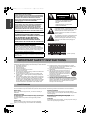
CAUTION!
THIS PRODUCT UTILIZES A LASER.
USE OF CONTROLS OR ADJUSTMENTS OR PERFORMANCE
OF PROCEDURES OTHER THAN THOSE SPECIFIED HEREIN
MAY RESULT IN HAZARDOUS RADIATION EXPOSURE.
DO NOT OPEN COVERS AND DO NOT REPAIR YOURSELF.
REFER SERVICING TO QUALIFIED PERSONNEL.
CAUTION!
DO NOT INSTALL OR PLACE THIS UNIT IN A BOOKCASE,
BUILT-IN CABINET OR IN ANOTHER CONFINED SPACE.
ENSURE THE UNIT IS WELL VENTILATED. TO PREVENT
RISK OF ELECTRIC SHOCK OR FIRE HAZARD DUE TO
OVERHEATING, ENSURE THAT CURTAINS AND ANY OTHER
MATERIALS DO NOT OBSTRUCT THE VENTILATION VENTS.
CAUTION
RISK OF ELECTRIC SHOCK
DO NOT OPEN
CAUTION: TO REDUCE THE RISK OF ELECTRIC
SHOCK, DO NOT REMOVE SCREWS.
NO USER-SERVICEABLE PARTS
INSIDE.
REFER SERVICING TO QUALIFIED
SERVICE PERSONNEL.
The lightning flash with arrowhead symbol, within
an equilateral triangle, is intended to alert the user
to the presence of uninsulated “dangerous voltage”
within the product’s enclosure that may be of
sufficient magnitude to constitute a risk of electric
shock to persons.
WARNING:
TO REDUCE THE RISK OF FIRE, ELECTRIC
SHOCK OR PRODUCT DAMAGE, DO NOT EXPOSE
THIS APPARATUS TO RAIN, MOISTURE,
DRIPPING OR SPLASHING AND THAT NO
OBJECTS FILLED WITH LIQUIDS, SUCH AS
VASES, SHALL BE PLACED ON THE APPARATUS.
The exclamation point within an equilateral triangle
is intended to alert the user to the presence of
important operating and maintenance (servicing)
instructions in the literature accompanying the
appliance.
THE FOLLOWING APPLIES ONLY IN THE U.S.A.
Note to CATV system installer:
This reminder is provided to call the CATV system installer’s
attention to Article 820-40 of the NEC that provides guidelines for
proper grounding and, in particular, specifies that the cable ground
shall be connected to the grounding system of the building, as
close to the point of cable entry as practical.
(Inside of product)
The socket outlet shall be installed near the equipment and easily
accessible or the mains plug or an appliance coupler shall remain
readily operable.
IMPORTANT SAFETY INSTRUCTIONS
Read these operating instructions carefully before using the unit. Follow the safety instructions on the unit and the applicable safety instructions
listed below. Keep these operating instructions handy for future reference.
10) Protect the power cord from being walked on or pinched
1) Read these instructions.
particularly at plugs, convenience receptacles, and the point
2) Keep these instructions.
where they exit from the apparatus.
3) Heed all warnings.
11) Only use attachments/accessories specified by the
4) Follow all instructions.
manufacturer.
5) Do not use this apparatus near water.
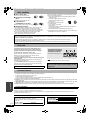
12) Use only with the cart, stand, tripod, bracket, or
6) Clean only with dry cloth.
table specified by the manufacturer, or sold with
7) Do not block any ventilation openings. Install in accordance with
the apparatus. When a cart is used, use caution
the manufacturer’s instructions.
when moving the cart/apparatus combination to
8) Do not install near any heat sources such as radiators, heat
avoid injury from tip-over.
registers, stoves, or other apparatus (including amplifiers) that
13) Unplug this apparatus during lightning storms
produce heat.
or when unused for long periods of time.
9) Do not defeat the safety purpose of the polarized or grounding14) Refer all servicing to qualified service personnel. Servicing is
type plug. A polarized plug has two blades with one wider than
required when the apparatus has been damaged in any way,
the other. A grounding-type plug has two blades and a third
such as power-supply cord or plug is damaged, liquid has been
grounding prong. The wide blade or the third prong are provided
spilled or objects have fallen into the apparatus, the apparatus
for your safety. If the provided plug does not fit into your outlet,
has been exposed to rain or moisture, does not operate
consult an electrician for replacement of the obsolete outlet.
normally, or has been dropped.
Useful features
This DVD recorder records high quality images to rapid random access capable DVD-RAM media.
This has resulted in many new features that outperform older tape formats. The following information summarizes a few of these features.
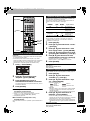
Quick Start
About 1 Sec. after turning on the unit, you can start recording to
DVD-RAM.
Instant recording
You no longer need to search for empty disc space. By pressing the
recording button, the unit finds available recording space and begins
recording right away.
There is no need to worry about overwriting already recorded
content.
Instant play
RQT8152
2
There is no need to rewind or search forward. Direct Navigator
guides you to the beginning of the recorded video immediately.
Chasing playback
There is no need to wait until recording is complete. Without
stopping recording, you can play the video currently being recorded
from its beginning.
Simultaneous Recording and Playback
While recording, you can play another video program that was
recorded previously.
Time Slip
During play and also while recording, you can jump to the scene you
wish to view by specifying the skip time.