1
DMR-ES20-P10_1.fm 37 ページ
2005年8月31日 水曜日 午前11時44分
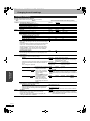
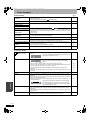
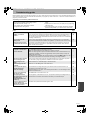
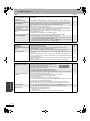
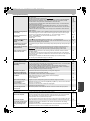
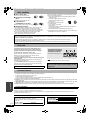
Frequently asked questions
Set up
Page
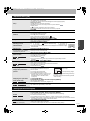
Do the Audio/Video cables need to be
connected to the TV in order to see the
Menus?
• If your television does not have AUDIO/VIDEO terminals, an RF modulator is
necessary. Consult your local dealer for more information.
What equipment is necessary to play multi
channel surround sound?
• DVD-Video:
Are the headphones and speakers directly
connected to the unit?
• You cannot directly connect to the unit. Connect through the amplifier, etc.
9
The television has both S VIDEO IN terminal • We recommend the COMPONENT VIDEO IN terminal. Component signal
outputs the color difference signals (PB/PR) and luminance signal (Y)
and COMPONENT VIDEO IN terminals.
separately in order to achieve high fidelity in reproducing colors. If the
Which terminal should I connect with?
8
7, 8
9
You can play DVD-Video multi channel surround by digitally connecting an
amplifier equipped with a Dolby Digital and a DTS decoder.
television is compatible with progressive output, a high quality picture can be
output because this unit’s component video output terminal outputs a
progressive output signal.
Is my television progressive output
compatible?
• All Panasonic televisions that have 480p input terminals are compatible.
—
Consult the manufacturer if you have another brand of television.
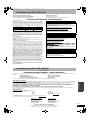
Disc
Can I play DVD-Video and Video CDs bought • You can play them if the video standard is NTSC.
• However, you cannot play DVD-Video if their region number does not include
in another country?
—
Cover
“1” or “ALL”.
Can a DVD-Video that does not have a
region number be played?
• The DVD-Video region number indicates the disc conforms to a standard. You
Please tell me about DVD-R, DVD-RW, +R
and +RW compatibility with this unit.
• This unit records and plays DVD-R, DVD-RW (DVD-Video format) and +R, and
Please tell me about CD-R and CD-RW
compatibility with this unit.
—
cannot play discs that do not have a region number.
plays DVD-RW (DVD Video Recording format) and +RW.
• This unit also records and plays high speed recording compatible DVD-R,
DVD-RW, +R discs.
• After recording but before finalizing +R discs
– You may not be able to play and record +R discs on this unit after recording
them on other Panasonic products or other manufacture's equipment.
– You may not be able to play and record +R discs on other equipment after
recording them on this unit.
After finalizing the disc, however, you will be able to play it on any DVD-Video
compatible player.
4, 5
—
—
• This unit plays CD-R/CD-RW discs (audio recording discs) which have been
4, 5, 22
recorded under one of the following standards: CD-DA, Video CD, MP3 and
still pictures (JPEG).
Close the session or finalize the disc after recording. This unit can recognize
up to 99 folders (groups) and 999 files (tracks) on a disc with MP3 or still
pictures (JPEG).
• You cannot write to a CD-R or CD-RW with this unit.
—
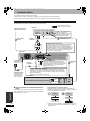
Recording
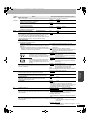
Can I record from a commercially purchased • Most commercially sold video cassettes and DVD are copy protected;
therefore, recording is usually not possible.
video cassette or DVD?
—
Can DVD-R, DVD-RW (DVD-Video format)
and +R recorded on this unit be played on
other equipment?
• You can play on compatible equipment such as DVD players after finalizing the
Can I record digital audio signals using this
unit?
• You cannot record digital signals. The digital audio terminals on this unit are
Can a digital audio signal from this unit be
recorded to other equipment?
• You can record if using the PCM signal. When recording DVD, change the
33
“Digital Audio Output” settings to the following from the SETUP menu.
– PCM Down Conversion
On
– Dolby Digital
PCM
– DTS
PCM
However, only
– As long as digital recording from the disc is permitted.
– As long as the recording equipment is compatible with a sampling
frequency of 48 kHz.
• You cannot record MP3 signals.
—
• With DVD-RAM, you can, and the recorded audio also changes. Just press
16
[AUDIO].
• With DVD-R, DVD-RW (DVD-Video format) or +R you cannot. Change before
recording with “Select MTS” in the SETUP menu.
33
Can I switch to SAP during recording?
31
disc on this unit. However, depending on the condition of the recording, the
quality of the disc and capabilities of the DVD player, play may not be possible.
Reference
—
for output only. (The audio recorded using the DV automatic recording function
from a digital video camcorder, for example, is recorded digitally.)
RQT8152
37