1
DMR-ES20-P10_1.fm 26 ページ
2005年8月31日 水曜日 午前11時44分
Editing titles/chapters
DVD POWER
Editing titles/chapters and playing
chapters
TV
POWER
INPUT SELECT TV/VIDEO
Preparation
Release protection (Ô page 30).
VOLUME
CH
1
2
AUDIO
SKIP
u, i
During play or while stopped
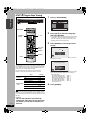
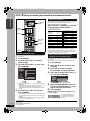
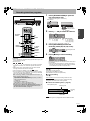
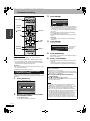
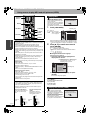
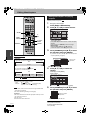
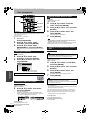
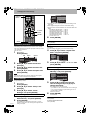
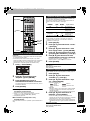
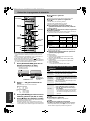
Press [DIRECT NAVIGATOR].
Press [e, r, w, q] to select the title.
DIRECT NAVIGATOR
DVD-RAM
VCR Plus+ CM SKIP
CANCEL
RAM
Title View
07
08
10 10/27 Mon
8 10/27 Mon
--
--
--
SLOW/SEARCH
--
q
DIRECT NAVIGATOR
DIRECT
NAVIGATOR
h
FUNCTIONS
e, r, w, q
ENTER
SUB MENU
S SUB MENU
Select
Next
Previous
Next
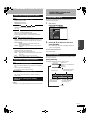
To show other pages
Press [e, r, w, q] to select “Previous” or “Next” and press
[ENTER].
• You can also press [u, i] to show other pages.
Multiple editing
Select with [e, r, w, q] and press [h]. (Repeat.)
A check mark appears. Press [h] again to cancel.
RETURN
SUB MENU
RETURN
SCHEDULE DISPLAY
REC
STATUS TIME SLIP
REC MODE ERASE
OPEN/CLOSE SETUP
Editing
Page 02/02
Previous
Play
TOP MENU
CREATE
CHAPTER
ADD/DLT
3
F Rec
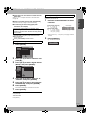
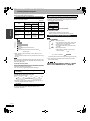
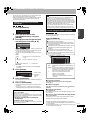
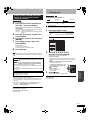
Press [SUB MENU], then [e, r] to select
the operation and press [ENTER].
• If you select “Edit Title”, press [e, r] to select the operation
DVD/TV
and press [ENTER] (Ô page 27).
RAM
-R
-RW(V)
+R
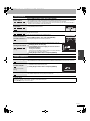
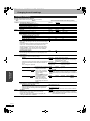
Title Name
Title/Chapter
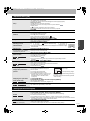
Programs are recorded as a single title consisting of one chapter.
Erase Title
Setup Protection
Title
Properties
Cancel Protection
Edit Title
Change Thumbnail
Chapter
View Chapters
Start
End
You can divide a title into multiple chapters.
(Ô page 21, 27, “Create Chapter”)
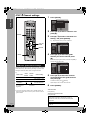
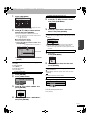
If you select “View Chapters”
4
RAM
Chapter
Chapter
To edit Ô Step 5.
Chapter
DIRECT NAVIGATOR
DVD-RAM
• Titles are divided into about 5-minute chapters after finalizing (Ô
page 31).
-R
-RW(V)
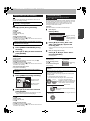
Press [e, r, w, q] to select the
chapter.
To start play Ô Press [ENTER].
Title
Chapter
001
+R
Note
certain before proceeding.
• You cannot edit during recording or chasing play.
---
---
---
---
---
---
---
---
---
---
---
0:00.00
99 ( +R 49 titles)
Approximately 1000 ( +R Approximately 254)
(Depends on the state of recording.)
• Once erased, a title cannot be restored to its original state. Make
Previous
Play
5
S SUB MENU
Page 01/01
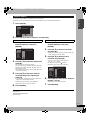
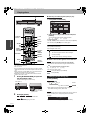
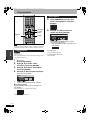
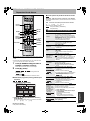
Press [SUB MENU], then [e, r] to select
the operation and press [ENTER].
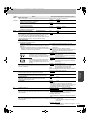
Erase Chapter
Combine Chapters
Refer to “Chapter
operations”.
View Titles
• You can go back to the Title View.
To exit the screen
Press [DIRECT NAVIGATOR].
RQT8152
26
Next
Select
• To show other pages/Multiple editing (Ô above)
Create Chapter
Preparation
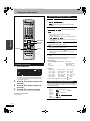
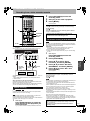
• Turn on the television and select the appropriate video input to suit
the connections to this unit.
• Turn the unit on.
• Insert the disc with the title to edit.
Chapter View
08 8 10/27 Mon
• The maximum number of items on a disc:
–Titles:
–Chapters:
Refer to “Title
operations”.
To return to the previous screen
Press [RETURN].