1
DMR-ES20-P10_1.fm 3 ページ
2005年8月31日 水曜日 午前11時44分
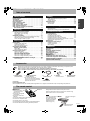
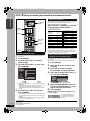
Table of contents
Getting started
Recording
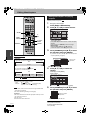
Recording television programs . . . . . . . . . . . . . . . . . . . .15
Selecting audio to be recorded. . . . . . . . . . . . . . . . . . . . . . . . 16
Playing while you are recording . . . . . . . . . . . . . . . . . . . . . . . 17
Flexible Recording . . . . . . . . . . . . . . . . . . . . . . . . . . . . . . . . . 17
Scheduled recording . . . . . . . . . . . . . . . . . . . . . . . . . . . .18
Using VCR Plus+® system to make scheduled recordings. . . 18
Manually programming scheduled recordings . . . . . . . . . . . . 19
Check, change or delete a program . . . . . . . . . . . . . . . . . . . . 19
Playing back
Playing discs. . . . . . . . . . . . . . . . . . . . . . . . . . . . . . . . . . .20
Changing audio during play . . . . . . . . . . . . . . . . . . . . . . . . . . 20
Operations during play . . . . . . . . . . . . . . . . . . . . . . . . . . . . . . 21
Editing operations during play . . . . . . . . . . . . . . . . . . . . . . . . 21
Using menus to play MP3
and still pictures (JPEG) . . . . . . . . . . . . . . . . . . . . . . .22
Playing MP3 . . . . . . . . . . . . . . . . . . . . . . . . . . . . . . . . . . . . . . 22
Playing still pictures (JPEG) . . . . . . . . . . . . . . . . . . . . . . . . . . 22
Using on-screen menus . . . . . . . . . . . . . . . . . . . . . . . . . .24
Common procedures . . . . . . . . . . . . . . . . . . . . . . . . . . . . . . .
Disc menu–Setting disc content . . . . . . . . . . . . . . . . . . . . . . .
Play menu–Change play sequence . . . . . . . . . . . . . . . . . . . .
Video menu–Change picture quality. . . . . . . . . . . . . . . . . . . .
Audio menu–Change sound effect . . . . . . . . . . . . . . . . . . . . .
Other menu–Change the display position. . . . . . . . . . . . . . . .
24
24
24
25
25
25
FUNCTIONS window and Status messages. . . . . . . . . .25
FUNCTIONS window . . . . . . . . . . . . . . . . . . . . . . . . . . . . . . . 25
Status messages . . . . . . . . . . . . . . . . . . . . . . . . . . . . . . . . . . 25
Editing titles/chapters . . . . . . . . . . . . . . . . . . . . . . . . . . 26
Editing titles/chapters and playing chapters . . . . . . . . . . . . . . 26
Title operations . . . . . . . . . . . . . . . . . . . . . . . . . . . . . . . . . . . . 27
Chapter operations . . . . . . . . . . . . . . . . . . . . . . . . . . . . . . . . . 27
Playing playlists . . . . . . . . . . . . . . . . . . . . . . . . . . . . . . . 28
Playing playlists . . . . . . . . . . . . . . . . . . . . . . . . . . . . . . . . . . . . 28
View Chapters . . . . . . . . . . . . . . . . . . . . . . . . . . . . . . . . . . . . . 28
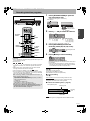
Transfer (Dubbing)
Getting started
Editing
IMPORTANT SAFETY INSTRUCTIONS . . . . . . . . . . . . . . .2
Useful features . . . . . . . . . . . . . . . . . . . . . . . . . . . . . . . . . .2
Accessories. . . . . . . . . . . . . . . . . . . . . . . . . . . . . . . . . . . . .3
The remote control . . . . . . . . . . . . . . . . . . . . . . . . . . . . . . .3
Disc information . . . . . . . . . . . . . . . . . . . . . . . . . . . . . . . . .4
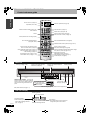
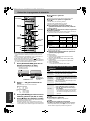
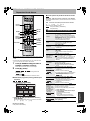
Control reference guide . . . . . . . . . . . . . . . . . . . . . . . . . . .6
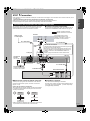
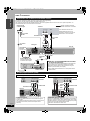
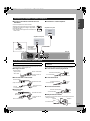
STEP 1 Connection. . . . . . . . . . . . . . . . . . . . . . . . . . . . . . .7
STEP 2 Plug-in Auto Tuning . . . . . . . . . . . . . . . . . . . . . .10
STEP 3 Channel settings . . . . . . . . . . . . . . . . . . . . . . . . .12
STEP 4 Set up to match your television
and remote control . . . . . . . . . . . . . . . . . . . . . . . . . . . .14
Recording from a video cassette recorder . . . . . . . . . . 29
Manual recording. . . . . . . . . . . . . . . . . . . . . . . . . . . . . . . . . . . 29
DV automatic recording (DV AUTO RECORDING) . . . . . . . . . 29
Convenient functions
Disc management . . . . . . . . . . . . . . . . . . . . . . . . . . . . . . 30
Setting the protection . . . . . . . . . . . . . . . . . . . . . . . . . . . . . . . 30
Providing a disc with a name. . . . . . . . . . . . . . . . . . . . . . . . . . 30
Erasing all titles–Erase All Titles . . . . . . . . . . . . . . . . . . . . . . . 30
Erasing all contents of a disc–Format Disc . . . . . . . . . . . . . . . 30
Enabling DVD-R, DVD-RW (DVD-Video format) or +R to be
played on other equipment–Finalize . . . . . . . . . . . . . . . . . . . . 31
Entering text . . . . . . . . . . . . . . . . . . . . . . . . . . . . . . . . . . 31
Changing the unit’s settings . . . . . . . . . . . . . . . . . . . . . 32
Summary of settings . . . . . . . . . . . . . . . . . . . . . . . . . . . . . . . . 32
Common procedures. . . . . . . . . . . . . . . . . . . . . . . . . . . . . . . . 34
Clock settings . . . . . . . . . . . . . . . . . . . . . . . . . . . . . . . . . . . . . 34
Reference
Specifications . . . . . . . . . . . . . . . . . . . . . . . . . . . . . . . . . 35
Glossary. . . . . . . . . . . . . . . . . . . . . . . . . . . . . . . . . . . . . . 36
Frequently asked questions . . . . . . . . . . . . . . . . . . . . . 37
Error messages. . . . . . . . . . . . . . . . . . . . . . . . . . . . . . . . 38
Troubleshooting guide . . . . . . . . . . . . . . . . . . . . . . . . . . 39
Disc handling . . . . . . . . . . . . . . . . . . . . . . . . . . . . . . . . . 42
Unit care. . . . . . . . . . . . . . . . . . . . . . . . . . . . . . . . . . . . . . 42
Product Service. . . . . . . . . . . . . . . . . . . . . . . . . . . . . . . . 42
Limited Warranty (ONLY FOR U.S.A.) . . . . . . . . . . . . . . 43
Limited Warranty (ONLY FOR CANADA). . . . . . . . . . . . 43
Referencia rápida en español. . . . . . . . . . . . . . . . . . . . .44
(Spanish Quick Reference)
Index. . . . . . . . . . . . . . . . . . . . . . . . . . . . . . . . . . Back cover
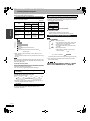
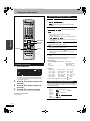
Accessories
Please check and identify the supplied accessories. Use numbers indicated in parentheses when asking for replacement parts.
(Product numbers correct as of June 2005. These may be subject to change.)
Only for U.S.A.: To order accessories, refer to “Accessory Purchases” on page 43.
Only for Canada: To order accessories, call the dealer from whom you have made your purchase.
1 Remote control
(N2QAKB000055)
1 AC power supply cord
(K2CB2CB00018)
• For use with this unit only.
Do not use it with other equipment.
Also do not use the cords for other
equipment with this unit.
1 75 Ω coaxial cable
(K2KZ2BA00001)
1 Audio/video cable
(K2KA6BA00003)
2 Batteries
for remote control
1 DVD-RAM disc
(U.S.A. only)
Product Registration Card
Please complete and return the included product registration card, or register via the Internet at: http://www.prodreg.com/panasonic/
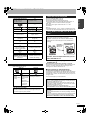
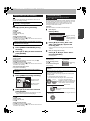
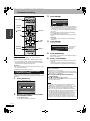
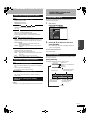
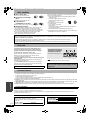
The remote control
n Batteries
• Insert so the poles (+ and
R6/LR6, AA
–) match those in the
remote control.
• Do not use rechargeable
type batteries.
• Do not mix old and new
batteries.
• Do not use different types at the same time.
• Do not heat or expose to flame.
• Do not take apart or short circuit.
• Do not attempt to recharge alkaline or manganese batteries.
• Do not use batteries if the covering has been peeled off.
Mishandling of batteries can cause electrolyte leakage which can
damage items the fluid contacts and may cause a fire.
Remove if the remote control is not going to be used for a long
period of time. Store in a cool, dark place.
Note
If you cannot operate the
unit or television using
the remote control after
changing the batteries,
please re-enter the
codes (Ô page 14).
Remote control signal
sensor
n Use
20
30
20
30
7 m (23 feet) directly
in front of the unit
RQT8152
3